





Pacemaker’s Automated Alerts and Alert Reporting: No More Outages for SAP Systems on Google Cloud!

3262
Of your peers have already read this article.
6:00 Minutes
The most insightful time you'll spend today!
When critical services fail, businesses risk losing revenue, productivity, and trust. That’s why Google Cloud customers running SAP applications choose to deploy high availability (HA) systems on Google Cloud.
In these deployments Linux operating system clustering provides application and guest awareness for the application state and automates recovery actions in case of failure — including cluster node, resource or node failover or failed action.
Pacemaker is the most popular software Linux administrators use to manage their HA clusters, which includes automating notifications about events — including failover fencing and node, attribute, and resource events — and reporting on events. With automated alerts and reports, Linux administrators can not only learn about events as they happen, but they can also make sure other stakeholders are alerted to take action when critical events occur. They can even discover past events to assess the overall health of their HA systems.
Here, we break down the steps to setting up automated alerts for HA cluster events and alert reporting.
How to Deploy the Alert Script
To set up event-based alerts, you’ll need to take the following steps to execute the script.
1. Download the script file ‘gcp_crm_alert.sh’ from
https://github.com/GoogleCloudPlatform/pacemaker-alerts-cloud-logging
2. Under root user, add exec flag for the script and execute deployment with:
chmod +x ./gcp_crm_alert.sh./gcp_crm_alert.sh -d
3. Confirm that the deployment runs successfully. If it does, you will see the following INFO log messages:
In the Red Hat Enterprise Linux (RHEL) system:
gcp_crm_alert.sh:2022-01-24T23:48:30+0000:INFO:'pcs alert recipient add gcp_cluster_alert value=gcp_cluster_alerts id=gcp_cluster_alert_recepient options value=/var/log/crm_alerts_log' rc=0
In the SUSE Linux Enterprise Server (SLES):
gcp_crm_alert.sh:2022-01-25T00:13:27+00:00:INFO:'crm configure alert gcp_cluster_alert /usr/share/pacemaker/alerts/gcp_crm_alert.sh meta timeout=10s timestamp-format=%Y-%m-%dT%H:%M:%S.%06NZ to { /var/log/crm_alerts_log attributes gcloud_timeout=5 gcloud_cmd=/usr/bin/gcloud }' rc=0Now, in the event of a cluster node, resource, node failover, or failed action, Pacemaker will start the alert mechanism. For further details on the alerting agent, check out the Pacemaker Explained documentation.
How to Use Cloud Logging for Alert Reporting
Alerted events are published in Cloud Logging. Below is an example of the log record payload, where the cluster alert key-value pairs get recorded in the jsonPayload node.
{
"insertId": "ktildwg1o3fbim", "jsonPayload": { "CRM_alert_recipient": "/var/log/crm_alerts_log", "CRM_alert_attribute_name": "", "CRM_alert_kind": "resource", "CRM_alert_status": "0", "CRM_alert_rsc": "STONITH-sapecc-scs", "CRM_alert_rc": "0", "CRM_alert_timestamp_usec": "", "CRM_alert_interval": "0", "CRM_alert_node_sequence": "21", "CRM_alert_task": "start", "CRM_alert_nodeid": "", "CRM_alert_timestamp": "2022-01-25T00:17:06.515313Z", "CRM_alert_timestamp_epoch": "", "CRM_alert_desc": "ok", "CRM_alert_target_rc": "0", "CRM_alert_version": "1.1.15", "CRM_alert_attribute_value": "", "CRM_alert_node": "sapecc-ers", "CRM_alert_exec_time": "" }, "resource": { "type": "global", "labels": { "project_id": "gcp-tse-sap-on-gcp-lab" } }, "timestamp": "2022-01-25T00:17:09.662557309Z", "severity": "INFO", "logName": "projects/gcp-tse-sap-on-gcp-lab/logs/sapecc-ers%2F%2Fvar%2Flog%2Fcrm_alerts_log", "receiveTimestamp": "2022-01-25T00:17:09.662557309Z" }
To get notified of a resource event — for example, when the HANA topology resource monitor fails — you can use the following filter for the alerting definition:
jsonPayload.CRM_alert_node=("hana-venus" OR "hana-mercury") -jsonPayload.CRM_alert_status="0" jsonPayload.CRM_alert_rsc="rsc_SAPHanaTopology_SBX_HDB00" jsonPayload.CRM_alert_task="monitor" To define an alert for a fencing event, your can apply this filter: jsonPayload.CRM_alert_node=("hana-venus" OR "hana-mercury") jsonPayload.CRM_alert_kind="fencing" The fencing log entry gets recorded with warning severity to give you deeper insight, and this additional information is also helpful for more specific filtering criteria: {   "insertId": "1plznskfjsxt82",   "jsonPayload": {     "CRM_alert_attribute_value": "",     "CRM_alert_recipient": "/var/log/crm_alerts_log",     "CRM_alert_rsc": "",     "CRM_alert_rc": "0",     "CRM_alert_timestamp_usec": "529261",     "CRM_alert_desc": "Operation reboot of hana-mercury by hana-venus for crmd.2361@hana-venus: OK (ref=2a9bf814-9adf-4247-af3f-94ac254fc3ca)", "CRM_alert_target_rc": "",     "CRM_alert_nodeid": "",     "CRM_alert_kind": "fencing",     "CRM_alert_node_sequence": "33",     "CRM_alert_task": "st_notify_fence",     "CRM_alert_status": "",     "CRM_alert_exec_time": "",     "CRM_alert_attribute_name": "",     "CRM_alert_timestamp_epoch": "1643072786",     "CRM_alert_version": "1.1.19",     "CRM_alert_timestamp": "2022-01-25T01:06:26.529261Z",     "CRM_alert_interval": "",     "CRM_alert_node": "hana-mercury"   },   "resource": {     "type": "global",     "labels": {       "project_id": "gcp-tse-sap-on-gcp-lab"     }   },   "timestamp": "2022-01-25T01:06:27.267017052Z",   "severity": "WARNING",   "logName": "projects/gcp-tse-sap-on-gcp-lab/logs/hana-venus%2F%2Fvar%2Flog%2Fcrm_alerts_log", "receiveTimestamp": "2022-01-25T01:06:27.267017052Z"
}
Alerts can be delivered through multiple channels, including text and email. Below is an example of an email notification for our earlier example, when we defined an alert for a HANA topology resource monitor failure:
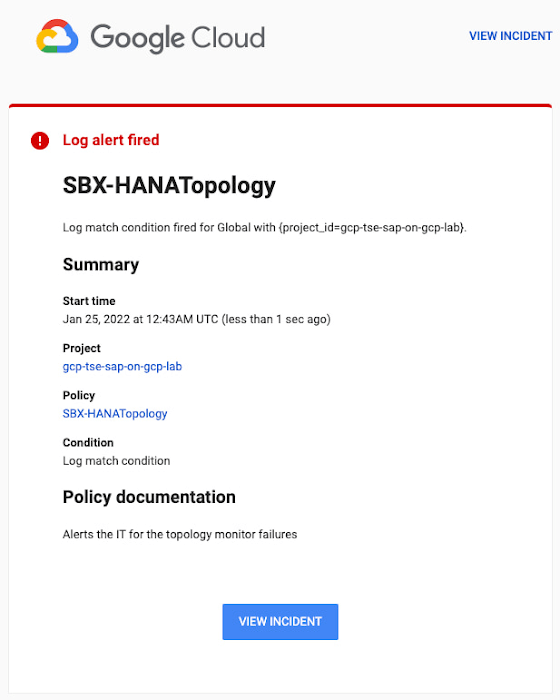
You can write and apply filters to your log-based alerts to isolate certain types of incidents and analyze events over time. For example, the following script will surface a resource event occurring within a two-hour window on a specific date:
timestamp>="2022-01-25T00:00:00Z" timestamp<="2022-01-25T02:00:00Z"
jsonPayload.CRM_alert_kind="resource"
With the ability to analyze these logged alerts over time, determine whether event patterns warrant any action.
[SIDEBAR]
The alert script prints details in the standard output and in the log file /var/log/crm_alerts_log, and this can grow over time. We recommend that the log file is set with the Linux logrotate service in order to limit the file system space. Use the following command to create the necessary logrotate setting for the alerting log file:
cat > /etc/logrotate.d/crm_alerts_log << END-OF-FILE /var/log/crm_alerts_log { create 0660 root root rotate 7 size 10M missingok compress delaycompress copytruncate dateext dateformat -%Y%m%d-%s notifempty } END-OF-FILE [END SIDEBAR]
Tips for Troubleshooting When you first deploy your alert script, how can you tell for certain that you’ve done it correctly? Use the following commands to test it out:
In RHEL:
pcs alert show
In SLES:
sudo crm config show | grep -A3 gcp_cluster_alert
You should see the following if the script is correct:
In RHEL:
Alerts: Alert: gcp_cluster_alert (path=/usr/share/pacemaker/alerts/gcp_crm_alert.sh) Description: "Cluster alerting for hana-node-X" Options: gcloud_cmd=/usr/bin/gcloud gcloud_timeout=5 Meta options: timeout=10s timestamp-format=%Y-%m-%dT%H:%M:%S.%06NZ Recipients: Recipient: gcp_cluster_alert_recepient (value=gcp_cluster_alerts) Options: value=/var/log/crm_alerts_log In SLES:
alert gcp_cluster_alert "/usr/share/pacemaker/alerts/gcp_crm_alert.sh" \ meta timeout=10s timestamp-format="%Y-%m-%dT%H:%M:%S.%06NZ" \ to "/var/log/crm_alerts_log" attributes gcloud_timeout=5 gcloud_cmd="/usr/bin/gcloud" If the commands do not display the alerts properly, re-deploy the script.
In case there is an issue with the script, or if the Cloud Logging records are not presenting as expected, examine the script log file /var/log/crm_alerts_log. The errors and warning can be filtered with:
egrep '(ERROR|WARN)' /var/log/crm_alerts_log
Any Pacemaker alert failures will be recorded in the messages and/or Pacemaker log. To examine recent alert failures, use the following command:
egrep '(gcp_crm_alert.sh|gcp_cluster_alert)' \ /var/log/messages /var/log/pacemaker.log
Keep in mind, though, that the Pacemaker log location may be different in your system from the one in the example above.
From reactive to proactive
Your SAP applications are too critical to risk outages. The most effective way to manage high availability clusters for your SAP systems on Google Cloud is to take full advantage of Pacemaker’s alerting capabilities, so you can be proactive in ensuring your systems are healthy and available.
Learn more about running SAP on Google Cloud.

Forrester Research: The Total Economic Impact of SAP on Google Cloud
DOWNLOAD RESEARCH REPORTS3611
Of your peers have already downloaded this article
2:30 Minutes
The most insightful time you'll spend today!
Migrating and running SAP on Google Cloud reduces complexity allowing for easier management, improving performance and security, and allowing organizations to better leverage SAP data to drive business outcomes.
Over three years, SAP on Google Cloud reduces costs and improves performance and reliability. Among other benefits, migrating SAP to Google Cloud reduces developer effort associated with updates and releases by 35%, eliminates system downtime saving over $1.5M per year, and eliminates on-premises SAP infrastructure resulting in $7.1M savings over three years.
Download this pathbreaking infographic from Forrester to understand the total economic impact of moving your SAP to Google Cloud.
BURGER KING Germany: Serving Up Marketing Insights and Supply Chain Visibility Easily

13962
Of your peers have already read this article.
8:30 Minutes
The most insightful time you'll spend today!
Do hamburgers really come from Hamburg? This may still be a matter of debate, but the popularity of American-style burger joints not just in Hamburg but all over Germany, is clear. Germany’s top two fast food companies are both burger chains. One of them is BURGER KING®, a global brand that welcomes more than 11 million customers worldwide every day. The company arrived in Germany in 1976, when its first restaurant opened in Berlin. It now operates more than 100 restaurants across Germany, with franchisees operating more than 600 restaurants of their own.
“In the fast food industry, being able to move quickly is very important. That means delivering the right promotion to our app or launching a viral campaign within days. To do that across more than 700 restaurants, we need the support of the right technology.”
—Oliver Mielentz, IT Manager, BURGER KING® Deutschland GmbH
Previously a subsidiary of the U.S. business, BURGER KING® Germany became an independent company in 2015. As a result, it needed to develop its own IT infrastructure, and the changeover needed to happen fast. “We had to put in place systems that would work for the entire network of franchisees and enable us to easily roll out campaigns,” explains Oliver Mielentz, IT Manager at BURGER KING® Deutschland GmbH.
With the help of Google Cloud Premier partner Cloudwürdig, BURGER KING® Germany chose Google Cloud and G Suite as the right combination to suit its needs.
“In the fast food industry, being able to move quickly is very important,” says Oliver. “That means delivering the right promotion to our app or launching a viral campaign within days. To do that across more than 700 restaurants, we need the support of the right technology.”
Building a franchisee platform in just three months
When a business has multiple franchisees, it’s important to make sure everyone is on the same page, especially in the fast-paced fast food environment. “We have to collate data from all our franchisees and produce reports quickly in order to react to changes in customer behavior,” explains Oliver. “That means processing every transaction that takes place in our restaurants.” Following the restructure, BURGER KING® Germany also needed to build a secure invoicing system with data storage and optimize its communication channels.
“Using Tableau with BigQuery, we’re able to produce reports very quickly. Previously, it took much longer, as data had to be fetched manually. Our reaction time is now almost a business day faster.”
—Oliver Mielentz, IT Manager, BURGER KING® Deutschland GmbH
With support from Witter-IT, BURGER KING® Germany chose Cloudwürdig to build its BKD Connect internal platform on Google Cloud. Thanks to the ready-to-go tools on Google Cloud, it was able to put its invoicing system and data warehouse in place in just three months.
For the BURGER KING® Germany data warehouse, Cloudwürdig built an ETL pipeline that channels ticket data for every sale into BigQuery. “Data is gathered from the restaurants,” says Oliver, “and using Tableau with BigQuery, we’re able to produce reports very quickly. Previously, it took much longer, as data had to be fetched manually. Our reaction time is now almost a business day faster.”
As the ticket data for every transaction is stored in BigQuery, the marketing team can easily see exactly which products are selling well. That’s crucial for tweaking promotions as well as monitoring the supply chain to make sure enough produce is delivered to restaurants in response to changes in demand.
“Thanks to BigQuery, we have a speedy data pipeline that enables us to react on the same day to changes in the market and eliminate bottlenecks in production,” says Oliver.
Switching to G Suite to improve communication
To enable franchisees to sign in to its BKD Connect Platform, BURGER KING® Germany needed a secure authentication system. To solve that problem, it chose to provide franchisees with G Suite accounts. “It’s really easy to set up a new franchisee on the platform. I just create a new G Suite account and Drive folder for it, and it’s ready to go,” says Oliver. G Suite also helps the franchise network to run efficiently, as daily reports are automatically saved to Drive and shared to the appropriate regional network. “Thanks to that system, it’s much easier for any team at headquarters to access the information it needs,” Oliver explains.
BURGER KING® Germany also recently extended its use of G Suite across the whole company. “Following an evaluation of our previous email and productivity software, I made the decision to switch solely to G Suite,” says Oliver. BURGER KING® Germany employees now use Gmail, Calendar, and Drive for their day-to-day productivity needs. “We only just completed the migration, but already, everyone’s happy,” says Oliver. “It’s so easy to share a file using Drive or set up a meeting on Calendar.”
“We’re big fans of Hangouts Meet, and we have two rooms here at our Hanover headquarters equipped with Hangouts Meet hardware,” Oliver adds. “The speech quality is good, and it’s helpful to be able to see every participant, especially when you’re running a meeting with multiple franchisees.”
Optimizing infrastructure to power innovative campaigns
The BURGER KING® app, available for iOS and Android, helps the company to deliver a great customer experience. Through their MyBK accounts, guests can access coupons and special promotions. “We had a really interesting campaign for Easter: guests used the app to hunt for virtual Easter eggs,” explains Oliver. “We knew it was going to be big, and our previous back end wouldn’t have been able to handle the traffic.”
To enable the marketing campaign to go ahead, BURGER KING® Germany moved the back end of the app, along with its website, to Google Cloud. For developing and running its web and app back ends, it now uses App Engine and virtual machines on Compute Engine, as well as Memorystore and Cloud Functions. For monitoring and logging, it uses Stackdriver, and Cloud CDN and Cloud DNS to easily handle its traffic.
“We ran the campaign without any performance issues, even though we were receiving several million hits a day,” says Oliver. Since migrating the back end to Google Cloud, the marketing team also launched the popular “Escape the Clown” campaign. “That campaign blew our minds!” says Oliver. “It wouldn’t have been possible without Google Cloud, because it required a lot of back end capacity.”
To develop the app infrastructure it needs, BURGER KING® Germany relies on Cloudwürdig. “Working with Cloudwürdig is great because the team has the same agile mindset as us,” says Oliver. “When we have a new idea, we just set up a meeting, and in a couple of days the new infrastructure is in place. For Escape the Clown, it only took a few weeks to get everything ready to launch.”
Leveraging integrated tools to grow the business
Using Google Cloud together with G Suite enables BURGER KING® Germany to run its franchise network efficiently, while keeping its IT team lean. “Google Cloud and G Suite are the perfect fit for the way of working at BURGER KING® Germany,” says Oliver. “Many of the company’s operatives are often on the road, visiting restaurants and franchisees. With these tools, they can work flexibly and react quickly to the situation on the ground.”
“In order to grow the business, we need to use the data we receive every day to understand exactly what is happening in our restaurants. With the tools provided by Google Cloud, we can get more guests through the door and offer them a better experience.”
—Oliver Mielentz, IT Manager, BURGER KING® Deutschland GmbH
It also helps to keep infrastructure costs under control. “With Google Cloud, we only pay for what we use, which is really important for us,” Oliver explains. “It means we can scale up quickly if we see an opportunity to react to a trend in customer behavior and launch a new marketing campaign that resonates with the moment. When it’s finished, we can then scale down again, and that definitely saves us money.”
BURGER KING® is now working with Cloudwürdig to add more functionality to the BURGER KING® app using Google Kubernetes Engine. “We like to work with customers long-term to support their digital transformation. BURGER KING® Germany is a great example of how one project can develop into a great collaboration,” says Benny Woletz, Managing Director of Cloudwürdig.
BURGER KING® also plans to expand its presence in Germany and gain a greater market share by further tailoring both its marketing and the way it runs its restaurants to answer its guests’ needs. “In order to grow the business, we need to use the data we receive every day to understand exactly what is happening in our restaurants,” says Oliver. “With the tools provided by Google Cloud, we can get more guests through the door and offer them a better experience.”
Forrester and IDC’s Research Confirms Quantifiable Benefits of Running SAP on Google Cloud
3638
Of your peers have already read this article.
3:00 Minutes
The most insightful time you'll spend today!
Cloud migration is top of mind for most companies with SAP applications. While the advantages of the cloud for SAP customers is generally understood, the move itself can be complicated and disruptive. So what actually are the business benefits and cost savings? How long will it take to recoup such an investment? Two recently published reports from Forrester and IDC can help to quantify the benefits and ROI.
Getting answers to the million-dollar questions
Forrester and IDC bring different methodologies to the table; they asked somewhat different questions and used different models to calculate their financial KPIs. This allows you to get two different points of view on the same basic questions about value, risk, and ROI.
As it turns out, both reports found that customers who migrate their SAP environments to Google Cloud see an impressive return on their investments. From uptime and infrastructure to efficiency and productivity—both Forrester and IDC identified major benefits to companies that have made the move to Google Cloud.
Let’s walk through some of the highlights from both reports.
Forrester’s TEI model spotlights the power of uptime improvements
Based on in-depth conversations and quantitative research with six companies, here are the key findings from the Forrester Total Economic Impact (TEI) study for companies running SAP systems on Google Cloud:
- Direct cost savings. When they compare cloud subscription and related costs to what they spent on legacy systems and infrastructure, most IT leaders expect a cloud migration to deliver up-front savings. But according to Forrester, the companies interviewed reported average savings of more than $3 million a year, including eliminated hardware purchases, right-sized software licensing, staffing efficiencies, and other operational cost savings.
- Dramatically improved uptime. Customers told Forrester that migrating SAP to Google Cloud pretty much eliminates downtime—planned or unplanned—as a significant IT concern. According to Forrester, companies realized an average of $1.5 million in savings per year by avoiding the revenue and user productivity losses that had once been a fact of life for their IT teams.
- Significant efficiency gains. Because Google Cloud works to mitigate performance bottlenecks, infrastructure mishaps, network delays and more, the companies Forrester interviewed reported a yearly average of $500,000 in productivity gains for SAP business users and frontline workers.
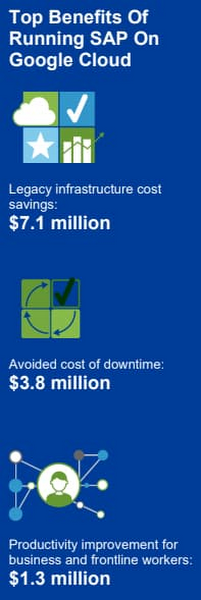
Companies also reported an annual average of $500,000 in additional IT efficiency gains after migrating SAP to Google Cloud. This quantifies what happens when IT practitioners no longer have to deal with the bottlenecks that come with legacy systems, and are able to spend their time on tasks that actually build value and help the business. Based on the Forrester analysis, the companies interviewed could expect average three-year net benefits of about $15.4 million.
“We benefit from any technical innovation in the infrastructure area because Google Cloud is doing that for us,” one customer told Forrester. “So, whenever there’s new hardware available or new processes or whatever, I don’t have to run the specific project to migrate from A to B.”
IDC finds that good things happen when SAP downtime is reduced
The IDC report highlights four areas where Google Cloud generates the most value for customers:
1. Cutting infrastructure costs. According to IDC, customers running SAP on Google Cloud spent 31% less on infrastructure each year, or an average of $233,000 less per company. The ability to scale SAP environments dynamically and to keep them right-sized was a major factor; so were the advantages of automated infrastructure monitoring and savings on software licenses once these companies could stop overprovisioning.
2. Giving a team better things to do. IDC found that the infrastructure, database, and security teams of the companies they interviewed reduced the time they need to maintain and manage SAP environments by an average of 66% per year, for a savings of $443,000, per company. As a result, these companies got the equivalent of a major staff expansion from their SAP migrations—giving them both the staff time and the expertise to focus on far more valuable activities.
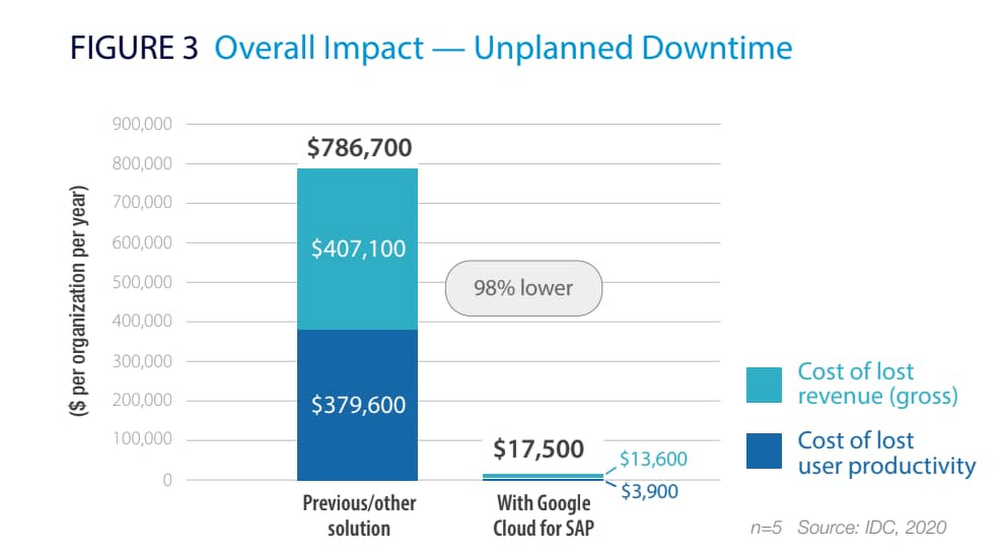
3. Limiting unplanned downtime. These companies reported to IDC an average 98% reduction in unplanned downtime. Migrating SAP to Google Cloud significantly reduces the threat of downtime and saves the business an average of nearly $770,000 per year in lost revenue and user productivity. For some firms, the downtime savings topped $1 million per year.
4. Making users more productive. The companies interviewed told IDC that by avoiding downtime and disruptions associated with upgrade and maintenance tasks for their legacy SAP systems, they saved an average of $363,000 annually in user productivity. But there’s an even more interesting under-the-hood stat contributing to these gains: These companies reduced the time required to deploy new SAP compute and storage resources from an average of 8.8 days to 1 hour.
When IDC added up these and other savings associated with running SAP on Google Cloud, it found an average three-year savings of more than $3.5 million and a five-month payback period.
“We acquired another company, so basically overnight we needed to be able to deal with that increase,” said one customer IDC spoke with. “We doubled our footprint overnight, and we had to take on hundreds of additional employees. We needed a platform that we could easily scale up if we required, and that’s the benefit of running SAP on Google Cloud for us.”
Explore the reports
There is a lot to think about when considering a move of SAP systems to the cloud. The cloud has many advantages, but migration can seem complicated and tricky; we appreciate that you are looking to understand the full picture. These papers are a great place to start.
Download the reports—Forrester’s “Total Economic Impact of SAP on Google Cloud” and IDC’s “Business Value of SAP for Google Cloud Environments.” Then, get in touch.
Google Cloud’s Autism Career Program to Nurture Neurodiverse Talent
3569
Of your peers have already read this article.
1:30 Minutes
The most insightful time you'll spend today!
My passion for neurodiversity began 10 years ago, when I became involved with Els for Autism, an organization that works with children and adults who have autism, as well as their families. At the time, I had a friend who was struggling to find resources for his son with autism. The foundation promotes acceptance and inclusion for people on the spectrum, helping them live independently and find jobs that harness their talents and skills. The organization’s focus on autism in the workplace resonated deeply with me, due to the rich experiences I had working with individuals with autism over the course of my career.
Approximately two percent of the population has autism, but it’s estimated this number is actually quite low as many individuals go undiagnosed. Of those that have been diagnosed, only 29% have had any sort of paid work in their lives. Personally, I find this tragic, because individuals with autism can be highly-functioning and contributing professionals in any organization. Too often, though, the interview process can pose challenges due to unconscious bias from a hiring manager or interviewer, for example, if the candidate doesn’t look an interviewer in the eyes or asks for additional time to complete a test. This bias often unintentionally marginalizes great candidates and means businesses miss out on valuable talent who can contribute and enrich the workplace.
Introducing Google Cloud’s Autism Career Program
It is in that spirit that I am excited to announce the launch of Google Cloud’s Autism Career Program, designed to hire and support more talented people with autism in the rapidly growing cloud industry.
We are working with experts from the Stanford Neurodiversity Project (part of the Stanford University School of Medicine), which provides consultation services to employers to advise on opportunities and success metrics for neurodiverse individuals in the workplace.
One key pillar of our program is to train up to 500 Google Cloud managers and others who are involved in hiring processes. Our goal is to empower these Googlers to work effectively and empathetically with autistic candidates and ensure Google’s onboarding processes are accessible and equitable. Stanford will also provide coaching to applicants, as well as ongoing support for them, their teammates and managers once they join the Google Cloud team.
We’re taking this approach to break down the barriers that candidates with autism most often face. In addition to bias, there may be challenges with how interviews are structured or conducted without the right tools. For these reasons, we will offer candidates in this program reasonable accommodations like extended interview time, providing questions in advance, or conducting the interview in writing in a Google Doc rather than verbally on a call. These accommodations don’t give those candidates an unfair advantage. It’s just the opposite: They remove an unfair disadvantage so candidates have a fair and equitable chance to compete for the job.
This program is just one example of Google Cloud’s commitment to inclusion, and it is an important step forward to building a more representative team and creating value for customers and stakeholders.
Simplifying Payments for SMBs: Helcim’s Transformational Approach
1463
Of your peers have already read this article.
6:00 Minutes
The most insightful time you'll spend today!
Small and medium-sized businesses and enterprises are the backbone of the US economy generating more than 44% of GDP1. Yet these organizations are still underserved when it comes to online financial tools—and dealing with payments is no exception. Complaints include hidden fees, limited capabilities, long-term lease agreements, and poor customer service.
These are the issues that we wanted to solve when we launched Helcim in 2020 in Calgary (Alberta, Canada). We provide a payment service that offers low rates through our interchange plus pricing model, no monthly fee for the core payments offering, and numerous payment options, as well as simple, affordable hardware such as card readers.
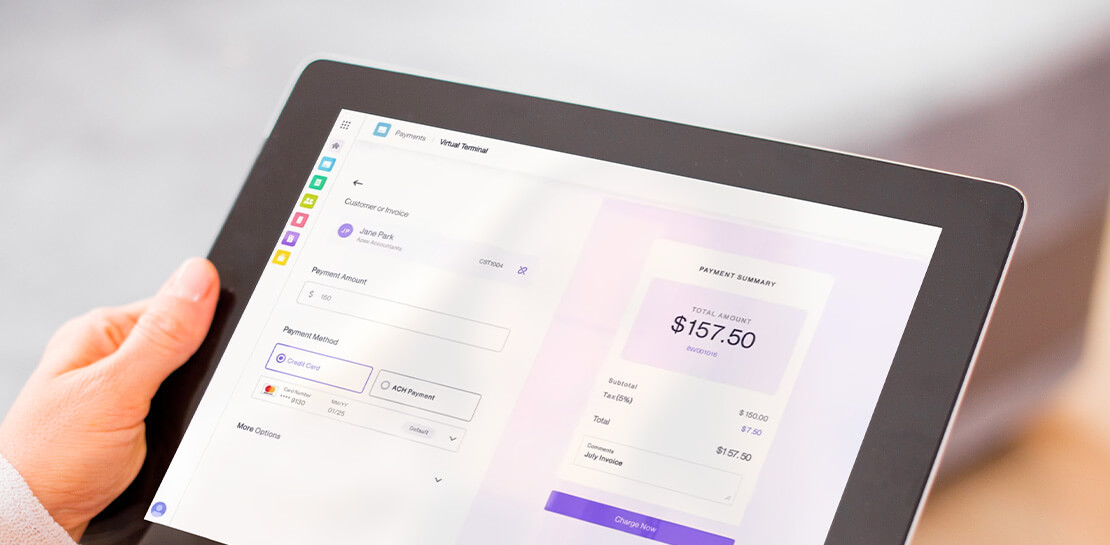
Our digital-first approach makes it easy for owners of small and medium-sized businesses to get started. Online sign-up means no paperwork and near instant access to Helcim’s software and all-in-one platform experience. Merchants can choose from a range of payment solutions from the Helcim app including in-person payments, SMS payment requests, online invoices with pay now buttons, and more.
To achieve our goals, we built most of the business systems and processes in-house including our technology stack, financial partnerships, marketing, and everything in between. This is something that few startups would dare to do, but it enabled us to build a payments platform offering the rich capabilities and performance SMBs really need.
Taking control with the cloud
Before migrating our infrastructure to Google Cloud, it was hosted at two colocation data centers in Calgary. This model served us well, but as we grew, most of our hardware needed to be replaced to maintain service security and performance.
A successful round of Series A funding also impacted our trajectory. Giving us the fuel we needed to scale and innovate faster. When we considered the choice between making a large capital investment in our existing environment, or to transition to the cloud, the decision was clear: The cloud was the way to go.
We looked at other big names in cloud hosting and tested another platform. But Google Cloud is by far the best environment for us. It’s much easier for a lean technology team to manage, as we embark on our first cloud strategy. It also offers all the tools and advanced machine learning capabilities we need.
Google Cloud also comes with the backing of Alphabet, a business that in the past five years has spent more on research and development than any other organization in the S&P 5002. The ability to engage the Google Workspace account team for guidance to improve our everyday processes was another bonus.
A variety of investment and training programs from Google Cloud also influenced our decision. We participated in Google for Startups Accelerator Canada which gave us access to Google Cloud experts across all our technology domains. This helped accelerate our infrastructure migration while ensuring we optimized every service from day one. We were also eligible for $100,000 USD of Google Cloud credits, covering our Google Cloud costs which helped us get everything up and running cost-effectively. The partnership with the wider Google team has been extremely impactful as we stand everything up for our business.
But ultimately, it’s the sheer depth and breadth of the Google Cloud environment that makes the difference. Here are the Google Cloud tools we currently have at Helcim.
We chose BigQuery because it is easy to aggregate new data and apply the right access controls. It also delivers outstanding performance running our analytics workloads.
Vertex AI makes the deployment of new models exponentially faster, and with Google Cloud, we can do most of the work through containers instead of proprietary tooling.
GKE has enabled us to migrate to a fully managed cloud service and avoid a lift-and-shift exercise that would have prevented us from getting the full benefits of a containerized infrastructure. Running a new GKE environment also enabled us to significantly reduce platform latency by 20%-50%. We can now deploy projects in hours instead of days.
We updated our centralized file system to use Cloud Storage, which is faster and more scalable.
All of our software today is built on top of MySQL, so CloudSQL was the natural choice for cloud database management.
Cloud Run is more flexible than other serverless tools and was an easy way to reduce the burden of managing some of our services.
Boosting performance across the business
By migrating to Google Cloud, we transformed our application performance. We were able to decouple the infrastructure between systems and use modern server hardware for our compute and database instances. With very little change to our code, we saw a 50%+ increase in the speed of our entire platform.
Giving developers more control of the technology running their systems via containers means that they can enhance systems through more frequent language updates and by deploying new technologies to optimize workloads.
We can more closely monitor our systems to diagnose issues and fix their root cause faster. Being able to quickly add resources gives us further options if we experience platform latency or increased traffic.
Maintaining momentum with machine learning
Leveraging Vertex AI has significantly reduced the time it takes the team to build and deploy new machine learning models. Greater agility in our data stack has also freed up time for exploratory work in the data team. For instance, by creating low fidelity proxy data for human behavior in the application process, we created a new model that will reduce the number of manually reviewed batches by more than 10%.
We’ve also been able to improve our deployment process and the time to rollback. As a result, breaking changes in production have been reduced from more than five minutes to less than 30 seconds.
Thanks to BigQuery, we can make better use of data to support key business decisions. Previously it was hard to aggregate data from different sources and while maintaining our strict requirements for customer data confidentiality. We also needed specialist SQL knowledge to consume it. By investing in a more modern data stack, the availability of trusted data across the organization has increased exponentially.
We’ve also overcome the constraints imposed by static hardware environments especially when maintaining a high-availability configuration between two locations. With Google Cloud, we’re no longer constrained by such a rigid arrangement and the deployment velocity of new infrastructure tooling has been reduced from months to days.
Security is another area where Google Cloud excels. From hackers and fraudsters to bots and web attacks, it protects our users, applications, and data, while facilitating compliance with local and regional authorities. We can also integrate more easily with our security partners ensuring that we can empower our team to stay ahead of cyber criminals and other external threats.
Building the payments platform for the future, today
When we look to the future, Google Cloud opens the door to dozens of opportunities to widen our appeal to SMBs while remaining competitive. Its advanced infrastructure for cloud computing, data analytics and ML supports our roadmap to profitability and will help us attract future rounds of funding.
Above all it provides a foundation for growth. We grew 400% in 2021 and raised more capital in the spring of 2022 to grow even faster. In 2022 we were also listed as one of the top payments processors by industry publications such as Nerdwallet and Merchant Maverick. With Google Cloud, we can build on this success, continue to innovate, and help our SMB customers take their payments and e-commerce strategies to the next level.
If you want to learn more about how Google Cloud can help your startup, visit our page here to get more information about our program, and sign up for our communications to get a look at our community activities, digital events, special offers, and more.
To learn more about Google for Startups Accelerators and to apply to a program in your region, visit the website here.
1. Small Businesses Generate 44 Percent Of U.S. Economic Activity
2. Alphabet: Big Value In Big Tech
More Relevant Stories for Your Company

Canada’s Climate Scientists Use Google Earth Engine to Observe Foliage Density in Near-real Time
Climate scientists face a deluge of environmental data to analyze and interpret from real-time sensors and satellites across the globe. The stakes are as high as our planet’s long-term future, but rapidly changing conditions are already impacting communities through extreme events like floods and wildfires as well as management of

How Ather Energy is leveraging the Cloud to build and scale smart mobility solutions for India
In 2013, long before the world was discussing clean energy and sustainable practices, two IIT Madras graduates — Swapnil Jain and Tarun Mehta — had an idea to develop India’s first-ever electrical scooter. This was at a time when auto manufacturers were still focusing on fossil-fuel-driven vehicles and ‘eco-friendly’ mobility

Strengthening Operational Resilience in Financial Services by Migrating to Google Cloud
Operational resilience continues to be a key focus for financial services firms. Regulators from around the world are refocusing supervisory approaches on operational resilience to support the soundness of financial firms and the stability of the financial ecosystem. Our new white paper discusses the continuing importance of operational resilience to the financial

Home Depot’s Interconnected Retail Experience by Virtue of Google Cloud Migration for SAP Applications
With nearly 2,300 stores, The Home Depot is the world’s largest home-improvement chain — a brand that professional contractors and DIYers alike have come to depend on. The home improvement industry continues to experience unprecedented demand and dramatic increases in online ordering accompanied by expanding consumer expectations for things like
