





OCR Engine Upgrade: Document AI Introduces 3 New Capabilities

2488
Of your peers have already read this article.
2:30 Minutes
The most insightful time you'll spend today!
Documents are indispensable parts of our professional and personal lives. They give us crucial insights that help us become more efficient, that organize and optimize information, and that even help us to stay competitive. But as documents become increasingly complex, and as the variety of document types continues to expand, it has become increasingly challenging for people and businesses to sift through the ocean of bits and bytes in order to extract actionable insights.
This is where Google Cloud’s Document AI comes in. It is a unified, AI-powered suite for understanding and organizing documents. Document AI consists of Document AI Workbench (state-of-the-art custom ML platform), Document AI Warehouse (managed service with document storage and analytics capabilities), and a rich set of pre-trained document processors. Underpinning these services is the ability to extract text accurately from various types of documents with a world-class Document Optical Character Recognition (OCR) engine.
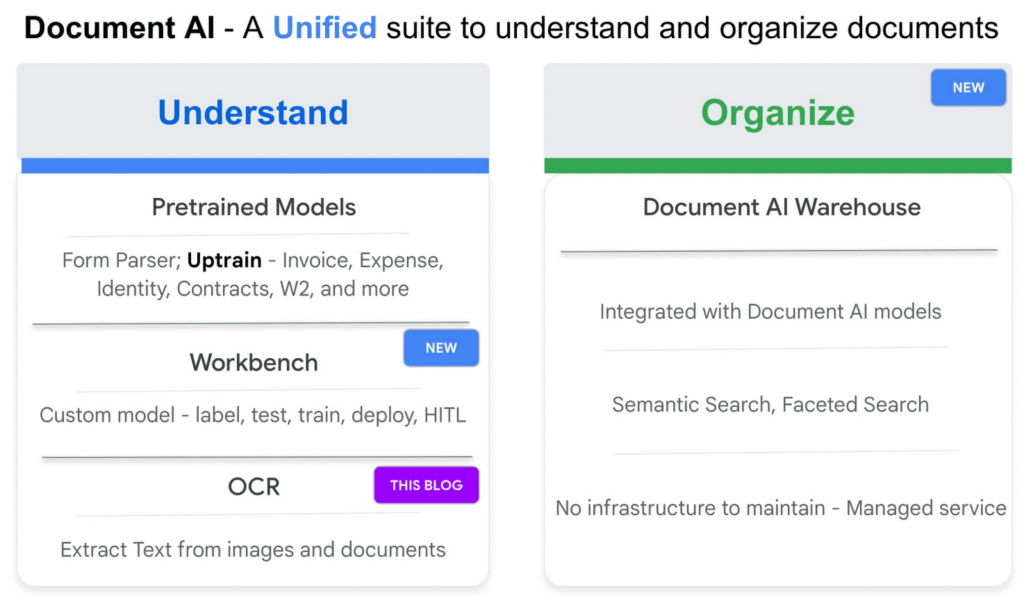
Google Cloud’s Document AI OCR takes an unstructured document as input and extracts text and layout (e.g., paragraphs, lines, etc.) from the document. Covering over 200 languages, Document AI OCR is powered by state-of-the-art machine learning models developed by Google Cloud and Google Research teams.
Today, we are pleased to announce three new OCR features in Public Preview that can further enhance your document processing workflows.
1. Assess page-level quality of documents with Intelligent Document Quality (IDQ)
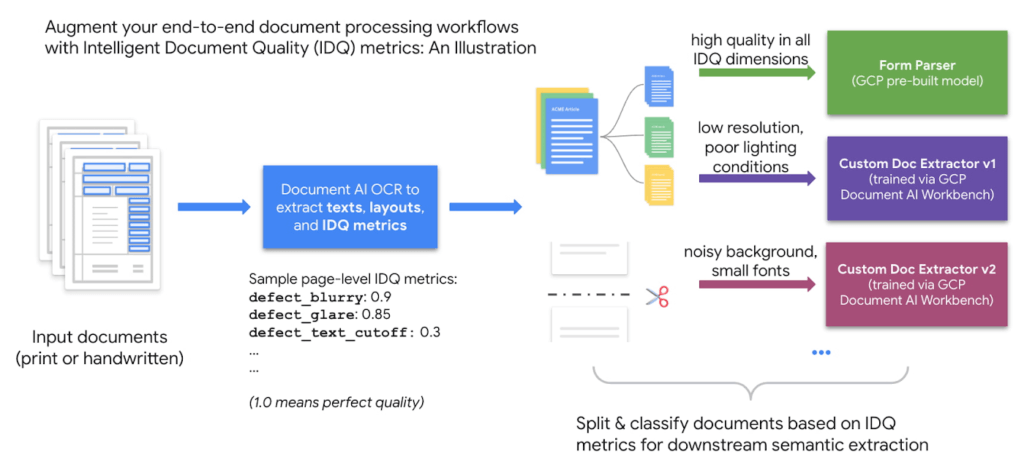
With Document AI OCR, Google Cloud customers and partners can programmatically extract key document characteristics – word frequency distributions, relative positioning of line items, dominant language of the input document, etc. – as critical inputs to their downstream business logic. Today, we are adding another important document assessment signal to this toolbox: Intelligent Document Quality (IDQ) scores.
IDQ provides page-level quality metrics in the following eight dimensions:
- Blurriness
- Level of optical noise
- Darkness
- Faintness
- Presence of smaller-than-usual fonts
- Document getting cut off
- Text spans getting cut off
- Glares due to lighting conditions
Being able to discern the optical quality of documents helps assess which documents must be processed differently based on their quality, making the overall document processing pipeline more efficient. For example, Gary Lewis, Managing Director of lending and deposit solutions at Jack Henry, noted, “Google’s Document AI technology, enriched with Intelligent Document Quality (IDQ) signals, will help businesses to automate the data capture of invoices and payments when sending to our factoring customers for purchasing. This creates internal efficiencies, reduces risk for the factor/lender, and gets financing into the hands of cash-constrained businesses quickly.”
Overall, document quality metrics pave the way for more intelligent routing of documents for downstream analytics. The reference workflow below uses document quality scores to split and classify documents before sending them to either the pre-built Form Parser (in the case of high document quality) or a Custom Document Extractor trained specifically on lower-quality datasets.
2. Process digital PDF documents with confidence with built-in digital PDF support
The PDF format is popular in various business applications such as procurement (invoices, purchase orders), lending (W-2 forms, paystubs), and contracts (leasing or mortgage agreements). PDF documents can be image-based (e.g., a scanned driver’s license) or digital, where you can hover over, highlight, and copy/paste embedded text in a PDF document the same way as you interact with a text file such as Google Doc or Microsoft Word.
We are happy to announce digital PDF support in Document AI OCR. The digital PDF feature extracts text and symbols exactly as they appear in the source documents, therefore making our OCR engine highly performant in complex visual scenarios such as rotated texts, extreme font sizes and/or styles, or partially hidden text.
Discussing the importance and prevalence of PDF documents in banking and finance (e.g., bank statements, mortgage agreements, etc.), Ritesh Biswas, Director, Google Cloud Practice at PwC, said, “The Document AI OCR solution from Google Cloud, especially its support for digital PDF input formats, has enabled PwC to bring digital transformation to the global financial services industry.”
3. “Freeze” model characteristics with OCR versioning
As a fully managed cloud-based service, Document AI OCR regularly upgrades the underlying AI/ML models to maintain its world-class accuracy across over 200 languages and scripts. These model upgrades, while providing new features and enhancements, may occasionally lead to changes in OCR behavior compared to an earlier version.
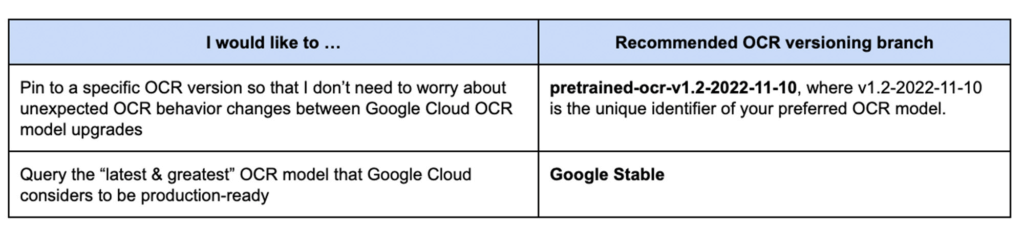
Today, we are launching OCR versioning, which enables users to pin to a historical OCR model behavior. The “frozen” model versions, in turn, give our customers and partners peace of mind, ensuring consistent OCR behavior. For industries with rigorous compliance requirements, this update also helps maintain the same model version, thus minimizing the need and effort to recertify stacks between releases. According to Jaga Kathirvel, Senior Principal Architect at Mr. Cooper, “Having consistent OCR behavior is mission-critical to our business workflows. We value Google Cloud’s OCR versioning capability that enables our products to pin to a specific OCR version for an extended period of time.”
With OCR versioning, you have the full flexibility to select the versioning option that best fits your business needs.
Getting Started on Document AI OCR
Learn more about the new OCR features and tutorials in the Document AI Documentation or try it directly in your browser (no coding required). For more details on what’s new with Document AI, don’t forget to check out our breakout session from Google Cloud Next 2022.
4688
Of your peers have already watched this video.
10:30 Minutes
The most insightful time you'll spend today!
How Google’s Customer Data Platform Helps Retail Brands Offer Data-driven , Personalized CX
Retail companies need customer insights to deliver personalized experiences that impact revenue generation and cost savings. Watch how Google Cloud’s customer data platform helps brands integrate and build holistic view of data in silos to drive marketing and customer service success.
Advance Your Cloud Career: Seven New No-Cost Generative AI Training Courses

1162
Of your peers have already read this article.
4:30 Minutes
The most insightful time you'll spend today!
Editor’s note: This blog has been updated since it originally published to reflect the total number of generative AI courses that have become available since the publish date.
An AI/ML (artificial intelligence/machine learning) career path can be a great specialty area within the cloud—and one of the most accessible! Because this area is constantly developing, most recently with the rise of generative AI, I want to share some recommendations to help you chart a sustainable career as AI/ML continues to evolve.
Generative AI falls under the overall category of AI and offers a new and exciting way of interacting with information, brands, and other people. Let’s talk about how these disciplines work together and about materials available to help you upskill in these areas.
To this end, we are happy to announce a new set of generative AI training content available at no cost. So, whether you are just getting started or already have a more advanced role, read on to find ways to help reach your desired position.
ML compared to AI
While the terms ML and AI are often used interchangeably, there are distinct differences. AI is an umbrella concept wherein machines are taught to perform tasks normally associated with human intelligence, such as decision-making and language interaction. ML is a subset of AI dedicated to taking data from the past and training algorithms to create models that can perform highly complex tasks without being explicitly programmed. It’s the basis for most forms of AI that people interact with, like virtual assistants, music recommendations, and chatbots.
Data engineers and ML engineers work with data scientists to get insights from data. They are needed to create software models and get clear results, and develop deployable applications. These skilled roles are needed in every industry!
Change the world for the better with generative AI
I recently wrote about four key pillars of technology trends expected in the next decade, including the role of AI/ML in the cloud environment as one of those pillars, and how you can bridge the skills gap and build your career.
Generative AI is a new type of ML that has made a lot of headlines recently. Research from CIO Dive finds that seven in 10 executives say their companies are investigating or exploring generative AI. Now is a great time to become an expert, while we are at the cusp of this technology becoming more widely adopted.
To get to generative AI, we need to talk first about deep learning. Deep learning is a subset of ML that uses artificial neural networks to process more complex patterns than traditional ML. Generative AI sits still further down the funnel, as a subset of deep learning that typically involves the Transformer architecture. Essentially, it’s a type of AI that can map long-range dependencies and patterns in large training sets, then use what it learns to produce new content, including text, imagery, audio, and synthetic data.
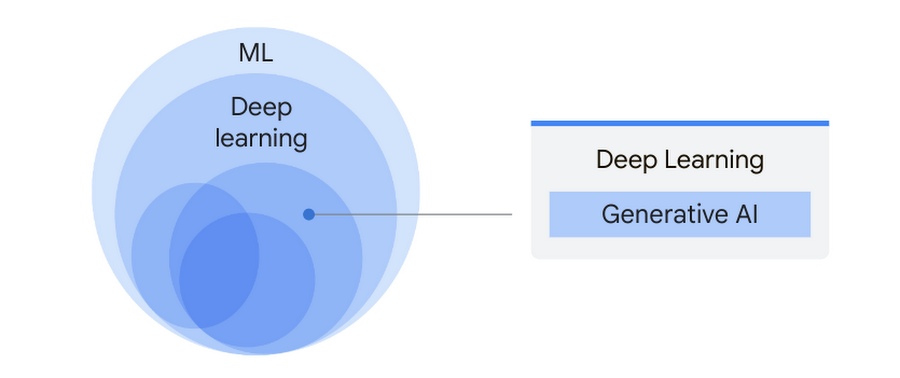
Generative AI relies on large models, such as large language models (LLMs) that can classify and generate text, answer questions, and summarize documents. For more detail about how this works, check out the video below from Google I/O 2023, which features great information from Dr. Gwendolyn Stripling, Artificial Intelligence Technical Curriculum Developer for Google Cloud.
How Google is offering generative AI
Here at Google, we’ve been heavily invested for decades in research and innovation aimed at helping businesses, governments, and developers maximize the potential of AI. Our vision is to empower builders, innovators, developers, and doers to use AI in unique, responsible, productive ways.
To deliver on this, we recently announced a variety of solutions to bring generative AI into our offerings, beginning with Generative AI support on Vertex AI and Gen App Builder.
Vertex AI is Google Cloud’s ML platform for training and deploying ML models and AI applications. With Generative AI support on Vertex AI, data science teams and developers can access foundation models from both Google and other sources, helping them to quickly build, customize, and deploy models for their own use cases.
As part of generative AI support on Vertex AI, Model Garden and Generative AI Studio are now in preview, including access to PaLM 2 for Text and Chat and Embeddings API for Text, while other features and services are available to select trusted testers. If you’d like early access to Google Cloud’s AI products, join the waitlist here.
We announced our latest PaLM model in production at I/O 2023: PaLM 2. Today, it powers more than 25 products! Additionally, we’ve fine-tuned PaLM 2 for specific use cases, including security and medical domains. You’ve probably also heard of Bard, our experiment for conversational AI, which is fully running on PaLM 2.
Our Gen App Builder aims to make customer, partner, and employee interactions more effective and helpful. With it, developers — even those with limited data science expertise — can quickly create bots, chat apps, digital assistants, custom search engines, and more. Gen App Builder even makes it possible to create some generative AI apps without any coding skills.
Now, let’s bring these products to life! Not sure exactly the use case or in need of a little inspiration? Check out this blog from Google Cloud CEO Thomas Kurian to see how customers and partners in the ecosystem are bringing ideas to life with generative AI. And watch this video to see generative AI in action!
Build your AI/ML skills and validate your knowledge to grow your career
There is a lot of excitement around generative AI—it’s truly a brand new path to consider for your AI/ML career! Check out my recommendations below for training options for AI/ML roles. These will help you gain critical skills as generative AI becomes more widely available.
*NEW* training materials, specific to generative AI technologies
Generative AI Learning Path – no cost training
- [Course] Introduction to Generative AI (1 day)
- [Course] Introduction to Large Language Models (1 day)
- [Course] Attention Mechanism (1 day)
- [Course] Transformer Models and BERT Model (1 day)
- [Course] Introduction to Image Generation (1 day)
- [Course] Create Image Captioning Models (1 day)
- [Course] Encoder-Decoder Architecture (1 day)
Additional AI/ML training – varying learning credits required to complete on Google Cloud Skills Boost
Introductory level
- [Course with completion badge] How Google Does Machine Learning (1 day)
- [Course with completion badge] MLOps: Getting Started (1 day)
- [Skill badge] Get started with TensorFlow on Google Cloud (8 hours)
- [Skill badge] Perform foundational ML, AI and data tasks in Google Cloud (7 hours)
- [Course with completion badge] Language, Speech, Text, and Translation with Google Cloud APIs (5 hours)
Intermediate/Multi-level
- [Learning Path] Machine Learning Engineer (Collection of 15 video courses and labs)
- [Skill badge] Build and Deploy Machine Learning Solutions on Vertex AI (1 day)
Advanced
- [Training + certification exam] Google Cloud Professional ML Engineer Certification (varied time)
- [Skill badge] Machine Learning with TensorFlow in Vertex AI (90 minutes)
- [Course with completion badge] Natural Language Processing in Google Cloud (1 day)
You can also catch up on hands-on demos in our most recent Cloud OnBoard: From Data to AI with BigQuery and Vertex AI. In it, we guide you through all steps of the data-to-AI solution.
Coming up on June 29, we are hosting Getting Started with Vertex Generative AI as part of Innovators Live. Register now!
I also encourage you to consider an Innovators Plus subscription. You get access to over 700 labs, skill badges and courses (including many that are specific to AI/ML), a certification exam voucher, and up to $1,000 in Google Cloud credits. You’ll also get access to live learning events and technical briefings with Google Cloud experts, plus 1:1 consultations (talk with us about your upcoming generative AI project!). It’s a $1,500 package for only $299. Learn more!
Make Meaningful Analysis with Geo Boundary Public Datasets on BigQuery

6332
Of your peers have already read this article.
4:00 Minutes
The most insightful time you'll spend today!
Geospatial data is a critical component for a comprehensive analytics strategy. Whether you are trying to visualize data using geospatial parameters or do deeper analysis or modeling on customer distribution or proximity, most organizations have some type of geospatial data they would like to use – whether it be customer zipcodes, store locations, or shipping addresses. However, converting geographic data into the correct format for analysis and aggregation at different levels can be difficult. In this post, we’ll walk through some examples of how you can leverage the Google Cloud platform alongside Google Cloud Public Datasets to perform robust analytics on geographic data. The full queries can be accessed from this notebook here.
Public US Geo Boundaries dataset
BigQuery hosts a slew of public datasets for you to access and integrate into your analytics. Google pays for the storage of these datasets and provides public access to the data via the bigquery-public-data project. You only pay for queries against the data. Plus, the first 1 TB per month is free! These public datasets are valuable on their own, but when joined against your own data they can unlock new analytics use cases and save the team a lot of time.
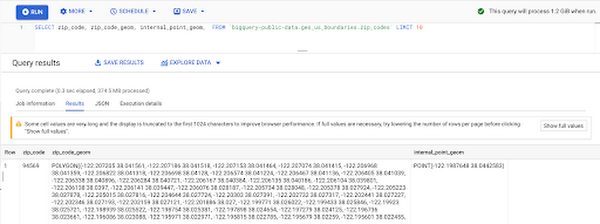
Within the Google Cloud Public Datasets Program there are several geographic datasets. Here, we’ll work with the geo_us_boundaries dataset, which contains a set of tables that have the boundaries of different geospatial areas as polygons and coordinates based on the center point (GEOGRAPHY column type in BigQuery), published by the US Census Bureau.
Mapping geospatial points to hierarchical areas
Many times you will find yourself in situations where you have a string representing an address. However, most tools require lat/long coordinates to actually plot points. Using the Google Maps Geocoding API we can convert an address into a lat/long and then store the results in the BigQuery table.
With a lat/long representation of our point, we can join our initial dataset back onto any of the tables here using the ST_WITHIN function. This allows us to check and see if a point is within the specified polygon.
ST_WITHIN(geography_1, geography_2)
This can be helpful for ensuring standard nomenclature; for example, metropolitan areas that might be named differently. The query below maps each customers’ address to a given metropolitan area name.
SELECTcust.id as customer_id,metro.name as metro_nameFROM `looker-private-demo.retail.customers` as cust,`bigquery-public-data.geo_us_boundaries.metropolitan_divisions` as metroWHERE ST_WITHIN(ST_GEOGPOINT(cust.longitude, cust.latitude),metro.metdiv_geom)
It can also be useful for converting to designated market area (DMA), which is often used in creating targeted digital marketing campaigns.
SELECTcust.id as customer_id,dma.dma_nameFROM `looker-private-demo.retail.customers` as cust,`bigquery-public-data.geo_us_boundaries.designated_market_area` as dmaWHERE ST_WITHIN(ST_GEOGPOINT(cust.longitude, cust.latitude),dma.dma_geom)
Or for filling in missing information; for example, some addresses may be missing zip code which results in incorrect calculations when aggregating up to the zipcode level. By joining onto the zip_codes table we can ensure all coordinates are mapped appropriately and aggregate up from there.
SELECTzip.zip_code,count(distinct cust.id) as unique_customersFROM `looker-private-demo.retail.customers` as cust,`bigquery-public-data.geo_us_boundaries.zip_codes` as zipWHERE ST_WITHIN(ST_GEOGPOINT(cust.longitude, cust.latitude),zip.zip_code_geom)GROUP BY 1
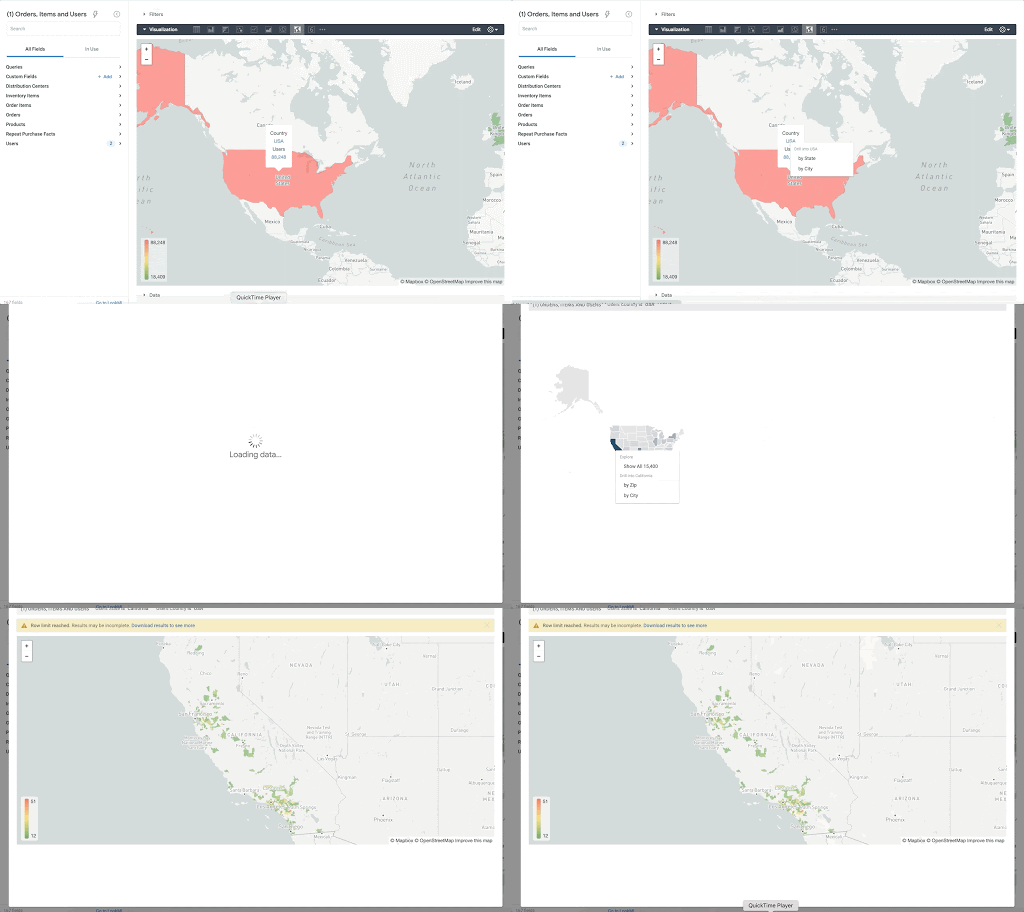
Note that the zip code table isn’t a comprehensive list of all US zip codes, they are zip code tabulation areas (ZCTAs). Details about the differences can be found here. Additionally, the zip code table gives us hierarchical information, which allows us to perform more meaningful analytics. One example is leveraging hierarchical drilling in Looker. I can aggregate my total sales up to the country level, and then drill down to state, city and zipcode to identify where sales are highest. You can also use the BigQuery GeoViz tool to visualize geospatial data!
Aside from simply checking if a point is within an area, we can also use ST_DISTANCE to do something like find the closest city using the centerpoint for the metropolitan area table.
SELECTcust.id as customer_id,ARRAY_AGG(metro.name order by ST_DISTANCE(ST_GEOGPOINT(cust.longitude, cust.latitude),metro.internal_point_geom) asc limit 1)[offset(0)] as metro_nameFROM`looker-private-demo.retail.customers` as cust,`bigquery-public-data.geo_us_boundaries.metropolitan_divisions` as metroGROUP BY cust.id
This concept doesn’t just hold true for points, we can also leverage other GIS functions to see if a geospatial area is contained within areas that are listed in the boundaries datasets. If your data comes into BigQuery as a GeoJSON string, we can convert it to a GEOGRAPHY type using the ST_GEOGFROMGEOJSON function. Once our data is in a GEOGRAPHY type we can do things like check to see what urban area the geo is within – using either ST_WITHIN or ST_INTERSECTS to account for partial coverage. Here, I am using the customer’s zip code to find all metropolitan divisions where the zip code polygon and the metropolitan polygon intersect. I am then selecting the metropolitan area that has the most overlap (or the intersection has the largest area) to be the customer’s metro that we use for reporting.
SELECTcust.id as customer_id,ARRAY_AGG(metro.name order by ST_AREA(ST_INTERSECTION(zip.zip_code_geom,metro.metdiv_geom)) desc limit 1)[offset(0)] as metro_nameFROM`looker-private-demo.retail.customers` as custJOIN `bigquery-public-data.geo_us_boundaries.zip_codes` as zip on cust.zip=zip.zip_code,`bigquery-public-data.geo_us_boundaries.metropolitan_divisions` as metroWHERE ST_INTERSECTS(zip.zip_code_geom,metro.metdiv_geom)GROUP BY cust.id
The same ideas can be applied to the other tables in the dataset including the county, urban areas and National Weather Service forecast regions (which can also be useful if you want to join your datasets onto weather data).
Correcting for data discrepancy
One problem that we may run into when working with geospatial data is that different data sources may have different representations of the same information. For example, you might have one system that records state as a two letter abbreviation and another using the full name. Here, we can use the state table to join the different datasets.
SELECTst.state_name,sum(ab.sales+fn.sales) as total_salesFROM `bigquery-public-data.geo_us_boundaries.states` as stLEFT JOIN abbreviated_table as ab on ab.state = st.stateLEFT JOIN fullname_table as fn on fn.state = st.state_nameWHERE COALESCE(ab.state, fn.state) IS NOT NULLGROUP BY 1
Another example might be using the tables as a source of truth for fuzzy matching. If the address is a manually entered field somewhere in your application, there is a good chance that things will be misspelled. Different representations of the same name may prevent tables from joining with each other or lead to duplicate entries when performing aggregations. Here, I use a simple Soundex algorithm to generate a code for each county name, using helper functions from this blog post. We can see that even though some are misspelled they have the same Soundex code.
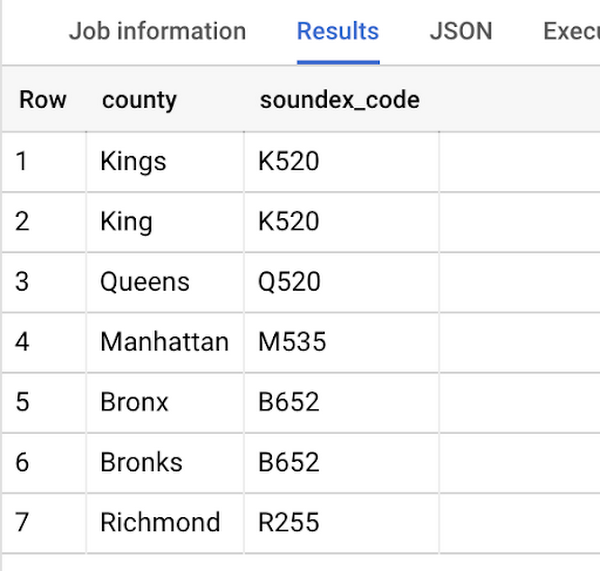
Next, we can join back onto our counties table so we make sure to use the correct spelling of the county name. Then, we can simply aggregate our data for more accurate reporting.
SELECTc.county_name,sum(sales) as total_salesFROMtableJOIN `bigquery-public-data.geo_us_boundaries.counties` as con testing.dq_fm_Soundex(table.county) = testing.dq_fm_Soundex(c.county_name)WHERE c.state_fips_code = cast(36 as string)GROUP BY 1
Note that fuzzy matching definitely isn’t perfect and you might need to try different methods or apply certain filters for it to work best depending on the specifics of your data.
The US Geo Boundary datasets allow you to perform meaningful geographic analysis without needing to worry about extracting, transforming or loading additional datasets into BigQuery. These datasets, along with all the other Google Cloud Public Datasets, will be available in the Analytics Hub. Please sign up for the Analytics Hub preview, which is scheduled to be available in the third quarter of 2021, by going to g.co/cloud/analytics-hub.
Plainsight Vision AI Available for Google Cloud Customers to Unlock Accurate, Actionable Insights
4668
Of your peers have already read this article.
4:00 Minutes
The most insightful time you'll spend today!
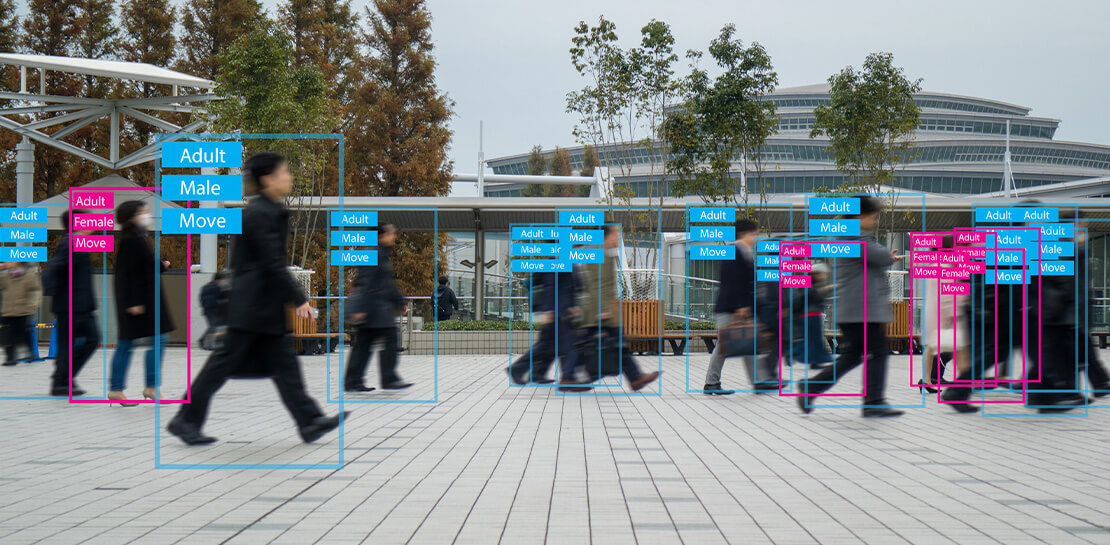
Data-savvy businesses increasingly rely on images and videos for critical functions, and yet are challenged by the sheer mass of information—more than 3.2 billion images and 720,000 hours of video are created daily. This explosion in visual data has paved the way for the growth of computer vision, a form of artificial intelligence (AI) that enables computers to “see” the world similarly to the way people do, but with unblinking consistency, and greater accuracy.
The transformational impact and value of computer vision solutions are significant and has been a guiding objective for companies and AI developers. And yet, even as the applications for computer vision increase dramatically, architecting and implementing vision AI solutions remain highly complex. Visual data, such as images and video, are made up of thousands of pixels of information that represent millions of different patterns and meanings, which can make interpreting even a single image overwhelming from a computational perspective.
Many organizations struggle with deployments and fail to operationalize vision AI solutions due to development delays, machine learning and data science hiring challenges, inaccurate output, a lack of integration with existing infrastructure, difficulty of use, and high cost. Plainsight, with the power of Google Cloud resources, is addressing all these challenges and helping businesses by enabling the deployment of vision AI within enterprise private networks that can be managed easily and scaled economically.
Plainsight has announced availability of its vision AI platform on Google Cloud Marketplace. Businesses can now easily deploy end-to-end vision AI to private clouds to realize the full value of their video and other visual data for accurate, actionable insights across diverse use cases.
Delivering on the Promise of AI: Seeing What’s Hiding In Plain Sight
For organizations to integrate AI and machine learning into their businesses successfully, the technology must be powerful enough to solve real challenges, yet fast, easy, and accessible enough to ensure the innovation potential is realized. Plainsight on Google Cloud delivers the power of enterprise vision AI that’s quick and easy to use with Google Cloud resources that enable global scale, increased security, bolstered privacy, unified billing, and cost savings.
To streamline vision AI workflows, Plainsight facilitates the entire pipeline, from visual data ingestion and annotation, through continuous model training, deployment, and monitoring for easier innovation and faster time-to-production. Our platform accelerates vision AI development in a manner that is complete, accurate, and accessible to non-technical business leaders. We believe that AI should be available and accessible to anyone and everyone—so that teams across entire organizations can reap the benefits.
By integrating Plainsight into their private networks, companies worldwide can now leverage one intuitive platform for centralized control of streamlined vision AI model creation and training with optimized visual data handling for diverse enterprise solutions. These use cases include: social distancing monitoring, medical imaging, drug compound screening, defect detection in manufacturing processes, identifying gas leaks, or even livestock counting and crop health monitoring for agriculture, to name a few.https://www.youtube.com/embed/A7U_0UkjvEg?enablejsapi=1&
We enable customers so they can create successful solutions that enable them to clearly see their business from all angles and to take advantage of the knowledge visual data can reveal by simply and quickly operationalizing practical vision AI applications.
AI-Powered Dataset Creation, Automated Model Training & Easy Deployment Without A Single Line Of Code
For vision AI applications, success is inextricably dependent on the quality and quantity of the datasets required to train the relevant models. To aid enterprises in this vital stage, the Plainsight platform provides built-in data annotation for the fast and easy creation of datasets. This includes AI-powered features that accelerate the speed and quality of labeling such as SmartPoly, for the automated polygon masking of objects, TrackForward, to predict and automatically label objects from frame to frame in video annotations, and AutoLabel for automated object recognition and labeling based on pre-trained machine learning models, to highlight a few.

In addition, to ensure the success of AI integration, we significantly reduce time-intensive processes with Plainsight vision AI’s automated machine learning with continuous model training and easy deployment capabilities. In just a few clicks, users can leverage optimizations for the most reliable model training without endless experimentation cycles. And, models are easily deployed at scale all within one, easy-to-manage model operationalization process for the business.
Growing With Google Cloud
Plainsight is a vision AI innovation leader, developing solutions that address unmet needs for challenger brands and Fortune 500s across vertical markets. As a team recognized for succeeding where others have failed, our expanding partnership with Google Cloud provides a powerful combination that helps customers see and activate the value of their visual data with a suite of services in a secure and private manner.
Our vision AI Platform simplifies building and operationalizing AI to solve business problems enterprises are facing every day—and the demand is increasing. To accelerate our journey to faster, more accessible AI for enterprises, we knew we needed strong support to grow Plainsight and scale our backend tools to match our vision.
Google Cloud delivered everything, and more, in one program. The Startup Program by Google Cloud provided the technology and services for scale and the support we needed to maximize the value the Program provided us. The Startup Program has been a springboard for architecting Plainsight vision AI in the cloud, accelerating our goals and optimizing innovation, efficiency, and growth. The team also helped us optimize Google Ads campaigns, fueling adoption of Plainsight.
After launching the SaaS version of Plainsight Data Annotation in November 2020, we grew our user base by nearly 110x in just three short months. Google Ads has also dramatically increased website traffic, growing new users by nearly 5.75X and page views by over 5X. The Google team helped us identify where Google Cloud offerings could be leveraged instead of developing in-house solutions and offered best practices that enabled us to deliver faster on our initiatives.
Kubernetes was already the underlying component of our platform and leveraging Google Kubernetes Engine (GKE) as a managed service removed a layer of complexity. By combining GKE and Anthos, we were able to standardize our deployments, aligning to how our customers leverage Anthos for enterprise applications in their own organizations. In addition, as a fast-moving, customer-centric company we use Google Workspace to help us centralize and manage our day-to-day work internally. By leveraging multiple products across Google’s ecosystem, we take advantage of a holistic partnership that has helped our business tremendously as we scale.
Leveraging Google’s Partners for Strategic Consultation
To facilitate this expansion of our partnership with Google and to maximize our use of Google Cloud services, we are working with DoiT International, a Google Managed Services Provider and 2020 Global Reseller Partner of the Year. DoiT provides us with ongoing technical consultation for cloud-native architecture, Google Cloud Marketplace integration, production-grade Kubernetes support, Google Cloud cost optimization, and technical support. The DoiT team has been invaluable in compiling best practices, tips, and strategies from their vast experience with various cloud customers to ease our Marketplace integration and is providing input for infrastructure strategy to support our continued rapid growth.
Plainsight Delivers Enterprise Vision AI Through The Google Cloud Platform Marketplace
Plainsight vision AI is now available to Google Cloud Customers on Google Cloud Marketplace enabling organizations across industries to deploy private Plainsight instances within their own environments. Marketplace customers will benefit from Google Cloud privacy, security, scalability and unified billing through their Google Cloud account.
Combining the powerful benefits provided by Google Cloud resources with Plainsight’s vision AI Platform into private networks, enterprises worldwide can now leverage one intuitive platform for centralized control of streamlined vision AI model creation and training with optimized visual data handling for diverse enterprise solutions.
Through our Google partnership, we’re able to leverage a powerful foundation that allows us to rapidly innovate, scale and accelerate delivery on our vision AI platform capabilities. By executing on our vision to make AI easier, faster and more accessible for all users across entire enterprises, we’re helping businesses see more and by seeing more, they’ll have the power to solve more.
If you want to learn more about how Google Cloud can help your startup, visit our page here where you can apply for our Startup Program, and sign up for our monthly startup newsletter to get a peek at our community activities, digital events, special offers, and more.
Google Cloud VMware Engine Achieves HIPAA Compliance
6956
Of your peers have already read this article.
1:30 Minutes
The most insightful time you'll spend today!
We are excited to announce that as of April 1, 2021, Google Cloud VMware Engine is covered under the Google Cloud Business Associate Agreement (BAA), meaning it has achieved HIPAA compliance. Healthcare organizations can now migrate and run their HIPAA-compliant VMware workloads in a fully compatible VMware Cloud Verified stack running natively in Google Cloud with Google Cloud VMware Engine, without changes or re-architecture to tools, processes, or applications.
Healthcare organizations increasingly use cloud platforms to personalize patient care, analyze large datasets more effectively, enhance research and development collaboration, and share medical knowledge. Leveraging cloud platforms can also help healthcare organizations increase the privacy and security of information systems, including protected health information (PHI), and, as a result, better comply with applicable laws and regulations while reducing the burden of compliance. For PHI, the Health Insurance Portability and Accountability Act of 1996 (HIPAA) set standards in the United States to protect individually identifiable health information. HIPAA applies to health plans, most healthcare providers, and healthcare clearinghouses that manage PHI electronically, and to persons or entities that perform certain functions on their behalf.
With Google Cloud, organizations can leverage solutions that enable secure, continuous patient care and data-driven clinical and operational decisions with ease, while being empowered with collaboration and productivity tools. Further, Google Cloud Platform supports HIPAA compliance. We offer HIPAA-regulated customers the same products at the same pricing that is available to all customers, unlike many other cloud providers.
For healthcare organizations that leverage VMware on-premises, having a consistent, cloud-integrated platform that provides seamless access to native cloud services unlocks the opportunity to extend, migrate, and modernize healthcare IT infrastructure and applications in a fast, low-risk manner at their own pace. This is especially important for mission-critical healthcare provider workloads, where having a low-risk way to adopt the cloud is important. Google Cloud VMware Engine offers that solution. By achieving coverage under Google Cloud’s BAA, Google Cloud VMware Engine enables healthcare organizations to realize the benefits of cloud computing and stay on track with their HIPAA compliance efforts without additional complexity. This is very relevant in hybrid scenarios, where customers would like to leverage other native cloud services such as analytics and big data processing, without having to enter into multiple BAAs.
Google Cloud VMware Engine offers dedicated, isolated software-defined datacenter environments with fully redundant and dedicated 100 Gbps networking that are suitable for healthcare organizations to run applications storing and processing PHI data. Customers have the ability to encrypt their virtual storage area network (vSAN) using an external key management server. Healthcare customers can run their workloads in a native VMware environment—vSphere, vCenter, vSAN, NSX-T, and HCX—while benefiting from Google Cloud’s highly performant infrastructure to meet the needs of their workloads. Customers can connect their VMware applications to native Google Cloud services such as BigQuery and artificial intelligence (AI) to derive new insights from existing data and quickly make informed decisions.
Protecting against and mitigating the impact of ransomware attacks is top-of-mind for Healthcare organizations. This requires building a cyber resilience program and back-up strategy to prepare for how users can restore core systems or assets affected by a security (in this case, ransomware) incident. This is a critical function for supporting recovery timelines and lessening the impact of a cyber event so organizations can get back to operating their business. Google Cloud VMware Engine in combination with Google Cloud first party solutions such as Actifio Go, or partner solutions such as NetApp CVO can provide an efficient way to recover incremental point-in-time backups along with on-demand provisioning of new compute to recover both data and infrastructure from Ransomware attacks quickly and efficiently.
Healthcare customers can also use Google Cloud VMware Engine as a disaster recovery (DR) target for their on-premises VMware workloads. Healthcare organizations also need a business continuity plan for their mission critical applications. When a disaster occurs, hospitals need their data protected so they can quickly get back to treating patients. It is a HIPAA requirement that healthcare organizations must be able to recover from a natural disaster. Google Cloud VMware Engine offers a like-for-like cost-effective DR target for these customers. The DR environment can be operated without new training using the same tools as their on-premises deployment. Google Cloud VMware Engine is currently available in 12 regions across the globe including three regions in the US, which means our regional and multi-national customers can take advantage of this service for geographic diversification as well.
If you are interested in understanding more and taking advantage of Google Cloud VMware Engine, contact your Google sales team now.
For details, see HIPAA compliance on Google Cloud Platform.
More Relevant Stories for Your Company

What Interests Baseball Fans? Unravel with Google’s Data Science Tools and ML
The game of baseball has no shortage of statistics -- from batting average to exit velocity, strikeouts to wins above replacement. Among all sports, Major League Baseball (MLB) arguably contains the most analytical and data-driven participants and fan base. Subconsciously or viscerally, players and managers on the field and those


Productionizing TensorFlow on Google Cloud with TensorFlow Enterprise
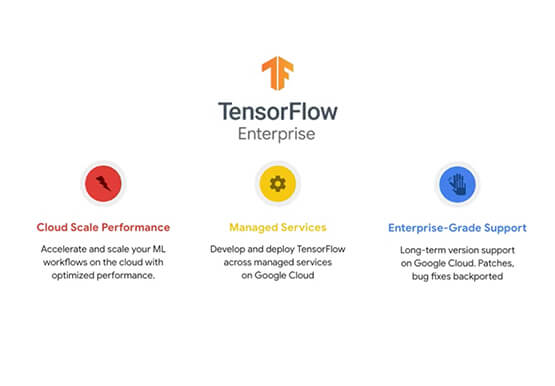
Machine learning is transforming every aspect of our lives and developers and enterprises are using ML to build impactful solutions that drive business value. TensorFlow is one of the most widely used production-ready frameworks for machine learning and it's open-sourced by Google so that everyone can take advantage of these

Unlocking Data Value: Latest Data Platforms and Announcements at the Next 21
Today at Google Cloud Next we are announcing innovations that will enable data teams to simplify how they work with data and derive value from it faster. These new solutions will help organizations build modern data architectures with real-time analytics to power innovative, mission-critical, data-driven applications. Too often, even the best minds

How AI is Revolutionizing Retail: Lessons for Marketers
Reach the Right Customers How can AI help you target customers who are looking for products like yours? The challenge: This customer wants to buy the best cat food for her pets. How AI Works The Result A targeted offer for a discount on luxury cat food is shown to
