





No More ‘Tab Game’ with Easy Tutorials on Google Cloud Console

3525
Of your peers have already read this article.
2:00 Minutes
The most insightful time you'll spend today!
When it comes to learning how to implement some technology, we all have our own version of what I call the “tab game”—that is, your setup for all the tabs and windows you need open at once. You may have several monitors so you can see documentation, your IDE, and terminal windows at the same time. You may have several guides and references open at once in one window to get all the information you need.

Personally, I like to work just from my laptop because I like to move around and work from various comfy spots. I think my tab game would probably enrage most devs because it involves a lot of swiping back and forth between windows *and* toggling tabs. It’s not pretty. That is, it wasn’t pretty until I discovered tutorials in the Google Cloud Console!
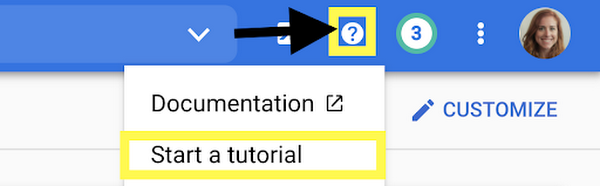
Jen really didn’t know about tutorials in the Google Cloud Console?
Yes, I honestly didn’t know about them! I’m sharing about it because if I can work for Google and not know, then I can’t be the only one, and it would be a shame to miss out on this because it’s a brilliant idea. Also I wrote some pretty sweet tutorials for the console, but I swear that the main reason I’m telling you is because it’s a cool thing!
There are several reasons that these tutorials are great:
- You can view the instructions and the console at the same time. No more playing the tab game!
- The tutorials include links and highlights, making it easy to find the screens and buttons you’re looking for
- You can run code from Cloud Shell, so you don’t need a separate window for an IDE
- You can use the demo data provided to try things out, or you can apply the steps to your existing projects using data that suits your app’s needs
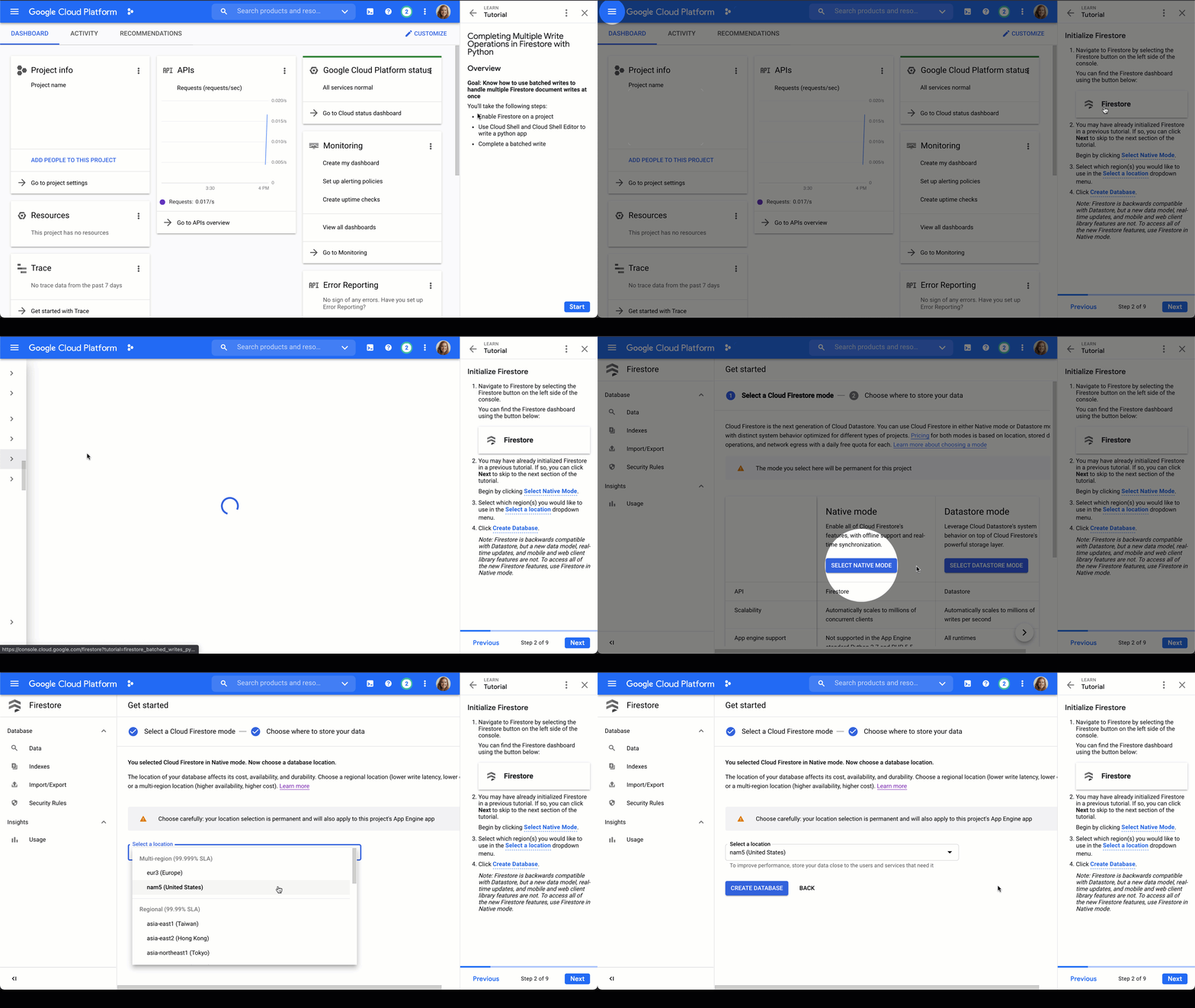
Firestore tutorials
I’m developing a series of tutorials in the Google Cloud Console designed to take you through everything you need to know about Firestore–from manually adding data in the Google Cloud Console to triggering Cloud Functions to make changes for you. Below are links and summaries for the currently available tutorials. Check back regularly to find the latest additions as they’re released!
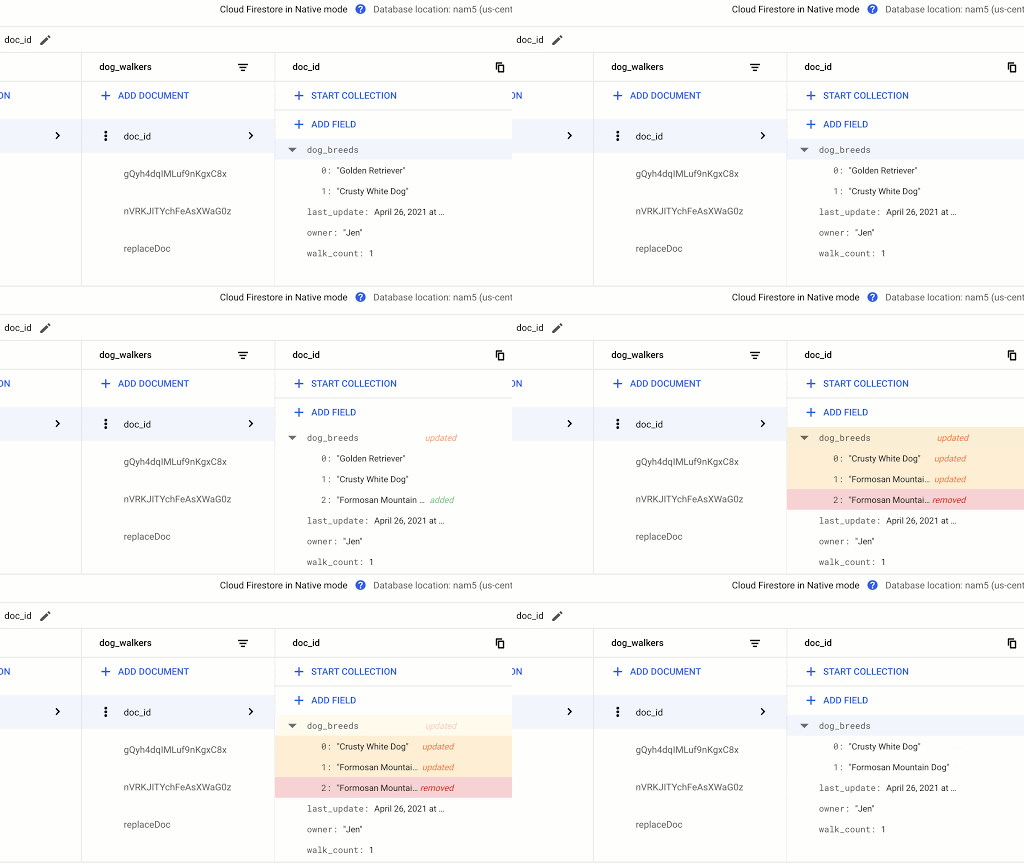
- Enable Firestore on a project
- Learn about the Firestore data model
- Add a collection of documents
- Add fields to a document
- Delete documents and collections
Updating Data in Firestore using Node.js or using Python
- Add a collection of documents
- Explore available data types
- Replace the data of document
- Replace fields in a document
- Handle special cases: incrementing, timestamps, and arrays
Reading Data from Firestore using Node.js or using Python
- Add a collection of documents
- Explore available data types
- Read a collection
- Read a single document
- Order documents
- Query documents
Transactions in Firestore using Node.js
- Add a collection of documents
- Update data without a transaction to observe issue
- Complete a transaction
- Complete a batched write
Batched Writes in Firestore using Node.js or using Python
- Use Cloud Shell and Cloud Shell Editor to write a Node.js or Python app
- Complete a batched write
Firestore triggers for Cloud Functions
- Initialize Cloud Functions using the Firebase CLI
- Write a Cloud Function triggered by a new document write to Firestore
- Add data to Firestore in the Cloud console Firestore dashboard
- Create a web app that uses Firestore using the Firebase SDK
- Deploy Firestore security rules that enable access to the required data
- Enable data persistence in the web app
- Observe app behavior with and without network connection
Chime in
Is there a particular action or concept in Firestore that you’d like to see a tutorial for? Is there another Google Cloud product that you want to learn more about? Tweet @ThatJenPerson and you may just see your suggestion come to life in the Google Cloud Console!
Turning the Tide: How PrestaShop Regained Trust in Data

4263
Of your peers have already read this article.
3:30 Minutes
The most insightful time you'll spend today!
Since 2007, PrestaShop has helped companies unlock the power of e-commerce through its open-source platform. Over 300,000 merchants worldwide use the PrestaShop platform to grow their business and serve online shoppers.
“Our open-source strategy to ecommerce enablement sets us apart,” says Rémi Paulin, Ph.D., Data Architect at PrestaShop. “Customization is becoming more crucial to retailers, and our open-source platform allows companies to continually evolve their sites and services to stand out from competitors.”
As PrestaShop grew, it wished to derive more value from its data, but the company ran into issues caused by a legacy, siloed architecture that negatively impacted data consistency and accessibility.
Let’s look at how PrestaShop works with Google Cloud and partners Fivetran and Hightouch to gain more control over data, enable a beyond-BI data strategy, and increase employee engagement from less than 10% to more than 40%.
Improving trust in data
Core systems at PrestaShop, including SQL and NoSQL databases, and SaaS Applications, were siloed; each presenting its own data, often captured from different sources such as support tickets, marketing engagement, purchase activity, and product usage. This setup made data overall inconsistent as no single system would contain a source of truth, resulting in many inefficiencies, poor collaboration across teams, and a reluctance to use data to support key decisions.
“Not long ago, less than 10% of the company regularly relied on data, so we were missing opportunities to make more data-driven decisions,” says Paulin. “Data was underutilized, and people were rapidly losing trust in data.”
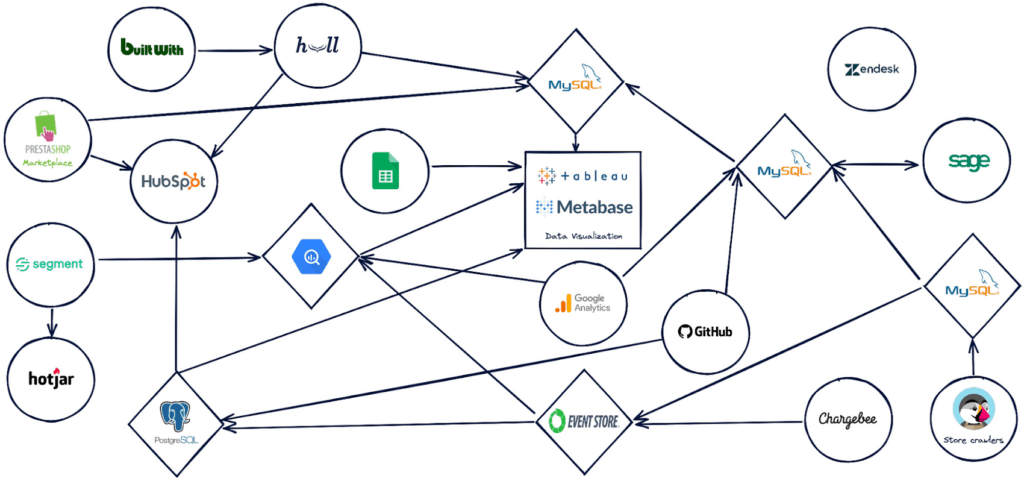
PrestaShop set out to design a new architecture to address past challenges, such as lack of data consistency, and improve data accessibility.
“Google Cloud, along with Hightouch and Fivetran, allowed us to build a modern stack to solve these challenges and support our beyond-BI data strategy.”
Building a modern data stack
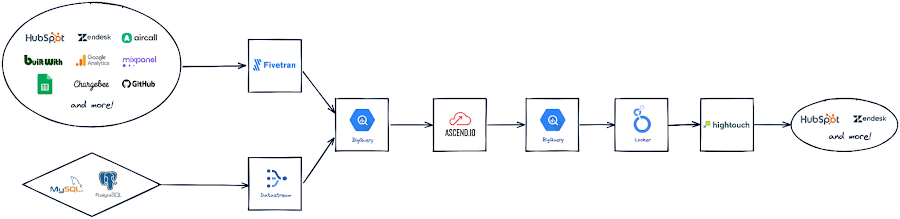
The first step was to build a robust data ingestion pipeline. After considering several vendors, PrestaShop chose to work with Fivetran to extract data from SaaS applications, including Zendesk, HubSpot, and GitHub, to load into BigQuery. They also use Datastream to stream Change Data Capture (CDC) data from transactional databases into BigQuery in real-time.
“Fivetran and Datastream are no-ops, efficient and highly reliable, and relieve our Data Engineers of management tasks. This brings us a high degree of confidence to build the rest of the stack atop these services,” says Paulin.
PrestaShop relies on several Google Cloud solutions, including Dataflow, and a managed Spark service by Ascend.io, for data transformation. It also uses Looker for its semantic modeling capacities and as a self-serve data platform.
As the company continued on its journey to transform how it manages and benefits from data, it engaged Hightouch to enable data accessibility through activation. Sitting on top of Looker, Hightouch unlocks all data models for operational intelligence. For example, in just a few days, the team built a customer knowledge model combining data from multiple sources and used Hightouch to sync data from the semantic layer to Zendesk via Reverse ETL. This allowed the care team to make more data-informed decisions, speeding up the time to resolve support tickets submitted through Zendesk by 33%.
“Hightouch feels like a natural extension of Looker and reinforces the position of the semantic data model as the single source of truth,” says Paulin. “It powers a variety of Data Activation use cases, supporting our beyond-BI strategy by providing teams with access to data when and where they need it to improve everyday operations. This has a big impact on the company, bolstering employee trust in available data.”
Becoming data-driven
In less than six months, PrestaShop managed to get the entire data stack up and running, build over 30 data models and engage over 120 employees with a small team of only two Data Engineers.
“Data is now accessible to every stakeholder within the company, regardless of their technical abilities,” says Paulin.
PrestaShop has already seen much progress in its shift to a more data-driven company and is excited to roll out more self-service intelligence capabilities in the future.
“Google Cloud drives home a culture of simplicity around our data stack, which is essential for us, especially given the small size of our engineering team,” says Paulin. “Fivetran and Hightouch share this culture of simplicity. Together, they offer strong foundations to support our data needs.”
Dashboards, which the company had always had an appetite for, are seamlessly created today. Before moving to Looker, a full-fledged dashboard would take an average of six weeks to develop. Now, it takes less than two days – and a simple dashboard can be created autonomously by business users in as little as 15 minutes.
Furthermore, data usage goes beyond dashboards. Thanks to Looker’s self-service exploration capabilities, many stakeholders can now glean insights surrounding product issues and business opportunities. Thanks to Hightouch, teams can activate their data to make better and smarter operational decisions.
“This is a big leap forward and one of many to come as we continue to add new models, activate our data, and onboard more users,” says Paulin. “Given our global reach and unique approach to e-commerce enablement, we know this is just the start of the great things we can accomplish with Google Cloud, Fivetran, and Hightouch.”
Check out Fivetran on Google Cloud Marketplace, or sign up for a free Hightouch workspace to learn more about what partners can do for your business.
An AI-Powered Cost Cutting Guide: 8 Strategies for Maximizing Profits

1699
Of your peers have already read this article.
3:30 Minutes
The most insightful time you'll spend today!
We are increasingly seeing one question arise in virtually every customer conversation: How can the organization save costs and drive new revenue streams?
Everyone would love a crystal ball, but what you may not realize is that you already have one. It’s in your data. By leveraging Data Cloud and AI solutions, you can put your data to work to achieve your financial objectives. Combining your data and AI reveals opportunities for your business to reduce expenses and increase profitability, which is especially valuable in an uncertain economy.
Google Cloud customers globally are succeeding in this effort, across industries and geographies. They are improving ROI by saving money and creating new revenue streams. We have distilled the strategies and actions they are implementing—along with customer examples and tips—in our eBook, “Make Data Work for You.” In it, you’ll find ways you can pare costs, increase profitability, and monetize your data.
Find money in your data
Our Google Cloud teams have identified eight strategies that successful organizations are pursuing to trim expenses and uncover new sources of revenue through intelligent use of data and AI. These use cases range from scaling small efficiencies in logistics to accelerating document-based workflows, monetizing data, and optimizing marketing spend.
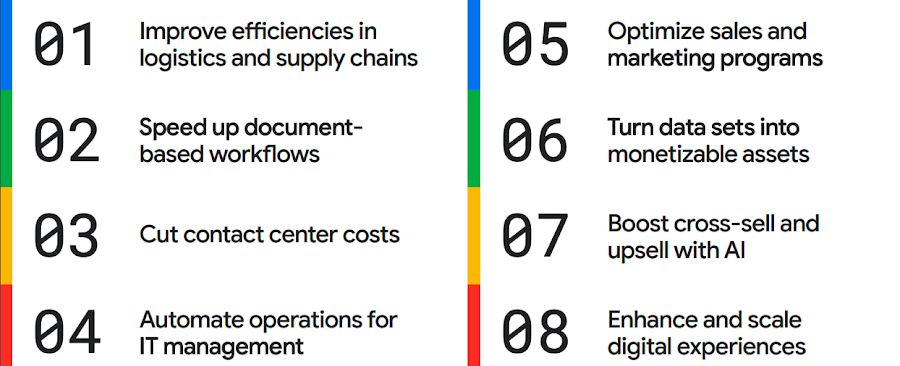
The results are impressive. They include massive cost savings and additional revenue. On-time deliveries have increased sharply at one company, and procure-to-pay processing costs have fallen by more than half at another. Other organizations have reaped big gains in ecommerce upselling and customer satisfaction.
We’ve found that businesses across every industry and around the globe are able to take action on at least one of these eight strategies. Contrary to common misperceptions, implementation does not require massive technology changes, crippling disruption to your business, or burdensome new investments.
What success looks like
If you worry your business is not ready or you need to gain buy-in from leadership, the success stories of the 15 companies in this report are helpful examples. Learning how organizations big and small, in different industries and parts of the world, have implemented these data and AI strategies makes the opportunities more tangible.
Carrefour
Among the world’s largest retailers, Carrefour operates supermarkets, ecommerce, and other store formats in more than 30 countries. To retain leadership in its markets, the company wanted to strengthen its omnichannel experience.
Carrefour moved to Google Data Cloud and developed a platform that gives its data scientists secure, structured access to a massive volume of data in minutes. This paved the way for smarter models of customer behavior and enabled a personalized recommendation engine for ecommerce services.
The company saw a 60% increase in ecommerce revenue during the pandemic, which it partly attributes to this personalization.
ATB Financial
ATB Financial, a bank in the Canadian province of Alberta, uses its data and AI to provide real-time personalized customer service, generating more than 20,000 AI-assisted conversations monthly. Machine learning models enable agents to offer clients real-time tailored advice and product suggestions.
Moreover, marketing campaigns and month-end processes that used to take five to eight hours now run in seconds, saving over CA$2.24 million a year.
Bank BRI
Bank BRI, which is owned by the Indonesian government, has 75.5 million clients. Through its use of digital technologies, the institution amasses a lot of valuable data about this large customer base.
Using Google Cloud, the bank packages this data through more than 50 monetized open APIs for more than 70 ecosystem partners who use it for credit scoring, risk management, and other applications. Fintechs, insurance companies, and financial institutions don’t have the talent or the financial resources to do quality credit scoring and fraud detection on their own, so they are turning to Bank BRI.
Early in the effort, the project generated an additional $50 million in revenue, showing how data can drive new sources of income.
How to get going now
“Make Data Work for You” will help you launch your financial resiliency initiatives by outlining the steps to get going. The process lays the groundwork for realizing your own cost savings and new revenue streams by leveraging data and AI.
Among these steps include building frameworks to operate cost efficiently, make informed decisions related to spending and optimize your data and AI budgets.
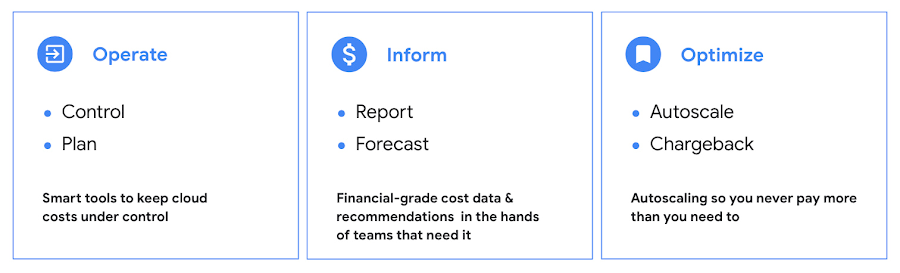
Operate: Billing that’s specific to your use-case
Control your costs by choosing data and analytics vendors who offer industry-leading data storage solutions and flexible pricing options. For example, multiple pricing options such as flat rate and pay-as-you-go allow you to optimize your spend for best price-performance.
Inform: make informed decisions based on usage
Use your cloud vendor’s dashboards or build a billing data report to gain insights on your spending over time. Make use of cost recommendations and other forecasting tools to predict what your future expenses are going to be.
Optimize: Never pay more than you use
While planning data analytics capacity, organizations often overprovision and overpay than what they actually use. Consider migrating your workloads that have unpredictable demand to a data warehousing solution that offers granular level autoscaling features so that you never have to pay for more than what you use.
There are other key moves that will set your initiative up for success including how to shorten time to value in building AI models and measuring impact. You can find details in the report.
A brighter future
The teams at Google Cloud helped the companies in “Make Data Work for You,” along with many more organizations, use their data and AI to achieve meaningful results. Download the full report to see how you can too.
Groww’s Google Cloud-Powered Platform: The Key to Secure and Successful Investing

2924
Of your peers have already read this article.
4:00 Minutes
The most insightful time you'll spend today!
Groww makes investments simple and accessible, using Google Kubernetes Engine to ensure a reliable platform for customers, and makes data-backed decisions to grow its business with BigQuery.
About Groww
Headquartered in Bangalore, Groww is India’s fast-growing online investment platform that offers a simple and easy way to invest in stocks, direct mutual funds, IPOs, ETFs, and digital gold. Its mission is to make investing as intuitive and accessible as ecommerce.

Google Cloud results
- Reduces hardware costs with Preemptable Virtual Machines
- Enables a lean DevOps team with Google Cloud
- Analyzes data effectively and quickly for agile business growth
Investing is one way to ensure financial security. However, the thought of it can be a daunting one, especially for people without any prior experience. With a mission to make investment simple for digital natives in India, Groww was launched in 2016.
“We noticed that many people were on social media, booking cabs, and ordering food online, but the same people were not investing, despite having the means to do so,” says Singh. This observation led to a lightbulb moment for the team, and they realized that in order to appeal to the millennial, mobile-savvy generation, they had to create an investment platform that was as easy to use as an ecommerce platform.
Managing unpredictable spikes with Google Kubernetes Engine
As with any platform, there are bound to be peak and non-peak hours when it comes to traffic. For Groww, regular spikes take place in the early mornings, or in the evenings when people are more relaxed having come home from work. But the nature of the fintech industry is a volatile one. Investors are only human, and their investment decisions can be swayed quickly by the news. As such, spikes in traffic can happen at the most unpredictable times. To cope with this unpredictability, Groww uses Google Kubernetes Engine to scale up and down automatically to meet the required capacity around the clock. This also helps the company save costs, as it pays only for what is needed.
“No matter how much of an expert you are, you can never predict when traffic on the platform will be heavy,” says Singh. “Google Kubernetes Engine helps ensure that we never run out of capacity, without overspending on infrastructure cost.”
More recently, the investment company started using Preemptible Virtual Machines, which run at one third of its hardware cost. It also leverages Anthos to monitor and manage its backend infrastructure and to have better workload visibility. Singh shares, “We are very open to adopting new technologies, and our team is always eager to learn if we can do things better. We believe that technology is always evolving and it’s our responsibility to learn and make use of what’s available out there.”
Despite having so much running in the background, Singh explains that the company keeps a very lean DevOps team. “We’ve only got four or five people in DevOps, and that’s only possible because Google Cloud products are already able to run on their own.”
Making swift, data-backed business decisions
Infrastructure is only part of the equation for a successful business. Outside of operations, the ability to analyze data effectively is arguably the most important component for a startup to thrive. Groww leverages BigQuery to make decisions quickly and efficiently. “With BigQuery, we have a place where we can put all data, fire queries, and build dashboards almost instantly, allowing us to make business decisions quickly,” explains Singh.
The team also uses Looker Studio to clearly visualize the information generated through charts and graphs. The best part? Groww doesn’t need to spend additional time and resources setting up a large data team, since BigQuery does most of the work and in a shorter period of time. The resources saved also enables the team to focus on addressing functional requirements, rather than managing and sizing the data platform.
“From a startup perspective, BigQuery is really helpful because often setting up your own data lake can be very costly, and a distraction when the team is also busy focusing on setting up an infrastructure,” adds Singh.
Ensuring security and compliance with Google Cloud
As a fintech company, security and compliance continue to be top priorities for Groww. It chose Google Cloud as its preferred cloud provider because there are three data center replication zones in Mumbai, which means it adheres to financial regulations for keeping its user data within borders.
Moving forward, Groww plans to evolve its platform alongside its users. Singh says, “As we gain more users with different wants and needs, it will be a natural progression that the company evolves. I believe that with Google Cloud, we are well equipped to pave the way to the future.”

Gartner Identifies Critical Capabilities for Data Management Solutions
DOWNLOAD WHITEPAPER3992
Of your peers have already downloaded this article
3:30 Minutes
The most insightful time you'll spend today!
Data management solutions for analytics offerings are consolidating, with major vendors able to address a range of use cases and smaller vendors addressing a subset of use cases. Data and analytics leaders can use this research to guide evaluation and initial vendor selection for DMSA offerings.
For data and analytics leaders responsible for data management solutions as part of strategizing and planning information infrastructure should:
- Evaluate the capabilities of incumbent solution(s) against new use cases, to determine if existing expertise could be used to reduce development time with a good-enough solution already in place.
- Plan on using a heterogeneous solution landscape overall, but try and reduce duplication of effort by categorizing use cases with regard to their target deployment platform.
- Use a logical data warehouse architecture when you need to integrate separate data repositories efficiently, keeping in mind performance SLAs that may be impacted by remote access.
- Plan for eventual integration with other data silos when scoping the effort needed to implement a specific solution, to avoid crippling overhead caused by proliferating data silos.
Download this report to know more.
Statsig’s Journey to Seamless Data Management with Google BigQuery

1196
Of your peers have already read this article.
3:30 Minutes
The most insightful time you'll spend today!
Statsig is a modern feature management and experimentation platform used by hundreds of organizations. Statsig’s end-to-end product analytics platform simplifies and accelerates experimentation with integrated feature gates (flags), custom metrics, real-time analytics tools, and more, enabling data-driven decision-making and confident feature releases. Companies send their real-time event-stream data to Statsig’s data platform, which, on average, adds up to over 30B events a day and has been growing at 30-40% month over month.
With these fast-growing event volumes, our Spark-based data processing regularly ran into performance issues, pipeline bottlenecks, and storage limits. In turn, this rapid data growth negatively impacted the team’s ability to deliver product insights on time. The sustained Spark tuning efforts that we were dealing with made it challenging to keep up with our feature backlog. Instead of spending time building new features for our customers, our engineering team was controlling significant increases in Spark’s runtime and cloud costs.
Adopting BigQuery pulled us out of Spark’s recurring spiral of re-architecture and into a Data Cloud, enabling us to focus on our customers and develop new features to help them run scalable experimentation programs.
The growing data dilemma
At Statsig, our processing volumes were growing rapidly. The assumptions and optimizations we madea month ago would become irrelevant the next month. While our team was knowledgeable in Spark performance tuning, the benefits of each change were short lived and became obsolete almost as quickly as it was implemented. As the months passed, our data teams were dedicating moretime to optimizing and tuning Spark clusters instead of building new data products and features. We knew we needed to change our data cloud strategy.

We started to source advice from companies and startups who had faced similar data scaling challenges – the resounding recommendation was “Go with BigQuery.” Initially, our team was reluctant. For us, a BigQuery migration would require an entirely new data warehouse and a cross-cloud migration to GCP.
However, during a company-wide hackathon, a pair of engineers decided to test BigQuery with our most resource-intensive job. Shockingly, this unoptimized job finished much faster and at a lower cost than our current finely-tuned setup. This outcome made it impossible for us to ignore a BigQuery migration any longer. We set out to learn more.
Investigating BigQuery
When we started our BigQuery journey, the first and obvious thing we had to understand was how to actually run jobs. With Spark, we were accustomed to daunting configurations, mapping concepts like executors back to virtual machines, and creating orchestration pipelines for all the tracking and variations required.
When we approached running jobs on BigQuery, we were surprised to learn that we only needed to configure the number of slots allocated to the project. Suddenly, with BigQuery, there were no longer hundreds of settings affecting query performance. Even before running our first migration test, BigQuery had already eliminated an expensive and tedious task list of optimizations our team would typically need to complete.
Digging into BigQuery, we learned about additional serverless optimizations that BigQuery offered out of the box that addressed many of the issues we had with Spark. For example, we often had a single task get stuck with Spark because virtual machines would be lost or the right VM shape needed to be attainable. With BigQuery’s autoscaling, SQL jobs are much more granularly defined and can move resources as needed between multiple jobs. As another example, we sometimes encountered a storage issue with Spark due to the shuffled data overwhelming a machine’s disk. On BigQuery, there is a separate in-memory shuffle service that eliminates the need for our team to worry about predicting and sizing shuffle disk sizes.
At this point, it was clear that the migration away from the DevOps of Spark and into the serverless BigQuery architecture would be worth the effort.
Spark to BigQuery migration
When migrating our pipelines over, we ran into situations where we had to rewrite large blocks of code, making it easy to introduce new bugs. We needed a way to simultaneously stage this migration without committing to huge rewrites . Dataproc is a very useful tool for this purpose. Dataproc provides us with a simple yet flexible API to spin up Spark clusters and gives us access to the full swath of configurations and optimizations that we’re accustomed to from our previous Spark deployments.
Additionally, BigQuery offers a direct Spark integration through stored procedures with Apache Spark, which provides a fully managed and serverless Spark experience native to BigQuery and allows you to call Spark code directly from BigQuery SQL. It can be configured as part of the BigQuery autoscaler and called from any orchestration tool that can execute SQL, such as dbt.
This ability to mix and match BigQuery SQL and multiple options for Spark gave us the flexibility to move to BigQuery immediately but roll out the entire migration on our timeline.
With BigQuery, we’re back to building features
With BigQuery, we could to tap into performance improvements, direct cost savings, and experienced a reduction in our data pipeline error rates. However, BigQuery really changed our business by unlocking new real-time features that we didn’t have before. A couple of examples are:
1. Fresh, fast data results
On our Spark cluster, we needed to pre-compute tens of thousands of possible results each day if a customer wanted to look at a specific detail. While only a small percentage of results would get viewed each day, we couldn’t predict which results would be needed, so we had to pre-compute it all. With BigQuery, the queries run much faster, so we now compute specific results when customers need them. We benefit from avoiding expensive jobs. To our customers, this translates into fresher data.
2. Real-time decision features
Since our migration to BigQuery began, we have rolled out several new features powered by BigQuery’s ability to compute things in near real-time, enhancing our customers’ ability to make real-time decisions.
1) A metrics explorer that lets our customers query their metric data in real-time.
2) A deep dive experience that lets our customers instantly dig into a specific user’s details instead of waiting on a 15-minute Spark job to process.
3) A warehouse-native solution that lets our customers use their own BigQuery project to run analysis.
Migrating from Spark to BigQuery has simplified many of our workflows and saved us significant money. But equally importantly, it has made it easier to work with massive data, reduced the strain on our perpetually stretched-thin data team, and allowed us to build awesome products faster for our customers.
Getting started with BigQuery
There are a few ways to get started with BigQuery. New customers get $300 in free credits to spend on BigQuery. All customers get 10GB storage and up to 1TB queries free per month, not charged against their credits. You can get these credits by signing up for the BigQuery free trial. Not ready yet? You can use the BigQuery sandbox without a credit card to see how it works.
The Built with BigQuery advantage for ISVs
Google is helping tech companies like Statsig build innovative applications on Google’s data cloud with simplified access to technology, helpful and dedicated engineering support, and joint go-to-market programs through the Built with BigQuery initiative.
More on Statsig
Companies want to understand the impact of their new features on the business, test different options, and identify optimal configurations that balance customer success with business impact. But running these experiments is hard. Simple mistakes can cause you to make wrong decisions, and lack of standardization can make results hard to compare, and reduce user trust. When implemented poorly, an experimentation program can become a bottleneck, causing feature releases to slow down or, in some cases, causing teams to skip experimentation altogether. Statsig provides an end-to-end product experimentation and analytics platform that makes it simple for companies to leverage best-in-class experimentation tooling.
If you’re looking to improve your company’s experimentation process, visit statsig.com and explore what our platform can offer. We have a generous free tier and a community of experts on Slack to help ensure your efforts are successful. Boost your business’s growth with Statsig and unlock the full potential of your data.
More Relevant Stories for Your Company

Unlocking Data Value: Latest Data Platforms and Announcements at the Next 21
Today at Google Cloud Next we are announcing innovations that will enable data teams to simplify how they work with data and derive value from it faster. These new solutions will help organizations build modern data architectures with real-time analytics to power innovative, mission-critical, data-driven applications. Too often, even the best minds

Dataplex Data Lineage: Leverage the Complete Data Story for Better Business Decisions
Today, we are excited to announce the general availability of Dataplex data lineage — a fully managed Dataplex capability that helps you understand how data is sourced and transformed within the organization. Dataplex data lineage automatically tracks data movement across BigQuery, BigLake, Cloud Data Fusion (Preview), and Cloud Composer (Preview), eliminating operational

Le Figaro Uses Google Firebase to Personalize Experiences and Generates 3X Revenue Results
Le Figaro, established in 1826, is France's oldest and largest daily morning newspaper. The company’s mission is to provide timely, digestible and engaging news to their readers. As one of the first in the industry to offer digital content, Le Figaro engages their subscribers across 11 Android, iOS and web

Serverless and BigQuery Together on Google Cloud: Behind the L’Oreal Beauty Tech Data Platform
Editor's note: In Today's guest post we hear from beauty leader L'Oréal about their approach to building a modern data platform on fully managed services: managing the ingest of diverse datasets into BigQuery with Cloud Run, and orchestrating transformations into relevant business domain representations for stakeholders across the organization. Learn
