





Nine Interesting Google Cloud Identity and Environment Features to Know About!

2920
Of your peers have already read this article.
2:00 Minutes
The most insightful time you'll spend today!
I’ve been at Google Cloud just a few weeks, following years of experience as an AWS Hero and building on other clouds. So last week’s Google Cloud Next–my first!—was a bit of a culture shock. On the GCP podcast, I used the word “intentionality” to describe what I’m seeing: a thoughtful, holistic approach that informs so much of how Google Cloud is put together. Not just in the headline-grabbing new announcements like Google Distributed Cloud, but in the everyday things too.
Things like IAM and project setup. Step 1 of any cloud project is to provision access to an environment, and that’s why I always found it so frustrating in my past life when I had to deal with outdated or clunky stuff like:
- Homebrewed, sketchy SSO tooling and config files
- No centralized identity—I was a different person in every cloud account
- Mysterious logouts, redirects, and missing project context within the cloud console
- Account organization features that were “bolted-on” rather than designed the right way from the beginning
In contrast, I recently shared a Twitter thread about how shockingly right Google Cloud gets identity and environments. It’s probably my favorite thing about Google Cloud so far, and so in this post I want to expand on what I’ve learned. If you’re searching for a better way to access and organize your cloud, let me make you one of today’s lucky 10,000.
Nine things to love about Google Cloud identity and environments
1. You are YOU!
Every user is just a Google account (personal or corporate) that works across projects. For beginners, this lowers the barrier to entry and makes cloud feel like an extension of things you already know. For experts, it reduces the friction of having to juggle a bunch of unrelated identities. I love that you can permit any Google account into a cloud project as a collaborator—even a contributor from outside your organization!
2. No non-IAM root accounts
Google Cloud has been designed from the ground up to avoid the chicken/egg problem of requiring a manually configured superuser that sits outside the rest of the identity management infrastructure. In the Google world, humans use Google accounts, and services use IAM-based service accounts —it’s as straightforward as that. (Even non-Google services can be IAM—yay, workload identity federation!)
3. Project discovery for humans
Project, folder, and organization discovery are baked into the console, like browsing a file system scoped to your access level. This hardly even feels like a feature, it’s so subtle and yet absolutely fundamental. But once you see it, you can’t imagine going back to a world where environments exist in a vacuum with no contextual awareness of each other.
The hierarchical organization model also means that project-per-application-per-environment best practices are the path of least resistance; if anything, I’ve erred on the side of setting up *too many* logical groupings. It’s just too much fun to play with projects and folders!
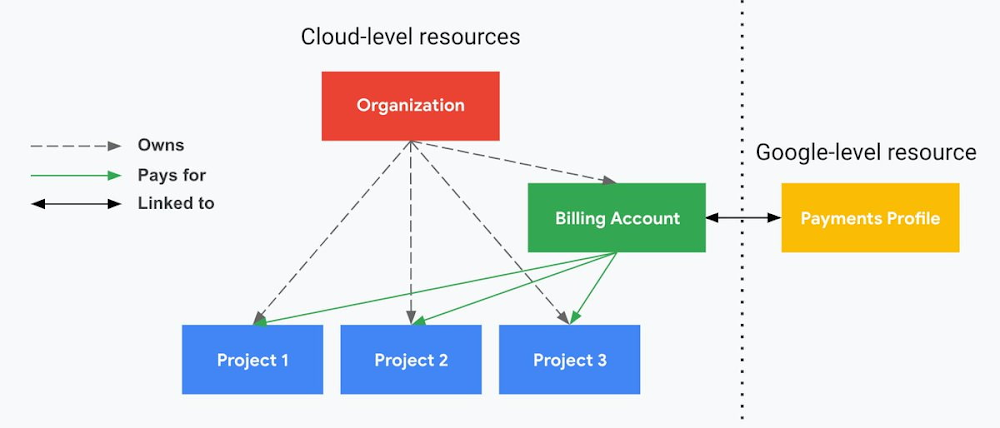
4. Billing that protects you from yourself
The project context gives you a logical container for the cost of the resources contained within it. My favorite part of this is that your billing entity is managed separately from the project itself. So you can delete a project and feel sure that all associated resources are gone and no longer racking up charges … without also trashing your ability to pay for future projects you might spin up.
(Related: the free tier does not charge you money unless you click a big button that basically says “YES, IT’S OK TO CHARGE ME MONEY.” This guarantee, combined with the familiarity of Google Accounts for access, are the main reasons I now recommend Google Cloud to beginners in my network who are looking for a safe place to learn and explore cloud.)
5. Organizational structure != billing structure
For organizations, billing is decoupled from the organization root. So permissions inheritance is a separate design decision from chargeback, as it should be. This keeps your Google Cloud footprint from converging toward Conway’s Law.
6. SSO that just works
Want to use the CLI? You get SSO out of the box with your Google Account—no corporate organization required, and no manual shuffling with config files and access keys. Or, better yet, you can use Cloud Shell to run gcloud commands right in your browser, even (especially?) on the docs pages. (Random trivia: I think Cloud Shell is the only native cloud service that has the same name across AWS, Azure, and Google Cloud–but Google’s version has been around the longest and as far as I can tell is the most fully-featured.)
7. One group to rule them all
Remember how user entities are just Google accounts? Guess what: you can use Google Groups to manage group access to IAM roles! That’s right: one set of users with permissions across docs, email, and cloud. It’s one reason why Google Workspace makes sense as a core piece of Google Cloud; it really does function like just another cloud service from an identity standpoint.
8. Never lose your place
In other clouds, I’ve experienced a problem I call the Timeout of Doom: when your console session expires, you’re left on a generic error screen and it’s up to you to figure out how to rebuild your context from scratch–starting with remembering what account you used in the first place. Imagine my delight to realize that reaching your Google Cloud console is as easy as bookmarking a single URL. console.cloud.google.com works and remembers who you are (or, at least, suggests the set of people you might be)—no mystery logouts or redirects.
9. Progressive complexity FTW
In my experience it’s been common for cloud providers to design most of their account features for organizations: if you’re an independent developer, you get more exposure to dangerous bills, less access to helpful SSO features, and generally must fend for yourself in a world that wasn’t really created with you in mind.
I love that Google Cloud has found a way to work with enterprises while still maintaining their roots as a cloud that developers love to use. Sign in with your personal Google account, attach it to an organization when-and-if you’re ready, and in the meantime you get the same thoughtfulness around SSO and billing as the giant shop down the street.
I’m not going to tell you my experience has been seamless; there are footguns here (every Google Workspace integration creates a new project?), and I’m still learning. But it’s that “intentionality” thing again. The Google Cloud identity and environment experience feels like it was designed, not just accreted; there’s an elegant simplicity to it that makes cloud feel fresh and exciting to me all over again. I can’t wait to see what’s next.
In the meantime, I highly encourage you to do what I did and spin up a free trial to try things out for yourself. Then hit me up on Twitter with your favorite Google Cloud identity or environment feature!
Find the Best Kept Security Secrets to Harness the Power of Organization Policy Service

2693
Of your peers have already read this article.
2:30 Minutes
The most insightful time you'll spend today!
The canvas of cloud resources is vast, ready for an ambitious organization to craft their digital masterpiece (or perhaps just their business.) Yet before the first brush of paint is applied, a painter in the cloud needs to think about their frame: What shape should it take, what material is it made of, how will it look as a border against the canvas of their cloud service. Google Cloud’s Organization Policy Service is just such a frame, a broad set of tools for our customer’s security teams to set broad yet unbendable limits for engineers before they start working.
Google Cloud’s Organization (org) Policy Service is one of our most dramatic features but is often under-appreciated by security teams. It provides for a separation of duties by focusing on what users can do, and lets the administrator set restrictions on specific resources to determine how they can be configured. This drives defense in depth from configuration errors as well as defense in depth from attacks. An org policy lets the administrator enforce compliance and conformance at a higher level than Identity and Access Management, which focuses on which users can access specific resources.
Org policies can reduce toil and can improve security at the scale needed by today’s cloud users. Financial services provider HSBC is one of Google Cloud’s largest customers and has been using org policies for years to help it manage cloud resources across its highly-regulated enterprise environment. As the company explains in this video, HSBC’s creative use of org policies manages more than 15,000 service accounts and 40,000 IT professionals. They control 6.5 million virtual machines per year. That’s 22,500 virtual machines per day, and only 2,500 of those VMs exist for more than 24 hours
HSBC prefers org policies instead of other preventative controls because they are native to Google Cloud and can be enforced independently of how the request originated (such as from Infrastructure-as-Code, Google Cloud services interacting with each other, or a user in the UI.) Detecting resource violations is expensive for many customers, and often comes too late to prevent harm. Org Policies can be deployed to prevent violations from occurring and eliminate detection and remediation costs.
Importantly, HSBC’s custom installation is designed so that org policy violations are immediately discoverable, which can help HSBC personnel quickly understand how to quickly and accurately correct an error condition. When an action violates org policy, an error code is returned telling the resource requester which policy was violated. Corresponding logs are generated for administrators to monitor and provide further troubleshooting.
Here are two additional use cases that further illustrate the power of organization policies.
- Organizations that operate in a region with rigorous data residency requirements can configure and enable the Location org policy to help ensure that all resources created (such as VMs, clusters, and buckets) are deployed in a particular cloud region.
- Admins who want to ensure that only trusted workloads are deployed for Google Kubernetes Engine (GKE) or Cloud Run may want to restrict developers to only use verified images in their deployment processes. They can create a custom org policy that targets GKE cluster resource type and create and update methods to block the creation or update of any clusters that do not have binary authorization enforced.
How it works
Google Cloud offers more than 80 org policies that can be used to restrict and govern interactions with Google Cloud services and resources across important domains such as security, reliability, and compliance. Org policies can help:
- Restrict resource and service access to the organization domain only, secure public access to resources, or stop service account key abuse.
- Enforce use of global or regional DNS, and global or regional load balancing, to Improve service reliability and availability.
- Specify which services can access resources, in which regions, and at what times in support of compliance objectives.
- Secure Virtual Private Cloud (VPC) networks and reduce data exfiltration risk by preventing data from leaving a specific perimeter.
See the Organization Policy Service list of constraints for more about org policies and constraints.
You can also use the recently introduced Custom Organization Policies to tailor guardrails so they meet your specific compliance and security requirements. With Custom Organization Policies, security administrators can create their own constraints using Common Expression Language (CEL) to define which resource configurations are allowed or denied. Administrators can develop and deploy new policies and constraints in minutes.
With great power comes great responsibility, so with that in mind we will soon be introducing Dry Run for Custom Org Policies. It will let users put a policy in an audit-only mode to observe behavior during real operations without putting production workloads at risk.
Getting started
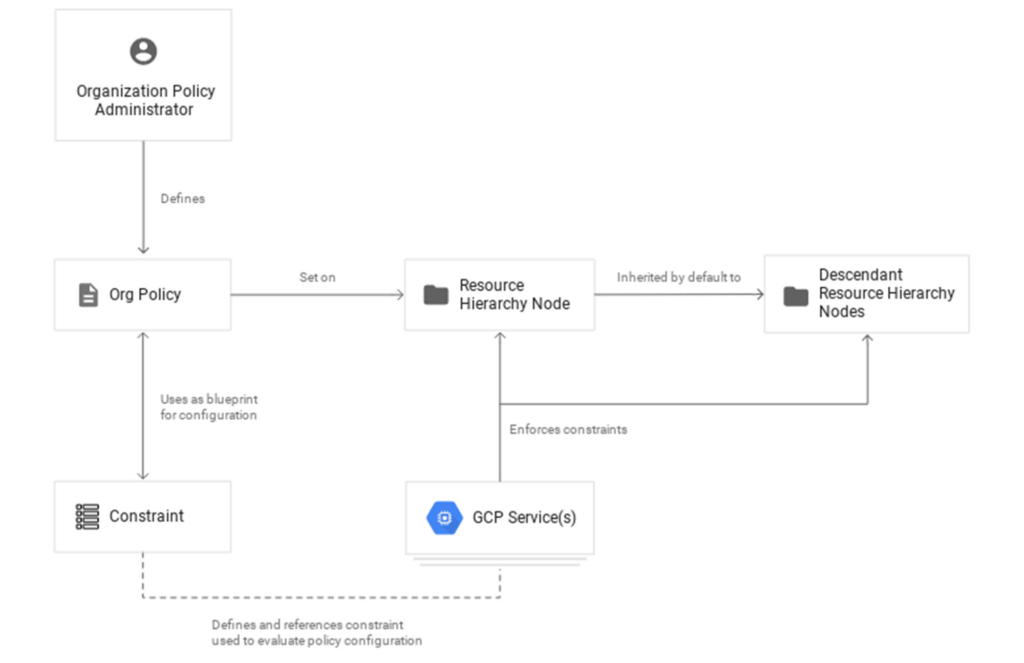
1. Setting up your first org policy is straightforward. An organization policy administrator enables a new organization policy on a Google Cloud organization, folder, or project in scope. Once set, the administrator then determines and applies the constraints. Here’s how it works:Design your constraint, which is a particular type of restriction against either a single Google Cloud service or a group of Google Cloud services. You can choose from the list of available built-in constraints by configuring desired restrictions and exceptions (based on tags) or create custom org policies.
It’s important to remember that descendants of the targeted resource hierarchy node inherit the org policy. By applying an organization policy to the root organization node, you can drive enforcement of that organization policy and configuration of restrictions across your organization.
2. Deploy the org policy to evaluate and allow or deny resource Create, Update, and Delete operations. This can be done through the Google Cloud console, gCloud, or via API.
3. Monitor audit logs and your Security Command Center Premium findings to detect and respond to policy violations.
Do I need an org policy?
Org policies can help maintain security and compliance at scale while also allowing development teams to work rapidly. Because they give you the ability to set broad guardrails, they can help ensure compliance without adding operational overhead and monitor policy violations.
To learn more about org policy, please review these resources:
- Read the Creating and Managing Organizations page to learn how to acquire an organization resource.
- Read about how to create and manage organization policies with the Google Cloud console.
- Learn how to define organization policies using constraints.
- Explore the solutions you can accomplish with organization policy constraints.
- Listen to the podcast where Vandy Ramadurai, Google Cloud’s Org Policy product manager, explains it all.
Google Workspace to Extend Digital Sovereignity for EU Organizations in Later Part of 2022
4808
Of your peers have already read this article.
2:00 Minutes
The most insightful time you'll spend today!
European organizations are moving their operations and data to the cloud in increasing numbers to enable collaboration, drive business value, and transition to hybrid work. However, the cloud solutions that underpin these powerful capabilities must meet an organization’s critical requirements for security, privacy, and digital sovereignty. We often hear from European Union policymakers and business leaders that ensuring the sovereignty of their cloud data, through regionalization and additional controls over administrative access, is crucial in this evolving landscape.
Today, we’re announcing Sovereign Controls for Google Workspace, which will provide digital sovereignty capabilities for organizations, both in the public and private sector, to control, limit, and monitor transfers of data to and from the EU starting at the end of 2022, with additional capabilities delivered throughout 2023. This commitment builds on our existing Client-side encryption, Data regions, and Access Controls capabilities.
Offering enhanced customer controls, including Client-side encryption
Encryption is an important technical control that limits a cloud provider’s access to customer data. Google Workspace already uses the latest cryptographic standards to encrypt all data at rest and in transit between our facilities. The European Data Protection Board recommendations include encryption as part of the supplementary measures to protect data. Google Workspace is leading the way on such measures with our Client-side encryption feature that allows customers to continue benefiting from the powerful innovations of Google Cloud while retaining complete confidentiality and control over their data.
Google Workspace’s unique approach to client-side encryption provides our customers with authoritative privacy control over their data through encryption keys that they can hold on site, within a nation’s borders, or within any other boundary they define. Google never has access to the keys or key holders, which means the data is indecipherable to us and we have no technical ability to access it. We deliver this level of encryption without the need for legacy desktop clients, while maintaining the same high-quality experience for your users such as online co-authoring.
Organizations can choose to use Client-side encryption pervasively across all their users, or create rules that apply to specific users, organizational units, or shared drives. Client-side encryption is now generally available for Google Drive, Docs, Sheets, and Slides, with plans to extend the functionality to Gmail, Google Calendar, and Meet by the end of 2022.
Expanding data location controls
Data regions already allow our customers to control the storage location of their covered data at-rest. We will enhance this capability by the end of 2023 through expanded coverage of data storage and processing in-region along with an in-country copy.
As employees and organizations adopt new ways of working in a hybrid world, they need secure access to data to drive key business outcomes. But this trend, combined with complex technical architectures, presents significant challenges to retaining control over where data resides.
Our cloud-native architecture means that Google Workspace functions fully within a browser, without requiring caches or installed software on employee devices. We adopt a zero-trust approach, with built-in security that provides controls to geo-fence devices and users through Context Aware Access. Moreover, admins can set sharing boundaries and define rules that govern user communication.
In short, we empower admins with critical capabilities that can give them granular control over the flow of their data without hindering the modern collaboration capabilities that form the foundation of Google Workspace. We are enabling organizations to strike the right balance between data location and collaboration across teams, partners, and customers.
Control and transparency for administrative access
When moving to a cloud-based service, organizations need greater visibility and control over all forms of administrative access to their systems, including who has access, the nature and circumstances of that access, and the ability to specify that only certain personnel—in designated countries or regions—have access. These capabilities are core to our approach for meeting evolving digital sovereignty standards.
Building on this approach, we will implement a series of new Access Controls by the end of 2023 that will enable customers to:
- Restrict and/or approve Google support access through Access Approvals.
- Limit customer support to EU-based support staff through Access Management.
- Ensure round-the-clock support from Google Engineering staff, when needed, with remote-in virtual desktop infrastructure .
- Generate comprehensive log reports on data access and actions through Access Transparency, which is already available in GA.
Sovereign Controls for Google Workspace will deliver digital sovereignty through a comprehensive set of capabilities for organizations working in and across EU regions. In parallel, Google Cloud will continue to provide customers with legal mechanisms for international data transfer, which will include making the protections offered by the new EU data transfer framework available once it is implemented.
We remain committed to equipping our customers in Europe and across the globe with powerful technical solutions that help them adapt to, and stay on top of, a rapidly evolving regulatory landscape. We’ve designed and built Google Workspace to operate on a secure foundation, providing capabilities to keep our users safe, their data secure, and their information private. Digital sovereignty is core to our ongoing mission in Europe and elsewhere, and a guiding principle that customers can rely on now and into the future.
Efficient, Safe and Dynamic Gaming Experience: Aristocrat’s Digital Journey on Google Cloud

4777
Of your peers have already read this article.
2:00 Minutes
The most insightful time you'll spend today!
Since Aristocrat’s founding in 1953, technology has constantly transformed gaming and the digital demands on our gaming business are a far cry from challenges we faced when we started. As we continue to expand globally, security and compliance are top priorities.
Managing IT security for several gaming subsidiaries and our core business became more complex as we entered into new markets and scaled up our number of users. We needed a centralized platform that could give us full visibility into all of our systems and efficient monitoring capabilities to keep data and applications secure. We also needed the ability to secure our systems without compromising user experiences.
We turned to Google Cloud and Splunk to better manage complexity and support highly efficient, secure, and more dynamic gaming experiences for everyone. We are committed to using today’s modern technologies to give players more optimal experiences.
Bringing our digital footprint into the cloud
When we set out on our digital transformation, we looked to address many business requirements.
These requirements included:
- Regulation: We wanted a platform that could efficiently address our industry’s stringent and global regulatory compliance requirements.
- Player experience: Our IT environment must support smooth gaming experiences to keep users engaged and satisfied.
- Scalability: As we grow and diversify, meeting the changing demands of an increasingly global gaming community, we need an easily scalable platform to align with our current and future needs.
Google Cloud offered us the perfect foundation through solutions such as Compute Engine, Google Kubernetes Engine, BigQuery, and Google Cloud Storage. These acted as the right infrastructure components for us for the following reasons:
- Google Cloud is globally accessible and supports compliance, helping to streamline security and regulatory processes for our team.
- With Google Cloud, we can manage our entire development and delivery processes globally with fast and efficient reconciliation of regional compliance requirements.
- When we need to adjust existing infrastructure or deliver new capabilities, Google Cloud accelerates the process and takes the heavy lifting off of our team.
- Google Cloud allows us to support tens of thousands of players on each of our apps while experiencing minimal downtime and low latency. The importance of this support can’t be underestimated in an industry where players have little to no patience if lags in games occur.
We migrated our back-office IT stack alongside our consumer-facing production applications to Google Cloud given our positive experiences with compliance, security, scalability, and process management. This migration has significantly accelerated our digital transformation while streamlining our infrastructure for faster and more cost-effective performance.
In many ways, Google Cloud has been, with maybe a pun intended, a game-changer for us. For instance, when we suddenly had to support a lot of remote work during the COVID-19 pandemic, native identity and access management tools in Google Cloud allowed us to retire costly VPNs used for backend access and quickly adopt a more easily managed, cost-effective zero-trust security posture.
Accessing vital third-party partners and managed services
Aristocrat has many IT needs best addressed in a multi-cloud environment. Google Cloud is particularly attractive given its strong cloud interoperability, as well as the many products and services available on Google Cloud Marketplace. The marketplace accelerated our deployment of key third-party apps including Splunk and Qualys.
Given the personal information we store and the global regulatory compliance statutes we must oblige, security lies at the heart of our business. Splunk is a critical component of our digital transformation because it offers solutions that provide the enhanced monitoring capabilities and visibility we need. The integration between Splunk and Google Cloud gives us confidence that our data is secure. We know our data can be secure in Google Cloud, while simplified billing through Google Cloud Marketplace makes payments and license tracking easier for our procurement team.
As part of our protected environment, we use the Splunk platform as our security information and event management system, leveraging the InfoSec app for Splunk that provides continuous monitoring and advanced threat detection to significantly improve our security.
We can manipulate and present data in Splunk in a way that provides us with a single pane-of-glass for our hybrid, multi-cloud environment and our third-party apps and systems. Splunk observability tools have likewise helped us to track browser-based applications like our online gaming apps to monitor details related to security and performance.
Splunk and Google Cloud have transformed how we operate. We can now quickly ingest and analyze data at scale within our refined approach to security management by offloading software management to Splunk and Google Cloud. This ability enables us to approach security more strategically, and positions us to integrate more AI/ML capabilities into our products for even greater governance and performance.
This is just the beginning of our journey with Splunk and Google Cloud. We’re excited to see the innovation we can continue bringing to the gaming community worldwide.
5 Compelling Ways to Practice the Principle of Least Privilege for Security Leaders

3562
Of your peers have already read this article.
4:30 Minutes
The most insightful time you'll spend today!
When it comes to security, managing access is a foundational capability—whether you’re talking about a physical space or your cloud infrastructure. If you were securing an office, you wouldn’t give every employee a master key that can open the front door, the mailbox, and the safe. Likewise, when you’re securing your cloud infrastructure, you should limit employees’ access based on their role and what they require to do their job.
This concept is known as the principle of least privilege, which NIST’s Computer Security Resource Center defines as: “A security principle that restricts the access privileges of authorized personnel… to the minimum necessary to perform their jobs.” In practice, this means assigning credentials and privileges only as needed to both users and services, and removing any permissions that are no longer necessary.
Keeping the principle of least privilege in mind, here are five practical tips to minimize the surface area of exposed resources on Google Cloud Platform (GCP) and defend against some common attacks.
Avoid excessive use of broad primitive roles
Primitive roles like Owner and Editor grant wide-ranging access to all project resources. To tighten access security, consider using more specific predefined roles in Cloud Identity and Access Management (IAM), or defining custom roles that are better suited to your organization. For example, if you have a Cloud SQL database, instead of granting the project-wide Editor role to everybody, you could grant the cloudsql.editor role to users who create new databases, cloudsql.client to those who only need to connect to existing databases, and limit cloudsql.admin to database administrators.
Our policy design page has some sample structures and policies for different types of organizations, including startups, large enterprises, and education and training customers.
Assign roles to groups, not individuals
If you assign an IAM role directly to an individual, they retain the rights granted by that role even if they change roles, move around your organization, or no longer require them. A safer and more maintainable option is to place users into logical groups. For example, to manage databases, you could create db-editors, db-viewers, and db-admins groups, and let users inherit roles from these groups:
Groups can be created within the Admin Console for any G Suite domain, or federated from an external tool like Active Directory. By using groups for ownership, you can also avoid “orphaned” projects and resources—where a project or resource has a single owner who leaves the organization.
You can assign roles at the organization, folder, project, or resource level. This lets larger organizations easily manage roles for, say, a specific developer team or the entire accounting department. Be aware, however, that a child resource cannot limit roles granted by a parent: a user’s project-level cloudsql.viewer role, for example, will override any resource-level restrictions on any database in the same project.
Reduce the risks of default service account behavior
Service accounts are a special type of account intended for apps that need to access data. If the app’s own private credentials are compromised, however, the attacker then has all the access granted to the app by the service account’s roles.
The Compute Engine default service account, which has the editor role, is enabled for all instances created in a project unless you specify otherwise.
Creating a custom service account to use for creating instances and limiting its roles to the minimum necessary significantly reduces risk. For example, many apps using Cloud SQL only need the cloudsql.client role that lets them connect to an existing database.
An alternative approach is to grant the instance service account minimal privileges and create dedicated service accounts for your apps. This gives you more fine-grained control over each app’s privileges, although you will need to carefully manage the service account credentials.
Reduce risk and control access to your project by using networking features
To enable inter-resource communication, new GCP projects initially have a default network connecting all resources in that project. This is convenient for development, but in this default configuration, if an attacker gains unauthorized access to one resource, they may be able to reach others as well.
To limit this risk, don’t use the default network in production and explicitly specify accepted source IP ranges, ports, and protocols in network firewalls. You should also separate sensitive apps into individual virtual private clouds (VPCs), and if inter-app connectivity is required, use a Shared VPC. In each VPC, use different subnets for public facing services (e.g., web servers and bastion hosts) and private backend services. Allocate public IPs only to instances in the public subnet and add firewall rules with network tags to control which services can communicate with each other. Finally, grant permission to create or modify firewalls and routes only to those directly responsible for the network.
The Secure Instances and Apps with Custom Networks codelab walks you through setting up the public/private subnet configuration above. The Policy design for customers article we mentioned earlier also contains sample network designs for common use cases. For guidance on the tradeoffs of single, multiple, and shared VPCs, see Best practices and reference architectures for VPC design.
Consider using managed platforms and services
If you deploy and manage your own applications, you are responsible for security configuration, including the maintenance of accounts and permissions. You can limit your responsibilities by hosting your apps on managed platforms like Cloud Run, App Engine, or Cloud Functions, or by using fully managed services for databases and processing frameworks like Cloud SQL for MySQL and Postgres, Cloud Dataproc for Hadoop and Spark, and Cloud Memorystore for Redis.
A final note
Security is a priority in all aspects of Google Cloud, but cloud security is a shared responsibility, and ultimately you are responsible for making the right configuration and product choices for your organization to protect your data on GCP. These tips are a great starting point to help reduce your attack surface and help you make more informed risk decisions.
A Look Back on Google Cloud’s Data Analytics Development Efforts from June

5974
Of your peers have already read this article.
4:00 Minutes
The most insightful time you'll spend today!
June is the month that holds the summer solstice, and some of us in the northern hemisphere get to enjoy the longest days of sunshine out of the entire year. We used all the hours we could in June to deliver a flurry of new features across BigQuery, Dataflow, Data Fusion, and more. Let’s take a look!
Simple, Sophisticated, and Secure
Usability is a key tenant of our data analytics development efforts. Our new user-friendly BigQuery improvements this month include:
- Flexible data type casting
- Formatting to change column descriptions
- GRANT/REVOKE access control commands using SQL
We hope this will delight data analysts, data scientists, DBAs, and SQL-enthusiasts who can find out more details in our blog here.
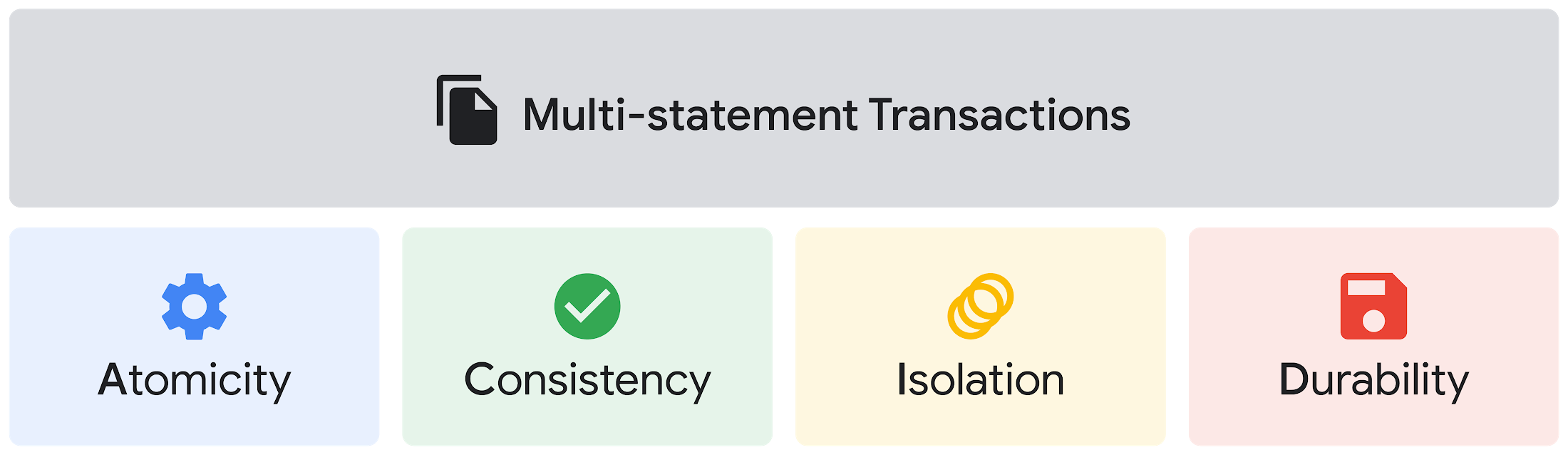
Beyond simplifying commands, we also recognize that it’s equally important to have more sophistication when dealing with transactions. That’s why we introduced multi-statement transactions in BigQuery.
As you probably know, BigQuery has long supported single-statement transactions through DML statements, such as INSERT, UPDATE, DELETE, MERGE and TRUNCATE, applied to one table per transaction. With multi-statement transactions, you can now use multiple SQL statements, including DML, spanning multiple tables in a single transaction.
This means that any data changes across multiple tables associated with all statements in a given transaction are committed atomically (all at once) if successful—or all rolled back atomically in the event of a failure.
We also know that organizations need to control access to data, down to the granular level and that, with the complexity of data platforms increasing day by day, it’s become even more critical to identify and monitor who has access to sensitive data.
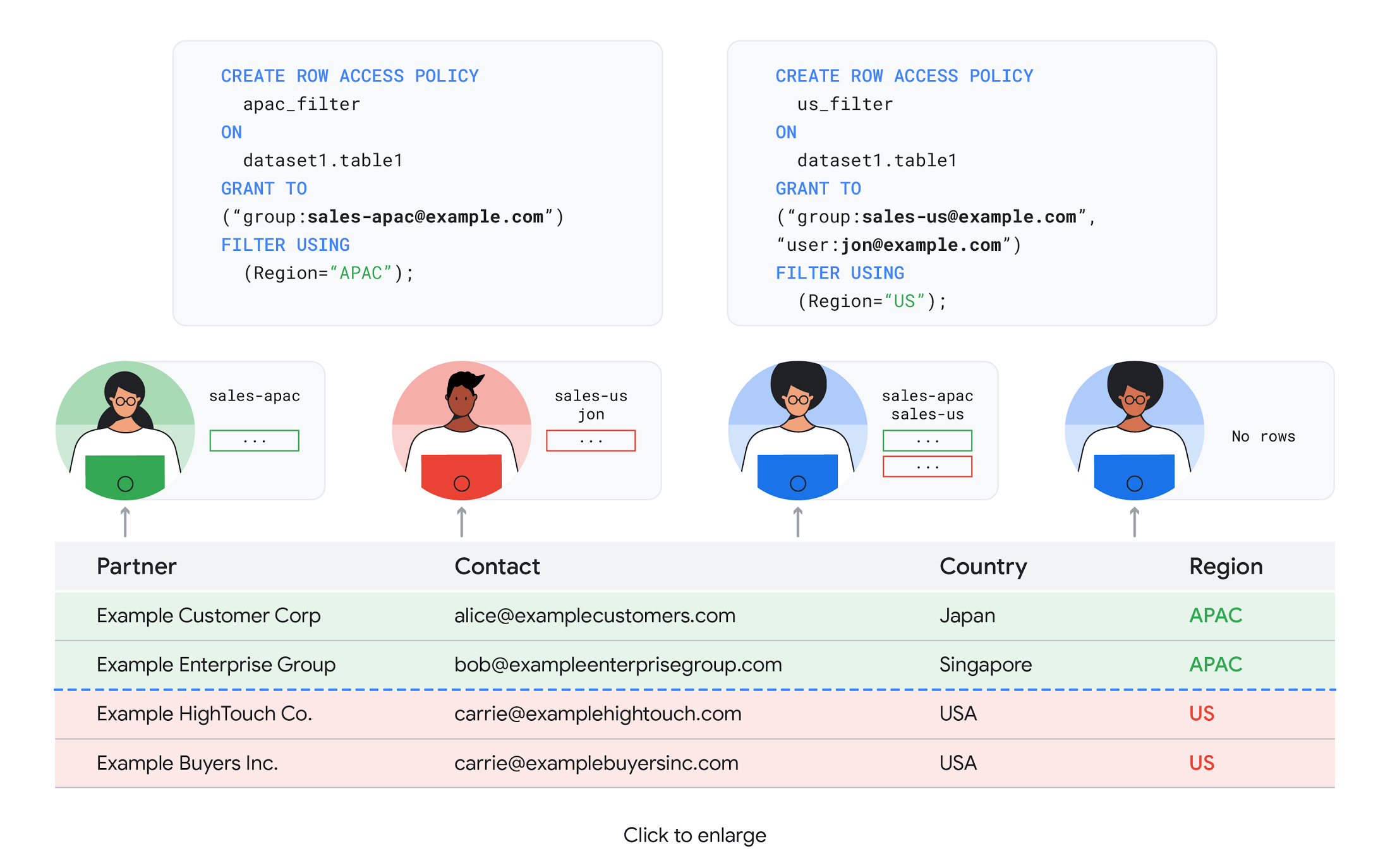
To help address these needs, we announced the general availability of BigQuery row-level security. This capability gives customers a way to control access to subsets of data in the same table for different groups of users. Row-level security in BigQuery enables different user personas access to subsets of data in the same table and can easily be created, updated, and dropped using DDL statements. To learn more, check out the documentation and best practices.
Simple, Safe, and Smart
Beyond building a simpler, more sophisticated and more secure data platform for customers, our team has been focused on providing solutions powered by built-in intelligence. One of our core beliefs is that for machine learning to be adopted and useful at scale, it must be easy to use and deploy.
BigQuery ML, our embedded machine learning capabilities, have been adopted by 80% of our top customers around the globe and it has become a cornerstone of their data to value journey.
As part of our efforts, we announced the general availability of AutoML tables in BigQuery ML. This no-code solution lets customers automatically build and deploy state-of-the-art machine learning models on structured data. With easy integration with Vertex AI, AutoML in BQML makes it simple to achieve machine learning magic in the background. From preprocessing data to feature engineering and model tuning all the way to cross validation, AutoML will “automagically” select and ensemble models so everyone—even non-data scientists—can use it.
Want to take this feature for a test drive? Try it today on BigQuery’s NYC Taxi public dataset following the instructions in this blog!
Speaking of public datasets, we also introduced the availability of Google Trends data in BigQuery to enable customers to measure interest in a topic or search term across Google Search. This new dataset will soon be available in Analytics Hub and will be anonymized, indexed, normalized, and aggregated prior to publication.
Want to ensure your end-cap displays are relevant to your local audience? You can take signals from what people are looking for in your market area to inform what items to place. Want to understand what new features could be incorporated into an existing product based on what people are searching for? Terms that appear in these datasets could be an indicator of what you should be paying attention to.
All this data and technology can be put to use to deploy critical solutions to grow and protect your business. For example, it can be difficult to know how to define anomalies during detection. If you have labeled data with known anomalies, then you can choose from a variety of supervised machine learning model types that are already supported in BigQuery ML.
But what if you don’t know what kind of anomaly to expect, and you don’t have labeled data? Unlike typical predictive techniques that leverage supervised learning, organizations may need to be able to detect anomalies in the absence of labeled data.
That’s why, we were particularly excited to announce the public preview of new anomaly detection capabilities in BigQuery ML that leverage unsupervised machine learning to help you detect anomalies without needing labeled data.
Our team has been working with a large number of enterprises who leverage machine learning for better anomaly detection. In financial services for example, customers have used our technology to detect machine-learned anomalies in real-time foreign exchange data.
To make it easier for you to take advantage of their best practices, we teamed up with Kasna to develop sample code, architecture guidance, and a data synthesizer that generates data so you can test these innovations right away.
Simple, Scalable, and Speedy
Capturing, processing and analyzing data in motion has become an important component of our customer architecture choices. Along with batch processing, many of you need the flexibility to stream records into BigQuery so they can become available for query as they are written.
Our new BigQuery Storage Write API combines the functionality of streaming ingestion and batch loading into a single API. You can use it to stream records into BigQuery or even batch process an arbitrarily large number of records and commit them in a single atomic operation.
Flexible systems that can do batch and real-time in the same environment is in our DNA: Dataflow, our serverless, data processing service for streaming and batch data was built with flexibility in mind.
This principle applies not just to what Dataflow does but also how you can leverage it—whether you prefer using Dataflow SQL right from the BigQuery web UI, Vertex AI notebooks from the Dataflow interface, or the vast collection of pre-built templates to develop streaming pipelines.
Dataflow has been in the news quite a bit recently. You might have noted the recent introduction of Dataflow Prime, a new no-ops, auto-tuning functionality that optimizes resource utilization and further simplifies big data processing. You might have also read that Google Dataflow is a Leader in The 2021 Forrester Wave™: Streaming Analytics, giving Dataflow a score of 5 out of 5 across 12 different criteria.
We couldn’t be more excited about the support the community has provided to this platform. The scalability of Dataflow is unparalleled and as you set your company up for more scale, more speed, and “streaming that screams”, we suggest you take a look at what leaders at Sky, RVU or Palo Alto Networks have already accomplished.
If you’re new to Dataflow, you’re in for a treat: this past month, Priyanka Vergadia (AKA CloudGirl) released a great set of resources to get you started. Read her blog here and watch her introduction video below!
https://youtube.com/watch?v=WRspZRG9e90%3Fenablejsapi%3D1%26
Simple structure that sticks together
We thrive to be the partner of choice for your transformation journey, regardless where your data comes from and how you choose to unify your data stack.
Our partners at Tata Consultancy Services (TCS) recently released research that highlights the importance of a unifying digital fabric and how data integration services like Google Cloud Data Fusion can enable their clients to achieve this vision.
We also announced SAP Integration with Cloud Data Fusion, Google Cloud’s native data integration platform, to seamlessly move data out of SAP Business Suite, SAP ERP and S4/HANA. To date, we provide more than 50 pipelines in Cloud Data Fusion to rapidly onboard SAP data.
This past month, we introduced our SAP Accelerator for Order to Cash. This accelerator is a sample implementation of the SAP Table Batch Source feature in Cloud Data Fusion and will help you get started with your end-to-end order to cash process and analytics.
It includes sample Cloud Data Fusion pipelines that you can configure to connect to your SAP data source, perform transformations, store data in BigQuery, and set up analytics in Looker. It also comes with LookML dashboards which you can access on Github.
Countless great organizations have chosen to work with Google for their SAP data. In June, we wrote about ATB Financial’s journey and how the company uses data to better serve over 800,000 customers, save over CA$2.24 million in productivity, and realize more than CA$4 million in operating revenue through “D.E.E.P”, a data exposure enablement platform built around BigQuery.
Finally, if you are an application developer looking for a unified platform that brings together data from Firebase Crashlytics, Google Analytics, Cloud Firestore, and third party datasets, we have good news!
This past month, we released a unified analytics platform that combines Firebase, BigQuery, Google Looker and FiveTran to easily integrate disparate data sources, and infuse data into operational workflows for greater product development insights and increased customer experience. This resource comes with sample code, a reference guide and a great blog! We hope you enjoy it. See you all next month!
https://youtube.com/watch?v=L25Vfzr2Ciw%3Fenablejsapi%3D1%26
More Relevant Stories for Your Company

Investing for Future: Why Shifting Security Left Helps Your Bottom Line
The concept of "shifting left" has been widely promoted in the software development lifecycle. The concept is that introducing security earlier, or leftwards, in the development process will lead to fewer software-related security defects later, or rightwards, in production. Shifting cloud security left can help identify potential misconfigurations earlier in

Google Cloud Announces General Availability of BigQuery Row-level Security
Data security is an ongoing concern for anyone managing a data warehouse. Organizations need to control access to data, down to the granular level, for secure access to data both internally and externally. With the complexity of data platforms increasing day by day, it's become even more critical to identify

reCAPTCHA Enterprise Fraud Prevention: Stop Payment Fraud with Google’s Intelligence
Today, we are putting the power of Google’s insights and intelligence in the hands of risk, fraud, and security teams everywhere. We are pleased to announce the general availability of reCAPTCHA Enterprise Fraud Prevention, a new product that uses Google's own fraud models, machine learning, and intelligence from protecting more

IT Leaders are Prioritizing Organizations’ Sustainability Goals: Study Finds
The global-wide interruptions of the coronavirus pandemic provided the opportunity for businesses to take a closer look at how we work, learn, live, and consume. With work stoppages and quarantine orders in place, carbon emissions and pollution levels saw significant reductions, highlighting how business and environmental sustainability are linked. As
