





Google Cloud Announces General Availability of BigQuery Row-level Security

6622
Of your peers have already read this article.
3:00 Minutes
The most insightful time you'll spend today!
Data security is an ongoing concern for anyone managing a data warehouse. Organizations need to control access to data, down to the granular level, for secure access to data both internally and externally. With the complexity of data platforms increasing day by day, it’s become even more critical to identify and monitor access to sensitive data. In many cases, sensitive data is co-mingled with non-sensitive data, and access restrictions to sensitive data need to be enabled based on factors like data location or presence of financial information. There may also be nuances where data is sensitive for some groups of users, while for others, it is not.
Today, we’re pleased to announce the general availability of BigQuery row-level security, which gives customers a way to control access to subsets of data in the same table for different groups of users. Row-level security (RLS) extends the principle of least privilege access and enables fine-grained access control policies in BigQuery tables. BigQuery currently supports access controls at the project-, dataset-, table- and column-level. Adding RLS to the portfolio of access controls now enables customers to filter and define access to specific rows in a table based on qualifying user conditions—providing much needed peace of mind for data professionals.
“Our digital transformation and migration of data to the cloud magnifies the business value we can extract from our information assets. However, granular data access control is essential to comply with international regulatory and contractual requirements. BigQuery row-level security helps us comply with data residency and export restrictions,” says Jarrett Garcia, Iron Mountain’s Enterprise Data Platform Senior Director. “It enables us to manage fine-grained access controls without replicating data. What used to take months for approval and access provisioning can now be done more efficiently and effectively. We are looking forward to implementing additional data security capabilities on the BigQuery roadmap to address other critical business use cases.”
How BigQuery row-level security works
Row-level security in BigQuery enables different user personas access to subsets of data in the same table. Customers who are currently using authorized views to enable these use cases can leverage RLS for ease of management. To express the concept of RLS, we have introduced a new entity in BigQuery called row access policy. Row access policies map a group of user principals to the rows that they can see, defined by a SQL filter predicate.
Secure logic rules created by data owners and administrators determines which user can see which rows through the creation of a row-level access policy. The row-level access policies created on a target table by administrators or data owners are applied when a query is run on the table. One table can have multiple policies applied to it.
Below is an example, where row-level access policies have been created to filter data based on users’ “region”.

In the illustrated scenario above, row-level access policies have been created to verify a querying user’s region and to give them access only to the subset of data relevant to that region. Access policies are granted to a grantee list which support all types of IAM principles such as individual users, groups, domains or service accounts. In this example, when a user queries the table, row-level access policies are evaluated to assess which, if any, policies are applicable to that user. The group ‘sales-apac’ is granted access to view a subset of rows where region = ‘APAC’ whereas the group ‘sales-us’ is granted access to view a subset of rows where the region = ’US’. Likewise, users in both groups will see rows in both regions, and users in neither group will not see any rows.
Row-level access policies can also be created using the SESSION_USER() function to restrict access only to rows that belong to the user running the query. If none of the row access policies are applicable to the querying user, the user will have no access to the data in the table.
When a user queries a table with a row-level access policy, BigQuery displays a banner notice indicating that their results may be filtered by a row-level access policy. This notice displays even if the user is a member of the `grantee_list`.

When to put BigQuery row-level security to work
Row-level access policies are useful when you have a need to limit access to data based on filter conditions. The row-access policies’ filter predicate supports arbitrary SQL, and is conceptually similar to the WHERE clause of a SQL query. Filter predicates support the SESSION_USER() function to restrict access only to rows that belong to the user running the query. If none of the row access policies are applicable to the querying user, the user will have no access to the data in the table. Currently, the column used for filtering must be in the table, but we anticipate adding support for subqueries in the filter expression, opening up access to use cases where data is filtered based on lookup tables and calculated values. Row-level access policies can be created, updated and dropped using DDL statements. You will be able to see the list of row-level access policies applied to a table using the BigQuery schema pane in the Cloud Console, which simplifies the management of policies per table, or by using the bq command-line tool.
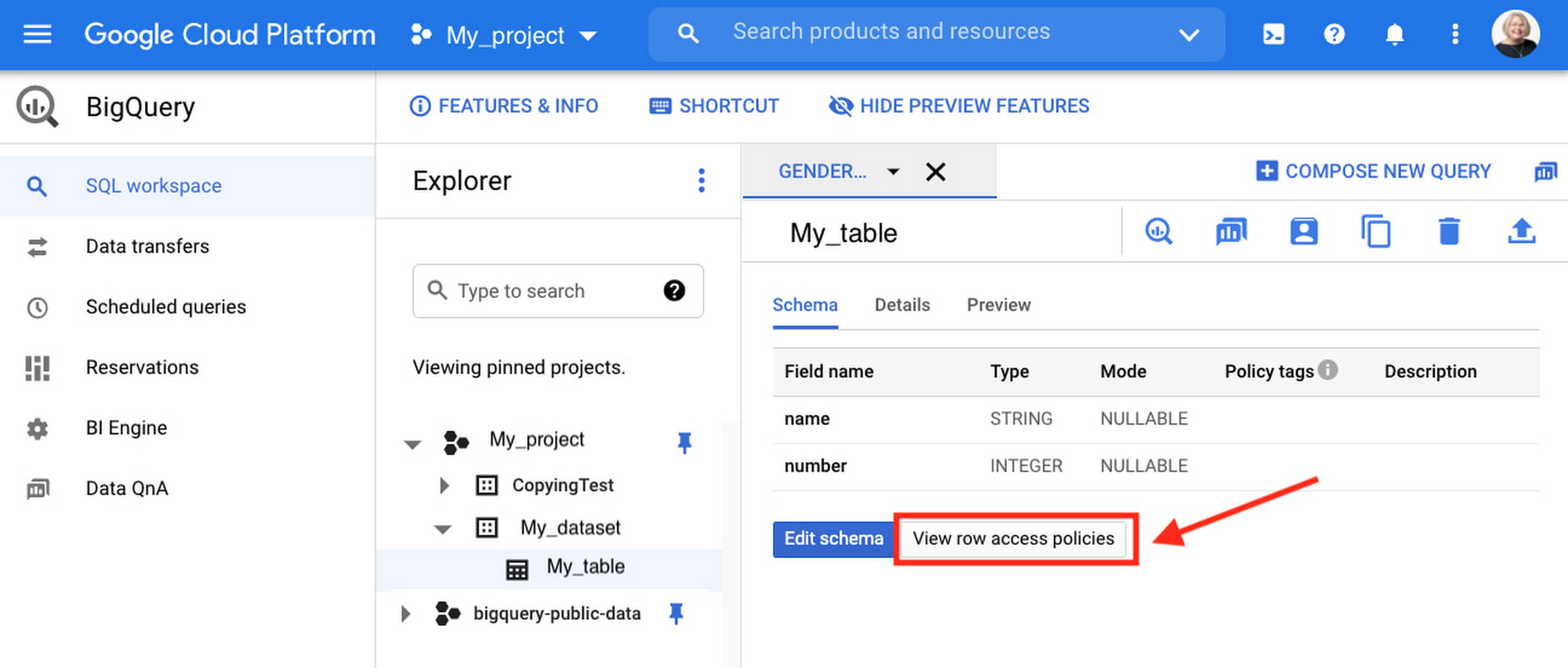
Row-level security is compatible with other BigQuery security features, and can be used along with column-level security for further granularity. Since row-level access policies are applied on the source tables, any actions performed on the table will inherit the table’s associated access policies, to ensure access to secure data is protected. Row-level access policies are applicable to every method used to access BigQuery data (API, Views, etc).
Try it out
We’re always working to enhance BigQuery’s (and Google Cloud’s) data governance capabilities, to provide more controls around managing your data. With row-level security, we are adding deeper protections for your data. You can learn more about BigQuery row-level security in our documentation and best practices.
Ensuring Ironclad Security: Our Validation Process for the Confidential Space

2589
Of your peers have already read this article.
2:30 Minutes
The most insightful time you'll spend today!
We’re pleased to announce that Confidential Space, our new solution that allows you to control access to your sensitive data and securely collaborate in ways not previously possible, is now available in public Preview. First announced at Google Cloud Next, Confidential Space can offer many benefits to securely manage data from financial institutions, healthcare and pharmaceutical companies, and Web3 assets. Today, we will explore some security properties of the Confidential Space system that makes these solutions possible.
Confidential Space uses a trusted execution environment (TEE), which allows data contributors to have control over how their data is used and which workloads are authorized to act on the data. An attestation process and hardened operating system image helps to protect the workload and the data that the workload processes from an untrusted operator.
The Confidential Space system has three core components:
- The workload is a containerized image with a hardened OS that runs in a cloud-based TEE. You can use Confidential Computing as the TEE that offers hardware isolation and remote attestation capabilities.
- The attestation service, which is an OpenID Connect (OIDC) token provider. This service verifies the attestation quotes for TEE and releases authentication tokens. The tokens contain identification attributes for the workload.
- A managed cloud protected resource, such as a Cloud Key Management Service key or Cloud Storage bucket. The resource is protected by an allow policy that grants access to authorized federated identity tokens.
The system can help ensure that access to protected resources is granted only to authorized workloads. Confidential Space also can help protect the workload from inspection and tampering, before and after attestation.
In our published Confidential Space Security Overview research paper, we explore several potential attack vectors against a Confidential Space system and how it can mitigate those threats. Notably, the research notes how Confidential Space can protect against malicious workload operators and administrators, and malicious outside adversaries, who are attempting to create rogue workload attestations.
Through these protections, Confidential Space establishes confidence that only the agreed upon workloads will be able to access sensitive data. The research also highlights some of the extensive security reviews and tests executed to identify potential weak points in the system, including domain expert reviews, meticulous security audits, and functional and fuzz testing.
We asked the NCC Group for an independent security assessment of Confidential Space to analyze its architecture and implementation. NCC Group leveraged their experience reviewing other Google Cloud products to dig deep into Confidential Space.
The NCC Group’s extensive review, which included penetration testing and automated security scanning, found zero security vulnerabilities. In their report, the architecture review highlights how the security properties are achieved through the coordination of measured boot with vTPM attestation, reduced attack surface with constricted administrator controls and access, workload measurement and enforced launch policy, and resource protection policy based on attested workload runtime properties.
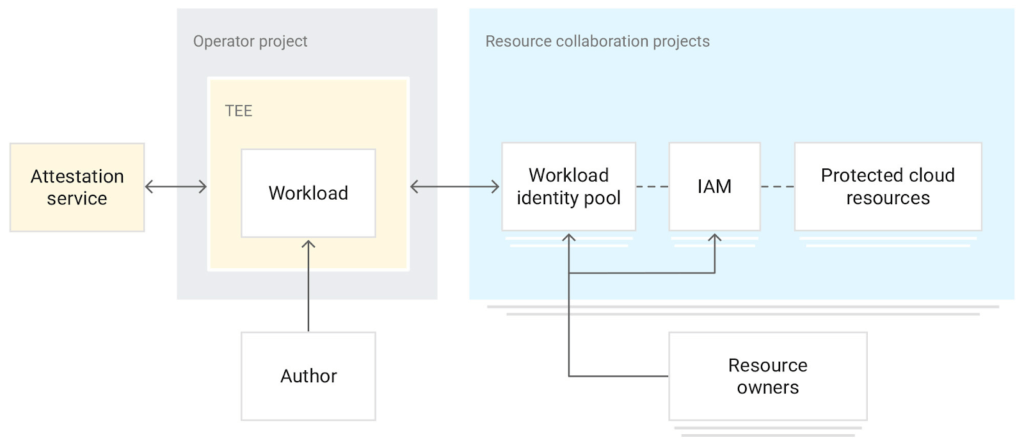
The combination of these attributes creates powerful security properties, gating release of data on runtime measurements of the actual workload code and environment instead of just user and service account credentials. Confidential Space provides a platform that includes:
- A dependable workload attestation, including workload code measurement, arguments and environment, and operating environment claims
- A fully-managed attestation verification service that validates expected environmental attestation claims
- A policy engine allowing for arbitrarily complex (or extremely simple) policy to be created around those claims
- A mechanism to attach those policies to Google Cloud resources
Together, the platform provides a mechanism where one can ensure that their data is only ever released into trusted workloads that will not abuse that data.
Take a look at our documentation and codelab and take it for a spin. We hope that Confidential Space can inspire organizations to solve their use cases around multi-party collaboration with sensitive data; please contact your Google Cloud sales representative if you have any questions.
How Firewall Insights can Simplify Corporate Firewall Rules

3124
Of your peers have already read this article.
3:30 Minutes
The most insightful time you'll spend today!
Corporate firewalls typically include a massive number of rules, which accumulate over time as new workloads are added. When rules stack up piecemeal like this, misconfigurations occur that, at best, create headaches for security administrators, and at worst, create vulnerabilities that lead to security breaches.
To address this, we have introduced the Firewall Insights module in our Network Intelligence Center, which provides a single console for managing Google Cloud network visibility, monitoring and troubleshooting.
What are Firewall insights?
Historically, there hasn’t been an easy way to deal with the accumulation of complicated firewall rules. That was until we created Firewall Insights, which provides metrics reports and insight reports. These two reports contain information about firewall usage and the impact of various firewall rules on your VPC network. Even better, these insights and metrics are integrated into your Google Cloud Console for the VPC firewall and are also available via APIs.
You can use metrics reports to verify that firewall rules are being used appropriately and as intended. This report can uncover leftover rules from the past that are not actively used, review that the firewall rules allow or deny what is intended, perform live debugging of connections dropped, and leverage Cloud Monitoring to discover malicious attempts to access your network.
You can use insight reports to identify firewall misconfigurations, detect security attacks, and optimize and tighten your security rules.
Let’s take a look at how these reports work.
Metrics Report, a deeper dive
Metrics insights analyzes your VPC firewalls usage by tracking metrics such as firewall hit counts and last used. Let’s check this out with an example:
When you navigate to your VPC network and click on Firewall, ensure that you have selected Logs, Hit count and also Last hit in the column display options:
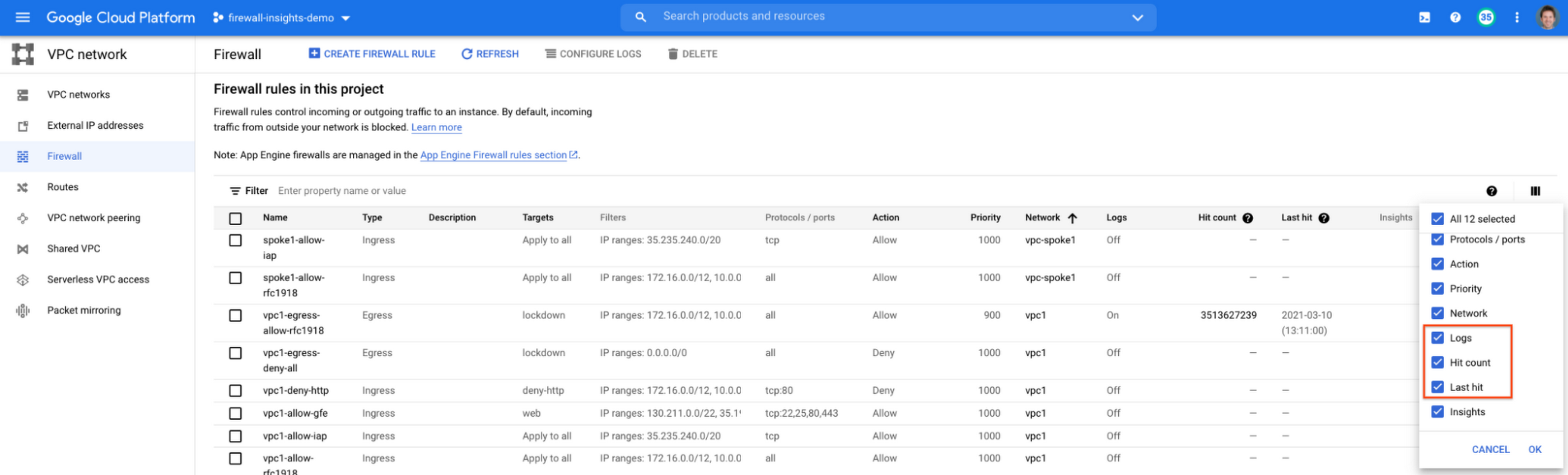
After this is enabled, now you should be able to see your VPC firewall rules with the hit count and last hit metrics. In the image below you can see that if logs are not enabled for rules, hit count and last hit metrics will not be collected. If logs are enabled, these details are collected, and shown in the VPC firewalls console.
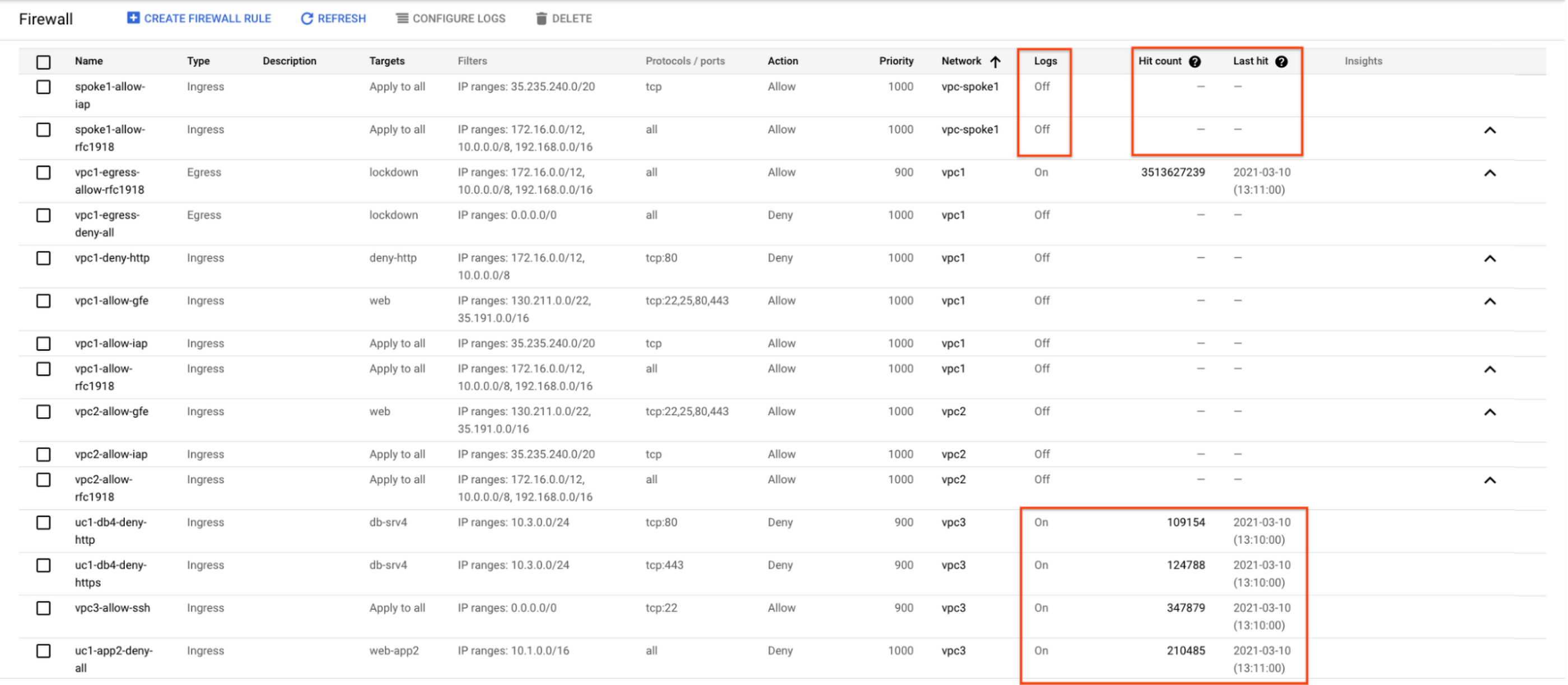
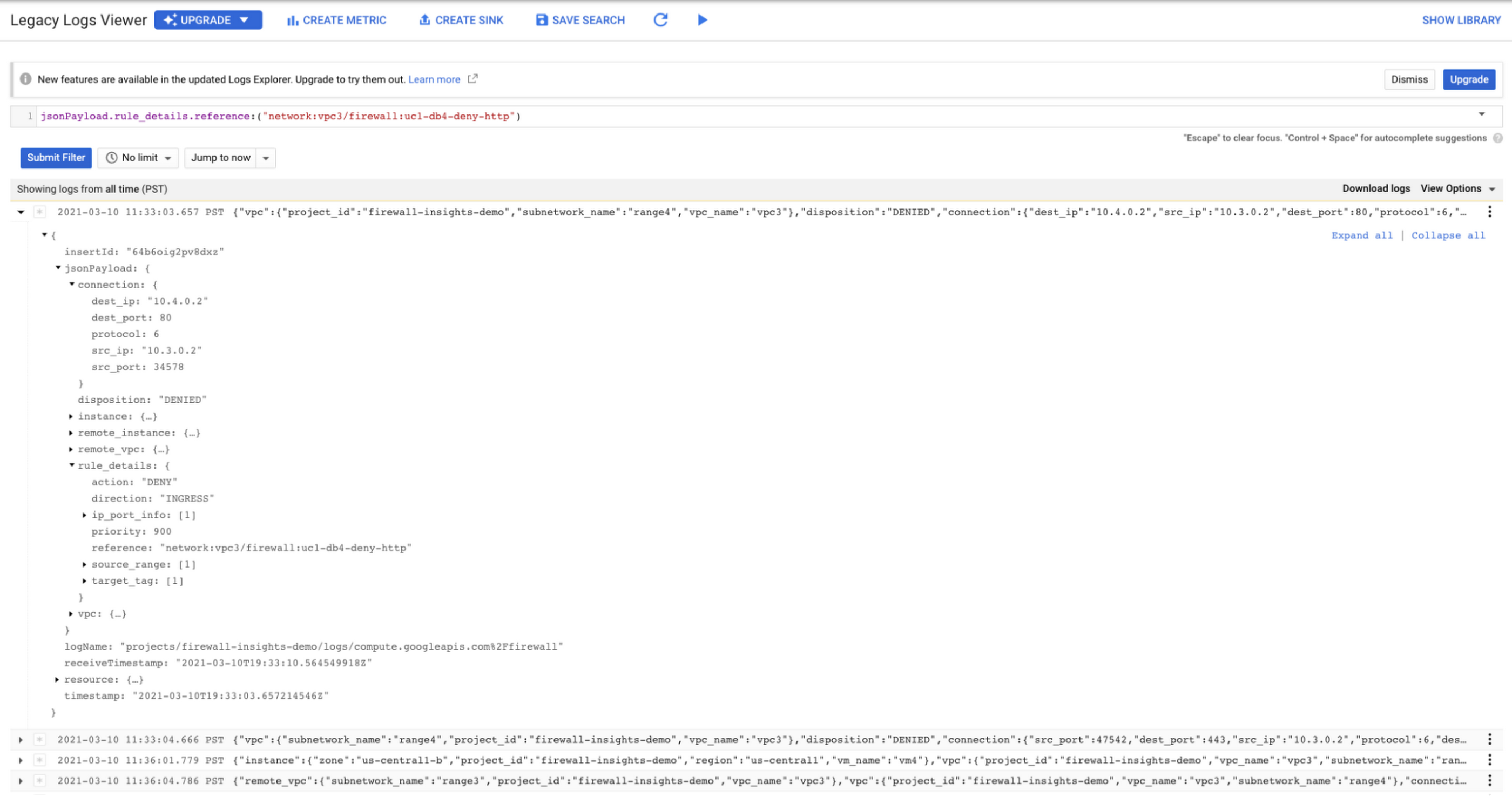
As you can see in Figure 1.2, each firewall rule which has logging enabled will show hit counts, so based on the example above, the rule “uc1-db4-deny-http” has been hit 109,154 times, the last time being 2021-03-10 (13:10:00). If you want to dive even deeper, you can click on the hit count and this will bring you to the logs viewer page where you can expand these logs and analyze all the details:
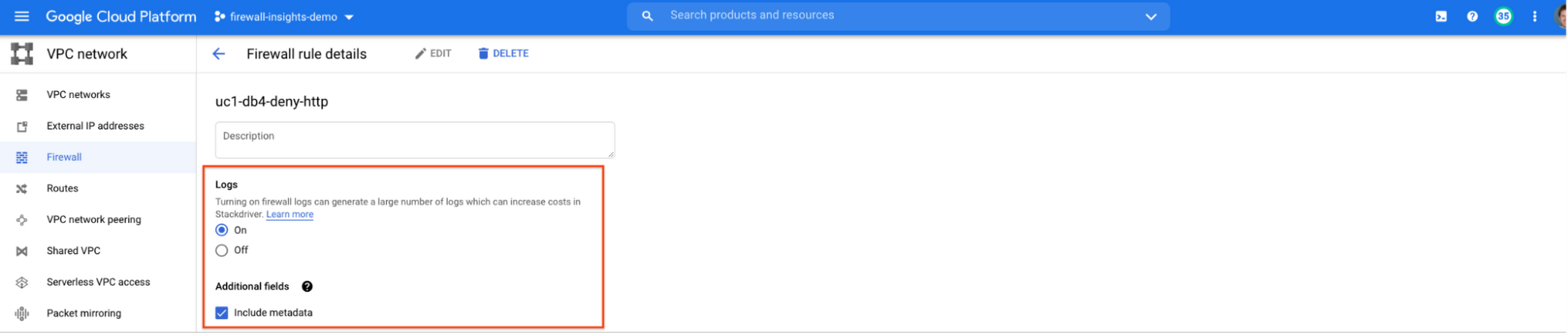
In order to enable logs for a particular firewall rule, you can edit it and turn logs on. By default, metadata is added in firewall logs. If you want to reduce the log size, you can do so by excluding these additional fields. Excluding these metadata fields will not impact the functionality of Firewall Insights.
From the “Firewall” page, you can also multi-select a group of firewall rules and turn on all logs at once.
Firewall rule usage metrics are accurate only for the period of time during which Firewall Rules Logging is enabled.
Insights Report, a deeper dive
Insights Report provides an intelligent analysis of the configuration of your firewalls. A report can contain one or more insights.
We will see examples now about the different insight reports which include:
- Shadowed firewall rules
- Allow rules with no hit in the last six weeks
- Deny rules with hits in the last 24 hours
By definition, a shadowed rule is a VPC firewall rule that is completely overshadowed by one or more firewall rules with higher or equal priority. We call that shadowing rules. Let’s see an example on how to find shadowed rules:Let’s say that you try to use ping between two VMs but it fails. Let’s take a look at the firewall rules applied to the VM:
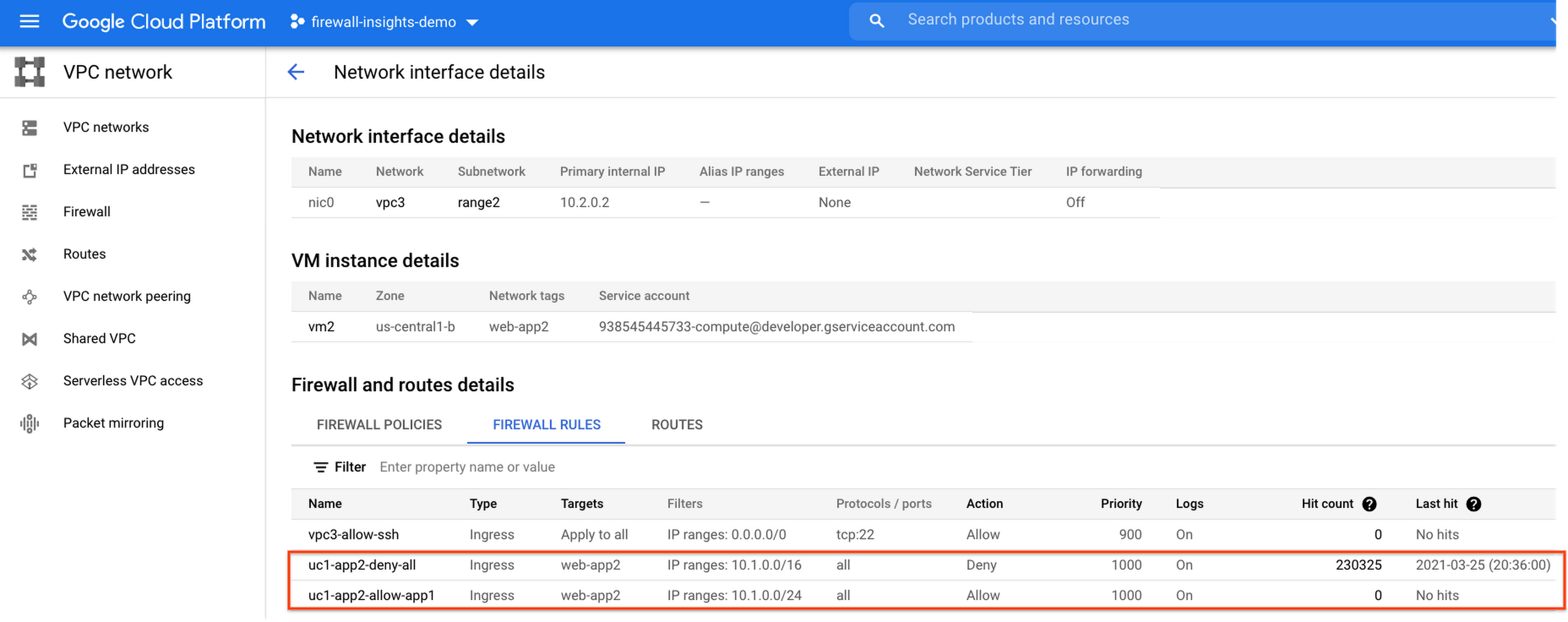
If we look closely, we can see that there are two rules with the same target tag, and those are almost identical except their source IP range. The IP range of the deny rule “uc1-app2-deny-all” includes the IP range of the rule allow “uc1-app2-allow-app1”. Therefore, we can see that “uc1-app2-allow-app1” is shadowed by “uc1-app2-deny-all”, and the ping between these VMs failed due to that.
To avoid such incidents in the future, Firewall Insights provides you with a convenient list of rules overshadowed by other firewall rules.
To see shadowed rules, you can click on the column selector, and add “Insights” to the firewall and route details:

Once this is applied, you will be able to see shadowed rules here:

Alternatively, you can navigate to Network Intelligence > Firewall Insights, where we will see the shadowed rule report:
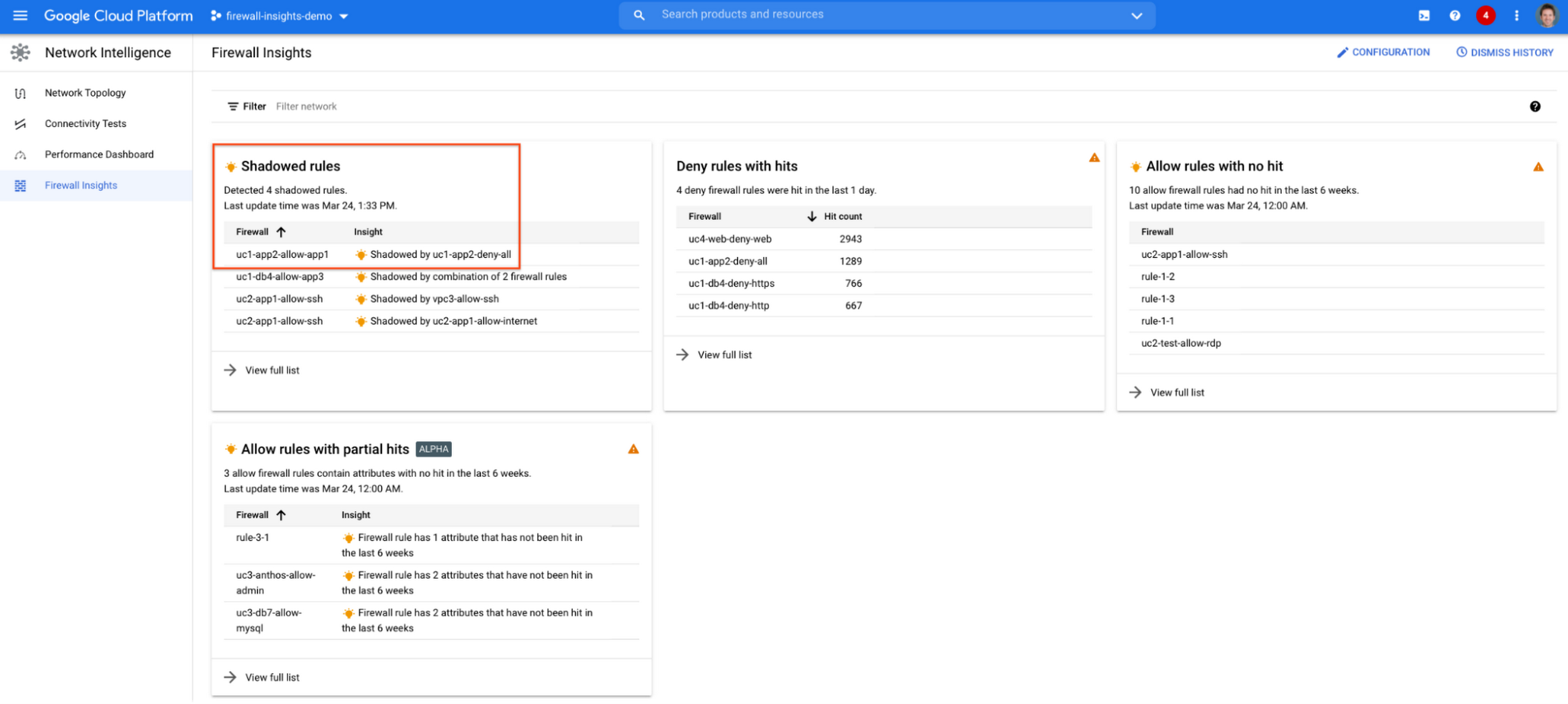
If we click on the insight we will get more details:

Going back to the firewall insights card (Figure 1.8), we can also identify that “uc1-db4-allow-app3” is shadowed by a combination of two rules and if we clicked on the insight this would provide all the details.
From the Firewall Insights dashboard, let’s move on to “allow rules with no hit”, where we can see firewall rules that have not logged any hits in the past six weeks. Such rules could be as a result of a misconfiguration, or leftover rules from past deployments. Tighten your security boundaries by identifying and removing such rules. If we go back to Network Intelligence > Firewall Insights, we can see allow rules with no hit:

We can drill down to view the full list of rules with no hit. We can see, for instance, one of the rules, the bottom one “uc2-app1-allow-internet”, might be a leftover rule to allow internet access from a past deployment, which means it has little likelihood of being hit in the future. So you may want to consider removing it from the rule set:

Click on the firewall rule to review all the details, and take a look at the prediction, which is made based on the hit pattern that we saw for similar rules in the same organization:

Let’s go back to the Firewall Insights dashboard and move on to the last category, “deny rules with hits in the last 24 hours”, which help you capture the traffic blocked by deny rules. These traffic types could indicate external attacks into your VPC network, or compromised VM instances attempting to send traffic out of your network. Let’s examine future hit prediction on a firewall rule. Navigate to Network Intelligence > Firewall Insights and take a look at the deny rules with hits card:

If your click on the “uc4-web-deny-web” rule, you can see the hit count monitoring, and if you click on the hit number we can dive deeper in the logs:
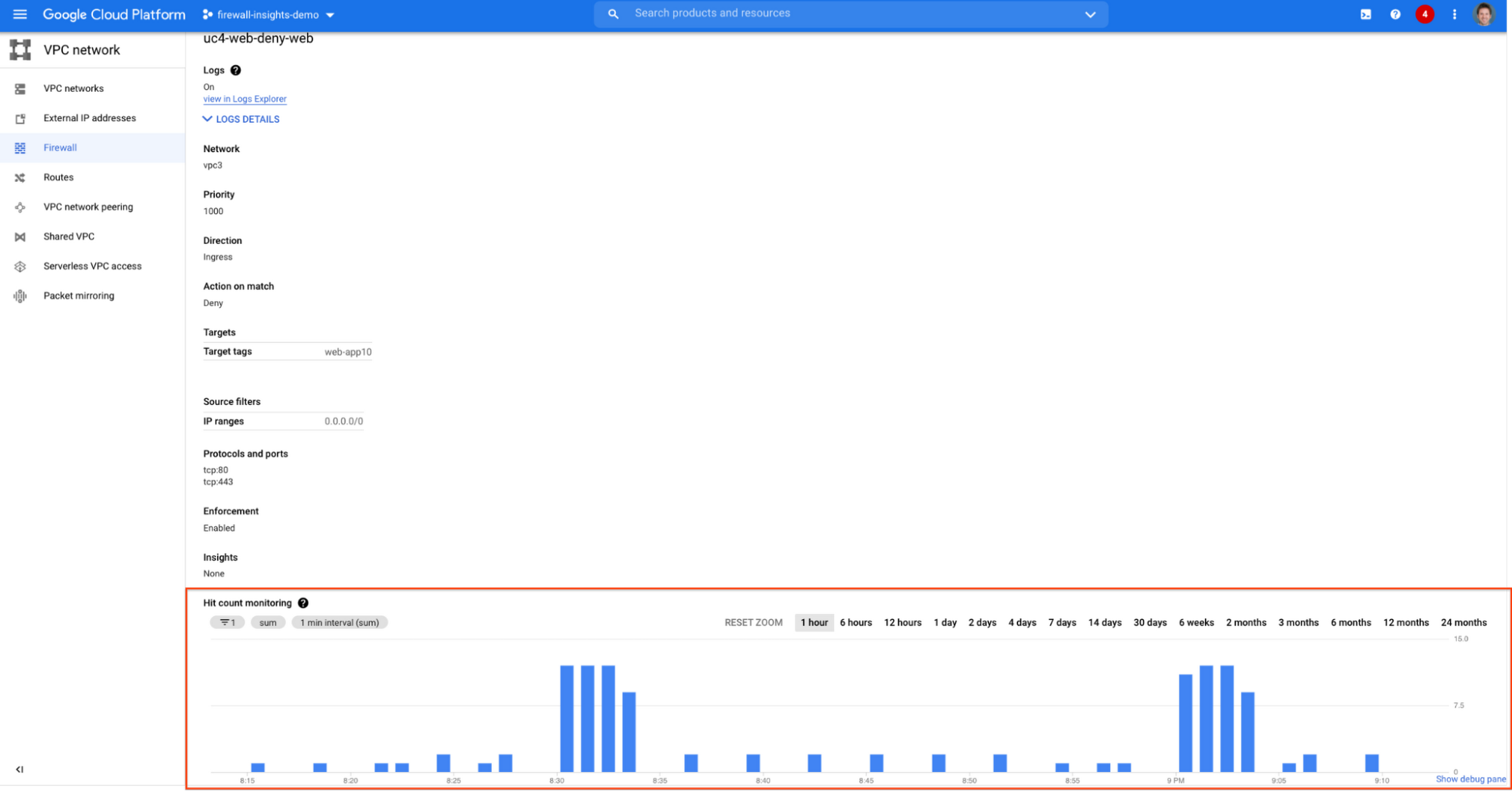

These tips should help you effectively leverage Firewall Insights to gain better control over a massive firewall rule set. Automate shadowed rule detection, quickly troubleshoot misconfigured rules, effortlessly pinpoint the overgranting rules hidden in the rule set, and identify the failed attempts to break into your network that were rejected by your firewall rules.
To learn more about Firewall Insights, please refer to our documentation. Additionally, to see how we’re advancing intelligent automation in network security, check our recent blog post.
Investing for Future: Why Shifting Security Left Helps Your Bottom Line

4492
Of your peers have already read this article.
3:30 Minutes
The most insightful time you'll spend today!
The concept of “shifting left” has been widely promoted in the software development lifecycle. The concept is that introducing security earlier, or leftwards, in the development process will lead to fewer software-related security defects later, or rightwards, in production.
Shifting cloud security left can help identify potential misconfigurations earlier in the development cycle, which if unresolved can lead to security defects. Catching those misconfigurations early can improve the security posture of production deployments.
Why shifting security left matters
Google’s DevOps Research and Assessment (DORA) highlights the importance of integrating security into DevOps in the 2016 State of DevOps Report. The report discussed the placement of security testing in the software development lifecycle. The survey found that most security testing and tool usage happened after the development of a release, rather than continuously throughout the development lifecycle. This led to increased costs and friction because remediating problems found in testing may involve big architectural changes and additional integration testing, as shown in Figure 1. For example, security defects in production can lead to GDPR violations, which can carry fines up to 4% of global annual revenue.
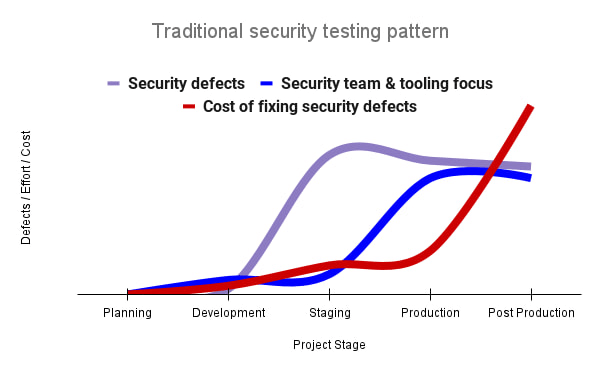
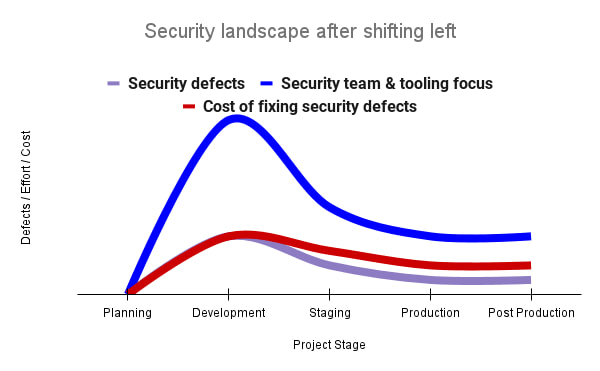
By inserting security testing into the development phase, we can identify security defects earlier and perform the appropriate remediation sooner. This results in fewer defects post-production and reduces remediation efforts and architectural changes. Figure 2 shows us that integrating security earlier in the SDLC results in overall decreases in security defects and associated remediation costs.
The 2021 State of DevOps Report expands the work of the 2016 report and advocates for integrating automated testing throughout the software development lifecycle. Automated testing is useful for continuously testing development code without the need for additional skills or intervention by the developer. Developers can continue to iterate quickly while other stakeholders can be confident that common defects are being identified and remediated.
From code to cloud
The DORA findings with regard to code security can also be applied to cloud infrastructure security. As more organizations deploy their workloads to the cloud, it’s important to test the security and configurations of cloud infrastructure. Misconfigurations in cloud resources can lead toward security incidents that could lead to data theft. Examples of such misconfigurations include overly permissive firewall rules, public IP addresses for VMs, or excessive Identity and Access Management (IAM) permissions on service accounts and storage buckets.
We can and should leverage different Google Cloud services to identify these misconfigurations early in the development process and prevent such errors from emerging in production to reduce the costs of future remediation, potential legal fines, and compromised customer trust.
The key tools in our toolshed are Security Command Center and Cloud Build. Security Command Center provides visibility into misconfigurations, vulnerabilities, and threats within a Google Cloud organization. This information is critical when protecting your cloud infrastructure (such as virtual machines, containers, web applications) against threats, or identifying potential gaps from compliance frameworks (such as CIS Benchmarks, PCI-DSS, NIST 800-53, or ISO 27001.
Security Command Center further supports shifting security left by allowing visibility of security findings at the cloud project level for individual developers, while still allowing global visibility for Security Operations. Cloud Build provides for the creation of cloud-native CI/CD pipelines. You can insert custom health checks into a pipeline to evaluate certain conditions (such as security metrics) and fail the pipeline when irregularities are detected. We will now explore two use cases that take advantage of these tools.
Security Health Checker
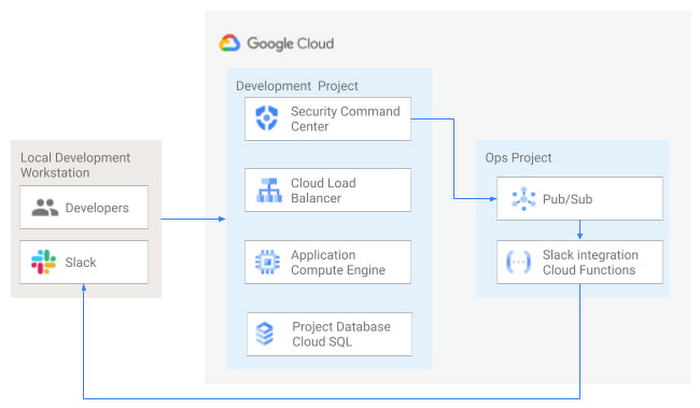
Security Health Checker continuously monitors the security health of a Google Cloud project and promptly notifies project members of security findings. Figure 3 shows developers interacting with a Google Cloud environment with network, compute, and database components. Security Command Center is configured to monitor the health of the project.
When Security Command Center identifies findings, it sends them to a Cloud Pub/Sub topic. A Cloud Function then takes the findings published to that topic and sends them to a Slack channel monitored by infrastructure developers. Just like a spell checker providing quick feedback on misspellings, Security Health Checker provides prompt feedback on security misconfigurations in a Google Cloud project that could lead to deployment failures or post-production compromises. No additional effort is required on the part of developers.
Security Pipeline Checker
In addition to using Security Command Center for timely notification of security concerns during the development process, we can also integrate security checks into the CI/CD pipeline by using Security Command Center along with Cloud Build as shown in Figure 4.
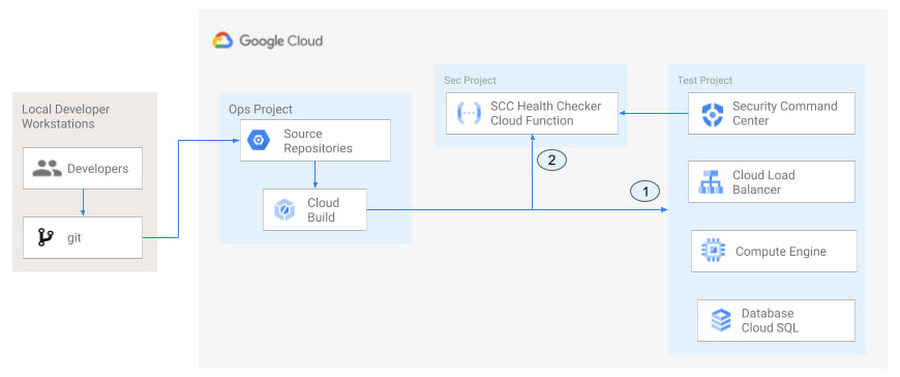
The pipeline begins with a developer checking code into a git repository. This repository is mirrored to Cloud Source Repositories. A build trigger will begin the build process. The build pipeline will include a short waiting period of a few minutes to give Security Command Center a chance to identify security vulnerabilities. A brief delay may appear undesirable at first, but the analysis that takes place during that interval can result in the reduction of security defects post-production.
At the end of the waiting period, a Cloud Function serving as a Security Health Checker will evaluate the findings from Security Command Center (Connector 1 in Figure 4). If the validator determines that unacceptable security findings exist, the validator will inject a failure indication into the pipeline to terminate the build process (Connector 2 in Figure 4). Developers have visibility into the failure triggers and remediate them before successfully deploying code to production. This is in contrast to the findings in the 2016 State of DevOps Report wherein organizations that didn’t integrate security into their DevOps processes spent 50% more time remediating security issues than those who “shifted left” on security.
Closing thoughts
DORA’s 2016 State of DevOps report called out the need for “shifting left” with security, introducing security earlier in the development process to identify security vulnerabilities early to reduce mitigation efforts post-production. The report also advocated for automated testing throughout the software development lifecycle.
We looked at two ways of achieving these objectives in Google Cloud. The Security Health Checker provides feedback to developers using Security Command Center and Slack to notify developers of security findings as they pursue their development activities. The Security Pipeline Checker uses Security Command Center as part of a Cloud Build pipeline to terminate a build pipeline if vulnerabilities are identified during the build process. To implement the Security Heath Checker and the Security Pipeline Checker, check out the GitHub repository. We hope these examples will help you to “shift left” using Google Cloud services. Happy coding!
This article was co-authored with Jason Bisson, Bakh Inamov, Jeff Levne, Lanre Ogunmola, Luis Urena, and Holly Willey, Security & Compliance Specialists at Google Cloud.
Google Workspace to Extend Digital Sovereignity for EU Organizations in Later Part of 2022

4813
Of your peers have already read this article.
2:00 Minutes
The most insightful time you'll spend today!
European organizations are moving their operations and data to the cloud in increasing numbers to enable collaboration, drive business value, and transition to hybrid work. However, the cloud solutions that underpin these powerful capabilities must meet an organization’s critical requirements for security, privacy, and digital sovereignty. We often hear from European Union policymakers and business leaders that ensuring the sovereignty of their cloud data, through regionalization and additional controls over administrative access, is crucial in this evolving landscape.
Today, we’re announcing Sovereign Controls for Google Workspace, which will provide digital sovereignty capabilities for organizations, both in the public and private sector, to control, limit, and monitor transfers of data to and from the EU starting at the end of 2022, with additional capabilities delivered throughout 2023. This commitment builds on our existing Client-side encryption, Data regions, and Access Controls capabilities.
Offering enhanced customer controls, including Client-side encryption
Encryption is an important technical control that limits a cloud provider’s access to customer data. Google Workspace already uses the latest cryptographic standards to encrypt all data at rest and in transit between our facilities. The European Data Protection Board recommendations include encryption as part of the supplementary measures to protect data. Google Workspace is leading the way on such measures with our Client-side encryption feature that allows customers to continue benefiting from the powerful innovations of Google Cloud while retaining complete confidentiality and control over their data.
Google Workspace’s unique approach to client-side encryption provides our customers with authoritative privacy control over their data through encryption keys that they can hold on site, within a nation’s borders, or within any other boundary they define. Google never has access to the keys or key holders, which means the data is indecipherable to us and we have no technical ability to access it. We deliver this level of encryption without the need for legacy desktop clients, while maintaining the same high-quality experience for your users such as online co-authoring.
Organizations can choose to use Client-side encryption pervasively across all their users, or create rules that apply to specific users, organizational units, or shared drives. Client-side encryption is now generally available for Google Drive, Docs, Sheets, and Slides, with plans to extend the functionality to Gmail, Google Calendar, and Meet by the end of 2022.
Expanding data location controls
Data regions already allow our customers to control the storage location of their covered data at-rest. We will enhance this capability by the end of 2023 through expanded coverage of data storage and processing in-region along with an in-country copy.
As employees and organizations adopt new ways of working in a hybrid world, they need secure access to data to drive key business outcomes. But this trend, combined with complex technical architectures, presents significant challenges to retaining control over where data resides.
Our cloud-native architecture means that Google Workspace functions fully within a browser, without requiring caches or installed software on employee devices. We adopt a zero-trust approach, with built-in security that provides controls to geo-fence devices and users through Context Aware Access. Moreover, admins can set sharing boundaries and define rules that govern user communication.
In short, we empower admins with critical capabilities that can give them granular control over the flow of their data without hindering the modern collaboration capabilities that form the foundation of Google Workspace. We are enabling organizations to strike the right balance between data location and collaboration across teams, partners, and customers.
Control and transparency for administrative access
When moving to a cloud-based service, organizations need greater visibility and control over all forms of administrative access to their systems, including who has access, the nature and circumstances of that access, and the ability to specify that only certain personnel—in designated countries or regions—have access. These capabilities are core to our approach for meeting evolving digital sovereignty standards.
Building on this approach, we will implement a series of new Access Controls by the end of 2023 that will enable customers to:
- Restrict and/or approve Google support access through Access Approvals.
- Limit customer support to EU-based support staff through Access Management.
- Ensure round-the-clock support from Google Engineering staff, when needed, with remote-in virtual desktop infrastructure .
- Generate comprehensive log reports on data access and actions through Access Transparency, which is already available in GA.
Sovereign Controls for Google Workspace will deliver digital sovereignty through a comprehensive set of capabilities for organizations working in and across EU regions. In parallel, Google Cloud will continue to provide customers with legal mechanisms for international data transfer, which will include making the protections offered by the new EU data transfer framework available once it is implemented.
We remain committed to equipping our customers in Europe and across the globe with powerful technical solutions that help them adapt to, and stay on top of, a rapidly evolving regulatory landscape. We’ve designed and built Google Workspace to operate on a secure foundation, providing capabilities to keep our users safe, their data secure, and their information private. Digital sovereignty is core to our ongoing mission in Europe and elsewhere, and a guiding principle that customers can rely on now and into the future.
5178
Of your peers have already watched this video.
14:00 Minutes
The most insightful time you'll spend today!
How Google Workspace Helps Manage, Govern and Protect Sensitive Data
The shift towards a hybrid work style and trends accelerated by the pandemic has resulted in data deluge. With companies and individuals sharing increasingly large volumes of information and collaborating with internal and external stakeholders, the need for innovations for higher security also escalates. View this video to learn how Google Workspace approaches security across content lifecycle from client-side encryption updates, data loss prevention, Google Vault, data regions, labels, and more!
More Relevant Stories for Your Company

MIT Cloud Security Confidence Report: An Evolution Worth Noting
The age of unthinking fears about cloud security is over. Not only is cloud adoption rising steadily across geographies, industries and job functions, but confidence in cloud security is rising as well — to the point where increased security is a major reason enterprises opt for cloud solutions. Gone are
Broadcom’s Journey to Simplified Compliance with Google Cloud’s Assured Workloads
Broadcom is a global technology leader that designs, develops, and supplies many semiconductor and infrastructure software solutions. Broadcom’s category-leading product portfolio serves critical markets including data center, networking, software, broadband, wireless, storage, and industrial sectors. Our customers, many of whom operate in the federal public sector, need ready-made SaaS solutions to

IT Team Figures Out Easiest Way to Build Data Pipelines and Create ML Models
Building a strong brand in today's hyper-competitive business environment takes vision. It also requires a flexible, easily managed approach to digital asset management (DAM), so marketing professionals and other stakeholders can easily share, store, track, and manipulate assets to build the brand. Many of today's leading companies, including JetBlue, Slack,

Protect Corporate Apps with BeyondCorp Enterprise
As part of our efforts to democratize Zero Trust, Google Cloud has designed our BeyondCorp Enterprise solution to be an extensible platform where customers can choose to integrate signals from other technology vendors and incorporate these into their Zero Trust access policies. Following our integrations announcements earlier this year, we
