





New to Cloud Firestore? Here are Some Basics You Need to Know

3556
Of your peers have already read this article.
5:00 Minutes
The most insightful time you'll spend today!
Learning to use a new database can be daunting, even more so if you don’t already have technical knowledge about databases. In this article, I will break down some database basics, terms you should know, what Firestore is, how it works, how it stores data, and how to get started using it with the assumption that you don’t have any existing database knowledge.
Before we dive into what Cloud Firestore is, let’s discuss some key database terms you should know. Feel free to skip this section if you are already familiar with the basics of Relational and non-relational databases.
What is a database?
A database is software that allows you to easily access, manage, modify, update, control and organize data. The way you want to store information can impact what type of database you choose. There are two major categories of databases, Relational and non-relational.
Relational Database
A relational database can be thought of like a spreadsheet. You can store information in your spreadsheet like this:
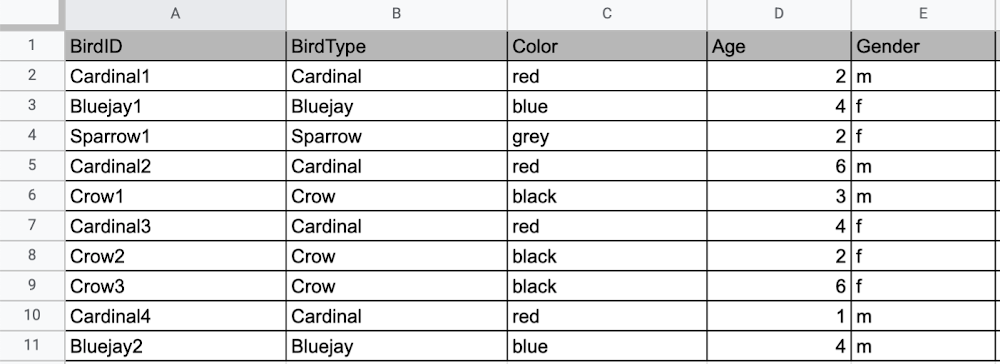
Now, what happens if I want to store information about where Sparrow1 lives, in my spreadsheet, but I don’t care about where the other birds live? I would have to add another column to my spreadsheet, called home, that would only contain data for the sparrow. That would look like this:
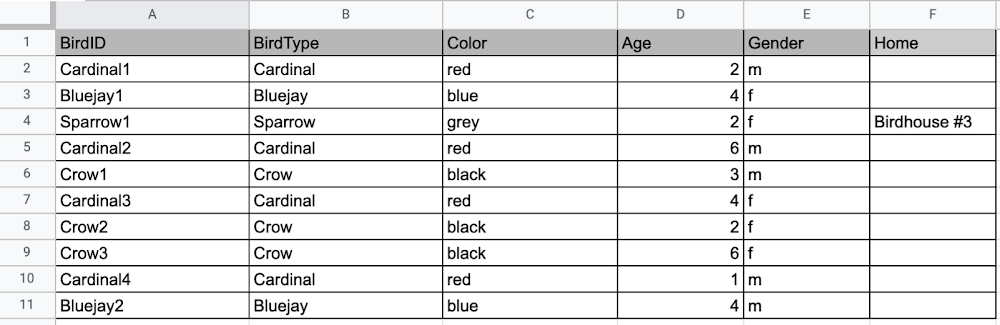
Even though I only want to know information about where the sparrow lives, I am required to have blank spaces in the column for all of the other animals. This is because in a relational database, you have a specific structure of your data called a schema. Just like in a spreadsheet, every item you are storing information on must have a place to put information about the bird’s home, even if you only want that information for one bird. This is enforced by the schema, which is essentially the column headers you put in the sheet and dictates a strict structure for the data, which has pros and cons.
The strict structure of a relational database allows your application to know what kind of data exists, to know what the data type is, and to enforce rules such as requiring data to be unique, or enforcing type of data stored etc. A schema, by design, forces the data in each row to have the same characteristics, which means it is not very flexible, unless you change the schema for the database. That means if you want to add different data that doesn’t fit your existing schema, you have to change the schema. As we discussed above, if you want to change the schema we are using to store information, such as Home, there is some information that will be stored for all rows, even if you don’t want to store anything. The amount of wasted storage is different between database engines, data types etc. Another thing to consider about Relational databases is that at scale, some traditional Relational databases will require more advanced deployments to handle the scale.
Changing the schema of a relational database can be highly disruptive, especially for busy workloads because it requires running scripts to change the schema and coordinating it carefully with the code changes in the app. Due to locking, you might even experience downtime in some cases. Now contrast that with a non-relational document database like Firestore, where you don’t have to worry about schema changes in the databases or downtime as a result of it.
Also, when you have a lot of data that you want to collect and it only applies to a few things in your database, having extra space with no information in it can become wasteful because it uses up storage space in many cases. A non-relational database can help get around this problem.
Non-relational databases
Generally speaking, a non-relational database stores information in a different format than a Relational database. There are 4 major categories of non-relational databases that you will hear most frequently.
- Column-Family
- Document (Firestore)
- Key-Value
- Graph
Since this post is focusing on Firestore, in this section we will dive into what a document database is, how it is used, and when to use it.
Document database (Firestore)
A document database can be thought of as a multi layered collection of entities, such as this:
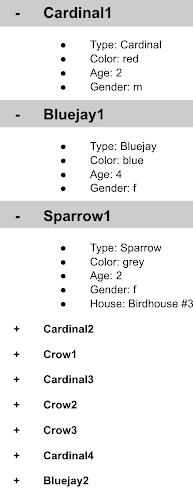
As you can see, when the list is all collapsed, you can only see the information at the top; in this case, that is the BirdID (Cardinal1, Bluejay1, Sparrow1, Cardinal2, Crow1 etc. When I open the list I see “word: word”. For example, the document ID Sparrow1, points to a document with “Type: Sparrow”. I also see “Color: grey”, “Age: 2”, “Gender: f” and “Home: Birdhouse #3”
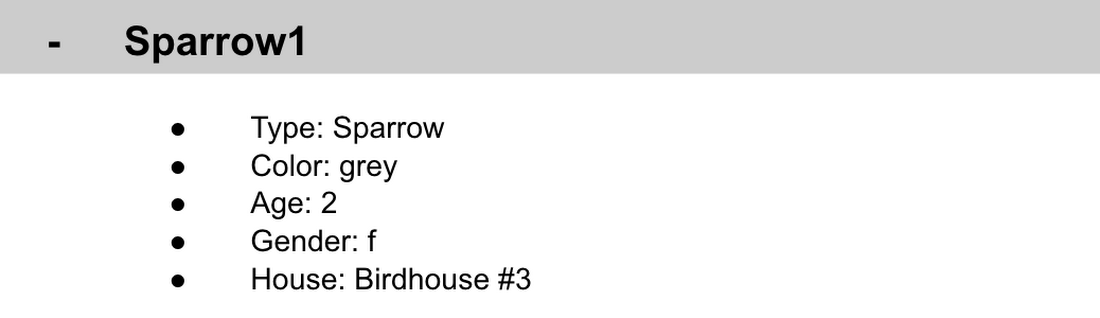
This is known as a key value pair. For “Type: Sparrow”, Type is the key and Sparrow is the value. All of the keys in the Sparrow1 document are: Type, Color, Age, Gender, House. All of the values in the Sparrow1 document are: Sparrow, grey, 2, f, Birdhouse #3.
Similarly to how the key gives you context, it allows you to ask the computer for a specific piece of information, such as the age of the bird. It is important to decide on a specific key term you will use for each piece of data you collect so your data can be easily read programmatically. This is called an implicit schema, an implied understanding of how data is stored that is not enforced by the database. Let’s go over what happens when we use an implicit schema.
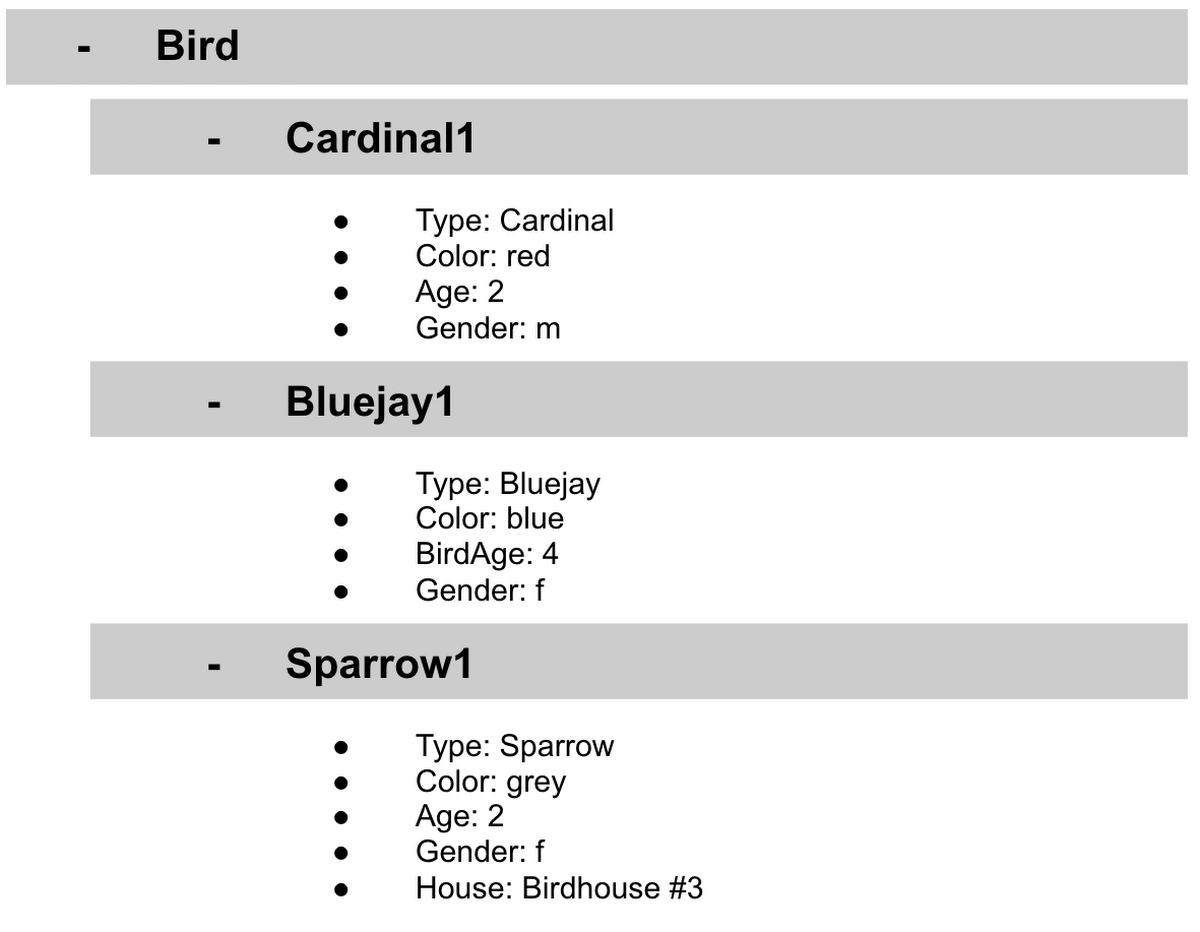
Under Cardinal1, you see Type, Color, Age, and Gender; however, under Sparrow1 you also see House. This is possible because in a non-relational database you don’t have a schema that requires you to store the same information about every bird in your database; instead, you can store the specific information that you need for each bird, regardless of what is stored for other birds. This is a great benefit in terms of flexibility, but because of this flexibility, maintaining standard naming conventions is very important.
Now, let’s discuss why using standard naming conventions is so important. In the example above, if I ask a human: “What is the age of Cardinal1?”, they would probably tell me 2. If I asked them: “What is the Age of Bluejay1?”, they would probably tell me 4. These are both correct answers, but they are only correct because a human is able to assume what Age means. A computer, on the other hand, can’t make assumptions. If I ask a computer: “What is the Age of Cardinal1?” it would say 2, but if I ask it: “What is the Age of Bluejay1?” it would not know. This is because the computer is looking for the keyword Age and it isn’t able to use any context clues to determine what other words might mean Age. However, if I asked the computer: “What is the BirdAge of Bluejay1?”, the computer would tell me 4. Why do I care that I need to tell the computer to look for BirdAge to get the age of blujay one, but to look for Age to get the age of Cardinal one? I care because it means I would have to write two entirely different sets of instructions (i.e software code) to get the age of Cardinal1 and the age of Bluejay1 if I am not careful in how I structure my data. But when I structure my data well, this is not an issue and is infact a benefit by adding added flexibility.
What we see from this example, is that even without a strict schema, we can (and should) define conventions for document formats. If conventions aren’t defined, things can get unwieldy quickly.
How information is accessed
Now, let’s discuss how the information is accessed. If I wanted to know information about which birds are blue in our drop down list example, I would need to expand every section of the list to check if the bird is blue or not. As you can imagine, once you start to get a lot of birds in your database, it becomes cumbersome to open every drop down and see if the bird is blue. Luckily, Firestore lets you run these types of queries against the data (See more here) and receive all the documents that satisfy your conditions. On the other hand, if I wanted to know all of the information about Cardinal1, I could just open the drop down for Cardinal1 and I would have all of the information about that bird.
Now let’s start using some Firestore specific terminology. For the example we just discussed:Collections
- In Firestore, your data lives in collections. You can think of collections as tabs in a spreadsheet.
- Collections can be used to organize data. For example, if I decide that I want to collect data about birds and fish, the data about birds could be put in a birds collection, and the data about fish could be put in a Fish collection. ex:
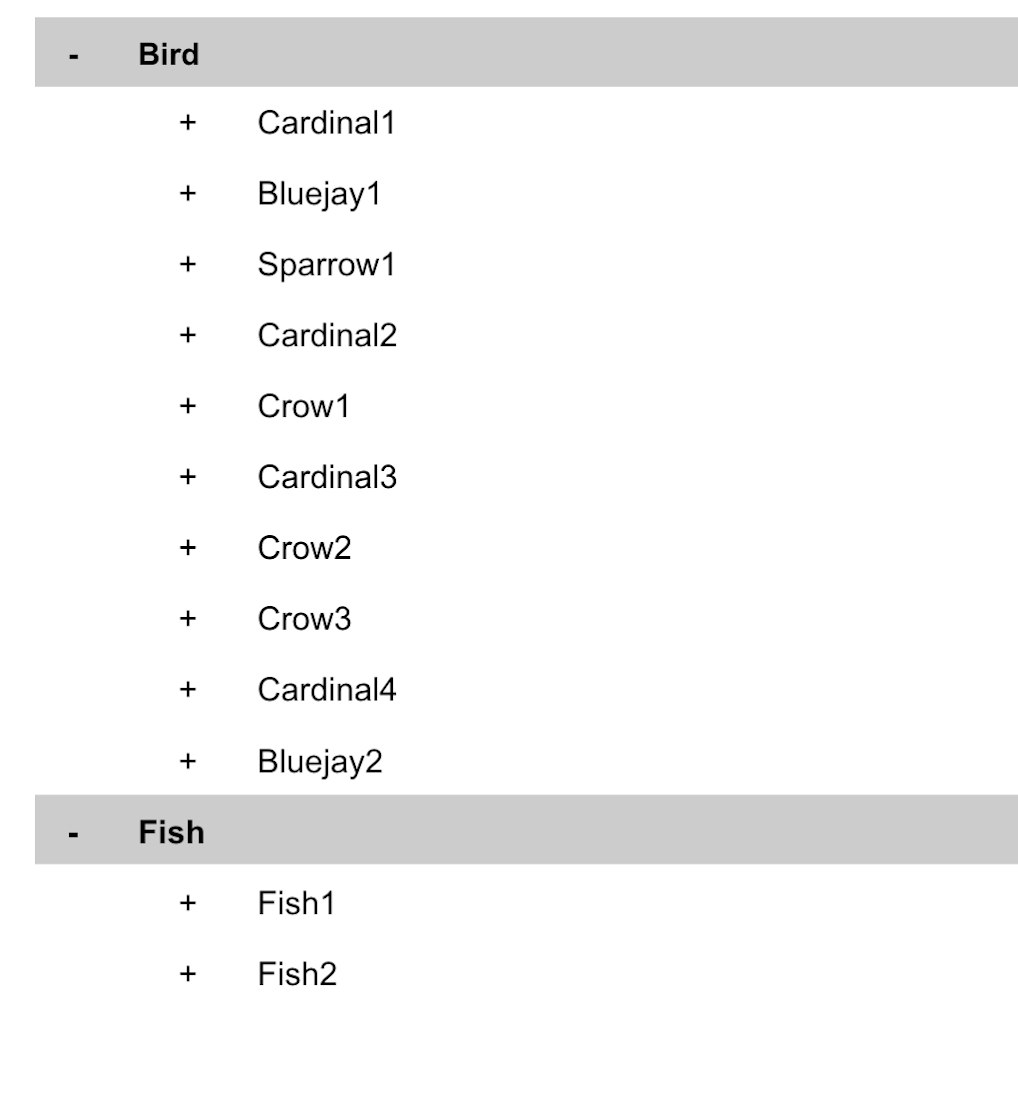
- This is the unit of storage that Firestore uses. In our example, each bird is its own document. Documents reside in collections. This is what one document would contain:
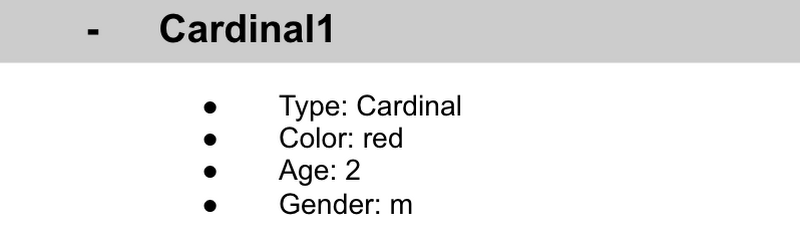
- Each Document corresponds to a row in the sheet. The following diagram demonstrates that each column header maps to a property name in the document and that each value in a row maps to a value in the document.
- Each document must be identified by a unique identifier. In our example, that is BirdID. Notice that the value for BirdID is stored at the top level of the list, so when the document is closed, you can only see Cardinal1 and Cardinal1 is not also stored within the document.
- All documents can be uniquely identified by their location. Let’s think through this in words first before we move to code. If I want to tell someone to get data about the sparrow from the drop down lists, I would need to tell them:
- In the bird drop down list, can you please get all the information under Sparrow1 and put it on a piece of paper called sparrow1Info?
- Now let’s try that again using Firestore terms.
- From the birds collection, can you please get the document for sparrow1 from the Firestore database (db) and save it as sparrow1Info?
- Now let’s try it in code.
- var sparrow1Info = db.collection(‘birds’).doc(‘sparrow1’);
- A subcollection is a collection associated with a document. Using our example of the drop down list, we can add a collection called sightings that stores documents about each sighting of the specific bird. This is what that would look like:
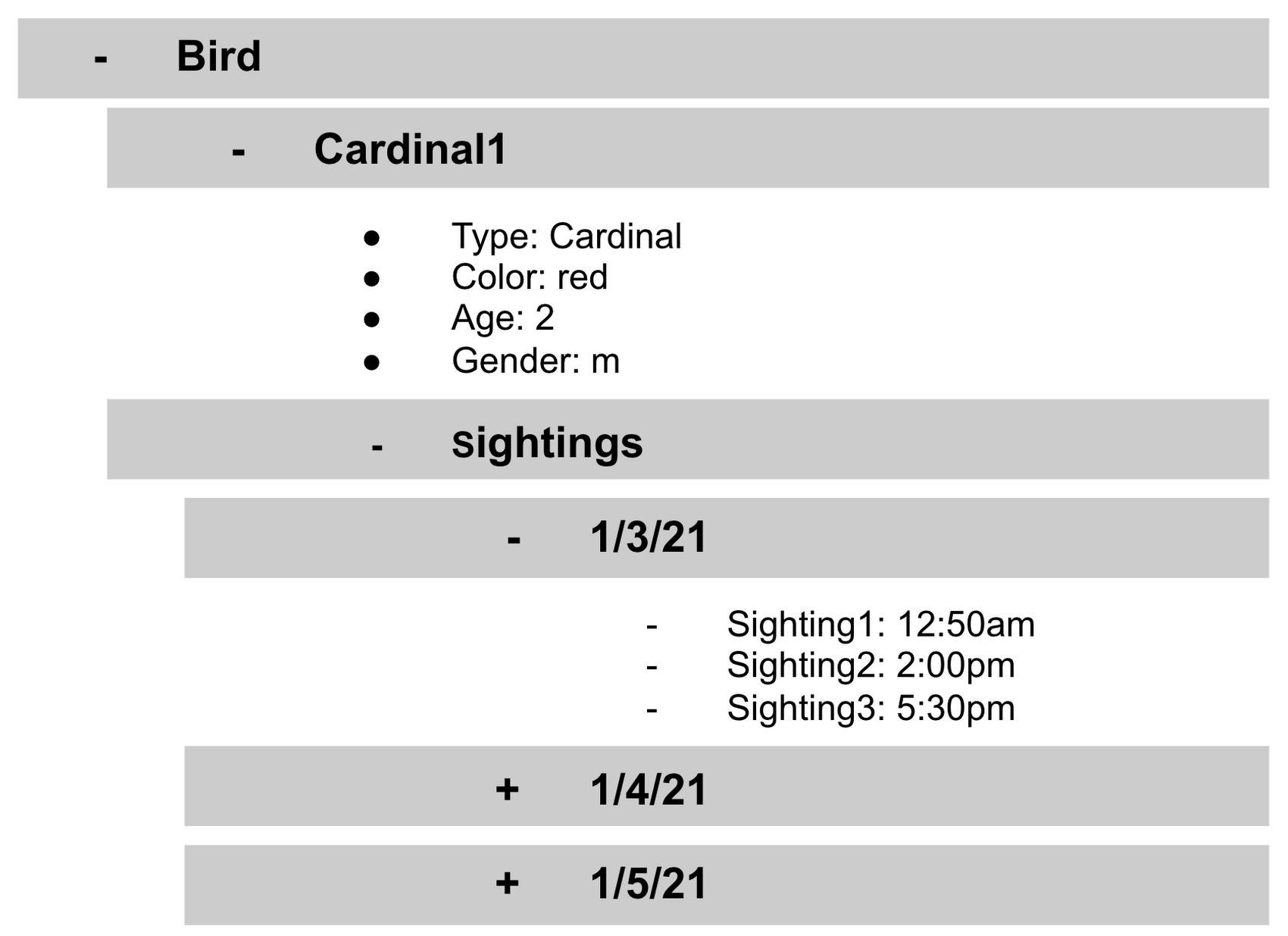
- It is important to note that you don’t need to have the same subcollections on all documents. For example, Cardinal1 can be the only document that has a subcollection of Sightings.
How to search on Google about Firestore
The hardest part of learning a new technology can often be knowing the right terms to put into Google search to get the answers you are looking for. Here are some key terms that can help you get started
Your question:
How should I arrange my data to store it in Firestore?
Search:
Document database implicit schema design
Your Question:
What other databases are similar to firestore?
Search:
What are some document databases
Your Question:
How do I get all documents in the Birds collection?
Search:
How to use wildcards in Firestore
What next?
Try this guide to get started building your first application that uses firestore: https://firebase.google.com/docs/firestore/quickstart
Serverless for Startups, the Best Way to Succeed: Expert Says

7061
Of your peers have already read this article.
1:30 Minutes
The most insightful time you'll spend today!
As Google Cloud has become a choice for more startups, I’ve experienced an increase in founders asking how they should think about cloud services. Though each startup is different and requirements may vary across industries and regions, I’ve seen a few core best practices that help startups to succeed—as well as several traps to avoid.
For example, If you go with a public cloud provider, you’re ideally not starting from ground zero like you would running your own data center, but it’s important not to introduce similar complexity in a virtualized environment. Just because you’re using public cloud infrastructure doesn’t mean you want to manage it.
Instead, you want to leverage platforms that abstract away complexity so your team can focus on delivering value to customers. That’s where serverless comes in. Serverless platforms are fully managed by the provider, offering automatic scaling for workloads, as well as provisioning, configuring, patching, and management of servers and clusters. Freed from these resource-intensive tasks, your technical talent can focus on the things that differentiate your business, not on IT curation.
This applies to not only running stateless applications, but also managing and analyzing data. You should be collecting data points about which features are most popular on your platform, what people are buying, the types of activities that help your customers get their jobs done, and so on. This information is essential to building and executing on a product roadmap that will serve your customers. However, it’s not enough to collect this data, you need to make your data accessible, secure, and easy for your team to analyze—so where do you run and host it?
On Google Cloud, this is where options like Spanner and Cloud SQL can play a large role, as can BigQuery for analysis. You won’t have to worry about standing up infrastructure or patching servers—you can just stream your data to our data management platforms, where it’s available whenever someone needs to run a query. By leveraging a serverless architecture, your startup can be data-driven without having to invest in the traditional complexity of database administration and management—and that can significantly change your playing field.
Serverless is just one of the factors you should consider as you build out your tech stack. To hear my thoughts on a range of other topics relevant to startups — such as security, cloud credits, and the differences among managed services — check out the below video or visit our Build and Grow page.
5 Best Practices for Cloud Cost Optimization

5801
Of your peers have already read this article.
3:30 Minutes
The most insightful time you'll spend today!
When customers migrate to Google Cloud Platform (GCP), their first step is often to adopt Compute Engine, which makes it easy to procure and set up virtual machines (VMs) in the cloud that provide large amounts of computing power. Launched in 2012, Compute Engine offers multiple machine types, many innovative features, and is available in 20 regions and 61 zones!
Compute Engine’s predefined and custom machine types make it easy to choose VMs closest to your on-premises infrastructure, accelerating the workload migration process cost effectively. Cloud allows you the pricing advantage of ‘pay as you go’ and also provides significant savings as you use more compute with Sustained Use Discounts.
As Technical Account Managers, we work with large enterprise customers to analyze their monthly spend and recommend optimization opportunities. In this blog, we will share the top recommendations that we’ve developed based on our collective experience working with GCP customers.
Getting ready to save
Before you get started, be sure to familiarize yourself with the VM instance pricing page—required reading for anyone who needs to understand the Compute Engine billing model and resource-based pricing. In addition to those topics, you’ll also find information about the various Compute Engine machine types, committed use discounts and how to view your usage, among other things.
Another important step to gain visibility into your Compute Engine cost is using Billing reports in the Google Cloud Console and customizing your views based on filtering and grouping by projects, labels and more. From there you can export Compute Engine usage details to BigQuery for more granular analysis. This allows you to query the datastore to understand your project’s vCPU usage trends and how many vCPUs can be reclaimed. If you have defined thresholds for the number of cores per project, usage trends can help you spot anomalies and take proactive actions. These actions could be rightsizing the VMs or reclaiming idle VMs.
Now, with these things under your belt, let’s go over the five ways you can optimize your Compute Engine resources that we believe will give you the most immediate benefit.
1. Apply Compute Engine rightsizing recommendations
Compute Engine’s rightsizing recommendations feature provides machine type recommendations that are generated automatically based on system metrics gathered by Stackdriver Monitoring over the past eight days. Use these recommendations to resize your instance’s machine type to more efficiently use the instance’s resources. It also recommends custom machine types when appropropriate. Compute Engine makes viewing, resizing and other actions easier right from the Cloud Console as shown below.
Recently, we expanded Compute Engine rightsizing capabilities from just individual instances to managed instance groups as well. Check out the documentation for more details.

For more precise recommendations, you can install the Stackdriver Monitoring agent which collects additional disk, CPU, network, and process metrics from your VM instances to better estimate your resource requirements. You can also leverage the Recommender API for managing recommendations at scale.
2. Purchase Commitments
Our customers have diverse workloads running on Google Cloud with differing availability requirements. Many customers follow a 70/30 rule when it comes to managing their VM fleet—they have constant year-round usage of ~70%, and a seasonal burst of ~30% during holidays or special events.
If this sounds like you, you are probably provisioning resources for peak capacity. However, after migrating to Google Cloud, you can baseline your usage and take advantage of deeper discounts for Compute workloads. Committed Use Discounts are ideal if you have a predictable steady-state workload as you can purchase a one or three year commitment in exchange for a substantial discount on your VM usage.
We recently released a Committed Use Discount analysis report in the Cloud Console that helps you understand and analyze the effectiveness of the commitments you’ve purchased. In addition to this, large enterprise customers can work with their Technical Account Managers who can help manage their commitment purchases and work proactively with them to increase Committed Use Discount coverage and utilization to maximize their savings.
3. Automate cost optimizations
The best way to make sure that your team is always following cost-optimization best practices is to automate them, reducing manual intervention.
Automation is greatly simplified using a label—a key-value pair applied to various Google Cloud services. For example, you could label instances that only developers use during business hours with “env: development.” You could then use Cloud Scheduler to schedule a serverless Cloud Function to shut them down over the weekend or after business hours and then restart them when needed. Here is an architecture diagram and code samples that you can use to do this yourself.
Using Cloud Functions to automate the cleanup of other Compute Engine resources can also save you a lot of time and money. For example, customers often forget about unattached (orphaned) persistent disk, or unused IP addresses. These accrue costs, even if they are not attached to a virtual machine instance. VMs with the “deletion rule” option set to “keep disk” retain persistent disks even after the VM is deleted. That’s great if you need to save the data on that disk for a later time, but those orphaned persistent disks can add up quickly and are often forgotten! There is a Google Cloud Solutions article that describes the architecture and sample code for using Cloud Functions, Cloud Scheduler, and Stackdriver to automatically look for these orphaned disks, take a snapshot of them, and remove them. This solution can be used as a blueprint for other cost automations such as cleaning up unused IP addresses, or stopping idle VMs.
4. Use preemptible VMs
If you have workloads that are fault tolerant, like HPC, big data, media transcoding, CI/CD pipelines or stateless web applications, using preemptible VMs to batch-process them can provide massive cost savings. In fact, customer Descartes Labs reduced their analysis costs by more than 70% by using preemptible VMs to process satellite imagery and help businesses and governments predict global food supplies.
Preemptible VMs are short lived— they can only run a maximum of 24 hours, and they may be shut down before the 24 hour mark as well. A 30-second preemption notice is sent to the instance when a VM needs to be reclaimed, and you can use a shutdown script to clean up in that 30-second period. Be sure to fully review the full list of stipulations when considering preemptible VMs for your workload. All machine types are available as preemptible VMs, and you can launch one simply by adding “-preemptible” to the gcloud command line or selecting the option from the Cloud Console.
Using preemptible VMs in your architecture is a great way to scale compute at a discounted rate, but you need to be sure that the workload can handle the potential interruptions if the VM needs to be reclaimed. One way to handle this is to ensure your application is checkpointing as it processes data, i.e., that it’s writing to storage outside the VM itself, like Google Cloud Storage or a database. As an example, we have sample code for using a shutdown script to write a checkpoint file into a Cloud Storage bucket. For web applications behind a load balancer, consider using the 30-second preemption notice to drain connections to that VM so the traffic can be shifted to another VM. Some customers also choose to automate the shutdown of preemptible VMs on a rolling basis before the 24-hour period is over, to avoid having multiple VMs shut down at the same time if they were launched together.
5. Try autoscaling
Another great way to save on costs is to run only as much capacity as you need, when you need it. As we mentioned earlier, typically around 70% of capacity is needed for steady-state usage, but when you need extra capacity, it’s critical to have it available. In an on-prem environment, you need to purchase that extra capacity ahead of time. In the cloud, you can leverage autoscaling to automatically flex to increased capacity only when you need it.
Compute Engine managed instance groups are what give you this autoscaling capability in Google Cloud. You can scale up gracefully to handle an increase in traffic, and then automatically scale down again when the need for instances is lowered (downscaling). You can scale based on CPU utilization, HTTP load balancing capacity, or Stackdriver Monitoring metrics. This gives you the flexibility to scale based on what matters most to your application.
High costs do not compute
As we’ve shown above, there are many ways to optimize your Compute Engine costs. Monitoring your environment and understanding your usage patterns is key to understanding the best options to start with, taking the time to model your baseline costs up front. Then, there are a wide variety of strategies to implement depending on your workload and current operating model.
For more on cost management, check out our cost management video playlist. And for more tips and tricks on saving money on other GCP services, check out our blog posts on Cloud Storage, Networking and BigQuery cost optimization strategies. We have additional blog posts coming soon, so stay tuned!
What’s Google Cloud Firestore Database and What are it’s Benefits for Business and Developers?
5979
Of your peers have already read this article.
2:30 Minutes
The most insightful time you'll spend today!
Cloud Firestore is a NoSQL document database that simplifies storing, syncing, and querying data for your mobile and web apps at global scale.
Cloud Firestore is a fast, fully managed, serverless, cloud-native NoSQL document database that simplifies storing, syncing, and querying data for your mobile, web, and IoT apps at global scale.
Its client libraries provide live synchronization and offline support, while its security features and integrations with Firebase and Google Cloud Platform (GCP) accelerate building truly serverless apps.
Here’s other stuff it’s good at:
Sync data across devices, on or offline
With Cloud Firestore, your applications can be updated in near real time when data on the back end changes. This is not only great for building collaborative multi-user mobile applications, but also means you can keep your data in sync with individual users who might want to use your app from multiple devices.
With Firebase Realtime Database, we felt we had built the best force-plate testing software on the market. Thanks to Cloud Firestore, in only two weeks, we built a system that’s significantly better and includes features we never thought possible to ship on Day 1.
Chris Wales, CTO, Hawkin Dynamics
Cloud Firestore has full offline support, so you can access and make changes to your data, and those changes will be synced to the cloud when the client comes back online. Built-in offline support leverages local cache to serve and store data, so your app remains responsive regardless of network latency or internet connectivity.
Simple and effortless
Cloud Firestore’s robust client libraries make it easy for you to update and receive new data while worrying less about establishing network connections or unforeseen race conditions. It can scale effortlessly as your app grows. Cloud Firestore allows you to run sophisticated queries against your data. This gives you more flexibility in the way you structure your data and can often mean that you have to do less filtering on the client, which keeps your network calls and data usage more efficient.
Enterprise-grade, scalable NoSQL
Cloud Firestore is a fast and fully managed NoSQL cloud database. It is built to scale and takes advantage of GCP’s powerful infrastructure, with automatic horizontal scaling in and out, in response to your application’s load. Security access controls for data are built in and enable you to handle data validation via a configuration language.
BigQuery Admin Reference Guide Series: How to Optimize Data in Your Native Storage
3733
Of your peers have already read this article.
4:00 Minutes
The most insightful time you'll spend today!
So far on the BigQuery Admin Reference Guide series, we’ve talked about the different logical resources available inside of BigQuery. Now, we’re going to begin talking about BigQuery’s architecture. In this post we’re diving into how BigQuery stores your data in native storage, and what levers you can pull to optimize how your data is stored.
Columnar storage format
BigQuery offers fully managed storage, meaning you don’t have to provision servers. Sizing is done automatically and you only pay for what you use. Because BigQuery was designed for large scale data analytics data is stored in columnar format.
Traditional relational databases, like Postgres and MySQL, store data row-by-row in record-oriented storage. This makes them great for transactional updates and OLTP (Online Transaction Processing) use cases because they only need to open up a single row to read or write data. However, if you want to perform an aggregation like a sum of an entire column, you would need to read the entire table into memory.
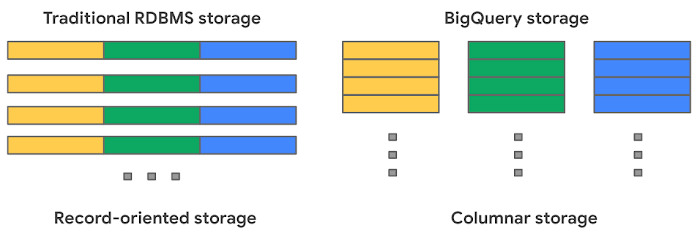
BigQuery uses columnar storage where each column is stored in a separate file block. This makes BigQuery an ideal solution for OLAP (Online Analytical Processing) use cases. When you want to perform aggregations you only need to read the column that you are aggregating over.
Optimized storage format
Internally, BigQuery stores data in a proprietary columnar format called Capacitor. We know Capacitor is a column-oriented format as discussed above. This means that the values of each field, or column, are stored separately so the overhead of reading the file is proportional to the number of fields you actually read. This doesn’t necessarily mean that each column is in its own file, it just means that each column is stored in a file block, which is actually compressed independently for increased optimization.
What’s really cool is that Capacitor builds an approximation model that takes in relevant factors like the type of data (e.g. a really long string vs. an integer) and usage of the data (e.g. some columns are more likely to be used as filters in WHERE clauses) in order to reshuffle rows and encode columns. While every column is being encoded, BigQuery also collects various statistics about the data — which are persisted and used later during query execution.
If you want to learn more about Capacitor, check out this blog post from Google’s own Chief BigQuery Officer.
Encryption and managed durability
Now that we understand how the data is saved in specific files, we can talk about where these files actually live. BigQuery’s persistence layer is provided by Google’s distributed file system, Colossus, where data is automatically compressed, encrypted, replicated, and distributed.
There are many levels of defense against unauthorized access in Google Cloud Platform, one of them being that 100% of data is encrypted at rest. Plus, if you want to control encryption yourself, you can use customer-managed encryption keys.
Colossus also ensures durability by using something called erasure encoding – which breaks data into fragments and saves redundant pieces across a set of different disks. However, to ensure the data is both durable and available, the data is also replicated to another availability zone within the same region that was designated when you created your dataset.
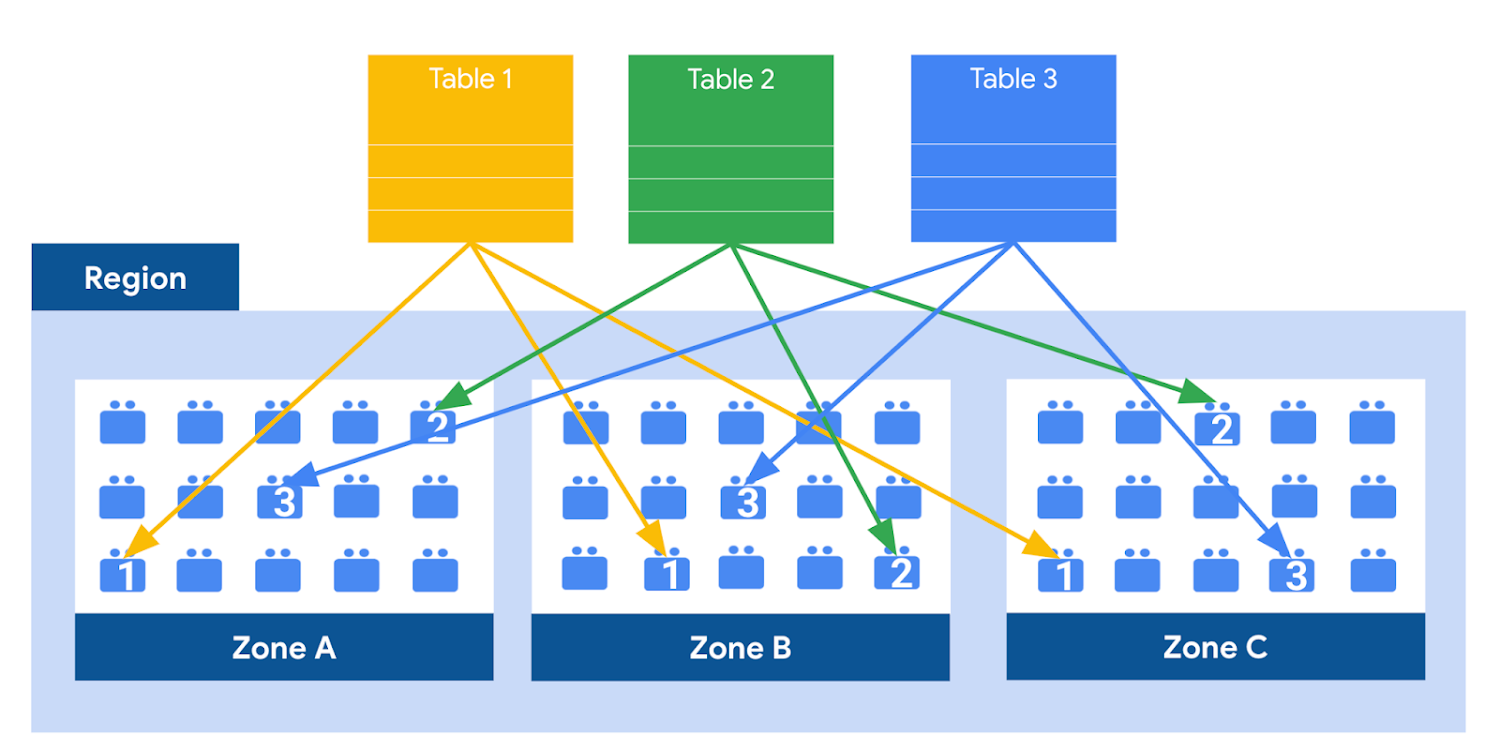
This means data is saved in a different building that has a different power system and network. The chances of multiple availability zones going offline at once is very small. But if you use “Multi-Region” locations – like the US or EU – BigQuery stores another copy of the data in an off-region replica. That way, the data is recoverable in the event of a major disaster.
This is all accomplished without impacting the compute resources available for your queries. Plus encoding, encryption and replication are included in the price of BigQuery storage – no hidden costs!
Optimizing storage for query performance
BigQuery has a built-in storage optimizer that helps arrange data into the optimal shape for querying, by periodically rewriting files. Files may be written first in a format that is fast to write but later BigQuery will format them in a way that is fast to query. Aside from the optimization happening behind the scenes, there are also a few things you can do to further enhance storage.
Partitioning
A partitioned table is a special table that is divided into segments, called partitions. BigQuery leverages partitioning to minimize the amount of data that workers read from disk. Queries that contain filters on the partitioning column can dramatically reduce the overall data scanned, which can yield improved performance and reduced query cost for on-demand queries. New data written to a partitioned table is automatically delivered to the appropriate partition.
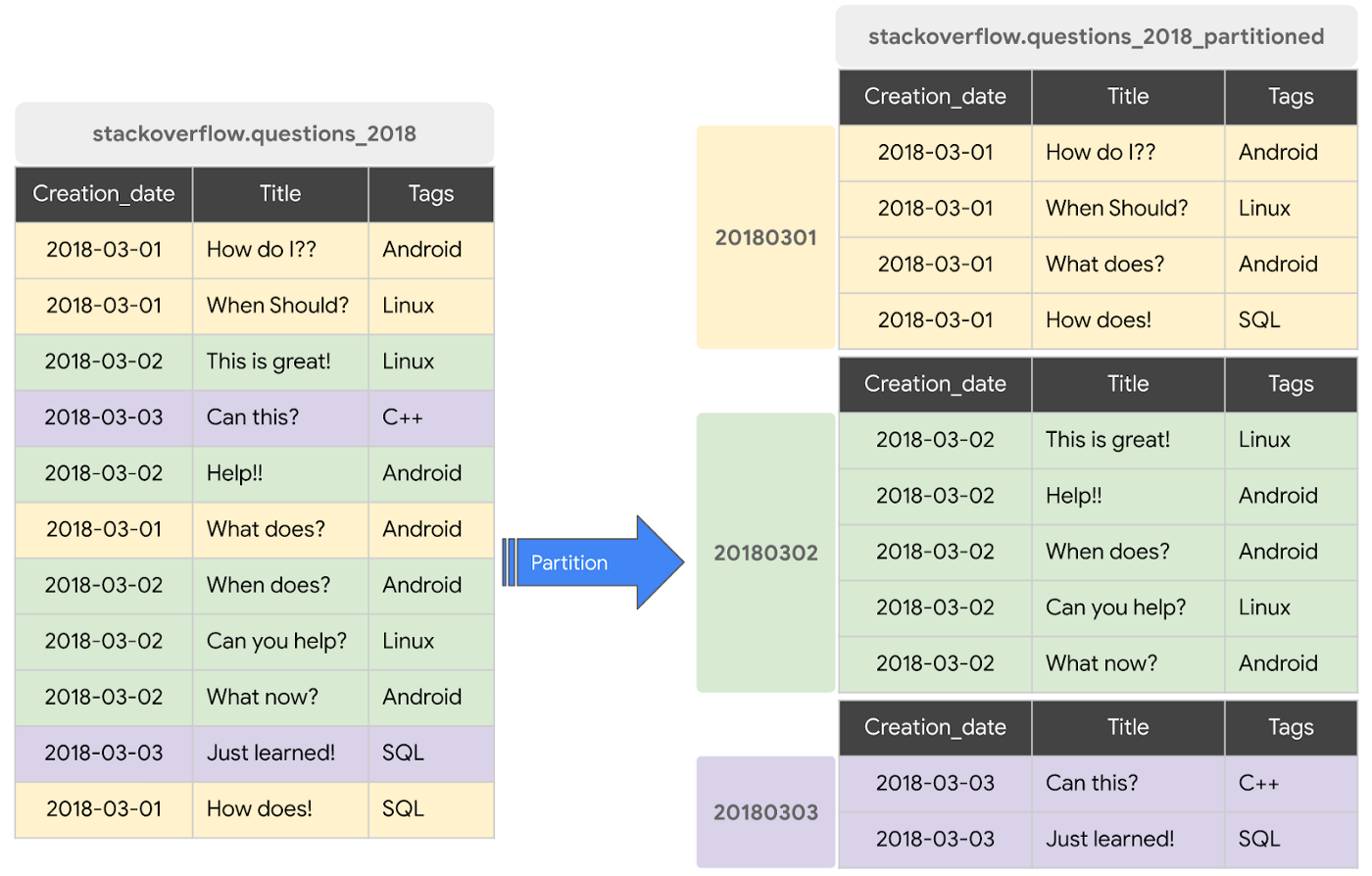
BigQuery supports the following ways to create partitioned tables:
- Ingestion time partitioned tables: daily partitions reflecting the time the data was ingested into BigQuery. This option is useful if you’ll be filtering data based on when new data was added. For example, the new Google Trends Dataset is refreshed each day, you might only be interested in the latest trends.
- Time-unit column partitioned tables: BigQuery routes data to the appropriate partition based on date value in the partitioning column. You can create partitions with granularity starting from hourly partitioning. This option is useful if you’ll be filtering data based on the date value in the table, for example looking at the most recent transactions by including a WHERE clause for transaction_created_date
- INTEGER range partitioned tables: Partitioned based on an integer column that can be bucketed. This option is useful if you’ll be filtering data based on an integer column in the table, for example focusing on specific customers using customer_id. You can bucket the integer values to create appropriately sized partitions, like having all customers with IDs from 0-100 in the same partition.
Partitioning is a great way to optimize query performance, especially for large tables that are often filtered down during analytics. When deciding on the appropriate partition key, make sure to consider how everyone in your organization is leveraging the table. For large tables that could cause some expensive queries, you might want to require partitions to be used.
Partitions are designed for places where there is a large amount of data and a low number of distinct values. A good rule of thumb is making sure partitions are greater than 1 GB. If you over partition your tables, you’ll create a lot of metadata – which means that reading in lots of partitions may actually slow down your query.
Clustering
When a table is clustered in BigQuery, the data is automatically sorted based on the contents of one or more columns (up to 4, that you specify). Usually high cardinality and non-temporal columns are preferred for clustering, as opposed to partitioning which is better for fields with lower cardinality. You’re not limited to choosing just one, you can have a single table that is both partitioned and clustered!
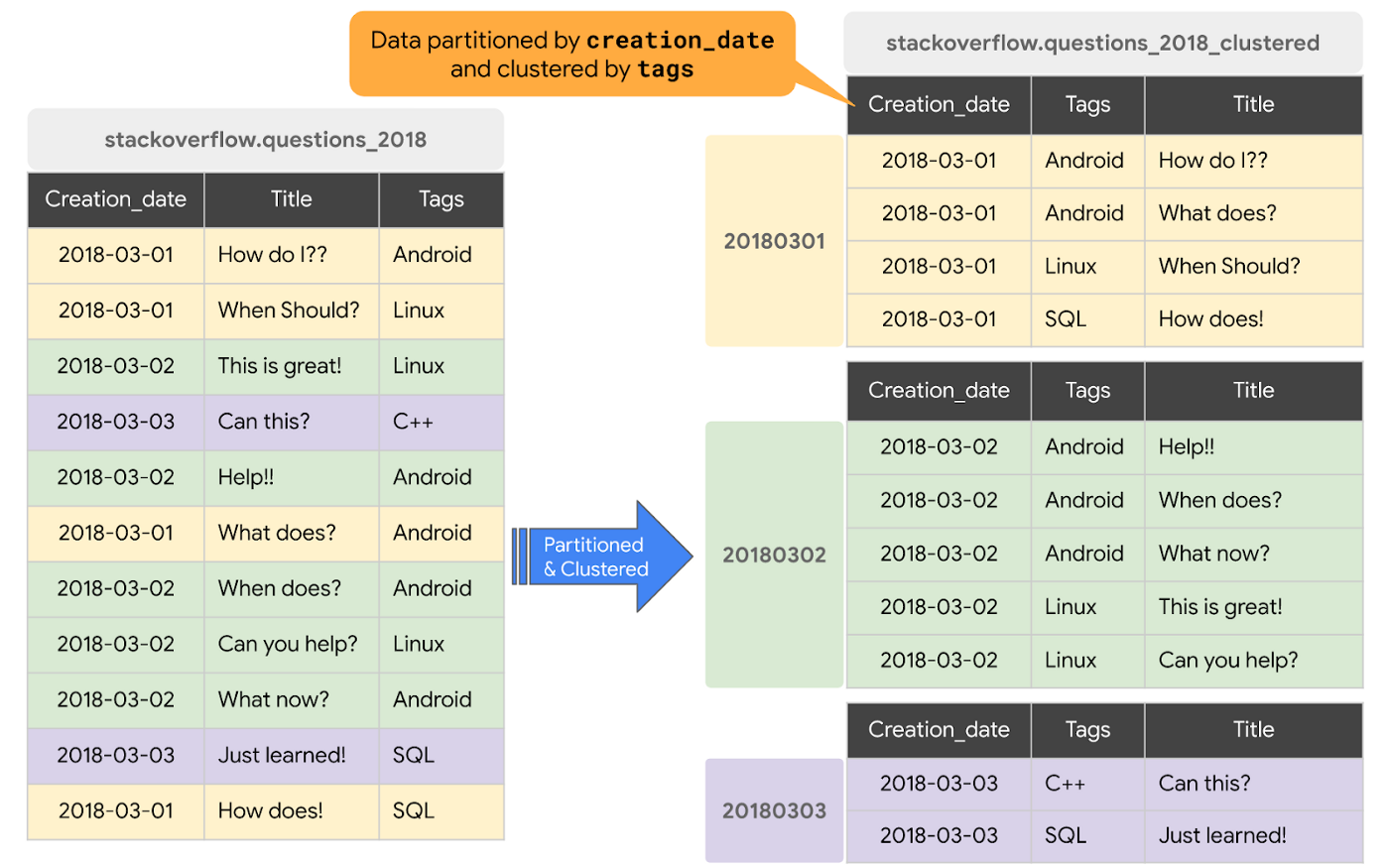
The order of clustered columns determines the sort order of the data. When new data is added to a table or a specific partition, BigQuery performs free, automatic re-clustering in the background. Specifically, clustering can improve the performance for queries:
- Containing where clauses with a clustered column: BigQuery uses the sorted blocks to eliminate scans of unnecessary data. The order of the filters in the where clause matters, so use filters that leverage clustering first
- That aggregate data based on values in a clustered column: performance is improved because the sorted blocks collocate rows with similar values
- With joins where the join key is used to cluster the table: less data is scanned, for some queries this offers a performance boost over partitioning!
Looking for some more information and example queries? Check out this blog post!
Denormalizing
If you come from a traditional database background, you’re probably used to creating normalized schemas – where you optimize your structure so that data is not repeated. This is important for OLTP workloads (as we discussed earlier) because you’re often making updates to the data. If your customer’s address is stored every place they have made a purchase, then it might be cumbersome to update their address if it changes.
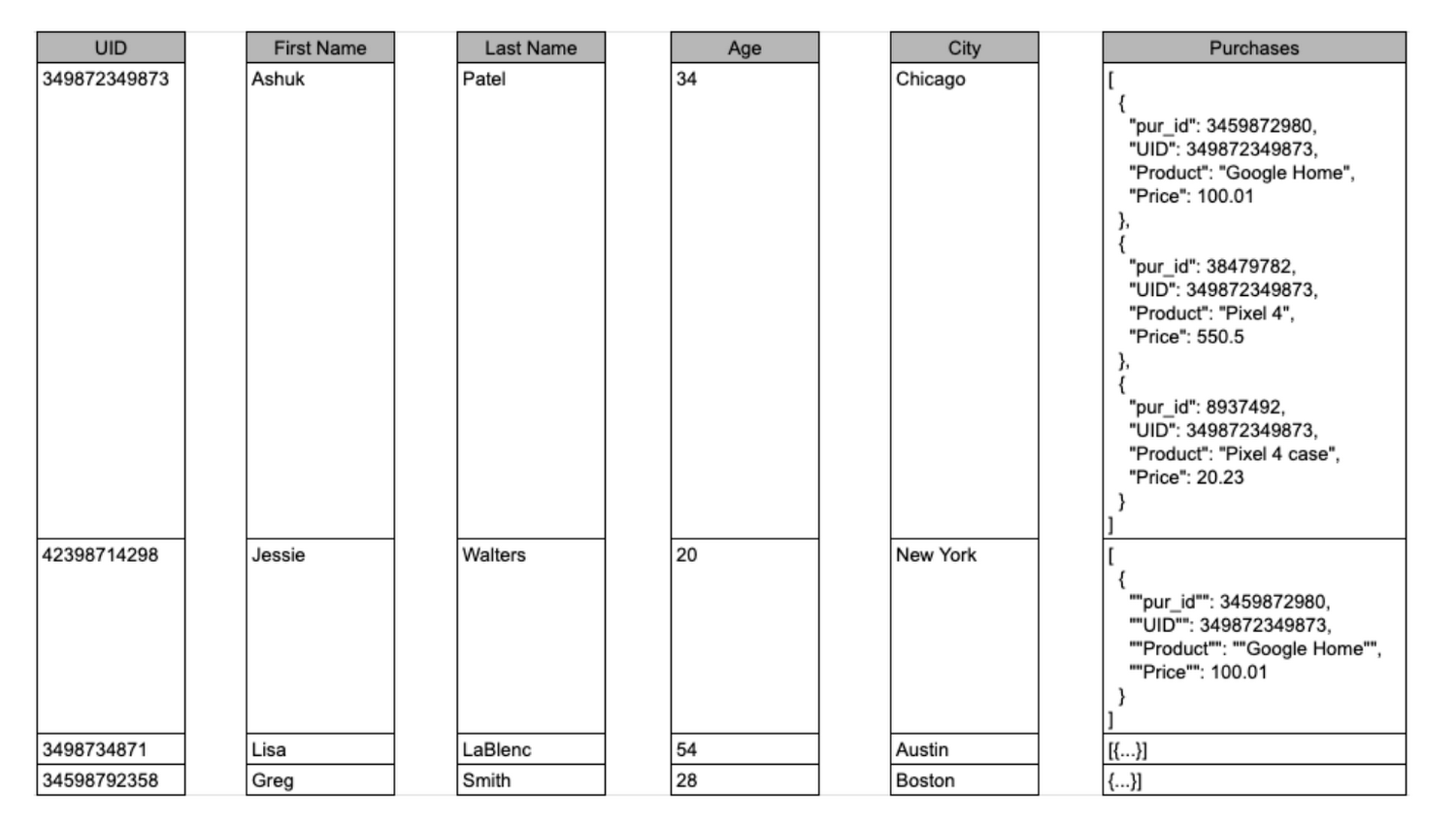
However, when performing analytical operations on normalized schemas, usually multiple tables need to be joined together. If we instead denormalize our data, so that information (like the customer address) is repeated and stored in the same table, then we can eliminate the need to have a JOIN in our query. For BigQuery specifically, we can also take advantage of support for nested and repeated structures. Expressing records using STRUCTs and ARRAYs can not only provide a more natural representation of the underlying data, but in some cases it can also eliminate the need to use a GROUP BY statement. For example, using ARRAY_LENGTH instead of COUNT.
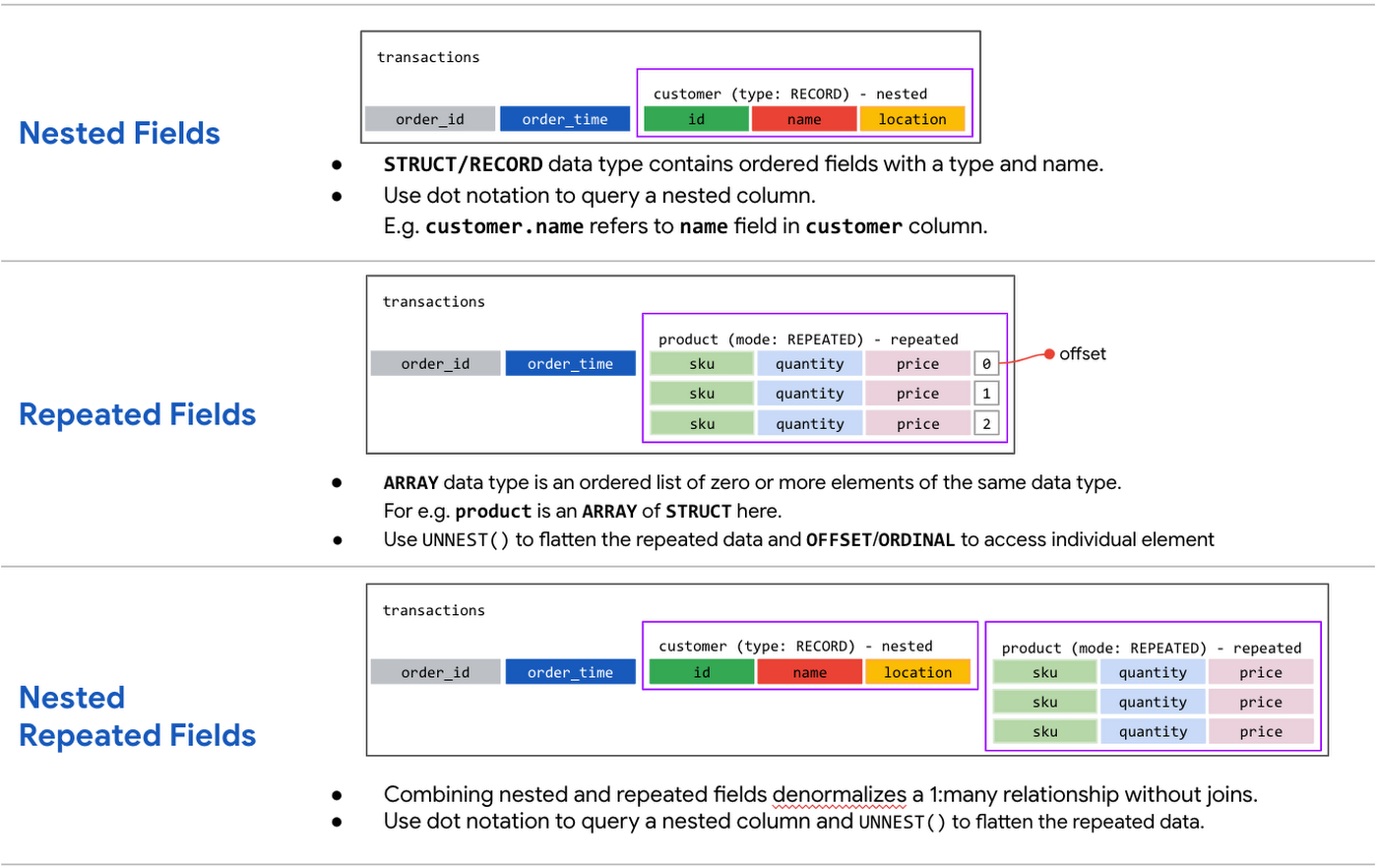
Keep in mind that denormalization has some disadvantages. First off, they aren’t storage-optimal. Although, many times the low cost of BigQuery storage addresses this concern. Second, maintaining data integrity can require increased machine time and sometimes human time for testing and verification. We recommend that you prioritize partitioning and clustering before denormalization, and then focus on data that rarely requires updates.
Optimizing for storage costs
When it comes to optimizing storage costs in BigQuery, you may want to focus on removing unneeded tables and partitions. You can configure the default table expiration for your datasets, configure the expiration time for your tables, and configure the partition expiration for partitioned tables. This can be especially useful if you’re creating materialized views or tables for ad-hoc workflows, or if you only need access to the most recent data.
Additionally, you can take advantage of BigQuery’s long term storage. If you have a table that is not used for 90 consecutive days, the price of storage for that table automatically drops by 50 percent to $0.01 per GB, per month. This is the same cost as Cloud Storage Nearline, so it might make sense to keep older, unused data in BigQuery as opposed to exporting it to Cloud Storage.Thanks for tuning in this week! Next week, we’re talking about query processing – a precursor to some query optimization techniques that will help you troubleshoot and cut costs. Be sure to stay up-to-date on this series by following me on LinkedIn and Twitter!
Empower Your Firm’s Data Decisions with Dataplex Data Lineage

1517
Of your peers have already read this article.
2:30 Minutes
The most insightful time you'll spend today!
Today, we are excited to announce the general availability of Dataplex data lineage — a fully managed Dataplex capability that helps you understand how data is sourced and transformed within the organization. Dataplex data lineage automatically tracks data movement across BigQuery, BigLake, Cloud Data Fusion (Preview), and Cloud Composer (Preview), eliminating operational hassles around manual curation of lineage metadata.
With rising data volume spread across data silos, it can be challenging for organizations to ensure users have a self-service mechanism to discover, understand and trust the data. Organizations constantly struggle with questions such as:
- Is the data extracted from an authoritative source?
- What is the impact if I drop this table?
- The data in this table seems corrupted – where did this data come from, and when was it last refreshed?
- How is sensitive information being moved or copied? Is it in adherence to data governance practices?
To answer the above questions, organizations need to track how data is sourced and transformed, which can be complex and requires significant effort.
Dataplex data lineage describes each lineage relationship by detailing what happened and when it happened in an interactable lineage graph, providing data observability.
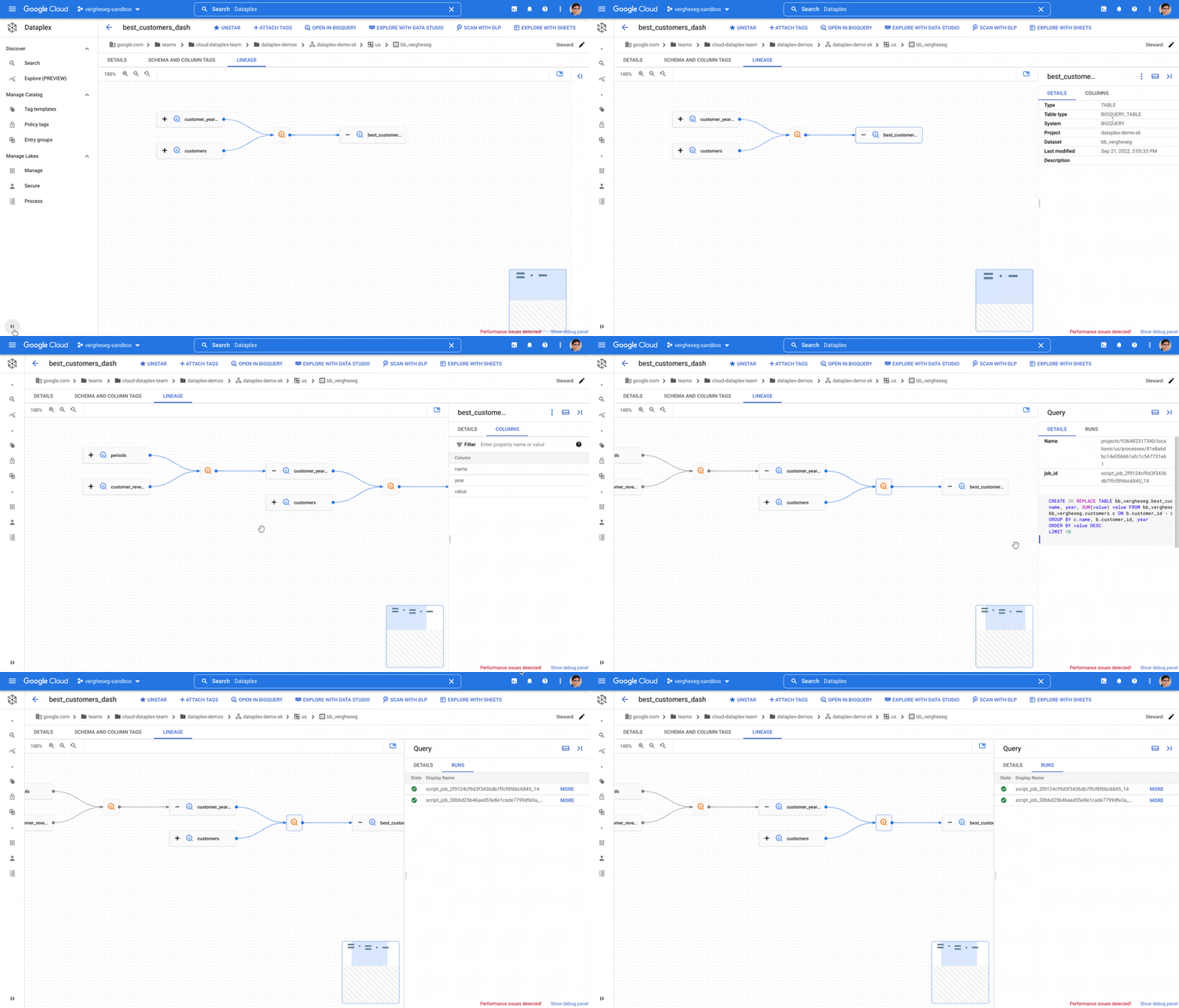
Data analysts who want to know if a table originates from an authoritative source can now answer this in a self-service manner with a simple look-up of lineage for the concerned table — available in Dataplex and in BigQuery for in-context analysis.
Data engineers can reduce time to identify and resolve data issues through root cause analysis using the operational metadata trace asserting a lineage relationship. Data lineage also aids deterministic change management by providing the ability to evaluate the impact of a change and collaborate with the corresponding stakeholders to minimize any adverse impact.
Finally, data lineage provides a map of data movement which can become the foundation for data governance practice. It enables data stewards and owners to evaluate and enforce adherence to governance requirements, especially when tracking the movement of sensitive information.
Dataplex data lineage provides APIs for extensibility so that organizations can report lineage from various systems and have a single map of how data entries are related.
What our customers are saying
L’Oréal, the world’s largest cosmetics company, is on a mission to ‘create the beauty that moves the world.’ “Dataplex data lineage helps us understand how data moves across our organization,” said Sébastien Morand, Head of Data Engineering team, L’Oréal. “As a fully managed solution, it becomes the main entry point to diagnose data issues and evaluate the impact of a change or incident — providing insight on what happened and when it happened, including reference to the execution metadata. Directly integrated into our beauty tech data platform, data lineage helps us reduce data issues and also enables us to mitigate issues faster when it does happen.”
“At Wayfair, we treat data-as-a-product and are building a robust data platform that provides self-service access and compliance constructs,” said Vinit Rajopadhye, Associate Director on Data Infrastructure & Data Enablement at Wayfair. “We are excited about Dataplex data lineage as it helps our data consumers trust data based on where it originates and the transformations applied.”
Hurb is an online travel agency in Brazil with a mission to optimize travel through technology. “Hurb has a rapidly growing data platform, with new data assets created and registered daily to support business decision-making and Machine Learning models,” said Vinícius dos Santos Mello, Senior Data Engineer. “Thanks to Dataplex data lineage features, we have end-to-end data observability across data in BigQuery. We can proactively address schema changes, data quality issues, and asset depreciation that could otherwise negatively affect the business.”
“As a company with many business domains and services, we handle a large volume of data and use it to power our decision making, so it is crucial to ensure data quality. Dataplex data lineage provides a visual understanding of the flow of data across our organization, improving efficiency of impact investigations when problems occur and increasing the reliability of the data.” said Mitsunori Fukase, Data Platform Department Group Manager, DeNA.
Get started with Dataplex data lineage
You can get started with Dataplex data lineage by enabling the Data Lineage API on your project. You can learn more here.
Additional Resources:
More Relevant Stories for Your Company

Canadian Bank’s SAP Workload Moved to BigQuery Helps Unlock New Business Opportunities
When ATB Financial decided to migrate its vast SAP landscape to the cloud, the primary goal was to focus on things that matter to customers as opposed to IT infrastructure. Based in Alberta, Canada, ATB Financial serves over 800,000 customers through hundreds of branches as well as digital banking options. To

Gartner Positions Google as the Leader for Cloud Database Management Systems!
We are thrilled that Gartner has positioned Google as a Leader for the second year in a row in the 2021 Gartner® Magic Quadrant™ for Cloud Database Management Systems (DBMS). We believe the report evaluated Google's unified capabilities across both transactional and analytical use cases, and showcases innovation progress in areas like
Google Leads the Pack in Big Data NoSQL Market: Forrester Research
NoSQL has become critical for all businesses to support modern business applications. It has gone from supporting simple schemaless apps to becoming a mission-critical data platform for large Fortune 1000 companies. It has already disrupted the database market, which was dominated for decades by relational database vendors. Today, half of

Google Cloud Next 21 for Data Analytics Unplugged
October 23rd (this past Saturday!) was my 4th Googlevarsery and we are wrapping an incredible Google Next 2021! When I started in 2017, we had a dream of making BigQuery Intelligent Data Warehouse that would power every organization’s data driven digital transformation. This year at Next, It was amazing to
