





New Histogram Features in Cloud Logging Make it Easier to Track Log Volumes, Errors and Anomalies!
3392
Of your peers have already read this article.
2:30 Minutes
The most insightful time you'll spend today!
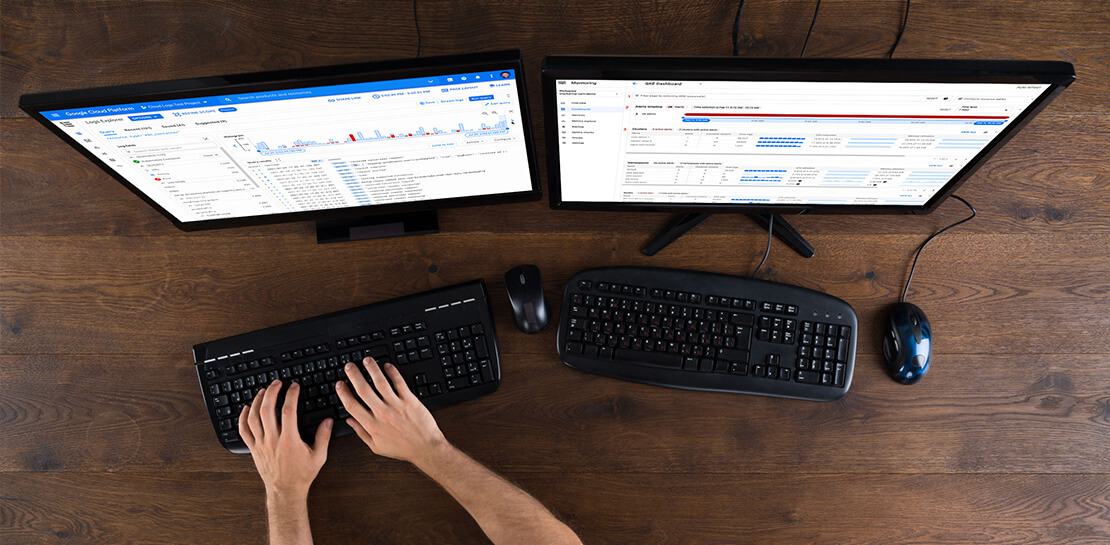
Visualizing trends in your logs is critical when troubleshooting an issue with your application. Using the histogram in Logs Explorer, you can quickly visualize log volumes over time to help spot anomalies, detect when errors started and see a breakdown of log volumes. But static visualizations are not as helpful as having more options for customization during your investigations.
That’s why we’re excited to announce that we recently added three new query controls along with separate colors for log severity to the histogram. These new features make it even easier to refine and analyze your logs by time range. The new histogram controls help find logs before or after the current period, jump to a specific time range represented in a histogram bar and zoom in/out of the current time window in the histogram.
Histogram colors
The histogram now makes it easier to view the breakdown of logs by severity with the introduction of color coding. For example, the severity colors make it easy to spot an increasing number of errors even when the volume of requests is relatively constant. Looking at the histogram below, the red vs blue shading makes it clear that there has been an increase in overall log volume and provides a visual breakdown of errors within that log volume.

Pan left/right to scroll through time
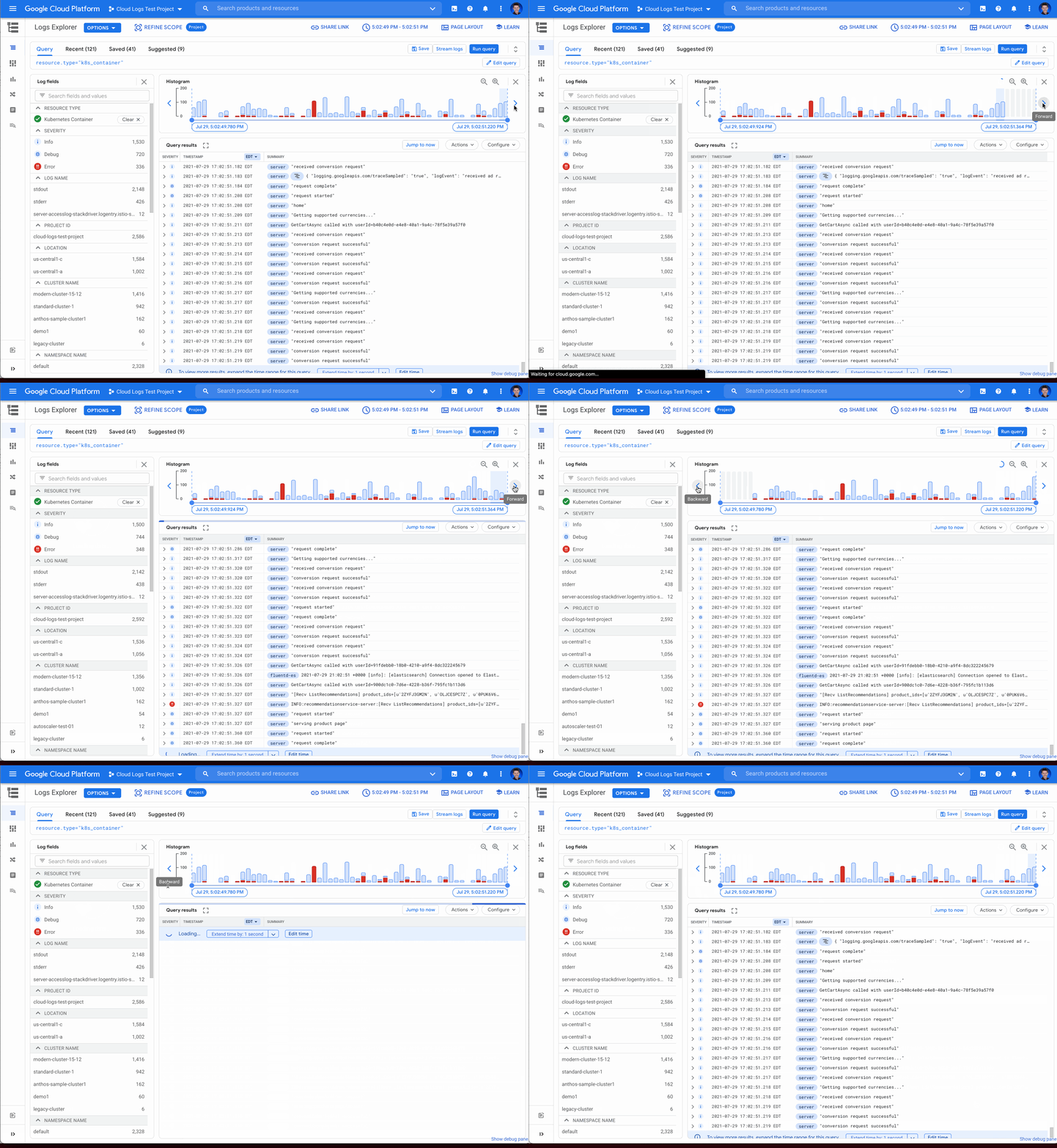
Sometimes in your troubleshooting journey, you may want to look at the logs directly before or after the current set of logs. Perhaps there was an unexpected spike in errors at the beginning of the time range and you need to see the logs in the time period directly preceding the current time range. Pressing the left arrow on the left side of the histogram shifts the time range earlier while the arrow on the right side of the histogram shifts the time range ahead. Either arrow will refine the time range in the query and rerun the query to return the logs in the new time range.
Zooming in or out
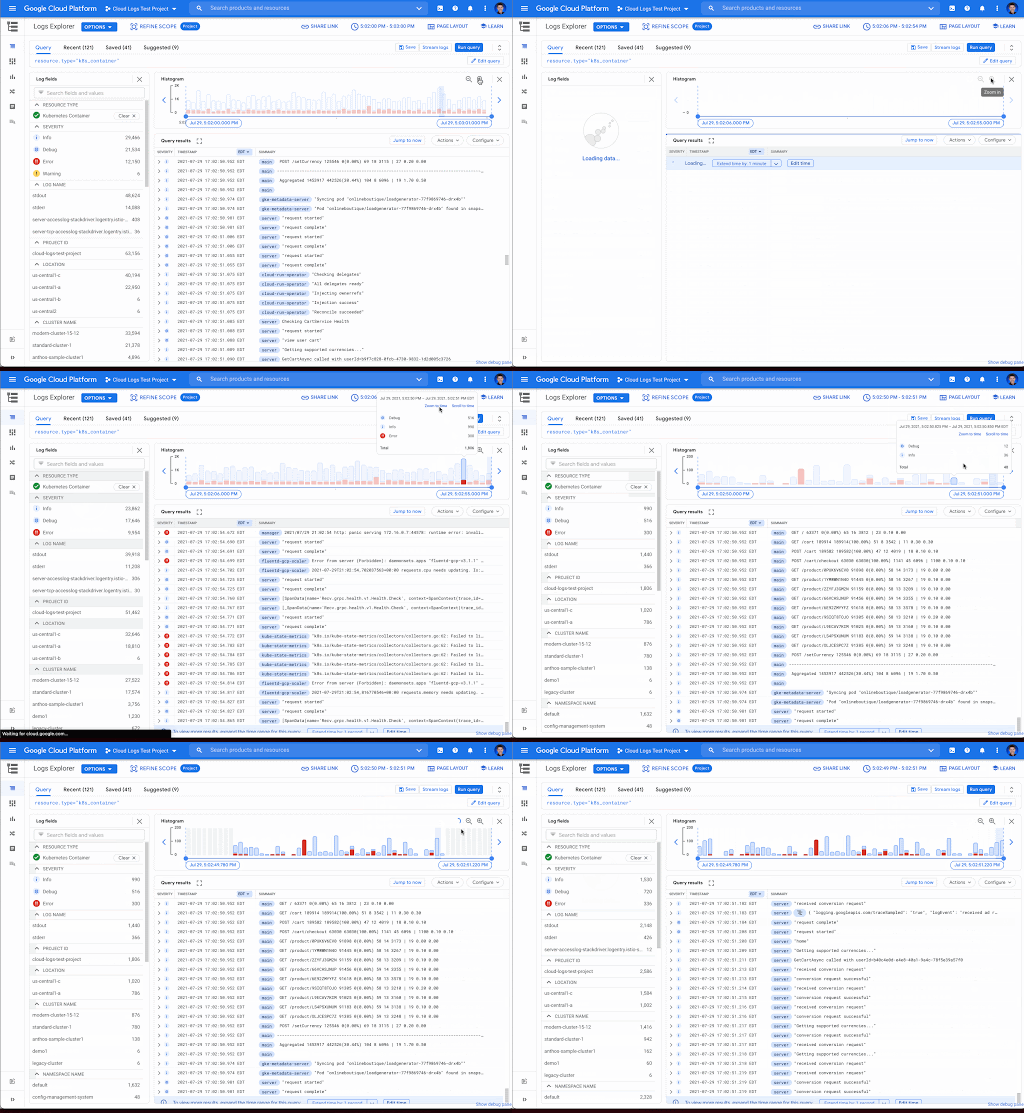
Zooming in or out from a given time range may be useful to visualize fine-grained details or a broader trend Clicking the zoom in or out icons in the upper right corner of the histogram refines the time range in the query and then reruns the query, returning the logs in the newly defined time range.
Scrolling to time
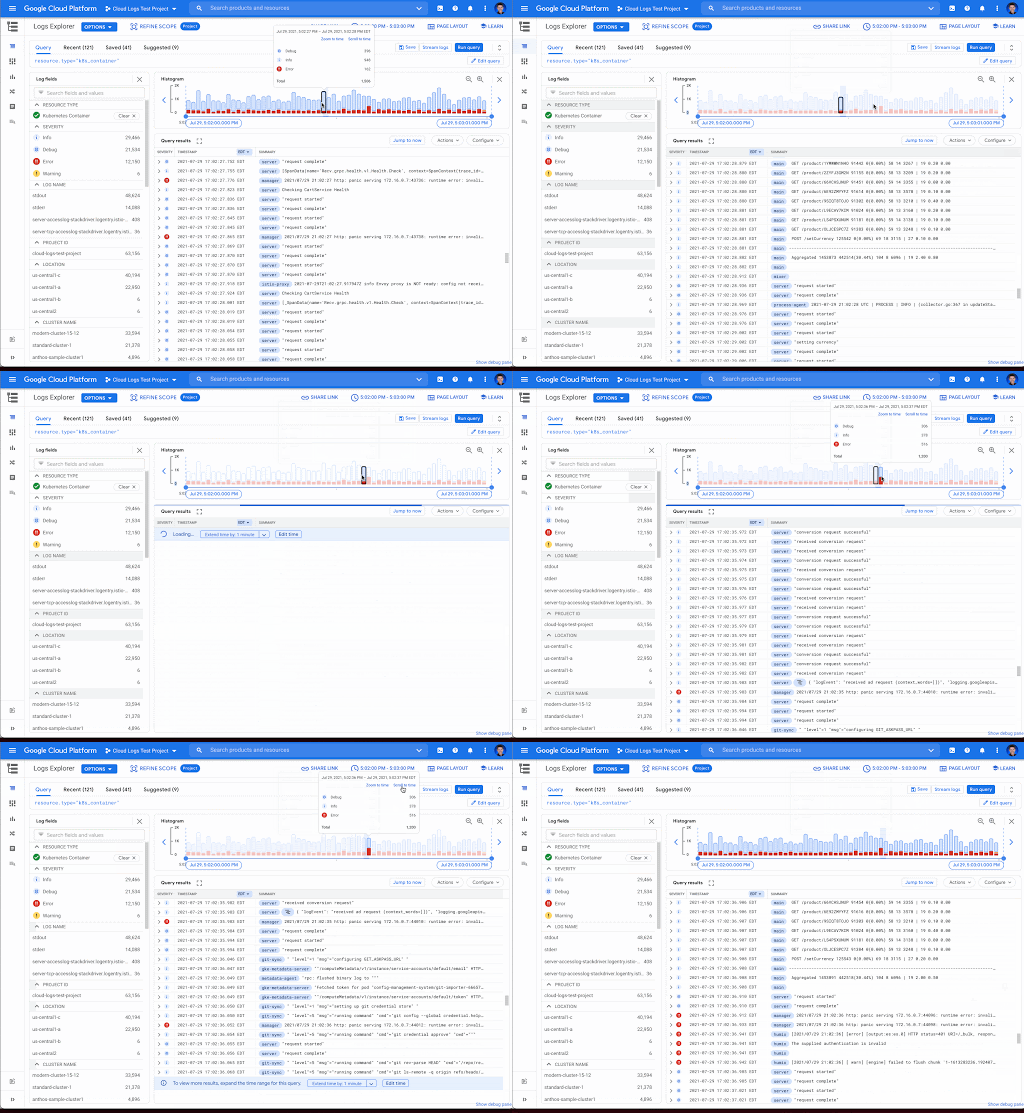
If you see a large spike in logs volume in the histogram, it’s useful to quickly review the logs generated during that spike. Clicking on the histogram bar that contains the spike now scrolls you to the logs generated during that time period.
Where to find the histogram
The histogram is a panel in Logs Explorer that can be displayed or hidden using the controls in the Page Layout menu. When you no longer want to display the histogram, click the “X” button in the upper right corner to quickly close it. To open it again, use the same Page Layout menu to enable the histogram display.
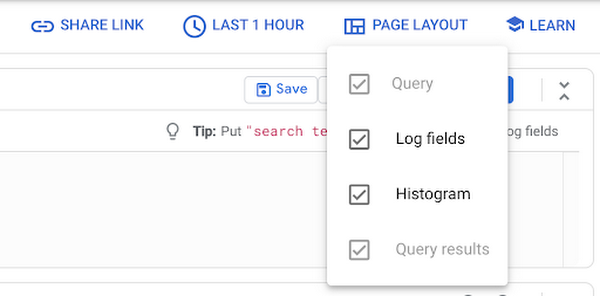
Get started with the histogram
These improvements move the histogram from a utility for visualization to an integral part of the troubleshooting journey. We are continuously working to launch new features that make Cloud Logging the best place to troubleshoot your Google Cloud logs. If you are not already a Cloud Logging user, review this getting started documentation or watch a quick video on troubleshooting services on Google Kubernetes Engine (GKE) to learn more. If you have specific questions or feedback, please join the discussion on our Google Cloud Community, Cloud Operations page.
Google Cloud’s 101 Illustrated References for Cloud Engineers and Architects

3377
Of your peers have already read this article.
1:30 Minutes
The most insightful time you'll spend today!
Many people are visual learners; I am definitely one of them, and judging by the tremendous response you all showed to Google Cloud Sketchnotes on LinkedIn and Twitter, you are too.
-Priyanka Vergadia, Lead Developer Advocate, Google
“A picture is worth a thousand words”
Shortly after I started creating and sharing visual explanations of Google Cloud concepts in late 2020, I began receiving overwhelmingly positive feedback from fellow cloud architects and enthusiasts. That feedback led me to think about pulling these sketches together into a reference guide — a one-stop shop for cloud learning fun. So here it is!
🥁 Introducing “Visualizing Google Cloud: 101 Illustrated References for Cloud Engineers and Architects”
🤔 What is this book about?
This book is my way of making Google Cloud technical concepts fun and interesting via visual storytelling. It covers Google Cloud essentials from end to end, with a visual explanation of each concept, how it works, and how you can apply it with other concepts to meet the needs of your real-world use case. After reading thousands of pages of Google Cloud documentation and experimenting with virtually every Google Cloud product, I distilled that experience down to this book of accessible, bite-sized visuals.
The sketches are spread across five broad categories:
- Infrastructure, storage, and databases: Run and scale applications seamlessly
- Data analytics and machine learning: Derive actionable insights from data
- Networking: Connect, scale, secure, modernize, and optimize your infrastructure
- Application development and modernization: Build apps using containers and microservices
- Security: Protect data, users, and applications in cloud
🙋♀️ Who is this book for?
It is for all cloud enthusiasts. It is for anyone who is planning a cloud migration or new cloud deployment, preparing for cloud certification, or looking to make the most of Google Cloud. If you are a cloud solutions architect, an IT decision-maker, or a data and machine learning engineer, you will find this book a good starting point. In short, this book is for YOU!
When you get the book you’ll not only help yourself, you’ll also help provide meals for schoolchildren who need them. All the books’ proceeds go directly to the awesome folks at Wiley and a charity that fights malnutrition and supports the right to education.
🪜 Next Steps
I hope this book helps you on your Google Cloud journey by making it both easier and more fun. Are you ready to dive in? Order here, learn more about how the idea of the book came about here and please share your thoughts with me on Twitter or LinkedIn.
5636
Of your peers have already downloaded this article
5:30 Minutes
The most insightful time you'll spend today!
Public cloud, big data, and AI technologies offer competitive advantages and cost savings for capital markets firms ready to make the transition. This paper discusses the three phases capital markets firms go through in transitioning to public cloud, and the workloads, benefits, and cultural changes that characterize the three phases:
Infrastructure Optimizers: The first step on the public cloud journey, where firms focus on migrating specific workloads to save costs.
Cautious Strategists: Firms build on the success of their first public cloud migrations, and begin to change the way they develop technology to increase cost savings and start taking advantage of capabilities only available on public cloud.
Transformative Innovators: Firms shift to a fully public cloud-enabled mentality, and fully leverage the flexibility and agility of the public cloud to build industry-changing solutions and attract top IT talent.
Additionally, we reveal the five things that capital markets innovators who have advanced to the transformation phase do well in their adoption of cloud, big data, and AI technologies across the front, middle, and back office functions.
1396
Of your peers have already watched this video.
2:30 Minutes
The most insightful time you'll spend today!
Greenovation: Adani and Google Cloud Join Forces for a Sustainable and Data-Driven India
As the biggest renewable energy developer, Adani aims to put India on the green map. Working with the world’s cleanest cloud inspired the organisation to solve their own efficiency issues, and better manage their facilities across the country to lower their carbon footprint.
- For more on Adani, visit: https://www.adani.com/
- For more on Google Cloud Customer Stories, visit: https://cloud.google.com/customers
- For more on how our customers across the region are solving with Google Cloud, visit: APAC YouTube Channel: @GoogleCloudAPAC
- Follow Google Cloud India on Facebook for more updates: https://www.facebook.com/GoogleCloudIN
Three Typical Connectivity Use Cases to Pick the Right Option for Your Enterprise

3299
Of your peers have already read this article.
3:00 Minutes
The most insightful time you'll spend today!
Enterprises today have a very broad mix of networks — from SD-WANs, dedicated WANs such as MPLS, cloud interconnects, to VPNs. At the same time, they’re moving those WANs to the cloud to take advantage of faster turn-up, lower cost, and increased feature velocity. As workloads migrate to the cloud and multi-cloud environments, we believe that it’s critical to simplify enterprises’ networking model.
Each major cloud provider uses distinct abstraction models to configure networks or connections between your resources. Some use gateways, some use connections or links. Network Connectivity Center, launched last year, provides a simple management solution for your network connection, and is now Generally Available.
In this post, we outline the typical connectivity use cases for customers to help you select and set up the best connectivity option for your environment.
Understanding cloud network connectivity
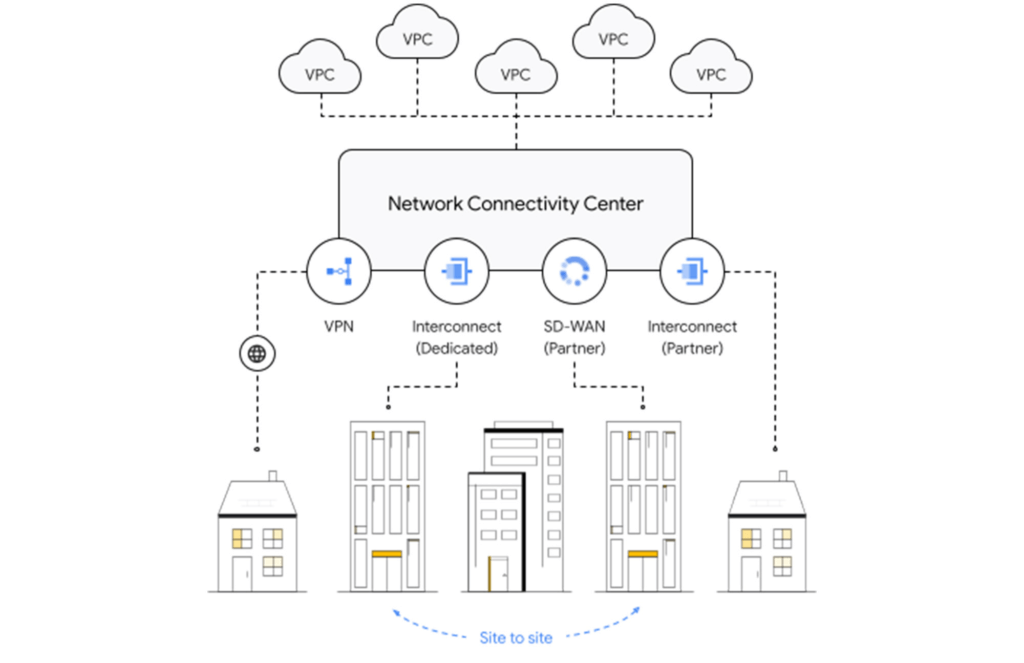
Cloud networking refers to the ability to connect two resources together inside a cloud, across clouds and with on-premises data centers. A cloud provider needs to provide three main types of connectivity:
- Site-to-cloud – Between on-premises equipment and cloud resources
- Site-to-site – To connect on-premises resources together
- VPC-to-VPC – Connectivity between cloud resources
- Let’s take a look at each one.
Site-to-cloud connectivity
Site-to-cloud connectivity traditionally is done via a cloud interconnect or a cloud VPN. The automatic exchange of routes between on-premises and multiple VPCs can be done using a transit VPC.
A newer approach is to add cloud providers into an SD-WAN mesh using a router virtual appliance in Google Cloud. Network Connectivity Center brings the capacity to synchronize the appliance routes dynamically via BGP to Cloud Router and hence their VPCs. It enables connectivity between on-premises data centers and branch offices and their cloud workloads via SD-WAN-enabled connectivity. This capability is available globally across all 29+ Google Cloud regions. Several of our partners also support this capability in their router appliances.
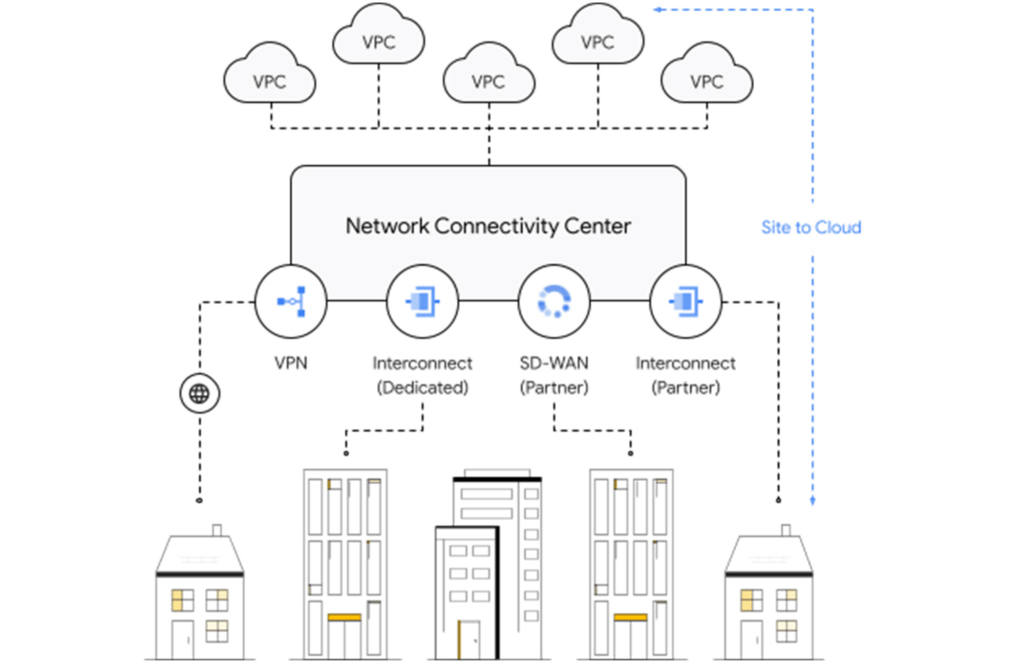
Site-to-site connectivity
Site-to-site connectivity enables network connectivity directly between two or more hybrid connection points (VPN, Interconnect or SD-WAN). Network Connectivity Center simplifies this model by automating the routing announcements in this environment, such that all sites connected to a single global Network Connectivity Center hub are able to communicate freely in any-any fashion. You can see an example of this for a specific market vertical use case in a recent blog, Voice trading in the cloud — digital transformation of private wires.
VPC-to-VPC connectivity
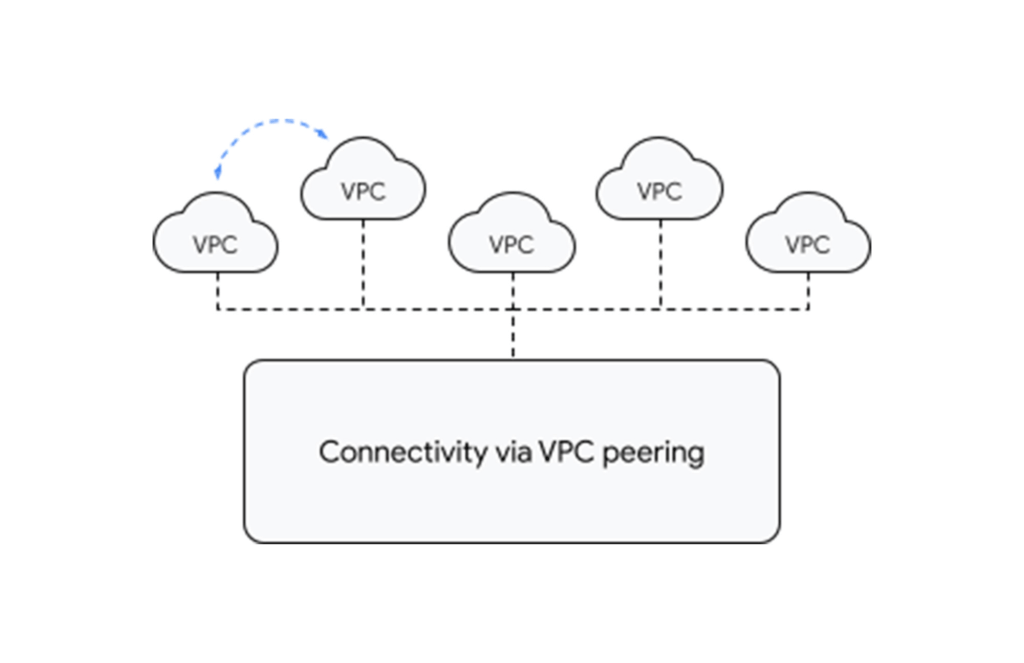
You can create a full or partial mesh of VPC connections using multiple technologies, with VPC peering being the most common. VPC peering provides highly performant, low latency, private connectivity for customer networks connected via hybrid connectivity and Network Connectivity Center to multiple VPCs containing workloads, which can be segmented via granular firewall policies as needed. Alternatively, you can use a transit VPC model to connect multiple VPCs together in a hub and spoke topology.
With tight integration with third-party router appliances as mentioned earlier, you can also leverage their third-party supported solutions such as next-generation firewalls to connect your VPCs together to meet specific compliance and segmentation requirements. Network Connectivity Center allows you to synchronize the routing tables of these appliances with your VPC’s routing table, simplifying the process of setting up redundant configurations.
What’s next for cloud networking connectivity in Google Cloud?
As enterprises continue to migrate different types of workloads to public cloud providers, networking topologies are becoming more complex. In summary, we have solutions for all connectivity needs. We aim to keep our models and solutions understandable and simple. Over time, look for Network Connectivity Center to become Google Cloud’s single point of configuration for all your connectivity needs, with capabilities to handle the most complex network.
How We Built a Brand New Bank on Google Cloud and Cloud Spanner: The First Scalable, Enterprise-grade, Database Service

6542
Of your peers have already read this article.
6:30 Minutes
The most insightful time you'll spend today!
Editor’s note: Technology today lets companies of any size take on entire industries simply with an innovative business model plus digital distribution. Take Shine, a French startup whose platform helps freelancers manage their finances — and their administrative commitments. Here, Raphael Simon, Shine’s CTO and co-founder, talks about why Shine built a new bank on Google Cloud Platform, and in particular Cloud Spanner.
More and more people are deciding to take the plunge and start a freelance career. Some of them by choice, others out of necessity. One of their biggest pain points is dealing with administrative tasks.
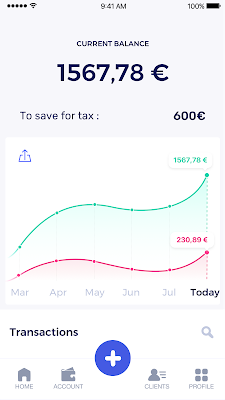
In some countries, especially in Europe, the administrative burden of being a freelancer is similar to what a company of 10 or more people deals with. A freelancer doesn’t necessarily have the time or skills to manage all this paperwork. So we are building a new bank for freelancers from the ground up that helps automate administrative tasks associated with their business.
Shine’s banking services and financial tools make it as easy to work as a freelancer as it is to work for a larger company. We deal with administrative tasks on behalf of the freelancer so that he or she can focus on their job: finding and wowing clients.

Building our infrastructure
As a new bank, we had the opportunity to build our infrastructure from the ground up. Designing an infrastructure and choosing a database presents tough decisions, especially in the financial services world. Financial institutions come under tremendous scrutiny to demonstrate stability and security. Even a tiny leak of banking data can have tremendous consequences both for the bank and its clients, and any service interruption can trigger a banking license to be suspended or a transaction to be declined.
At the same time, it’s vital for us to optimize our resources so we can maximize the time we spend developing user-facing features. In our first six months, we iterated and validated a prototype app using Firebase, and secured our seed funding round (one of the largest in Europe in 2017).
Based on our positive experience with Firebase, plus the ease-of-use and attractive pricing that Google Cloud offered, we decided to build our platform on Google Cloud Platform (GCP).
We were drawn to GCP because it has a simple, consistent interface that is easy to learn. We chose App Engine flexible environment with Google Cloud Endpoints for an auto-scaling microservices API. These helped us reduce the time, effort, and cost in terms of DevOps engineers, so we could invest more in developing features, while maintaining our agility.
We use Cloud Identity and Access Management (Cloud IAM) to help control developer access to critical parts of the application such as customer bank account data. It was quite a relief to lean on a reliable partner like Google Cloud for this.
Database decisions
Next came time to choose a database. Shine lives at the financial heart of our customers’ businesses and provides guidance on things like accounting and tax declaration. The app calculates the VAT for each invoice and forecasts the charges they must pay each quarter.
Due to the sensitivity of our customers’ data, the stakes are high. We pay careful attention to data integrity and availability and only a relational database with support for ACID transactions (Atomicity, Consistency, Isolation, Durability) can meet this requirement.
At the same time, we wanted to focus on the app and user experience, not on database administration or scalability issues. We’re trying to build the best possible product for our users, and administering a database has no direct value for our customers. In other words, we wanted a managed service.
Cloud Spanner combines a globally distributed relational database service with ACID transactions, industry-standard SQL semantics, horizontal scaling, and high availability. Cloud Spanner provided additional security, high-availability, and disaster recovery features out-of-the-box that would have taken months for us to implement on our own. Oh, and no need to worry about performance — Cloud Spanner is fast. Indeed, Cloud Spanner has been a real asset to the project, from the ease-of-use of creating an instance to scaling the database.
Cloud Spanner pro tips
We began working with Cloud Spanner and have learned a lot along the way. Here are some technical notes about our deployment and some best practices that may be useful to you down the road:
- Cloud Spanner allows us to change a schema in production without downtime. We always use a NOT NULL constraint, because we generally think that using NULL leads to more errors in application code. We always use a default value when we create an entity through our APIs and we use Cloud Dataflow to set values when we change a schema (e.g., adding a field to an entity).
- With microservices, it’s generally a good practice to make sure every service has its own database to ensure data isolation between the different services. However, we adopted a slightly different strategy to optimize our use of Cloud Spanner. We have an instance on which there are three databases — one for production, one for staging and one for testing our continuous integration (CI) pipeline. Each service has one or more interleaved tables that are isolated from others services’ tables (we do not use foreign-keys between tables from different services). This way our microservices data are not tightly “coupled”.
- We created an internal query service that performs read-only queries to Cloud Spanner to generate a dashboard or do complex queries for analytics. It is the only service where we allow joins between tables across services.
- We take advantage of Cloud Spanner’s scalability, and thus don’t delete any data that could one day be useful and/or profitable.
- We store all of our business logs on Cloud Spanner, for example connection attempts to the application. We append the ‘-Logs’ suffix to them.
- When possible, we always create an interleave.
In short, implementing Cloud Spanner has been a good choice for Shine:
- It’s saved us weeks, if not months, of coding.
- We feel we can rely on it since it’s been battle-tested by Google.
- We can focus on building a disruptive financial services product for freelancers and SMBs.
And because Cloud Spanner is fully managed and horizontally scalable, we don’t have to worry about hardware, security patches, scaling, database sharding, or the possibility of a long and risky database migration in the future. We are confident Cloud Spanner will grow with our business, particularly as we expand regionally and globally. I strongly recommend Cloud Spanner to any company looking for a complete database solution for business-critical, sensitive, and scalable data.
More Relevant Stories for Your Company

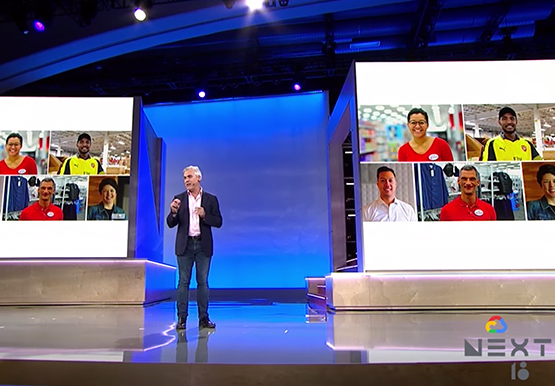

Target Leverages Google Cloud to Create Market-defining Online Experience
In the hyper-competitive world of online retail sales, ease-of-use and transaction speed can make or break business outcomes. However, a few years ago US Retail giant Target was going through a period of uncertainty. While the company had over 1800 stores across the US with an estimated 85% of US



How Carrefour is Building the Future of Retail on Google Cloud
Multinational retailer Carrefour was facing the challenge of meeting increasing customer expectations and realized that it needed to innovate faster. That's when the company decided to move its SAP workloads to Gooogle Cloud. As a result, Carrefour transformed over 1,000 stores and redesigned its back office management with SAP on

Hybrid Work with Google Workspace: What Customers can Expect
In June, we shared our vision for navigating the future of hybrid work with a single connected experience in Google Workspace. Now, as many of our customers begin to embark on their own hybrid journeys, I wanted to share how we’re helping them bridge the gaps in this new way of

Explore Google Cloud SQL’s 3 Fault Tolerance Mechanism to Ease Data Pro
If you’re managing a crucial application that has to be fully fault-tolerant, you need your system to be able to handle every fault, no matter the type and scope of failure, with minimal downtime and data loss. Protecting against these faults means juggling numerous variables that can impact performance as
