





Hybrid Work with Google Workspace: What Customers can Expect

5865
Of your peers have already read this article.
4:00 Minutes
The most insightful time you'll spend today!
In June, we shared our vision for navigating the future of hybrid work with a single connected experience in Google Workspace. Now, as many of our customers begin to embark on their own hybrid journeys, I wanted to share how we’re helping them bridge the gaps in this new way of working.
A dedicated place for team collaboration: Spaces are now live
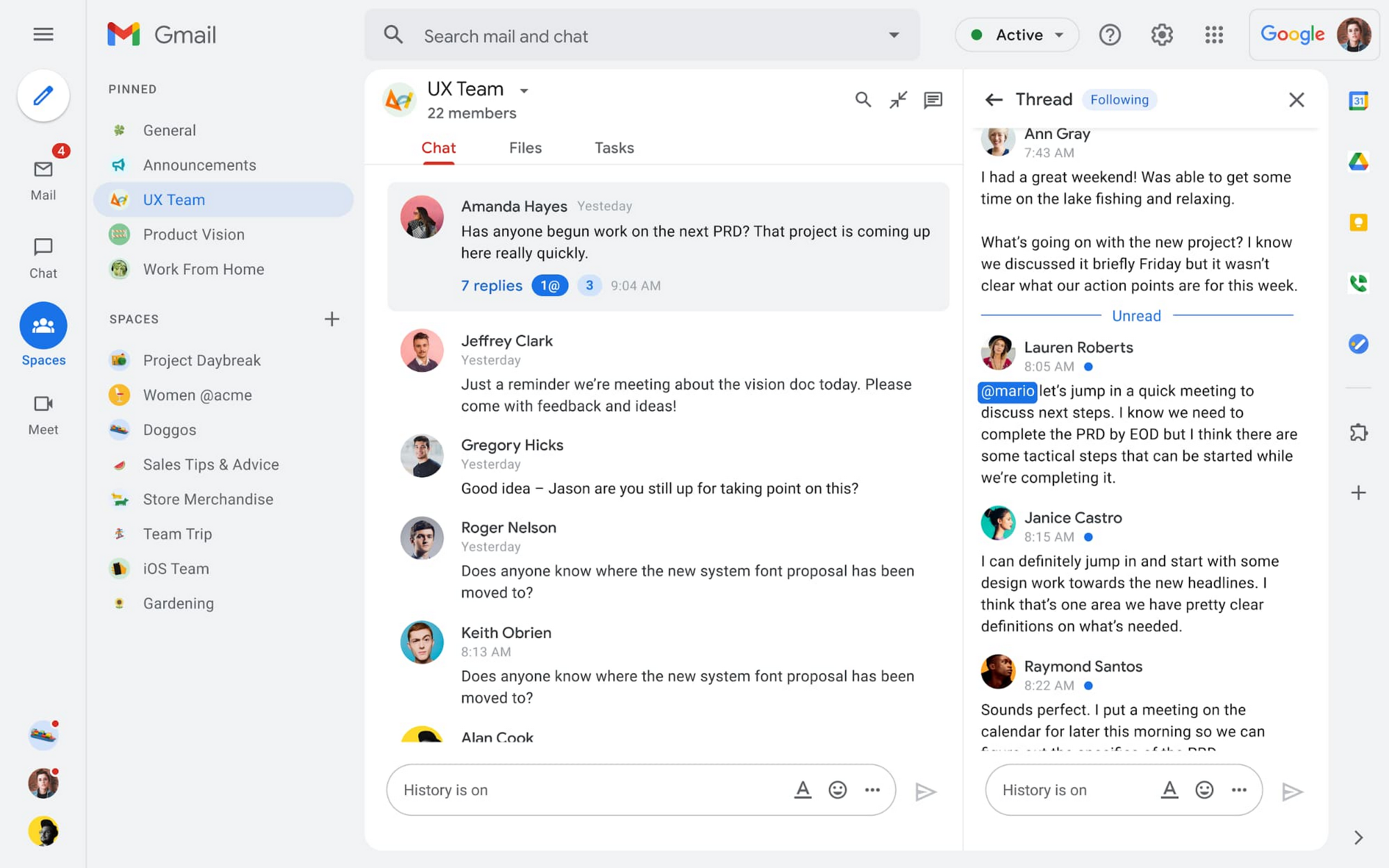
Spaces are the central place for team collaboration in Workspace and starting today, Spaces are live for all users. Spaces are unique in that they are tightly integrated with Google Workspace tools like Calendar, Drive, Docs, Sheets, Slides, Meet, and Tasks, providing a better way for people to engage in topic-based discussions, share knowledge and ideas, move projects forward and build communities and team culture.
We hear from our customers that they’re continuing to work across a broad range of locations and working hours, and that Spaces can be a central hub for collaboration, both in real time and asynchronously. Instead of starting an email chain or scheduling a video meeting, teams can come together directly in a Space to move projects and topics along, whether it’s a team of 10 for “2022 Roadmap Planning” or a team of 1,000 for the “Company-wide All-Hands.”
With Spaces, teams can share ideas, collaborate on documents, and manage tasks from a single place. Because all their work is preserved for future reference, team members can easily jump in and contribute at a time that works best for them, seeing a full history of the conversations, context, and content along the way. Using Spaces has already helped my own team, which is spread across time zones and varied in its working styles. It’s been helpful to rely on Spaces to retain and structure foundational knowledge, whether it’s for onboarding a new teammate or preserving context when someone moves to a new role.
We’re just getting started with Spaces and I’m excited to share a little more about where we’ll take it next.
In the coming months, our users will see:
- Streamlined navigation: A flexible user interface helps users easily access their inbox, chats, Spaces and meetings—all from a single location—so they can stay on top of everything that’s important.
- Discoverable Spaces: Spaces and their content can be made discoverable to all members of an organization, so other people can find and join the conversation. Administrators can also set discoverability as the default for their organization.
- Enhanced search: Allows users to easily find content from within and across Spaces, or even discover new Spaces to join. “Search everything” in Spaces opens up powerful new collaboration possibilities and makes it easier to access the team’s collective knowledge base.
- In-line topic threading: The ability to reply to any message within a Space fuels deeper discussions and collaboration across teams and organizations.
- Robust security & admin features: Tools for content moderation, managing Spaces, and establishing the right rules for healthy communication across domains and companies.
Making meetings more hybrid friendly
Spaces will play an important role in laying the groundwork for meetings and, in some cases, reduce the number of meetings a team needs to gain alignment. Having a dedicated space for asynchronous collaboration, with access to all the right content and context, will help teams be more deliberate about scheduling meetings. This is top of mind for us and many of our customers given the rise in meeting fatigue over the last 18 months. But when having a meeting genuinely feels worthwhile, the experience of transitioning into (and out of) it from different collaboration touchpoints should be seamless.
Over the past few months, in collaboration with many customers and across teams within Google, we developed a handbook for navigating hybrid work that includes best-practice blueprints for the five most common hybrid meeting types. Because meetings are a foundational piece of hybrid work, our goal is to make them as productive, immersive and inclusive as possible.
Scheduling meetings that work across the entire team
With hybrid work, many teams—my own included—have locations and working hours that can change daily. When many of us were together in the office, we might have tended to schedule meetings at a time that favored the “in-office majority,” but now it’s especially important to schedule meetings that scale across the entire distributed team.
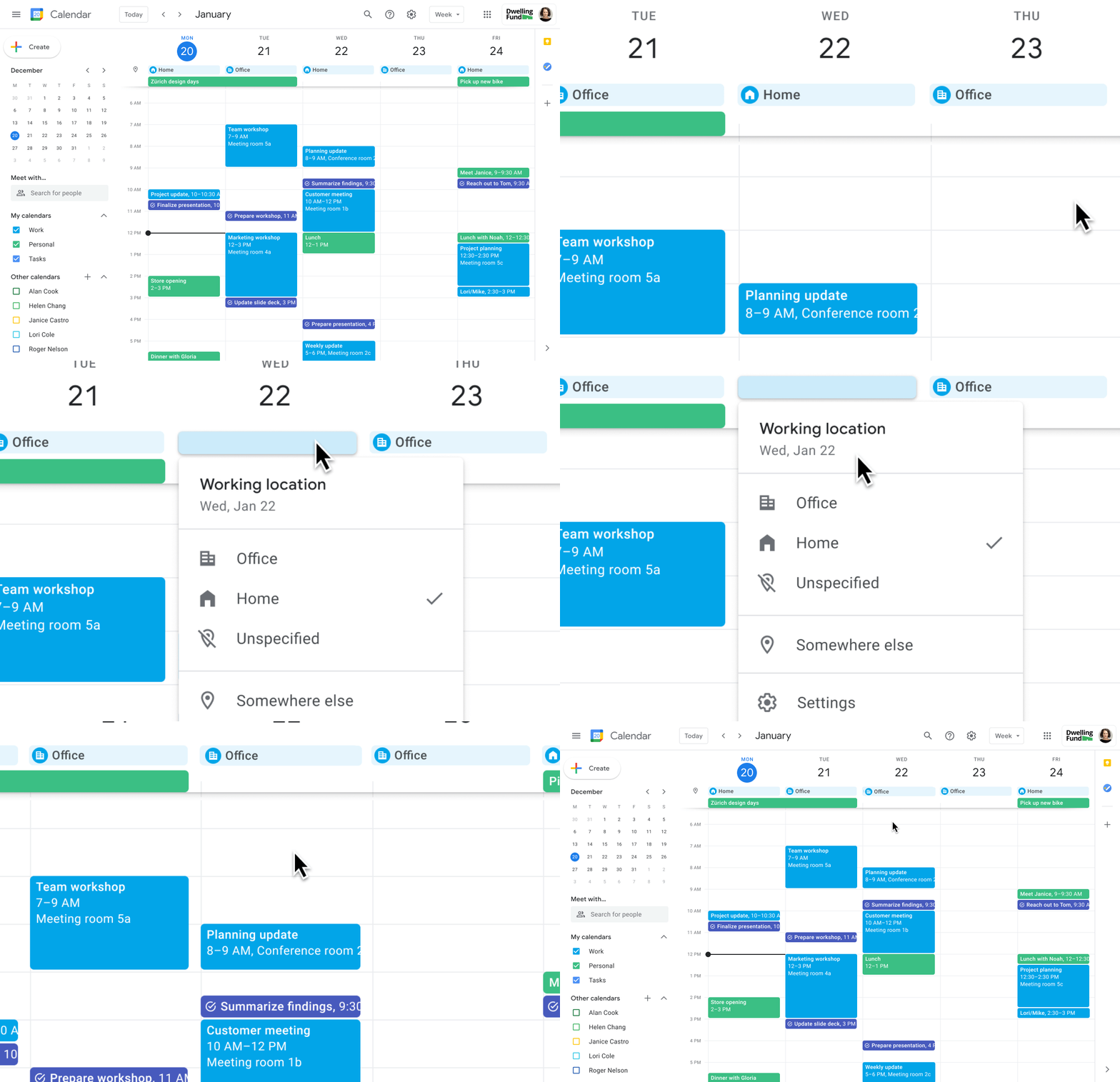
Now, beyond indicating their virtual or physical presence when accepting meeting invites, team members can set their location for each work day in Calendar. When combined, these capabilities allow meeting organizers and on-site support teams to plan for the right mix of in-person and virtual attendance. They can also provide greater visibility and help set expectations across hybrid teams.
Making meetings more spontaneous
Remember when you’d casually bump into a colleague in the office hallway or a break room and start a conversation that sparked new ideas? That’s perhaps the thing I’m looking forward to most as more of my team plan their part-time return to the office. These casual encounters were always a great way to build relationships and learn about topics that might not come up in structured meetings. To help enable these spontaneous connections when teammates aren’t in the office together, we’re bringing Google Meet calling to Workspace.
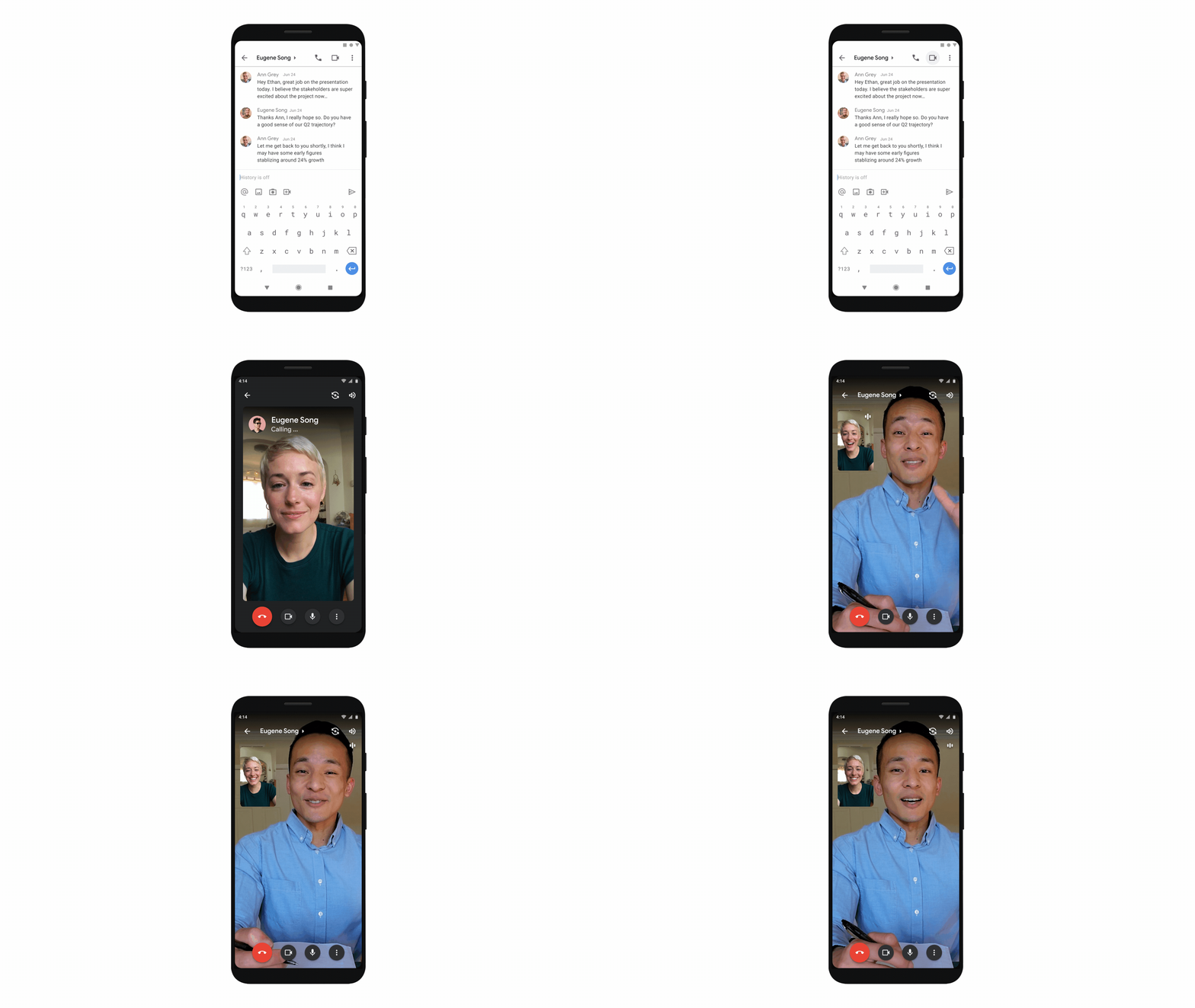
Google Meet calling is a seamless experience of initiating a video or audio call between one or more participants, complementing more structured, scheduled video meetings. Our intention is to bring Meet calling to all the natural endpoints in Workspace where you’d initiate an ad-hoc call including chats, people cards, and Spaces, but this will come first to one-to-one chats within the Gmail mobile app. Soon I’ll be able to call members of my team directly from a one-to-one chat. This will ring their device running the Gmail mobile app and send a call chip to our chat on their laptop, so they can easily answer from any device. It’s not quite the same as a spontaneous hallway conversation, but it might be the next best thing in a hybrid setting.
Ensuring collaboration equity in hybrid meetings
How do we ensure that hybrid meetings aren’t two meetings in one, divided between those in-person and those who are remote? Effective hybrid meetings need a unified experience so that the people sitting together in the same room can interact with their remote colleagues seamlessly, without it ever feeling like there are two parallel conversations.
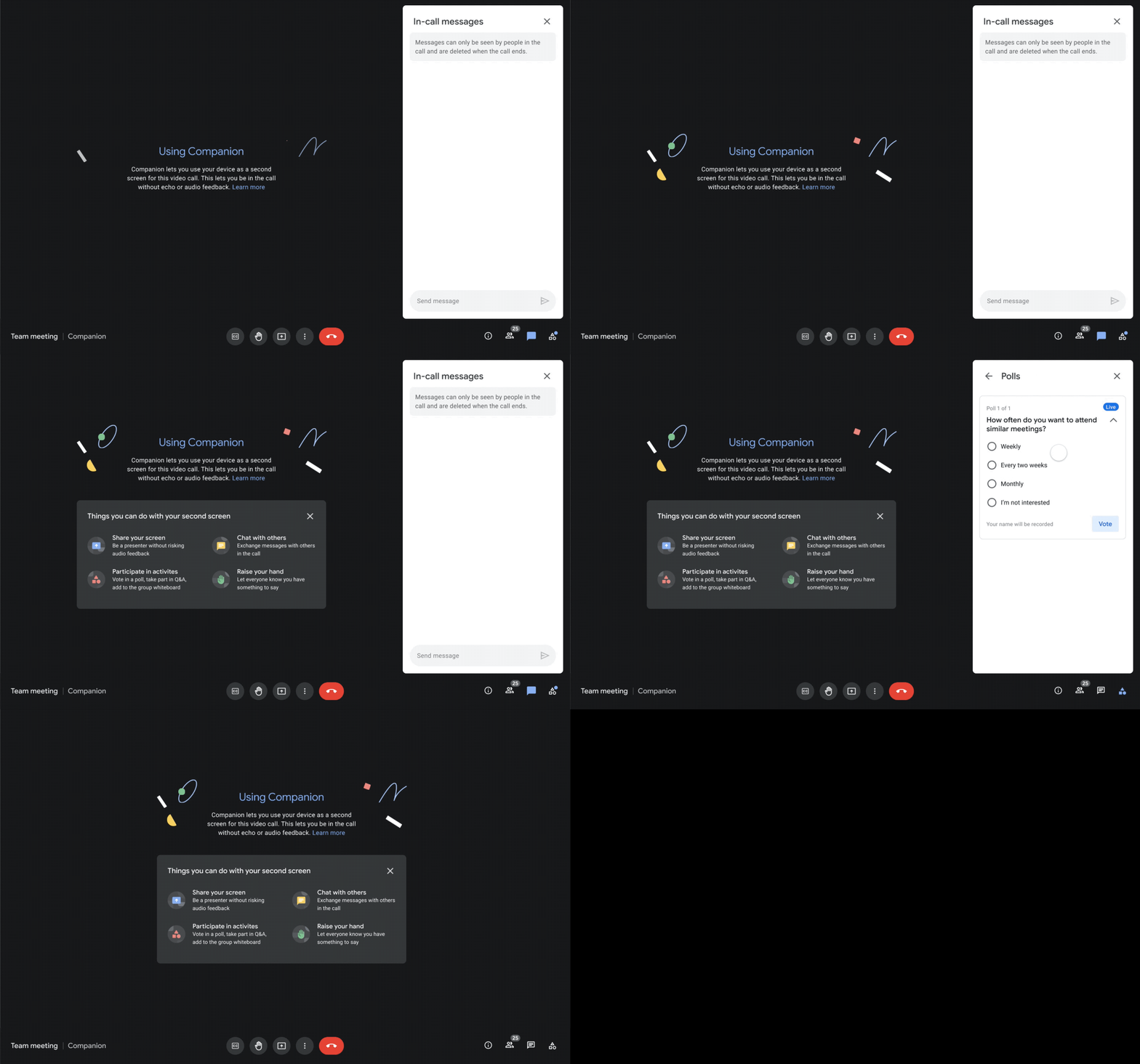
We designed Companion mode in Google Meet to specifically meet this challenge and we’ll start rolling it out to customers in November. With Companion mode I can host or join a meeting from within a conference room using my laptop while leveraging the in-room audio and video—and it all happens without any awkward audio feedback. This functionality lets me share content or see presentations up close on my own device, access the meeting chat and whiteboard, initiate and vote on polls, or post a question in Q&A, just as I would from home. And to ensure that users have greater choice over how they participate in meetings, live-translated captions will be available in Meet and through Companion mode by the end of the year. We’re currently working on translating meetings in English to French, German, Spanish and Portuguese, with many more languages coming in the future.
Expanding choice and flexibility for meeting hardware
While Companion mode keeps people in the room seamlessly connected to their remote colleagues, meeting hardware plays a crucial role in making hybrid meetings feel more immersive and human, with the ability for everyone to be clearly seen and heard. To provide more flexibility and choice on this foundation of how we come together in a hybrid work world, we’re announcing an expanded Google Meet hardware portfolio and interoperability with other conference room solutions.
First, we’re announcing two new all-in-one video conferencing devices to complement our Series One Room Kits. The Series One Desk 27 is an all-in-one 27” device that’s perfect for small shared spaces or your desktop, either in the office or at home. Series One Board 65 is an all-in-one 65” 4K device that can be paired with an optional stand for ultimate configuration flexibility—turning any room or space into a video collaboration hub in minutes.
Both devices feature collaboration capabilities with the Jamboard app built right in, and each can be used as an external display. While optimized for Google Meet, USB-C connection from your laptop gives you the flexibility to use the meeting app of your choice while leveraging the high-fidelity audio and high-definition video on Series One Desk 27 and Board 65. You can learn more about these devices developed in partnership with Avocor through our on-demand webinar starting at 9 AM PT today.
https://www.youtube.com/embed/BR81EAce5BQ?enablejsapi=1&
We’re also proud to announce new third-party devices coming to the Google Meet hardware ecosystem. Google has certified the Logitech Rally Bar Mini and Rally Bar for Google Meet, which provide complete room solutions for small and mid-sized rooms. You can learn more about these Google Meet-certified products in Logitech’s September 21 webinar. Additionally, the Rayz Rally Pro is a new mobile device speaker dock by Appcessori that will automatically launch Google Meet for video meetings and provide an improved audio experience from your mobile device.
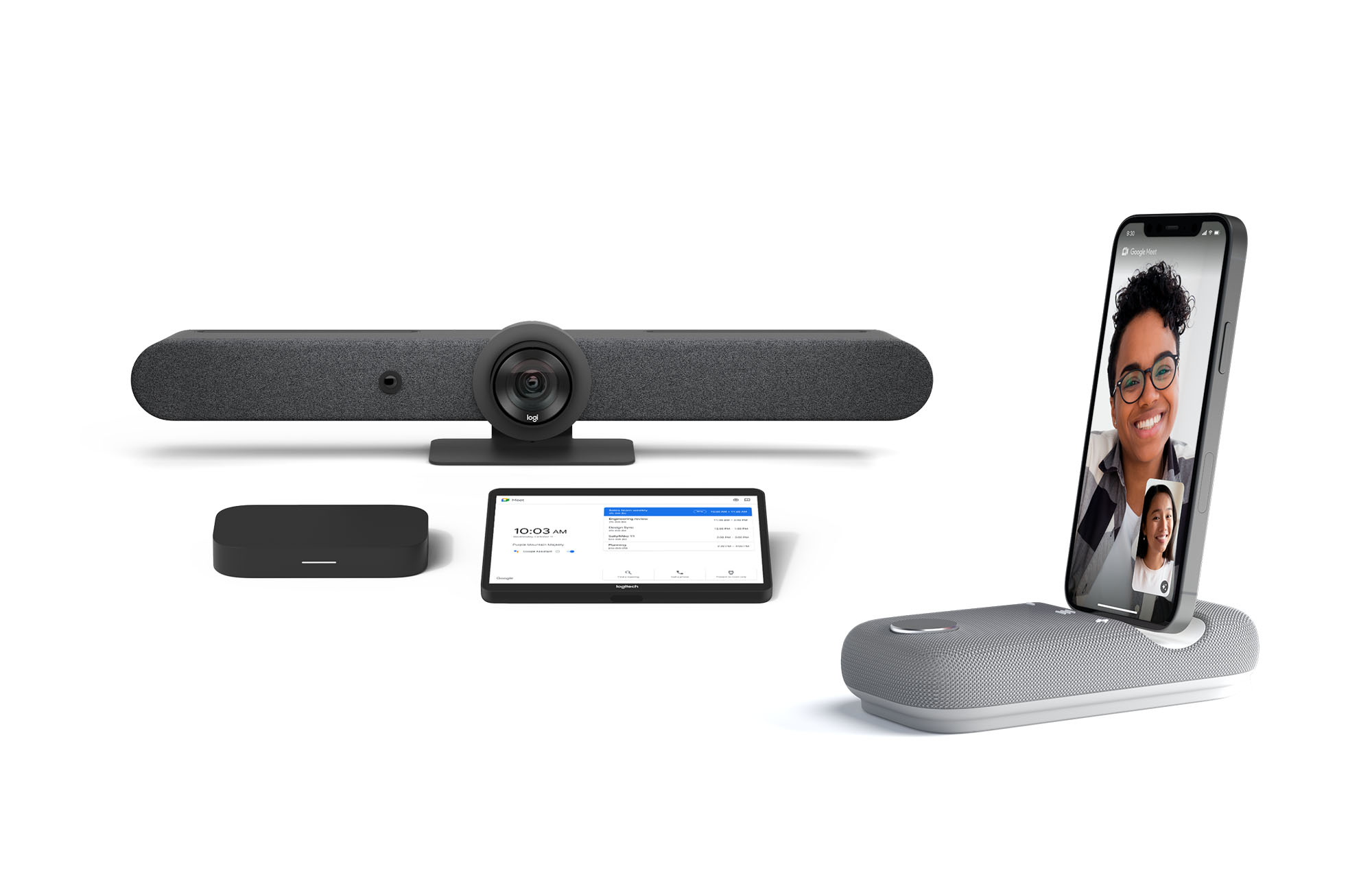
Certified Google Meet hardware ensures high-quality video and audio in meetings and is easy to deploy and manage. You can view our full Google Meet device portfolio and purchase directly from approved resellers by visiting the Google Meet Hardware website.
While Google Meet customers enjoy a full-featured experience on Meet hardware, we realize they sometimes need to connect with people outside of their video calling network. To enable this, organizations can use Pexip for Google Meet to seamlessly join Meet meetings from the widest range of third-party video conferencing solutions. Today, we’re also announcing support for bidirectional interoperability with devices from Webex by Cisco and Google Meet hardware. Soon you’ll be able to launch a Google Meet meeting on Webex hardware and a Webex meeting on Google Meet hardware. Calling interoperability between Meet and Webex is supported on Series One Board 65, Series One Desk 27, and the rest of the Google Meet hardware portfolio, as well as Webex Room Series, Room Kit Series, Desk Series and Board Series. We expect general availability later this year. You can find more details here. We plan to give Meet users even broader calling interoperability with support for other conferencing services in the near future.
Navigating hybrid work is a journey
We’re thrilled to bring these new Google Workspace experiences and devices to our customers, but we also realize that navigating hybrid work will be a journey of learning and adaptation for every organization. Two resources we recently developed can help along the way:
- Navigating hybrid work: A Google Workspace handbook
- The newly launched Future of Work site from Google Workspace, where you can keep up with all the ways work is changing.
Bridging the gaps in the emerging hybrid work world will necessarily be a combination of technology, workplace culture, and reimagining the use of physical spaces. But developing a “hybrid-first” mindset starts with the tools people use every day to connect, create, and collaborate, and Google Workspace will continue to play a crucial role in that evolution.
How the City of Memphis Uses Technology to Identify 75 Percent More Potholes

7147
Of your peers have already read this article.
4:30 Minutes
The most insightful time you'll spend today!
At 340 square miles, the City of Memphis is among the largest in the United States in terms of land area. Memphis has over 6,800 lane-miles of city streets, enough to drive back and forth to Los Angeles four times. Keeping these streets well maintained and safe for citizens and visitors is a major priority for the city.
Lots of traffic, lots of roads, and a four-season climate prone to wintertime freeze-thaw-refreeze cycles means the opportunity for potholes. Although the city aims to fill potholes within five business days of notification, it can take longer, especially during winter and early spring. Last year, the city’s Public Works crews repaired some 63,000 potholes, only 20% of which were reported by residents. Approximately 32,000-man-hours each year are spent repairing potholes, with seasonal fluctuations requiring ten to twelve Street Maintenance crews working steadily during the winter months. Still, many went unreported, leading the city to flag pothole request resolution under “needs improvement” on its open data portal website.
Like many large cities, Memphis also struggles with vacant and blighted properties. Nearly 15,000 properties in Memphis are likely vacant, and city officials contend that many are owned by out-of-town investors who live elsewhere and do not take necessary restoration or maintenance steps. These properties can decrease the value of surrounding real estate and discourage new businesses and other residents from moving to an area. Citizen frustration and concerns over the number of blighted properties has made blight eradication a major focus of the City of Memphis.
Historically, residents reported potholes and blighted properties by calling 311, or more recently by using the Memphis 311 app. However, these reports only covered about 20 percent of the problems — often the worst cases. And by the time residents took the initiative to submit a 311 report, they usually weren’t feeling good about the situation.
Recognizing that potholes and vacant properties are often the most visible indicators of whether a city government is doing its job efficiently, Memphis Mayor Jim Strickland and CIO Mike Rodriguez began looking for ways they could apply technology to fix the problems. Mike approached Google for ideas, and Google recommended conducting a machine learning proof-of-concept (POC) with SpringML, a Google Cloud Partner.
“Memphis is focused on easy living, and we want to do everything we can to keep our citizens happy,” says Mike Rodriguez. “Working with Google and SpringML to reduce potholes and urban blight using machine learning and artificial intelligence was an easy decision.”
Bringing machine learning to city operations and budgets
The city’s goal is to detect potholes and abandoned properties by analyzing video footage of roads and residential properties. It wanted to classify potholes by width and depth, and share the information with workers who can repair them. For abandoned properties, it wanted to enable more strategic deployment of resources for homeowners citywide and take action to hold neglectful property owners accountable.
The POC began by training TensorFlow models for ML object detection using preconfigured AI Platform Deep Learning VM Images on Compute Engine. SpringML helped set up cameras and developed a user interface to collect pothole data and automate the 311 ticketing process.
Together, the teams analyzed 30 days of video from a moving city bus and high-resolution video from 360-degree cameras mounted to a code enforcement vehicle, overlaid with data from 311 reports. As the models were refined, accuracy quickly climbed from 50 percent to over 90 percent as models were taught to differentiate a pothole from a manhole cover or other object.
The city also imported routes, potholes, and paving data along with geolocation data from ArcGIS and Google Maps into BigQuery to better understand street conditions and the proximity of potholes to one another. BigQuery also analyzes city property records, tax records, 311 reports, and third-party survey data on-demand to predict where homes are starting to become run down and where neighborhood decay is most likely to occur. The SpringML team created a pilot analysis to begin vacant property protections and developed a user interface tool to interact with the model’s results.
“Google Cloud Platform made it possible for us to experiment with machine learning and artificial intelligence to help solve our city’s problems while working within the budget constraints of a municipal IT organization,” says Mike. “Google turned a ‘nice to have’ into a ‘let’s do this!'”
Identifying 75 percent more potholes
Memphis expects to substantially reduce the number of potholes on its streets, creating a better driving experience for residents and visitors alike. Because drivers won’t be as likely to swerve to miss a pothole, streets will be safer and friendlier to bicycles and scooters. Fewer potholes will also save the city between $10,000 and $20,000 annually in city claims that it pays out in cases where vehicle damage results from a pothole that was not addressed in a timely manner.
“Historically, Public Works has relied primarily upon Street Maintenance crews to proactively locate and fill potholes. As Memphis has over 6,800 lane-miles of public streets, it is a daunting task to reliably survey the entire system in an efficient and systematic way,” says Robert Knecht, Public Works Director for the City of Memphis. “The outcome of the data collected will be invaluable to Public Works so that it can ensure it is managing the city’s street system in a more proactive manner.”
Memphis will be able to better prioritize road maintenance based on condition and impact, increasing the efficiency of its Public Works road crews. Analyzing video of streets also gave the city visibility into issues it wasn’t previously aware of, such as curbs, gutters, and manhole covers that had been mistakenly paved over and need to be excavated. The ML process is easily transferrable to other concerns as well, helping the city identify illegal signs or spools of cable hanging on light posts that could be potentially unsafe.
Helping communities recover and thrive
Memphis is also having success in analyzing predictive trends to combat high rates of abandoned and blighted properties, surpassing 97.5 percent accuracy. “In the past, Public Works experimented with comprehensive, city-wide blight identification by using approximately 200 volunteers to survey and photograph over 237,000 city parcels. This effort was costly, took a long time to complete, and resulted in inconsistent data collection,” says Robert. “Blighted property conditions can change quickly in a city the size of Memphis. Now, with this new technology, Memphis will be able to make a significant difference in the efforts to proactively and comprehensively identify and manage blighted and substandard properties.”
Code Enforcement with better data-driven detection mechanisms enables the city to also identify cases where homeowners are not physically or financially able to keep up with the challenges of homeownership and make them aware of resources that are available to assist them. Memphis Code Enforcement can do a better job of finding people living in derelict properties that pose hazards to inhabitants’ health and safety, and help them fix those problems or find a new place to live.
“Using SpringML and Google Cloud Platform to detect indicators of vacant or blighted properties will help Memphis create safer neighborhoods that will be more attractive to businesses and home buyers,” says Mike. “Property values and employment will go up, crime will go down, and social services can be more focused and effective.”
Revolutionizing service delivery for citizens
Memphis is proving the viability of a cost-effective, cloud-based machine learning model that other cities can follow. The city is already looking into new applications of AI and ML that will further improve city services and help it build a better future for its 652,000 residents.
As part of his commitment to a transparent government, Memphis Mayor Jim Strickland created an open data policy that commits to releasing raw data and sharing it with citizens in a variety of downloadable formats. Going forward, this transparency will help citizens understand how their needs are being served and uncover new, innovative use cases for AI and ML.
“Our goal is to become a smart city, and technologies such as Google Cloud Platform and SpringML put us ahead of the game,” says Mayor Strickland. “Google understands data, and there isn’t a better company to help us analyze our data resources for actionable insights.”
Create and Protect Admin Accounts

4874
Of your peers have already read this article.
1:30 Minutes
The most insightful time you'll spend today!
Setting up your new cloud infrastructure is scary. Extra scary when you realize that someone (is it gonna be you?) gets to have phenomenal cosmic power over the whole thing.
Yes, I’m talking about the admin account, and today we’ll dig into why they are important, dangerous and different.
When the team at pistach.io got their nuts-as-a-service business growing fruitfully, they knew they needed to think carefully about admin accounts. These people would have tremendous control over their use of Google Cloud, and they could potentially cause very big problems if any were compromised. Definitely resources that require a protective shell.

Early in pistach.io’s development, an employee named Walter Nutt wanted to play a prank by changing his co-worker’s profile photo from an almond to a peanut (pretty devious, since a peanut is actually a legume). He didn’t have access to his friend’s computer, but he did have access to the company’s Cloud Storage bucket. While searching for the profile photo in question, Wally inadvertently deleted the entire contents of the bucket!
As he searched for ways to restore its contents, Wally modified access to two other pistach.io buckets. The company was ground to a halt for a week while teams worked to crack through the permissions issues.
Time to rethink permissions a bit, so this couldn’t spoil their buttery smooth operations in the future.
Following the resource manager guide, the team made a super admin email address that wasn’t tied to a particular individual or Workspace account, and secured it with strong multi-factor authentication. This would be their backup in case an admin account were to be compromised, so they could recover and repair.
The team already uses Google Workspace, so they have an organization set up already. That creation process established initial super administrators, allowing them to create and modify all other resources inside the organization. As they looked toward using Google Cloud, the super administrators could:
- Give the admin role to people, for Cloud
- Act as a point of contact for account recovery
- Modify or delete the organization if needed
Making admin users for the organization allows other people to then flesh out the resources and policies for pistach.io, before they go nuts and give everyone all the permissions. While that would speed things up, it would make it easy for an attacker to crack through the security shell because any account compromise could give ousize access. Yikes!

Instead, the IT leads specified certain people to act as organization admins, and then gave them permissions to:
- Define Identity and Access Management policies
- Structure the Resource Hierarchy
- Delegate control of specific Cloud elements to others on the team
Once those organization admins were set up, they could give management and oversight of Compute, Storage, Networking and other resource types to the relevant leads, making sure each person had just the right amount of permission for the role they needed to perform. The organization admins don’t have permissions themselves to make these resources. They just delegate.
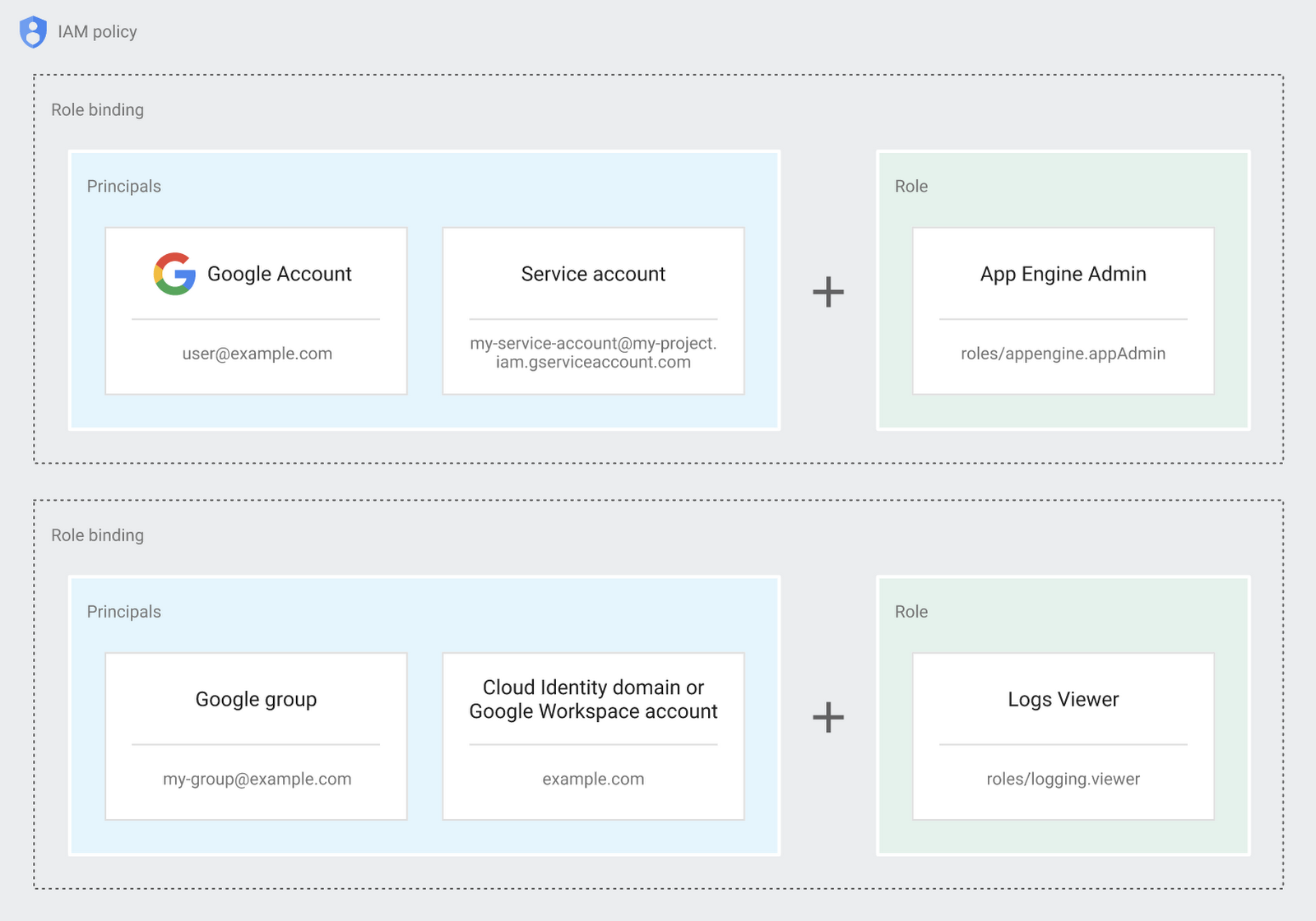
Now each person can accomplish the job they’re responsible for, but doesn’t have overly permissive access. Delegating like this keeps the entire organization safer, and limits the blast radius if someone does manage to break in.
You can go through these steps yourself with this tutorial.
By default the creation of an organization resource for the domain gives everyone the ability to create projects and billing accounts. Once they set up their Organization Admin at pistach.io they decided to remove some of these wide permissions and, in a nutshell, bring everything down to a much finer control. So people could get permissions for a folder or a project, but not the entire organization!
Remember to take care of your admin roles, as they have the power, and responsibility, to cause serious harm if not used safely. Be safe with your Identity and Access Management. And keep your data yours!
Next time we join you we’ll take a crack at creating and provisioning an app to run inside the policies and resource management frameworks created today.
RISE with SAP on Google Cloud is An Engine of Progress for Cloud Migrations!

3381
Of your peers have already read this article.
3:00 Minutes
The most insightful time you'll spend today!
The practical benefits of migrating SAP systems to the cloud aren’t lost on most businesses. Running SAP in the cloud lets companies simplify tasks, scale quickly, and reduce costs. But as a growing number of organizations are discovering, the cloud is more than the sum of improved processes and workflows. It offers unique and powerful ways to transform an enterprise.
That’s because the cloud is more than a technology. It’s a foundational layer for business and IT transformation. In the best scenario, it unleashes exponential gains that fundamentally change an enterprise. Organizations achieve greater agility and resilience, and they’re equipped to innovate and disrupt like never before.
RISE with SAP and Google Cloud sit at the intersection of these possibilities. RISE with SAP helps organizations embark on the cloud migration journey with minimal risk and on their own terms. Together with Google Cloud, it enables a more advanced framework for a move to the cloud. Think of RISE with SAP on Google Cloud as business-transformation-as-a-service.
Companies move their SAP systems to the cloud for very clear and compelling reasons: 44% say it fuels digital transformation, and 43% are looking to build out a modern IT infrastructure to lower costs and simplify processes. RISE with SAP on Google Cloud takes direct aim at these challenges.
MSC Industrial Supply Co., a premier North American distributor of metalworking and maintenance, repair, and operations products and services to industrial customers views RISE with SAP on Google Cloud as a way to make its IT systems and the business more flexible and scalable by expanding data access in the cloud. With approximately 2 million products and more than 6,500 associates, that’s no small task for the Melville, New York, company.
In June 2021, MSC successfully migrated to SAP S/4HANA Cloud, private edition, running on Google Cloud infrastructure. Through RISE with SAP, MSC adopted cloud resources that were both reliable and scalable, without any disruption to its business operations. Advanced data analytics, machine learning, and other AI capabilities are now available to MSC.
At the center of this transformation is BigQuery, with which MSC data scientists can pinpoint business insights among vast and complex data sets from diverse sources, including Ads, Maps, Shopping, or the Google Marketing Platform. The net effect is significantly less time needed to manage and analyze rich data sets.
Energizer Holdings Inc., a leading manufacturer and distributor of primary batteries (think Energizer Bunny), portable lights, and auto care products, has turned to RISE with SAP on Google Cloud to power its move to SAP S/4HANA. The company wants to automate essential business processes, improve customer service, and boost innovation. It had been using a private cloud solution but needed to gain flexibility while better containing costs.
After migrating through RISE with SAP on Google Cloud, Energizer is able to share data and intelligence to keep teams better informed. The framework has also helped contain costs and support business growth through reduced licensing costs and a more economical and efficient SaaS model.
Inchcape plc, the leading multi-brand automotive distributor for Toyota, Mercedes, BMW and others, is turning to RISE with SAP on Google Cloud to take its business-critical sales, marketing and operations systems, and data into the cloud. Doing so will allow the UK-based company to join a diverse range of datasets into a centralized, secure, and scalable platform for the first time.
With operations in over 40 markets and geographies, Inchcape has complex logistics requirements. Google Cloud supports and offers the types of advanced analytics and machine learning capabilities the company requires for today’s complex manufacturing environment.
GCP Applied Technologies Inc. (GCPAT) is dedicated to the development of high-performance products and the advancement in construction technologies, simplifying the complexities of construction worldwide and delivering value to its customers. As a part of their business transformation initiatives, the company was looking to move from an on-premise data center to a more modern framework that can keep up with evolving demands. GCPAT considered various solution options like non-cloud colocation, but ultimately opted to move to the cloud through RISE with SAP on Google Cloud.
The platform provides a resilient foundation for accelerating business process improvement and innovation while optimizing maintenance and licensing costs. With the ability to deliver transformative solutions across the enterprise, GCPAT is now well-positioned to handle the pace of business change.
Veolia is an international company with nearly 180,000 employees across the globe and activities in three main service and utility areas: water management, waste management and energy services. Veolia, which aims to become the benchmark company for ecological transformation, was looking to digitize its processes and operations with a modern, cloud-based enterprise management system. Fundamental to Veolia’s success is its ability to continually roll out new, digital services to its industrial and municipal clients, so the company needed an enterprise management system capable of adapting quickly as the company’s business model evolves.
Veolia Poland upgraded to S/4HANA Private Cloud Edition on Google Cloud through RISE with SAP. Not only has the company been able to take advantage of a simplified, fully managed, and shortened cloud implementation, it has also been able to extend its existing Google environment, including BigQuery, to place data at the center of its digitization strategy and develop predictive capabilities using Google Cloud AI.
4 steps to cloud success
These successful transformation stories share four key characteristics in common.
- Low-risk path: Each enterprise reduced its risk of migrating to the cloud while speeding up time-to-value. Subject matter experts from Google Cloud and its partners guided each enterprise through the transition, and they were able to take advantage of incentives to defray infrastructure costs through the Google Cloud Acceleration Program.
- Near-zero downtime: By increasing SAP application availability with Live Migration, our success stories dramatically reduced planned outages due to infrastructure and maintenance updates, down to less than 1 percent.
- Room to innovate: With advanced analytics, artificial intelligence, and machine learning capabilities, these enterprises are improving processes, reducing costs and driving new revenue streams. Additionally, they have the ability to experiment with modern applications faster and more securely using their SAP data with Apigee.
- IT sustainability: By moving SAP applications to smarter and more efficient data centers, these success stories instantly reduced their IT emissions, while eliminating guesswork. Now, they can set goals based on seamless, agentless assessments and track progress with Google Cloud tools, analytics and reporting capabilities.
The engine of progress for cloud migrations
RISE with SAP on Google Cloud delivers a modular and low-risk path to the cloud for organizations at various stages of the migration and transformation path by clearing roadblocks and using performance indicators and industry benchmarks to pinpoint the best place to start.
The result? Reporting that’s 100x faster, as well as embedded AI technology, real-time advanced analytics, streamlined data display, consumer-grade UX across devices, strong sustainability, and a 50% reduction in a company’s data footprint. In practical terms, all the numbers add up to a simple but profound conclusion: RISE with SAP on Google Cloud is an engine of progress for organizations looking to gain an advantage in today’s highly competitive business environment.
To learn more about RISE with SAP on Google Cloud click here.
Google Cloud Announces General Availability of BigQuery Row-level Security

6614
Of your peers have already read this article.
3:00 Minutes
The most insightful time you'll spend today!
Data security is an ongoing concern for anyone managing a data warehouse. Organizations need to control access to data, down to the granular level, for secure access to data both internally and externally. With the complexity of data platforms increasing day by day, it’s become even more critical to identify and monitor access to sensitive data. In many cases, sensitive data is co-mingled with non-sensitive data, and access restrictions to sensitive data need to be enabled based on factors like data location or presence of financial information. There may also be nuances where data is sensitive for some groups of users, while for others, it is not.
Today, we’re pleased to announce the general availability of BigQuery row-level security, which gives customers a way to control access to subsets of data in the same table for different groups of users. Row-level security (RLS) extends the principle of least privilege access and enables fine-grained access control policies in BigQuery tables. BigQuery currently supports access controls at the project-, dataset-, table- and column-level. Adding RLS to the portfolio of access controls now enables customers to filter and define access to specific rows in a table based on qualifying user conditions—providing much needed peace of mind for data professionals.
“Our digital transformation and migration of data to the cloud magnifies the business value we can extract from our information assets. However, granular data access control is essential to comply with international regulatory and contractual requirements. BigQuery row-level security helps us comply with data residency and export restrictions,” says Jarrett Garcia, Iron Mountain’s Enterprise Data Platform Senior Director. “It enables us to manage fine-grained access controls without replicating data. What used to take months for approval and access provisioning can now be done more efficiently and effectively. We are looking forward to implementing additional data security capabilities on the BigQuery roadmap to address other critical business use cases.”
How BigQuery row-level security works
Row-level security in BigQuery enables different user personas access to subsets of data in the same table. Customers who are currently using authorized views to enable these use cases can leverage RLS for ease of management. To express the concept of RLS, we have introduced a new entity in BigQuery called row access policy. Row access policies map a group of user principals to the rows that they can see, defined by a SQL filter predicate.
Secure logic rules created by data owners and administrators determines which user can see which rows through the creation of a row-level access policy. The row-level access policies created on a target table by administrators or data owners are applied when a query is run on the table. One table can have multiple policies applied to it.
Below is an example, where row-level access policies have been created to filter data based on users’ “region”.

In the illustrated scenario above, row-level access policies have been created to verify a querying user’s region and to give them access only to the subset of data relevant to that region. Access policies are granted to a grantee list which support all types of IAM principles such as individual users, groups, domains or service accounts. In this example, when a user queries the table, row-level access policies are evaluated to assess which, if any, policies are applicable to that user. The group ‘sales-apac’ is granted access to view a subset of rows where region = ‘APAC’ whereas the group ‘sales-us’ is granted access to view a subset of rows where the region = ’US’. Likewise, users in both groups will see rows in both regions, and users in neither group will not see any rows.
Row-level access policies can also be created using the SESSION_USER() function to restrict access only to rows that belong to the user running the query. If none of the row access policies are applicable to the querying user, the user will have no access to the data in the table.
When a user queries a table with a row-level access policy, BigQuery displays a banner notice indicating that their results may be filtered by a row-level access policy. This notice displays even if the user is a member of the `grantee_list`.

When to put BigQuery row-level security to work
Row-level access policies are useful when you have a need to limit access to data based on filter conditions. The row-access policies’ filter predicate supports arbitrary SQL, and is conceptually similar to the WHERE clause of a SQL query. Filter predicates support the SESSION_USER() function to restrict access only to rows that belong to the user running the query. If none of the row access policies are applicable to the querying user, the user will have no access to the data in the table. Currently, the column used for filtering must be in the table, but we anticipate adding support for subqueries in the filter expression, opening up access to use cases where data is filtered based on lookup tables and calculated values. Row-level access policies can be created, updated and dropped using DDL statements. You will be able to see the list of row-level access policies applied to a table using the BigQuery schema pane in the Cloud Console, which simplifies the management of policies per table, or by using the bq command-line tool.
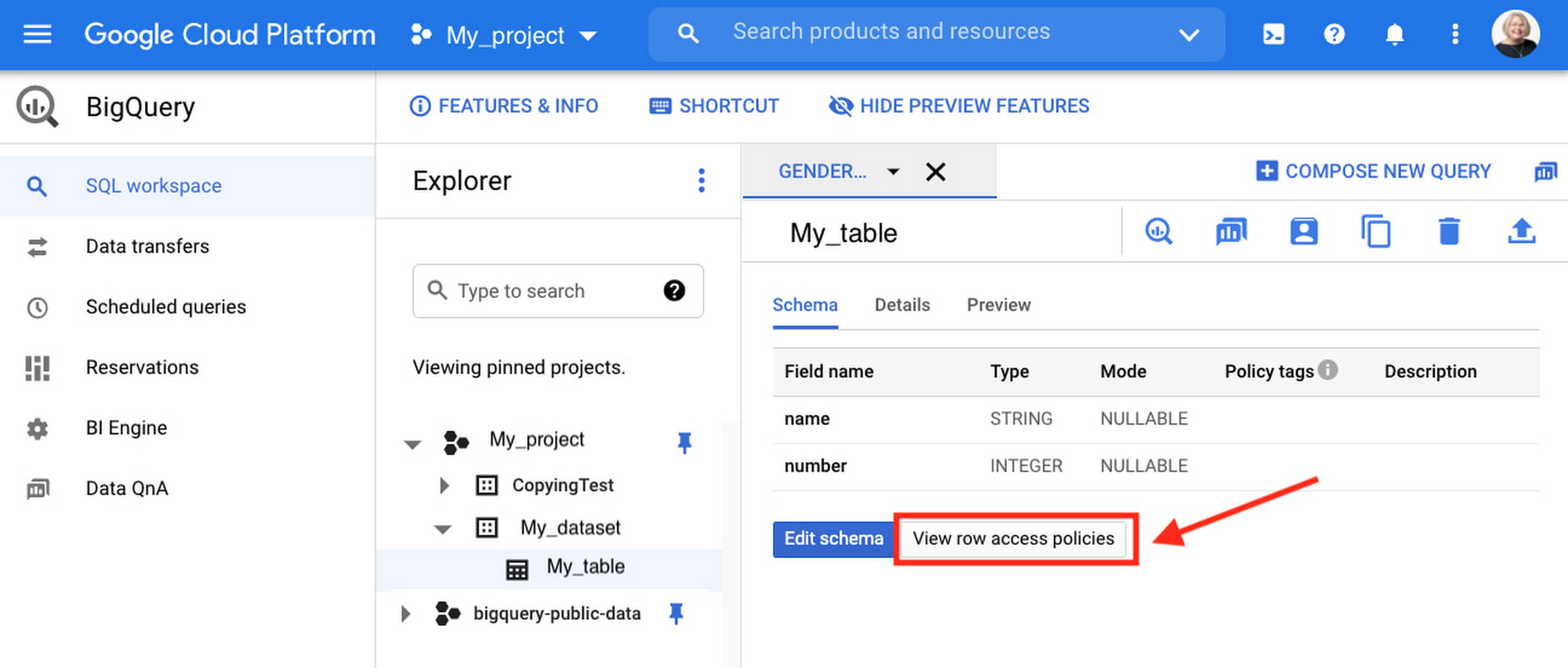
Row-level security is compatible with other BigQuery security features, and can be used along with column-level security for further granularity. Since row-level access policies are applied on the source tables, any actions performed on the table will inherit the table’s associated access policies, to ensure access to secure data is protected. Row-level access policies are applicable to every method used to access BigQuery data (API, Views, etc).
Try it out
We’re always working to enhance BigQuery’s (and Google Cloud’s) data governance capabilities, to provide more controls around managing your data. With row-level security, we are adding deeper protections for your data. You can learn more about BigQuery row-level security in our documentation and best practices.
3432
Of your peers have already watched this video.
1:30 Minutes
The most insightful time you'll spend today!
Google Cloud Cortex Framework: Innovate on Cloud with Less Risk, Cost and Complexity!
Google Cloud Cortex Framework is a comprehensive approach to cloud innovation that enables users to accelerate value with less risk, complexity and cost! The Cortex Framework includes a comprehensive tools and know-how to build, design and deploy cloud solutions to address business challenges and achieve desired outcomes. Watch the video to get started with Google Cloud Cortex Framework.
More Relevant Stories for Your Company
WPP Innovates with the Cloud
Unlocking the Power of Data and Creativity withthe Cloud: The WPP Story

Bushel: Empowering Agribusinesses One Step at a Time with Google Cloud
Working to put food on all of our tables, today’s farmers are facing a higher amount of instability from input supply chain issues to weather patterns. Adding to this challenge are problems farmers face when trying to correctly time grain purchases, sales and transport. Farmers have always been stewards of

Cloud Bigtable Helps Fraud-detection Company Meet Scalability Demands and Secure Customer Data
Editor’s note: Today we are hearing from Jono MacDougall , Principal Software Engineer at Ravelin. Ravelin delivers market-leading online fraud detection and payment acceptance solutions for online retailers. To help us meet the scaling, throughput, and latency demands of our growing roster of large-scale clients, we migrated to Google Cloud and its

Your DW Need Scaling Up? Try What This Company Did: It Can Run 25,000 Events a Second
With access to more data than ever before, companies have never been better positioned to adopt precision marketing methods and target the right customers at the right time. Emarsys, a digital marketing platform, enables its clients to collect, analyze, and act on a wide variety of data. From websites to mobile
