





Maximizing Reliability, Minimizing Costs: Right-Sizing Kubernetes Workloads

941
Of your peers have already read this article.
3:30 Minutes
The most insightful time you'll spend today!
Do you know how much money you could save by adjusting workload requests to better represent their actual usage? If you’re not rightsizing your workloads, you might be overpaying for resources that your workloads aren’t even using or worse, putting your workloads at risk for reliability issues due to under provisioning.
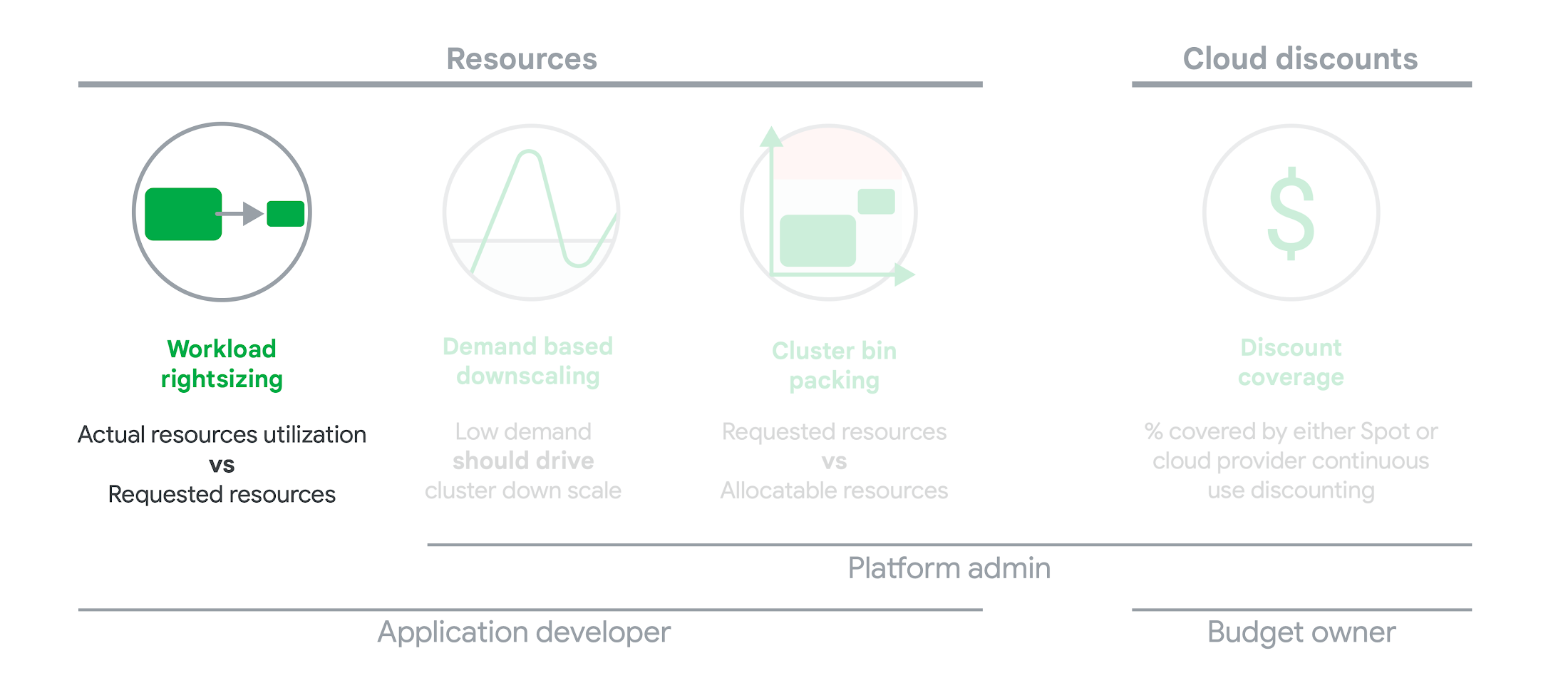
As we’ve previously discussed, setting the resources is the most important thing you can do to increase the reliability of your Kubernetes workloads. In this blog we will help you with the second key finding from the State of Kubernetes Cost Optimization report!
The research … found that workload rightsizing has the biggest opportunity to reduce resource waste.
State of Kubernetes Cost Optimization report
According to our research findings, workload rightsizing is the most important golden signal. Workload rightsizing measures the capacity of developers to properly use the CPU and memory they have requested for their applications.
Rightsizing is challenging
It can be quite difficult to predict the resource needs of your applications, which historically has not been a concern for developers in traditional data center environments.In traditional data center environments, resources were typically over-provisioned upfront to ensure capacity for peak demand and future growth, so developers didn’t need to focus on accurately predicting resource needs as they were covered by the excess capacity, whereas in cloud environments, resources are consumed on-demand. Finding a balance between efficiency and reliability can often feel like a delicate balancing act.
Tools for workload rightsizing
There are native tools in Cloud Monitoring and the GKE UI you can use to rightsize your workloads running on GKE.
Rightsizing in the console
The Workload Cost Optimization tab helps you identify workloads that can be optimized by displaying the resources used versus what’s requested.
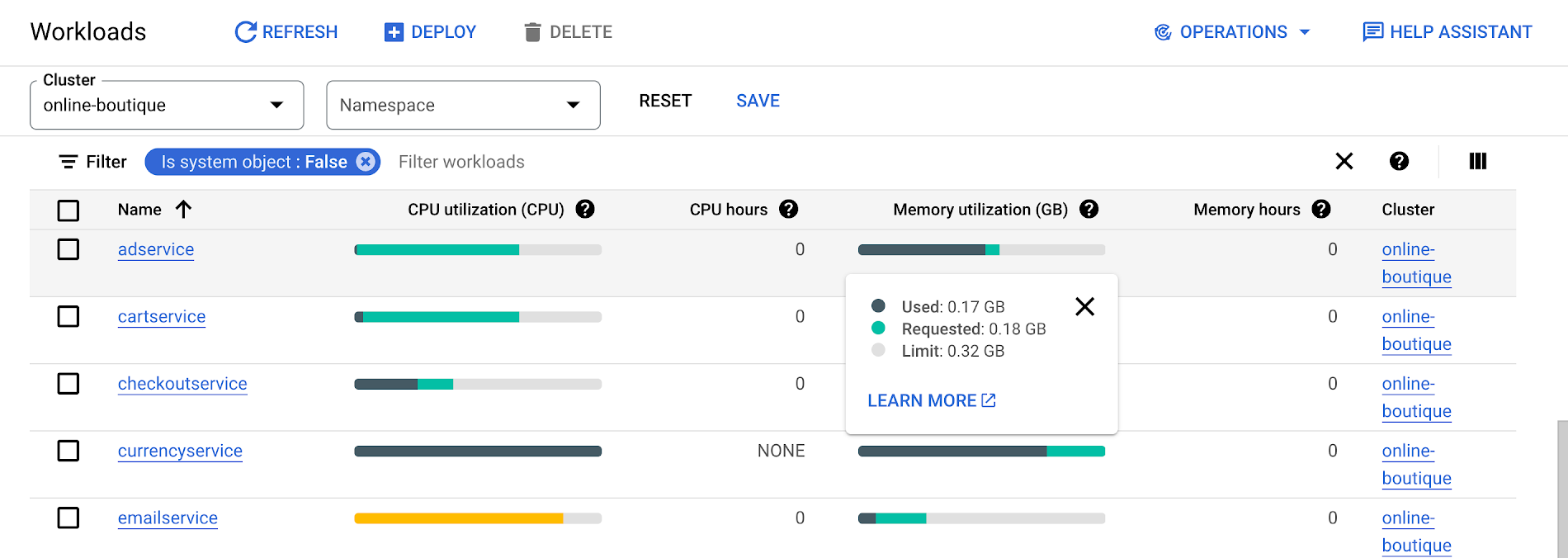
To take advantage of potential cost savings, you can drill into clusters to see workload level resource recommendations.
To view workload resource recommendations for Deployment objects only:
- In the GKE Cost Optimization.
- Select a cluster.
- Click Workloads > Cost Optimization.
- Select one Deployment workloads
- In the workload’s detail page, select Actions > Scale > Edit Resource Requests
Rightsizing with Cloud Monitoring
Cloud Monitoring provides built-in VPA scale recommendations metrics that you can use to monitor the performance of your workloads and to identify opportunities to rightsize them without the need to create VPA objects.
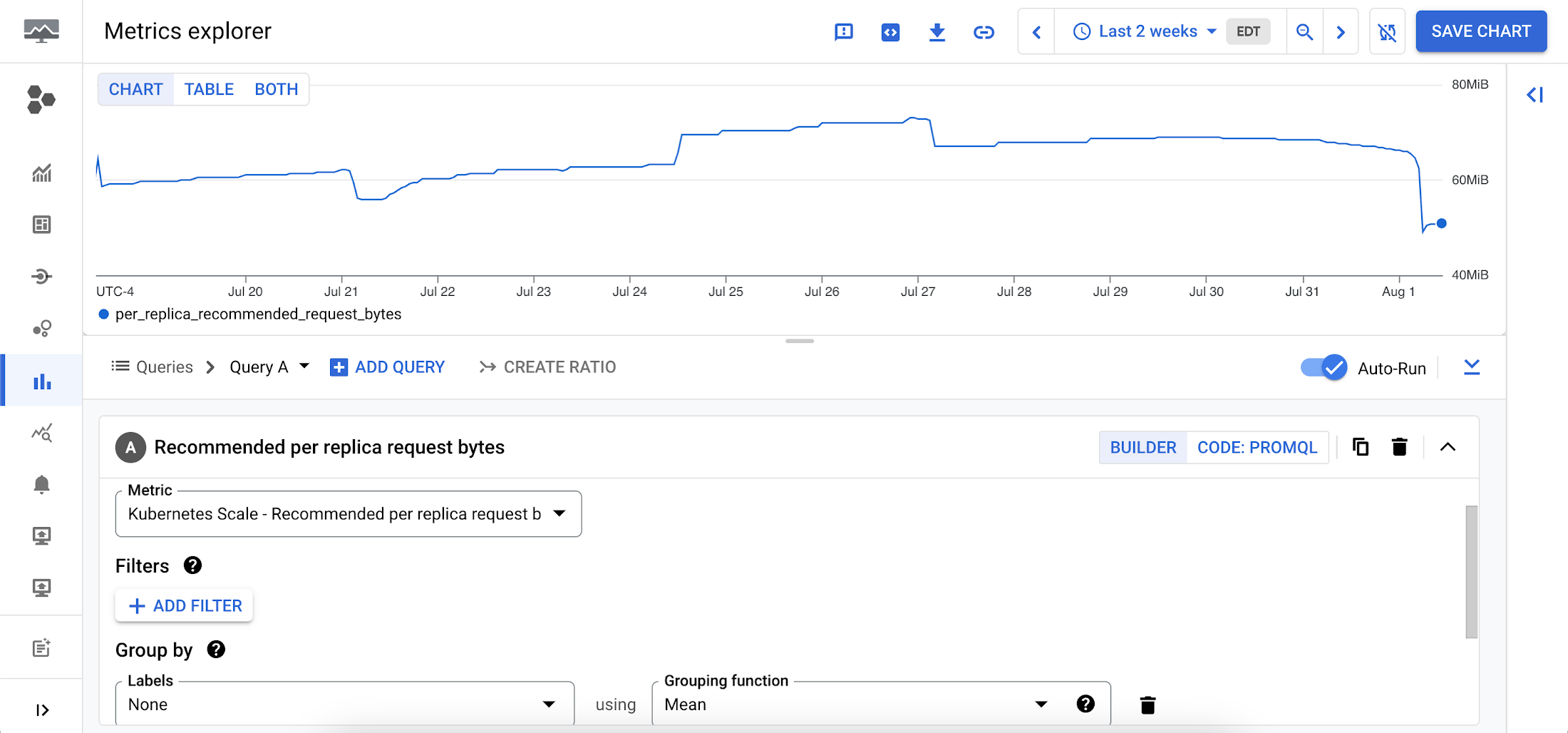
To view these metrics:
1. Go to the Cloud Monitoring > Metric Explore console.
2. In the Metric dropdown, select the metrics:
- Memory recommendations:
Kubernetes Scale > autoscaler > Recommended per replica request bytes - CPU recommendations:
Kubernetes Scale > autoscaler > Recommended per replica request cores
Rightsizing at scale
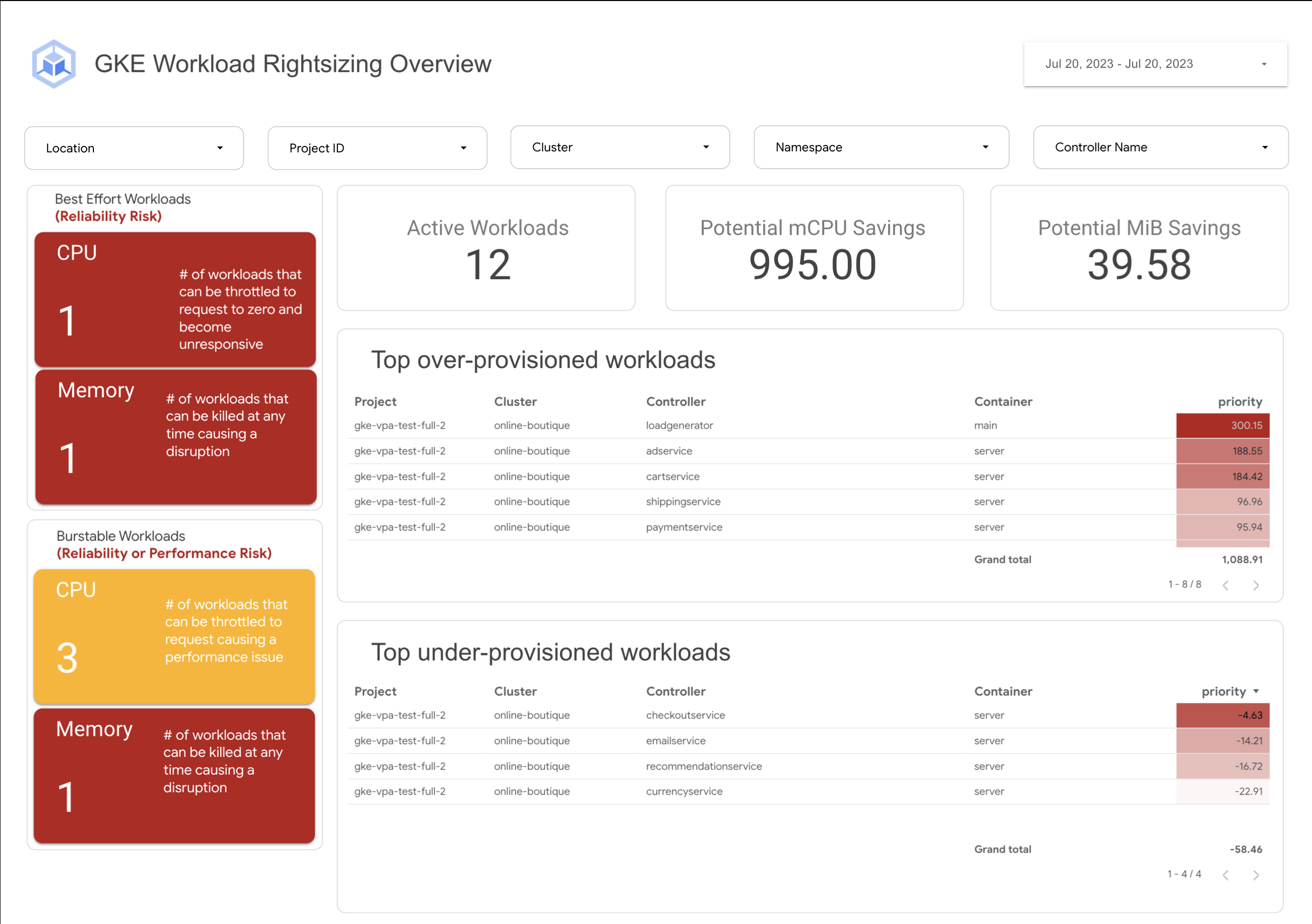
If you’re interested in viewing recommendations across clusters and projects, We’ve created a guide that you can use today to help you right-size your GKE workloads at scale. This solution leverages your actual cluster’s metric data and built-in workload recommendations provided by Cloud Monitoring. You can determine the resource requirements for all your workloads without having to create additional VPA autoscaler objects in each of your clusters. The guide walks you through deploying the solution.
In conclusion
In conclusion, rightsizing your workloads is essential for both cost savings and reliability. By following the tips in this blog, you can ensure that your workloads are using the right amount of resources, which will save you money and increase your workload’s reliability.
Links to the solution presented in this blog and other useful tools to help you optimize your cluster are listed below:
- The Right-sizing workloads at scale solution guide
- Setting resource requests: the key to Kubernetes cost optimization
- The simple kube-requests-checker tool
- An interactive tutorial to get set up in GKE with a set of sample workloads
Download the State of Kubernetes Optimization report, review the key findings, and stay tuned for our next blog post.
Amadeus: Shaping the Future of Travel with Apigee

3989
Of your peers have already read this article.
3:25 Minutes
The most insightful time you'll spend today!
If you’ve taken a trip in the past 30 years, then you’ve probably used Amadeus technology. Our solutions connect over 1.5 billion travellers every year to the journeys they want, linking them via travel agents, search engines, and tour operators to over 700 airlines, 110 airports, 580,000 hotel properties, 40 car rental companies, 90 railways, and more.
In 2016, over 595 million total travel agency bookings were processed using the Amadeus distribution platform. In addition, over 175 Amadeus airline customers processed over 1.3 billion passengers using Amadeus’ Passenger Service Systems. We combine an understanding of how people travel with the development of the most complex, trusted, critical systems our customers need.
A platform for scalability and speed
In today’s crowded travel marketplace, our customers want IT solutions that can scale up to match their complex needs—whether this includes solving the challenge of ever increasing flight search volumes, delivering flight search results in milliseconds, or enabling “pop-up” check-in and bag drop from anywhere.
Amadeus operates at large scale with hundreds of thousands of transactions processed per second to deliver mission-critical services in travel. Having a scalable and secure platform is essential to continue driving solutions for our customers, and Apigee’s API management platform fulfills this objective.
At the same time, our customers also want solutions that can adapt quickly with new features and upgrades. We’re talking days, not weeks or months. Apigee provides on-premise gateways to securely expose our APIs to our customers. These can be scaled to deliver our APIs according to our business needs. Apigee’s great capacity to create rock-solid API infrastructure gives us more freedom to focus on the architectural details of the technology we create for the travel industry.
A platform for collaboration
In the fast-paced and competitive travel industry, our customers hunger for new ways of doing things. This hunger can only be met with an open and collaborative approach across the sector.
That’s why we use an open systems architecture that offers SOAP/XML and REST/JSON formatting to be entirely platform neutral. It is totally independent of language and application frameworks, making implementation fast and efficient.
But as the number of customers using our APIs grows, so does the need to shorten the time to deploy our applications to market and evolve our API strategy.
The Apigee platform is key here. For one thing, it’s always up to date with constantly evolving industry standards, in particular with security standards like OAuth.
The platform also forms the backbone for the web app development cycle for Amadeus and our customers to jointly build applications and release them in production. Ultimately, by integrating Apigee’s control plane seamlessly with our APIs, we are able to foster fully automated operations.
A platform for visibility
Understanding how our APIs are consumed is also key for us and our customers. With Apigee we are able to see this and provide them with a detailed view of API analytics. In this big data era, knowing the number of transactions, response times on APIs, or the page travellers are spending the most time on with a mobile app could be invaluable to make the informed decisions that help us maintain an edge over competitors. This also serves as a great feedback tool to closely monitor where the industry is heading.
As a leader in travel technology, we’re committed to open systems. That’s why Amadeus also works with Kubernetes. We have a strong partnership with Red Hat through its OpenShift platform, which is based on Kubernetes. Amadeus Cloud Services works with this open-source system and enables us to use automated cloud methods to deploy our services in a flexible mix of private and public clouds.
We’re excited to collaborate with players like Google and Apigee, because together we can pave the way for technology that makes better journeys and creates value for our customers, travelers, and society.
Olivier Richaud is senior manager, API management & web services, technology platforms & engineering, at Amadeus. Xavier Gardien is head of portfolio and product management, technology platforms & engineering, at Amadeus.
3482
Of your peers have already watched this video.
2:00 Minutes
The most insightful time you'll spend today!
Leveraging Intelligent Behavior Detection to Protect User Sensitive APIs
Malicious actors are out there, and APIs are their new target. External threats could be attacking your APIs as you read this, and your business might not even know it.
Attacks can come in the form of software applications that run automated tasks and they are everywhere. A growing percentage of a company’s traffic is generated by bots. In some cases, they compose as much as 50 percent of an organization’s traffic.
When these are used with malicious intent these software programs can be used to trigger dangerous attacks. It can lead to information scraping and account abuse. They can also probe for API weaknesses and skew analytics. Such attacks are adaptive and can easily blend in with normal traffic. Without a dedicated API security solution, your APIs could be breached creating serious problems for your brand reputation and customer loyalty.
This is where Apigee Sense comes in. Apigee is the only solution purpose-built for APIs. It collects, analyzes, detects and mitigates API attacks. Apigee Sense algorithms are built from analyzing metadata gathered from a billion daily API calls.
Watch this two-minute video to learn how to protect your APIs against malicious actors.
Apigee and Vision API: ICICI Prudential Life Insurance’s Journey of Speeding Document Processing

5532
Of your peers have already read this article.
2:00 Minutes
The most insightful time you'll spend today!
Google Cloud results
- Helps enable instant document approval with optical character recognition by Vision API
- Processes 100,000 documents in 20 minutes with automated document processing product Recognic, powered by Vision API and Apigee
- Helps increase the number of applications processed by 30% within the same timeframe
The insurance landscape in India has seen significant changes in recent years with the adoption of new technology. As one of the major insurance providers in the country, ICICI Prudential Life Insurance has aimed to lead in this transformation journey. “There has been a data explosion across India over the past few years, together with a high mobile penetration rate. Today, about 60% of our customers approach us via mobile, for example, which was certainly not the case before,” says Alpesh Karnik, SVP, IT, at ICICI Life Insurance.
Consumer expectations have also evolved, with easier access to information and online services. “Consumers today are more informed on the importance of investing in insurance products, so there’s much more of a pull factor when it comes to sales, but they also want to be able to get these products quickly and easily,” adds Alpesh. To meet the demands of these consumers, ICICI Prudential Life Insurance realized it needed to make its processes even faster and more efficient. Looking to upgrade its infrastructure, the company turned to Google Cloud.
“The biggest benefit of using Recognic and Vision API is that it eliminates the initial waiting time, which can result in drop-offs. Now customers can know immediately whether their documents are sufficient, or if they need to revise or submit any others.”—Alpesh Karnik, SVP, IT, ICICI Prudential Life Insurance
Serving customers better by speeding up processes with Google Cloud
ICICI Prudential Life Insurance’s distributors were already using tablets to input customer data faster and more efficiently, but many of the company’s solutions still required a team at the back end to manually sift through documents for approval. This meant that customers needed to wait five or six hours, or sometimes until the next working day, to know if their documents were approved or needed revision.
That all changed after partnering with Google Cloud Premier Partner Searce to take advantage of its AI/ML powered automated document processing product Recognic, which is built on Google Cloud. Developed using the optical character recognition (OCR) capabilities of Cloud Vision, Recognic reads, understands, and validates documents at scale, enabling organizations that handle massive amounts of paperwork to digitize these documents and then accurately store and index them.
“Google Cloud has cut down the middle- and back-office work, leading to a 30% increase in the number of applications we can process in the same time span without the need for additional resources.”—Alpesh Karnik, SVP, IT, ICICI Prudential Life Insurance
“In the case of ICICI Prudential, the biggest benefit of using Recognic and Vision API is that it eliminates the initial waiting time, which can result in drop-offs. Now customers can know immediately whether their documents are sufficient, or if they need to revise or submit any others,” Alpesh adds.
Alpesh explains that if the details on the application form match the documents provided, the case doesn’t need to go to the underwriter for further checks and can go directly to policy issuance. “Google Cloud has cut down the middle- and back-office work, leading to a 30% increase in the number of applications we can process in the same time span without the need for additional resources.”
ICICI Prudential Life Insurance is also working with Searce to build deep learning models into Recognic so that it can overcome template barriers and input data from a variety of forms. This is particularly helpful for financial and medical documents underwriting because unlike a passport or driving license, financial documents have a higher structural complexity.
As customer data becomes more important in the work of ICICI Prudential Life Insurance, so does protecting it, and the company is taking every measure to safeguard the security and privacy of its customers’ information. “Details of customers’ contactability are automatically removed by Google Cloud after processing is complete. This step in the workflow gives us the confidence that data is not stored at any level of the optical character recognition process,” says Alpesh.
Partnering with the right teams for dedicated support
In achieving the best solution for its business goals, ICICI Prudential Life Insurance recognizes the importance of its decision to work with partners that truly understand the insurance business. “There are many intricacies involved in this business, and it’s clear that both Google Cloud and Searce really took the time to understand our underwriting processes before coming up with a solution,” says Alpesh. He adds that during the implementation process, all findings were well documented and queries were responded to quickly.
“We didn’t want to take any shortcuts deploying Recognic, but at the same time, we didn’t want to draw out the implementation process. The excellent support from both Google Cloud and Searce throughout the journey was reassuring for us as they were always thinking ahead.”
Future-proofing the organization through machine learning and AI
In the coming years, Alpesh foresees the insurance industry to be even more agile than it is today. “I doubt elaborate processes such as underwriting or operations checks will need to be done manually in the future. Everything will be done through machine learning and AI.” In light of this, ICICI Prudential Life Insurance is doing everything it can to prepare, as customers’ expectations are set to keep evolving. “We have to be prepared for the future, and I believe that with Google Cloud, we can do it.”

About ICICI Prudential Life Insurance
ICICI Prudential Life Insurance aims to lead the Indian insurance field through quality products and a hassle-free claim settlement experience. A customer-centric company, it offers long-term savings and protection plans to meet customers’ needs at every stage of life.Industries: Financial Services & InsuranceLocation: India

About Searce
Searce is a niche cloud consulting business with futuristic tech in its DNA, focused on “realizing the Next in the Now” for its clients. Specializing in cloud data engineering, AI/ML, and ad

Le Figaro Uses Google Firebase to Personalize Experiences and Generates 3X Revenue Results
DOWNLOAD CASE STUDY8305
Of your peers have already downloaded this article
1:45 Minutes
The most insightful time you'll spend today!
Le Figaro, established in 1826, is France’s oldest and largest daily morning newspaper. The company’s mission is to provide timely, digestible and engaging news to their readers. As one of the first in the industry to offer digital content, Le Figaro engages their subscribers across 11 Android, iOS and web apps that cover news, sports, lifestyle and games. Le Figaro has about 22M monthly active users on their mobile and web apps and 120K paid digital subscribers.
The Challenge
In a saturated news app market, Le Figaro was looking to increase paying customers and to retain existing paid subscribers. To do this, Le Figaro’s development team needed to engage readers with personalized content at the right price point, but how could they pull it off with limited time and resources?
The Solution
Le Figaro used a number of Firebase products to retain existing users and increase paid subscriptions. They sent targeted notifications through Firebase Cloud Messaging reminding customers to follow topics and journalists they found interesting. This helped reduce churn by keeping subscribers engaged in content they valued. They also tested different subscription amounts using Firebase A/B testing, which helped Le Figaro identify the price points that led to the highest number of conversions among both Android and iOS users.
“Using Firebase has completely transformed Le Figaro’s digital business by making it easy to rapidly innovate and personalize content for our readers. With Firebase we have seen continuous increases in retention, downloads and screen time in our apps!”
Valentin Paquot, Mobile CTO, Le Figaro
Le Figaro found their biggest increase in paid subscriptions came from embedding real time interactive infographics into their mobile and web app articles. When a user added information into the infographic, it triggered a Cloud Function that accessed data stored in Cloud Firestore and returned a personalized infographic to the user in real time.
For example, in the article “Are you rich?” readers could input their income into the infographic and compare it against different income groups in Paris instantaneously. The infographics was behind a paywall and users had to subscribe to gain access.
According to Le Figaro, this infographic saw 3X the rate of paid subscription sign-ups compared to their other infographics. The team built this interactive infographic system in 3 days instead of their average time of 2-3 weeks using a traditional backend service. Using Cloud Functions and Cloud Firestore, they estimate they were able to reduce development time by 86%.
What Users and System Designers Must Learn from Google’s Best Practices for Password Management

5281
Of your peers have already read this article.
3:00 Minutes
The most insightful time you'll spend today!
Updated for 2021: This post includes updated best practices including the latest from Google’s Best Practices for Password Management whitepapers for both users and system designers.
Account management, authentication and password management can be tricky. Often, account management is a dark corner that isn’t a top priority for developers or product managers. The resulting experience often falls short of what some of your users would expect for data security and user experience.
Fortunately, Google Cloud brings several tools to help you make good decisions around the creation, secure handling and authentication of user accounts (in this context, anyone who identifies themselves to your system—customers or internal users). Whether you’re responsible for a website hosted in Google Kubernetes Engine, an API on Apigee, an app using Firebase, or other service with authenticated users, this post lays out the best practices to follow to ensure you have a safe, scalable, usable account authentication system.
1. Hash those passwords
My most important rule for account management is to safely store sensitive user information, including their password. You must treat this data as sacred and handle it appropriately.
Do not store plaintext passwords under any circumstances. Your service should instead store a cryptographically strong hash of the password that cannot be reversed—created with Argon2id, or Scrypt. The hash should be salted with a value unique to that specific login credential. Do not use deprecated hashing technologies such as MD5, SHA1 and under no circumstances should you use reversible encryption or try to invent your own hashing algorithm. Use a pepper that is not stored in the database to further protect the data in case of a breach. Consider the advantages of iteratively re-hashing the password multiple times.
Design your system assuming it will be compromised eventually. Ask yourself “If my database were exfiltrated today, would my users’ safety and security be in peril on my service or other services they use?” As well as “What can we do to mitigate the potential for damage in the event of a leak?”
Another point: If you could possibly produce a user’s password in plaintext at any time outside of immediately after them providing it to you, there’s a problem with your implementation.
If your system requires detection of near-duplicate passwords, such as changing “Password” to “pAssword1”, save the hashes of common variants you wish to ban with all letters normalized and converted to lowercase. This can be done when a password is created or upon successful login for pre-existing accounts. When the user creates a new password, generate the same type of variants and compare the hashes to those from the previous passwords. Use the same level of hashing security as with the actual password.
2. Allow for third-party identity providers if possible
Third-party identity providers enable you to rely on a trusted external service to authenticate a user’s identity. Google, Facebook, and Twitter are commonly used providers.
You can implement external identity providers alongside your existing internal authentication system using a platform such as Identity Platform. There are a number of benefits that come with Identity Platform, including simpler administration, a smaller attack surface, and a multi-platform SDK. We’ll touch on more benefits throughout this list.
3. Separate the concept of user identity and user account
Your users are not an email address. They’re not a phone number. They’re not even a unique username. Any of these authentication factors should be mutable without changing the content or personally identifiable information (PII) in the account. Your users are the multi-dimensional culmination of their unique, personalized data and experience within your service, not the sum of their credentials. A well-designed user management system has low coupling and high cohesion between different parts of a user’s profile.
Keeping the concepts of user account and credentials separate will greatly simplify the process of implementing third-party identity providers, allowing users to change their username, and linking multiple identities to a single user account. In practical terms, it may be helpful to have an abstract internal global identifier for every user and associate their profile and one or more sets of authentication datavia that ID as opposed to piling it all in a single record.
4. Allow multiple identities to link to a single user account
A user who authenticates to your service using their username and password one week might choose Google Sign-In the next without understanding that this could create a duplicate account. Similarly, a user may have very good reason to link multiple email addresses to your service. If you’ve properly separated user identity and authentication, it will be a simple process to link several authentication methods to a single user.
Your backend will need to account for the possibility that a user gets part or all the way through the signup process before they realize they’re using a new third-party identity not linked to their existing account in your system. This is most simply achieved by asking the user to provide a common identifying detail, such as email address, phone, or username. If that data matches an existing user in your system, require them to also authenticate with a known identity provider and link the new ID to their existing account.
5. Don’t block long or complex passwords
NIST publishes guidelines on password complexity and strength. Since you are (or will be very soon) using a strong cryptographic hash for password storage, a lot of problems are solved for you. Hashes will always produce a fixed-length output no matter the input length, so your users should be able to use passwords as long as they like. If you must cap password length, do so based on the limits of your infrastructure; often this is a matter of memory usage (memory used per login operation * potential concurrent logins per machine), or more likely—the maximum POST size allowable by your servers. We’re talking numbers from hundreds of KB to over 1MB. Seriously. Your application should already be hardened to prevent abuse from large inputs. This doesn’t create new opportunities for abuse if you employ controls to prevent credential stuffing and hash the input as soon as possible to free up memory.
Your hashed passwords will likely already consist of a small set of ASCII characters. If not, you can easily convert a binary hash to Base64. With that in mind, you should allow your users to use literally any characters they wish in their password. If someone wants a password made of Klingon, Emoji, and ASCII art with whitespace on both ends, you should have no technical reason to deny them. Just make sure to perform Unicode normalization to ensure cross-platform compatibility. See our system designers whitepaper (PDF) for more information on Unicode and supported characters in passwords.
Any user attempting to use an extreme password is probably following password best practices (PDF) including using a password manager, which allows the entry of complex passwords even on limited mobile device keyboards. If a user can input the string in the first place (i.e., the HTML specification for password input disallows line feed and carriage return), the password should be acceptable.
6. Don’t impose unreasonable rules for usernames
It’s not unreasonable for a site or service to require usernames longer than two or three characters, block hidden characters, and prevent whitespace at the beginning and end of a username. However, some sites go overboard with requirements such as a minimum length of eight characters or by blocking any characters outside of 7-bit ASCII letters and numbers.
A site with tight restrictions on usernames may offer some shortcuts to developers, but it does so at the expense of users and extreme cases will deter some users.
There are some cases where the best approach is to assign usernames. If that’s the case for your service, ensure the assigned username is user-friendly insofar as they need to recall and communicate it. Alphanumeric generated IDs should avoid visually ambiguous symbols such as “Il1O0.” You’re also advised to perform a dictionary scan on any randomly generated string to ensure there are no unintended messages embedded in the username. These same guidelines apply to auto-generated passwords.
7. Validate the user’s identity
If you ask a user for contact information, you should validate that contact as soon as possible. Send a validation code or link to the email address or phone number. Otherwise, users may make a typo in their contact info and then spend considerable time using your service only to find there is no account matching their info the next time they attempt login. These accounts are often orphaned and unrecoverable without manual intervention. Worse still, the contact info may belong to someone else, handing full control of the account to a third party.
8. Allow users to change their username
It’s surprisingly common in legacy systems or any platform that provides email accounts not to allow users to change their username. There are very good reasons not to automatically release usernames for reuse, but long-term users of your system will eventually come up with significant reasons to use a different username and they likely won’t want to create a new account.
You can honor your users’ desire to change their usernames by allowing aliases and letting your users choose the primary alias. You can apply any business rules you need on top of this functionality. Some orgs might limit the number of username changes per year or prevent a user from displaying or being contacted via anything but their primary username. Email address providers are advised to never re-issue email addresses, but they could alias an old email address to a new one. A progressive email address provider might even allow users to bring their own domain name and have any address they wish.
If you are working with a legacy architecture, this best practice can be very difficult to meet. Even companies like Google have technical hurdles that make this more difficult than it would seem. When designing new systems, make every effort to separate the concept of user identity and user account and allow multiple identities to link to a single user account and this will be a much smaller problem. Whether you are working on existing or greenfield code, choose the right rules for your organization with an emphasis on allowing your users to grow and change over time.
9. Let your users delete their accounts
A surprising number of services have no self-service means for a user to delete their account and associated PII. Depending on the nature of your service, this may or may not include public content they created such as posts and uploads. There are a number of good reasons for a user to close an account permanently and delete all their PII . These concerns need to be balanced against your user experience, security, and compliance needs. Many if not most systems operate under some sort of regulatory control (such as PCI or GDPR), which provides specific guidelines on data retention for at least some user data. A common solution to avoid compliance concerns and limit data breach potential is to let users schedule their account for automatic future deletion.
In some circumstances, you may be legally required to comply with a user’s request to delete their PII in a timely manner. You also greatly increase your exposure in the event of a data breach where the data from “closed” accounts is leaked.
10. Make a conscious decision on session length
An often overlooked aspect of security and authentication is session length. Google puts a lot of effort into ensuring users are who they say they are and will double-check based on certain events or behaviors. Users can take steps to increase their security even further.
Your service may have good reason to keep a session open indefinitely for non-critical analytics purposes, but there should be thresholds after which you ask for password, 2nd factor, or other user verification.
Consider how long a user should be able to be inactive before re-authenticating. Verify user identity in all active sessions if someone performs a password reset. Prompt for authentication or 2nd factor if a user changes core aspects of their profile or when they’re performing a sensitive action. Re-authenticate if the user’s location changes significantly in a short period of time. Consider whether it makes sense to disallow logging in from more than one device or location at a time.
When your service does expire a user session or requires re-authentication, prompt the user in real time or provide a mechanism to preserve any activity they have not saved since they were last authenticated. It’s very frustrating for a user to take a long time to fill out a form, only to find all their input has been lost and they must log in again.
11. Use 2-Step Verification
Consider the practical impact on a user of having their account stolen when choosing 2-Step Verification (also known as two-factor authentication, MFA, or 2FA) methods. Time-based one-time passwords (TOTP), email verification codes, or “magic links” are consumer-friendly and relatively secure. SMS 2FA auth has been deprecated by NIST due to multiple weaknesses, but it may be the most secure option your users will accept for what they consider a trivial service.
Offer the most secure 2FA auth you reasonably can. Hardware 2FA such as the Titan Security Key are ideal if feasible for your application. Even if a TOTP library is unavailable for your application, email verification or 2FA provided by third-party identity providers is a simple means to boost your security without great expense or effort. Just remember that your user accounts are only as secure as the weakest 2FA or account recovery method.
12. Make user IDs case-insensitive
Your users don’t care and may not even remember the exact case of their username. Usernames should be fully case-insensitive. It’s trivial to store usernames and email addresses in all lowercase and transform any input to lowercase before comparing. Make sure to specify a locale or employ Unicode normalization on any transformations.
Smartphones represent an ever-increasing percentage of user devices. Most of them offer autocorrect and automatic capitalization of plain-text fields. Preventing this behavior at the UI level might not be desirable or completely effective, and your service should be robust enough to handle an email address or username that was unintentionally auto-capitalized.
13. Build a secure auth system
If you’re using a service like Identity Platform, a lot of security concerns are handled for you automatically. However, your service will always need to be engineered properly to prevent abuse. Core considerations include implementing a password reset instead of password retrieval, detailed account activity logging, rate-limiting login attempts to prevent credential stuffing, locking out accounts after too many unsuccessful login attempts, and requiring two-factor authentication for unrecognized devices or accounts that have been idle for extended periods. There are many more aspects to a secure authentication system, so please see the further reading section below for links to more information.
Further reading
There are a number of excellent resources available to guide you through the process of developing, updating, or migrating your account and authentication management system. I recommend the following as a starting place:
- Our Modern Password Security for System Designers whitepaper (PDF)
- The related Modern password security for users whitepaper (PDF)
- NIST 800-063B covers Authentication and Lifecycle Management
- OWASP continually updates their Password Storage Cheat Sheet
- OWASP goes into even more detail with the Authentication Cheat Sheet
- Google Cloud Identity Platform is a multi-protocol customer identity and access management solution, with robust authentication features
- Google’s Firebase Authentication site has a rich library of guides, reference materials and sample code
More Relevant Stories for Your Company

Vodafone Turns to Google Maps Platform to Expand and Improve its Network
Vodafone India had a manual, labor-intensive process for determining network capabilities and reach. The company sent field operatives to every customer location to conduct a feasibility study. These feasibility studies help Vodafone determine whether they can provide connectivity and services to customers based on the infrastructure at that location. Everyone

Google Announces Cloud Functions’ Native Integration with Secret Manager
Google Cloud Functions provides a simple and intuitive developer experience to execute code from Google Cloud, Firebase, Google Assistant, or any web, mobile, or backend application. Oftentimes that code needs secrets—like API keys, passwords, or certificates—to authenticate to or invoke upstream APIs and services. While Google Secret Manager is a fully-managed, secure, and

How APIs Help Financial Services Firms Enhance Digital CX and Increase Revenue
Faced with changing customer behaviors and demands, tightening margins, and increasing threat from digital competitors, financial services institutions (FSIs) will need to meet customers where they are, open up their services, and establish new ways to monetize their products. Doing so will also enable them to build a better profile




Uber’s Story of Scaling Their App with Millions of Concurrent Requests
Uber has millions of concurrent customers who use the platform to book rides and place food delivery orders, generating billions of database transactions per day. In just a click of a button, Uber captures users' intent which bases their fulfillment model to meet the customers' demand, and match it to
