





How APIs Help Financial Services Firms Enhance Digital CX and Increase Revenue

3473
Of your peers have already read this article.
2:00 Minutes
The most insightful time you'll spend today!
Faced with changing customer behaviors and demands, tightening margins, and increasing threat from digital competitors, financial services institutions (FSIs) will need to meet customers where they are, open up their services, and establish new ways to monetize their products. Doing so will also enable them to build a better profile of their customers, and deliver more personalized user experiences and fast, convenient banking and payment services. Cloud technology plays a big role in this shift toward digital FSIs.
In Asia, bank branches now account for just 12% to 21% of monthly transactions in the region, with customers turning to digital channels for routine transactions such as peer-to-peer transfers and bill payments, according to McKinsey&Company. Overall customer engagement has climbed from an average 12.7 to 14.9 transactions a month in Asia’s developed markets, and from 6 to 8.1 in emerging markets.1
Fueled by growing smartphone adoption, the evolving customer behavior and momentum toward digital platforms have enabled digital-first players to snag a growing piece of the banking pie.
McKinsey estimates that digital banking penetration has grown an average of 97% in Asia’s developed markets, and 52% in emerging markets, with between 30% and 50% of those that have yet to use digital banking likely to do so.
Consumers now are more than ready to make the switch to neobanks, or digital banks. In Singapore, 63% are open to banking with digital-only players, according to a Visa study. On what will entice them to do so, 63% point to bill payments while 56% will use neobank services to make payments at retail outlets. Furthermore, 54% prefer digital banks for the convenience they offer while 52% like the faster service.
Among those who are open to digital banks, 60% will move some services from their current bank to these new players even if the latter have no prior banking experience. One in five of respondents say they are willing to switch all services to a neobank.
The same is true for small and midsize businesses (SMBs) in Singapore. According to a separate survey by Visa, 88% of these companies will consider moving some services to digital banks.
Driven to do so by their frustration over a lack of quality corporate products and control of their banking experience, 55% of SMBs believe neobanks will help bring down overall banking costs. Another 54% say digital banks offer greater convenience, while 53% point to greater ease in paying bills online.
These stats should worry even established FSIs, especially those that have not done quite enough to open up their service ecosystems and drive innovation through APIs.
An API toward new revenue
While most banks have active APIs, the services that some of them currently provide are just functional; they’re the means to an end for partners to obtain their targeted products and services. Without knowing, consumers use these types of APIs indirectly by using their favorite applications every day—a payment processing API will enable them to purchase their lunch, while a loan application API will get them that dream home.
But while banks do not always own the customer journey, they still can find opportunities to sell their products via partners. Many leading banks are leveraging key technologies, such as API management, artificial intelligence (AI), and data analytics to embed digital banking into consumers’ everyday lives, including groceries, travel, entertainment, healthcare, and food delivery.
When traditional banks open up their APIs to third parties offering broader services that pull in unique services into their own apps, they then become plugged into the broader customer journey. This helps boost usage of their services and embeds them in the overall customer experience. It also provides aggregated data that will help banks build richer consumer profiles, and deliver more personalized products and services.
APIs also create equal opportunities for smaller participants to be involved in the financial services ecosystem, potentially creating micro-segments that previously may not have existed. With insufficient demand within a closed system, to justify the provision of such services, some customers in these micro-segments have previously been left unserved. The APIs, which facilitate collaboration between the different micro-segments so they can be commercially viable, help assuage this problem.
Some banks are also opening up APIs to allow access to datasets that enable businesses to trigger automated workflows and enhance their operational efficiencies. Others, such as Bank Rakyat Indonesia (Bank BRI) have generated new revenue by leveraging Google Cloud’s Apigee to manage their API lifecycle and identify new revenue opportunities.
Apigee’s monetization feature has helped Bank BRI realize $50 million in revenue and enabled the bank to define its pricing based on API calls and automatically bill based on usage.
In addition, the Indonesian bank uses the data analysis alongside Google Maps Platform to score its customer base of 75.5 million, and identify those who can be recruited as BRILink agents for underbanked areas. These agents are customers who maintain a minimum balance of $800 USD and score high on reliability.
The appointment of branchless agents via the Agent BRILink app has pushed the loan volume from the bank’s branchless business to $26 billion in 2018, up from $15 billion the year before.
How banks can get started with APIs
Clearly, there are new revenue opportunities for banks to leverage the data they already have. Here are some tips to help FSIs kickstart their API journey:
- Align with internal leadership growth initiatives. Leverage executive key performance indicators around growth and cost savings to foster a culture that offers APIs to micro-segmented markets with an eye on cultivating a healthy financial services ecosystem.
- Productize APIs with a strong value proposition. Starting with an API-first approach, stock the shelves of your API shop with new services and a strong inventory of APIs that will entice third parties (i.e., retailers, telcos, etc.) to start using them. This customer-first, outside-in approach will serve as a strong base to build on and enable the addition of more APIs as adoption grows.
- Actively nurture a developer community. A properly trained API manager will ensure constant contact with the developer community, and that partners are provided with case studies to help them identify viable use cases for your APIs.
- Leverage security as a strategic enabler. Security is a key enabler of the API economy, and most API security postures are defensive. By leveraging deep security tooling together with strong identification of developers, banks can better track information and data usage offensively.
FSIs also need to avoid some common pitfalls, such as overlooking the need to continuously improve their APIs. If no one is using it, the API clearly is failing to provide any real value to third-party developers.
In addition, efforts should be made to market the APIs and let developers know what is available. A common mistake FSIs make is assuming their work is done once their APIs are released and neglecting the need to carry out community outreach and marketing to generate awareness about the APIs.
If you are interested in learning more about this topic, don’t miss our session at the Google Cloud Financial Services Summit on Embedded Finance: The Future of Banking.
1. McKinsey & Company. “Asia’s digital banking race: Giving customers what they want.” Global Banking Practice. April 2018.
Why APIs are De Facto Business Requirements

5548
Of your peers have already read this article.
1:30 Minutes
The most insightful time you'll spend today!
The benefits of APIs are becoming more clear in an ever-evolving tech landscape, yet ITDMs still struggle to convince executives and investors to buy into an API-first strategy. Here’s a look at the importance of APIs in a changing world, and how ITDMs can make the business case in order to secure the best API strategy for their organization.

According to Google Cloud’s new “State of the API Economy 2021” report, a majority of IT decision-makers view application programming interfaces, or APIs, as essential ingredients in improved customers experiences, expanded partner engagement, accelerated innovation, and other demands of today’s business environment. This is encouraging: APIs are how software talks to other software, and since much of digital transformation involves combining disparate data and functionality into rich user experiences and process automations, APIs are an essential ingredient in modern business strategies.
What’s less encouraging: the research surveys primarily IT professionals, not business leaders. It’s clear that IT people see the benefits of APIs in the ever-changing tech landscape, but we still hear regular concerns from these same people that they have trouble convincing executives and investors to buy into an API-first strategy. In this article, we’ll look into why they are having these difficulties and some proven ways to successfully position an API strategy not just as a technological solution, but also as a business requirement.
The importance of APIs in a changing world
The rise of APIs has been heavily influenced by the introduction of disruptive new business models and evolving customer preferences that traditional technologies are not positioned to quickly and efficiently address.
For example, traditionally, if your business sold tickets to events, it would build physical ticket booths and maybe a website or first-party mobile app. Today, tickets in many cases aren’t so much a physical thing presented to an usher as a digital code that an usher scans. Likewise, tickets are less-often purchased in person as opposed to online, and reliance on a first-party website can be unnecessarily restrictive. It places the burden on the business to attract customers, whereas surfacing organically in social media, search engine results, and other digital experiences lets the business meet customers where they’re already assembled.
Moreover, as COVID-19 continues to disrupt events throughout the world, many ticket sellers—and most organizations, for that matter—have pivoted to digital-first business interactions as a matter of necessity. All of these changes in the business model, and all of the interacting systems and functionality that underpin them, rely on communication among APIs.
Similarly, today’s banks cannot grow by simply building more branches or hiring more tellers. Instead, they need to make financial information and functionality available when and where customers require it, whether that means via an ATM, a first-party app, or within some other digital experience. Many banks also need to do more than just present this functionality, as customers are increasingly interested in the analytics and insights their spending patterns can yield. Again, all of these interactions—from customers making a purchase within an app to banks applying machine learning in order to offer customers financial insights—are enabled by APIs.
Related: The “State of API Economy 2021” report describes how digital transformation initiatives evolved throughout 2020, as well as where they’re headed in the years to come. Download for free.
When guidance meets resistance
These examples do not illustrate technology that updates the status quo, but rather technology that unlocks business opportunities that transcend the status quo—and that help businesses to thrive even as the status quo fades into irrelevance and obsolescence. APIs are thus not just an IT topic but also important business enablers that should be understood by everyone involved with the enterprise’s investments, from internal stakeholders approving business strategies to external shareholders trying to assess an organization’s trajectory.
The challenge for investor relations is to convey these financial and operational benefits in a way that clearly communicates the need for a new business model rather than refinements to the existing models. It’s essential that IT professionals understand APIs, but it’s also essential for business leaders to understand them too.
This is even trickier given that arguments for API investments are often based on future potential, while arguments for more conservative alternatives are based on past success.
At a high level, the API value proposition is clear: In the past, valuable functionality and data have been encased in systems and applications, making them difficult to scale or leverage for new, evolving use cases. In contrast, APIs make functionality and data infinitely reusable, infinitely scalable, and modular such that APIs can easily be combined for new uses. All of this accrues to richer user experiences and more flexibility than ever for companies to monetize their digital assets, share them with partners, or combine them with assets from third parties.
It’s essential that IT professionals understand APIs, but it’s also essential for business leaders to understand them too.
But investors typically want as much information as possible because their decisions can affect not just productivity and output, but company stock prices and potential future growth. High-level arguments may not be persuasive. The deeper assurances investors crave would normally come from guidance.
Guidance in this context refers to insights based on growth forecasts and customer adoption, but this can be difficult early in market entry. Robust forecasting processes need to be developed to demonstrate the efficacy and value of the API economy, which can be hard to predict: whereas APIs are well understood in some sectors, and especially among digital natives, they are in the early stages of the growth rate in other verticals, making it challenging to forecast developer adoption of a given API. And since there is a shortage of information, trying to use traditional guidance comes with a risk of being wrong and thus of little value to investors.
Related: Set your 2021 API resolutions with these top 2020 posts.
How to deliver a more useful value proposition
While guidance may be premature during the early stages of market entry, investor relations teams still need to convey the full value of an enterprise to investors. To do this, they need a value proposition that emphasizes the intrinsic value of the investment while reinforcing the benefits that can best drive business and stock growth. Considering how large an investment of time, effort, and money transitioning to an API economy can be, it is vital to convey that the benefits are substantial.
A solid value proposition should demonstrate maximum returns, and while this shouldn’t include far-fetched or unobtainable claims, it can include reasonable aspirational visions alongside statistical insights. To craft these aspirational narratives, investor relations teams should look to their organization’s existing business needs and challenges, and then demonstrate how APIs can benefit the organization in these areas. Here are some options that speak to a number of common business requirements:
- Sales channel: API investments are reusable, improve speed to market, enable automated processes and partner onboarding, and can uncover unanticipated opportunities.
- Cost: Businesses can reduce operational costs by using and reusing APIs for innovation and business development, and by using the services native to your partner’s digital surface, you can further reduce innovation costs and risks.
- Earnings: API-enabled digital ecosystems unlock a variety of partner services that leverage the business’s shared data to drive new customer acquisition, new market positions, new transaction volumes, and direct API monetization.
- Risk mitigation: By investing in a credible API, businesses can mitigate downside risks that traditional enterprises can face from market disruptors, industry-wide shifts to digital tools, and inabilities to ingest and analyze growing data sources.
- Intellectual property: Unlike project-driven innovation and customized, point-to-point integration that traps enterprise knowledge in small teams and divisional silos, APIs are reusable and modular, breaking down silos and encouraging intra-organizational collaboration.
- Speed to market: The efficient, repeatable API interface informs improvements to the fulfillment process with consistent access to data from across the organization, which drives solutions that more quickly and efficiently meet customer needs.
- Ethics: APIs offer the flexibility and economical advantages that give organizations the capacity to focus on their brand’s ethical “reason for being” beyond profitability by serving economically marginal and underserved market segments.
- Customer credibility: Organizations can deliver the extended, connected digital experiences that customers expect with the tools and flexibility included with API products.
- Employee retention: Businesses can avoid losing key employees by updating their legacy technologies with APIs, giving employees the opportunity to enhance their skills with modern technologies.
- Corporate strategy: Enterprises that use APIs’ reusable, modular structure and tools are more capable of adapting to rapid structural shifts in customer demand patterns and sectoral changes in the economy.
Whichever of these business challenges a team speaks to, it is imperative that they demonstrate the benefits of APIs, and that once they’ve determined the angle they intend to use, they keep their message consistent. While we’ve seen a number of viable ways to position APIs as a winning strategy, switching among them could make the presentation—and APIs in general—seem insubstantial and unreliable.
This is why it’s key to decide on the most relevant business concerns, and once you’ve tailored your presentation, to make sure that you have message alignment, including buy-in and support from C-level executives. With a strong pitch built around solving existing business concerns and solidarity from relevant stakeholders, you can go into your investor meeting with the confidence to secure the best API strategy for your organization.
Strengthen your pitch with additional insights. Here are five key trends in 2021 for API-first digital transformation.
About the Author: Paul Rohan is a researcher on Open Banking and a Google Cloud solutions consultant. Paul works with banking C-Suites that are examining the impact of the Platform Economy and Digital Ecosystems on financial services industry growth, market structures and governance. Paul is the author of “PSD2 in Plain English” and “Open Banking Strategy Formation”.
Minimum Instances for Cloud Functions to Keep Performances Going for Serverless Apps

3371
Of your peers have already read this article.
2:00 Minutes
The most insightful time you'll spend today!
Cloud Functions, Google Cloud’s Function as a Service (FaaS) offering, is a lightweight compute platform for creating single-purpose, standalone functions that respond to events, without needing an administrator to manage a server or runtime environment.
Over the past year we have shipped many new important capabilities on Cloud Functions: new runtimes (Java, .NET, Ruby, PHP), new regions (now up to 22), an enhanced user and developer experience, fine-grained security, and cost and scaling controls. But as we continue to expand the capabilities of Cloud Functions, the number-one friction point of FaaS is the “startup tax,” a.k.a. cold starts: if your function has been scaled down to zero, it can take a few seconds for it to initialize and start serving requests.
Today, we’re excited to announce minimum (“min”) instances for Cloud Functions. By specifying a minimum number of instances of your application to keep online during periods of low demand, this new feature can dramatically improve performance for your serverless applications and workflows, minimizing your cold starts.
Min instances in action
Let’s take a deeper look at min instances with a popular, real-world use case: recording, transforming and serving a podcast. When you record a podcast, you need to get the audio in the right format (mp3, wav), and then make the podcast accessible so that users can easily access, download and listen to it. It’s also important to make your podcast accessible to the widest audience possible including those with trouble hearing and those who would prefer to read the transcript of the podcast.
In this post, we show a demo application that takes a recorded podcast, transcribes the audio, stores the text in Cloud Storage, and then emails an end user with a link to the transcribed file, both with and without min instances.
Approach 1: Building the application with Cloud Functions and Cloud Workflows
In this approach, we use Cloud Functions and Google Cloud Workflows to chain together three individual cloud functions. The first function (transcribe) transcribes the podcast, the second function (store-transcription) consumes the result of the first function in the workflow and stores it in Cloud Storage, and the third function (send-email) is triggered by Cloud Storage when the transcribed result is stored and sends an email to the user to inform them that the workflow is complete.

Cloud Workflows executes the functions in the right order and can be extended to add additional steps in the workflow in the future. While the architecture in this approach is simple, extensible and easy to understand, the cold start problem remains, impacting end-to-end latency.
Approach 2: Building the application with Cloud Functions, Cloud Workflows and min instances
In this approach, we follow all the same steps as in Approach 1, with a slightly modified configuration that enables a set of min instances for each of the functions in the given workflow.

This approach presents the best of both worlds. It has the simplicity and elegance of wiring up the application architecture using Cloud Workflows and Cloud Functions. Further, each of the functions in this architecture leverages a set of min instances to mitigate the cold-start problem and time to transcribe the podcast.
Comparison of cold start performance
Now consider executing the Podcast transcription workflow using Approach 1, where no min instances are set on the functions that make up the app. Here is an instance of this run with a snapshot of the log entries. The start and end timestamps are highlighted to show the execution of the run. You can see here that the total runtime in Approach 1 took 17 s.
Approach 1: Execution Time (without Min Instances)

Now consider executing the podcast transformation workflow using Approach 2, where min instances are set on the functions. Here is an instance of this run with a snapshot of the log entries. The start and end timestamps are highlighted to show the execution of the run, for a total of 6 s.
Approach 2: Execution Time (with Min Instances)
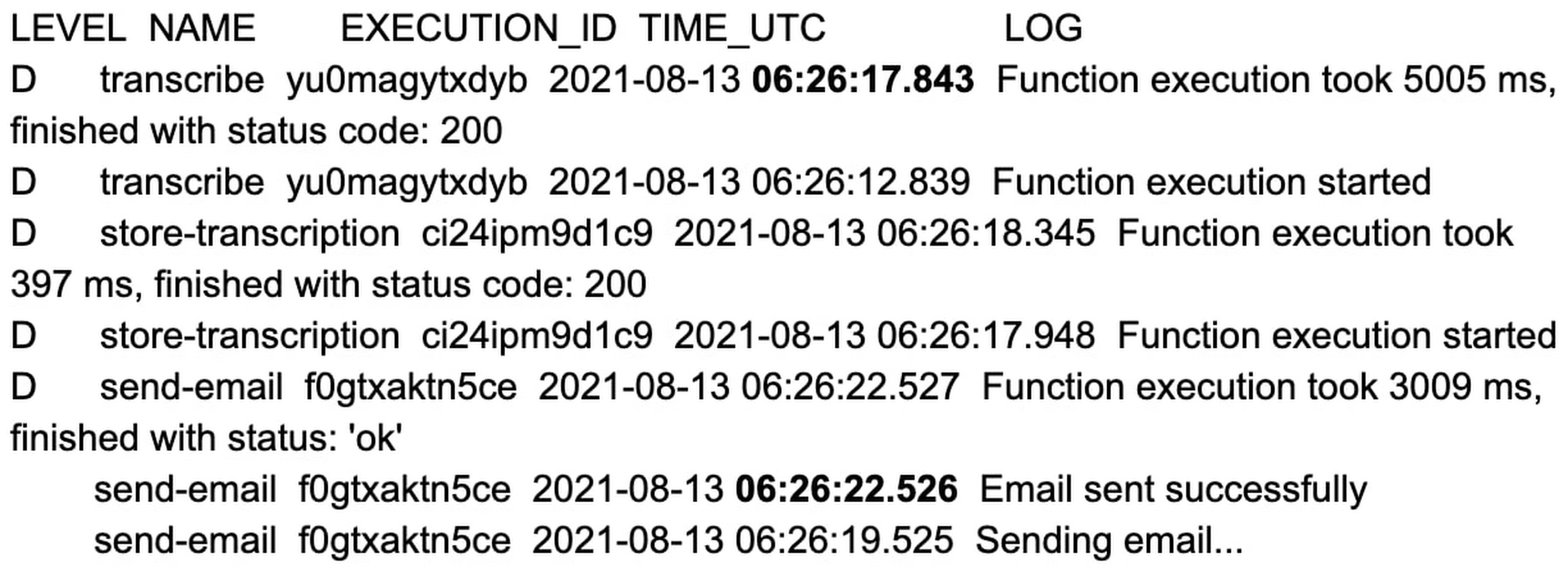
That’s an 11 second difference between the two approaches. The example set of functions are hardcoded with a 2 to 3 second sleep during function initialization, and when combined with average platform cold-start times, you can clearly see the cost of not using min instances.
You can reproduce the above experiment in your own environment using the tutorial here.
Check out min instances on Cloud Functions
We are super excited to ship min instances on Cloud Functions, which will allow you to run more latency-sensitive applications such as podcast transcription workflows in the serverless model. You can also learn more about Cloud Functions and Cloud Workflows in the following Quickstarts: Cloud Functions, Cloud Workflows.
How to Build A Basic Image Search Utility for Natural Language Queries

4699
Of your peers have already read this article.
6:00 Minutes
The most insightful time you'll spend today!
This post shows how to build an image search utility using natural language queries. Our aim is to use different GCP services to demonstrate this. At the core of our project is OpenAI’s CLIP model. It makes use of two encoders – one for images and one for texts. Each encoder is trained to learn representations such that similar images and text embeddings are projected as close as possible.
We will first create a Flask-based REST API capable of handling natural language queries and matching them against relevant images. We will then demonstrate the use of the API through a Flutter-based web and mobile application. Figure 1 shows how our final application would look like:

All the code shown in this post is available as a GitHub repository. Let’s dive in.
Application at a high-level
Our application will take two queries from the user:
- Tag or keyword query. This is needed in order to pull a set of images of interest from Pixabay. You can use any other image repositories for this purpose. But we found Pixabay’s API to be easier to work with. We will cache these images to optimize the user experience. Suppose we wanted to find images that are similar to this query: “horses amidst flowers”. For this, we’d first pull in a few “horse” images and then run another utility to find out the images that best match our query.
- Longer or semantic query that we will use to retrieve the images from the pool created in the step above. These images should be semantically similar to this query.
Note: Instead of two queries, we could have only taken a single long query and run named-entity extraction to determine the most likely important keywords to run the initial search with. For this post, we won’t be using this approach.
Figure 2 below depicts the architecture design of our application and the technical stack used for each of the components.
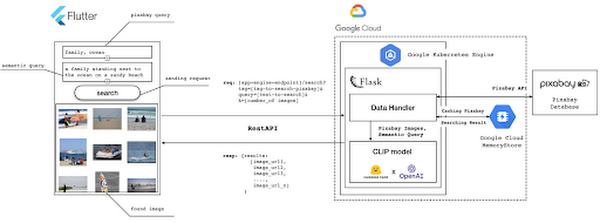
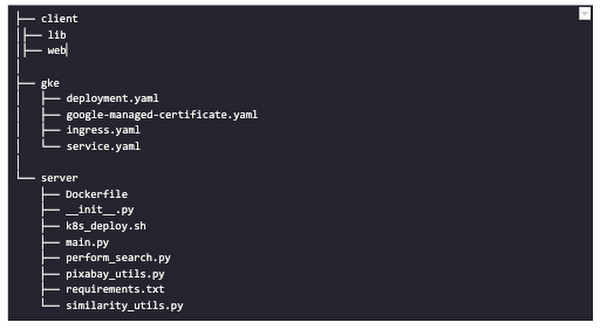
Figure 2 also presents the core logic of the API we will develop in bits and pieces in this post. We will deploy this API on a Kubernetes cluster using the Google Kubernetes Engine (GKE). The following presents a brief directory structure of our application code-base:
Next, we will walk through the code and other related components for building our image search API. For various machine learning-related utilities, we will be using PyTorch.
Building the backend API with Flask
First, we’d need to fetch a set of images with respect to user-provided tags/keywords before performing the natural language image search. The utility below from the pixabay_utils.py script can do this for us:
def fetch_images_tag(pixabay_search_keyword, num_images):"""Fetches images from Pixabay w.r.t a keyword.:param pixabay_search_keyword: Keyword to perform the search on Pixabay.:param num_images: Number of images to retrieve.:return: List of PIL images.:return: List of image URLs."""query = (PIXABAY_API+ "&q="+ pixabay_search_keyword.lower()+ "&image_type=photo&safesearch=true&per_page="+ str(num_images))response = requests.get(query)output = response.json()all_images = []all_image_urls = []for each in output["hits"]:imageurl = each["webformatURL"]response = requests.get(imageurl)image = Image.open(BytesIO(response.content)).convert("RGB")all_images.append(image)all_image_urls.append(imageurl)return (all_images, all_image_urls)
Note that all the API utilities are logging relevant information. But for brevity, we have omitted the lines of code responsible for that. Next, we will see how to invoke the CLIP model and select the images that would best match a given query semantically. For this, we’ll be using Hugging Face, an easy-to-use Python library offering state-of-the-art NLP capabilities. We’ll collate all the logic related to this search inside a SimilarityUtil class:
class SimilarityUtil:def __init__(self):self.model = CLIPModel.from_pretrained(CLIP_MODEL)self.processor = CLIPProcessor.from_pretrained(CLIP_PREPROCESSOR)self.device = "cuda" if torch.cuda.is_available() else "cpu"def perform_sim_search(self, images, query_phrase, top_k=3):"""Performs similarity search between the images and query.:param images: A list of PIL images initially retrieved withrespect to some entity e.g. Tiger.:param query_phrase: A list containing a single text query,e.g. "Tiger drinking water".:param top_k: Number of top images to return from `images`.:return: Top-k indices matching the query semantically andtheir similarity scores."""model = self.model.to(self.device)# Obtain the text-image similarity scoreswith torch.no_grad():inputs = self.processor(text=[query_phrase], images=images, return_tensors="pt", padding=True)inputs = inputs.to(self.device)outputs = model(**inputs)# Image-text similarity scoreslogits_per_image = outputs.logits_per_image.cpu()(top_indices, top_scores) = self.sort_scores(logits_per_image, top_k)return (top_indices, top_scores)def sort_scores(self, scores, top_k):"""Sorts the scores in a descending manner.:param scores: Scores to sort through.:param top_k: Number of top scores to return.:return: Top-k scores and their indices."""values, indices = scores.squeeze().topk(top_k)top_indices, top_scores = [], []for score, index in zip(values, indices):top_indices.append(int(index.numpy()))score = score.numpy().tolist()top_scores.append(round(score, 3))return (top_indices, top_scores)
CLIP_MODEL uses a ViT-base model to encode the images for generating meaningful embeddings with respect to the provided query. The text-based query is also encoded using A Transformers-based model for generating the embeddings. These two embeddings are matched with one another during inference. To know more about the particular methods we are using for the CLIP model please refer to this documentation from Hugging Face.
In the code above, we are first invoking the CLIP model with images and the natural language query. This gives us a vector (logits_per_image) that contains the similarity scores between each of the images and the query. We then sort the vector in a descending manner. Note that we are initializing the CLIP model while instantiating the SimilarityUtil to save us the model loading time. This is the meat of our application and we have tackled it already. If you want to interact with this utility in a live manner you can check out this Colab Notebook.
Now, we need to collate our utilities for fetching images from Pixabay and for performing the natural language image search inside a single script – perform_search.py. Following is the main class of that script:
class Searcher:def __init__(self):self.similarity_model = SimilarityUtil()def get_similar_images(self, keyword, semantic_query, pixabay_max, top_k):"""Finds semantically similar images.:param keyword: Keyword to search with on Pixabay.:param semantic_query: Query to find semantically similar images retrieved from Pixabay.:param pixabay_max: Number of maximum images to retrieve from Pixabay.:param top_k: Top-k images to return.:return: Tuple of top_k URLs and the similarity scores of the images present inside the URLs."""images_redis_key = keyword + "_images"urls_redis_key = keyword + "_urls"if redis_client.exists(images_redis_key) and redis_client.exists(urls_redis_key):keyword_images = redis_client.get(images_redis_key)keyword_image_urls = redis_client.get(urls_redis_key)else:(keyword_images, keyword_image_urls) = fetch_images_tag(keyword, pixabay_max)redis_client.set(images_redis_key, keyword_images)redis_client.set(urls_redis_key, keyword_image_urls)(top_indices, top_scores) = self.similarity_model.perform_sim_search(keyword_images, semantic_query, top_k)top_urls = [keyword_image_urls[index] for index in top_indices]return (top_urls, top_scores)
Here, we are just calling the utilities we had previously developed to return the URLs of the most similar images and their scores. What is even more important here is the caching capability. For that, we combined GCP’s MemoryStore and a Python library called direct-redis. More on setting up MemoryStore later.
MemoryStore provides a fully managed and low-cost platform for hosting Redis instances. Redis databases are in memory and light-weight making them an ideal candidate for caching. In the code above, we are caching the images fetched from Pixabay and their URLs. So, in the event of a cache hit, we won’t need to call the CLIP model and this will tremendously improve the response time of our API.
Other options for caching
We can cache other elements of our application. For example, the natural language query. When searching through the cached entries to determine if it’s a cache hit, we can compare two queries for semantic similarity and return results accordingly.
Consider that a user had entered the following natural language query: “mountains with dark skies”. After performing the search, we’d cache the embeddings of this query. Now, consider that another user entered another query: “mountains with gloomy ambiance”. We’d compute its embeddings and run a similarity search with the cached embeddings. We’d then compare the similarity scores with respect to a threshold and parse the most similar queries and their corresponding results. In case of a cache miss, we’d just call the image search utilities we developed above.
When working on real-time applications we often need to consider these different aspects and decide what enhances the user experience and maximizes business at the same time.
All that’s left now for the backend is our Flask application – main.py:
@app.route("/search", methods=["GET"])def get_images():tag = request.args.get("t").lower()query = request.args.get("s_query").lower()top_k = request.args.get("k")(top_urls, top_scores) = searcher.get_similar_images(tag, query, MAX_PIXABAY_SEARCH, int(top_k))return jsonify({"top_urls": top_urls, "top_scores": top_scores})
Here we are first parsing the query parameters from the request payload of our search API. We are then just calling the appropriate function from perform_search.py to handle the request. This Flask application is also capable of handling CORS. We do this via the flask_cors library:
cors = CORS(app,resources={r"/search/*": {"origin": "*"},r"/test/*": {"origin": "*"},},)
And this is it! Our API is now ready for deployment.
Deployment with Compute Engine and GKE
The reason why we wanted to deploy our API on Kubernetes is because of the flexibility Kubernetes offers for managing deployments. When operating at scale, auto scalability and load balancing are very important. With the comes the requirement of security — we’d not want to expose the utilities for interacting with any internal services such as databases. With Kubernetes, we can achieve all these easily and efficiently.
GKE provides secured and fully managed functionalities for operationalizing Kubernetes clusters. Here are the steps to deploy the API on GKE at a glance:
- We first build a Docker image for our API and then push it to the Google Container Registry (GCR).
- We then create a Kubernetes cluster on GKE and initialize a deployment.
- We then add scalability options.
- If any public exposure is needed for the API, we then tackle it.
We can assimilate all the above into a shell script – k8s_deploy.sh:
## Docker build and push ### We are inside the `server` directorydocker build -t gcr.io/${PROJECT_ID}/search_service .docker push gcr.io/${PROJECT_ID}/search_service## Deploy on a GKE cluster ### Configure the Docker command-line tool to authenticate to Container Registrygcloud auth configure-docker# Create a Kubernetes clustergcloud container clusters create image-search-nlp# Create a deploymentkubectl create deployment clip-search --image=gcr.io/${PROJECT_ID}/search_service# Number of worker replicaskubectl scale deployment clip-search --replicas=3# HorizontalPodAutoscaler resourcekubectl autoscale deployment clip-search --cpu-percent=80 --min=1 --max=5# Expose deploymentkubectl expose deployment clip-search --name=clip-search-service --type=LoadBalancer --port 80 --target-port 8080
These steps are well explained in this tutorial that you might want to refer to for more details. We can configure all the dependencies on our local machine and execute the shell script above. We can also use the GCP Console to execute it since a terminal on the GCP Console is pre-configured with the system-level dependencies we’d need. In reality, the Kubernetes cluster should only be created once and different deployment versions should be created under it.
After the above shell script is run successfully, we can run kubectl get service to know the external IP address of the service we just deployed:
NAME CLUSTER-IP EXTERNAL-IP PORT(S) AGEclip-search-service 10.3.251.122 203.0.113.0 80:30877/TCP 10s
We can now consume this API with the following base URI: http://203.0.113.0/. If we wanted to deal with only http-based API requests, then we are done here. But secured communication is often a requirement in order for applications to operate reliably. In the following section, we are to discuss how to configure the additional items to allow our Kubernetes cluster to allow https requests.
Configurations for handling https requests with GKE
A secure connection is almost often a must-have requirement in modern client/server applications. The front-end Flutter application would be hosted on GitHub Pages for this project, and it requires https-based connection as well. Even if configuring https connection particularly for a GKE-based cluster can be considered a chore, its setup might seem daunting at first.
There are six steps to configure https connection in the GKE environment:
- You need to have a domain name, and there are a lot of inexpensive options that you can buy. For instance, mlgde.com domain for this project is acquired via Gabia which is a Korean service provider.
- A reserved (static) external IP address has to be acquired via gcloud command or GCP console.
- You need to bind the domain name with the acquired external IP address. This is a platform-specific configuration that issued the domain name to you.
- There is a special ManagedCertificate resource which is specific to the GKE environment. ManagedCertificate resource specifies the domain that the SSL certificate will be created for, so you need this.
- An Ingress resource should be created by listing the static external IP address, ManagedCertificate resource, and the service name and port which the incoming traffic will be routed to. The Service resource could remain the same as in the above section with only changes from LoadBalancer to ClusterIP.
- Last but not least, you need to modify the existing Flask application and Deployment resource to support liveness and readiness probes which are used to check the health status of the Deployment. The Flask application side can be simply modified with the flask-healthz Python package, and you only need to add
livenessProbeandreadinessProbesections in the Deployment resource. In the code example below, thelivenessProbeandreadinessProbeare checked via/aliveand/readyendpoints respectively.
from flask_healthz import healthzfrom flask_healthz import HealthErrorapp = Flask(__name__)app.register_blueprint(healthz, url_prefix="/")def printok():print("Everything is fine")def liveness():try:printok()except Exception:raise HealthError("Can't connect to the file")def readiness():try:printok()except Exception:raise HealthError("Can't connect to the file")app.config.update(HEALTHZ = {"alive": "main.liveness","ready": "main.readiness",})
One thing to be careful of is the initialDelaySeconds attribute of the probes. It is uncommon to configure this attribute with a big number, but it could be bigger than 90 – 120 seconds depending on the size of the model to be used. For this project, it is configured in 90 seconds in order to wait until the CLIP model is fully loaded into memory (full YAML script here).
livenessProbe:httpGet:path: /aliveport: 8080initialDelaySeconds: 90periodSeconds: 10readinessProbe:httpGet:path: /readyport: 8080initialDelaySeconds: 90periodSeconds: 10
Again, these steps may seem daunting at first, but it will become clear when you have done it once. Here is the official document for Using Google-managed SSL certificates You can find all the GKE-related resources used in this project here.
Once every step is completed you should be able to see your server application running on the GKE environment. Please make sure to run kubectl apply command whenever you create Kubernetes resources such as Deployment, Service, Ingress, and ManagedCertificate, and it is important to wait for more than 10 minutes until the ManagedCertifcate provisioning is done.
You can run gcloud compute addresses list command to find out the static external IP address that you have configured.
NAME ADDRESS/RANGE TYPE PURPOSE NETWORK REGION SUBNET STATUSgde 34.149.231.34 EXTERNAL IN_USE
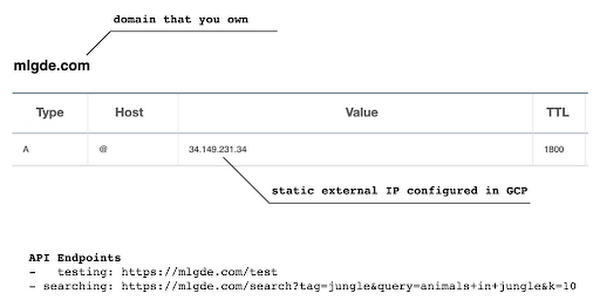
Then, the IP address has to be mapped to the domain. Figure 3 is a screenshot of a dashboard from where we got the mlgde.com domain. It clearly shows mlgde.com is mapped to the static external IP address configured in GCP.
In case you’re wondering why we didn’t deploy this application on App Engine, well that is because of the compute needed to execute the CLIP model. App Engine instance won’t fit in that regime. We could have also incorporated compute-heavy capabilities via a VPC Connector. That is a design choice that you and your team would need to consider. In our experiments, we found the GKE deployment to be easier and suitable for our needs.
Infrastructure for the CLIP model
As mentioned earlier, at the core of our application is the CLIP model. It is computationally a bit more expensive than the regular deep learning models. This is why it makes sense to have the hardware infrastructure set up accordingly to execute it. We ran a small benchmark in order to see how a GPU-based environment could be beneficial here.
We ran the CLIP on a Tesla P100-based machine and also on a standard CPU-only machine 1000 times. The code snippet below is the meat of what we executed:
DEVICE = "cuda" if torch.cuda.is_available() else "cpu"start_time = time.time()for _ in range(1000):with torch.no_grad():model = model.to(DEVICE)inputs = processor(text=[semantic_search_phrase],images=all_images, return_tensors="pt", padding=True)inputs = inputs.to(DEVICE)outputs = model(**inputs)end_time = time.time() - start_timeprint(f"Total time: {end_time:.3f} seconds.")
As somewhat expected, with the GPU, the code took 13 minutes to complete execution. With no GPU, it took about 157 minutes.
It is uncommon to leverage GPUs for model prediction because of cost restrictions, but sometimes we have to access GPUs for deploying a big model like CLIP. We configured a GPU-based cluster on GKE and compared the performance differences with and without it. It took about 1 second to handle a request with GPU and MemoryStore cache while it took more than 4 seconds with MemoryStore only (without the GPUs).
For the purposes of this post, we used a CPU-based cluster on Kubernetes. But It is easy to configure GPU usage in a GKE cluster. This document shows you how to do so. For a short summary, there are two steps. First, a node should be configured with GPUs when creating a GKE cluster. Second, GPU drivers should be installed in GKE nodes. You don’t need to visit and manually install GPU drivers for each node by yourself. Rather you can simply apply the DaemonSet resource to GKE as described here.
Setting up MemoryStore
In this project, we first query the general concept of images to Pixabay, then we filter the images with a semantic query using CLIP. It means we can cache the initially retrieved images from Pixabay for the next specific semantic query. For instance, you may want to search with “gentleman wearing tie” at first, then you may want to retry searching for “gentleman wearing glass”. In this case, the base images remain all the same, so they could be stored in a cache server like Redis.
MemoryStore is a GCP service wrapping the Redis which is an in-memory data store, so you can simply use a standard Redis Python package for accessing it. The only thing to be careful about when provisioning a MemoryStore Redis instance is to make sure it is in the same region where your GKE cluster or Compute Engine instance is.
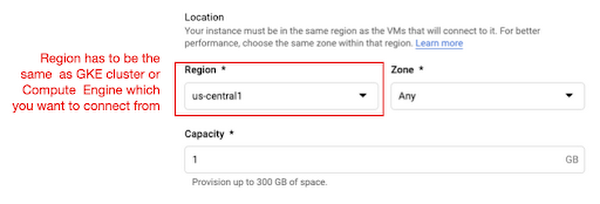
The code snippet below shows how to make a connection to the Redis instance in Python. Nothing specific to GCP, but you only need to be aware of the usage of the standard redis-py package.
# REDISHOST is the IP address to the MemoryStore instanceredis_host = os.environ.get("REDISHOST", "localhost")redis_port = int(os.environ.get("REDISPORT", 6379))redis_client = redis.StrictRedis(host=redis_host, port=redis_port)
After creating a connection, you can store and retrieve data from MemoryStore. There are more advanced use cases of Redis, but we only used exists, get, and set methods for the demonstration purpose. These methods should be very familiar if you know maps, dictionaries, or other similar data structures. For the code portion that uses Redis-related utilities, please refer to the Searcher Python class we discussed in an earlier section.
In the URLs below, you can find side-by-side comparisons of using MemoryStore:
- Without MemoryStore: https://youtu.be/7B88Eyrd-4s
- With MemoryStore (1st try): https://youtu.be/LE6xeEIRuMM
- With MemoryStore (2nd try): https://youtu.be/rRfK17sdk84
Putting everything together
All that’s left now is to collate the different components we developed in the sections above and deploy our application with a frontend. All the frontend-related code is present here.
- The front-end application is written in the Flutter development kit. The main screen contains two text fields for queries to Pixabay and CLIP model respectively. When you click the “Send Query” button, it will send out a RestAPI request to the server. After receiving the result back from the server, the retrieved images from the semantic query will be displayed at the bottom section of the screen.
- Please note that a Flutter application can be deployed to various environments including desktop, web, iOS, and Android. In order to keep as simple as possible, we chose to deploy the application to the GitHub Pages. Whenever there is any change to a client-side source directory, the GitHub Action will be triggered to build a web page and deploy the latest version to the GitHub Pages.
Our final application is deployed here and it looks like so:

Note that due to constraints, the above-mentioned URL will only be live for one or two months.
It is also possible to redeploy the back-end application with a GitHub Action.
- The very first step is to craft a Dockerfile like below. Since Python is a scripting language, and there are lots of heavy packages that the application is dependent on, it is important to cache the steps. For instance, installing the dependencies should be separated from other commands.
FROM pytorch/pytorch:latestWORKDIR /app# install the dependenciesCOPY requirements.txt requirements.txtRUN pip install -r requirements.txtCOPY . .# set up environment variablesENV PIXABAY_API_KEY="..."ENV REDIS_IN_USE="true"ENV REDISHOST="..."# expose port that Flask app is listening onEXPOSE 8080# run the Flask appCMD [ "python3", "main.py" ]
- With the Dockerfile defined, we can use a GitHub Action like this for automatic deployment.
Edge cases
Since the CLIP model is pre-trained on a large corpus of image and text pairs it’s likely that it may not generalize well to every natural language query we throw at it. Also, because we are limiting the number of images on which the CLIP model can operate, this somehow restricts the expressivity of the model.
We may be able to improve the performance for the second situation by increasing the number of images to be pre-fetched and by indexing them into a low-cost and high-performance database like Datastore.
Costs
In this section, we wanted to provide the readers a breakdown of the costs they might incur in order to consume the various services used throughout the application.
- Frontend hosting
- The front-end application is hosted on GitHub Pages, so there is no expenditure for this.
- Compute Engine
- With an e2-standard-2 instance type without GPUs, the cost is around $48.92 per month. In case you want to add a GPU (NVIDIA K80), the cost goes up to $229.95 per month.
- MemoryStore
- The cost for MemoryStore depends on the size. With 1GB of space, the cost is around $35.77 per month, and whenever you add more GBs the cost will be doubled.
- Google Kubernetes Engine
- The monthly cost for a 3 node GKE cluster with n2-standard-2 (vCPUs: 2, RAM: 8GB without GPUs) is about $170.19. If you add one GPU (NVIDIA K80) to the cluster, the cost goes up to $835.48.
While you may think that is a lot cost-wise, it is good to know that Google gives away free $300 credits when you create a new GCP account. It is still not enough for leveraging GPUs, but it is enough to learn and experiment with GKE and MemoryStore usage.
Conclusion
In this post, we walked through the components needed to build a basic image search utility for natural language queries. We discussed how these different components are connected to each other. Our image search API is able to utilize caching and was deployed on a Kubernetes cluster using GKE. These elements are essential when building a similar service to cater to a much bigger workload. We hope this post will serve as a good starting point for that purpose. Below are some references on similar areas of work that you can explore:
- Building a real-time embeddings similarity matching system
- Detecting image similarity using Spark, LSH and TensorFlow
Acknowledgments: We are grateful to the Google Developers Experts program for supporting us with GCP credits. Thanks to Karl Weinmeister and Soonson Kwon of Google for reviewing the initial draft of this post.
A Year of Connecting Brand and Consumers with Google’s Business Messages

6186
Of your peers have already read this article.
3:00 Minutes
The most insightful time you'll spend today!
Last June, in the early months of the pandemic, we expanded Business Messages to support all kinds of businesses, from pharmacies and grocery stores to airlines and luxury brands. Then, in December, we announced the ability for small businesses to use the Google Maps app to message with their customers. We knew people would find messaging directly with businesses from Google Search and Maps helpful, but we didn’t know just how valuable it would turn out to be.
Consumers are increasingly eager to use messaging to connect with brands, and businesses across all industries are now building innovative messaging experiences to address that growing need. The demand from consumers is reflected in recent data:
- 45% of users have spent more time on messaging services because of the pandemic
- 85% of consumers would like to message brands directly, up from 65% in 2019
Being able to message a business directly has never been more important. For me personally, there’s nothing more fulfilling than using technology to help people in the moments that matter. After the release of initial COVID-19 vaccines in late 2020, online searches for vaccines reached an all-time high. To help people searching for vaccine eligibility, availability, and appointment booking, Albertsons Companies’ banner pharmacies—like Albertsons, Safeway, and Vons—made this information easily accessible through Google Search and Maps via the “chat” button. This gave people the information they needed, when they needed it.

To be more helpful in moments like these, over the last year, we’ve made Business Messages available globally, in more than 70 languages, and we’ve seen more than 30,000 brands and 200 partners come on board. Major brands like Carrefour, Walmart, and Woolworths have invested in Business Messages to help serve their consumers in new and meaningful ways.
Expanding the conversation between consumers and brands
The retail sector has undergone a transformation since the start of the pandemic. As a result, we know it is critical for digital services to integrate with physical stores. We were able to do just that with Google’s Business Messages, which has been instrumental in helping better serve our customers across 1200+ stores in Europe.
Thomas Rudelle
Global Digital Marketing Director, Carrefour
There were major shifts in consumer behavior during the pandemic, from the way people found and purchased products to the ways they interacted with businesses. Not only did we see higher demand for direct contact with brands, but retail searches also surged. At the end of 2020, retail searches grew at a rate that was more than three times higher than the same period in 2019 (based on Google internal data).
As Business Messages has become more widespread, brands are able to boost both responsiveness and customer satisfaction using the service. Levi’s, for example, surpassed 85% customer satisfaction scores using Business Messages and they discovered that the service drove 30x more store-related questions than web chat.

Many brands have also digitized what were traditionally in-store experiences, especially in high-consideration categories like jewelry. For example, Signet brought its virtual jewelry consultant to Business Messages, offering customers advice and answering queries in a way that’s convenient but still feels personal.We started using Google’s Business Messages pretty early on, and continue to transform and improve our experience. The ability to let customers know whether a product is in stock, and its precise location, is critical to offering a connected and frictionless shopper experience. Of course it also helps reduce the workload on our store and customer hub teams.
Nick Eshkenazi
Chief Digital Technology Officer, Woolworths
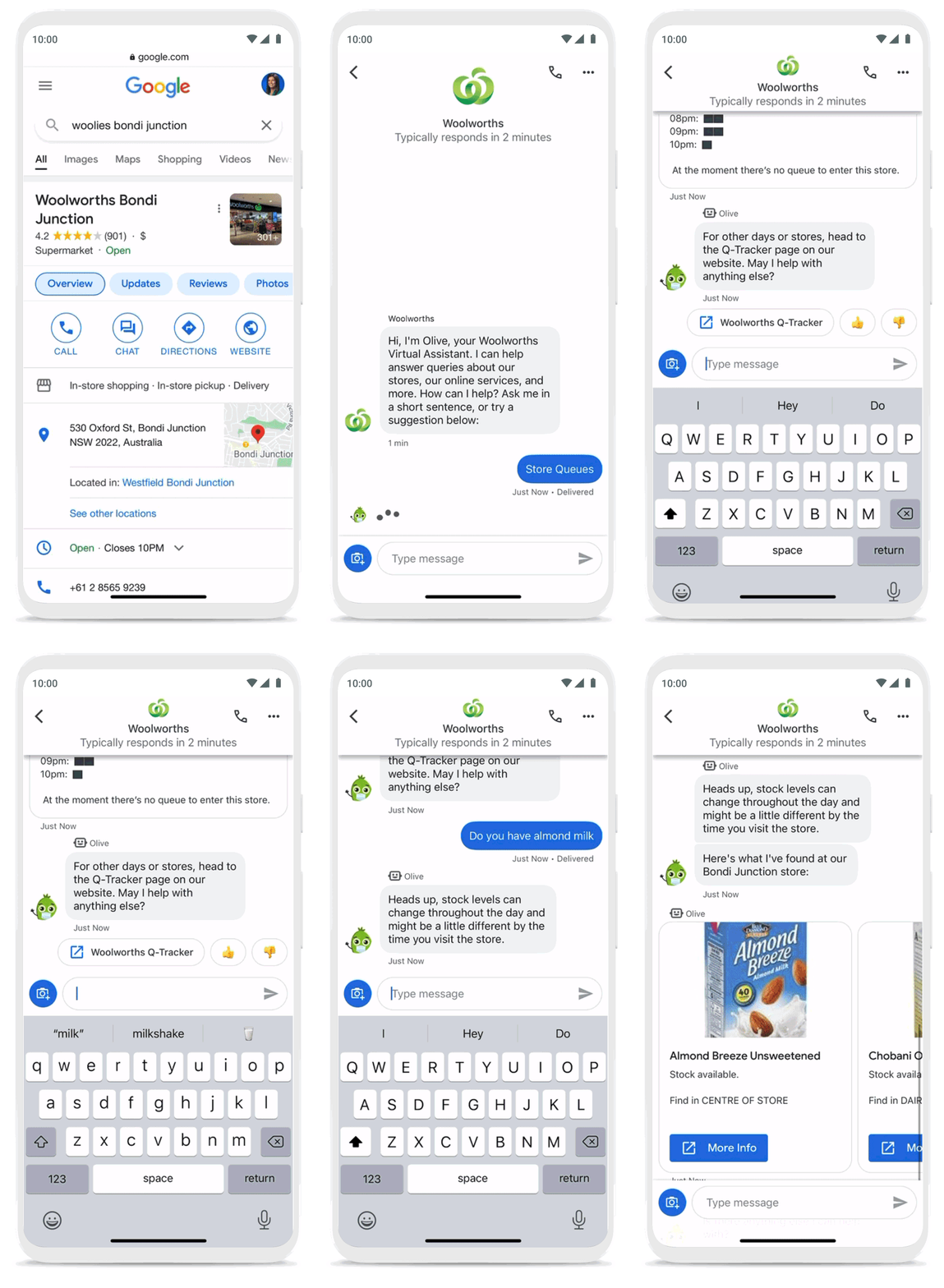
As a working mother, these sorts of innovations have made a direct impact in my own life. I find it very helpful to be able to ask—and get real-time answers to—everyday questions using Business Messages, ranging from store hours and product availability to order status and how to make returns. One of my favorite features is the ability to know, in real time, what store wait times are like, and the exact location of the product I’m looking for, saving me precious time when I visit the store.
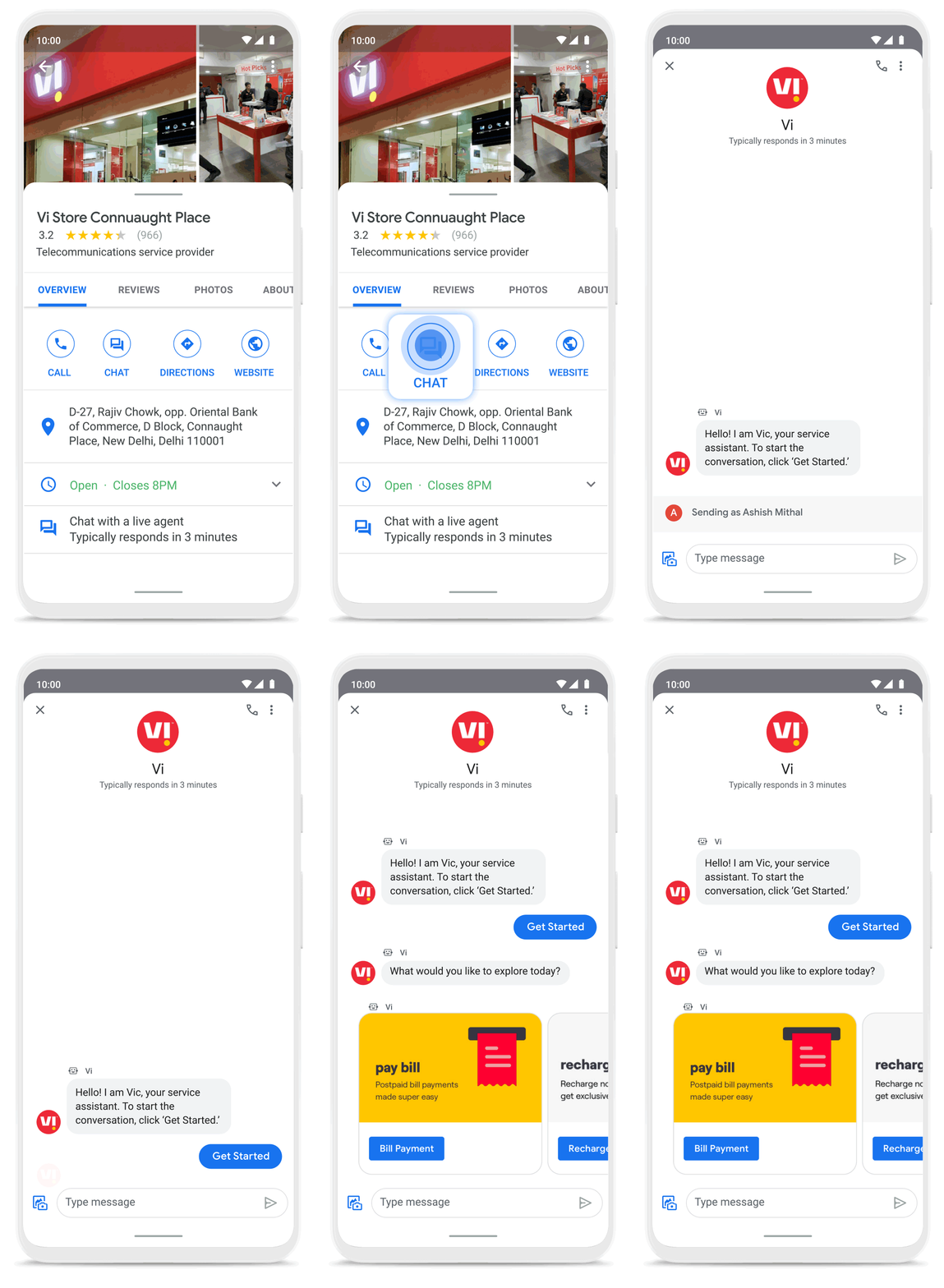
Business Messages helps people do more with their time in other ways as well. Earlier this year I’d been meaning to change my insurance plan, but kept pushing it off because I didn’t want to get on a phone call. I can now message Geico to update my policy through the agent pretty effortlessly. Similarly, in India, Vi customers can use 24×7 real-time customer service to chat with their AI powered virtual assistant VIC, integrated with Google’s Business Messages, to check billing information, activate packs, add recharges and payments, check balances, and much more—and it all happens seamlessly.
Building a full suite of messaging products
We’re investing in building a full suite of messaging products that enable seamless conversational commerce to drive business results. As Business Messages continues to support brands in establishing their messaging presence on Google, we’re also experimenting with other ways to help them increase their reach and engagement on Search and Display. To accelerate on the digital front, we recently integrated AdLingo, a project built within Area 120, Google’s in-house incubator. This will enable brands to easily transform ads into AI powered, personalized conversations at scale.
For more information on how you can activate Business Messages, please reach us via the contact form on the Business Messages website. Merchants can also read and respond to messages via Google My Business or on the Google Maps app.
Transforming the Bank of Anthos App with Spring Cloud GCP 4.0

1559
Of your peers have already read this article.
3:30 Minutes
The most insightful time you'll spend today!
We’re excited to announce that Spring Cloud GCP version 4.0 is now generally available! In this post, we’ll be describing what the new major version has to offer, and demonstrating the process of using the migration guide on one of our reference architectures, Bank of Anthos.
What’s new?
With this release, Spring Cloud GCP officially supports Spring Boot 3.x. However, this migration involves a number of breaking changes as outlined in the migration guide. The full list of changes made is available on Github, but the one of the most significant differences is that Java 17 is now a minimum requirement.
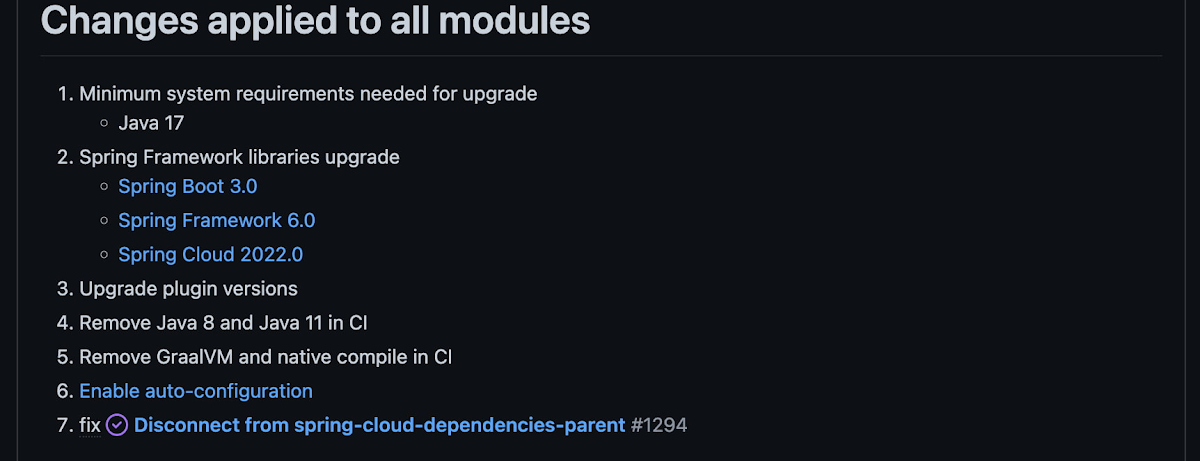
Another notable feature of this release is the addition of starter artifacts – Spring Boot starters for Google Cloud – that provide dependencies and auto-configurations for 80+ Google Client libraries. Just as the name suggests, these starters can serve as helpful starting points when working with a new client library. For now, they’re in preview.
These starters are not included in the BOM by default and need to be added as a dependency to your project before they can be used. For example, if you wanted to get started with Cloud Text-to-Speech, you would include the following:
<dependency>

    <groupId>com.google.cloud</groupId>

    <artifactId>google-cloud-texttospeech-spring-starter</artifactId>

    <version>4.0.0-preview</version>

  </dependency>
The upgrade process
We prepared a migration guide to help answer any questions involved with moving from 3.x to 4.x. Let’s follow those instructions to migrate Bank of Anthos.
We’ll start by cloning and building the application before the upgrade, according to the quickstart and development guide:
PROJECT_ID=<YOUR-PROJECT-ID>
gcloud services enable container --project ${PROJECT_ID}

git clone https://github.com/GoogleCloudPlatform/bank-of-anthos.git
cd bank-of-anthos/

gcloud services enable container.googleapis.com monitoring.googleapis.com \
  --project ${PROJECT_ID}

REGION=us-central1
gcloud container clusters create-auto bank-of-anthos \
  --project=${PROJECT_ID} --region=${REGION}

gcloud container clusters get-credentials bank-of-anthos \
  --project=${PROJECT_ID} --region=${REGION}

skaffold run --default-repo=gcr.io/${PROJECT_ID}/bank-of-anthos
With the environment set up for development, we’re ready to move on to the actual migration. The migration is already complete at time of writing, but here’s the full list of changes made:
- We began by checking the current Java, Spring Boot and Spring Cloud GCP versions.
- Our Java version is okay, but the other two are out of date, and will need to be updated.
We can also add the Spring Cloud GCP BOM to manage our versions going forward while we’re here.
- Our Java version is okay, but the other two are out of date, and will need to be updated.
- Then, in no particular order, we can make the following code changes:
- Remove the explicit type declarations from our ResponseEntity instantiations.
- Replace all javax.* imports with Jakarta.* counterparts, since Spring 3.0 makes use of Jakarta EE 9.0
With those changes in place, the app is upgraded and ready to re-deploy!
Live example
For a finished example of this migration, check out the Bank of Anthos repository on Github. It’s an excellent sample application that showcases a polyglot Java & Python app, served on Kubernetes and Google Cloud. All CI/CD and configurations are open source, so it may be instructive as you approach this migration.
Thanks for reading, and feel free to provide comments or feedback on Twitter, or in the issues section of the repository.
More Relevant Stories for Your Company

Chrome OS’s Hybrid Work Model Powers Google’s Return to Work Strategy
The pandemic continues to deeply affect our lives around the globe. In some places, new cases are surging and returning to work is the last thing on people’s minds. In other areas, conditions are improving and companies are starting to think about transitioning their workforce back to the office. Exactly




Accelerate App Development and Delivery: The Modern Way
Cloud-native, Kubernetes, Serverless have been the hottest and most widely discussed topics given the velocity and agility benefits. Learn more about how you can leverage these modern app development practices to ship software faster, while reducing costs and improving security and compliance. Learn how Google Cloud lets you modernize existing



Google Cloud’s ML-based Image Classification App: A Key to Global Wildlife Conservation
Wildlife provides critical benefits to support nature and people. Unfortunately, wildlife is slowly but surely disappearing from our planet and we lack reliable and up-to-date information to understand and prevent this loss. By harnessing the power of technology and science, we can unite millions of photos from [motion sensored cameras]

Consent is a Key Component for a Successful Embedded Financial Solution: Read Why
When banks and other financial institutions make their products available via non-banks, we call that Embedded Finance. Think, for example, of a retailer offering financing for people buying goods; or a budgeting app gathering bank transactions to help you categorize and understand your spending patterns. The finance - the money
