





Maximizing API Potential: A Look at 7 Prominent API Management Use Cases

2707
Of your peers have already read this article.
4:30 Minutes
The most insightful time you'll spend today!
Paper currency — which started gaining prominence in the 1600s — changed the face of global economics and ushered in a new era of international monetary regulation. The primary reason currency created such disruption was its ability to standardize the “medium of exchange”. APIs created a similar effect in the world of technology and digitalization by creating a standardized, reusable, and secure way to exchange information.
Modern web APIs took shape in the early 2000s and played a key role in “.com”mercializing every business. APIs started as a connective tissue primarily relegated to a technical context and quickly evolved into a gateway to new business models, revenue streams, and ecosystems. In 2017, McKinsey estimated a total of $1 Trillion in profit could be up for grabs in the API economy. And in 2022, GGV Capital created an index of API-first startups — a generation of stylistically divergent SaaS companies with leaner operating cost structures and organic usage growth. Just as currency is going through an evolution from banknotes to digital wallets, the world of API management is also on the brink of change.
With more than 15 years of experience managing APIs at Google-scale, we’ve got a unique vantage point from which to observe that change. In today’s post, we will spotlight seven API management use cases that we see growing in prominence — and how you can take advantage of these trends to future-proof your architecture.
1 “Shift left” in API security
As a gateway to a wealth of information, APIs have also quickly become the primary attack vector in security incidents. When we surveyed 500 technology leaders, we learned that more than 50% of organizations experienced an API security incident in the last 12 months. Adding to the increasing magnitude of attacks, there are an increasing number of vectors for potential API security incidents like misconfigurations, outdated APIs/data/components, and bots/spam/abuse.
These security issues aren’t just in production APIs, but at every stage in the API lifecycle. Notably, we found that 67% of the issues are discovered during testing as part of the release management process. This trend ushers in the need for forward-thinking organizations to “shift left with security” — moving controls earlier into the production workflow — by bringing security teams and API teams closer. To stay ahead of security threats, many organizations are actively looking for solutions that allow them to be proactive while minimizing the burden on their security teams. According to our research, integrating capabilities that proactively identify security threats (60%) is top of mind for most IT leaders for the next year.
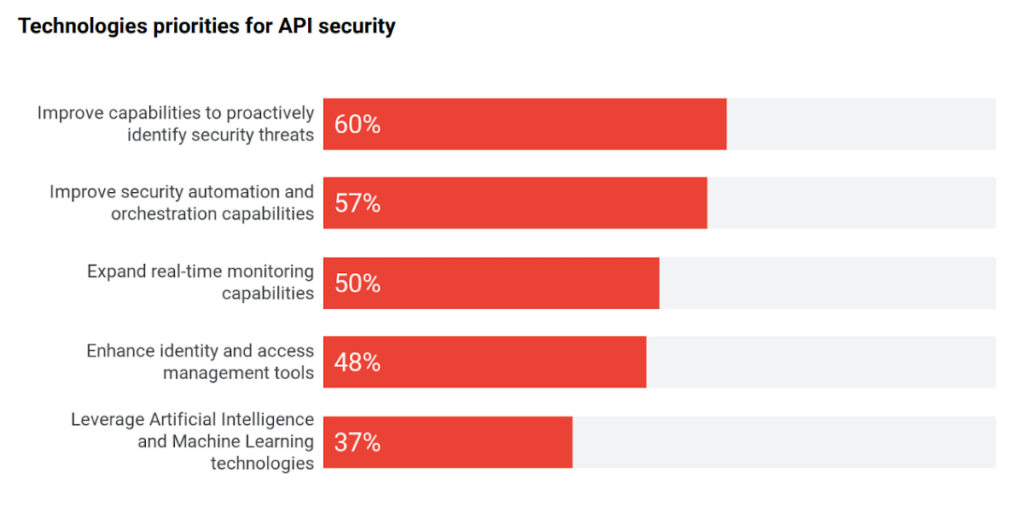
Source: 2022 API Security Research Report
2 “Knowledge graph” for your enterprise APIs
It comes as no surprise that every organization is relying on APIs to expand and even ground their digital ecosystem — a network of partners, developers, and customers facilitated by modern, cloud-first technologies. There is a growing magnitude and variety of middleware assets, contributing to the growth of IT complexity.
As the number of APIs continues to increase, there is a need to simplify consumption for internal and external developers. Even the most objectively useful APIs remain unseen by most of the organization. In turn this results in redundant code, reduced developer productivity, or worse — turned into a potential security attack vector. This complexity is shifting focus towards consolidation of all middleware assets, growing adoption, and improving education (see below) to improve developer efficiency and de-mystify the IT complexity.
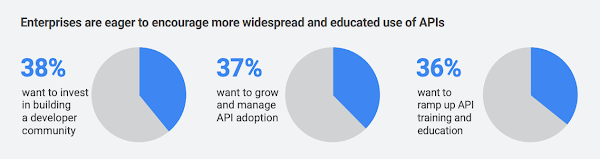
This sprawl is a growing problem in the world of APIs, but it has a lot in common with an age-old phenomenon in the world of web pages and content—search. Google was born out of this problem to help organize the world’s information. Similar to Google’s knowledge graph for web pages, there is a need to index, organize, and instantly present API information for developers that need it. Although it is an emerging practice, we see an increasing number of digital leaders and security teams in larger organizations with mature API programs invest in solutions that help consolidate all APIs, organize their information, and manage their lifecycle.
3 The imminent need for “omni” control planes
APIs have taken on such a vital role in the modern application stack that they have slowly become the neural links across the entire enterprise architecture — bridging legacy and modern applications, shifting architectures towards microservices, and enabling operations across heterogeneous environments. To support all these technological decisions without sacrificing speed, organizations adopted multiple API gateways and fragmented API management solutions. However, this led to a lack of universal visibility, consistent governance, comprehensive security, and meaningful analytics across ALL the enterprise APIs (not just the ones within the confines of a given API management solution). And it increases the maintenance costs — fundamentally undercutting the value of APIs. With this evolution there is a growing need for an omni control plane — analogous to the brain in a human body — across all enterprise APIs.
4 API governance rising through the priority ranks
Despite the clear need for governance, there is still no unified understanding on a good (or right) approach to API governance. With the rapid adoption of APIs without appropriate standardization or quality standards, API governance is top of mind for IT leaders, again.
According to our research, 45% of IT leaders identified API governance as a critical component of their API program. The top three components of API security, performance analytics, and governance demonstrate the critical need for visibility, quality, and security across all APIs.
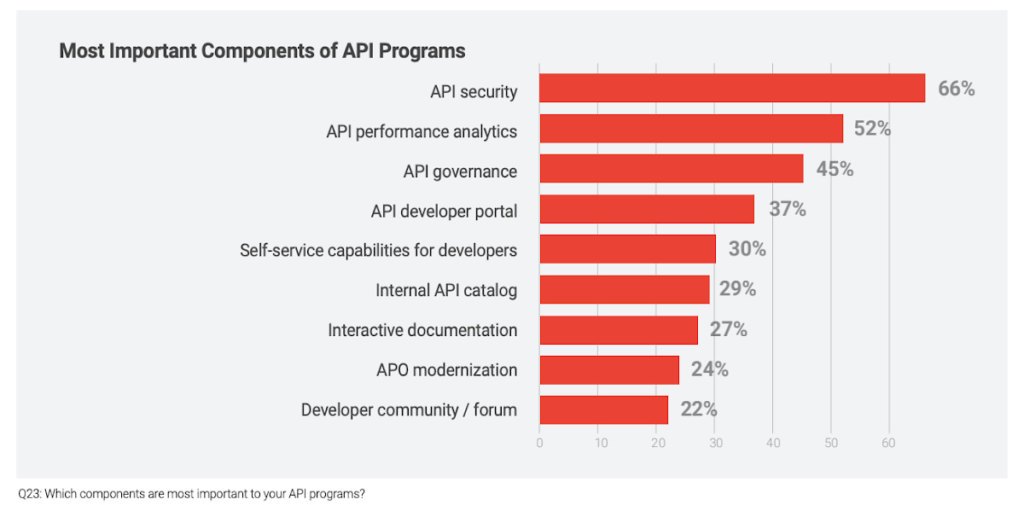
As digital consumers, we have seen this phenomenon across many industries and digital products. For example AirBnB disrupted the short-term rental market by providing standardized listings, detailed information, and high-resolution photos. In fact, the same governance phenomenon is ubiquitous in the world of e-commerce where there is a clear correlation between a high-quality website or product listing and increasing sales.
The same analogy holds true in the world of APIs, as ~90% of developers use APIs in their work there is a direct correlation between the use of APIs and developer productivity. Digital officers and CIOs need to add appropriate governance controls to standardize API design and improve reuse without adding friction to development timelines.
5 Evolution of design patterns with multiple API gateways
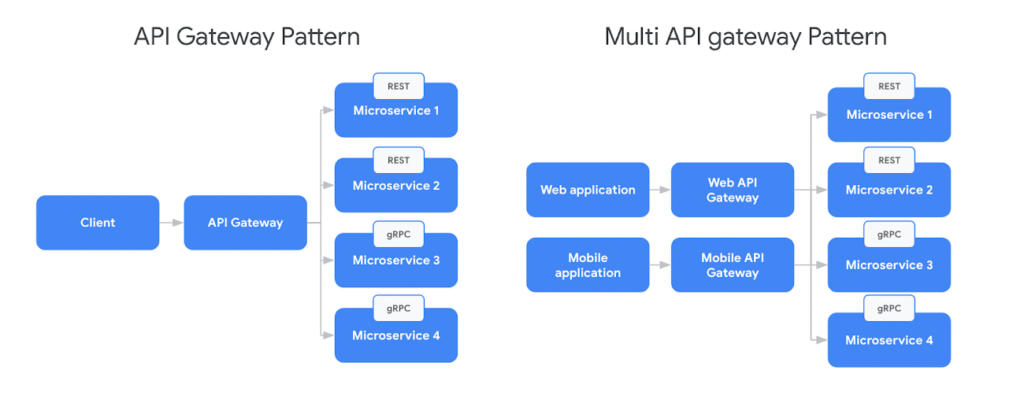
Adoption of new API architectural styles and microservices increased the complexity of the modern application stack. Our research found that 54% of organizations use a service mesh and API management in conjunction today to support the API gateway design pattern. In parallel, there is broad adoption of new protocols like GraphQL or AsyncAPI, outpacing the innovation in API gateways. For example, in a recent survey from DZone found that GraphQL accounted for 22.7% of application integrations.
In response to this challenge IT teams are adopting multiple API gateways — by design — which is creating the need for complex communication patterns for future scalability. But the existing design patterns were mostly sufficient when client applications used homogeneous API protocols (Ex: REST). Although patterns like Backend For FrontEnd (BFF) intended to provide specific API interactions that are relevant on a per-client basis, they still did not account for complexities from multiple gateways and protocols. In response to the adoption of new protocols, there is a need to evolve the existing BFF pattern to account for multiple API gateways and protocols.
6 Driving green value chains with digital twins
A digital twin is an effectively indistinguishable virtual representation of a physical object, system, or a process. For example the digital twin of a wind turbine (the object being studied) might be used to capture data like performance, rpm (revolutions per minute), or output captured by various sensors outfitted on the turbine. Digital twin adoption is growing and McKinsey estimates investments in digital twins will reach $58 billion by 2026 with a 58% CAGR. Every digital twin uses APIs to monitor, engage, and possibly control the physical asset. For example, Google created the Digital Buildings project — an open source, Apache-licensed effort to manage applications and analyses between a large heterogeneous portfolio of buildings.
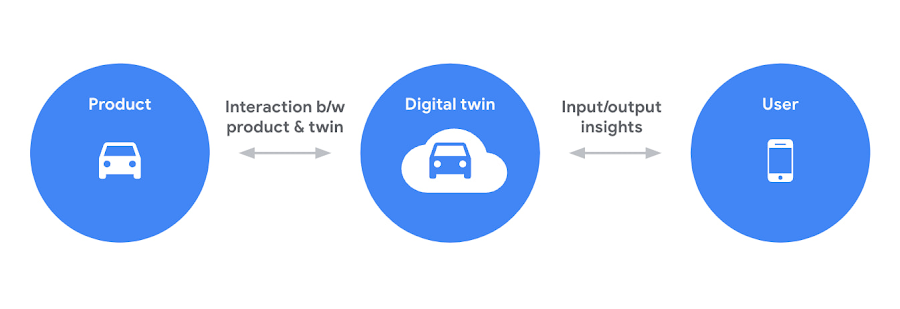
Sustainability is one of the driving forces behind the increased use of digital twins. As the need to reach net zero emissions accelerates, many organizations are tying performance (and in some cases even executive pay) to environmental, social, and governance goals. APIs help connect the dots between digital twins and sustainability. For example, an organization operating a manufacturing process could build a digital twin with APIs to collect behavioral data from sensors, monitoring systems, or other sources — which can eventually be integrated into the organization’s digital platform or applications. These digital twins could be used to analyze and optimize the use of materials and energy, to minimize waste and emissions. Additionally, digital twins could be used to monitor and analyze the performance of systems over time, to identify opportunities for continuous improvement.
Overall, APIs play a valuable role in supporting sustainability efforts by enabling digital twins, effectively driving more efficient operation of systems, and providing insights to improve environmental impact. For further examples, check out this video about driving a green value chain with APIs.
7 Commercializing access to data products
The growing use of data-rich services (like IoT, ML models, remote access services, and web scraping, etc.) coupled with massive ingestion of data everyday is creating massive growth in data delivery paradigms like data lakehouses, data marketplaces, and data streaming systems (global data marketplaces alone are poised to reach $3.5 billion by 2028). Unfortunately, most of these systems are fragmented with almost no relationship or interoperability.
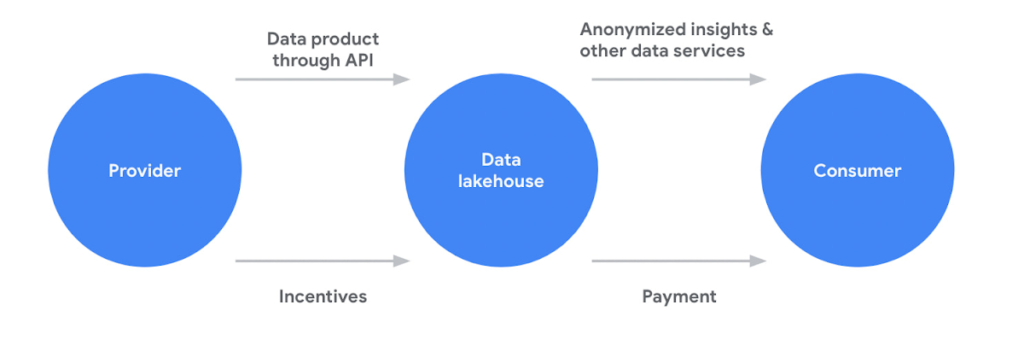
APIs are filling this critical gap for organizations in two critical ways. First, APIs are providing standard and easy access to systems like data lakehouses or analytics hubs. Second, APIs are a key enabler of data products (digital products or services built using data as a core value proposition), a core component of any data sharing system. APIs provide a standardized way for different applications to interact with the data product. For example, an API could be used to allow a mobile app to access data from a weather forecast or a recommendation engine data product. Beyond data products, APIs also provide easy and standardized access various data management platform
APIs continue to play a critical role in every application, experience, and ecosystem. Robust API strategies help organizations adapt to any architecture, business model, or environment in the face of changing technology landscape. Learn more about how Apigee is driving innovation and helping companies future proof their architectures to stay ahead of the top API trends.
6347
Of your peers have already watched this video.
2:00 Minutes
The most insightful time you'll spend today!
Google Cloud’s ML-based Image Classification App: A Key to Global Wildlife Conservation
Wildlife provides critical benefits to support nature and people. Unfortunately, wildlife is slowly but surely disappearing from our planet and we lack reliable and up-to-date information to understand and prevent this loss. By harnessing the power of technology and science, we can unite millions of photos from [motion sensored cameras] around the world and reveal how wildlife is faring, in near real-time…and make better decisions
wildlifeinsights.org/about
GKE Feature Guide: 5 Ways to Optimize Your Kubernetes Clusters

1570
Of your peers have already read this article.
7:00 Minutes
The most insightful time you'll spend today!
In this post, we’ll be discussing 5 features in GKE you can use to optimize your clusters today. To get started with testing these in GKE, check out our interactive tutorials for getting started with standard and autopilot clusters.
If you find value from running workloads on Kubernetes clusters in your organization, chances are your footprint will grow – be it through larger clusters or more clusters.
Whichever your approach, one thing is certain: you’ll have more resources that you pay for. And you know what they say – more resources, more problems. The more resources you have across clusters, the more critical it becomes to make sure you’re using them efficiently.
Google Kubernetes Engine has numerous features built-in that you as a cluster admin can use to navigate this continuous journey of optimizing your use of resources in GKE.
Let’s review five of them you can get started with today.
#1 – Cluster view cost optimization in the console
If you don’t know where to start with optimizing your clusters, the best place to start is looking for a big problem that stands out. That’s probably most visible by looking at a view that spans all of your clusters.
In GKE, we have a cluster-level cost optimization tab built into the console, rich with information that may be cumbersome to gather on your own otherwise.
You can find this as seen in the following image:
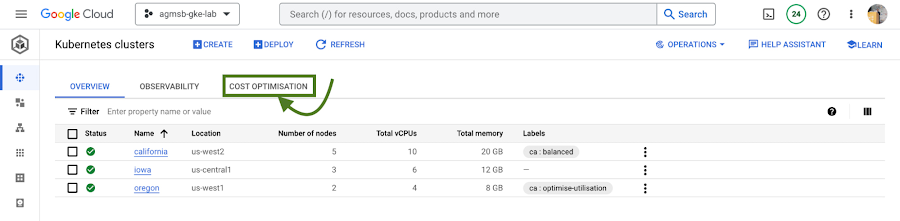
Fig. 1 – Navigating to the cost optimization tab in the cloud console
Once you navigate to this tab, you’re greeted with a time series visualization.
For GKE standard clusters, this visualization is a time series representation that shows three key dimensions for CPU and Memory across all of your clusters in a project:
Total CPU/Memory allocatable– # of CPU or GB of memory that can be allocated to user workloadsTotal CPU/Memory request– # of CPU or GB of memory that has been requested by user workloadsTotal CPU/Memory usage– actual usage by # of CPU or GB of memory by user workloads
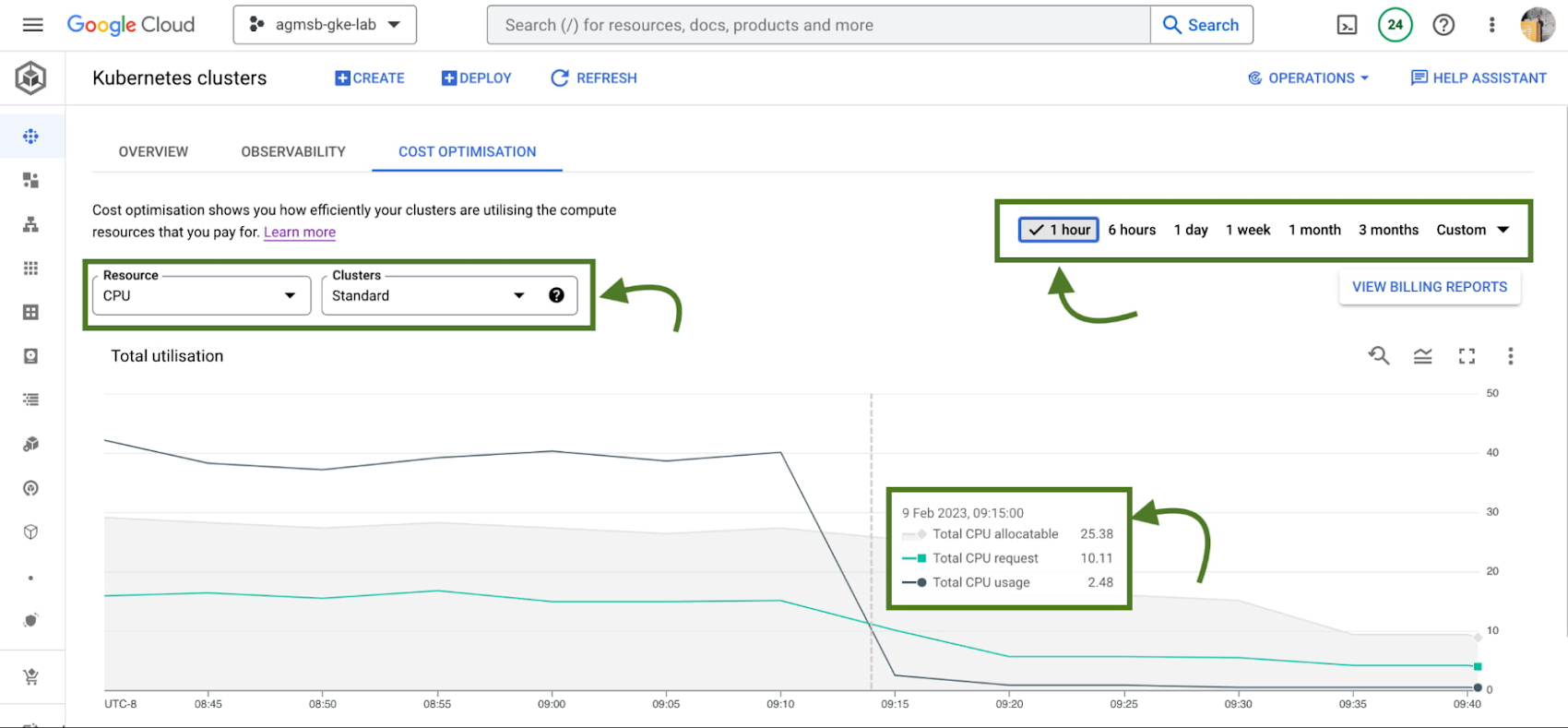
Fig. 2 – Allocatable, requested, and usage time series data across CPU or memory in all standard GKE clusters over a specified window
Analyzing these in relationship to one another can help identify answers to important optimization questions such as:
- Do we have too much allocatable CPU and memory idle across our GKE standard clusters? If so, can we do things like re-evaluate the machine types we use in node pools? This can help us bin pack the cluster, by having a higher percentage of allocatable resources allocated to Pod requests.
- Are workloads running in our GKE standard clusters requesting too much CPU and memory that goes unused? If so, can we do things like work with workload owners to adjust requests? This can help us workload right-size, by setting requests to more closely reflect expected usage.
If we’re using GKE Autopilot, this time series visualization will look slightly different, as seen in the following image:
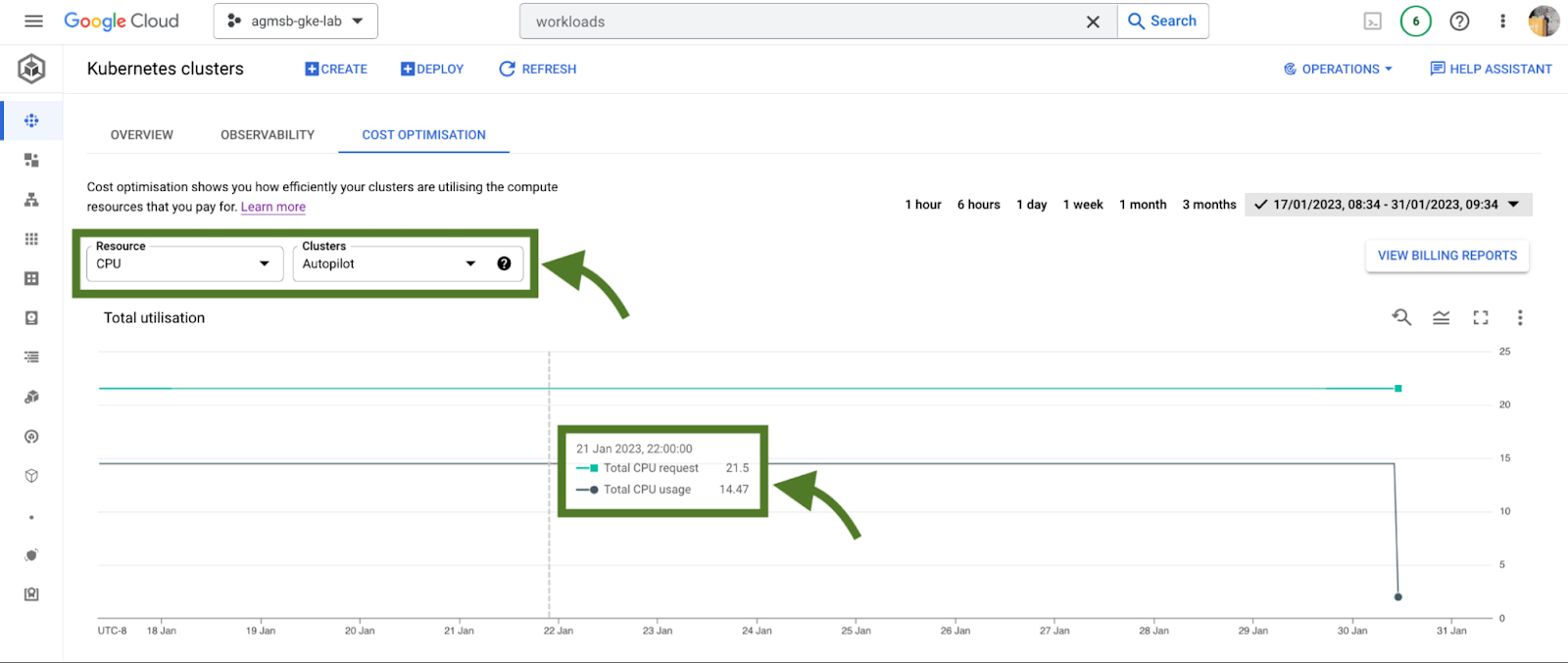
Fig. 3 – Requested and usage time series data across CPU or memory in all GKE Autopilot clusters
In the case of GKE Autopilot clusters, we’re only able to view the Total CPU/Memory request and the Total CPU/Memory usage data. But nothing here is actually missing!
In Autopilot clusters, you only pay per Pod based on its requests; Autopilot automatically handles provisioning the infrastructure that gives us our allocatable resources based on whatever you set Pod requests to. When we trade in that ownership of node provisioning, we also trade in the control to optimize at that layer.
For a cluster administrator, this information can be a spark to spur actions such as diving into individual clusters or meeting with workload teams to work through their requests and limits that they set for workloads. In our research, this is perhaps the most impactful area many teams optimize. We’ll dive into how GKE can enable this exercise a bit further in this blog.
When going down those paths, it helps to have financial data to quantify the impact of the optimization to the business. Gathering this info on your own can require a bit of work (for some, a lot of spreadsheets as well!), but luckily GKE has another native feature to help make this easily accessible to you.
#2 – GKE cost allocation
GKE cost allocation is a native GKE feature that integrates workload usage with Cloud Billing and its reports, allowing you to see and alert on billing not only on a per-cluster level, but on a per-Kubernetes namespace or per-Kubernetes label level.
It must be enabled on your cluster in order for it to function, so if you’re working with an existing GKE cluster and want to enable it, use the following gcloud command once you have set your appropriate zone or region:
$ gcloud beta container clusters create $CLUSTER_NAME \
    --enable-cost-allocation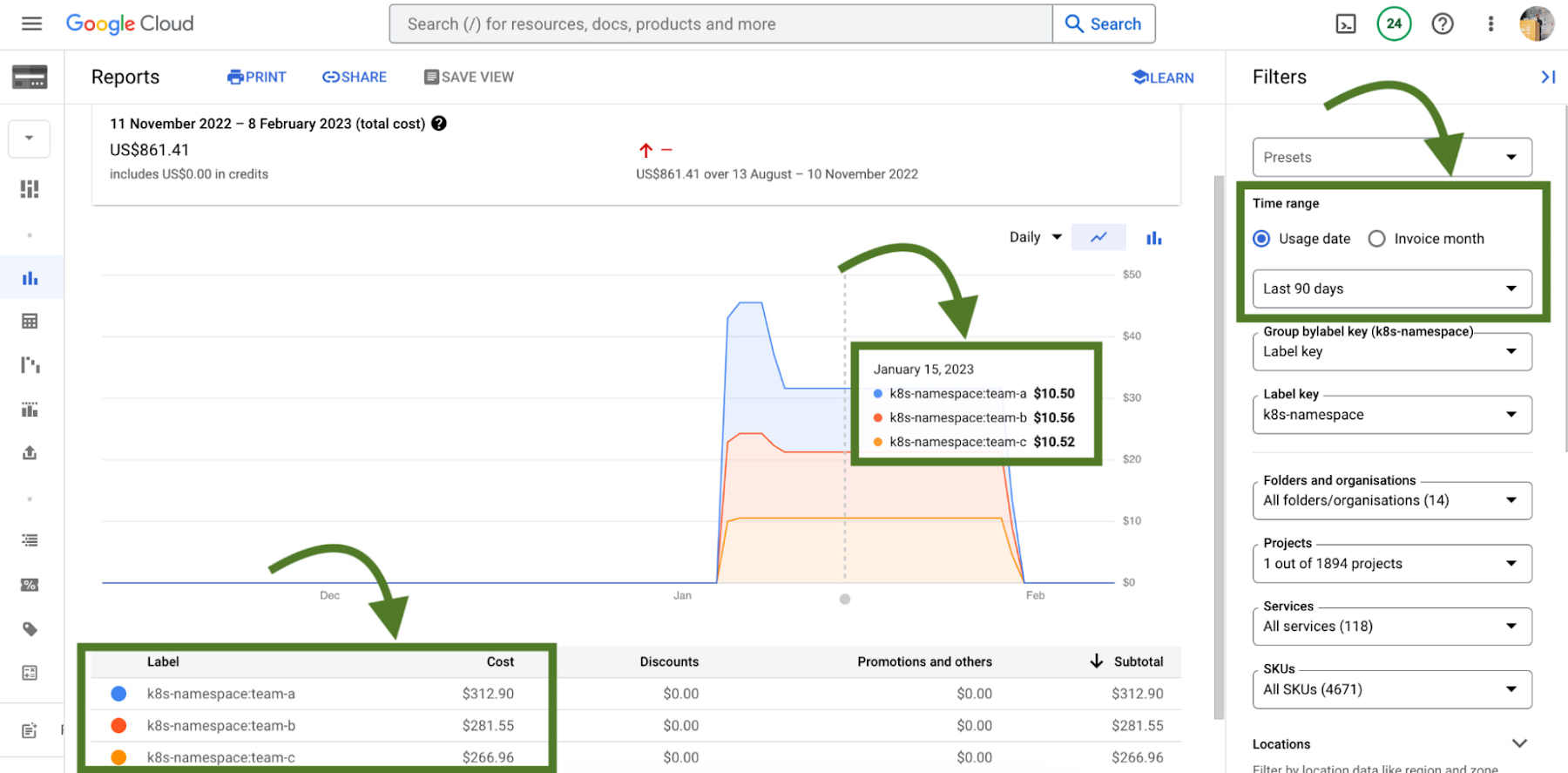
Without GKE cost allocation, the financial impact of a cluster and all of the different workloads it might run were a bit obfuscated. With the cluster as the deepest level of detail in billing, finding areas to optimize or even performing showback and chargeback was a challenge.
With Namespaces and Labels bubbling up into billing reports, you can now understand the cost of the CPU/Memory requests that workloads define in Kubernetes. A caveat – this works best when you are using Namespaces and Labels to logically define and organize teams and their workloads.
This integration also gives the bigger picture of optimization – in that GKE does not typically live on an island! In theory, workloads in a team’s namespace could be using external backing services like Cloud Memorystore that are also a key part of its usage.
Because Cloud Billing data has all GCP services, we can now filter and query across namespaces and their corresponding backing services.
# 3 – Workload view cost optimization in the console
Once you have teams identified that you may want to work with, GKE provides a cost optimization tab at the workload level, where you can then begin to drill down and identify specific workloads that could be optimized through an exercise called “workload right-sizing”. This is the act of making sure that Pod requests more closely reflect their expected usage.
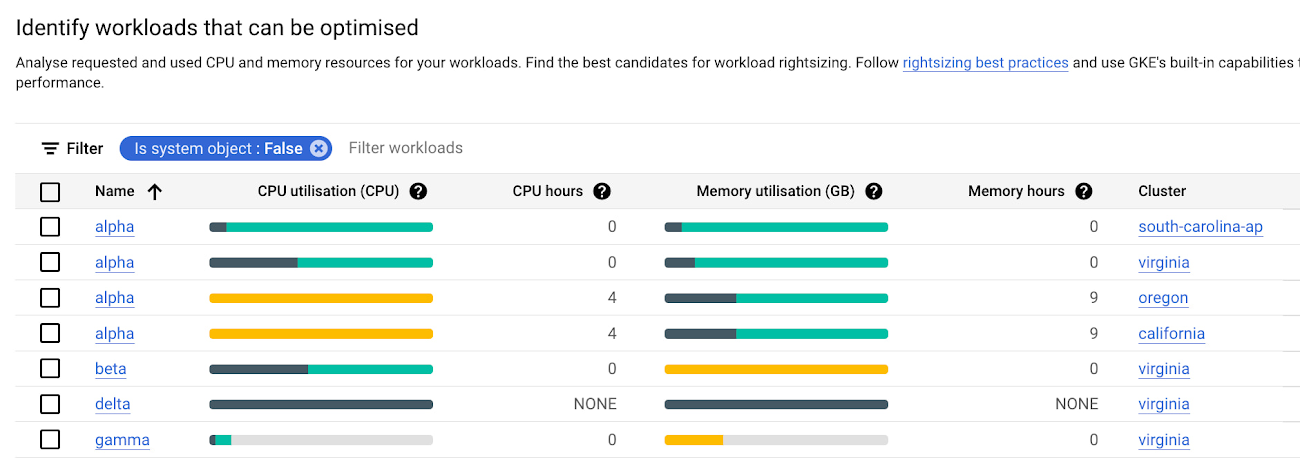
As you can see here, we’re given bar charts to represent the relationship of usage, requests, and limits to one another.
- Dark green: CPU/Memory usage
- Light green: CPU/Memory requests
- Grey: CPU/Memory Limits
- Yellow: Scenarios in which CPU/Memory usage exceeds requests
You can also hover over each individual workload bar chart to reveal a small on-screen report of this data. Similar to the cluster view cost optimization tab, you can filter down to a custom time window; we recommend viewing this data in a window greater than an hour (IE a day, week, month) to potentially uncover diurnal or weekly patterns that would otherwise be obfuscated.
In the preceding screenshot of these charts, we can call out a few patterns that might stand out to you:
- If we have too much light green stacked above dark green in a bar, we may have workloads that are over provisioned.
- If we have a yellow bar, we have a workload where requests are not set high enough, which can be a stability/reliability risk – consuming additional resources on its node and potentially being throttled or OOMKilled if it hits its limits.
- If we have a bar that is all dark green, this means that we don’t have requests set for a workload – which is not best practice! Set those requests.
With this information, it becomes easier to quickly identify workloads that need requests and limits tuned for either cost optimization or stability and reliability.
# 4 – Recommendations for adjusting workload requests
In scenarios where we need to increase or reduce CPU/Memory requests, it is easier to know that it needs to be done than to know how it needs to be done. What should we set the requests to?
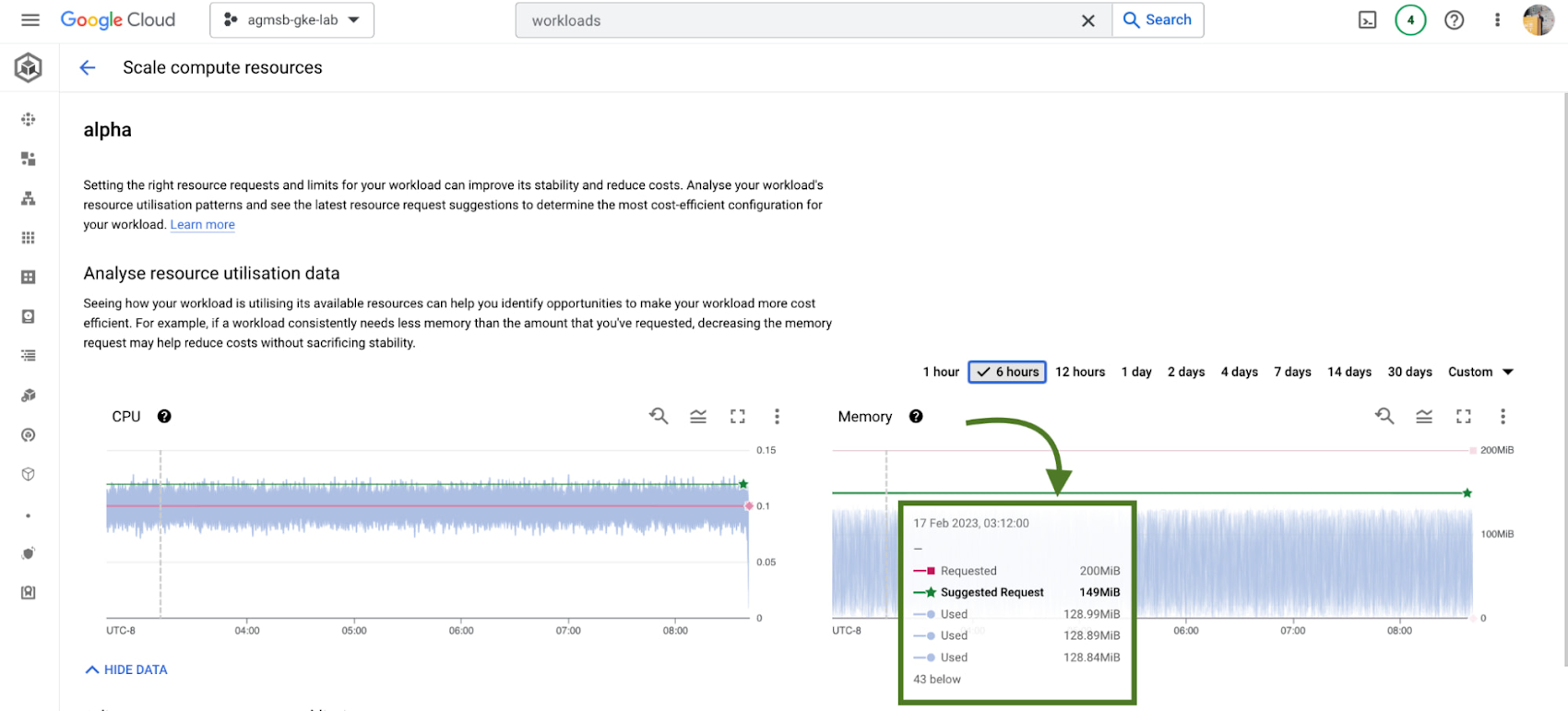
GKE integrates recommendations from the Kubernetes Vertical Pod Autoscaler (VPA) directly into its workload console, currently for all deployments in your clusters. You can find this by navigating to the Actions > Scale > Scale compute resources menu when viewing the page for a specific workload.
It’s important to remember that these recommendations are just that – recommendations. They’re based on historical usage data, so when viewing these values, it’s important to work with workload owners to see if these suggestions make sense to incorporate into their respective Kubernetes manifests.
# 5 – Cost estimation and cluster creation setup guides
Finally, if you’re just getting started with GKE and you want to get started on the right, optimized foot, we have tooling incorporated into the GKE cluster creation page.
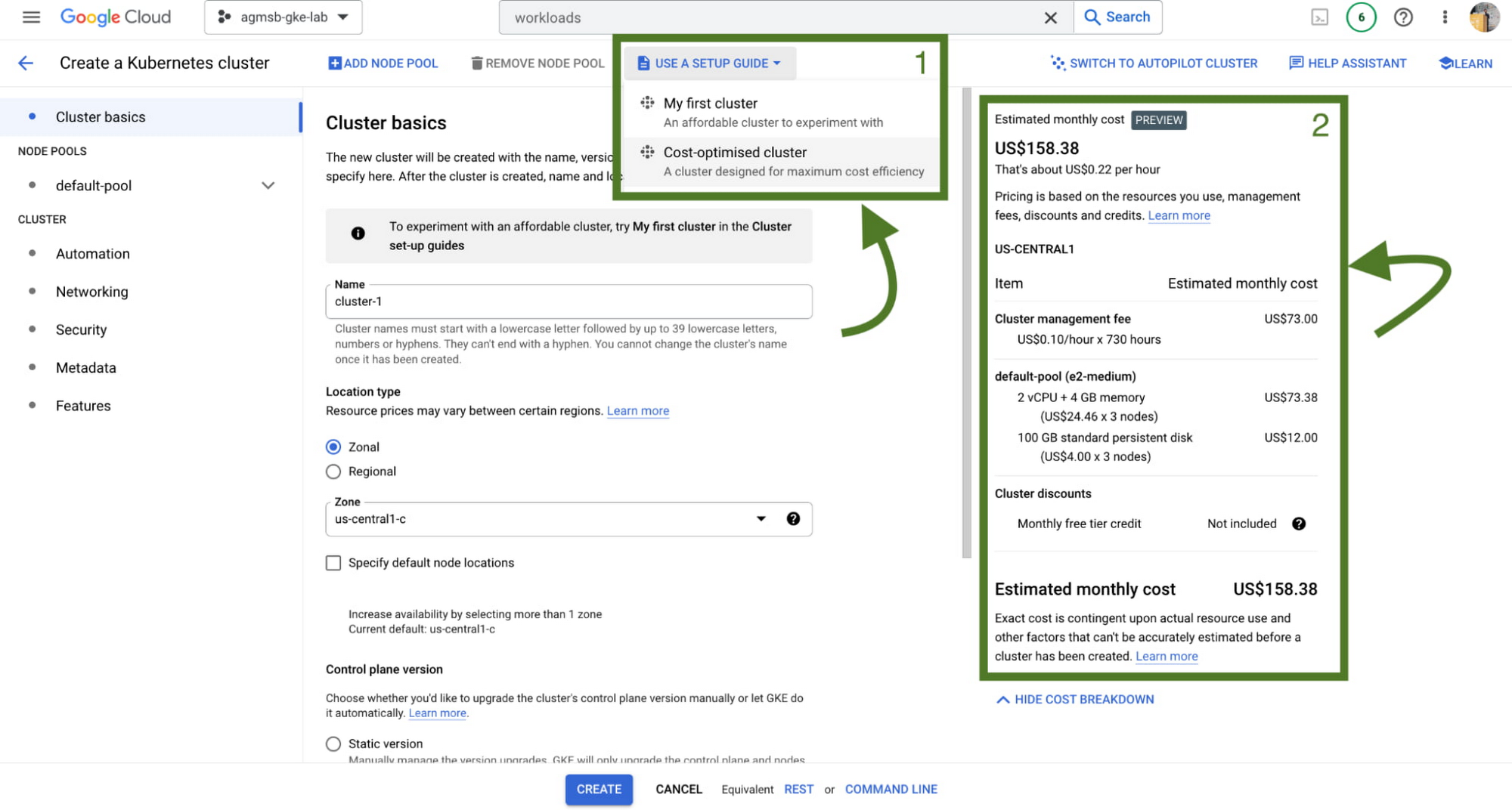
First, we have a setup guide that will help you create an opinionated GKE standard cluster with some things we discussed here already enabled, such as GKE cost allocation and Vertical Pod Autoscaler.
Second, we also have a cost estimation panel that, depending on the configuration of your GKE standard cluster, will show you an estimated monthly cost. This even helps you get a range of potential costs if you expect your cluster to scale up and down!
Now what?
Optimization across a set of GKE clusters can include a handful of areas to think about – and isn’t a one time task! Instead, it’s a continuous journey that cluster administrators, workload owners, and even billing managers all take part in. GKE provides the tooling to make this journey and process easier, with the right data and insights at your fingertips.
To familiarize yourself with these features in GKE, check out our interactive tutorials for getting started with standard and autopilot clusters.
You can also watch a demo showing most of these features in the following video:
A special thanks to Laurie White, Fernando Rubbo, and Bobby Allen for their review on this blog post.
Google Cloud Celebrates Journey of 3 Inspiring Founders for the Asian Pacific American Heritage Month

8152
Of your peers have already read this article.
1:30 Minutes
The most insightful time you'll spend today!
May is Asian Pacific American Heritage Month —a time for us to come together to celebrate and remember the important people and history of Asian and Pacific Island heritage. This feature highlights three AAPI founders from the Google For Startups community.
Read on to learn how these three founders built their businesses, leverage Google tech, and suggestion they have for aspiring entrepreneurs.
CultivatePeople
Founder: Lola Han
Description: CultivatePeople’s compensation software, Kamsa, provides global market pay rate data and helps companies make data-driven salary decisions so they can attract and retain their most valuable asset: employees.
Why GCP: “CultivatePeople began using GCP when integrating SSO/SAML authentication after our SaaS product became a high priority. We were able to exceed our clients’ expectations and increase their level of trust in our platform’s capabilities. We’re currently investigating additional machine learning products, such as Cloud AutoML, that will allow us to quickly deliver exciting features.”
Note from the Founder: “I grew up with immigrant parents who value stability and are risk-averse. My parents discouraged me from starting my own company because they didn’t want to see me struggle financially or see my health suffer (due to stress). I felt strongly about what CultivatePeople could do, so I started the company as a sole founder in 2017 and watched it double in size year over year since. While the ones I love most may not have cheered me on initially, it was important for me to hang on to the encouraging words of former bosses, executives, and founders to keep me focused on my mission.
My advice for other AAPI founders is to be a “silent assassin” and believe in the mission and values of your organization. Always remember to stop along the way and:
1) Enjoy the journey by celebrating wins and giving yourself credit;
2) Follow your intuition—it’s (almost) always right;
3) Recognize and invest in your people regularly (ie. give increases more than once a year, if warranted);
4) Give regular words of affirmation to employees on even small achievements.”

Swit
Founder: Josh Lee and Max Lim
Description: Swit is a team collaboration platform that seamlessly combines team chat with task management by allowing teams to turn their conversations into trackable tasks and share tasks to chat with simple drag-and-drop functionality, ensuring everyone is on the same page and projects get done faster.
Why GCP: “Swit is a cross-category hybrid work tool for chat and tasks. This functionality requires more complicated and heavier architecture for performance. So, configuring and managing virtual machines was really challenging to scale up our systems, while handling occasional unexpected traffic surges and frequent updates. Eventually we divided our monolithic architecture into 35 microservices when we launched our official product. The migration to GKE took around one month, and it turned out to be well worth the effort—our systems became able to offer high scalability and enough resilience to keep its uptime no matter what happened. Now we’re operating 84 workloads and 252 microservices with high stability with remarkably low downtime – less than 0.00001%/year.”
Note from the Founder: “As an AAPI founder based in Silicon Valley, I feel proud of the work ethics and diligence fellow Korean American entrepreneurs and professionals have long demonstrated here. Especially with K-pop breaking into the mainstream, I feel even more proud of our culture that strives toward an absolute perfection molded through years of training and dedication. The mission-driven culture of Silicon Valley coupled with Google’s edging technology and creativity really helped us build a product that not only encompasses verticals but also transcends cultures. Swit is growing at an unprecedented rate, and we hope to join the long list of successful AAPI entrepreneurs here. Swit’s close network with the AAPI community wouldn’t have been possible without Google support. We are grateful for this collaborative environment, and we hope to become the next-generation ambassador for collaboration after Google.”
Check out more from Swit in their founder story.

WISY
Founder: Min Chen
Description: Wisy develops technology to bring digital efficiency into the physical world, supporting consumer products businesses and making them thrive in the new economy. All of us have a bad experience when we can’t find the product we want to buy. That is a $1.9T problem in the consumer-packaged goods industry that Wisy is solving with AI and analytics to help manufacturers and retailers sell more by reducing out-of-stocks and waste at a global scale.
Why GCP: “GCP has an intuitive, easy to use interface, was lower cost, and offered preemptible instances with flexible compute options. Some of the reasons why Wisy decided to use GCP include instance and payment configurability, privacy and traffic security, cost-efficiency, and Machine Learning.
Wisy has been able to advance quickly with product development, as well as collaborate better and iterate faster in the creation of our AI models, while reducing costs by 40%. At Wisy, we are solving a problem that affects everyone who shops at a store.“
Note from the Founder: “Two years ago, I moved to San Francisco to expand my second startup, Wisy. This is when I learned that my name ‘Min’ stands for ‘minority.’ I was born in China, raised in a Black community in Panama, received scholarships to attend both Carnegie Mellon and UC Berkeley. I worked for 20 years in several countries, but I have never felt so discriminated against due to my race, ethnicity, gender and age than during my time in Silicon Valley. However, this is also the place I learned that my diverse life experience is my competitive advantage. My background enables me to recruit and relate to people in different countries, create scalable and flexible products for multinational customers, and run global operations efficiently.
My recommendation to AAPI founders is to find strength in their multicultural background. Don’t hide what makes you unique, do not limit yourselves, and do not let others limit you. You will lose your edge when trading authenticity for validation. Be proud and own your story.”
If you want to learn more about how Google Cloud can help your startup, visit our Startup Program application page here and sign up for our monthly startup newsletter to get a peek at our community activities, digital events, special offers, and more.To learn more about how you can help #StopAsianHate during Asian Pacific American Heritage Month and beyond, visit their website here.
Learn About Kf: How it Helps Move Existing Cloud Foundry Workloads to Kubernetes

3430
Of your peers have already read this article.
1:30 Minutes
The most insightful time you'll spend today!
While many companies are writing brand-new Kubernetes-based applications, it’s still quite common to find companies who want to migrate existing workloads. A common source platform for these applications is Cloud Foundry. However, getting an existing Cloud Foundry application running on Kubernetes can be non-trivial, especially if you want to avoid making code changes in your applications, or taking on big process changes across teams. That is, if you’re not using Kf to do a lot of that heavy lifting for you.
Kf is a Google Cloud service that allows you to easily move existing Cloud Foundry workloads to Kubernetes with minimal disruption to your existing processes.
Kf features a command line interface (CLI) also named kf, that replaces the existing Cloud Foundry cf command line utility. The kf CLI implements the most commonly used cf functionality, including the ability to manage bindings, services, apps, routes and more.
For example, to deploy an existing application you would simply issue the kf push command.
On the server side Kf is built on several open source technologies. In some cases these technologies are also the Google Cloud implementation. For instance GKE is our managed Kubernetes offering, and provides the platform for managing and running the applications. Routing and ingress is handled by Anthos Service Mesh, Google Cloud’s managed Istio-based service mesh. Finally, Tekton provides on-cluster build functionality for Kf. Developers don’t have to worry about any of those technologies, as Kf abstracts them away.
Kf primitives such as spaces, bindings and services are implemented as custom Kubernetes resources and controllers. The custom resources effectively serve as the Kf API and are used by the kf CLI to interact with the system. The controllers use Kf’s CRDs to orchestrate the other components in the system.
The beauty of this approach is that developers who are familiar with existing workflows can largely replicate those workflows with the kf CLI. On the other hand, platform operators who are more familiar with Kubernetes can use kubectl to interact with the CRDs and controllers.
For instance if you wanted to list the apps running on your Kf cluster you could issue either of the following commands:
kf appskubectl get apps -n space-name
Notice that CF / Kf spaces get mapped one to one to Kubernetes namespaces.
To get a list of all the custom resources you can examine the api-resources in the kf.dev API group.
kubectl api-resources --api-group=kf.devNAME SHORTNAMES APIGROUP NAMESPACED KINDapps kf.dev true Appbuilds kf.dev true Buildclusterservicebrokers kf.dev false ClusterServiceBrokerroutes kf.dev true Routeservicebrokers kf.dev true ServiceBrokerserviceinstancebindings kf.dev true ServiceInstanceBindingserviceinstances kf.dev true ServiceInstancespaces kf.dev false Space
With Kf developers can continue to work with a familiar interface and platform operators can use declarative Kubernetes practices and tooling such as Anthos Config Management to manage the cluster. It’s really the best of both worlds if you’re looking to manage your existing Cloud Foundry applications on Kubernetes.
If you’d like to learn more about Kf check out the video I just released on YouTube. It reviews some of the concepts discussed here, and includes a short demo. If you’d like to get hands on, try the quick start. And, of course, you can always read the documentation.
Without an API Product Owner, Your APIs Have a Limited Lifespan

3550
Of your peers have already read this article.
3:30 Minutes
The most insightful time you'll spend today!
Product teams often serve as the nexus between all organizational units within a company, ensuring that a specific line of business follows a clear roadmap and that cross-functional alignment drives success. At their most empowered, product owners are like miniature CEOs for each offering within a company.
Unfortunately, in today’s complicated IT landscape, not everything that should be thought of as a product receives the designation. In my time as a digital consultant, I’ve seen one particular technology too often dismissed as back-office minutiae — application programming interfaces, or APIs.
APIs can be the glue that binds a company’s resources together and the mechanisms through which an enterprise’s data, functionality, and other digital assets are accessed and distributed. They enable software systems to communicate and let developers leverage software for new applications and digital experiences, abstracting underlying complexity into a consistent interface that allows data and functionality to be combined and reused with unprecedented flexibility.
Unfortunately, many business leaders see APIs as middleware and thus as undeserving of the resources of a full-fledged digital product. Their organizations create APIs as one-off projects, with engineers moving on to other projects when they are done and no one looking after an API’s maintenance or whether it offers utility beyond the bespoke use case for which it was created.
This is a problem because APIs can unlock digital assets that otherwise would be captive within enterprise silos. An API that exposes a customer database can likely be used and reused for numerous purposes, for example, and treating developers as customers of this API can help increase adoption of and the amount of innovation around it. But such a powerful outcome is unlikely if an API has been created only as a system integration detail rather than as a product with an owner who oversees a full lifecycle, from ideation to adoption to iteration. Put bluntly, a project-oriented attitude toward APIs misses the boat.
Pitney Bowes, a company I’ve worked with at Google Cloud, offers a high-profile example in which a notable enterprise has treated APIs as products and given its API program the same treatment it would give to any go-to-market offering. After selling traditional mailing and shipping solutions for nearly 100 years, the company transformed itself into a provider of digital logistics and e-commerce solutions by building out 160 public APIs and 400 internal APIs. This enabled its developers and partners to easily consume the company’s location intelligence and shipping services in new, agile ways. It also accelerated the company’s internal project timelines, shortening the average project lifecycle from over a year to just a few months. What’s more, APIs not only introduced efficiencies and reduced costs, but also opened new revenue streams. Because developers can more easily leverage individual Pitney Bowes business capabilities for their applications, the company’s services are manifesting in new ways — such as when Pitney Bowes technology is harnessed to let customers print USPS shipping labels from within the context of an online marketplace.
Manage APIs as products
Traditionally, but wrongly, APIs have been considered pieces of other products. They’ve been built by the IT team at the request of product owners every time a project came up that required one. When the funding spigot is flowing, APIs generally receive support. But once the project runs its course, the APIs are neglected and quickly grow outdated.
Without consistent resources, APIs can’t be adapted to fluctuations in the enterprise and market dynamics. Worst of all, project-oriented APIs often end up siloed within the business unit that gave birth to them, which defies the benefit of modern APIs: to not only allow enterprise assets to be reused by other business units and partners but also accelerate the business’s innovation by increasing the number of developers interacting with its capabilities.
In contrast, if an API is treated as a product in its own right with its own owner lobbying for consistent funding, the API can be iterated according to shifts in internal and market trends. Ideally, the product owner should continually monitor an API’s engagement and collect and synthesize analytics to improve quality of service. Product-minded companies frequently launch APIs as minimum viable products in order to get ideas to market faster, then use API consumption analytics to understand developer engagement and refine APIs to be even more attractive, powerful, and intuitive.
With the help of management tools that facilitate dynamic changes, an API product owner can also help ensure that developers benefit from the latest and greatest build with minimal interruption.
Virtually all traditional product ownership responsibilities can be easily applied to an API. An API product owner is responsible for galvanizing the entire company around their API’s value. Their team can answer any questions users may have about the API’s value proposition or how to use it. It may sound trivial but having dedicated experts available to assist with any question that may arise can be a boon to an API’s velocity.
Additionally, if a dedicated product owner is assigned to pilot a company’s aggregate API program, they can use comprehensive monitoring and analysis of all API traffic to derive insight into which APIs drive value and which don’t. This can save considerable time and money from being wasted on the wrong bets. The product owner can also create API bundles segmented according to each developer community the program wants to serve. Here, the goal is not just to expose enterprise assets, but also to encourage repeat consumption. When it comes to third-party engagement, these bundles should seek to improve partner stickiness to cultivate and maintain new revenue channels. Just as any product is only useful if it has users adopting it and sticking with it, APIs are typically valuable when they attract communities of repeat users.
Tools and processes that turn APIs into strategic assets
To drive an API as a strategic asset, an API product manager should support the API with management tools and processes.
First off, it’s necessary to establish comprehensive security layers for an API so cross-functional internal groups and third-party partners are comfortable using it. Mechanisms that apply protection with introducing user friction — such as OAuth, API key verification, XML/JSON threat protection — are strongly encouraged. It’s also often prudent to integrate machine learning functionality that can detect bot attacks and other adversaries before they breach an API and affect either its developer users or the end users consuming those developers’ apps.
Enterprise software products are typically afforded visualization tools, dashboards, reports, and self-service functionality to drive adoption — and APIs should be no different. Comprehensive portals that highlight API features (including knowledge centers, interactive documentation, blogs, and forums) should be crafted to promote developer consumption. Anything that is likely to magnetize collaborators and expedite registration should be provided for an API. A primary goal of API-first development is to increase velocity, so offering developers a self-service experience while maintaining visibility and control over API usage is crucial.
Manage with an “outside-in” perspective
Perhaps the most important role an API product owner must fulfill is maintaining a staunch outside-in approach.
In an inside-out perspective, enterprise leaders look internally for gaps and fill them with existing IT capabilities. Internal intuition untested by the market can define planning, and the resources that IT already has — rather than those that customers demand — typically restrict options. In contrast, an outside-in approach requires the company to listen to what the market is asking for and to respond appropriately. Outside-in thinkers start by asking what the customer needs, then build strategies from there. Because customer preferences are moving targets, an outside-in perspective is constantly evolving and seeking new data. In the case of API programs, product managers should find ways to align API user data with business KPIs, which can be essential to organizing stakeholders and achieving buy-in for the program throughout the organization.
Because both consumers and developers will abandon products that do not meet their needs, an outside-in perspective is increasingly non-negotiable. The product owner needs to analyze rapidly-changing market trends, understand the competitive landscape, keep a pulse on customer and stakeholder needs, and facilitate a backlog of changes that can help the company satisfy the market. Essentially, API product owners are the end-user advocate — and that’s for both for developers using the APIs and the people touching the applications powered by those APIs.
None of this means product owners need to be entirely risk averse, however. They should have the freedom to experiment with hypotheses and to make adjustments — but to make experimentation viable over the long run, they also need to have the foresight to kill a project immediately if the early end-user response is poor. If the product owner is not learning and iterating, they probably are not pushing the API program forward.
Calling all product professionals
If an enterprise plans to pursue an API-first mandate, it’s crucial that the API program is a well-funded, autonomous business unit. Without a visionary owner, APIs will not be able to usher in the transformation experienced by companies such as Pitney Bowes. The API-first philosophy requires that APIs are built prior to applications and that the API provide a value proposition of its own — which means that if an enterprise wants to accelerate innovation and take advantage of APIs, its first step should be to hire API product managers.
More Relevant Stories for Your Company

SoFi Stadium Personalizes Fan Experiences with Game-changing App Built on Google Cloud and Deloitte
Editor’s note: Engineers from SoFi Stadium, Google Cloud, and Deloitte built a fan-ready Personal Concierge app that uses advanced analytics to tailor game-day experiences for every visitor. SoFi's 10-year partnership with Google Cloud not only pumps up the fans. Advanced analytics also enable stadium employees to securely store, analyze, and action

Google Named a Leader in the 2019 Gartner Magic Quadrant for Full Life Cycle API Management
The number of APIs within organizations is growing very rapidly not only in IT departments, but also within lines of business (LOBs). Every connected mobile app, every website that tracks users or provides a rich user experience, and every application deployed on a cloud service uses APIs. LOBs see them

Woolaroo App and Vision AI are Helping Users Explore Native Languages
One of the most vibrant elements of culture is the use of native languages and the time-honored tradition of storytelling. Anthropologists and linguists have been vocal on the role that language plays in the preservation of culture and how it contributes to the appreciation of heritage. Unfortunately, of the more




Telstra Leverages APIs To Accelerate Digital Transformation
Telstra is Australia’s leading telecommunications and technology company, offering a full range of communication services and competing in all telecommunications markets. In Australia, it provides 17.7 million retail mobile services, 4.9 million retail fixed voice services and 3.6 million retail fixed broadband services. But owing to legacy infrastructure the company
