





Make Meaningful Analysis with Geo Boundary Public Datasets on BigQuery

6352
Of your peers have already read this article.
4:00 Minutes
The most insightful time you'll spend today!
Geospatial data is a critical component for a comprehensive analytics strategy. Whether you are trying to visualize data using geospatial parameters or do deeper analysis or modeling on customer distribution or proximity, most organizations have some type of geospatial data they would like to use – whether it be customer zipcodes, store locations, or shipping addresses. However, converting geographic data into the correct format for analysis and aggregation at different levels can be difficult. In this post, we’ll walk through some examples of how you can leverage the Google Cloud platform alongside Google Cloud Public Datasets to perform robust analytics on geographic data. The full queries can be accessed from this notebook here.
Public US Geo Boundaries dataset
BigQuery hosts a slew of public datasets for you to access and integrate into your analytics. Google pays for the storage of these datasets and provides public access to the data via the bigquery-public-data project. You only pay for queries against the data. Plus, the first 1 TB per month is free! These public datasets are valuable on their own, but when joined against your own data they can unlock new analytics use cases and save the team a lot of time.
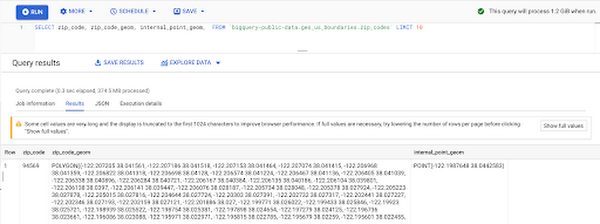
Within the Google Cloud Public Datasets Program there are several geographic datasets. Here, we’ll work with the geo_us_boundaries dataset, which contains a set of tables that have the boundaries of different geospatial areas as polygons and coordinates based on the center point (GEOGRAPHY column type in BigQuery), published by the US Census Bureau.
Mapping geospatial points to hierarchical areas
Many times you will find yourself in situations where you have a string representing an address. However, most tools require lat/long coordinates to actually plot points. Using the Google Maps Geocoding API we can convert an address into a lat/long and then store the results in the BigQuery table.
With a lat/long representation of our point, we can join our initial dataset back onto any of the tables here using the ST_WITHIN function. This allows us to check and see if a point is within the specified polygon.
ST_WITHIN(geography_1, geography_2)
This can be helpful for ensuring standard nomenclature; for example, metropolitan areas that might be named differently. The query below maps each customers’ address to a given metropolitan area name.
SELECTcust.id as customer_id,metro.name as metro_nameFROM `looker-private-demo.retail.customers` as cust,`bigquery-public-data.geo_us_boundaries.metropolitan_divisions` as metroWHERE ST_WITHIN(ST_GEOGPOINT(cust.longitude, cust.latitude),metro.metdiv_geom)
It can also be useful for converting to designated market area (DMA), which is often used in creating targeted digital marketing campaigns.
SELECTcust.id as customer_id,dma.dma_nameFROM `looker-private-demo.retail.customers` as cust,`bigquery-public-data.geo_us_boundaries.designated_market_area` as dmaWHERE ST_WITHIN(ST_GEOGPOINT(cust.longitude, cust.latitude),dma.dma_geom)
Or for filling in missing information; for example, some addresses may be missing zip code which results in incorrect calculations when aggregating up to the zipcode level. By joining onto the zip_codes table we can ensure all coordinates are mapped appropriately and aggregate up from there.
SELECTzip.zip_code,count(distinct cust.id) as unique_customersFROM `looker-private-demo.retail.customers` as cust,`bigquery-public-data.geo_us_boundaries.zip_codes` as zipWHERE ST_WITHIN(ST_GEOGPOINT(cust.longitude, cust.latitude),zip.zip_code_geom)GROUP BY 1
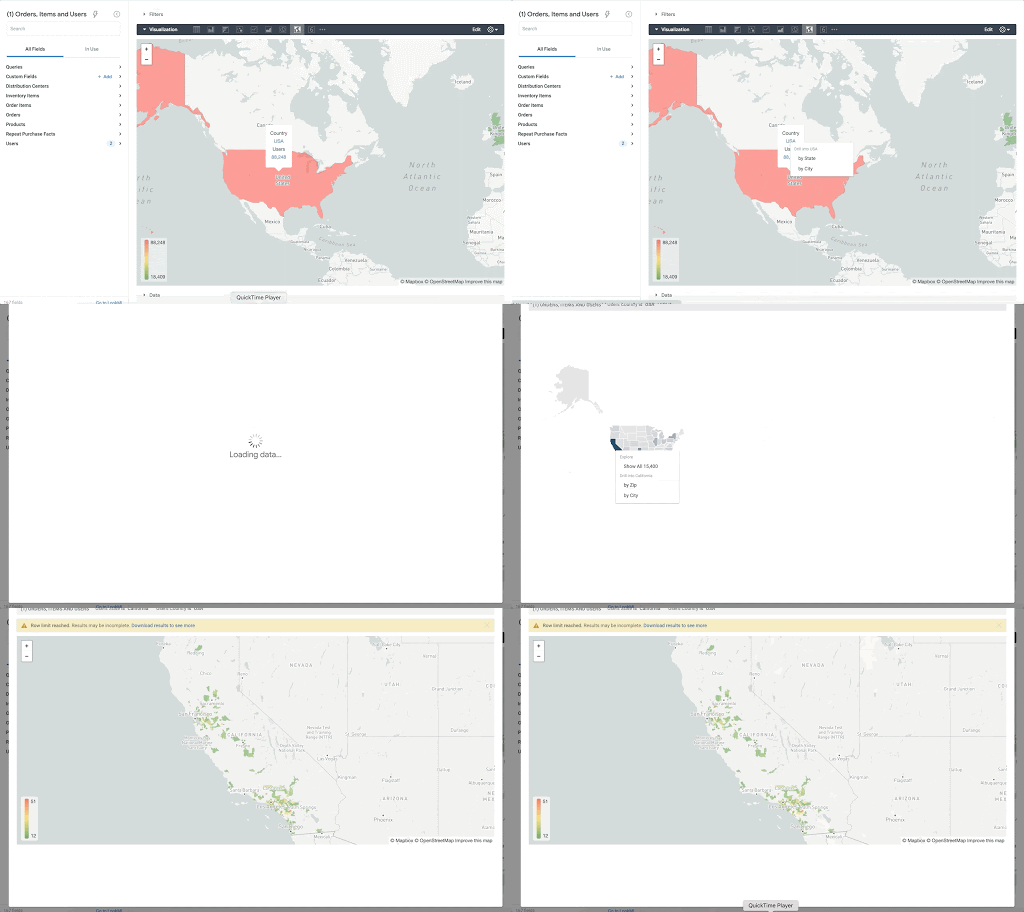
Note that the zip code table isn’t a comprehensive list of all US zip codes, they are zip code tabulation areas (ZCTAs). Details about the differences can be found here. Additionally, the zip code table gives us hierarchical information, which allows us to perform more meaningful analytics. One example is leveraging hierarchical drilling in Looker. I can aggregate my total sales up to the country level, and then drill down to state, city and zipcode to identify where sales are highest. You can also use the BigQuery GeoViz tool to visualize geospatial data!
Aside from simply checking if a point is within an area, we can also use ST_DISTANCE to do something like find the closest city using the centerpoint for the metropolitan area table.
SELECTcust.id as customer_id,ARRAY_AGG(metro.name order by ST_DISTANCE(ST_GEOGPOINT(cust.longitude, cust.latitude),metro.internal_point_geom) asc limit 1)[offset(0)] as metro_nameFROM`looker-private-demo.retail.customers` as cust,`bigquery-public-data.geo_us_boundaries.metropolitan_divisions` as metroGROUP BY cust.id
This concept doesn’t just hold true for points, we can also leverage other GIS functions to see if a geospatial area is contained within areas that are listed in the boundaries datasets. If your data comes into BigQuery as a GeoJSON string, we can convert it to a GEOGRAPHY type using the ST_GEOGFROMGEOJSON function. Once our data is in a GEOGRAPHY type we can do things like check to see what urban area the geo is within – using either ST_WITHIN or ST_INTERSECTS to account for partial coverage. Here, I am using the customer’s zip code to find all metropolitan divisions where the zip code polygon and the metropolitan polygon intersect. I am then selecting the metropolitan area that has the most overlap (or the intersection has the largest area) to be the customer’s metro that we use for reporting.
SELECTcust.id as customer_id,ARRAY_AGG(metro.name order by ST_AREA(ST_INTERSECTION(zip.zip_code_geom,metro.metdiv_geom)) desc limit 1)[offset(0)] as metro_nameFROM`looker-private-demo.retail.customers` as custJOIN `bigquery-public-data.geo_us_boundaries.zip_codes` as zip on cust.zip=zip.zip_code,`bigquery-public-data.geo_us_boundaries.metropolitan_divisions` as metroWHERE ST_INTERSECTS(zip.zip_code_geom,metro.metdiv_geom)GROUP BY cust.id
The same ideas can be applied to the other tables in the dataset including the county, urban areas and National Weather Service forecast regions (which can also be useful if you want to join your datasets onto weather data).
Correcting for data discrepancy
One problem that we may run into when working with geospatial data is that different data sources may have different representations of the same information. For example, you might have one system that records state as a two letter abbreviation and another using the full name. Here, we can use the state table to join the different datasets.
SELECTst.state_name,sum(ab.sales+fn.sales) as total_salesFROM `bigquery-public-data.geo_us_boundaries.states` as stLEFT JOIN abbreviated_table as ab on ab.state = st.stateLEFT JOIN fullname_table as fn on fn.state = st.state_nameWHERE COALESCE(ab.state, fn.state) IS NOT NULLGROUP BY 1
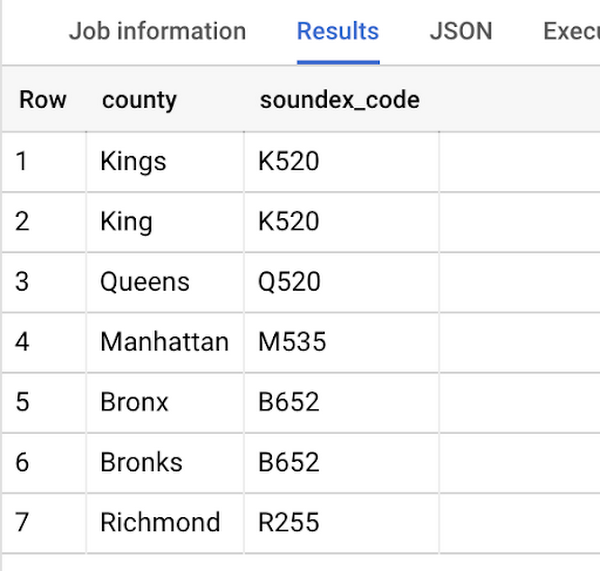
Another example might be using the tables as a source of truth for fuzzy matching. If the address is a manually entered field somewhere in your application, there is a good chance that things will be misspelled. Different representations of the same name may prevent tables from joining with each other or lead to duplicate entries when performing aggregations. Here, I use a simple Soundex algorithm to generate a code for each county name, using helper functions from this blog post. We can see that even though some are misspelled they have the same Soundex code.
Next, we can join back onto our counties table so we make sure to use the correct spelling of the county name. Then, we can simply aggregate our data for more accurate reporting.
SELECTc.county_name,sum(sales) as total_salesFROMtableJOIN `bigquery-public-data.geo_us_boundaries.counties` as con testing.dq_fm_Soundex(table.county) = testing.dq_fm_Soundex(c.county_name)WHERE c.state_fips_code = cast(36 as string)GROUP BY 1
Note that fuzzy matching definitely isn’t perfect and you might need to try different methods or apply certain filters for it to work best depending on the specifics of your data.
The US Geo Boundary datasets allow you to perform meaningful geographic analysis without needing to worry about extracting, transforming or loading additional datasets into BigQuery. These datasets, along with all the other Google Cloud Public Datasets, will be available in the Analytics Hub. Please sign up for the Analytics Hub preview, which is scheduled to be available in the third quarter of 2021, by going to g.co/cloud/analytics-hub.
Cloud Migration and Modernization is ‘Easier Done than Said’ with Google Cloud RAMP!
DOWNLOAD INFOGRAPHIC3256
Of your peers have already downloaded this article
3:00 Minutes
The most insightful time you'll spend today!
The reliance on cloud compute, storage and network has accelerated with the growing usage of digital products and services. To keep up with the customer demands and deliver digital solutions, many companies are struggling through their cloud migration and modernization journeys. But not anymore, says Google Cloud with the Rapid Assessment & Migration Program (RAMP)!
Download the infographic to have succinct view of what cloud migration and modernization would look like by RAMPing up! Bid Adieu to delays and budget overspend with the tools, resources, partners and fundings with RAMP.
Efficient, Safe and Dynamic Gaming Experience: Aristocrat’s Digital Journey on Google Cloud

4778
Of your peers have already read this article.
2:00 Minutes
The most insightful time you'll spend today!
Since Aristocrat’s founding in 1953, technology has constantly transformed gaming and the digital demands on our gaming business are a far cry from challenges we faced when we started. As we continue to expand globally, security and compliance are top priorities.
Managing IT security for several gaming subsidiaries and our core business became more complex as we entered into new markets and scaled up our number of users. We needed a centralized platform that could give us full visibility into all of our systems and efficient monitoring capabilities to keep data and applications secure. We also needed the ability to secure our systems without compromising user experiences.
We turned to Google Cloud and Splunk to better manage complexity and support highly efficient, secure, and more dynamic gaming experiences for everyone. We are committed to using today’s modern technologies to give players more optimal experiences.
Bringing our digital footprint into the cloud
When we set out on our digital transformation, we looked to address many business requirements.
These requirements included:
- Regulation: We wanted a platform that could efficiently address our industry’s stringent and global regulatory compliance requirements.
- Player experience: Our IT environment must support smooth gaming experiences to keep users engaged and satisfied.
- Scalability: As we grow and diversify, meeting the changing demands of an increasingly global gaming community, we need an easily scalable platform to align with our current and future needs.
Google Cloud offered us the perfect foundation through solutions such as Compute Engine, Google Kubernetes Engine, BigQuery, and Google Cloud Storage. These acted as the right infrastructure components for us for the following reasons:
- Google Cloud is globally accessible and supports compliance, helping to streamline security and regulatory processes for our team.
- With Google Cloud, we can manage our entire development and delivery processes globally with fast and efficient reconciliation of regional compliance requirements.
- When we need to adjust existing infrastructure or deliver new capabilities, Google Cloud accelerates the process and takes the heavy lifting off of our team.
- Google Cloud allows us to support tens of thousands of players on each of our apps while experiencing minimal downtime and low latency. The importance of this support can’t be underestimated in an industry where players have little to no patience if lags in games occur.
We migrated our back-office IT stack alongside our consumer-facing production applications to Google Cloud given our positive experiences with compliance, security, scalability, and process management. This migration has significantly accelerated our digital transformation while streamlining our infrastructure for faster and more cost-effective performance.
In many ways, Google Cloud has been, with maybe a pun intended, a game-changer for us. For instance, when we suddenly had to support a lot of remote work during the COVID-19 pandemic, native identity and access management tools in Google Cloud allowed us to retire costly VPNs used for backend access and quickly adopt a more easily managed, cost-effective zero-trust security posture.
Accessing vital third-party partners and managed services
Aristocrat has many IT needs best addressed in a multi-cloud environment. Google Cloud is particularly attractive given its strong cloud interoperability, as well as the many products and services available on Google Cloud Marketplace. The marketplace accelerated our deployment of key third-party apps including Splunk and Qualys.
Given the personal information we store and the global regulatory compliance statutes we must oblige, security lies at the heart of our business. Splunk is a critical component of our digital transformation because it offers solutions that provide the enhanced monitoring capabilities and visibility we need. The integration between Splunk and Google Cloud gives us confidence that our data is secure. We know our data can be secure in Google Cloud, while simplified billing through Google Cloud Marketplace makes payments and license tracking easier for our procurement team.
As part of our protected environment, we use the Splunk platform as our security information and event management system, leveraging the InfoSec app for Splunk that provides continuous monitoring and advanced threat detection to significantly improve our security.
We can manipulate and present data in Splunk in a way that provides us with a single pane-of-glass for our hybrid, multi-cloud environment and our third-party apps and systems. Splunk observability tools have likewise helped us to track browser-based applications like our online gaming apps to monitor details related to security and performance.
Splunk and Google Cloud have transformed how we operate. We can now quickly ingest and analyze data at scale within our refined approach to security management by offloading software management to Splunk and Google Cloud. This ability enables us to approach security more strategically, and positions us to integrate more AI/ML capabilities into our products for even greater governance and performance.
This is just the beginning of our journey with Splunk and Google Cloud. We’re excited to see the innovation we can continue bringing to the gaming community worldwide.
Take a Look at 30 Eventrac Locations!
4937
Of your peers have already read this article.
2:00 Minutes
The most insightful time you'll spend today!
New locations in Eventarc
Back in August, we announced more Eventarc locations (17 new regions, as well as 6 new dual-region and multi-region locations to be precise). This takes the total number of locations in Eventarc to more than 30. You can see the full list in the Eventarc locations page or by running gcloud eventarc locations list .
What does location mean in Eventarc?
An Eventarc location usually refers to the single region that the Eventarc trigger gets created in. However, depending on the trigger type, the location can be more than a single region:
- Pub/Sub triggers only support single-region locations.
- Cloud Storage triggers support single-region, dual-region, and multi-region locations.
- Cloud Audit Logs triggers support single-region locations and the special
globalregion.
Before looking into trigger location in more detail, let’s look at other locations relevant in Eventarc.
What other locations are relevant in Eventarc?
Triggers connect event sources to event targets:
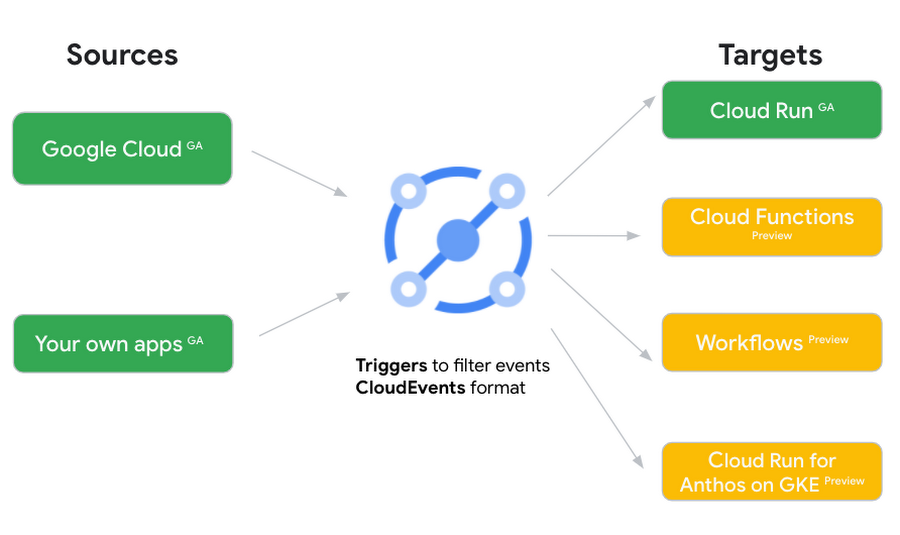
Each event source, event target, and trigger has its own location. Sometimes, these locations have to match and sometimes they can be different.
Here’s an example of a trigger connecting Cloud Storage events from a bucket in the europe-west1 region to a Cloud Run service in the us-central1 region with a trigger located in the europe-west1 region:
gcloud eventarc triggers create trigger-storage \--destination-run-service=hello \--destination-run-region=us-central1 \--location=europe-west1 \--event-filters="type=google.cloud.storage.object.v1.finalized" \--event-filters="bucket=my-bucket-in-europe-west1-region" \--service-account=$PROJECT_NUMBER-compute@developer.gserviceaccount.com
In many cases, you don’t have control over the location of the event source. In the example above, the Cloud Storage bucket is in the europe-west1 region. That’s the location that you need to work with and it has implications for the trigger location (which I’ll get to later).
The location of the event target is the region of the service where you want the events to go. You get to choose this from one of the supported regions when you deploy your Cloud Run service. You typically want this to be in the same region as your event source for latency and data locality reasons (but this is not strictly a requirement). In the example above, the event source (bucket) is in europe-west1 but the event target (Cloud Run service) is in us-central1 as specified by the --destination-run-region flag.
The location of the trigger is dictated by the event source location, but the trigger type also comes into play. It is specified by the –location flag. Let’s take a look at the trigger location for each trigger type in more detail.
Location in Pub/Sub triggers
In a Pub/Sub trigger, you connect a Pub/Sub topic to an event target. Pub/Sub topics are global and not tied to a single region. However, when you create a Pub/Sub trigger, you need to specify a region for it (because Eventarc triggers need to live in a region) with the --location flag as follows:
gcloud eventarc triggers create trigger-pubsub \--destination-run-service=hello \--destination-run-region=us-central1 \--location=us-central1 \--event-filters="type=google.cloud.pubsub.topic.v1.messagePublished" \--transport-topic=projects/your-projectid/topics/your-topic
By specifying a location, Eventarc automatically configures the geofencing feature in Pub/Sub such that events only persist in the specified location. As I noted above, you typically want to (but are not required to) choose the same region for the trigger and the Cloud Run service for lower latency and data locality. You can also use regional Pub/Sub service endpoints to publish to the topic to ensure that all of the data stays in a single region.
Location in Cloud Storage triggers
In a Cloud Storage trigger, you connect a Cloud Storage bucket to an event target. A Cloud Storage bucket can be in a single-region (e.g. europe-west1), dual-region (e.g. eur4), or multi-region (e.g. eu) location. The location of the bucket dictates the location of the trigger and they have to match. The earlier trigger example was for a bucket in the europe-west1 single-region location. Here’s another trigger connecting Cloud Storage events from a bucket in the eu multi-region location. Notice how the location flag matches the bucket region:
gcloud eventarc triggers create trigger-storage \--destination-run-service=hello \--destination-run-region=us-central1 \--location=eu \--event-filters="type=google.cloud.storage.object.v1.finalized" \--event-filters="bucket=my-bucket-in-eu-multi-region" \--service-account=$PROJECT_NUMBER-compute@developer.gserviceaccount.com
If the bucket region and the trigger region do not match, you’ll see an error:
ERROR: (gcloud.eventarc.triggers.create) INVALID_ARGUMENT: The request was invalid: Bucket "my-bucket-in-eu-multi-region" location "eu" does not match trigger location "europe-west1". Try again by creating the trigger in "eu".
Location in Cloud Audit Logs triggers
In a Cloud Audit Logs trigger, you connect any event source that emits Audit Logs to an event target. The location of the event source will dictate the trigger location. This is typically a single region but there is a special global region that’s necessary in some cases.
For example, if you want to read Cloud Storage events from a bucket in the europe-west1 region with an Audit Logs trigger, you will create the trigger with the same location. Note that this will match all buckets in the europe-west1 region as there’s no filter by bucket in Audit Logs:
gcloud eventarc triggers create trigger-auditlog \--destination-run-service=hello \--destination-run-region=us-central1 \--location=europe-west1 \--event-filters="type=google.cloud.audit.log.v1.written" \--event-filters="serviceName=storage.googleapis.com" \--event-filters="methodName=storage.objects.create" \--service-account=$PROJECT_NUMBER-compute@developer.gserviceaccount.com
On the other hand, if you want to match a dual-region or a multi-region bucket such as eu, you will create the trigger with the global location as Audit Logs triggers only support a single or global region. Note that this will match all buckets in all regions globally:
gcloud eventarc triggers create trigger-storage \--destination-run-service=hello \--destination-run-region=us-central1 \--location=global \--event-filters="type=google.cloud.storage.object.v1.finalized" \--event-filters="bucket=my-bucket-in-europe-west1-region" \--service-account=$PROJECT_NUMBER-compute@developer.gserviceaccount.com
As you can see from this example, if you want to read Cloud Storage events, the native Cloud Storage trigger is a much better option, but this example illustrates a typical case in which a global Audit Log trigger is necessary.
That wraps up this closer look at locations in Eventarc. Feel free to reach out to me on Twitter @meteatamel for any questions or feedback.
Freenome’s Innovative Cancer Detection Technology and Its Integration with Google Cloud

1501
Of your peers have already read this article.
3:30 Minutes
The most insightful time you'll spend today!
It’s incredible to see how startups across industries are using cloud technology to help address some of our most pressing, important, and life-altering challenges. Startups and high-growth technology companies are choosing Google Cloud and using technologies like Google Compute Engine (GCE), BigQuery, Looker, Firebase and more to help businesses reduce energy consumption, build more inclusive and sustainable workforces, and in the case of high-growth biotech company Freenome, are creating diagnostic tests that will help detect life-threatening diseases like cancer in the earliest, most-treatable stages.
Freenome is driven by its mission to develop high-quality diagnostic tests to detect and treat diseases like cancer from a simple blood draw. In 2022, Freenome significantly accelerated its growth on Google Cloud to support the business as it began the clinical trials of its diagnostic blood testing technology. Today, the high-growth biotech is further deepening its partnership with Google Cloud in order to support its rapid growth and scale as it concludes clinical validation, takes its tests through FDA approvals, and prepares to bring its product to market.
When detected early, data shows that there is a higher probability for cancer to be beaten, yet not everyone has access to early detection measures. By creating a way to detect the earliest warning signs of cancer with a standard blood test, Freenome is helping bridge the gap between accessibility and early cancer detection. To do this, Freenome built a multiomics platform capable of analyzing and detecting disease-associated patterns in the blood using molecular biology, advanced biology, and machine learning. By applying machine learning models trained to scan for tumor and non-tumor biomarkers to the diagnostic process, Freenome’s tests can identify suspicious molecular patterns in a patient’s blood, which will ultimately help more people detect cancer at its earliest stages in the body.
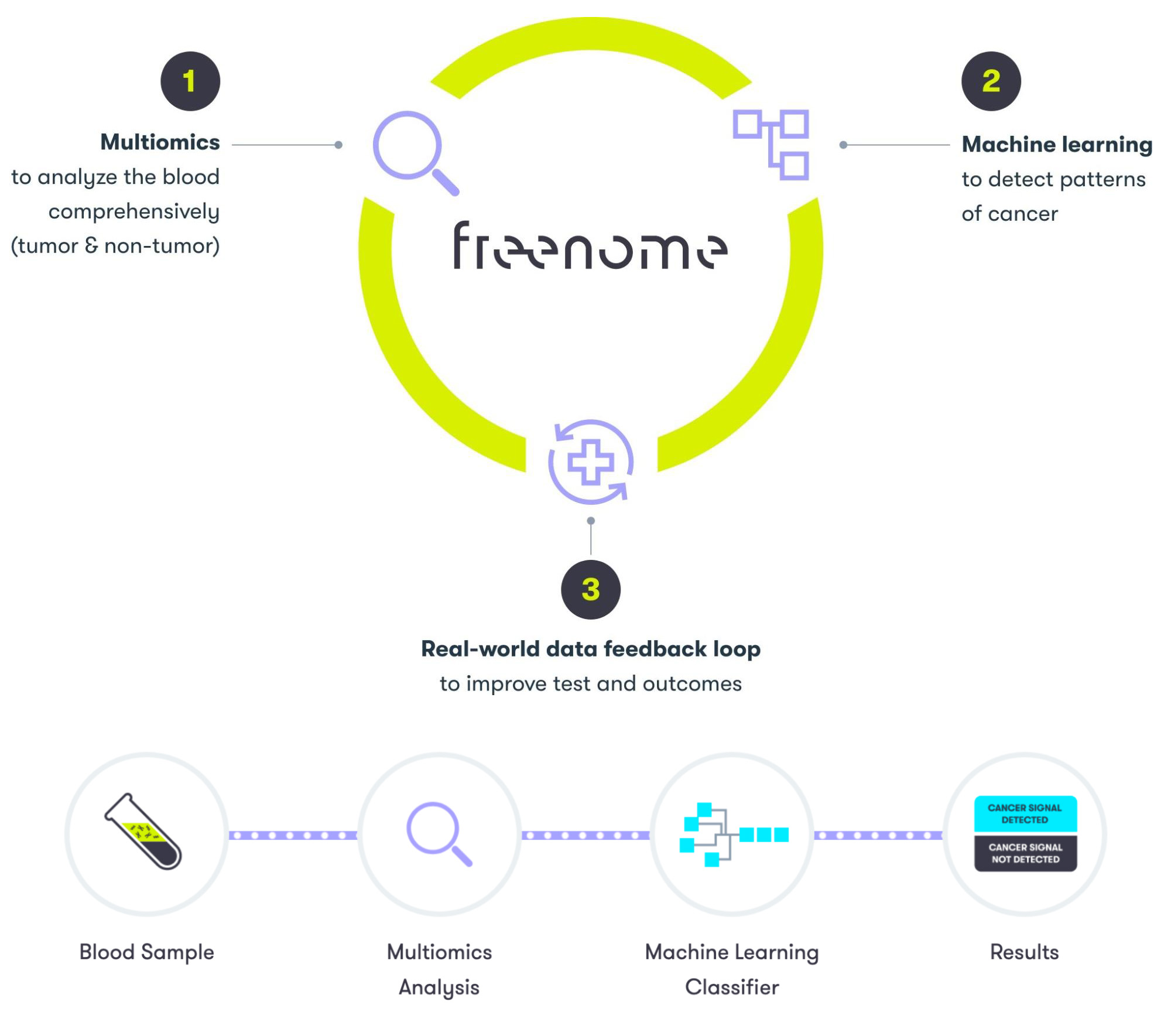
The amount of molecular data extracted from blood samples can quickly add up to hundreds of terabytes worth of data, so it was clear early on that Freenome would need infrastructure that could support the fast sequencing and processing of large amounts of data. In addition, Freenome’s collaboration technology needed to provide flexibility, security, and proper identity management safeguards, given the nature of its business. To meet these needs and support the company’s plans for growth and innovation, Freenome selected Google Cloud as its primary cloud provider, utilizing services like Google Cloud Storage and Google Kubernetes Engine (GKE), along with Google Workspace as its collaboration platform.
Using Cloud Storage alongside GKE gives Freenome the computing power needed to sequence and process mass amounts of blood sample data with high-performance, speed, and at scale. Cloud Storage also makes it easy for Freenome to leverage other Google Cloud capabilities like BigQuery for analytics with built-in query acceleration. Additionally, the built-in cluster management capabilities of GKE make it easy for Freenome’s engineering and IT teams to manage and deploy new workflows to the high-performance computing clusters used by the machine learning components of its multiomics platform to speed up cancer detection. Freenome also uses Google Cloud technologies like Artifact Registry and Cloud SQL, which help the company ensure a managed and secure software supply chain of containers and other artifacts.
Today, as a part of its expanded partnership with Google Cloud, Freenome is significantly increasing its use of Cloud Storage and GKE as it works to complete the clinical trials related to its diagnostic test. By expanding its use of GKE and Cloud Storage, Freenome will be equipped to perform the compute-intensive analytical work required for running its research workflow and diagnostic classifier algorithms. In addition, Freenome teams will continue leveraging Google Workspace products across the company so they can securely manage and collaborate on business-critical content.
Besides using Cloud Storage, GKE, and Google Workspace to support the company’s rapid growth, Freenome plans to leverage Google Cloud technologies like BigQuery to support the research and development of new products. The company is also testing security technologies like BeyondCorp to keep its growing workforce secure and productive at scale.
As the future of disease detection continues to evolve, Google Cloud is proud to support the growth of innovative companies like Freenome with infrastructure and cloud technologies so they can help empower more people with early disease detection solutions and ultimately, change more lives for the better.
Built on Google Cloud, Enexor’s Bio-CHP Unit Powers 100 Homes with Renewable Energy!
4795
Of your peers have already read this article.
2:00 Minutes
The most insightful time you'll spend today!
Editor’s note: Earth Day reminds us that we all can contribute to creating a cleaner, healthier, and more sustainable future. Google Cloud is excited to celebrate innovative startup companies developing new technology and driving sustainable change. On this year’s Earth Day we’re highlighting Enexor BioEnergy and their initiative to produce clean, sustainable energy from plastic and agro-waste with the help of Google Cloud solutions.
Picture a world without electricity where billions of people burn dangerous fuels and trash from landfills to cook meals and heat their homes. Children constantly cough, choking on toxic smoke that lingers in houses and sickens entire families. Because there are no pumps or purification plants, contaminated water is hauled in buckets from dirty rivers and polluted wells. Without power or lights, hospitals and emergency medical clinics can only provide basic services during the day.
Although it is 2022, this harsh life is a reality for billions of people living in developing countries around the world.
Producing clean energy from plastics and organic-waste
This Earth Day, let’s imagine what life would be like in these countries if people had access to safe and inexpensive bioenergy. In this world, indoor air is fresher. Clean water runs from faucets, while homes, businesses, and schools have electricity. Doctors and nurses have the power to treat patients 24 hours a day and save lives with advanced medical equipment. Local economies boom and entrepreneurs thrive.
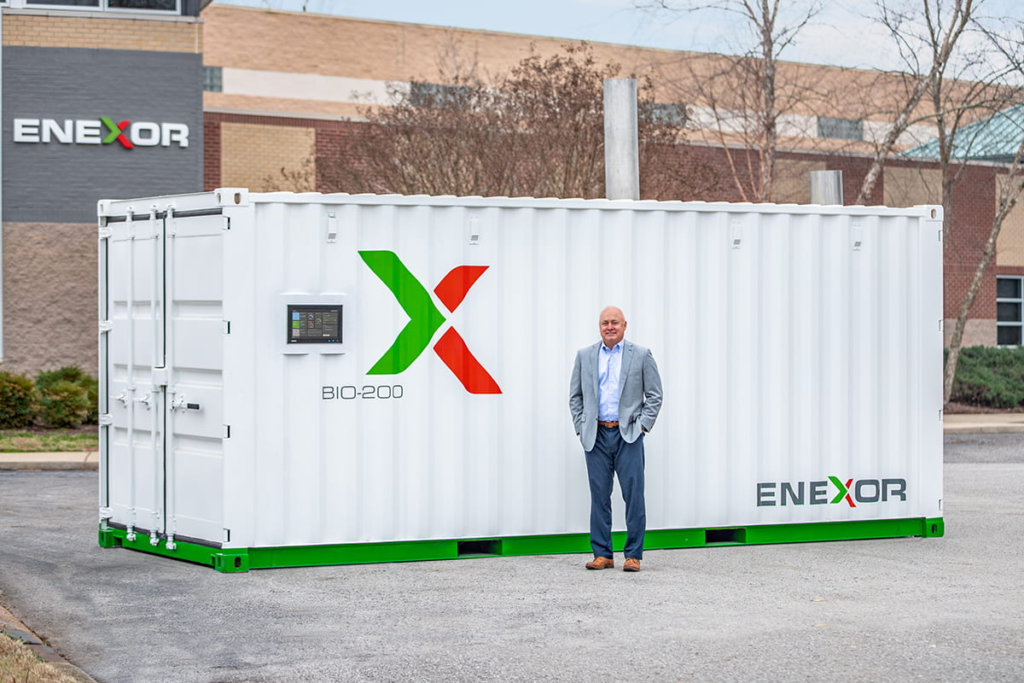
This is the sustainable future Enexor BioEnergy and its partners are building—one village at a time. With the Enexor Bio-CHP™ system, we produce clean and sustainable energy from discarded plastics, organic, and biomass-waste such as rice and corn husks, seaweed, coconuts, and other biomatter while offsetting significant Carbon emissions. The Bio-CHP can be commissioned and easily installed in just a single day, with multiple systems installed side-by-side when more power is needed. By being offered under its novel Energy-as-a-Service business model, Enexor ensures that the Bio-CHP can generate immediate environmental positive impact and customer adoption.
Each Bio-CHP unit generates enough energy to power over 100 homes—and provides much-needed renewable electricity and thermal power for schools, businesses, manufacturing facilities, water pumps, Wi-Fi systems, and telecommunications towers. The Bio-CHP creates clean energy by safely oxidizing plastics and biomatter in a secure container using a high-temperature system to power a micro-turbine. This produces bioenergy, significantly reducing harmful greenhouse gas emissions.
By solving a community’s waste issues while providing more affordable renewable energy, the Bio-CHP also creates new economic opportunities and improved outcomes where it is installed. This includes using its inexpensive power to expand local services and offerings, and empowering local community clean up efforts by incentivizing waste collection via blockchain-enabled digital currencies and services such as PayGo. Additionally, the Bio-CHP is an ideal solution for businesses who desire to maximize their own sustainability efforts, gain greater energy resiliency, and save money on their current energy and waste costs.
Engaging in Google for Startups Accelerator: Climate Change
When developing the Bio-CHP, we realized we needed a reliable and experienced partner to help us incorporate the best in class machine learning and artificial intelligence into our technology. That’s why we joined the Google for Startups Accelerator and participated in the Google for Startups Accelerator: Climate Change.
The accelerator introduced us to other companies working to create a sustainable future and opened new opportunities for collaboration and partnerships. The accelerator also continues to give our small team access to the best of Google Cloud’s people, programs, and solutions. We especially want to highlight Google Cloud’s dedicated startup experts and the incredible technical support they provide, as well as the Google Cloud research credits we used to explore new solutions.
As an example, Enexor is developing a predictive maintenance tool that automatically adjusts Bio-CHP operations to match fuel composition. Another tool in development proactively identifies and flags potential Bio-CHP system and component failures—before they occur.
Google Cloud’s dedicated startup experts work closely with Enexor to develop predictive models for these tools and Enexor also used the Google Cloud research credits that were provided to build these advanced models on TensorFlow, Vertex AI, Cloud CDN and AutoML. Since each system is remotely monitored from Enexor’s global headquarters in Tennessee, predictive maintenance tools also increase the safety, reliability, and efficiency of Bio-CHP in off-grid locations.
Generating 13 billion kWh of clean power by 2040
In the future, Enexor plans to explore additional Google Cloud solutions such as BigQuery to crunch larger datasets, Google Data Studio to build dashboards, and perhaps even Google Cloud Tensor Processing Units (TPUs) to more efficiently process machine learning (ML) workloads.
These solutions will help Enexor to achieve three primary goals by 2040: to generate 13 billion kWh of clean power, reduce 120 million tons of CO₂, and provide one million people with access to clean and sustainable energy. With each Bio-CHP system, Enexor annually reduces up to 2,000 metric tons of CO₂ equivalent emissions by decreasing methane emissions released from landfills, offsetting fossil fuel-based power generation with carbon credits and minimizing waste disposal transportation emissions.
Enexor is now preparing to deploy the Bio-CHP in Accra, Ghana where it will convert organic and plastic manufacturing waste into sustainable energy. Enexor is also looking forward to working with the local Accra community and NGOs to collect discarded plastics and organic waste diverting it from ending in the rivers and oceans and instead using them as renewable fuel sources. We can’t wait to see what we accomplish next as we celebrate Earth Day 2022 and think about the sustainable future Enexor is helping to empower.
If you want to learn more about how Google Cloud can help your startup, visit our page here to get more information about our program, and sign up for our communications to get a look at our community activities, digital events, special offers, and more.
More Relevant Stories for Your Company

Expect 40 Percent Higher Price-performance than General Purpose VM with Google TAU VMs!
In November 2021, we announced the general availability of Tau VMs. Since then, Google Cloud’s Tau VMs with Google Kubernetes Engine (GKE) have unlocked value for many customers who are now using Tau VMs for their production workloads, such as: Ascend, who achieved over 125% higher performance; Nylas, who gained

This Chart, from Home Depot, Dramatically Demonstrates the Power of a Cloud Data Warehouse
The Home Depot (THD) is the world’s largest home-improvement chain, growing to more than 2,200 stores and 700,000 products in four decades. Much of that success was driven through the analysis of data. This included developing sales forecasts, replenishing inventory through the supply chain network, and providing timely performance scorecards. However,

Developers and Practitioners’ Guide for Moving On-prem Data Warehouse to BigQuery
Data teams across companies have continuous challenges of consolidating data, processing it and making it useful. They deal with challenges such as a mixture of multiple ETL jobs, long ETL windows capacity-bound on-premise data warehouses and ever-increasing demands from users. They also need to make sure that the downstream requirements

Google Cloud Celebrates Journey of 3 Inspiring Founders for the Asian Pacific American Heritage Month
May is Asian Pacific American Heritage Month —a time for us to come together to celebrate and remember the important people and history of Asian and Pacific Island heritage. This feature highlights three AAPI founders from the Google For Startups community. Read on to learn how these three founders built
