





Scaling Machine Learning Operations with Vertex AI AutoML and Pipeline

2547
Of your peers have already read this article.
2:30 Minutes
The most insightful time you'll spend today!
When you build a Machine Learning (ML) product, consider at least two MLOps scenarios. First, the model is replaceable, as breakthrough algorithms are introduced in academia or industry. Second, the model itself has to evolve with the data in the changing world.
We can handle both scenarios with the services provided by Vertex AI. For example:
- AutoML capability automatically identifies the best model based on your budget, data, and settings.
- You can easily manage the dataset with Vertex Managed Datasets by creating a new dataset or adding data to an existing dataset.
- You can build an ML pipeline to automate a series of steps that start with importing a dataset and end with deploying a model using Vertex Pipelines.
This blog post shows you how to build this system. You can find the full notebook for reproduction here. Many folks focus on the ML pipeline when it comes to MLOps, but there are more parts to building MLOps as a “system”. In this post, you will see how Google Cloud Storage (GCS) and Google Cloud Functions manage data and handle events in the MLOps system.
Architecture
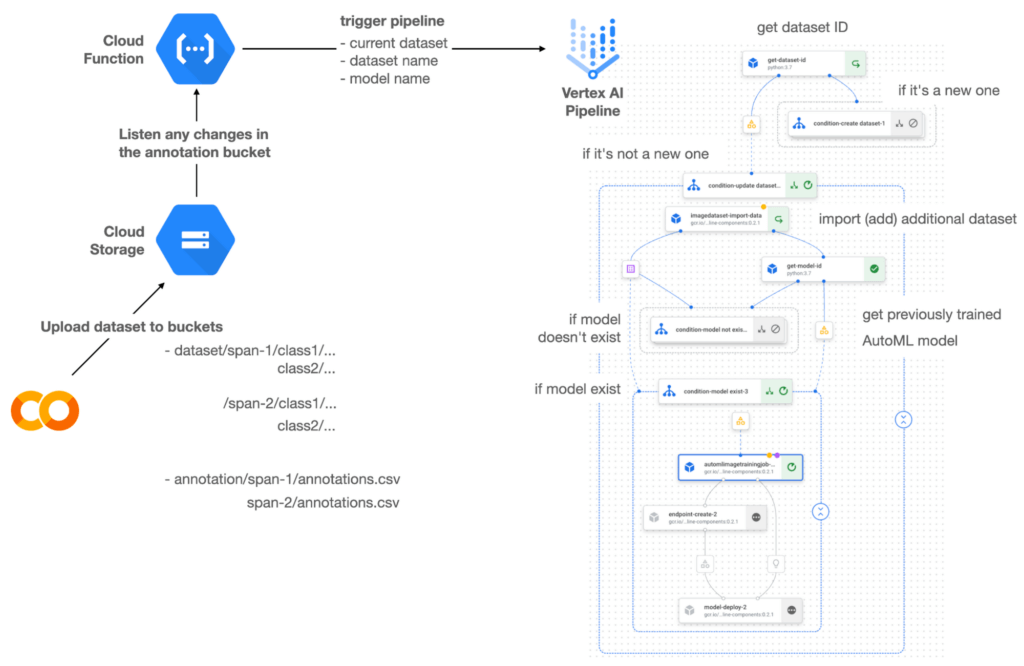

Figure 1 shows the overall architecture presented in this blog. We cover the components and their connection in the context of two common workflows of the MLOps system.
Components
Vertex AI is at the heart of this system, and it leverages Vertex Managed Datasets, AutoML, Predictions, and Pipelines. We can create and manage a dataset as it grows using Vertex Managed Datasets. Vertex AutoML selects the best model without your knowing much about modeling. Vertex Predictions creates an endpoint (RestAPI) to which the client communicates.
It is a simple, fully managed yet somewhat complete end-to-end MLOps workflow moves from a dataset to training a model that gets deployed. This workflow can be programmatically written in Vertex Pipelines. Vertex Pipelines outputs the specification for an ML pipeline allowing you to re-run the pipeline whenever or wherever you want. Specify when and how to trigger the pipeline using Cloud Functions and Cloud Storage.
Cloud Functions is a serverless way to deploy your code in Google Cloud. In this particular project, it triggers the pipeline by listening to changes on the specified Cloud Storage location. Specifically, if a new dataset is added, for example, a new span number is created; the pipeline is triggered to train the dataset, and a new model is deployed.
Workflow
This MLOps system prepares the dataset with either Vertex Dataset’s built-in user interface (UI) or any external tools based on your preference. You can upload the prepared dataset into the designated GCS bucket with a new folder named SPAN-NUMBER. Cloud Functions then detects the changes in the GCS bucket and triggers the Vertex Pipeline to run the jobs from AutoML training to endpoint deployment.
Inside the Vertex Pipeline, it checks if there is an existing dataset created previously. If the dataset is new, Vertex Pipeline creates a new Vertex Dataset by importing the dataset from the GCS location and emits the corresponding Artifact. Otherwise, it adds the additional dataset to the existing Vertex Dataset and emits an artifact.
When the Vertex Pipeline recognizes the dataset as a new one, it trains a new AutoML model and deploys it by creating a new endpoint. If the dataset isn’t new, it tries to retrieve the model ID from Vertex Model and determines whether a new AutoML model or an updated AutoML model is needed. The second branch determines whether the AutoML model has been created. If it hasn’t been created, the second branch creates a new model. Also, when the model is trained, the corresponding component emits the artifact as well.
Directory structure that reflects different distributions
In this project, I have created two subsets of the CIFAR-10 dataset, SPAN-1 and SPAN-2. A more general version of this project can be found here, which shows how to build training and batch evaluation pipelines pipelines. The pipelines can be set up to cooperate so they can evaluate the currently deployed model and trigger the retraining process.
ML Pipeline with Kubeflow Pipelines (KFP)
We chose to use Kubeflow Pipelines to orchestrate the pipeline. There are a few things that I would like to highlight. First, it’s good to know how to make branches with conditional statements in KFP. Second, you need to explore AutoML API specifications to fully leverage AutoML capabilities, such as training a model based on the previously trained one. Last, you also need to find a way to emit artifacts for Vertex Dataset and Vertex Model to consume that Vertex AI can recognize them. Let’s go through these one by one.
Branching strategy
In this project, there are two main conditions and two sub-branches inside the second main branch. The main branches split the pipeline based on a condition if there is an existing Vertex Dataset. The sub-branches are applied in the second main branch, which is selected when there is an exciting Vertex Dataset. It looks up the list of models and decides to train an AutoML model from scratch or a previously trained one.
ML pipelines written in KFP can have conditions with a special syntax of kfp.dsl.Condition. For instance, we can define the branches as follows:
from google_cloud_pipeline_components import aiplatform as gcc_aip


# try to get Vertex Dataset ID
dataset_op = get_dataset_id(...)

with kfp.dsl.Condition(name="create dataset",
                       dataset_op.outputs['Output'] == 'None'):
    # Create Vertex Dataset, train AutoML from scratch, deploy model

with kfp.dsl.Condition(name="update dataset",
                       dataset_op.outputs['Output'] != 'None'):
    # Update existing Vertex Dataset
    ...

    # try to get Vertex Model ID
    model_op = get_model_id(...)

    with kfp.dsl.Condition(name='model not exist',
                           model_op.outputs['Output'] == 'None'):
    # Create Vertex Dataset, train AutoML from scratch, deploy model

    with kfp.dsl.Condition(name='model exist',
                           model_op.outputs['Output'] != 'None'):
        # Create Vertex Dataset, train AutoML based on trained one, deploy model
get_dataset_id and get_model_id are custom KFP components used to determine if there is an existing Vertex Dataset and Vertex Model respectively. Both return “None” if a model is found and some other value if a model isn’t found. They also emit Vertex AI-aware artifacts. You will see what this means in the next section.
Emit Vertex AI-aware artifacts
Artifacts track the path of each experiment in the ML pipeline and display metadata in the Vertex Pipeline UI. When Vertex AI aware artifacts are released into in the pipeline, Vertex Pipeline UI displays links for its internal services such as Vertex Dataset, so that users can visit a web page for more information.
So how could you write a custom component to generate Vertex AI-aware artifacts? To do this, custom components should have Output[Artifact] in their parameters. Then you need to replace the resourceName of the metadata attribute with a special string format.
The following code example is the actual definition of get_dataset_id used in the previous code snippet:
@component(
    packages_to_install=["google-cloud-aiplatform",
                         "google-cloud-pipeline-components"]
)
def get_dataset_id(project_id: str,
                     location: str,
                 dataset_name: str,
                 dataset_path: str,
                      dataset: Output[Artifact]) -> str:
    from google.cloud import aiplatform
    from google.cloud.aiplatform.datasets.image_dataset import ImageDataset
    from google_cloud_pipeline_components.types.artifact_types import VertexDataset


    aiplatform.init(project=project_id, location=location)

    datasets = aiplatform.ImageDataset.list(project=project_id,
                                            location=location,
                                            filter=f'display_name={dataset_name}')

    if len(datasets) > 0:
        dataset.metadata['resourceName'] =
               f'projects/{project_id}/locations/{location}/datasets/{datasets[0].name}'
        return f'projects/{project_id}/locations/{location}/datasets/{datasets[0].name}'
    else:
        return 'None'
As you see, the dataset is defined in the parameters as Output[Artifact]. Even though it appears in the parameter, it is actually emitted automatically. You just need to provide the necessary data as if it is a function variable.
The dataset component retrieves the list of Vertex Dataset by calling the aiplotform.ImageDataset.list API. If the length of it is zero, it simply returns ‘None’. Otherwise, it returns the found resource name of the Vertex Dataset and provides the dataset.metadata[‘resourceName’] with the resource name at the same time. The Vertex AI-aware resource name follows a special string format, which is ‘projects/<project-id>/locations/<location>/<vertex-resource-type>/<resource-name>’.
The <vertex-resource-type>can be anything that points to an internal Vertex AI service. For instance, if you want to specify that the artifact is the Vertex Model, then you should replace <vertex-resource-type> with models. The <resource-name> is the unique ID of the resource, and it can be accessed in the name attribute of the resource found by the aiplatform API. The other custom component, get_model_id, is written in a very similar way as well.
AutoML based on the previous model
You sometimes want to train a new model on top of the previously best model. If that is possible, the new model will probably be much better than the one trained from scratch, because it leverages previously learned knowledge.
Luckily, Vertex AutoML comes with the ability to train a model using a previous model. AutoMLImageTrainingJobRunOp component lets you train a model by simply providing the base_model argument as follows:
training_job_run_op =
gcc_aip.AutoMLImageTrainingJobRunOp(
…,
base_model=model_op.outputs['model'],
…
)
When training a new AutoML model from scratch, you pass ‘None‘ in the base_model argument, and it is the default value. However, you can set it with a VertexModel artifact, and the component will trigger an AutoML training job based on the other model.
One thing to be careful of is that VertexModel artifacts can’t be constructed in a typical way of Python programming That means you can’t create an instance of VertexModel artifact by setting the id found in the Vertex Model dashboard. The only way you can create one is to set the metadata[‘resourceName’] parameters properly. The same rule applies to other Vertex AI-related artifacts such as VertexDataset. You can see how the VertexDataset artifact is constructed properly to get an existing Vertex Dataset to import additional data into it. See the full notebook of this project here.
Cost
You can reproduce the same result from this project with the free $300 credit when you create a new GCP account.
At the time of this blog post, Vertex Pipelines costs about $0.03/run, and the type of underlying VM for each pipeline component is e2-standard-4, which costs about $0.134/hour. Vertex AutoML training costs about $3.465/hour for image classification. GCS holds the actual data, which costs about $2.40/month for 100GiB capacity, and Vertex Dataset is free.
To simulate two different branches, the entire experiment took about one to two hours, and the total cost for this project is approximately $16.59. Please find more detailed pricing information about Vertex AI here.
Conclusion
Many people underestimate the capability of AutoML, but it is a great alternative for app and service developers who have little ML background. Vertex AI is a great platform that provides AutoML as well as Pipeline features to automate the ML workflow. In this article, I have demonstrated how to set up and run a basic MLOps workflow, from data injection to training a model based on the previously-achieved best one, to deploying the model to a Vertex AI platform. With this, we can let our ML model automatically adapt to the changes in a new dataset. What’s left for you to implement is to integrate a model monitoring system to detect data/model drift. One example is found here.
Geospatial Data for Business Apps Drive Sustainable and Accurate Decision-making

4348
Of your peers have already read this article.
1:30 Minutes
The most insightful time you'll spend today!
Organizations that collect geospatial data can use that information to understand their operations, help make better business decisions, and power innovation. Traditionally, organizations have required deep GIS expertise and tooling in order to deliver geospatial insights. In this post, we outline some ways that geospatial data can be used in various business applications.
Assessing environmental risk
Governments and businesses involved in insurance underwriting, property management, agriculture technology, and related areas are increasingly concerned with risks posed by environmental conditions. Historical models that predict natural disasters like pollution, flooding, and wildfires are becoming less accurate as real-world conditions change. Therefore, organizations are incorporating real-time and historical data into a geospatial analytics platform and using predictive modeling to more effectively plan for risk and to forecast weather.
Selecting sites and planning expansion
Businesses that have storefronts, such as retailers and restaurants, can find the best locations for their stores by using geospatial data like population density to simulate new locations and to predict financial outcomes. Telecom providers can use geospatial data in a similar way to determine the optimal locations for cell towers. A site selection solution can combine proprietary site metrics with publicly-available data like traffic patterns and geographic mobility to help organizations make better decisions about site selection, site rationalization, and expansion strategy.
Planning logistics and transport
For freight companies, courier services, ride-hailing services, and other companies that manage fleets, it’s critical to incorporate geospatial context into business decision-making. Fleet management operations include optimizing last-mile logistics, analyzing telematics data from vehicles for self-driving cars, managing precision railroading, and improving mobility planning. Managing all of these operations relies extensively on geospatial context. Organizations can create a digital twin of their supply chain that includes geospatial data to mitigate supply chain risk, design for sustainability, and minimize their carbon footprint.
Understanding and improving soil health and yield
AgTech companies and other organizations that practice precision agriculture can use a scalable analytics platform to analyze millions of acres of land. These insights help organizations understand soil characteristics and help them analyze the interactions among variables that affect crop production. Companies can load topography data, climate data, soil biomass data, and other contextual data from public data sources. They can then combine this information with data about local conditions to make better planting and land-management decisions. Mapping this information using geospatial analytics not only lets organizations actively monitor crop health and manage crops, but it can help farmers determine the most suitable land for a given crop and to assess risk from weather conditions.
Managing sustainable development
Geospatial data can help organizations map economic, environmental, and social conditions to better understand the geographies in which they conduct business. By taking into account environmental and socio-economic phenomena like poverty, pollution, and vulnerable populations, organizations can determine focus areas for protecting and preserving the environment, such as reducing deforestation and soil erosion. Similarly, geospatial data can help organizations design data-driven health and safety interventions. Geospatial analytics can also help an organization meet its commitments to sustainability standards through sustainable and ethical sourcing. Using geospatial analytics, organizations can track, monitor, and optimize the end-to-end supply chain from the source of raw materials to the destination of the final product.
What’s next
Google Cloud provides a full suite of geospatial analytics and machine learning capabilities that can help you make more accurate and sustainable business decisions without the complexity and expense of managing traditional GIS infrastructure. Get started today by learning how you can use Google Cloud features to get insights from your geospatial data, see Geospatial analytics architecture.
Acknowledgements: We’d like to thank Chad Jennings, Lak Lakshmanan, Kannappan Sirchabesan, Mike Pope, and Michael Hao for their contributions to this blog post and the Geospatial Analytics architecture.
A Look Back on Google Cloud’s Data Analytics Development Efforts from June

5956
Of your peers have already read this article.
4:00 Minutes
The most insightful time you'll spend today!
June is the month that holds the summer solstice, and some of us in the northern hemisphere get to enjoy the longest days of sunshine out of the entire year. We used all the hours we could in June to deliver a flurry of new features across BigQuery, Dataflow, Data Fusion, and more. Let’s take a look!
Simple, Sophisticated, and Secure
Usability is a key tenant of our data analytics development efforts. Our new user-friendly BigQuery improvements this month include:
- Flexible data type casting
- Formatting to change column descriptions
- GRANT/REVOKE access control commands using SQL
We hope this will delight data analysts, data scientists, DBAs, and SQL-enthusiasts who can find out more details in our blog here.
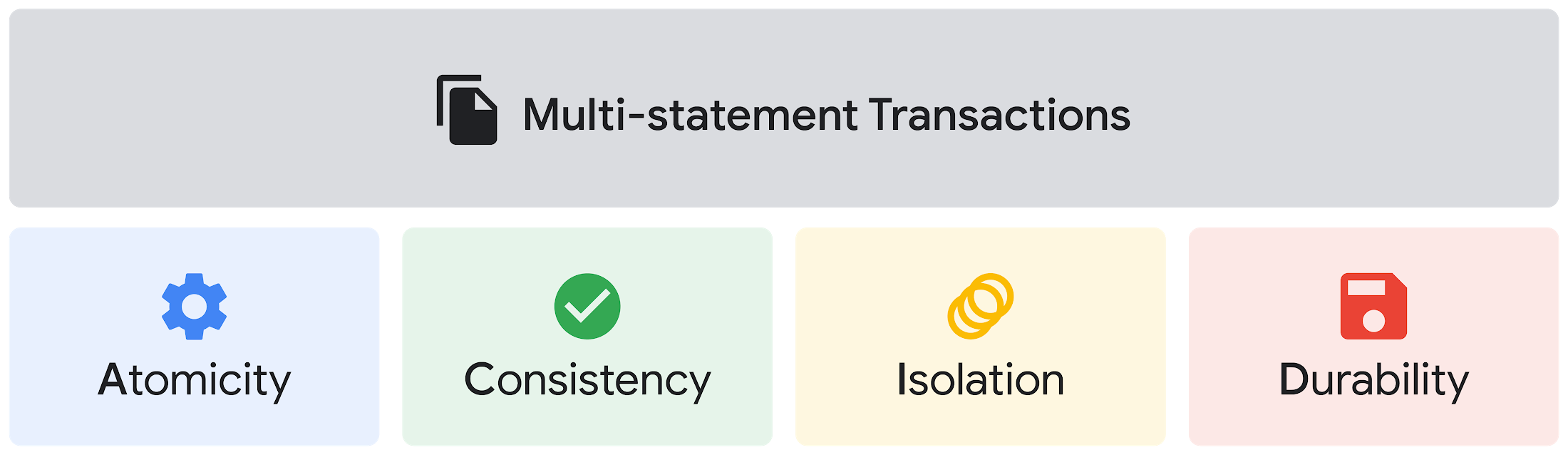
Beyond simplifying commands, we also recognize that it’s equally important to have more sophistication when dealing with transactions. That’s why we introduced multi-statement transactions in BigQuery.
As you probably know, BigQuery has long supported single-statement transactions through DML statements, such as INSERT, UPDATE, DELETE, MERGE and TRUNCATE, applied to one table per transaction. With multi-statement transactions, you can now use multiple SQL statements, including DML, spanning multiple tables in a single transaction.
This means that any data changes across multiple tables associated with all statements in a given transaction are committed atomically (all at once) if successful—or all rolled back atomically in the event of a failure.
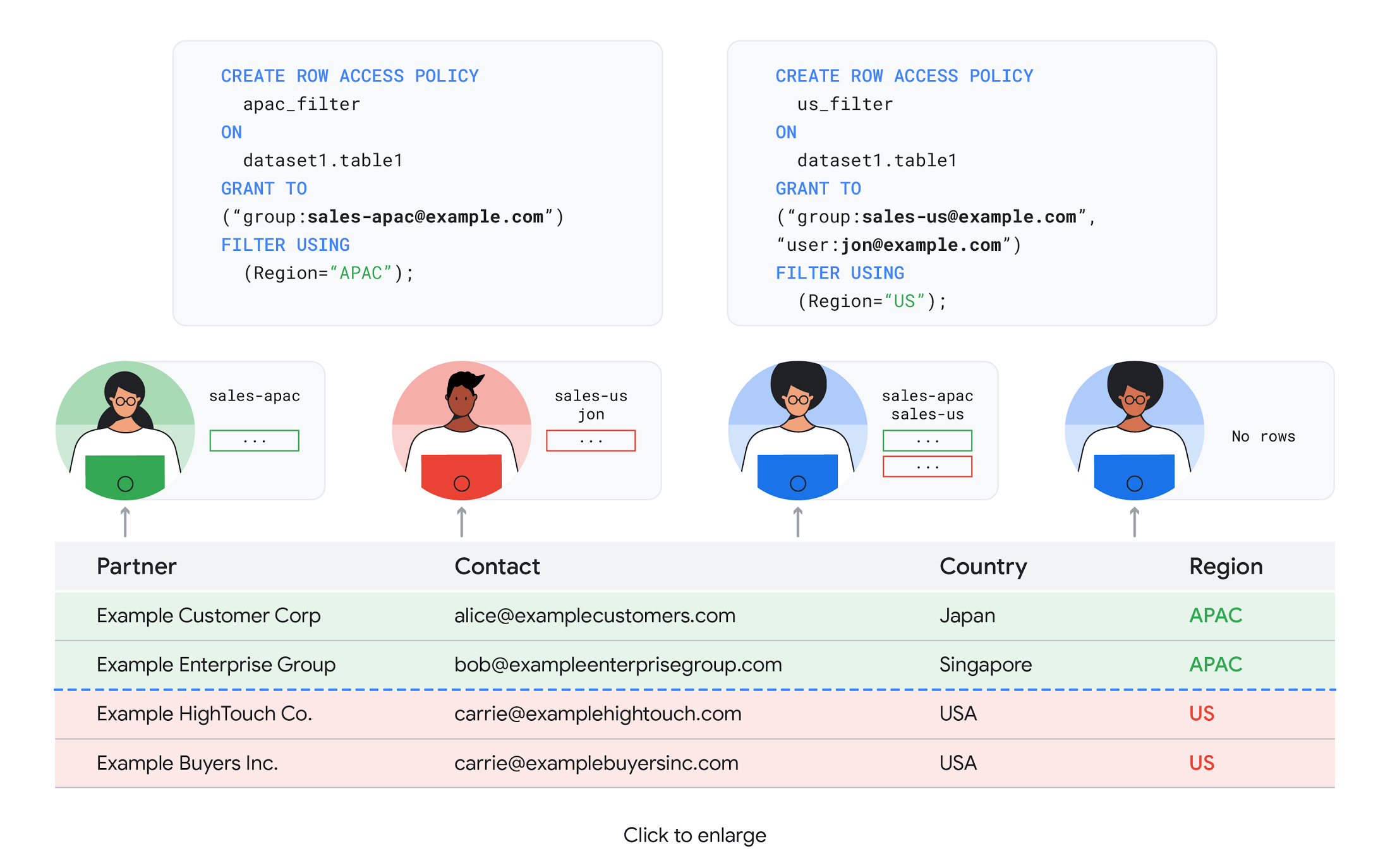
We also know that organizations need to control access to data, down to the granular level and that, with the complexity of data platforms increasing day by day, it’s become even more critical to identify and monitor who has access to sensitive data.
To help address these needs, we announced the general availability of BigQuery row-level security. This capability gives customers a way to control access to subsets of data in the same table for different groups of users. Row-level security in BigQuery enables different user personas access to subsets of data in the same table and can easily be created, updated, and dropped using DDL statements. To learn more, check out the documentation and best practices.
Simple, Safe, and Smart
Beyond building a simpler, more sophisticated and more secure data platform for customers, our team has been focused on providing solutions powered by built-in intelligence. One of our core beliefs is that for machine learning to be adopted and useful at scale, it must be easy to use and deploy.
BigQuery ML, our embedded machine learning capabilities, have been adopted by 80% of our top customers around the globe and it has become a cornerstone of their data to value journey.
As part of our efforts, we announced the general availability of AutoML tables in BigQuery ML. This no-code solution lets customers automatically build and deploy state-of-the-art machine learning models on structured data. With easy integration with Vertex AI, AutoML in BQML makes it simple to achieve machine learning magic in the background. From preprocessing data to feature engineering and model tuning all the way to cross validation, AutoML will “automagically” select and ensemble models so everyone—even non-data scientists—can use it.
Want to take this feature for a test drive? Try it today on BigQuery’s NYC Taxi public dataset following the instructions in this blog!
Speaking of public datasets, we also introduced the availability of Google Trends data in BigQuery to enable customers to measure interest in a topic or search term across Google Search. This new dataset will soon be available in Analytics Hub and will be anonymized, indexed, normalized, and aggregated prior to publication.
Want to ensure your end-cap displays are relevant to your local audience? You can take signals from what people are looking for in your market area to inform what items to place. Want to understand what new features could be incorporated into an existing product based on what people are searching for? Terms that appear in these datasets could be an indicator of what you should be paying attention to.
All this data and technology can be put to use to deploy critical solutions to grow and protect your business. For example, it can be difficult to know how to define anomalies during detection. If you have labeled data with known anomalies, then you can choose from a variety of supervised machine learning model types that are already supported in BigQuery ML.
But what if you don’t know what kind of anomaly to expect, and you don’t have labeled data? Unlike typical predictive techniques that leverage supervised learning, organizations may need to be able to detect anomalies in the absence of labeled data.
That’s why, we were particularly excited to announce the public preview of new anomaly detection capabilities in BigQuery ML that leverage unsupervised machine learning to help you detect anomalies without needing labeled data.
Our team has been working with a large number of enterprises who leverage machine learning for better anomaly detection. In financial services for example, customers have used our technology to detect machine-learned anomalies in real-time foreign exchange data.
To make it easier for you to take advantage of their best practices, we teamed up with Kasna to develop sample code, architecture guidance, and a data synthesizer that generates data so you can test these innovations right away.
Simple, Scalable, and Speedy
Capturing, processing and analyzing data in motion has become an important component of our customer architecture choices. Along with batch processing, many of you need the flexibility to stream records into BigQuery so they can become available for query as they are written.
Our new BigQuery Storage Write API combines the functionality of streaming ingestion and batch loading into a single API. You can use it to stream records into BigQuery or even batch process an arbitrarily large number of records and commit them in a single atomic operation.
Flexible systems that can do batch and real-time in the same environment is in our DNA: Dataflow, our serverless, data processing service for streaming and batch data was built with flexibility in mind.
This principle applies not just to what Dataflow does but also how you can leverage it—whether you prefer using Dataflow SQL right from the BigQuery web UI, Vertex AI notebooks from the Dataflow interface, or the vast collection of pre-built templates to develop streaming pipelines.
Dataflow has been in the news quite a bit recently. You might have noted the recent introduction of Dataflow Prime, a new no-ops, auto-tuning functionality that optimizes resource utilization and further simplifies big data processing. You might have also read that Google Dataflow is a Leader in The 2021 Forrester Wave™: Streaming Analytics, giving Dataflow a score of 5 out of 5 across 12 different criteria.
We couldn’t be more excited about the support the community has provided to this platform. The scalability of Dataflow is unparalleled and as you set your company up for more scale, more speed, and “streaming that screams”, we suggest you take a look at what leaders at Sky, RVU or Palo Alto Networks have already accomplished.
If you’re new to Dataflow, you’re in for a treat: this past month, Priyanka Vergadia (AKA CloudGirl) released a great set of resources to get you started. Read her blog here and watch her introduction video below!
https://youtube.com/watch?v=WRspZRG9e90%3Fenablejsapi%3D1%26
Simple structure that sticks together
We thrive to be the partner of choice for your transformation journey, regardless where your data comes from and how you choose to unify your data stack.
Our partners at Tata Consultancy Services (TCS) recently released research that highlights the importance of a unifying digital fabric and how data integration services like Google Cloud Data Fusion can enable their clients to achieve this vision.
We also announced SAP Integration with Cloud Data Fusion, Google Cloud’s native data integration platform, to seamlessly move data out of SAP Business Suite, SAP ERP and S4/HANA. To date, we provide more than 50 pipelines in Cloud Data Fusion to rapidly onboard SAP data.
This past month, we introduced our SAP Accelerator for Order to Cash. This accelerator is a sample implementation of the SAP Table Batch Source feature in Cloud Data Fusion and will help you get started with your end-to-end order to cash process and analytics.
It includes sample Cloud Data Fusion pipelines that you can configure to connect to your SAP data source, perform transformations, store data in BigQuery, and set up analytics in Looker. It also comes with LookML dashboards which you can access on Github.
Countless great organizations have chosen to work with Google for their SAP data. In June, we wrote about ATB Financial’s journey and how the company uses data to better serve over 800,000 customers, save over CA$2.24 million in productivity, and realize more than CA$4 million in operating revenue through “D.E.E.P”, a data exposure enablement platform built around BigQuery.
Finally, if you are an application developer looking for a unified platform that brings together data from Firebase Crashlytics, Google Analytics, Cloud Firestore, and third party datasets, we have good news!
This past month, we released a unified analytics platform that combines Firebase, BigQuery, Google Looker and FiveTran to easily integrate disparate data sources, and infuse data into operational workflows for greater product development insights and increased customer experience. This resource comes with sample code, a reference guide and a great blog! We hope you enjoy it. See you all next month!
https://youtube.com/watch?v=L25Vfzr2Ciw%3Fenablejsapi%3D1%26
Companies Can Speed-up AI Developments with NVIDIA’s One Stop Catalog for AI Software

3132
Of your peers have already read this article.
2:00 Minutes
The most insightful time you'll spend today!
NVIDIA GPU-powered instances on Google Cloud provide an optimal platform for organizations to develop their AI applications on the latest hardware and software stack, then seamlessly deploy those applications at scale in production.
Simplifying Workflows to Speedup AI Developments
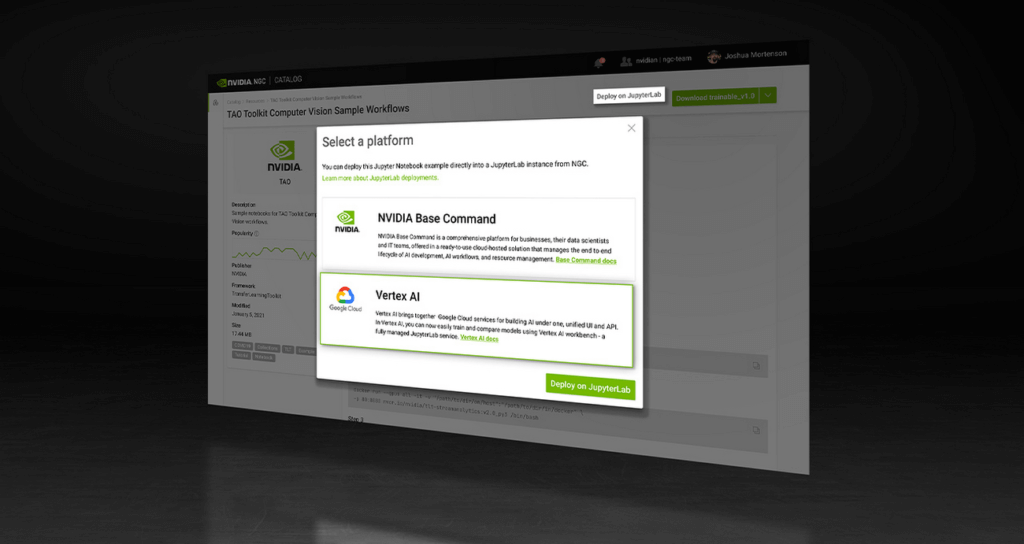
NVIDIA recently announced the One Click Deploy feature on the NVIDIA NGC catalog, the hub for GPU-optimized AI software. Developed in collaboration with Google Cloud, this feature simplifies the deployment of AI software, to a single click from the NGC catalog.
This allows data scientists to deploy frameworks, software development kits and Jupyter Notebooks directly to Google Cloud’s Vertex AI Workbench, a new managed Jupyter Notebook service on top of Vertex AI, Google’s service for machine learning operations.
Under the hood, this feature launches the JupyterLab instance on Google Cloud Vertex AI Workbench with optimal instance configuration, preloads the software dependencies, and downloads the NGC notebook in one go.
NGC Catalog – One Stop for AI Software
NVIDIA is expanding the rich trove of NVIDIA AI software in the catalog to ensure AI practitioners have everything they need to get started — from frameworks to models.
All of the AI models in the catalog come with credentials. They’re like resumes that show the model’s skills, the dataset that trained it, how to use the model and how it’s expected to perform.
These model credentials provide transparency, which gives developers the confidence in picking the right model for their use case.
The NGC catalog also hosts Jupyter Notebooks tailored for the most popular AI/ML applications. Examples include:
Computer Vision – A collection of models for detecting human actions, gestures and more.
Automatic Speech Recognition – An end-to-end workflow for text-to-speech training.
Recommendation – A collection of example notebooks to help build end-to-end recommendation services.
Serve Robotics uses Vertex AI and the simple easy-to-use interface that the NGC One Click Deploy delivers.
“NGC catalog allows our ML research engineers to launch environments for experiments on Vertex AI with a single click. This saves us the efforts on ML infra setup and lets researchers focus on the ML problem in the computer vision and robotics space more efficiently.”—Kaiwen Yuan, Director of ML/Head of Perceptions & Predictions at Serve Robotics
Accelerate ML Deployments
Explore hundreds of Jupyter notebook examples for speech, computer vision and recommenders and, if you’re just getting started with AI, browse NVIDIA’s collection of Jupyter notebook examples and run it using the One Click Deploy feature on Google Cloud Vertex AI.

4655
Of your peers have already listened to this podcast
30:30 Minutes
The most insightful time you'll spend today!
Why it’s Easier Than Ever for Developers to Break Into Machine Learning and Data Science
When you build a Machine Learning (ML) product, consider at least two MLOps scenarios. First, the model is replaceable, as breakthrough algorithms are introduced in academia or industry. Second, the model itself has to evolve with the data in the changing world.
We can handle both scenarios with the services provided by Vertex AI. For example:
- AutoML capability automatically identifies the best model based on your budget, data, and settings.
- You can easily manage the dataset with Vertex Managed Datasets by creating a new dataset or adding data to an existing dataset.
- You can build an ML pipeline to automate a series of steps that start with importing a dataset and end with deploying a model using Vertex Pipelines.
This blog post shows you how to build this system. You can find the full notebook for reproduction here. Many folks focus on the ML pipeline when it comes to MLOps, but there are more parts to building MLOps as a “system”. In this post, you will see how Google Cloud Storage (GCS) and Google Cloud Functions manage data and handle events in the MLOps system.
Architecture
Figure 1 shows the overall architecture presented in this blog. We cover the components and their connection in the context of two common workflows of the MLOps system.
Components
Vertex AI is at the heart of this system, and it leverages Vertex Managed Datasets, AutoML, Predictions, and Pipelines. We can create and manage a dataset as it grows using Vertex Managed Datasets. Vertex AutoML selects the best model without your knowing much about modeling. Vertex Predictions creates an endpoint (RestAPI) to which the client communicates.
It is a simple, fully managed yet somewhat complete end-to-end MLOps workflow moves from a dataset to training a model that gets deployed. This workflow can be programmatically written in Vertex Pipelines. Vertex Pipelines outputs the specification for an ML pipeline allowing you to re-run the pipeline whenever or wherever you want. Specify when and how to trigger the pipeline using Cloud Functions and Cloud Storage.
Cloud Functions is a serverless way to deploy your code in Google Cloud. In this particular project, it triggers the pipeline by listening to changes on the specified Cloud Storage location. Specifically, if a new dataset is added, for example, a new span number is created; the pipeline is triggered to train the dataset, and a new model is deployed.
Workflow
This MLOps system prepares the dataset with either Vertex Dataset’s built-in user interface (UI) or any external tools based on your preference. You can upload the prepared dataset into the designated GCS bucket with a new folder named SPAN-NUMBER. Cloud Functions then detects the changes in the GCS bucket and triggers the Vertex Pipeline to run the jobs from AutoML training to endpoint deployment.
Inside the Vertex Pipeline, it checks if there is an existing dataset created previously. If the dataset is new, Vertex Pipeline creates a new Vertex Dataset by importing the dataset from the GCS location and emits the corresponding Artifact. Otherwise, it adds the additional dataset to the existing Vertex Dataset and emits an artifact.
When the Vertex Pipeline recognizes the dataset as a new one, it trains a new AutoML model and deploys it by creating a new endpoint. If the dataset isn’t new, it tries to retrieve the model ID from Vertex Model and determines whether a new AutoML model or an updated AutoML model is needed. The second branch determines whether the AutoML model has been created. If it hasn’t been created, the second branch creates a new model. Also, when the model is trained, the corresponding component emits the artifact as well.
Directory structure that reflects different distributions
In this project, I have created two subsets of the CIFAR-10 dataset, SPAN-1 and SPAN-2. A more general version of this project can be found here, which shows how to build training and batch evaluation pipelines pipelines. The pipelines can be set up to cooperate so they can evaluate the currently deployed model and trigger the retraining process.
ML Pipeline with Kubeflow Pipelines (KFP)
We chose to use Kubeflow Pipelines to orchestrate the pipeline. There are a few things that I would like to highlight. First, it’s good to know how to make branches with conditional statements in KFP. Second, you need to explore AutoML API specifications to fully leverage AutoML capabilities, such as training a model based on the previously trained one. Last, you also need to find a way to emit artifacts for Vertex Dataset and Vertex Model to consume that Vertex AI can recognize them. Let’s go through these one by one.
Branching strategy
In this project, there are two main conditions and two sub-branches inside the second main branch. The main branches split the pipeline based on a condition if there is an existing Vertex Dataset. The sub-branches are applied in the second main branch, which is selected when there is an exciting Vertex Dataset. It looks up the list of models and decides to train an AutoML model from scratch or a previously trained one.
ML pipelines written in KFP can have conditions with a special syntax of kfp.dsl.Condition. For instance, we can define the branches as follows:
from google_cloud_pipeline_components import aiplatform as gcc_aip


# try to get Vertex Dataset ID
dataset_op = get_dataset_id(...)

with kfp.dsl.Condition(name="create dataset",
                       dataset_op.outputs['Output'] == 'None'):
    # Create Vertex Dataset, train AutoML from scratch, deploy model

with kfp.dsl.Condition(name="update dataset",
                       dataset_op.outputs['Output'] != 'None'):
    # Update existing Vertex Dataset
    ...

    # try to get Vertex Model ID
    model_op = get_model_id(...)

    with kfp.dsl.Condition(name='model not exist',
                           model_op.outputs['Output'] == 'None'):
    # Create Vertex Dataset, train AutoML from scratch, deploy model

    with kfp.dsl.Condition(name='model exist',
                           model_op.outputs['Output'] != 'None'):
        # Create Vertex Dataset, train AutoML based on trained one, deploy model
get_dataset_id and get_model_id are custom KFP components used to determine if there is an existing Vertex Dataset and Vertex Model respectively. Both return “None” if a model is found and some other value if a model isn’t found. They also emit Vertex AI-aware artifacts. You will see what this means in the next section.
Emit Vertex AI-aware artifacts
Artifacts track the path of each experiment in the ML pipeline and display metadata in the Vertex Pipeline UI. When Vertex AI aware artifacts are released into in the pipeline, Vertex Pipeline UI displays links for its internal services such as Vertex Dataset, so that users can visit a web page for more information.
So how could you write a custom component to generate Vertex AI-aware artifacts? To do this, custom components should have Output[Artifact] in their parameters. Then you need to replace the resourceName of the metadata attribute with a special string format.
The following code example is the actual definition of get_dataset_id used in the previous code snippet:
@component(
    packages_to_install=["google-cloud-aiplatform",
                         "google-cloud-pipeline-components"]
)
def get_dataset_id(project_id: str,
                     location: str,
                 dataset_name: str,
                 dataset_path: str,
                      dataset: Output[Artifact]) -> str:
    from google.cloud import aiplatform
    from google.cloud.aiplatform.datasets.image_dataset import ImageDataset
    from google_cloud_pipeline_components.types.artifact_types import VertexDataset


    aiplatform.init(project=project_id, location=location)

    datasets = aiplatform.ImageDataset.list(project=project_id,
                                            location=location,
                                            filter=f'display_name={dataset_name}')

    if len(datasets) > 0:
        dataset.metadata['resourceName'] =
               f'projects/{project_id}/locations/{location}/datasets/{datasets[0].name}'
        return f'projects/{project_id}/locations/{location}/datasets/{datasets[0].name}'
    else:
        return 'None'
As you see, the dataset is defined in the parameters as Output[Artifact]. Even though it appears in the parameter, it is actually emitted automatically. You just need to provide the necessary data as if it is a function variable.
The dataset component retrieves the list of Vertex Dataset by calling the aiplotform.ImageDataset.list API. If the length of it is zero, it simply returns ‘None’. Otherwise, it returns the found resource name of the Vertex Dataset and provides the dataset.metadata[‘resourceName’] with the resource name at the same time. The Vertex AI-aware resource name follows a special string format, which is ‘projects/<project-id>/locations/<location>/<vertex-resource-type>/<resource-name>’.
The <vertex-resource-type>can be anything that points to an internal Vertex AI service. For instance, if you want to specify that the artifact is the Vertex Model, then you should replace <vertex-resource-type> with models. The <resource-name> is the unique ID of the resource, and it can be accessed in the name attribute of the resource found by the aiplatform API. The other custom component, get_model_id, is written in a very similar way as well.
AutoML based on the previous model
You sometimes want to train a new model on top of the previously best model. If that is possible, the new model will probably be much better than the one trained from scratch, because it leverages previously learned knowledge.
Luckily, Vertex AutoML comes with the ability to train a model using a previous model. AutoMLImageTrainingJobRunOp component lets you train a model by simply providing the base_model argument as follows:
training_job_run_op =
gcc_aip.AutoMLImageTrainingJobRunOp(
…,
base_model=model_op.outputs['model'],
…
)
When training a new AutoML model from scratch, you pass ‘None‘ in the base_model argument, and it is the default value. However, you can set it with a VertexModel artifact, and the component will trigger an AutoML training job based on the other model.
One thing to be careful of is that VertexModel artifacts can’t be constructed in a typical way of Python programming That means you can’t create an instance of VertexModel artifact by setting the id found in the Vertex Model dashboard. The only way you can create one is to set the metadata[‘resourceName’] parameters properly. The same rule applies to other Vertex AI-related artifacts such as VertexDataset. You can see how the VertexDataset artifact is constructed properly to get an existing Vertex Dataset to import additional data into it. See the full notebook of this project here.
Cost
You can reproduce the same result from this project with the free $300 credit when you create a new GCP account.
At the time of this blog post, Vertex Pipelines costs about $0.03/run, and the type of underlying VM for each pipeline component is e2-standard-4, which costs about $0.134/hour. Vertex AutoML training costs about $3.465/hour for image classification. GCS holds the actual data, which costs about $2.40/month for 100GiB capacity, and Vertex Dataset is free.
To simulate two different branches, the entire experiment took about one to two hours, and the total cost for this project is approximately $16.59. Please find more detailed pricing information about Vertex AI here.
Conclusion
Many people underestimate the capability of AutoML, but it is a great alternative for app and service developers who have little ML background. Vertex AI is a great platform that provides AutoML as well as Pipeline features to automate the ML workflow. In this article, I have demonstrated how to set up and run a basic MLOps workflow, from data injection to training a model based on the previously-achieved best one, to deploying the model to a Vertex AI platform. With this, we can let our ML model automatically adapt to the changes in a new dataset. What’s left for you to implement is to integrate a model monitoring system to detect data/model drift. One example is found here.
Transform Your Marketing Strategy with Tinyclues and Google Cloud CDP

2617
Of your peers have already read this article.
4:00 Minutes
The most insightful time you'll spend today!
Editor’s note: The post is part of a series highlighting our awesome partners, and their solutions, that are Built with BigQuery.
What are Customer Data Platforms (CDPs) and why do we need them?
Today, customers utilize a wide array of devices when interacting with a brand. As an example, think about the last time you bought a shirt. You may start with a search on your phone as you take the subway to work. During that 20 minute ride, you narrow down the type of shirt . Later, as you take your lunch break, you spend a few more minutes refining your search on your work laptop and you are able to find two shirt models of interest. Pressed for time, you add both to your shopping cart at an online retailer to review at a later point. Finally, after you arrive back home and as you are checking your physical mail, you stumble across a sales advertisement for the type of shirt that you are looking for, available at your local brick and mortar store. The next day you visit that store during your lunch break and purchase the shirt.
Many marketers face the challenge of creating a consistent 360 customer view that captures the customer lifecycle, as illustrated in the example above – including their online/offline journey, interacting with multiple data points across multiple data sources.
The evolution of managing customer data reached a turning point in the late 90’s with CRM software that sought to match current and potential customers with their interactions. Later as a backbone of data-driven marketing, Data Management Platforms (DMPs) expanded the reach of data management to include second and third party datasets including anonymous IDs. A Customer Data Platform combines these two types of systems, creating a unified, persistent customer view across channels (mobile, web etc) that provide data visibility and granularity at individual level.
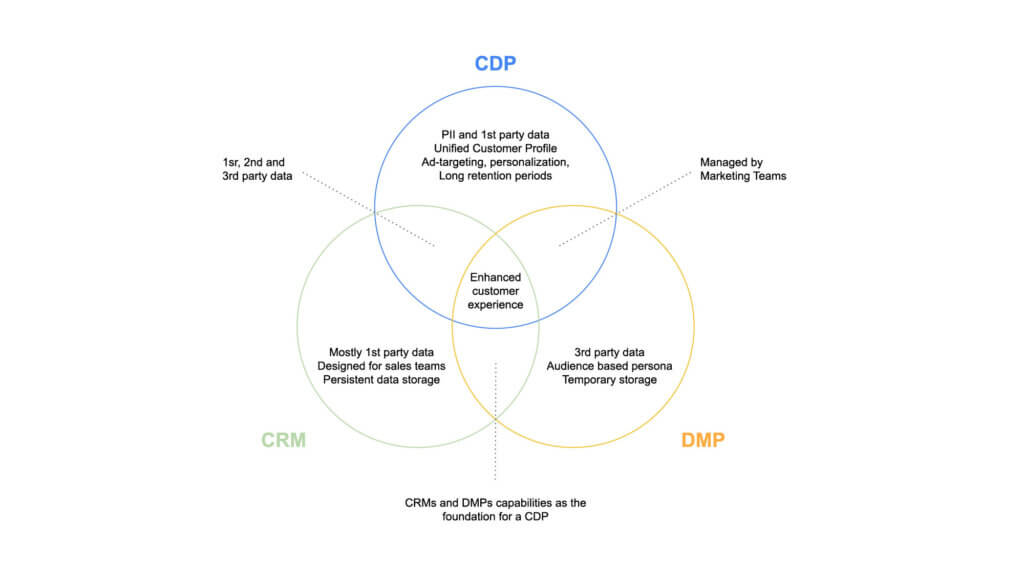
A new approach to empowering marketing heroes
Tinyclues is a company that specializes in empowering marketers to drive sustainable engagement from their customers and generate additional revenue, without damaging customer equity. The company was founded in 2010 on a simple hunch: B2C marketing databases contain sufficient amounts of implicit information (data unrelated to explicit actions) to transform the way marketers interact with customers, and a new class of algorithms based on Deep Learning (sophisticated machine learning that mimics the way humans learn) holds the power to unlock this data’s potential. Where other players in the space have historically relied – and continue to rely – on a handful of explicit past behaviors and more than a handful of assumptions, Tinyclues’ predictive engine uses all of the customer data that marketers have available in order to formulate deeply precise models, down even to the SKU level. Tinyclues’ algorithms are designed to detect changes in consumption patterns in real-time, and adapt predictions accordingly.
This technology allows marketers to find precisely the right audiences for any offer during any timeframe, increasing engagement with those offers and, ultimately, revenue; additionally, marketers are able to increase campaign volume while decreasing customer fatigue and opt-outs, knowing that audiences are receiving only the most relevant messages. Tinyclues’ technology also reduces time spent building and planning campaigns by upwards of 80%, as valuable internal resources can be diverted away from manual audience-building.
Google Cloud’s Data Platform, spearheaded by BigQuery, provides a serverless, highly scalable, and cost-effective foundation to build this next generation of CDPs.
Tinyclues Architecture:
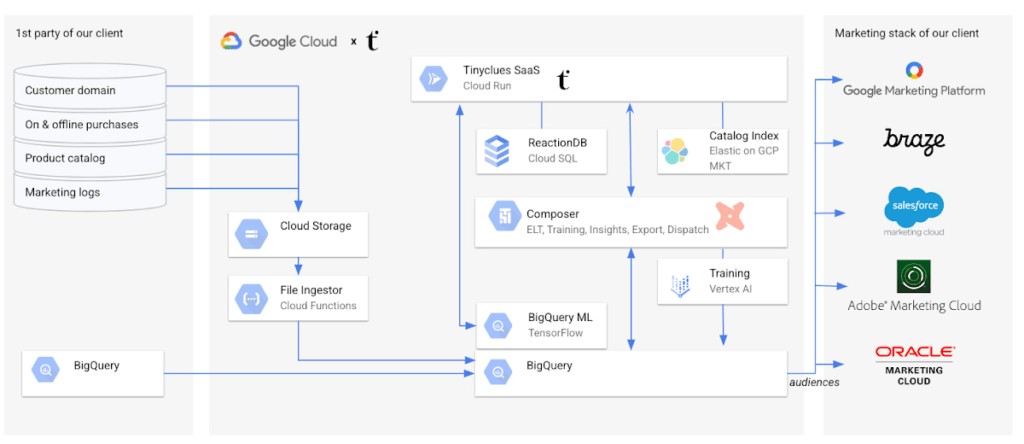
To enable this scalable solution for clients, Tinyclues receives purchase and interaction logs from clients in addition to product and user tables. In most cases, this data is already in the client’s BigQuery instance, in which case they can be easily shared with Tinyclues utilizing BigQuery authorized views.
In cases where the data is not in BigQuery, flat files are sent to Tinyclues via GCS and are ingested in the client’s data set via a lightweight Cloud Function. The orchestration of all pipelines is implemented via Cloud Composer (Google’s managed Airflow). The transformation of data is accomplished by utilizing simple select statements in the Data Built Tool (DBT), which is wrapped inside an airflow DAG that powers all data normalization and transformations. There are several other DAGs to fulfill more functionalities, including:
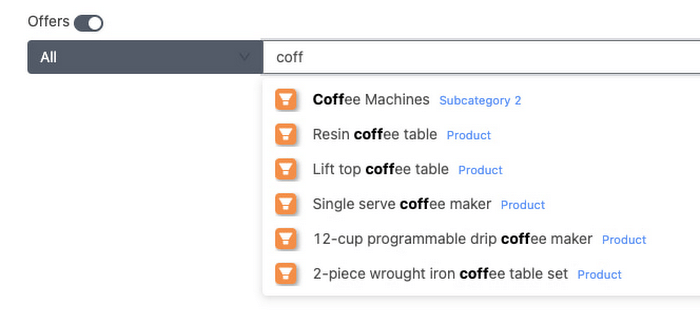
- Indexing the product catalog on Elastic Cloud (Elasticsearch managed service) on GCP to provide auto-complete search capabilities to TCs clients as shown below:
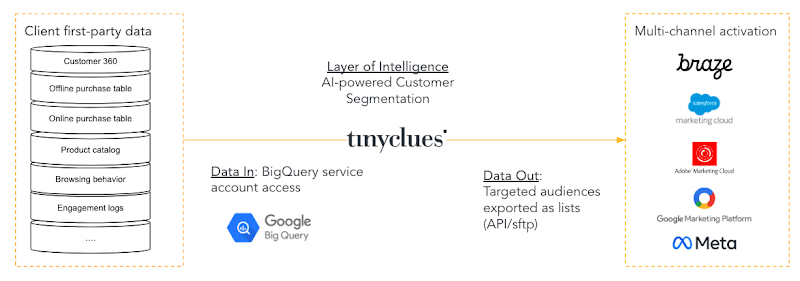
- The export of Tinyclues-powered audiences to the clients’ activation channels, whether they are using SFMC, Braze, Adobe, GMP, or Meta.
Tinyclues AI/ML Pipeline powered by Google Vertex AI
TCs ML Training pipelines are used to train models that calculate propensity scores. They are composed using Airflow DAGs, powered by Tensorflow & Vertex AI Pipelines. BigQuery is used natively, without data movement, to perform as much feature engineering as possible in-place.
TC uses the TFX library to run ML Pipelines in Vertex AI. Building on top of Tensorflow as their main deep learning framework of choice due to its maturity, open source platform, scalability and support for complex data structures (Ragged and Sparse Tensors).
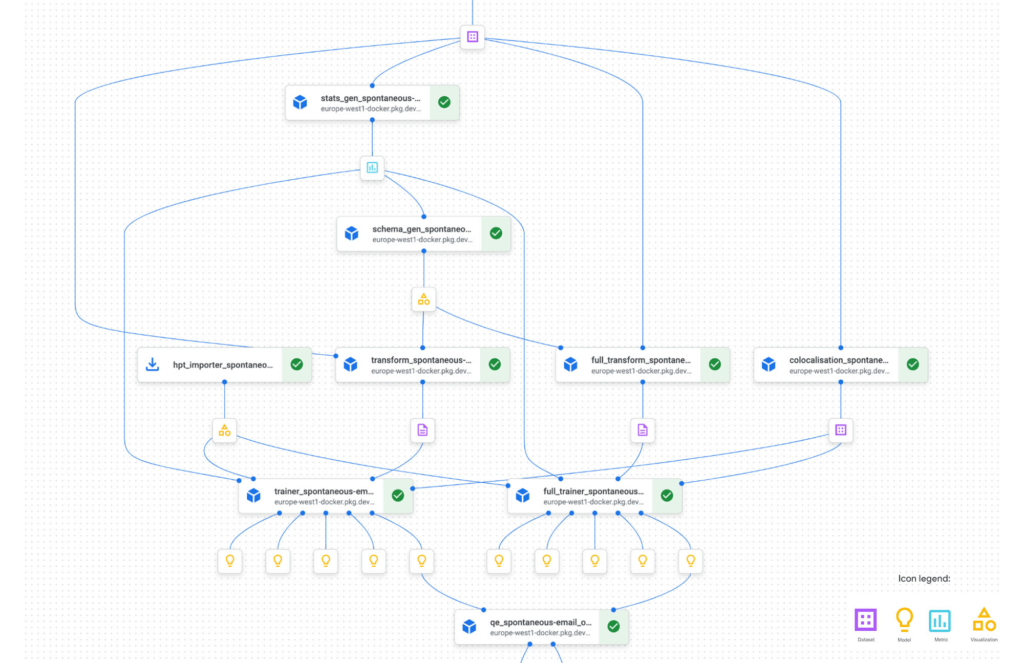
Below is a partial example of TC’s Vertex AI Pipeline graph, illustrating the workflow steps in the training pipeline. This pipeline allows for the modularization & standardization of functionality into easily manageable building blocks. These blocks are composed of TFX components (TC reuses most of the standard components in addition to customizing some such as a proprietary implementation of the Evaluator to compute both ML Metrics (which is part of the standard implementation) but also more Business Metrics like Overlap of clickers etc. The individual components/steps are chained with DSL to form a pipeline that is modular and easily orchestrated or updated as needed.
With the trained Tensorflow models available in GCS, TCs exposes these in BigQuery ML (BQML) to enable their clients to score millions of users for their propensity to buy X or Y within minutes. This would not be possible without the power of BigQuery and also frees TC from previously experienced scalability issues.
As an illustration, TC has the need to score thousands of topics among millions of users. This used to take north of 20 hours on their previous stack, and now takes less than 20 minutes thanks to the optimization work that TC has implemented in their custom algorithm and the sheer power of BQ to scale to any workload accordingly.
Data Gravity: Breaking the Paradigm – Bringing the Model to your Data
BQML enables TC to call pre-trained TensorFlow models within an SQL environment, thus avoiding exporting data in and out of BQ using already provisioned BQ serverless processing power. Using BQML removes the layers between the models and the data warehouse and allows them to express the entire inference pipe as a number of SQL requests. TC no longer has to export data to load it into their models. Instead, they are bringing their models to the data.
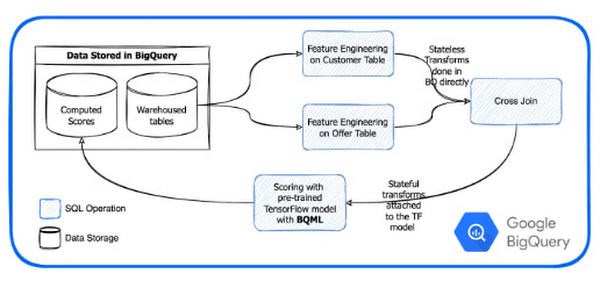
Avoiding the export of data in and out of BQ and the serverless provisioning and start of machines saves significant time. As an example, exporting an 11M lines campaign for a large client previously took 15 min or more to process. Deployed on BQML it now takes minutes with more than half of the processing time attributed to network transfers to our client system.
Inference times in BQML compared to TCs legacy stack:
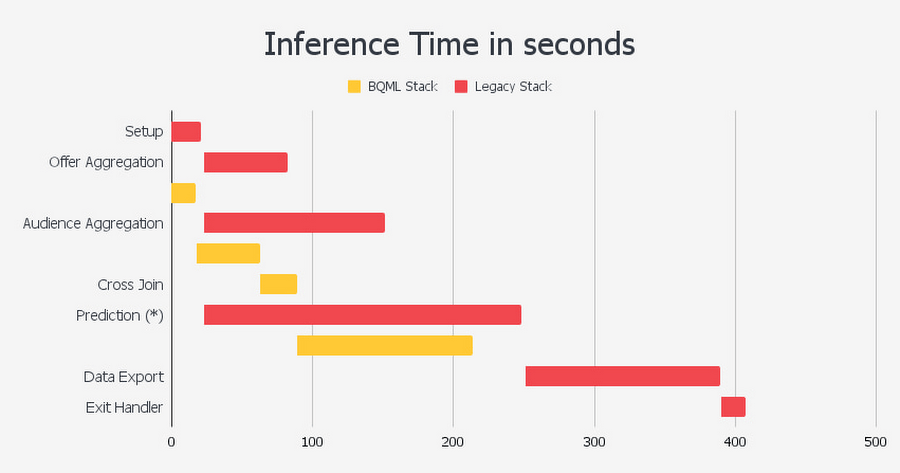
As can be seen, using this approach enabled by BQML, the reduction in the number of steps leads to a 50% decrease in overall inference time, improving upon each step of the prediction.
The Proof is in the pudding
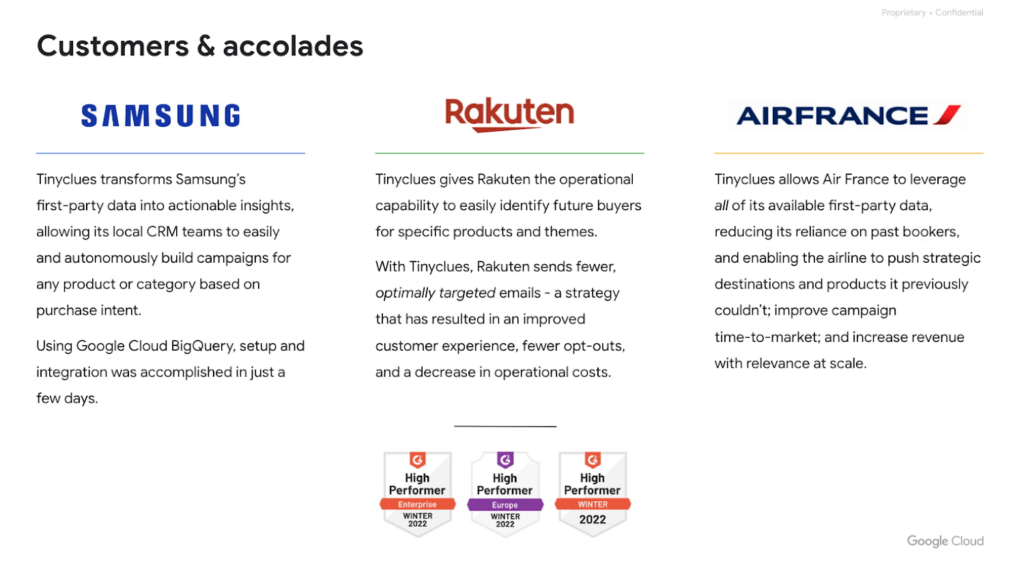
Tinyclues has consistently delivered on its promises of increased autonomy for CRM teams, rapid audience building, superior performance against in-house segmentation, identification of untapped messaging and revenue opportunities, fatigue management, and more, working with partners like Tiffany & Co, Rakuten, and Samsung, among many others.
Conclusion
Google’s data cloud provides a complete platform for building data-driven applications like the headless CDP solution developed by Tinyclues — from simplified data ingestion, processing, and storage to powerful analytics, AI, ML, and data sharing capabilities — all integrated with the open, secure, and sustainable Google Cloud platform. With a diverse partner ecosystem, open-source tools, and APIs, Google Cloud can provide technology companies the portability and differentiators they need to serve the next generation of marketing customers.
To learn more about Tinyclues on Google Cloud, visit Tinyclues. Click here to learn more about Google Cloud’s Built with BigQuery initiative.
We thank the many Google Cloud team members who contributed to this ongoing data platform collaboration and review, especially Dr. Ali Arsanjani in Partner Engineering.
More Relevant Stories for Your Company

Google Cloud Modernized Wisconsin Department of Workforce Development to Process 150K+ Unemployment Claims Per Week
When confronted with challenges, resilient organizations adapt and innovate to address changing customer needs. Through its partnership with Google Cloud, the Wisconsin Department of Workforce Development exemplifies this evolutionary approach. Just a few months ago, challenges created by the antiquated unemployment insurance (UI) system threatened the agency's ability to serve

Maximize Efficiency in Document Extraction Models with Document AI Workbench GA Release
Each day, more documents are created and used across companies to make decisions. However, the value in these documents is primarily expressed as unstructured data, which makes the value difficult and manually intensive to extract and use for business processes. As the number and variety of documents used by businesses

Notebook Executor Feature of Vertex AI Workbench to Schedule Notebooks Ad Hoc or on Recurring Basis
When solving a new ML problem, it’s common to start by experimenting with a subset of your data in a notebook environment. But if you want to execute a long-running job, add accelerators, or run multiple training trials with different input parameters, you’ll likely find yourself copying code over to

Smart Reply: How the AI-augmented Chat Helps Scale Google’s Tech Support Operations
As Googlers transitioned to working from home during the pandemic, more and more turned to chat-based support to help them fix technical problems. Google's IT support team looked at many options to help us meet the increased demand for tech support quickly and efficiently. More staff? Not easy during a
