





Notebook Executor Feature of Vertex AI Workbench to Schedule Notebooks Ad Hoc or on Recurring Basis

4445
Of your peers have already read this article.
3:00 Minutes
The most insightful time you'll spend today!
When solving a new ML problem, it’s common to start by experimenting with a subset of your data in a notebook environment. But if you want to execute a long-running job, add accelerators, or run multiple training trials with different input parameters, you’ll likely find yourself copying code over to a Python file to do the actual computation. That’s why we’re excited to announce the launch of the notebook executor, a new feature of Vertex AI Workbench that allows you to schedule notebooks ad hoc, or on a recurring basis. With the executor, your notebook is run cell by cell on Vertex AI Training. You can seamlessly scale your notebook workflows by configuring different hardware options, passing in parameters you’d like to experiment with, and setting an execution schedule, all via the Console UI or the notebooks API.
Built to Scale
Imagine you’re tasked with building a new image classifier. You start by loading a portion of the dataset into your notebook environment and running some analysis and experiments on a small machine. After a few trials, your model looks promising, so you want to train on the full image dataset. With the notebook executor, you can easily scale up model training by configuring a cluster with machine types and accelerators, such as NVIDIA GPUs, that are much more powerful than the current instance where your notebook is running.
Your model training gets a huge performance boost from adding a GPU, and you now want to run a few extra experiments with different model architectures from TensorFlow Hub. For example, you can train a new model using feature vectors from various architectures, such as Inception, ResNet, or MobileNet, all pretrained on the ImageNet dataset. Using these feature vectors with the Keras Sequential API is simple; all you need to do is pass the TF Hub URL for the particular model to hub.KerasLayer.

Instead of running these trials one by one in the notebook, or making multiples copies of your notebook (inceptionv3.ipynb, resnet50.ipynb, etc) for each of the different TF Hub URLs, you can experiment with different architectures by using a parameter tag. To use this feature, first select the cell you want to parameterize. Then click on the gear icon in the top right corner of your notebook.

Type “parameters” in the Add Tag box and hit Enter. Later when configuring your execution, you’ll pass in the different values you want to test.
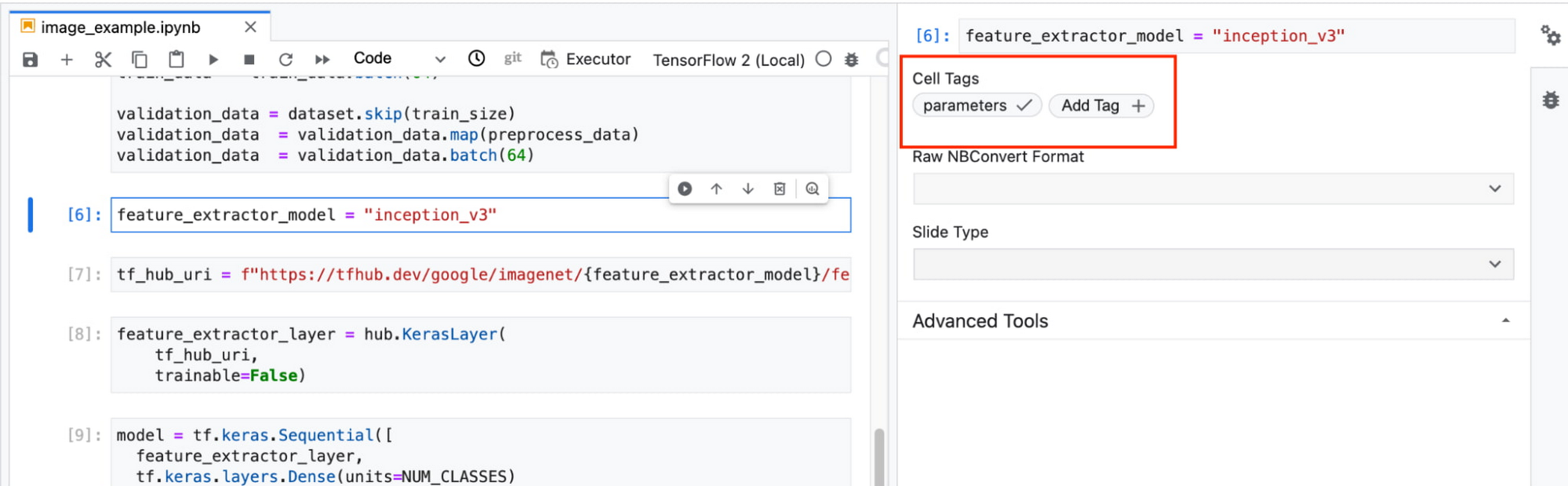
In this example, we create a parameter called feature_extractor_model, and we’ll pass in the name of the TF hub model we want to use when launching the execution. That model name will be substituted into the tf_hub_uri variable, which is then passed to the hub.KerasLayer, as shown in the screenshot above.
After you’ve discovered the optimal model architecture for your use case, you’ll want to track the performance of your model in production. You can create a notebook that pulls the most recent batch of serving data that you have labels for, gets predictions, and computes the relevant metrics. By scheduling these jobs to execute on a recurring basis, you’ve created a lightweight monitoring system that tracks the quality of your model predictions over time. The executor supports your end-to-end ML workflow, making it easy to scale up or scale out notebook experiments written with Vertex AI Workbench.
Configuring Executions
Executions can be configured through the Cloud Console UI or the Notebooks API.
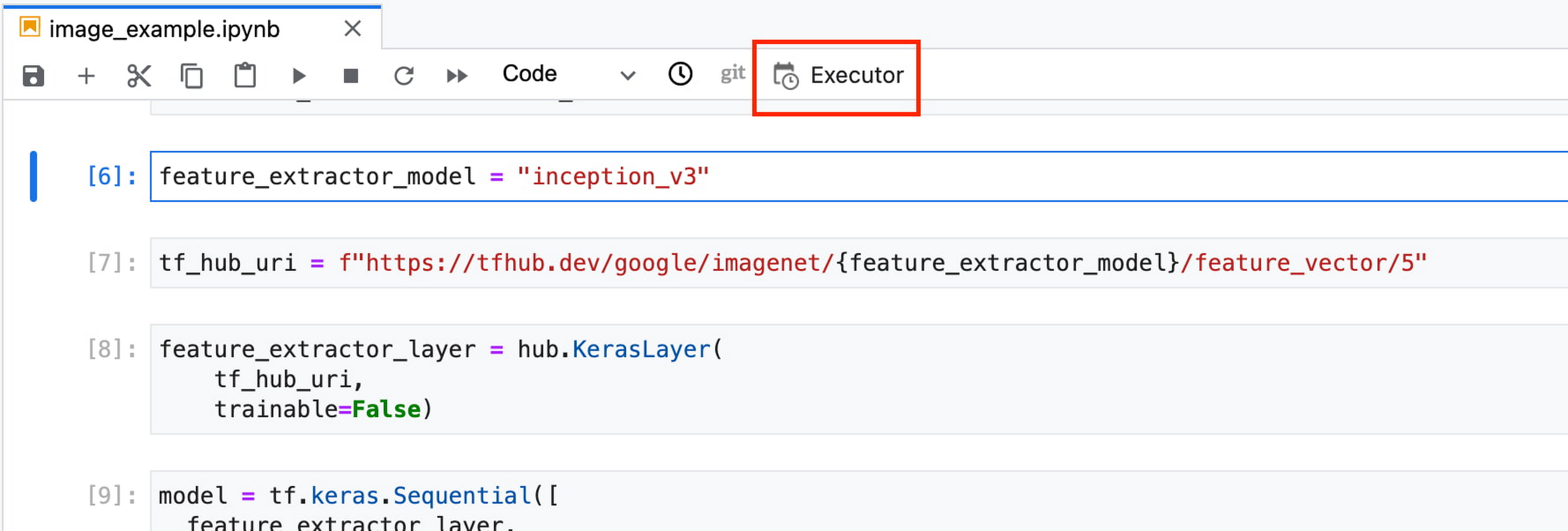
In your notebook, click on the Executor icon.
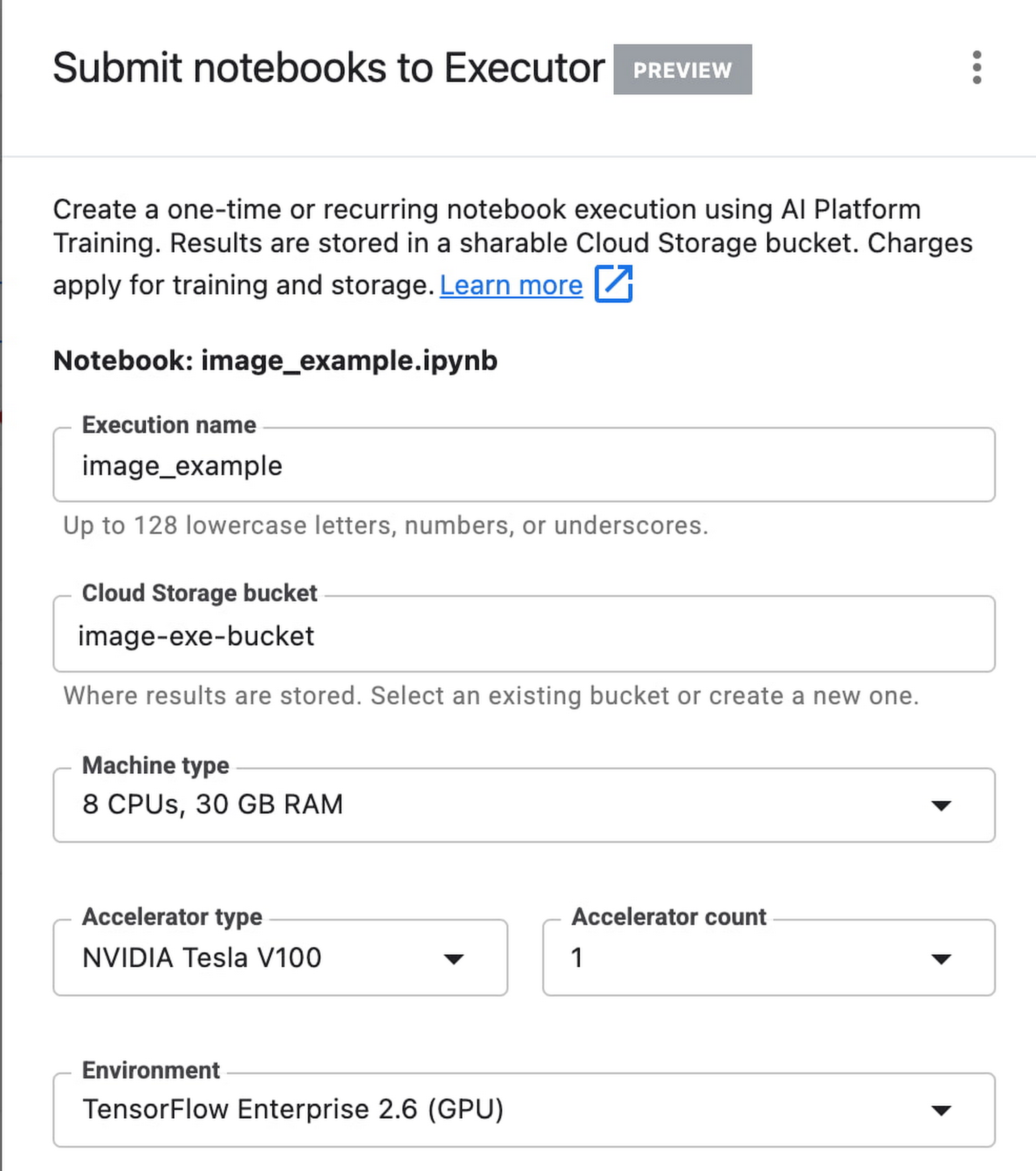
In the side panel on the right specify the configuration for your job, such as the machine type and the environment. You can select an existing image, or provide your own custom docker container image.
If you’ve added parameter tags to any of your notebook cells, you can pass in your parameter values to the executor.

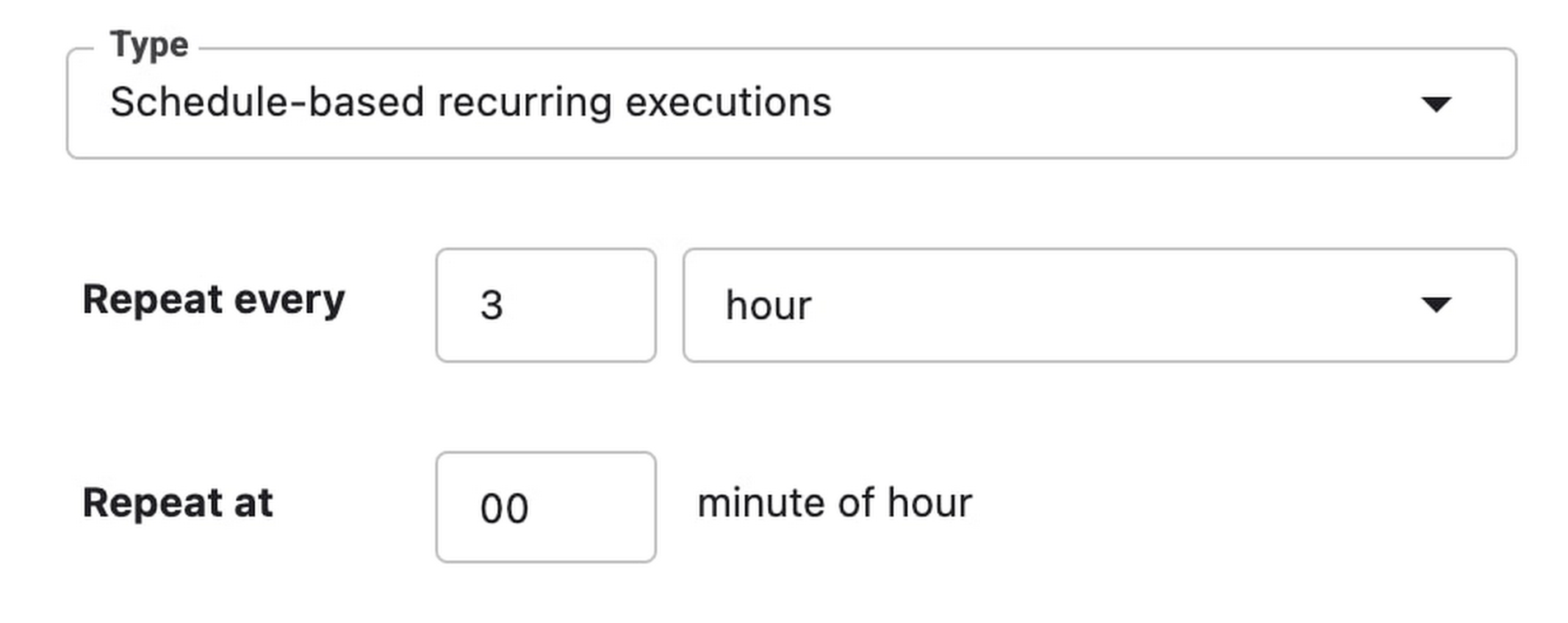
Finally, you can choose to run your notebook as a one time execution, or schedule recurring executions.
Then click SUBMIT to launch your job.
In the EXECUTIONS tab, you’ll be able to track the status of your notebook execution.

When your execution completes, you’ll be able to see the output of your notebook by clicking VIEW RESULT.

You can see that an additional cell was added with the comment # Parameters, that overrides the default value for feature_extractor_model, with the value we passed in at execution time. As a result, the feature vectors used for this execution came from a ResNet50 model instead of an Inception model.
What’s Next?
You now know the basics of how to use the notebook executor to train with a more performant hardware profile, test out different parameters, and track model performance over time. If you’d like to try out an end-to-end example, check out this tutorial. It’s time to run some experiments of your own!
Leverage ML to Spot Anomalies in Real-time Forex Data

3106
Of your peers have already read this article.
6:00 Minutes
The most insightful time you'll spend today!
Let’s say you are a quantitative trader with access to real-time foreign exchange (forex) price data from your favorite market data provider. Perhaps you have a data partner subscription, or you’re using a synthetic data generator to prove value first. You know there must be thousands of other quants out there with your same goal. How will you differentiate your anomaly detector?
What if, instead of training an anomaly detector on raw forex price data, you detected anomalies in an indicator that already provides generally agreed buy and sell signals? Relative Strength Index (RSI) is one such indicator; it is often said that RSI going above 70 is a sell signal, and RSI going below 30 is a buy signal. As this is just a simplified rule, it means there could be times when the signal is inaccurate, such as a currency market correction, making it a prime opportunity for an anomaly detector.
This gives us the following high level components:

Of course, we want each of these components to handle data in real time, and scale elastically as needed. Dataflow pipelines and Pub/Sub are the perfect services for this. All we need to do is write our components on top of the Apache Beam sdk, and they’ll have the benefit of distributed, resilient and scalable compute.
Luckily for us, there are some great existing Google plugins for Apache Beam. Namely, a Dataflow time-series sample library that includes RSI calculations, and a lot of other useful time series metrics; and a connector for using AI Platform or Vertex AI inference within a Dataflow pipeline. Let’s update our diagram to match, where the solid arrows represent Pub/Sub topics.
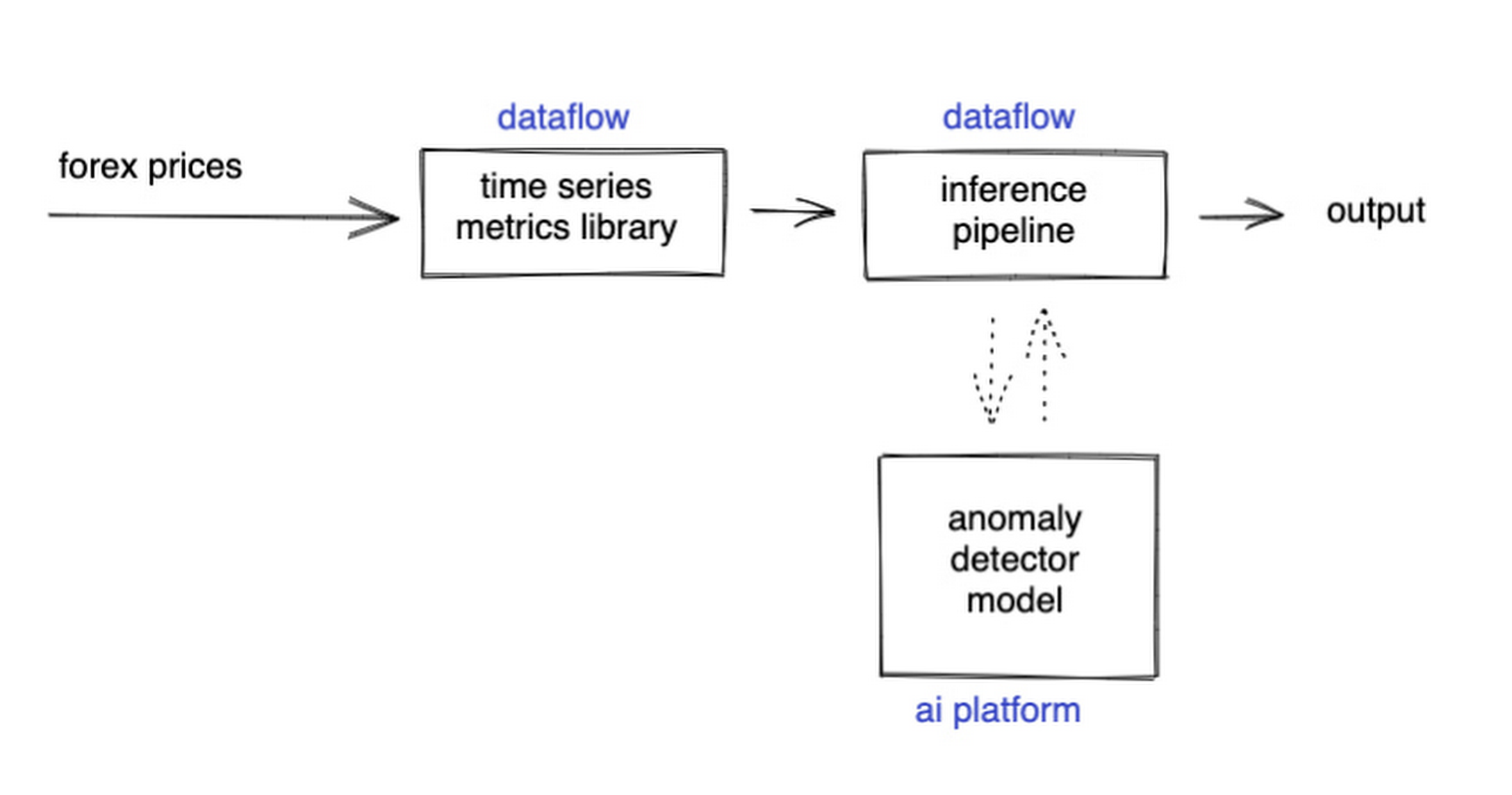
The Dataflow time-series sample library also provides us with gap-filling capabilities, which means we can rely on having contiguous data once the flow reaches our machine learning (ML) model. This lets us implement quite complex ML models, and means we have one less edge case to worry about.
So far we’ve only talked about the real time data flow, but for visualization and continuous retraining of our ML model, we’re going to want historical data as well. Let’s use BigQuery as our data warehouse, and Dataflow to plumb Pub/Sub into it. As this plumbing job is embarrassingly parallelizable, we wrote our pipeline to be generic across data types and share the same Dataflow job, such that compute resources can be shared. This results in efficiencies of scale both in cost savings and time required to scale-up.

Data Modeling
Let’s discuss data formats a bit further here. An important aspect of running any data engineering project at scale is flexibility, interoperability and ease of debugging. As such, we opted to use flat JSON structures for each of our data types, because they are human readable and ubiquitously understood by tooling. As BigQuery understands them too, it’s easy to jump into the BigQuery console and confirm each component of the project is working as expected.
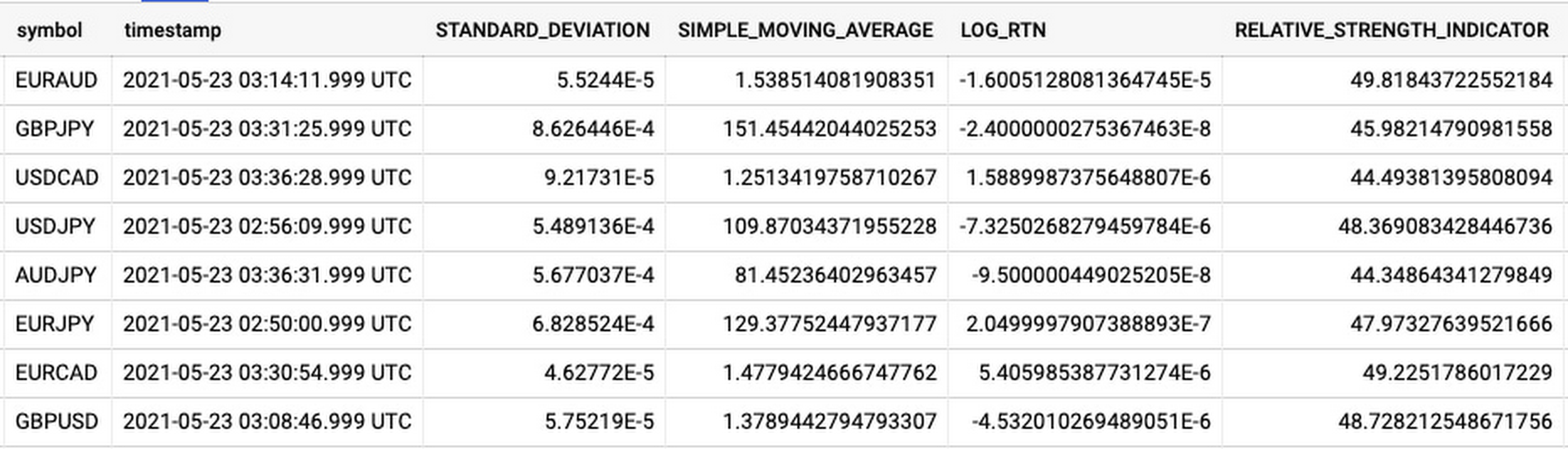
As you can see, the Dataflow sample library is able to generate many more metrics than RSI. It supports generating two types of metrics across time series windows, metrics which can be calculated on unordered windows, and metrics which require ordered windows, which the library refers to as Type 1 metrics and Type 2 metrics, respectively. Unordered metrics have a many-to-one relationship, which can help reduce the size of your data by reducing the frequency of points through time. Ordered metrics run on the outputs of the unordered metrics, and help to spread information through the time domain without loss in resolution. Be sure to check out the Dataflow sample library documentation for a comprehensive list of metrics supported out of the box.
As our output is going to be interpreted by our human quant, let’s use the unordered metrics to reduce the time resolution of our flow of real time data to one per second, or one hertz. If our output was being passed into an automated trading algorithm, we might choose a higher frequency. The decision for the size of our ordered metrics window is a little more difficult, but broadly determines the amount of time-steps our ML model will have for context, and therefore the window of time for which our anomaly detection will be relevant. We at least need it to be larger than our end-to-end latency, to ensure our quant will have time to act. Let’s set it to five minutes.
Data Visualization
Before we dive into our ML model, let’s work on visualization to give us a more intuitive feel for what’s happening with the metrics, and confirm everything we’ve got so far is working. We use the Grafana helm chart with the BigQuery plugin on a Google Kubernetes Engine (GKE) Autopilot cluster. The visualisation setup is entirely config-driven and provides out-of-the-box scaling, and GKE gives us a place to host some other components later on.
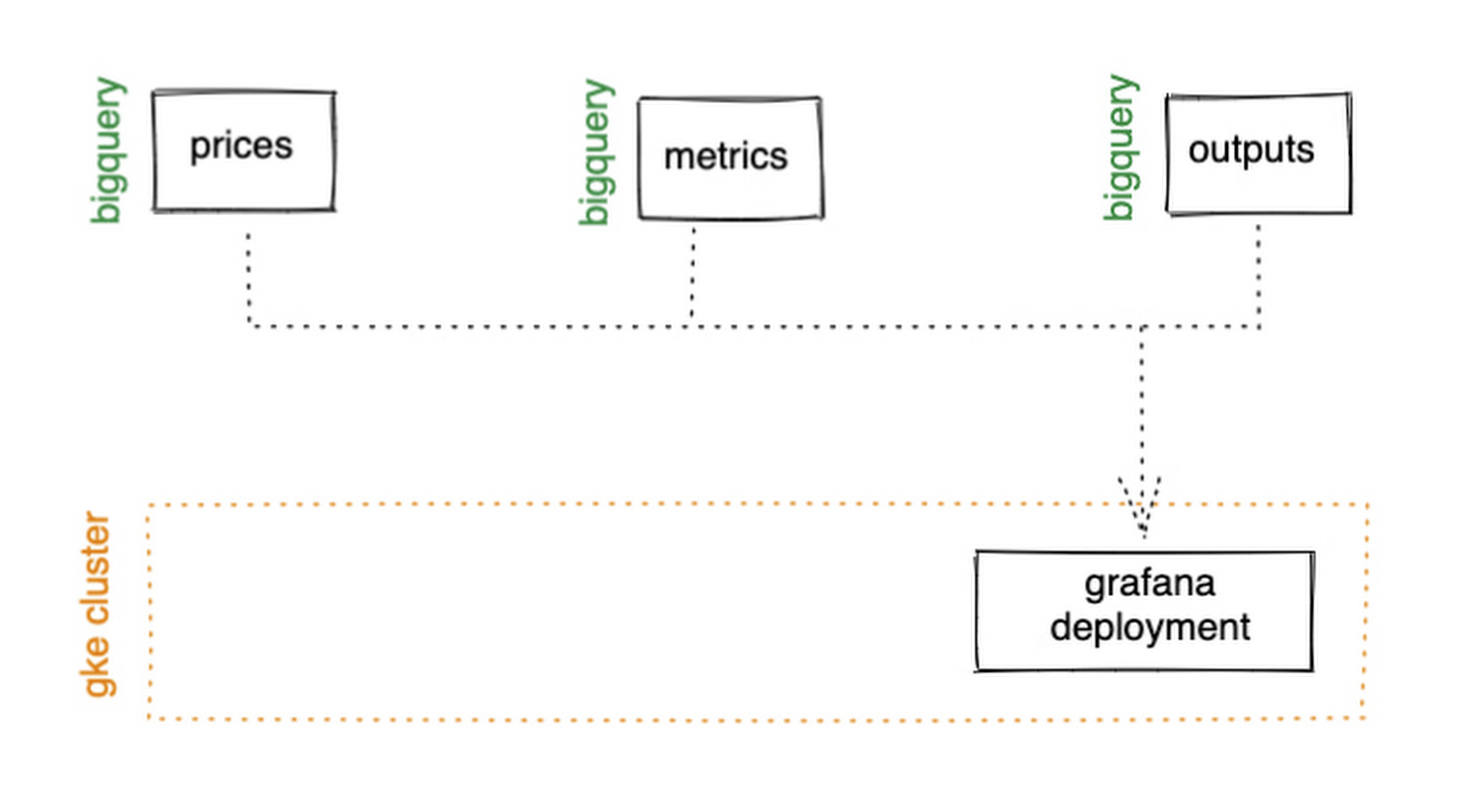
GKE Autopilot has Workload Identity enabled by default, which means we don’t need to worry about passing around secrets for BigQuery access, and can instead just create a GCP service account that has read access to BigQuery and assign it to our deployment through the linked Kubernetes service account.
That’s it! We can now create some panels in a Grafana dashboard and see the gap filling and metrics working in real time.

Building and deploying the Machine Learning Model
Ok, ML time. As we alluded to earlier, we want to continuously retrain our ML model as new data becomes available, to ensure it remains up to date with the current trend of the market. TensorFlow Extended (TFX) is a platform for creating end-to-end machine learning pipelines in production, and eases the process around building a reusable training pipeline. It also has extensions for publishing to AI Platform or Vertex AI, and it can use Dataflow runners, which makes it a good fit for our architecture. The TFX pipeline still needs an orchestrator, so we can host that in a Kubernetes job, and if we wrap it in a scheduled job, then our retraining happens on a schedule too!

TFX requires our data be in the tf.Example format. The Dataflow sample library can output tf.Examples directly, but this tightly couples our two pipelines together. If we want to be able to run multiple ML models in parallel, or train new models on existing historical data, we need our pipelines to only be loosely coupled. Another option is to use the default TFX BigQuery adaptor, but this restricts us to each row in BigQuery mapping to exactly one ML sample, meaning we can’t use recurrent networks.
As neither of the out-of-the-box solutions met our requirements, we decided to write a custom TFX component that did what we needed. Our custom TFX BigQuery adaptor enables us to keep our standard JSON data format in BigQuery and train recurrent networks, and it keeps our pipelines loosely coupled! We need the windowing logic to be the same for both training and inference time, so we built our custom TFX component using standard Beam components, such that the same code can be imported in both pipelines.
def window_elements(pipeline: beam.Pipeline,window_length: int,drop_irregular_windows: bool = True,sort_windows_by: str = "timestamp",):"""Window elements into regular windows of a given size.Assumes elements flow at a fixed rate of 1Hz."""def _sort_windows(window: Iterable[Dict[Text, Any]]) -> List[Dict[Text, Any]]:sorted_window = sorted(window, key=lambda e: e[sort_windows_by])return sorted_windowwindowed_elements = (pipeline| "AddConstantKey" >> beam.Map(lambda item: (0, item))| "WithSlidingWindow">> beam.WindowInto(beam.transforms.window.SlidingWindows(window_length, 1),trigger=beam.transforms.trigger.AfterCount(window_length),accumulation_mode=beam.transforms.trigger.AccumulationMode.DISCARDING,)| "CombineWindow" >> beam.GroupByKey()| "GetValues" >> beam.Values())if drop_irregular_windows:windowed_elements = windowed_elements | "EnforceWindowLengths" >> beam.Filter(lambda w: len(w) == window_length).with_output_types(List[Dict[Text, Any]])if sort_windows_by is not None:windowed_elements = windowed_elements | "Sort" >> beam.Map(_sort_windows).with_output_types(List[Dict[Text, Any]])return windowed_elements
With our custom generator done, we can start designing our anomaly detection model. An autoencoder utilising long-short-term-memory (LSTM) is a good fit for our time-series use case. The autoencoder will try to reconstruct the sample input data, and we can then measure how close it gets. That difference is known as the reconstruction error. If there is a large enough error, we call that sample an anomaly. To learn more about autoencoders, please consider reading chapter 14 from Deep Learning by Ian Goodfellow, Yoshua Bengio, and Aaron Courville.
Our model uses simple moving average, exponential moving average, standard deviation, and log returns as input and output features. For both the encoder and decoder subnetworks, we have 2 layers of 30 time step LSTMs, with 32 and 16 neurons, respectively.
In our training pipeline, we include z score scaling as a preprocessing transformer – which is usually a good idea when it comes to ML. However, there’s a nuance to using an autoencoder for anomaly detection. We need not only the output of the model, but also the input, in order to calculate the reconstruction error. We’re able to do this by using model serving functions to ensure our model returns both the output and preprocessed input as part of its response. As TFX has out-of-the-box support for pushing trained models to AI Platform, all we need to do is configure the pusher, and our (re)training component is complete.
Detecting Anomalies in real time
Now that we have our model in Google Cloud AI Platform, we need our inference pipeline to call to it in real time. As our data is using standard JSON, we can easily apply our RSI rule of thumb inline, ensuring our model only runs when needed. Using the reconstructed output from AI Platform, we are then able to calculate the reconstruction error. We choose to stream this directly into Pub/Sub to enable us to dynamically apply an anomaly threshold when visualising, but if you had a static threshold you could apply it here too.
with beam.Pipeline(options=pipeline_options) as pipeline:(pipeline| "ReadFromPubSub">> beam.io.ReadFromPubSub(topic=input_metrics,timestamp_attribute=timestamp_key,)| "DeserialiseJSON" >> beam.Map(pubsub_serialiser.to_json)| "FilterSymbol" >> beam.Filter(lambda m: m["symbol"] == symbol)| "FilterRSIThreshold">> beam.Filter(lambda m: m["RELATIVE_STRENGTH_INDICATOR"] > rsi_upper_thresholdor m["RELATIVE_STRENGTH_INDICATOR"] < rsi_lower_threshold)| "WindowElements" >> window_elements(window_length)| "RunAutoencoder">> run_windowed_inference(gcp_project_id,model_name,window_length,{f: "FLOAT" for f in feature_metrics},)| "CalcReconError" >> beam.Map(calc_reconstruction_err)| "ToJSON">> beam.Map(lambda re: {"symbol": symbol, "reconstruction_error": re})| "SerialiseJSON" >> beam.Map(pubsub_serialiser.from_json)| "WriteToPubSub">> beam.io.WriteToPubSub(topic=output_alerts,timestamp_attribute=timestamp_key,))
Summary
Here’s what the wider architecture looks like now:

More importantly though, does it fit for our use case? We can plot the reconstruction error of our anomaly detector against the standard RSI buy/sell signal, and see when our model is telling us that perhaps we shouldn’t blindly trust our rule of thumb. Go get ‘em, quant!
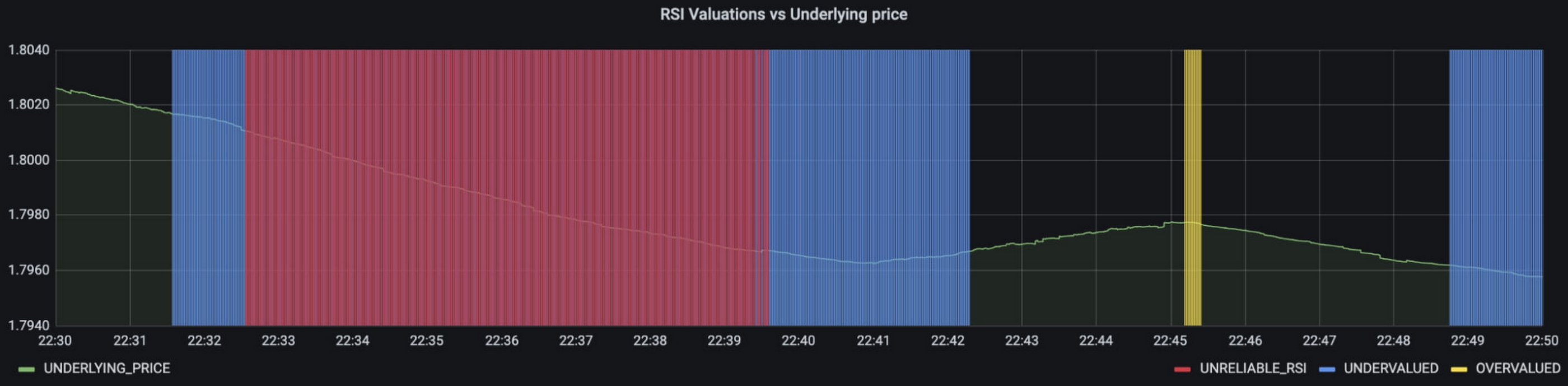
In terms of next steps, there are many things you could do to extend or adapt what we’ve covered. You might want to explore with multi-currency models, where you could detect when the price action of correlated currencies is unexpected, or you could connect all of the Pub/Sub topics to a visualization tool to provide a real-time dashboard.
Give it a try
To finish it all off, and to enable you to clone the repo and set everything up in your own environment, we include a data synthesizer to generate forex data without needing access to a real exchange. As you might have guessed, we host this on our GKE cluster as well. There are a lot of other moving parts – TFX uses a SQL database and all of the application code is packaged into a docker image and deployed along with the infra using Terraform and cloud build. But if you’re interested in those nitty gritty details, head over to the repo and get cloning!
Feel free to reach out to our teams at Google Cloud and Kasna for help in making this pattern work best for your company.
How Google Cloud Helps RecruitMilitary Connect More Veterans to Jobs

3030
Of your peers have already read this article.
3:30 Minutes
The most insightful time you'll spend today!
Editor’s note: Today’s post is by Mike Francomb, Senior Vice President of Technology, RecruitMilitary and a U.S. Army Veteran. RecruitMilitary is a wholly owned subsidiary of Bradley-Morris, Inc. (BMI), the largest military-focused recruiting company in the United States. RecruitMilitary uses Google Cloud Talent Solution to power its job search experience and connect more organizations with veteran talent.
For seven years, I served in the U.S. Army as a Field Artillery Officer, Military Occupation Code 13A. My time in service included a deployment to Operation Desert Shield / Desert Storm with the 24th Infantry Division out of Fort Stewart, GA, and a variety of front line artillery leadership roles, serving as a logistics officer for my unit and as an instructor teaching new officers how to be professional artillerymen. My day-to-day entailed leading teams of highly trained soldiers and managing logistics and materials to help those soldiers perform at a high level in stressful, fast-paced environments. It was my job to ensure we were ready to handle any circumstance.
The hardest part about transitioning out of the Army in May 1996 as a highly trained artillery veteran was the fact that, though I felt prepared for any challenge ahead, I wasn’t sure I was making the right choice. I made a common mistake of transitioning veterans, I jumped right into an entrepreneurial venture. Looking back, I wish I’d had access to resources that displayed career options that would help translate my skills for the corporate world, it would have helped me be better prepared and know what my options were. I wasn’t ready to jump from the Army into running a business, and it was a long two years.
Though my first job out of the Army was challenging, it taught me that I loved the start-up environment, and I joined RecruitMilitary in October 1998 when it was five months old. For the past 21 years, I have been fortunate enough to play an important role in helping RecruitMilitary grow to what it is today, the industry leader in connecting military veterans with organizations.
RecruitMilitary connects organizations with veteran talent through over 30 products and services, all of which are fueled by our job board. Our job board, with over 1,400,000 members, is core to our business. In fact, if we don’t have an active and growing job board population, we don’t have the supply of veteran talent we need to deliver to our clients across our suite of services.
With veteran unemployment at a 50-year low, it became increasingly challenging for RecruitMilitary to grow our veteran job seeker database and keep those veterans actively applying to client jobs. Being a data-driven company, we saw our existing search functionality was no longer producing the desired results for clients and began to receive client feedback about decreased candidate activity.
It was clear to us that we needed to begin adopting machine learning and more advanced search capabilities into our products and operations. The HR Tech space is shifting that way fast, and we want to be at the forefront. As we researched paths to take and learned of Google’s operating philosophy leading with AI, and that they were developing a tool for veteran job search, it made a lot of sense to go with a leader.
When Grow with Google announced its commitment to support veterans, we learned that we could add their military occupation code (MOS) translation feature to our job board through Cloud Talent Solution. This feature lets transitioning service members enter their military occupation codes (MOS, AFSC, NEC, or rating) directly into our search bar to see relevant civilian jobs available at client companies. We’re also using Cloud Talent Solution’s remote work functionality to provide an improved job search experience that allows our customers to make remote work opportunities in the U.S. more discoverable on their career sites. We’re excited about this feature, as it enhances our ability to deliver meaningful jobs to important members of our military community, military spouses, and veterans with limited mobility.
The results of Cloud Talent Solution compared to our previous search are tremendous. Our job seekers are getting a much better experience, and to us that means more veterans are connected to jobs with our clients. We know this because our number of daily job applications has grown by 78 percent. And knowing that we now have a tool that’s going to learn and get better as more of our job seekers use it means that we will reap benefit for work done over time, and so will our clients and veterans who use our job board. That’s tremendous ROI to receive for a lean development staff.
These are just a few of the types of tools I wish I’d had access to when I was considering my transition in 1996. With the help of technology and resources, like those from RecruitMilitary and Grow with Google, people in the military community, including veterans like myself, can prepare for and build meaningful careers.
OCR Engine Upgrade: Document AI Introduces 3 New Capabilities

2493
Of your peers have already read this article.
2:30 Minutes
The most insightful time you'll spend today!
Documents are indispensable parts of our professional and personal lives. They give us crucial insights that help us become more efficient, that organize and optimize information, and that even help us to stay competitive. But as documents become increasingly complex, and as the variety of document types continues to expand, it has become increasingly challenging for people and businesses to sift through the ocean of bits and bytes in order to extract actionable insights.
This is where Google Cloud’s Document AI comes in. It is a unified, AI-powered suite for understanding and organizing documents. Document AI consists of Document AI Workbench (state-of-the-art custom ML platform), Document AI Warehouse (managed service with document storage and analytics capabilities), and a rich set of pre-trained document processors. Underpinning these services is the ability to extract text accurately from various types of documents with a world-class Document Optical Character Recognition (OCR) engine.
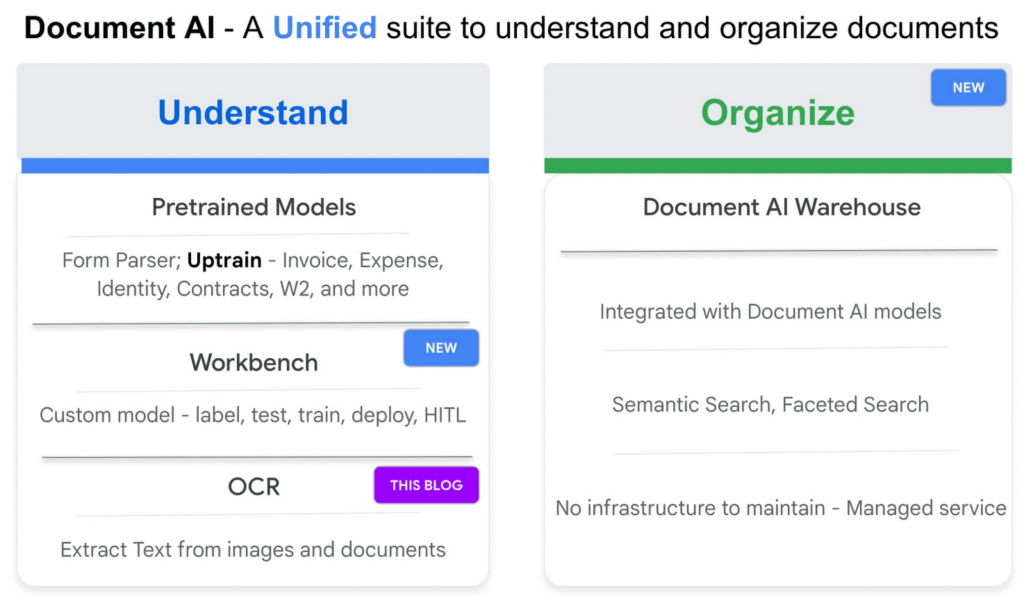
Google Cloud’s Document AI OCR takes an unstructured document as input and extracts text and layout (e.g., paragraphs, lines, etc.) from the document. Covering over 200 languages, Document AI OCR is powered by state-of-the-art machine learning models developed by Google Cloud and Google Research teams.
Today, we are pleased to announce three new OCR features in Public Preview that can further enhance your document processing workflows.
1. Assess page-level quality of documents with Intelligent Document Quality (IDQ)
With Document AI OCR, Google Cloud customers and partners can programmatically extract key document characteristics – word frequency distributions, relative positioning of line items, dominant language of the input document, etc. – as critical inputs to their downstream business logic. Today, we are adding another important document assessment signal to this toolbox: Intelligent Document Quality (IDQ) scores.
IDQ provides page-level quality metrics in the following eight dimensions:
- Blurriness
- Level of optical noise
- Darkness
- Faintness
- Presence of smaller-than-usual fonts
- Document getting cut off
- Text spans getting cut off
- Glares due to lighting conditions
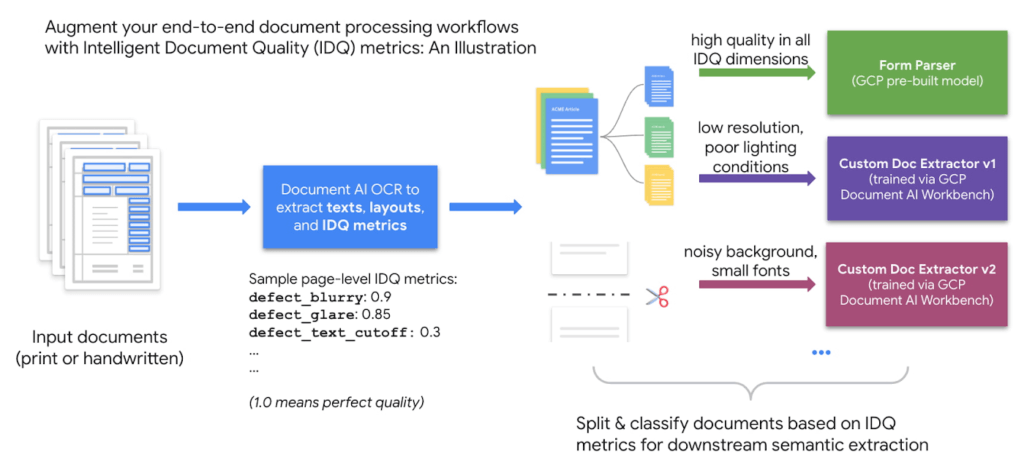
Being able to discern the optical quality of documents helps assess which documents must be processed differently based on their quality, making the overall document processing pipeline more efficient. For example, Gary Lewis, Managing Director of lending and deposit solutions at Jack Henry, noted, “Google’s Document AI technology, enriched with Intelligent Document Quality (IDQ) signals, will help businesses to automate the data capture of invoices and payments when sending to our factoring customers for purchasing. This creates internal efficiencies, reduces risk for the factor/lender, and gets financing into the hands of cash-constrained businesses quickly.”
Overall, document quality metrics pave the way for more intelligent routing of documents for downstream analytics. The reference workflow below uses document quality scores to split and classify documents before sending them to either the pre-built Form Parser (in the case of high document quality) or a Custom Document Extractor trained specifically on lower-quality datasets.
2. Process digital PDF documents with confidence with built-in digital PDF support
The PDF format is popular in various business applications such as procurement (invoices, purchase orders), lending (W-2 forms, paystubs), and contracts (leasing or mortgage agreements). PDF documents can be image-based (e.g., a scanned driver’s license) or digital, where you can hover over, highlight, and copy/paste embedded text in a PDF document the same way as you interact with a text file such as Google Doc or Microsoft Word.
We are happy to announce digital PDF support in Document AI OCR. The digital PDF feature extracts text and symbols exactly as they appear in the source documents, therefore making our OCR engine highly performant in complex visual scenarios such as rotated texts, extreme font sizes and/or styles, or partially hidden text.
Discussing the importance and prevalence of PDF documents in banking and finance (e.g., bank statements, mortgage agreements, etc.), Ritesh Biswas, Director, Google Cloud Practice at PwC, said, “The Document AI OCR solution from Google Cloud, especially its support for digital PDF input formats, has enabled PwC to bring digital transformation to the global financial services industry.”
3. “Freeze” model characteristics with OCR versioning
As a fully managed cloud-based service, Document AI OCR regularly upgrades the underlying AI/ML models to maintain its world-class accuracy across over 200 languages and scripts. These model upgrades, while providing new features and enhancements, may occasionally lead to changes in OCR behavior compared to an earlier version.
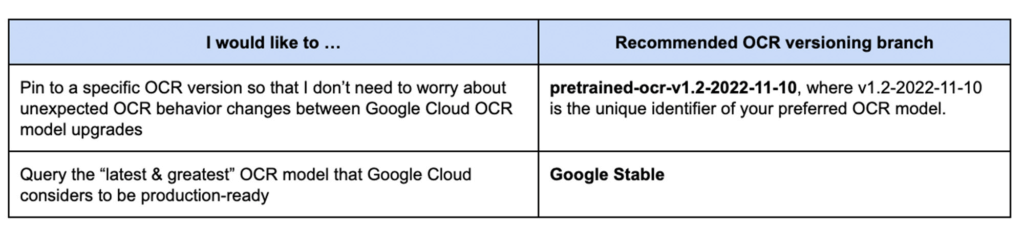
Today, we are launching OCR versioning, which enables users to pin to a historical OCR model behavior. The “frozen” model versions, in turn, give our customers and partners peace of mind, ensuring consistent OCR behavior. For industries with rigorous compliance requirements, this update also helps maintain the same model version, thus minimizing the need and effort to recertify stacks between releases. According to Jaga Kathirvel, Senior Principal Architect at Mr. Cooper, “Having consistent OCR behavior is mission-critical to our business workflows. We value Google Cloud’s OCR versioning capability that enables our products to pin to a specific OCR version for an extended period of time.”
With OCR versioning, you have the full flexibility to select the versioning option that best fits your business needs.
Getting Started on Document AI OCR
Learn more about the new OCR features and tutorials in the Document AI Documentation or try it directly in your browser (no coding required). For more details on what’s new with Document AI, don’t forget to check out our breakout session from Google Cloud Next 2022.
Say Goodbye to Manual W2 & Payslip Processing with Document AI

2502
Of your peers have already read this article.
2:00 Minutes
The most insightful time you'll spend today!
Documents like payslips and W2s are crucial to processes such as employment and income verification for mortgage loans, personal loans, personal finance, and benefits processing. Unfortunately, efficiently extracting data from these documents at scale can be challenging and time-consuming, with many organizations relying on manual examination of documents or automated approaches that don’t adequately capture the document data needed for given tasks. Google Cloud built Document AI to remove these barriers, empowering customers to deploy powerful machine learning models to more quickly process documents, save money, and discover insights. We’re excited to expand Document AI’s capabilities with the recent release of improved pre-trained models for W2s and payslips, built on Document AI Workbench.
Pre-trained models let developers focus on core application logic and leave the complex task of information extraction from the documents to Google’s AI technology. In many cases, the primary driver for automated data extraction is operational efficiency and cost savings, but Document AI can also open new possibilities. For example, a financial services company might use Document AI to enable fully self-serve loan applications on mobile devices, helping the organization to differentiate itself with simple, fast customer experiences.
We’ve heard from customers that more granular entity extraction from W2 and payslip documents is particularly important, with organizations requiring support for a wider variety of layouts and formats. The recent launch of the stable release of these pretrained models addresses these requests.
Here is what is new with W2 parser:
- The parser improves accuracy and entity specificity thanks to the ability to break down long entities such as addresses into fine-grained sub-entities like StreetAddressOrPostalBox, AdditionalStreetAddressOrPostalBox, City, State, and ZIP code.
- It can handle a wider variation of W2 forms, including multi-copies (2,3,4-ups) issued by various payroll vendors. The model is not limited to specific tax years, which means it should be able to process W2 for 2022 or beyond provided there are not significant changes to the format.
- It introduces eight new entities for Box 12 that represent both codes and values, enriching understanding of the various taxable and non-taxable components of the W2 recipient’s income.
Here is what is new with Payslip parser:
- Bonus, commissions, holiday, overtime, regular pay, and vacation are now part of earning_item/earning_this_period and earning_item/earning_ytd. The parser captures types of earnings beyond those categories, and maps them to their respective earning rates, hours, and pay (both for the period and year-to-date). This helps in building a more detailed understanding of the components of the payslip recipient’s income
- The parser now returns year-to-date and current-period taxes and deductions.
- Direct deposits are linked to corresponding bank account numbers.
- The parser now returns page numbers, state and federal tax exemptions, and filing statuses.
While these parsers have become more useful out of the box, with this release, the ability to uptrain makes them easy to modify as new needs arise. Uptraining lets developers further improve the accuracy of these models and extract additional fields with minimal development work. It also lets developers customize existing parsers to support new document types that are similar. For example, the parser is trained on U.S. data and could be uptrained to create a payslip parser for the U.K.
We’re pleased that parsers are already making a difference for customers. Bryan Jackson, CTO at lending automation firm Gateless, said, “High accuracy data extraction is critical to the success of our Smart Underwrite solution, and Document AI provided better results than competitors. Using the latest W2 & Payslip pretrained parsers, we saw a 48% increase in performance on pay stubs and a 15% performance improvement in W2s. The ability to easily uptrain models as new document variations are introduced ensures we continue to deliver optimal outcomes for our customers.”
Additional pre-trained models available as release candidates include parsers for 1040, 1099R, 1120, and 1120S documents. Check for details here. To learn more, talk to a Google Cloud sales executive about how Document AI can help your business, and check out our Document AI breakout session from Google Cloud Next ’22.
ShareChat Builds its Diverse, Hyperlocal Social Network. Thanks to Google Cloud

9253
Of your peers have already read this article.
3:00 Minutes
The most insightful time you'll spend today!
Editor’s note: Today’s guest post comes from Indian social media platform ShareChat. Here’s the story of how they improved performance, app development, and analytics for serving regional content to millions of users using Google Cloud.
How do you create a social network when your country has 22 major official languages and countless active regional dialects? At ShareChat, we serve more than 160 million monthly active users who share and view videos, images, GIFs, songs, and more in 15 different Indian languages. We also launched a short video platform in 2020, Moj, which already supports over 80 million monthly active users.
Connecting with people in the language they understand
As mobile data and smartphones have become more affordable in India, we noticed a large new segment of people, many in rural areas, being welcomed onto the internet. However, many of them didn’t speak English, and when it comes to accessing content and information—language plays a significant role. Instead of joining other social media sites where English reigned supreme, new internet users chose to join language or dialect-specific Whatsapp groups where they felt more comfortable instead.
So, we set out to build a platform where people can share their opinions, document their lives, and make new friends, all in their native language. ShareChat simplifies content and people discovery by using a personalized content newsfeed to deliver language-specific content to the right audience.
Given the high-intensity data and high volume of content and traffic, we rely heavily on IT infrastructure. On top of that, a large number of our users rely on 2G networks to post, like, view, or follow each other. Our platform needs to deliver great experiences to people who are spread out across the country and different networks without any reduction in performance.
The right cloud partner to support future growth
ShareChat was born in the cloud—we already knew how to scale systems to serve a large customer base with our existing cloud provider. But like many companies, we struggled with over-provisioning compute and storage to accommodate unpredictable traffic and avoid running out of storage. With demand rising for local language content and an increase in online interactions in response to the COVID-19 crisis, we realized that we would need a more efficient way to scale dynamically and allocate resources as needed.
Google Cloud was a natural choice for us. We wanted to partner with a technology-first company that would make it easy (and cost-effective) to manage a strong technology portfolio that would allow us to build whatever we wanted. Google is at the forefront of technology innovation and provided everything we needed to build, run, and manage our applications (including creating an efficient DevOps pipeline to fix and release new features quickly).
We had a few issues in mind at the start of discussions with the Google Cloud team, but over time, as we got information and support from them, we realized that these were the partners we wanted in our corner when it came time to tackle our most challenging problems. In the end, we decided to take our entire infrastructure to Google Cloud.
To support millions of users, we deploy and scale using Google Kubernetes Engine. While we analyze our data using a combination of managed data cloud services, such as Pub/Sub for data pipelines, BigQuery for analytics, Cloud Spanner for real-time app serving workloads, and Cloud Bigtable for less-indexed databases. We also rely on Cloud CDN to help us distribute high-quality and reliable content delivery at low latency to our users.
We now use just half the total core consumption of our legacy environment to run ShareChat’s existing workloads.
Google Cloud delivers better outcomes at every level
By moving to Google Cloud, we saw major benefits in several key areas:
Zero-downtime migration for users
At the time of migration, we had over 70 terabytes of data, consisting of 220 tables—some of which were up to 14 terabytes with nearly 50 billion rows. Due to our data’s interdependencies, moving services over one at a time wasn’t an option for us.
Even though we were migrating such large volumes of data, we didn’t want to impact any of our customers. Latency spikes for out-of-sync data might affect message delivery. For instance, if a message or notification was delayed, we didn’t want to risk a bad user experience causing someone to abandon ShareChat.
To prepare for the move, we ran a proof-of-concept cluster for over four months to test database performance in a real-world scenario for handling more than a million queries per second. Using an open-source API gateway, we replicated our legacy data environment into Google Cloud for performance testing and capacity analysis. As soon as we were confident Google Cloud could handle the same traffic as our previous cloud environment, we were ready to execute.
Using wrappers, we were able to migrate without having to change anything in our existing application code. The entire migration of 60 million users to Google Cloud took five hours—without any data loss or downtime. Today, ShareChat has grown to 160 million users, and Google Cloud continues to give us the support we need.
Scaling globally to meet unexpected demand
We rely on real-time data to drive everything on ShareChat by tracking everything that goes on in our app—from messages and new groups to content people like or who they follow. Our users create more than a million posts per day, so it’s critical that our systems can process massive amounts of data efficiently.
We chose to migrate to Spanner for its global consistency and secondary index. Unlike our legacy NoSQL database, we could scale without having to rethink existing tables or schema definitions and keep our data systems in sync across multiple locations. It’s also cost-effective for us—moving over 120 tables with 17 indexes into Cloud Spanner reduced our costs by 30%.
Spanner also replicates data seamlessly in multiple locations in real time, enabling us to retrieve documents if one region fails. For instance, when our traffic unexpectedly grew by 500% over just a few days, we were able to scale horizontally with zero lines of code change. We were also launching our Moj video app simultaneously, and we were able to move it to another region without a single issue.
Simplifying development and deployment
On average, we experience about 80,000 requests per second (RPS) –nearly 7 billion RPS per day. That means daily push notifications sent out to the entire user base about daily trending topics can often result in a spike of 130,000 RPS in just a few seconds.
Instead of over-provisioning, Google Kubernetes Engine (GKE) enables us to pre-scale for traffic spikes around scheduled events, such as holidays like Diwali, when millions of Indians send each other greetings.
Migrating to GKE has also enabled us to adopt more agile ways of work, such as automating deployment and saving time with writing scripts. Even though we were already using container-based solutions, they lacked transparency and coverage across the entire deployment funnel.
Kubernetes features, such as sidecar proxy, allows us to attach peripheral tasks like logging into the application without requiring us to make code changes. Kubernetes upgrades are managed by default, so we don’t have to worry about maintenance and stay focused on more valuable work. Clusters and nodes automatically upgrade to run the latest version, minimizing security risks and ensuring we always have access to the latest features.
Low latency and real-time ML predictions
Even though many of our users may be accessing ShareChat outside of metropolitan areas, it doesn’t mean they’re more patient if the app loads slowly or their messages are delayed. We strive to deliver a high-performance experience, regardless of where our users are.
We use Cloud CDN to cache data in five Google Cloud Point of Presence (PoP) locations at the edge in India, allowing us to bring content as close as possible to people and speeding up load time. Since moving to Cloud CDN, our cache hit ratio has improved from 90% to 98.5%—meaning our cache can handle 98.5% of content requests.
As we expand globally, we’d like to use machine learning to reach new people with content in different languages. We want to build new algorithms to process real-time datasets in regional languages and accurately predict what people want to see. Google Cloud gives us an infrastructure optimized to handle compute-intensive workloads that will be useful to us both now—and in the future.
The confidence to build the best platform
Our current system now performs better than before we migrated, but we are continuously building new features on top of it. Google’s data cloud has provided us with an elegant ecosystem of services that allows us to build whatever we want, more easily and faster than ever before.
Perhaps the biggest advantage of partnering with Google Cloud has been the connection we have with the engineers at Google. If we’re working to solve a specific problem statement and find a specific solution in a library or a piece of code, we have the ability to immediately connect with the team responsible for it.
As a result, we have experienced a massive boost in our confidence. We know that we can build a really good system because we not only have a good process in place to solve problems—we have the right support behind us.
More Relevant Stories for Your Company

Google is a Leader in the 2019 Gartner Magic Quadrant for Data Management Solutions for Analytics
As organizations continue to produce vast quantities of data, they increasingly need platforms that allow them to analyze, store, and extract meaningful insights from that data. And research from analyst firms like Gartner offer an important way for organizations to evaluate and compare cloud data warehouse providers. Earlier this year,


Creating Value With the Breadth and Depth of AI Platform
Watch Craig Wiley, Director of Product Management - Google Cloud, as he breaks down and simplifies AI for enterprises and the adoption of AI. “As I think about AI, fundamentally AI only does two things. One it helps you grow your market, increase subscribership, increase users, increase their spend or

3 AI Tools You Can Deploy Immediately
AI has the power to revolutionize every industry—from retail to agriculture, and education to healthcare. Yet many businesses still haven’t begun to adopt AI. There are a number of factors, including the need for specialized talent and hardware, the right types and quantities of data for training and refining machine

Easy Access to Stream Analytics with Google Cloud
By 2025, more than a quarter of the data created in the global datasphere will be real-time in nature. “This is important because in the real-time world, “the window of opportunity diminishes and goes away really fast. You want to be able to respond to your customer needs, their asks,
