






3700
Of your peers have already downloaded this article
5:23 Minutes
The most insightful time you'll spend today!
Cadbury Worldwide Hide: How the Chocolatier Made the Hiding Eggs Ritual Possible with Google Maps

3707
Of your peers have already read this article.
3:00 Minutes
The most insightful time you'll spend today!
Editor’s note: Today’s post is a Q&A with the VCCP London and VCCP CX team. VCCP London conceived of and built the Cadbury Worldwide Hide platform using Google Maps Platform as a way to get consumers ‘hiding’ eggs and engaging with loved ones during a time when they could not be physically together.
How did the team come up with the idea for the ‘Cadbury Worldwide Hide’?
VCCP London is the agency of record for Cadbury both locally in the UK and centrally with the Global team. So, when Cadbury briefed us in May for their Easter 2021 campaign, they wanted us to come up with a creative way to encourage people to hide eggs and get consumers excited about interacting with loved ones. At the time, the pandemic was constantly changing, and it was looking like we were going to continue to be in lock-down for the foreseeable future, into the Easter season.
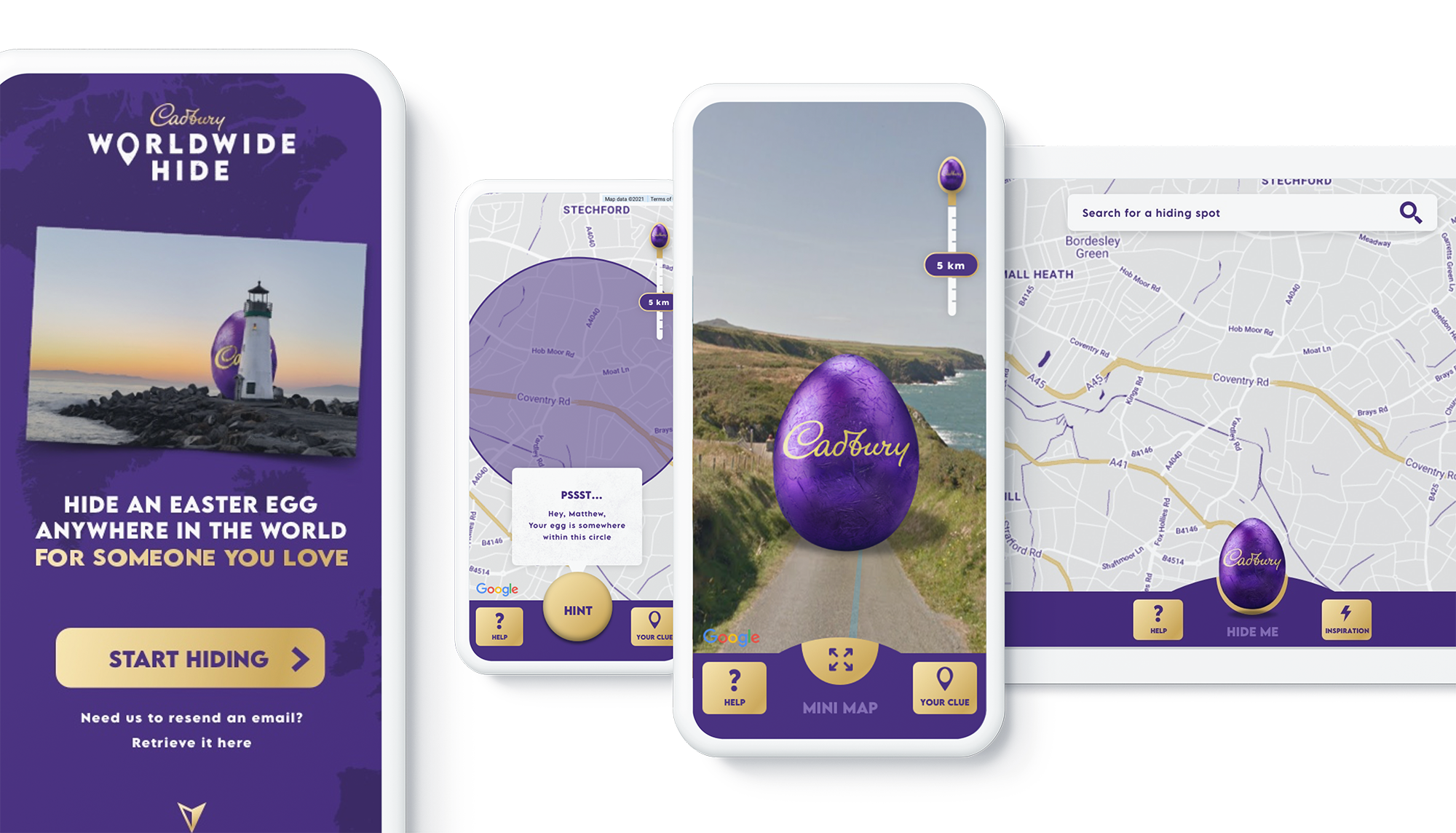
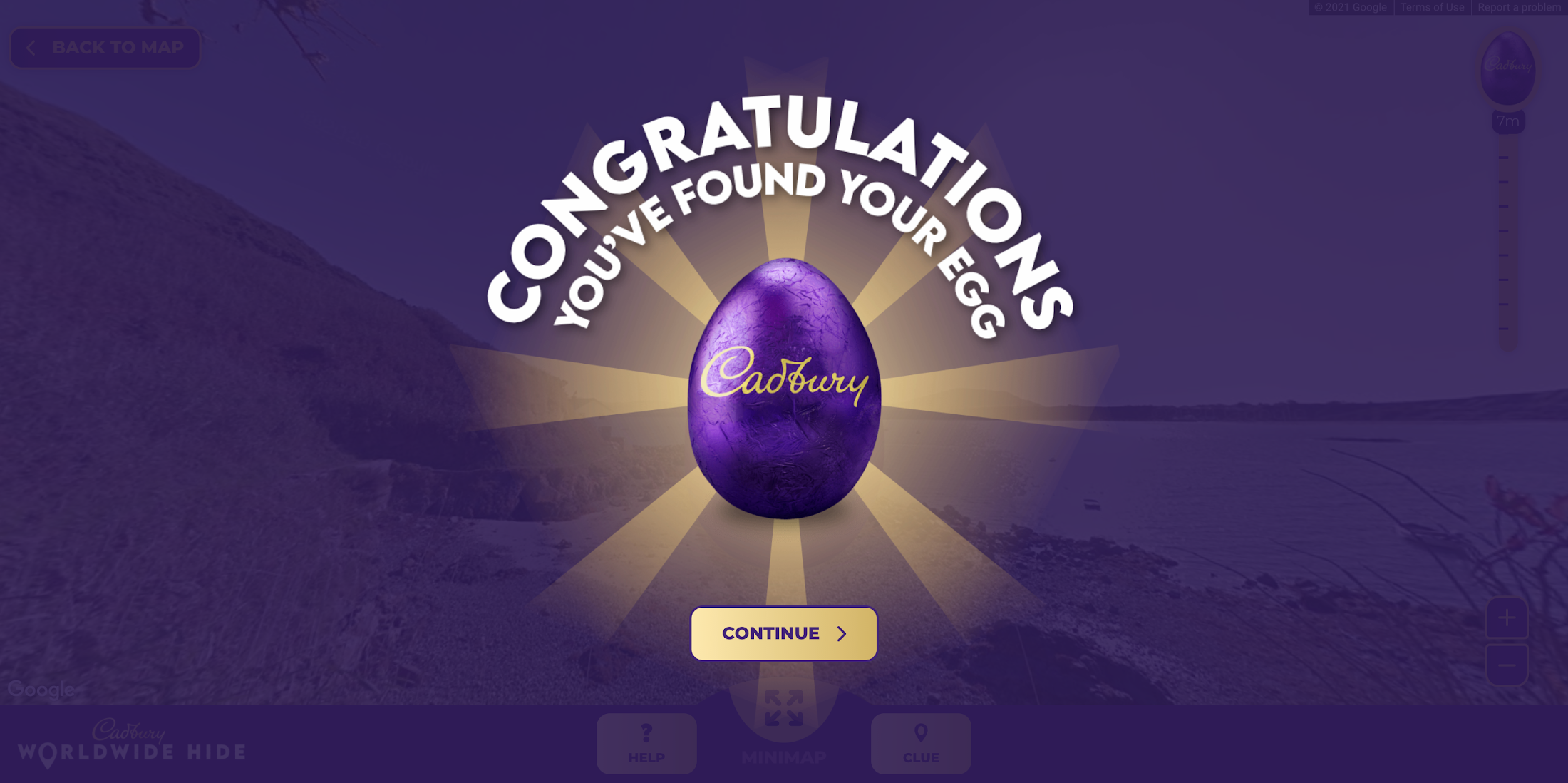
We then came up with an idea: wouldn’t it be really cool if somehow you could still hide a real Easter egg for someone you love, but do it virtually. And then once it’s found, that real egg could be delivered to the seeker’s home. With the use of some creativity and technology, we brought this idea to life. The experience we developed allowed our users to purchase a real Cadbury Easter Egg, hide it virtually on the map in a special location, then write the recipient a personalized clue for him to find the egg. Once the seeker found the egg, they would receive a real, physical egg the hider bought for her delivered to her home.
We wanted it to be a truly meaningful one-to-one connection, to bring back some lovely memories for people, and to allow a real chocolate egg to be hidden for a loved one no matter where they were.

Why was this important to Cadbury?
Generosity is at the heart of Cadbury’s brand, and Easter is our opportunity to show that ‘there’s a glass and a half in everyone’. As we enter the second year of our campaign ‘Show you care, hide it’, we are flipping the Easter ritual on its head and showing that the generous act is in hiding an egg for someone you love.
Physical connection has been restricted by the global pandemic and that’s why this year’s Easter campaign sets out to connect people across the UK through the power of generosity.
Tell us a little bit about the technical side of the project. Which Google Maps Platform products did you use to create the user experience?
The Cadbury Worldwide Hide launched across 4 markets (UK, IE, AU, NZ) simultaneously. Integration with regional e-commerce and CRM partners brought the activation into the real world with chocolate eggs being delivered throughout the campaign as seekers found them.
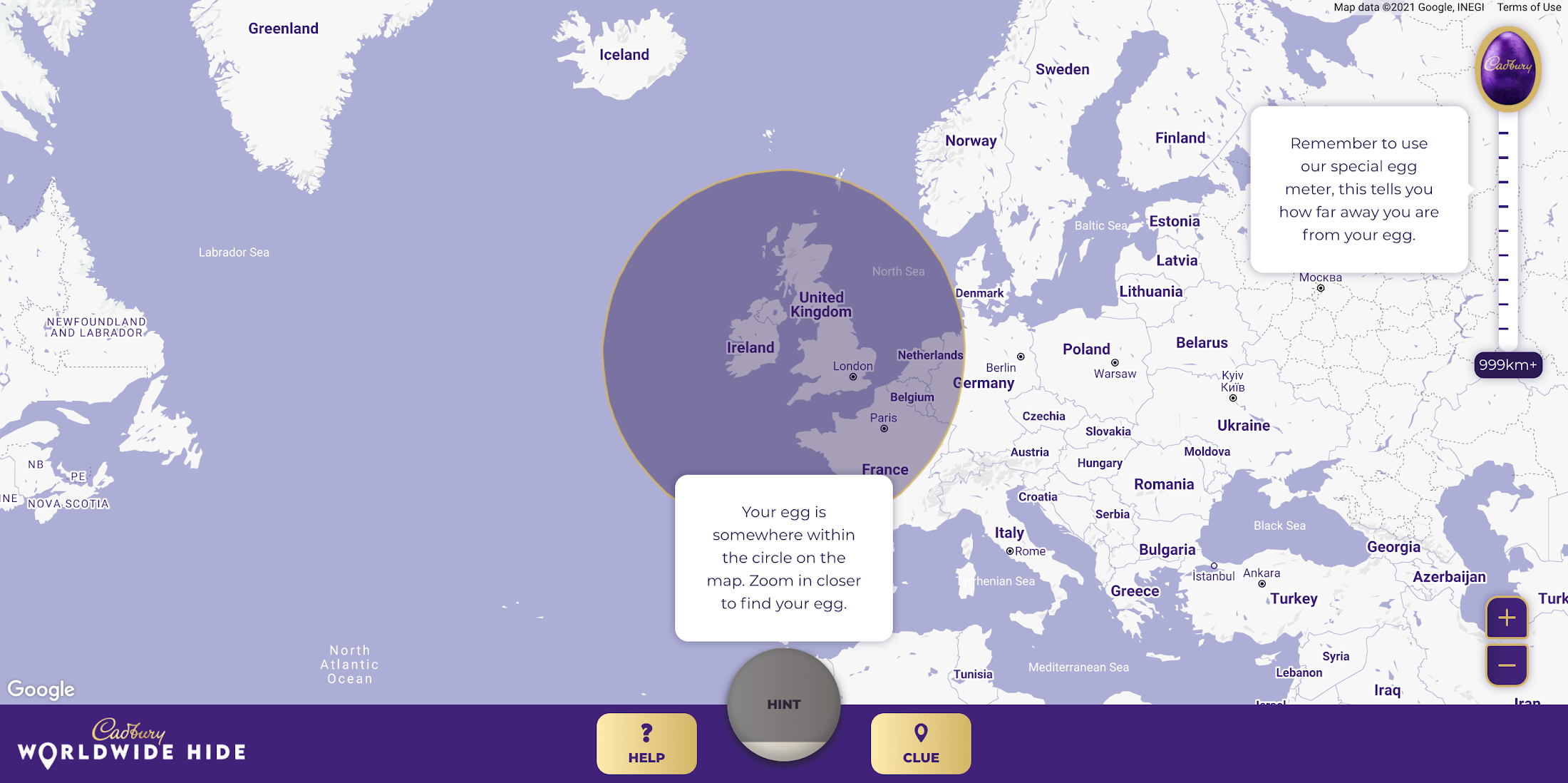
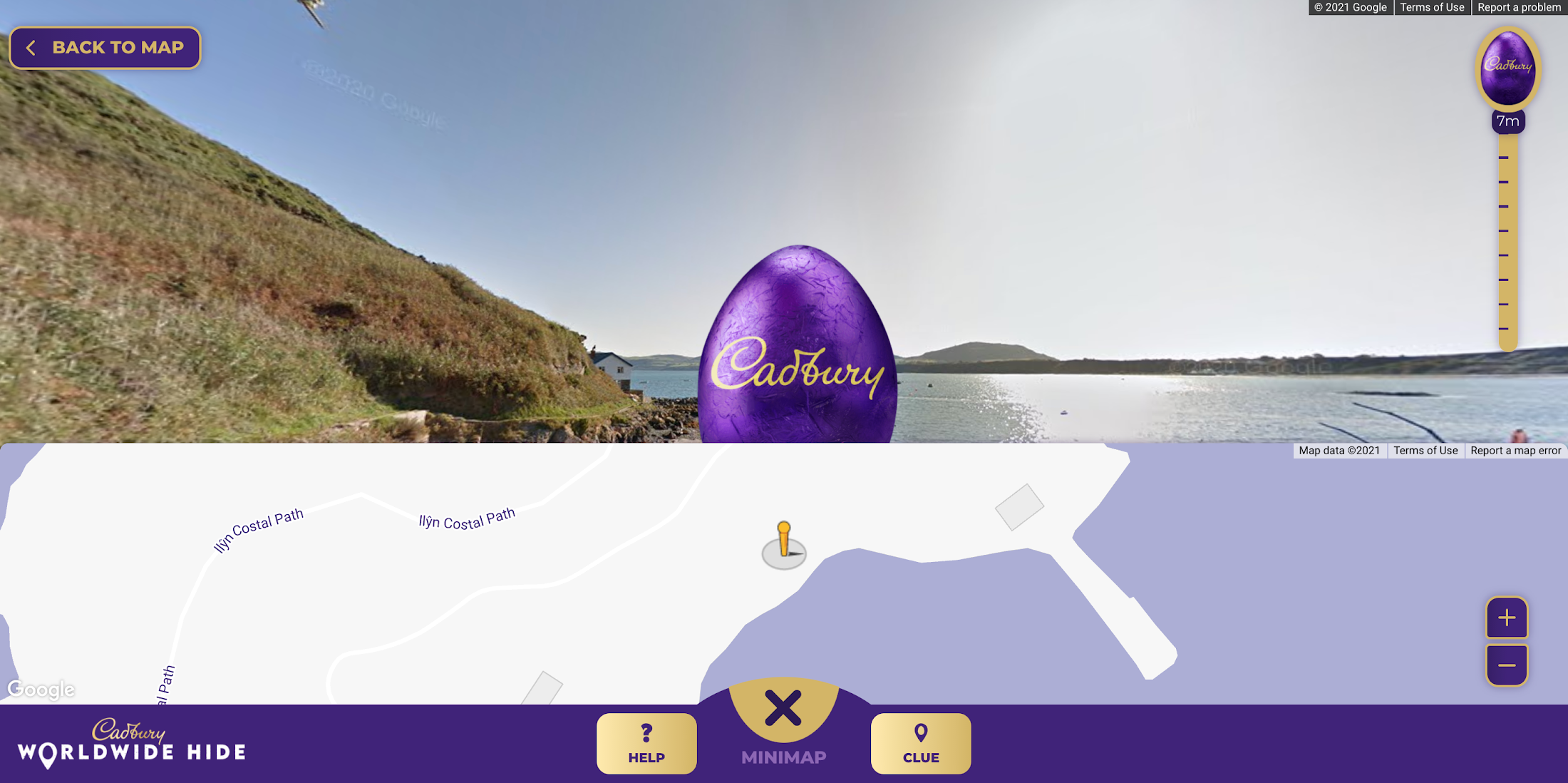
Providing an engaging map experience to our users was key to the execution and by leveraging the Google Maps interface consumers already use on a daily basis, we were able to focus on our core campaign message. We built the platform using both the Maps Javascript API to render the 2D maps and the Street View API, which allowed users to hide their egg anywhere in the world for their loved one to find. We also used Place Autocomplete powered search allowing users to search for their favorite location while contextual hints kept hiders on track. Seekers were aided with a distance meter and hints system if they got stuck. Our Design and Engineering team used Google Maps Platform Cloud-based maps styling to customize the map.
To get the campaign to as many people as possible we prioritized accessibility throughout the site, from screen-reader support and relevant tab indexes through to full keyboard shortcuts within the map experience – allowing users to hide (or find!) their egg without ever using a mouse. Real user testing was done throughout the UX, design and development process to ensure best practices were being followed.
How long did it take the VCCP team to build-out the solution?
Discovery to the roll-out of the solution took about 7 months. Our Design and Engineering team started with a 4-week discovery phase in September 2020 where we developed a service blueprint that set the foundations of the project. By visualizing the entire process of a service from start to finish, listing all the activities that happened at each stage, and the different roles, actions, processes and systems involved, the blueprint allowed all stakeholders to align on the solution.
We started iterative cycles of development in November 2020, beginning with UX (prototype for user testing), UI (look and feel and customization of Google Maps using Cloud-based Maps styling), and then kicked off front end and back end development in December. We launched the Cadbury Worldwide Hide platform in early March 2021—just in time for millions of users around the world to enjoy ahead of Easter.
Did you experience any challenges as you developed the experience?
The biggest challenge was actually around adapting to change in plans in response to the desire to launch the platform across more markets than originally intended. During the development phase, we rapidly scaled up to develop the platform for Ireland, Australia and New Zealand in addition to the UK within the same timeframe.
What results were you able to achieve and how did you measure the success of the project?
One week before Easter Sunday, we had sold out of Cadbury Worldwide Hide chocolate eggs. There were over 2.26 million site visits with an average time spent on the platform of almost five minutes. Over 809k virtual eggs were hidden in total and 14.5k real Cadbury Easter eggs bought. The Cadbury Worldwide Hide platform was the number one Mondelēz International website globally, and a couple even used the platform for a marriage proposal!
Would you recommend this type of campaign and user engagement to other B-to-C brands, if so, why?
Direct to consumer capabilities are increasingly important for brands, particularly in the FMCG (Fast Moving Consumer Goods) space. Local lockdowns and restrictions on physical retail have accelerated our adoption of ecommerce. Not only have brands had to adapt quickly, but consumers are beginning to expect direct-to-consumer capabilities from their favorite brands. Cadbury recognized this behavior shift early. What the Cadbury Worldwide Hide did well was to innovate beyond the traditional DTC and ecommerce experience by gamifying the platform and enabling moments of human connection at a time when physical connection was impossible.
What advice would you give to other agencies or brands thinking about creating user experiences with Google Maps Platform?
We learned a great deal taking on this project. Here are just a few highlights:
- Assume anything is possible.
- Our ‘Mobile First’ approach allowed consumers to access the platform from any device with consistent, engaging brand experience.
- Think big and beyond the traditional use of Google Maps and treat it as a foundation platform to build upon.
- Prototype and test early to validate your hypotheses. We created a technical proof of concept which enabled us to test using ‘real’ Google Maps and real people early in our design process.
- Don’t assume everything is accessible to everyone. You may need to build upon the ‘out the box’ functionality to ensure as many people as possible can use your solution.
For more information on Google Maps Platform, visit our website.
Develop for Compute Engine in your IDE with Cloud Code

2812
Of your peers have already read this article.
2:30 Minutes
The most insightful time you'll spend today!
When developing services with Compute Engine, our customizable compute service that lets you create and run virtual machines on Google’s infrastructure, you’ll likely find yourself frequently switching between your code editor, terminal, and the Google Cloud Console.
Cloud Code is a set of IDE plugins for popular IDEs like VS Code and IntelliJ that make it easier to develop applications that use Google Cloud services. And now, Cloud Code makes it easy to develop with Compute Engine by incorporating common workflows with your favorite IDE’s user interface.
Specifically, this new integration between Compute Engine and Cloud Code makes it easier to manage your commonly used virtual machines in the IDE, view details about them, connect to them over SSH, upload your application files to them, and view their logs.
Before you begin
Let’s demonstrate how the new integration works in Cloud Code for VS Code. Install Cloud Code for VS Code, and once installed, open its icon on the activity bar on the left and find “Compute Engine”:
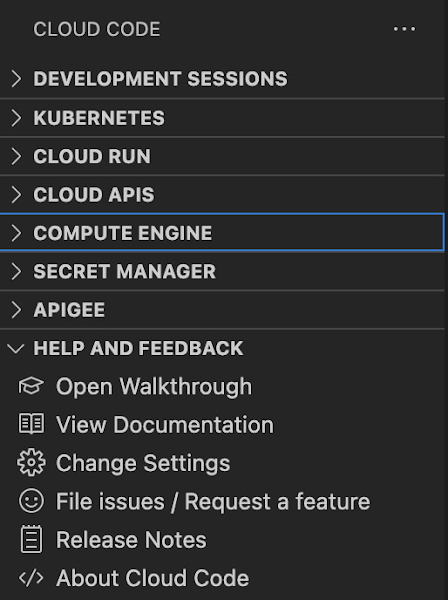
Cloud Code for Jetbrains IDEs (such as IntelliJ) could be installed similarly, and you will find Compute Engine in the list of your IDE tool windows.
View your VMs
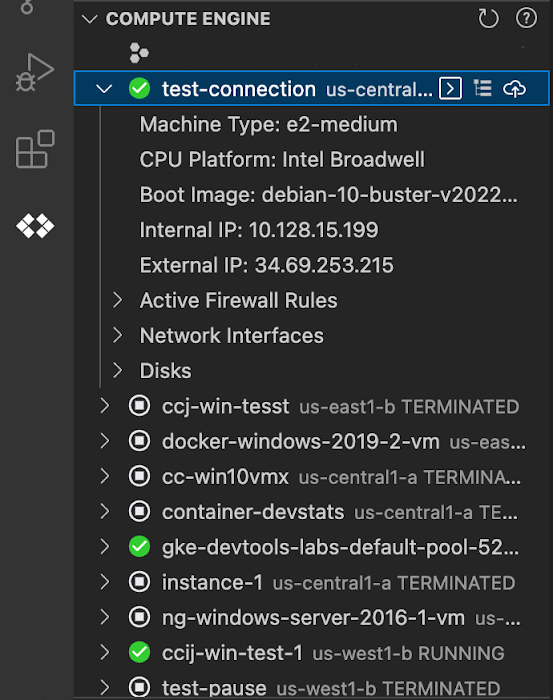
Cloud Code makes it easy to see all relevant VMs in your GCP project and view details needed to effectively work with the VM from the IDE. To start working with a Compute Engine VM in the IDE, navigate to Cloud Code’s new Compute Engine explorer. From there, you can see all the VMs in your current Cloud project. Clicking on a VM will display details such as machine type, boot image, IP address and more. You can also right click on a VM for a quick link to the Google Cloud Console where you can take additional action.
Connect to your VMs over SSH
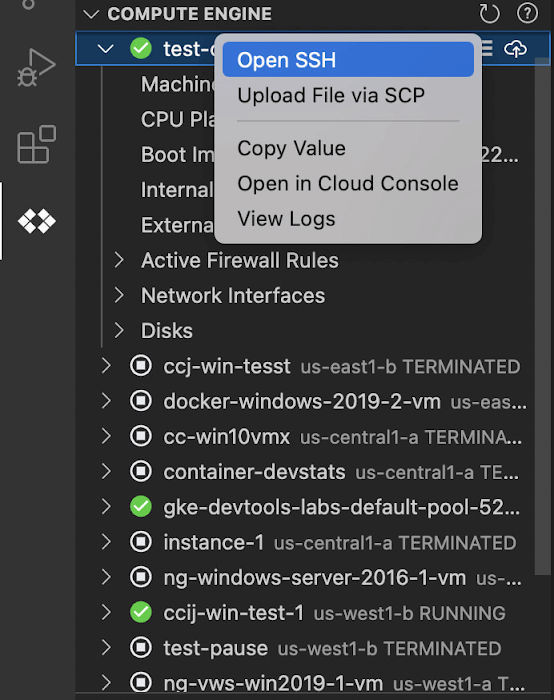
Once you’ve found the VM you want to work with, Cloud Code makes it easy to connect to that VM over SSH. Again, find the VM you want to connect to in Cloud Code’s Compute Engine explorer, right click it, and select “Open SSH”. Cloud Code will then establish an SSH connection from your IDEs terminal into the VM. If there’s any difficulty establishing a connection, Cloud Code can run a troubleshooting diagnostic to help resolve the issue.
Many organizations maintain VMs that don’t have a public IP address, making it difficult to establish an SSH connection to them. For those VMs that use Identity-Aware Proxy, Cloud Code can still securely connect to them over SSH, even without a public IP address.
Upload files to your VMs
You might want to try a debug version of your application, run a script, or try a new code in an environment identical to production, in this case on a development VM instance which might not have access to full source code or is not a part of your CI/CD pipeline. Cloud Code provides an easy way to upload your code files into a VM instance.
Find the VM you want to connect to in Cloud Code’s Compute Engine explorer, right click it, and select “Upload File via SCP”. Choose a file from your local system and Cloud Code will upload it to a VM instance using SCP. Once upload completes, Cloud Code offers to open a new SSH connection to access the files and work with them on a remote VM instance. Again, if there’s any difficulty establishing a connection, Cloud Code can run a troubleshooting diagnostic to help resolve the issue.
View your VM logs
As you’re working with your VM, you can right click it and select to view the VM instance logs. From Visual Studio Code this will open a logs viewer in the IDE. From IntelliJ, the logs viewer in the Cloud Console will be opened. If you’ve configured application logs to be collected with Cloud Logging, you can also view those in these logs viewers as well.
Get Started
We invite you to try out Compute Engine with Cloud Code to better streamline your development workflow. To learn more, check out the Compute Engine documentation for Visual Studio Code and JetBrains IDEs. If you’re new to development with IDEs, you can take the first step by installing Visual Studio Code or IntelliJ.
Ease Your Migration and Modernization Journey with Microsoft and Windows on Google Cloud Demo Center

8271
Of your peers have already read this article.
2:00 Minutes
The most insightful time you'll spend today!
If you’re looking to migrate and modernize your Microsoft and Windows workloads, Google Cloud is your premiere destination. No matter what migration strategy you’ve selected or what value you’re looking to achieve, with Google Cloud you’re able to:
- simplify your migration and modernization journey
- reduce your on-prem footprint and increase agility
- optimize license usage to reduce costs
- modernize to reduce single-vendor dependencies
- rely on enterprise-class support backed by Microsoft
Whether you’re looking to migrate applications running on Windows virtual machines, adopt Windows containers in Google Kubernetes Engine (GKE), convert SQL databases to Cloud SQL, or something else, Google Cloud offers you the first-class experience you need.
But we don’t want you to take our word for it. Try it out yourself with our new online Microsoft and Windows on Google Cloud Demo Center without any commitment or friction.

The demo center uses hands-on guided simulations to walk you through several scenarios for solving business critical challenges with Google Cloud’s Microsoft and Windows solutions. Because these are all simulated, you’ll see how it works without any deployment, configuration, or commitment. It’s a seamless way for you to see exactly how Google Cloud can help you.
Run dedicated hardware and optimize with sole tenant
Sometimes you might want to run your workloads on dedicated hardware (with oversubscription options) for compliance, licensing, and management. Google Cloud provides sole-tenant nodes that allow you to easily deploy your virtual machines onto dedicated machines to avoid “noisy neighbor” issues, address regulatory or licensing constraints, and optimize inter-VM communications.
Plus, the CPU Overcommit option allows oversubscribing sole-tenant node resources by up to 2x, therefore helping save on per-physical core licensing for many licensed workloads like SQL Server.
Learn how to set up a sole tenant group and node.
Optimize license costs with premium images & custom VMs
One of the easiest ways to optimize your cloud experience with virtual machines (VM) is to pick the right VM image. Google Cloud provides premium license-included VM images that are thoroughly tested and optimized, including SQL Server options with pay-as-you-go licensing. These are great for workloads that don’t need to run all the time or when you do not have spare licenses for bring your own license (BYOL).
Explore some Windows & SQL images and learn how CPU/Memory options can help optimize deployment and save on licensing.
Modernize your databases with Managed SQL Server
Sometimes you need to manage your SQL Server instance to achieve certain business or operational goals. But more often, managing SQL Server deployments can be undifferentiated: backups, high-availability, updates, and patching are just some of the many things you have to take care of when going the do-it-yourself route. One way to modernize your database tier is to migrate to a managed service like Cloud SQL, which is a fully managed Relational Database service for SQL.
Explore the process of creating an instance in just a few clicks!
Extract apps from VMs and move to containers in GKE with Migrate for Anthos
Many Windows workloads running on virtual machines such as Internet Information Services (IIS) are ideal candidates for migrating to containers without major changes like rewriting or rearchitecting. However, doing this migration manually can be tedious, which is why Migrate for Anthos can help easily re-platform a .NET app running on IIS into a container-based app.
Simulate intelligently extracting, migrating, and modernizing applications to run natively on containers in GKE and Anthos clusters.
Move .NET applications to GKE on Windows without code changes
When you’re looking to go fully cloud native, you can leverage Windows containers in GKE without rewriting your .NET applications. Simply create clusters with Windows nodes and deploy containerized Windows workloads in a few clicks, even alongside Linux containers. These deployments reduce operational overhead with features such as auto-upgrade, auto-repair, and release channels.
Learn how easy it is to build a GKE cluster with a Windows node and deploy an app.
Now that you’ve gotten a feel for what’s available, go check out the Demo Center. You can also visit us at Windows and Microsoft on Google Cloud to learn more.
Beyond Traditional Learning: AI-based Online Learning Platform and Google Cloud Solutions Push Learners to Get Ahead

10314
Of your peers have already read this article.
1:30 Minutes
The most insightful time you'll spend today!
The combination of a vital need for IT experts among businesses and a digital skills gap is making lifelong learning increasingly critical. Beyond professional development, learning new skills offers additional rewards from building peer connections to boosting your creativity. That’s why in 2020 Krishna Deepak Nallamilli and I launched KIMO.ai to reimagine how people approach learning, especially in developing markets. Our team is building the artificial intelligence needed to generate individual learning paths through a wide range of quality digital learning content.
Google Cloud and its Startup Program have been instrumental in connecting our team with the tools, people, processes, and best practices to grow our business.
Existing learning platforms lack engagement
Outside of traditional education settings, massive open online learning courses (MOOCs)—often modeled after university courses—can provide a flexible and affordable way to upskill or reskill. But the vast majority of people who participate in MOOC programs fail to complete courses. Based on our research, the challenge with existing learning platforms is a lack of engagement, primarily caused by limited direction on which skills to learn, whether AI, fintech, blockchain, or other in-demand disciplines.
We’ve also received feedback that many corporate learning management systems–developed as online training systems to upskill employees–tend to be poorly designed and time-consuming to use.
Overall, a significant challenge with most existing learning platforms is that they’re generic. For example, suppose you’re interested in learning about AI. In that case, you need AI-related coursework that applies to your industry and the job you want because AI in medicine is vastly different from AI in financial services. Today’s online learning options typically take a one-size-fits-all approach and fail to capture the nuances of what learners really need to get ahead.
Building a future-proof learning platform
The commitment to highly personalized, accessible learning inspired KIMO.ai, a platform that we believe is the future of education. Depending on your goals, current skills, location, and other factors, our AI-based platform will identify which coursework (and where to find those classes) to build the skills you need. The more personalized, relevant learning recommendations even take into account people’s preferences for podcasts, MOOCs, books, articles, videos, courses, publications, and more.
In a mix of cooperation and competition we call “coopetition,” KIMO.ai will regularly recommend courses from other established online learning systems if, based on our automated assessment, it’s the best option for a learner. There’s also the option to access free content only.
Google cultural alignment fosters trust
Our platform started with one developer exploring NLP models and Google APIs. As we’ve grown our team and launched our beta to 110,000 users in developing markets, we discovered there is a lot of interest in our platform, and we believe we can make a significant impact. In feedback forums, we also learned that we need to focus our efforts on the mobile experience to improve engagement since 99% of the beta testers use mobile devices.
Beyond our team’s high level of trust in Google Cloud solutions, our team also appreciates the cultural alignment with Google. We value Google’s developer-centric approach and rely on tools like Dataflow for batch data processing and Cloud TPU to reliably run machine learning models with AI services on Google Cloud. We also build all of our deployments on Google Kubernetes Engine (GKE), which makes it easy to manage all our containerized workloads
On the front end, Google App Engine makes it easy to deploy apps and experiment, and it integrates seamlessly with Firebase for authentication and more. BigQuery is our serverless data warehouse that efficiently scales to support the millions of articles, videos, and other learning resources we need to analyze to provide the targeted coursework recommendations our learners require.
As we grow our business having a network of trusted advisors is also extremely valuable. By working closely with DoIT International, the 2020 Google Cloud Global Reseller Partner of the Year, our team has access to their cloud, Kubernetes, and machine learning expertise. DoIT has already helped us quickly resolve IT issues and create analytics dashboards that give us insights to continually enhance our services.
Building for a growing industry
The dynamic edtech market is growing rapidly and estimated to become an $11B industry by 2025. We’re proud to be part of the next wave of personalized education that has the potential to empower people in developing markets and beyond to grow their skills with coursework tailored to their exact needs and how they like to learn. This year, we will deliver our platform to at least 400,000 more people. We’re excited to see how they use it and where it takes them.
If you want to learn more about how Google Cloud can help your startup, visit our Startup Program application page here to get more information about our program, and sign up for our communications to get a look at our community activities, digital events, special offers, and more.
11207
Of your peers have already watched this video.
1:30 Minutes
The most insightful time you'll spend today!
Indian Retailer Figures Optimizes Hyperlocal Delivery to Increase Customer Experience
Anyone who follows the Indian e-commerce scene knows that one of the largest challenges these companies face is hyperlocal delivery.
That was a problem facing Wellness Forever, a retail chain of pharmacies with 150-plus stores across India.
“Exactly a year ago, we started our journey of hyperlocal deliveries. This optimization was a big time challenge for us to understand how to optimize this,” Palani Subbiah, CTO, Wellness Forever.
The problem in front of Wellness Forever was to identify which customer could can be sold from which store, so that a delivery could be made within 90 minutes.
“We handle a large amount of customer data and we wanted to use insights to help and improve the customer satisfaction index,” says Subbiah.
To do that Wellness Forever leveraged Google Big Query to run massive amount of data to come up with the operational insights. They also used Firebase and Google Maps.
“By 2021, we are going to have about 450 stores. Those stores are going to be not only a physical store, which is a digital store.
More Relevant Stories for Your Company

Securing apps using Anthos Service Mesh
Hi there! I'm David Challoner from Access Site Reliability Engineering (SRE), here with Anthony Bushong from Developer Relations to talk about how Corp Eng is adopting Anthos Service Mesh internally at Google. Corp Eng is Google's take on "Enterprise IT". A big part of the Corp Eng mission is running



Microservices in the Cloud with Kubernetes and Istio
Are you building or interested in building microservices? They are a powerful method to build a scalable and agile backend, but managing these services can feel daunting: building, deploying, service discovery, load balancing, routing, tracing, auth, graceful failures, rate limits, and more. The most suited solution for you is Istio.

Transport Platform’s Richly-detailed Geospatial Data Allows Commuters to Track Buses in Real-time!
Vinayak Bhavnani, Co-Founder and CTO of India-based bus transport technology company Chalo, shares how Google Maps Platform is used to improve visibility for commuters and bus operators across India by visualizing geospatial data. Effective public transport networks contribute to the local economy and help make cities safe, pleasant, and sustainable.

APIs and IT Rationalization: Cost Avoidance and Cost Savings for Enterprise IT
The dynamic and fast-moving business environments of today demands that technology leaders and teams deliver more at a lightning speed, all the while working within the constraints of shoe-string budgets and tight project timelines. Winning in today’s environment requires a more strategic approach to optimize utilization of resources, remove unnecessary
