





Key Highlights on Data Analytics to Smooth Your Organization’s Data Journey

4869
Of your peers have already read this article.
2:00 Minutes
The most insightful time you'll spend today!
As the Olympics kicked off in Tokyo at the end of July, we found ourselves reflecting on the beauty of diverse countries and cultures coming together to celebrate greatness and sportsmanship. For this month’s blog, we’d like to highlight some key data and analytics performances that should help inspire you to reach new heights in your data journey.
Let’s review the highlights!
BigQuery ML Anomaly Detection: A perfect 10 for augmented analytics
Identifying anomalous behavior at scale is a critical component of any analytics strategy. Whether you want to work with a single frame of data or a time series progression, BigQuery ML allows you to bring the power of machine learning to your data warehouse.
In this blog released at the beginning of last month, our team walked through both non-time series and time-series approaches to anomaly detection in BigQuery ML:
- Non-time series anomaly detection
- Autoencoder model (now in Public Preview)
- K-means model (already in GA)
- Time-series anomaly detection
- ARIMA_PLUS time series model (already in GA)
These approaches make it easy for your team to quickly experiment with data stored in BigQuery to identify what works best for your particular anomaly detection needs. Once a model has been identified as the right fit, you can easily port that model into the Vertex AI platform for real-time analysis or schedule it in BigQuery for continued batch processing.
App Analytics: Winning the team event
Google provides a broad ecosystem of technologies and services aimed at solving modern day challenges. Some of the best solutions come when those technologies are combined with our data analytics offerings to surface additional insights and provide new opportunities.
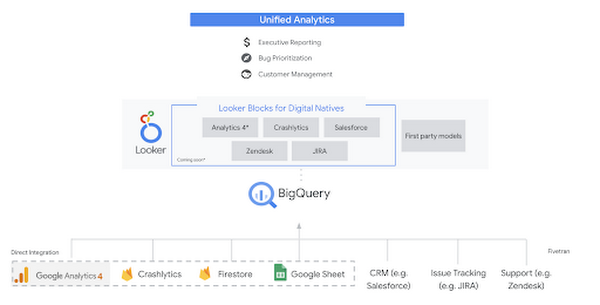
Firebase has deep adoption in the app development community and provides the technology backbone for many organization’s app strategy. This month we launched a design pattern that shows Firebase customers how to use Crashlytics data, CRM, issue tracking, and support data in BigQuery and Looker to identify opportunities to improve app quality and enhance customer experiences.
Crux on BigQuery: Taking gold in the all-around data competition
Crux Informatics provides data services to many large companies to help their customers make smarter business decisions. While they were already operating on a modern stack and not on the hunt for a modern data warehouse, BigQuery became an enticing option due to performance and a more optimal pricing model. Crux also found advantages with lower-cost ingestion and processing engines like Dataflow that allow for streaming analytics.… when it came to building a centralized large-scale data cloud, we needed to invest in a solution that would not only suit our current data storage needs but also enable us to tackle what’s coming, supporting a massive ecosystem of data delivery and operations for thousands of companies.
Mark Etherington
Chief Technology Office, Crux Informatics
Technology is a team sport, and Crux found our support team responsive and ready to help. This decision to more deeply adopt Google Cloud’s data analytics offerings provides Crux with the flexibility to manage a constantly evolving data ecosystem and stay competitive.
You can read more about Crux’s decision to adopt BigQuery in this blog.
Google Trends: A classic emerges a champion
Following up on the launch of our Google Trends dataset in June, we delivered some examples of how to use that data to augment your decision making.
As a quick recap of that dataset, Google Cloud, and in particular BigQuery, provide access to the top 25 trending terms by Nielsen’s Designated Market Area® (DMA) with a weekly granularity. These trending terms are based on search patterns and have historically only been available on the Google Trends website.https://www.youtube.com/embed/9FJAXMF0ASc?enablejsapi=1&
The Google Trends design pattern addresses some common business needs, such as identifying what’s trending geographically near your stores and how to match trending terms to products to identify potential campaigns.
Dataflow GPU: More power than ever for those streaming sprints
Dataflow is our fully-managed data processing platform that supports both batch and streaming workloads. The ability of Dataflow to scale and easily manage unbounded data has made it the streaming solution of choice for large workloads with high-speed needs in Google Cloud.
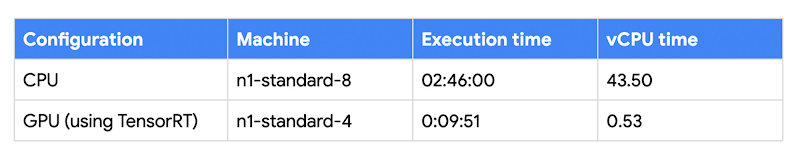
But what if we could take that speed and provide even more processing power for advanced use cases? Our team, in partnership with NVIDIA, did just that by adding GPU support to Dataflow. This allows our customers to easily accelerate compute-intensive processing like image analysis and predictive forecasting with amazing increases in efficiency and speed.
Take a look at the times below:
Data Fusion: A play-by-play for data integration’s winning performance
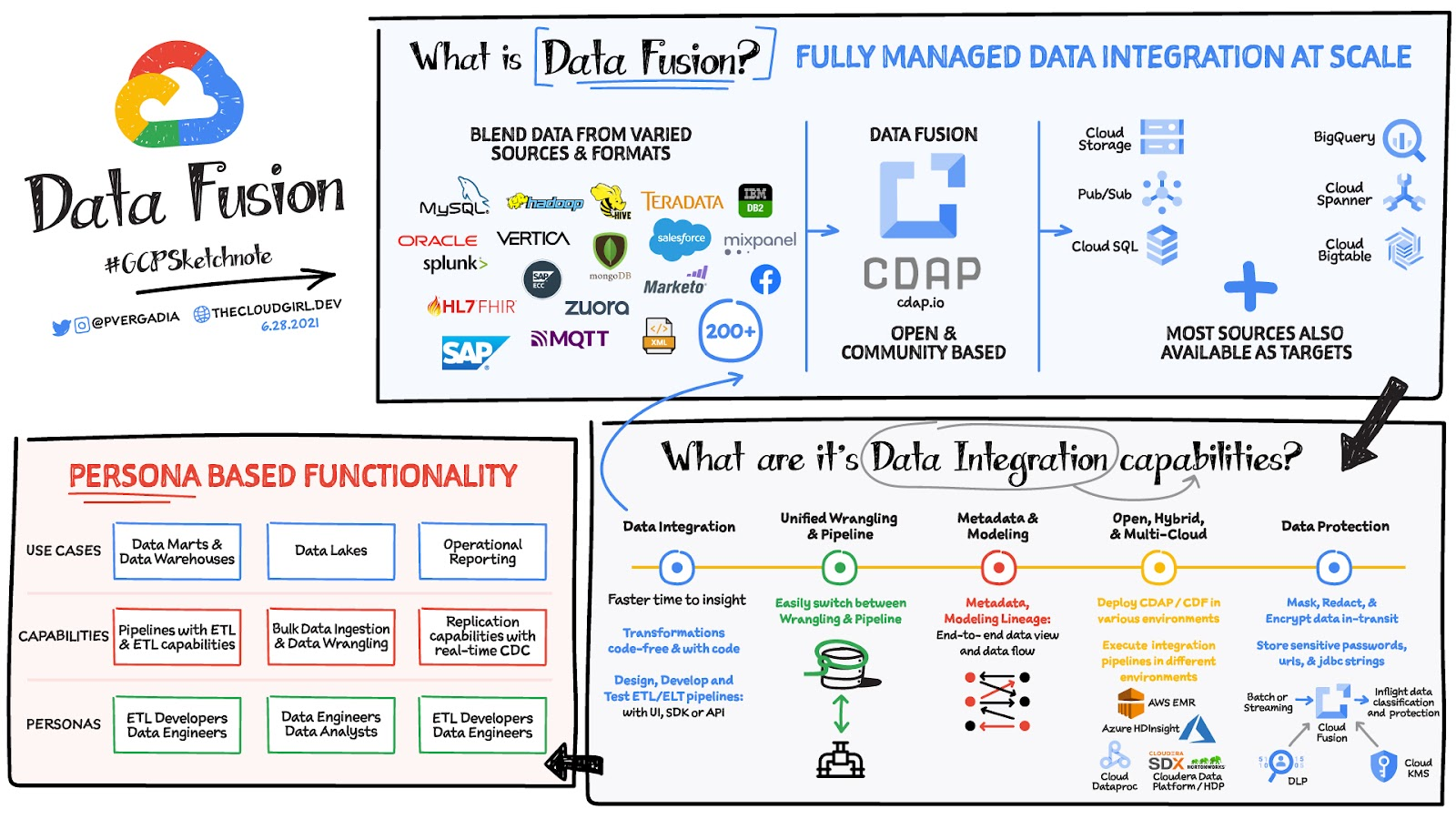
Data Fusion provides Google Cloud customers with a single place to perform all kinds of data integration activities. Whether it’s ETL, ELT, or simply integrating with a cloud application, Data Fusion provides a clean UI and streamlined experience with deep integrations to other Google Cloud data systems. Check out our team’s review of this tool and the capabilities it can bring to your organization.
HSBC Overcomes Capacity Challenges and Innovation-Blocks With Google BigQuery

4012
Of your peers have already read this article.
3:45 Minutes
The most insightful time you'll spend today!
At HSBC, we serve 39 million customers, in-person and online, from consumers to businesses, in 66 countries. We maintain data centers in 21 countries, with more than 94,000 servers. With an on-premises infrastructure supporting our business, we kept running into capacity challenges, which really became an innovation blocker and ultimately a business constraint.
Our teams wanted to do more with data to create better products and services, but the technology tools we had weren’t letting us grow and explore. And that data was growing continually. Just one of our data warehouses had grown 300% from 2014 to 2018.
We had a huge amount of data, but what’s the point of having all that data if we couldn’t get insights and business value from it? We wanted to serve our customers flexibly, in the ways that work best for them.
We knew moving to cloud would let us store and process more data, but as a global bank, we were moving complex systems that needed to also be secure.
It was a team effort to create the project scope and strategy up front, and it paid off in the end. Our cloud migration now enables us to use an agile, DevOps mindset, so we can fail fast and deliver smaller workloads, with automation built in along the way.
This migration also helped us eliminate technical debt and build a data platform that lets us focus on innovation, not managing infrastructure. Along the way, we invented new technology and built processes that we can use as we continue migrating.
Planning for a cloud move
We chose cloud migration because we knew we needed cloud capabilities for our business to really reach its digital potential. We picked Google Cloud, specifically BigQuery, because it’s super fast over small and large datasets, and because we could use both a SQL interface and Connected Sheets to interact with it.
We had to move our data and its schema into the cloud—without having to manually manage every detail and miss the timelines we had set. Our data warehouse is huge, complex, and mission-critical, and didn’t easily lend itself to fit into existing reference architectures. We needed to plan ahead and automate to make sure the migration was efficient, and to ensure we could simplify data and processes along the way.
The first legacy data warehouse we migrated had been built over a period of 15 years, with 30 years worth of data comprising millions of transactions and 180 TB of data.
It ran 6,500 extract, transform, load (ETL) jobs and more than 2,500 reports, getting data from about 100 sources. Cloud migration choices usually involves either re-engineering or lift-and-shift, but we decided on a different strategy for ours: move and improve.
This allowed us to take full advantage of BigQuery’s capabilities, including its capacity and elasticity, to help solve our essential problem of capacity constraints.
Taking the first steps to cloud
We started creating our cloud strategy through a mapping exercise, which also helped start the change management process among internal teams. We chose architecture decision records as our migration approach, basing those on technical user journeys, which we mapped out using an agile board. User journeys included things like “change data capture,” “product event handling,” or “slowly changing dimensions.”
These are typical data warehouse topics that have to be addressed when going through a migration, and we had others more specific to the financial services industry, too.
For example, we needed to make sure the data warehouse would have a consistent, golden source of data at a specific point in time. We considered business impacts as well, so we prioritized initially moving archival and historical data to immediately take load off of the old system.
We also worked to establish metrics early on and introduce new concepts, like managing queries and quotas rather than managing hardware, so that data warehouse users would be prepared for the shift to cloud.
To simplify as we went, we examined what we currently had stored in our data warehouse to see what was used or unused. We worked with stakeholders to assess reports, and identified about 600-plus reports that weren’t being used that we could deprecate. We also examined how we could simplify our ETL jobs to remove the technical debt added by previous migrations, giving our production support teams a bit more sleep at night.
We used a three-step migration strategy for our data: first, migrating schema to BigQuery; second, migrating the reporting load to BigQuery, adding metadata tagging and performing the reconciliation process; and third, moving historical data by converting all the SQL script into data into BigQuery-compliant scripts.
Creating new tools for migration automation
In keeping with our automation mantra, we invented multiple accelerators to speed up migration. We developed these to meet the timelines we’d set, and to eliminate human error.
The schema parser and data reconciliation tool helped us migrate our data layer onto BigQuery. SQL parser helped migrate the data access layer onto Google Cloud Platform (GCP) without having to individually migrate 3,500 SQL instances that don’t have data lineage or documentation. This helped us to prioritize workloads.
And the data lineage tool identified components across layers to find dependencies. This was essential for finding and eliminating integration issues during the planning stage, and for identifying application owners during the migration. Finally, the data reconciliation tool reconciles any discrepancies between the data source and the cloud data target.
Building a cloud future
We used this first migration in our UK data center as a template, so we now have a tailored process and custom tools that we’re confident using going forward.
Our careful approach has paid off for our teams and our customers. We’re enjoying better development and testing procedures. We’ve created an onboarding path for applications, we have a single source of truth in our data warehouse, and we use authorized views for secure data access. The flexibility and scalable capacity of BigQuery means that users can explore data without constraints and our customers get the information they need, faster.
1 Developer. 5 Months. A Revenue Generating App With 100K Users With Firebase

7878
Of your peers have already read this article.
5:30 Minutes
The most insightful time you'll spend today!
This is a guest post authored by Firebase customer, Anton Ivanov, Founder & CEO of DealCheck
Real estate investing is a fantastic way to build a stream of passive income and grow your wealth. Numerous studies have pointed out that real estate investing has created more millionaires throughout history than any other form of investing (like this one and this one). So why don’t more people do it?
I asked myself this very question a few years ago after talking to a group of friends about the success I’ve had with real estate, and listening to their reasons why they think it’s out of their reach.
A common theme among them was that they viewed it as something too difficult to learn and master. There were too many steps, the learning curve was steep and there was a lot of room for mistakes for somebody just starting out, especially when analyzing the financial performance of potential investment properties.
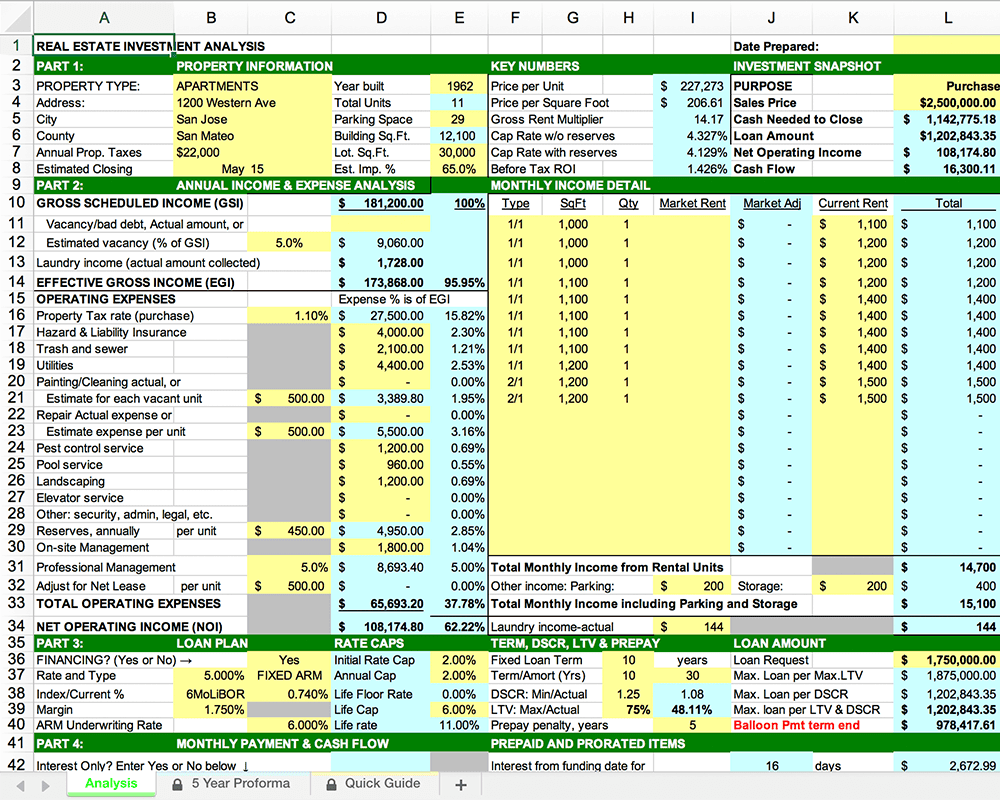
Traditionally, most investors used spreadsheets to do the math – which works only if you know what and how you’re calculating something. But if you don’t know that, it’s very easy to make mistakes and overlook things. And no one wants to make mathematical errors before a huge purchase like an investment property.
Where do I even begin?!
And that’s when I had the idea to build DealCheck – a cloud-based, easy-to-use property analysis tool for real estate investors and agents. I wanted to create a platform that would help new investors learn the ropes and avoid costly mistakes, but at the same time provide the flexibility to perform more advanced analysis with a click of a button.
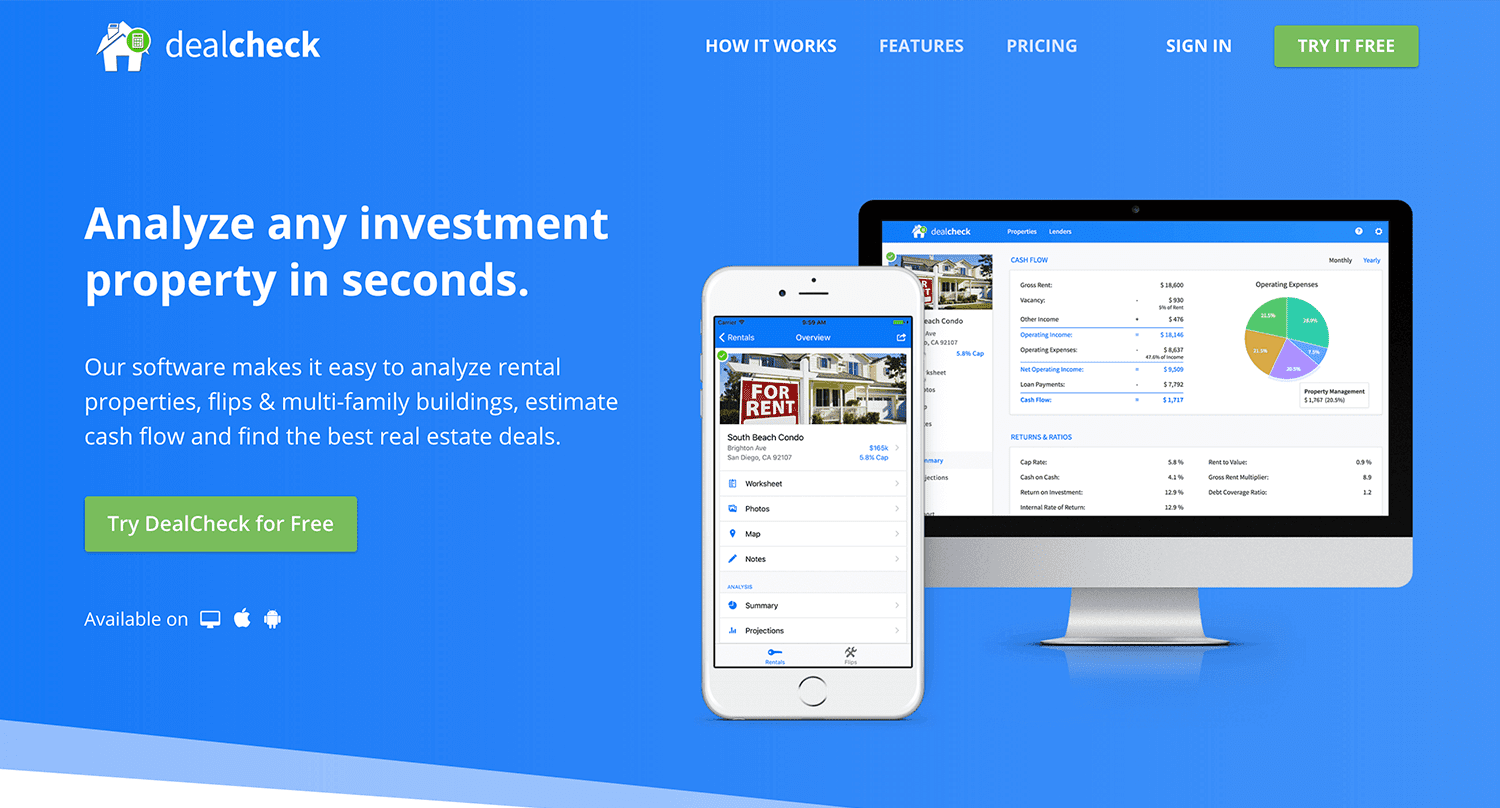
Making real estate investing easier and more accessible.
The Challenges of Solo Development
I was working as a front-end engineer at the time, so I knew I could build the UI myself, but what about the back-end, data storage, authentication, and a bunch of other things you need for a full-functioning cloud app?
I didn’t know anybody I could bring on as a co-founder, so I set out to research what technologies and platforms I could leverage to help me with the back-end and server infrastructure.
Firebase kept popping up again and again and I began to look at it in more detail. It was then recently acquired by Google and its collection of BaaS (backend-as-a-service) modules seemed to offer the exact solution I needed to build DealCheck.
I was especially impressed with the documentation for each feature and how well all of the different technologies could be tied together to create one unified platform.
It wasn’t long before I signed up and started building the first MVP of the app.
Using Firebase to Quickly Build a Scalable Backend
As the only developer on the project, I had limited time and resources to spend on building the back-end, so I set out to use every Firebase feature that was available at the time to my advantage.
My goal was actually to write as little server-side code as possible and instead focus on leveraging the different Firebase modules to solve three specific challenges:
Challenge #1 – Authentication and User Management
The first one was authentication and user management. DealCheck’s users needed the ability to create their accounts so they can view and analyze properties on any device (more on that later). I wanted to have the ability to sign in with email, Facebook or a Google account.
Firebase Authentication was designed specifically for this purpose and I used it to handle pretty much the entire authentication flow. Out-of-the-box, it has support for all the major social networks, cross-network credential linking and the basic account management operations like email changes, password resets and account deletions.
There was no server-side code required at all – I just needed to build the UI on the front-end.
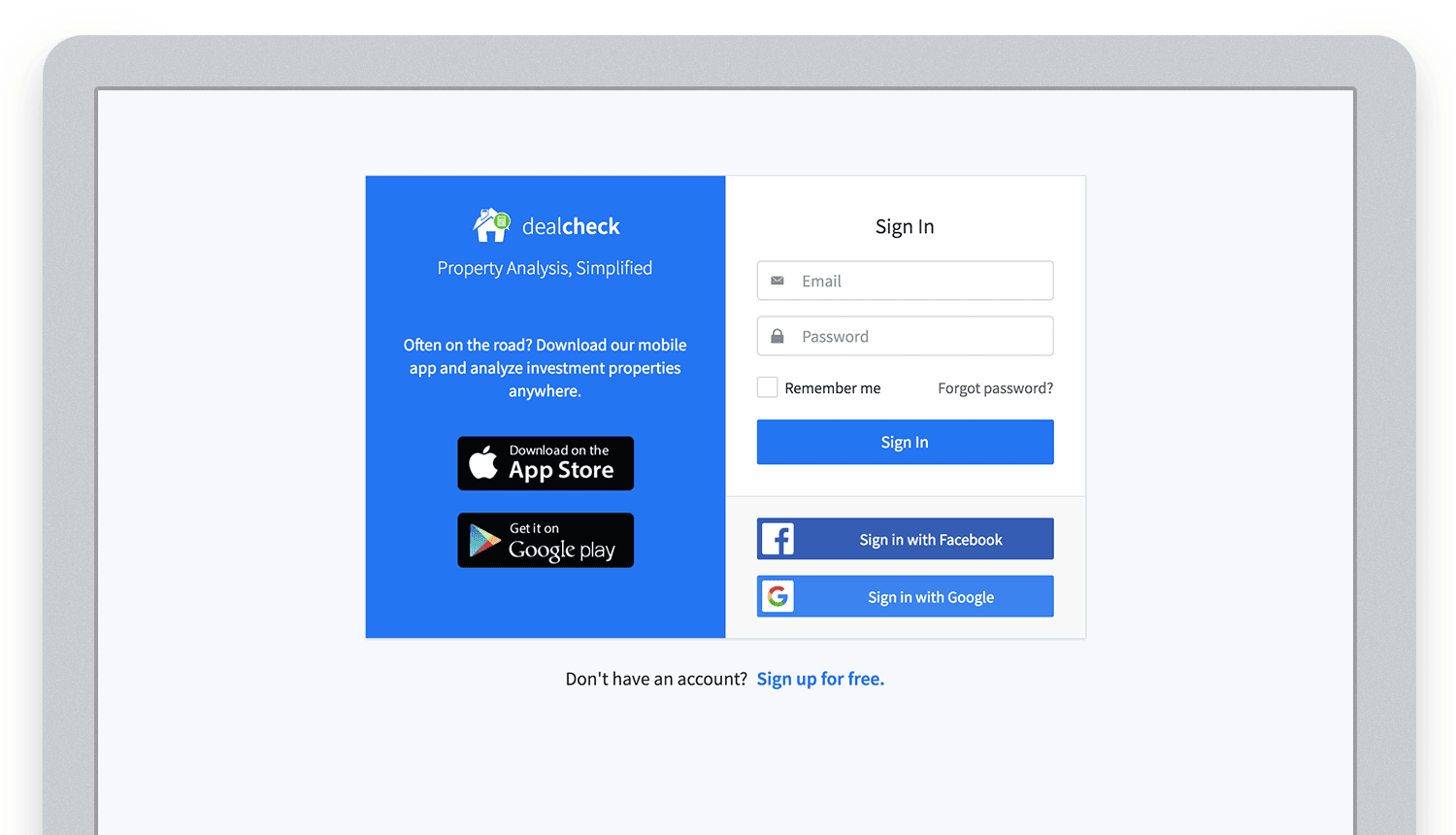
Email, Facebook and Google sign in powered by Firebase.
And as an added benefit, Firebase Authentication ties directly into the Realtime Database product to create a declarative permissions and access control framework that’s easy to implement and maintain. This helped me make sure user data was protected from unauthorized access, but also facilitate data sharing among users.
Challenge #2 – Cloud Storage with Cross-Device Sync
Next up was data storage. I knew that I wanted DealCheck’s users to be able to use the app and analyze properties online, on iOS and Android. So I needed a real-time, cloud-based database solution that could sync data across any device.
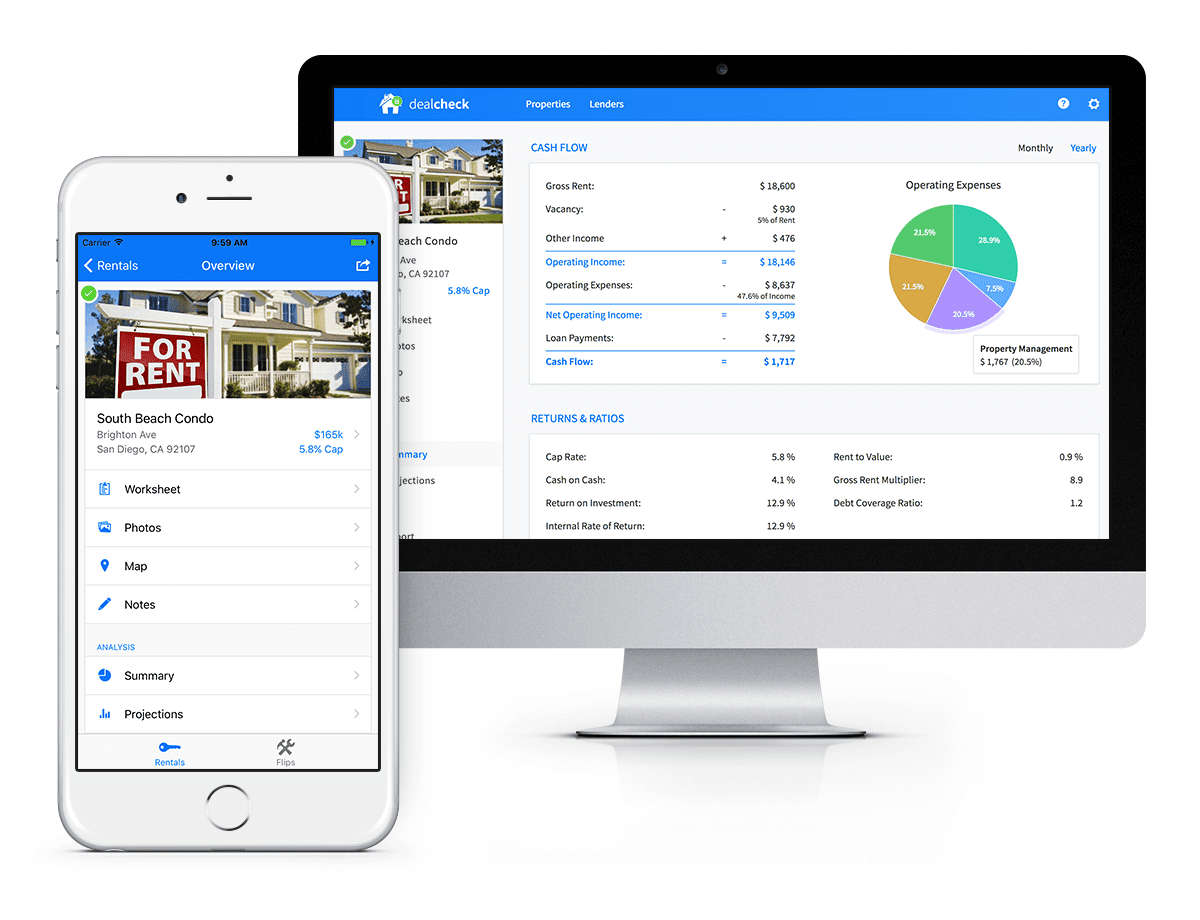
Syncing data across web and mobile is not easy!
Firebase Realtime Database is a NoSQL, JSON-based database solution that was designed exactly for this purpose, and I was actually surprised how great it worked. I used the official AngularJS bindings for Firebase on the front-end to read and write to it directly from the client.
I had to do some extra work on mobile to implement an offline mode with syncing after reconnections, but all-together the code required to make everything work was minimal.
As I mentioned, Firebase Authentication tied directly to the database to facilitate access control, so I really didn’t need to do anything extra there. And I was able to set up automatic daily backups of all the data with a click of a button.
Challenge #3 – Third-Party Integrations
Up to now, I had written exactly 0 lines of server-side code and everything was handled by the client directly. As DealCheck’s development progressed, however, I knew that I would need a server to handle some operations that could not be done in the client.
I wasn’t very experienced with server maintenance and DevOps, but fortunately the Firebase Cloud Functions product was able to solve all of my needs. Cloud Functions are essentially single-purpose functions that can be triggered (or executed) based on a specific HTTP request or events coming from the Authentication, Realtime Database or other Firebase products.
Each function can be run once based on a specific event trigger to perform its prescribed task. You don’t have to worry about provisioning a server instance or managing load – everything is done automatically for you by Firebase.
What’s even cooler, is that Cloud Functions can access the Realtime Database and Cloud Storage buckets of the same project, performing operations on them server-side, as needed.
This is how DealCheck processes subscription payments through Stripe, validates Apple and Google Play mobile subscription receipts, integrates with third-party APIs and updates database records without user interaction.
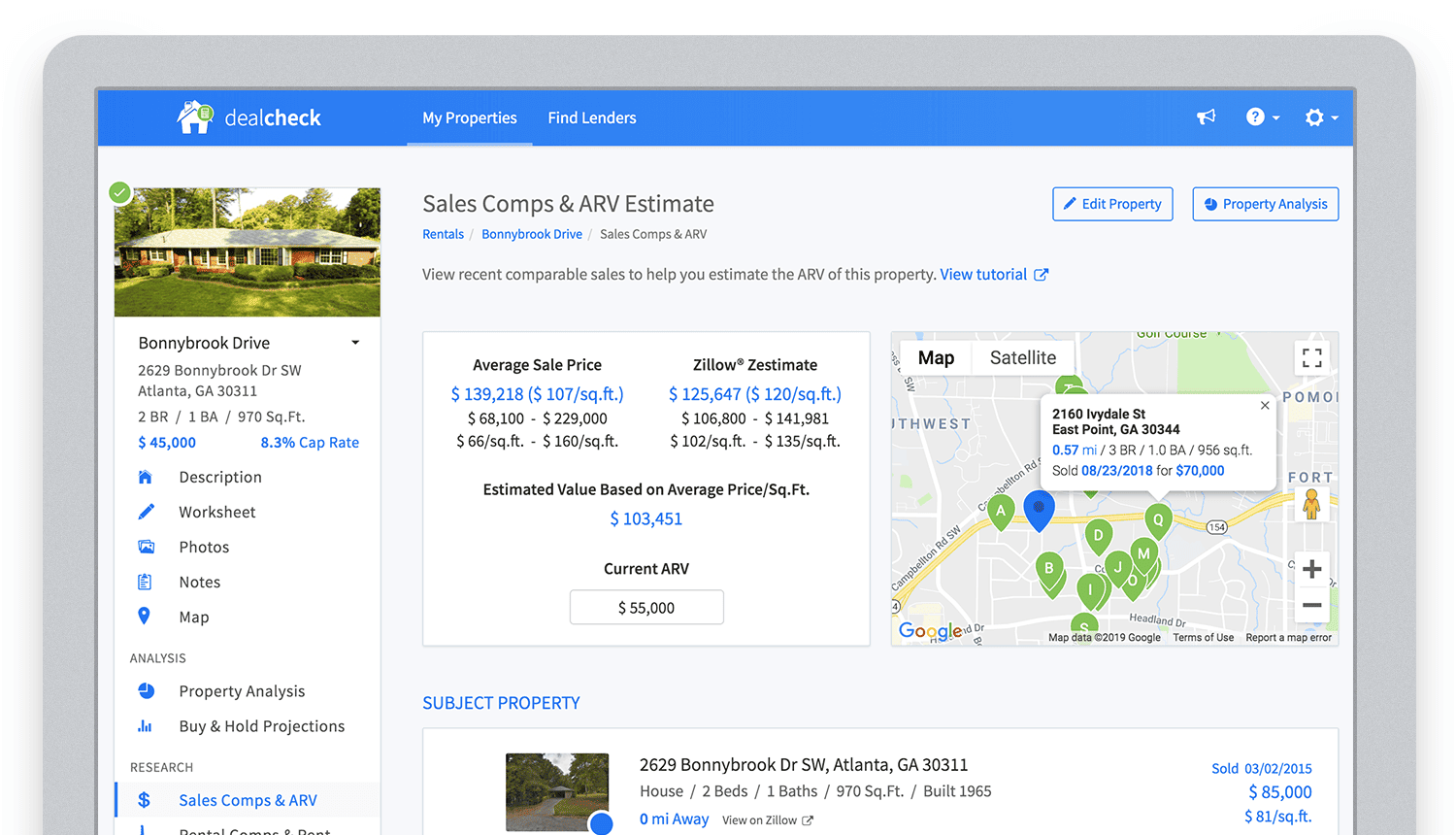
Bringing in sales comparable data from third-party providers into DealCheck.
Cloud Functions became the “glue” that tied the entire back-end infrastructure together.
Growing from an MVP to 100,000 Users with Firebase
The first version of the DealCheck app was built and launched in less than 5 months with just me on the development team. I definitely don’t think that would have been possible without Firebase powering the back-end infrastructure. Maybe the project wouldn’t have ever launched at all.
While Firebase is awesome for quick MVP development, it’s definitely designed to power production applications at scale as well. As DealCheck grew from a small side-project to one of the most popular real estate apps with over 100k users, all of the Firebase products that we use scaled to support the increasing load.
Moreover, the fantastic interoperability of all Firebase modules allows us to develop and release new features much faster because of the reduced coding requirements and ease of configuration.
So next time you’re looking to build an ambitious project with a small team – take a look at how Firebase can help you reduce development time and provide a suite of powerful tools that scale as your business grows.
This is exactly how DealCheck grew from a simple idea to make property analysis easier and faster, to an app that is helping tens of thousands of people grow their wealth and passive income through real estate investing. It’s a truly awesome and fulfilling experience to see your work positively impact so many people and it wouldn’t have been possible without Firebase.
Incorporating Custom Holidays into Your Time-Series Models with BigQuery ML

1129
Of your peers have already read this article.
4:30 Minutes
The most insightful time you'll spend today!
About three years ago, JCB, one of the biggest Japanese payment companies, launched a project to develop new high-value services with agility. We set up a policy of starting small from scratch without using the existing system, which we call the concept of “Dejima”, where we focused on improving various aspects such as team structure, risk management, and application and platform development process.
Until now, large Japanese enterprises have built decision-making systems focused on eliminating unnecessary business processes and efficiently increasing quarterly profits. As a result, we are seeing more organizational structures that make it difficult to take on new challenges or experiments with trial and error. We wanted to breathe a new life into this situation, and that is how the concept of Dejima came up. In the Edo period, Japan closed its national border to other countries under its national isolation policy. At the time, Dejima was the only area where special rules were applied and allowed people from different cultures to come and go, and trade. This special rule generated the culture of inclusion and led to Dejima’s prosperity. Like Dejima, we believe that creating an organization that is independent from other business practices can be effective in enabling digital transformation for the organization.
We have been able to make this transformation with the direct help of the Google Cloud and its products such as Google Kubernetes Engine (GKE), Cloud Spanner and Anthos Service Mesh, applying domain-driven design and microservice architecture. We named this the “JCB Digital Enablement Platform (JDEP),” which now hosts multiple business critical production services.
A key benefit of GKE is that the team can easily add resources and release them when they are finished, allowing them to be flexible to accommodate busy periods and off-seasons. Meanwhile, Anthos Service Mesh helps us manage complex environments easily. With containerization and managed services, we are prepared for the future for when more services go into production, as it would be easy to maintain and provide version upgrade support. At the same time, Cloud Spanner ensures that we maintain a 99.99% availability at all times.
Our initial motivation for introducing SRE practices was to break proverbial walls between business, development and operations, which was a success. Now we are focused on ensuring its reliability and maintaining customer satisfaction with our SRE practices.
To ensure the success of SRE practices that we implemented, there were a few categories we needed to address, from defining the organizational culture and practices to ensuring the policies attached to the new models created were practical enough to be implemented on the ground level. This is so that the Dejima concept remains sustainable for the long run.
Instilling a culture of measurement
Here, “appropriate” reliability is the key. According to the conventional way of thinking at JCB, “service failure must not occur” and “SLA should be maintained as high as possible.” We started by discussing what was the “appropriate reliability” that our customers really needed, but it was not as easy as we thought because the level of reliability for user satisfaction differed from application to application.
Eventually, the business, development and operations teams formulated specific SLIs and SLOs together, something we would never have been able to do if we discussed separately. This is because the business is required to compromise on lower service levels, since our reliability standard used to be too high. The collaboration of development and operations teams is necessary to understand how our system works upon our users’ interactions.
After Google Cloud helped us run a series of workshops where all teams participated, we saw change within the organization. The business team started evangelizing SRE to other members in the business department, and the development and operations teams started collaborating autonomously. We felt like we were working at Google speed, accomplishing so much in a short amount of time.
Understanding SRE as an entire company is necessary to progress. We are now working on creating internal training materials to spread the SRE concept throughout the company.
Eliminating ambiguity
With the cooperation of Google Cloud, we have created a Team Charter that defines the team’s mission, values and engagement models. We also created policy documents that include Incident Response Policy, Postmortem Policy, On-call Policy, Toil Policy and Error Budget Policy, to eliminate ambiguity in day-to-day operations.
For example, when an incident occurs, we can identify exactly the level of importance, the roles that are assigned to each person, and in what order they need to follow. When to do a postmortem, who owns it? What to do if the error budget is exhausted? How do other teams reach out to SRE when they have problems? The written policy documents will dramatically improve efficiency and motivate teams to adopt a culture of learning from failures.
The format for such policies are written in Google’s SRE book, but when we adopt it, it needs to take into account the circumstances specific to our company. Simply copying an existing policy won’t work, which is why it’s important to formulate a policy that fits the situation each team is in.
Reformalizing teams
Based on these policies, JCB’s SRE team has two sub-teams. One is called Sheriff which works as the platform SRE, and provides infrastructure services for the application team. The other is called the Diplomat which works as the embedded SRE, and participates in the application team to lead productionisation. There is also a team called Architecture that is separate from the SRE teams whose role is to consult SRE on system design and review architecture.
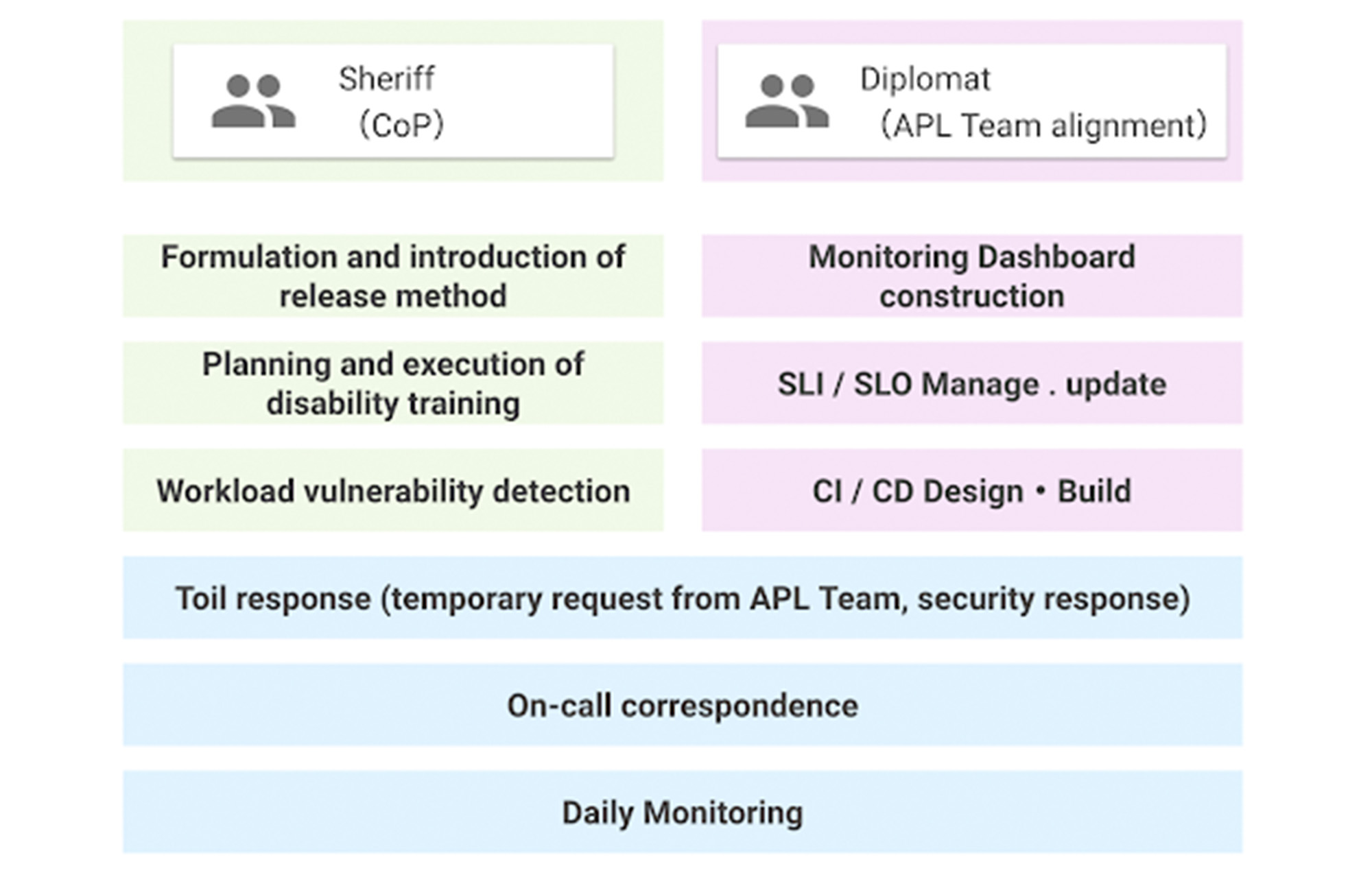
The SRE team was a single role when it was first launched, but now has two sub-teams. This is because as the number of application teams increases, the number of support tasks for the teams also increases, which can result in a shortage of resources to work on overall improvement. Securing people who are not interrupted from day-to-day support tasks and focusing on the main task improves efficiency.
Whereas both sub-teams share the on-call duty, some engineers are not allowed to do it by contract as they are not allowed to get paged. For those who cannot participate in on-call duties, we created what’s called a Toil Shift, which allows them to focus on resolving tickets in our backlogs instead.
This works well so far, but we will keep evolving as our business grows.
Dataflow Guarantees 50+% Increase in Developer Productivity and Infrastructure Cost Savings: Read More

8418
Of your peers have already read this article.
3:00 Minutes
The most insightful time you'll spend today!
In our conversations with technology leaders about data-driven transformation using Google Data Cloud – industry’s leading unified data and AI solution – , one important topic is incorporating continuous intelligence to move from answering questions such as “What has happened? to questions like “What is happening?” and “What might happen?”. The core to this evolution is the need for an underlying data processing that not only provides powerful real-time capabilities for events happening close to origination, but also brings together existing data sources under one unified data platform to enable organizations to draw insights and take actions holistically. Dataflow, Google’s cloud-native data processing and streaming analytics platform, is a key component of any modern data and AI architecture and data transformation journey, along with BigQuery, Google’s internet-scale warehouse with built-in streaming, BI engine and ML; Pub/Sub, a global no-ops event delivery service; and Looker, a modern BI and embedded analytics platform. One of the key evaluation factors is potential economic value of Dataflow to their organization, particularly in the context of engaging other stakeholders is key for many of the leaders that we engage with. So we commissioned Forrester Consulting to conduct a comprehensive study on the impact that Dataflow had on their organization by interviewing actual customers .
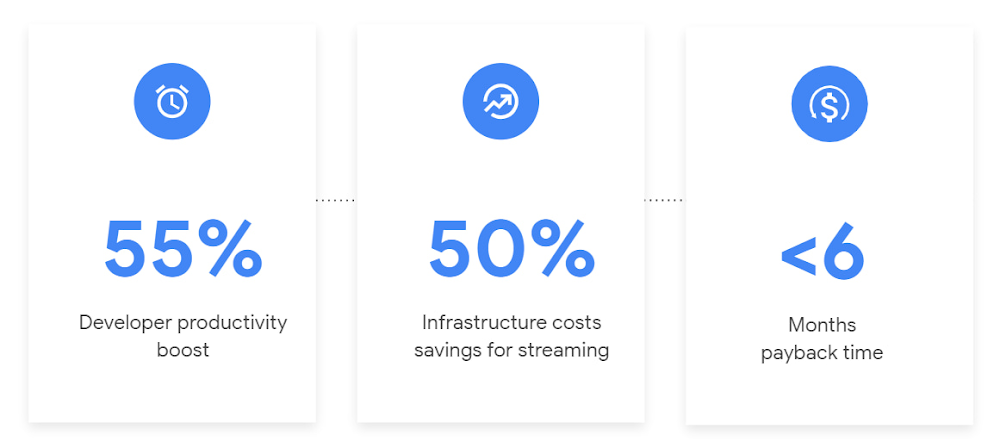
Today we’re excited to share our commissioned study conducted by Forrester Consulting, the Total Economic Impact™ of Google Cloud Dataflow, which allows data leaders to understand and quantify the benefits of Dataflow, and use cases it enables. Forrester conducted interviews with Dataflow customers to evaluate the benefits, costs, and risks of investing in Dataflow across an organization. Based on their interviews, Forrester identified major financial benefits across four different areas: business growth, infrastructure cost savings, data engineer productivity, and administration efficiency. In fact, Forrester found that customers adopting Dataflow can achieve a 55% boost in developer productivity and a 50% reduction in infrastructure costs. In fact, Forrester projects that customers adopting Dataflow can achieve a range of up to 171% Return on Investment (ROI) and a less than six months payback period. Customers can now use figures in the report to compute their own Return on Investment (ROI) and payback period.
“Dataflow is integral to accelerating time-to-market, decreasing time-to-production, reducing time to figure out how to use data for use cases, focusing time on value-add tasks, streamlining ingestion, and reducing total cost of ownership.” – Lead technical architect, CPG
Let’s take a deeper look at the ways that Forrester found that Dataflow can help you achieve your goals and unlock your business potential.
Benefit #1: Increase data engineer productivity by 55%
Developers can choose among a variety of programming languages to define and execute data workflows. Dataflow also seamlessly integrates with other Google Cloud Platform and open source technologies to maximize value and applicability to a wide variety of use cases. Dataflow streamlined workflows with code reusability,dynamic templates, and the simplicity of a managed service. Engineers trusted pipelines to run correctly and adhere to governance. Data engineers avoided laborious issue-monitoring and remediation tasks that were common in the legacy environments such as poor performance, lack of availability, and failed jobs. Teams valued the language flexibility and open source base.
“Dataflow provided us with ETL replacement that opened limitless potential use cases and enabled us to do smarter data enhancement while data remains in motion.” — Director of data projects, financial services
Benefit #2: Reduce infrastructure costs by up-to 50% for batch and streaming workloads
Dataflow’s serverless autoscaling and discrete control of job needs, scheduling, and regions eliminated overhead and optimized technology spending. Consolidating global data processing solutions to Dataflow further eliminated excess costs while ensuring performance, resilience, and governance across environments. Dataflow’s unified streaming and batch data platform gives organizations the flexibility to define either workload in the same programming model, run it on the same infrastructure, and manage it from a single operational management tool.
“Our costs with our cloud data platform using Dataflow are just a fraction of the costs we faced before. Now we only pay for cloud infrastructure consumption because the open source base helps us avoid licensing costs. We spend about $120,000 per year with Dataflow, but we’d be spending millions with our old technologies.” – Lead technical architect, CPG
Benefit #3: Increase top-line revenue by improving customer experience and retention with payback time of < 6 months
Streaming analytics is an essential capability in today’s digital world to gain real-time actionable insights. Likewise, organizations must also have flexible, high- performance batch environments to analyze historical data for building machine learning models, business intelligence, and advanced analytics. Dataflow enabled real-time streaming use cases, improved data enrichment, encouraged data exploration,improved performance and resiliency, reduced errors, increased trust, and eliminated barriers to scale. As a result, organizations provided customers with more accurate, relevant, and in-the-moment data-backed services and insights — boosting customer experience, creating new revenue streams, and improving acquisition, retention, and enrichment.
“It’s already been proven that we are getting more business [with Dataflow] because we can turn around results faster for customers.” – VP of technology, financial services technology
“When we provide data to our customers and partners with Dataflow, we are much more confident in those numbers and can provide accurate data within a minute. Our customers and partners have taken note and commented on this. It’s reduced complaints and prevented churn.” – Senior software engineer, media
Other benefits
Eliminated administrative overhead and toil
As a cloud-native managed service, all administration tasks such as provisioning, scaling, and updates are automatically handled by Google Cloud. Teams no longer need to manage servers and related software for legacy data processing solutions. Admins also streamlined processes for setting up data sources, adding pipelines, and enforcing governance.
Saved business operations costs for support teams and data end users
Dataflow improved the speed, quality, reliability, and ease of access to data for insights for general business users, saving time and empowering users to drive better data-backed outcomes. It also reduced support inquiry volume while automating manual job creation.
What’s next?
Download the Forrester Total Economic Impact study today to dive deep into the economic impact Dataflow can deliver your organization. We would love to partner with you to explore the potential Dataflow can unlock in your teams. Please reach out to our sales team to start a conversation about your data transformation with Google Cloud.
New to Cloud Firestore? Here are Some Basics You Need to Know

3557
Of your peers have already read this article.
5:00 Minutes
The most insightful time you'll spend today!
Learning to use a new database can be daunting, even more so if you don’t already have technical knowledge about databases. In this article, I will break down some database basics, terms you should know, what Firestore is, how it works, how it stores data, and how to get started using it with the assumption that you don’t have any existing database knowledge.
Before we dive into what Cloud Firestore is, let’s discuss some key database terms you should know. Feel free to skip this section if you are already familiar with the basics of Relational and non-relational databases.
What is a database?
A database is software that allows you to easily access, manage, modify, update, control and organize data. The way you want to store information can impact what type of database you choose. There are two major categories of databases, Relational and non-relational.
Relational Database
A relational database can be thought of like a spreadsheet. You can store information in your spreadsheet like this:
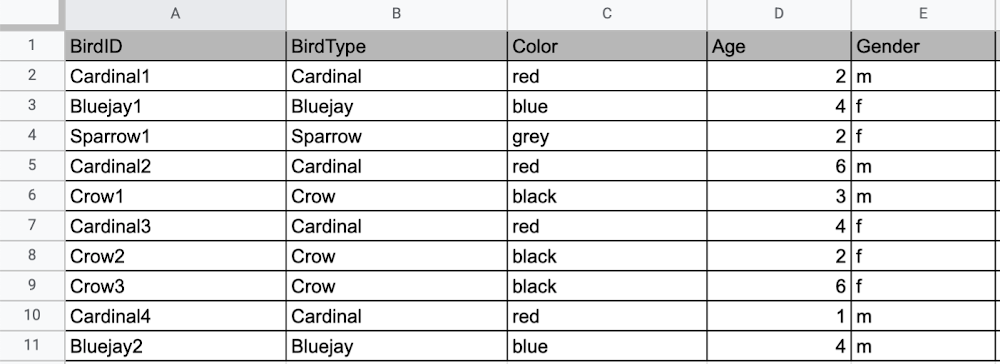
Now, what happens if I want to store information about where Sparrow1 lives, in my spreadsheet, but I don’t care about where the other birds live? I would have to add another column to my spreadsheet, called home, that would only contain data for the sparrow. That would look like this:
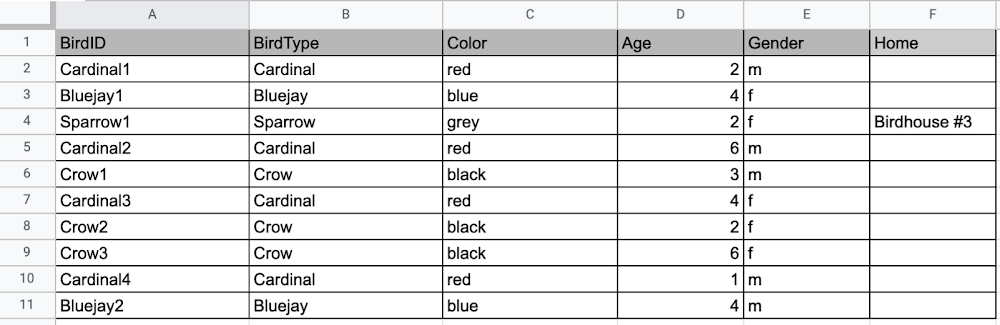
Even though I only want to know information about where the sparrow lives, I am required to have blank spaces in the column for all of the other animals. This is because in a relational database, you have a specific structure of your data called a schema. Just like in a spreadsheet, every item you are storing information on must have a place to put information about the bird’s home, even if you only want that information for one bird. This is enforced by the schema, which is essentially the column headers you put in the sheet and dictates a strict structure for the data, which has pros and cons.
The strict structure of a relational database allows your application to know what kind of data exists, to know what the data type is, and to enforce rules such as requiring data to be unique, or enforcing type of data stored etc. A schema, by design, forces the data in each row to have the same characteristics, which means it is not very flexible, unless you change the schema for the database. That means if you want to add different data that doesn’t fit your existing schema, you have to change the schema. As we discussed above, if you want to change the schema we are using to store information, such as Home, there is some information that will be stored for all rows, even if you don’t want to store anything. The amount of wasted storage is different between database engines, data types etc. Another thing to consider about Relational databases is that at scale, some traditional Relational databases will require more advanced deployments to handle the scale.
Changing the schema of a relational database can be highly disruptive, especially for busy workloads because it requires running scripts to change the schema and coordinating it carefully with the code changes in the app. Due to locking, you might even experience downtime in some cases. Now contrast that with a non-relational document database like Firestore, where you don’t have to worry about schema changes in the databases or downtime as a result of it.
Also, when you have a lot of data that you want to collect and it only applies to a few things in your database, having extra space with no information in it can become wasteful because it uses up storage space in many cases. A non-relational database can help get around this problem.
Non-relational databases
Generally speaking, a non-relational database stores information in a different format than a Relational database. There are 4 major categories of non-relational databases that you will hear most frequently.
- Column-Family
- Document (Firestore)
- Key-Value
- Graph
Since this post is focusing on Firestore, in this section we will dive into what a document database is, how it is used, and when to use it.
Document database (Firestore)
A document database can be thought of as a multi layered collection of entities, such as this:
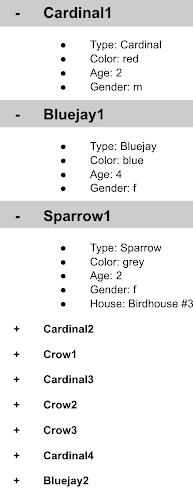
As you can see, when the list is all collapsed, you can only see the information at the top; in this case, that is the BirdID (Cardinal1, Bluejay1, Sparrow1, Cardinal2, Crow1 etc. When I open the list I see “word: word”. For example, the document ID Sparrow1, points to a document with “Type: Sparrow”. I also see “Color: grey”, “Age: 2”, “Gender: f” and “Home: Birdhouse #3”
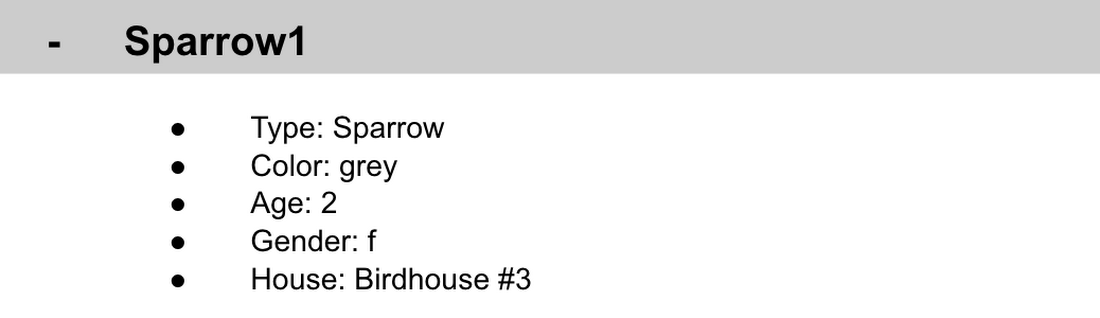
This is known as a key value pair. For “Type: Sparrow”, Type is the key and Sparrow is the value. All of the keys in the Sparrow1 document are: Type, Color, Age, Gender, House. All of the values in the Sparrow1 document are: Sparrow, grey, 2, f, Birdhouse #3.
Similarly to how the key gives you context, it allows you to ask the computer for a specific piece of information, such as the age of the bird. It is important to decide on a specific key term you will use for each piece of data you collect so your data can be easily read programmatically. This is called an implicit schema, an implied understanding of how data is stored that is not enforced by the database. Let’s go over what happens when we use an implicit schema.
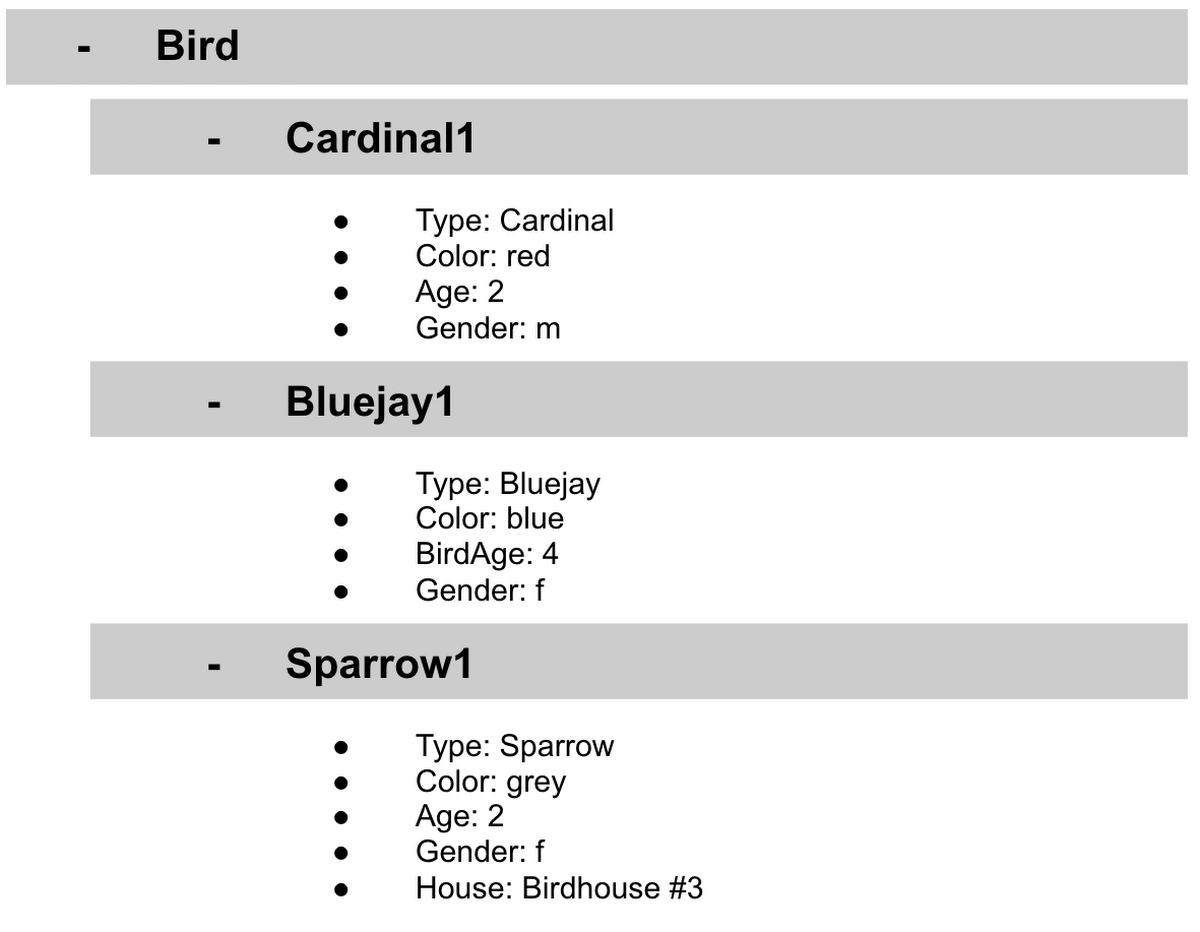
Under Cardinal1, you see Type, Color, Age, and Gender; however, under Sparrow1 you also see House. This is possible because in a non-relational database you don’t have a schema that requires you to store the same information about every bird in your database; instead, you can store the specific information that you need for each bird, regardless of what is stored for other birds. This is a great benefit in terms of flexibility, but because of this flexibility, maintaining standard naming conventions is very important.
Now, let’s discuss why using standard naming conventions is so important. In the example above, if I ask a human: “What is the age of Cardinal1?”, they would probably tell me 2. If I asked them: “What is the Age of Bluejay1?”, they would probably tell me 4. These are both correct answers, but they are only correct because a human is able to assume what Age means. A computer, on the other hand, can’t make assumptions. If I ask a computer: “What is the Age of Cardinal1?” it would say 2, but if I ask it: “What is the Age of Bluejay1?” it would not know. This is because the computer is looking for the keyword Age and it isn’t able to use any context clues to determine what other words might mean Age. However, if I asked the computer: “What is the BirdAge of Bluejay1?”, the computer would tell me 4. Why do I care that I need to tell the computer to look for BirdAge to get the age of blujay one, but to look for Age to get the age of Cardinal one? I care because it means I would have to write two entirely different sets of instructions (i.e software code) to get the age of Cardinal1 and the age of Bluejay1 if I am not careful in how I structure my data. But when I structure my data well, this is not an issue and is infact a benefit by adding added flexibility.
What we see from this example, is that even without a strict schema, we can (and should) define conventions for document formats. If conventions aren’t defined, things can get unwieldy quickly.
How information is accessed
Now, let’s discuss how the information is accessed. If I wanted to know information about which birds are blue in our drop down list example, I would need to expand every section of the list to check if the bird is blue or not. As you can imagine, once you start to get a lot of birds in your database, it becomes cumbersome to open every drop down and see if the bird is blue. Luckily, Firestore lets you run these types of queries against the data (See more here) and receive all the documents that satisfy your conditions. On the other hand, if I wanted to know all of the information about Cardinal1, I could just open the drop down for Cardinal1 and I would have all of the information about that bird.
Now let’s start using some Firestore specific terminology. For the example we just discussed:Collections
- In Firestore, your data lives in collections. You can think of collections as tabs in a spreadsheet.
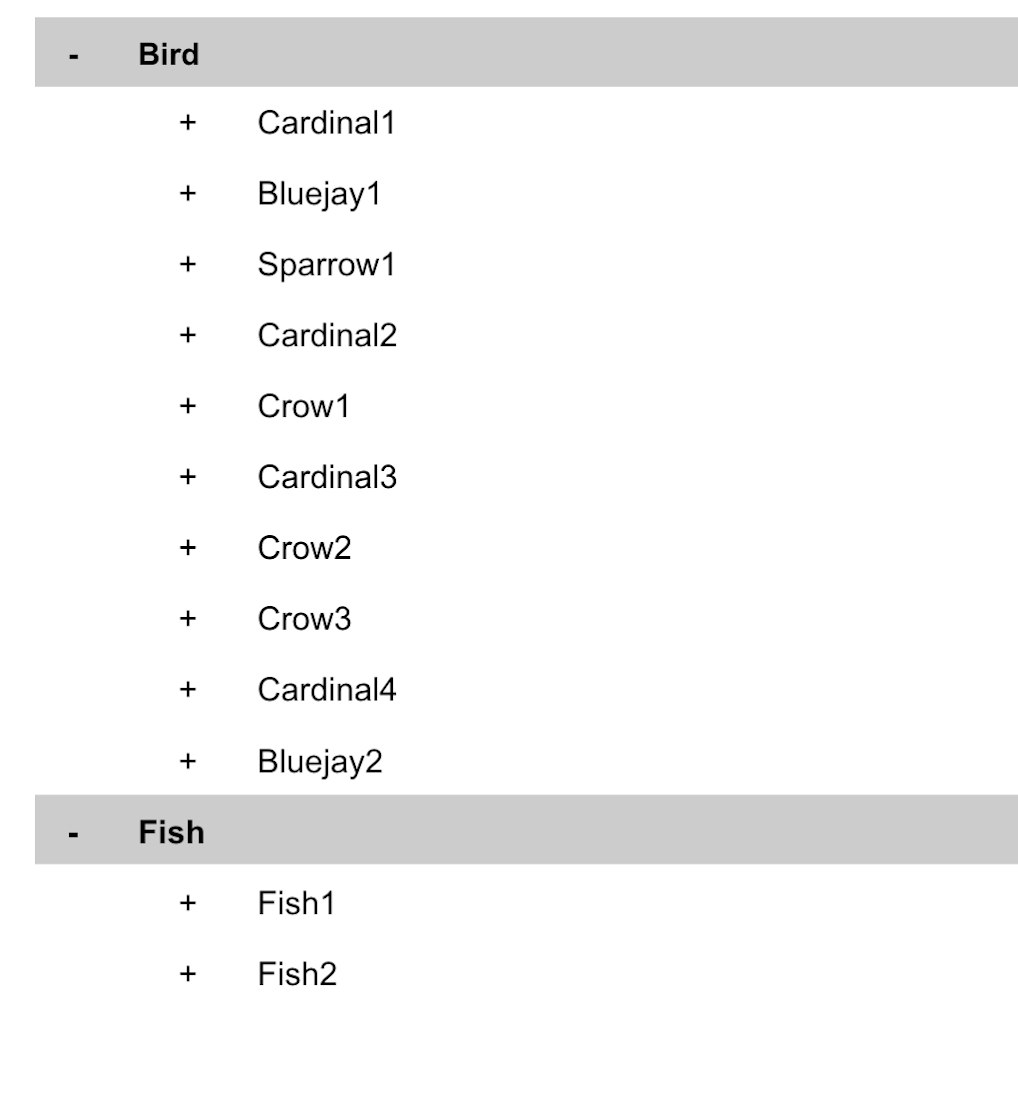
- Collections can be used to organize data. For example, if I decide that I want to collect data about birds and fish, the data about birds could be put in a birds collection, and the data about fish could be put in a Fish collection. ex:
- This is the unit of storage that Firestore uses. In our example, each bird is its own document. Documents reside in collections. This is what one document would contain:
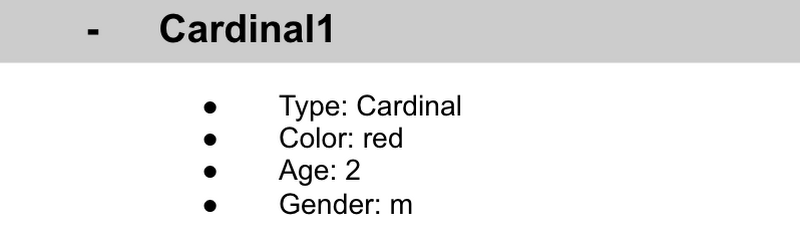
- Each Document corresponds to a row in the sheet. The following diagram demonstrates that each column header maps to a property name in the document and that each value in a row maps to a value in the document.
- Each document must be identified by a unique identifier. In our example, that is BirdID. Notice that the value for BirdID is stored at the top level of the list, so when the document is closed, you can only see Cardinal1 and Cardinal1 is not also stored within the document.
- All documents can be uniquely identified by their location. Let’s think through this in words first before we move to code. If I want to tell someone to get data about the sparrow from the drop down lists, I would need to tell them:
- In the bird drop down list, can you please get all the information under Sparrow1 and put it on a piece of paper called sparrow1Info?
- Now let’s try that again using Firestore terms.
- From the birds collection, can you please get the document for sparrow1 from the Firestore database (db) and save it as sparrow1Info?
- Now let’s try it in code.
- var sparrow1Info = db.collection(‘birds’).doc(‘sparrow1’);
- A subcollection is a collection associated with a document. Using our example of the drop down list, we can add a collection called sightings that stores documents about each sighting of the specific bird. This is what that would look like:
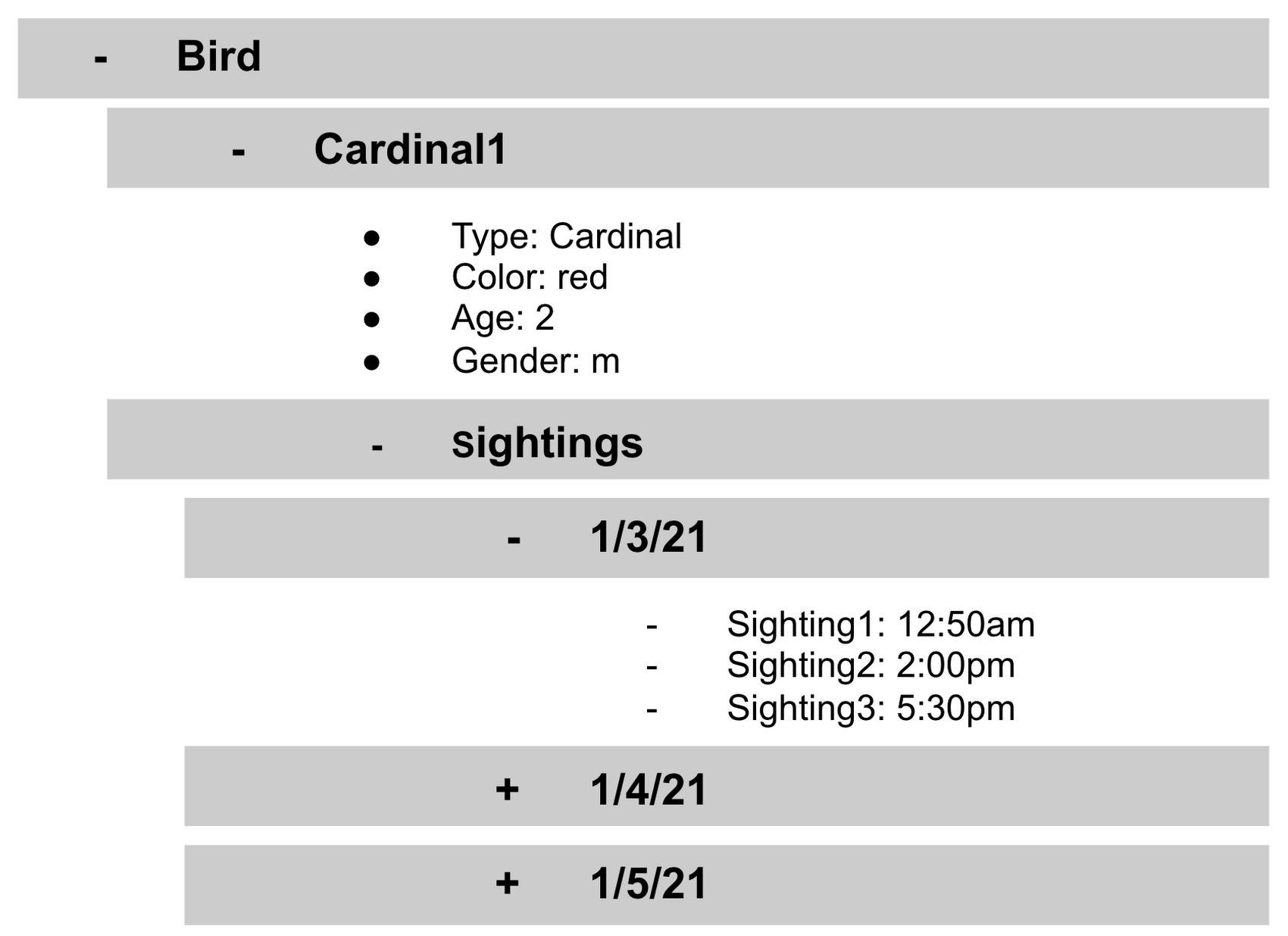
- It is important to note that you don’t need to have the same subcollections on all documents. For example, Cardinal1 can be the only document that has a subcollection of Sightings.
How to search on Google about Firestore
The hardest part of learning a new technology can often be knowing the right terms to put into Google search to get the answers you are looking for. Here are some key terms that can help you get started
Your question:
How should I arrange my data to store it in Firestore?
Search:
Document database implicit schema design
Your Question:
What other databases are similar to firestore?
Search:
What are some document databases
Your Question:
How do I get all documents in the Birds collection?
Search:
How to use wildcards in Firestore
What next?
Try this guide to get started building your first application that uses firestore: https://firebase.google.com/docs/firestore/quickstart
More Relevant Stories for Your Company

BigQuery Now Supports Multi-statement Transactions
Mercury, the Roman god of commerce, is often depicted carrying a purse, symbolic of business transactions, wearing winged sandals, illustrating his abilities to move at great speeds. Transactions power the world’s business systems today, ranging from millions of packages moving worldwide tracked in real time by logistics companies to global

Turning the Tide: How PrestaShop Regained Trust in Data
Since 2007, PrestaShop has helped companies unlock the power of e-commerce through its open-source platform. Over 300,000 merchants worldwide use the PrestaShop platform to grow their business and serve online shoppers. "Our open-source strategy to ecommerce enablement sets us apart," says Rémi Paulin, Ph.D., Data Architect at PrestaShop. "Customization is

How Constellation Brands’ Direct-to-Customer Tech Delivers Economic Impact across Business Portfolio
Editor’s note: Today we’re hearing from Ryan Mason, Director, Head of DTC Growth & Strategy, at alcoholic beverage firm, Constellation Brands on the company’s shift to Direct-to-Consumer (DTC) sales and how Google Cloud’s powerful technology stack helped with this transformation. It’s no secret that consumer businesses have been up-ended in

Unlocking Data Value: Latest Data Platforms and Announcements at the Next 21
Today at Google Cloud Next we are announcing innovations that will enable data teams to simplify how they work with data and derive value from it faster. These new solutions will help organizations build modern data architectures with real-time analytics to power innovative, mission-critical, data-driven applications. Too often, even the best minds
