





IT Team Figures Out Easiest Way to Build Data Pipelines and Create ML Models

14108
Of your peers have already read this article.
5:15 Minutes
The most insightful time you'll spend today!
Building a strong brand in today’s hyper-competitive business environment takes vision. It also requires a flexible, easily managed approach to digital asset management (DAM), so marketing professionals and other stakeholders can easily share, store, track, and manipulate assets to build the brand.
Many of today’s leading companies, including JetBlue, Slack, TripAdvisor, Lyft, and HealthONE, rely on Brandfolder to deliver consistent, organized, and efficient brand experiences. Brandfolder provides an easy-to-use platform that can scale across an entire company with little end-user training, empowering customers to distribute digital assets wherever they are needed. Customers also gain much greater insight into how those assets are used, and how to use them more effectively in marketing campaigns and brand messaging.
“Google Cloud made it easy to build an ML platform to quickly iterate through different brand intelligence use cases and release data-driven product features into the Brandfolder platform.”
—Ajay Rajasekharan, Head of Data Science, Brandfolder
Brandfolder is constantly advancing its development efforts to introduce new data-driven features without complicating the user experience. Big data, artificial intelligence (AI), and machine learning (ML) are key to meeting customers’ unique business needs, and essential for Brandfolder to compete in the fast-moving DAM industry. To enhance these capabilities, Brandfolder sought a public cloud provider that could help it scale its data pipeline cost effectively while providing access to advanced AI technologies.
After graduating from the Techstars startup accelerator program in 2013, Brandfolder tried two other cloud providers before standardizing on Google Cloud Platform (GCP).
“We saw a difference with Google Cloud from the very beginning because the interactions felt like a strategic relationship,” says Jim Hanifen, Head of Product at Brandfolder. “Google gave us startup credits and a lot of face-to-face support, which we hadn’t experienced with other cloud providers. We decided to move our entire infrastructure to Google Cloud Platform.”
Building an ML platform for brand intelligence
After performing an initial lift-and-shift migration of virtual machines (VMs) onto Compute Engine, Brandfolder built an ML platform using GCP managed services to seamlessly deliver its data products. The platform leverages Cloud SQL, Cloud Storage as the data lake, Cloud Dataproc for cloud-native Apache Spark computing clusters, Cloud Composer as the batch job scheduler, Cloud Pub/Sub as the backbone data pipeline, Container Registry to store Docker images, and Google Kubernetes Engine (GKE) as the application orchestrator. Cloud Dataflow brings data into the data lake and into BigQuery for analysis.
“Google Cloud made it easy to build an ML platform to quickly iterate through different brand intelligence use cases and release data-driven product features into the Brandfolder platform,” says Ajay Rajasekharan, Head of Data Science at Brandfolder, who describes the architecture in a detailed blog. “We simply ingest raw application and event data on one end and output an ML service on the other.”
“Moving to Google Cloud Platform allows us to complete more sophisticated data analysis and ML models much faster, and at a much lower cost. We can create brand-specific ML models 12x faster and get them into production quickly to address our customers’ unique business needs.”
—Brett Nekolny, Head of Engineering, Brandfolder
For many general use cases, Brandfolder does not need to build custom ML models, and instead relies on pre-trained API models from GCP. For example, it uses Vision API and Video Intelligence API to auto-tag creative assets on import to enable fast, intuitive searches across images and videos. When more product- and brand-specific modeling is required to address unique customer use cases, Brandfolder builds and trains custom ML models using its GCP pipeline or Cloud AutoML, a suite of products built on Google transfer learning and neural architecture search technology. For example, if a Brandfolder customer makes different types of grills, Brandfolder can use AutoML Vision to train a model to recognize the different grills.
“Moving to Google Cloud Platform allows us to complete more sophisticated data analysis and ML models much faster, and at a much lower cost,” explains Brett Nekolny, Head of Engineering at Brandfolder. “We can create brand-specific ML models 12x faster and get them into production quickly to address our customers’ unique business needs.”
Industry-leading security and performance
Google Cloud’s security model helps Brandfolder give existing and prospective customers peace of mind that their data will be protected. Cloud Identity & Access Management (Cloud IAM) provides enterprise-grade access control, while Cloud Identity-Aware Proxy (Cloud IAP) enables remote users to work more securely without the hassles of a VPN client. GCP also isolates cloud resources into projects, making it easy to assign permissions and keep data and VMs organized and segregated.
“With Google Cloud, everything begins and ends with security, which makes things very easy for us,” says Jim. “If we’re under a security review, we can submit a Google security white paper. If a potential customer has security concerns, we tell them we are hosted on GCP, and those concerns go away.”
To give customers even better application performance for accessing their brand assets, Brandfolder uses Cloud Memorystore, an in-memory data store service for Redis, to cache data and provide sub-millisecond data access for production applications.
“It was much easier for us to use Cloud Memorystore versus running Redis on our compute instances,” says Brett. “The high availability, replication across zones, and automatic failover with no data loss are big for us.”
Global private network interconnects between Google Cloud and the Fastly content delivery network (CDN) dramatically reduce latency, allowing Brandfolder’s customers to deliver and update even very large creative assets quickly around the world.
“What’s beautiful about the relationship between Google and Fastly is that if one of our customers uploads a new version of an asset, we can propagate that out to Fastly, and the new version will automatically show up in all the places where it’s referenced,” says Brett.
“The ability to quickly solve problems with AI has a substantial impact on our revenue, and that’s more apparent every quarter. Few of our competitors are doing product- or brand-specific modeling because it takes a lot of time and resources. We overcame those hurdles with Google Cloud.”
—Jim Hanifen, Head of Product, Brandfolder
Improving employee and customer productivity
Brandfolder also uses Google solutions for real-time collaboration and productivity, using G Suite to connect employees with intuitive, cloud-based apps. Teams use Gmail, Calendar, Docs, Drive, Sheets, Slides, and Hangouts Meet every day to move the business forward. Many of Brandfolder’s customers are also G Suite users, and Brandfolder offers a plug-in that allows them to view their creative assets inside of Docs and pull images in as needed. Customers can also log into Brandfolder with their G Suite credentials, making the solution even easier to use.
“We’ve been using G Suite since the beginning, and it’s helped us collaborate efficiently to build a successful, growing company,” says Jim. “Our teams expect to have that kind of close collaboration, and everyone here enjoys the G Suite experience.”
Driving 99 percent annual business growth
With automated tagging and other innovative AI-based features, Brandfolder is helping customers locate and distribute assets faster. As a result, Brandfolder is building customer loyalty and increasing sales, growing its business by 99 percent year-over-year. Since moving to GCP, Brandfolder has been able to scale its analytics and data pipeline 50x without a corresponding increase in costs and has not had to expand its development team.
“The ability to quickly solve problems with AI has a substantial impact on our revenue, and that’s more apparent every quarter,” says Jim. “Few of our competitors are doing product- or brand-specific modeling because it takes a lot of time and resources. We overcame those hurdles with Google Cloud.”
Achieving MLOps Excellence with Google Cloud and Equinix Collaboration
1240
Of your peers have already read this article.
3:30 Minutes
The most insightful time you'll spend today!
In recent years, machine learning (ML) has gained tremendous popularity as a powerful tool for solving complex problems across various domains. However, building and deploying ML models at scale can be challenging, as it involves a range of tasks such as data preparation, feature engineering, model training, deployment, monitoring, maintenance and so on.
According to “The Art of AI maturity” report published by Accenture “87% of data science projects never make it into production.” This is where MLOps comes in – it can help to address the core challenges by providing a framework for managing the entire ML lifecycle, from data collection and preparation to model development, testing, and deployment. It also reduces the time from ML model development to production and increases the success rate of ML projects.
In Google Cloud, we understand how important MLOps is to successfully productionize ML models. So we collaborated with Equinix, the world’s digital infrastructure company™ and a leader in global colocation data center market share, with 248 data centers in 27 countries on five continents. We helped them by providing the advisory services on the MLOps best practices and architecture.
Let’s take a sneak peek at the MLOps requirements at Equinix and the final architecture that was proposed.
What does MLOps mean for Equinix?
After multiple discovery sessions with the Equinix Team, we identified the core requirements and pain points to address in their new MLOps architecture:
- Reusability: Components such as features and pipeline components should be reused across projects to reduce costs and improve efficiency.
- Foundations: The foundations of the infrastructure, such as environments, folder structure, and project hierarchy, should be well-designed to support scalability and reliability.
- Early identification of problems: Problems should be identified early by including data validation, notifications, and retry mechanisms.
- Cost optimization: Costs should be optimized by paying only for what is used.
- Enterprise CI/CD requirements: Enterprise CI/CD requirements should be met by integrating with GitHub and GitActions.
- Scaling: The infrastructure must scale to support future growth.
- Security: Enterprise security requirements should be met in terms of IAM roles, network, etc.
MLOps Architecture
Based on the above requirements from Equinix, key design considerations were made for example – using Vertex AI Feature Store instead of Big Query for online feature serving, using DataFlow for pre-processing vs using the existing python based pre-processing and so on. After carefully assessing all the alternatives, the below reference architecture for MLOps in GCP was proposed:
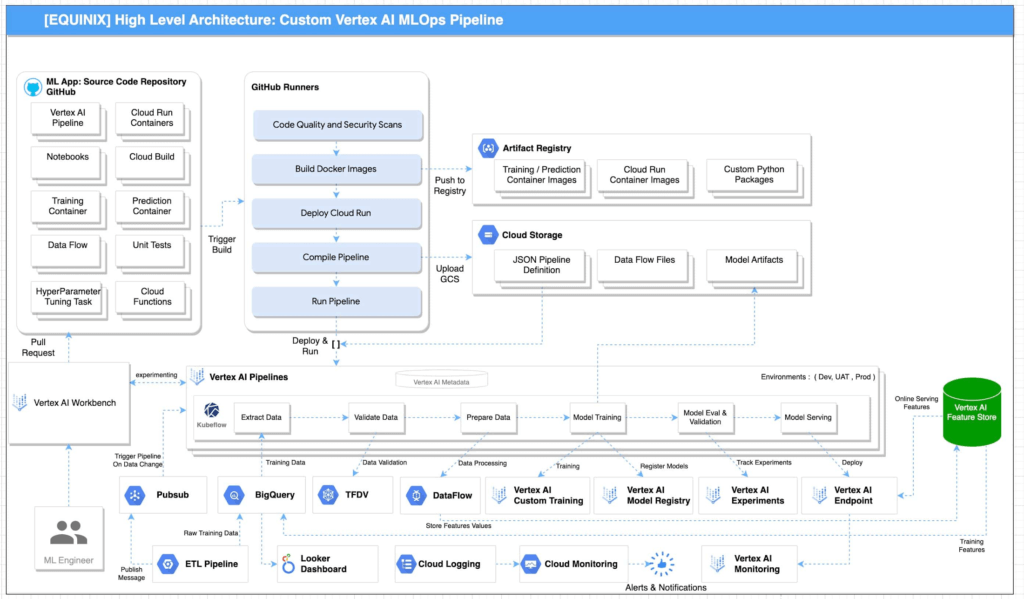
Reference architecture for MLOPs using GCP is illustrated in Figure 1. This architecture includes the following pipeline stages:
- Vertex AI Workbench enables data scientists to quickly explore new ideas and develop/experiment new models. The source code is saved in GitHub repository
- Github Actions with self-hosted runners are integrated with Github as the source code repository. This enables continuous integration of code, quality and security scans. The artifacts generated during the process are saved in Artifact Registry and Google Cloud Storage. These artifacts are deployed to implement the pipeline.
- Unit tests and integration tests can be performed during the continuous integration in Github Actions with self-hosted runners. End-to-end tests are performed on demand in the continuous integration pipeline.
- Metadata about the artifacts is generated and saved in Vertex ML Metadata.
- Automated triggers can be enabled to run pipelines. For example, one trigger is the availability of new training data. These triggers can run the model training pipeline and the new trained model can be pushed to Vertex AI Model Registry.
- To train a new ML model with new data, the deployed Vertex AI Pipeline is executed.
- To train a new ML model with new implementation, a new pipeline will be deployed through CI/CD pipeline.
“The proposed architecture design covers the requirements and scenarios that we were looking for. As our AI and ML portfolio is growing in scale and complexity, it’s important to follow a clear and up-to-date architecture if we want to keep increasing the value delivered by our solutions. As part of the process, the team also acquired the skills required to fully implement it” according to Bernardo Fernandes, Data Science Senior Manager at Equinix.
Below is the snapshot of the features before and after MLOps implementation at Equinix:
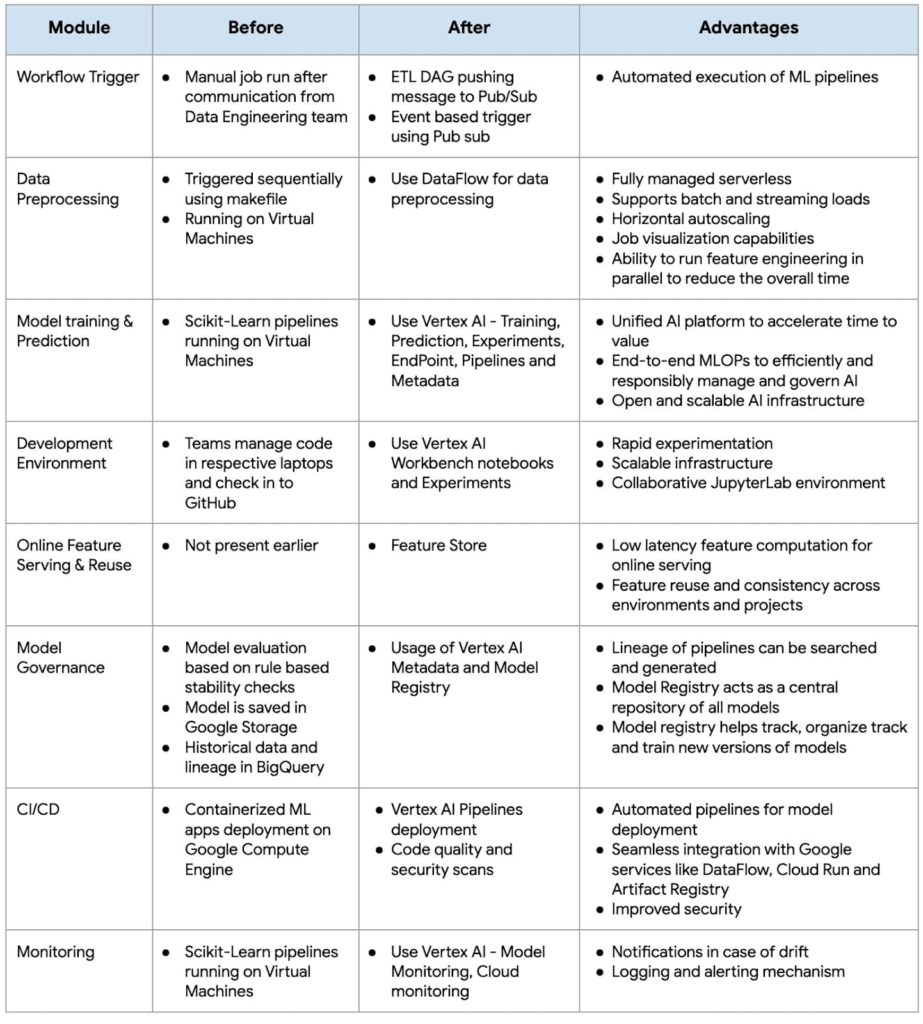
As businesses increasingly rely on machine learning to gain a competitive edge, MLOps has become a critical component of their strategy. By adopting MLOps practices, organizations can achieve faster time-to-market, better performance, and higher ROI for their machine learning initiatives.
Fast track end-to-end deployment with Google Cloud AI Services (AIS)
The partnership between Google Cloud and Equinix is just one of the latest examples of how we’re providing AI-powered solutions to solve complex problems to help organizations drive the desired outcomes. To learn more about Google Cloud’s AI services, visit our AI & ML Products page.
We’d like to give special thanks to Nitin Aggarwal, Vijay Surampudi, Parag Mhatre and Anantha Narayanan Krishnamurthy for their support and guidance throughout the project. We are also grateful to the super awesome collaboration with the Equinix Team (Ravi Pasula and Brendan Coffey, Bernardo Fernandes, Łukasz Murawski, Jakub Michałowski, Sonia Przygocka-Groszyk, Marek Opechowski, Daria Bondara, Nila Velu, Vijay Narayanan, Dharmendra Kumar, Shailesh Sukare, Arunraj Kumar Raje, Seng Cheong Lee).
Maximize Efficiency in Document Extraction Models with Document AI Workbench GA Release

1305
Of your peers have already read this article.
3:30 Minutes
The most insightful time you'll spend today!
Each day, more documents are created and used across companies to make decisions. However, the value in these documents is primarily expressed as unstructured data, which makes the value difficult and manually intensive to extract and use for business processes.
As the number and variety of documents used by businesses proliferate, machine learning (ML) solutions need to be more flexible to handle the broader set of use cases. That’s why we introduced the first Document AI Workbench model, Custom Document Extractor (CDE), in Public Preview at Google Cloud Next ‘22. CDE makes it fast and easy to apply ML to virtually any document-based workflow to extract structured data from unstructured document types, to automate business processes.
CDE lets developers and analysts use their own data to train models and extract fields from documents needed for the business. CDE lets organizations build models faster and with less data — thus accelerating time-to-value for processing and analysis of data in documents.
Today, we announce that Document AI Workbench is Generally Available (GA), open to all customers, ready for production use through APIs and the Google Cloud Console. Document AI Workbench is covered by the Document AI SLA — online and batch document prediction is supported with >=99.9% uptime. Furthermore, Document AI Workbench is now covered by Google Cloud’s GA product terms. For example, Google will notify customers at least 12 months before significantly modifying a customer-facing Google API in a backwards-incompatible manner.
In this blog post, we’ll explore ways customers are already using CDE and Document AI Workbench’s updated capabilities.
What users are saying about Workbench
Deliver higher model accuracy with Workbench
Users leverage Workbench to ultimately save time and money. A third party evaluated Document AI Workbench and concluded that it extracts data more accurately1 than several competing products for document types with variable layouts (e.g. invoice, receipt, bank statements, paystubs). Better accuracy drives higher automation rates, helping Workbench users save time and money.
Chris Jangareddy, managing director for Artificial Intelligence & Data at Deloitte Consulting LLP said, “Google Cloud Document AI is a leading document processing solution packed with rich features like multi-step classify and text extraction to automate sorting, classification, extraction, and quality assurance. By combining Document AI with Workbench, Google Cloud has created a forward-thinking and powerful AI platform for intelligent document processing that will allow for process transformation at an enterprise scale with predictable outcomes that can benefit businesses.”
Mansoor Khan, CEO of OneClinic said, “We help medical professionals scale their clinics through automation. We used Google’s Document AI Workbench to create a model to automatically extract data from patients’ insurance cards as part of our patient check-in software. Workbench is easy to use and we are really happy with the model accuracy — it extracts data more accurately than what we would expect from human data entry.”
Rajnish Palande, VP, Google Business Unit for BFSI, TCS said, “The Google Cloud Document AI Workbench leverages artificial intelligence (AI) to manage and glean insights from unstructured data. The Workbench brings together the power of classification, auto-annotation, page-number identification and multi-language support to help organizations rapidly deliver enhanced accuracy, improved operational efficiency, higher confidence in the information extract, and increased return on investment.”
Build production ready models faster with Workbench
Document AI Workbench helps users create machine learning models faster. For example, a third-party evaluation shows Document AI Workbench trains machine learning models up to 3x faster than a leading competitor. This is an important improvement which lowers total cost of ownership and increases value.
Dallas Dolen, Partner, Google Alliance Leader at PwC said, “Google Document AI Workbench helps to accelerate our custom parser models training as well as improves accuracy and performance using a custom document extractor with human in the loop. It helps us solve complex business problems for our clients in the financial services and healthcare industries.”
Ziang Jia, Senior DocAl Development Lead at Resultant, said, “Document AI Workbench has unlocked a brand-new machine learning development experience for information extraction solutions. Its simplicity and robustness enabled us to build models and deliver a highly accurate outcome in an agile way for a large government agency. We couldn’t be more impressed by its simplicity and robustness and are excited to see how the product will evolve in the future.”
Sean Earley, VP of Delivery Services of Zencore said, “Document AI Workbench allows us to develop highly accurate document parsing models in a matter of days. Our customers have automated tasks that formerly required significant human labor. For example, using Document AI Workbench, a team of two trained a model to split, classify and extract data from 15 document types to automate Home Mortgage Disclosure Act reporting. The mean trained model accuracy was 94%, drastically reducing the operational cost of our customer’s compliance reporting procedures.”
What’s new with Document AI Workbench
The latest Workbench capabilities make it even easier to train and deploy an extraction model:
- With Workbench’s public APIs, you can programmatically create, delete, train, evaluate and deploy models.
- Our updated dataset management tools automatically detect and create existing schema labels from your pre-annotated documents. They also provide you more flexibility when creating and managing schema.
- Our new DocAI Toolkit includes a labeled document converter so that you can easily convert your labeled documents to DocAI’s format and start training faster.
- We’ve reduced the cognitive load for labelers with efficiency enhancements to our Labeling UI.
- The revamped Processor Gallery helps you quickly identify the best model for your use case.
What’s next for Document AI Workbench
We continue to invest in Document AI Workbench to help you automate document processing. Here are a few things we’re working on that we’re excited about:
- Classify document types with the Custom Document Classifier (CDC), coming soon in public preview
- Copy processor versions across projects and processors to streamline managing development and production environments
- Support larger documents (e.g., longer than 50 pages) so you can process a wider array of documents
- Broader (non-latin) language support–equivalent to Document AI OCR
- And many more investments, using state of the art technology, to help you build world class models faster to automate document processing
Document AI Workbench is in GA and ready for production workloads. Learn more via Document AI Workbench documentation or try it out in the Google Cloud Console.
Acknowledgements: Tomas Moreno, Outbound Product Manager, Lukas Rutishauser, Software Engineering Manager, Michael Kwong, Software Engineering Manager, Rajagopal Janani, Software Engineering Manager, Michael Lanning, UX Designer.
1. When trained with 200+ documents
Marks & Spencer Aims to Bring a Third of business Online and Google Contact Center AI is Key to its Success

5794
Of your peers have already read this article.
6:20 Minutes
The most insightful time you'll spend today!
“Hello, Marks & Spencer. How may we help you?”
As one of the biggest and best-loved retail brands in the UK, Marks & Spencer (M&S) is known for the personalized service it provides to its 30 million loyal customers. For 135 years and in 57 countries around the world, M&S has worked to meet and exceed customer expectations for quality and service. Since the advent of the telephone, this has meant cheerfully servicing customers who call in to M&S branches or into their contact centers, no matter what their request might be.
“Retail is in a state of flux and M&S is transforming to better serve our customers so that we can compete and win. Automating calls into our stores with Google voice recognition gives us every opportunity to get things right for our customers and keep them coming back again and again.”
—Akash Parmar, Enterprise Architect (Digital Customer Engagement), Marks & Spencer
The company now has a goal of bringing one third of its business online by 2022. In order to engage more customers online, it has opened a new voice channel hosted on Google Cloud.
The company previously had switchboards in 13 different stores across the UK and Ireland (UKI), handling up to nine million calls a year. But as its retail offering evolved across multiple channels, it was becoming increasingly difficult to quickly and effectively answer customer service requests using an outdated switchboard model.
Customers might call in to order an outfit they had seen in a store, to inquire about returning a dress they bought online, or to recover a lost umbrella in a food hall. Each of these different requests required a different routing response from staff, and if the company didn’t act soon, it knew that the cost of managing the increase in call volume would lead to a significant cost impact. M&S decided it was time to make a technological leap forward to meet customers’ expectations in the new, omnichannel retail environment.
“Retail is in a state of flux and M&S is transforming to better serve our customers so that we can compete and win,” says Akash Parmar, Enterprise Architect for Digital Customer Engagement at M&S. “Automating calls into our stores with Google voice recognition gives us every opportunity to get things right for our customers and keep them coming back again and again.”
Boosting opportunities for customer engagement with voice recognition
M&S customers were used to dealing with their local store for anything they needed. But as stores were completely separate from the online business, customers weren’t able to purchase something they’d seen online by calling stores because the store staff didn’t have access to platforms needed to place an online order securely. For a company that places a very high importance on customer experience, this was unacceptable.
Akash Parmar, Enterprise Architect for Customer Engagement, was set a the goal by Chris McGrath, M&S Programme Manager, to ensure that the right channel and the right level of assistance was available to customers at any point before, during, or after purchase. Akash set himself the challenge of building a platform that could adapt to all of these channels and scale very quickly.
“We didn’t have the resources to build a speech recognition platform. DVELP removed that obstacle. It understood what we wanted to achieve and how Google Voice APIs and Twilio could get us there. Whatever we want, DVELP builds it for us. DVELP always presents options, never problems.”
—Akash Parmar
In 2018, Akash reached out to Google Cloud partner DVELP, one of the UK’s leading experts on the Twilio programmable contact center platform and Google speech recognition technology. DVELP recommended a Google Cloud-based natural language speech recognition platform that leverages the audio stream intent detection functionality in the Contact Center AI solution, Dialogflow, as the heart of an inbound-call-handling strategy. This strategy was designed to improve routing accuracy, give customers more self-service options, and increase analyst visibility into customer journeys.
“We didn’t have the resources to build a speech recognition platform. DVELP removed that obstacle,” says Akash. “They understood what we wanted to achieve and how Google Cloud Voice APIs and Twilio could get us there. Whatever we want, DVELP builds it for us. DVELP always presents options, never problems.”
Using Google speech recognition to improve customer experience
M&S wanted to use natural language to enable customers to speak and state what help they required rather than choose from a list of options. This would help them answer the millions of calls coming in and figure out what customers needed quickly.
In order to do that, DVELP needed to consider how best to address tying customer intent to actions, while maintaining flexibility. DVELP recommended the unconventional choice of not referencing intent in the application layer, but mapping the available actions to the information required to perform them. These actions were then used to build a “declarative dictionary” for the customer service team.
By focusing on actions rather than intents, the solution enables the customer services team to configure actions to intents in virtually any combination of key-value pairs. Leveraging the fact that Dialogflow can detect and respond to customer intents in real time, M&S has already reached 92% accuracy in translating customer declarations to actionable intents.
“With Google Cloud speech recognition and Contact Center AI solutions such as Dialogflow, there’s no information that we can’t make sense of. No matter where you call from, who you are, your age, your gender: you speak, and we understand.”
—Akash Parmar
Akash recalls that once customers became comfortable with the prompt, “in a few words, how may we help you?” they started providing simple, concise responses, and the customer learning curve quickly leveled out. At that point, Google Cloud speech recognition and Dialogflow took over. “The technology worked perfectly and the result was like magic,” says Akash.
“With Google Cloud speech recognition and Contact Center AI solutions such as Dialogflow, there’s no information that we can’t make sense of,” he says. “No matter where you call from, who you are, your age, your gender: you speak, and we understand.”
Enabling self-service contact center improvements with Dialogflow
It was important to M&S that contact center employees be self-sufficient in updating the platform to reflect changes in demand. They needed to be able to easily react to a spike in inquiries about a special offer, for example, without relying on the engineering team. At the same time, neither Akash nor the DVELP team wanted the staff to have to learn error-prone JSON inside contexts, or write responses in order to get necessary information from customers.
DVELP’s creative solution was to fill out the “Action and parameters” section of every intent. This is usually reserved for collecting information from customer declarations, but was also easily adapted to implementing custom key-value pairs. This is particularly helpful in making sure that the contact center is ready to handle new promotions as they arise. As sales and special events are communicated to the contact center from the head office, staff can program specific vocabulary directly into Dialogflow, thanks to Contact Center AI, ensuring that the M&S system is immediately ready to handle related customer calls.
Rolling out the platform to the UK and Ireland
In just a few months after going live, calls are being efficiently routed to the contact center and its existing customer service platform. At the contact center, staff can quickly and easily respond to customer requests, place orders, and process returns. Thanks to the natural language capabilities of Google Cloud, a simple customer request like “order the red children’s dress in the Bath high street window in size six” not only gets correctly routed, but provides data points for future personalized interactions.
Being able to accurately recognize customer intent 92% of the time after less than four months since deployment is an important milestone for M&S. With a concurrent 89% voice-to-text accuracy rate for Dialogflow transcriptions, M&S has rolled out the successful speech recognition platform to all of its stores in UK and Ireland and customer service contact centers.
Akash is so pleased with the performance of the new Google Cloud platform that he’s focusing on what new functionality he can add next to improve customer experience even more.
“We’re working on collecting product codes from customers using natural language so we can give them stock availability details,” he shares. “We also want to use Google Cloud to enable a more conversational experience when customers are searching for help or FAQs on our website. At the same time, we’re looking at Contact Center AI and Dialogflow to provide a virtual assistant experience for our webchat journey. Thanks to our new voice solution, we can clearly understand the key issues that our customers face on a day-to-day basis; the aim now is to start solving these issues through self-service and automation.”
New Capabilities in BigQuery to Ease Anomalies Detection in the Absence of Labeled Data

6339
Of your peers have already read this article.
4:00 Minutes
The most insightful time you'll spend today!
When it comes to anomaly detection, one of the key challenges that many organizations face is that it can be difficult to know how to define what an anomaly is. How do you define and anticipate unusual network intrusions, manufacturing defects, or insurance fraud? If you have labeled data with known anomalies, then you can choose from a variety of supervised machine learning model types that are already supported in BigQuery ML. But what can you do if you don’t know what kind of anomaly to expect, and you don’t have labeled data? Unlike typical predictive techniques that leverage supervised learning, organizations may need to be able to detect anomalies in the absence of labeled data.
Today we are announcing the public preview of new anomaly detection capabilities in BigQuery ML that leverage unsupervised machine learning to help you detect anomalies without needing labeled data. Depending on whether or not the training data is time series, users can now detect anomalies in training data or on new input data using a new ML.DETECT_ANOMALIES function (documentation), with the following models:
- Autoencoder model, now in Public Preview (documentation)
- K-means model, already GA (documentation)
- ARIMA_PLUS time series model, already GA (documentation)
How does anomaly detection with ML.DETECT_ANOMALIES work?
To detect anomalies in non-time-series data, you can use:
- K-means clustering models: When you use
ML.DETECT_ANOMALIESwith a k-means model, anomalies are identified based on the value of each input data point’s normalized distance to its nearest cluster. If that distance exceeds a threshold determined by the contamination value provided by the user, the data point is identified as an anomaly. - Autoencoder models: When you use
ML.DETECT_ANOMALIESwith an autoencoder model, anomalies are identified based on the reconstruction error for each data point. If the error exceeds a threshold determined by the contamination value, it is identified as an anomaly.
To detect anomalies in time-series data, you can use:
- ARIMA_PLUS time series models: When you use
ML.DETECT_ANOMALIESwith an ARIMA_PLUS model, anomalies are identified based on the confidence interval for that timestamp. If the probability that the data point at that timestamp occurs outside of the prediction interval exceeds a probability threshold provided by the user, the datapoint is identified as an anomaly.
Below we show code examples of anomaly detection in BigQuery ML for each of the above scenarios.
Anomaly detection with a k-means clustering model
You can now detect anomalies using k-means clustering models, by running ML.DETECT_ANOMALIES to detect anomalies in the training data or in new input data. Begin by creating a k-means clustering model:
Language: SQL
CREATE MODEL `mydataset.my_kmeans_model`OPTIONS(MODEL_TYPE = 'kmeans',NUM_CLUSTERS = 8,KMEANS_INIT_METHOD = 'kmeans++') ASSELECT* EXCEPT(Time, Class)FROM`bigquery-public-data.ml_datasets.ulb_fraud_detection`;
With the k-means clustering model trained, you can now run ML.DETECT_ANOMALIES to detect anomalies in the training data or in new input data.
To detect anomalies in the training data, use ML.DETECT_ANOMALIES with the same data used during training:
Language: SQL
SELECT*FROMML.DETECT_ANOMALIES(MODEL `mydataset.my_kmeans_model`,STRUCT(0.02 AS contamination),TABLE `bigquery-public-data.ml_datasets.ulb_fraud_detection`);
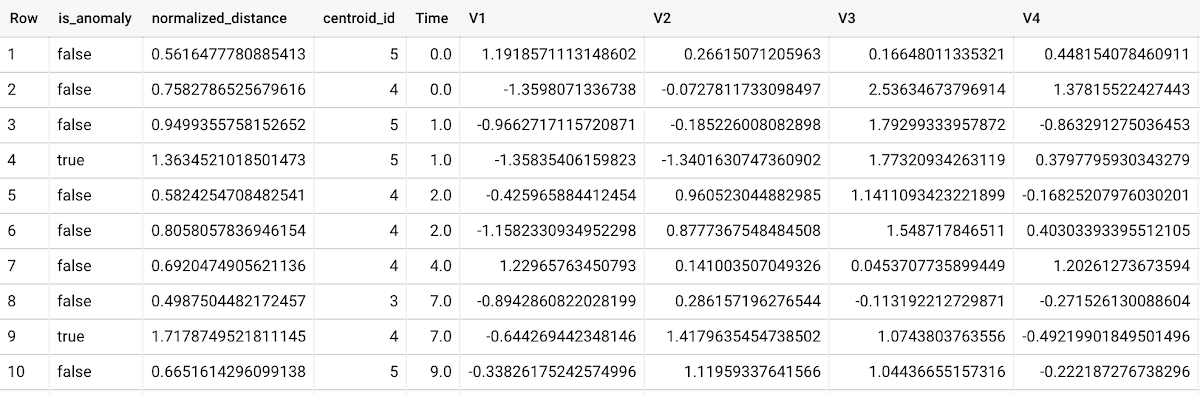
To detect anomalies in new data, use ML.DETECT_ANOMALIES and provide new data as input:
Language: SQL
SELECT*FROMML.DETECT_ANOMALIES(MODEL `mydataset.my_kmeans_model`,STRUCT(0.02 AS contamination),(SELECT * FROM `mydataset.newdata`));

How does anomaly detection work for k-means clustering models?
Anomalies are identified based on the value of each input data point’s normalized distance to its nearest cluster, which, if exceeds a threshold determined by the contamination value, is identified as an anomaly. How does this work exactly? With a k-means model and data as inputs, ML.DETECT_ANOMALIES first computes the absolute distance for each input data point to all cluster centroids in the model, then normalizes each distance by the respective cluster radius (which is defined as the standard deviation of the absolute distances of all points in this cluster to the centroid). For each data point, ML.DETECT_ANOMALIES returns the nearest centroid_id based on normalized_distance, as seen in the screenshot above. The contamination value, specified by the user, determines the threshold of whether a data point is considered an anomaly. For example, a contamination value of 0.1 means that the top 10% of descending normalized distance from the training data will be used as the cut-off threshold. If the normalized distance for a datapoint exceeds the threshold, then it is identified as an anomaly. Setting an appropriate contamination will be highly dependent on the requirements of the user or business.
For more information on anomaly detection with k-means clustering, please see the documentation here.
Anomaly detection with an autoencoder model
You can now detect anomalies using autoencoder models, by running ML.DETECT_ANOMALIES to detect anomalies in the training data or in new input data.
Begin by creating an autoencoder model:
Language: SQL
CREATE MODEL `mydataset.my_autoencoder_model`OPTIONS(model_type='autoencoder',activation_fn='relu',batch_size=8,dropout=0.2,hidden_units=[32, 16, 4, 16, 32],learn_rate=0.001,l1_reg_activation=0.0001,max_iterations=10,optimizer='adam') ASSELECT* EXCEPT(Time, Class)FROM`bigquery-public-data.ml_datasets.ulb_fraud_detection`;
To detect anomalies in the training data, use ML.DETECT_ANOMALIES with the same data used during training:
Language: SQL
SELECT*FROMML.DETECT_ANOMALIES(MODEL `mydataset.my_autoencoder_model`,STRUCT(0.02 AS contamination),TABLE `bigquery-public-data.ml_datasets.ulb_fraud_detection`);
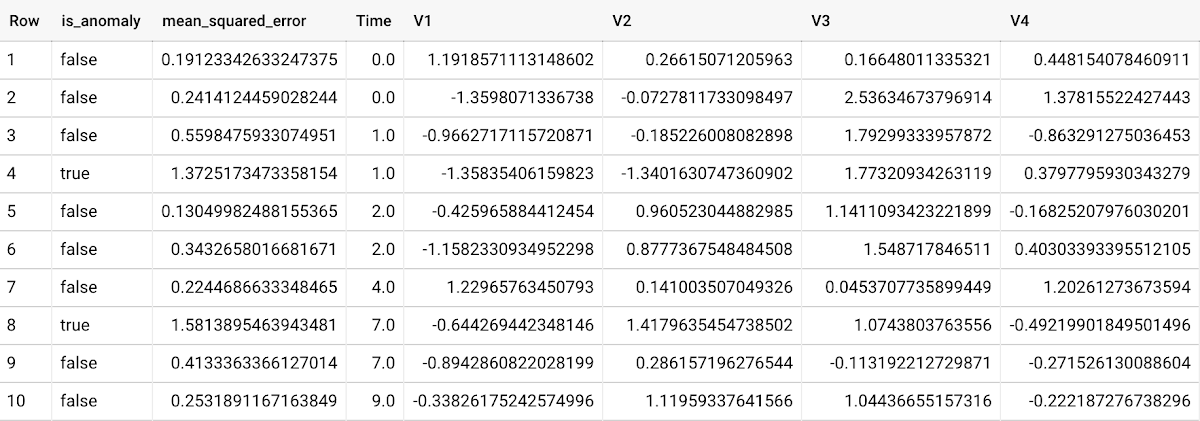
To detect anomalies in new data, use ML.DETECT_ANOMALIES and provide new data as input:
Language: SQL
SELECT*FROMML.DETECT_ANOMALIES(MODEL `mydataset.my_autoencoder_model`,STRUCT(0.02 AS contamination),(SELECT * FROM `mydataset.newdata`));

How does anomaly detection work for autoencoder models?
Anomalies are identified based on the value of each input data point’s reconstructed error, which, if exceeds a threshold determined by the contamination value, is identified as an anomaly. How does this work exactly? With an autoencoder model and data as inputs, ML.DETECT_ANOMALIES first computes the mean_squared_error for each data point between its original values and its reconstructed values. The contamination value, specified by the user, determines the threshold of whether a data point is considered an anomaly. For example, a contamination value of 0.1 means that the top 10% of descending error from the training data will be used as the cut-off threshold. Setting an appropriate contamination will be highly dependent on the requirements of the user or business.
For more information on anomaly detection with autoencoder models, please see the documentation here.
Anomaly detection with an ARIMA_PLUS time-series model
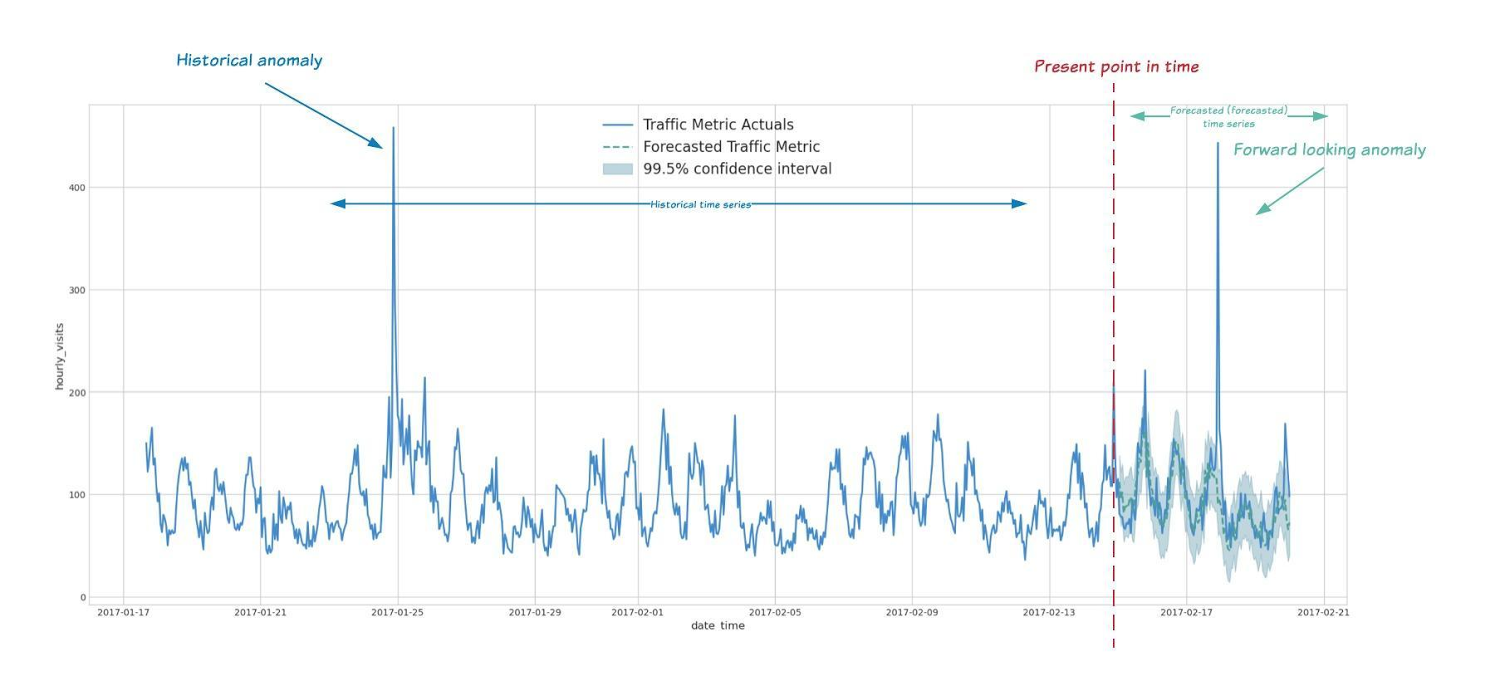
With ML.DETECT_ANOMALIES, you can now detect anomalies using ARIMA_PLUS time series models in the (historical) training data or in new input data. Here are some examples of when might you want to detect anomalies with time-series data:
Detecting anomalies in historical data:
- Cleaning up data for forecasting and modeling purposes, e.g. preprocessing historical time series before using them to train an ML model.
- When you have a large number of retail demand time series (thousands of products across hundreds of stores or zip codes), you may want to quickly identify which stores and product categories had anomalous sales patterns, and then perform a deeper analysis of why that was the case.
Forward looking anomaly detection:
- Detecting consumer behavior and pricing anomalies as early as possible: e.g. if traffic to a specific product page suddenly and unexpectedly spikes, it might be because of an error in the pricing process that leads to an unusually low price.
- When you have a large number of retail demand time series (thousands of products across hundreds of stores or zip codes), you would like to identify which stores and product categories had anomalous sales patterns based on your forecasts, so you can quickly respond to any unexpected spikes or dips.
How do you detect anomalies using ARIMA_PLUS? Begin by creating an ARIMA_PLUS time series model:
Language: SQL
CREATE OR REPLACE MODEL mydataset.my_arima_plus_modelOPTIONS(MODEL_TYPE='ARIMA_PLUS',TIME_SERIES_TIMESTAMP_COL='date',TIME_SERIES_DATA_COL='total_amount_sold',TIME_SERIES_ID_COL='item_name',HOLIDAY_REGION='US') ASSELECTdate,item_description AS item_name,SUM(bottles_sold) AS total_amount_soldFROM`bigquery-public-data.iowa_liquor_sales.sales`GROUP BYdate,item_nameHAVINGdate BETWEEN DATE('2016-01-04') AND DATE('2017-06-01')AND item_name IN ("Black Velvet", "Captain Morgan Spiced Rum","Hawkeye Vodka", "Five O'Clock Vodka", "Fireball Cinnamon Whiskey");
To detect anomalies in the training data, use ML.DETECT_ANOMALIES with the model obtained above:
Language: SQL
SELECT*FROMML.DETECT_ANOMALIES(MODEL `mydataset.my_arima_plus_model`,STRUCT(0.8 AS anomaly_prob_threshold));
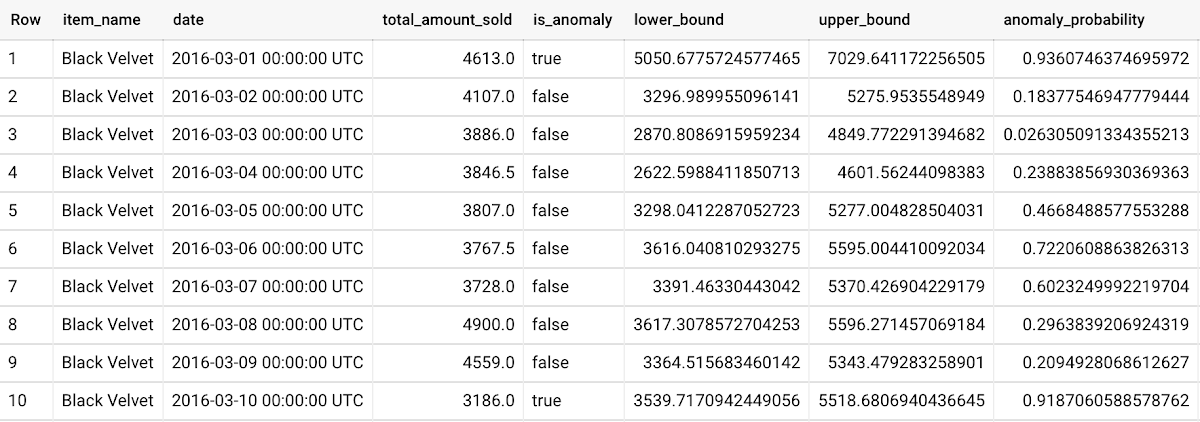
To detect anomalies in new data, use ML.DETECT_ANOMALIES and provide new data as input:
Language: SQL
WITHnew_data AS (SELECTdate,item_description AS item_name,SUM(bottles_sold) AS total_amount_soldFROM`bigquery-public-data.iowa_liquor_sales.sales`GROUP BYdate,item_nameHAVINGdate BETWEEN DATE('2017-06-02')AND DATE('2017-10-01')AND item_name IN ('Black Velvet','Captain Morgan Spiced Rum','Hawkeye Vodka',"Five O'Clock Vodka",'Fireball Cinnamon Whiskey') )SELECT*FROMML.DETECT_ANOMALIES(MODEL `mydataset.my_arima_plus_model`,STRUCT(0.8 AS anomaly_prob_threshold),(SELECT*FROMnew_data));
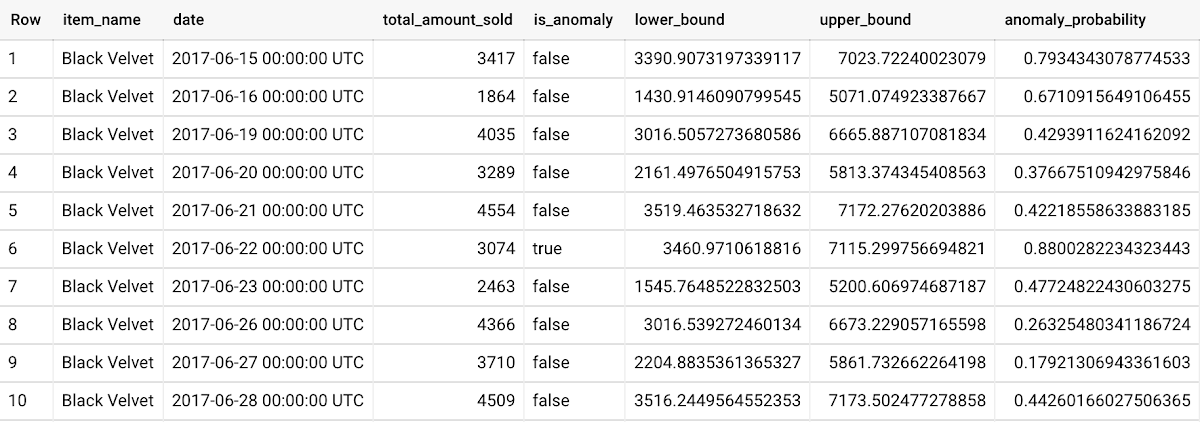
For more information on anomaly detection with ARIMA_PLUS time series models, please see the documentation here.
Thanks to the BigQuery ML team, especially Abhinav Khushraj, Abhishek Kashyap, Amir Hormati, Jerry Ye, Xi Cheng, Skander Hannachi, Steve Walker, and Stephanie Wang.
Google’s Latest ‘Carbon Footprint’ can Flag Users about Carbon Emission Levels from their Cloud Usage

7094
Of your peers have already read this article.
4:00 Minutes
The most insightful time you'll spend today!
Google Cloud is proud to support our customers with the cleanest cloud in the industry. For the past four years, we’ve matched 100% of our electricity use with renewable energy purchases, and we were the first company of our size to commit going even further by running on carbon-free energy 24/7 by 2030. As we work to achieve 24/7 carbon-free energy, we help you take immediate action to decarbonize your digital applications and infrastructure. We’re also working with our customers across every industry to develop new solutions for the unique climate change challenges that organizations face. Today, we’re excited to expand our portfolio of carbon-free solutions and announce new partnerships that will help every company build a more sustainable future.
First, we’re launching Carbon Footprint, a new product that provides customers with the gross carbon emissions associated with their Google Cloud Platform usage. Now available to every GCP user for free in the Cloud Console, this tool helps you measure, track and report on the gross carbon emissions associated with the electricity of your cloud usage. Of course, the net operational emissions associated with your Google Cloud usage is still zero. With growing requirements for Environmental Social and Governance (ESG) reporting, companies are looking for ways to show their employees, boards and customers their progress against climate targets. Using Carbon Footprint, you have access to the gross energy related emissions data you need for internal carbon inventories and external carbon disclosures, with one click.
Built in collaboration with customers like Atos, Etsy, HSBC, L’Oréal, Salesforce, Thoughtworks and Twitter, our Carbon Footprint reporting introduces a new standard of transparency to support you in meeting your climate goals. You can monitor your gross cloud emissions over time, by project, by product and by region, giving IT teams and developers metrics that can help them reduce their carbon footprint. Our detailed calculation methodology is published so that auditors and reporting teams can verify that their cloud emissions data meets GHG Protocol guidance.

“The power of knowledge combined with the power of technology innovation plays a vital role in proactively responding to the climate crisis we are facing. With Google Carbon Footprint reporting, Atos feeds emissions data in our Decarbonization Data Platform, demonstrating potential emissions reductions from the Google Cloud Platform to our customers. This reporting opens up new levels of emissions transparency, trajectory planning, and data insight to support our customers in meeting, and potentially accelerating towards, their climate goals.”—Nourdine Bihmane, Head of Decarbonization Business Line, Atos
“The capability to measure and understand the environmental footprint of our Public Cloud usage is among the key axis of our sustainable tech roadmap. With Google Cloud Carbon Footprint, we are now able to directly follow the impact of our sustainable infrastructure approach and architecture principles.”—Hervé DUMAS, Sustainability IT Director, L’Oreal
While digital infrastructure emissions are just one part of your environmental footprint, accurately accounting for IT carbon emissions is necessary to measure progress against the carbon reduction targets required to avert the worst consequences of climate change. To help you account for emissions beyond our cloud and across your organization, we’re excited to partner with Salesforce Sustainability Cloud, integrating our Google Cloud Platform emissions data into their carbon accounting platform.
“As we face unprecedented climate challenges, companies across the globe need to embed sustainability into the core of their business in order to meet growing customer and stakeholder expectations, and reduce their environmental impact. Together, Google Cloud and Salesforce Sustainability Cloud can help our joint customers accelerate their path to Net Zero, leveraging data-driven insights and visualizations to track and reduce their carbon emissions to drive sustainable change.”—Ari Alexander, GM of Salesforce Sustainability Cloud.
From information to action
With the gross energy-related emissions footprint of data associated with your Google Cloud usage now available, we’re committed to providing tools to not only measure your carbon footprint, but help you reduce it. We recently launched low-carbon region icons to help you choose cleaner regions to locate your Google Cloud resources. New users who see the icons are over 50% more likely to choose clean regions over others, ensuring their applications emit less carbon over time.
For current Google Cloud users, we’re pleased to announce that Active Assist Recommender will include a new sustainability impact category, extending its original core pillars of cost, performance, security, and manageability. Starting with the Unattended Project Recommender, you’ll soon be able to estimate the gross carbon emissions you’ll save by removing your idle resources. Unattended Project Recommender uses machine learning to identify, with a high degree of confidence, projects that are likely abandoned based on API and networking activity, billing, usage of cloud services, and other signals, and provides actionable recommendations on how to remediate those abandoned projects. By deleting these projects, not only can you reduce costs and mitigate security risks, but you can also reduce your carbon emissions. In August, Active Assist analyzed the aggregate data from all customers across our platform, and over 600,000 gross kgCo2e was associated with projects that it recommended for cleanup or reclamation. If customers deleted these projects they would significantly reduce future gross carbon emissions. Check out this blog to learn more about Active Assist.

Solutions for climate resilience
Many of our customers face difficult questions about how their business impacts the natural environment today, and how it will be affected by climate change in the future. Answering these questions requires rich datasets about the planet, better analytics tools and smarter models to predict potential outcomes. For over a decade Google Earth Engine has supported scientists and developers with hyperscale computing power and the world’s largest catalog of satellite image data. Today, we are delighted to announce the preview of Earth Engine as part of Google Cloud Platform. Now, you can access Earth Engine and combine it with other geospatial-enabled products like BigQuery. By extending Earth Engine’s powerful platform to enterprises through Google Cloud, we are bringing the best of Google together.
Over the past year we’ve worked with a number of organizations to use Earth Engine technology with tools like BigQuery and the Cloud AI Platform to develop new solutions for responsible commodity sourcing, sustainable land management and carbon emissions reduction. Earth Engine enables companies to track, monitor and predict changes in the Earth’s surface due to extreme weather events or human-caused activities, thus helping them save on operational costs, mitigate and better manage risks, and become more resilient to climate change threats. This new offering will wrap the unique data, insights and functionality of Earth Engine with a fully-managed, enterprise-grade experience and reliability.
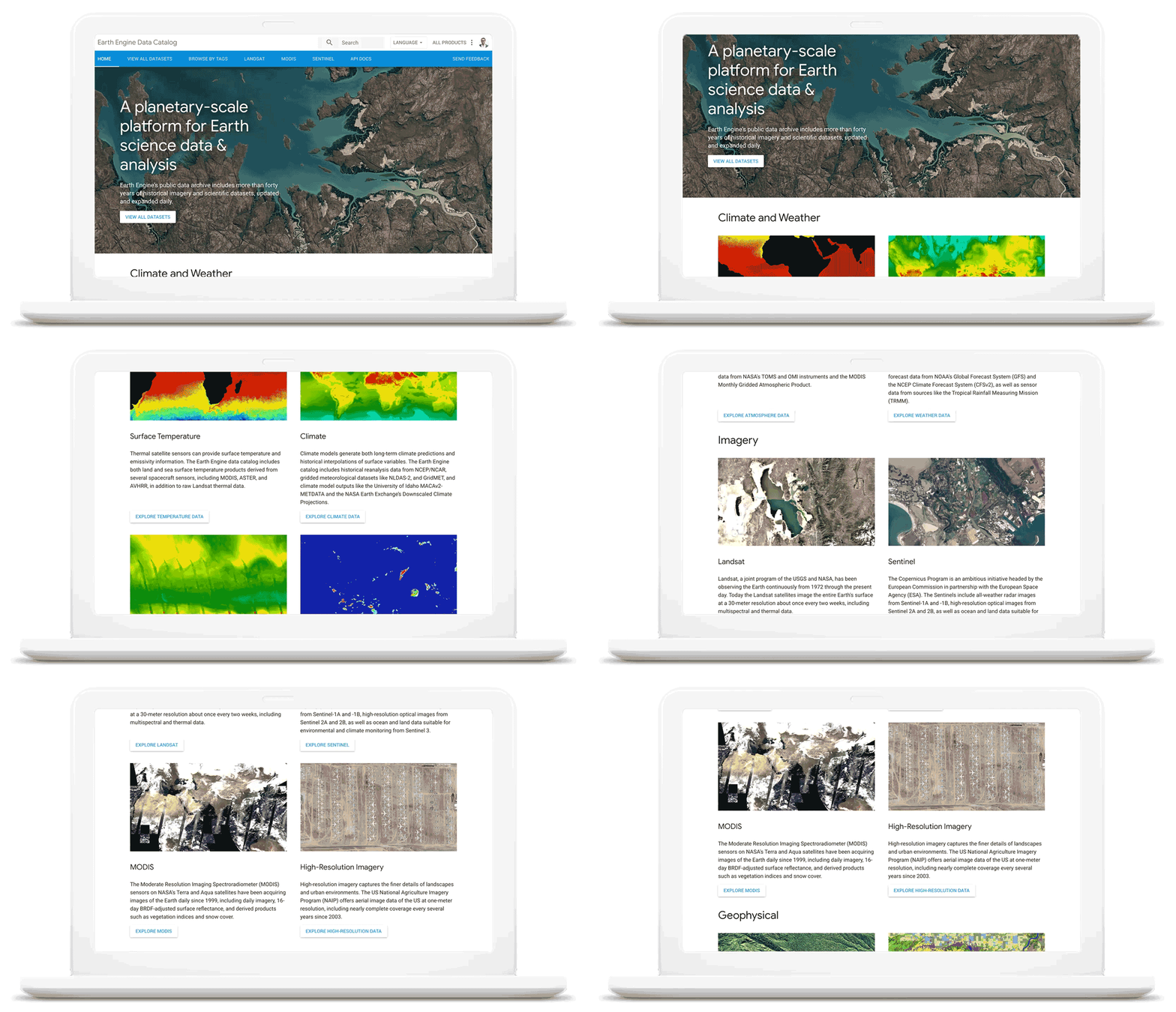
As we work with our customers to accelerate their sustainability initiatives, earth observation data is proving critical to effectively plan for the long-term impacts of climate change. To extend our geospatial and sustainability use cases we’re also expanding our partnerships with CARTO, Climate Engine, Geotab, NGIS, and Planet to bring their data and core applications to Google Cloud.
These partners will each make their existing platforms and datasets available globally on Google Cloud, giving you low-latency and reliable access to critical data and applications that will inform your sustainability initiatives. By integrating water availability, agricultural data, weather risks, and extensive daily satellite imagery into Earth Engine and BigQuery, you can achieve more ambitious goals for the sustainability of your business and our planet.
Committing to help you meet your climate goals
With each of these tools, we’re working to reduce the barriers you face in adopting more sustainable technology practices. We understand that building more sustainable applications and infrastructure is not easy. You face competing priorities, technical challenges, and the perception that climate action is costly.
It doesn’t have to be this way. Today, we are making a sustainability pledge to you: teams across Google Cloud are committing to eliminating the barriers you face in building a more sustainable digital future for your organization, and will help you take action today to realize your climate goals. We’ll do this in a number of ways:
- In digital transformation projects and workshops, sustainability teams will always have a seat at the planning table, so we can work together on using cloud technology to build a more sustainable future.
- We’re putting low-carbon signals natively into our products to help developers choose more sustainable options early in their application development.
- We’ll ensure carbon impact is measured consistently with other key performance indicators. Leveraging the social cost of carbon, the ROI models and value assessments you conduct with Google Cloud will project your emissions impact too.
- We’ll be transparent about our carbon impact, by publishing third-party reviewed reports and methodologies, so you can trust the data for your own reports and disclosures.
- We’ll continue to work with the industry on best practices, including educational resources like Sustainable IT – Decoded, a new masterclass created in partnership with Intel, that shares the expertise of sustainability thought leaders.
For the next decade we need to work together to avert the worst consequences of climate change. We’ve made tremendous progress in building technology that helps everyone do more for the planet, and we’re excited to see what you do with it. Visit this page to learn more about Google Cloud’s sustainability efforts.
More Relevant Stories for Your Company

How Kinguin Notched Up Shopping Experience with Google Recommendations AI
Over 2.14 billion people worldwide are expected to buy online this year, according to Statista. Online retail sales will account for 22% of all purchases by 2023. But in a competitive retail landscape, positive interactions can mean the difference between a sale and an abandoned shopping cart. One of the leading global


Driving Business Transformation in Manufacturing, Industrial, and Transportation Using Google Cloud and AI/ML
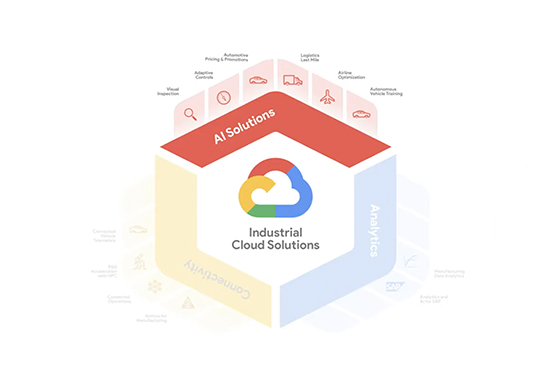
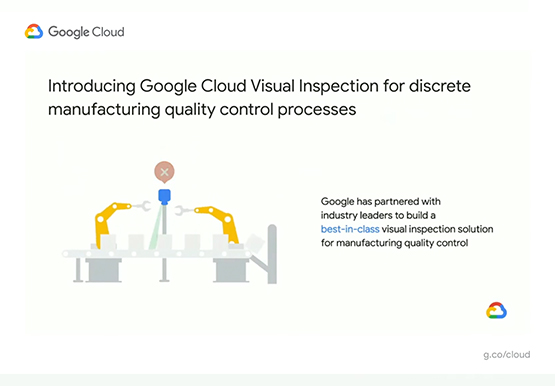
Google Cloud partners closely with manufacturing, industrial, and transportation organizations to drive business transformation. In this video, Mandeep Waraich, Head of Product - Industrial AI, Google Cloud, shares customer stories as well as Google Cloud’s differentiated AI products and solutions. Waraich covers the current state of automation and industrial efficiency


Responsible AI: From Theory to Practice
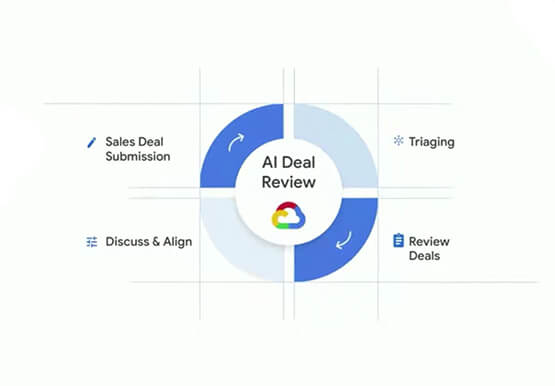
In less than 10 years, AI will be the number one driver of global GDP growth. And organizations that achieve AI absorption will be the leaders of the global economy. But as fast as AI is progressing, it also requires more care and attention from a responsibility standpoint. A more
Predict User Churn on Gaming Apps with Google Analytics Data using BigQuery ML
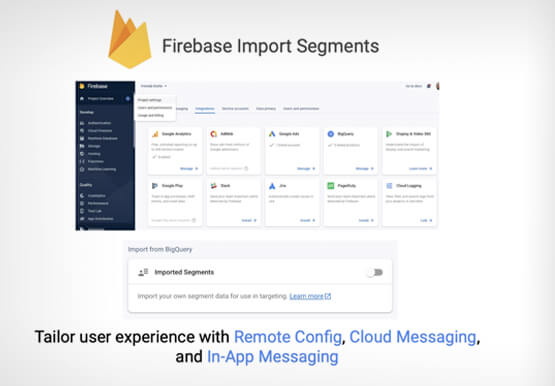
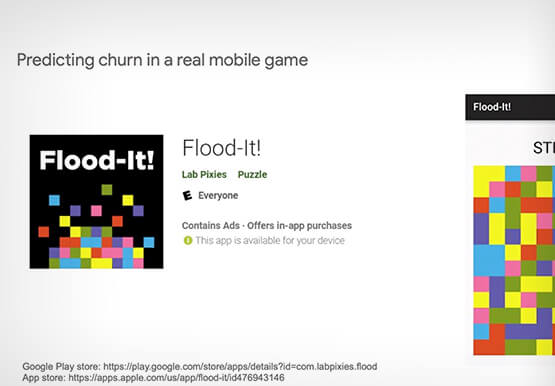
User retention can be a major challenge for mobile game developers. According to the Mobile Gaming Industry Analysis in 2019, most mobile games only see a 25% retention rate for users after the first day. To retain a larger percentage of users after their first use of an app, developers can
