





IT Team Figures Out Easiest Way to Build Data Pipelines and Create ML Models

14074
Of your peers have already read this article.
5:15 Minutes
The most insightful time you'll spend today!
Building a strong brand in today’s hyper-competitive business environment takes vision. It also requires a flexible, easily managed approach to digital asset management (DAM), so marketing professionals and other stakeholders can easily share, store, track, and manipulate assets to build the brand.
Many of today’s leading companies, including JetBlue, Slack, TripAdvisor, Lyft, and HealthONE, rely on Brandfolder to deliver consistent, organized, and efficient brand experiences. Brandfolder provides an easy-to-use platform that can scale across an entire company with little end-user training, empowering customers to distribute digital assets wherever they are needed. Customers also gain much greater insight into how those assets are used, and how to use them more effectively in marketing campaigns and brand messaging.
“Google Cloud made it easy to build an ML platform to quickly iterate through different brand intelligence use cases and release data-driven product features into the Brandfolder platform.”
—Ajay Rajasekharan, Head of Data Science, Brandfolder
Brandfolder is constantly advancing its development efforts to introduce new data-driven features without complicating the user experience. Big data, artificial intelligence (AI), and machine learning (ML) are key to meeting customers’ unique business needs, and essential for Brandfolder to compete in the fast-moving DAM industry. To enhance these capabilities, Brandfolder sought a public cloud provider that could help it scale its data pipeline cost effectively while providing access to advanced AI technologies.
After graduating from the Techstars startup accelerator program in 2013, Brandfolder tried two other cloud providers before standardizing on Google Cloud Platform (GCP).
“We saw a difference with Google Cloud from the very beginning because the interactions felt like a strategic relationship,” says Jim Hanifen, Head of Product at Brandfolder. “Google gave us startup credits and a lot of face-to-face support, which we hadn’t experienced with other cloud providers. We decided to move our entire infrastructure to Google Cloud Platform.”
Building an ML platform for brand intelligence
After performing an initial lift-and-shift migration of virtual machines (VMs) onto Compute Engine, Brandfolder built an ML platform using GCP managed services to seamlessly deliver its data products. The platform leverages Cloud SQL, Cloud Storage as the data lake, Cloud Dataproc for cloud-native Apache Spark computing clusters, Cloud Composer as the batch job scheduler, Cloud Pub/Sub as the backbone data pipeline, Container Registry to store Docker images, and Google Kubernetes Engine (GKE) as the application orchestrator. Cloud Dataflow brings data into the data lake and into BigQuery for analysis.
“Google Cloud made it easy to build an ML platform to quickly iterate through different brand intelligence use cases and release data-driven product features into the Brandfolder platform,” says Ajay Rajasekharan, Head of Data Science at Brandfolder, who describes the architecture in a detailed blog. “We simply ingest raw application and event data on one end and output an ML service on the other.”
“Moving to Google Cloud Platform allows us to complete more sophisticated data analysis and ML models much faster, and at a much lower cost. We can create brand-specific ML models 12x faster and get them into production quickly to address our customers’ unique business needs.”
—Brett Nekolny, Head of Engineering, Brandfolder
For many general use cases, Brandfolder does not need to build custom ML models, and instead relies on pre-trained API models from GCP. For example, it uses Vision API and Video Intelligence API to auto-tag creative assets on import to enable fast, intuitive searches across images and videos. When more product- and brand-specific modeling is required to address unique customer use cases, Brandfolder builds and trains custom ML models using its GCP pipeline or Cloud AutoML, a suite of products built on Google transfer learning and neural architecture search technology. For example, if a Brandfolder customer makes different types of grills, Brandfolder can use AutoML Vision to train a model to recognize the different grills.
“Moving to Google Cloud Platform allows us to complete more sophisticated data analysis and ML models much faster, and at a much lower cost,” explains Brett Nekolny, Head of Engineering at Brandfolder. “We can create brand-specific ML models 12x faster and get them into production quickly to address our customers’ unique business needs.”
Industry-leading security and performance
Google Cloud’s security model helps Brandfolder give existing and prospective customers peace of mind that their data will be protected. Cloud Identity & Access Management (Cloud IAM) provides enterprise-grade access control, while Cloud Identity-Aware Proxy (Cloud IAP) enables remote users to work more securely without the hassles of a VPN client. GCP also isolates cloud resources into projects, making it easy to assign permissions and keep data and VMs organized and segregated.
“With Google Cloud, everything begins and ends with security, which makes things very easy for us,” says Jim. “If we’re under a security review, we can submit a Google security white paper. If a potential customer has security concerns, we tell them we are hosted on GCP, and those concerns go away.”
To give customers even better application performance for accessing their brand assets, Brandfolder uses Cloud Memorystore, an in-memory data store service for Redis, to cache data and provide sub-millisecond data access for production applications.
“It was much easier for us to use Cloud Memorystore versus running Redis on our compute instances,” says Brett. “The high availability, replication across zones, and automatic failover with no data loss are big for us.”
Global private network interconnects between Google Cloud and the Fastly content delivery network (CDN) dramatically reduce latency, allowing Brandfolder’s customers to deliver and update even very large creative assets quickly around the world.
“What’s beautiful about the relationship between Google and Fastly is that if one of our customers uploads a new version of an asset, we can propagate that out to Fastly, and the new version will automatically show up in all the places where it’s referenced,” says Brett.
“The ability to quickly solve problems with AI has a substantial impact on our revenue, and that’s more apparent every quarter. Few of our competitors are doing product- or brand-specific modeling because it takes a lot of time and resources. We overcame those hurdles with Google Cloud.”
—Jim Hanifen, Head of Product, Brandfolder
Improving employee and customer productivity
Brandfolder also uses Google solutions for real-time collaboration and productivity, using G Suite to connect employees with intuitive, cloud-based apps. Teams use Gmail, Calendar, Docs, Drive, Sheets, Slides, and Hangouts Meet every day to move the business forward. Many of Brandfolder’s customers are also G Suite users, and Brandfolder offers a plug-in that allows them to view their creative assets inside of Docs and pull images in as needed. Customers can also log into Brandfolder with their G Suite credentials, making the solution even easier to use.
“We’ve been using G Suite since the beginning, and it’s helped us collaborate efficiently to build a successful, growing company,” says Jim. “Our teams expect to have that kind of close collaboration, and everyone here enjoys the G Suite experience.”
Driving 99 percent annual business growth
With automated tagging and other innovative AI-based features, Brandfolder is helping customers locate and distribute assets faster. As a result, Brandfolder is building customer loyalty and increasing sales, growing its business by 99 percent year-over-year. Since moving to GCP, Brandfolder has been able to scale its analytics and data pipeline 50x without a corresponding increase in costs and has not had to expand its development team.
“The ability to quickly solve problems with AI has a substantial impact on our revenue, and that’s more apparent every quarter,” says Jim. “Few of our competitors are doing product- or brand-specific modeling because it takes a lot of time and resources. We overcame those hurdles with Google Cloud.”
Stop Cribbing About Shadow IT and Start Taking Charge Now

3658
Of your peers have already read this article.
2:20 Minutes
The most insightful time you'll spend today!
Employees use tools at their disposal to get work done, but if these tools (often legacy) hamper collaboration or are inflexible, they’ll turn to less secure options for the sake of convenience. According to Gartner, a third of successful attacks experienced by enterprises will come from Shadow IT usage by 2020.
And this problem is not unknown. Eighty-three percent of IT professionals reported that employees stored company data in unsanctioned cloud services, a challenge especially apparent with file sync and share tools. When people work around their legacy systems to use tools like Google Drive, it’s often because they find their current systems to be clunky or that they can’t collaborate with others as easily. They’re unable to do three key things in legacy file sync and share systems (like Microsoft SharePoint):
1. Unable to work on their phones. By now, people expect to be able to work on the go—and this means not just opening an attachment, but actually making edits to and comments on work. It gives them freedom to work when it’s convenient for them and to help teammates anytime.
2. Unable to create workspaces independently and easily. This might sound counterintuitive, but if an employee needs to contact IT to have a new project folder made on a drive, the bar is too high. Employees need to be able to quickly, and independently, create documents that can be shared simply because of the changing nature of collaboration. Work happens ad-hoc, on the go (like we mentioned above), and with people inside and outside of your organization. If someone has to contact IT to create a new folder, they’re more likely to neglect the request or use a different tool altogether to get started.
3. Unable to make the data work for them. Traditional file storage is just that, storage. Like an attic, we store things in these systems, but at some point stuff gets stale and it’s hard to tell what we should keep or pitch. People need their storage systems to not only house their data, but to help them categorize and find information quicker so that they can make this data work better for them.
You have two choices when it comes to making a decision on file sync and share systems:
Option 1: Continue to let your employees work on unsanctioned products, some of which may open your business up to unintended security issues (and, in some instances, scary terms of service).
Option 2: Buy the tools that your users want to use because these tools are making them more productive.
If you want to create a more productive workforce, take cues from your employees. Your tools should not only meet the highest security standards for IT, but let people work the way they want to (and be intelligent enough to guide them along the way).
Imagine if your technology could flag that a file contains confidential information before an employee accidentally shares it. Or surface files as they’re needed to help people work faster. Google Drive does this.
Remember, if the technology doesn’t suit your employees, they’re just going to work around it anyway. Instead of investing time and resources on routine maintenance, shift this energy toward helping your employees stay productive in ways that work for both you and them.
Know the Leaders of Google Cloud Public Sector Community

5013
Of your peers have already read this article.
1:30 Minutes
The most insightful time you'll spend today!
At Google Cloud, being a strategic partner is part of our DNA. Whether it’s listening closely to our customers, helping to build team skills for innovation or simply being there (since we know the cloud is 24/7), we get excited about working hands-on with customers to deliver new solutions.
As we look to solve decades-old challenges with new technologies in workforce productivity, cybersecurity, and artificial intelligence/machine learning, we know that we are only as good as the people behind the technology. Today, we’re proud to spotlight a few of the inspiring folks behind Google Cloud Public Sector and celebrate their recognition in the industry.
Melissa Adamson, Head of Government Channels at Google Cloud, has been named to the highly respected Women of the Channel list for 2021. This annual list recognizes the unique strengths, leadership and achievements of female leaders in the IT channel. The women honored this year pushed forward with comprehensive business plans, marketing initiatives and innovative ideas to support their partners and customers.
Melissa was brought on to build the Public Sector channel from scratch. The initial focus was building the channel for the US government team and has since expanded to include education, Canada and Latin America.
Having a career background at both Microsoft and Accenture, Melissa leveraged her extensive professional network to build the organic partnerships needed to accelerate the Public Sector partner ecosystem. This helped her drive two key wins (US Postal Service and PTO) and personally recruit top cloud partners in the industry. Melissa loves card games and is learning a new language.
Todd Schoeder, Director of Global Public Sector Digital Strategy, was recently featured in the “Top 20 Cloud Executives to Watch in 2021” by Wash Exec. Recognized for his work in helping customers navigate through the impact of COVID-19 and developing innovative solutions to meet mission challenges, he says: “New partnerships are required to solve for the problems of the future. Challenges that were previously thought of as insurmountable, too risky or expensive, are actually quite the opposite — as long as you have the right partner that is working in your best interest with you.”
Josh Marcuse, Head of Strategy & Innovation, received his second Wash100 Award for leading a digital transformation team that works to drive the development of public sector solutions, including cyber defense, smart cities, and public health.
Josh has launched services to support collaborative team operations including Workspace for Government and an artificial intelligence-based customer service platform to support remote work needs. His work also includes leading Google Cloud’s partnerships with organizations to improve data sharing in the public health community, contact tracing activities, and supporting research efforts across national laboratories.
Like Melissa, Josh was brought on to build a new team dedicated to strategy and innovation. This team’s purpose is to bring an intense focus to public sector mission outcomes and the public servants who own them. Josh spent a decade pushing digital modernization and workforce transformation at the U.S. Department of Defense, and co-founded the Federal Innovation Council at the Partnership for Public Service, and now brings that domain expertise to supporting government workers who are driving digital transformation.
Join us in celebrating these folks for their leadership and contributions!
Register to Watch July’s Security Summit

2904
Of your peers have already read this article.
1:30 Minutes
The most insightful time you'll spend today!
Together we can solve for the future of cloud security. Join us to learn how you can stay ahead of the next generation of threats with Google Cloud – whether you need to keep your organization secure in the cloud, on-premises, or in a hybrid environment. Get fresh insights from industry leaders and engage in interactive sessions that can help you solve your most critical security challenges.
Our digital event has ended, but you can still explore our sessions on demand.
The Security Summit is part of our digital Google Cloud Summit series. Check out the other events in the series to explore Google Cloud technology applications in various industries and dive into our latest digital innovations.Original air date:20 July 2021 21:30 Register to watch on demand.
Google Cloud Announces General Availability of BigQuery Row-level Security

6600
Of your peers have already read this article.
3:00 Minutes
The most insightful time you'll spend today!
Data security is an ongoing concern for anyone managing a data warehouse. Organizations need to control access to data, down to the granular level, for secure access to data both internally and externally. With the complexity of data platforms increasing day by day, it’s become even more critical to identify and monitor access to sensitive data. In many cases, sensitive data is co-mingled with non-sensitive data, and access restrictions to sensitive data need to be enabled based on factors like data location or presence of financial information. There may also be nuances where data is sensitive for some groups of users, while for others, it is not.
Today, we’re pleased to announce the general availability of BigQuery row-level security, which gives customers a way to control access to subsets of data in the same table for different groups of users. Row-level security (RLS) extends the principle of least privilege access and enables fine-grained access control policies in BigQuery tables. BigQuery currently supports access controls at the project-, dataset-, table- and column-level. Adding RLS to the portfolio of access controls now enables customers to filter and define access to specific rows in a table based on qualifying user conditions—providing much needed peace of mind for data professionals.
“Our digital transformation and migration of data to the cloud magnifies the business value we can extract from our information assets. However, granular data access control is essential to comply with international regulatory and contractual requirements. BigQuery row-level security helps us comply with data residency and export restrictions,” says Jarrett Garcia, Iron Mountain’s Enterprise Data Platform Senior Director. “It enables us to manage fine-grained access controls without replicating data. What used to take months for approval and access provisioning can now be done more efficiently and effectively. We are looking forward to implementing additional data security capabilities on the BigQuery roadmap to address other critical business use cases.”
How BigQuery row-level security works
Row-level security in BigQuery enables different user personas access to subsets of data in the same table. Customers who are currently using authorized views to enable these use cases can leverage RLS for ease of management. To express the concept of RLS, we have introduced a new entity in BigQuery called row access policy. Row access policies map a group of user principals to the rows that they can see, defined by a SQL filter predicate.
Secure logic rules created by data owners and administrators determines which user can see which rows through the creation of a row-level access policy. The row-level access policies created on a target table by administrators or data owners are applied when a query is run on the table. One table can have multiple policies applied to it.
Below is an example, where row-level access policies have been created to filter data based on users’ “region”.

In the illustrated scenario above, row-level access policies have been created to verify a querying user’s region and to give them access only to the subset of data relevant to that region. Access policies are granted to a grantee list which support all types of IAM principles such as individual users, groups, domains or service accounts. In this example, when a user queries the table, row-level access policies are evaluated to assess which, if any, policies are applicable to that user. The group ‘sales-apac’ is granted access to view a subset of rows where region = ‘APAC’ whereas the group ‘sales-us’ is granted access to view a subset of rows where the region = ’US’. Likewise, users in both groups will see rows in both regions, and users in neither group will not see any rows.
Row-level access policies can also be created using the SESSION_USER() function to restrict access only to rows that belong to the user running the query. If none of the row access policies are applicable to the querying user, the user will have no access to the data in the table.
When a user queries a table with a row-level access policy, BigQuery displays a banner notice indicating that their results may be filtered by a row-level access policy. This notice displays even if the user is a member of the `grantee_list`.

When to put BigQuery row-level security to work
Row-level access policies are useful when you have a need to limit access to data based on filter conditions. The row-access policies’ filter predicate supports arbitrary SQL, and is conceptually similar to the WHERE clause of a SQL query. Filter predicates support the SESSION_USER() function to restrict access only to rows that belong to the user running the query. If none of the row access policies are applicable to the querying user, the user will have no access to the data in the table. Currently, the column used for filtering must be in the table, but we anticipate adding support for subqueries in the filter expression, opening up access to use cases where data is filtered based on lookup tables and calculated values. Row-level access policies can be created, updated and dropped using DDL statements. You will be able to see the list of row-level access policies applied to a table using the BigQuery schema pane in the Cloud Console, which simplifies the management of policies per table, or by using the bq command-line tool.
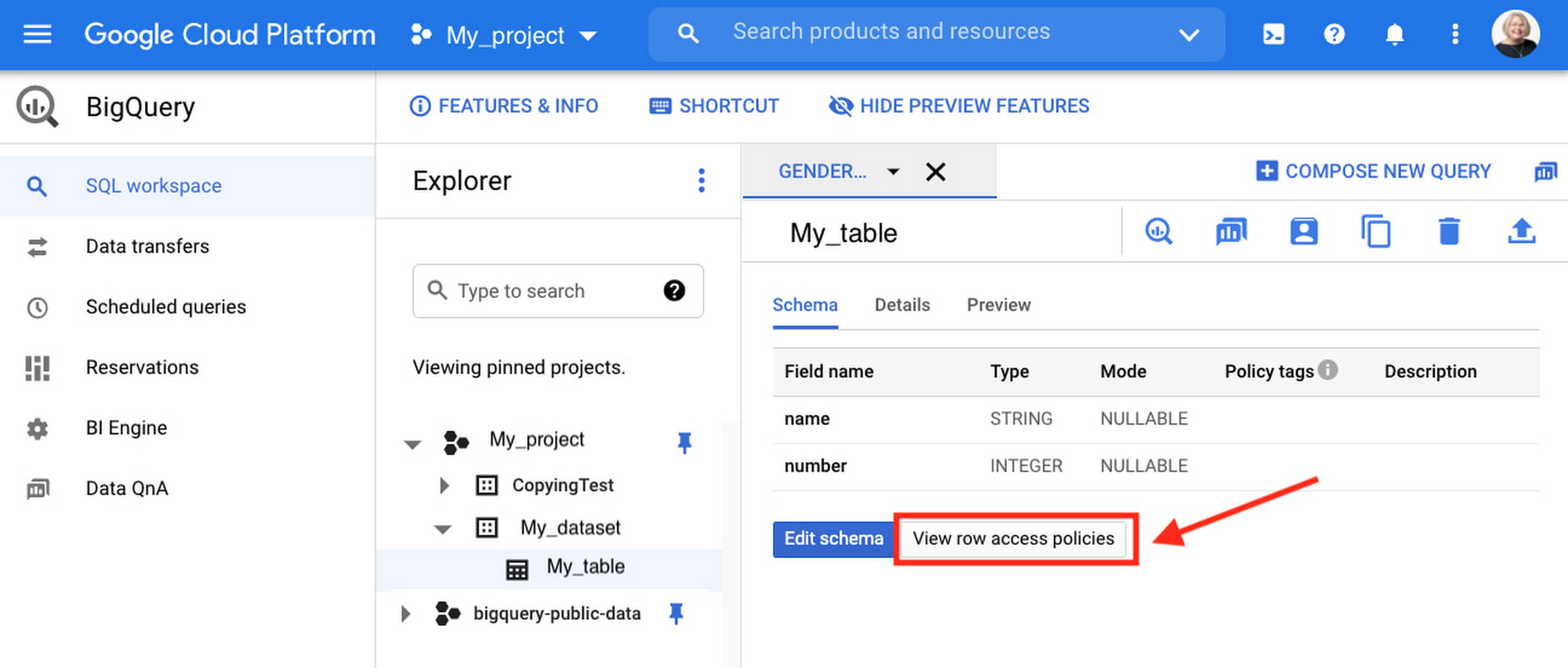
Row-level security is compatible with other BigQuery security features, and can be used along with column-level security for further granularity. Since row-level access policies are applied on the source tables, any actions performed on the table will inherit the table’s associated access policies, to ensure access to secure data is protected. Row-level access policies are applicable to every method used to access BigQuery data (API, Views, etc).
Try it out
We’re always working to enhance BigQuery’s (and Google Cloud’s) data governance capabilities, to provide more controls around managing your data. With row-level security, we are adding deeper protections for your data. You can learn more about BigQuery row-level security in our documentation and best practices.
How Google Meet Keeps Your Video Conferences Secure

6805
Of your peers have already read this article.
4:30 Minutes
The most insightful time you'll spend today!
All over the world, businesses, schools and users depend on G Suite to help them stay connected and get work done. Google designs, builds, and operates our products on a secure foundation, aimed at thwarting attacks and providing the protections needed to keep you safe. G Suite and Google Meet are no exception.
Google Meet’s security controls are turned on by default, so that in most cases, organizations and users won’t have to do a thing to ensure the right protections are in place. Here, we’ll summarize the key capabilities of Google Meet that help protect you.
Proactive protections to combat abuse and block hijacking attempts
Google Meet employs an array of counter-abuse protections to keep your meetings safe. These include anti-hijacking measures for both web meetings and dial-ins.
Google Meet makes it difficult to programatically brute force meeting IDs (this is when a malicious individual attempts to guess the ID of a meeting and make an unauthorized attempt to join it) by using codes that are 10 characters long, with 25 characters in the set. We limit the ability of external participants to join a meeting more than 15 minutes in advance, reducing the window in which a brute force attack can even be attempted. External participants cannot join meetings unless they’re on the calendar invite or have been invited by in-domain participants. Otherwise, they must request to join the meeting, and their request must be accepted by a member of the host organization.
In addition, we’re rolling out several features to help schools keep meetings safe and improve the remote learning experiences for teachers and students, including:
- Only meeting creators and calendar owners can mute or remove other participants. This ensures that instructors can’t be removed or muted by student participants.
- Only meeting creators and calendar owners can approve requests to join made by external participants. This means that students can’t allow external participants to join via video, and that external participants can’t join before the instructor.
- Meeting participants can’t rejoin nicknamed meetings once the final participant has left. This means if the instructor is the last person to leave a nicknamed meeting, students can’t join later without the instructor present.

Secure deployment and access controls for admins and end-users
To limit the attack surface and eliminate the need to push out frequent security patches, Google Meet works entirely in your browser. This means we do not require or ask for any plugins or software to be installed if you use Chrome, Firefox, Safari, or Microsoft Edge. On mobile, we recommend that you install the Google Meet app.
To help ensure that only authorized users administer and access Meet services, we support multiple 2-Step Verification options for accounts that are secure and convenient. These include hardware and phone-based security keys and Google prompt. Additionally, Google Meet users can enroll their account in our Advanced Protection Program (APP), which provides our strongest protections available against phishing and account hijacking and is specifically designed for the highest-risk accounts.
For G Suite Enterprise and G Suite for Education customers, we offer Access Transparency, which logs any Google access to Google Meet recordings stored in Drive, along with the reason for the access (support team actions that you might have requested, for example). Customers can also use data regions functionality to store select/covered data of Google Meet recordings in specific regions (i.e. US or Europe).
Secure, compliant, and reliable meeting infrastructure
In Google Meet, all data is encrypted in transit by default between the client and Google for video meetings on a web browser, on the Android and iOS apps, and in meeting rooms with Google meeting room hardware. Meet adheres to IETF security standards for Datagram Transport Layer Security (DTLS) and Secure Real-time Transport Protocol (SRTP). For every person and for every meeting, Meet generates a unique encryption key, which only lives as long as the meeting, is never stored to disk, and is transmitted in an encrypted and secured RPC (remote procedure call) during the meeting setup.
Security is an integral part of all our operations at Google. Our team of full-time security and privacy professionals supports our software engineering and operations to ensure that security is always a part of how we build and run our services. All of our Google Cloud and G Suite customers benefit from these capabilities, including:
- Secure-by-design infrastructure: Google Meet benefits from Google Cloud’s defense-in-depth approach to security, which utilizes the built-in protections and global-private network that Google uses to secure your information and safeguard your privacy.
- Compliance certifications: Our Google Cloud products, including Google Meet, regularly undergo independent verification of their security, privacy, and compliance controls, including validation against standards such as SOC, ISO/IEC 27001/17/18, HITRUST, and FedRAMP. We support your compliance requirements around regulations such as GDPR and HIPAA, as well as COPPA and FERPA for education.
- Incident management: We have a rigorous process for managing data and security incidents that specifies actions, escalations, mitigation, resolution, and notification of any potential incidents impacting customer data.
- Reliability: Google’s network is engineered to accommodate peak demand and handle future growth. Our network is resilient and engineered to accommodate the increased activity we’ve seen on Google Meet.
- Transparency: At Google Cloud, we’re clear about our commitments regarding customer data: we process customer data according to your instructions; we never use customer data for advertising purposes; and we publish the locations of our Google data centers, which are highly available, resilient, and secure.
During COVID-19 and beyond, we will continue to protect Google Meet users and their data, and keep innovating with new features to make our tools helpful, secure, and safe.
More Relevant Stories for Your Company

Google’s BeyondCorp to Accelerate U.S. Govt’s Zero Trust Journey
In May, the White House issued an Executive Order aiming to improve the nation’s cybersecurity defenses and requiring US Federal agencies to develop plans to implement Zero Trust architectures in alignment with National Institute of Standards and Technology National Institute of Standards and Technology (NIST) guidance. This Executive Order also calls on agencies

DueDil Chooses Apigee to Leverage APIs for Customers’ Risk Monitoring with Better Insights
As their name reflects, DueDil provides due diligence services ranging from customer-specific risk evaluations and selections to customer onboarding and real-time risk monitoring for leading financial services, high-growth tech and insurance companies. Founded in 2009, the company helps more than 3,000 enterprise users from over 400 clients to not only understand with

5 Compelling Ways to Practice the Principle of Least Privilege for Security Leaders
When it comes to security, managing access is a foundational capability—whether you’re talking about a physical space or your cloud infrastructure. If you were securing an office, you wouldn’t give every employee a master key that can open the front door, the mailbox, and the safe. Likewise, when you’re securing

Beaconing Malware: How CISOs Can Catch it With Threat Analytics in Just a Few Clicks
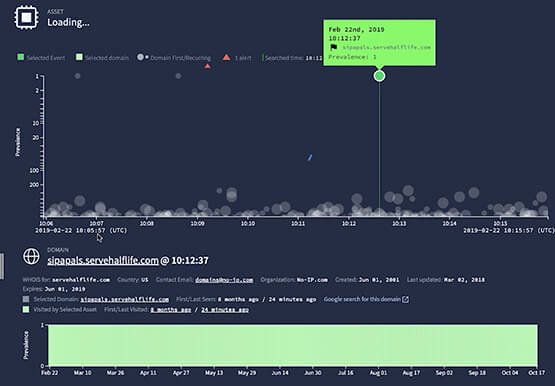
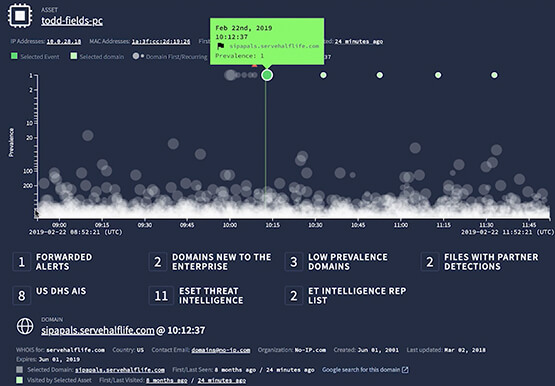
Are you checking your network for beacon activity? If you aren't you are risking your business' reputation and customer data. Beaconing is the practice of sending short and regular communications from an infected host to an attacker-controlled Command and Control server, compromising internal information. These threats often go undetected but with
