





5 Compelling Ways to Practice the Principle of Least Privilege for Security Leaders

3558
Of your peers have already read this article.
4:30 Minutes
The most insightful time you'll spend today!
When it comes to security, managing access is a foundational capability—whether you’re talking about a physical space or your cloud infrastructure. If you were securing an office, you wouldn’t give every employee a master key that can open the front door, the mailbox, and the safe. Likewise, when you’re securing your cloud infrastructure, you should limit employees’ access based on their role and what they require to do their job.
This concept is known as the principle of least privilege, which NIST’s Computer Security Resource Center defines as: “A security principle that restricts the access privileges of authorized personnel… to the minimum necessary to perform their jobs.” In practice, this means assigning credentials and privileges only as needed to both users and services, and removing any permissions that are no longer necessary.
Keeping the principle of least privilege in mind, here are five practical tips to minimize the surface area of exposed resources on Google Cloud Platform (GCP) and defend against some common attacks.
Avoid excessive use of broad primitive roles
Primitive roles like Owner and Editor grant wide-ranging access to all project resources. To tighten access security, consider using more specific predefined roles in Cloud Identity and Access Management (IAM), or defining custom roles that are better suited to your organization. For example, if you have a Cloud SQL database, instead of granting the project-wide Editor role to everybody, you could grant the cloudsql.editor role to users who create new databases, cloudsql.client to those who only need to connect to existing databases, and limit cloudsql.admin to database administrators.
Our policy design page has some sample structures and policies for different types of organizations, including startups, large enterprises, and education and training customers.
Assign roles to groups, not individuals
If you assign an IAM role directly to an individual, they retain the rights granted by that role even if they change roles, move around your organization, or no longer require them. A safer and more maintainable option is to place users into logical groups. For example, to manage databases, you could create db-editors, db-viewers, and db-admins groups, and let users inherit roles from these groups:
Groups can be created within the Admin Console for any G Suite domain, or federated from an external tool like Active Directory. By using groups for ownership, you can also avoid “orphaned” projects and resources—where a project or resource has a single owner who leaves the organization.
You can assign roles at the organization, folder, project, or resource level. This lets larger organizations easily manage roles for, say, a specific developer team or the entire accounting department. Be aware, however, that a child resource cannot limit roles granted by a parent: a user’s project-level cloudsql.viewer role, for example, will override any resource-level restrictions on any database in the same project.
Reduce the risks of default service account behavior
Service accounts are a special type of account intended for apps that need to access data. If the app’s own private credentials are compromised, however, the attacker then has all the access granted to the app by the service account’s roles.
The Compute Engine default service account, which has the editor role, is enabled for all instances created in a project unless you specify otherwise.
Creating a custom service account to use for creating instances and limiting its roles to the minimum necessary significantly reduces risk. For example, many apps using Cloud SQL only need the cloudsql.client role that lets them connect to an existing database.
An alternative approach is to grant the instance service account minimal privileges and create dedicated service accounts for your apps. This gives you more fine-grained control over each app’s privileges, although you will need to carefully manage the service account credentials.
Reduce risk and control access to your project by using networking features
To enable inter-resource communication, new GCP projects initially have a default network connecting all resources in that project. This is convenient for development, but in this default configuration, if an attacker gains unauthorized access to one resource, they may be able to reach others as well.
To limit this risk, don’t use the default network in production and explicitly specify accepted source IP ranges, ports, and protocols in network firewalls. You should also separate sensitive apps into individual virtual private clouds (VPCs), and if inter-app connectivity is required, use a Shared VPC. In each VPC, use different subnets for public facing services (e.g., web servers and bastion hosts) and private backend services. Allocate public IPs only to instances in the public subnet and add firewall rules with network tags to control which services can communicate with each other. Finally, grant permission to create or modify firewalls and routes only to those directly responsible for the network.
The Secure Instances and Apps with Custom Networks codelab walks you through setting up the public/private subnet configuration above. The Policy design for customers article we mentioned earlier also contains sample network designs for common use cases. For guidance on the tradeoffs of single, multiple, and shared VPCs, see Best practices and reference architectures for VPC design.
Consider using managed platforms and services
If you deploy and manage your own applications, you are responsible for security configuration, including the maintenance of accounts and permissions. You can limit your responsibilities by hosting your apps on managed platforms like Cloud Run, App Engine, or Cloud Functions, or by using fully managed services for databases and processing frameworks like Cloud SQL for MySQL and Postgres, Cloud Dataproc for Hadoop and Spark, and Cloud Memorystore for Redis.
A final note
Security is a priority in all aspects of Google Cloud, but cloud security is a shared responsibility, and ultimately you are responsible for making the right configuration and product choices for your organization to protect your data on GCP. These tips are a great starting point to help reduce your attack surface and help you make more informed risk decisions.
You Need Enhanced Security for a Successful Cloud Transformation

2634
Of your peers have already read this article.
1:30 Minutes
The most insightful time you'll spend today!
Twenty years ago, organizations discovered the magic of server virtualization. Among the many benefits of virtualization, it heralded the end of the need for one physical server per application and the beginning of managing software-defined infrastructure. It helped automate building and installing systems, and it helped lay foundations for today’s Continuous Integration/Continuous Delivery mechanisms and DevOps practices. However, the adoption of virtualization was not always smooth and several hurdles stood in its path. Today’s organizations are facing similar obstacles in their journey to the cloud.
Organizations that wanted to virtualize their server environment two decades ago faced a significant challenge that was neither technical nor budgetary, but organizational, stretching across IT teams and beyond. The first team to be concerned about virtualization was the one in charge of installing the physical servers in the racks of the datacenter, managing the physical network connections and operating environmental controls, such as HVAC and power systems. These tasks were drastically reduced, if not outright eliminated.
The second team affected by this shift in technology was the one responsible for installing the operating system and running the post-install procedures. Their job almost completely disappeared as most virtual machines were automatically instantiated from templates.
As a result, successful adoption relied on the ability to smooth these organizational changes. Along the way, training the staff and making sure they acquire the new skills necessary to operate the virtualization infrastructure was critical. And usually, the affected teams eventually found that their new responsibilities were different but still essential to the organization, and perhaps even more appealing.
Virtualizations lessons for cloud transformation regulators
Discussions on virtualization didn’t end with these internal changes when organizations were operating in a regulated environment. They needed to engage closely with their regulators. Regulated organizations often considered the hypervisor solely as an additional layer of software with potential vulnerabilities.
This viewpoint raised risks (such as virtual machine escape) that didn’t exist with physical servers. Even if this is taken into account and the risks mitigated, it should have been considered in balance with all the benefits of machine virtualization, including security benefits such as asset identification, harmonization, and smoother patch management.
While the relevance and benefits of virtualization are now widely accepted, history has repeated itself as similar issues have arisen for organizations facing cloud migrations. When large cloud service providers (CSP) began supporting critical workloads for their customers, regulators increased their oversight over CSPs and issued guidance concerning cloud adoption. This happened in the European financial sector, with guidelines from the European Supervisory Authorities (European Banking Authority, European Securities and Market Authority and European Insurance and Occupational Pensions Authority,) and the coming Digital Operational Resilience Act regulation.
These regulations can help establish trust between providers and customers. As regulator decisions are vital for organizations, there is an opportunity now with cloud technology to balance the risks with the benefits and take into consideration all the ways CSPs can help organizations improve their overall security and compliance levels.
Cultural transformation can drive cloud transformation
Another similarity between cloud transformation and the journey to virtualization is the required internal transformation. When an organization decides to start its journey to the cloud, training its staff with the new technology and tools is a necessary step, but probably not the first nor the most arduous to make. A change of mindset is paramount to fully incorporate all the cloud benefits, in particular regarding security.
This new approach begins with a deep transformation at the organizational level. Organizations should avoid viewing the cloud as a datacenter because there’s so much more potential to cloud technology. This new approach and its accompanying organizational transformation is driven by two factors: The burdens that the CSP removes from the customer, and the new flexibility that software-defined infrastructure brings to the table.
The CSP directly manages several tasks and services, and their security, which means that they’re no longer a direct concern for the customer. These responsibilities include data center management, security-hardened hardware, default encryption for data at rest and data in transit, and resilient network management.
Since all the infrastructure used by the organization to manage its workloads is software defined, it brings much more flexibility to what can be done with it. Software-defined infrastructure can more easily enable security guardrails and continuous compliance that weren’t possible before.
While there’s a temptation to approach an organization’s cloud transformation as merely a “lift and shift” operation from on-premises infrastructure, the reality is that approach reduces the potential gains a cloud transformation can bring to an organization. Moving systems to the cloud accounts for a small portion of the potential impact, while updating the mindset can be truly transformational. Development, architecture and security processes need to be rebuilt; this inevitably requires a deeper transformation of the organization.
The next step is to transform the operations, to align them with the overall organization and the new defined processes, operationalize CI/CD and build DevOps practices. After that, the technological gap will be adjusted, moving the new tools and teaching teams how to best use them.
The important point here is the order of the transformation to manage: organization, operations and technologies (O-O-T) and not the other way round (T-O-O). Of course, these three steps should not be considered completely sequential, as technology plays an important role in the organization and the operations. However, it is essential to support the development of personnel and frameworks to take full advantage of the transformation opportunity, rather than primarily focusing on the tooling.
In addition, at Google Cloud, we believe in a shared fate that goes far beyond the usual shared responsibility model. We think it is part of our duty to help our customers to achieve their goals in their scope of responsibility. We prepare secure landing zones and guide the customers, we bring transparency to security controls and help them with cyber-insurance.
Our shared objective with our customers is to continuously improve security. Our Google Cybersecurity Action Team initiative helps us to be engaged alongside our customers, provide them with necessary guidance, support them in their security and compliance strategies, and assist their organizational and operational transformation in their cloud journey.
- Listen to a related podcast “How to Apply Lessons from Virtualization Transition to Make Cloud Transformation Better”
- Listen to “Preparing for Cloud Migrations from a CISO Perspective, Part 1”
- Read “The journey to the cloud mitigates enterprise risk”
- Also, review “Megatrends drive cloud adoption—and improve security for all”
- Visit Google Cybersecurity Action Team website
2926
Of your peers have already watched this video.
15:00 Minutes
The most insightful time you'll spend today!
What Makes Google Cloud the Go-to Platform to Build Next-gen Security Services
Join the discussion by the panel of security experts and IT leaders from renowned organizations to examine the role of Google Cloud for security companies in building next-generation security services. Watch the video from the security session of Google Cloud Next ’21 to deep dive into Google Cloud’s security and partnership models to explore the security-related aspects of building robust, security based SaaS products.
Manage IAM permissions with the Google Cloud mobile app

1213
Of your peers have already read this article.
2:00 Minutes
The most insightful time you'll spend today!
What’s new with Permissions Management on the Cloud Mobile App
Identity and Access Management (IAM) is the foundation of a strong cloud security posture, ensuring that the right access and permissions for cloud resources are granted across your organization. The Google Cloud mobile app gives cloud administrators the ability to quickly and easily manage their organization’s cloud identities and access from the mobile platform of their choice.
Permissions management is one of the top user-requested features for the Cloud mobile app based on feedback we’ve received. The Permissions tab is used by more than half of our mobile users every month, highlighting the importance of easily managing permissions on-the-go.
We are excited to announce the availability of enhanced permissions management on the Google Cloud mobile app. This new capability enables you to easily view, assign and search for all the roles in your organization.
Manage permissions easily on-the-go
The Cloud mobile app has expanded beyond supporting the three basic roles of Owner, Editor, and Reader, to supporting all the roles in your organization. Administrators are not only able to see all the roles but also assign these roles across their organization:
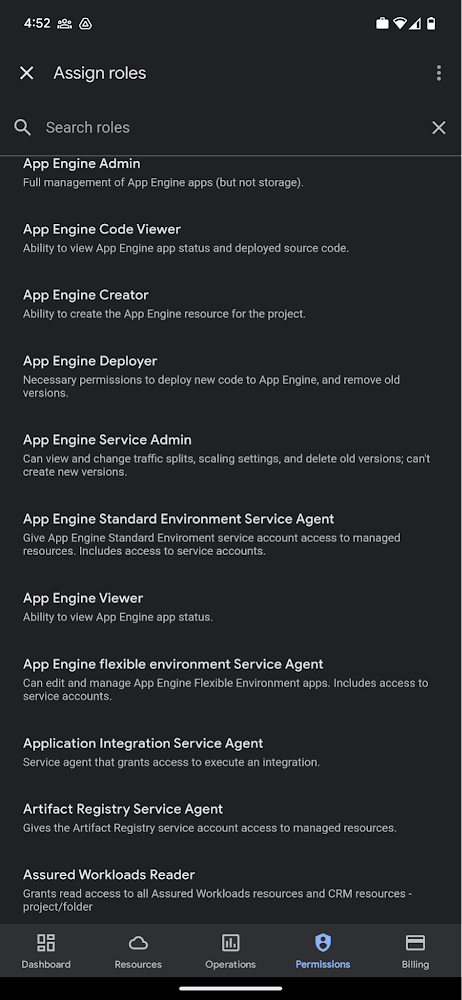
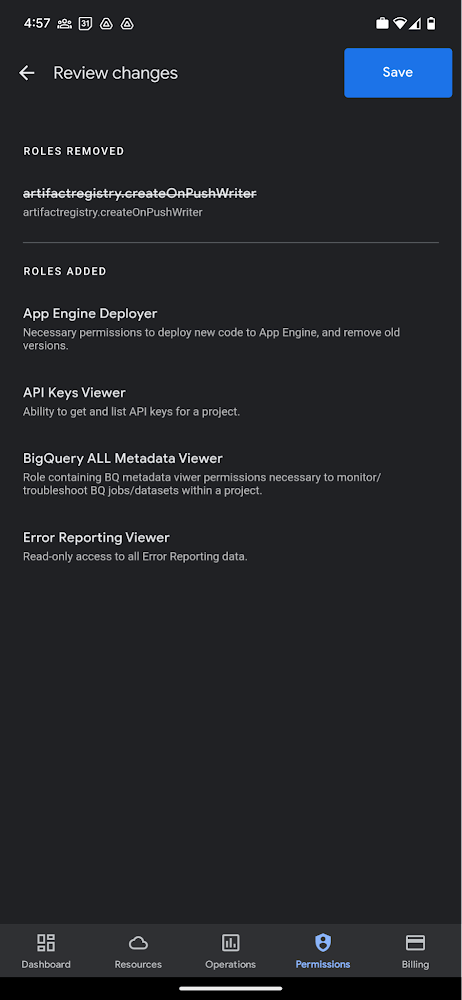
Administrators can also easily view a list of users, and click into each to see all the roles assigned to each user. On top of that, you can easily leverage the search capability to check if a role is assigned and modify its assignment. You can even assign multiple roles at the same time for easy editing. The app will show you a summary of changes before you will proceed.
The layout is optimized for mobile, with the categories of information organized for easy viewing. Currently assigned roles are always displayed on the top of the screen so they are easily accessible. Basic roles appear below, followed by all other roles grouped by Google Cloud products.
Get started on the Google Cloud app today
To summarize we’ve enhanced permissions management on the Google Cloud mobile app with:
- Smoother navigation
- Support for all the roles in your organization
- Easy search for assigned roles
- Ability to review changes before applying
Give enhanced permission management a try and explore the possibilities by downloading the app today from Google Play or the Apple App Store. If you have any feedback, we would love to hear from you – simply click on the “send feedback” button in the app to share your experience.
Cloud on Europe’s Terms: How Google Sets to Deliver Cloud Services for Driving Digital Sovereignty

5168
Of your peers have already read this article.
1:30 Minutes
The most insightful time you'll spend today!
Cloud computing is globally recognized as the single most effective, agile and scalable path to digitally transform and drive value creation. It has been a critical catalyst for growth, allowing private organizations and governments to support consumers and citizens alike, delivering services quickly without prohibitive capital investment. European organizations—in both the public and private sectors—want a provider to deliver a cloud on their terms, one that meets their requirements for security, privacy, and digital sovereignty, without compromising on functionality or innovation.
Last year, we set out an ambitious vision of sovereignty along three distinct pillars: data sovereignty (including control over encryption and data access), operational sovereignty (visibility and control over provider operations), and software sovereignty (providing the ability to run and move cloud workloads without being locked-in to a particular provider, including in extraordinary situations such as stressed exits). After extensive dialogue with customers and policymakers, we are today unveiling ‘Cloud. On Europe’s Terms’. As part of this initiative, we will continue to demonstrate our commitment to deliver cloud services that provide the highest levels of digital sovereignty, all while enabling the next wave of growth and transformation for Europe’s businesses and organizations.
Google Cloud’s baseline controls and security features offer strong protections, meet current robust security and privacy requirements, and address many customer needs. Yet each country in Europe has its own characteristics and expectations. Certain customers in Europe may require more flexibility than current public and private cloud offerings may provide. We want to deliver a platform that allows customers to deploy workloads with the desired local control, without losing the transformational benefits of the public cloud.
We are now delivering on this new vision collaboratively with trusted local technology providers in Europe, starting with T-Systems in Germany. Today, together with T-Systems, we announced a partnership to build a Sovereign Cloud offering in Germany for private and public sector organizations. The offering will become available in mid 2022 with additional features being added over time.
In this new joint offering, T-Systems will manage sovereignty controls and measures, including encryption and identity management of the Google Cloud Platform. In addition, as part of their offering, T-Systems will operate and independently control key parts of the Google Cloud infrastructure for T-Systems Sovereign Cloud customers in Germany.
We are committed to building trust with European governments and enterprises with a cloud that meets their digital sovereignty, sustainability and economic objectives. We are starting with T-Systems today and will continue by partnering with trusted technology providers in selected markets across the region.
Customers in other markets across Europe will be able to use these trusted partner offerings or use Google Cloud’s controls to exercise autonomous control over data access and use; exercise choice over the infrastructure that is used to process that data; and avoid cloud vendor lock-in.
With Google Cloud, our customers also automatically benefit from sustainable business transformation on the cleanest cloud in the industry. Today, we are the largest annual corporate purchaser of renewable energy globally, and by 2030, we aim to operate entirely on 24/7 carbon-free energy in all of our cloud regions worldwide.
We’ll continue to listen to our customers and key stakeholders across Europe who are setting policy and helping shape requirements for customer control of data. Our goal is to make Google Cloud the best possible place for sustainable, digital transformation for European organizations on their terms—and there is much more to come.
Register to Watch July’s Security Summit

2916
Of your peers have already read this article.
1:30 Minutes
The most insightful time you'll spend today!
Together we can solve for the future of cloud security. Join us to learn how you can stay ahead of the next generation of threats with Google Cloud – whether you need to keep your organization secure in the cloud, on-premises, or in a hybrid environment. Get fresh insights from industry leaders and engage in interactive sessions that can help you solve your most critical security challenges.
Our digital event has ended, but you can still explore our sessions on demand.
The Security Summit is part of our digital Google Cloud Summit series. Check out the other events in the series to explore Google Cloud technology applications in various industries and dive into our latest digital innovations.Original air date:20 July 2021 21:30 Register to watch on demand.
More Relevant Stories for Your Company

Google Cloud & Siemplify Join Forces to Empower Companies to Manage Threat Responses Better
At Google Cloud, we are committed to advancing invisible security and democratizing security operations for every organization. Today, we’re proud to share the next step in this journey with the acquisition of Siemplify, a leading security orchestration, automation and response (SOAR) provider. Siemplify shares our vision in this space, and

Improving Your Security Posture: Integrating Cloud DLP with Security Command Center
Our Cloud Data Loss Prevention (Cloud DLP) discovery service can monitor and profile your data warehouse to bring awareness of where sensitive data is stored and processed. Profiling is also useful for confirming that data is not being stored and processed where you don’t want it. But how can you

Announcement: Merger of Google’s Data Processing Terms into CDPA
At Google, we are constantly looking to improve our products, services, and contracts so that we can better serve our customers. To this end, we are pleased to announce that we have updated and merged our data processing terms for Google Cloud, Google Workspace (including Workspace for Education), and Cloud

Why CISOs Need to Know This to Protect Users From Unsafe Websites
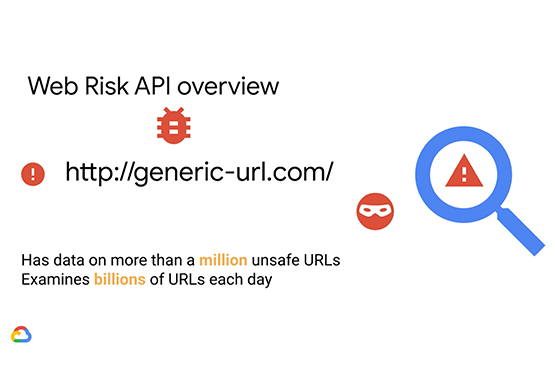
Unsafe web resources include social engineering sites—such as phishing and deceptive sites—and sites that host malware or unwanted software. For CISOs and their teams, this can quickly become an insurmountable challenge if it's not nipped in the bud. But there's a way to enable companies to find unsafe URLs before their
