





Introducing IAM Deny: Harden Your Security Posture at Scale the Easy Way

2643
Of your peers have already read this article.
1:30 Minutes
The most insightful time you'll spend today!
At Google Cloud, we’re focused on making it easy for organizations to build solutions quickly and securely. Identity and Access Management (IAM) is the core security control for establishing who has access to which cloud resources and making sure access permissions are aligned to your company’s business and security policies.
We are excited to announce the general availability of IAM Deny policies. This new capability helps you easily create access guardrails for Google Cloud resources. With IAM Deny policies, you can create rules that broadly restrict resource access. It provides a powerful, coarse-grained access control to help implement security policies at scale.
Control with IAM Policy – Allow and Deny
IAM Deny policies complement IAM Allow policies as you define access to your resources. Google Cloud’s IAM Allow policy lets you grant granular access to Google Cloud resources. The more coarse-grained Deny policies let you explicitly prohibit access to certain resources regardless of existing Allow rules. IAM Deny policies always supersede IAM Allow policies and override conflicting IAM Allow rules.
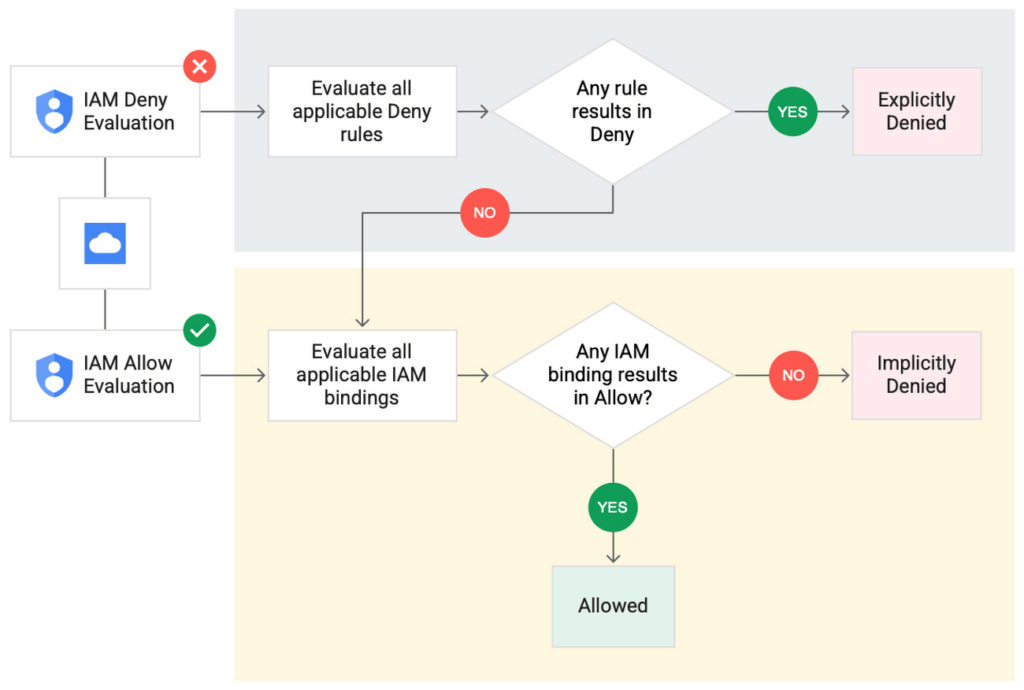
IAM Deny policies can be applied across many Google Cloud resources, such as Compute Engine, Cloud Storage, and Google Cloud Kubernetes Engine. These policies can help reduce toil on administrators as they can set up deny rules that will be enforced at scale without requiring reviews and changes of existing access rules. This makes resource governance simpler.
How to strengthen your security posture with IAM Deny
There are multiple use cases where IAM Deny policies can be used to help strengthen posture. Some of these are:
- Establish a default security baseline: IAM Deny can be used to set base policies at the organization level, folder level, and project level to deny access to resources. For example, you can attach a deny policy at the organization level to deny all users access to sensitive data storage buckets, making an exception for a specific user group.
- Prevent backdoors: IAM Deny rules override any IAM Allow rules. This can help you ensure that no “backdoor” access can be granted. For example, an organization that wants to ensure only central-admin can create projects in a folder can add an IAM Deny policy that restricts all users from creating projects except central-admin. This can help ensure no backdoor users will be added using allow policy rules.
- Prevent data exfiltration: Controlling access to data is a key measure to prevent exfiltration. For example, an organization that wants to restrict access to their personally identifiable information (PII) can set an IAM Deny policy on resources containing PII that denies access to all users except those in a group called PII-admin.
- Demonstrate compliance: Many industry regulations and compliance frameworks require organizations to demonstrate least-privilege access to sensitive resources. IAM Deny policies can create a baseline access restriction that always takes precedence when applied to resources.
Simplify IAM administration
IAM Deny can also help simplify common administrative tasks. It provides a list of permissions for Google Cloud services that you can readily use in your deny policies. Here are a few common situations where you can use IAM Deny to help streamline your access management.
- Centralize administrative privileges: You can use deny policies to restrict certain types of administrative activities to specific users or user groups. For example, if you want to limit custom role management to a single central team, you can create a deny rule that denies the permissions required for custom role management to all users, except users in the central-admin group. This will only let members of the central-admin group manage custom roles, even if other users have the required permissions.
- Create exceptions to access grants: You can use deny policies to deny inherited permissions. For example, you can grant a role at a high level in the resource hierarchy, and then deny the role’s permissions on individual lower-level resources if necessary.
- Block access based on tags: Google Cloud supports key-value based tags and you can use deny policies to deny permissions based on tags without adding an IAM Condition to every role grant. For example, you can create a rule to deny delete permissions for resources tagged as “production” for everyone except project-admins.
IAM Deny in action
The following example illustrates how a deny policy can be used to block all users from deleting projects unless the user is a member of a project-admins group or the project being deleted is tagged as a “test” project. Without a deny policy, you would have to manually track all members who have the permission to delete projects, and ensure that no undesired user has access to this permission. The deny policy makes it easy for the administrator to build this guardrail.
The below deny rule denies permission to everyone except project-admins@example.com for projects not tagged as test. Add this deny rule to a deny policy and attach the policy at the org level. That’s it!
(Note that project-admins@example.com is a security group. Using security groups is a best practice that should be followed to help keep your resources secure.)
{
"name": "policies/cloudresourcemanager.googleapis.com%2Fprojects%2F253519172624/denypolicies/limit-project-deletion",
"uid": "06ccd2eb-d2a5-5dd1-a746-eaf4c6g3f816",
"kind": "DenyPolicy",
"displayName": "Only project admins can delete projects.",
"etag": "MTc1MTkzMjY0MjUyMTExODMxMDQ=",
"createTime": "2021-09-07T23:15:35.258319Z",
"updateTime": "2021-09-07T23:15:35.258319Z",
"rules": [
{
"denyRule": {
"deniedPrincipals": [
"principalSet://goog/public:all"
],
"exceptionPrincipals": [
"principalSet://goog/group/project-admins@example.com"
],
"deniedPermissions": [
"cloudresourcemanager.googleapis.com/projects.delete"
],
"denialCondition": {
"title": "Only for non-test projects",
"expression": "!resource.matchTag('12345678/env', 'test')"
}
}
}
]
}
Getting started with IAM Deny Policies
With IAM Deny, you now have a powerful new capability to build security guardrails and more effectively control access to your Google Cloud resources. IAM Deny is now generally available for all customers through gCloud and APIs. We offer IAM Deny to Google Cloud customers at no additional cost. You can learn more about IAM Deny by visiting our documentation page.
Redefining Network Security with Google Cloud’s Secure Web Proxy

1201
Of your peers have already read this article.
3:30 Minutes
The most insightful time you'll spend today!
Google Cloud provides multiple layers of security to help customers stay ahead of evolving threats and keep their cloud workloads safe. Today at our annual Security Summit, we are excited to announce the general availability of Secure Web Proxy, a new cloud-first network security offering that provides web egress traffic inspection, protection, and control. Secure Web Proxy (Cloud SWP) can help networking and security teams implement Zero Trust networking principles, discover malicious activity, and support forensic investigations
How Secure Web Proxy works
You configure workloads to use Secure Web Proxy as a gateway. Web requests can originate from virtual machine (VM) instances, containers, serverless environments, and workloads outside of Google Cloud connected by Cloud VPN or Cloud Interconnect. Policies and rules in Cloud SWP will be applied to traffic sent from these workloads to the internet.
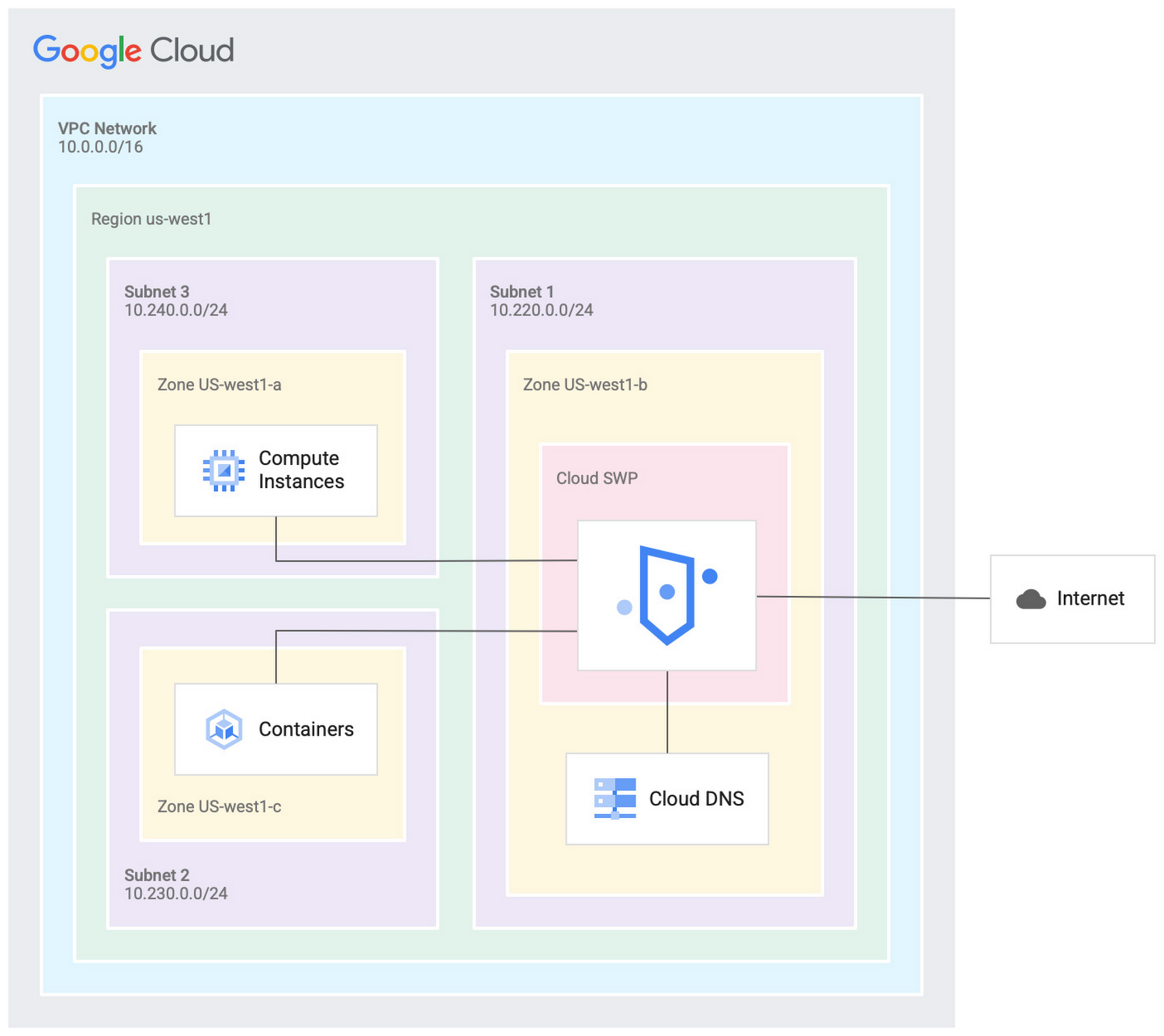
Cloud SWP helps enable organizations to enforce granular access policies, limiting egress web traffic based on source, identities, destination, or request types. With Cloud SWP you can create policies with Google Cloud Identity Access Management (IAM) context using service accounts and secure tags to block egress. For example, you can set a policy to limit a service account to sending traffic to a specific outbound destination.
Secure Web Proxy offers a scalable TLS inspection service that lets you intercept TLS traffic, inspect the encrypted request, and enforce your policies. Cloud SWP integrates with Cloud Logging to record metrics and transaction logs for requests handled by the proxy.
Common use cases for Secure Web Proxy
Many organizations employ a proxy like Cloud SWP to programmatically restrict workload access to only trusted external web services.
You can also use Cloud SWP to monitor outbound access. The proxy identifies traffic that doesn’t conform to policy and logs it to Cloud Logging. This allows you to monitor internet usage, discover and disrupt threats on your network by spotting command and control traffic or anomalous data transfers. Logs can be also used in forensics to investigate security events and incidents involving egress web traffic.
Operational benefits
Secure Web Proxy is another example of how Google Cloud continues to deliver built-in, cloud-first security capabilities that offer operational efficiencies for our customers.
Cloud SWP is easy to deploy and manage because it is a managed service. Unlike frequently deployed proxy solutions, it does not require users to configure virtual machines (VMs) to run and scale the proxy. Security patching is handled automatically. As your business and outbound traffic grows, Cloud SWP takes care of growing your proxy infrastructure for you.
Secure Web Proxy can also help make cloud migrations more seamless. If you are using an on-premises proxy, you can easily port the existing proxy’s policies to Cloud SWP when you migrate the app, maintaining the same egress protection in the cloud as you had on-premises.
Customer testimonials
Preview customers validated the operational and security value of implementing Cloud SWP:
“Google’s Secure Web Proxy is a powerful tool that can help businesses of all sizes protect their cloud workloads from online threats. By using the granular policy controls and TLS inspection, we are ensuring that our cloud applications only access approved external destinations. Additionally we are able to comply with data security regulations,” said David Saleh, director, Cloud Architecture and Application Security, ATB Financial.
“Secure Web Proxy has helped us to improve our security in Google Cloud. We are now able to filter outbound HTTP and HTTPS traffic from our applications. In addition, having a native solution will allow us to replace the VM-based solution we currently have, providing us with cost savings and continuing to deliver on our strategy of replacing products with cloud native services,” said Roberto Vega, cloud analyst, Carrefour.
Getting started with Secure Web Proxy
You can get started with Cloud SWP by visiting our documentation page to learn more about Cloud SWP prerequisite requirements and configuration options. If you want to quickly evaluate Cloud SWP for your cloud environment, use the SWP evaluation guide for step-by-step instructions. Be sure to check out all our sessions at this year’s Google Cloud Security Summit.
SEED: The 4 Areas of a Well-functioning and Responsible AI

4331
Of your peers have already read this article.
2:00 Minutes
The most insightful time you'll spend today!
The future of AI is better AI—designed with ethics and responsibility built in from the start. This means putting the brakes on AI-driven transformation until you have a well-functioning strategy and process in place to ensure your models deliver fair outcomes. Failing to recognize this imperative is a threat to your bottom line. The following post provides a simple framework to follow to keep your business on the right track as you place more trust in algorithms.
AI is inherently sociotechnical. AI systems represent the interconnectedness of humans and technology. They are designed to be used by and to inform humans within specific contexts, and the speed and scale of AI means that any lack of responsibility—such as bias, safety, privacy, scientific excellence etc—will also replicate at that same speed and scale. Without ethics and responsibility built in by design, AI systems lack the critical “inputs” or societal context that enable long term success.
Lawsuits stemming from AI systems that are biased towards certain groups are stacking up. In August 2020, IBM was forced to settle a lawsuit with the city of Los Angeles for misappropriating data it collected for its weather channel app. Health services company, Optum, is being investigated by regulators for creating an algorithm that allegedly recommended that doctors and nurses pay more attention to white patients than to sicker black patients. And Facebook, which granted Cambridge Analytica, a political firm, access to the personal data of more than 50 million people, is buried in legal work. Google has also run into its share of issues with algorithms making egregious mistakes.
While lawsuits are real, the foundational reason ethical AI is critical to your bottom line is trust. Without it, increasingly, consumers will ignore you and choose a brand they do trust. Research from Kantar, which runs one of the largest global brand equity studies (4 million consumers, 18,000 brands, across 50 markets), revealed that almost 9% of a brand’s equity is driven by corporate reputation, of which responsibility is a key attribute. Over the last decade, the importance of responsibility to consumers in relation to making brand choices has tripled.
The study stated brands perceived to be among the world’s most trusted and responsible shared three crucial factors that proved particularly important for building consumer trust and confidence, even when a brand might be new to a market. These are:
- Honesty and openness
- Respect and inclusion
- Identifying with and caring for customers
Brands that develop these associations more strongly tend to outperform their competitors in defending and growing their brand value.
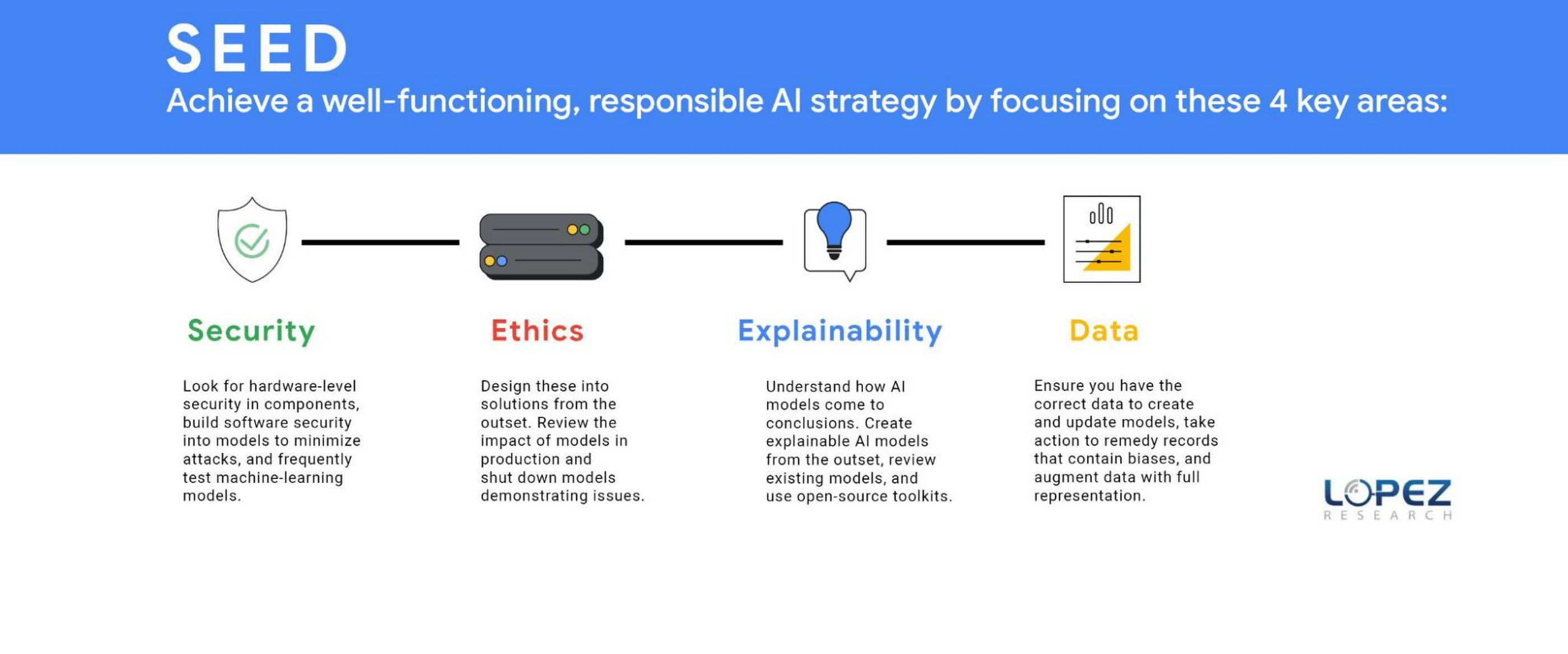
Technology and business leaders need to focus on four areas to accomplish a well-functioning ethical AI strategy. Lopez Research refers to this group of tasks as SEED, which stands for security, ethics, explainability, and data (SEED). Each of these topics could be an article in itself, but this post will define several essential components.
SECURITY (S)
It might not seem obvious, but a robust AI strategy requires an embedded security strategy. Companies should look for hardware-level security in components such as GPUs and CPUs. IT leaders should build software security into models to minimize attacks such as poisoning, evasion, deepfakes, backdoors, and model extraction. The threat of adversarial data poisoning attacks machine learning models by maliciously introducing inaccurate data designed to corrupt the model’s ability to be accurate. Another security threat is model extraction, also known as model cloning, where a hacker finds a way to either reconstruct a black-box machine learning model or extract the training data. The first line of defense against all security attacks is to design security at the outset, but the next best step is to frequently test models to ensure they are operating as planned. Business leaders, data science experts, and IT leaders must work together to regularly review the outcomes of AI models.
ETHICS (E)
Today, organizations must understand that ethics should be designed into the solution at its outset. The ethics process starts with defining the potential positive and negative outcomes of the model that your business is creating. Once the team has evaluated potential harmful effects, which means unpacking the systems, beliefs, power hierarchies and dynamics that interconnect with the technology, it’s your responsibility to eliminate or minimize the impact of these outcomes. It’s also critically important to review the impact of models in production and shut down models demonstrating issues. An example of this was the public beta release of the Tay chatbot that Microsoft deployed and rapidly shut down because it propagated negative biases.
Yet, many organizations aren’t taking this action. The FICO study revealed that 93% of companies said responsible AI was critical for success but only 33% of these companies were measuring AI model outputs to ensure these models were operating as expected (measuring for model drift). Another survey by Pew Research revealed that 68% believe that ethical principles focused primarily on the public good will not be employed in most AI systems by 2030.
Regulations may turn this tide, regardless of whether organizations plan to adopt an ethical AI framework. Laws governing the ethical use of data in AI are expected to be finalized as soon as 2022, such as the European Commission’s proposed legal framework for AI. Organizations that start with ethical use of AI in mind will be better positioned to deal with customer privacy concerns and regulatory compliance.
EXPLAINABILITY(E)
As models have become more sophisticated, it’s also become increasingly difficult to explain why a model created a specific outcome. In the FICO Responsible AI report, 65% of respondents could not explain how specific AI model decisions or predictions are made, and only 35% said their organization made an effort to use AI in a way that was transparent and accountable. However, it’s never been more important to clarify how AI models came to conclusions such as why a loan was denied, why a particular strategy should be implemented, and how AI selected a set of resumes to review for a position. The goal is to create an explainable AI model from the outset but many of today’s models lack this capability. Every business should review its existing models and use open-source toolkits that can be found on Github.com that support the interpretability and explainability of machine learning models.
Keep in mind that explainability isn’t one-size-fits-all. Different stakeholders need different types of information. Much of explainability to date has focused on “opening the black box” which gets equated to information that is only useful for other data scientists. That’s important, but it doesn’t help the line of business users whose workflows AI is integrated into, or end users who deserve information about how decisions are made; or policymakers who don’t have data science backgrounds, and so on.
DATA (D)
An equally important item in ethics is data. Ethics starts with ensuring you have the correct data to create and update models. Three main issues include representative data, inherent biases within existing data, and inaccurate data. A critical issue that most companies miss in creating models is that current data sets frequently lack full market representation. A recent Capgemini Research Institute report revealed that 65% of executives “were aware of the issue of discriminatory bias” with these systems.
Awareness is the first step, but organizations must take action to remedy this issue. Historical data may no longer serve a company’s current needs for model creation. Historical records may contain biases against certain groups. For example, historical criminal data records show an imbalance in ethnic groups’ incarceration, which would lead to model biases. Additionally, laws and societal norms also change. Certain groups were prosecuted for sexual preference in the past, but today this information would create an inaccurate model.
Companies have also discovered that using demographic data, a common practice in marketing, can also lead to model bias. For example, individuals that primarily used cash for transactions and others that lived in specific zip codes were at a disadvantage in banking models to determine creditworthiness. To minimize these issues, a company needs to augment its data with full representation in areas such as ethnicity, gender, age, behavioral and economic profiles.

Design AI models with a continuous feedback loop
Another, more prominent, yet tricky issue is data accuracy. As the adage says, garbage in, equals garbage out. The least appreciated but arguably the most essential component of the AI model lifecycle is ensuring the model has accurate data at all times. Inaccurate data from either poor data hygiene or data that was tampered with for security purposes can cause model failures. Organizations need to invest the time and resources to ensure they have the correct data. Data privacy is another key element that businesses must address, but the concepts of data privacy, sovereignty, and security are significant enough that we will come back to this in a separate article.
Overall, it’s clear that while we may have an abundance of data, it most likely doesn’t represent what we want to model for the future. A successful AI strategy is an ethical AI strategy that requires the organization to be thoughtful in its model creation by ensuring it has a broad representation of accurate data and testing the outcomes to ensure the models are secure and operating as expected.
Organizations that define an AI model lifecycle with a continuous feedback loop will reap the benefits of better intelligence. This will increasingly mean stronger, longer lasting trust with customers and staying on the right side of new laws and regulations.
Center for Internet Security’s Latest Benchmark for Securing Chrome

5401
Of your peers have already read this article.
1:30 Minutes
The most insightful time you'll spend today!
As the way people work continues to evolve, keeping security policies in place that protect organizations but give workers the ability to get things done is more important than ever. IT and security teams must aim to stay a step ahead of web-based security threats that come their organization’s way. To help, the Center for Internet Security (CIS) team has released the latest CIS Benchmark 2.1 for Google Chrome. This Benchmark offers independent recommendations on which Chrome policies to configure to help support organizations’ security and compliance needs. Thanks to Chrome being built with security at its core, in many cases, Chrome default settings are aligned with CIS recommendations.
Chrome is secure by default, but we also pride ourselves on providing customizations for enterprises to allow Chrome to better fit the needs of their business. And with hundreds of policies available through Chrome Browser Cloud Management and Group Policy Objects (Note: The CIS Benchmark is also available as a GPO), organizations can do just that.
Throughout the CIS guide you’ll notice that there are different designations for configuration profiles. Any labeled Level 1, are considered to be a good baseline for an organization. Level 2 profiles are recommended for deployments that require the highest level of security, but note that these settings could have a trade off on user productivity. We recommend looking at each setting and determining if it’s a good fit for your business.
The benchmark is made up of five sections:
- Enforced Defaults — Notes policies that are configured by default when you install Chrome. Enforcing these settings at an enterprise level can prevent these settings from being changed by business users to less secure options.
- Attack Surface Reduction — Details how to disable web features that may not be necessary in your enterprise environment and could reduce your overall attack surface.
- Privacy — Surfaces settings that improve user privacy.
- Data Loss Prevention — Contains settings that can help prevent data loss and protect your organization’s data. (Note: These recommendations cover additional capabilities that can be added to Chrome through BeyondCorp Enterprise).
- Forensics (Post Incident) — Shares recommendations on policies that give insights into post incident forensics and analysis.
Organizations can use these benchmarks to optimize the best way to secure Chrome in their environment. Download the CIS Benchmark here and check out our team’s configuration guide for additional recommendations on how to configure Chrome.
Note: This benchmark was created using a consensus review process composed of subject matter experts. Consensus participants provide perspective from a diverse set of backgrounds such as consulting, software development, audit and compliance, security research, operations, government, and legal. While these recommendations come from a trusted source, it’s important for each organization to weigh which policies make the most sense for their business.
What You Need to Know About Compute Engines

6546
Of your peers have already read this article.
1:30 Minutes
The most insightful time you'll spend today!
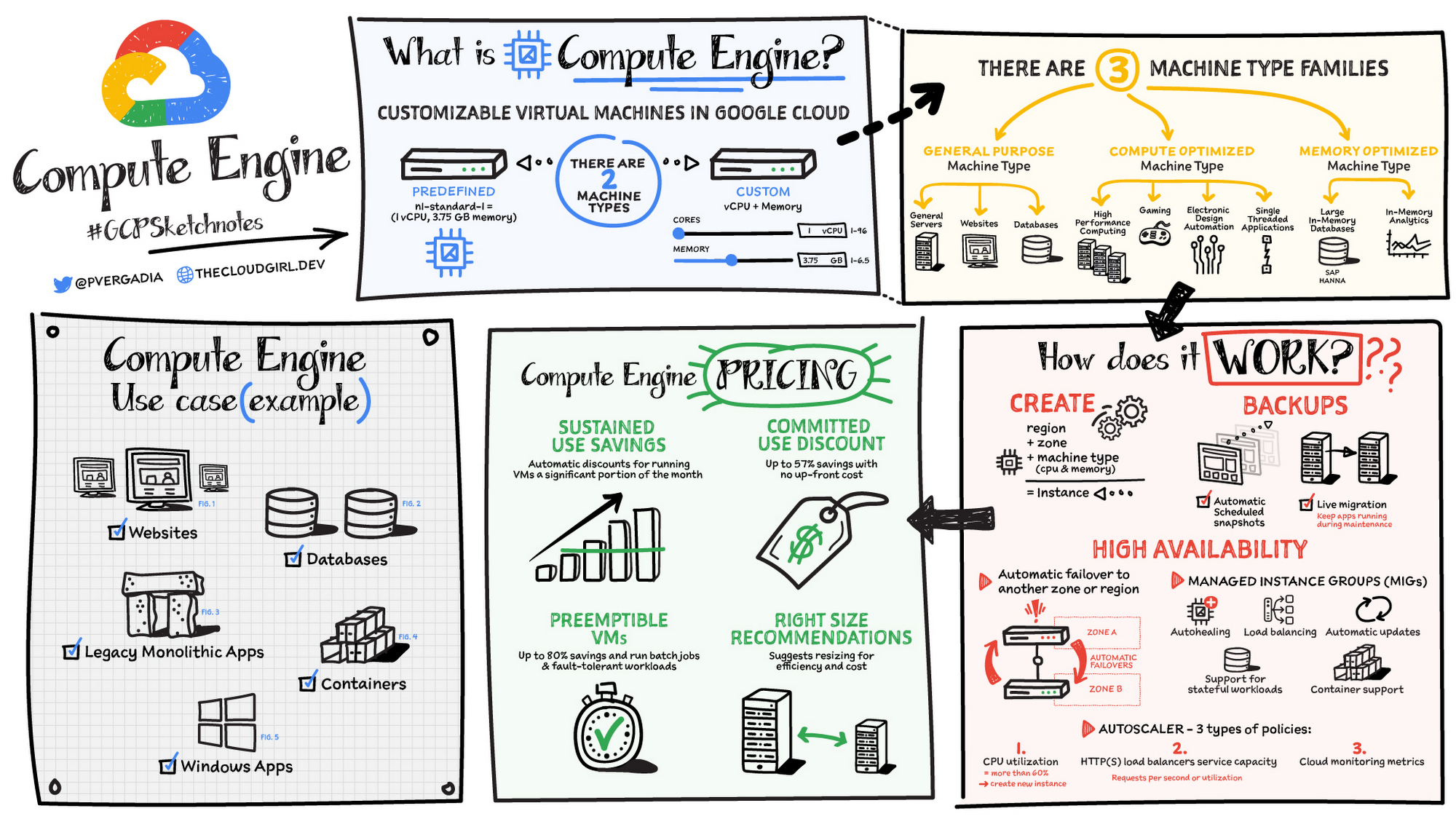
Compute Engine is a customizable compute service that lets you create and run virtual machines on Google’s infrastructure. You can create a Virtual Machine (VM) that fits your needs. Predefined machine types are pre-built and ready-to-go configurations of VMs with specific amounts of vCPU and memory to start running apps quickly. With Custom Machine Types, you can create virtual machines with the optimal amount of CPU and memory for your workloads. This allows you to tailor your infrastructure to your workload. If requirements change, using the stop/start feature you can move your workload to a smaller or larger Custom Machine Type instance, or to a predefined configuration.
Machine types
In Compute Engine, machine types are grouped and curated by families for different workloads. You can choose from general-purpose, memory-optimized, compute-optimized and accelerator-optimized families.
- General-purpose machines are used for Day-to-day computing at a lower cost and for balanced price/performance across a wide range of VM shapes. The use cases that best fit here are web serving, app serving, back office applications, databases, cache, media-streaming, microservices, virtual desktops, development environments.
- Memory-Optimized machine are recommended for ultra high-memory workloads such as in-memory analytics and large in-memory databases such as SAP HANA
- Compute-Optimized machines are recommended for ultra high performance workloads such as High Performance Computing (HPC), Electronic Design Automation (EDA), gaming, video transcoding, single-threaded applications.
- Accelerator-Optimized machines are optimized for high performance computing workloads such as Machine learning (ML), Massive parallelized computations and High Performance Computing (HPC)
How does it work?
You can create a VM instance using a boot disk image, a boot disk snapshot, or a container image. The image can be a public operating system (OS) image or a custom one. Depending on where your users are you can define the zone you want the virtual machine to be created in. By default all traffic from the internet is blocked by the firewall and you can enable the HTTP(s) traffic if needed.
Use snapshot schedules (hourly, daily, or weekly) as a best practice to back up your Compute Engine workloads. Compute Engine offers live migration by default to keep your virtual machine instances running even when software or hardware update occurs. Your running instances are migrated to another host in the same zone instead of requiring your VMs to be rebooted.
Availability
For High Availability (HA) Compute Engine offers automatic failover to other regions or zones in event of a failure. Managed instance groups (MIGs) help keep the instances running by automatically replicating instances from a predefined image. They also provide application based autohealing health checks. If an application is not responding on a VM, the auto healer automatically recreates that VM for you. Regional MIGs let you spread app load across multiple zones. This replication protects against zonal failures. MIGs work with load balancing services to distribute traffic across all of the instances in the group.
Compute Engine offers autoscaling to automatically add or remove VM instances from a managed instance group based on increases or decreases in load. Autoscaling lets your apps gracefully handle increases in traffic, and it reduces cost when the need for resources is lower. You define the autoscaling policy for automatic scaling based on the measured load, CPU utilization, requests per second or other metrics.
Active Assist’s new feature, predictive autoscaling, helps improve response times for your applications–When you enable predictive autoscaling, Compute Engine forecasts future load based on your Managed Instance Group’s (MIG) history and scales it out in advance of predicted load, so that new instances are ready to serve when the load arrives. Without predictive autoscaling, an autoscaler can only scale a group reactively, based on observed changes in load in real time. With predictive autoscaling enabled, the autoscaler works with real-time data as well as with historical data to cover both the current and forecasted load. That makes predictive autoscaling ideal for those apps with long initialization times and whose workloads vary predictably with daily or weekly cycles. For more information, see How predictive autoscaling works or check if predictive autoscaling is suitable for your workload, and to learn more about other intelligent features, check out Active Assist.
Pricing
You pay for what you use. But you can save cost by taking advantage of some discounts! Sustained use saving are automatic discounts applied for running instances for a significant portion of the month. If you know your usage upfront, you can take advantage of committed use discounts which can lead up to significant savings without any upfront cost. And by using short lived preemptive instances you can save up to 80%, they are great for batch jobs and fault tolerant workloads. You can also optimize resource utilization with automatic recommendations. For example if you are using a bigger instance for a workload that can run on a smaller instance you can save costs applying these recommendations.
Security
Compute Engine provides you default hardware security. Using Identity and Access Management (IAM) you just have to ensure that proper permissions are given to control access to your VM resources. All the other basic security principles apply, if the resources are not related and don’t require network communication amongst themselves, consider hosting them on different VPC networks. By default, users in a project can create persistent disks or copy images using any of the public images or any images that project members can access through IAM roles. You may want to restrict your project members so that they can create boot disks only from images that contain approved software that meet your policy or security requirements. You can define an organization policy that only allows Compute Engine VMs to be created from approved images. This can be done by using the Trusted Images Policy to enforce images that can be used in your organization.
By default all VM families are Shielded VMs. Shielded VMs are virtual machine instances that are hardened with a set of easily configurable security features to ensure that when your VM boots, it’s running a verified bootloader and kernel — is the default for everyone using Compute Engine, at no additional charge. For more details on Shielded VMs refer to the documentation here.
For additional security, you also have the option to use Confidential VM to encrypt your data in use, while it’s being processed in Compute Engine. For more details on Confidential VM refer to the documentation here.
Use cases
There are many use cases Compute Engine can serve in addition to running websites and databases. You can also migrate your existing systems onto Google Cloud, with Migrate for Compute Engine, enabling you to run stateful workloads in the cloud within minutes rather than days or weeks. Windows, Oracle or VMware applications have solution sets enabling a smooth transition to Google Cloud. To run windows applications either bring your own license leveraging Sole-tenant nodes or using the included licenced images.
Conclusion
Whatever your application use case may be, from legacy enterprise applications to digital native applications, Compute Engine’s families will fit it. For a more in-depth look into Compute Engine check out the documentation.
For more #GCPSketchnote, follow the GitHub repo. For similar cloud content follow me on Twitter @pvergadia and keep an eye out on thecloudgirl.dev
Building Unique Customer Experiences with Speed & Scale: Sprinklr & Google Cloud

8229
Of your peers have already read this article.
2:00 Minutes
The most insightful time you'll spend today!
Enterprises are increasingly seeking out technologies that help them create unique experiences for customers with speed and at scale. At the same time, customers want flexibility when deciding where to manage their enterprise data, particularly when it comes to business-critical applications.
That’s why I’m thrilled that Sprinklr, the unified customer experience management (Unified-CXM) platform for modern enterprises, has partnered with Google Cloud to accelerate its go-to-market strategy and grow awareness among our joint customers. Sprinklr will work closely with our global salesforce, benefitting from our deep relationships with enterprises that have chosen to build on Google Cloud.
Akin to Google Cloud’s mission to accelerate every organization’s ability to digitally transform their business through data-powered innovation, Sprinklr’s primary objective is to empower the world’s largest and most loved brands to make their customers happier by listening, learning, and taking action through insights. With this strategic partnership now in place, Sprinklr and Google Cloud will go-to-market together with the end-customer as our sole focus.
Traditionally, brands have adopted point solutions to manage segments of the customer journey. In isolation, these may work — but they rarely work collaboratively, even when vendors build “Frankenstacks” of disconnected products. These solutions can’t deliver a 360° view of the customer, and often reinforce departmental silos. All of which creates point-solution chaos.
Sprinklr’s approach is fundamentally different and is the way out of the aforementioned point-solution chaos. As the first platform purpose-built for unified customer experience management (Unified-CXM) and trusted by the enterprise, Sprinklr’s industry-leading AI and powerful Care, Marketing, Research, and Engagement solutions enable the world’s top brands to learn about their customers, understand the marketplace, and reach, engage, and serve customers on all channels to drive business growth.
Sprinklr was built from the ground up as a platform-first solution, designed to evolve and grow with the rapid expansion of digital channels and applications. The results? Faster innovation. Stronger performance. And a future-proof strategy for customer engagement on an enterprise scale.
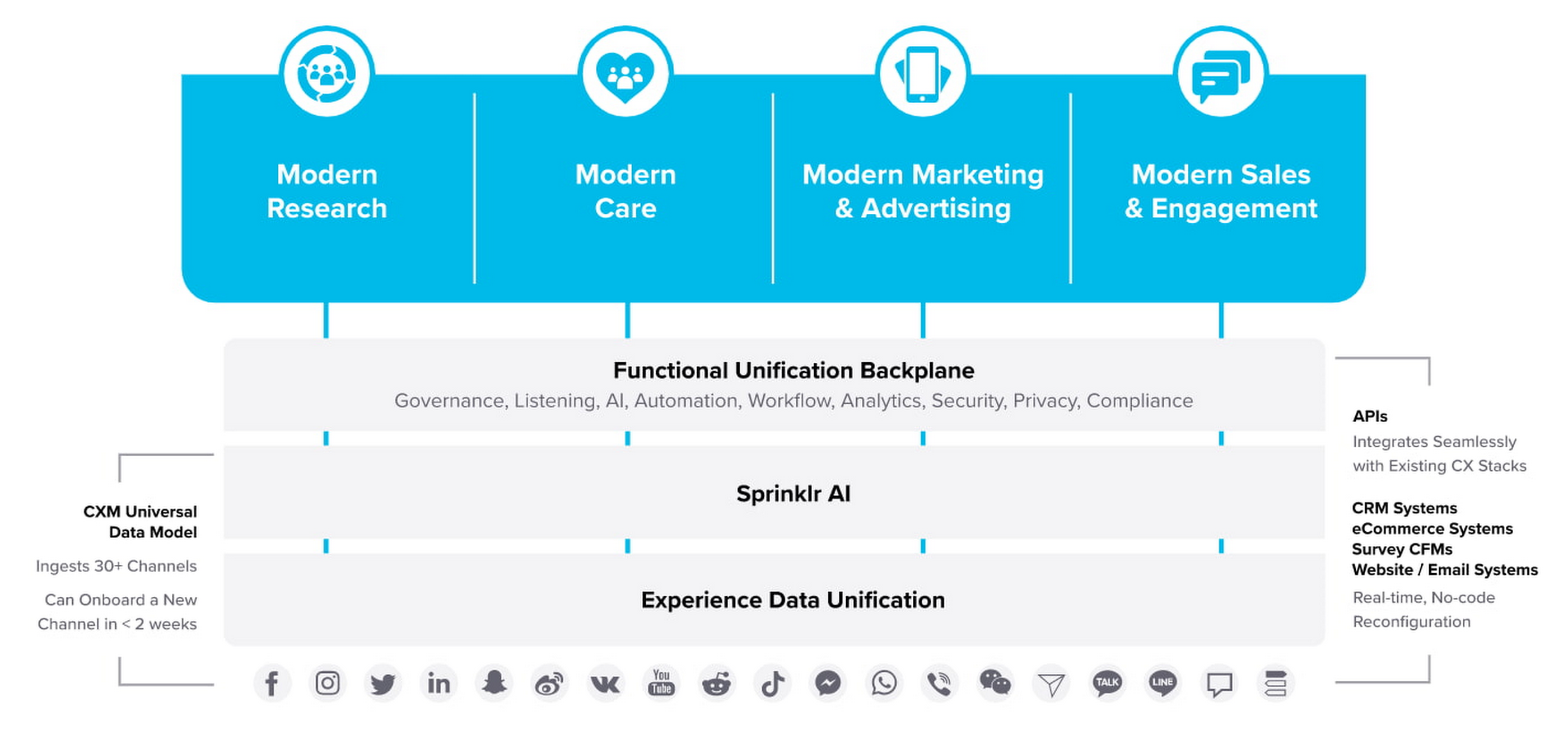
“Sprinklr works with large, global companies that want flexibility when deciding where to manage their enterprise data and consider our platform a business-critical application,” said Doug Balut, Senior Vice President of Global Alliances, Sprinklr. “Giving our customers the opportunity to manage Sprinklr on Google Cloud empowers them to create engaging customer experiences while maintaining the high security, scalability, and performance they need to run their business.”
To learn more about this exciting partnership and the challenges we jointly solve for customers, check out the recent conversation between Google Cloud’s VP of Marketing, Sarah Kennedy, and Sprinklr’s Chief Experience Officer, Grad Conn. Or read the press release on the partnership.
More Relevant Stories for Your Company

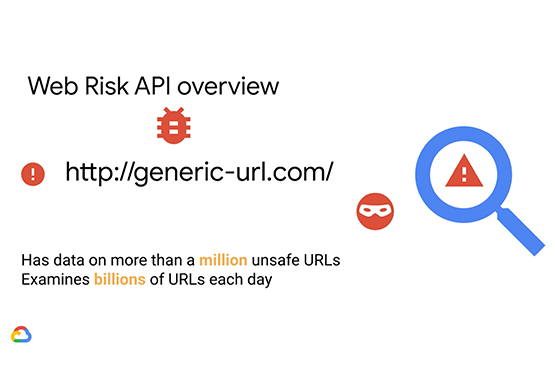
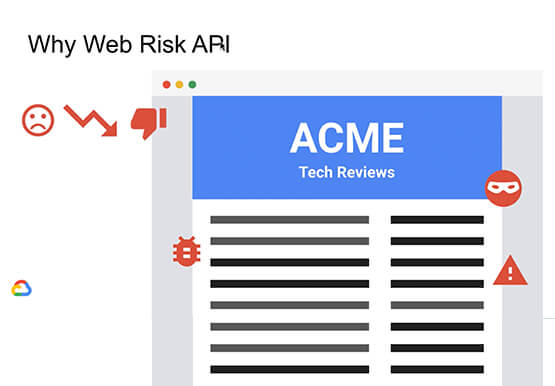

Why CISOs Need to Know This to Protect Users From Unsafe Websites
Unsafe web resources include social engineering sites—such as phishing and deceptive sites—and sites that host malware or unwanted software. For CISOs and their teams, this can quickly become an insurmountable challenge if it's not nipped in the bud. But there's a way to enable companies to find unsafe URLs before their

Deep Dive into Google Cloud’s Security Track at the Next 21
In every industry, in every part of the world, cybersecurity concerns continue to grow in the wake of attacks on critical infrastructure and the software supply chain. Governments and businesses of all sizes recognize that they must do more to protect their employees, customers and citizens. But doing more of

AirAsia’s CIO Speaks Up: Why He Decided, What He Did
At AirAsia, we operate a fleet of more than 270 aircraft across 23 markets, fly to more than 150 destinations and carry 100m guests each year. We’ve also been named the world’s best low-cost carrier for 11 years running. To accomplish all of this, we rely heavily on our 22,000

The SolarWinds Attack: A Case Study in Supply Chain Threats
Our quarterly Security Talks series brings together experts from Google Cloud Security teams and the industry to share information on our latest security products, innovations and best practices. Below is an introduction to Mandiant’s Security Talks presentation on Dec. 7, Mandiant Tales from the Front Lines: Activate Cyber Defenses Against
