





The SolarWinds Attack: A Case Study in Supply Chain Threats

2587
Of your peers have already read this article.
2:30 Minutes
The most insightful time you'll spend today!
Our quarterly Security Talks series brings together experts from Google Cloud Security teams and the industry to share information on our latest security products, innovations and best practices. Below is an introduction to Mandiant’s Security Talks presentation on Dec. 7, Mandiant Tales from the Front Lines: Activate Cyber Defenses Against Supply Chain Compromise.
The discovery in December 2020 of the SolarWinds supply chain compromise, a global computer intrusion campaign, caused organizations and security leaders to completely reassess their Cyber Threat Profiles, risk assessments, and defensive postures. It was a rare, watershed event that savvy security leaders and IT decision makers have been using to improve how security teams protect systems, networks, and data across industries and sectors, especially critical infrastructure. Two years later, we’re looking back at the security incident, what we’ve learned, and how it continues to drive change across security teams and organizations.
The SolarWinds compromise leveraged access to the software maker’s Orion business software in order to distribute a malicious update containing malware. Mandiant has since attributed this operation to APT29, a Russia-based espionage group assessed to be sponsored by the Russian Foreign Intelligence Service (SVR). This operation afforded APT29 with unparalleled access to an estimated 18,000 global organizations for follow-on targeting based on the attacker’s discretion and collection priorities.
While the security industry has yet to see anything that rivals the scale and scope of the SolarWinds compromise since it was discovered, a recent Google Cloud research report on software supply chain security found that there’s been a sharp increase in software supply chain attacks across nearly every sector.
Mandiant analysis identified supply chain compromise as the second-most prevalent initial infection vector in 2021. When the initial infection vector was identified, supply chain compromise accounted for 17% of intrusions in 2021 compared to less than 1% of intrusions in 2020. Further, 86% of supply chain compromise intrusions in 2021 were related to the SolarWinds breach.
Since 2020, Mandiant has also observed an increase in financially-motivated threat actors targeting the software supply chain. These actors compromised popular software packages and even mobile applications in order to deploy ransomware, cryptocurrency miners, and banking trojans. In one case, malicious code was inserted into a popular package, prompting the U.S. Cybersecurity and Infrastructure Agency (CISA) to issue an alert about the compromise.
Mitigation recommendations
The discovery of the SolarWinds incident resulted in increased global attention around supply chain compromise threats. Government authorities and technology organizations have responded with several initiatives, legislation, and studies seeking to reduce software supply chain and software dependency risk. Although these initiatives may make it more difficult for threat actors to conduct these operations, organizations should also take steps to mitigate supply chain threats.
Mandiant suggests that organizations contemplate applying multiple layers of security policies, plans, and solutions to maximize opportunities to provide early threat detection and prevent an anomaly or compromise stemming from the supply chain. This guidance is aligned with best practices Google Cloud has recommended for organizations to improve their software supply chain security.
Mandiant has also provided the following additional recommendations for organizations to consider more generally:
- Establish a vendor vetting process to evaluate vendor security practices before deploying hardware or software.
- Create a change control process and board for all enterprise hardware and software changes, which could include a centralized IT or IT security managed process for downloading, testing, and pushing updates to users.
- Use an advanced endpoint security solution, such as an endpoint detection and response (EDR), to detect malicious behavior when a tainted software package is downloaded and executed.
- Ensure proper logging and monitoring is in place between the software, hardware, and the internet.
- Implement the software and hardware using network segmentation with minimal access to the internet.
- Enact employee training programs and policies to encourage security best practices, including security audits of code in development.
Next steps
You can watch the Google Cloud Security Talks presentation on SolarWinds and the current state of supply chain threats here. You can learn more about Google Cloud’s solutions to help improve software supply chain security here, or for more general inquiries, please contact us or reach out to your sales representative to learn how we can assist.
How Google Meet Keeps Your Video Conferences Secure

6797
Of your peers have already read this article.
4:30 Minutes
The most insightful time you'll spend today!
All over the world, businesses, schools and users depend on G Suite to help them stay connected and get work done. Google designs, builds, and operates our products on a secure foundation, aimed at thwarting attacks and providing the protections needed to keep you safe. G Suite and Google Meet are no exception.
Google Meet’s security controls are turned on by default, so that in most cases, organizations and users won’t have to do a thing to ensure the right protections are in place. Here, we’ll summarize the key capabilities of Google Meet that help protect you.
Proactive protections to combat abuse and block hijacking attempts
Google Meet employs an array of counter-abuse protections to keep your meetings safe. These include anti-hijacking measures for both web meetings and dial-ins.
Google Meet makes it difficult to programatically brute force meeting IDs (this is when a malicious individual attempts to guess the ID of a meeting and make an unauthorized attempt to join it) by using codes that are 10 characters long, with 25 characters in the set. We limit the ability of external participants to join a meeting more than 15 minutes in advance, reducing the window in which a brute force attack can even be attempted. External participants cannot join meetings unless they’re on the calendar invite or have been invited by in-domain participants. Otherwise, they must request to join the meeting, and their request must be accepted by a member of the host organization.
In addition, we’re rolling out several features to help schools keep meetings safe and improve the remote learning experiences for teachers and students, including:
- Only meeting creators and calendar owners can mute or remove other participants. This ensures that instructors can’t be removed or muted by student participants.
- Only meeting creators and calendar owners can approve requests to join made by external participants. This means that students can’t allow external participants to join via video, and that external participants can’t join before the instructor.
- Meeting participants can’t rejoin nicknamed meetings once the final participant has left. This means if the instructor is the last person to leave a nicknamed meeting, students can’t join later without the instructor present.

Secure deployment and access controls for admins and end-users
To limit the attack surface and eliminate the need to push out frequent security patches, Google Meet works entirely in your browser. This means we do not require or ask for any plugins or software to be installed if you use Chrome, Firefox, Safari, or Microsoft Edge. On mobile, we recommend that you install the Google Meet app.
To help ensure that only authorized users administer and access Meet services, we support multiple 2-Step Verification options for accounts that are secure and convenient. These include hardware and phone-based security keys and Google prompt. Additionally, Google Meet users can enroll their account in our Advanced Protection Program (APP), which provides our strongest protections available against phishing and account hijacking and is specifically designed for the highest-risk accounts.
For G Suite Enterprise and G Suite for Education customers, we offer Access Transparency, which logs any Google access to Google Meet recordings stored in Drive, along with the reason for the access (support team actions that you might have requested, for example). Customers can also use data regions functionality to store select/covered data of Google Meet recordings in specific regions (i.e. US or Europe).
Secure, compliant, and reliable meeting infrastructure
In Google Meet, all data is encrypted in transit by default between the client and Google for video meetings on a web browser, on the Android and iOS apps, and in meeting rooms with Google meeting room hardware. Meet adheres to IETF security standards for Datagram Transport Layer Security (DTLS) and Secure Real-time Transport Protocol (SRTP). For every person and for every meeting, Meet generates a unique encryption key, which only lives as long as the meeting, is never stored to disk, and is transmitted in an encrypted and secured RPC (remote procedure call) during the meeting setup.
Security is an integral part of all our operations at Google. Our team of full-time security and privacy professionals supports our software engineering and operations to ensure that security is always a part of how we build and run our services. All of our Google Cloud and G Suite customers benefit from these capabilities, including:
- Secure-by-design infrastructure: Google Meet benefits from Google Cloud’s defense-in-depth approach to security, which utilizes the built-in protections and global-private network that Google uses to secure your information and safeguard your privacy.
- Compliance certifications: Our Google Cloud products, including Google Meet, regularly undergo independent verification of their security, privacy, and compliance controls, including validation against standards such as SOC, ISO/IEC 27001/17/18, HITRUST, and FedRAMP. We support your compliance requirements around regulations such as GDPR and HIPAA, as well as COPPA and FERPA for education.
- Incident management: We have a rigorous process for managing data and security incidents that specifies actions, escalations, mitigation, resolution, and notification of any potential incidents impacting customer data.
- Reliability: Google’s network is engineered to accommodate peak demand and handle future growth. Our network is resilient and engineered to accommodate the increased activity we’ve seen on Google Meet.
- Transparency: At Google Cloud, we’re clear about our commitments regarding customer data: we process customer data according to your instructions; we never use customer data for advertising purposes; and we publish the locations of our Google data centers, which are highly available, resilient, and secure.
During COVID-19 and beyond, we will continue to protect Google Meet users and their data, and keep innovating with new features to make our tools helpful, secure, and safe.
Announcing New, Faster Search and Investigative Experience in Chronicle Security Operations

2926
Of your peers have already read this article.
1:30 Minutes
The most insightful time you'll spend today!
In cybersecurity, speed matters. Whether a security analyst is trying to understand the details of an alert that was triggered by an indicator of compromise (IoC), or find additional context for a suspicious asset, speed is often the critical factor that will help thwart a cyberattack before threat actors are able to inflict damage.
With speed in mind, we are pleased to announce the general availability of our new investigative experience in Chronicle Security Operations. We are continuing to deliver on our mission to bring the power of Google to security operations and are raising the bar for search and the investigative experience in the SOC.
With this release, SecOps teams will be able to harness Chronicle’s lightning-fast search across any form of structured data. Additionally, the new investigation experience can provide greater flexibility to pivot and drill-down when conducting complex, open-ended threat investigations and surface insights quickly and easily.
Our Unified Data Model (UDM) schema, with its built-in flexibility that can effectively handle a wide variety of security related events, is at the heart of Chronicle’s powerful search. We have scaled this capability by optimizing query responses across structured data. Additionally, analysts can investigate large datasets and build complex queries with a new and intuitive user experience. With user personalization enhancements, analysts can quickly access saved searches and top queries in their environment to improve routine SOC workflows.
With the new investigative experience, security teams can:
- Drive faster threat understanding with an interactive event results timeline that helps eliminate unnecessary long wait times by streaming results as they are processed to quickly begin threat analysis
- Use enhanced context and operationalize relevant data for threat analysis with one-click filter-to-query conversion
- Personalize the analyst experience with saved search and search history functions for quicker analyst knowledge recall
- Power threat investigation and hunting with a new, improved, highly performant UDM search
Let’s look at an example of how to use the reimagined investigative experience and our new broader, faster search.
In our use-case, a security analyst is investigating a curated detection alert for potentially suspicious behavior on a Windows environment. Additionally, there is a low prevalence domain from host “win-dc-01” with ip “10.166.0.3”. To investigate further, let’s open the UDM Search page and construct a query containing the host and IP information along with destination information of the domain the host was contacting (edge.microsoft.com). Over 70,000 events stream into the investigation interface providing the analyst an immediate picture of data surrounding their alert.
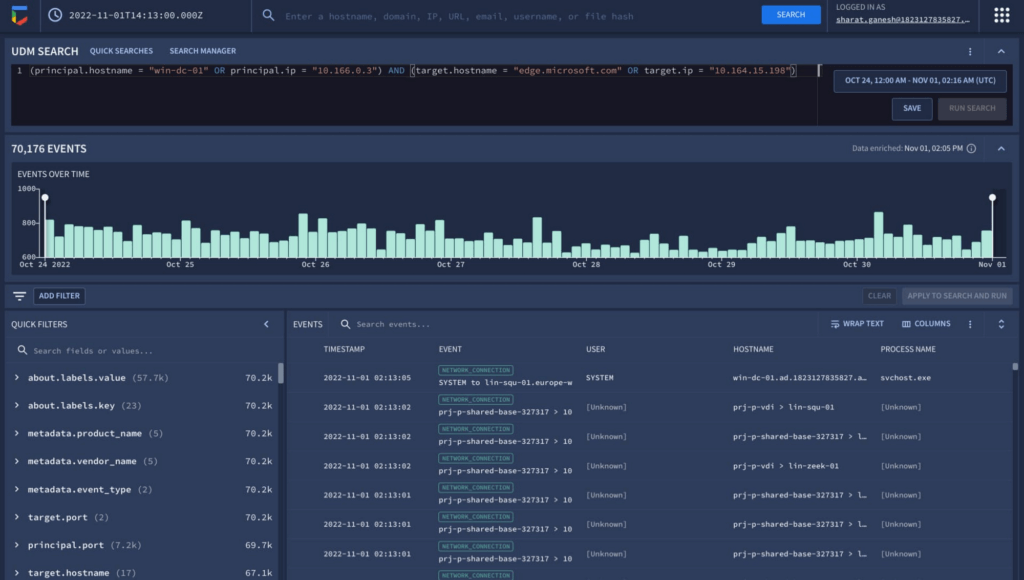
The new interactive events timeline can provide a clear picture of event trends over time with key statistical data which can be easily filtered. Additionally, with the new quick filters, the analyst is able to easily filter out hosts that are known-good to get pertinent information about the domain.
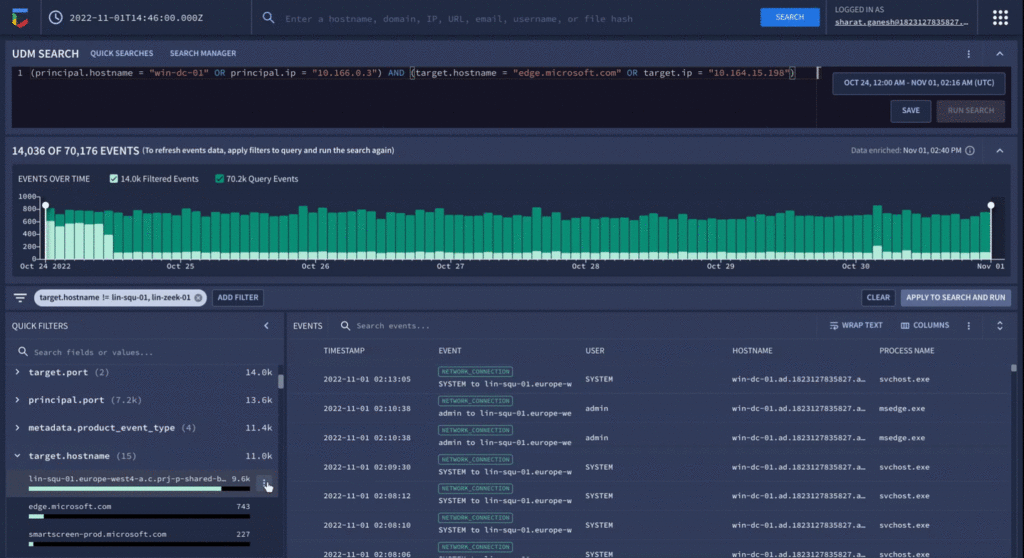
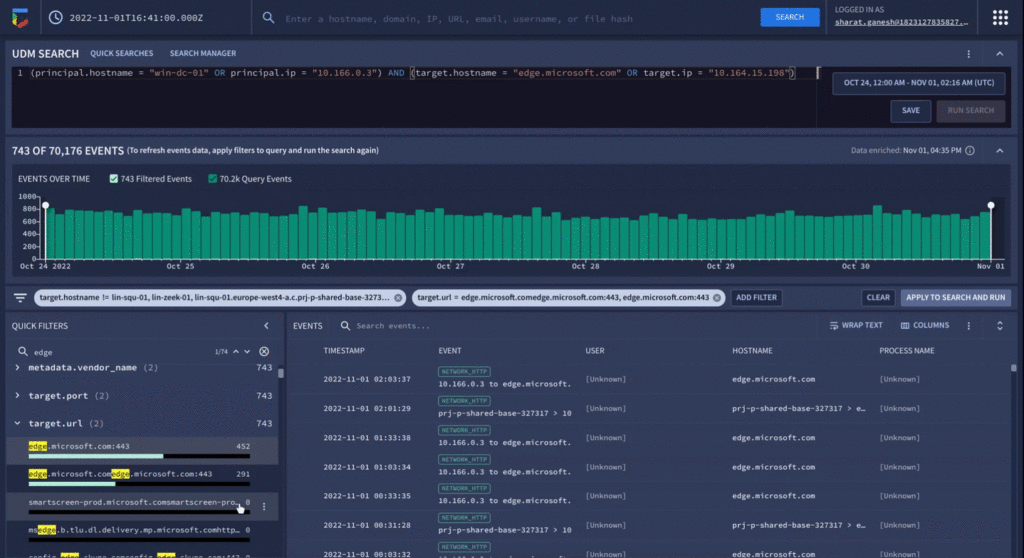
Analyzing value aggregations present in the filter panel, automatically generated by Chronicle, enables analysts to domain values of highest interest, and quickly determine that approximately 800 events were present in the last week that related to edge.microsoft.com URL. Since Microsoft Edge is disallowed in the organization, there should not be any outbound traffic to this type of destination.
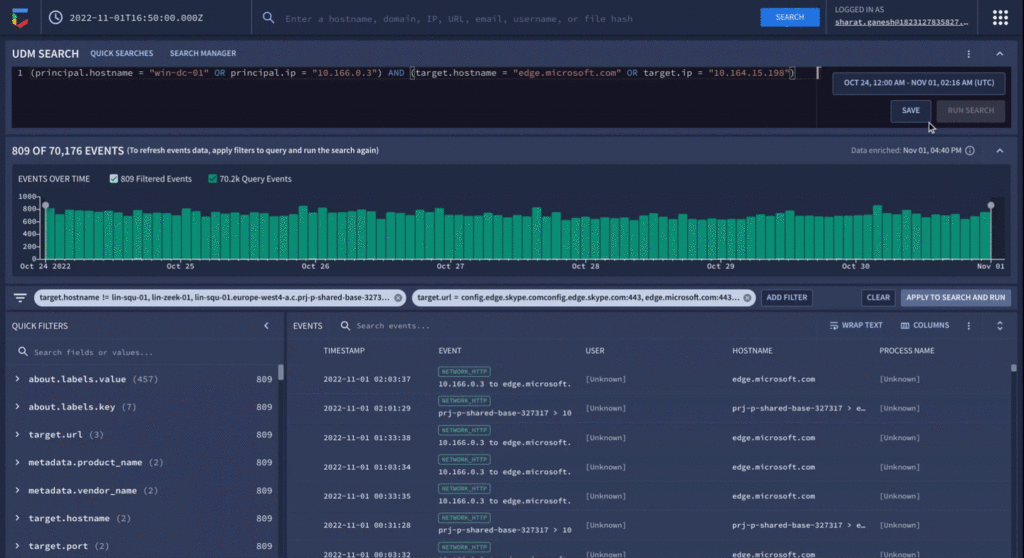
As a final step before orchestrating a response in Chronicle SOAR’s case management, the analyst can save their search to quickly recall the steps they took in the future for related investigations.
We have already seen our customers use these new capabilities in preview to build new use cases, accelerate existing threat hunting workflows, and drive faster threat response. We will continue our mission to bring Google speed, scale, and intelligence to the investigative experience, expediting “time to aha” for security analysts, and driving better, faster responses.
Ready to put Chronicle to work in your Security Operations Center? Contact Google Cloud sales or your customer success CSM team. You can also learn more about all these new capabilities in Google Chronicle in our product documentation.
2022’s First Cloud CISO Perspectives: Recap of the Megatrends, Releases and News

9330
Of your peers have already read this article.
3:00 Minutes
The most insightful time you'll spend today!
I’m excited to share our first Cloud CISO Perspectives post of 2022. It’s already shaping up to be an eventful year for our industry and we’re only in month one. There’s a lot to recap in this post, including the U.S. government’s recent efforts to address critical security issues, like open source software security and zero trust architectures. We’ve also released new resources from our Google Cybersecurity Action Team like the Cloud Security Megatrends and the Boards of Directors whitepaper on cloud risk governance.
Cloud Security Megatrends
We’re often asked if the cloud is more secure than on-prem (and why) so we shared our answer in a recent blog post. At Google Cloud, security by design is our priority. We’ve long adopted zero-trust principles for our baseline security architectures and built a global network that relies on defense in depth layers to protect against configuration errors and attacks. But security is always evolving and that is why we also take advantage of the following megatrends:
- Economy of scale: Decreasing the marginal cost of security raises the baseline level of security.
- Shared fate: A flywheel of increasing trust drives more transition to the cloud, which compels even higher security and even more skin-in-the-game from the cloud provider.
- Healthy competition: The race by deep-pocketed cloud providers to create and implement leading security technologies is the tip of the spear of innovation.
- Cloud as the digital immune system: Every security update the cloud gives the customer is informed by some threat, vulnerability, or new attack technique often identified by someone else’s experience. Enterprise IT leaders use this accelerating feedback loop to get better protection.
- Software-defined infrastructure: Cloud is software defined, so it can be dynamically configured without customers having to manage hardware placement or cope with administrative toil. From a security standpoint, that means specifying security policies as code, and continuously monitoring their effectiveness.
- Increasing deployment velocity: Because of cloud’s vast scale, providers have had to automate software deployments and updates, usually with automated continuous integration/continuous deployment (CI/CD) systems. That same automation delivers security enhancements, resulting in more frequent security updates.
- Simplicity: Cloud becomes an abstraction-generating machine for identifying, creating and deploying simpler default modes of operating securely and autonomically.
- Sovereignty meets sustainability: The cloud’s global scale and ability to operate in localized and distributed ways creates three pillars of sovereignty. This global scale can also be leveraged to improve energy efficiency.
If you’re an IT decision maker, pay attention to these megatrends that will continue to drive and reinforce cloud security and will outpace the security of on-prem infrastructure well into the future.
U.S. Federal government cybersecurity momentum
- Open source software security: Earlier this month, Google participated in the White House Summit on open source software security. The meeting came at a critical time for the industry following December’s Log4j vulnerabilities and was both a recognition of the challenge and an important first step towards addressing it. The open source software ecosystem is not homogenous, despite the fact that the industry often thinks of or treats it this way. Some of it, like Linux, is highly curated, while other critical software is supported through diffuse communities including technology companies and other stakeholders. There is also a long tail of many other critical projects driven by a dedicated community of maintainers around the world, including Googlers. In light of this reality, we welcomed the chance to share our recommendations to advance the future of open source software security. Some work we’ve done includes founding the Open Source Security Foundation, which has been instrumental already in making security improvements. We’ve also helped drive a number of key security initiatives within the open source community including security scorecards, the SLSA framework to improve the security and integrity of open source packages, and Secure Open Source Rewards to financially incentivize improvements to critical open source security projects.
- OMB’s Federal zero trust strategy: The publication of the Office of Management and Budget’s zero trust architecture strategy marks an important step for the U.S. federal government’s efforts to modernize under Executive Order 14028. Google Cloud supports this approach, which recognizes the immense security benefits offered by modern computing architectures. For the past decade, Google has successfully applied zero trust principles through our BeyondCorp and BeyondProd frameworks for providing end-user access and securing our cloud workloads. And we’ve brought these best practices from our own journey to global governments and businesses of any size through solutions like BeyondCorp Enterprise and capabilities like Binary Authorization and Anthos Service Mesh, which are embedded in Anthos, our managed application platform. For Federal agencies embarking on this zero trust journey, the Google Cybersecurity Action Team will offer our expertise by conducting Zero Trust Foundations strategy workshops, which can help organizations in the public and private sectors develop actionable and achievable strategies and plans for zero trust implementation.
Google Cybersecurity Action Team Highlights
Here are the latest updates, products, services and resources across our security teams this month:
Security
- Democratizing security operations: We recently announced that Siemplify, a leading security orchestration, automation and response (SOAR) provider, is joining Google Cloud to help companies better manage their threat response. Providing a proven SOAR capability with Chronicle’s approach to security analytics is an important step forward in our vision to advance invisible security and democratize security operations for every organization.
- Security by design: The Highmark Health security team is using “secure-by-design” techniques to address the security, privacy, and compliance aspects of its Living Health solution with Google Cloud’s Professional Services Organization (PSO). Google has long advocated for and followed security by design principles, which is why we’re continuously building enhanced security, controls, resiliency and more into our cloud products and services.
- Secure collaboration for hybrid work environments: The Google Workspace team shared its recommendations for businesses as they prepare for the future of work, where the hybrid/flexible work model is becoming standard practice and a new approach to security is essential.
- Anthos Policy Controller CIS Benchmark enforcement: A big part of our shared fate philosophy is to build secure products and not just security products. A recent example of this in action is embedding CIS benchmark policy conformance in the Anthos Policy Controller. We believe the more we embed approaches like this into our products, the more application and infrastructure teams can intrinsically embed security at the start and reduce toil for the security team.
- DevOps for technology-driven organizations and startups: A key success factor for many security programs is the partnership and integration with development teams, and there are some great resources and lessons in our DORA research.
- Security by design with Chrome OS: ABN AMRO’s Asia-Pacific region team recently shared how they are using Chrome OS and CloudReady to work securely in the cloud, reduce total cost of ownership, and add flexibility for employees. This is a great example of secure by design principles in the use of Chromium.
Risk & Compliance
- Boards of Directors summary guide to cloud risk governance: The latest whitepaper from the Google Cybersecurity Action Team outlines how boards of directors can prioritize safe, secure, and compliant adoption processes for cloud technologies within their organizations.
- TruSight Risk Assessment of Google Cloud: TruSight recently released a comprehensive
risk assessment report on Google Cloud. Our Enterprise Trust team collaborated on this robust assessment of Google Cloud services to validate the design and implementation of controls. TruSight’s risk assessment of our security controls will help customers accelerate and complete their risk management due diligence. - Data governance: Check out this new blog series on data governance where our teams explain the role of data governance, its importance, and the necessary processes to run an effective data governance program. Implementing data governance will help maximize value derived from business data, build user trust, and ensure compliance with required security measures.
Controls and Products
- Encrypting Data Fusion: To help meet the security, privacy and compliance requirements of customers in regulated industries like finance or public sector, we announced the general availability of Customer Managed Encryption Keys (CMEK) integration for Cloud Data Fusion, which enables encryption of both user data and metadata at rest with a key that customers can control through our Cloud Key Management Service (KMS).
Don’t forget to sign-up for our newsletter if you’d like to have our Cloud CISO Perspectives post delivered every month to your inbox. We’ll be back next month with more updates and security-related news.
Thwart Ransomware Threats with Google Cloud’s 5 Pillars of Protection

3128
Of your peers have already read this article.
2:00 Minutes
The most insightful time you'll spend today!
Ransomware, a form of malware that encrypts a user’s or organization’s most important files or data rendering them unreadable, isn’t a novel threat in the world of computer security. These destructive, financially-motivated attacks where cybercriminals demand payment to decrypt data and restore access have been studied and documented for many years. Today’s reality shows us that these attacks have become more pervasive, impacting essential services like healthcare or pumping gasoline. Yet despite attempts to stop this threat, ransomware continues to impact organizations across all industries, significantly disrupting business processes and critical national infrastructure services and leaving many organizations looking to better protect themselves. Organizations that continue to rely on legacy systems are especially vulnerable to ransomware threats, as these systems may not be regularly patched and maintained.
For more than 20 years Google has been operating securely in the cloud, using our modern technology stack to provide a more defensible environment that we can protect at scale. We strive to make our security innovations available in our platforms and products for customers to use as well. This underpins our work to be the industry’s most trusted cloud, and while the threat of ransomware isn’t new, our responsibility to help protect you from existing or emerging threats never changes. In this post, we share guidance on how organizations can increase their resilience to ransomware and how some of our Cloud products and services can help.
Develop a comprehensive, defensive security posture to protect against ransomware
Robust protection against ransomware (and many other threats) requires multiple layers of defense. The National Institute of Standards and Technology (NIST) outlines five main functions in the Cybersecurity Framework that serve as the primary pillars for a successful and comprehensive cybersecurity program in any public or private sector organization. Below are the recommendations from NIST and examples of how our Cloud technologies can help address ransomware threats:
Pillar #1 – Identify: Develop an understanding of what cybersecurity risks you need to manage for the scope of your assets, systems, data, people, and capabilities. In the case of ransomware, this covers which systems or processes are most likely to be targeted in a ransomware attack, and what the business impact would be if specific systems were rendered inoperable. This will help prioritize and focus efforts to manage risks.
Our CISO Guide to Security Transformation whitepaper outlines steps for a risk-informed, rather than risk-avoidance, approach to security with the cloud. A risk-informed approach can help you address the most important security risks, instead of addressing the risks that you already know how to mitigate. Cloud service providers make this risk-informed approach easier and more efficient for you by developing and maintaining many of the controls and tools that you need to mitigate modern security threats. Services like Cloud Asset Inventory provide a mechanism to discover, monitor, and analyze all your assets in one place for tasks like IT ops, security analytics, auditing, and governance.
Pillar #2 – Protect: Create safeguards to ensure delivery of critical services and business processes to limit or contain the impact of a potential cybersecurity incident or attack. In the case of ransomware, these safeguards may include frameworks like zero trust that protect and strongly authenticate user access and device integrity, segment environments, authenticate executables, reduce phishing risk, filter spam and malware, integrate endpoint protection, patch consistently and provide continuous controls assurance. Some examples of products and strategies to involve in this step include:
- A cloud-native, inherently secure email platform: Email is at the heart of many ransomware attacks. It can be exploited to phish credentials for illegitimate network access and/or to distribute ransomware binaries directly. Advanced phishing and malware protection in Gmail provides controls to quarantine emails, defends against anomalous attachment types, and protects from inbound spoofing emails. Security Sandbox detects the presence of previously unknown malware in attachments. As a result, Gmail prevents more than 99.9 percent of spam, phishing, and malware from reaching users’ inboxes. Unlike frequently-exploited legacy on-premises email systems, Gmail is continually and automatically updated with the latest security improvements and protections to help keep your organization’s email safe.
- Strong protection against account takeovers: Compromised accounts allow ransomware operators to gain a foothold in victim organizations, perform reconnaissance, get unauthorized access to data and install malicious binaries. Google’s Advanced Protection Program provides the strongest defense against account takeovers and has yet to see a user that participates in the program be successfully phished. Further, Google Cloud employs many layers of machine learning systems for anomaly detection to differentiate between safe and anomalous user activity across browsers, devices, application logins, and other usage events.
- Zero trust access controls that limit attacker access and lateral movement: BeyondCorp Enterprise provides a turnkey solution for implementing zero trust access to your key business applications and resources. In a zero trust access model, authorized users are granted point-in-time access to individual apps, not the entire corporate network, and permissions are continuously evaluated to determine if access is still valid. This prevents the lateral movement across the network that ransomware attackers rely on to hunt for sensitive data and spread infections. BeyondCorp’s protections can even be applied to RDP access to resources, one of the most common ways that ransomware attackers gain and maintain access to insecure legacy Windows Server environments.
- Enterprise threat protections for Chrome: Leveraging Google Safe Browsing technology, Chrome warns users of millions of malware downloads each week. Threat protection in BeyondCorp Enterprise delivered through Chrome can prevent infections from previously unknown malware including ransomware, with real-time URL checks and deep scanning of files.

- Endpoints designed for security: Chromebooks are designed to protect against phishing and ransomware attacks with a low on-device footprint, read-only, constantly invisibly updating Operating System, sandboxing, verified boot, Safe Browsing and Titan-C security chips. Rollout of ChromeOS devices for users who work primarily in a browser can reduce an organization’s attack surface, such as relying too much on legacy Windows devices, which have been found to often be vulnerable to attacks.
Pillar #3 – Detect: Define continuous ways to monitor your organization and identify potential cybersecurity events or incidents. In the case of ransomware, this may include watching for intrusion attempts, deploying Data Loss Prevention (DLP) solutions to detect exfiltration of sensitive data from your organization, and scanning for early signs of ransomware execution and propagation.
The ability to spot and stop malicious activity associated with ransomware as early as possible is key to preventing business disruptions. Chronicle is a threat detection solution that identifies threats, including ransomware, at unparalleled speed and scale. Google Cloud Threat Intelligence for Chronicle surfaces highly actionable threats based on Google’s collective insight and research into Internet-based threats. Threat Intel for Chronicle allows you to focus on real threats in the environment and accelerate your response time.
DLP technologies are also useful in helping detect data that could be appealing to ransomware operators. With data discovery capabilities like Cloud DLP, you can detect sensitive data that’s accessible to the public when it should not be and detect access credentials in exposed code.
Pillar #4 – Respond: Activate an incident response program within your organization that can help contain the impact of a security (in this case, ransomware) event.
During a ransomware attack or security incident, it’s critical to secure your communications both internally to your teams and externally to your partners and customers. Many organizations with legacy Office deployments have shifted to Google Workspace because it offers a more standardized and secure online collaboration suite, and in the event of a security incident, a new instance can quickly be stood up to provide a separate, secure environment for response actions.
Pillar #5 – Recover: Build a cyber resilience program and back-up strategy to prepare for how you can restore core systems or assets affected by a security (in this case, ransomware) incident. This is a critical function for supporting recovery timelines and lessening the impact of a cyber event so you can get back to operating your business.
Immediately after a ransomware attack, a safe point-in-time backup image that is known not to be infected must be identified. Actifio GO provides scalable and efficient incremental data protection and a unique near-instant recovery capability for data. This near-instant recovery facilitates identifying a clean restore point quickly, enabling resumption of business functions rapidly. Actifio GO is infrastructure-agnostic and can protect applications on-premises and in the cloud.
In Google Workspace, if files on your computer were infected with malware but you sync them to Google Drive, you may be able to recover those files. Additionally, ensuring that you have a strong risk transfer program in place, like our Risk Protection Program, is a critical element of a comprehensive approach to managing cyber risk.
Key ransomware prevention and mitigation considerations for business and IT leaders
As you plan for a comprehensive defense posture against ransomware threats, here are some key questions to consider:
- Does your organization have a ransomware plan, and what does it entail? Remember to demand a strong partnership with your cloud providers based on a shared understanding of risk and security objectives.
- How are you defending your organization’s data, systems and employees against malware?
- Are your organization’s systems up to date and patched continuously?
- Are you watching for data exfiltration or other irregularities?
- What is your comprehensive zero trust approach, especially strongly authenticating my employees when they access information?
- Are you taking the right back ups to high assurance immutable locations and testing that they are working properly? This should include testing that does a periodic restore of key assets and data.
- What drills are you conducting to battle-test your organization’s risk management and response to cyber events or incidents?
Ransomware attacks will continue to evolve
Recently, ransomware groups have evolved their tactics to include stealing data prior to it being encrypted, with the threat of extorting this data through leaks. Additionally, some ransomware operators have used the threat of distributed-denial-of-service (DDoS) attacks against victim organizations as an attempt to further compel them to pay ransoms. DDoS attacks can also serve as a distraction, occupying security teams while attackers seek to accomplish other objectives such as data exfiltration or encryption of business-critical data. By deploying Google Cloud Armor — which can scale to absorb massive DDoS attacks— you can help protect services deployed in Google Cloud, other clouds, or on-premise against DDoS attacks.
Protecting against ransomware is a critical issue for all organizations, and these questions and best practices are only the start of building a mature and resilient cybersecurity posture. It’s important to remember that you can’t focus on a single piece of defense; you need a comprehensive cybersecurity program that enables you to identify, prevent, detect, respond, and recover from threats. Above all, you need a range of solutions from a battle-tested and highly-resilient cloud platform that works across these elements in an integrated way with your business. To learn more about how Google Cloud can help you implement a comprehensive cybersecurity program to protect against threats like ransomware and more, visit our Google Cloud Security Best Practices Center.
Track metrics and stay focused on threats: Achieving Autonomic Security Operations

2830
Of your peers have already read this article.
2:30 Minutes
The most insightful time you'll spend today!
What’s the most difficult question a security operations team can face? For some, is it, “Who is trying to attacks us?” Or perhaps, “Which cyberattacks can we detect?” How do teams know when they have enough information to make the “right” decision? Metrics can help inform our responses to those questions and more, but how can we tell which metrics are the best ones to rely on during mission-critical or business-critical crises?
As we discussed in our blogs, “Achieving Autonomic Security Operations: Reducing toil” and “Achieving Autonomic Security Operations: Automation as a Force Multiplier,” your Security Operations Center (SOC) can learn a lot from what IT operations discovered during the Site Reliability Engineering (SRE) revolution. In this post, we discuss how those lessons apply to your SOC, and center them on another SRE principle—Service Level Objectives (SLOs).
Even though industry definitions can vary for these terms, SLI, SLO, and SLA have specific meanings, wrote the authors of the Service Level Objectives chapter in our e-book, “Site Reliability Engineering: How Google runs production systems.” (All subsequent quotes come from the SLO chapter of the book, which we’ll refer to as the “SRE book.”)
- SLI: “An SLI is a service level indicator—a carefully defined quantitative measure of some aspect of the level of service that is provided.”
- SLO: “An SLO is a service level objective: a target value or range of values for a service level that is measured by an SLI.”
- SLA: An SLA is a Service Level Agreement about the above: “an explicit or implicit contract with your users that includes consequences of meeting (or missing) the SLOs they contain.”
In practice, we measure something (SLI) and we set the target value (SLO); we may also have an agreement about it (SLA).
This is not about cliches like “what gets measured gets done” here, but metrics and SLIs/SLOs will to a large extent determine the fate of your SOC. For example, SOCs (including at some Managed Security Service Providers) that obsessively focus on “time to address the alert” end up reducing their security effectiveness while making things go “whoosh” fast. If you equate mean time to detect or discover (MTTD) with “time to address the alert” and then push the analyst to shorten this time, attackers gain an advantage while defenders miss things and lose.
How to choose which metrics to track
One view of metrics would be that “whatever sounds bad” (such as attacks per second or incidents per employee) needs to be minimized, while “whatever sounds good” (such as successes, reliability, or uptime) needs to be maximized.
But the SRE experience is that sometimes good metrics have an optimum level, and yes, even reliability (and maybe even security). The book’s authors, Chris Jones, John Wilkes, and Niall Murphy with Cody Smith, cite an example of a service that defied common wisdom and was too reliable.
“Its high reliability provided a false sense of security because the services could not function appropriately when the service was unavailable, however rarely that occurred… SRE makes sure that global service meets, but does not significantly exceed, its service level objective,” they wrote.
The SOC lesson here is that some security metrics have optimum value. The above-mentioned time to detect has an optimum for your organization. Another example is the number of phishing incidents, which may in fact have an optimum value. If nobody phishes you, it’s probably because they already have credentialed access to many of your systems – so in your SOC, think of SLI optimums, and don’t automatically assume zero or infinite targets for metrics.
Three specific quotes from the SRE book remind us that “good metrics” may need to be balanced with other metrics, rather than blindly pushed up:
- “User-facing serving systems generally care about availability, latency, and throughput.”
- “Storage systems often emphasize latency, availability, and durability.”
- “Big data systems, such as data processing pipelines, tend to care about throughput and end-to-end latency.”
In a SOC, this may mean that you can detect threats quickly, review all context related to an incident, and perform deep threat research—but the results may differ for various threats. A fourth guidepost explains why your SOC should care even about this: “Whether or not a particular service has an SLA, it’s valuable to define SLIs and SLOs and use them to manage the service.” Indeed, we agree that SLIs and SLOs matter more for your SOC than any SLAs or other agreements.
Metrics matter, but so does flexibility
When considering the list of most difficult questions a security operations team can face, it’s vital to understand how to evaluate metrics to reach accurate answers. Consider another insight from the book: “Most metrics are better thought of as distributions rather than averages.”
If the average alert response is 20 minutes, does that mean that “all alerts are addressed in 18 to 22 minutes,” or that “all alerts are addressed in five minutes, while one alert is addressed in six hours?” Those different answers point to very different operational environments.
What we’ve seen before in SOCs is that a single outlier event is probably the one that matters most. As the authors put it, “The higher the variance in response times, the more the typical user experience is affected by long-tail behavior.” So, in security land, that one alert that took six hours to respond to was likely related to the most dangerous activity detected.
To address this, the book advises, “Using percentiles for indicators allows you to consider the shape of the distribution.” Google detection teams track the 5% and 95% values, not just averages.
Another useful concept from SRE is the “error budget,” a rate at which the SLOs can be missed, and tracked on a daily or weekly basis. It’s a SLO for meeting other SLOs.
The SOC value here may not be immediately obvious, but it’s vital to understanding the unique role security occupies in technology. In security, metrics can be a distraction because the real game is about preventing the threat actor from achieving their objectives. Based on our own experiences, most blue teams would rather miss the SLO and catch the threat in their environment. The defenders win when the attacker loses, not when the defenders “comply with a SLA.” The concept of the error budget might be your best friend here.
The SRE book takes that line of thinking even further. “It’s both unrealistic and undesirable to insist that SLOs will be met 100% of the time: doing so can reduce the rate of innovation and deployment.”
More broadly, and as we said in our recent paper with Deloitte on SOCs, rigid obeisance is its own vulnerability to exploit. “This adherence to process and lack of ability for the SOC to think critically and creativity provides potential attackers with another opportunity to successfully exploit a vulnerability within the environment, no matter how well planned the supporting processes are.”
To be successful at defending their organizations, SOCs must be less like the unbending oak and more like the pliant but resilient willow.
Track metrics but stay focused on threats
A third interesting puzzle from our SRE brethren: “Don’t pick a target based on current performance.”
We all want to get better at what we do, so choosing a target goal for improvement based on our existing performance can’t be bad, right? It turns out, however, that choosing a goal that sets up unrealistic or otherwise unhelpful, or woefully insufficient, expectations can do more harm than good.
Here is an example: An analyst handles 30 alerts a day (per their SLI), and their manager wants to improve by 15% so they set the SLO to 35 alerts a day. But how many alerts are there? Leaving aside the question of whether it is the right SLI for your SOC, what if you have 5,000 alerts, and you drop 4,970 of them on the floor. When you “improve,” you still drop 4,965 on the floor. Is this a good SLO? No, you need to hire, automate, filter, tune, or change other things in your SOC, not set better SLO targets that seemingly improve upon today’s numbers.
To this, our SRE peers say: “As a result, we’ve sometimes found that working from desired objectives backward to specific indicators works better than choosing indicators and then coming up with targets… Start by thinking about (or finding out!) what your users care about, not what you can measure.”
In the SOC, this probably means start with threat models and use cases, not the current alert pipeline performance.
SOC guidance can sometimes be more cryptic than we’ve let on. One challenging question is determining how many metrics we really need in a typical SOC. SREs wax philosophical here: “Choose just enough SLOs to provide good coverage of your system’s attributes.”
In our experience, we haven’t seen teams succeed with more than 10 metrics, and we haven’t seen people describe and optimize SOC performance with fewer than 3. However, SREs offer a helpful, succinct test: “If you can’t ever win a conversation about priorities by quoting a particular SLO, it’s probably not worth having that SLO.”
SLOs will get to define your SOC, so define them the way you want your SOC to be, the book advises. “It’s better to start with a loose target that you tighten than to choose an overly strict target that has to be relaxed when you discover it’s unattainable. SLOs can—and should—be a major driver in prioritizing work for SREs and product developers, because they reflect what users care about.”
Importantly, make SLOs for your SOC transparent within the company. As the SREs say, “Publishing SLOs sets expectations for system behavior.” The benefit is that nobody can blame you for non-performance if you perform to those agreed upon SLOs.
Finally, here are some examples of metrics from our teams at Google. In addition to reviewing all escalated alerts, they collect and review weekly:
- event volume
- event source counts
- pipeline latency
- triage time median
- triage time at 95%
Analyzing these metrics can reveal useful guidance for applying SRE principles and ideas with their detection and response teams.
Event volume: What we need to know here is what is driving the volume. Is the event volume normal, high, or low—and why? Was there a flood of messages? New data source causing high volume? What caused it? Any bad signals? Or is there a problematic area of the business that needs strategic follow-up to implement additional controls?
Event source count: Are there signals or automation that’s behaving abnormally? Is there new automation that’s misbehaving? Counting events for each source call makes for a decent SLI.
Pipeline latency: Here at Google, we aim for a confirmed detection within an hour of an event being generated. The aspirational time is 5 minutes. This means that the event pipeline latency is something that must be tracked very diligently. This also means that we must scrutinize automation latency. To achieve this, we try to remove self-caused latency so that we’re not hiding the pain of bad signals or bad automation.
We triage median and 95p time: We track the response time to events. As the SRE book points out, tracking only a single average number can get you in trouble very quickly. Note that triage time is not the same as time to resolution, but more of a dwell time for an attacker before they are discovered.
Incident resolution times: When you have a SLI but not a SLO, this can be the proverbial elephant in the room and create all sorts of bad incentives to “go fast” instead of “go good.” Specifically, SLO without SLI causes harm from encouraging the analysis to resolve quickly and potentially increase the risk of missing serious security incidents, especially when subtle signals are involved.
When reviewing alert escalations, we look to determine if the analysis is deep enough, if handoffs contain the right information for our response teams, and to get a sense of analyst fatigue. If analysts are phoning in their notes, it’s a sign that they’re over a particular signal or that there are a ton of duplicate incidents and we need to drive the business in some way.
By measuring these and other factors, metrics allow us to drive down the cost of each detection. Ultimately, this can help our detection and response operation scale faster than the threats.
Related posts:
- “Achieving Autonomic Security Operations: Automation as a Force Multiplier”
- “Achieving Autonomic Security Operations: Reducing toil”
- “Taking an autonomic approach to security operations” video
- “New Paper: “Future Of The SOC: Process Consistency and Creativity: a Delicate Balance” (Paper 3 of 4)”
- “New Paper: “Autonomic Security Operations — 10X Transformation of the Security Operations Center””
- “EP75 How We Scale Detection and Response at Google: Automation, Metrics, Toil” podcast episode
More Relevant Stories for Your Company

MIT Cloud Security Confidence Report: An Evolution Worth Noting
The age of unthinking fears about cloud security is over. Not only is cloud adoption rising steadily across geographies, industries and job functions, but confidence in cloud security is rising as well — to the point where increased security is a major reason enterprises opt for cloud solutions. Gone are

The {$persona} Survival Guide: A Roadmap for Successful Transformation
Part of being a security leader whose organization is taking on a digital transformation is preparing for hard questions – and complex answers – on how to implement a transformation strategy. In our previous CISO Survival Guide blog, we discussed how financial services organizations can more securely move to the

Three Reasons Why Enterprises Must Think Next-gen Serverless
As we reflect on the past year, Heraclitus' phrase “The only constant in life is change” has never rang more true. With the pandemic, companies had to shift operations, launch new products and adapt to extreme demand patterns, sometimes within a matter of weeks. To respond to customer needs faster

Redefining Network Security with Google Cloud’s Secure Web Proxy
Google Cloud provides multiple layers of security to help customers stay ahead of evolving threats and keep their cloud workloads safe. Today at our annual Security Summit, we are excited to announce the general availability of Secure Web Proxy, a new cloud-first network security offering that provides web egress traffic inspection, protection,
