





IKEA’s AI-driven Personalized and Real-time Recommendations Up its Conversion Rates and Average Order Value

4868
Of your peers have already read this article.
3:00 Minutes
The most insightful time you'll spend today!
Background
At IKEA we have multiple places in our customer journey in various channels where different kinds of personalization can deliver a superior customer experience. Product recommendations in the shopping basket, content recommendations in editorial sections, inspirational recommendations on product pages and more. After a while in the broader “recommendations” team there was a decision to split the team to have one sub-team focused on product recommendations. The pandemic altered customer behavior and needs as well. At that inflection point we decided to change our way of working and dive head-first into a more scientific approach to handle the operational complexities of delivering high quality product recommendations at scale. We deemed this necessary to improve our level of personalization and to have a holistic understanding of our customers.
Data Driven Decisions
The first step was to radically improve our ability to get high-quality quantitative information to understand how our ‘recommendation’ solutions affected personalization. We did this through high volume A/B testing on customer behaviour and after initial experimentation, we had a few key learnings:
- The mix of both UX and algorithms are really important for a cohesive customer experience.
- The quality of personalization can’t be measured in silos. Statistical significance can be attained by testing several groups of recommendations at once.
Once we came up with a solid framework for gathering data and acknowledged how little we knew about our customers, we were able to explore an incredible number of creative options – nothing was off the table. This was a very humbling experience, in that it opened up new perspectives for personalization, a more curious and less confined way of thinking. We learned to trust the data because it might show you things you don’t expect.
Experimentation and Learning Framework
Our teams created ways to quickly deploy experimental modifications to our existing solution. This enabled experimentation in the front-end with the user experience, including details in headings and images. This also covered tweaks in the backend with anything from detailed manual additions or removals of recommendations to mixing and matching of various algorithms both home grown and from Recommendations AI.
This flexibility came with an overhead–more complexity and cost relative to directly retrieving recommendations from Recommendations AI. However, the benefit was that we were no longer dependent on manual evaluation of what made for a good recommendation system. We aligned on a data-driven and qualitative approach to provisioning recommendations and significantly accelerated our experimentation timeline. Together with optimization of the CI/CD pipeline this enabled the team to take an idea or hypothesis from inception to A/B testing with customers in less than half an hour.
Recommendations AI Experiments
Our team’s infrastructure was already running on GCP and when we received early access to Recommendations AI, the requirements to get started were minimal and that allowed us to start with initial tests requiring minimal effort and investment.
We started with a few use-cases and identified places where our existing recommendation algorithms needed improvement or complementary recommendations. We also explored additional ways where more useful information could be presented to the customers through personalized recommendations.
Recommendations AI Model Combinations
While Recommendations AI might be considered a simple API to get a set of product recommendations, as we dove deeper into the solution it became apparent that it could be tweaked in several different ways to offer many fine tuning configurations to meet business goals. While too much fine tuning and customization could lead to subpar performance, in general we found that it was a great strategy to give us several versions of ML powered recommendations to work with. The further you personalize the experience, the more options you have to likely pick the best one for the customer.
Recommendations AI models like ‘Recommended for you’, ‘Frequently Bought Together’ and ‘Others you may like’; are coupled with business goals like optimizing for conversion rate, click through rate and revenue. We experimented with many different model combinations and custom rules. All this was easily configurable right in the GCP console. One of the simplest custom configurations we used was to only recommend items that were in stock, and when items were out of stock we looked at similar items that were available to augment the experience.
Collaboration with Google
Our collaboration with Google Cloud accelerated our learning process during experimentation. We worked closely together early in the product development. Additionally, their model provided flexibility to change direction and allow for more options than we had previously. Ultimately, this provided us a way to drastically improve our time to market with a product that produced tremendous results that we could not have accomplished on our own.
Results and Takeaways
With more personalized and real-time recommendations available we saw great success. We were able to increase the number of relevant recommendations displayed on a page by +400%. To accommodate the wider repertoire of recommendations we had to change the user experience. For example, in some places we had horizontally scrolling displays of product recommendations which were much easier for customers to use.
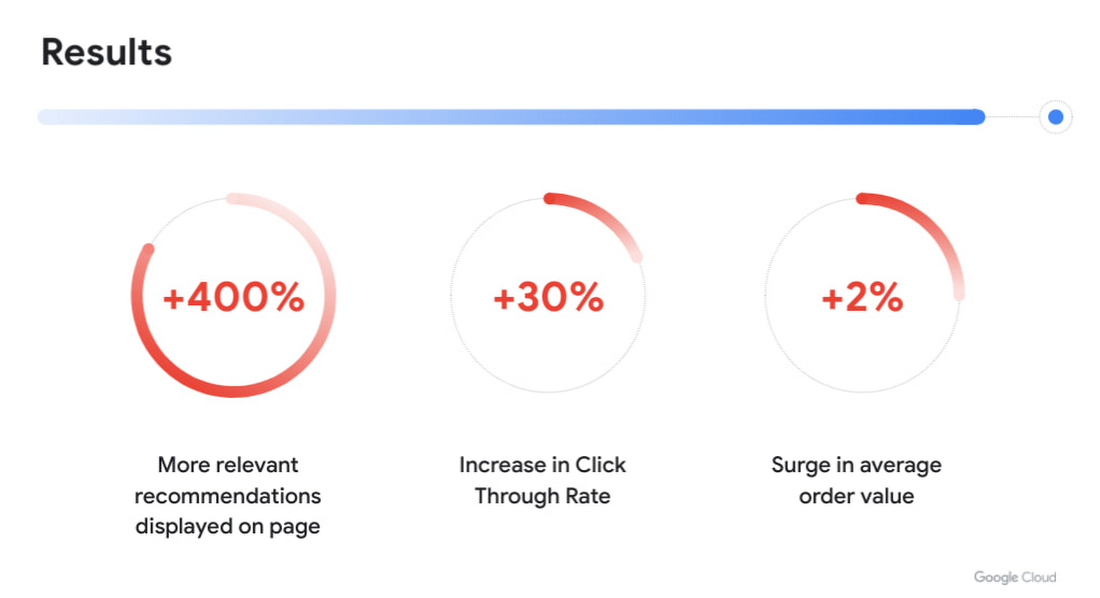
Another consequence of displaying more personalized recommendations was tangible improvement to conversion rate and average order value. Recommendations AI algorithms helped customers in two ways:
- Customers were able to find products that they liked quickly and establish their preferred choice among other options more quickly as well, giving them confidence to make a purchase through much fewer clicks. Even though we previously already had well tuned recommendations of several types, with Recommendations AI we measured +30% improvement in click through rates.
- Average order value saw a +2% surge with numerous examples of how Recommendations AI could help customers find both attractive and directly complementary products, expanding the customer purchase from a single product to an entire home furnishing solution.
As a direct effect of having stronger business results, the team started exploring more places in the customer journey where our growing buffet of recommendations could be used. We’d start with an initial experiment to answer if displaying recommendations in the specific context made sense at all. Frequently the data that emerged from these experiments prodded us to iterate further on what additional types of recommendations would be most appropriate to show to the customer as the customer’s behaviour evolved. Today, most of IKEA’s site recommendations are powered by Recommendations AI.
One key takeaway is that for some types of personalized recommendations there are benefits to using advanced algorithms that require a lot of high level data science and engineering competence to build since they outperform simplistic approaches. In some places, simplistic approaches work very well and in others the right decision is to not have product recommendations at all. For an effective use of product recommendations you need to have all the above options and the ability to tell when to use which one.

Next steps
When working with something so tightly related to customer experience, there is a constant change in user behaviour and new learnings to observe and adapt to. Product recommendations are rarely the main stand alone experience and frequently something that is used to help and enhance an experience. We see a lot of value in having a large toolbox of possible options and a team with a relentless focus on collaboration to improve the customer experience. We’re working directly with the Recommendations AI team and experimenting with several new features that we’re excited about.
In the future we see opportunities of improving the customer journey through a more visual experience that inspires the customer rather than relying on customers to use their imagination to visualize groups of products together. Vision Product Search provides that and is something we’re looking into deploying next. We’ll be sharing more about our journey with Recommendations AI at the Google Cloud Retail Summit session ‘IKEA’s Approach to Building a Powerful Recommendations Engine’ on July 27th 2021.
Best wishes to all developers from the IKEA product recommendations team & the Google Recommendations AI team!
Scaling Machine Learning Operations with Vertex AI AutoML and Pipeline

2551
Of your peers have already read this article.
2:30 Minutes
The most insightful time you'll spend today!
When you build a Machine Learning (ML) product, consider at least two MLOps scenarios. First, the model is replaceable, as breakthrough algorithms are introduced in academia or industry. Second, the model itself has to evolve with the data in the changing world.
We can handle both scenarios with the services provided by Vertex AI. For example:
- AutoML capability automatically identifies the best model based on your budget, data, and settings.
- You can easily manage the dataset with Vertex Managed Datasets by creating a new dataset or adding data to an existing dataset.
- You can build an ML pipeline to automate a series of steps that start with importing a dataset and end with deploying a model using Vertex Pipelines.
This blog post shows you how to build this system. You can find the full notebook for reproduction here. Many folks focus on the ML pipeline when it comes to MLOps, but there are more parts to building MLOps as a “system”. In this post, you will see how Google Cloud Storage (GCS) and Google Cloud Functions manage data and handle events in the MLOps system.
Architecture
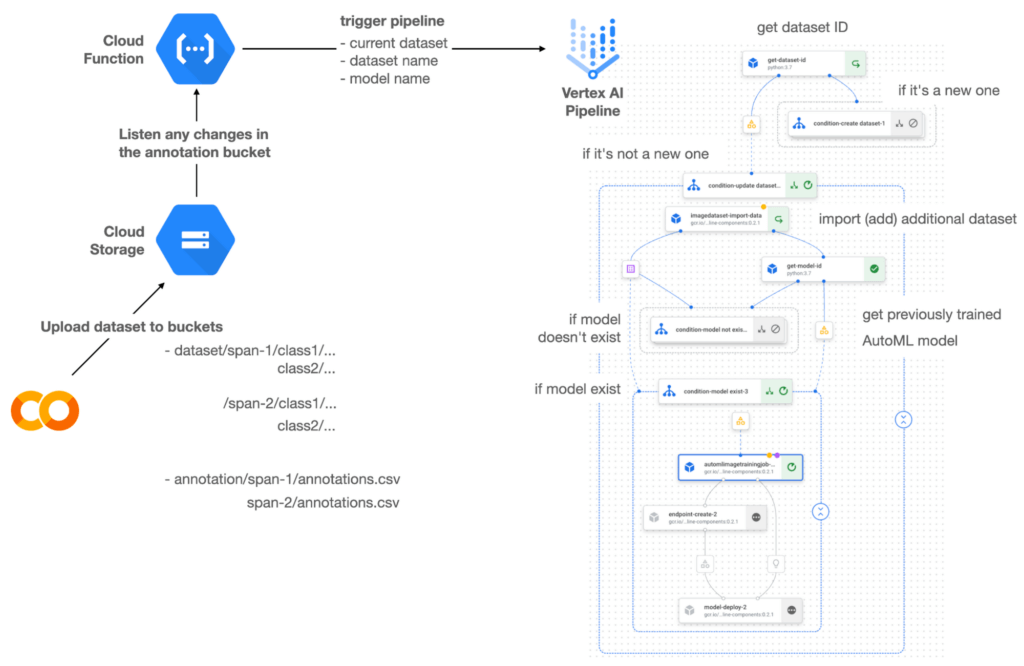

Figure 1 shows the overall architecture presented in this blog. We cover the components and their connection in the context of two common workflows of the MLOps system.
Components
Vertex AI is at the heart of this system, and it leverages Vertex Managed Datasets, AutoML, Predictions, and Pipelines. We can create and manage a dataset as it grows using Vertex Managed Datasets. Vertex AutoML selects the best model without your knowing much about modeling. Vertex Predictions creates an endpoint (RestAPI) to which the client communicates.
It is a simple, fully managed yet somewhat complete end-to-end MLOps workflow moves from a dataset to training a model that gets deployed. This workflow can be programmatically written in Vertex Pipelines. Vertex Pipelines outputs the specification for an ML pipeline allowing you to re-run the pipeline whenever or wherever you want. Specify when and how to trigger the pipeline using Cloud Functions and Cloud Storage.
Cloud Functions is a serverless way to deploy your code in Google Cloud. In this particular project, it triggers the pipeline by listening to changes on the specified Cloud Storage location. Specifically, if a new dataset is added, for example, a new span number is created; the pipeline is triggered to train the dataset, and a new model is deployed.
Workflow
This MLOps system prepares the dataset with either Vertex Dataset’s built-in user interface (UI) or any external tools based on your preference. You can upload the prepared dataset into the designated GCS bucket with a new folder named SPAN-NUMBER. Cloud Functions then detects the changes in the GCS bucket and triggers the Vertex Pipeline to run the jobs from AutoML training to endpoint deployment.
Inside the Vertex Pipeline, it checks if there is an existing dataset created previously. If the dataset is new, Vertex Pipeline creates a new Vertex Dataset by importing the dataset from the GCS location and emits the corresponding Artifact. Otherwise, it adds the additional dataset to the existing Vertex Dataset and emits an artifact.
When the Vertex Pipeline recognizes the dataset as a new one, it trains a new AutoML model and deploys it by creating a new endpoint. If the dataset isn’t new, it tries to retrieve the model ID from Vertex Model and determines whether a new AutoML model or an updated AutoML model is needed. The second branch determines whether the AutoML model has been created. If it hasn’t been created, the second branch creates a new model. Also, when the model is trained, the corresponding component emits the artifact as well.
Directory structure that reflects different distributions
In this project, I have created two subsets of the CIFAR-10 dataset, SPAN-1 and SPAN-2. A more general version of this project can be found here, which shows how to build training and batch evaluation pipelines pipelines. The pipelines can be set up to cooperate so they can evaluate the currently deployed model and trigger the retraining process.
ML Pipeline with Kubeflow Pipelines (KFP)
We chose to use Kubeflow Pipelines to orchestrate the pipeline. There are a few things that I would like to highlight. First, it’s good to know how to make branches with conditional statements in KFP. Second, you need to explore AutoML API specifications to fully leverage AutoML capabilities, such as training a model based on the previously trained one. Last, you also need to find a way to emit artifacts for Vertex Dataset and Vertex Model to consume that Vertex AI can recognize them. Let’s go through these one by one.
Branching strategy
In this project, there are two main conditions and two sub-branches inside the second main branch. The main branches split the pipeline based on a condition if there is an existing Vertex Dataset. The sub-branches are applied in the second main branch, which is selected when there is an exciting Vertex Dataset. It looks up the list of models and decides to train an AutoML model from scratch or a previously trained one.
ML pipelines written in KFP can have conditions with a special syntax of kfp.dsl.Condition. For instance, we can define the branches as follows:
from google_cloud_pipeline_components import aiplatform as gcc_aip


# try to get Vertex Dataset ID
dataset_op = get_dataset_id(...)

with kfp.dsl.Condition(name="create dataset",
                       dataset_op.outputs['Output'] == 'None'):
    # Create Vertex Dataset, train AutoML from scratch, deploy model

with kfp.dsl.Condition(name="update dataset",
                       dataset_op.outputs['Output'] != 'None'):
    # Update existing Vertex Dataset
    ...

    # try to get Vertex Model ID
    model_op = get_model_id(...)

    with kfp.dsl.Condition(name='model not exist',
                           model_op.outputs['Output'] == 'None'):
    # Create Vertex Dataset, train AutoML from scratch, deploy model

    with kfp.dsl.Condition(name='model exist',
                           model_op.outputs['Output'] != 'None'):
        # Create Vertex Dataset, train AutoML based on trained one, deploy model
get_dataset_id and get_model_id are custom KFP components used to determine if there is an existing Vertex Dataset and Vertex Model respectively. Both return “None” if a model is found and some other value if a model isn’t found. They also emit Vertex AI-aware artifacts. You will see what this means in the next section.
Emit Vertex AI-aware artifacts
Artifacts track the path of each experiment in the ML pipeline and display metadata in the Vertex Pipeline UI. When Vertex AI aware artifacts are released into in the pipeline, Vertex Pipeline UI displays links for its internal services such as Vertex Dataset, so that users can visit a web page for more information.
So how could you write a custom component to generate Vertex AI-aware artifacts? To do this, custom components should have Output[Artifact] in their parameters. Then you need to replace the resourceName of the metadata attribute with a special string format.
The following code example is the actual definition of get_dataset_id used in the previous code snippet:
@component(
    packages_to_install=["google-cloud-aiplatform",
                         "google-cloud-pipeline-components"]
)
def get_dataset_id(project_id: str,
                     location: str,
                 dataset_name: str,
                 dataset_path: str,
                      dataset: Output[Artifact]) -> str:
    from google.cloud import aiplatform
    from google.cloud.aiplatform.datasets.image_dataset import ImageDataset
    from google_cloud_pipeline_components.types.artifact_types import VertexDataset


    aiplatform.init(project=project_id, location=location)

    datasets = aiplatform.ImageDataset.list(project=project_id,
                                            location=location,
                                            filter=f'display_name={dataset_name}')

    if len(datasets) > 0:
        dataset.metadata['resourceName'] =
               f'projects/{project_id}/locations/{location}/datasets/{datasets[0].name}'
        return f'projects/{project_id}/locations/{location}/datasets/{datasets[0].name}'
    else:
        return 'None'
As you see, the dataset is defined in the parameters as Output[Artifact]. Even though it appears in the parameter, it is actually emitted automatically. You just need to provide the necessary data as if it is a function variable.
The dataset component retrieves the list of Vertex Dataset by calling the aiplotform.ImageDataset.list API. If the length of it is zero, it simply returns ‘None’. Otherwise, it returns the found resource name of the Vertex Dataset and provides the dataset.metadata[‘resourceName’] with the resource name at the same time. The Vertex AI-aware resource name follows a special string format, which is ‘projects/<project-id>/locations/<location>/<vertex-resource-type>/<resource-name>’.
The <vertex-resource-type>can be anything that points to an internal Vertex AI service. For instance, if you want to specify that the artifact is the Vertex Model, then you should replace <vertex-resource-type> with models. The <resource-name> is the unique ID of the resource, and it can be accessed in the name attribute of the resource found by the aiplatform API. The other custom component, get_model_id, is written in a very similar way as well.
AutoML based on the previous model
You sometimes want to train a new model on top of the previously best model. If that is possible, the new model will probably be much better than the one trained from scratch, because it leverages previously learned knowledge.
Luckily, Vertex AutoML comes with the ability to train a model using a previous model. AutoMLImageTrainingJobRunOp component lets you train a model by simply providing the base_model argument as follows:
training_job_run_op =
gcc_aip.AutoMLImageTrainingJobRunOp(
…,
base_model=model_op.outputs['model'],
…
)
When training a new AutoML model from scratch, you pass ‘None‘ in the base_model argument, and it is the default value. However, you can set it with a VertexModel artifact, and the component will trigger an AutoML training job based on the other model.
One thing to be careful of is that VertexModel artifacts can’t be constructed in a typical way of Python programming That means you can’t create an instance of VertexModel artifact by setting the id found in the Vertex Model dashboard. The only way you can create one is to set the metadata[‘resourceName’] parameters properly. The same rule applies to other Vertex AI-related artifacts such as VertexDataset. You can see how the VertexDataset artifact is constructed properly to get an existing Vertex Dataset to import additional data into it. See the full notebook of this project here.
Cost
You can reproduce the same result from this project with the free $300 credit when you create a new GCP account.
At the time of this blog post, Vertex Pipelines costs about $0.03/run, and the type of underlying VM for each pipeline component is e2-standard-4, which costs about $0.134/hour. Vertex AutoML training costs about $3.465/hour for image classification. GCS holds the actual data, which costs about $2.40/month for 100GiB capacity, and Vertex Dataset is free.
To simulate two different branches, the entire experiment took about one to two hours, and the total cost for this project is approximately $16.59. Please find more detailed pricing information about Vertex AI here.
Conclusion
Many people underestimate the capability of AutoML, but it is a great alternative for app and service developers who have little ML background. Vertex AI is a great platform that provides AutoML as well as Pipeline features to automate the ML workflow. In this article, I have demonstrated how to set up and run a basic MLOps workflow, from data injection to training a model based on the previously-achieved best one, to deploying the model to a Vertex AI platform. With this, we can let our ML model automatically adapt to the changes in a new dataset. What’s left for you to implement is to integrate a model monitoring system to detect data/model drift. One example is found here.

7526
Of your peers have already downloaded this article
15:52 Minutes
The most insightful time you'll spend today!
Breakthroughs in artificial intelligence (AI) have captured the imaginations of business and technical leaders alike. The AI techniques underlying these breakthroughs are finding diverse application across every industry. Early adopters are seeing results, particularly encouraging is that AI is starting to transform processes in established industries, from retail to financial services to manufacturing.
However, an organization’s effectiveness in applying these breakthroughs is anchored in the basics: A disciplined foundation in capturing, preparing and analyzing data.
Data scientists spend up to 80% of their time on the “data wrangling,” “data munging” and “data janitor” work required well before the predictive capabilities promised by AI can be realized.
Capturing, preparing and analyzing data creates the foundation for successful AI initiatives. To help business and IT leaders create this virtuous cycle, Google Cloud has prepared a CIO’s guide to data analytics and machine learning that outlines key enabling technologies at each step. Crucially, the guide illustrates how managed cloud services greatly simplify the journey—regardless of an organization’s maturity in handling big data.
This is important because, for many companies, the more fundamental levels of data management present a larger challenge than new capabilities like AI. “Management teams often assume they can leapfrog best practices for basic data analytics by going directly to adopting artificial intelligence and other advanced technologies,” noted Oliver Wyman consultants Nick Harrison and Deborah O’Neill in a recent Harvard Business Review article (aptly titled If Your Company Isn’t Good at Analytics, It’s Not Ready for AI). “Like it or not, you can’t afford to skip the basics.
Building on new research and Google Cloud’s own contributions to big data since the beginning, this guide walks readers through each step in the data management cycle, illustrating what’s possible alongside examples.
Specifically, the CIO’s guide to data analytics and machine learning is designed to help business and IT leaders address some of the essential questions companies face in modernizing data strategy:
- For my most important business processes, how can I capture raw data to ensure a proper foundation for future business questions? How can I do this cost-effectively?
- What about unstructured data outside of my operational/transactional databases: raw files, documents, images, system logs, chat and support transcripts, social media?
- How can I tap the same base of raw data I’ve collected to quickly get answers as new business questions arise?
- Rather than processing historical data in batch, what about processes where I need a real-time view of the business? How can I easily handle data streaming in real time?
- How can I unify the scattered silos of data across my organization to provide a current, end-to-end view? What about data stored off-premises in the multiple cloud and SaaS providers I work with?
- How can I disseminate this capability across my organization—especially to business users, not just developers and data scientists?
Because managed cloud services deal with an organization’s sensitive data, security is a top consideration at each step of the data management cycle. From data ingestion into the cloud, followed by storage, preparation and ongoing analysis as additional data flows in, techniques like data encryption and the ability to connect your network directly to the Google Cloud must reflect data security best practices that keep data assets safe as they yield insights.
Wherever your company is on its path to data maturity, Google Cloud is here to help. We welcome the opportunity to learn more about your challenges and how we can help you unlock the transformational potential of data.
How to Enhance Incremental Pipeline Performance while Ingesting Data into BigQuery

6323
Of your peers have already read this article.
3:00 Minutes
The most insightful time you'll spend today!
When you build a data warehouse, the important question is how to ingest data from the source system to the data warehouse. If the table is small you can fully reload a table on a regular basis, however, if the table is large a common technique is to perform incremental table updates. This post demonstrates how you can enhance incremental pipeline performance when you ingest data into BigQuery.
Setting up a standard incremental data ingestion pipeline
We will use the below example to illustrate a common ingestion pipeline that incrementally updates a data warehouse table. Let’s say that you ingest data into BigQuery from a large and frequently updated table in the source system, and you have Staging and Reporting areas (datasets) in BigQuery.

The Reporting area in BigQuery stores the most recent, full data that has been ingested from the source system tables. Usually you create the base table as a full snapshot of the source system table. In our running example, we use BigQuery public data as the source system and create reporting.base_table as shown below. In our example each row is identified by a unique key which consists of two columns: block_hash and log_index.
CREATE TABLE reporting.base_table --156 GB processedPARTITION BY TIMESTAMP_TRUNC(block_timestamp, DAY) ASSELECT log_index, data, topics, block_timestamp, block_hashFROM bigquery-public-data.crypto_ethereum.logsWHERE block_timestamp BETWEEN TIMESTAMP '2020-01-01' AND TIMESTAMP '2020-11-30';
In data warehouses it is common to partition a large base table by a datetime column that has a business meaning. For example, it may be a transaction timestamp, or datetime when some business event happened, etc. The idea is that data analysts who use the data warehouse usually need to analyze only some range of dates and rarely need the full data. In our example, we partition the base table by block_timestamp which comes from the source system.
After ingesting the initial snapshot you need to capture changes that happen in the source system table and update the reporting base table accordingly. This is when the Staging area comes into the picture. The staging table will contain captured data changes that you will merge into the base table. Let’s say that in our source system on a regular basis we have a set of new rows and also some updated records. In our example we mock the staging data as follows: first, we create new data, than we mock the updated records:
CREATE TABLE staging.load_delta AS --5 GB processedSELECT log_index, data, topics, block_timestamp, block_hashFROM bigquery-public-data.crypto_ethereum.logsWHERE block_timestamp BETWEEN TIMESTAMP '2020-12-01' AND TIMESTAMP '2020-12-07';INSERT INTO staging.load_delta --2 GB processedSELECT log_index, CONCAT(data, RAND()), topics, block_timestamp, block_hashFROM bigquery-public-data.crypto_ethereum.logs TABLESAMPLE SYSTEM (5 PERCENT)WHERE block_timestamp BETWEEN TIMESTAMP '2020-10-01' AND TIMESTAMP '2020-11-30';
Next, the pipeline merges the staging data into the base table. It joins two tables by unique key and than updates the changed value or inserts a new row
MERGE INTO reporting.base_table T --161 GB processedUSING staging.load_delta SON T.block_hash = S.block_hashAND T.log_index = S.log_indexWHEN MATCHED THEN UPDATE SETT.data = S.dataWHEN NOT MATCHED THEN INSERT (log_index, data, topics, block_timestamp, block_hash)VALUES (log_index, data, topics, block_timestamp, block_hash);
It is often the case that the staging table contains keys from various partitions but the number of those partitions are relatively small. It holds, for instance, because in the source system the recently added data may get changed due to some initial errors or ongoing processes but older records are rarely updated. However, when the above MERGE gets executed, BigQuery scans all partitions in the base table and processes 161 GB of data. You might add additional join condition on block_timestamp:
MERGE INTO reporting.base_table T --161 GB processedUSING staging.load_delta SON T.block_hash = S.block_hashAND T.log_index = S.log_indexAND T.block_timestamp = S.block_timestampWHEN MATCHED THEN UPDATE SETT.data = S.dataWHEN NOT MATCHED THEN INSERT (log_index, data, topics, block_timestamp, block_hash)VALUES (log_index, data, topics, block_timestamp, block_hash);
But BigQuery would still scan all partitions in the base table because condition T.block_timestamp = S.block_timestamp is a dynamic predicate and BigQuery doesn’t automatically push such predicates down from one table to another in MERGE.
Can you improve the MERGE efficiency by making it scan less data? The answer is Yes.
As described in the MERGE documentation, pruning conditions may be located in a subquery filter, a merge_condition filter, or a search_condition filter. In this post we show how you can leverage the first two. The main idea is to turn a dynamic predicate into a static predicate.
Steps to enhance your ingestion pipeline
The initial step is to compute the range of partitions that will be updated during the MERGE and store it in a variable. As was mentioned above, in data ingestion pipelines, staging tables are usually small so the cost of the computation is relatively low.
DECLARE src_range STRUCT<date_min TIMESTAMP, date_max TIMESTAMP> --115 MB processedDEFAULT(SELECT STRUCT(MIN(block_timestamp) AS date_min,MAX(block_timestamp) AS date_max) FROM staging.load_delta);
Based on your existing ETL/ELT pipeline, you can add the above code as-is to your pipeline or you can compute date_min, data_max as part of some already existing transformation step. Alternatively, date_min, data_max can be computed on the Source System side while capturing the next ingestion data batch.
After computing date_min, date_max you pass those values to the MERGE statement as static predicates. There are several ways to enhance the MERGE and prune partitions in the base table based on precomputed date_min, data_max.
If your initial MERGE statement uses a subquery, you can incorporate a new filter into it:
BEGINDECLARE src_range STRUCT<date_min TIMESTAMP, date_max TIMESTAMP> --115 MB processedDEFAULT(SELECT STRUCT(MIN(block_timestamp) AS date_min,MAX(block_timestamp) AS date_max) FROM staging.load_delta);MERGE INTO reporting.base_table T --41 GB processedUSING (SELECT *FROM staging.load_deltaWHERE block_timestamp BETWEEN src_range.date_min AND src_range.date_max) SON T.block_hash = S.block_hashAND T.log_index = S.log_indexAND T.block_timestamp = S.block_timestampWHEN MATCHED THEN UPDATE SETT.data = S.dataWHEN NOT MATCHED THEN INSERT (log_index, data, topics, block_timestamp, block_hash)VALUES (log_index, data, topics, block_timestamp, block_hash);END;
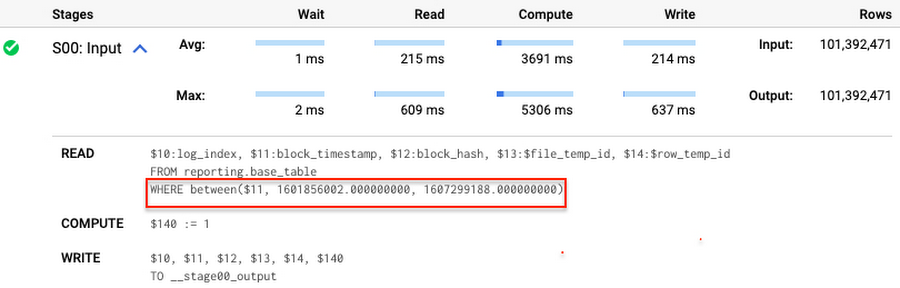
Note that you add the static filter to the staging table and keep T.block_timestamp = S.block_timestamp to convey to BigQuery that it can push that filter to the base table. This MERGE processes 41 GB of data in contrast to the initial 161 GB. You can see in the query plan that BigQuery pushes the partition filter from the staging table to the base table:
This type of optimization, when a pruning condition is pushed from a subquery to a large partitioned or clustered table, is not unique for MERGE. It also works for other types of queries. For instance:
SELECT * -- 41 GB processedFROM reporting.base_table TINNER JOIN staging.load_delta SON T.block_hash = S.block_hashAND T.log_index = S.log_indexAND T.block_timestamp = S.block_timestampWHERE S.block_timestamp BETWEEN TIMESTAMP '2020-10-05' AND TIMESTAMP '2020-12-07'
And you can check the query plan to verify that BigQuery pushed down the partition filter from one table to another.
Moreover, for SELECT statements, BigQuery can automatically infer a filter predicate on a join column and push it down from one table to another if your query meets the following criteria:
- The target table must be clustered or partitioned.
- The result size of the other table, i.e. after applying all filters, must qualify for broadcast join. Namly, the result set must be relatively small, less than ~100MB.
In our running example, reporting.base_table is partitioned by block_timestamp. If you define a selective filter on staging.load_delta and join two tables, you can see an inferred filter on the join key pushed to the target table
SELECT *FROM reporting.base_table TINNER JOIN staging.load_delta SON T.block_timestamp = S.block_timestampWHERE S.block_hash = '0x0c1caa16b34d94843aabfebc0d5a961db358135988f7498a6fdc450ad55f0870'
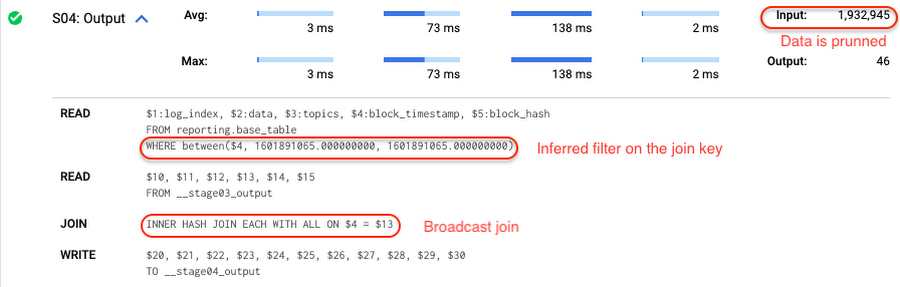
There is no requirement to join tables by partitioning or clustering key to kick off this type of optimization. However, in this case the pruning effect on the target table would be less significant.
But let us get back to the pipeline optimizations. Another way to enhance MERGE is to modify the merge_condition filter by adding static predicate on the base table:
BEGINDECLARE src_range STRUCT<date_min TIMESTAMP, date_max TIMESTAMP> --115 MB processedDEFAULT(SELECT STRUCT(MIN(block_timestamp) AS date_min,MAX(block_timestamp) AS date_max) FROM staging.load_delta);MERGE INTO reporting.base_table T --41 GB processedUSING staging.load_delta SON T.block_hash = S.block_hashAND T.log_index = S.log_indexAND T.block_timestamp BETWEEN src_range.date_min AND src_range.date_maxWHEN MATCHED THEN UPDATE SETT.data = S.dataWHEN NOT MATCHED THEN INSERT (log_index, data, topics, block_timestamp, block_hash)VALUES (log_index, data, topics, block_timestamp, block_hash);END;
To summarize, here are the steps that you can perform to enhance incremental ingestion pipelines in BigQuery. First you compute the range of updated partitions based on the small staging table. Next, you tweak the MERGE statement a bit to let BigQuery know to prune data in the base table.
All the enhanced MERGE statements scanned 41 GB of data, and setting up the src_range variable took 115 MB. Compare it with the initial 161 GB scan. Moreover, given that computing src_range may be incorporated into some existing transformation in your ETL/ELT, it results in a good performance improvement which you can leverage in your pipelines.
In this post we described how to enhance data ingestion pipelines by turning dynamic filter predicates into static predicates and letting BiQuery prune data for us. You can find more tips on BigQuery DML tuning here.
Special thanks to Daniel De Leo, who helped with examples and provided valuable feedback on this content.
ShareChat Builds its Diverse, Hyperlocal Social Network. Thanks to Google Cloud

9236
Of your peers have already read this article.
3:00 Minutes
The most insightful time you'll spend today!
Editor’s note: Today’s guest post comes from Indian social media platform ShareChat. Here’s the story of how they improved performance, app development, and analytics for serving regional content to millions of users using Google Cloud.
How do you create a social network when your country has 22 major official languages and countless active regional dialects? At ShareChat, we serve more than 160 million monthly active users who share and view videos, images, GIFs, songs, and more in 15 different Indian languages. We also launched a short video platform in 2020, Moj, which already supports over 80 million monthly active users.
Connecting with people in the language they understand
As mobile data and smartphones have become more affordable in India, we noticed a large new segment of people, many in rural areas, being welcomed onto the internet. However, many of them didn’t speak English, and when it comes to accessing content and information—language plays a significant role. Instead of joining other social media sites where English reigned supreme, new internet users chose to join language or dialect-specific Whatsapp groups where they felt more comfortable instead.
So, we set out to build a platform where people can share their opinions, document their lives, and make new friends, all in their native language. ShareChat simplifies content and people discovery by using a personalized content newsfeed to deliver language-specific content to the right audience.
Given the high-intensity data and high volume of content and traffic, we rely heavily on IT infrastructure. On top of that, a large number of our users rely on 2G networks to post, like, view, or follow each other. Our platform needs to deliver great experiences to people who are spread out across the country and different networks without any reduction in performance.
The right cloud partner to support future growth
ShareChat was born in the cloud—we already knew how to scale systems to serve a large customer base with our existing cloud provider. But like many companies, we struggled with over-provisioning compute and storage to accommodate unpredictable traffic and avoid running out of storage. With demand rising for local language content and an increase in online interactions in response to the COVID-19 crisis, we realized that we would need a more efficient way to scale dynamically and allocate resources as needed.
Google Cloud was a natural choice for us. We wanted to partner with a technology-first company that would make it easy (and cost-effective) to manage a strong technology portfolio that would allow us to build whatever we wanted. Google is at the forefront of technology innovation and provided everything we needed to build, run, and manage our applications (including creating an efficient DevOps pipeline to fix and release new features quickly).
We had a few issues in mind at the start of discussions with the Google Cloud team, but over time, as we got information and support from them, we realized that these were the partners we wanted in our corner when it came time to tackle our most challenging problems. In the end, we decided to take our entire infrastructure to Google Cloud.
To support millions of users, we deploy and scale using Google Kubernetes Engine. While we analyze our data using a combination of managed data cloud services, such as Pub/Sub for data pipelines, BigQuery for analytics, Cloud Spanner for real-time app serving workloads, and Cloud Bigtable for less-indexed databases. We also rely on Cloud CDN to help us distribute high-quality and reliable content delivery at low latency to our users.
We now use just half the total core consumption of our legacy environment to run ShareChat’s existing workloads.
Google Cloud delivers better outcomes at every level
By moving to Google Cloud, we saw major benefits in several key areas:
Zero-downtime migration for users
At the time of migration, we had over 70 terabytes of data, consisting of 220 tables—some of which were up to 14 terabytes with nearly 50 billion rows. Due to our data’s interdependencies, moving services over one at a time wasn’t an option for us.
Even though we were migrating such large volumes of data, we didn’t want to impact any of our customers. Latency spikes for out-of-sync data might affect message delivery. For instance, if a message or notification was delayed, we didn’t want to risk a bad user experience causing someone to abandon ShareChat.
To prepare for the move, we ran a proof-of-concept cluster for over four months to test database performance in a real-world scenario for handling more than a million queries per second. Using an open-source API gateway, we replicated our legacy data environment into Google Cloud for performance testing and capacity analysis. As soon as we were confident Google Cloud could handle the same traffic as our previous cloud environment, we were ready to execute.
Using wrappers, we were able to migrate without having to change anything in our existing application code. The entire migration of 60 million users to Google Cloud took five hours—without any data loss or downtime. Today, ShareChat has grown to 160 million users, and Google Cloud continues to give us the support we need.
Scaling globally to meet unexpected demand
We rely on real-time data to drive everything on ShareChat by tracking everything that goes on in our app—from messages and new groups to content people like or who they follow. Our users create more than a million posts per day, so it’s critical that our systems can process massive amounts of data efficiently.
We chose to migrate to Spanner for its global consistency and secondary index. Unlike our legacy NoSQL database, we could scale without having to rethink existing tables or schema definitions and keep our data systems in sync across multiple locations. It’s also cost-effective for us—moving over 120 tables with 17 indexes into Cloud Spanner reduced our costs by 30%.
Spanner also replicates data seamlessly in multiple locations in real time, enabling us to retrieve documents if one region fails. For instance, when our traffic unexpectedly grew by 500% over just a few days, we were able to scale horizontally with zero lines of code change. We were also launching our Moj video app simultaneously, and we were able to move it to another region without a single issue.
Simplifying development and deployment
On average, we experience about 80,000 requests per second (RPS) –nearly 7 billion RPS per day. That means daily push notifications sent out to the entire user base about daily trending topics can often result in a spike of 130,000 RPS in just a few seconds.
Instead of over-provisioning, Google Kubernetes Engine (GKE) enables us to pre-scale for traffic spikes around scheduled events, such as holidays like Diwali, when millions of Indians send each other greetings.
Migrating to GKE has also enabled us to adopt more agile ways of work, such as automating deployment and saving time with writing scripts. Even though we were already using container-based solutions, they lacked transparency and coverage across the entire deployment funnel.
Kubernetes features, such as sidecar proxy, allows us to attach peripheral tasks like logging into the application without requiring us to make code changes. Kubernetes upgrades are managed by default, so we don’t have to worry about maintenance and stay focused on more valuable work. Clusters and nodes automatically upgrade to run the latest version, minimizing security risks and ensuring we always have access to the latest features.
Low latency and real-time ML predictions
Even though many of our users may be accessing ShareChat outside of metropolitan areas, it doesn’t mean they’re more patient if the app loads slowly or their messages are delayed. We strive to deliver a high-performance experience, regardless of where our users are.
We use Cloud CDN to cache data in five Google Cloud Point of Presence (PoP) locations at the edge in India, allowing us to bring content as close as possible to people and speeding up load time. Since moving to Cloud CDN, our cache hit ratio has improved from 90% to 98.5%—meaning our cache can handle 98.5% of content requests.
As we expand globally, we’d like to use machine learning to reach new people with content in different languages. We want to build new algorithms to process real-time datasets in regional languages and accurately predict what people want to see. Google Cloud gives us an infrastructure optimized to handle compute-intensive workloads that will be useful to us both now—and in the future.
The confidence to build the best platform
Our current system now performs better than before we migrated, but we are continuously building new features on top of it. Google’s data cloud has provided us with an elegant ecosystem of services that allows us to build whatever we want, more easily and faster than ever before.
Perhaps the biggest advantage of partnering with Google Cloud has been the connection we have with the engineers at Google. If we’re working to solve a specific problem statement and find a specific solution in a library or a piece of code, we have the ability to immediately connect with the team responsible for it.
As a result, we have experienced a massive boost in our confidence. We know that we can build a really good system because we not only have a good process in place to solve problems—we have the right support behind us.
Adapting Regulatory Frameworks to Manage AI/ML Risks in Financial Services

1169
Of your peers have already read this article.
4:30 Minutes
The most insightful time you'll spend today!
Advances in artificial intelligence (AI) and machine learning (ML) have led to increased adoption in the financial services sector. A prominent use for this technology is to assist in key compliance and risk functions, including the detection of fraud, money laundering, and other financial crimes and illicit finance, as well as trade manipulation — collectively referred to as “Risk AI/ML.” As the use of these models grows, so do questions about managing risks associated with the models.
In particular, regulators, financial institutions, and technology service providers have been looking into whether existing Model Risk Management (MRM) guidance — which has traditionally been the regulatory regime applicable to managing model risk in the financial services industry — continues to be relevant for AI/ML models. And, if so, how should the guidance be interpreted and applied to this new technology?
As the financial sector increasingly adopts artificial intelligence and machine learning techniques, it is critical for regulators, financial companies and technology providers to work together to assure that there are clear rules of the road,” says Jo Ann Barefoot, AIR CEO and co-founder. “Updated guidelines on the responsible use of these models can help prevent novel technologies from causing harm, and can also open up better ways to combat risk in areas like money laundering, illicit finance, and fraud.
Our new white paper, written in partnership with the Alliance for Innovative Regulation (AIR), seeks to address that question, with the aim of fostering thought and dialogue among agencies, the financial services industry, risk model vendors, and entities interested in the performance, outputs, and compliance of models used to identify, mitigate, and combat risks in financial services. This white paper does not address issues that may arise with other applications of AI/ML in the financial services industry, such as consumer credit underwriting or models using generative AI or Large Language Models, which are better addressed iteratively.
The paper argues that MRM guidance, given its broad, principles-based approach, continues to provide an appropriate framework for assessing financial institutions’ management of model risk, even for Risk AI/ML models. Working within an existing framework takes advantage of the knowledge and operational capabilities of institutions that already understand this framework, instead of having to create an entirely new approach, which generally takes longer to implement and make effective. Nonetheless, the paper recognizes that AI/ML models have unique traits and characteristics compared to conventional models, including their potential dynamism and pattern recognition capabilities. These distinctions must be in focus when considering how MRM guidance should be applied to Risk AI/ML models.
Taking into account those unique aspects of AI/ML models, the paper offers specific observations and recommendations regarding the application of MRM guidance to Risk AI/ML models, including:
- Risk assessment: In assessing risk, it is important to recognize that AI/ML models are not inherently more risky than conventional models. A risk-tiering assessment must consider the targeted business application or process for which a model is used, as well as the model’s complexity and materiality. To assist in these assessments, regulators could clarify that the use of AI/ML alone does not place a model into a high-risk tier and publish further guidance to help set expectations regarding the materiality/risk ratings of AI/ML models as applied to common use cases.
- Safety and soundness: Due to the dynamic nature of Risk AI/ML models, reliance on extensive and ongoing testing focused on outcomes throughout the development and implementation stages of such models should be primary in satisfying regulatory expectations of soundness. To that end, the development of technical metrics and related testing benchmarks should be encouraged. Model “explainability,” while useful for purposes of understanding the specific outputs of AI/ML models, may be less effective or insufficient for establishing whether the model as a whole is sound and fit for purpose.
- Model documentation: The touchstone for the sufficiency of documentation should be what is needed for the bank to use and validate the model, and understand its design, theory, and logic. Disclosure of proprietary details, such as model code, is unnecessary and unhelpful in verifying the sufficiency of a model and would deter model builders from sharing best-in-class technology with financial institutions.
- Industry standards and best practices: Regulators should support the development of global standards and their use across the financial services and regulatory landscape by explicitly recognizing such standards as presumptive evidence of compliance with the MRM guidance and sound AI/ML risk mitigation practices. In addition, regulators should foster industry collaboration and training based on such standards.
Governance controls: Regulators should use guidance to advance the use of governance controls, including incremental rollouts and circuit breakers, as essential tools in mitigating risks associated with Risk AI/ML models.
In an era where AI technology has the potential to revolutionize financial services, we acknowledge the foresight of our regulators in setting a solid foundation and blueprint for navigating the labyrinth of potential risks through the MRM guidance,” says Philip Moyer, Global VP, AI and Business Solutions at Google Cloud. “We believe there is room for greater coherence and precision, enhanced risk-mitigation approaches, and refined best practices surrounding AI and ML risk models. Whether it’s in capacity building or information sharing, our call to action is for greater collaboration between regulators and financial institutions. We’re confident that our collective efforts today will help shape a more robust and resilient future for financial services.
We invite a discussion of additional considerations, including the importance of examiner and industry training and collaboration, as well as openness by regulators to continue to refine the MRM guidance as AI/ML technologies develop and standards emerge.
Implementing our recommendations would advance several goals. It would help regulators, financial institutions, and technology providers work together to better serve their shared purpose of protecting the safety and soundness of the financial system. At the same time, implementing the recommendations and continuing work in this space would promote the adoption of cutting-edge technologies in the industry, including those that combat such scourges as money laundering, illicit finance, and fraud.
You can read the full white paper here.
More Relevant Stories for Your Company



Prototyping Language Applications Made Easy with Generative AI
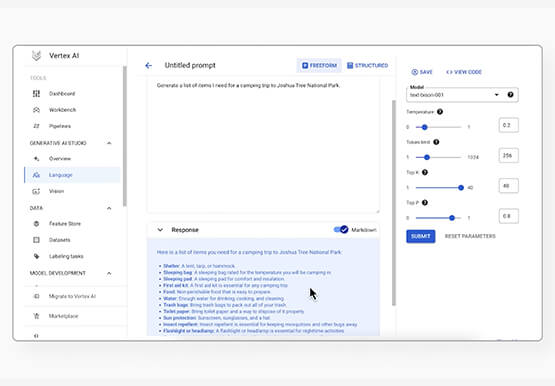
Did you know generative AI allows developers to prototype applications quickly? With Generative AI Studio on Google Cloud, developers can quickly explore and customize AI models that can be leveraged in Google Cloud applications. Watch along and see how developers, with the right tools, can experiment with new ideas in

Google Search Feature with Document AI Simplifies Document Extraction!
Google Cloud introduced Document AI to automate document processing and to streamline workflows with state-of-the-art machine learning models. With the deep neural networks, the models generalize the learning from seeing hundreds of thousands variations of the documents. But when information is missing or ambiguous on a document - like a missing address

Google Migration and BigQuery Brings PedidosYa Closer towards its Goal of Becoming Data-driven
Editor’s note: PedidosYa is the market leader for online food ordering in Latin America, serving 15 markets and over 400 cities. It’s also one of the largest brands within the German multinational company Delivery Hero SE. With over 20 million app downloads, PedidosYa provides the best online delivery experience through



Engage and Translate: Text and Audio Chat in 100+ Languages
As users worldwide connect to the internet and work remotely, it’s more important than ever to make interactive applications chat in many languages. But when users speak 100s of languages, this quickly can get challenging. Where to start? If you are new to translation, Sarah Weldon, the Product Manager for
