






Driving Digital Success: Three ROI Criteria for Competitive Advantage
READ FULL INTRODOWNLOAD AGAIN3949
Of your peers have already downloaded this article
6.00 Minutes
The most insightful time you'll spend today!
App Engine Basics to Help You Build and Deploy Low-latency, Scalable Apps

3519
Of your peers have already read this article.
2:00 Minutes
The most insightful time you'll spend today!
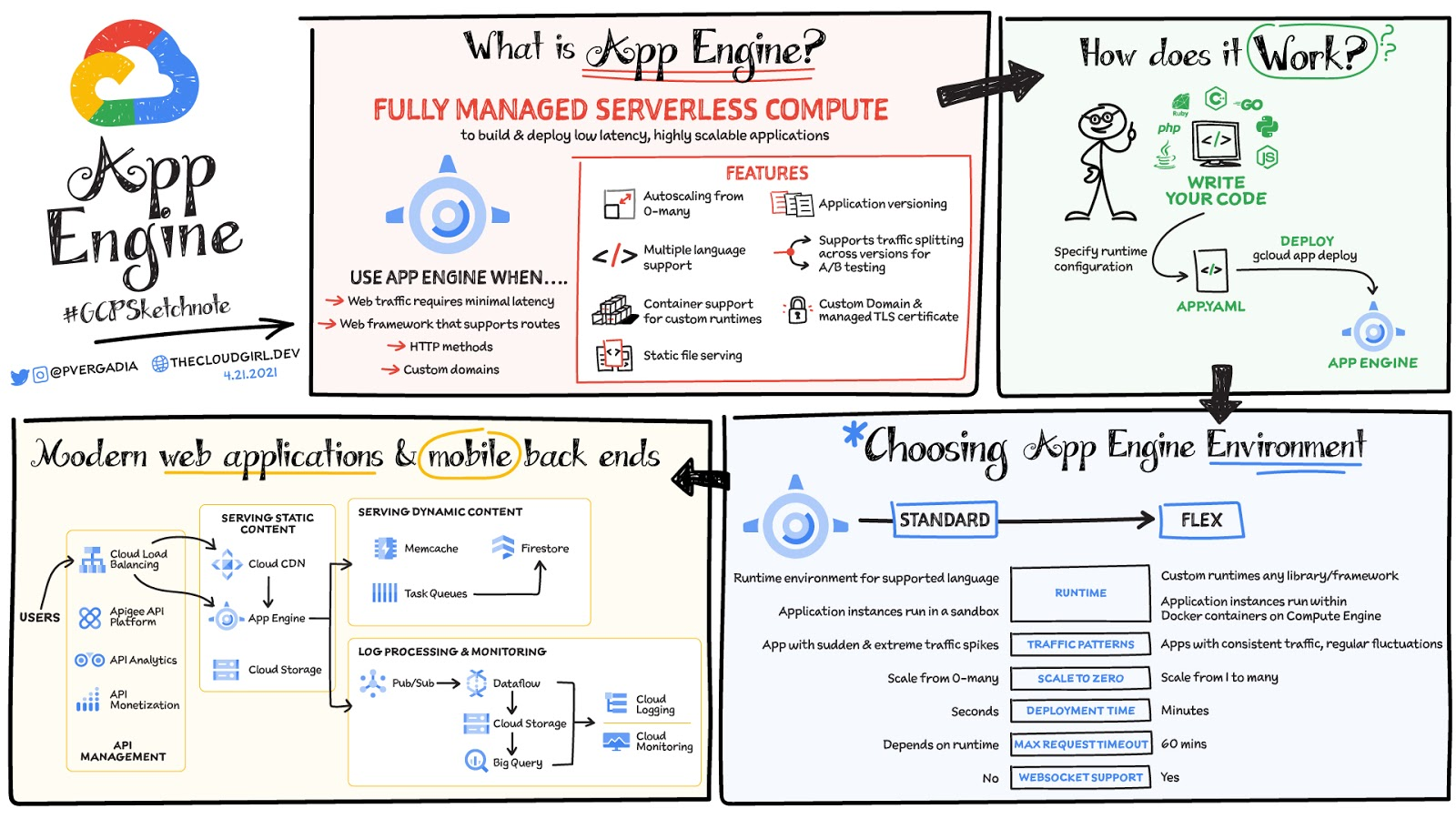
App Engine is a fully managed serverless compute option in Google Cloud that you can use to build and deploy low-latency, highly scalable applications. App Engine makes it easy to host and run your applications. It scales them from zero to planet scale without you having to manage infrastructure. App Engine is recommended for a wide variety of applications including web traffic that requires low-latency responses, web frameworks that support routes, HTTP methods, and APIs.
Environments
App Engine offers two environments; here’s how to choose one for your application:
- App Engine Standard – Supports specific runtime environments where applications run in a sandbox. It is ideal for apps with sudden and extreme traffic spikes because it can scale from zero to many requests as needed. Applications deploy in a matter of seconds. If your required runtime is supported and it’s an HTTP application, then App Engine Standard is the way to go.
- App Engine Flex – Is open and flexible and supports custom runtimes because the application instances run within Docker containers on Compute Engine. It is ideal for apps with consistent traffic and regular fluctuations because the instances scale from one to many. Along with HTTP applications it also supports applications requiring WebSockets. The max request timeout is 60 minutes.
How does it work
No matter which App Engine environment you choose, the app creation and deployment process is the same. First write your code, next specify the app.yaml file with runtime configuration, and finally deploy the app on App Engine using a single command: gcloud app deploy.
Notable features
- Developer friendly – A fully managed environment lets you focus on code while App Engine manages infrastructure.
- Fast responses – App Engine integrates seamlessly with Memorystore for Redis enabling distributed in-memory data cache for your apps.
- Powerful application diagnostics – Cloud Monitoring and Cloud Logging help monitor the health and performance of your app and Cloud Debugger and Error Reporting help diagnose and fix bugs quickly.
- Application versioning – Easily host different versions of your app, and easily create development, test, staging, and production environments.
- Traffic splitting – Route incoming requests to different app versions for A/B tests incremental feature rollouts, and similar use cases.
- Application security – Helps safeguard your application by defining access rules with App Engine firewall and leverage managed SSL/TLS certificates by default on your custom domain at no additional cost.
Conclusion
Whether you need to build a modern web application or a scalable mobile backend App Engine has you covered. For a more in-depth look, check out the documentation. Click here for demos on how to use serverless technology and free hands-on training.https://www.youtube.com/embed/Xuf3J6SKVV0?enablejsapi=1&
For more #GCPSketchnote, follow the GitHub repo. For similar cloud content follow me on Twitter @pvergadia and keep an eye out on thecloudgirl.dev.
3352
Of your peers have already watched this video.
17:30 Minutes
The most insightful time you'll spend today!
An App Modernization Story with Cloud Run
Back in 2016, an ASP.NET monolith app was deployed to IIS on Windows. While it worked, it was clunky in every sense of the word.
Over the years, the app was freed from Windows (thanks to .NET Core), containerized to run consistently in different environments (thanks to Docker) and decomposed into a set of loosely-coupled, event-driven, microservices (thanks to Cloud Run). The end result is a simpler and portable serverless architecture that’s much cheaper to run and maintain.
Watch the modernization journey, explore the decision points, and deep dive into the final architecture and code.
Google Extends Support for Windows Server Containers on Anthos for Faster App Modernization and Consistent Dev Experience

5597
Of your peers have already read this article.
3:00 Minutes
The most insightful time you'll spend today!
Today, many applications in organizations’ data centers run on Windows Server. Modernizing these traditional Windows apps onto Kubernetes promises a host of benefits: a consistent platform across environments, better portability, scalability, availability, simplified management and speed of deployment, just to name a few. But how? Rewriting traditional .NET applications to run on Linux with .NET Core can be challenging and time-consuming. There is, however, a lower-toil, more developer friendly option.
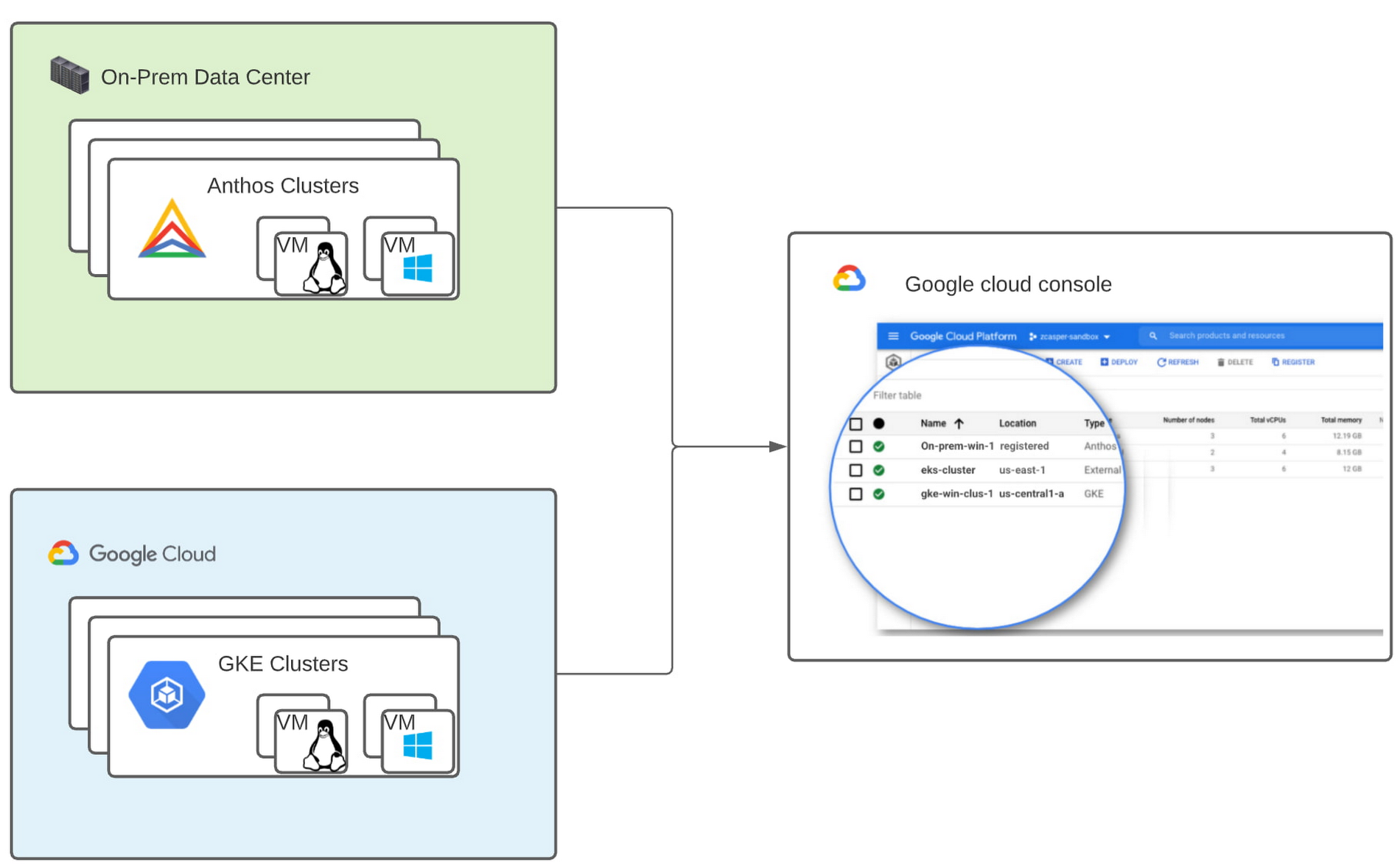
Last year, we announced support for Windows Server containers running on Google Kubernetes Engine (GKE), our cloud-based managed Kubernetes service, which lets you take the advantage of containers without porting your apps to .NET core or rewriting them for Linux. Today, we’re going a step further with support for Windows Server containers on Anthos clusters on VMware in your on-premises environment. Now available in preview, you can consolidate all your Windows operations across on-prem and Google Cloud.
Bringing Windows Server support to our family of Kubernetes-based services—GKE running on Google Cloud, and Anthos everywhere—with the same experience, lets you modernize apps faster and achieve a consistent development and deployment experience across hybrid and cloud environments. Further, by running Windows and Linux workloads side by side, you get operational consistency and efficiency—no need to have multiple teams specializing in different tooling or platforms to manage different workloads. The single-pane-of-glass view and the ability to manage policies from a central control plane simplifies the management experience, while bin packing multiple Windows applications drives better resource utilization, leading to infrastructure and license savings.
With all these benefits, it’s no surprise that customers such as Thales, a French multinational firm specializing in aerospace and security services, have been able to reap significant benefits by moving Windows applications to GKE.
“We moved our Windows applications from VMs to Windows containers on GKE and now have a unified mechanism for Linux and Windows-based application management, scaling, logging, and monitoring. Earlier, setting up these applications in VMs and configuring them for high availability used to take up to a week, and the applications were not easily scalable,” said Najam Siddiqui, Solutions Architect at Thales. “Now with GKE, the setup takes only a few minutes. GKE’s automatic scaling and built-in resiliency features make scaling and high-availability setup seamless. Also, manually maintaining the VMs and applying security patches used to be tedious, which is now handled by GKE.”
Let’s take a deeper look at the architecture that lets you run your Windows container-based workloads on-prem.
Windows Server running on-prem with Anthos
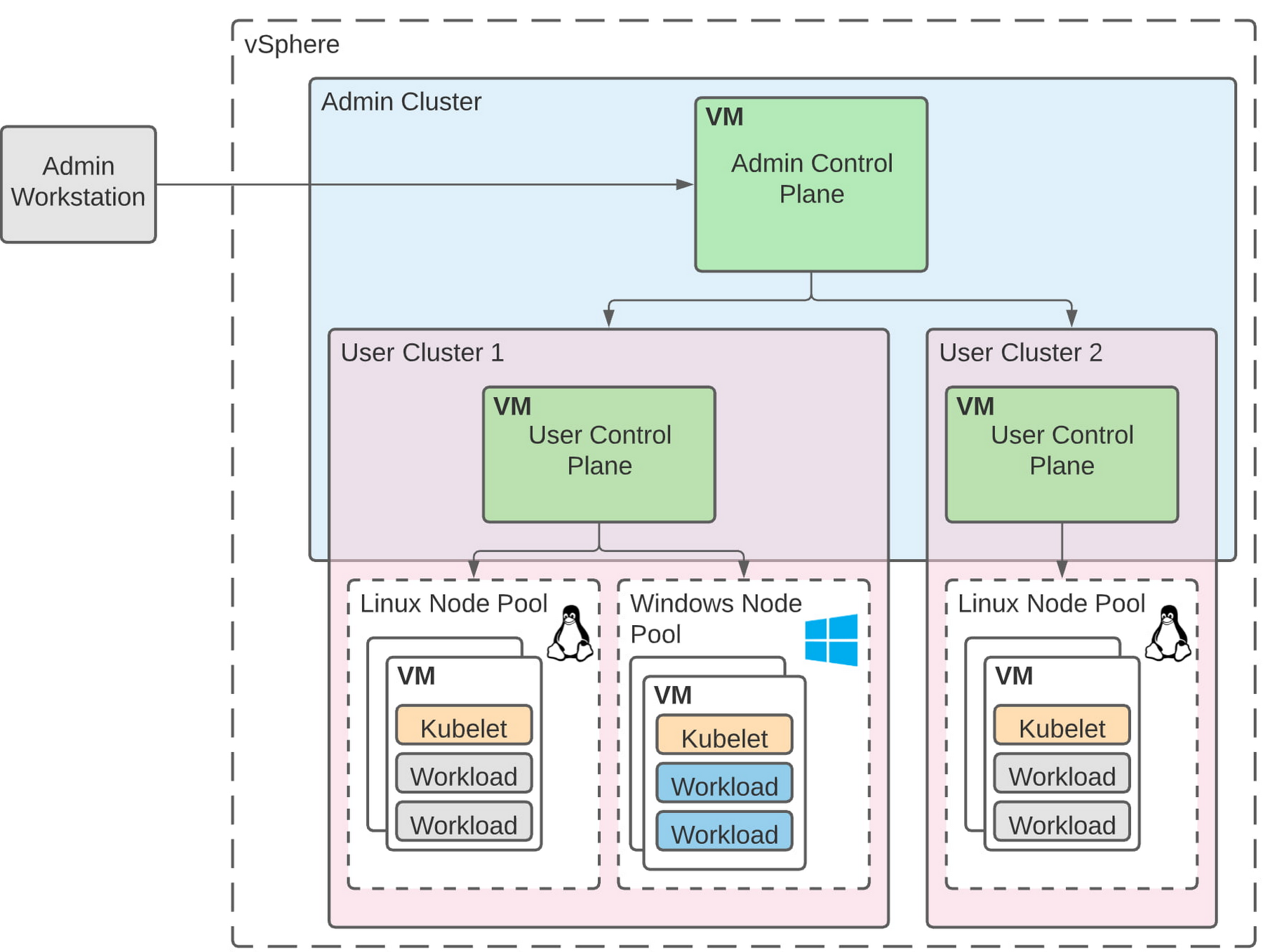
The diagram below illustrates the high-level architecture of running Windows container-based workloads in an on-prem GKE cluster with Anthos. Windows server node-pools can be added to an existing or new Anthos cluster. Kubelet and Kube-proxy run natively on Windows nodes, allowing you to run mixed Windows and Linux containers in the same cluster. The admin cluster and the user cluster control plane continue to be Linux-based, providing you a consistent orchestration experience and management ease across Windows and Linux workloads.
Get started today
When considering modernizing your on-prem Windows estate, we recommend running Windows Server containers on Anthos in your own data center. If you are new to Anthos, the Anthos getting started page and the Coursera course on Architecting Hybrid Cloud with Anthos are good places to start. You can also find detailed documentation on our website, and our partners are eager to help you with any questions related to the published solutions, as is the GCP sales team. And as always, please don’t hesitate to reach out to us at anthos-onprem-windows@google.com if you have any feedback or need help unblocking your use case.

3581
Of your peers have already downloaded this article
2:30 Minutes
The most insightful time you'll spend today!
After undergoing an agile transformation, ING realized it needed a standardized platform to support the work their developers were doing. “Our DevOps teams got empowered to be autonomous,” says Thijs Ebbers, Infrastructure Architect.
“It has benefits, you get all kinds of ideas. But a lot of teams are going to devise the same wheel. Teams started tinkering with Docker, Docker Swarm, Kubernetes, Mesos. Well, it’s not really useful for a company to have one hundred wheels, instead of one good wheel,” Ebbers added.
Using Kubernetes for container orchestration and Docker for containerization, the ING team began building an internal public cloud for its CI/CD pipeline and green-field applications. The pipeline, which has been built on Mesos Marathon, will be migrated onto Kubernetes.
The bank-account management app Yolt in the U.K. (and soon France and Italy) market already is live hosted on a Kubernetes framework. At least two greenfield projects currently on the Kubernetes framework will be going into production later this year. By the end of 2018, the company plans to have converted a number of APIs used in the banking customer experience to cloud-native APIs and host these on the Kubernetes-based platform.
“Cloud native technologies are helping our speed, from getting an application to test to acceptance to production,” says Infrastructure Architect Onno Van der Voort. “If you walk around ING now, you see all these DevOps teams, doing stand-ups, demoing. They try to get new functionality out there really fast.”
Find out how.
Google Cloud Partnership Helps Lowe’s SRE Team Achieve 20X More Releases Per Month
5541
Of your peers have already read this article.
2:00 Minutes
The most insightful time you'll spend today!
Editor’s note: Today we hear from the Lowe’s SRE team. They share about how they have been able to increase the number of releases they can support by adopting Google’s Site Reliability Engineering (SRE) framework and leveraging their partnership with Google Cloud.
At Lowe’s, we’ve made significant progress in our multiyear technology transformation. To modernize our systems and build new capabilities for our customers and associates, we leverage Google’s SRE framework and Google Cloud, which helps us meet their needs faster and more effectively. With these efforts, we’ve been able to go from one release every two weeks to 20+ releases daily—about 20X more releases per month.
Our SRE transformation didn’t happen overnight, though. Every step along the way brought some challenges. But looking back, we are excited to see how much we have accomplished for our customers as a result.
Back in 2018, before adopting SRE practices, we were more reactive than proactive, following an “eyes on glass” approach. On-call structures and incident management efficiency were not at optimal levels with too many repetitive and manual tasks, resulting in operational toil. Production concerns were not surfaced into the product roadmap, which resulted in delays in making fixes.
Bootstrapping SRE at Lowe’s
As we moved from on-prem to Google Cloud, we decided to move from a monolithic- to microservices-based architecture. And to better manage this new architecture, we embarked on an SRE journey.
Then as COVID-19 hit, we really had to accelerate this journey as customers increasingly moved to online ordering and delivery to meet their Total Home Improvement needs. To do so, we followed four key principles that allowed us to meet changing customer needs quickly and release fast and reliably.
- Automate away toil
As we moved from traditional Ops to an SRE ecosystem, our biggest opportunity was reducing toil, so that engineers can spend time on activities that drive business impact and customer outcomes. We think of toil as work that is manual, repetitive, tactical, devoid of enduring value—but automatable. So, to tackle toil, we focused on automating away the need for manual intervention. As an example, we made sure engineers were not the first point of contact for any alert. Any triage or resolution that an engineer can perform, a machine can be trained to do the same. We used supervised and unsupervised learning techniques to automate our toil. With a long-term goal of “no toil,” our SREs work on identifying and reducing toil to a manageable level across the organization. - Engineer alignment through roadmaps
Our goal is to maximize the engineering velocity of developer teams while keeping products reliable. We want an engagement model where product, SRE and development teams are closely aligned. A key way we’ve been able to create this alignment is by having our SREs embedded into domain and product teams. Each domain has an SRE, who is involved at the beginning stages of product development to ensure that the domain stakeholders are in alignment with the SRE initiatives. As such, SREs are able to improve the reliability, performance, scalability and launch velocity of the services throughout all phases of the service lifecycle. - Adopt one-touch releases
Our path to production used to contain many manual steps and validations, slowing the rate at which we released features. Additionally, we used to bulk all our releases together to deploy at once, which increased the risk of failure and created a longer feedback loop from production. To tackle this with an SRE mindset, we created a one-touch release process in which SREs review the product team’s pull requests. When approved, this triggers a DevSecOps pipeline that deploys the approved changes to production securely. This process created a safe, reliable and sustainable continuous delivery pipeline with quick feedback loops. Striking the right balance between speed, innovation and stability, we were able to increase our releases exponentially for the year, taking less than 30 minutes per release to deliver quality code, including various automated quality checks and processes, all in just one click. - Embrace capacity planning
To ensure our services have enough spare capacity to handle any surge in traffic patterns, our SREs emphasize capacity planning, making recommended capacity changes in the continuous delivery (CD) pipeline. They constantly monitor performance to make sure the service is robust, stable and available. And when there’s a sudden surge beyond the forecasted volume, SREs change the capacity on demand and document changes for the performance and domain teams.
Capacity planning is especially important for us during peak holiday times such as Black Friday and Cyber Monday (BFCM). We lay out our SRE stability plan three months in advance and surface into the domain team’s product roadmap. This way development teams are able to allocate sufficient engineering time to reliability. We do performance testing to ensure the environment is able to sustain increased load over long periods of time and also handle sudden surges in traffic. We also do region failover testing at a global scale to validate the automatic failover duration of service level agreements (SLAs), SRE and domain readiness. Additionally, we conduct Black Friday and Cyber Monday-specific destructive testing to validate customer experience, reliability and more.
Google Cloud’s Black Friday and Cyber Monday white-glove service played a key role in ensuring our success in both BFCM 2019 and BFCM 2020. This service included on-site visits from Google’s Customer Reliability Engineering (CRE) team who reviewed Lowe’s web architecture, capacity planning, operations practices for event risks, and presented workshops on topics such as incident response best practices.
Looking ahead
There is always room for improvement, and at Lowe’s we aim to continuously improve our SRE practices. One thing that has worked well for us, which we plan to continue, has been our road shows, where senior SRE leads present to other SREs and application domain teams on the latest SRE principles and best practices, and to get input in real-time from them.
Google’s tools and methodology have played an instrumental role in helping reshape our SRE practices and better serve our customers. We look forward to building on the momentum and partnership as we continue our SRE journey at Lowe’s.
If you want to learn more about how to adopt SRE best practices on Google Cloud, check out our documentation. If you want to learn more about Google SRE, visit our website. Stay tuned for the next blogs with Lowe’s discussing how they trained their engineering talent to adopt SRE practices and tooling, and how they improved MTTR using SRE principles.
More Relevant Stories for Your Company




Start Your Serverless Expeditions Now!
Google Cloud's fully managed serverless platform like Cloud Run helps build and run highly scalable containerized applications. In traditional scenarios, over or under-provisioning enterprise applications can result in outages and cost hurdles. Severless Experts at the Google Cloud succinctly breakdown what serverless means for an organization and how Engineering Managers

A CIO’s Guide to Application Modernization
Even before the current crisis, IT organizations saw pressure to be more agile and innovative. Customer demographics and expectations are changing. Competition is emerging faster and from unexpected sources. Business models are being reinvented. Digital technology was at the heart of many of these challenges, and its adoption was key

Enhance Your GKE Deployment with Improved Control Plane Connectivity and Isolation
Once upon a time, all Google Kubernetes Engine (GKE) clusters used public IP addressing for communication between nodes and the control plane. Subsequently, we heard your security concerns and introduced private clusters enabled by VPC peering. To consolidate the connectivity types, starting in March 2022, we began using Google Cloud’s
Managed containers: An enterprise standard at Colgate-Palmolive
Kubernetes is an increasingly key part of the application deployment strategies at large organizations, and one of the most recommended options for the teams we work with. An idea brought to life at Google, organizations throughout the world use containers and Kubernetes on-premises, in Google Cloud, or in a multi-cloud
