





How Google Cloud’s PSO Supports Customers’ Migration Goals

5033
Of your peers have already read this article.
2:00 Minutes
The most insightful time you'll spend today!
Google Cloud’s Professional Services Organization (PSO) engages with customers to ensure effective and efficient operations in the cloud, from the time they begin considering how cloud can help them overcome their operational, business or technical challenges, to the time they’re looking to optimize their cloud workloads.
We know that all parts of the cloud journey are important and can be complex. In this blog post, we want to focus specifically on the migration process and how PSO engages in a myriad of activities to ensure a successful migration.
As a team of trusted technical advisors, PSO will approach migrations in three phases:
- Pre-Migration Planning
- Cutover Activities
- Post-Migration Operations
While this post will not cover in detail all of the steps required for a migration, it will focus on how PSO engages in specific activities to meet customer objectives, manage risk, and deliver value. We will discuss the assets, processes and tools that we leverage to ensure success.
Pre-Migration Planning
Assess Scope
Before the migration happens, you will need to understand and clarify the future state that you’re working towards. From a logistical perspective, PSO will be helping you with capacity planning to ensure sufficient resources are available for your envisioned future state.
While migration into the cloud does allow you to eliminate many of the considerations for the physical, logistical, and financial concerns of traditional data centers and co-locations, it does not remove the need for active management of quotas, preparation for large migrations, and forecasting. PSO will help you forecast your needs in advance and work with the capacity team to adjust quotas, manage resources, and ensure availability.
Once the future state has been determined, PSO will also work with the product teams to determine any gaps in functionality. PSO captures feature requests across Google Cloud services and makes sure they are understood, logged, tracked, and prioritized appropriately with the relevant product teams. From there, they work closely with the customer to determine any interim workarounds that can be leveraged while waiting for the feature to land, as well as providing updates on the upcoming roadmap.
Develop Migration Approach and Tooling
Within Google Cloud, we have a library of assets and tools we use to assist in the migration process. We have seen these assets help us successfully complete migrations for other customers efficiently and effectively.
Based on the scoping requirements and tooling available to assist in the migration, PSO will help recommend a migration approach. We understand that enterprises have specific needs; differing levels of complexity and scale; regulatory, operational, or organization challenges that will need to be factored into the migration. PSO will help customers think through the different migration options and how all of the considerations will play out.
PSO will work with the customer team to determine the best migration approach for moving servers from on-prem to Google Cloud. PSO will walk customers through different migration approaches, such as refactoring, lift-shift, or new installs. From there, the customer can determine the best fit for their migration. PSO will provide guidance on best practices and use cases from other customers with similar use cases.
Google offers a variety of cloud native tools that can assist with asset discovery, the migration itself, and post-migration optimization. PSO, as one example, will help work with project managers to determine the best tooling that accommodates the customer’s requirements for migrating servers. PSO will also engage Google product team to ensure the customer fully understands the capabilities of each tool and the best fit for the use case. Google understands from a tooling perspective, one size does not fit all, thus PSO will work with the customer on determining the best migration approach and tooling for different requirements.
Cutover Activities
Once all of the planning activities have been completed, PSO will assist in making sure the cutover is successful.
During and leading up to critical customer events, PSO can provide proactive event management services which deliver increased support and readiness for key workloads. Beyond having a solid architecture and infrastructure on the platform, support for this infrastructure is essential and TAMs will help ensure that there are additional resources to support and unblock the customer where challenges arise.
As part of event management activities, PSO liaises with the Google Cloud Support Organization to ensure quick remediation and high resilience for situations where challenges arise. A war room is usually created to facilitate quick communication about the critical activities and roadblocks that arise. These war rooms can give customers a direct line to the support and engineering teams that will triage and resolve their issues.
Post-Migration Activities
Once cutover is complete, PSO will continue to provide support in areas such incident management, capacity planning, continuous operational support, and optimization to ensure the customer is successful from start to finish.
PSO will serve as the liaison between the customer and Google engineers. If support cases need to be escalated, PSO will ensure the appropriate parties are involved and work to get the case resolved in a timely manner. Through operational rigor, PSO will work with the customer in determining if certain Google Cloud services will be beneficial to the customer objectives. If services will add value to the customer, PSO will help enable the services so it aligns with the customer’s goal and current cloud architecture. In cases where there are missing gaps in services, PSO will proactively work with the customer and Google engineering teams to close the gaps by enabling additional functionality in the services.
PSO will continue to work with the engineering teams to consistently review and provide recommendations on the customer’s cloud architecture in ensuring the most optimal and cost efficient design along with adhering to Google’s best practices guidelines.
Aside from migrations, PSO is also responsible for providing continuous training of Google Cloud to customers. To ensure consistent development of Google Cloud, PSO will work with the customer to jointly develop a learning roadmap to ensure the customer has the necessary skills to succeed in delivering successful projects in Google Cloud.
Conclusion
Google PSO will be actively engaged throughout the customer’s cloud journey to ensure the necessary guidance, methodology, and tools are presented to the customer. PSO will engage in a series of activities from pre-migration planning to post migration in key areas such as capacity planning to ensure sufficient resources are allocated for future workloads to providing support on technical cases for troubleshooting. PSO will serve as a long-term trusted advisor who will be the voice of the customer and provide the reliability and stability of the customer’s Google Cloud environment.
Click here if you’d like to engage with our PSO team on your migration. Or, you can also get started with a free discovery and assessment of your current IT landscape.
Elevating Voice Solutions: Google Cloud Introduces Speech-to-Text v2 API and Chirp for Businesses

912
Of your peers have already read this article.
3:30 Minutes
The most insightful time you'll spend today!
As one of the most innate and ubiquitous forms of expression, speech is a fundamental pillar of human interaction. It comes as no surprise, then, that Google Cloud’s Speech API has become a crucial tool for enterprise customers, launched to general availability (GA) over six years ago and, now, processing over 1 billion voice minutes each month.
With the Speech API, we’ve been pleased to serve thousands of customers and provide industry-leading speech recognition quality and cost-effective products across a range of industries. We want to constantly evolve our offerings and bring new benefits to organizations, which is why today, we’re excited to announce the GA release of our new Speech-to-Text v2 API.
Speech-to-Text v2 modernizes our API interface and introduces several new features. It also migrates all of our existing functionality, so you can use the same models and features that you were using in STT v1 or v1p1beta1 APIs. This new version of our API also allows us to take advantage of significant cost savings in our serving path, and as such we are reducing our base price, as well as adding pricing incentives for large workloads and those willing to accept longer turnaround times.
This new infrastructure also allows us to serve a wide variety of new types of models, including Chirp , our latest 2B-parameter large speech model. All of these are Generally Available to Google Cloud Platform customers and users starting today.
Let’s have a more thorough look though at the enhanced features of Speech-to-Text API V2 and illustrate how your business can benefit from our new capabilities:
Expanding Speech-to-Text features with V2 API
Since the official launch of Speech-to-Text API back in 2017, we’ve utilized Google’s global infrastructure to host and monitor our production-facing transcription models. This robust, well-connected network has been the backbone of our offering for all of our customers.
However, a unified view of our Speech-to-Text service has been a crucial request for our enterprise customers who need to satisfy data residency and compliance requirements, especially in regulated industries like banking and public sector. We listened carefully to this feedback, and starting today, our Speech-to-Text v2 API supports full regionalization, allowing our customers to invoke identical copies of all our transcription models in the Google Cloud Platform region of their choice.
In addition to giving users the flexibility to deploy in any region, we are adding a number of new features to help developers build on the API:
- Recognizers: A user-defined named configuration that combines a model identifier, the language-locale of the audio to be transcribed, and the cloud region for the transcription model to run. Once-created, the recognizer can be referenced to every subsequent transcription request, eliminating the need for users to repeatedly define the same configuration parameters. This resourceful implementation of recognizers allows for greater flexibility in authentication and authorization, as users are not longer required to set up dedicated service accounts.
- Cloud Logging: Requests performed using a recognizer object automatically support cloud logging by default. Since the recognizers are defined as named entities, customers can partition traffic based on the recognizer of interest or collectively.
- Audio Format Auto-Detection: Instead of having our users analyze and manually define the audio configuration settings to pass in a transcription request, the new Speech-to-Text V2 API detects settings like encoding, sampling rate, and channel count, then automatically populates the request configuration parameters.
Increasing accuracy at Enterprise Scale with Chirp
As part of our continuous investment in foundational speech models, in March 2023 we released research results for our Universal Speech Mode (USM), a family of state-of-the-art speech models with 2B parameters and support for transcriptions of 300+ languages. In May 2023, at Google I/O, we announced Chirp in Private Preview, the latest version of the USM family, fine-tuned for our Cloud-specific use-cases.
Chirp is now GA through the Speech-to-Text v2 API. Following extensive testing and feedback from our customers, we are making the power of pre-trained large models accessible through a simple enterprise-grade API surface. Our early adopters have seen major strides in customer engagement, thanks to the market-leading accuracy and language coverage of the new model, and we cannot wait to see what opportunities our enterprise customers will unlock.
Introducing new pricing, tiers, and options
We have heard from customers that price can be just as important as quality for many workloads. That’s why the Speech-to-Text API v2 features totally new pricing. We have lowered the cost of real-time and batch transcription from $0.024 per minute to $0.016 per minute. Additionally, we know that pricing can be a concern for those that have very large transcription workloads. For that reason, we are also introducing standard volume tiers, allowing costs as low as $0.004 per minute. As always, additional discounts are available to those with even larger workloads.

Staying true to our commitment on flexibility and choice in pricing, we noticed that even though the majority of our customers are interested in our models for real-time transcription scenarios, many are also interested in non-real time transcriptions for data at rest. With our new API v2 infrastructure, we can take greater advantage of capacity that goes unused at certain times. With our new Dynamic Batch pricing, we are passing this savings on to customers that are less latency sensitive. Aimed at users who can wait up to 24 hours for transcription results, Dynamic Batch is a new discounted pricing tier that offers 75% lower price per minute for transcription audio relative to our Standard tier.

For more information on Dynamic Batch and all our new STT v2 API pricing, check out our pricing page.
Learn more and start you Speech-to-Text journey
For more information to help get you started on your migration journey from V1 to V2, head over to the detailed documentation and try our walkthroughs to make the most of regionalization and recognizers.
If you are curious to learn more about how to use Chirp, you can get started by following our tutorial. You can also read more about how we built it in our research blog post.
We are very excited to bring all these improvements to our developer ecosystem and provide you with the tools to leverage the power of voice for your businesses, programs, and applications.
How Google Cloud’s Scalable Data Storage and High Compute Resources Fuel Investment Research

6296
Of your peers have already read this article.
1:30 Minutes
The most insightful time you'll spend today!
Investment management is a heavily data-driven industry—portfolio managers and investment researchers require a large number of data sources to guide them in shaping their investment strategies.
New cloud capabilities and technologies enable investment managers to process data faster than ever before and iterate on ideas quickly to fuel innovation in the signal generation process and gain a competitive edge.
Using the cloud for investment research workflows makes it easier to onboard data from data providers, spin up large compute workloads in the midst of market volatility or during heavy research cycles, and manage complex machine learning or natural language workflows to gain market insights.
We hear from industry leaders that they’re exploring new ways to run investment research. “Differentiated investment strategies require new types of information sources, and new ways to process that information,” David Easthope, senior analyst, Market Structure and Technology, Greenwich Associates. “And that, of course, relies heavily on having access to reliable and scalable storage, computational, and AI / ML resources. More specifically, quantitative strategies can benefit from the computational platforms and embedded AI/ML capabilities the cloud can offer.”
Google Cloud gives investment managers essential components to work and operate faster as they bring their investment research workflows to the cloud. Here are the key highlights:
1. Simplify, speed up your data acquisition, discovery, and analytics
The foundation of any investment strategy starts with data—acquiring it, detecting patterns, and analyzing it for insights. Enabling data providers to easily share large datasets such as tick history within a high-performance analytics engine can greatly reduce the data engineering overhead when possible.
Once data is onboarded, you can tag business and technical metadata related to your datasets and provide portfolio managers the ability to discover these datasets via a search interface.
We further review analytics options for various scenarios, including aggregating massive datasets, creating dashboards, and incorporating streaming analytics workloads.
2. Take advantage of burst compute workloads
Data engineers and researchers require ready access to burst compute capabilities to perform backtesting, portfolio simulations and run risk calculations. Cloud works well for these workloads due to its elasticity, consumption-based models, and hardware evolution.
Many investment managers are shifting to a container-based strategy along with a Kubernetes-based scheduler for greater consistency, scaling and efficiency in environments with a large number of researchers. Cloud managed services and a rich suite of CI/CD tools can make this vision a reality while improving security and developer productivity.
3. Tackle machine learning (ML) and model deployment with the help from cloud
Quantitative researchers scour vast amounts of market and alternative data sources searching for signals and correlations, while ML engineers have the challenge of taking these signals and moving them to production.
Google Cloud empowers users to create and operationalize their models without wasting valuable time with a comprehensive set of MLOps tools.
In this paper, we explore multiple solutions for ML and model deployment. Those capabilities reduce the amount of time operationalizing ML models, so quants and data scientists have more time to devote to differentiating activities.
4. Get the data you need in less time with Natural Language and Document AI
Thousands of financial filings, news articles, and sell-side research reports are generated every day, and it’s difficult for humans alone to process this volume of information. These documents are often generated in many languages and the ability to do entity recognition, sentiment or syntactical analysis in those languages, or perhaps translate them into the language of the portfolio manager is of critical importance. Google Cloud provides these capabilities through pre-trained models, or allows you to train high-quality models with your own datasets.
Getting started
There are plenty of emerging technologies, tools, and approaches available to help investment managers today. At Google Cloud, we can help you access, organize, and utilize these essential components to make your research faster, reliable, and more valuable.
To learn more about these four keys to better investment research, check out our whitepaper for more.
IKEA’s AI-driven Personalized and Real-time Recommendations Up its Conversion Rates and Average Order Value

4871
Of your peers have already read this article.
3:00 Minutes
The most insightful time you'll spend today!
Background
At IKEA we have multiple places in our customer journey in various channels where different kinds of personalization can deliver a superior customer experience. Product recommendations in the shopping basket, content recommendations in editorial sections, inspirational recommendations on product pages and more. After a while in the broader “recommendations” team there was a decision to split the team to have one sub-team focused on product recommendations. The pandemic altered customer behavior and needs as well. At that inflection point we decided to change our way of working and dive head-first into a more scientific approach to handle the operational complexities of delivering high quality product recommendations at scale. We deemed this necessary to improve our level of personalization and to have a holistic understanding of our customers.
Data Driven Decisions
The first step was to radically improve our ability to get high-quality quantitative information to understand how our ‘recommendation’ solutions affected personalization. We did this through high volume A/B testing on customer behaviour and after initial experimentation, we had a few key learnings:
- The mix of both UX and algorithms are really important for a cohesive customer experience.
- The quality of personalization can’t be measured in silos. Statistical significance can be attained by testing several groups of recommendations at once.
Once we came up with a solid framework for gathering data and acknowledged how little we knew about our customers, we were able to explore an incredible number of creative options – nothing was off the table. This was a very humbling experience, in that it opened up new perspectives for personalization, a more curious and less confined way of thinking. We learned to trust the data because it might show you things you don’t expect.
Experimentation and Learning Framework
Our teams created ways to quickly deploy experimental modifications to our existing solution. This enabled experimentation in the front-end with the user experience, including details in headings and images. This also covered tweaks in the backend with anything from detailed manual additions or removals of recommendations to mixing and matching of various algorithms both home grown and from Recommendations AI.
This flexibility came with an overhead–more complexity and cost relative to directly retrieving recommendations from Recommendations AI. However, the benefit was that we were no longer dependent on manual evaluation of what made for a good recommendation system. We aligned on a data-driven and qualitative approach to provisioning recommendations and significantly accelerated our experimentation timeline. Together with optimization of the CI/CD pipeline this enabled the team to take an idea or hypothesis from inception to A/B testing with customers in less than half an hour.
Recommendations AI Experiments
Our team’s infrastructure was already running on GCP and when we received early access to Recommendations AI, the requirements to get started were minimal and that allowed us to start with initial tests requiring minimal effort and investment.
We started with a few use-cases and identified places where our existing recommendation algorithms needed improvement or complementary recommendations. We also explored additional ways where more useful information could be presented to the customers through personalized recommendations.
Recommendations AI Model Combinations
While Recommendations AI might be considered a simple API to get a set of product recommendations, as we dove deeper into the solution it became apparent that it could be tweaked in several different ways to offer many fine tuning configurations to meet business goals. While too much fine tuning and customization could lead to subpar performance, in general we found that it was a great strategy to give us several versions of ML powered recommendations to work with. The further you personalize the experience, the more options you have to likely pick the best one for the customer.
Recommendations AI models like ‘Recommended for you’, ‘Frequently Bought Together’ and ‘Others you may like’; are coupled with business goals like optimizing for conversion rate, click through rate and revenue. We experimented with many different model combinations and custom rules. All this was easily configurable right in the GCP console. One of the simplest custom configurations we used was to only recommend items that were in stock, and when items were out of stock we looked at similar items that were available to augment the experience.
Collaboration with Google
Our collaboration with Google Cloud accelerated our learning process during experimentation. We worked closely together early in the product development. Additionally, their model provided flexibility to change direction and allow for more options than we had previously. Ultimately, this provided us a way to drastically improve our time to market with a product that produced tremendous results that we could not have accomplished on our own.
Results and Takeaways
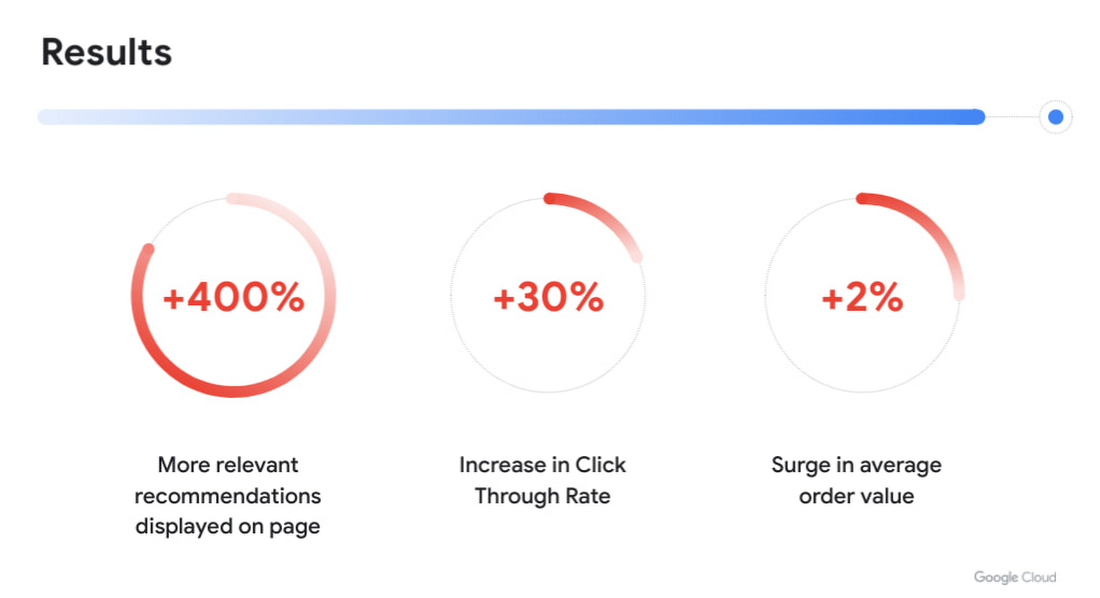
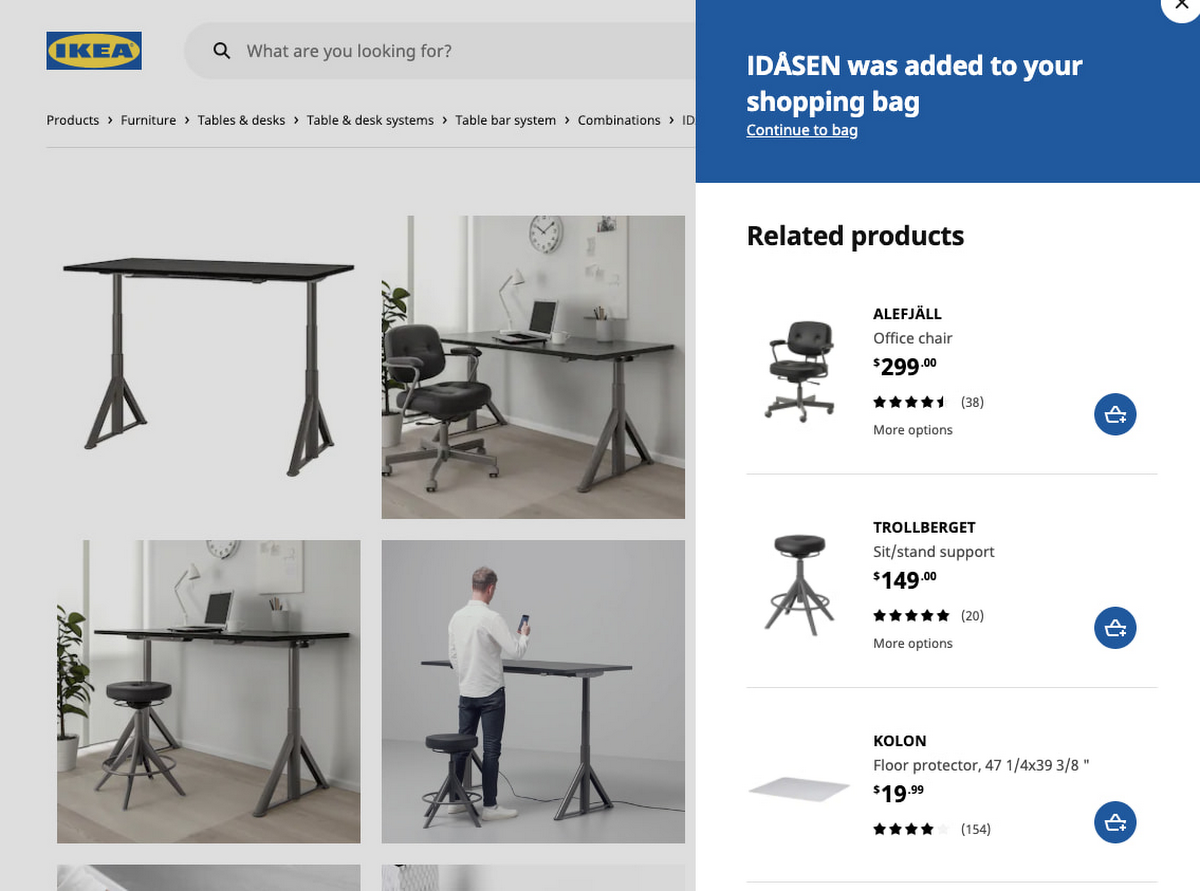
With more personalized and real-time recommendations available we saw great success. We were able to increase the number of relevant recommendations displayed on a page by +400%. To accommodate the wider repertoire of recommendations we had to change the user experience. For example, in some places we had horizontally scrolling displays of product recommendations which were much easier for customers to use.
Another consequence of displaying more personalized recommendations was tangible improvement to conversion rate and average order value. Recommendations AI algorithms helped customers in two ways:
- Customers were able to find products that they liked quickly and establish their preferred choice among other options more quickly as well, giving them confidence to make a purchase through much fewer clicks. Even though we previously already had well tuned recommendations of several types, with Recommendations AI we measured +30% improvement in click through rates.
- Average order value saw a +2% surge with numerous examples of how Recommendations AI could help customers find both attractive and directly complementary products, expanding the customer purchase from a single product to an entire home furnishing solution.
As a direct effect of having stronger business results, the team started exploring more places in the customer journey where our growing buffet of recommendations could be used. We’d start with an initial experiment to answer if displaying recommendations in the specific context made sense at all. Frequently the data that emerged from these experiments prodded us to iterate further on what additional types of recommendations would be most appropriate to show to the customer as the customer’s behaviour evolved. Today, most of IKEA’s site recommendations are powered by Recommendations AI.
One key takeaway is that for some types of personalized recommendations there are benefits to using advanced algorithms that require a lot of high level data science and engineering competence to build since they outperform simplistic approaches. In some places, simplistic approaches work very well and in others the right decision is to not have product recommendations at all. For an effective use of product recommendations you need to have all the above options and the ability to tell when to use which one.
Next steps
When working with something so tightly related to customer experience, there is a constant change in user behaviour and new learnings to observe and adapt to. Product recommendations are rarely the main stand alone experience and frequently something that is used to help and enhance an experience. We see a lot of value in having a large toolbox of possible options and a team with a relentless focus on collaboration to improve the customer experience. We’re working directly with the Recommendations AI team and experimenting with several new features that we’re excited about.
In the future we see opportunities of improving the customer journey through a more visual experience that inspires the customer rather than relying on customers to use their imagination to visualize groups of products together. Vision Product Search provides that and is something we’re looking into deploying next. We’ll be sharing more about our journey with Recommendations AI at the Google Cloud Retail Summit session ‘IKEA’s Approach to Building a Powerful Recommendations Engine’ on July 27th 2021.
Best wishes to all developers from the IKEA product recommendations team & the Google Recommendations AI team!
Drive Business Results Faster with Advanced AI Technology: Translation Hub, Document AI, and Contact Center AI

2769
Of your peers have already read this article.
2:30 Minutes
The most insightful time you'll spend today!
When it comes to the adoption of artificial intelligence (AI), we have reached a tipping point. Technologies that were once accessible to only a few are now broadly available. This has led to an explosion in AI investment. However, according to research firm McKinsey, for AI to make a sizable contribution to a company’s bottom line, they “must scale the technology across the organization, infusing it in core business processes” — and based on conversations with our customers, we couldn’t agree more.
While investments in pure data science continue to be essential for many, widespread adoption of AI increasingly involves a category of applications and services that we call AI Agents. These are technologies that let customers apply the best of AI to common business challenges, with limited technical expertise required by employees, and include Google Cloud products like Document AI and Contact Center AI. Today, at Google Cloud Next ‘22, we’re announcing new features to our existing AI Agents and a brand new one with Translation Hub.
“AI is becoming a key investment for many companies’ long term success. However, most companies are still in the experimental phases with AI and haven’t fully put the technology into production because of long deployment timelines, IT staffing needs, and more,” said Ritu Jyoti, group vice president, worldwide AI and automation research practice global AI research lead, at IDC. “Organizations need AI products that can be immediately applied to automate processes and solve business problems. Google Cloud is answering this problem by providing fully managed, scalable AI Agents that can be deployed fast and deliver immediate results.”
Translation Hub: An enterprise-scale translation AI Agent
At I/O this year, we announced the addition of 24 new languages to Google Translate to allow consumers in more locations, especially those whose languages aren’t represented in most technology, to help reduce communication barriers through the power of translation. Businesses strive for the same goals, but unfortunately it is often out of reach due to the high costs that come with scaling translation.
That’s why today, we are announcing Translation Hub, our AI Agent that provides customers with self-service document translation. With 135 languages, Translation Hub can create impactful, inclusive, and cost-effective global communications in a few clicks.

With Translation Hub, now researchers are able to share their findings instantly across the world, goods and services providers can reach underserved markets, and public sector administrators can reach more members of their communities in a language they understand — all of which ultimately help make for a more connected, inclusive world.
Translation Hub brings together Google Cloud AI technology, like Neural Machine Translation and AutoML, to help make it easy to ingest and translate content from the most common enterprise document types, including Google Docs and Slides, PDFs, and Microsoft Word. It not only preserves layouts and formatting, but also provides granular management controls such as support for post-editing human-in-the-loop feedback and document review.
“In just three months of using Translation Hub and AutoML translation models, we saw our translated page count go up by 700% and translation cost reduced by 90%,” said Murali Nathan, digital innovation and employee experience lead, at materials science company Avery Dennison. “Beyond numbers, Google’s enterprise translation technology is driving a feeling of inclusion among our employees. Every Avery Dennison employee has access to on-demand, general purpose, and company-specific translations. English language fluency is no longer a barrier, and our employees are beginning to broadly express themselves right in their native language.”
Document AI: A document processing AI Agent to automate workflows
Every organization needs to process documents, understand their content, and make them available to the appropriate people. Whether it’s during procurement cycles involving invoices and receipts, contract processes to close deals, or for general increases in efficiency, Document AI simplifies and automates various document processing. With two new features launching today, Document AI can allow employees to focus on higher impact tasks and better serve their own customers.
For example, payments provider Libeo used Document AI to uptrain an invoice parser with 1,600 documents and increase its testing accuracy from 75.6% to 83.9%. “Thanks to uptraining, the Document AI results now beat the results of a competitor and will help Libeo save ~20% on the overall cost for model training over the long run,” said Libeo chief technology officer, Pierre-Antoine Glandier.
Today, we’re announcing these new features to our existing Document AI Agent:
- Document AI Workbench can remove the barriers around building custom document parsers, helping organizations extract fields of interest that are specific to their business needs. Relative to more traditional development approaches, it requires less training data and offers a simple interface for both labeling data and one-click model training.
- Document AI Warehouse can eliminate the challenges that many enterprises face when tagging and extracting data in documents by bringing Google’s Search technologies to Document AI. This feature can make it simpler and easier to search for and manage documents like workflow controls to accommodate invoice processing, contracts, approvals, and custom workflows.
Contact Center AI: A contact center AI Agent to improve customer experiences
Scaling call center support can be expensive and difficult, especially when implementing AI technologies to support representatives. Contact Center AI is an AI Agent for virtually all contact center needs, from intelligently routing customers, to facilitating handoffs between virtual and human customer support representatives, to analyzing call center transcripts for trends and much more.
Just days ago, we announced that Contact Center AI Platform is now generally available to provide additional deployment choice and flexibility. With this addition to Contact Center AI, we are furthering our commitment to providing an AI Agent that can assist organizations to quickly scale their contact centers to improve customer experiences and create value via data-driven decisions.
Dean Kontul, division chief information officer at KeyBank, had this to say about powering their contact center with Contact Center AI from Google Cloud: “With Google Cloud and Contact Center AI, we will quickly move our contact center to the Cloud, supporting both our customers and agents with industry-leading customer experience innovations, all while streamlining operations through more efficient customer care operations.”
Start delivering business results with AI Agents, today!
If you’re ready to get started with Translation Hub, this Next ‘22 session has the details, including a deeper dive into Avery Dennison’s use of the AI Agent.
To learn more about our Document AI announcements, check out our session with Commerzbank, “Improve document efficiency with AI,” as well as “Transform digital experiences with Google AI powered search and recommendations.”
And, to explore Contact Center AI Platform, watch “Delight customers in every interaction with Contact Center AI,” featuring more insight into KeyBank’s use case.
Global Communication Made Easy with Translation Hub
2501
Of your peers have already read this article.
3:30 Minutes
The most insightful time you'll spend today!
Hello! ¡Hola! 你好! नमस्ते! Bonjour! Being greeted in your own language can instantly put a smile on your face, and organizations around the world recognize that messages become more inclusive and powerful when translated into many languages.
As the Head of Product Management for Translation AI at Google Cloud, I am always looking to make our user’s lives easier when it comes to language tools—like Google Cloud’s Document Translation API, which has been used to translate over 2.5 billion documents across Google Translate and our Cloud customers.
But during my time working on translation products, I have seen enterprise users making compromises, like sacrificing cost and speed of translation for quality, or paying much more for high-quality translations and making peace with the slow turnaround times and high costs. That’s why we are excited to see momentum building behind Translation Hub, which launched earlier this year. Built to address organizations’ localization and translation challenges and delight users with an incredibly intuitive and administratively simple offering, Translation Hub makes it easy to translate content at scale—users just need to select the files to be translated, choose the output languages, and then they’re off and running.
In this article, we’ll take a closer look at Translation Hub’s powerful features, and the ways it is helping customers do more with their content.
Enterprise translation, reimagined: fast, lean, and intuitive
Translation Hub is a fully-managed, self-serve translation offering, powered by Google AI and built for the enterprise. With Translation Hub, businesses can instantaneously translate content into 135 languages with a single click, via an intuitive interface that integrates human reviews (i.e., a “human in the loop”) where required.
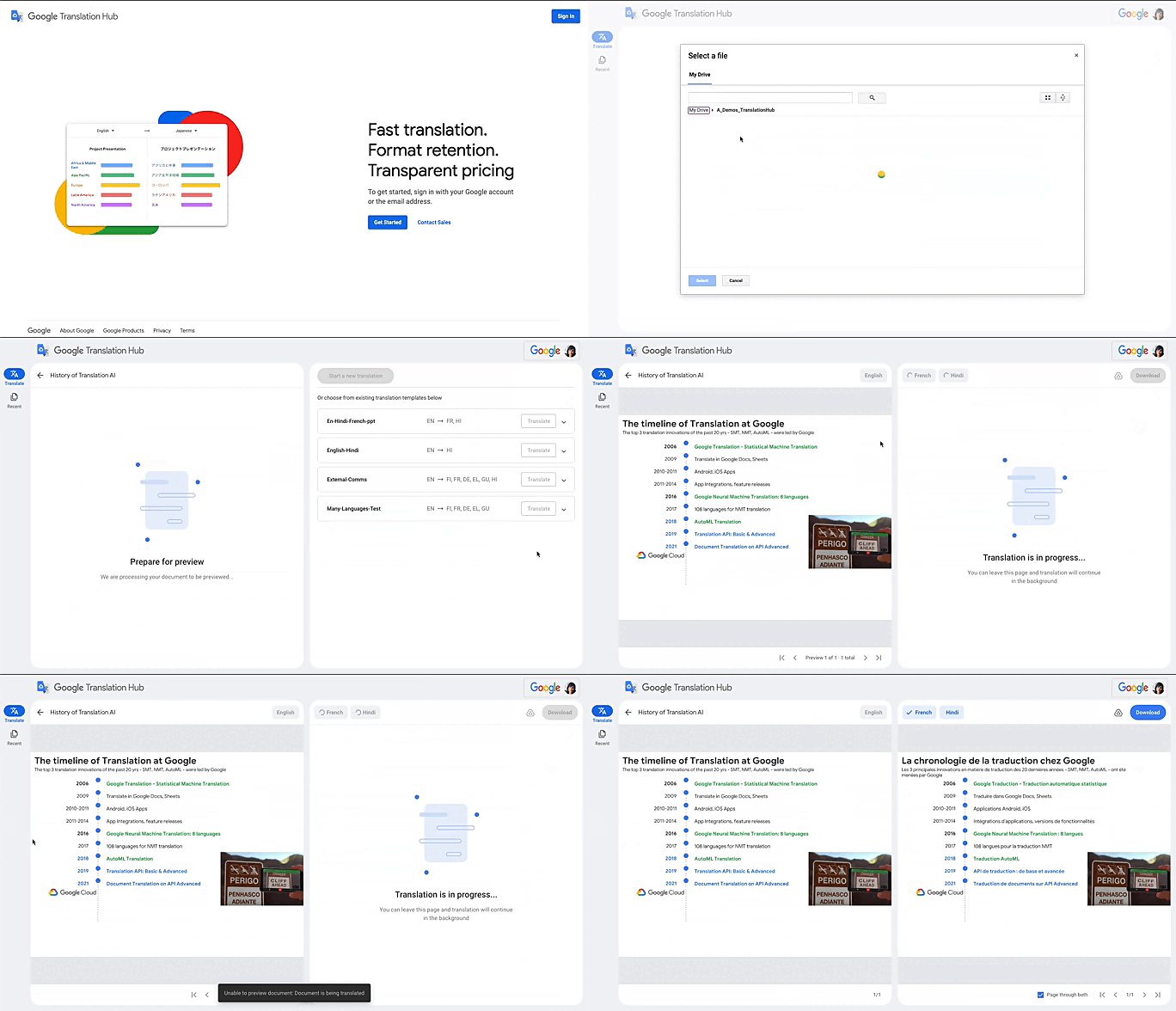
Translation Hub is designed to be both easy to manage and use. Each organization’s Translation Hub administrator uses the Google Cloud console to onboard and manage business users, typically by adding their email, which triggers an invite to the business user. Once a business user is added, they can sign in and start requesting translations and post-editing reviews.
With advanced features like “Glossary” and “Custom Translation Models (AutoML Translation),” Translation Hub makes it easy for enterprises to control the terminology and inject domain-specific context to meet their unique needs. Furthermore, Translation Hub ensures that organizations own their Translation Memory, for use in future translations or to leverage as a rich, human-validated source of training data for custom translation models (e.g., AutoML Translation). For example, when a user edits a phrase or segment through Translation Hub, this is immediately captured and used in the next translation for all future users who initiate translation where the same content or segment appears.
One of my favorite features is that Translation Hub preserves the layout and format of documents, saving both time and money. And while Translation Hub works with Google Drive (you can ingest and export documents to Drive) and is compatible with all our Google Workspace content sources (e.g., Slides, Docs etc.), it also supports many of the most commonly used formats, like documents and presentations created in Microsoft Office, and scanned and native PDFs.
Organizations need to be able to share the output of AI-powered translation with localization teams or agencies, for review. They need to save time by leveraging glossaries or customer machine learning (ML) models. They need these capabilities in one cohesive platform—and they need all of this to be user-friendly for all kinds of business users. It’s the difference between being able to automate translations in a few scenarios and being able to translate at scale. Google Cloud’s mission is to accelerate every organization’s ability to digitally transform, and with Translation Hub, our customers can leverage the best of AI for their content translations without sacrificing speed, quality or cost.
All of Google’s Translation Innovations within a single product
Translation Hub uses Google Cloud’s Translation API, AutoML Translation, and innovations in Neural Machine Translation Quality Prediction and Translation Memory—all technologies we’ve put to good use inside Google. For example, our localization teams have realized more than $80 million in cost avoidance and savings since 2021, using Google Cloud AutoML Translation and localization expertise.
“In just three months of using Translation Hub and AutoML translation models, we saw our translated page count go up by 700% and translation cost reduced by 90%,” said Murali Nathan, digital innovation and employee experience lead, at materials science company Avery Dennison. “Beyond numbers, Google’s enterprise translation technology is driving a feeling of inclusion among our employees. Every Avery Dennison employee has access to on-demand, general purpose, and company-specific translations. English language fluency is no longer a barrier, and our employees are beginning to broadly express themselves right in their native language.”
To get started with Translation Hub, visit our solution page, and for a deep dive, check out this Google Next ‘22 session, including more details about Avery Dennison’s use case.
More Relevant Stories for Your Company

You Can Now ‘Listen’ to Over 50 Tech Blogs on Google Cloud Reader
🎧 Prefer to listen? Check out this episode on the Google Cloud Reader podcast If you’re anything like me, you love reading, but also appreciate that sometimes your eyes need to be doing other things; whether it’s finding your exit off the highway, or keeping your puppy from destroying the couch. And

AgroStar: Small farms in India getting big help from the cloud
AgroStar has launched a cloud-based mobile app that is helping to boost crop yields and encourage best practices for small farmers in India. Launched as an on-premises ecommerce platform selling farm tools in 2008, the firm turned to Google Cloud Platform (GCP) to expand its offering. It now uses cloud-based analytics and is

Contact Center AI Platform Brings Together the Merits of AI, Cloud Scalability, CRM Integration and Multi-experiences!
Providing best-in-class customer service is crucial for the success of your business. Contact centers are a critical touch point, as they have to balance between representing your brand and prioritizing customer care. When your customers seek help and support, they expect efficient service that is accessible through modern voice and


Interpreting ML Models with Explainable AI
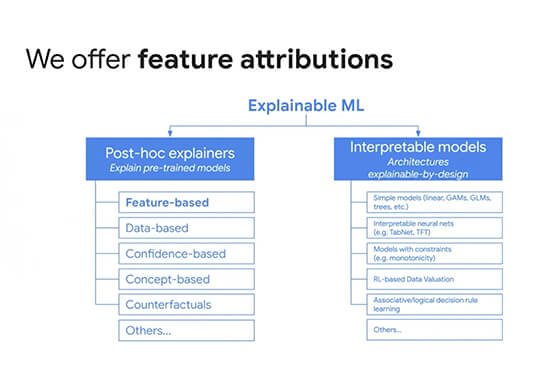
We often trust our high-accuracy ML models to make decisions for our users, but it’s hard to know exactly why or how these models came to specific conclusions. Explainable AI provides a suite of tools to help you interpret your ML model’s predictions. Listen to this discussion regarding how to
