





How Eventrac and Workflows Integration Helps Implement Hybrid Architecture in Google Cloud

6533
Of your peers have already read this article.
3:00 Minutes
The most insightful time you'll spend today!
I previously talked about Eventarc for choreographed (event-driven) Cloud Run services and introduced Workflows for orchestrated services.
Eventarc and Workflows are very useful in strictly choreographed or orchestrated architectures. However, you sometimes need a hybrid architecture that combines choreography and orchestration.
For example, imagine a use case where a message to a Pub/Sub topic triggers an automated infrastructure workflow or where a file upload to a Cloud Storage bucket triggers an image processing workflow. In these use cases, the trigger is an event but the actual work is done as an orchestrated workflow.
How do you implement these hybrid architectures in Google Cloud? The answer lies in Eventarc and Workflows integration.
Eventarc triggers
To recap, an Eventarc trigger enables you to read events from Google Cloud sources via Audit Logs and custom sources via Pub/Sub and direct them to Cloud Run services:

One limitation of Eventarc is that it currently only supports Cloud Run as targets. This will change in the future with more supported event targets. It’d be nice to have a future Eventarc trigger to route events from different sources to Workflows directly.
In absence of such a Workflows enabled trigger today, you need to do a little bit of work to connect Eventarc to Workflows. Specifically, you need to use a Cloud Run service as a proxy in the middle to execute the workflow.
Let’s take a look at a couple of concrete examples.
Eventarc Pub/Sub + Workflows integration
In the first example, imagine you want a Pub/Sub message to trigger a workflow.
Define and deploy a workflow
First, define a workflow that you want to execute. Here’s a sample workflows.yaml that simply decodes and logs the Pub/Sub message body:
main:params: [args]steps:- init:assign:- headers: ${args.headers}- body: ${args.body}...- pubSubMessageStep:call: sys.logargs:text: ${"Decoded Pub/Sub message data is " + text.decode(base64.decode(args.body.message.data))}severity: INFODeploy the workflow with a single command:gcloud workflows deploy ${WORKFLOW_NAME} --source=workflow.yaml --location=${REGION}
Deploy a Cloud Run service to execute the workflow
Next, you need a Cloud Run service to execute this workflow. Workflows has an execution API and client libraries that you can use for your favorite language. Here’s an example of the execution code from a Node app.js file. It simply passes the received HTTP request headers and body to the workflow and executes it:
const execResponse = await client.createExecution({parent: client.workflowPath(GOOGLE_CLOUD_PROJECT, WORKFLOW_REGION, WORKFLOW_NAME),execution: {argument: JSON.stringify({headers: req.headers, body: req.body})}});
Deploy the Cloud Run service with the Workflows name and region passed as environment variables:
gcloud run deploy ${SERVICE_NAME} \--image gcr.io/${PROJECT_ID}/${SERVICE_NAME} \--region=${REGION} \--allow-unauthenticated \--update-env-vars GOOGLE_CLOUD_PROJECT=${PROJECT_ID},WORKFLOW_REGION=${REGION},WORKFLOW_NAME=${WORKFLOW_NAME}
Connect a Pub/Sub topic to the Cloud Run service
With Cloud Run and Workflows connected, the next step is to connect a Pub/Sub topic to the Cloud Run service by creating an Eventarc Pub/Sub trigger:
gcloud eventarc triggers create ${SERVICE_NAME} \--destination-run-service=${SERVICE_NAME} \--destination-run-region=${REGION} \--location=${REGION} \--event-filters="type=google.cloud.pubsub.topic.v1.messagePublished"
This creates a Pub/Sub topic under the covers that you can access with:
export TOPIC_ID=$(basename $(gcloud eventarc triggers describe ${SERVICE_NAME} --format='value(transport.pubsub.topic)'))
Trigger the workflow
Now that all the wiring is done, you can trigger the workflow by simply sending a Pub/Sub message to the topic created by Eventarc:
gcloud pubsub topics publish ${TOPIC_ID} --message="Hello there"
In a few seconds, you should see the message in Workflows logs, confirming that the Pub/Sub message triggered the execution of the workflow:

Eventarc Audit Log-Storage + Workflows integration
In the second example, imagine you want a file creation event in a Cloud Storage bucket to trigger a workflow. The steps are similar to the Pub/Sub example with a few differences.
Define and deploy a workflow
As an example, you can use this workflow.yaml that logs the bucket and file names:
main:params: [args]steps:...- log:call: sys.logargs:text: ${"Workflows received event from bucket " + bucket + " for file " + file}severity: INFO
Deploy a Cloud Run service to execute the workflow
In the Cloud Run service, you read the CloudEvent from Eventarc and extract the bucket and file name in app.js using the CloudEvent SDK and the Google Event library:
const cloudEvent = HTTP.toEvent({ headers: req.headers, body: req.body });//"protoPayload" : {"resourceName":"projects/_/buckets/events-atamel-images-input/objects/atamel.jpg}";const logEntryData = toLogEntryData(cloudEvent.data);const tokens = logEntryData.protoPayload.resourceName.split('/');const bucket = tokens[3]
Executing the workflow is similar to the Pub/Sub example, except you don’t pass in the whole HTTP request but rather just the bucket and file name to the workflow:
const execResponse = await client.createExecution({parent: client.workflowPath(GOOGLE_CLOUD_PROJECT, WORKFLOW_REGION, WORKFLOW_NAME),execution: {argument: JSON.stringify({bucket: bucket, file: file})}});
Connect Cloud Storage events to the Cloud Run service
To connect Cloud Storage events to the Cloud Run service, create an Eventarc Audit Logs trigger with the service and method names for Cloud Storage:
gcloud eventarc triggers create ${SERVICE_NAME} \--destination-run-service=${SERVICE_NAME} \--destination-run-region=${REGION} \--location=${REGION} \--event-filters="type=google.cloud.audit.log.v1.written" \--event-filters="serviceName=storage.googleapis.com" \--event-filters="methodName=storage.objects.create" \--service-account=${PROJECT_NUMBER}-compute@developer.gserviceaccount.com
Trigger the workflow
Finally, you can trigger the workflow by creating and uploading a file to the bucket:
echo "Hello World" > random.txtgsutil cp random.txt gs://${BUCKET}/random.txt
In a few seconds, you should see the workflow log the bucket and object name.
Conclusion
In this blog post, I showed you how to trigger a workflow with two different event types from Eventarc. It’s certainly possible to do the opposite, namely, trigger a Cloud Run service via Eventarc with a Pub/Sub message (see connector_publish_pubsub.workflows.yaml) from Workflows or a file upload to a bucket from Workflows.
All the code mentioned in this blog post is in eventarc-workflows-integration. Feel free to reach out to me on Twitter @meteatamel for any questions or feedback.
A Year of Going Carbon-free! Google’s Road to Sustainability Looks Promising
3732
Of your peers have already read this article.
2:00 Minutes
The most insightful time you'll spend today!
Last year, we announced our most ambitious sustainability goal yet: to operate everywhere on 24/7 carbon-free energy by 2030. We’ve set this goal to ensure that Google Cloud continues to be the cleanest cloud in the industry, and to show that full-scale decarbonization of electricity use is possible.
Since setting our target, we’ve made tremendous progress in how we track, buy, and use electricity; advocate for clean energy policies; and support the development of new technologies to help us reach this goal. And we’ve done it all while maintaining a commitment to transparency that we hope will make it easier for other organizations wishing to fully decarbonize their operations as well.
In the spirit of transparency, today we’re releasing the 2020 carbon-free energy percentages (CFE%) for all Google data centers, as well as overall progress on the road to our 2030 goal: In 2020, Google achieved 67% round-the-clock carbon free energy across all its data centers, up from 61% in 2019. In other words, of all the electricity consumed by Google data centers in 2020, two-thirds of it was matched with local, carbon-free sources on an hourly basis.
Though we saw a significant jump in global CFE% in 2020, we expect the numbers to vary from year to year. Ultimately, CFE% is dependent on the amount of new clean energy that comes online in a given year; we may even occasionally see short-term drops in the numbers. What’s most important is that we continue to maintain a long-term trajectory toward our 2030 goal. With meaningful progress in clean energy policy, technologies, and transactional models, we believe 24/7 carbon-free energy is achievable.
Tracking these numbers also allows us to give Google Cloud customers greater control in their own sustainability efforts. Earlier this year we announced Google Cloud Region Picker, a system that helps our customers assess factors like cost, speed, and CFE% as they choose where to run their applications.
To outline some of the events that have helped us get to 67% CFE%, we’ve developed an animation that shows every hour of electricity use in 2020, at all our Google data centers around the world.
Visualizing clean energy: every hour, every day, everywhere
Imagining what every hour in a year looks like is hard enough (there are 8,760 of them, in case you’re wondering). With 23 data centers and 25 cloud regions around the world, we’re aiming to source clean energy for over 200,000 operational hours each year.
https://youtube.com/watch?v=f9ecEokcFlk%3Fenablejsapi%3D1%26
The “A year in carbon-free energy” animation points out significant projects that came online in 2020 to bring our data centers closer to operating entirely on round-the-clock carbon-free energy. It also reflects an unparalleled level of transparency about our carbon-free energy data, showing hour-by-hour where we need to develop new clean energy projects, advocate for policy changes, and in some cases, look to new technologies that can help fill in the gaps left by variable renewable resources.
In the animation, you’ll notice sites with a lot of green at midday (e.g. in Chile or the U.S. Southeast) – a sign that solar is making a big contribution. Other data centers, such as our facilities in the U.S. Midwest, rely more heavily on wind power and are subject to seasonal fluctuations in wind speed.
Preventing the worst impacts of climate change will require decarbonizing the world’s electric grids, as fast as possible. Google is committed to doing as much as possible to clear a path for others and drive collective action to achieve this goal. We’re thrilled to be in good company as we move, together, toward a carbon-free future.
Three German Retail Firms Choose Google Cloud to Migrate SAP Workloads for Business Transformation
3670
Of your peers have already read this article.
1:30 Minutes
The most insightful time you'll spend today!
The retail industry is rapidly evolving, with customers demanding exceptional digital experiences, and retailers adjusting their businesses to be more efficient. With many retailers relying on SAP for critical business functions like digital transactions, finance, supply chains and more, this shift has led them to look for ways to modernize these systems, deliver them on highly scalable infrastructure, and extract more value out of the data from within them.
I’m proud that we are helping German retailers successfully migrate business-critical SAP systems onto Google Cloud, minimizing risk and downtime and ultimately helping them build a foundation for future growth. Our work with retailers like Otto Group, one of the world’s largest ecommerce businesses, MediaMarktSaturn, the large consumer electronics retailer, and METRO, the wholesale retailer with operations across Europe, demonstrates our deep partnership with SAP to support customers’ digital transformations.
Helping Otto Group IT run SAP on secure, sustainable infrastructure
Otto Group, a leading online-retailer and services group in Germany and one of the world’s largest ecommerce companies, migrated their SAP workloads to Google Cloud in order to modernize their SAP landscape and build a more agile environment that would enable them to quickly scale up or down according to business needs.
The Otto Group, which consistently balances the sustainable use of resources and climate-neutral action with economic growth, is also able to leverage Google Cloud’s clean infrastructure to deliver the bulk of its internal SAP environment, ensuring the company’s business systems are running on secure, sustainable infrastructure. Since 2017, Google has matched 100% of its global electricity use with purchases of renewable energy every year, and is now building on that progress with a new goal of running entirely on carbon-free energy at all times by 2030.
With Google Cloud, Otto Group has told us they have access to better means of automation and improved network capability compared to what they had with their previous provider. Through this cloud migration, Otto Group IT is providing modern and flexibly scalable SAP systems to their internal customers.
Powering MediaMarktSaturn’s online ecommerce experience
For MediaMarktSaturn, SAP is critical to the smooth day-to-day running of its business, so the company was keen to ensure maximum availability and stability with a cloud environment. After a thorough examination of its business needs and hands-on support from Google Cloud’s teams, MediaMarktSaturn elected to migrate its SAP HANA database onto Google Cloud, enabling a performance increase of four times compared to its previous on-premises installations.
The SAP suite is critical for the ecommerce platform to run smoothly on a day-to-day basis. By migrating to Google Cloud, the retailer is providing even more support and maximum availability for its customers. With Google Cloud’s industry-specific expertise, MediaMarktSaturn’s customers have access to a reliable and stable ecommerce platform, so they can browse for products online from wherever they are.
Transforming METRO’s business by running SAP workloads in the cloud
With more than 97,000 employees in 34 countries, Germany’s METRO is one of the world’s largest B2B wholesalers. Previously, METRO relied on unique finance systems that were different in each country, and updates or system testing required substantial coordination across numerous teams, which was both time-consuming and costly.
To address these pain points, METRO is moving away from on premise deployments and is now migrating its SAP S/4HANA finance systems to Google Cloud to support everything from classical role-based accounting to the use of cognitive tools. Now, internal METRO teams can work seamlessly across operations, enhancing the services they provide to customers by addressing demands in real time.
To read more about how SAP on Google Cloud drives agility, efficiency, and innovation for our customers, visit our solutions page here.
Kohl’s Leverages Google Cloud Platform for Omnichannel Retail

3655
Of your peers have already read this article.
2:30 Minutes
The most insightful time you'll spend today!
Kohl’s is an omnichannel retailer focused on driving traffic, operational efficiency and delivering seamless omnichannel customer experiences.
Ratnakar Lavu is Kohl’s Senior Executive Vice President and Chief Technology Officer. He, and Kohl’s, are at the forefront of retail technology innovation, focusing on a frictionless customer journey across digital, mobile and more than 1,150 stores.
As part of this journey to more closely unify its online and offline experiences for customers, the company was looking for supporting cloud services that would continue to drive best-in-class data center infrastructure; the ability to manage data at a very large scale; and industry leading analytics and machine learning tools to continually understand real time data streams and help personalize experiences for their customers.
Kohl’s recognized the opportunity to take on a cloud partner to help drive the improvement of the speed and reliability of their operations, while they focused on a number of innovations to deepen customer experiences.
“At the time, I was looking for an open and scalable platform to partner with our Kohl’s technology team as we transform our business by shifting to the cloud,” says Ratnakar.
“Google has great engineering talent as well as demonstrated experience solving stability and scale in its own Ads and Search business. At Kohl’s, we need to be bold and innovative in today’s retail environment, and therefore need partners who deeply understand how to manage risk.”
Kohl’s leveraged several capabilities of Google Cloud. For example:
- They built applications to automate deployment, scaling and operations.
- They used monitoring capabilities to monitor for things like response time.
- Scalable technology provided an infrastructure to elastically scale to site traffic.
- They ran their infrastructure across multiple regions for high availability.
In 2017 and 2018, record-setting numbers of customers visited Kohls.com during the Thanksgiving holiday weekend and the digital platform experienced high double-digit growth both years.
The capabilities provided by Google Cloud Platform (GCP) and Google’s data center infrastructure supported Kohl’s servers and systems during these key timeframes.
In addition, the Kohl’s team partnered together with Google’s core engineering team and services organization to optimize applications and make them more reliable.
Google Cloud’s Customer Reliability Engineers (CREs) worked with them in advance of their peak time frames to test the infrastructure for performance, scaling, and fault tolerance.
“Google CRE and services teams collaborated with us as we ran drills and exercises during each phase of preparation for peak time frames,” Ratnakar said. “As we continued to understand better how to scale, monitor, and support our applications in GCP and we are pleased that we worked with the CRE team as partners on monitoring services, alerting teams, and triaging work.”
Making Mothers’ Day Special: How Google Cloud Migration for 1-800-FLOWERS.COM, Inc Impacts CX

6828
Of your peers have already read this article.
2:30 Minutes
The most insightful time you'll spend today!
Editor’s note: In honor of Mother’s Day, we look at how 1-800-FLOWERS.COM, Inc. migrated to Google Cloud as part of its digital transformation to quickly deploy seamless and convenient customer experiences across multiple brands on Mother’s Day and every day.
As a leading provider of gifts designed to help customers express, connect, and celebrate, 1-800-FLOWERS.COM, Inc. has embraced cloud technologies to grow and transform its business through constant innovation. As part of our digital transformation, we recently completed the migration of our ecommerce platform and other services to Google Cloud. We’ve transitioned from a monolithic to a microservices platform, moved many workloads from our on-premises data centers to our Google Cloud environment, and scaled both horizontally and vertically.
Since our migration, we’ve developed efficient processes to launch new brands, improved the customer experience across all brands, and seen significantly increased site traffic.
Nurturing a more delightful customer journey
Customer delight is at the core of everything we do. Whether it be with a flower bouquet, a sweet treat, or a personalized keepsake, our mission is to deliver smiles. With the rise of the COVID-19 pandemic, we’ve all been challenged to find unique and safe ways to continue honoring the special connections in our lives and celebrating occasions with loved ones. Our customers have adapted by doing things such as sending gifts to isolated loved ones, sharing the same meal together virtually, or using video to engage with others through group activities like flower arranging and building charcuterie boards.
The customer experience is a top priority for us, and we constantly look for innovative ways to enhance the customer journey across our ecommerce platform of more than a dozen brands. As a result, we’ve continued to see a rise in demand as customers enjoy the ease and convenience of our site and discover our full family of brands.
Migrating to a cloud-first mindset
As we’ve continued to innovate and iterate on the customer experience, we knew we wanted to evolve our platform. We wanted to shift to a microservices platform, which would allow our team the opportunity to release updates to our site more often and set up the right continuous integration/continuous deployment (CI/CD) practices.
Working with Google Cloud, we were able to move our ecommerce platform to the cloud and standardize our site and brand deployment by building one release that could then be repeated across all of our brands. We built everything in a modular fashion, including microservices and code libraries, so that sites could be easily constructed and replicated for each brand. And because of this, we were able to launch Shari’s Berries extremely quickly after we acquired the brand in 2019.
Moving our platform to a completely homegrown solution of microservices was a daunting task. But our team handled it beautifully through load-testing, stress-testing, and building new monitoring tools. And with Google Cloud supporting us all along the way, managing the migration process was simple and easy from start to finish.
Arranging a better bouquet of services
Currently, we’ve migrated every customer-facing touchpoint for all of our brands to Google Cloud—whether it’s on the web or mobile, our AI bots, or our chat interfaces.
- We run on Google Kubernetes Engine and Istio.
- We have nearly 200 microservices built to help power our entire ecommerce stack across several cloud services running on Google Cloud.
- We’re utilizing BigQuery for our offline intelligence.
Results are coming up roses
Our new stack on Google Cloud has benefits for both us and our customers. We moved from a session-based to a token-based system, which provides enhanced security as well as a consistent, convenient experience across all our brands. Using service workers and a single-page app, we are able to download all the relevant site content to the browser in under two seconds to create an instant-click experience for each and every customer. We also use Google Analytics to measure our user interactions and provide personalized results to each customer. Our hope is that with this new system, we can learn from customer behavior to offer gift givers a more personalized shopping experience during each visit.
The benefits of our new tech stack have not only helped us enhance the solutions we offer to customers today, they’ve also enabled us to offer new ones at lightning speed. With our legacy system, we used to release new code once a week or once a month. Now, even during our peak periods, we’re able to release 10 to 15 times a day and can deploy and pivot quickly to create new microservices and microsites on the fly—often without having to touch any code.
Efficiencies abound
The benefits of moving our platform to Google Cloud have extended to our internal teams as well. Before the migration, we had only two environments for developing and testing, which made it time-consuming to test updates before they went into production. Now with Google Cloud, we have several different journey teams—which are made up of developers, product owners, and technical owners—all working in several different environments, solving problems, and creating new solutions together.
Everyone is now empowered to be self-sufficient, developing and releasing microservices on their own when they’re ready. This has given our developers more time to take part in continued development and learning opportunities. For example, we offer lunch-and-learn sessions as well as other resources for everyone to take advantage of so they can continue to learn and refine their skills.
Planting the seeds for future growth
As we look to the future and think about how we help our customers express, connect, and celebrate, we’ll continue to collaborate across teams to deliver solutions that spread smiles. Specifically, we’re exploring additional use of AI to help us better serve our customers across all our brands.
We’ve enjoyed the ongoing support we’ve received from the Google Cloud team as they help us build new solutions and design a road map for the future. Their support has helped the 1-800-FLOWERS.COM, Inc. team to realize the power of the cloud and bring the very best experience to our customers.
Learn more about 1-800-FLOWERS.COM, Inc., or check out our recent blog about cloud migration for the real world.
How Google Cloud Helps SAP Admins Create Scalable, Secure Networks

6650
Of your peers have already read this article.
3:00 Minutes
The most insightful time you'll spend today!
SAP forms the critical backbone of thousands of enterprises, supporting critical business functions such as finance, supply chain, warehouse management, and more. Google Cloud provides a highly scalable and resilient infrastructure to run such workloads and offers tools, such as Smart Analytics and Machine Learning that can accelerate your organization’s digital transformation.
In fact, a recent study by Forrester found that running SAP on Google Cloud can generate a 160% return on investment and a payback period of six months or less, thanks to legacy infrastructure cost savings, downtime avoidance, and productivity improvements.
How you deploy your SAP systems across your network has a tremendous impact on its availability, resilience, and performance. In addition to separate production and high-availability (HA) environments, SAP deployments typically include sandbox, development, quality assurance (QA), and disaster recovery environments as well.
Because most of the Google network is virtual, SAP administrators can easily design complex landscapes that suit your organization’s SAP deployment and organizational structure while also meeting security and operational requirements.
As you get started with SAP on Google Cloud, you’ll need to decide how to configure your networking to ensure the availability and performance of various SAP systems. Here’s a look at your options.
VPC and shared VPC
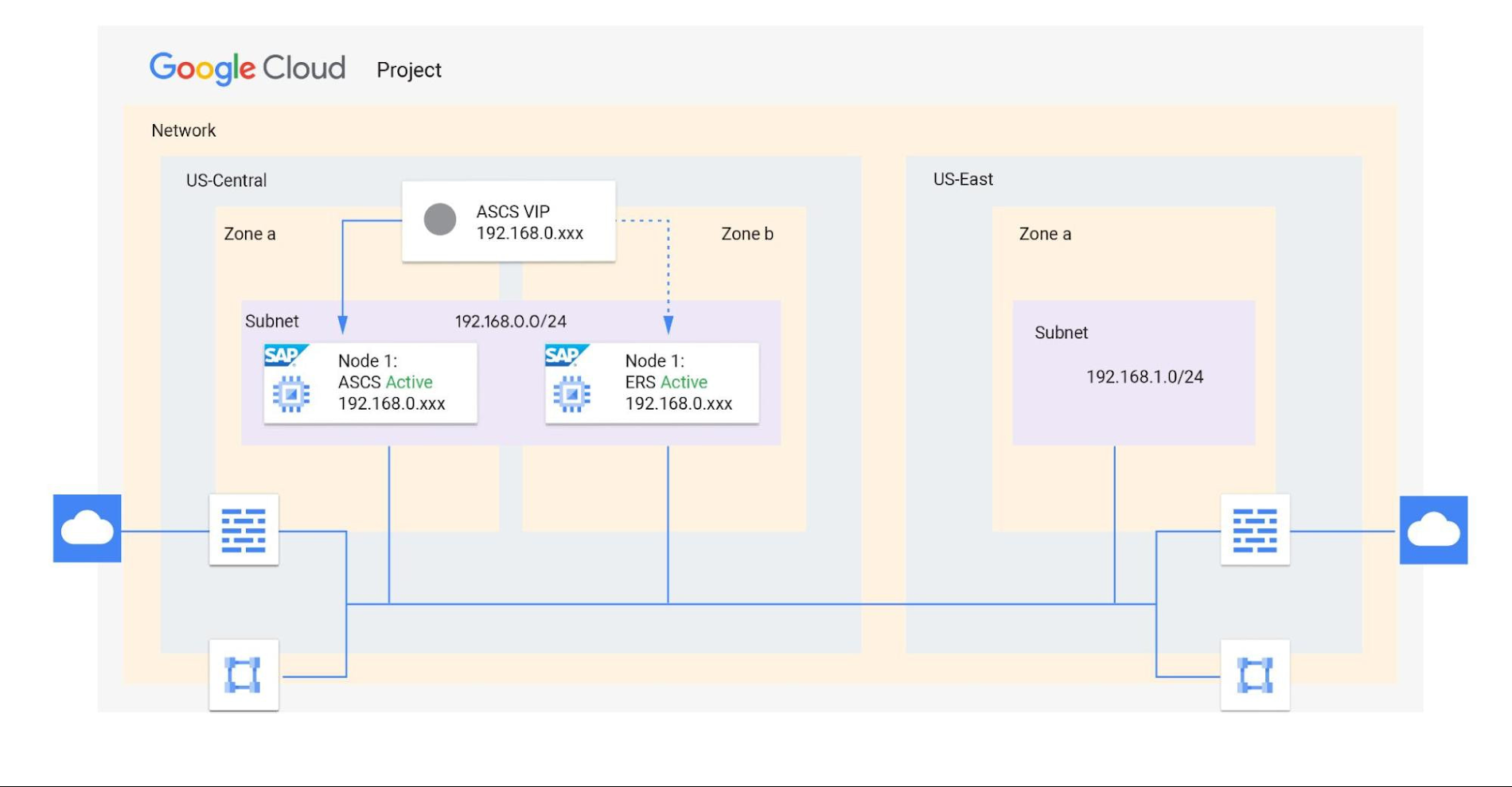
A virtual private cloud (VPC) is a secure, isolated private network hosted within Google Cloud. VPCs are global in Google Cloud, so a single VPC can span multiple regions without communicating across the public internet. Similarly, subnets can span across zones within a region. A zone represents a single failure domain, so typical SAP deployments place production and HA systems in different zones to ensure resiliency. Google Cloud simplifies this type of deployment, because subnets containing both production and HA systems can span multiple zones.
This capability also simplifies SAP clustering, since the cluster’s virtual IP (VIP) address can be in the same range as those of the production and HA machines. This configuration shields the floating IP using Google internal load balancers and is applicable to HA clustering of the application layer (ASCS and ERS) and the HANA database layer (HANA Primary and Secondary).
Shared VPCs are a feature unique to Google Cloud that allows an organization to connect resources from multiple projects to a common VPC network. This lets them communicate with each other securely and efficiently using internal IPs. You can also centrally control the network for all SAP projects (service) from the Host project while using firewalls to inspect communication between compute engines in the same subnet, and between those in different subnets. (Best practice is to limit the communication between these systems to only the required ports — typically via SAP remote function call (RFC) communication at Layer 4.)
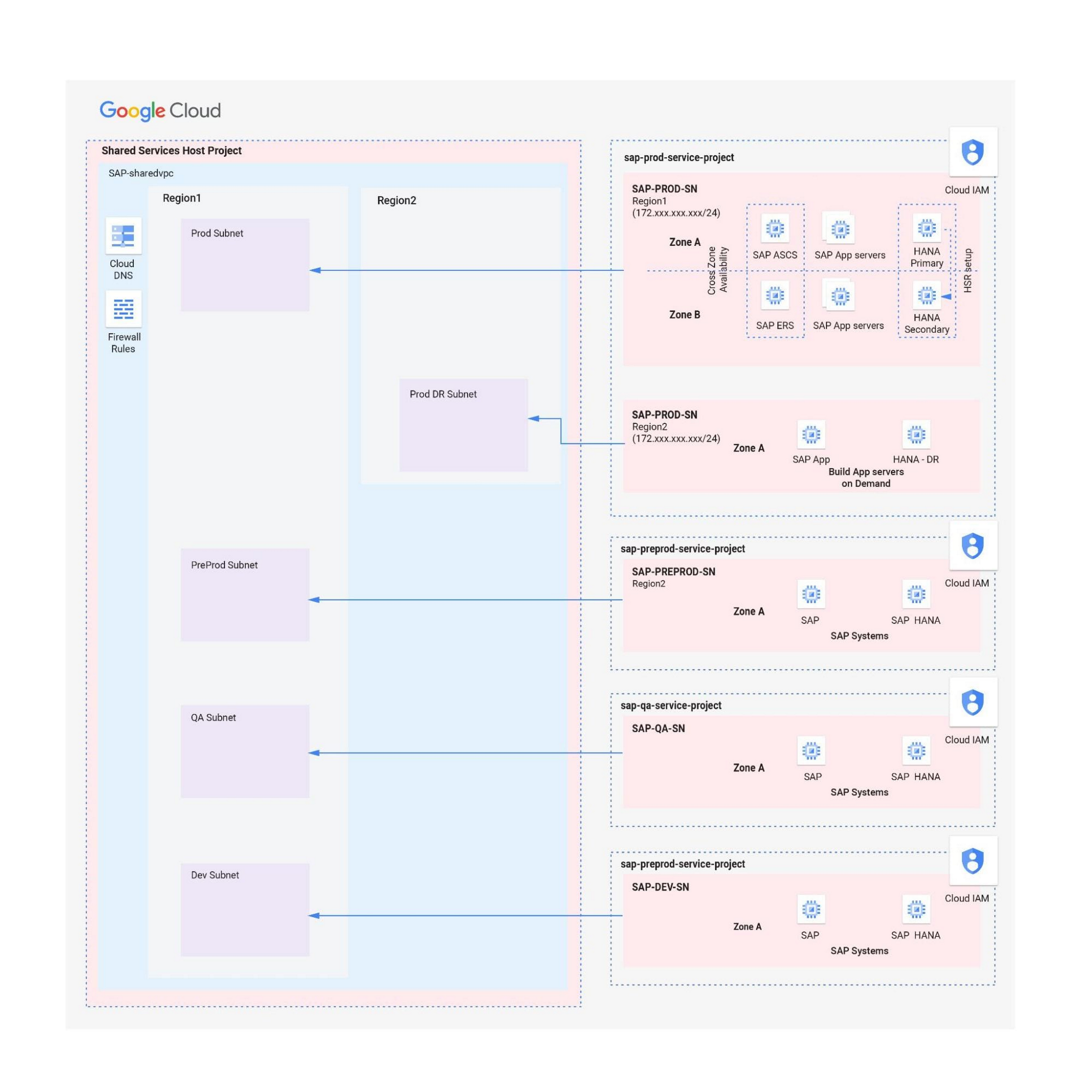
When designing your network, start with a host project containing one or more Shared VPC networks. You can attach additional service projects to a host project, which allows them to participate in the Shared VPC. It’s common practice to have multiple service projects operated and administered by various departments or teams in your organization.
Depending on your needs, you can deploy SAP on a single Shared VPC or multiple ones. The two scenarios differ in terms of network control, SAP environment isolation, and network inspection. Let’s look more closely at these differences.
Scenario 1: Deploying SAP on a single Shared VPC
If you require only a single network inspection, deploying SAP on a single Shared VPC has the advantage of simplicity and reduces administrative overhead.
- Network control: The Shared VPC serves as the network hub, allowing central network management based on identity access management (IAM) roles for the network team(s) in both production and non-production environments.
- SAP environment isolation: You can create projects and subnets for each SAP environment. Projects help group resources together for finer IAM control and billing visibility, while subnets provide network isolation for individual SAP environments. In service projects, compute engines can communicate by default; however, you can adopt simple firewall rules to block communication between compute engines within a subnet or in separate subnets.
- Network inspection: Use Google Cloud firewalls to allow only the required ports for communication between SAP systems. Leverage network tags and service accounts to define granular control for both north-south and east-west traffic.
Scenario 2: Multiple Shared VPCs for SAP deployment
In scenarios requiring additional network inspections, you can create multiple Shared VPCs, typically one per environment. Use peering between these Shared VPCs to enable RFC communication among the SAP development, QA, and production systems.
- Network isolation: Multiple Shared VPCs are completely isolated from each other except via specific ports opened in Google Cloud firewalls. This allows additional East-West traffic inspection by a Network Virtual Appliance (NVA) within a Google Cloud network.
- Network control:As the number of Shared VPCs increases, activities such as peering and firewall policies also increase. This diminishes the central network control that Shared VPCs offer, so the network team should plan to manage the policies in each VPC separately.
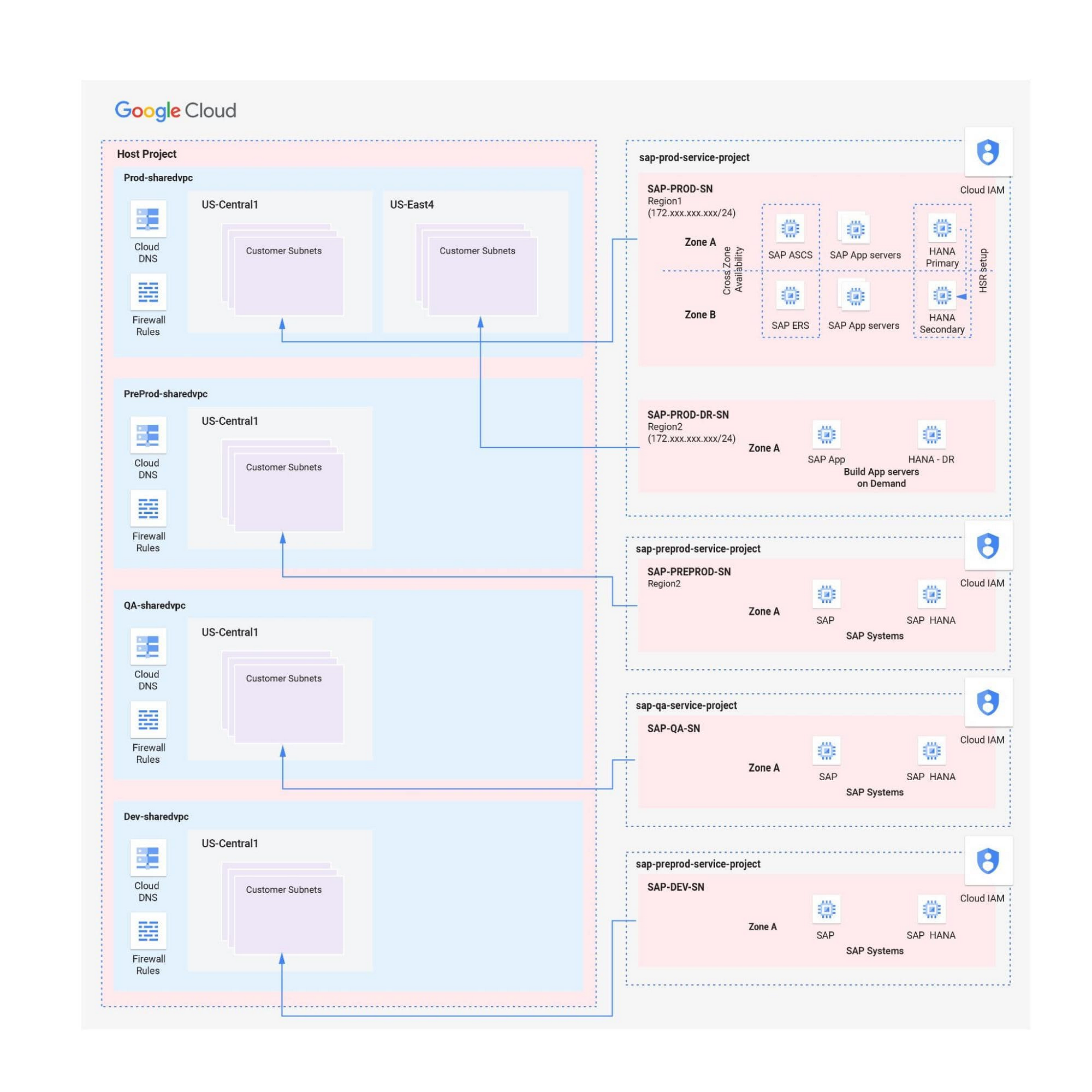
Hybrid scenarios – for example, one Shared VPC for the production environment and one Shared VPC for all non-production systems — are also possible. This arrangement allows network inspection between production and non-production systems, and limits the number of central network administration layers to two.
Configuring the networking environment for multiple SAP systems can be a complex process. Thanks to Google Cloud’s Shared Virtual Clouds and other tools, SAP administrators can create scalable, secure networks that provide logic, resilience, and visibility to their cloud deployments.Learn more about these networking capabilities and our full offerings for SAP customers.
More Relevant Stories for Your Company

Hike: Processing Analytics Queries 20X Faster with Google Cloud Platform
After a seamless migration to Google Cloud Platform with CloudCover and Google Cloud Professional Services, Hike has reduced its costs by 20% and processed analytics queries 20 times faster than with its previous cloud provider. The business is also using AI and machine learning to enhance the experience provided by

An Expert’s Opinion on What Early-stage Startups Must Know
As lead for analytics and AI solutions at Google Cloud, my team works with startups building on Google Cloud. This puts us in the fortunate position to learn from founders and engineers about how early-stage startups’ investments can either constrain them or position them for success, even at the seed


Metro Consolidates 100 SAP Instances on Google Cloud
German retailer Metro, with operations in 25 countries across Europe and Asia and employing over 150,000 people, decided to consolidate its 100 SAP instances into one SAP S/4HANA system running on the Google Cloud Platform. This helped the company lower costs, increase efficiency, and improve customer experience. In addition, the
WPP Innovates with the Cloud
Unlocking the Power of Data and Creativity withthe Cloud: The WPP Story
