





Revolutionizing Finance: Google Cloud’s Role in Auditoria.AI’s Success

1256
Of your peers have already read this article.
4:00 Minutes
The most insightful time you'll spend today!
Be it marketing, sales, or even security, most departments in large organizations today have a range of SaaS tools at their disposal to help make their work more efficient. But people in corporate finance and accounting have been underserved in that respect. Their days are still spent on routine, mundane tasks that keep them away from more stimulating work. Auditoria.AI aims to change that by automating those functions with AI and natural language technology.
We strive to improve the lives of finance and accounting professionals by automating the routine, repetitive, and laborious parts of the finance function, such as copy-and-pasting data, validating documents, and checking for errors on spreadsheets, freeing these teams to focus instead on providing valuable, strategic insights to the business.
To that end, the problems we’re solving affect three major finance functions:
- Accounts Payable, responsible for sending money out of the company, such as bill payments.
- Accounts Receivable, responsible for bringing money into the company, such as invoicing for services.
- General accounting, a broader term consisting of functions of the general ledger team and the CFO, including closing books.
Historically, making these processes more efficient entailed dedicating more personnel to them. But this didn’t necessarily mean more work was done faster and to the highest standards. Many finance professionals are often overworked, dedicating extra hours, weekends, and sometimes holidays to process invoices, collect payments, and close the books on time.
We created solutions for these three finance functions, with our SmartBots taking care of the back-and-forth communications between finance teams, vendors, and customers. In large companies, these micro-transactions add up to thousands per day, resulting in finance professionals spending entire days reading inquiries, interpreting requests, looking for relevant information, and answering as many as possible. But with our AR helpdesk, for example, accounts receivable tasks, such as a request for a copy of an invoice, get automated. Our technology reads emails and attachments to understand what is being requested. Then it connects to the Enterprise Resource Planning (ERP) software to grab the relevant information and attach it to the email, so the recipient gets a response within 60 seconds.
Building the smart assistant that finance teams need
In our automation flow, we constantly handle different types of documents, from invoices and tax forms to receipts and email messages. But processing the interaction between computers and human language is complex. You must detect intent and facts, and understand the context before finding the specific slots of information extraction that may be relevant to specific processes and requests. Our solution adds value by extracting the right information in the right context, from the right document, for the relevant finance function. Instead of building everything from scratch, we turned to Google Cloud’s Document AI to support extracting data from unstructured documents to understand and analyze them.
Document AI comes with pre-built models that help analyze specific parts of our post-production lifecycle. For example, Invoice Parser extracts text and values from invoices, including invoice number, supplier name, invoice amount, tax amount, and invoice due date, all of which are necessary for our SmartBots to execute an extraction workflow. These out-of-the-box features significantly accelerate our own product development process and time-to-market, which are critical for the performance of a startup such as ours.
To ensure a high quality of information extraction, we used to do document readings in-house. Having automated some of that with Document AI, we’re at 85% accuracy extracting files, and with some additional customization efforts, we will achieve 95%+ extraction accuracy.
Meanwhile, we have now streamlined internal processes, which ultimately translates into faster services for our customers. For example, assuming all the information has been provided, it generally took up to 15 minutes to process a tax form. We now do that in seconds.
The value of automation doesn’t stop there. Using DocumentAI to automate structured data extraction from documents, we have managed to:
- Speed up the collection of general ledger entries by 90%+
- Reduce errors and omissions by 85%+
- Close books 20% faster
- Improved the productivity of full-time employees by 60%+
- Reduce process workload by 75%+
- Improve vendor serviceability by 75%+
- Reduce vendor risk and fraud by 50%+
Leveraging automation to focus on more innovation
Automating some of our processes with Document AI also means we have more time to focus on developing new features and further improving our solution. 80-90% of the time used for extracting custom fields from documents has now been automated with an OCR metadata library.
With Document AI taking care of standard extraction, we focus on the intelligence we add to post-extraction. For example, when an invoice comes in from a vendor, our application needs to figure out which vendor it is to match it to the correct records in the ERP. But variations in the documents could interfere with that extraction process. The vendor’s trading name might be slightly different from the company’s name registered in our internal system, delaying the process. With more time on our hands, we’re now working on features enabling our models to leverage logos and other elements extracted from documents to swiftly match them to the correct company registered in our systems.
With the benefits we’ve seen thus far, we look forward to accelerating our international growth. We’ll be relying on Google Cloud’s Document AI to automate operations, potentially in different languages, as we continually remove friction from the work lives of finance and accounting people worldwide.
What Swiggy and You Can Learn From This Company’s Use of ML to Engage Customers

9673
Of your peers have already read this article.
1:45 Minutes
The most insightful time you'll spend today!
The app economy has enabled a huge range of unique business models to flourish. One such model is online food ordering and delivery services, in which apps leverage geo-location data to aggregate local food choices and offer personalized options to consumers.
A leading company in this space is Just Eat. Launched in the UK in 2001 with a vision of ‘serving the world’s greatest menu. Brilliantly.’ The company has capitalized on the popularity of online food delivery and grown its presence across 12 markets.
Just Eat acts as an intermediary between take-out food outlets and hungry customers, giving local restaurants access to a broader base of potential diners, while providing consumers with an easy and secure way to order and pay for food from their favourite restaurants.
Today the company helps 27 million customers find food from more than 112,000 restaurants—everything from homemade Italian pasta, to Chinese noodle bowls, to fish-and-chips.
Data is the fuel of Just Eat’s rapid growth, but it wasn’t always looked at that way. In its early days, Just Eat struggled with the deluge of information and faced fragmentation across its systems. In fact, the company realized its legacy data vendor wasn’t capable of ingesting 90 percent of the data produced by its food platform. This was incredibly frustrating for Just Eat’s analysts and data scientists, who had to waste time cleaning up sources instead of leveraging the data to create a better user experience.
Just Eat turned to Google Cloud, and now uses machine learning (ML) to power sophisticated consumer recommendations on both its app and website. It also makes heavy use of features offered by Google Cloud Platform, including BigQuery for running analytics on its customer data set and Cloud Pub/Sub for messaging app users with relevant offers in real-time.
Having all of Just Eat’s data in one platform has translated into real value for its customers. With Google Cloud tools, Just Eat has created its own proprietary Customer Ontology framework, which today contains 5.5 billion features that better understand consumers’ behavior and food habits, and provides insights into previous visits.
Just Eat recently created an “Adventurous Index” to map its customers according to their ordering habits, enabling them to tailor their marketing and user experiences. For example, mid-adventurous customers are shown a choice of restaurants that serve their most ordered cuisine, while adventurous customers can choose from restaurants that serve a wider variety. This not only has prompted consumers to be more adventurous with their choices, but also has led to more business at a more diverse set of restaurants.
Matt Cresswell, Director of Customer Platforms at Just Eat said that Google Cloud has become integral to its product delivery: “Consumer food choice is a hugely nuanced topic. We know that individuals have their own unique journeys when they use Just Eat. We’ve sought to create a truly one-to-one relationship with every customer. The changes we’ve made to the platform mean they can access the dishes they enjoy at the touch of a fingertip, and find inspiration to discover new dishes they’ll love. We’re grateful to Google Cloud for helping us support our customers on their culinary explorations.”
Measuring Deforestation in Extractive Supply Chains With ML

2572
Of your peers have already read this article.
2:30 Minutes
The most insightful time you'll spend today!
Introduction
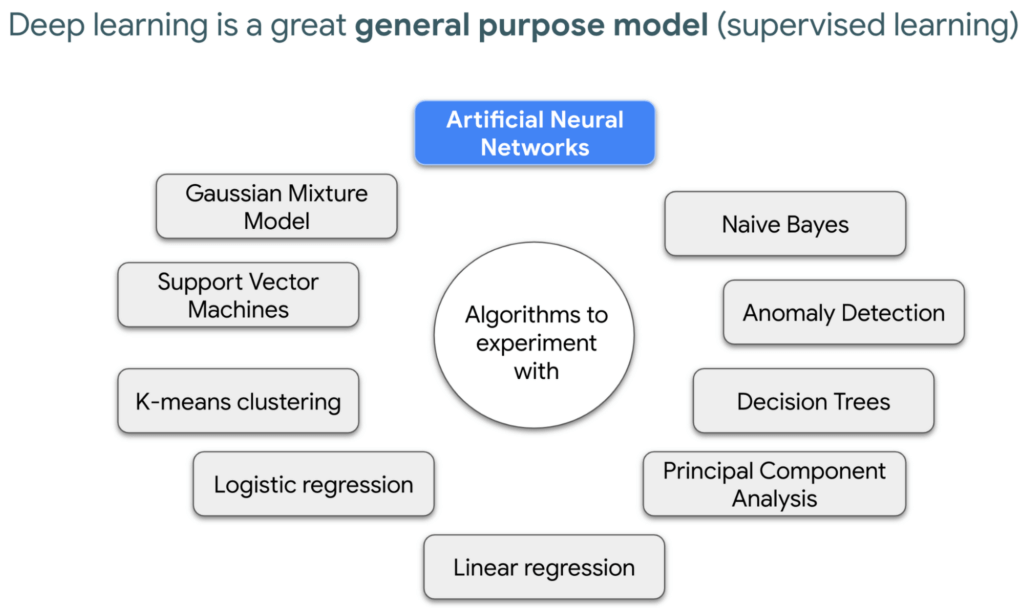
In my experience, I have observed that it’s common in machine learning to surrender to the process of experimenting with many different algorithms in a trial and error fashion, until you get the desired result. My peers and I at Google have a People and Planet AI YouTube series where we talk about how to train and host a model for environmental purposes using Google Cloud and Google Earth Engine. Our focus is inspiring people to use deep learning, and if we could rename the series, we would call it AI for Minimalists since we would recommend artificial neural networks for most of our use cases. And so in this episode we give an overview of what deep learning is and how you can use it for tracking deforestation in supply chains. I also included a summary of the architecture and products you can use in this blog that I presented at the 2022 Geo For Good Summit. For those of you interested in diving even deeper into code, please visit our end-to-end sample (click “open in colab” at the bottom of the screen to view this tutorial in a notebook format).
What’s included in this article
- What is Deep Learning?
- Measuring deforestation in extractive supply chains with ML
- When to build a custom model outside of Earth Engine?
- How to build a model with Google Cloud & Earth Engine?
- Try it out!
What is Deep Learning?
Out of the many ML algorithms out there, I’m happy to share that deep learning or artificial neural networks is a technique that can be used for almost any supervised learning job.
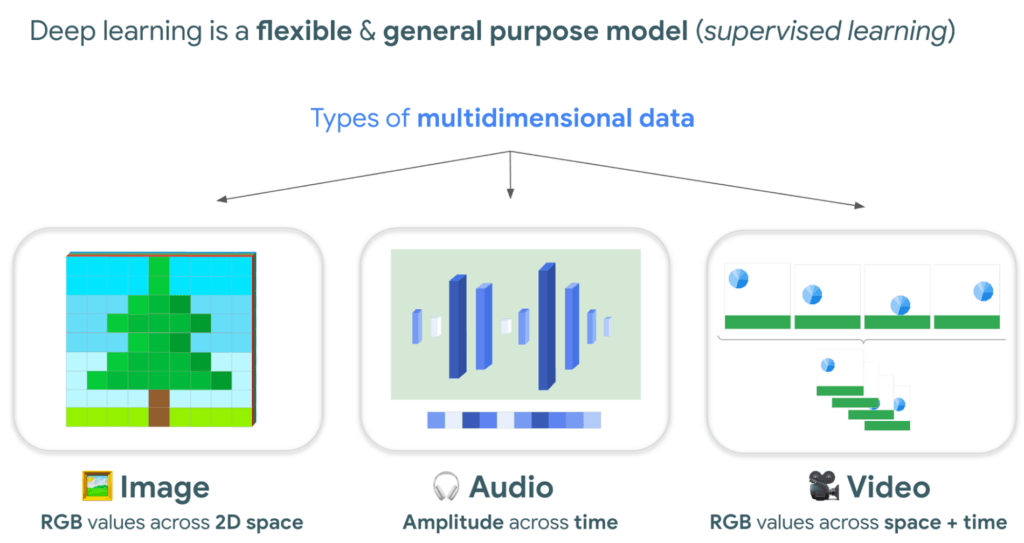
In supervised learning, you tell a computer the right answers to look for, through examples. Deep learning is very flexible, and is a great go-to algorithm. Especially for images, audio, or video files which are types of multidimensional data. This is because each of these data types have one or more dimensions with specific values for each point.
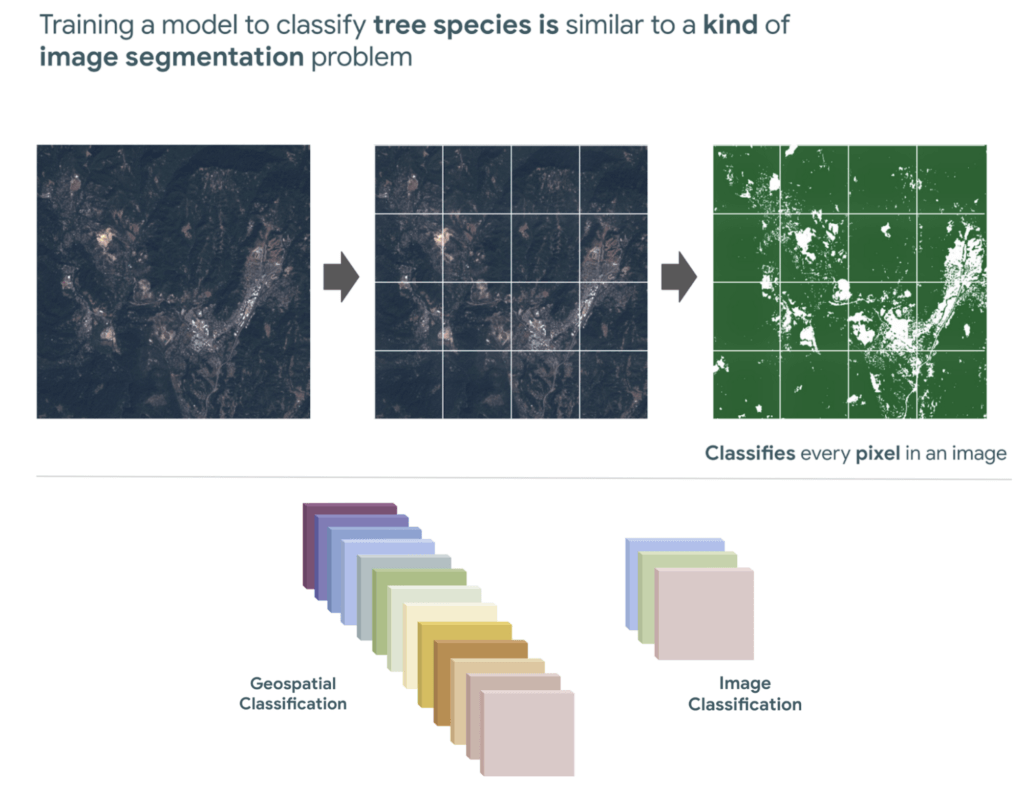
And training a model to classify tree species using satellite images is kind of like an image segmentation problem, where every pixel in the image is classified.
“Deep learning approaches problems differently”
David Cavazos, Developer Programs Engineer
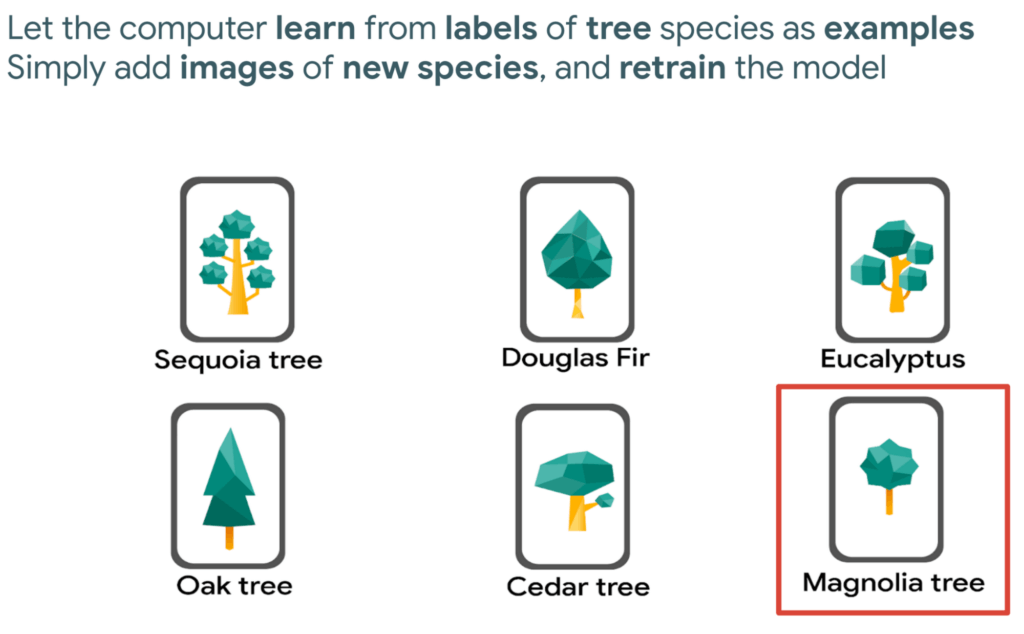
There’s no writing a function with explicit & sequential steps that reviews every single pixel one by one for every image, as traditional software development does. Let’s say you wish to build a model that classifies tree species. You don’t spend time coding all the instructions, but instead give a computer examples of images with tree species labels, and let it learn from these examples. And when you want to add more species, it’s as simple as adding new images of that species to retrain the model.
Measuring deforestation in extractive supply chains with ML
So let’s say we would like to measure deforestation using deep learning; to get started with building a model we first need a dataset that includes satellite images with an even amount of labels marking where there are trees and where there aren’t. Next, we choose a goal, here are a few common ones. In our case, we simply want to know if there are trees or not for every pixel, and so this would be a binary semantic segmentation problem.
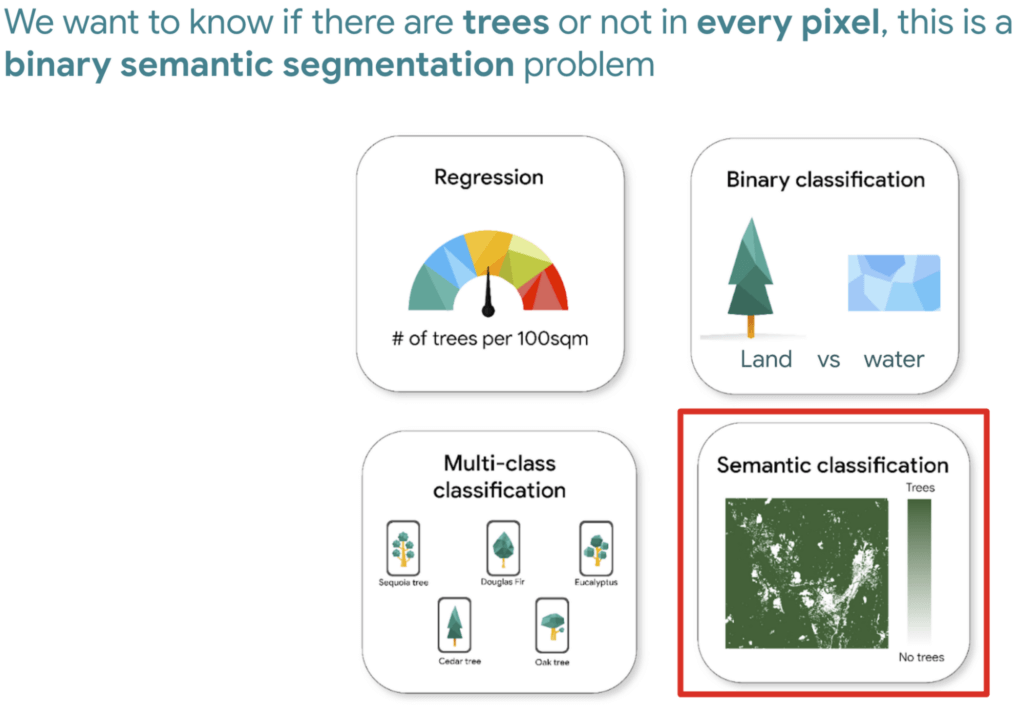
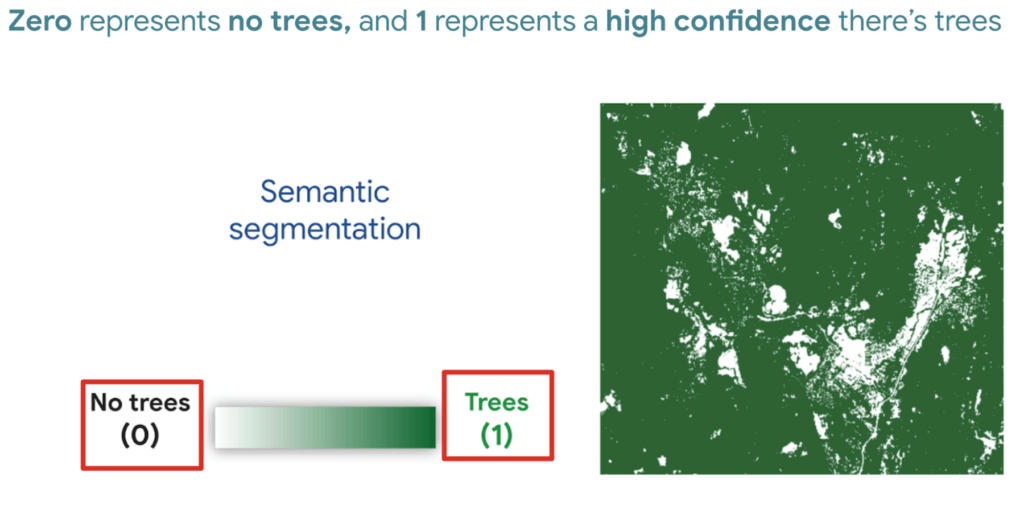
And based on this goal, we expect the outputs to be the percentage of trees for every pixel; as a number between 0 and 1. Zero represents no trees, and one represents a high confidence there are trees.
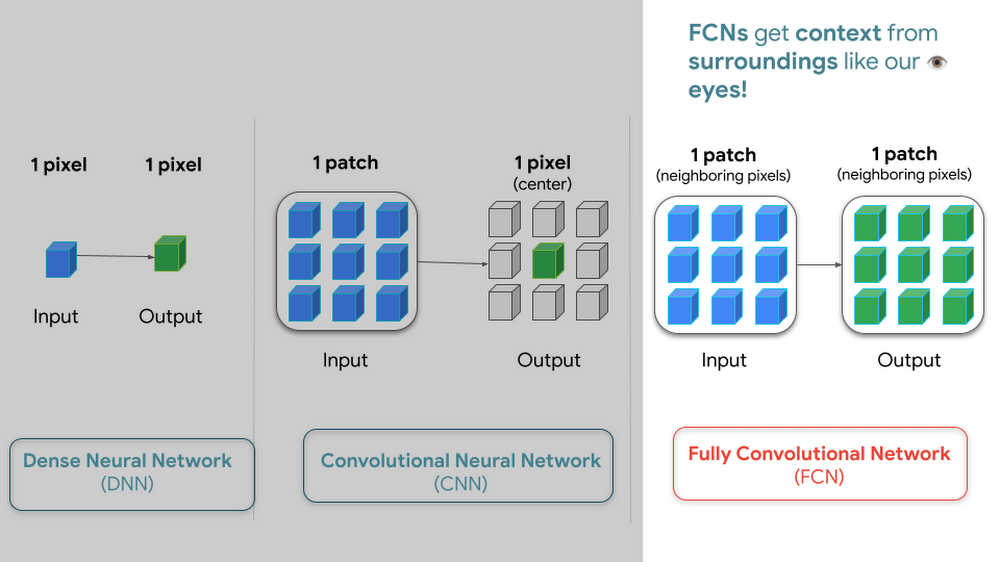
But how do we go from input images into probabilities of trees? Well think about it this way…there are many ways to approach this problem, here are 3 common ways of doing so. My peers and I prefer using Fully convolutional networks when building a map with ML predictions
And since a model is a collection of interconnected layers, we must come up with an arrangement of layers that transforms our data inputs based on our desired outputs. Each layer by the way has something called an activation function, which performs the transformations of each layer before it passes them to the next layer.
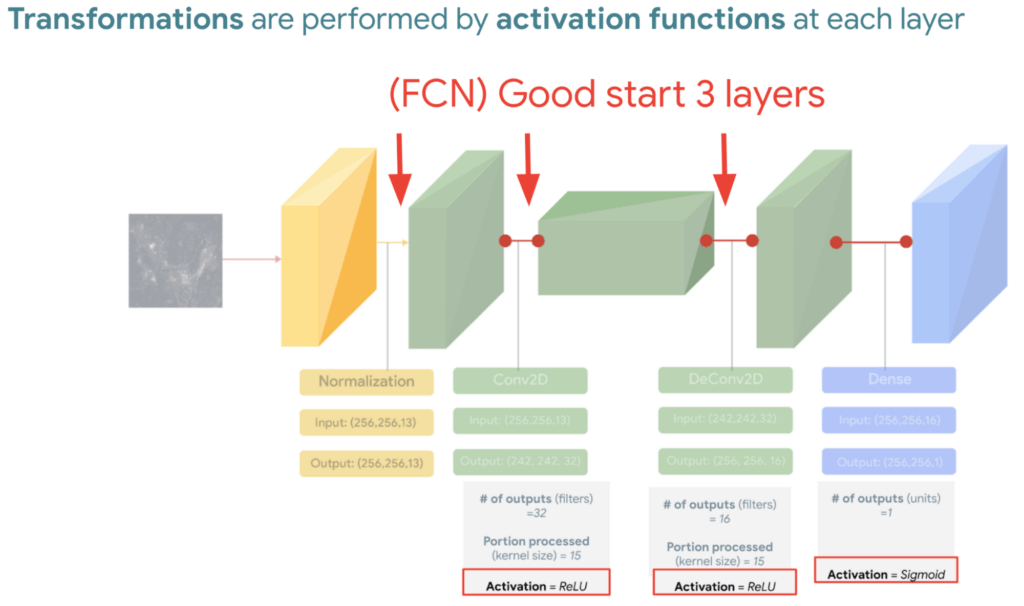
FYI Below is a handy dandy table, with our recommended activation and loss functions to choose from based on your goal. We hope this saves you time.
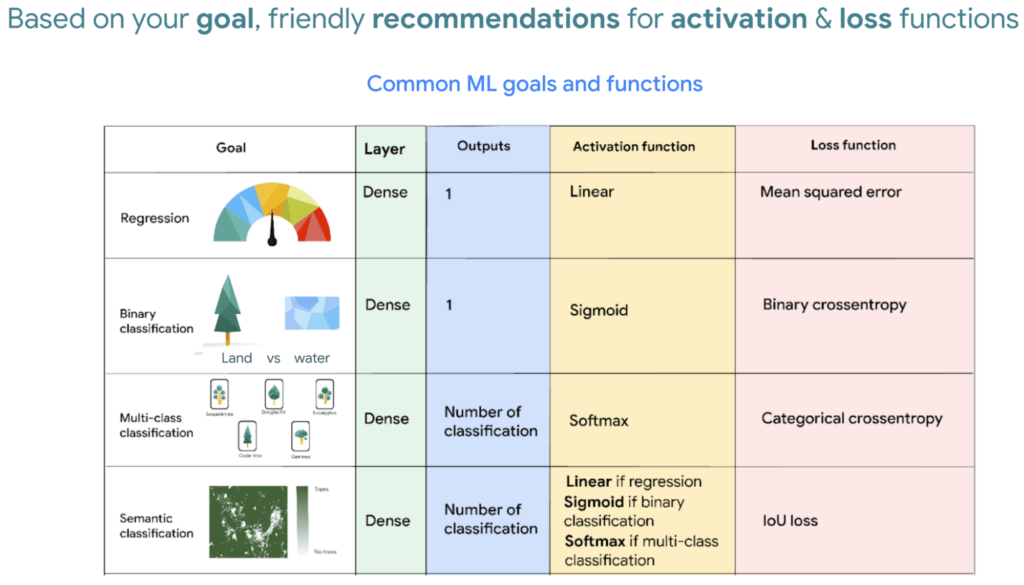
We then reach the fourth and last layer. Depending on our goals at the beginning, we also choose an appropriate loss function that helps us score how well the model did during training.
After choosing layers and functions you will split your data into training and validation datasets. Just remember that all of this work is about experimenting repeatedly until you reach desired results. Our 8min episode gives this overview more in detail.
When to build a custom model outside of Earth Engine
So now that we covered what is deep learning, the next step is understanding which tools to use to build our deforestation model. For starters it’s important to call out that Google Earth Engine is a wonderful tool that helps organizations of all sizes find insights about changes on the planet, in order to make a climate positive impact. It has built-in machine learning algorithms (classifiers) that let users quickly spin them up, with just a basic machine learning background. This is fantastic place to start when using ML on geospatial data, however there are multiple situations where you will want to opt to build a custom model such as:
- You want to use a popular ML library such as TensorFlow Keras.
- You wish to build a state of the art model to build a global and accurate land cover map product such as Google’s Dynamic World.
- Or because you generally have too much data to process that you can’t execute it in just one task in Earth Engine (and are trying to figure out hacky ways to export your data).
Whenever you identify with any of these options, you will want to roll up your sleeves and dive into building a custom model, which does require expertise and of course working with multiple products. But I have good news, using deep learning is a great go-to algorithm.
How to build a model with Google Cloud & Earth Engine?
To get started, you will need an account with Google Earth Engine which is free for non-commercial entities and Google Cloud account which has a free tier if you are just getting started for all users. I have broken up the products you would use by function.
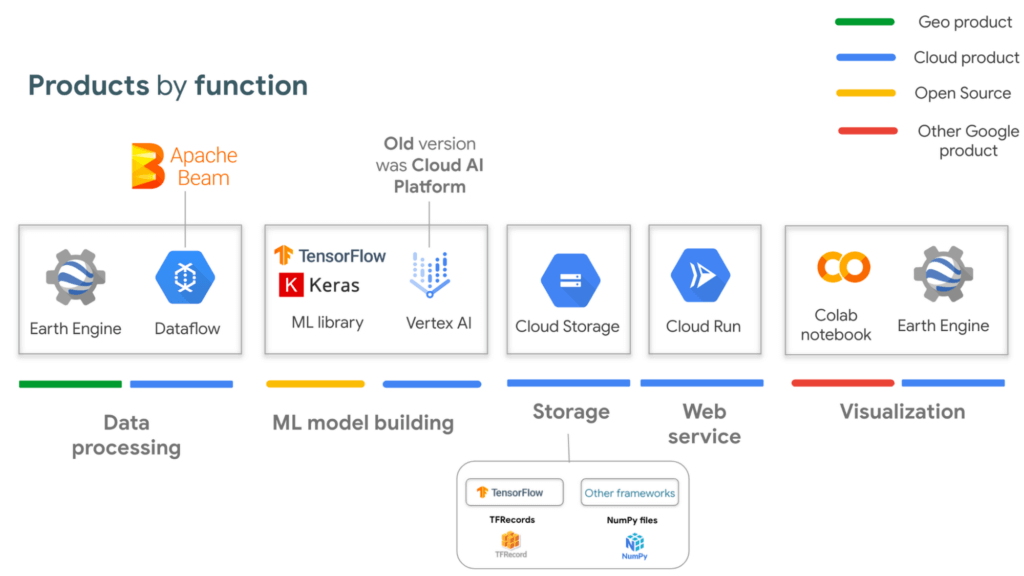
If you are interested in looking deeper into this overview, visit our slides here starting from slide 53 and read the speaker notes. Our code sample also walks through how to integrate with all of these projects end to end (just scroll down and click “open in colab”). But here is a quick visual summary. The main place to start is to identify which are the inputs and which are the outputs.
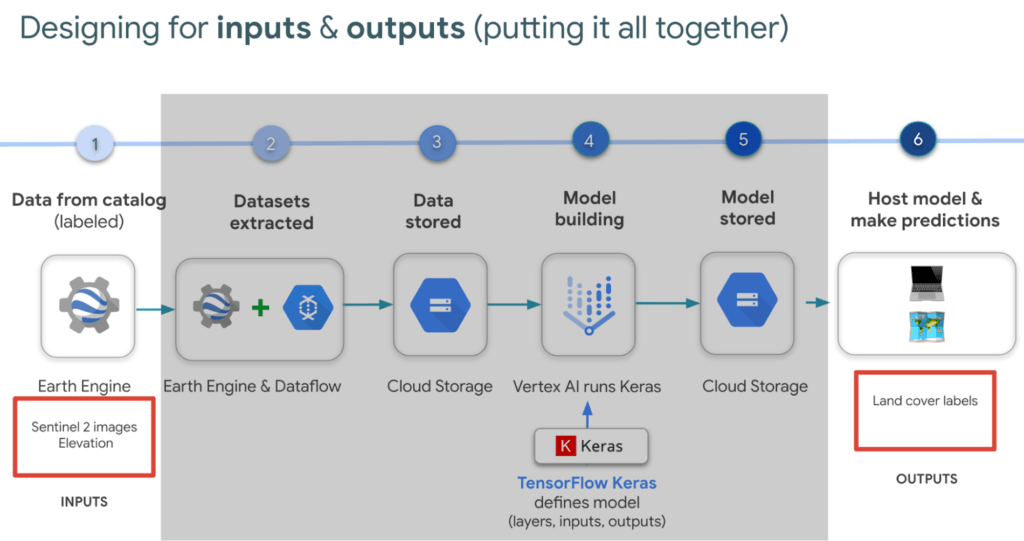
In our latest episodes for our People and Planet AI YouTube series, we walk through how to train a model and then host it in a relatively inexpensive web hosting platform called Cloud Run in episodes of less than 10mins.
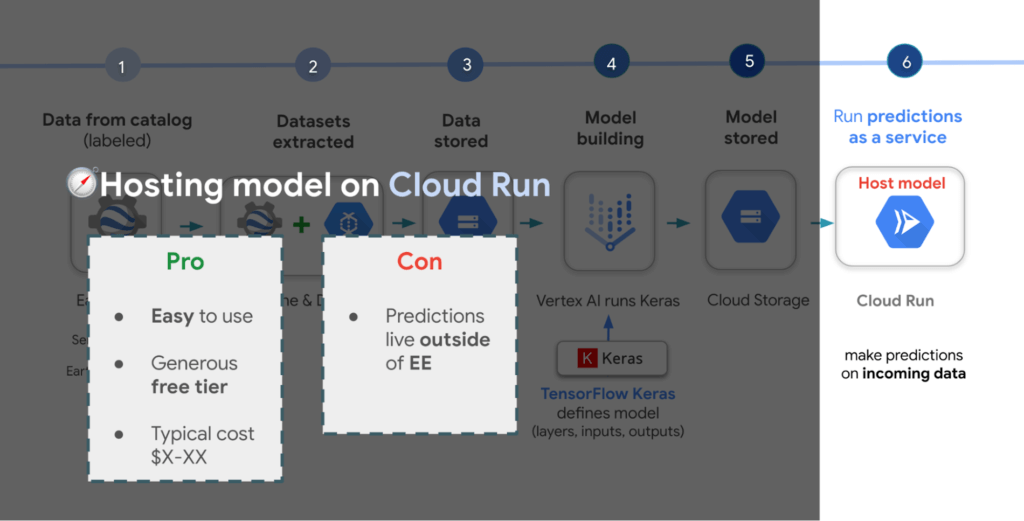
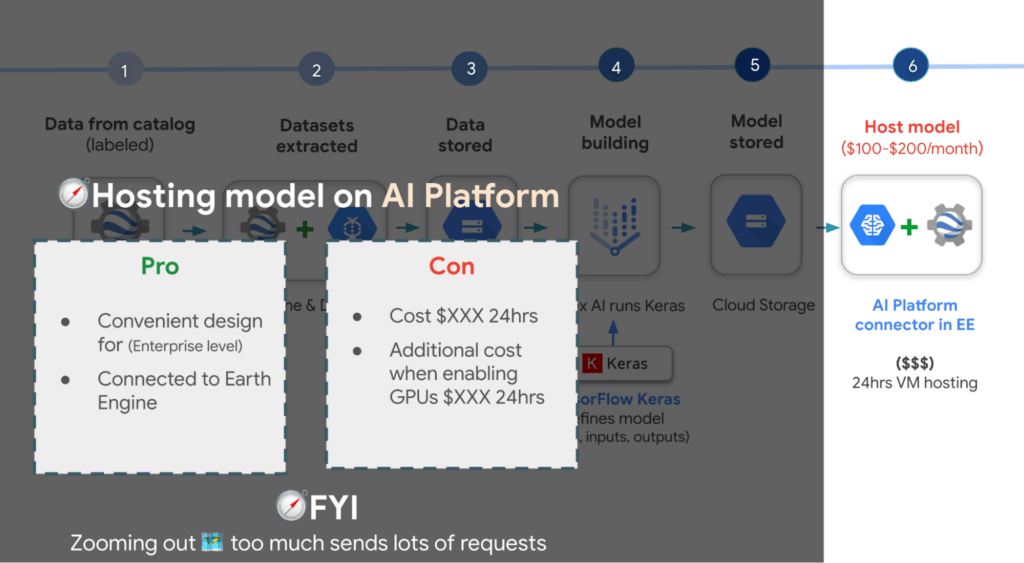
There are a few options presented in the slides, however the current best practice is to train a model using Vertex AI. Do note though that Google Earth Engine is currently not integrated with Vertex AI (we are working on this), but it is with the older (ML predecessor) called Cloud AI Platform (which is the recommended ML platform to use moving forward). As such, if you would like to import your model for detecting deforestation back into Earth Engine after training it in Vertex AI for example, you can host the model in Cloud AI Platform and get predictions. Just note that it’s a 24 hour paid service and so it can cost upwards of $100 or more a month to host your model to stream predictions. It also currently supports the following model building platforms if you don’t wish to use TensorFlow.
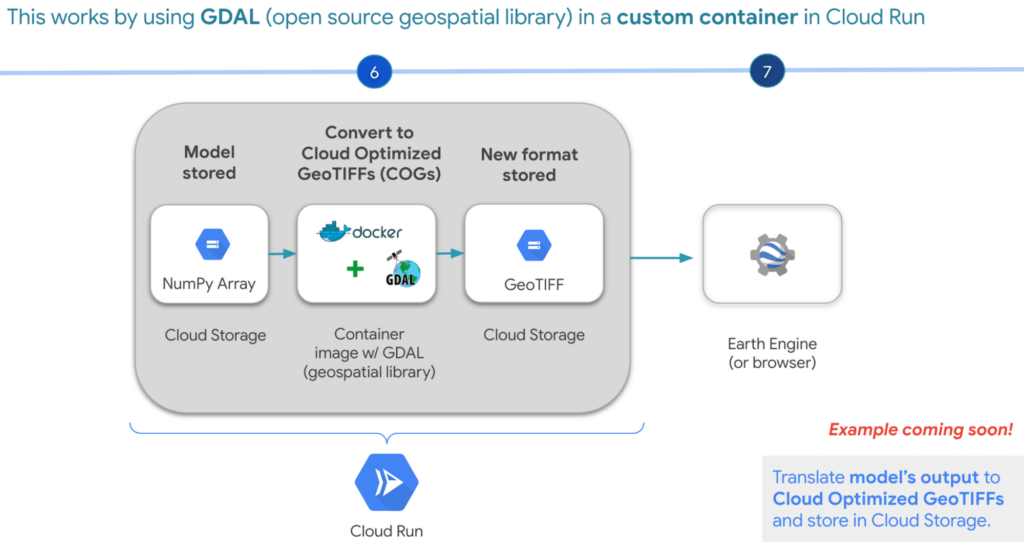
A cheaper alternative but without the convenience AI Platform offers is to manually translate the model’s output, which is NumPy Arrays into Cloud Optimized GeoTIFFs in order to load it back into Earth Engine using Cloud Run. Within this web service you would store the NumPy arrays into a Cloud Storage bucket, then spin up a container image with GDAL, an open source geospatial library in order to convert them into Cloud Optimized GeoTIFF files into Cloud Storage. This way you can view predictions from your browser or Earth Engine.
Try it out
This was a quick overview of deep learning and what Cloud products you can use to solve meaningful environmental challenges like detecting deforestation in extractive supply chains. If you would like to try it out, check out our code sample here (click “open in colab” at the bottom of the screen to view the tutorial in our notebook format or click this shortcut here).
Unifying Data and AI: Bringing Unstructured Data Analytics to BigQuery

4194
Of your peers have already read this article.
2:30 Minutes
The most insightful time you'll spend today!
Over one third of organizations believe that data analytics and machine learning have the most potential to significantly alter the way they run business over the next 3 to 5 years. However, only 26% of organizations are data driven. One of the biggest reasons for this gap is that a major portion of the data generated today is unstructured, which includes images, documents, and videos. It is estimated to cover roughly up to 80% of all data, which has so far remained untapped by organizations.
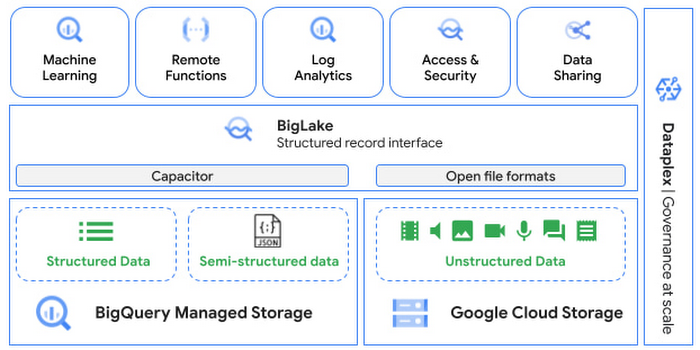
One of the goals of Google’s data cloud is to help customers realize value from data of all types and formats. Earlier this year, we announced BigLake, which unifies data lakes and warehouses under a single management framework, enabling you to analyze, search, secure, govern and share unstructured data using BigQuery.
At Next ‘22, we announced the preview of object tables, a new table type in BigQuery that provides a structured record interface for unstructured data stored in Google Cloud Storage. This enables you to directly run analytics and machine learning on images, audio, documents and other file types using existing frameworks like SQL and remote functions natively in BigQuery itself. Object tables also extend our best practices of securing, sharing and governing structured data to unstructured, without needing to learn or deploy new tools.
Directly process unstructured data using BigQuery ML
Object tables contain metadata such as URI (Uniform Resource Identifier), content type, and size that can be queried just like other BigQuery tables. You can then derive inferences using machine learning models on unstructured data with BigQuery ML. As part of preview, you can import open source TensorFlow Hub image models, or your own custom models to annotate the images. Very soon, we plan to enable this for audio, video, text and many other formats, and pre-trained models to enable out-of-the box analysis. Check out this video to learn more and watch a demo.
Create an object table
CREATE EXTERNAL TABLE my_dataset.object_table
WITH CONNECTION us.my_connection
OPTIONS(uris=["gs://mybucket/images/*.jpg"],
object_metadata="SIMPLE", metadata_cache_mode="AUTOMATIC");
# Generate inferences with BQML
SELECT * FROM ML.PREDICT(
MODEL my_dataset.vision_model,
(SELECT ML.DECODE_IMAGE(data) AS img FROM my_dataset.object_table)
);By analyzing unstructured data natively in BigQuery, businesses can
- Eliminate manual effort as pre-processing steps such as tuning image sizes to model requirements are automated
- Leverage the simple and familiar SQL interface to quickly gain insights
- Save costs by utilizing existing BigQuery slots without needing to provision new forms of compute
Adswerve is a leading Google Marketing, Analytics and Cloud partner on a mission to humanize data. Twiddy & Co. is Adswerve’s client – a vacation rental company in North Carolina. By combining structured and unstructured data, Twiddy and Adswerve used BigQuery ML to analyze images of rental listings and predict the click-through rate, enabling data-driven photo editorial decisions.
“Twiddy now has the capability to use advanced image analysis to stay competitive in an ever changing landscape of vacation rental providers – and can do this using their in-house SQL skills.” said Pat Grady, Technology Evangelist, Adswerve
Process unstructured data using remote functions
Customers today use remote functions (UDFs) to process structured data for languages and libraries that are not supported in BigQuery. We are extending this capability to process unstructured data using object tables.
Object tables provide signed URLs to allow remote UDFs running on Cloud Functions or Cloud Run to process the object table content. This is particularly useful for running Google’s pre-trained AI models, including Vision AI, Speech-to-Text, Document AI, open source libraries such as Apache Tika, or deploying your own custom models where performance SLAs are important.
Here’s an example of an object table being created over PDF files that are parsed using an open source library running as a remote UDF.
SELECT uri, extract_title(samples.parse_tika(signed_url)) AS title<br>FROM EXTERNAL_OBJECT_TRANSFORM(TABLE pdf_files_object_table,<br>["SIGNED_URL"]);
Extending more BigQuery capabilities to unstructured data
Business intelligence – The results of analyzing unstructured data either directly in BigQuery ML or via UDFs can be combined with your structured data to build unified reports using Looker Studio (at no charge), Looker or any of your preferred BI solutions. This allows you to gain more comprehensive business insights. For example, online retailers can analyze product return rates by correlating them with the images of defective products. Similarly, digital advertisers can correlate ad performance with various attributes of ad creatives to make more informed decisions.
BigQuery search index – Customers are increasingly using the search functionality of BigQuery to power search use cases. These capabilities now extend to unstructured data analytics as well. Whether you use BigQueryML to produce inference on images or use remote UDFs with Doc AI to produce document extraction, the results can now be search indexed and used to support search access patterns.
Here’s an example of search index on data that is parsed from PDF files:
CREATE SEARCH INDEX my_index ON pdf_text_extract(ALL COLUMNS);
SELECT * FROM pdf_text_extract WHERE SEARCH(pdf_text, "Google");Security and governance – We are extending BigQuery’s row-level security capabilities to help you secure objects in Google Cloud Storage. By securing specific rows in an object table, you can restrict the ability of end users to retrieve the signed URLs of corresponding URIs present in the table. This is a shared responsibility security model, for which administrators need to ensure that end users don’t have direct access to Google Cloud Storage, and use signed URLs from object tables as the only access mechanism.
Here’s an example of a policy for PII images that are secured to be first processed through a blur pipeline:
CREATE ROW ACCESS POLICY pii_data ON object_table_images
GRANT TO ("group:admin@example.com")
FILTER USING (ARRAY_LENGTH(metadata)=1 AND
metadata[OFFSET(0)].name="face_detected")
Soon, Dataplex will support object tables, allowing you to automatically create object tables in BigQuery and manage and govern unstructured data at scale.
Data sharing – You can now use Analytics Hub to share unstructured data with partners, customers and suppliers while not compromising on security and governance. Subscribers can consume the rows of object tables that are shared with them, and use signed URLs for unstructured data objects.
Getting Started
Submit this form to try these new capabilities that unlock the power of your unstructured data in BigQuery. Watch this demo to learn more about these new capabilities.
Special thanks to engineering leaders Amir Hormati, Justin Levandoski and Yuri Volobuev for contributing to this post.
Johnson & Johnson Increases it’s Ability to Find Highly Qualified Staffers for Business Critical Roles by 41% with Easy-to-Use AI

5140
Of your peers have already read this article.
3:30 Minutes
The most insightful time you'll spend today!
Job seekers can often feel lost or disconnected—like the right opportunity is out there, but they don’t know where or how to look. Employers face a similar challenge when trying to attract the right candidates. Many companies, especially large enterprises, face a talent shortage across a range of critical roles.
For global companies like Johnson & Johnson (J&J), their online career website is an important recruiting tool. It’s the “front door” for talent that could make a vital difference in the company’s future and drive innovation for years to come.
However, career sites are often underutilized. If a job seeker doesn’t find a good job match with a quick search, they will likely move on. Too often, that represents a lost opportunity for both the company and the job seeker that could have been avoided with better search results.
“Partnering with Jibe and using Cloud Talent Solution for our career site allows us to do a much better job matching opportunity to talent on a very large scale.”
—Sjoerd Gehring, Global VP of Talent Acquisition, Johnson & Johnson
While J&J receives approximately 1 million applications for 25,000 positions each year, the percent of applicants that were highly qualified for open positions was low.
Although the company always has a variety of open jobs on its career site, it noticed that even when strong matches existed between online job seekers and available positions, search results often didn’t highlight or even display the right opportunities. The user interface wasn’t intuitive enough, and job seekers couldn’t easily find their ideal positions.
As J&J began to reevaluate recruiting to take a more relationship-centric and digitally-driven approach, the company began working with Jibe, a career-site solutions provider.
Jibe introduced J&J to Cloud Talent Solution, which uses machine learning to better match job listings with job seekers’ interests and qualifications. Using Cloud Talent Solution, companies can build a compelling career-site search experience that helps candidates easily find the jobs most relevant to them. With smarter job searches and recommendations, J&J improved the effectiveness of its career site in just a few weeks.
“Jibe and Google make it easy for a large company to make a real difference in the candidate experience without investing a lot of time, money, or internal resources,” says Sjoerd Gehring, Global VP of Talent Acquisition at Johnson & Johnson. “Now that we’re using Cloud Talent Solution, our career site search results are exponentially better.”
Transforming job searches with better matches
Cloud Talent Solution better connects job seekers with jobs, because it understands the nuances of job titles, descriptions, industry jargon, and skills, matching job seeker preferences with relevant listings based on sophisticated classifications and relational models. It helps decipher job seeker queries and employer job postings, removing the manual effort of optimizing job content for search.
By using the Jibe platform to integrate Cloud Talent Solution with its career site, job seekers are more easily finding what they’re looking for and J&J is filling business critical roles more efficiently.
Since integrating Cloud Talent Solution, J&J has seen a 41% increase in high-quality job applicants per search and a nearly 45% increase in click-through rate on its career site.
“Partnering with Jibe and using Cloud Talent Solution for our career site allows us to do a much better job matching opportunity to talent on a very large scale,” adds Sjoerd. “We’re able to take a more personal approach and really connect with job seekers, which is a win.”
“Today’s job seekers expect a prospective employer’s career site to work like the other cloud services they use. Using Google’s machine learning and artificial intelligence, we can help customers like J&J get better search results and return jobs that candidates are more likely to apply to.”
—Joe Essenfeld, Founder & CEO, Jibe
Connecting people with opportunities
J&J is now offering job seekers experiences in line with what they have come to expect as consumers—searching for a job should be as easy as searching for flights, restaurants, products, and other services. Because candidates are familiar with the experience, their level of interaction and engagement goes up, creating a larger pipeline of qualified candidates and filling jobs faster.
“Today’s job seekers expect a prospective employer’s career site to work like the other cloud services they use,” says Joe Essenfeld, Founder & CEO at Jibe. “Using Google’s machine learning and artificial intelligence, we can help customers like J&J get better search results and return jobs that candidates are more likely to apply to.”
A new digital revolution for recruiting
J&J continues to work with Jibe and Google to offer new features which make its career site even more effective. By offering job seekers a transformative, engaging experience, J&J is a more attractive and visible employer, increasing the value of its brand. It’s also continuously improving its recruiting process with end-to-end visibility and feedback from interactions with a million people every year.
“Transforming our career site with Jibe and Cloud Talent Solution directly impacts our ability to attract high-quality talent and hire those candidates faster,” adds Sjoerd. “Lots of people are looking for their dream job, and if it’s here at J&J, we want them to find it quickly and easily.”
Unlocking Data Value: Latest Data Platforms and Announcements at the Next 21

6434
Of your peers have already read this article.
3:30 Minutes
The most insightful time you'll spend today!
Today at Google Cloud Next we are announcing innovations that will enable data teams to simplify how they work with data and derive value from it faster. These new solutions will help organizations build modern data architectures with real-time analytics to power innovative, mission-critical, data-driven applications.
Too often, even the best minds in data are constrained by ineffective systems and technologies. A recent study showed that only 32% of companies surveyed gained value from their data investments. Previous approaches have resulted in difficult to access, slow, unreliable, complex, and fragmented systems.
At Google Cloud, we are committed to changing this reality by helping customers simplify their approach to data to build their data clouds. Google Cloud’s data platform is simply unmatched for speed, scale, security, and reliability for any size organization with built-in, industry-leading machine learning (ML) and artificial intelligence (AI), and an open standards-based approach.
Vertex AI and data platform services unlock rapid ML modeling
With the launch of Vertex AI in May 2021, we empowered data scientists and engineers to build reliable, standardized AI pipelines that take advantage of the power of Google Cloud’s data pipelines. Today, we are taking this a step further with the launch of Vertex AI Workbench, a unified user experience to build and deploy ML models faster, accelerating time-to-value for data scientists and their organizations. We’ve integrated data engineering capabilities directly into the data science environment, which lets you ingest and analyze data, and deploy and manage ML models, all from a single interface.
Data scientists can now build and train models 5X faster on Vertex AI than on traditional notebooks. This is primarily enabled by integrations across data services (like Dataproc, BigQuery, Dataplex, and Looker), which significantly reduce context switching. The unified experience of Vertex AI let’s data scientists coordinate, transform, secure and monitor Machine Learning Operations (MLOps) from within a single interface, for their long-running, self-improving, and safely-managed AI services.
“As per IDC’s AI StrategiesView 2021, model development duration, scalable deployment, and model management are three of the top five challenges in scaling AI initiatives,” said Ritu Jyoti, Group Vice President, AI and Automation Research Practice at IDC. “Vertex AI Workbench provides a collaborative development environment for the entire ML workflow – connecting data services such as BigQuery and Spark on Google Cloud, to Vertex AI and MLOps services. As such, data scientists and engineers will be able to deploy and manage more models, more easily and quickly, from within one interface.”
Ecommerce company, Wayfair, has transformed its merchandising capabilities with data and AI services. “At Wayfair, data is at the center of our business. With more than 22 million products from more than 16,000 suppliers, the process of helping customers find the exact right item for their needs across our vast ecosystem presents exciting challenges,” said Matt Ferrari, Head of Ad Tech, Customer Intelligence, and Machine Learning; Engineering and Product at Wayfair. “From managing our online catalog and inventory, to building a strong logistics network, to making it easier to share product data with suppliers, we rely on services including BigQuery to ensure that we are able to access high-performance, low-maintenance data at scale. Vertex AI Workbench and Vertex AI Training accelerate our adoption of highly scalable model development and training capabilities.”
BigQuery Omni: Breaking data silos with cross-cloud analytics and governance
Businesses across a variety of industries are choosing Google Cloud to develop their data cloud strategies and better predict business outcomes — BigQuery is a key part of that solution portfolio. To address complex data management across hybrid and multicloud environments, this month we are announcing the general availability of BigQuery Omni, which allows customers to analyze data across Google Cloud, AWS, and Azure. Healthcare provider, Johnson and Johnson was able to combine data in Google Cloud and AWS S3 with BigQuery Omni without needing data to migrate.
This flexible, fully-managed, cross-cloud analytics solution allows you to cost-effectively and securely answer questions and share results from a single pane of glass across your datasets, wherever you are. In addition to these multicloud capabilities, Dataplex will be generally available this quarter to provide an intelligent data fabric that enables you to keep your data distributed while making it securely accessible to all your analytics tools.
Spark on Google Cloud simplifies data engineering
To help make data engineering even easier, we are announcing the general availability of Spark on Google Cloud, the world’s first autoscaling and serverless Spark service for the Google Cloud data platform. This allows data engineers, data scientists, and data analysts to use Spark from their preferred interfaces without data replication or custom integrations. Using this capability, developers can write applications and pipelines that autoscale without any manual infrastructure provisioning or tuning. This new service makes Spark a first class citizen on Google Cloud, and enables customers to get started in seconds and scale infinitely, regardless if you start in BigQuery, Dataproc, Dataplex, or Vertex AI.
Spanner meets PostgreSQL: global, relational scale with a popular interface
We’re continuing to make Cloud Spanner, our fully managed, globally scalable, relational database, available to more customers now with a PostgreSQL interface, now in preview. With this new PostgreSQL interface, enterprises can take advantage of Spanner’s unmatched global scale, 99.999% availability, and strong consistency using skills and tools from the popular PostgreSQL ecosystem.
This interface supports Spanner’s rich feature set that uses the most popular PostgreSQL data types and SQL features to reduce the barrier to entry for building transformational applications. Using the tools and skills they already have, developer teams gain flexibility and peace of mind because the schemas and queries they build against the PostgreSQL interface can be easily ported to another Postgres environment. Complete this form to request access to the preview.
Our commitment to the PostgreSQL ecosystem has been long standing. Customers choose Cloud SQL for the flexibility to run PostgreSQL, MySQL and SQL Server workloads. Cloud SQL provides a rich extension collection, configuration flags, and open ecosystem, without the hassle of database provisioning, storage capacity management, or other time-consuming tasks.
Auto Trader has migrated approximately 65% of their Oracle footprint to Cloud SQL, which remains a strategic priority for the company. Using Cloud SQL, BigQuery, and Looker to facilitate access to data for their users, and with Cloud SQL’s fully managed services, Auto Trader’s release cadence has improved by over 140% (year-over-year), enabling an impressive peak of 458 releases to production in a single day.
Looker integrations make augmented analytics a reality
We are announcing a new integration between Tableau and Looker that will allow customers to operationalize analytics and more effectively scale their deployments with trusted, real-time data, and less maintenance for developers and administrators. Tableau customers will soon be able to leverage Looker’s semantic model, enabling new levels of data governance while democratizing access to data. They will also be able to pair their enterprise semantic layer with Tableau’s leading analytics platform. The future might be uncertain, but together with our partners we can help you plan for it.
We remain committed to developing new ways to help organizations go beyond traditional business intelligence with Looker. In addition to innovating within Looker, we’re continuing to integrate within other parts of Google Cloud. Today, we are sharing new ways to help customers deliver trusted data experiences and leverage augmented analytics to take intelligent action.
First, we’re enabling you to democratize access to trusted data in tools where you are already familiar. Connected Sheets already allows you to interactively explore BigQuery data in a familiar spreadsheet interface and will soon be able to leverage the governed data and business metrics in Looker’s semantic model. It will be available in preview by the end of this year.
Another integration we’re announcing is Looker’s Solution for Contact Center AI, which helps you gain a deeper understanding and appreciation of your customers’ full journey by unlocking insights from all of your company’s first-party data, such as contextualizing support calls to make sure your most valuable customers receive the best service.
We’re also sharing the new Looker Block for Healthcare NLP API, which provides simplified access to intelligent insights from unstructured medical text. Compatible with Fast Healthcare Interoperability Resources (FHIR), healthcare providers, payers, and pharma companies can quickly understand the context and relationships of medical concepts within the text, and in turn, can begin to link this to other clinical data sources for additional AI and ML actions.
Bringing the best of Google together with Google Earth Engine and Google Cloud
We are thrilled to announce the preview of Google Earth Engine on Google Cloud. This launch makes Google Earth Engine’s 50+ petabyte catalog of satellite imagery and geospatial data sets available for planetary-scale analysis. Google Cloud customers will be able to integrate Earth Engine with BigQuery, Google Cloud’s ML technologies, and Google Maps Platform. This gives data teams a way to better understand how the world is changing and what actions they can take — from sustainable sourcing, to saving energy and materials costs, to understanding business risks, to serving new customer needs.
For over a decade, Earth Engine has supported the work of researchers and NGOs from around the world, and this new integration brings the best of Google and Google Cloud together to empower enterprises to create a sustainable future for our planet and for your business.
At Google Cloud, we are deeply grateful to work with companies of all sizes, and across industries, to build their data clouds. Join my keynote session to hear how organizations are leveraging the full power of data, from databases to analytics that support decision making to AI and ML that predict and automate the future. We’ll also highlight our latest product innovations for BigQuery, Spanner, Looker, and Vertex AI.
I can’t wait to hear how you will turn data into intelligence and look forward to connecting with you.
More Relevant Stories for Your Company

SystemsResearch@Google (SRG) to Revamp the Future of Hyperscaler Systems
For over two decades, Google has helped lead the invention of modern cloud systems—defining, designing and deploying warehouse-scale computing as the foundation for reliable, performant, and secure global-scale information services delivered to billions of users around the world. This leadership involves significant innovation across a broad range of systems technologies, including distributed systems, storage

Increasing Production Efficiency: How AI Can Improve Asset Utilization and Minimize Downtime
Today, manufacturers are advancing on their factory digitalization journey, betting on innovative technologies to strengthen competitiveness, deliver sustainable growth, and offer new services. Macroeconomic factors - such as high energy costs, increasing labor, and raw material shortages - drive the need for urgent operational optimizations and automation. Cloud capabilities have

A Road to Possibilities: Google Maps Platform Website
For more than 15 years, developers have used Google Maps Platform to deliver location-based experiences to their end users and used location intelligence to optimize their businesses. Along this journey, we’ve made a variety of changes to better support our community as needs have changed and new industries and technologies

Google Cloud Modernized Wisconsin Department of Workforce Development to Process 150K+ Unemployment Claims Per Week
When confronted with challenges, resilient organizations adapt and innovate to address changing customer needs. Through its partnership with Google Cloud, the Wisconsin Department of Workforce Development exemplifies this evolutionary approach. Just a few months ago, challenges created by the antiquated unemployment insurance (UI) system threatened the agency's ability to serve
