





How APIs Helped PWC Open New Revenue Streams Using Existing Data

4693
Of your peers have already read this article.
5.17 Minutes
The most insightful time you'll spend today!
PwC, one of the “Big Four” accounting firms, is well-known for professional services structured around auditing, insurance, tax, legal, and traditional management consulting. In Australia, the PwC Innovation and Ventures group has taken the global lead in building new, technology-based, turnkey lines of business outside of PwC’s traditional service areas. Applying its insights and knowledge base to the company’s vast amounts of existing data, PwC has uncovered new revenue models, distinct from its traditional, labor-intensive services.
Traditionally, people at PwC connected to critical data in response to scheduled tasks or crises in order to provide independent advice, often after the fact, when there’s little runway to make considered business decisions. The company wanted to move beyond the status quo, where people connected to static data and where benchmarking, deeper insights, and alerts were often an afterthought. Expertise gained from analyzing data and drawing valuable insights often was limited to individuals—it didn’t scale. PwC aimed to leap forward technologically and build utility and value for its customers through the development of a vibrant API-based ecosystem.
Innovation From Down Under
Australia is helping to lead the way at PwC from a software and development perspective. Early on, the Innovation and Ventures group decided to collaborate with PwC New Zealand, which leads the world in cloud general ledger adoption. The group represents the first with over 20% of its customer companies keeping their general ledgers in the cloud (that figure is currently around 35%), and serves as an early example of what can be achieved with APIs based on cloud general ledger data.
Accessing proprietary data (most significantly general ledger data), transforming it, and connecting it to an ecosystem of partners and clients via APIs, has quickly proved a winning formula for PwC, in the form of its Next platform, which combines multiple cloud accounting tools and integrated cloud applications in an open platform. It also includes customizable dashboards that provide a holistic view of a client’s entire portfolio, including business trends, in real time.
“By our very nature, we’re a people and services business, evolving into a data business. The biggest help that Apigee has provided in this transformation is in helping us expose core, rich data so that our people who provide services today can actually demonstrate value in the market tomorrow.”
— Trent Lund, PwC Australia
In developing the firm’s first technology products, PwC Australia’s Head of Innovation and Ventures Trent Lund was adamant that as an accounting firm, PwC never spend a dollar building something that technology professionals had already done better. That credo led Lund to select Google’s Apigee as PwC’s platform of choice for developing productized APIs.
Cloud-first Strategy
Increasingly, the datasets PwC wants to connect with are from public sources and open APIs coming from cloud providers. The Apigee toolset is perfectly positioned for Lund’s team’s focus on data connectivity—especially now that Apigee is part of Google, Lund says.
“The Apigee integration into Google is really helpful for us because we can connect in with that same ecosystem. Our team is relatively small by global standards, so we really don’t have time to try and foster multiple technology relationships,” Lund says. “We need to have deep, trusted relationships where we can get a level of sharing now and into the future, and that’s what we get with Apigee.”
PwC Australia continues to innovate and build the platform, but rather than continuing to pay for development from its local innovation fund, the platform is now funded globally so that it can be accelerated and shared across four countries. Australia, New Zealand, the United Kingdom, and the United States are simultaneously guiding the platform’s requirements and features as PwC develops with an awareness of each country’s individual regulations.
For example, compliance with the European Union’s General Data Protection Regulation (GDPR) and China’s data residency rules would be far more complicated without a single technology partner like Apigee that experiences the same global challenges as part of Google, Lund says.

How The New York Times Increased Speed of Delivery by Using Kubernetes
DOWNLOAD CASE STUDY6174
Of your peers have already downloaded this article
2:40 Minutes
The most insightful time you'll spend today!
When New York Times decided a few years ago to move out of its data centers, its first deployments on the public cloud were smaller and less critical applications that were being managed on virtual machines.
“We started building more and more tools, and at some point, we realized that we were doing a disservice by treating Amazon as another data center,” says Deep Kapadia, Executive Director, Engineering at The New York Times.
Kapadia was tapped to lead a Delivery Engineering Team that would “design for the abstractions that cloud providers offer us.”
The team decided to use Google Cloud Platform and its Kubernetes-as-a-service offering, GKE (Google Kubernetes Engine). Owing to Google Cloud solution and GKE, The New York Times was able to increase the speed of delivery.
Some of the legacy VM-based deployments took 45 minutes; with Kubernetes, that time was “just a few seconds to a couple of minutes,” says Brian Balser, Engineering Manager at The New York Times.
“Teams that used to deploy on weekly schedules or had to coordinate schedules with the infrastructure team, now deploy their updates independently, and can do it daily when necessary,” says Tony Li, Site Reliability Engineer, The New York Times.
Adopting Cloud Native Computing Foundation technologies allowed The New York Times to have a more unified approach to deployment across the engineering staff, and portability for the company.
How Eventrac and Workflows Integration Helps Implement Hybrid Architecture in Google Cloud

6544
Of your peers have already read this article.
3:00 Minutes
The most insightful time you'll spend today!
I previously talked about Eventarc for choreographed (event-driven) Cloud Run services and introduced Workflows for orchestrated services.
Eventarc and Workflows are very useful in strictly choreographed or orchestrated architectures. However, you sometimes need a hybrid architecture that combines choreography and orchestration.
For example, imagine a use case where a message to a Pub/Sub topic triggers an automated infrastructure workflow or where a file upload to a Cloud Storage bucket triggers an image processing workflow. In these use cases, the trigger is an event but the actual work is done as an orchestrated workflow.
How do you implement these hybrid architectures in Google Cloud? The answer lies in Eventarc and Workflows integration.
Eventarc triggers
To recap, an Eventarc trigger enables you to read events from Google Cloud sources via Audit Logs and custom sources via Pub/Sub and direct them to Cloud Run services:

One limitation of Eventarc is that it currently only supports Cloud Run as targets. This will change in the future with more supported event targets. It’d be nice to have a future Eventarc trigger to route events from different sources to Workflows directly.
In absence of such a Workflows enabled trigger today, you need to do a little bit of work to connect Eventarc to Workflows. Specifically, you need to use a Cloud Run service as a proxy in the middle to execute the workflow.
Let’s take a look at a couple of concrete examples.
Eventarc Pub/Sub + Workflows integration
In the first example, imagine you want a Pub/Sub message to trigger a workflow.
Define and deploy a workflow
First, define a workflow that you want to execute. Here’s a sample workflows.yaml that simply decodes and logs the Pub/Sub message body:
main:params: [args]steps:- init:assign:- headers: ${args.headers}- body: ${args.body}...- pubSubMessageStep:call: sys.logargs:text: ${"Decoded Pub/Sub message data is " + text.decode(base64.decode(args.body.message.data))}severity: INFODeploy the workflow with a single command:gcloud workflows deploy ${WORKFLOW_NAME} --source=workflow.yaml --location=${REGION}
Deploy a Cloud Run service to execute the workflow
Next, you need a Cloud Run service to execute this workflow. Workflows has an execution API and client libraries that you can use for your favorite language. Here’s an example of the execution code from a Node app.js file. It simply passes the received HTTP request headers and body to the workflow and executes it:
const execResponse = await client.createExecution({parent: client.workflowPath(GOOGLE_CLOUD_PROJECT, WORKFLOW_REGION, WORKFLOW_NAME),execution: {argument: JSON.stringify({headers: req.headers, body: req.body})}});
Deploy the Cloud Run service with the Workflows name and region passed as environment variables:
gcloud run deploy ${SERVICE_NAME} \--image gcr.io/${PROJECT_ID}/${SERVICE_NAME} \--region=${REGION} \--allow-unauthenticated \--update-env-vars GOOGLE_CLOUD_PROJECT=${PROJECT_ID},WORKFLOW_REGION=${REGION},WORKFLOW_NAME=${WORKFLOW_NAME}
Connect a Pub/Sub topic to the Cloud Run service
With Cloud Run and Workflows connected, the next step is to connect a Pub/Sub topic to the Cloud Run service by creating an Eventarc Pub/Sub trigger:
gcloud eventarc triggers create ${SERVICE_NAME} \--destination-run-service=${SERVICE_NAME} \--destination-run-region=${REGION} \--location=${REGION} \--event-filters="type=google.cloud.pubsub.topic.v1.messagePublished"
This creates a Pub/Sub topic under the covers that you can access with:
export TOPIC_ID=$(basename $(gcloud eventarc triggers describe ${SERVICE_NAME} --format='value(transport.pubsub.topic)'))
Trigger the workflow
Now that all the wiring is done, you can trigger the workflow by simply sending a Pub/Sub message to the topic created by Eventarc:
gcloud pubsub topics publish ${TOPIC_ID} --message="Hello there"
In a few seconds, you should see the message in Workflows logs, confirming that the Pub/Sub message triggered the execution of the workflow:

Eventarc Audit Log-Storage + Workflows integration
In the second example, imagine you want a file creation event in a Cloud Storage bucket to trigger a workflow. The steps are similar to the Pub/Sub example with a few differences.
Define and deploy a workflow
As an example, you can use this workflow.yaml that logs the bucket and file names:
main:params: [args]steps:...- log:call: sys.logargs:text: ${"Workflows received event from bucket " + bucket + " for file " + file}severity: INFO
Deploy a Cloud Run service to execute the workflow
In the Cloud Run service, you read the CloudEvent from Eventarc and extract the bucket and file name in app.js using the CloudEvent SDK and the Google Event library:
const cloudEvent = HTTP.toEvent({ headers: req.headers, body: req.body });//"protoPayload" : {"resourceName":"projects/_/buckets/events-atamel-images-input/objects/atamel.jpg}";const logEntryData = toLogEntryData(cloudEvent.data);const tokens = logEntryData.protoPayload.resourceName.split('/');const bucket = tokens[3]
Executing the workflow is similar to the Pub/Sub example, except you don’t pass in the whole HTTP request but rather just the bucket and file name to the workflow:
const execResponse = await client.createExecution({parent: client.workflowPath(GOOGLE_CLOUD_PROJECT, WORKFLOW_REGION, WORKFLOW_NAME),execution: {argument: JSON.stringify({bucket: bucket, file: file})}});
Connect Cloud Storage events to the Cloud Run service
To connect Cloud Storage events to the Cloud Run service, create an Eventarc Audit Logs trigger with the service and method names for Cloud Storage:
gcloud eventarc triggers create ${SERVICE_NAME} \--destination-run-service=${SERVICE_NAME} \--destination-run-region=${REGION} \--location=${REGION} \--event-filters="type=google.cloud.audit.log.v1.written" \--event-filters="serviceName=storage.googleapis.com" \--event-filters="methodName=storage.objects.create" \--service-account=${PROJECT_NUMBER}-compute@developer.gserviceaccount.com
Trigger the workflow
Finally, you can trigger the workflow by creating and uploading a file to the bucket:
echo "Hello World" > random.txtgsutil cp random.txt gs://${BUCKET}/random.txt
In a few seconds, you should see the workflow log the bucket and object name.
Conclusion
In this blog post, I showed you how to trigger a workflow with two different event types from Eventarc. It’s certainly possible to do the opposite, namely, trigger a Cloud Run service via Eventarc with a Pub/Sub message (see connector_publish_pubsub.workflows.yaml) from Workflows or a file upload to a bucket from Workflows.
All the code mentioned in this blog post is in eventarc-workflows-integration. Feel free to reach out to me on Twitter @meteatamel for any questions or feedback.
Google Unveils New Cloud Region in Delhi NCR to Power India’s Digitization

8337
Of your peers have already read this article.
2:00 Minutes
The most insightful time you'll spend today!
In the past year, Google has worked to surface timely and reliable health information, amplify public health campaigns, and help nonprofits get urgent support to Indians in need. Now, we are continuing to focus on helping India’s businesses accelerate their digital transformation, deepening our commitment to India’s digitization and economic recovery. To support customers and the public sector in India and across Asia Pacific, we’re excited to announce that our new Google Cloud region in Delhi National Capital Region (NCR) is now open.
Designed to help both Indian and global companies alike build highly available applications for their customers, the Delhi NCR region is our second Google Cloud region in India and 10th to open in Asia Pacific.
What customers and partners are saying
Navigating this past year has been a challenge for companies as they grapple with changing customers demands and economic uncertainty. Technology has played a critical role, and we’ve been fortunate to partner with and serve people, companies, and government institutions around the world to help them adapt. The Google Cloud region in Delhi NCR will help our customers adapt to new requirements, new opportunities and new ways of working, like we’ve helped so many companies do in the region:
- InMobi scaled a personalized AI platform to support 120+ million active users. “With the arrival of the Google Cloud Delhi NCR, InMobi Group sees the opportunity to continue closing the gap between our users and products,” says Mohit Saxena, Co-founder and Group CTO of Inmobi. “Glance, especially, has been serving AI-powered personalised content to over 120 million active users. We can’t wait to continue giving them truly meaningful experiences that are speedy, scale well, and are relevant to them, by expanding the use of our current tools working on Google Cloud with the opening of a new region.”
- Groww now supports a sizable user base. “Google Cloud provides great technology that enables us to build and scale infrastructure to millions of users, and the new Google Cloud region in Delhi NCR will continue to help more businesses and startups in India access powerful cloud-based infrastructure, products and services,” says Neeraj Singh, Co-founder and Chief Technology Officer, Groww.
- HDFC Bank is positioned for the future. “At HDFC Bank, we are harnessing technology platforms to both run and build the bank. As we progress to be future ready, the objective is to invest in future technologies that give us scale, efficiency and resiliency. Towards this the Google Cloud region in Delhi NCR will enable us to enhance our resiliency and help us in building an active-active design framework for our new generation applications on cloud,” says Ramesh Lakshminarayanan, CIO, HDFC Bank.
- Dr. Reddy’s Lab built a modern data platform with Google Cloud. “At Dr Reddy’s, we pride ourselves in helping patients regain good health, acting quickly to provide innovative solutions to address patients’ unmet needs and in accelerating access to medicines to people worldwide. Our Google Cloud-powered data platform is helping us realize these objectives and we welcome Google’s investment in the new Delhi NCR region as helping us and other businesses in India make further contributions to our social and economic future,” says Mukesh Rathi, Senior Vice President & CIO, Dr. Reddy’s Laboratories.
- “To survive the disruption caused by the pandemic and to succeed in the long term, organizations need to become digital natives, so they can be more agile, explore new business models and build new capabilities that boost resilience. A cloud-first strategy plays a key role in enabling businesses to do this,” said Piyush N. Singh, Lead – India market unit & lead – Growth and Strategic Client Relationships, Asia Pacific and Latin America, Accenture. “Harnessing the potential of cloud requires the right data infrastructure and this expansion by Google Cloud will undoubtedly help Indian enterprises in their digital transformation journeys.”
A global network of regions
Delhi NCR joins 25 existing Google Cloud regions connected via our high-performance network, helping customers better serve their users and customers throughout the globe. As the second region in India, customers benefit from improved business continuity planning with distributed, secure infrastructure needed to meet IT and business requirements for disaster recovery, while maintaining data sovereignty.
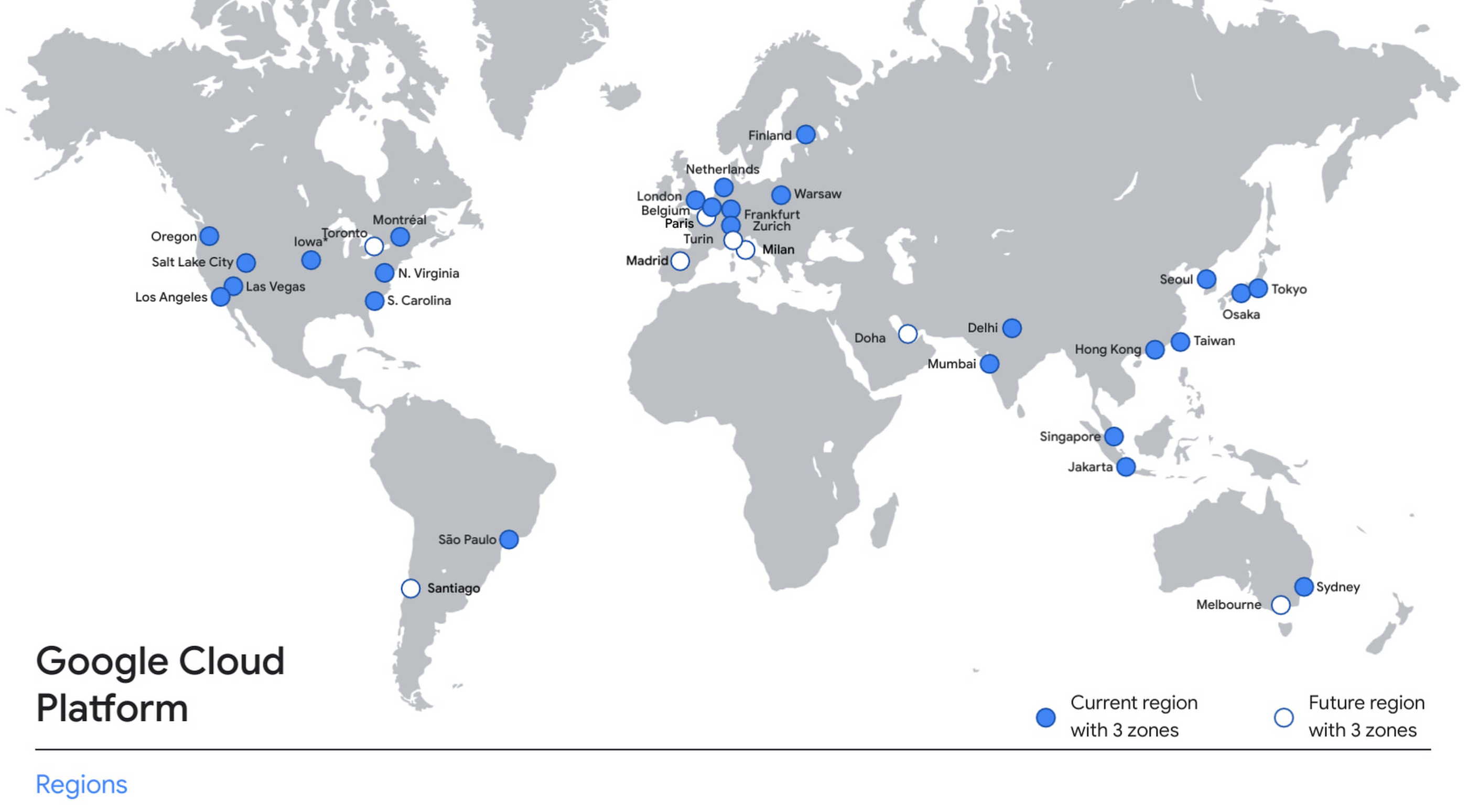
With this new region, Google Cloud customers operating in India also benefit from low latency and high performance of their cloud-based workloads and data. Designed for high availability, the region opens with three availability zones to protect against service disruptions, and offers a portfolio of key products, including Compute Engine, App Engine, Google Kubernetes Engine, Cloud Bigtable, Cloud Spanner, and BigQuery.
Supporting India’s recovery with training and education
Google and Google Cloud will also continue to support our customers with people and education programs. We’re investing in local talent and the local developer community to help enterprises digitally transform and support economic recovery.
Through the India Digitization Fund, we expanded our efforts to support India’s recovery from COVID-19—in particular, through programs to support education and small businesses. In addition to expanding internet access, and investments to help start-ups accelerate India’s digital transformation, we’ve grown our Grow with Google efforts. Businesses can access digital tools to maintain business continuity, find resources like quick help videos, and learn digital skills—in both English and in Hindi.
Helping customers build their transformation clouds
Google Cloud is here to support businesses, helping them get smarter with data, deploy faster, connect more easily with people and customers throughout the globe, and protect everything that matters to their businesses. The cloud region in Delhi NCR offers new technology and tools that can be a catalyst for this change. To learn more, visit the Google Cloud locations page, and be sure to watch the region launch event here.
The Future of Workloads: Google Cloud’s Purpose-Built Infrastructure Evolution

3830
Of your peers have already read this article.
3:30 Minutes
The most insightful time you'll spend today!
For far too long, cloud infrastructure has focused on raw speeds and feeds of building blocks such as VMs, containers, networks, and storage. Today, Moore’s law is slowing, and the burden of picking the right combination of infrastructure components increasingly falls on IT.
At Google Cloud we are committed to removing that burden. We’ve engineered golden paths from silicon to the console, with a recipe of purpose-built infrastructure, prescriptive architectures, and an ecosystem to deliver workload-optimized infrastructure. And at this year’s Google Cloud Next, we made some exciting new announcements across key workloads.
In this post, we will put the new Google Cloud releases and capabilities in the context of popular workloads: From AI/ML to high performance computing and data analytics, to SAP, VMware, and mainframes.
Powering AI/ML workloads
No single technology has the potential to drive more transformation than AI and ML. At Next, we announced several new AI-based services: Translation Hub and DocAI services, and the OpenXLA Project, an open-source ecosystem of ML compiler technologies co-developed by a consortium of industry leaders.
To build these innovative services, you also need a powerful infrastructure platform. Today, we announced the following additions to our compute offerings:
- Cloud TPU v4 Pods – Now in General Availability (GA), Google’s advanced machine learning infrastructure is based on the world’s largest publicly available ML hub in Oklahoma and offers up to 9 exaflops of peak aggregate compute. Developers and researchers can use TPU v4 to train increasingly sophisticated models to power workloads such as large-scale natural language processing (NLP), recommendation systems, and computer vision algorithms in a cost effective and sustainable way. In June 2022, Cloud TPU v4 recorded the fastest training times on five MLPerf 2.0 benchmarks, with up to 80% better performance and up to 50% lower cost of training than the next best available alternative.
- A2 Ultra GPU VM instances – Now GA, you can use A2 Ultra GPU VM instances with Compute Engine, Google Kubernetes Engine and Deep Learning VMs. A2 Ultra GPUs have the largest and fastest GPU memory of the Google Cloud portfolio and are optimized for large AI/ML and HPC workloads with use cases such as AI assistants, recommendation systems, and autonomous driving. Powered by NVIDIA A100 Tensorcore GPU with 80 GBs of GPU memory, A2 Ultra delivers 25% higher throughput on inference and 2x higher performance on HPC simulations than original A2 machine shapes.
Learn more about A2 Ultra and hear how you can accelerate your ML development and learn from our customers Uber and Cohere in breakout session MOD300.
Boost HPC and data-intensive workloads
Customers rely on Google Cloud to help them run data-intensive workloads such as HPC and Hadoop. The new C3 machine series (currently in Preview) is the first in the public cloud to include the new 4th Gen Intel Xeon processor and Google’s custom Intel Infrastructure Processing Unit that enables 200Gbps, low-latency networking. Learn more about top HPC best practices in breakout session MOD106.
You can pair the C3 with Hyperdisk (currently in Private Preview), our new generation block storage, which offers 80% higher IOPS per vCPU for high-end database management system (DBMS) workloads when compared to other hyperscalers. Data workloads such as Hadoop and databases may no longer need oversized compute instances to benefit from high IOPS. Learn more about Hyperdisk in breakout session MOD206.
Enable new streaming experiences
Media and entertainment customers want streaming optimized workloads that build on our innovation in edge and our global network. Here are some new developments to support streaming use cases:
- Cloud CDN, our original content delivery networking offering, now offers Dynamic compression to reduce the size of responses transferred from the edge to a client, significantly helping to accelerate page load times and reduce egress traffic.
- Media CDN, introduced earlier this year, now supports the Live Stream API to ingest and package source content into HTTP-Live Streaming and DASH formats for optimized live streaming. We are also enabling two new developer-friendly integrations in Preview for Media CDN: Dynamic Ad Insertion with Google Ad Manager, which provides customized video ad placements, and third-party Ad Insertion using our Video Stitcher API for personalized ad placement. With these options, content producers can introduce additional monetization and personalization opportunities to their streaming services.
- For advanced customization, we are introducing the Preview of Network Actions for Media CDN, a fully managed serverless solution based on open-source web assembly that enables programmability for customers to deploy their own code directly in the request/response path at the edge.
With Media CDN, customers like Paramount+ are able to deliver a high-quality experience on the same Google infrastructure we’ve tested and tuned to serve YouTube’s 2 billion users globally.
“Streaming is one of the key growth areas for Paramount Global. When we migrated traffic onto Media CDN, we observed consistently superior performance and offload metrics. Partnering with Google Cloud enables us to provide our subscribers with the highest quality viewing experience.” — Chris Xiques, SVP of Video Technology Group, Paramount Global
Bringing Google Cloud to your workloads
For customers in regulated markets and in countries with strict sovereignty laws, Google Cloud has a spectrum of offerings to help them achieve varying degrees of sovereignty. Sovereign Controls by T-Systems is now GA, and Local Controls by S3NS, the Thales-Google partnership, is now available in Preview. You can expect more region and market announcements in the coming months. And for the most stringent sovereignty needs, we offer Google Distributed Cloud Hosted for a disconnected Google Cloud footprint deployed at the customer’s chosen site.
We are also expanding functionality for existing offerings to give you even more options to run your cloud where you want, how you want.
- Anthos, our cloud-centric container platform to run modern apps anywhere consistently at scale, now has a more robust user interface and an upgraded fleet management experience. Create, update, and reconfigure your Anthos clusters the same way from one dashboard or command-line interface, wherever your clusters run. New fleet management capabilities let you manage growing fleets of container clusters across clouds, on-premises, and at the edge and for different use cases (isolate dev from prod, apply fleet-specific security controls, enforce configurations fleet-wide). And we are pleased to announce the GA of virtual machine support on Anthos clusters for retail edge environments. Learn more about how Anthos can help you run modern applications anywhere in breakout session MOD208.
- Google Distributed Cloud Edge GPU-Optimized Config, is now GA in server-rack form factors powered by 12 Nvidia T4 GPUs. GDC Edge is designed to enable low-latency and high-performance hybrid workloads as a complement to your primary Google Cloud environment or as an independent edge deployment. We’re seeing early adoption by customers and partners for workloads such as augmented reality and retail self-checkout. In addition, software partners such as 66degrees are taking advantage of GDC Edge GPU optimization to provide real-time insights on in-store product availability, while Ipsotek is using machine intelligence at the edge to perform crowd and foot-traffic analysis in large locations such as malls, airports and railway stations. Learn more about GDC Edge and new partner validated solutions here, or watch breakout session MOD207 to hear how you can modernize your data center and accelerate your edge.
Infrastructure building blocks for cloud-first workloads
For most new projects, developers prefer them to be cloud-first optimized workloads, and nearly half of all developers use containers today. Google Kubernetes Engine (GKE) is the most automated and scalable container management service on the market today, and when you use GKE Autopilot, developers can get started faster than other leading cloud providers. At Next ‘22, we’re excited to unveil:
- A new workshop to help you discover how to unlock efficiency and innovation with a GKE Autopilot — sign up to get started.
- A new security posture management dashboard in GKE that provides opinionated guidance on Kubernetes security along with bundled tools to expertly help improve the security posture of your Kubernetes clusters and workloads.
When building scalable web applications or running background jobs that require lightweight batch processing, developers are increasingly turning to serverless technologies. We’re helping developers choose serverless with numerous updates to Cloud Run, our managed serverless compute service.
- With new Cloud Run integrations, Cloud Run and Google Cloud services work together smoothly. For example, configuring domains with a Load Balancer or connecting to a Redis Cache is now as easy as a single click, with more scenarios on the way.
- Cloud Run customized health checks for services is now available in Preview, providing user-defined HTTP and TCP Startup probes at the container level. This capability allows Cloud Run users to define criteria as to when their application has started and is ready to start serving traffic, and is particularly useful for applications that might require additional startup time on their first initialization.
- To make continuous deployment easier for our customers, we added an integration between Cloud Deploy, our fully managed continuous deployment service, and Cloud Run. With this integration in place, you can do continuous deployment through Cloud Deploy directly to Cloud Run, with one-click approvals and rollbacks, enterprise security and audit, and built-in delivery metrics. Learn more on Cloud Deploy web page.
Learn more about how to build next-level web applications with Cloud Run in breakout session BLD203.
You also need confidence in the building blocks that make up your workloads from the outset. To help get you started, we introduced Software Delivery Shield, which provides a comprehensive suite of tools offering a fully managed, end-to-end solution that helps protect your software supply chain. The Software Delivery Shield launch also included the following announcements:
- Cloud Workstations, currently in Preview, provides fully-managed development environments built to meet the needs of security-sensitive enterprises. With Cloud Workstations, developers can access secure, fast, and customizable development environments via a browser anytime and anywhere, with consistent configurations and customizable tooling. To learn more about Cloud Workstations, please visit the web page and check out breakout session BLD100.
- A new partnership with JetBrains provides fully managed Jetbrains IDEs as part of Cloud Workstations. This integration can give developers access to several popular IDEs with minimal management overhead for their admin teams.
Read more about Software Delivery Shield.
Open source and open standards are an important part of building applications. With that, we are excited to announce that Google has joined the Eclipse Adoptium Working Group, a consortium of leaders in the Java community working to establish a higher quality, developer-centric standard for Java distributions. Also, we are making Eclipse Temurin available across Google Cloud products and services. Eclipse Temurin provides Java developers a higher quality developer experience and more opportunities to create integrated, enterprise-focused solutions, with the openness they deserve.
Pioneering new technology with Web3 optimized infrastructure
It’s incredible to see the energy in Web3 right now and the focus on developing the broader benefits, use cases, and core capabilities of blockchain. We are helping customers with scalability, reliability, security, and data, so they can spend the bulk of their time on innovation in the Web3 space — unlocking deep user value and building the next app to attract a billion users to the ecosystem.
Companies like Near, Nansen, Solana, Blockdaemon, Dapper Labs & Sky Mavis use Google Cloud’s infrastructure. Yesterday, we announced a strategic partnership with Coinbase to better serve the growing Web3 ecosystem.
“We could not ask for a better partner to execute our vision of building a trusted bridge into the Web3 economy and accelerating broader growth and adoption of blockchain technology. I started Coinbase with a desire to create a more accessible financial system for everyone, and Google’s history of supporting open source and decentralized ecosystems made this a natural fit. Our partnership marks a major inflection point and, together, we are removing barriers to blockchain adoption and accelerating innovation.” — Brian Armstrong, CEO, Coinbase
Lift and transform traditional workloads
Not all workloads were born in the cloud — or have completed their journey to it. Google Cloud offers a variety of programs and capabilities to help optimize traditional workloads for a new cloud era, regardless of whether you’re looking to migrate it as-is, do light optimizations, or fully modernize and transform:
- Migration Center – Now in Preview. For organizations looking to migrate to the cloud and transform their businesses, Migration Center can reduce the complexity, time, and cost by providing an integrated migration and modernization experience. It brings together our assessment, planning, migration, and modernization tooling in one centralized location with a shared data platform so you can proceed faster, more intelligently, and more easily through your journey. Learn more at the Migration Center webpage.
- Google Cloud VMware Engine – Google Cloud is the first VMware partner to market with VMware Cloud Universal support, simplifying the migration of on-premises VMware VMs to VMware Engine in the cloud. With a cloud market-leading 99.99% availability SLA in a single site, VMware Engine is helping large organizations like Carrefour move to Google Cloud.
- Dual Run for Google Cloud – Now in Preview, this first-of-its-kind solution helps eliminate many of the common risks associated with mainframe modernizations by letting customers simultaneously run workloads on their existing mainframes and their modernized version on Google Cloud. This means customers can perform real-time testing and quickly gather data on performance and stability with no disruption to their business. Once satisfied that the performance of the two systems is functionally equivalent, the customer can make the Google Cloud environment the system of record, and operate the existing mainframe system as needed, typically as a backup. Learn more about Dual Run in this press release or on our Mainframe Modernization webpage.
- Google Cloud Workload Manager – Now in Preview for SAP workloads, and available in the Google Cloud console, Workload Manager provides automated analysis of your enterprise systems on Google Cloud to help continuously improve system quality, reliability, and performance. Google Cloud Workload Manager evaluates your SAP workloads by detecting deviations from documented standards and best practices to help proactively prevent issues, continuously analyze workloads, and simplify system troubleshooting.
Learn more about how organizations like Global Payments and Loblaw Technology have migrated with ease and speed in breakout session MOD104.
Protect all your workloads
The foundation of any workload is storage, and this year we expanded the number of supported regions with our Cloud Storage dual-region buckets (GA), so you can ensure that your workloads are protected. In the event of an outage, your application can easily access the data in the alternate region. You can add Turbo replication (GA) with your dual-region buckets. Turbo replication is backed by a 15-minute Recovery Point Objective (RPO) SLA.
Also, we recently announced Google Cloud’s Backup and DR Service (GA). This service is a fully integrated data-protection solution for critical applications and databases that lets you centrally manage data protection and disaster recovery policies directly within the Google Cloud console, and fully protect databases and applications with a few mouse clicks.
Learn more about Storage best practices in breakout session MOD206.
Migrate, observe, and secure network traffic
We also announced many new capabilities and enhancements to the Cloud Networking portfolio that help customers migrate, modernize, secure, and observe workloads traveling to and in Google Cloud:
- Private Service Connect helps simplify migrations by giving more control to users and integrations with 5 new partners.
- Network Intelligence Center can monitor the network for you with enhanced capabilities like the Performance Dashboard that will give you latency visibility between Google Cloud and the Internet.
- We expanded our Cloud Firewall product line and introduced two new tiers: Cloud Firewall Essentials and Cloud Firewall Standard.
For more information on what’s new with networking, read this blog and check out breakout session MOD205.
Optimize costs
Our customers’ workloads also require technical and commercial options that can deliver the best return on their investments. Here are some new enhancements that can help:
- Flex CUDs – GA coming soon, Flexible Committed Use Discounts help you save up to 46% off on-demand Compute Engine VM pricing, in exchange for a one- or three-year commitment. Like standard CUDs, you can apply Flex CUDs across projects within the same billing account, to VMs of different sizes, and across operating systems. Learn more.
- Batch – Now GA, Batch is a fully managed service that helps you run batch jobs easily, reliably, and at scale. Without having to install any additional software, Batch dynamically and efficiently manages resource provisioning, scheduling, queuing, and execution, freeing you up to focus on analyzing results. There’s no charge for using Batch, and you only pay for the resources used to complete the tasks.
Learn more about how you can optimize for cost savings with Google Cloud in MOD103.
Optimize for sustainability
Any new workloads you develop should have the smallest possible carbon footprint. Google Cloud Carbon Footprint helps you measure, report, and reduce your cloud carbon emissions, and is now GA. Since introducing Carbon Footprint last year, we added features that cover Scope 1, 2 and 3 emissions, and provided role-based access to other users such as sustainability teams. Active Assist’s carbon emissions estimates related to removing unattended projects are also now GA. Learn how to build a more sustainable cloud with lower carbon emissions in MOD103, and start using Carbon Footprint today.
“At Box, we’re focused on reducing our carbon footprint and we’re excited for the visibility and transparency the Carbon Footprint tool will provide as we continue our work to operate sustainably.” — Corrie Conrad, VP Communities and Impact and Executive Director of Box.org at Box
“At SAP we’re working to achieve net-zero by 2030, making it crucial to measure carbon emissions all along our value chain. Collaborating with Google Cloud on Carbon Footprint ensures that accurate emissions data is available in a timely manner, helping our many Solution Areas make more sustainable decisions.” — Thomas Lee, SVP and Head of Multicloud Products and Services at SAP
Designed around your workloads
These are only a few examples of the many golden paths we are enabling for your workloads. We strive to be the ‘open infrastructure cloud’ that is the most intuitive to consume because everything is designed around your workloads, providing tremendous TCO benefits.
To get even more information on all of this and more check out the Modernize breakout session track and these “What’s New” sessions available on demand at Next ’22:
- MOD105 to learn about new infrastructure solutions for enterprise architects and developers.
- BLD106 to learn what’s new to help developers build, deploy, and run applications.
- OPE100 to learn about the biggest announcements for DevOps teams, sysadmins, and operators.
Learn About Kf: How it Helps Move Existing Cloud Foundry Workloads to Kubernetes

3431
Of your peers have already read this article.
1:30 Minutes
The most insightful time you'll spend today!
While many companies are writing brand-new Kubernetes-based applications, it’s still quite common to find companies who want to migrate existing workloads. A common source platform for these applications is Cloud Foundry. However, getting an existing Cloud Foundry application running on Kubernetes can be non-trivial, especially if you want to avoid making code changes in your applications, or taking on big process changes across teams. That is, if you’re not using Kf to do a lot of that heavy lifting for you.
Kf is a Google Cloud service that allows you to easily move existing Cloud Foundry workloads to Kubernetes with minimal disruption to your existing processes.
Kf features a command line interface (CLI) also named kf, that replaces the existing Cloud Foundry cf command line utility. The kf CLI implements the most commonly used cf functionality, including the ability to manage bindings, services, apps, routes and more.
For example, to deploy an existing application you would simply issue the kf push command.
On the server side Kf is built on several open source technologies. In some cases these technologies are also the Google Cloud implementation. For instance GKE is our managed Kubernetes offering, and provides the platform for managing and running the applications. Routing and ingress is handled by Anthos Service Mesh, Google Cloud’s managed Istio-based service mesh. Finally, Tekton provides on-cluster build functionality for Kf. Developers don’t have to worry about any of those technologies, as Kf abstracts them away.
Kf primitives such as spaces, bindings and services are implemented as custom Kubernetes resources and controllers. The custom resources effectively serve as the Kf API and are used by the kf CLI to interact with the system. The controllers use Kf’s CRDs to orchestrate the other components in the system.
The beauty of this approach is that developers who are familiar with existing workflows can largely replicate those workflows with the kf CLI. On the other hand, platform operators who are more familiar with Kubernetes can use kubectl to interact with the CRDs and controllers.
For instance if you wanted to list the apps running on your Kf cluster you could issue either of the following commands:
kf appskubectl get apps -n space-name
Notice that CF / Kf spaces get mapped one to one to Kubernetes namespaces.
To get a list of all the custom resources you can examine the api-resources in the kf.dev API group.
kubectl api-resources --api-group=kf.devNAME SHORTNAMES APIGROUP NAMESPACED KINDapps kf.dev true Appbuilds kf.dev true Buildclusterservicebrokers kf.dev false ClusterServiceBrokerroutes kf.dev true Routeservicebrokers kf.dev true ServiceBrokerserviceinstancebindings kf.dev true ServiceInstanceBindingserviceinstances kf.dev true ServiceInstancespaces kf.dev false Space
With Kf developers can continue to work with a familiar interface and platform operators can use declarative Kubernetes practices and tooling such as Anthos Config Management to manage the cluster. It’s really the best of both worlds if you’re looking to manage your existing Cloud Foundry applications on Kubernetes.
If you’d like to learn more about Kf check out the video I just released on YouTube. It reviews some of the concepts discussed here, and includes a short demo. If you’d like to get hands on, try the quick start. And, of course, you can always read the documentation.
More Relevant Stories for Your Company

Artifact Registry: An Extension Capabilities of Container Registry
Enterprise application teams need to manage more than just containers in their software supply chain. That’s why we created Artifact Registry, a fully-managed service with support for both container images and non-container artifacts. Artifact Registry improves and extends upon the existing capabilities of Container Registry, such as customer-managed encryption keys, VPC-SC support,

Predict User Churn on Gaming Apps with Google Analytics Data using BigQuery ML
User retention can be a major challenge for mobile game developers. According to the Mobile Gaming Industry Analysis in 2019, most mobile games only see a 25% retention rate for users after the first day. To retain a larger percentage of users after their first use of an app, developers can

Kaluza & Google Cloud: Committed to Powering Up 73 Million EVs by 2040
Electric vehicles already account for one in seven car sales globally, and with new gas and diesel cars being phased out across the world, global sales are forecast to reach 73 million units in 2040. But with power grids becoming increasingly dependent on variable energy sources such as wind and solar, rising demand from electric vehicles

Headless e-Commerce is the Next Big Thing in Retail
Headless Ecommerce In the last couple of years there has been a shift in the way retailers approach ecommerce: where in the past development efforts were prioritized around building a solid foundation for backend transactions and operations now it is clear that companies in this space are focusing on differentiating
