





Headless e-Commerce is the Next Big Thing in Retail

4995
Of your peers have already read this article.
2:00 Minutes
The most insightful time you'll spend today!
Headless Ecommerce
In the last couple of years there has been a shift in the way retailers approach ecommerce: where in the past development efforts were prioritized around building a solid foundation for backend transactions and operations now it is clear that companies in this space are focusing on differentiating themselves by creating unique shopping experiences that increase engagement and reduce friction.
But how can development teams spend the necessary time designing and writing code for this kind of interactions while also having to seamlessly maintain ecommerce vital components like online catalogs, shopping carts and checkout payment processes? Enter headless commerce.
Headless commerce (HC) helps companies of all sizes to innovate, develop and launch in less time and using fewer resources by decoupling backend and frontend. Headless solution providers empower online retailers by offering a balance between flexibility and optimization through pre-built api-accessible modules and components that can be easily plugged into their frontend architecture. This translates into rapid development while keeping desired levels of security, compliance, integration and responsiveness.
This composable approach enables dev teams not only to create new features but also connect other ecommerce components with less effort which is critical when responding to business trends. But above all, the main benefit retailers receive from HC, is owning and controlling the frontend for an engaging customer journey as well as quickly launching new experiences.
Google Cloud + commercetools
commercetools, a leader in the headless commerce space, has partnered with Google Cloud to make their cloud-native SaaS platform available in the Google Cloud Marketplace. With a flexible API system (REST API and GraphQL), commercetools’ architecture has been designed to meet the needs of demanding omnichannel ecommerce projects while offering real flexibility to modify or extend its features. It supports a variety of storefront providers like Vue Storefront, offers a large set of integrations and supports microservice-based architectures. All this while providing access to multiple programming languages (PHP, JS, Java) via its SDK tools.
commercetools and Google Cloud provide development teams with all the tools to build high-quality digital commerce systems. Google Cloud’s scalability, AI/ML components, API management capabilities and CI/CD tools are a perfect fit to build frontend shopping experiences that easily integrate with the commercetools stack. Developers can take advantage of this compatibility by:
- Integrating systems with Google’s Retail Search, Recommendations AI and Vision Product Search
- Injecting serverless functions into commercetools using Google Cloud Functions
- Extending and integrating commercetools via Events handled by Pub/Sub
- Managing 3rd party, legacy, microservices and commercetools APIs with Apigee
- Selecting the Google Cloud region commercetools uses for zero latency for custom apps
- Expanding their microservice ecosystem with components like Cloud Storage, Cloud SQL, Firestore and BigQuery
Additionally, commercetools allows ecommerce solutions to tap into the wider Google Ecosystem by providing authoritative data via Merchant Center, advertising via product listing ads and selling via Google Shopping.
Architecture Overview
As mentioned previously, headless commerce is increasingly preferred by retailers who want to own and control the ‘front-end’ for providing and enabling an engaging and differentiated user and shopping experiences.
The approach involves a loosely coupled architecture that separates ‘front end’ from the ‘back end’ of a digital commerce application. The front end is typically built and managed by the retailer. They want to leverage an independent software vendor (ISV) offered, ready-to-use ‘back-end’ commerce building blocks for capabilities, such as product catalog, pricing, promotions, cart, shipping, account and others.

Most retailers want to invest their time and resources in building a front end that requires an agile development model to introduce new and tweaking existing user experiences to acquire and retain customers. A few retailers that do not have an in-house web development team may choose an ISV that offers ready to use front end. The front end is a web app and designed as a progressive web application (PWA) on Google Cloud. The backend is a headless commerce offered by an ISV, such as commercetools. The backend commerce capabilities are built as a set of microservices, exposed as APIs, run cloud-native and implemented as headless. It is commonly referred to as the “MACH” solution. The API-first approach of the architecture allows easily integrating ‘best of breed’ capabilities built internally and/or offered by 3rd party ISVs.
Leveraging Google Cloud Components
The architecture of the front end will be implemented on Google Cloud and will integrate with the ISV’s headless commerce back end that runs natively in Google Cloud.
The front end will be designed using cloud-native services for
- PWA web app development (Google Kubernetes Engine, CI/CD services),
- Google Product Discovery solution that includes Retail Search and Vision API Product Search for serving product search (text and image) and Recommendations AI for serving recommendations.
- Storage (Cloud Storage), Database (Cloud SQL, Cloud Firestore), and edge caching for content delivery (Cloud CDN)
- Networking (Cloud DNS, Global Load Balancing), and
- Security (Cloud Armor for DDoS, API Defense for API protection)
Additionally, API management (Apigee on Google Cloud) can be used to orchestrate interactions of the front end with the APIs of the backend commerce services. The API management’s capability will be used for accessing the services of on-premises systems, such as ERP, order management system (OMS), warehouse management system (WMS) as needed to support the functioning of digital commerce application. Alternatively, depending on the frontend capabilities, developers can use middleware to build custom services and route requests.
What’s next?
A considerable number of retailers have adopted headless commerce and are now focusing on adopting best practices and leveraging the agility that comes with this approach. Just like commercetools offers robust components that meet the retailer’s backend operational needs (Product Catalog, Order Management, Carts, Payments, etc), Google Cloud’s Compute, Networking, Severless and AI/ML services provide the agility and flexibility required by development teams to quickly and easily extend their frontend capabilities.
commercetools and Google Cloud work seamlessly together because they both prioritize ease of integration, scalability, security and iterability while providing ready-to-use building blocks. It also helps that commercetools backend runs on Google Cloud. Once an initial foundation of Google Cloud and commercetools has been established, adding new commerce modules and extending functionally of the current ones becomes a straightforward process that allows to route efforts to innovation initiatives. In the end, the main beneficiaries of this technical synergy are the shoppers that enjoy experiences which increase engagement and minimize friction.
Alternatively, retailers can also save time and resources by relying on frontend integrations. commercetools offers a variety of third-party solutions that can effortlessly be added to a headless commerce architecture. These integrations as well as other important headless commerce extensions will be explored in future blog entries. In the meantime, all the necessary tools to leverage headless commerce can be found in just one place:
Get started with commercetools on the Google Cloud Marketplace today!
Google Maps Platform Can Elevate FinTech Experience with Less Risks and Higher Security

4735
Of your peers have already read this article.
3:00 Minutes
The most insightful time you'll spend today!
The financial services industry is changing—an estimated $68 trillion in wealth transferring from baby boomers to millennials.1 This means financial service providers will have to deliver the speed, ease-of-use, technological sophistication, and tailored services that millennials have come to expect. In fact, half of all millennials are willing to switch to a competing institution if it offers a better digital experience.2 This and many other trends are driving unprecedented growth for mobile Fintech experiences in banking, digital payments, financial management and insurance.3
Google Maps Platform financial services solutions
To help you respond to customer’s changing demands, we’re launching financial services solutions that can help you improve your customer experience, security and operations. We’ve outlined the technical guidance and APIs you need to build out three financial services solutions: Enriched Transactions, Quick and Verified Sign-up, and Branch and ATM Locator Plus. We’ve also highlighted two use cases that customers are using our APIs to solve: Contextual Experiences and Fraud Detection.
Clarify financial statements with Enriched Transactions solution
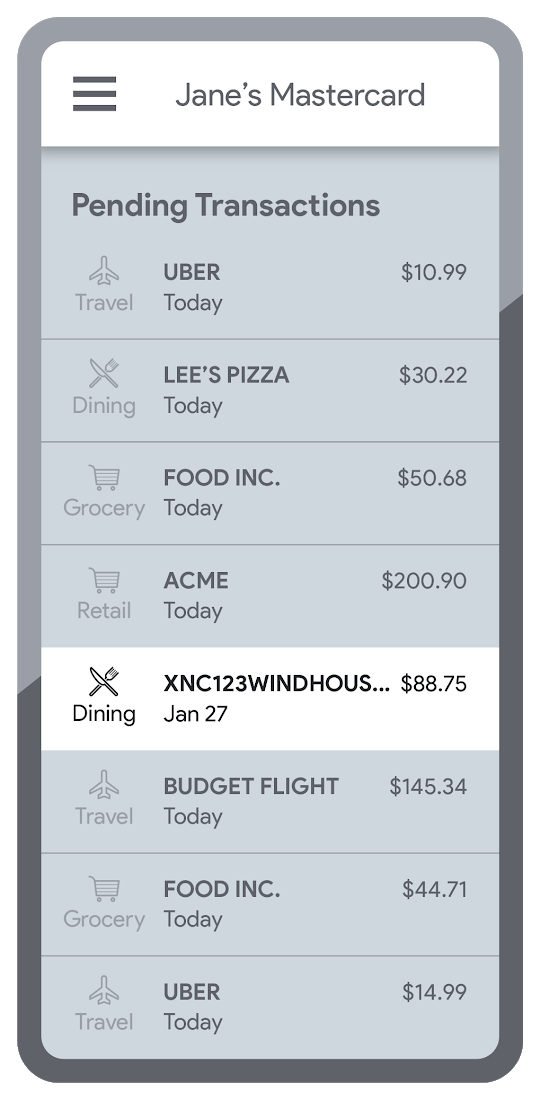
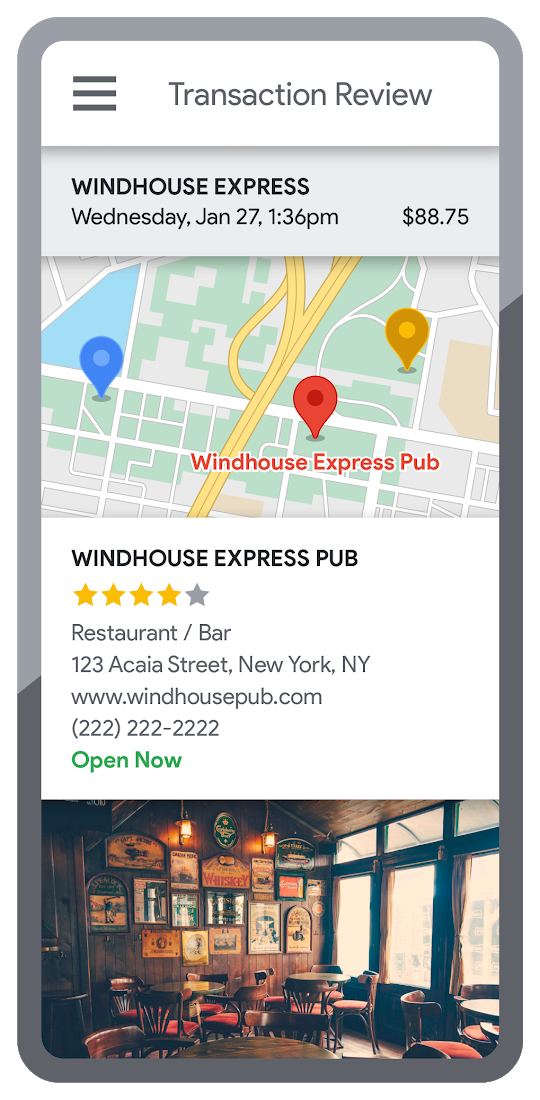
Transaction statements are often hard for customers to understand, using abbreviations like “ACMEHCORP” instead of customer-facing names like “Acme Houseware”. Our Enriched Transactions solution clarifies these transactions and makes them instantly recognizable by adding the merchant name and business category, a photo of the storefront, its location on a map, and full contact info. Making transactions easier to recognize not only boosts consumer confidence, with reported increases in NPS of 15% or higher, but decreases costly support calls by approximately 67%.4
In addition, you can help customers easily visualize a series of transactions by adding the merchant name to the transaction amount and date, and displaying their transactions on a Google map. This enables you to give customers insights about where and how they spend money. See the guide to implement Enriched Transactions today.
Enable faster sign-up with Quick and Verified Sign-up solution
Manually entered addresses can lead to lowered conversions, erroneous customer data, and costly delivery mistakes. Our Quick and Verified Sign-up solution makes sign-up faster, suggesting nearby addresses with just a few thumb taps—cutting sign-up time by up to 64% and increasing conversion rates by up to 15%.5
The solution also provides one additional level of address verification that helps reduce the risk of fraudulent account sign-ups—and companies have decreased fraudulent account setups by approximately 30% through using geospatial data to verify customer identities.4 See the Quick and Verified Sign-up solution guide to get started today.
- Faster sign-ups 1An application form requires an address
- Faster sign-ups 2Autocomplete quickly suggests addresses
- Faster sign-ups 3Select the address with visual confirmation
- Faster sign-ups 4Address verification options are presented
- Faster sign-ups 5Location permission is granted by the user
- Faster sign-ups 6The address is verified
Help customers visit you with Branch and ATM Locator Plus solution
74% of customers now search for specific details prior to their visit, which makes detailed, accurate profiles for each location a must.5 Our Branch and ATM Locator Plus solution enhances your own websites and apps with the same information shown about your branches and ATMs on Google Maps. Include hours of operation, available services, user reviews, photos of the location, driving directions and more.
Financial services companies using geospatial data to provide additional information (e.g. opening hours, available services, etc.) on branch and ATM services have seen a 14% increase in Net Promoter Score (NPS), and a 7% decrease in customer support calls.4 Implement Branch and ATM Locator Plus today using the guide or build it in minutes with Quick Builder.
- ATM locator 1Customers can enable location permissions, or enter their address
- ATM locator 2Quickly enter the address with Autocomplete
- ATM locator 3Nearby location listings, ranked by distance and ETA
- ATM locator 4Map view and directions
Enable offers and rewards with Contextual Experiences
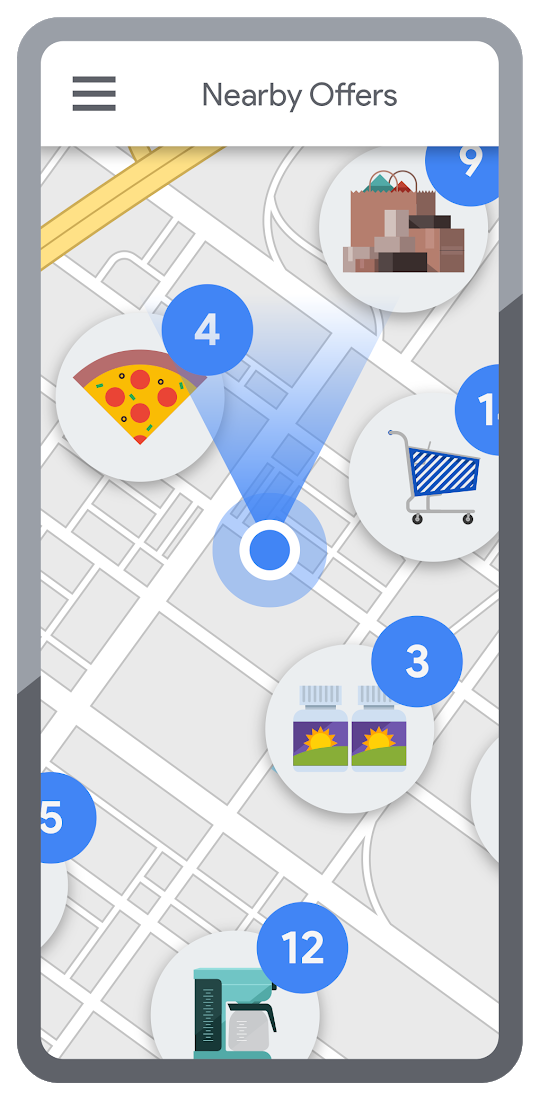
Real-time, geo-targeted offers can power deals, rewards, and cash-back programs—all visualized with rich Google Maps. By combining the insights of purchase histories with customer opt-in to location-based features, companies can implement the Contextual Experiences use case to enable personalized offers and rewards programs that drive engagement with brands while putting money in customers’ pockets at the same time.This is a win for banks and their customers, validated by encouraging metrics like NPS rating boosts of 8% or higher, and an increase of 8% or more time spent in-app.4 Learn how Current uses Google Maps Platform to create innovative customer rewards programs with location intelligence.

Detect suspicious transactions with Fraud Detection
With the Fraud Detection use case, companies can use customer opted-in mobile device location to flag suspicious activity based on geographic distance, such as an ATM withdrawal that is far from the customer’s phone. Our APIs can also help companies recognize suspicious transaction patterns such as a purchase made at a location that is physically distant from a recent transaction.
Financial services companies that use geospatial data to verify customers’ identities have reduced fraudulent transactions by approximately 70%, and false positives in fraud detection by 45%, on average.4 Learn how Starling Bank uses Google Maps Platform to enable real-time notification of transactions and their locations, and enhance data-driven decision-making.
Start elevating customer experiences, reducing risk and increasing efficiency today with our financial services offerings. Visit our financial services solutions page to learn more about how to start implementing these solutions.
For more information on Google Maps Platform, visit our website.
5 Ways You Need to Know to Reduce Costs with Containers

3173
Of your peers have already read this article.
2:30 Minutes
The most insightful time you'll spend today!
“Cloud Wisdom Weekly: for tech companies and startups” is a new blog series we’re running this fall to answer common questions our tech and startup customers ask us about how to build apps faster, smarter, and cheaper. In this installment, Google Cloud Product Manager Rachel Tsao explores how to save on compute costs with modern container platforms.
Many tech companies and startups are built to operate under a certain degree of pressure and to efficiently manage costs and resources. These pressures have only increased with inflation, geopolitical shifts, and supply chain concerns, however, creating urgency for companies to find ways to preserve capital while increasing flexibility. The right approach to containers can be crucial to navigating these challenges.
In the last few years, development teams have shifted from virtual machines (VMs) to containers, drawn to the latter because they are faster, more lightweight, and easier to manage and automate. Containers also consume fewer resources than VMs, by leveraging shared operating systems. Perhaps most importantly, containers enable portability, letting developers put an application and all its dependencies into a single package that can run almost anywhere.
Containers are central to an organization’s agility, and in our conversations with customers about why they choose Google Cloud, we hear frequently that services like Google Kubernetes Engine (GKE) and Cloud Run help tech companies and startups to not only go to market quickly, but also save money. In this article, we’ll explore five ways to help your business quickly and easily reduce compute costs with containers.
5 ways to control compute costs with containers
Whether your company is an established player that is modernizing its business or a startup building its first product, managed containerized products can help you reduce costs, optimize development, and innovate. The following tips will help you to evaluate core features you should expect of container services and include specific advice for GKE and Cloud Run.
- Identify opportunities to reduce cluster administration
Most companies want to dedicate resources to innovation, not infrastructure curation. If your team has existing Kubernetes knowledge or runs workloads that need to leverage machine types or graphics processing units (GPUs), you may be able to simplify provisioning with GKE Autopilot. GKE Autopilot provisions and manages the cluster’s underlying infrastructure, all while you pay for only the workload, not 24/7 access to the underlying node-pool compute VMs. In this way, it can reduce cluster administration while saving you money and giving you hardened security best practices by default.
- Consider serverless to maximize developer productivity
Serverless platforms continue the theme of empowering your technical talent to focus on the most impactful work. Such platforms can promote productivity by abstracting away aspects of infrastructure creation, letting developers work on projects that drive the business while the platform provider oversees hardware and scalability, aspects of security, and more.
For a broad range of workloads that don’t need machine types or GPUs, going serverless with Cloud Run is a great option for building applications, APIs, internal services, and even real-time data pipelines. Analyst research supports that Cloud Run customers achieve faster deployments with less time spent monitoring services, resulting in reinvested productivity that lets these customers do more with fewer resources.
Designed with high scalability in mind, and an emphasis on the portability of containers, Cloud Run also supports a wide range of stateless workloads, including jobs that run to completion. Moreover, it lets you maximize the skills of your existing team, as it does not require cluster management, a Kubernetes skillset or prior infrastructure experience. Additionally, Cloud Run leverages the Knative spec and a container image as a deployment artifact, enabling an easy migration to GKE if your workload needs change.
With Cloud Run, gone are the days of infrastructure overprovisioning! The platform scales down to zero automatically, meaning your services always have the capacity to meet demand, but do not incur costs if there is no traffic.
- Save with committed use discounts
Committed use discounts provide discounted pricing in exchange for committing to a minimal level of usage in a region for a specified term. If you are able to reliably predict your resource needs, for instance, you can get a 17% discount for Cloud Run (for either one year or three years), and either a 20% discount (for one year) or a 45% discount (for three years) on GKE Autopilot.
- Leverage cost management features
Minimum and maximum instances are useful for ensuring your services are ready to receive requests but do not cause cost overages. For Google Cloud customers, best practices for cost management include building your container with Cloud Build, which offers pay-for-use pricing and can be more cost efficient than steady-state build farms.
Relatedly, if you choose to leverage serverless containers with Cloud Run, you can set minimum instances to avoid the lag (i.e., the cold start) when a new container instance is starting up from zero. Minimum instances are billed at one-tenth of the general Cloud Run cost. Likewise, if you are testing and want to avoid costs spiraling, you can set a maximum number of instances to ensure your containers do not scale beyond a certain threshold. These settings can be turned off anytime, resulting in no costs when your service is not processing traffic. To have better oversight of costs, you can also view built-in billing reports and set budget alerts on Cloud Billing.
- Match workload needs to pricing models
GKE Autopilot is great for running highly reliable workloads thanks to its Pod-level SLA. But if you have workloads that do not need a high level of reliability (e.g., fault tolerant batch workloads, dev/test clusters), you can leverage spot pricing to receive a discount of 60% to 91% compared to regularly-priced pods. Spot Pods run on spare Google Cloud compute capacity as long as resources are available. GKE will evict your Spot Pod with a grace period of 25 seconds during times of high resource demand, but you can automatically redeploy as soon as there is available capability. This can result in significant savings for workloads that are a fit.
Innovation requires balance
Put into practice, these tips can help you and your business to get the most out of containers while controlling management and resource costs. That said, it is worth noting that while managing cloud costs is important, the relationship between “cloud” and “cost” is often complex. If you are adopting cloud computing with only the primary goal of saving money, you may soon run into other challenges. Cloud services can save your business money in many ways, but they can also help you get the most value for your money. This balance between cost efficiency and absolute cost is important to keep in mind so that even in challenging economic landscapes, your tech company or startup can continue growing and innovating.
Beyond cost savings, many tech and startup companies are seeking improved business agility, which is the ability to deploy new products and features frequently and with high quality. With deployment best practices built into GKE Autopilot and Cloud Run, you can transform the way your team operates while maximizing productivity with every new deployment.
You can learn if your existing workloads are appropriate for containers with this fit assessment and these guides for migrating to containers. For new workloads, you can leverage these guides for GKE Autopilot and Cloud Run. And for more tips on cost optimization, check out our Architecture Framework for compute, containers, and serverless.
If you want to learn more about how Google Cloud can help your startup, visit our page here to get more information about our program and apply for our Google for Startups Cloud Program, and sign up for our communications to get a look at our community activities, digital events, special offers, and more.
Are You Providing Sufficient Digital Leadership?

4971
Of your peers have already read this article.
5:00 Minutes
The most insightful time you'll spend today!
It has been seven years since Marc Andreesen’s famous article “Why Software is Eating the World” was published in the Wall Street Journal, and given the slow pace of change in many companies, some executives still may not be taking the threat of being “eaten” seriously enough.
Software, and platform business models based on software, have the potential to deliver powerful economic forces into virtually any company or industry. Every company has valuable assets—such as data, expertise or access to certain services or user bases—and most of these assets can be delivered via software. Once an asset is expressed as software in a modern way—that is, as an application programming interface (API)—it can be combined with other software to create new applications and digital experiences.
Benefits of this approach, just to name a few, include near-zero marginal cost to scale up APIs for new users or use cases; global reach for both partners using APIs and end users consuming the digital experiences those APIs power; and network effects triggered as more partners use a given company’s digital assets and spread its services into new markets and use cases.
Disruption by software-powered business models
In the last two decades we’ve seen individual companies and entire industries upended by these kinds of software-powered business models. Examples abound: Amazon and the retail industry, Netflix and movie rentals, Uber and ride hailing, Airbnb and hotels, etc. We’ve reached the point that these companies’ names have become verbs synonymous with being “eaten” by software (e.g., “Amazoned” or “Netflixed”).
The most famous examples of digital disruption involve digital natives, of course, but legacy businesses are leveraging software to evolve too. Brazilian retailer Magazine Luiza—a company I’ve worked with through my employer, Google Cloud’s Apigee team—has enjoyed enormous revenue growth and seen its stock soar, for example, as it has built out its digital platform capabilities and transitioned from a primarily brick-and-mortar model to an omnichannel one. The point is, whether a company has been in business five decades, five years or five months, software remains ravenous and is always looking for new companies and industries to “eat.”
Change in the face of serious threats
Facing this threat, how should corporate leadership respond? There are some excellent examples of CEOs who have galvanized their companies and led them through the massive, gut-wrenching change required to pivot in the face of a serious threat. A few of the biggest examples include:
- In 1995, it became apparent to Microsoft co-founder and then-CEO Bill Gates that the internet was “the most important single development to come along since the IBM PC,” and, if not embraced in haste, a threat to many of Microsoft’s businesses. In May of that year he published the “The Internet Tidal Wave” memo and focused all of Microsoft on adopting and building for the internet. Almost 20 years later, current Microsoft CEO Satya Nadella similarly made the bold decision to redirect the company for a cloud-first world.
- Facebook went public at $38 per share in May of 2012 but within months, stocks could be had for a little over half that. The concern? Facebook was a desktop-optimized website without a polished mobile presence, and by 2012, consumer attention had begun to accelerate towards mobile at a much higher rate than many initially predicted. Facebook CEO Mark Zuckerberg reacted by not only proclaiming Facebook a mobile-first company, but also backing up that proclamation with action.
- Turning to another company I’ve worked with via Apigee, T-Mobile launched its highly visible “Uncarrier” campaign—which offers streamlined, customer-friendly plans and services—while also investing in and executing a new IT vision dedicated to ongoing digital transformation. T-Mobile execs have credited the technology effort, spearheaded by CEO John Legere, with helping the company to introduce new services and better service customers. T-Mobile’s market cap has more than doubled since Legere took over in 2012.
Keeping pace with changing customer needs
In the face of an existential threat, strong executive leadership is required to pivot the company to safety, as these examples attest. Digital transformationisn’t about deploying new technologies just to make an existing approach more efficient or to add a few new apps or features to the status quo; digital transformation is about keeping pace with changing customer needs by leveraging software platforms to continuously evolve how the business operates. This can be akin to turning an enormous ship—and a ship can’t turn very well without her captain, first mate, and other leaders showing the way.
Research supports this. A recent Deloitte survey, for example, found that over “80 percent of respondents from digitally maturing organizations say their leaders have sufficient knowledge and ability to lead the company’s digital strategy,” compared to only “22 percent of early-stage business respondents [who] have the same belief.” Similarly, Gartner research finds that CEOs are seeking a “deeper understanding of digital business” as they shift their focus from growth in general to how technology helps them attain it.
More recently, the onslaught of software devouring the world has been further accelerated by machine learning making everything smarter, voice interfaces changing how people interact with devices, and more. To keep pace, corporate leaders need to galvanize their companies to build and deploy software faster, make systems and data easily accessible inside and outside their companies, and improve digital experiences through not only machine learning but also constant data-driven iteration.
Seven years after Andreesen’s editorial, the pace of digital disruption is still increasing, and so is the need for strong leadership to pivot fully into digital. Over half of the Fortune 500 has been acquired, merged or declared bankruptcy since 2000—and the companies that survive in coming years won’t be those whose leaders treat technology as an IT concern rather than a core part of the business.
4852
Of your peers have already watched this video.
3:00 Minutes
The most insightful time you'll spend today!
A Winner’s Story of Optimizing IT Operations for Informed Business Decisions with Google Cloud
An award-winning leader in the enterprise software industry, Broadcom Software is known for modernizing, securing and optimizing the most complex and largest hybrid environments. It’s broad portfolio of industry-leading, enterprise infrastructure and security software built on different tech stack and vision of tech leaders, are run on on-prem, private and public cloud and operated differently. To have a unified standard platform to run their wide range of products, Broadcom Software needed infrastructure as a service and Kubernetes orchestration layer, standard DevOps and security practices as well as common set of DevSecOps tools. Although the company knew there was no common ground to run all their products, migrating products into container-based architecture, they discovered many common strands that they could leverage for efficiency. Watch to learn the role played by Google Cloud in the Broadcom’s transformation!
BigQuery Omni: Your Solution for Multi-Cloud Geospatial Analytics

1491
Of your peers have already read this article.
6:30 Minutes
The most insightful time you'll spend today!
As we become increasingly reliant on technology to make decisions, geospatial data is becoming more critical than ever. It is a powerful resource that can be used to solve a variety of problems, from tracking the movement of goods, identifying interest areas and potential areas of disaster.
Geospatial data incorporates data with a geographic component, such as latitude and longitude coordinates, addresses, postal codes, or place names, and can be obtained from a variety of sources, including satellites, sensors, and surveys, making it an incredibly powerful tool with a broad range of applications.
One of the key features of BigQuery, Google Cloud’s serverless enterprise data warehouse, is its ability to analyze geospatial data. However, oftentimes geospatial data sits in a variety of public clouds, not just Google Cloud. To access it effectively, you need a multi-cloud analytics solution that lets you capitalize on the distinct capabilities of each cloud platform, while extracting insights and value from data sitting across multiple cloud platforms.
BigQuery Omni is a multi-cloud analytics solution that enables the analysis of data stored across public cloud environments, including Google Cloud, Amazon Web Services (AWS) and Microsoft Azure, without the need to transfer the data. With BigQuery Omni, users can employ the same SQL queries and tools used to analyze data in Google Cloud to analyze data in other clouds, making it easier to gain insights from all data, regardless of the storage location. For businesses using multiple clouds, BigQuery Omni is an excellent tool to unify analytics and optimize the value of data.
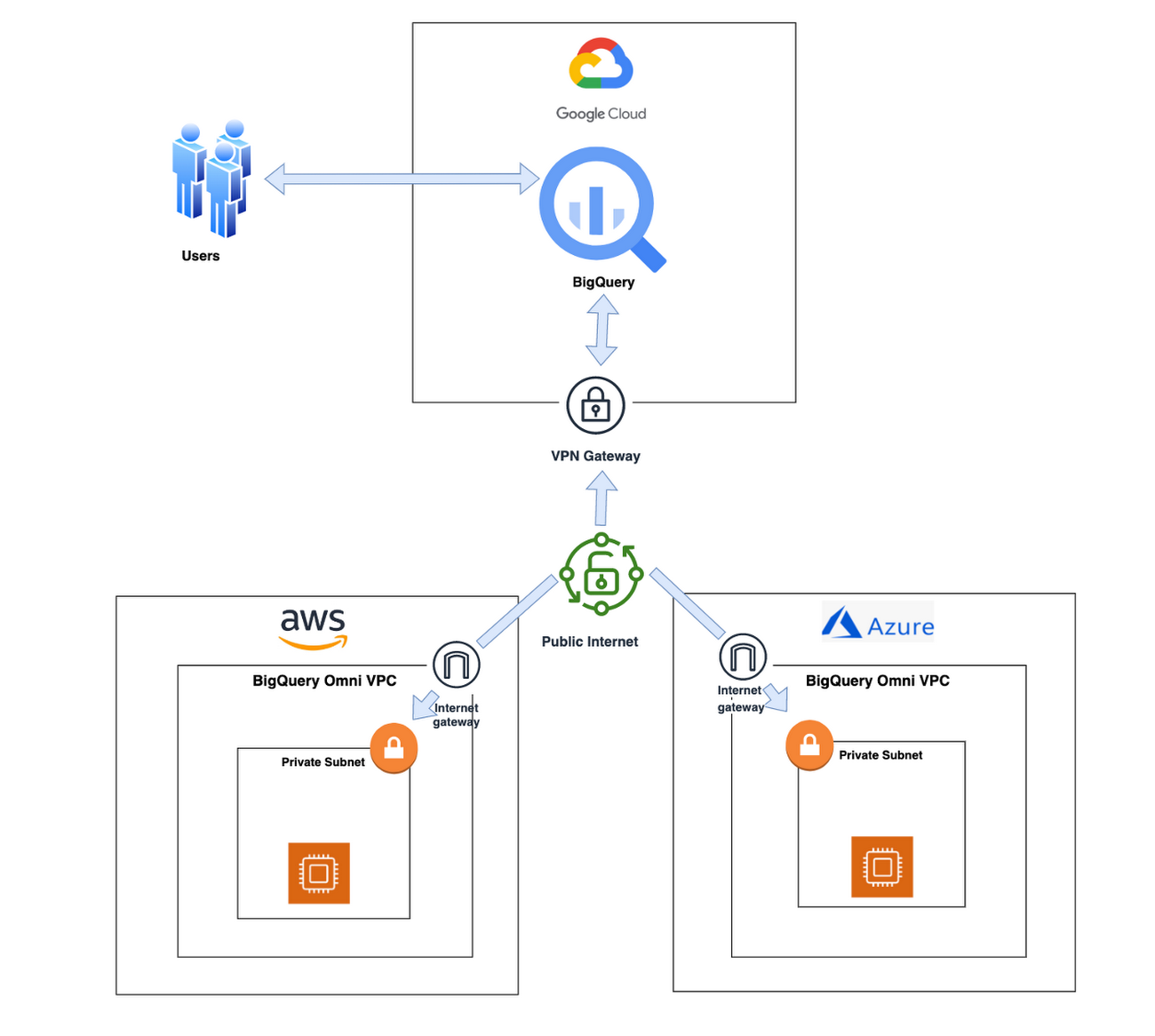
With BigQuery Omni, organizations can analyze location-based information or geographic components, such as latitude and longitude coordinates, addresses, postal codes, or place names without even copying their data to Google Cloud. For example, you could use BigQuery Omni to analyze data from a fleet of delivery vehicles to track their location and identify potential problems.
BigQuery Omni and geospatial data analysis
If you are working with geospatial data, BigQuery Omni is a powerful tool that can help you to get insights from your data. It is scalable, reliable, and secure, making it a great option for unifying your analytics and getting the most out of your data.
Here are a few examples of ways organizations might use BigQuery Omni for geospatial data:
- A transportation company could use BigQuery Omni to analyze data from GPS sensors in its vehicles to track the movement of its fleet and identify potential problems.
- A retail company could use BigQuery Omni to analyze data from its point-of-sale systems to track customer behavior and identify trends.
- A government agency could use BigQuery Omni to analyze data from its weather sensors to track the movement of storms and identify areas at risk of flooding.
BigQuery Omni and geospatial data can be used together to gain insights into a variety of business problems. Specifically, some of the advantages of using BigQuery Omni and geospatial data include:
- Access to quality geospatial data: BigQuery supports loading of newline-delimited GeoJSON files and provides built-in support for loading and querying geospatial data. Data from public data sources like BigQuery public datasets, the Earth Engine catalog, and the United States Geological Survey (USGS) can be easily integrated into your BigQuery environment. Earth Engine has an integrated data catalog with a comprehensive collection of analysis-ready datasets, including satellite imagery and climate data. This data can be combined with proprietary data sources such as SAP, Oracle, Esri ArcGIS Server, Carto, and QGIS.
- Loading and preprocessing of geospatial data: BigQuery has built-in support for loading and querying geospatial data types, and you can use partner solutions such as FME Spatial ETL to load data.
- Working with different geospatial data types and formats: BigQuery supports a variety of file types and formats including WKT, WKB, CSV and GeoJSON.
- Coordinate reference systems: BigQuery’s geography data type is globally consistent. That means that your data is registered to the WGS84 reference system and your analyses can span a city block or multiple continents.
Overall, geospatial analytics with BigQuery Omni provides a wide range of technical capabilities for processing and analyzing geospatial data, making it a powerful tool for businesses that need to work with location-based data.
Analyzing geospatial data with BigQuery Omni
Imagine a retailer who has a large chain of department stores with locations all over the country. They are looking to expand their business and want to identify areas with high sales potential. They want a way to get a better understanding of their sales volume within specific geographic boundaries. To achieve this goal, the retailer turns to the GIS (Geographic Information System) functions built into BigQuery. Here are the steps what the retailer takes to analyze this dataset:
Step 1 : An initial orders dataset on AWS S3 contains 5.54 million rows, and with separate locations (300 rows) and zipcode (33144 rows) metadata files on AWS S3.
Orders Parquet files:
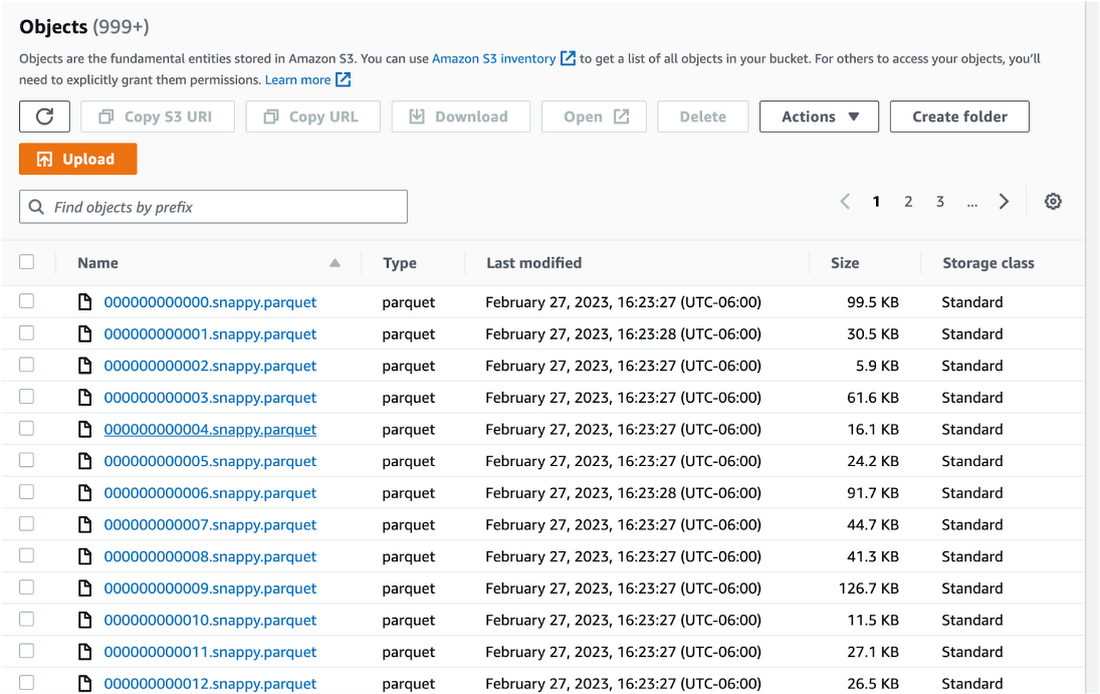
Location and Zipcode files:

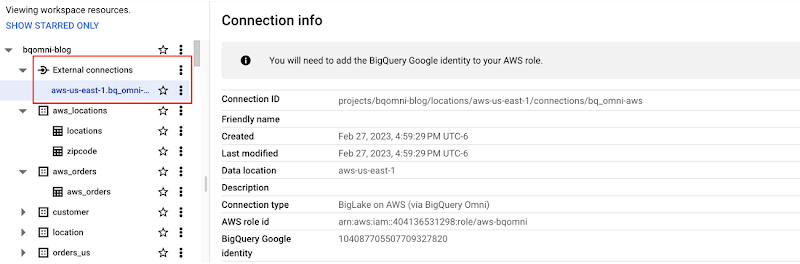
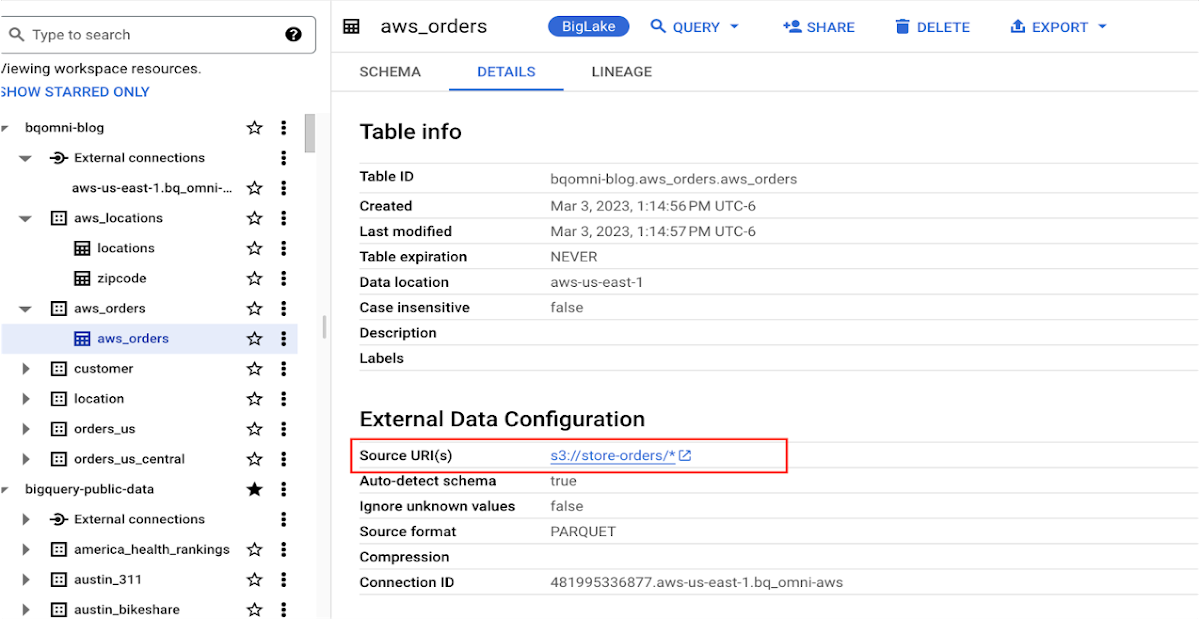
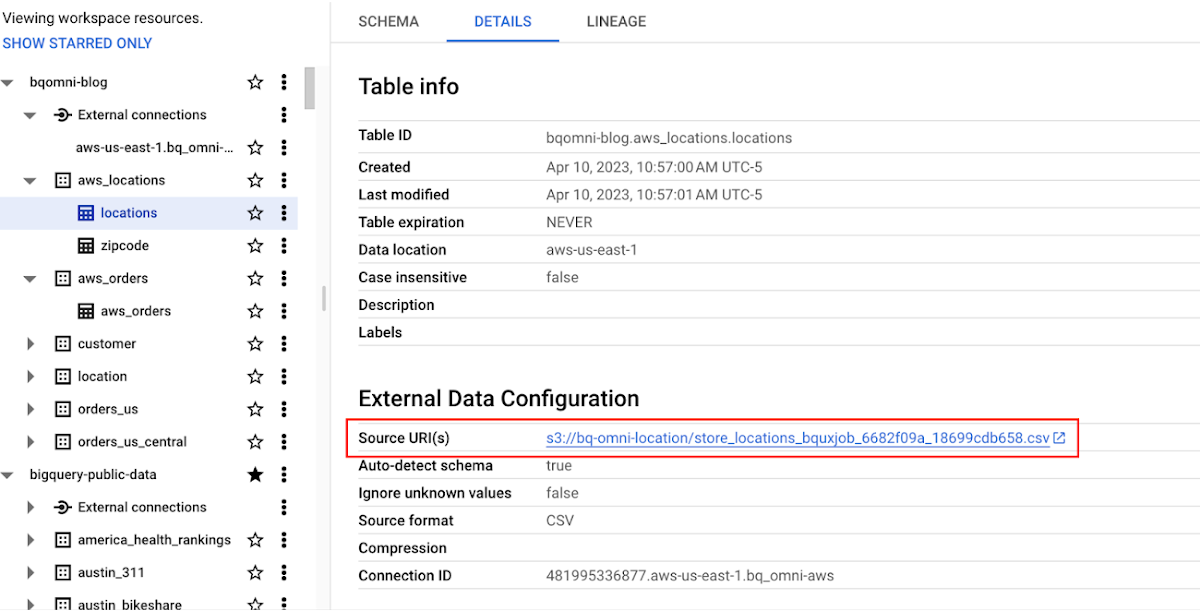
Step 2 : The retailer uses BigQuery Omni to establish a connection between the data stored in AWS and BigQuery, enabling them to access the S3 datasets externally.
External Connection for AWS
External Table for orders
External Table for locations
External Table for zipcode
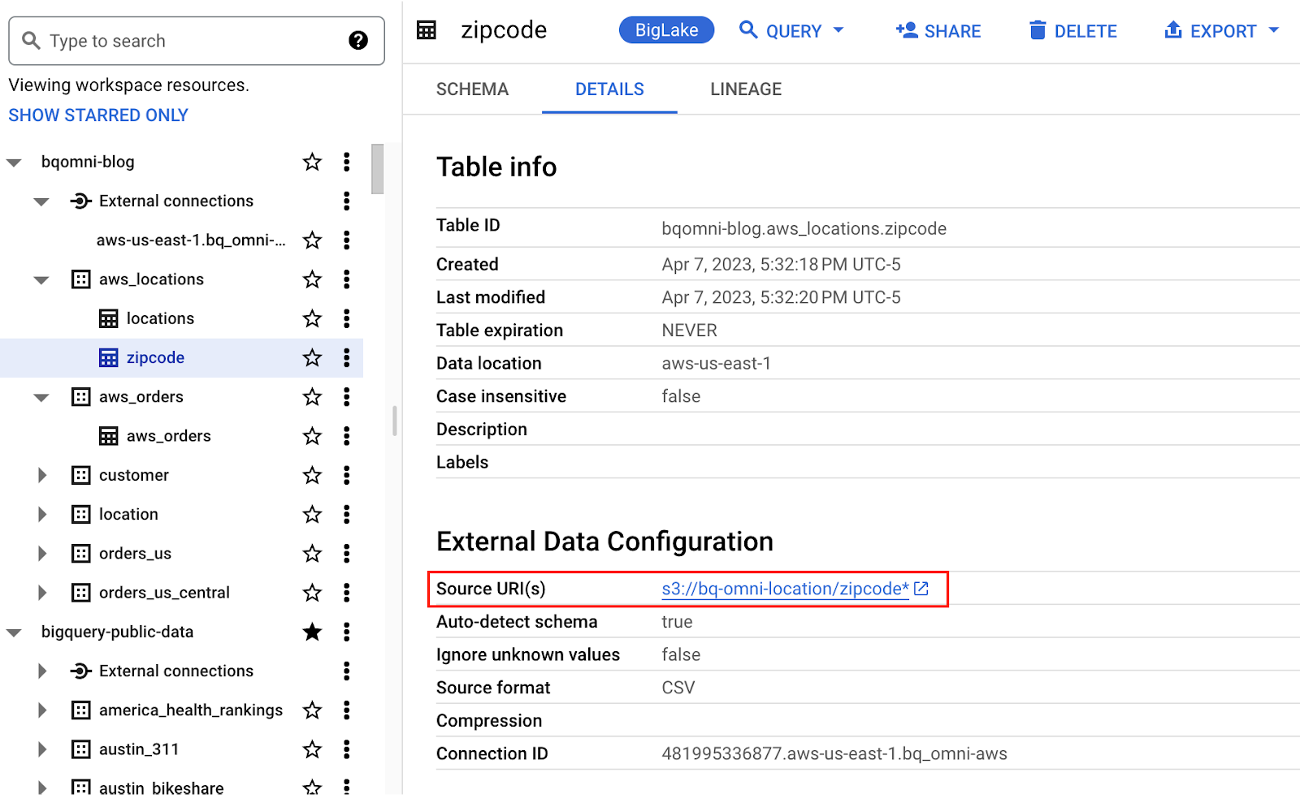
Step 3 : They combine the orders and locations datasets using BigQuery Omni, and remotely aggregate the data on AWS. Joining this dataset with geospatial datasets helps them derive geospatial coordinates.
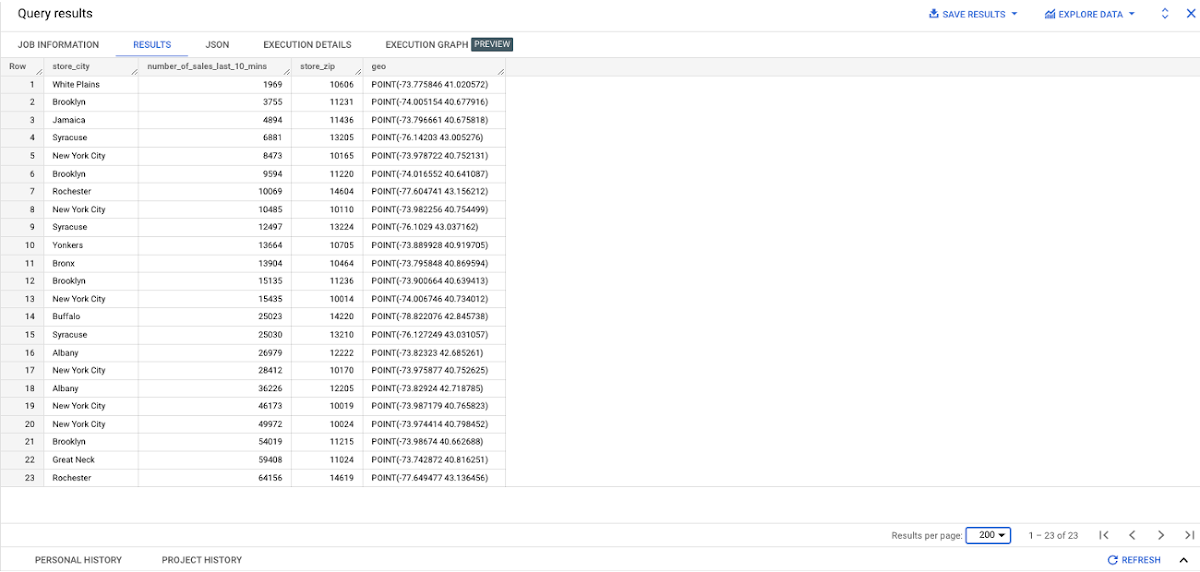
The final aggregated dataset is reduced to 23 rows. Subsequently, they bring back the result dataset, which contains just 23 rows. This helps them reduce the extraction of millions of rows to just 23 rows for their geospatial analytics.
Select sales.store_city store_city,
sales.number_of_sales_last_10_mins number_of_sales_last_10_mins,
sales.store_zip store_zip,
 ST_GeogPoint(zip_lat_lng.longitude ,
   zip_lat_lng.latitude  ) geo
FROM (
 SELECT
   FORMAT_DATETIME("%X",
     CURRENT_DATETIME("America/Los_Angeles")) current_time,
   MAX(DATETIME(time_of_sale,
       "America/Los_Angeles")) time_of_last_sale,
   COUNT(1) number_of_sales_last_10_mins,
   locations.city store_city,
   locations.zip store_zip
 FROM
   `bqomni-blog.aws_locations.orders_small`  sales
 JOIN
   `bqomni-blog.aws_locations.locations` locations
 ON
   sales.store_id = locations.id
 GROUP BY
   locations.city,
   locations.zip ) sales
JOIN
   `bqomni-blog.aws_locations.zipcode` zip_lat_lng
ON
 cast(sales.store_zip as INT) = cast(zip_lat_lng.zipcode as INT)
 WHERE ST_WITHIN( ST_GeogPoint(zip_lat_lng.longitude , zip_lat_lng.latitude  ) ,ST_GeogFromText(zip_lat_lng.zipcode_geom ) )
 AND zip_lat_lng.state_name  = "New York"
 ORDER BY number_of_sales_last_10_mins
Aggregated Sales data by region
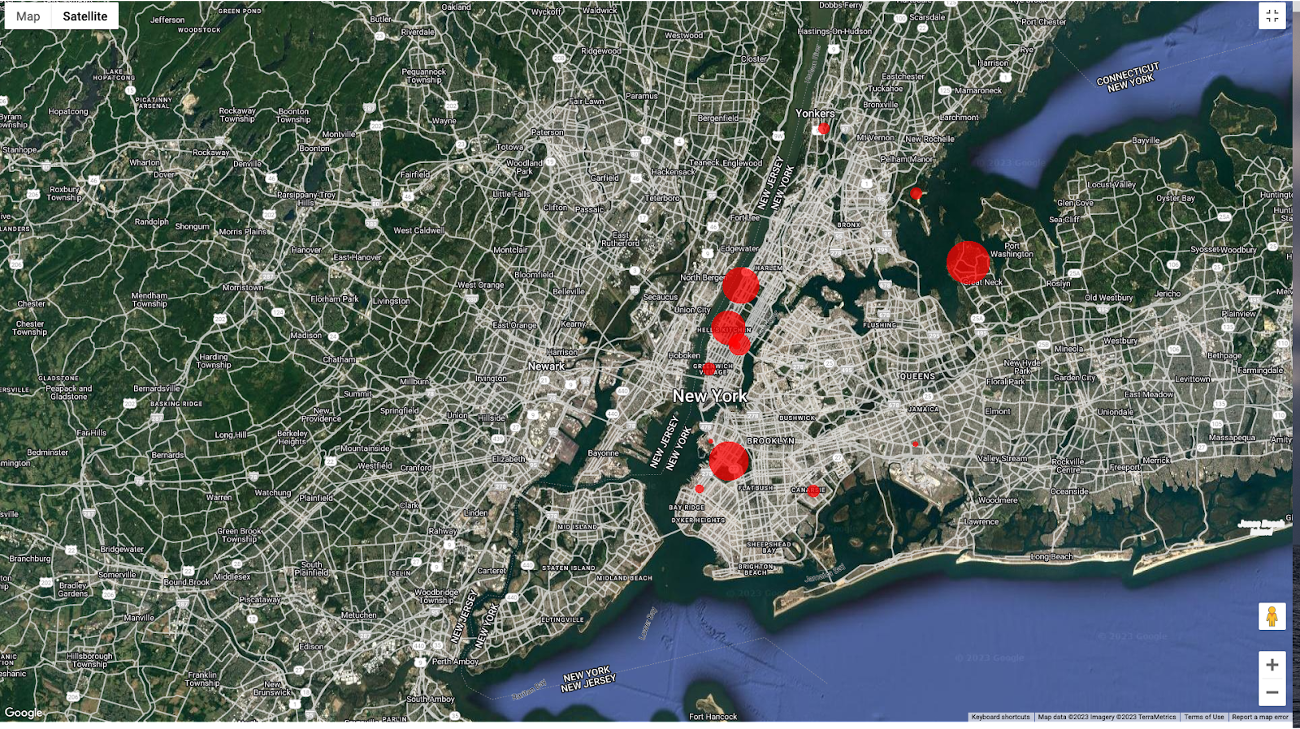
To build richer views of their sales volume data, the retailer uses BigQuery GeoViz integration, a powerful tool that allows for visualizing geographic data on maps.BigQuery Geo Viz is a web tool for visualization of geospatial data in BigQuery using Google Maps APIs. You can run a SQL query and display the results on an interactive map
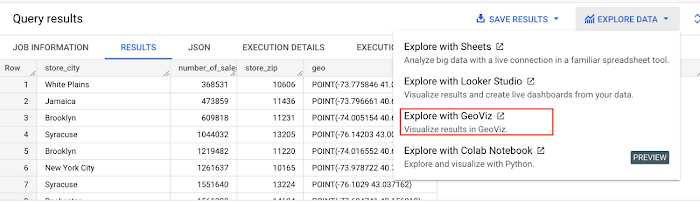
BigQuery Geo view for sales data analysis
With the geo-tagged data in place, the retailer can now see regional sales volume, sales density, distribution by department by time, and distribution within department, all powered through BigQuery.
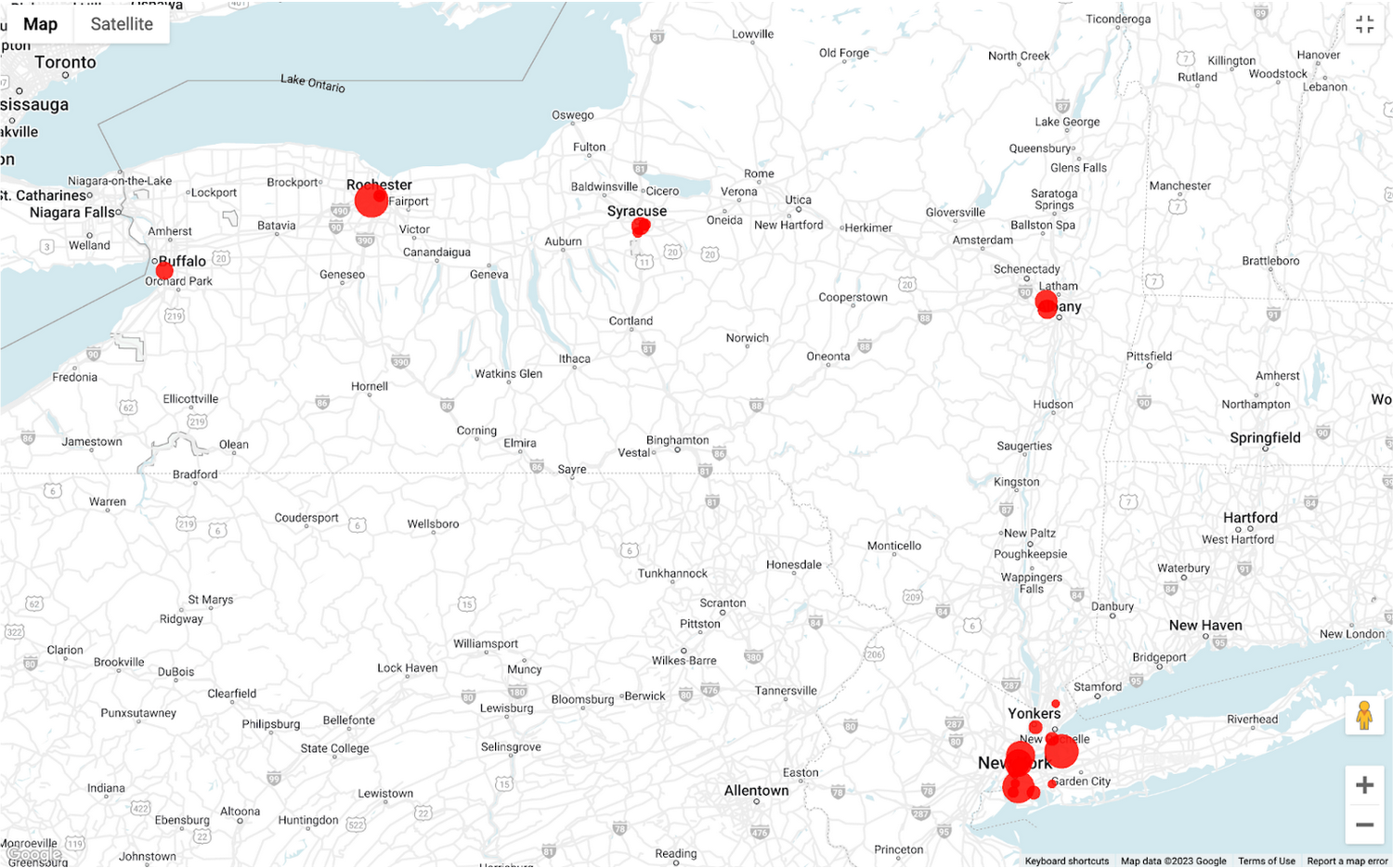
Satellite view
Benefits of using BigQuery Omni
Beyond geospatial analysis, BigQuery Omni offers a number of benefits, including:
Reduced costs: BigQuery Omni’s ability to eliminate data transfers between clouds can help organizations reduce costs and simplify data management, making it a valuable tool for multi-cloud analytics. Also, the ability to access and analyze data across multiple clouds can reduce the need for data replication and synchronization, which can further simplify the ETL process and improve data consistency.
Unified governance: BigQuery Omni uses the same security controls as BigQuery, which include features such as encryption, access controls, and audit logs, to help protect data from unauthorized access.
Single pane for analytics: BigQuery Omni provides a single interface for querying data across all three clouds, which can simplify the process of analyzing data and reduce the need for organizations to use multiple analytics tools.
Flexibility: Analyze data stored in any of the supported cloud storage services, giving organizations the flexibility to work with the data they have regardless of where it’s located.
BigQuery Omni is a valuable tool for geospatial analysis because it allows you to analyze data from multiple sources without having to move the data. This can save you time and money, and it can also help you to get more accurate insights from your data.If you are looking for a way to improve the accuracy, efficiency, and decision-making of your business, using BigQuery Omni to analyze geospatial data can be a powerful tool.
References
- Omni-introduction
- Omni-benefits
- Omni-aws-create-connection
- Omni-azure-create-connection
- BigQuery Omni Retail Demo on Looker
- Omni-pricing
- Working with Geospatial Data
- Geospatial Analytics – Intro
Learn more about how BigQuery Omni can help your organization.
More Relevant Stories for Your Company

How APIs Help National Bank of Pakistan Modernize the Banking Experience
NBP, Pakistan’s largest government-owned bank, serves private and commercial customers and also acts as the government treasury bank. This means that it handles all government transactions—including disbursements and cash collection. In the past, every government transaction had to be handled physically through the NBP branch network. But in a populous

Consent is a Key Component for a Successful Embedded Financial Solution: Read Why
When banks and other financial institutions make their products available via non-banks, we call that Embedded Finance. Think, for example, of a retailer offering financing for people buying goods; or a budgeting app gathering bank transactions to help you categorize and understand your spending patterns. The finance - the money

Transform ‘Dark Data’ from Documents with Document AI, Cloud Functions and Workflows
At enterprises across industries, documents are at the center of core business processes. Documents store a treasure trove of valuable information whether it's a company's invoices, HR documents, tax forms and much more. However, the unstructured nature of documents make them difficult to work with as a data source. We

Google Cloud is a Leader in Q1 2022’s Public Cloud Container Platform: Forrester
We’re thrilled to share the news that leading global research and advisory firm Forrester Research has named Google Cloud a Leader in the recently published report The Forrester WaveTM: Public Cloud Container Platforms, Q1 2022. Forrester evaluated the container and cloud-native offerings of a select group of top public cloud container
