





How 4K+ Coffee Lovers Get their Cuppa at Costa Coffee with the Help of Google Maps

3835
Of your peers have already read this article.
1:30 Minutes
The most insightful time you'll spend today!
Editor’s note: Gordon Lucas, Global Head of Digital Engineering at Costa Coffee, explains how Google Maps Platform helps direct customers to each of its 4,000 plus Costa Coffee shops across the world, as well as streamline payments, and optimize deliveries.
When brothers Sergio and Bruno Costa opened the first Costa Coffee in central London in 1971, they relied on word of mouth to grow trade. Personal recommendations encouraged people who lived and worked locally to visit the coffee shop and sample what became (and still remains) our signature blend coffee, Mocha Italia.
Fast forward 50 years and we have more than 4,000 coffee shops spread over 31 countries. To make it as easy as possible for our global customers to pick up a Mocha Italia, a Costa Americano, or any other Costa Coffee product wherever we operate, we decided to create a visual app. We wanted the app to help customers across the world find their most convenient eat-in, takeaway, drive-thru, partner store, or delivery platform, and highlight which services are available and at what times.

Enhancing the customer experience with intelligent maps
We were already using Google Maps Platform products on our website to provide our customers with a basic store locator service. So when we launched our mobile app in 2017, we added more interactive geospatial features to make our customers’ journeys quicker and easier.
We chose to enhance our existing Google Maps Platform solution because our developers enjoyed using it. Google Maps Platform offered all the capabilities we needed to boost our solutions, and we were excited to see how we’d be able to leverage geospatial data to improve the experience of our customers.
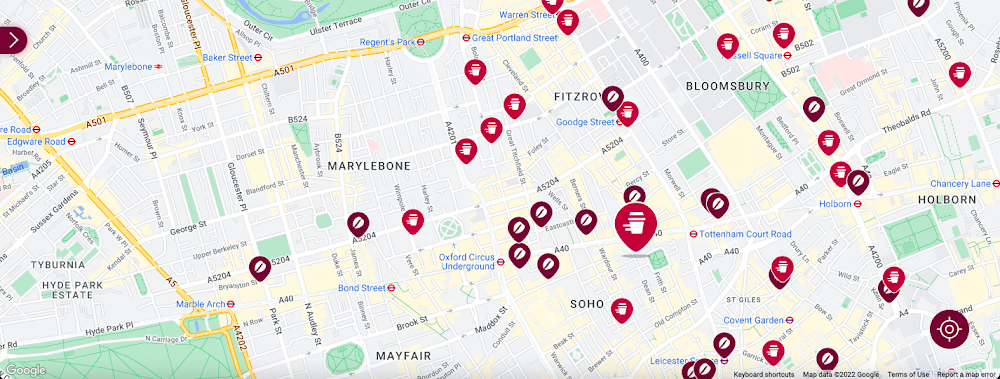
Our Google Cloud Premier Partner, Snowdrop Solutions, supported us in deploying all our requirements so the app’s new features could be rolled out globally. We wanted to direct pedestrians and vehicles to standalone Costa Coffee shops and kiosks in supermarkets and gas stations. We also wanted a dynamic map feature to highlight which locations offered click-and-collect, drive-thru, and delivery services. We then wanted to link these services to our online payments systems, seamlessly integrating our transaction process to make it as easy as possible for our customers.
To that end, we used the Maps Static API to embed maps within our app, and the Geocoding API to convert addresses into coordinates to create markers on our maps. We also use the Places API to allow customers to search for a Costa Coffee facility based on their location.
A new route for customer satisfaction
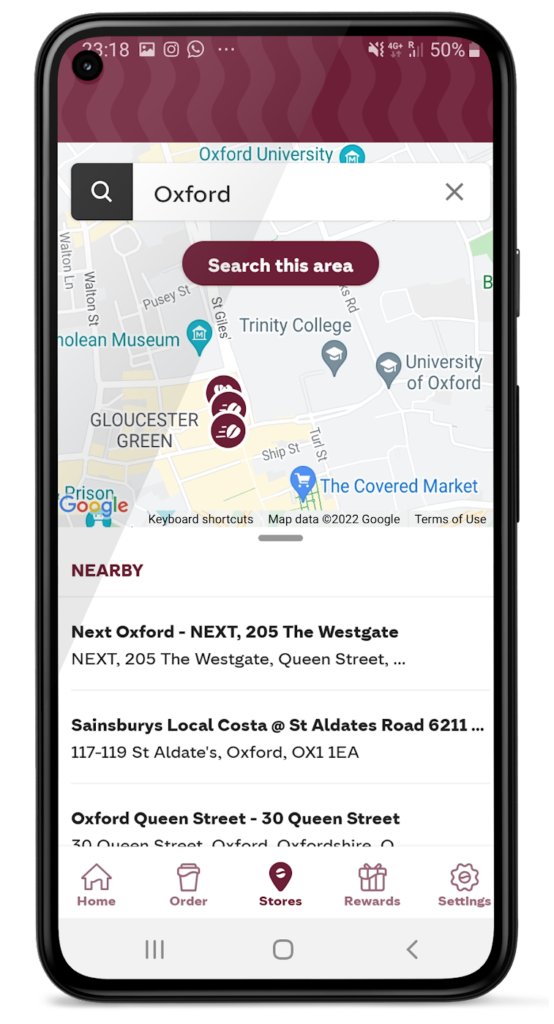
We had one issue when it came to locating Costa Coffee shops, however. We noticed that some customers were selecting the wrong store to collect orders. Fortunately, Google Maps Platform provided a quick fix that solved this issue. We updated the service to provide customers with a map of their collection point upon receipt of their order, remindIng them which store to collect from. A tweak like adding a map to a receipt improves customer satisfaction. The drop in calls to our customer service is testimony to this.
Geospatial intelligence became invaluable in the pandemic
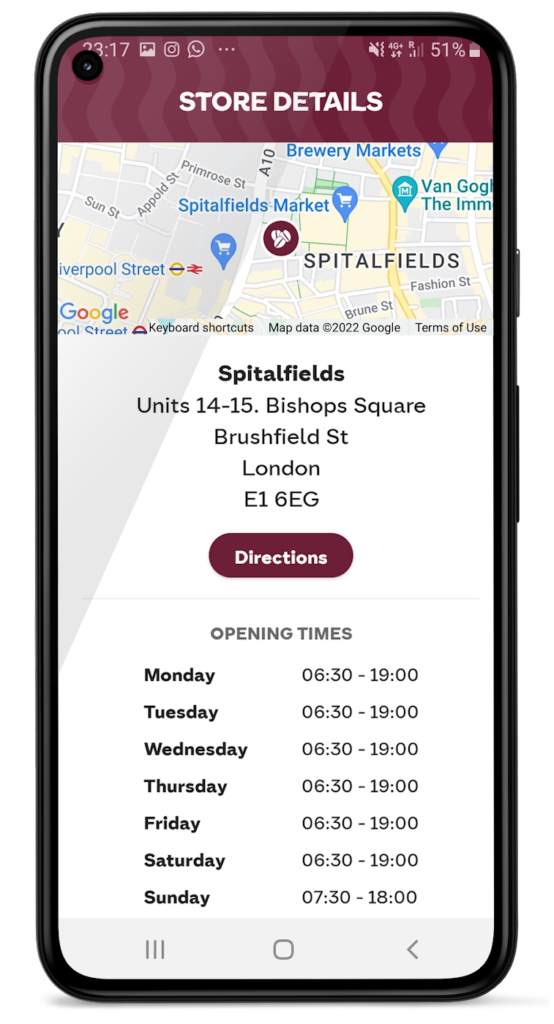
We had to adjust our service when the pandemic hit and Google Maps Platform was again instrumental in helping us. Because we had to comply with unique lockdown measures and travel restrictions across different locations, it could be challenging for our customers to stay up-to-date on the changing opening times and service guidelines of our shops. So we used Google Maps Platform Places API to show our customers which nearby stores, click-and-collect outlets, or drive-thrus were open, and when, during lockdowns.
Integrating this with our mobile ordering system also enabled us to promote COVID-safe contactless payments. Customers can locate a Costa Coffee shop, select, order, purchase, and collect their order or have it delivered to their cars without the need for any human contact. This reduces service wait times and minimizes the risk of transmission between customers and baristas. It also makes our employees feel more safe at work.
Geospatial data optimizes our entire operation
When the lockdown ended, our in-app order data showed a spike in demand, illustrating how much our customers miss their Costa Coffee experience. This data not only helps us to identify demand, it lets us track user preferences, informs where to direct supplies to meet a raised demand, and creates more accurate forecasts. This data can also help us manage costs.
Geospatial intelligence is also used to improve the experience of customers, from when they first look to order a cappuccino to when they arrive at the shop to enjoy it. We are using geomarketing to surface local offers. Say a Costa Coffee shop is trialing a new beverage, a pop-up can suggest users of our app try it next time they’re nearby.
Google Maps Platform has become integral to our digital operations. New features and capabilities of Google Maps Platform products have allowed us to continue innovating. The Costa Coffee footprint now spreads physically and digitally around the globe, and with the help of Google Maps Platform we can still offer the same tailored personal service that spurred the initial success of the Costa Brothers 50 years ago.
For more information on Google Maps Platform, visit our website.
Vodafone Turns to Google Maps Platform to Expand and Improve its Network

6390
Of your peers have already read this article.
1:30 Minutes
The most insightful time you'll spend today!
Vodafone India had a manual, labor-intensive process for determining network capabilities and reach. The company sent field operatives to every customer location to conduct a feasibility study. These feasibility studies help Vodafone determine whether they can provide connectivity and services to customers based on the infrastructure at that location.
Everyone from the IT team and end users to the field operatives doing the work recognized the need to adopt a new solution to automate the measurements. They needed a technology that was easy to use and maintain.
“Vodafone used to manually perform physical surveys for each feasibility, which is a time-consuming and labor-intensive process. Often, feasibility studies were delayed, and we missed out on opportunities to serve additional customers. With SmartFeasibility, we’ve increased our capacity 15 fold, which positively impacts our bottom line and allows us to provide better and smarter customer service.”
—Rajneesh Asthana, IT Planning and Delivery, Vodafone India
Partnering with Lepton Software (a leading global provider of location-based analytics solution) Vodafone introduced SmartFeasibility—a solution that changed the feasibility testing from a manual to an automated process. This involved a full Google geo platform solution – leveraging world class technology like maps, roads and directions.
Google Maps Platform Results
- Employees are able to access information faster with SmartFeasibility—they have data at their fingertips, rather than waiting for an employee to collect it
- Field operatives have increased their conversion rates by providing more accurate readings on feasibilities and closing more customer business
- Addresses are now easy to find with a click of a button. The Vodafone India team can search feasibilities that have been loaded into the database, so if there’s an issue or if they need to reference a past action, they have that information at their fingertips
- 2 day turnaround versus 5 before the solution was implemented
- 400+ new customers added per day
With the new solution, Vodafone India no longer needs field operatives to manually calculate these measurements. With Google Maps, users can search customers’ addresses, calculate the distance between Vodafone’s location and the customer’s location and research building data such as height.
The old system of having field operatives collect data was unreliable. With Google Maps Platform, the Vodafone India team knows that the measurements are accurate and reliable.
Fortune 500 Electronics Manufacturer Makes Collaboration a Competitive Advantage…and Saves $2 Million A Year
4650
Of your peers have already read this article.
4:30 Minutes
The most insightful time you'll spend today!
When electronics manufacturer Sanmina adopted G Suite several years ago, its goals were clear: reduce licensing costs, simplify management—particularly of its messaging tools—and cut hardware expenditures.
Fast forward several years and the Fortune 500 company has achieved those goals and more. By moving to Gmail, Sanmina reduced more than 110 email servers by over 90%, freed up its IT support function from basic administration to focus on more valuable tasks, and saved $2 million a year on total cost of ownership (including over $1.5 million a year on IT licensing).
A long-term plan: cloud collaboration
For Sanmina CIO Manesh Patel, the impressive returns are part of a bigger plan. From the beginning, Manesh recognized the potential of moving to the cloud to facilitate collaboration across Sanmina’s global operations. With more than 45,000 employees across 26 countries delivering different elements of a global value chain from design to delivery, the benefits of improving collaboration were clear. It could open up innovation by drawing on ideas from different locations and teams and enhance quality control throughout the manufacturing process.
As the first step towards this compelling vision, Manesh focused on rolling out Gmail and Calendar. Both applications were already familiar to many employees and offered a straightforward route to embrace cloud services. With cost savings quickly following, colleagues across Sanmina could see clear benefits from the shift to the cloud.
At the same time, Sanmina made the full suite of tools available and allowed adoption to occur organically across the organization.
Driving adoption
As interest in cloud computing grew, G Suite provided an ideal platform for employees to explore new ways of working together—with some parts of the business swift to develop effective uses for the collaborative tools. Building on the work of these leaders, Manesh has promoted adoption of the suite on several fronts over the past 18 months. Manufacturing, Quality, Engineering, and Supply Chain are a few examples of early adopters that benefit from the improved collaboration in G Suite.
The company also looked to build greater awareness of new G Suite features and functions. It engaged with Google partner Maven Wave. “Maven Wave has been a terrific and responsive partner,” he says. “They’re open and adapted their approach to our needs, while bringing a core competency on G Suite.” Maven Wave brought the experience of working with other global companies on similar initiatives, and an effective change management methodology that was tailored to fit Sanmina’s culture.
“Hangouts Meet fundamentally changes how people interact; you can put a face to a name and really engage with your team. It’s as close as you can get to meeting in person.”
– Manesh Patel, CIO, Sanmina
The messaging tools were not being used to full effect either. When Gmail was first introduced, training was optional; some of the teams were therefore not familiar with features such as attaching documents from Google Drive or archiving content. To help ensure the whole business was using Gmail to its full potential, there has been strong internal promotion of Google’s easy-to-use, online G Suite Training tools. “It’s very easy to consume and very effective,” says Manesh.
Embracing collaboration
Today, Sanmina employees rely daily on several G Suite tools, including Docs, Sheets, Slides, and most recently Hangouts Meet.
“More and more of our employees use Hangouts Meet. Our employees often work as part of teams that are dispersed around the world, so they don’t have the chance to actually meet their colleagues,” Manesh explains. “Hangouts Meet fundamentally changes how people interact; you can put a face to a name and really engage with your team. It’s as close as you can get to meeting in person.”
Manesh acknowledges that this is not simply a result of technological change, but a cultural shift as people grow more comfortable with video calls in their personal lives. Hangouts Meet brings that same ease of use to professional settings—and even well-traveled executives are adopting Hangouts Meet, appreciating its versatility across multiple platforms.
To encourage further use, the IT team has committed to equipping at least one room in every Sanmina facility around the world with Hangouts Meet hardware. “We definitely expect to save time and reduce travel costs with Hangouts Meet,” Manesh confirms. “But the bigger benefit for us is definitely the way it brings people together.”
Collaborating across teams and communities
With that goal in mind, Manesh has also promoted several other collaboration tools—in particular Hangouts Chat, Reveal, and Team Drives.
“More and more of our communications take place via Chat, whether in a team environment or one-to-one setting,” he says. “It’s the asynchronous tool that works alongside Hangouts Meet, for synchronous collaboration.”
Similarly, the use of Reveal—a corporate video sharing platform developed by Maven Wave and Google—is growing. “We’ve just started using Reveal to distribute regular video messages from the CEO to our employees and we also expect it to be a big part of our internal communications,” Manesh says. These videos help keep Sanmina employees aligned with company goals and increase a sense of connectedness across the global organization.
Sharing files between dispersed teams
The move to increase use of Team Drives, meanwhile, is one of Manesh’s priorities. “In every one of our factories worldwide, we have a shared drive on a shared server. We’re in the process of moving those to Team Drives, which will provide a big benefit in terms of infrastructure and in terms of how we work.”
“G Suite enables us to collaborate efficiently and create complex process documents that help us adhere to strict quality control requirements.”
– Manesh Patel, CIO, Sanmina
Manesh and his team have spent a lot of time and effort improving capacity, redundancy, and failover capabilities in preparation for the change. Team Drives should reduce storage requirements and remove challenges and costs tied to back-up and maintenance.
More importantly, the use of Team Drives will mean that files can be shared across multiple sites to further improve collaboration across teams.
Bringing collaboration to the factory floor
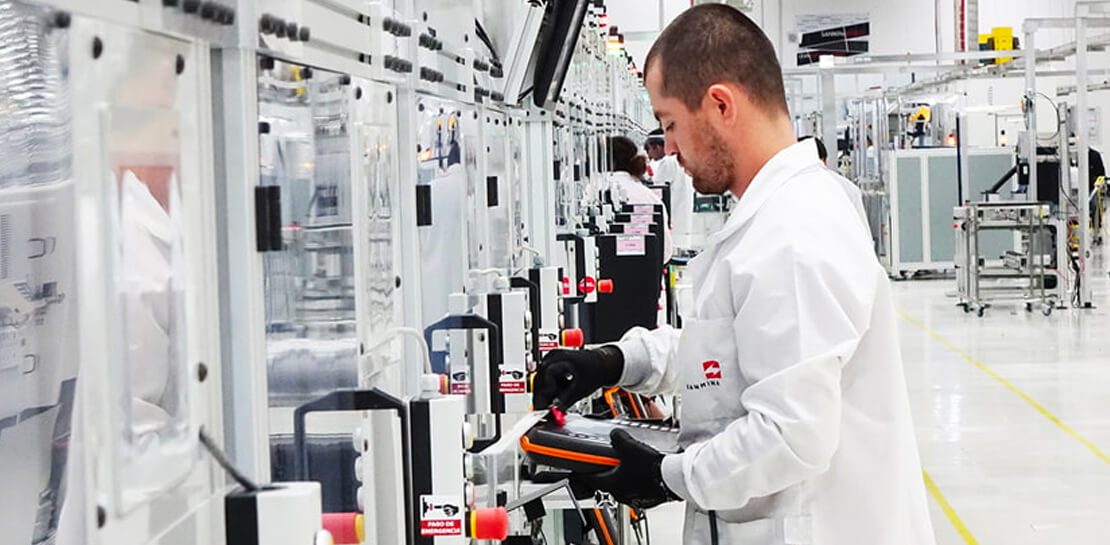
The power of G Suite is evident across the organization—from its corporate offices to its factories worldwide. “We’ve had employees creating a Google Sheet, sharing it with five team members, and then displaying it on a big screen on the manufacturing floor so everyone can see the project status,” he explains.
Another key process that is being transformed is quality reporting. The quality team has identified that moving large quantities of required documentation from legacy technologies to G Suite can assist with transparency and version control, routing, and approvals. “G Suite enables us to collaborate efficiently and create complex process documents that help us adhere to strict quality control requirements,” Manesh says.
“We need to empower employees to get the information they need, when they need it, on any device. G Suite makes that happen.”
– Manesh Patel, CIO, Sanmina
Gaining a competitive edge
Sanmina continues to achieve solid year-over-year returns on its investment in G Suite, and those returns will grow with increased adoption. “G Suite really is at the heart of our efforts to get people to work in ways that are more efficient and effective,” Manesh says.
For a company with a rich history of innovation and service, the expanded use of G Suite is another way that Sanmina stands out from competitors. “We need employees to be empowered to get the information they need, when they need it, and on any device. G Suite makes that happen.”
4586
Of your peers have already watched this video.
41:00 Minutes
The most insightful time you'll spend today!
What IT Managers Really Need to Know About G Suite and Google Cloud Platform
Today, some of the world’s largest organizations are using Google technology to innovate. They are leveraging Google APIs and platform services to find new ways to transform their organizations.
They are also leveraging Google Cloud to empower their G Suite users. But what does the Google Cloud Platform (GCP) really offer?
For starters, GCP brings to the table some of the same capabilities as the G Suite like building globally distributed storage systems and collaboration. GCP has a deep and broad portfolio from moving entire datacenters or providing access to Google APIs so you can build those into your applications and services.
You can also make use of business platforms like Apigee or Orbitera or leverage Google APIs to integrate with your applications. Most organizations today are want don’t want to move any of their infrastructure. And GCP helps organizations achieve exactly that.
Vincent Wienczorkowski, Cloud Sales Manager, Google Cloud, and Nick Pan, Cloud Customer Engineer, Google Cloud, share how IT managers, like you, can help their organizations make the most of Google Cloud Platform.
3917
Of your peers have already watched this video.
15:11 Minutes
The most insightful time you'll spend today!
Communication in G Suite: The Future of Gmail, Chat, Meet, and More
Let’s take a step back and acknowledge the sudden shift that many of our businesses and employees have recently faced in the workplace.
A lot of people, who for a really long time relied on physical office space and infrastructure to both communicate and collaborate, have had to shift how they work and quickly. The crisis at hand has become a massive catalyst to remote, distributed and flexible work. And almost 3/4 of CFOs actually predict that these changes will permanently affect how companies choose to work moving forward.
While we’re well into this new reality, I want to quickly recap a few ways we’ve adapted to try to make this change to flexible work easier on people and organizations. First, we made premium Meet features available to all G Suite users, which meant that every customer, from schools to startups to small businesses to large enterprises, could leverage larger meeting sizes, live streams, recordings, and more.
In this video, find out more about how Google Workspace (formerly G Suite) is changing the future of work.
In sync for better efficiency: Effective collaboration strategies for distributed workforces

3188
Of your peers have already read this article.
2:30 Minutes
The most insightful time you'll spend today!
Workplace collaboration continues to evolve as hybrid work expands its footprint. While both “same-time” and “staggered-time” (or asynchronous) collaboration modes each have their place in the hybrid work environment, organizations and teams sometimes overuse one mode over another. That’s probably because in-person meetings or collaborating in real time have been the default for many organizations, leading to a “same-time” bias, even as new tools make working across time zones and locations seamless. Ultimately, the key for making collaboration scalable and to support employee wellbeing is choosing the right method and tool for the task at hand. With that in mind, here are some ways to get the most out of same-time and staggered-time collaboration in your organization.
Making same-time collaboration more valuable
Historically, many organizations have valued same-time interactions for the fast, direct exchange of information and feedback. They also bring teams together and build human connections. While all these outcomes are powerful and important, same-time collaboration also has some drawbacks — especially in a hybrid environment.
First, same-time interactions can be difficult to arrange. Coordinating schedules requires advanced planning, especially when employees are distributed across time zones or working outside of traditional business hours. Second, back-to-back scheduling can contribute to meeting fatigue. In our recently commissioned global hybrid work survey with Economist Impact, 72% of respondents acknowledged that virtual meetings improve inclusion and participation. At the same time, 68% said there are too many virtual meetings in general, suggesting that even though employees value same-time collaboration, they want it in moderation.

To address these challenges, organizations should consider the collaboration scenarios in which same-time interactions can make the greatest impact. It’s particularly useful when consensus or immediate action is needed, as in briefings, decision-making, and crisis management.
For effective same-time collaboration in a hybrid environment, your employees need tools that help them coordinate real-time interactions and minimize time spent switching apps and context. With Google Workspace, teams can create and access a shared agenda or Google Doc inside a Google Calendar invite, helping align expectations and goals before, during, and after scheduled same-time work sessions. And, the more integrated your collaboration tools are, the easier it is for employees to get right to work when inspiration strikes or a quick decision is needed. For example, team members can initiate spontaneous work sessions by starting a Google Meet directly from Docs, Sheets, or Slides.
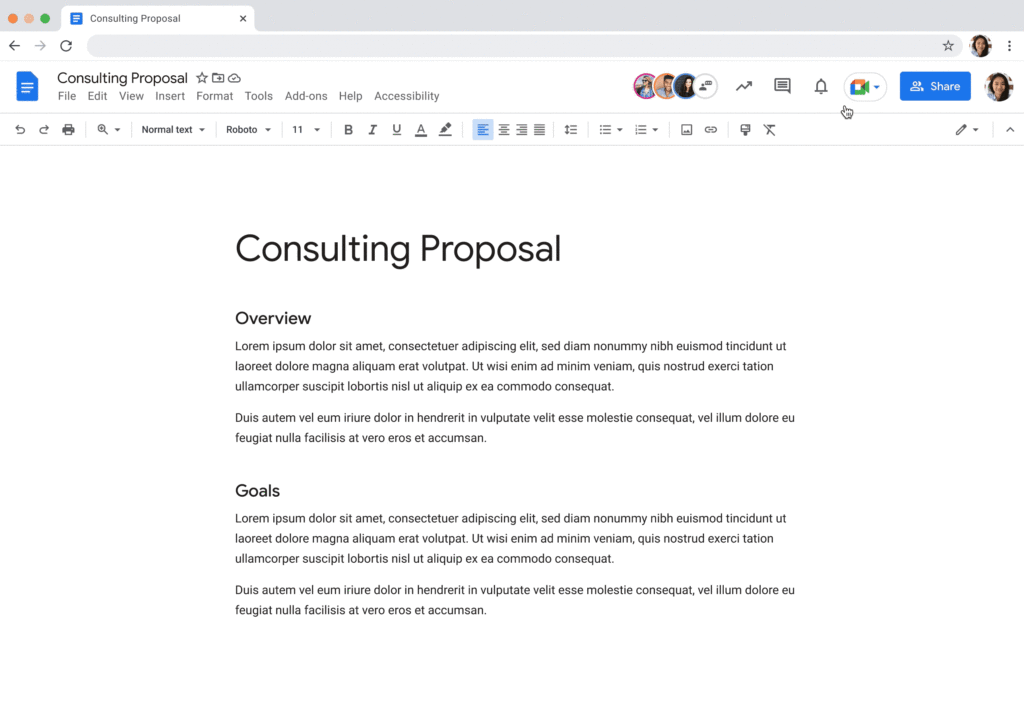
Additionally, consider how you can bring real-world collaboration activities into virtual environments to enhance same-time collaboration for distributed teams. For instance, digital whiteboard tools, like Jamboard and Miro in Google Meet, allow people to brainstorm, ideate, and problem-solve in real time from anywhere. Interactive solutions like these empower employees to work together in new ways.
Expanding what’s possible with staggered-time collaboration
Widespread adoption of hybrid work has prompted organizations to turn more frequently to staggered-time collaboration — where team members are free to share and respond to information in their own time. A key benefit of staggered collaboration is improving the experience and wellbeing of employees — specifically, by promoting participation across the team and support for flexible work habits. Allowing team members to engage when they’re most productive, or when it doesn’t interfere with their scheduled focus time, supports their wellbeing. It can also help employees feel heard, valued, and empowered. Staggered-time collaboration can also give team members who may feel uncomfortable or vulnerable speaking up in real time, or who just need time to think about their feedback, a more inviting way to share their perspectives.
Staggered-time collaboration can enhance a range of collaboration scenarios, including assigning tasks and action items, knowledge- and resource-sharing, brainstorming, and giving feedback. To make these interactions successful, employees need secure, intuitive tools that give them the information they need to do their jobs from anywhere, at any time. For example, in Spaces, team members can initiate and take part in group chat threads devoted to project- and topic-based discussions, as well as access files and tasks, to stay in the loop whenever they’re able to participate. For people working on a task or project at varied times, creating a dynamic, single source of truth makes all the difference.
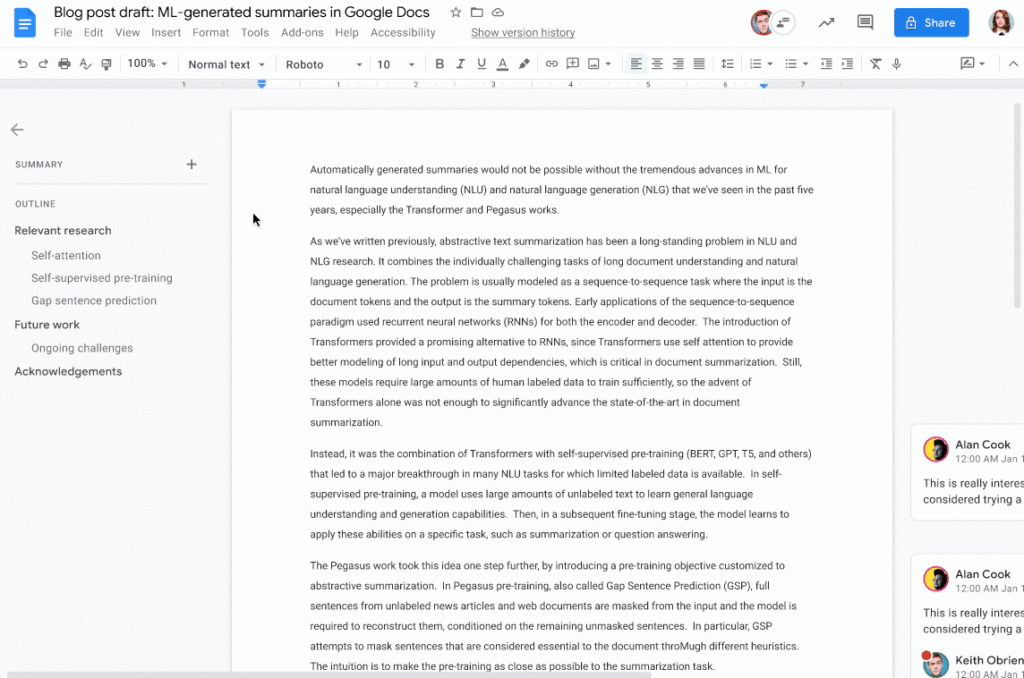
When collaborating on shared documents, a feature like smart canvas enables teammates to assign tasks, build checklists, and share files using @-mentions for easy information access. Meanwhile, automated, built-in summaries in Docs help the team get up to speed without losing focus. Features like these help everyone stay on the same page (literally), even if they’re contributing to a project at different times.
Flexibility and collaboration are not mutually exclusive
Helping people know which tasks call for real-time collaboration and which tasks are better done on their own time is critical for sustaining productivity and wellbeing in a hybrid work world. Employees who are empowered to work in ways that complement their needs, preferences, and schedules typically reward their organization for that flexibility. As Holger Reisinger, Paul Sephton, and Dane Fetterer wrote for the Harvard Business Review, “When leaders give employees the freedom to choose where and when they work, it signals they trust them to do the job they were hired to do. The data shows that that trust is then paid back…at a very high rate, building a tight-knit culture of inclusivity and belonging.”
When you create team norms around same-time and staggered-time collaboration, you can help your employees stay productive and connected — to each other and the broader organization. And by giving them tools that support seamless, secure collaboration experiences from anywhere, the impact on productivity, employee wellbeing, and morale can be transformational.
More Relevant Stories for Your Company




Are You Suffering from Spreadsheet Paralysis?
Today, within the four walls of your office there’s just one concern everyone has: What do the numbers say? The answer to that question almost always rests with you. If they get it wrong, everybody gets it wrong. But does it have to be so hard to get it right?

A Road to Possibilities: Google Maps Platform Website
For more than 15 years, developers have used Google Maps Platform to deliver location-based experiences to their end users and used location intelligence to optimize their businesses. Along this journey, we’ve made a variety of changes to better support our community as needs have changed and new industries and technologies

How Do You Cut Costs and Improve Staff Productivity, and Business Visibility? Ascend Money Has an Answer
Hundreds of millions of residents of South East Asia have only limited access to banking and finance services. However, help is at hand. One of South East Asia's largest fintech businesses, Ascend Money is using digital technologies to realize its mission of enabling as many people as possible to access

How Kisan Network is Connecting Over 30,000 Farmers to Help them Reap Over 10% More Profits from Their Crops
For many people, an Ivy League education is a promise of a better future. But Aditya Agarwalla, who studied computer science at Princeton, didn’t want to limit that future to just himself. He wanted to share his good fortune and create a positive social impact in his home country of
