





Google Workspace to Extend Digital Sovereignity for EU Organizations in Later Part of 2022

4797
Of your peers have already read this article.
2:00 Minutes
The most insightful time you'll spend today!
European organizations are moving their operations and data to the cloud in increasing numbers to enable collaboration, drive business value, and transition to hybrid work. However, the cloud solutions that underpin these powerful capabilities must meet an organization’s critical requirements for security, privacy, and digital sovereignty. We often hear from European Union policymakers and business leaders that ensuring the sovereignty of their cloud data, through regionalization and additional controls over administrative access, is crucial in this evolving landscape.
Today, we’re announcing Sovereign Controls for Google Workspace, which will provide digital sovereignty capabilities for organizations, both in the public and private sector, to control, limit, and monitor transfers of data to and from the EU starting at the end of 2022, with additional capabilities delivered throughout 2023. This commitment builds on our existing Client-side encryption, Data regions, and Access Controls capabilities.
Offering enhanced customer controls, including Client-side encryption
Encryption is an important technical control that limits a cloud provider’s access to customer data. Google Workspace already uses the latest cryptographic standards to encrypt all data at rest and in transit between our facilities. The European Data Protection Board recommendations include encryption as part of the supplementary measures to protect data. Google Workspace is leading the way on such measures with our Client-side encryption feature that allows customers to continue benefiting from the powerful innovations of Google Cloud while retaining complete confidentiality and control over their data.
Google Workspace’s unique approach to client-side encryption provides our customers with authoritative privacy control over their data through encryption keys that they can hold on site, within a nation’s borders, or within any other boundary they define. Google never has access to the keys or key holders, which means the data is indecipherable to us and we have no technical ability to access it. We deliver this level of encryption without the need for legacy desktop clients, while maintaining the same high-quality experience for your users such as online co-authoring.
Organizations can choose to use Client-side encryption pervasively across all their users, or create rules that apply to specific users, organizational units, or shared drives. Client-side encryption is now generally available for Google Drive, Docs, Sheets, and Slides, with plans to extend the functionality to Gmail, Google Calendar, and Meet by the end of 2022.
Expanding data location controls
Data regions already allow our customers to control the storage location of their covered data at-rest. We will enhance this capability by the end of 2023 through expanded coverage of data storage and processing in-region along with an in-country copy.
As employees and organizations adopt new ways of working in a hybrid world, they need secure access to data to drive key business outcomes. But this trend, combined with complex technical architectures, presents significant challenges to retaining control over where data resides.
Our cloud-native architecture means that Google Workspace functions fully within a browser, without requiring caches or installed software on employee devices. We adopt a zero-trust approach, with built-in security that provides controls to geo-fence devices and users through Context Aware Access. Moreover, admins can set sharing boundaries and define rules that govern user communication.
In short, we empower admins with critical capabilities that can give them granular control over the flow of their data without hindering the modern collaboration capabilities that form the foundation of Google Workspace. We are enabling organizations to strike the right balance between data location and collaboration across teams, partners, and customers.
Control and transparency for administrative access
When moving to a cloud-based service, organizations need greater visibility and control over all forms of administrative access to their systems, including who has access, the nature and circumstances of that access, and the ability to specify that only certain personnel—in designated countries or regions—have access. These capabilities are core to our approach for meeting evolving digital sovereignty standards.
Building on this approach, we will implement a series of new Access Controls by the end of 2023 that will enable customers to:
- Restrict and/or approve Google support access through Access Approvals.
- Limit customer support to EU-based support staff through Access Management.
- Ensure round-the-clock support from Google Engineering staff, when needed, with remote-in virtual desktop infrastructure .
- Generate comprehensive log reports on data access and actions through Access Transparency, which is already available in GA.
Sovereign Controls for Google Workspace will deliver digital sovereignty through a comprehensive set of capabilities for organizations working in and across EU regions. In parallel, Google Cloud will continue to provide customers with legal mechanisms for international data transfer, which will include making the protections offered by the new EU data transfer framework available once it is implemented.
We remain committed to equipping our customers in Europe and across the globe with powerful technical solutions that help them adapt to, and stay on top of, a rapidly evolving regulatory landscape. We’ve designed and built Google Workspace to operate on a secure foundation, providing capabilities to keep our users safe, their data secure, and their information private. Digital sovereignty is core to our ongoing mission in Europe and elsewhere, and a guiding principle that customers can rely on now and into the future.
No-code Development Platforms Help Employees Reclaim their Time and Talent

3885
Of your peers have already read this article.
4:00 Minutes
The most insightful time you'll spend today!
As offices reopen, businesses aren’t keeping to a single formula. Many are embracing hybrid models, with employees splitting time between home and the office. Some are staying 100% remote. Others are returning the full workforce to offices with a greater focus on digitization.
Regardless of their model, one thing is certain: technology is more central than ever to organizations’ ability to work smarter and more effectively. In particular, organizations need technology that can be tailored to specific business needs. For example, a retail store manager may need a way to ensure improved sanitation practices, or office workers may need to create an app to manage desk reservations.
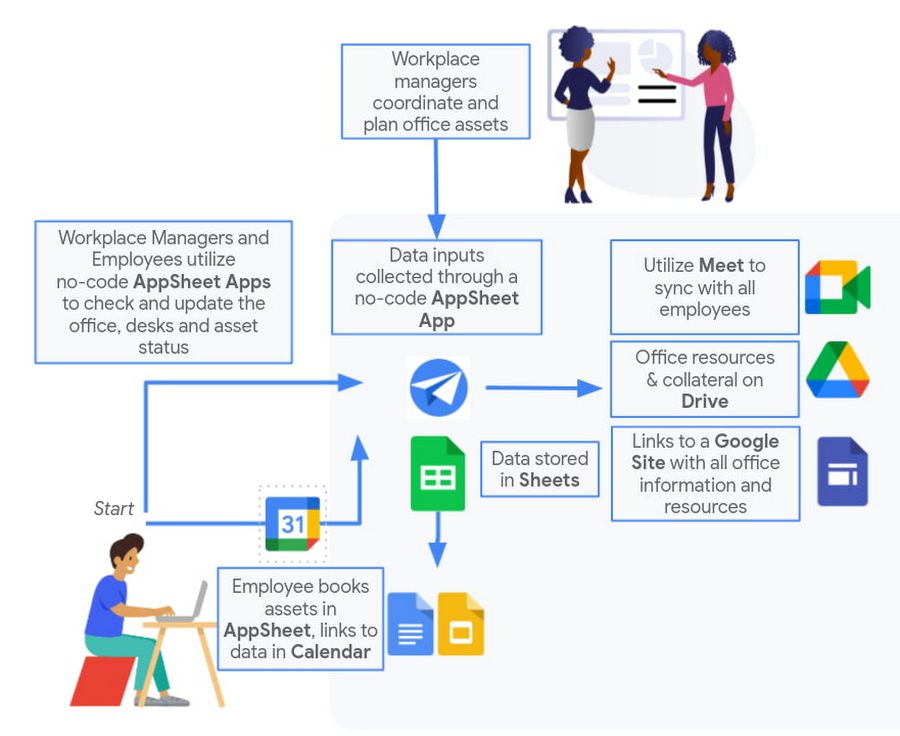
Google Workspace can help by bringing together everything you need to get things done, all in one place—including the ability to build custom apps and automations with AppSheet. AppSheet, Google Cloud’s no-code development platform, lets employees–even those with no programming experience–reclaim their time and talent by building custom apps and automations.
Building solutions with AppSheet is often easier and faster than traditional coding, as AppSheet leverages Google’s machine learning expertise to help you quickly go from idea to solution, helping your business to match the pace and agility that today’s landscape requires. In this article, we’ll explore how you can use AppSheet to create custom solutions that will help your business adapt to shifting business needs. To illustrate, we’ll focus on a use case many businesses face: reservation and management of meeting rooms and other office resources, but this process can easily be adapted for a wide variety of use cases, from apps for retail pickup to incident reporting and more.
Simplify and centralize with apps
The first thing to consider is whether your solution would be best managed via a custom interface. If you’re trying to simplify a process for someone, such as inspections or inventory tracking, or centralize information, such as resource portals or events calendars, creating a custom app is the way to go.
For this example app, we created a simple Google Sheet to hold our backend data. Sheets are ideal backend data sources when we know the amount of data will not grow exponentially, especially when piloting to a first office or group of users. We can switch our data seamlessly at any time to a scalable Google Cloud SQL database or other database if needed.
The example app has several worksheets to manage the different buildings, rooms, checkpoints and people (including their roles).

We can build an app in AppSheet directly from our Sheet by selecting Tools > AppSheet > Create an App.
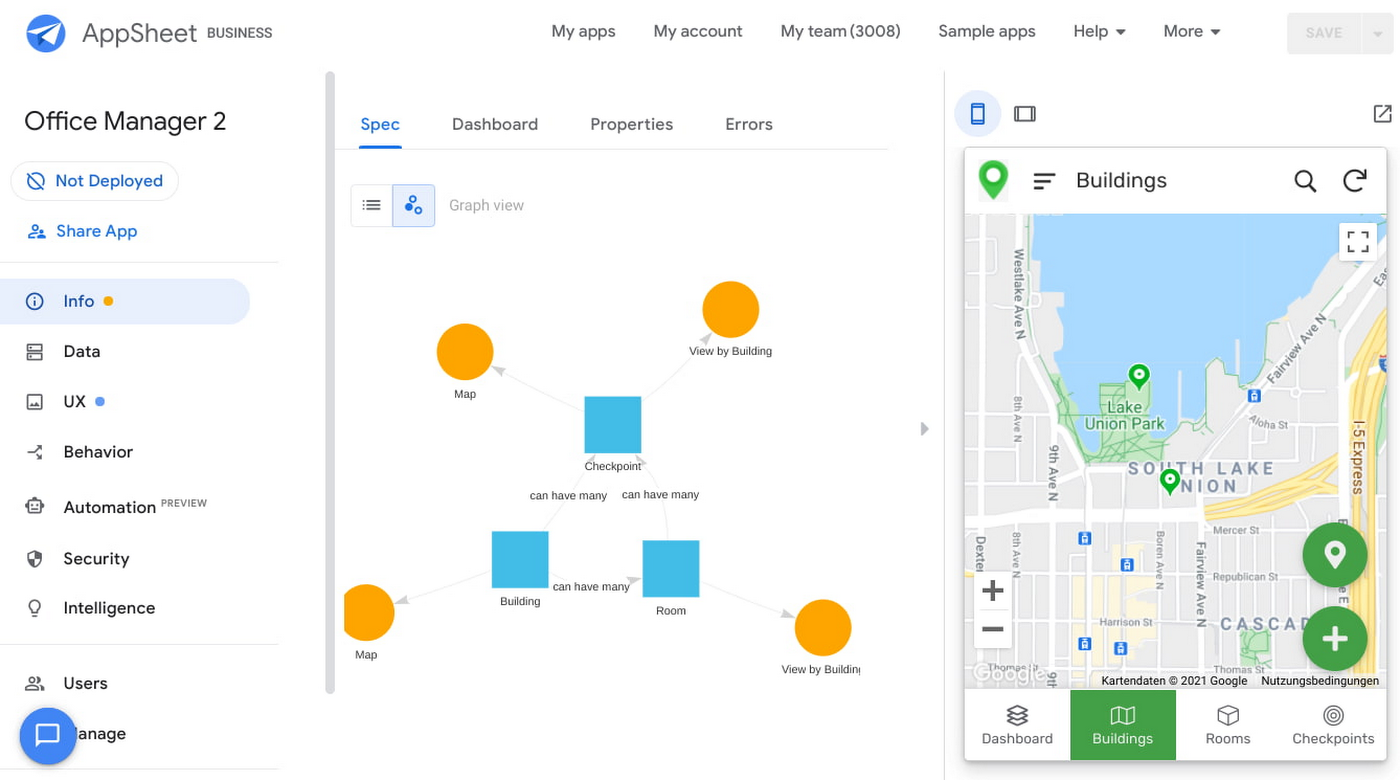
After creating our app, we see an overview of the data that we’ve connected, how pieces of data relate to each other, the views that are presented to the user, and a live interactive preview of the app. Refining the app is intuitive. When you input keywords, for instance, AppSheet surfaces appropriate functionality options that can be further customized. If we have address or location data, it’s automatically turned into a map view that we can further customize.
Our office management app will offer building managers and cleaners administrative features for managing equipment, disinfection schedules, and maintenance information, and it will also offer views for employees to check occupancy and safely reserve desks and equipment.
Opening an office and then a room in the app gives us an overview of both the floorplan and the occupancy and reservations for spaces and equipment in the room.
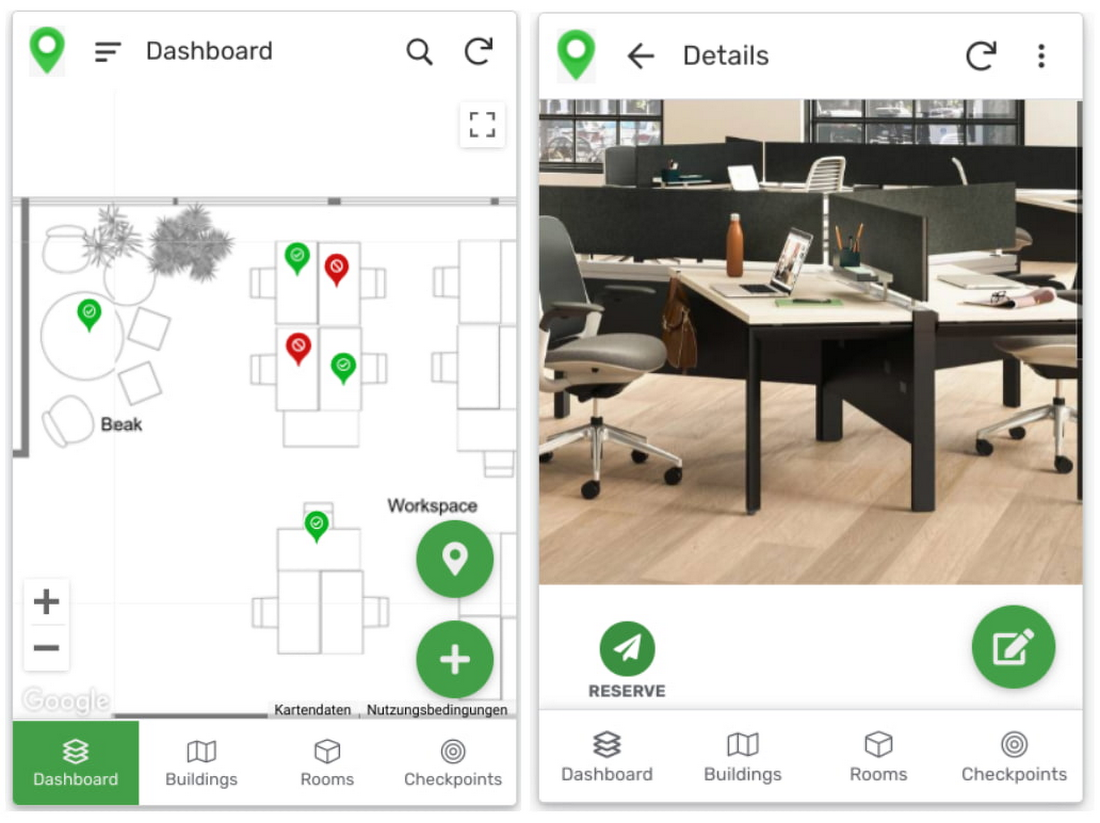
Users can then reserve spaces and equipment in the app, without having to first search for a form or page in the intranet, or even log onto their work computer. The reservation is an automation routine in AppSheet, which performs pre-configured actions when triggered.
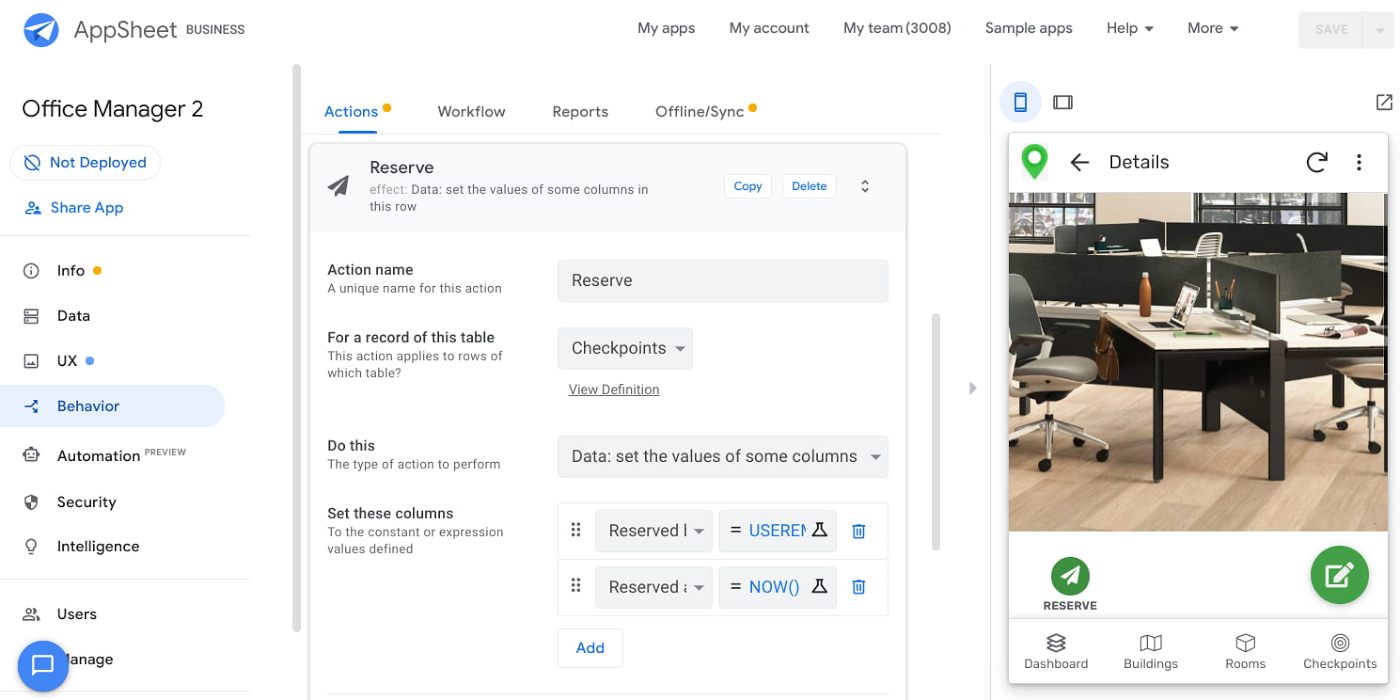
As illustrated in the screenshot above, when the action is triggered either by pressing a button in the app, scanning a QR code, or tapping an RFC tag, the action simply sets the “Reserved by” and “Reserved at” columns to the current user and timestamp.
Streamline with automations
AppSheet Automation, which was recently made generally available, makes it possible to reduce repetitive tasks and streamline processes even further.
In this example, one challenge you may encounter is that users often forget to release a desk or resource when they’re finished, which means those reservations stay blocked until an administrator releases all blocked reservations. However, it’s also important that resources aren’t immediately released, as they first need to be cleaned and disinfected before being made available to new users.
AppSheet Automation can solve this challenge by periodically checking all resources that have been reserved for longer than four hours, then alerting the user to either re-reserve them or release them to be cleaned. If there is no answer, the automation can trigger the resources to be cleaned, then released.

We can configure this as a recurring event, and create a bot that sends the notifications and triggers actions based on the user input (or lack of input).
Optimize for multiple roles
Creating an app for one user is one thing–creating an app that fits the needs of multiple types of users is another. AppSheet has you covered for this kind of complexity because it lets you build multiple roles into a single app.
In our office management app, for example, the office manager can have a particular view and dashboard, and workers in the office can have their own views and functionalities front and center. This makes it possible to automate tasks for all types of users with a single app.
Likewise, AppSheet Automation lets you easily react to real-time changes in data, send notifications to groups of users, and initiate additional workflows using data shared between the app and the users. If a group needs to reserve a conference space for an important late-breaking meeting, for example, there might be ripple effects across a number of user groups. The ability to automate all these updates and interactions can ultimately save a lot of time and effort.
AppSheet also supports advanced features such as QR codes, NFC, and bluetooth sensor integration. This could help users check into locations or workspaces, further streamlining the task of helping people safely navigate and collaborate within the office.
Mission critical solutions, faster than ever
In the past, the type of app explored in this article would have required a central data store, distribution to specific groups of users, management and dashboard capabilities, as well as smartphone sensor integration for NFC and image capturing. This would have necessitated a mammoth implementation project and a team of professional coders.
But with no-code, you can effectively design and implement these requirements in hours and days rather than months and years. Changes can be made on the fly in any browser, including pushing out new versions to users. Though AppSheet opens up app building and digital automations to any knowledge worker, it also includes robust security and governance controls, ensuring that as you manage getting employees back into office, you don’t neglect IT security.
Try out your own back-to-the-office app for free today at AppSheet.com, or explore and copy our sample app.
Best Kept Security Secrets: How to Resolve Cloud Trust Paradox with Cloud EKM

4622
Of your peers have already read this article.
2:30 Minutes
The most insightful time you'll spend today!
Whether driven by government policy, industry regulation, or geo-political considerations, the evolution of cloud computing has led organizations to want even more control over their data and more transparency from their cloud services. At Google Cloud, one of the best tools for achieving that level of control and transparency is a bit of technological magic we call Cloud External Key Manager (EKM).
Cloud EKM can help you protect your cloud data at rest with encryption keys which are stored and managed in a third-party key management system that’s outside Google Cloud’s infrastructure, and ultimately outside Google’s control. This can help you achieve full separation between your encryption keys and your data stored in the cloud. Cloud EKM works with symmetric and asymmetric encryption keys, and offers organization policies that allow for fine-grained control over what types of keys are used. Via Key Access Justification (KAJ) it also offers a way for clients to control each key use.
At their core, many cloud security and cloud computing discussions are about the kinds of trust that Cloud EKM specifically and encryption more broadly can help create. While the concept of digital trust is much bigger than cybersecurity and its tripartite components of security, privacy, and compliance, one of the most crucial themes of cloud computing is the cloud trust paradox. In order to trust the cloud more, you must be able to trust it less, and external control of keys and their use can help reduce concerns over unauthorized access to sensitive data.

How it works
From our Cloud EKM documentation, you can use keys that you manage within a supported external key management partner to protect data within Google Cloud. You can protect data at rest in services that support CMEK, or by calling the Cloud Key Management Service API directly.
Cloud EKM provides several benefits:
- Key provenance: You control the location and distribution of your externally-managed keys. Externally-managed keys are never cached or stored within Google Cloud. Google cannot see them. Instead, Cloud EKM communicates directly with the external key management device for each request.
- Access control: You manage access to your externally-managed keys. Before you can use an externally-managed key to encrypt or decrypt data in Google Cloud, you must grant the Google Cloud project access to use the key. You can revoke this access at any time.
- Centralized key management: You can manage your keys and access policies from a single location and user interface, whether the data they protect resides in the cloud or on your premises. The system that managed the keys is entirely outside Google control.
In all cases, the key resides on the external system, and is never sent to Google.
Here’s how it works:
- Create or use an existing key in a supported external key management partner system. This key has a unique URI.
- Grant your Google Cloud project access to use the key, in the external key management partner system.
- Create a Cloud EKM key in your Google Cloud project, using the URI for the externally-managed key.
The Cloud EKM key and the external key management partner key work together to protect your data. The external key is never exposed to Google and cannot be accessed by Google employees. Furthermore, Cloud EKM can be combined with Key Access Justifications (KAJ) to establish cryptographic control over data access.
KAJ with Cloud EKM can give customers the ability to deny Google Cloud administrators access to their data at rest for any reason, even in situations typically exempted from customer control, such as outages or responses to third-party data requests. KAJ does this by providing customers a clear reason why data is being decrypted, which they can use to programmatically decide whether to permit decryption and thus allow access to their data.
Previously, we’ve discussed three patterns where keeping the keys off the cloud may in fact be truly necessary or outweighs the benefits of cloud-based key management. Here’s a brief summary of those three scenarios where Cloud EKM can help solve these Hold Your Own Key dilemmas.
Scenario 1: The last data to go to the cloud
As organizations complete their digital transformations by migrating data processing workloads to the cloud, there is often a pool of data that can not be moved to the cloud. Perhaps it’s the most sensitive data, the most regulated data, or the data with the toughest internal security control requirements.
Finance, healthcare, manufacturing and other heavily-regulated organizations face myriad risk, compliance, and policy reasons that may make it challenging to send some of their data to a public cloud provider. However, the organization may be willing to migrate this data set to the cloud as long as it is encrypted and they have sole possession of the encryption keys.
Scenario 2: Regional regulations and concerns
Regional requirements are playing a larger role in how organizations migrate to and operate workloads in the public cloud.
Some organizations are already facing situations where they are based in one country and want to use a cloud provider based in a different country, but they aren’t comfortable with or legally allowed to give the provider access to encryption keys for their stored data. Here the situations are more varied, and can include an organization’s desire to stay ahead of evolving regulatory demands or industry-specific mandates.
Ultimately, this scenario allows organizations to utilize Google Cloud while keeping their encryption keys in the location of their choice, and under their physical and administrative control.
Scenario 3: Centralized encryption key control
The focus here is on operational efficiency. Keeping all the keys within one system to cover multiple cloud and on-premise environments can help reduce overhead and attack surface, thus helping to improve security. As Gartner researchers concluded in their report, “Develop an Enterprisewide Encryption Key Management Strategy or Lose the Data1,” organizations are motivated to reduce the number of key management tools.
“By minimizing the number of third-party encryption solutions being deployed within an environment, organizations can focus on establishing a cryptographic center of excellence,” Gartner researchers said
Given that few organizations are 100% cloud-based today for workloads that require encryption, keeping keys on-prem can streamline key management. Centralizing key management can give the cloud user a central location to enforce policies around access to keys and access to data-at-rest, while a single set of keys can help reduce management complexity. A properly implemented system with adequate security and redundancy outweighs the need to have multiple systems.
Do I need Cloud EKM?
Whether protecting highly sensitive data, retaining key control to address geopolitical and regional concerns, or supporting hybrid and multi-cloud architectures, Cloud EKM is best suited for those Google Cloud customers who must keep their encryption keys off of the cloud and always under their full control.
To learn more about Cloud EKM, please review these resources:
- Our research explaining why Google Cloud users can benefit from Cloud EKM
- The most recent updates to Cloud EKM
- Take a deeper dive into the cloud trust paradox
- Gartner, Develop an Enterprisewide Encryption Key Management Strategy or Lose the Data, David Mahdi, Brian Lowans, March 2022.
Lending DocAI Shortens Borrowers’ Journey on Roostify

11792
Of your peers have already read this article.
3:00 Minutes
The most insightful time you'll spend today!
The home lending journey entails processing an immense number of documents daily from hundreds of thousands of borrowers. Currently, home lending document processing relies on some outdated digital models and a high dependency on manual labor, resulting in slow processing times and higher origination costs. Scaling a business that sorts through millions of documents daily, while increasing efficacy and accuracy, is no small feat. When it comes to applying for a mortgage loan, consumers expect a digital experience that’s as good as the in-person one. Roostify simplifies the home lending journey for lenders and their customers.
No time to spare: Overcoming document processing challenges with AI
Roostify provides enterprise cloud applications for mortgage and home lenders. In order to empower its customers to deliver a better, more personalized lending experience, they needed to automate and scale their in-house document parsing functionality.
As a key component of its document intelligence service, Roostify is leveraging Google Cloud’s Lending DocAI machine learning platform to automate processing documents required during a home loan application process, such as tax returns or bank statements with multi-language support. This partnership delivers data capture at scale, enabling Roostify customers to automatically identify document types from the uploaded file and to extract relevant entities such as wages, tax liabilities, names, and ID numbers for further processing, and make things move faster in the cumbersome lending process.
Roostify’s solutions leverage Google Cloud’s Lending DocAI, which is built on the recently announced Document AI platform, a unified console for document processing. Customers can easily create and customize all the specialized parsers (e.g., mortgage lending documents and tax returns parsers) on the platform without the need to perform additional data mapping or training. All Google Cloud’s specialized parsers are fine-tuned to achieve industry-leading accuracy, helping customers and partners confidently unlock insights from documents with machine learning. Learn more about the solution from the GA launch blog and the overview video.
Integrating Lending DocAI’s intelligent document processing capabilities into the Roostify platform means more innovation for their customers and tangible results: faster loan processing times, fewer document intake errors, and lower origination costs. Additional support in Google Lending DAI for other languages and more documents like global Know Your Customer (KYC) documents or payroll reports is in the near future.
Full integration of AI solutions
Working together with Roostify’s platform team, we were able to help them solve their document processing challenge through integration of various GCP products such as Lending DocAI (LDAI), Data Loss Prevention (DLP) for redacting sensitive data, BigQuery for data warehousing and analytics, and Firestore for API status. To make it very safe and secure, all data was encrypted end-to-end at Rest and in Transit. LDAI won’t require any training data to process. It is an easy plug and play API.
Here is a sneak peek in the high level deployment architecture for LDAI in Roostify environment:

Here are the steps for processing data:
- Receives document processing request from the client.
- API Function directs requests to the pre-processing service. For Async requests a processing ID is generated and returned to the caller.
- Pre-processing service sends the request for further processing (Long/short PDF conversion), calling other microservices and receives back the responses. Any error in the response received is then sent to the response processing service.
- If the response is synchronous, the pre-processing service directs it to the LDAI Invoker service.
- If the response is asynchronous, the pre-processing service feeds it into the Cloud Pub/Sub service.
- Cloud Pub/Sub service feeds the response back to the LDAI Invoker service.
- LDAI Invoker service routes the request to the Google LDAI API for classification if there are multiple pages in the document.
- Document will be split based on LDAI response and then saved in a GCS bucket for temporary storage.
- LDAI entity interface for single page processing and then LDAI Invoker sends LDAI results to LDAI Response Processing
- If a request is a synchronous request the LDAI Response Processor sends results to the API Function so that it can complete the synchronous call and respond to the rConnect caller.
- If the request is an asynchronous request the LDAI Response Processor will respond to the caller’s webhook and complete the transaction.
- Finally, Data stored in the GCP bucket will be deleted.
All the responses that come from the LDAI API can optionally feed into BigQuery via the Response Processor, after parsing it through Data Loss Prevention (DLP) API to redact the PII/sensitive information. Throughout the processing of both asynchronous and synchronous requests all transactions are logged using Cloud Logging. For asynchronous transactions, the state is maintained throughout the process using Cloud Firestore.
Roostify currently uses this technology to power two different solutions: Roostify Document Intelligence and Roostify Beyond™. Roostify Document Intelligence is a real-time document capture, classification, and data extraction solution built for home lenders. It ingests documents uploaded by borrowers and loan officers, identifies the relevant documents, and extracts and classifies key information. Roostify Document Intelligence is available as a standalone API service to any home lender with any digital lending infrastructure already in place.
Roostify Beyond™ is a robust suite of AI-powered solutions that enables home lenders to create intelligent experiences from start to close. It combines powerful data, insightful analytics, and meaningful visualization to streamline the underwriting process. Roostify Beyond™ is currently available only to Roostify customers as part of an Early Adopter program and will be rolled out to the market later this year.


Through this partnership, Roostify has enabled its customers to adopt a data-first approach to their home lending processes, which will lead to improved user experiences and significantly reduced loan processing times.
Fast track end-to-end deployment with Google Cloud AI Services (AIS)
Google AIS (Professional Services Organization), in collaboration with our partner Quantiphi, helped Roostify deploy this system into production and fast-tracked the development multifold to generate the final business value.
The partnership between Google Cloud and Roostify is just one of the latest examples of how we’re providing AI-powered solutions to solve business problems.
Business Messages drives 85% CSAT scores for Levi Strauss

4276
Of your peers have already read this article.
3:30 Minutes
The most insightful time you'll spend today!
Founded in 1853, clothing company Levi Strauss & Co. gained fame for their Levi’s® denim jeans. Over 150 years later, Levi’s is a globally-recognized brand that sells jeans and other apparel in more than 3,100 retail stores across 110 countries.
The summary
During the COVID-19 pandemic, Levi’s saw that their shoppers were investing more time in pre-purchase research. They realized that being able to provide customers with information around the clock in an easily accessible way could greatly improve interest, engagement, and eventually purchase behavior. In June 2020, Levi’s partnered with customer experience automation provider Linc Global to integrate Google’s Business Messages into Levi’s customer experience (CX) strategy and cross-channel chat experiences. Business Messages soon brought in customer satisfaction (CSAT) scores of over 85 percent, and drove 30x more store-related questions than Levi’s onsite web chat. In addition, most Business Messages conversations occurred outside store hours, allowing Levi’s to respond to inquiries more quickly.
The challenge
Levi’s knows customers want to drive these interactions on their own terms and timelines— and on their own preferred communications channel. With store hours often impacted by the pandemic, the company needed 24/7 service to answer the 30% increase in off-hours shoppers. Google’s Business Messages allowed customers to connect with Levi’s without visiting the website, going to a store or making a phone call. Anisa Kumar, VP Global DTC says, “Rolling out CX automation on web chat provided a new way for customers to find answers to their pre purchase and other questions that regularly resulted in a call to customer service. Launching with Google’s Business Messages was the logical next step in providing our customers with a best-in-class customer experience.”
The approach
Levi’s worked with Linc Global, a CX automation platform, to set up Google’s Business Messages on Google Maps for five, then 50, stores, before expanding to more than 200 stores. “Customers can message us through Google Maps even after stores are closed. They can search for products and see product information and availability at their local store, plus get details about hours and COVID-19 related updates to make shopping easier,” said Kumar. The company then added Business Messages on Google Search for a rich messaging experience that synchronized with their regular webchat channel. “Consumers can have their entire messaging experience be on Google—and then visit our website or a physical store to complete a purchase recommended to them in Business Messages,” says Rico Arrastia, VP Product & Experience at Levi Strauss & Co.
The results
Two months after launching Google’s Business Messages, Levi’s CSAT scores for the channel surpassed 85%. And four months after launch, Levi’s found that this new channel drove 30x more store-related questions than web chat.
Additionally, Levi’s noted that 31% of Business Messages conversations were product-related, indicating that shoppers preferred targeted engagement to unstructured browsing. For Levi’s, Business Messages helps cross-sell or suggest products to customers based on an individual’s past purchases, personal information, and behaviors.
Levi’s is now a big proponent of Business Messages as a way to meaningfully engage with customers and stand out from other brands. Arrastia shares, “Business Messages not only creates a stronger customer experience but also enables us to do a much better job at ‘hearing’ shoppers.”
4203
Of your peers have already watched this video.
18:40 Minutes
The most insightful time you'll spend today!
Enabling a Remote Workforce with Chrome Enterprise
The recent COVID-19 pandemic has mandated that organizations take unprecedented efforts to enable their employees to work remotely. This recent Gartner survey indicated that 88% of organizations have encouraged or required employees to work from home.
Even before this year’s events, remote working has been a growing consideration for employees and employers alike. In fact, since 2005, working from home has grown by 173% amongst the non-self-employed population. And the desire to work remotely continues to increase.
As more businesses consider how to enable their teams to work remotely, business and IT leaders are increasingly thinking about how to best support a distributed workforce.
In this video, learn how Chrome Enterprise can help keep your employees productive and data secure while allowing IT to remotely manage devices and find out how other companies are doing it too.
More Relevant Stories for Your Company

Ways to Manage Extensions on Windows and Mac If You Haven’t Moved to Chrome Browser Cloud Management
Many enterprises are looking to better manage extensions on their corporate devices. Extensions themselves are a great tool for productivity and customization of Chrome. However, some extensions can have the potential for far reaching rights to sites your users visit and devices they browse from, giving IT the desire to

Collaboration Helps Nielsen Gain Better Consumer Insights and Save Costs by 20%
The Nielsen Company is one of the world’s most well-known and respected marketing research firms, with operations in over 100 countries. Its 56,000 employees work to provide insights and data that give customers a better understanding of what people watch, listen to, and buy. Those insights are essential to companies in a
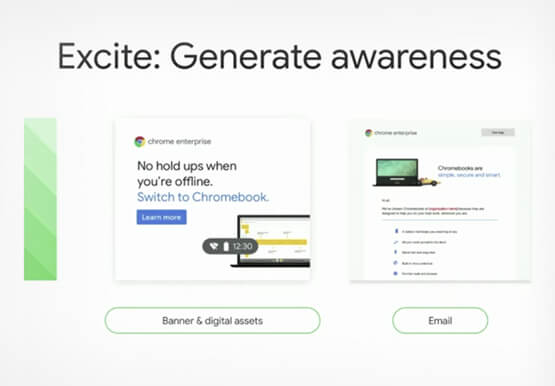
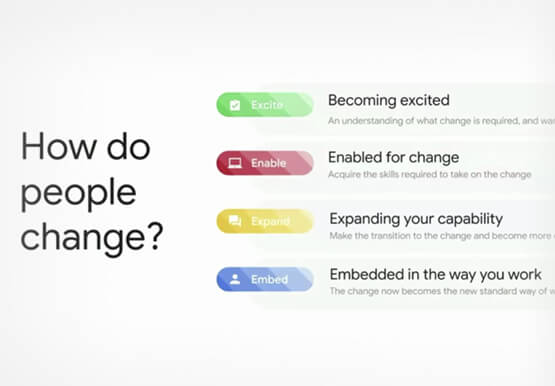

Boosting Chrome OS adoption with effective change management
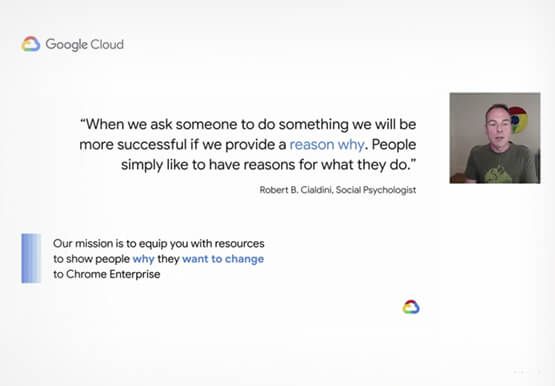
Can you remember the last time you asked a child to do something how did you convince them to do what you wanted? How many times did they ask you why probably more than once, right? So we know change is hard when we ask someone to make a change

Making Hybrid Work Human: Google Workspace and Economist Impact Survey
Google Workspace recently commissioned Economist Impact to complete a global survey (October 2021)* on the state of hybrid work, including its challenges and opportunities. We already knew that the pandemic had fundamentally changed the world of work, but the survey emphasizes the scale, reach, and longevity of those changes.. Over 75% of
