





Google Products Helps HMH’s Healthcare Staff Work from Anywhere Efficiently and Securely!

10209
Of your peers have already read this article.
3:00 Minutes
The most insightful time you'll spend today!
Hackensack Meridian Health (HMH) executive Mark Eimer explains how an ambitiously-timed rollout of a comprehensive suite of Google products helped the entire organization—from doctors to IT staff—achieve better security, cultivate a more equitable work environment, and ultimately, improve patient outcomes.
How does a recently merged, 17-hospital healthcare system fast-track a platform migration and hardware rollout securely and in a way that improves work for everyone, regardless of location or role? These are the questions that kept me up at night in early 2020, when the pandemic demanded a “big bang”—something our legacy laptops and operating systems couldn’t handle.
We began our work with Google in 2020 with the adoption of Chrome as our default browser. As we migrated platforms, keeping patient data safe was of the utmost importance to us, along with providing every staff member with the tools they needed to work virtually. Our staff often experienced issues accessing our web-based applications using Internet Explorer or Edge Browser, a problem that went away when we switched to Chrome. Chrome’s versatile compatibility also made it easier for my team to migrate all of our web-based operations, and Chrome’s security and manageability were key components to making this switch a huge win for the organization.
The success of this migration led us to extend our Google partnership to patient care applications—where Google’s expertise in AI and ML helps scale the use of diagnostics tools and improve other aspects of the patient journey.

Achieving security at every step
Like so many other healthcare organizations, we’ve been concerned about ransomware attacks. This is part of why we moved to Google Workspace and distributed over 3,000 Chrome OS devices in kiosk mode in March of 2020, when many of us went remote due to the pandemic. We were very concerned about team members accessing corporate applications through home devices that were running EOL operating systems (WIN7), as well as a general lack of antivirus and encryption measures.
We were protected by the fact that Google’s software and hardware both had built-in security features that we needed to stave off sophisticated attackers. For example, Chrome OS automatically updates to the latest security update and encrypts data living outside the cloud on the hardware. These features protected us from security-related disruptions, letting us securely move a huge library of file shares and emails across thousands of accounts to Google Chrome OS in just four months.
A year later, in March 2021, we migrated the enterprise over to Google Workspace and saw an immediate reduction in spam by 30% from the inherent built-in AI/ML. This meant staff were less likely to receive (and click through) phishing attempts. My team could connect, create, and collaborate easily and securely—even as more of us were working from home and needed to access sensitive data remotely.
Leveling the playing field
As an organization, we were surprised by how many team members didn’t have personal computers at home. We quickly decided that if we needed team members to work from home, the health network would have to supply hardware. Chromebooks’ lower price tag compared to PCs—on top of their built-in security controls—allowed us to purchase, deploy, and support that initial distribution of 3,000 Chromebooks to team members in less than three weeks, providing devices to every eligible remote employee instead of just a select few. This was vital to reaching our equitable technology goal as part of our diversity and inclusion initiative: everybody has the same tools to do good work.
When all employees have what they need to do their jobs well, we get better patient outcomes. Before we began this cloud adoption journey, patient and staff experiences were different within the hospitals and outside of them.
Now it’s the same wherever our staff is, and we’ve seen efficiency and accessibility benefits extend to the patient side. For example, we built a web-based contact center that supports 80 locations that use Workspace and Chrome OS devices. Since customer service, admin, and providers are all on the same system, it has become a one-stop shop for patients.
Furthermore, through the Grow with Google program, we were able to provide another benefit to employees that drove our equity goals. Google trained 50 non-IT staff members—from environmental services, food and nutrition, and other non-tech areas who were interested in making a career change to IT—on the Google products we were using. They may not have thought about switching to a career in IT before the Grow with Google program came to our organization, but through this partnership, they now have that opportunity.
A strategic, long-term partner
With any large-scale rollout, the work doesn’t end once laptops are in employee hands. Google has shown their commitment to long-term collaboration as they continuously optimize their products for the unique needs of healthcare providers and go the extra mile in tailoring tools to our staff’s workflows.
For example, on the Chrome OS side, the Google team has helped our registration desks and document centers with device integration for hardware like credit card readers and e-signature pads. They’ve also helped us meet security and privacy requirements mandated by state and federal governments around HIPAA, Medicaid, and Medicare reimbursements. Over this next year, we’ll look at a feature roadmap with Google Cloud to deliver further enhancements, iterating on the product itself to meet our needs for the present and the future.

Delivering the future of healthcare
The benefits we’ve seen around security and usability—and the ability to provide all staff with equal access to Google’s technology—are why we’re expanding our partnership with Google to both the administrative and clinical sides of HMH. In addition to further Google rollouts with corporate, next year we’re distributing Chromebooks to all 350 of our ambulatory clinics.
We’re also working with the Google professional services team to create a custom AI model that analyzes 3D mammogram images. This AI model will enable two providers to read mammograms—which adheres to international best practices but is currently rare in the US—without requiring additional time. Conducting double readings of mammograms will yield better health outcomes for our patients, such as a lower patient recall rate and an increased accuracy in detecting breast cancer.
We’re currently building the model using a variety of Google Cloud products, including Cloud Healthcare API. Once complete, this model is expected to be trained, deployed, and maintained in Google’s Vertex AI, allowing our providers to be more productive as they make clinical decisions with AI support. As the model is proven over time, we plan to make the predictive services accessible to other healthcare organizations.
With Google, we’re able to achieve a unified architecture for storing data as well as training and deploying AI models, which enable our staff to work more efficiently and securely from anywhere. While I may not be able to predict the future as accurately as AI can, I foresee our continued partnership with Google as a key part of HMH’s improved provider and patient outcomes.
Media CDN to Intelligently Deliver Streaming Experiences to Viewers around the World!

3299
Of your peers have already read this article.
3:00 Minutes
The most insightful time you'll spend today!
The digital media and entertainment industry is experiencing dramatic growth, as audiences migrate to online experiences and content providers seek to deliver new and innovative content. According to The Global Internet Phenomena Report, streaming video accounted for 53.7% of internet bandwidth traffic, up by 4.8% from a year ago. This rapid growth of over-the-top content is straining existing infrastructure, fueling media companies’ shift to the public clouds with their global presence and greater distribution capacities. In addition, other use cases such as gaming, social networks, AR/VR experiences, and education continue to fuel the need for intelligent media services and operations.
Today, at the 2022 NAB Show Streaming Summit, we’re excited to announce the general availability of Media CDN — a modern, extensible platform for delivering immersive experiences with unparalleled scale and intelligence. Media CDN will enable media and entertainment customers to efficiently and intelligently deliver streaming experiences to viewers anywhere in the world. The same infrastructure that Google has built over the last decade to serve YouTube content to over 2 billion users is now being leveraged to deliver media at scale to Google Cloud customers with Media CDN.
Unparalleled planet-scale reach and scale
Media CDN’s foundational advantage is the Google network. We have invested decades of resources to build tremendous capacity and reach in over 200 countries and more than 1,300 cities around the globe. Modern video applications are sensitive to fluctuations in latency, so getting content closer to users enables higher bitrates and reduces rebuffers, resulting in a superior experience for the end user. Media CDN builds on the success of the existing Cloud CDN portfolio for web and API acceleration and complements it by enabling delivery of immersive media experiences.
In addition to running on planet-scale infrastructure, Media CDN tailors delivery protocols to individual users and network conditions. Media CDN includes out-of-the-box support for QUIC (HTTP/3), TLS 1.3, and BBR, optimizing for last-mile delivery . When the Chrome team rolled out widespread support for QUIC, video rebuffer time decreased by more than 9% and mobile throughput increased by over 7%.
Media CDN also achieves industry-leading offload rates. With multiple tiers of caching, we minimize calls to origin — even for infrequently accessed content. This alleviates performance or capacity stress in the content origin and saves costs. These features are built into the product and seamlessly support customer content hosted on Google Cloud, on-premises, or on a third-party cloud.
“We are excited to leverage Media CDN to continue to deliver an exceptional streaming experience for Stan users across Australia. With Google’s massive network, and a deep reach into the ISPs, we are able to deliver the highest quality video for our users, no matter where they are”—John Hogan, Chief Technology Officer, Stan
“Our mission at U-NEXT is to deliver the highest quality and most entertaining content to our users. Google Cloud’s Media CDN helps us efficiently scale our infrastructure, which is challenging with a vast library of content. Media CDN offloaded 98.3% of requests from our origin server while delivering consistent great quality.”—Rutong Li, Chief Technology Officer, U-NEXT
Broader platform for monetization and immersive experiences
While global distribution is critical for a high-quality end-user experience, it’s only one piece of delivering a world-class platform for immersive experiences. Media CDN offers additional capabilities to enable this transformation — ad insertion, ecosystem integrations and platform extensibility, and powerful AI/ML analytics for interactive experiences.
Streaming providers can improve monetization through integrated ad serving via the Video Stitcher API, which allows manipulation of video content to dynamically insert ads.
Through extensible ecosystem integrations, Media CDN connects customers to key capabilities to simplify their operations. For example, the Transcoder API supports custom streaming formats, while the Live Stream API transcodes mezzanine live signals into direct-to-consumer streaming formats, for multiple device platforms.
Media CDN is built with AI/ML that will give viewers more control over how they see, experience, and even interact with content. For example, sports fans watching a game can obtain real-time stats and analytics, viewers can purchase items from virtual billboards, etc.
Cloud-native and developer-friendly operations
Media companies are under pressure to develop and deploy innovative experiences at a furious pace. Media CDN was built by developers, for developers, with automation and observability built in, giving media providers the speed and flexibility they need to integrate delivery provisioning and management into their content release processes.
Media CDN offers comprehensive APIs and automation tools such as Terraform. Detailed, pre-aggregated metrics and playback tracing make it easy to diagnose performance across the entire infrastructure stack. Real-time visibility is provided via Google Cloud’s operations suite, and integrates with tools that developers already use such as Grafana and ElasticSearch.
“Leveraging the same infrastructure as YouTube, Google Cloud’s Media CDN combines geographic reach, API-first architecture and integration with the Cloud operations suite. This is a transformative move that is aligned with the future of the CDN industry.”— Ghassan Abdo, Research Vice President, WW Telecom, Virtualization and CDN, IDC
“Viewers around the world are demanding best-in-class video quality and performance across modes of consumption. A video-first delivery network can be a game changer in this space. We’re excited to partner with Google Cloud and to leverage Media CDN to enable premium video experiences and customer engagements.”—Juan Martin, Founder and CTO, Firstlight Media
Planet-scale advanced security
Media CDN lets streaming media providers take advantage of Google’s decades-long experience delivering video safely, securely, and reliably. The platform includes deep integration with Google Cloud Armor for planet-scale DDoS protection and a rich set of capabilities to detect and mitigate attacks, prevent abuse, manage risk, and comply with regulatory or licensing requirements.
If you want to deliver rich, immersive experiences to global audiences with an extensible, modern delivery platform, we’d love to hear from you. For more information, including technical specifications and platform architecture, please visit cloud.google.com/media-cdn. To get started with Media CDN, contact your sales team.
Google Products Helps HMH’s Healthcare Staff Work from Anywhere Efficiently and Securely!
10210
Of your peers have already read this article.
3:00 Minutes
The most insightful time you'll spend today!
Hackensack Meridian Health (HMH) executive Mark Eimer explains how an ambitiously-timed rollout of a comprehensive suite of Google products helped the entire organization—from doctors to IT staff—achieve better security, cultivate a more equitable work environment, and ultimately, improve patient outcomes.
How does a recently merged, 17-hospital healthcare system fast-track a platform migration and hardware rollout securely and in a way that improves work for everyone, regardless of location or role? These are the questions that kept me up at night in early 2020, when the pandemic demanded a “big bang”—something our legacy laptops and operating systems couldn’t handle.
We began our work with Google in 2020 with the adoption of Chrome as our default browser. As we migrated platforms, keeping patient data safe was of the utmost importance to us, along with providing every staff member with the tools they needed to work virtually. Our staff often experienced issues accessing our web-based applications using Internet Explorer or Edge Browser, a problem that went away when we switched to Chrome. Chrome’s versatile compatibility also made it easier for my team to migrate all of our web-based operations, and Chrome’s security and manageability were key components to making this switch a huge win for the organization.
The success of this migration led us to extend our Google partnership to patient care applications—where Google’s expertise in AI and ML helps scale the use of diagnostics tools and improve other aspects of the patient journey.
Achieving security at every step
Like so many other healthcare organizations, we’ve been concerned about ransomware attacks. This is part of why we moved to Google Workspace and distributed over 3,000 Chrome OS devices in kiosk mode in March of 2020, when many of us went remote due to the pandemic. We were very concerned about team members accessing corporate applications through home devices that were running EOL operating systems (WIN7), as well as a general lack of antivirus and encryption measures.
We were protected by the fact that Google’s software and hardware both had built-in security features that we needed to stave off sophisticated attackers. For example, Chrome OS automatically updates to the latest security update and encrypts data living outside the cloud on the hardware. These features protected us from security-related disruptions, letting us securely move a huge library of file shares and emails across thousands of accounts to Google Chrome OS in just four months.
A year later, in March 2021, we migrated the enterprise over to Google Workspace and saw an immediate reduction in spam by 30% from the inherent built-in AI/ML. This meant staff were less likely to receive (and click through) phishing attempts. My team could connect, create, and collaborate easily and securely—even as more of us were working from home and needed to access sensitive data remotely.
Leveling the playing field
As an organization, we were surprised by how many team members didn’t have personal computers at home. We quickly decided that if we needed team members to work from home, the health network would have to supply hardware. Chromebooks’ lower price tag compared to PCs—on top of their built-in security controls—allowed us to purchase, deploy, and support that initial distribution of 3,000 Chromebooks to team members in less than three weeks, providing devices to every eligible remote employee instead of just a select few. This was vital to reaching our equitable technology goal as part of our diversity and inclusion initiative: everybody has the same tools to do good work.
When all employees have what they need to do their jobs well, we get better patient outcomes. Before we began this cloud adoption journey, patient and staff experiences were different within the hospitals and outside of them.
Now it’s the same wherever our staff is, and we’ve seen efficiency and accessibility benefits extend to the patient side. For example, we built a web-based contact center that supports 80 locations that use Workspace and Chrome OS devices. Since customer service, admin, and providers are all on the same system, it has become a one-stop shop for patients.
Furthermore, through the Grow with Google program, we were able to provide another benefit to employees that drove our equity goals. Google trained 50 non-IT staff members—from environmental services, food and nutrition, and other non-tech areas who were interested in making a career change to IT—on the Google products we were using. They may not have thought about switching to a career in IT before the Grow with Google program came to our organization, but through this partnership, they now have that opportunity.
A strategic, long-term partner
With any large-scale rollout, the work doesn’t end once laptops are in employee hands. Google has shown their commitment to long-term collaboration as they continuously optimize their products for the unique needs of healthcare providers and go the extra mile in tailoring tools to our staff’s workflows.
For example, on the Chrome OS side, the Google team has helped our registration desks and document centers with device integration for hardware like credit card readers and e-signature pads. They’ve also helped us meet security and privacy requirements mandated by state and federal governments around HIPAA, Medicaid, and Medicare reimbursements. Over this next year, we’ll look at a feature roadmap with Google Cloud to deliver further enhancements, iterating on the product itself to meet our needs for the present and the future.
Delivering the future of healthcare
The benefits we’ve seen around security and usability—and the ability to provide all staff with equal access to Google’s technology—are why we’re expanding our partnership with Google to both the administrative and clinical sides of HMH. In addition to further Google rollouts with corporate, next year we’re distributing Chromebooks to all 350 of our ambulatory clinics.
We’re also working with the Google professional services team to create a custom AI model that analyzes 3D mammogram images. This AI model will enable two providers to read mammograms—which adheres to international best practices but is currently rare in the US—without requiring additional time. Conducting double readings of mammograms will yield better health outcomes for our patients, such as a lower patient recall rate and an increased accuracy in detecting breast cancer.
We’re currently building the model using a variety of Google Cloud products, including Cloud Healthcare API. Once complete, this model is expected to be trained, deployed, and maintained in Google’s Vertex AI, allowing our providers to be more productive as they make clinical decisions with AI support. As the model is proven over time, we plan to make the predictive services accessible to other healthcare organizations.
With Google, we’re able to achieve a unified architecture for storing data as well as training and deploying AI models, which enable our staff to work more efficiently and securely from anywhere. While I may not be able to predict the future as accurately as AI can, I foresee our continued partnership with Google as a key part of HMH’s improved provider and patient outcomes.
3463
Of your peers have already watched this video.
20:00 Minutes
The most insightful time you'll spend today!
Managing Change in an SAP World
Change is a constant for SAP customers. Now more than ever, SAP customers need solutions that provide them business agility, rock solid availability, enhanced security, and true economic value.
Learn how Google Cloud can guide your SAP journey to the cloud with simple and no cost migrations, powerful infrastructure, and innovation technologies that you can take advantage of today. Hear examples of SAP customers who have deployed on Google Cloud and the game changing results they are realizing.
Learn to Access Process Metrics for Full-visibility into Software and Infrastructure behind Your Apps

3393
Of your peers have already read this article.
2:00 Minutes
The most insightful time you'll spend today!
When you are experiencing an issue with your application or service, having deep visibility into both the infrastructure and the software powering your apps and services is critical. Most monitoring services provide insights at the Virtual Machine (VM) level, but few go further. To get a full picture of the state of your application or service, you need to know what processes are running on your infrastructure. That visibility into the processes running on your VMs is provided out of the box by the new Ops Agent and made available by default in Cloud Monitoring. Today we will cover how to access process metrics and why you should start monitoring them.
Better visibility with process metrics
The data gathered by process metrics include CPU, memory, I/O, number of threads, and more, for any running processes and services on your VMs. When the Ops Agent or the Cloud Monitoring agent is installed, these metrics are captured at 60-second intervals and sent to Cloud Monitoring so you can visualize, analyze, track, and alert on them. A single VM may run tens or hundreds of processes, while you may have tens of thousands running across your fleet of VMs.
As a developer, you may only care about seeing inside a single VM to troubleshoot and identify memory leaks or the source of performance issues.
As an operator or IT Admin, you may be interested in aggregate resource consumption, building baseline views of compute, storage, and networking usage across your VM fleet. Then, when those baseline consumption levels break normal behaviors, you will know when to investigate your systems.
Built for scale and ease of use
Cloud Monitoring is built on the same advanced backend that powers metrics across Google. This proven scalability means your metrics ingestion will be supported despite the extremely high cardinality. Additionally, our agents do not require any config file changes to turn on process metric monitoring.
Lastly, our goal is to provide you the observability and telemetry data where, and when, you need it. So, like the rest of the operations suite, we deliver process metrics in the context of your infrastructure, directly in the VM admin console.
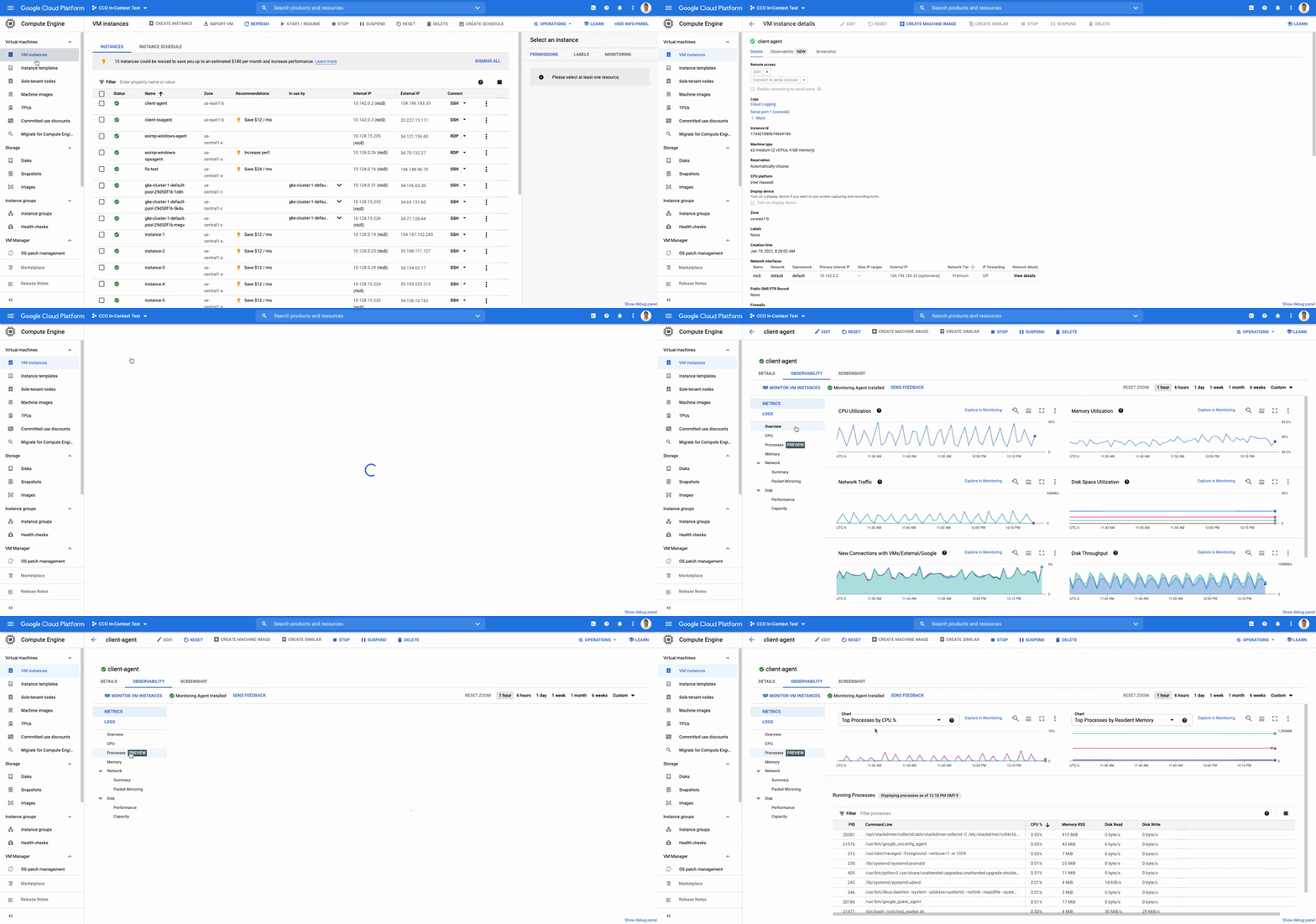
The navigation is simple. Once you have the Ops Agent or the Cloud Monitoring agent installed in your VMs:
- Go to the Compute Engine console page and click on VM Instances
- Select the VM that you want to investigate
- In the navigation menu on the top, click Observability
- Click on Metrics
- Lastly, click on Processes
In the window on the right you will see a chart and a table with all of the processes in your VM. You can also filter by time frame and sort by name or value. You do not need to do anything, other than have the agent installed, for the process to be detected and displayed.
Fleet-wide metrics monitoring
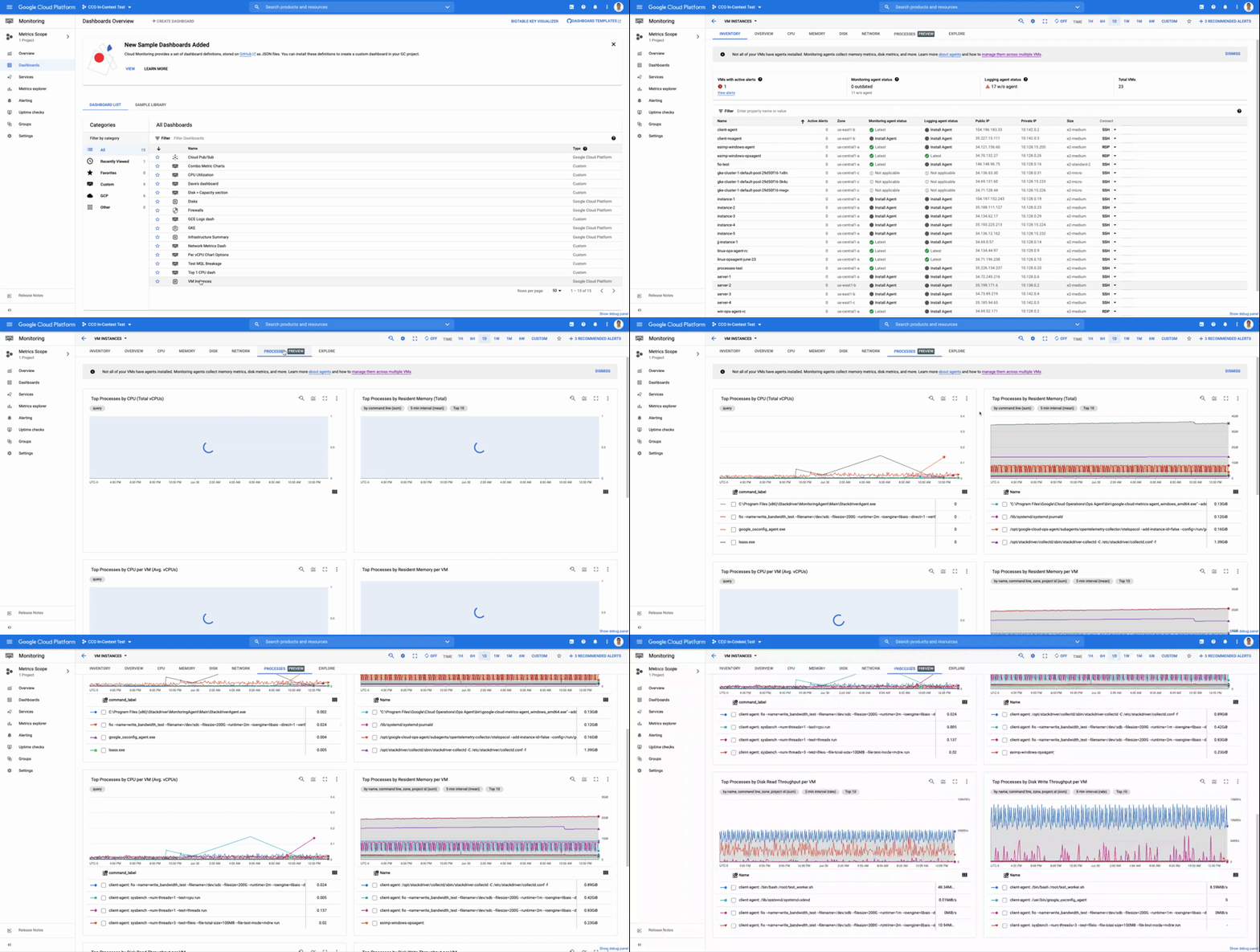
Cloud Monitoring gives you a look across your fleet of VMs so you can identify the aggregated usage of resources by processes. This level of broad, yet granular, insight can drive your decisions around which software to run or how many VMs you need to optimally power your apps and services. Admins can perform a cost-savings analysis if they determine that certain processes are slowing down the work of a large number of VMs. The larger numbers of less powerful VMs can be replaced by fewer, more capable VMs.
To get this fleet-wide view:
- Navigate to Cloud Monitoring
- Click Dashboards in the left menu
- In the All Dashboards list, click on VM Instances
- Towards the top of the window, click on Processes
This provides many charts detailing the processes running across your fleet of VMs.
Get started today
To start identifying and monitoring your process metrics, you must first install the Ops Agent, or have installed the legacy Cloud Monitoring agent. Once that is complete, the process metrics data will automatically be ingested into Cloud Monitoring and the VM admin console.
If you have any questions, or to join the conversation with other developers, operators, DevOps, and SREs, visit the Cloud Operations page in the Google Cloud Community.
A Record Breaking Calculation: 100 Trillion Digits of π on Google Cloud!

3572
Of your peers have already read this article.
4:00 Minutes
The most insightful time you'll spend today!
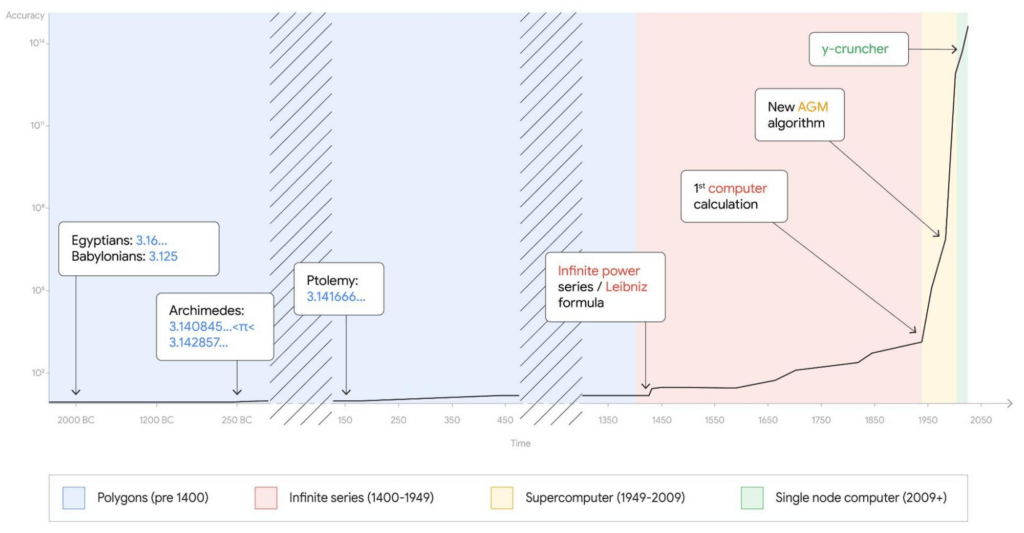
Records are made to be broken. In 2019, we calculated 31.4 trillion digits of π — a world record at the time. Then, in 2021, scientists at the University of Applied Sciences of the Grisons calculated another 31.4 trillion digits of the constant, bringing the total up to 62.8 trillion decimal places. Today we’re announcing yet another record: 100 trillion digits of π.
This is the second time we’ve used Google Cloud to calculate a record number1 of digits for the mathematical constant, tripling the number of digits in just three years.
This achievement is a testament to how much faster Google Cloud infrastructure gets, year in, year out. The underlying technology that made this possible is Compute Engine, Google Cloud’s secure and customizable compute service, and its several recent additions and improvements: the Compute Engine N2 machine family, 100 Gbps egress bandwidth, Google Virtual NIC, and balanced Persistent Disks. It’s a long list, but we’ll explain each feature one by one.
Before we dive into the tech, here’s an overview of the job we ran to calculate our 100 trillion digits of π.
- Program: y-cruncher v0.7.8, by Alexander J. Yee
- Algorithm: Chudnovsky algorithm
- Compute node: n2-highmem-128 with 128 vCPUs and 864 GB RAM
- Start time: Thu Oct 14 04:45:44 2021 UTC
- End time: Mon Mar 21 04:16:52 2022 UTC
- Total elapsed time: 157 days, 23 hours, 31 minutes and 7.651 seconds
- Total storage size: 663 TB available, 515 TB used
- Total I/O: 43.5 PB read, 38.5 PB written, 82 PB total
Architecture overview
Calculating π is compute-, storage-, and network-intensive. Here’s how we configured our Compute Engine environment for the challenge.
For storage, we estimated the size of the temporary storage required for the calculation to be around 554 TB. The maximum persistent disk capacity that you can attach to a single virtual machine is 257 TB, which is often enough for traditional single node applications, but not in this case. We designed a cluster of one computational node and 32 storage nodes, for a total of 64 iSCSI block storage targets.
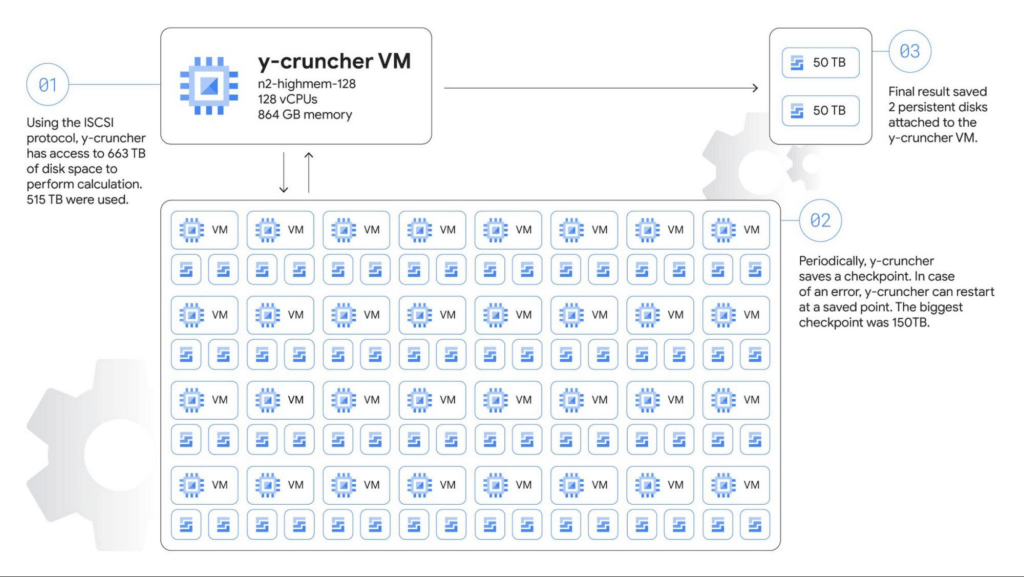
The main compute node is a n2-highmem-128 machine running Debian Linux 11, with 128 vCPUs and 864 GB of memory, and 100 Gbps egress bandwidth support. The higher bandwidth support is a critical requirement for the system as we adopted a network-based shared storage architecture.
Each storage server is a n2-highcpu-16 machine configured with two 10,359 GB zonal balanced persistent disks. The N2 machine series provides balanced price/performance, and when configured with 16 vCPUs it provides a network bandwidth of 32 Gbps, with an option to use the latest Intel Ice Lake CPU platform, which makes it a good choice for high-performance storage servers.
Automating the solution
We used Terraform to set up and manage the cluster. We also wrote a couple of shell scripts to automate critical tasks such as deleting old snapshots, and restarting from snapshots (we didn’t need to use this though). The Terraform scripts created OS guest policies to help ensure that the required software packages were automatically installed. Part of the guest OS setup process was handled by startup scripts. In this way, we were able to recreate the entire cluster with just a few commands.
We knew the calculation would run for several months and even a small performance difference could change the runtime by days or possibly weeks. There are also a number of combinations of parameters in the operating system, infrastructure, and application itself. Terraform helped us test dozens of different infrastructure options in a short time. We also developed a small program that runs y-cruncher with different parameters and automated a significant portion of the measurement. Overall, the final design for this calculation was about twice as fast as our first design. In other words, the calculation could’ve taken 300 days instead of 157 days!
The scripts we used are available on GitHub if you want to look at the actual code that we used to calculate the 100 trillion digits.
Choosing the right machine type for the job
Compute Engine offers machine types that support compute- and I/O-intensive workloads. The amount of available memory and network bandwidth were the two most important factors, so we selected n2-highmem-128 (Intel Xeon, 128 vCPUs and 864 GB RAM). It satisfied our requirements: high-performance CPU, large memory, and 100 Gbps egress bandwidth. This VM shape is part of the most popular general purpose VM family in Google Cloud.
100 Gbps networking
The n2-highmem-128 machine type’s support for up to 100 Gbps of egress throughput was also critical. Back in 2019 when we did our 31.4-trillion digit calculation, egress throughput was only 16 Gbps, meaning that bandwidth has increased by 600% in just three years. This increase was a big factor that made this 100-trillion experiment possible, allowing us to move 82.0 PB of data for the calculation, up from 19.1 PB in 2019.
We also changed the network driver from virtio to the new Google Virtual NIC (gVNIC). gVNIC is a new device driver and tightly integrates with Google’s Andromeda virtual network stack to help achieve higher throughput and lower latency. It is also a requirement for 100 Gbps egress bandwidth.
Storage design
Our choice of storage was crucial to the success of this cluster – in terms of capacity, performance, reliability, cost and more. Because the dataset doesn’t fit into main memory, the speed of the storage system was the bottleneck of the calculation. We needed a robust, durable storage system that could handle petabytes of data without any loss or corruption, while fully utilizing the 100 Gbps bandwidth.
Persistent Disk (PD) is a durable high-performance storage option for Compute Engine virtual machines. For this job we decided to use balanced PD, a new type of persistent disk that offers up to 1,200 MB/s read and write throughput and 15-80k IOPS, for about 60% of the cost of SSD PDs. This storage profile is a sweet spot for y-cruncher, which needs high throughput and medium IOPS.
Using Terraform, we tested different combinations of storage node counts, iSCSI targets per node, machine types, and disk size. From those tests, we determined that 32 nodes and 64 disks would likely achieve the best performance for this particular workload.
We scheduled backups automatically every two days using a shell script that checks the time since the last snapshots, runs the fstrim command to discard all unused blocks, and runs the gcloud compute disks snapshot command to create PD snapshots. The gcloud command returns and y-cruncher resumes calculations after a few seconds while the Compute Engine infrastructure copies the data blocks asynchronously in the background, minimizing downtime for the backups.
To store the final results, we attached two 50 TB disks directly to the compute node. Those disks weren’t used until the very last moment, so we didn’t allocate the full capacity until y-cruncher reached the final steps of the calculation, saving four months worth of storage costs for 100 TB.
Results
All this fine tuning and benchmarking got us to the one-hundred trillionth digit of π — 0. We verified the final numbers with another algorithm (Bailey–Borwein–Plouffe formula) when the calculation was completed. This verification was the scariest moment of the entire process because there is no sure way of knowing whether or not the calculation was successful until it finished, five months after it began. Happily, the Bailey-Borwein-Plouffe formula found that our results were valid. Woo-hoo! Here are the last 100 digits of the result:
4658718895 1242883556 4671544483 9873493812 1206904813
2656719174 5255431487 2142102057 7077336434 3095295560
You can also access the entire sequence of numbers on our demo site.
So what?
You may not need to calculate trillions of decimals of π, but this massive calculation demonstrates how Google Cloud’s flexible infrastructure lets teams around the world push the boundaries of scientific experimentation. It’s also an example of the reliability of our products – the program ran for more than five months without node failures, and handled every bit in the 82 PB of disk I/O correctly. The improvements to our infrastructure and products over the last three years made this calculation possible.
Running this calculation was great fun, and we hope that this blog post has given you some ideas about how to use Google Cloud’s scalable compute, networking, and storage infrastructure for your own high performance computing workloads. To get started, we’ve created a codelab where you can create and calculate pi on a Compute Engine virtual machine with step-by-step instructions. And for more on the history of calculating pi, check out this post on The Keyword. Here’s to breaking the next record!
- We are actively working with Guinness World Records to secure their official validation of this feat as a “World Record”, but we couldn’t wait to share it with the world. This record has been reviewed and validated by Alexander J. Yee, the author of y-cruncher.
More Relevant Stories for Your Company
Dassana: Choosing Google Workspace and Google Cloud to accelerate growth and reach goals
When Dassana co-founders Gaurav Kumar and Parth Shah, formerly founder and founding engineer at RedLock (now Prisma Cloud by Palo Alto Networks), set out on a new startup journey in 2020, they knew exactly where to start: sign up for Google Workspace. “Every startup I’ve been at, we used Google

10 Reasons that Make Google Cloud the Champion of IaaS
When you choose to run your business on Google Cloud you benefit from the same planet-scale infrastructure that powers Google’s products such as Maps, YouTube, and Workspace. We have picked 10 ways in which Google Cloud Infrastructure services outshine alternatives in the market in how they simplify your operations, save

Beany’s Cloud-Based Accounting Solutions Transform Small Business Finance
Many people start a small business that aligns with their passions, but soon discover the day-to-day running of a business is very different than anticipated. Dealing with accounting, finance, and other daily activities can quickly overwhelm even the most promising of new businesses. Recognizing the unique challenges facing small businesses,

Customer Search Experience that Takes Advantage of Enterprise Edge Capabilities!
Every year at CES, people from around the world experience the latest and greatest that consumer tech has to offer. In 2021, CES will be in an all-digital format for the first time. So how can a virtual show like CES create immersive experiences for attendees tuning in remotely? That’s
