





Google Maps Platform Can Elevate FinTech Experience with Less Risks and Higher Security

4739
Of your peers have already read this article.
3:00 Minutes
The most insightful time you'll spend today!
The financial services industry is changing—an estimated $68 trillion in wealth transferring from baby boomers to millennials.1 This means financial service providers will have to deliver the speed, ease-of-use, technological sophistication, and tailored services that millennials have come to expect. In fact, half of all millennials are willing to switch to a competing institution if it offers a better digital experience.2 This and many other trends are driving unprecedented growth for mobile Fintech experiences in banking, digital payments, financial management and insurance.3
Google Maps Platform financial services solutions
To help you respond to customer’s changing demands, we’re launching financial services solutions that can help you improve your customer experience, security and operations. We’ve outlined the technical guidance and APIs you need to build out three financial services solutions: Enriched Transactions, Quick and Verified Sign-up, and Branch and ATM Locator Plus. We’ve also highlighted two use cases that customers are using our APIs to solve: Contextual Experiences and Fraud Detection.
Clarify financial statements with Enriched Transactions solution
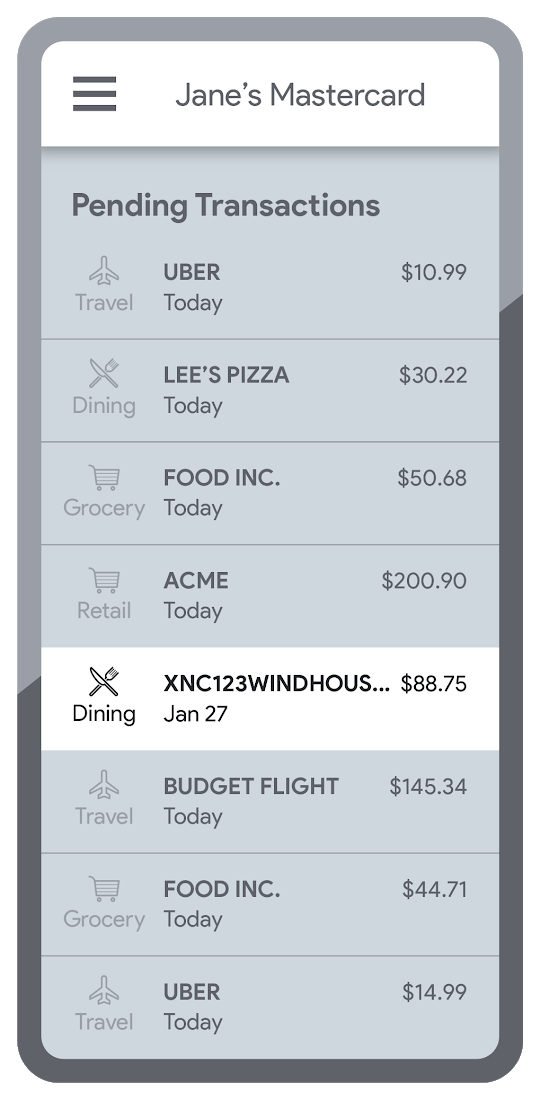
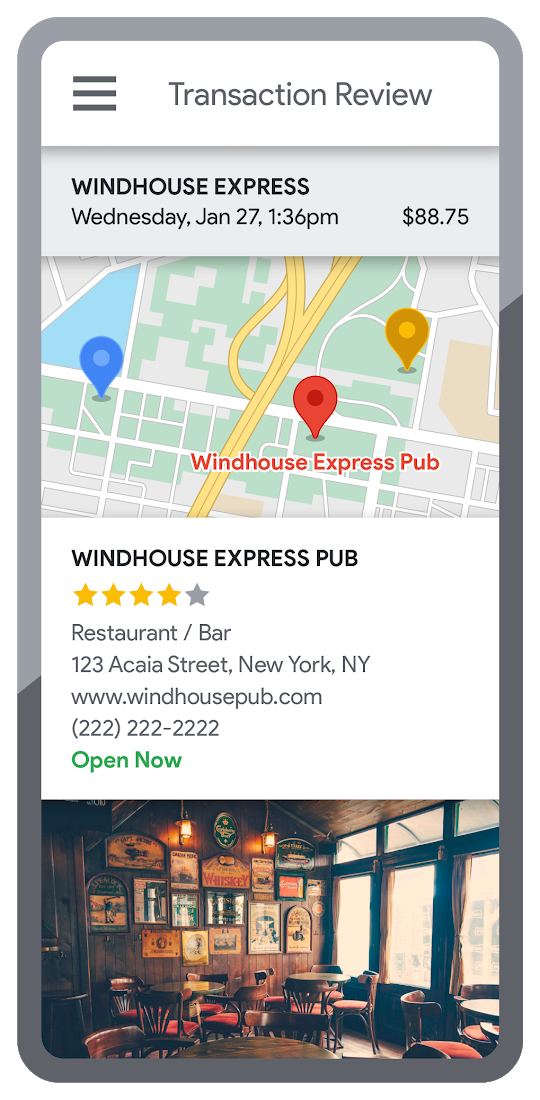
Transaction statements are often hard for customers to understand, using abbreviations like “ACMEHCORP” instead of customer-facing names like “Acme Houseware”. Our Enriched Transactions solution clarifies these transactions and makes them instantly recognizable by adding the merchant name and business category, a photo of the storefront, its location on a map, and full contact info. Making transactions easier to recognize not only boosts consumer confidence, with reported increases in NPS of 15% or higher, but decreases costly support calls by approximately 67%.4
In addition, you can help customers easily visualize a series of transactions by adding the merchant name to the transaction amount and date, and displaying their transactions on a Google map. This enables you to give customers insights about where and how they spend money. See the guide to implement Enriched Transactions today.
Enable faster sign-up with Quick and Verified Sign-up solution
Manually entered addresses can lead to lowered conversions, erroneous customer data, and costly delivery mistakes. Our Quick and Verified Sign-up solution makes sign-up faster, suggesting nearby addresses with just a few thumb taps—cutting sign-up time by up to 64% and increasing conversion rates by up to 15%.5
The solution also provides one additional level of address verification that helps reduce the risk of fraudulent account sign-ups—and companies have decreased fraudulent account setups by approximately 30% through using geospatial data to verify customer identities.4 See the Quick and Verified Sign-up solution guide to get started today.
- Faster sign-ups 1An application form requires an address
- Faster sign-ups 2Autocomplete quickly suggests addresses
- Faster sign-ups 3Select the address with visual confirmation
- Faster sign-ups 4Address verification options are presented
- Faster sign-ups 5Location permission is granted by the user
- Faster sign-ups 6The address is verified
Help customers visit you with Branch and ATM Locator Plus solution
74% of customers now search for specific details prior to their visit, which makes detailed, accurate profiles for each location a must.5 Our Branch and ATM Locator Plus solution enhances your own websites and apps with the same information shown about your branches and ATMs on Google Maps. Include hours of operation, available services, user reviews, photos of the location, driving directions and more.
Financial services companies using geospatial data to provide additional information (e.g. opening hours, available services, etc.) on branch and ATM services have seen a 14% increase in Net Promoter Score (NPS), and a 7% decrease in customer support calls.4 Implement Branch and ATM Locator Plus today using the guide or build it in minutes with Quick Builder.
- ATM locator 1Customers can enable location permissions, or enter their address
- ATM locator 2Quickly enter the address with Autocomplete
- ATM locator 3Nearby location listings, ranked by distance and ETA
- ATM locator 4Map view and directions
Enable offers and rewards with Contextual Experiences
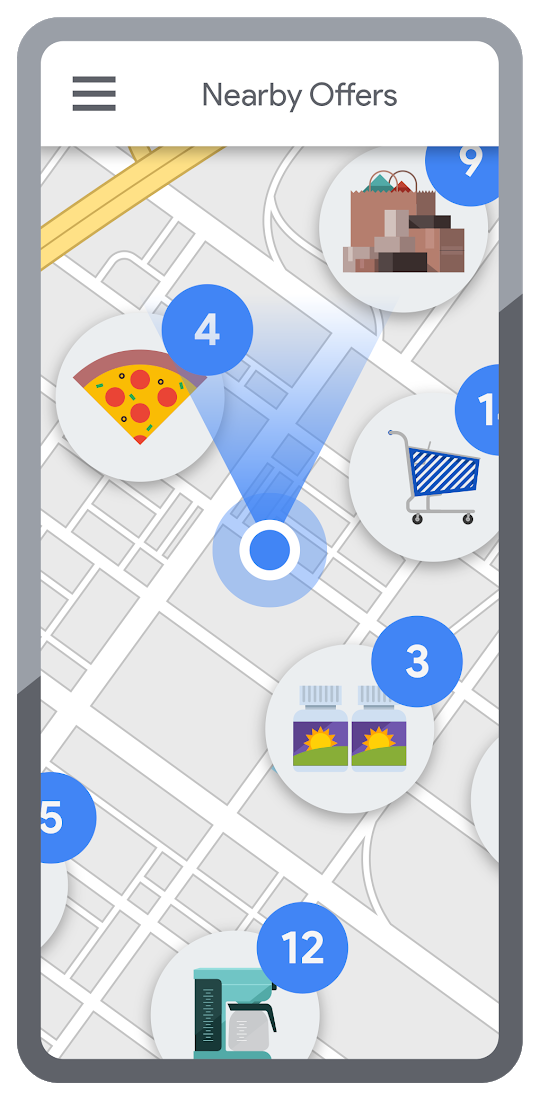
Real-time, geo-targeted offers can power deals, rewards, and cash-back programs—all visualized with rich Google Maps. By combining the insights of purchase histories with customer opt-in to location-based features, companies can implement the Contextual Experiences use case to enable personalized offers and rewards programs that drive engagement with brands while putting money in customers’ pockets at the same time.This is a win for banks and their customers, validated by encouraging metrics like NPS rating boosts of 8% or higher, and an increase of 8% or more time spent in-app.4 Learn how Current uses Google Maps Platform to create innovative customer rewards programs with location intelligence.

Detect suspicious transactions with Fraud Detection
With the Fraud Detection use case, companies can use customer opted-in mobile device location to flag suspicious activity based on geographic distance, such as an ATM withdrawal that is far from the customer’s phone. Our APIs can also help companies recognize suspicious transaction patterns such as a purchase made at a location that is physically distant from a recent transaction.
Financial services companies that use geospatial data to verify customers’ identities have reduced fraudulent transactions by approximately 70%, and false positives in fraud detection by 45%, on average.4 Learn how Starling Bank uses Google Maps Platform to enable real-time notification of transactions and their locations, and enhance data-driven decision-making.
Start elevating customer experiences, reducing risk and increasing efficiency today with our financial services offerings. Visit our financial services solutions page to learn more about how to start implementing these solutions.
For more information on Google Maps Platform, visit our website.

5431
Of your peers have already downloaded this article
4:30 Minutes
The most insightful time you'll spend today!
Security is often a deciding factor when choosing a public cloud provider. At Google Cloud, security is of the utmost importance and the security strategy encompass authentication, integrity, and encryption, for both data at rest and in transit.
Hence, Google Cloud encrypts and authenticates all data in transit at one or more network layers when data moves outside physical boundaries not controlled by Google or on behalf of Google. Data in transit inside a physical boundary controlled by or on behalf of Google is generally authenticated but not necessarily encrypted.
In addition, Google works actively with the industry to help bring encryption in transit to everyone, everywhere. It has several open-source projects that encourage the use of encryption in transit and data security on the Internet at large including Certificate Transparency, Chrome APIs, and secure SMTP.
Download this whitepaper and understand Google’s approach to the encryption of data in transit, where it is applied, and why Google is the industry leader in encryption in transit.
Confidential Computing at Google Cloud

3127
Of your peers have already read this article.
2:00 Minutes
The most insightful time you'll spend today!
This blog includes content from Episode One “Confidentially Speaking” of our Cloud Security Podcast, hosted by Anton Chuvakin (Head of Solutions Strategy) and Timothy Peacock (Product Manager). You should listen to the whole conversation for more insights and deeper context.LEARN MORECloud Security Podcast – Confidentially SpeakingListen to the Cloud Security Podcast with guest Nelly Porter, Group Product Manager @ Google.
We all deal with a lot of sensitive data and today, enterprises must entrust all of this sensitive data to their cloud providers. With on-premises systems, companies used to have a very clear idea about who could access data and who was responsible for protecting that data. Now, data lives in many different places—on-premises, at the edge, or in the cloud.
You may already know that Google Cloud provides encryption for data when it is in transit or at rest by default, but did you also know we also allow you to encrypt data in use—while it’s being processed?
In this podcast episode, Product Manager Nelly Porter gave us a peek under the hood of confidential computing at Google Cloud.
What is confidential computing?
Google Cloud’s Confidential Computing started with a dream to find a way to protect data when it’s being used. We developed breakthrough technology to encrypt data when it is in use, leveraging Confidential VMs and GKE Nodes to keep code and other data encrypted when it’s being processed in memory. The idea is to ensure encrypted data stays private while being processed, reducing exposure.
During the episode, Nelly Porter explained that Google Cloud’s approach is based on hardware and CPU capability. Confidential Computing is built on the newest generation of AMD CPU processors, which have a Secure Encrypted Virtualization extension that enables the hardware to generate encryption keys that are ephemeral and associated with a single VM. Basically, they are never stored anywhere else and are not extractable—the software will never have access to those keys.
“You can do whatever you need to do, but you will be in a cryptographically isolated space that no other strangers passing by can see.”
Memory controllers use the keys to quickly decrypt cache lines when you need to execute an instruction and then immediately encrypts them again. In the CPU itself, data is decrypted but it remains encrypted in memory.
Confidential computing aims to mitigate gaps in data security
Nelly also shed some light on why confidential computing will continue to play a central role in the future of cloud computing. She pointed out that one of the biggest gaps companies are looking to cover is securing data when it is in use.
Data that is encrypted on-premises or in cloud storage, but the biggest risk for companies is when they start working with that data. For instance, imagine you encrypted your data on-premises and only you hold the keys. You upload that data into Cloud Storage buckets—simple, safe, and secure.
But now, you want to train machine learning models based on that data. When you upload it into your environment, it’s no longer protected. Specifically, data in reserved memory is not encrypted.We’re trying to ensure that your data is always protected in whatever state it exists, so fewer people have the opportunity to make mistakes or maliciously expose your data.
Top takeaways about confidential computing
Throughout the conversation, Nelly also shared interesting points about the development and direction of confidential computing at Google Cloud.
Here were our favorite takeaways from the podcast:
We worked hard to make Google Cloud’s approach simple.
We’ve invested a lot of time and effort into investigating the possibilities (and limitations) of confidential computing to avoid introducing residual risks to our approach. For instance, the early introduction of hardware capable of confidential computing in the industry required IT teams to have the resources to rewrite or refactor their app, severely limiting their ability to adopt it within their organizations.
With Confidential Computing, teams can encrypt data in use without making any code changes in their applications. All Google Cloud workloads can run as Confidential VMs, enabled with a single checkbox, making the transition to confidential computing completely simple and seamless.
“A lot of customers understand the values of confidential computing, but simply cannot support re-writing the entire application. It’s why Google Cloud, in particular, decided to take a different approach and use models that were incredibly easy to implement, ensuring that our customers would not have those barriers to cross.”
Confidential computing is for more than just fintech.
There is, of course, a compelling use case for confidential computing at highly-regulated companies in financial, government, life sciences, and public sectors. However, Nelly shared that her team didn’t anticipate that even verticals without significant regulation or compliance requirements would be so interested in this technology, mostly to pre-empt privacy concerns.
Many companies see confidential computing as a way to create cryptographic isolation in the public cloud, allowing them to further ease any user or client concerns about what they are doing to protect sensitive data. For instance, during COVID-19, there was an increase in small research organizations that wanted to collaborate across large datasets of sensitive data.
“Prior to confidential computing, it wasn’t possible to collaborate because you needed the ability to share very sensitive data sets among multiple parties while ensuring none of them will have access to this data, but the results will benefit all of them—and us.”
An open community, working together will be key for the future.
Nelly also shared that there are plans to extend memory protections beyond just CPUs to cover GPUs, TPUs, and FPGAs. Google Cloud is working with multiple industry vendors and companies to develop confidential computing solutions that will cover specific requirements and use cases.
Confidential computing will not be achieved by a single organization – it will require many people to come together. We are a member of the Confidential Computing Consortium, which aims to solve security for data in use and includes other vendors like Red Hat, Intel, IBM, and Microsoft.
“Google alone would not be able to accomplish confidential computing. We need to ensure that all vendors, GPU, CPU, and all of them follow suit. Part of that trust model is that it’s third parties’ keys and hardware that we’re exposing to a customer.”
There are no magic bullets when it comes to security.
Confidential computing is still an emerging, very new technology and unsurprisingly, there are a lot of questions about what it does and how it works. It’s important to remember that there is no such thing as the one-tool-fits-all-threats security solution. Instead, Nelly notes that confidential computing is yet another tool that can be added to your security arsenal.
“No solution will ever be the magic bullet that will make everyone happy and secure, guaranteed. But confidential computing is an addition to our toolbox of defense against gaps we have to take super seriously and invest in solving.”
Did you enjoy this blog post? To listen to the full conversation, head over to Episode One “Confidentially Speaking” of our Cloud Security Podcast, hosted by Anton Chuvakin (Head of Solutions Strategy) and Timothy Peacock (Product Manager).
We also recommend checking out other episodes of the Cloud Security Podcast by Google for more interesting stories and insights about security in the cloud, from the cloud, and of course, what we’re doing at Google Cloud.
Broadcom’s Journey to Simplified Compliance with Google Cloud’s Assured Workloads
1222
Of your peers have already read this article.
3:00 Minutes
The most insightful time you'll spend today!
Broadcom is a global technology leader that designs, develops, and supplies many semiconductor and infrastructure software solutions. Broadcom’s category-leading product portfolio serves critical markets including data center, networking, software, broadband, wireless, storage, and industrial sectors.
Our customers, many of whom operate in the federal public sector, need ready-made SaaS solutions to secure their infrastructure while meeting compliance requirements. As head of platform engineering for Broadcom and its subsidiaries, my team is responsible for designing, testing, and building the common orchestration platform and services for our federal customers.
Since early 2021, we’ve partnered with Google Cloud to deliver best-in-class cloud solutions for our multinational customers with speed, scale and efficiency, which earned us the Google Cloud Customer of the Year Award. When it came to creating plug-and-play security and compliance solutions for federal organizations in the United States, we turned to Assured Workloads.
Simplifying the path to compliance
Assured Workloads provides out-of-the-box capabilities that allow us to easily create and maintain controlled environments that address security and compliance needs across different verticals and sectors. This includes enforcement of data residency, administrative and personnel controls, and managing encryption keys.
For example, in the United States, federal government agencies need to use solutions that comply with FedRAMP, the government-wide standard for cloud computing security, while the Department of Defense (DoD) needs to comply with Impact Level (IL) standards. Assured Workloads helps us create solutions with built-in guardrails to ensure our customers automatically operate within whichever standard applies.
Additionally, Assured Workloads guarantees that only personnel with the necessary clearance and permissions have access to information, and it offers integrated cryptographic control over data, including customer-managed encryption keys based on the chosen compliance program.
As a result of using Assured Workloads, our Symantec Security suite can provide a comprehensive set of security services that are being certified for FedRAMP. These include Web Security Service, Data Loss Prevention, Cloud Access Security Broker, and Symantec Endpoint Protection (SEP).
We also offer our enterprise software products as services through Google Cloud. Rally Software, our enterprise agility tool, and Clarity PPM, our project and portfolio management tool, are already certified for FedRAMP. Additionally Clarity PPM is undergoing certification for IL4 compliance for our DoD clients.
Sophisticated solutions for a secure future
Given the intricate nature of securing the cloud environment and the business processes it handles, integrating Assured Workloads into our service offering has been simple and streamlined. Many of our services already run on Google Cloud, using Google Kubernetes Engine and Google Compute Engine, and since those Google Cloud services can be configured for all programs in an Assured Workloads environment, we were able to provide solutions to federal agencies without making significant changes to our deployment or configurations. This has helped save enormous engineering effort by avoiding a customized one-off effort to manage a Federal environment.
Google Kubernetes Engine (GKE) is one of the critical services in our environment, and Google Cloud releases many new GKE capabilities each year. Assured Workloads allows us to benefit from all the latest GKE innovations that come through automatic updates, maintaining parity with the commercial cloud without compromising on security and compliance requirements.
Compliance is a must-have for our federal clients, and our duty as providers of security and software services is to supply them with easy-to-use, efficient solutions they can trust. With the power of Assured Workloads streamlining our infrastructure software solutions hosted in Google Cloud, we can better support our regulated customers and further grow our software and security service businesses.
Center for Internet Security’s Latest Benchmark for Securing Chrome

5399
Of your peers have already read this article.
1:30 Minutes
The most insightful time you'll spend today!
As the way people work continues to evolve, keeping security policies in place that protect organizations but give workers the ability to get things done is more important than ever. IT and security teams must aim to stay a step ahead of web-based security threats that come their organization’s way. To help, the Center for Internet Security (CIS) team has released the latest CIS Benchmark 2.1 for Google Chrome. This Benchmark offers independent recommendations on which Chrome policies to configure to help support organizations’ security and compliance needs. Thanks to Chrome being built with security at its core, in many cases, Chrome default settings are aligned with CIS recommendations.
Chrome is secure by default, but we also pride ourselves on providing customizations for enterprises to allow Chrome to better fit the needs of their business. And with hundreds of policies available through Chrome Browser Cloud Management and Group Policy Objects (Note: The CIS Benchmark is also available as a GPO), organizations can do just that.
Throughout the CIS guide you’ll notice that there are different designations for configuration profiles. Any labeled Level 1, are considered to be a good baseline for an organization. Level 2 profiles are recommended for deployments that require the highest level of security, but note that these settings could have a trade off on user productivity. We recommend looking at each setting and determining if it’s a good fit for your business.
The benchmark is made up of five sections:
- Enforced Defaults — Notes policies that are configured by default when you install Chrome. Enforcing these settings at an enterprise level can prevent these settings from being changed by business users to less secure options.
- Attack Surface Reduction — Details how to disable web features that may not be necessary in your enterprise environment and could reduce your overall attack surface.
- Privacy — Surfaces settings that improve user privacy.
- Data Loss Prevention — Contains settings that can help prevent data loss and protect your organization’s data. (Note: These recommendations cover additional capabilities that can be added to Chrome through BeyondCorp Enterprise).
- Forensics (Post Incident) — Shares recommendations on policies that give insights into post incident forensics and analysis.
Organizations can use these benchmarks to optimize the best way to secure Chrome in their environment. Download the CIS Benchmark here and check out our team’s configuration guide for additional recommendations on how to configure Chrome.
Note: This benchmark was created using a consensus review process composed of subject matter experts. Consensus participants provide perspective from a diverse set of backgrounds such as consulting, software development, audit and compliance, security research, operations, government, and legal. While these recommendations come from a trusted source, it’s important for each organization to weigh which policies make the most sense for their business.
Launches and Stories on Google Cloud Security from Q1: Fresh off the Boat!

2972
Of your peers have already read this article.
4:00 Minutes
The most insightful time you'll spend today!
The security world keeps changing, with new tools and new threats in the ever-evolving arms race that is cybersecurity. To keep you up to speed on all that Google Cloud is doing to help safeguard your data and your applications, welcome to the first installment of the Security Roundup. In this regular series, I’ll be sharing a selection of news and guidance to help ensure you have the resources you need for your hectic, high-stakes harm-preventing job.
Applying the principle of least privilege to GKE clusters
Access to your GKE clusters – just like any other resource – should be based on the principle of least privilege. Use groups, individual roles, and Identity and Access Management tools to limit who can do what with your Kubernetes clusters in Google Cloud. These principles can help you control who uses which elements of the Kubernetes API as well as how they access your clusters. More details are in Anthony Bushong’s video.
Ensuring CI/CD pipeline security
To make sure only trusted code artifacts enter your continuous integration and deployment pipeline, you can take advantage of Binary Authorization on Google Cloud, and then only permit signed builds to go through. Learn more in Martin Omander’s video interview and walkthrough with XIaowen Lin.
Protecting against denial of service and flooding attacks
Once your applications are on the web, they become potential targets for attack. You can use Cloud Armor to protect against many types of traffic attacks, including distributed denial-of-service (DDoS), and HTTP POST flood attacks. After learning the normal traffic patterns of your apps, Cloud Armor monitors for anomalies and then generates alerts or intervenes on your behalf to block malicious traffic. Learn more with Arman Rye in this video.
Defending against cyberattacks with Palo Alto Networks
If you use Palo Alto Networks products for endpoint protection or network monitoring, now you can integrate the signals from those systems into Google Cloud security tools. You can ingest device health conclusions from Palo Alto Networks Cortex XDR to boost your visibility into those endpoints’ state and improve your trust decisions. BeyondCorp Enterprise users can incorporate Cortex XDR metadata into access policies, leveraging additional posture information to add another level of trusted device information and operate with more confidence. Check out the details in this interview with Mason Yan at Palo Alto Networks.
Dealing with Apache Log4j 2 vulnerability(ies)
Attackers who exploit the Apache Log4j 2 vulnerability can execute arbitrary code on a vulnerable server. Read this post by the Google Cybersecurity Action Team for more details on log4j vulnerabilities (CVE-2021-44228 and CVE-2021-45046) and how you can find out if you’re affected. It includes advice for how to use Google Cloud products like Binary Authorization rules and Security Command Center to keep your cloud deployments safe.
Good luck out there, and remember: Keep your data yours!
More Relevant Stories for Your Company

Google Cloud & Health-ISAC’s EMEA Collaborate to Boost Healthcare Security
Last July, Google Cloud launched our ambassador partnership with the Health Information Sharing and Analysis Center (Health-ISAC) and committed to working with industry leaders to better protect our healthcare ecosystem. Securing healthcare technology and data is a global challenge, and to meet it security professionals need to have better channels for sharing information and

Confidential GKE Nodes: Now Available on Compute Optimized C2D VMs
Today, we are happy to announce that Confidential GKE Nodes are available on compute optimized C2D VMs. Many companies have adopted Google Kubernetes Engine (GKE) as a key component in their application infrastructure. In some cases, the advantages of using containers and Kubernetes can surpass those of traditional architectures, but


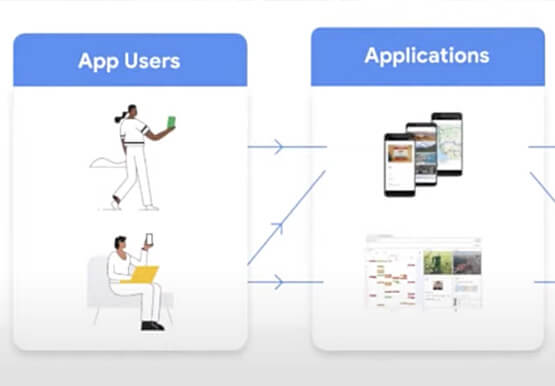

AppSheet: Reduce Shadow IT and Accelerate Development of Enterprise-grade Apps
Google Cloud findings suggest that nearly 40 percent of organizations' investments are consumed by shadow IT and can be a detractor to the adoption of cutting-edge tools and solutions. Also, about 51 percent of the surveyed executives are of the opinion that the inability to adapt to digital transformation trends

Register to Watch July’s Security Summit
Together we can solve for the future of cloud security. Join us to learn how you can stay ahead of the next generation of threats with Google Cloud – whether you need to keep your organization secure in the cloud, on-premises, or in a hybrid environment. Get fresh insights from
