





Google Maps Platform Can Elevate FinTech Experience with Less Risks and Higher Security

4737
Of your peers have already read this article.
3:00 Minutes
The most insightful time you'll spend today!
The financial services industry is changing—an estimated $68 trillion in wealth transferring from baby boomers to millennials.1 This means financial service providers will have to deliver the speed, ease-of-use, technological sophistication, and tailored services that millennials have come to expect. In fact, half of all millennials are willing to switch to a competing institution if it offers a better digital experience.2 This and many other trends are driving unprecedented growth for mobile Fintech experiences in banking, digital payments, financial management and insurance.3
Google Maps Platform financial services solutions
To help you respond to customer’s changing demands, we’re launching financial services solutions that can help you improve your customer experience, security and operations. We’ve outlined the technical guidance and APIs you need to build out three financial services solutions: Enriched Transactions, Quick and Verified Sign-up, and Branch and ATM Locator Plus. We’ve also highlighted two use cases that customers are using our APIs to solve: Contextual Experiences and Fraud Detection.
Clarify financial statements with Enriched Transactions solution
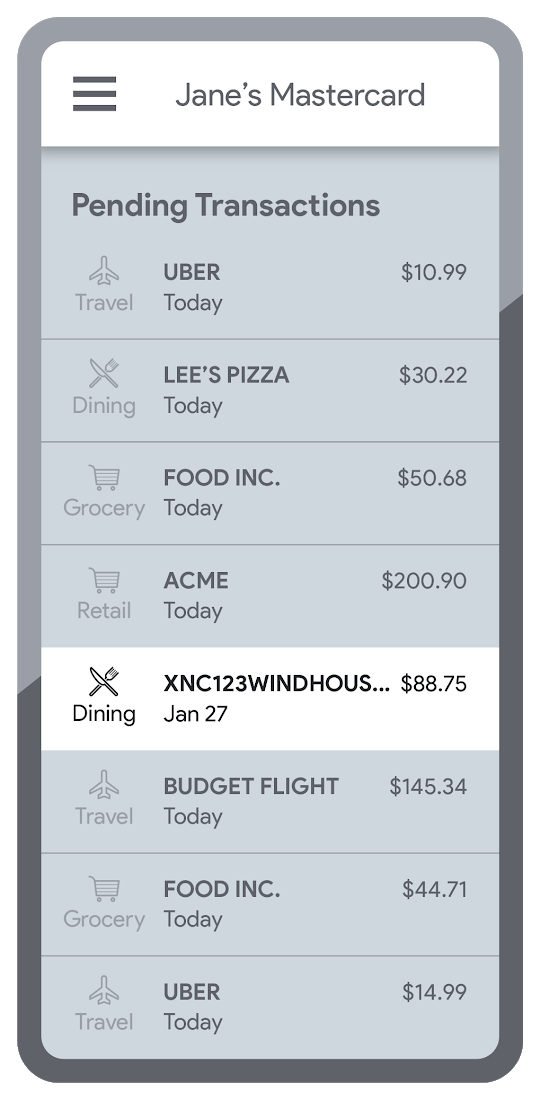
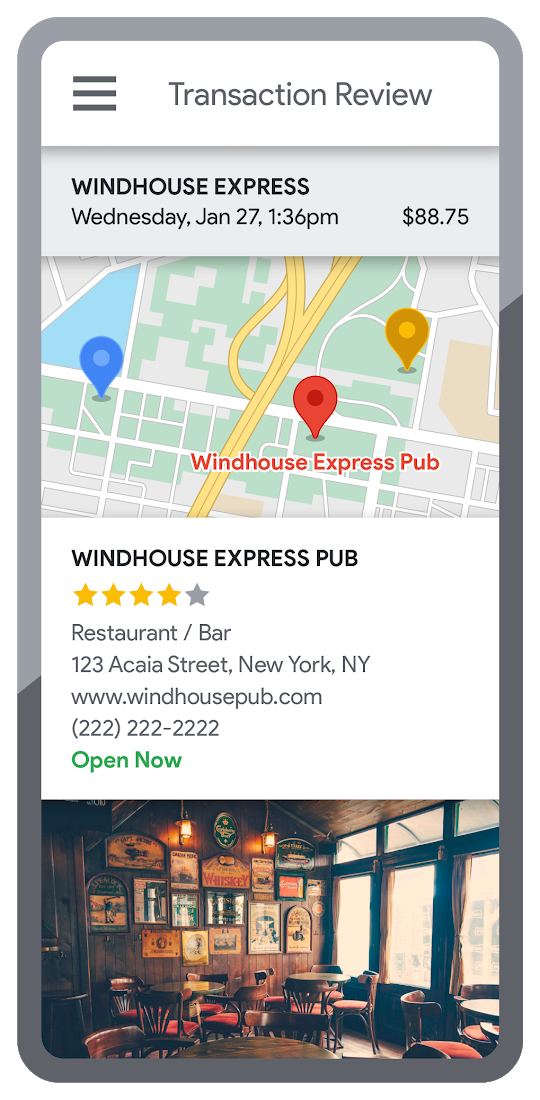
Transaction statements are often hard for customers to understand, using abbreviations like “ACMEHCORP” instead of customer-facing names like “Acme Houseware”. Our Enriched Transactions solution clarifies these transactions and makes them instantly recognizable by adding the merchant name and business category, a photo of the storefront, its location on a map, and full contact info. Making transactions easier to recognize not only boosts consumer confidence, with reported increases in NPS of 15% or higher, but decreases costly support calls by approximately 67%.4
In addition, you can help customers easily visualize a series of transactions by adding the merchant name to the transaction amount and date, and displaying their transactions on a Google map. This enables you to give customers insights about where and how they spend money. See the guide to implement Enriched Transactions today.
Enable faster sign-up with Quick and Verified Sign-up solution
Manually entered addresses can lead to lowered conversions, erroneous customer data, and costly delivery mistakes. Our Quick and Verified Sign-up solution makes sign-up faster, suggesting nearby addresses with just a few thumb taps—cutting sign-up time by up to 64% and increasing conversion rates by up to 15%.5
The solution also provides one additional level of address verification that helps reduce the risk of fraudulent account sign-ups—and companies have decreased fraudulent account setups by approximately 30% through using geospatial data to verify customer identities.4 See the Quick and Verified Sign-up solution guide to get started today.
- Faster sign-ups 1An application form requires an address
- Faster sign-ups 2Autocomplete quickly suggests addresses
- Faster sign-ups 3Select the address with visual confirmation
- Faster sign-ups 4Address verification options are presented
- Faster sign-ups 5Location permission is granted by the user
- Faster sign-ups 6The address is verified
Help customers visit you with Branch and ATM Locator Plus solution
74% of customers now search for specific details prior to their visit, which makes detailed, accurate profiles for each location a must.5 Our Branch and ATM Locator Plus solution enhances your own websites and apps with the same information shown about your branches and ATMs on Google Maps. Include hours of operation, available services, user reviews, photos of the location, driving directions and more.
Financial services companies using geospatial data to provide additional information (e.g. opening hours, available services, etc.) on branch and ATM services have seen a 14% increase in Net Promoter Score (NPS), and a 7% decrease in customer support calls.4 Implement Branch and ATM Locator Plus today using the guide or build it in minutes with Quick Builder.
- ATM locator 1Customers can enable location permissions, or enter their address
- ATM locator 2Quickly enter the address with Autocomplete
- ATM locator 3Nearby location listings, ranked by distance and ETA
- ATM locator 4Map view and directions
Enable offers and rewards with Contextual Experiences
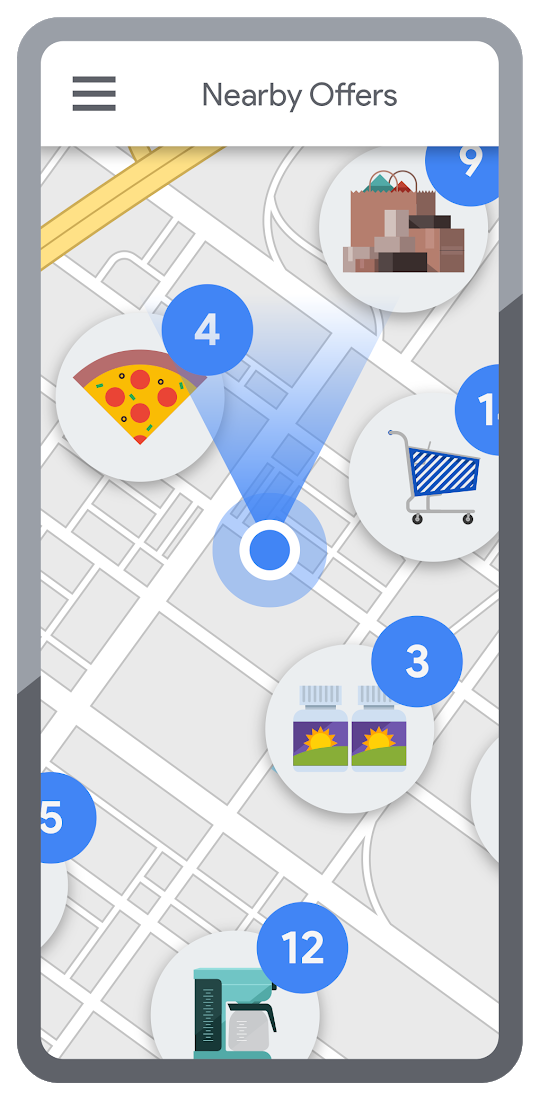
Real-time, geo-targeted offers can power deals, rewards, and cash-back programs—all visualized with rich Google Maps. By combining the insights of purchase histories with customer opt-in to location-based features, companies can implement the Contextual Experiences use case to enable personalized offers and rewards programs that drive engagement with brands while putting money in customers’ pockets at the same time.This is a win for banks and their customers, validated by encouraging metrics like NPS rating boosts of 8% or higher, and an increase of 8% or more time spent in-app.4 Learn how Current uses Google Maps Platform to create innovative customer rewards programs with location intelligence.

Detect suspicious transactions with Fraud Detection
With the Fraud Detection use case, companies can use customer opted-in mobile device location to flag suspicious activity based on geographic distance, such as an ATM withdrawal that is far from the customer’s phone. Our APIs can also help companies recognize suspicious transaction patterns such as a purchase made at a location that is physically distant from a recent transaction.
Financial services companies that use geospatial data to verify customers’ identities have reduced fraudulent transactions by approximately 70%, and false positives in fraud detection by 45%, on average.4 Learn how Starling Bank uses Google Maps Platform to enable real-time notification of transactions and their locations, and enhance data-driven decision-making.
Start elevating customer experiences, reducing risk and increasing efficiency today with our financial services offerings. Visit our financial services solutions page to learn more about how to start implementing these solutions.
For more information on Google Maps Platform, visit our website.
How Arvind Fashions Ltd leads the fashion industry with powerful data analytics on BigQuery

4116
Of your peers have already read this article.
3:30 Minutes
The most insightful time you'll spend today!
Arvind Ltd has been in the apparel industry for more than 90 years, with its retail powerhouse Arvind Fashions Ltd being the backbone of well-known names in the retail fashion industry in India.
Arvind Fashions Ltd (Arvind) has seen significant growth in its portfolio with new franchises being added every year. The six high conviction brands include Tommy Hilfiger, Calvin Klein, Sephora, Arrow, U.S. Polo Assn. & Flying Machine.
To secure a foundation for future growth, the company has embarked on a digital transformation (DX) journey, focusing on profitability and improving the customer experience. The key objectives for Arvind’s DX is to unlock the value of existing applications, gain new insights, and build a solid workflow with resilient systems.
Getting Google Cloud to address the challenges around insights & analytics was a natural step forward, since Arvind had already formed a relationship with Google Cloud, starting with its productivity and collaboration tools during the pandemic.
Key Challenges
Arvind’s enterprise applications estate is a mix of SAP, Oracle POS, logistics management systems and other applications. Having so many different applications made it a challenge for the company to bring all of this data together to drive retail insights and at the same time maintain the freshness of its products.
As a case in point, the existing sales reporting and inventory reconciliation process had been enabled by a mix of automated and semi-automated desktop applications. There were challenges to scale the infrastructure in order to process large amounts of data at a low latency.
The synchronization of master data across functions was critical to build the data platform that provides consistent insights to multiple stakeholders across the organization.
Solution Approach – Modern Data Platform
There are several ways to solve the challenges above and do more by building a modern data analytics platform. For example, using a data lake based approach that builds use case by use case, hybrid data estates and so on. Regardless of the approach, it is important to define the solution based on certain principles.
In Arvind’s scenario, the key business principles considered are that data platforms should support Variety, Variability, Velocity and Volume. Each of these 4 V’s are critical business pivots to successful fashion retailing. Variety in SKU’s to deal with myriad fashion trends every season, Variability in shopping footfalls due to different festivities, weekends and special occasions, Velocity to be agile and responsive to customer needs, and Volumes of data that bring richer insights.
This is where Google BigQuery enabled data platform comes in, as it is able to meet the needs above.
Solution Architecture – Current Capabilities & Future Vision
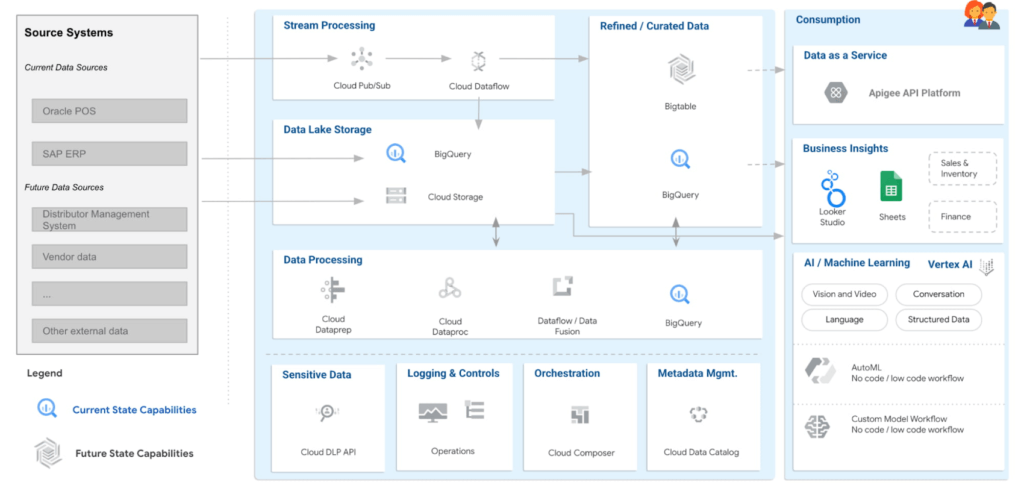
BigQuery is the mothership of the data and analytics platform on Google Cloud. Its serverless construct ensures that data engineering teams focus only on insights & analytics. Storage and compute is decoupled and can be independently scaled. BigQuery has been leveraged to service both the raw as well as the curated data zones.
With BigQuery procedures, it is possible to process the data natively within the data warehouse itself. Procedures have been leveraged to process the data in a low latency manner with the familiar SQL.
But then what happens to advanced analytics and insights? With simplicity being our key guiding principle, BigQuery machine learning ensures that data analysts can create, train and deploy analytics models even with complex requirements. It can also consume data from Looker Studio, which is seamlessly integrated with BigQuery.
Here are the key principles and highlights of the data platform that have been achieved:
- Simple, yet exhaustive – We needed a solution with vast technical capabilities such as data lake & data warehouse, data processing, data consumption, analytics amongst others. And at the same time it needed to be simple to implement and run ongoing operations.
- Agility – High quality analytics use cases typically require a significant amount of time, effort and skill set. While building a simple solution we ensured that the selection of technology services ensured agility in the long term.
- Security – An organization can be truly successful if the insights and analytics operations are democratized. But while data is made available to a wider community, we need to ensure data governance and security.
- Ease of operations – Data engineering teams spend a lot of time doing infrastructure setting and management operations. With BigQuery, teams can put in more effort on building the data pipelines and models to feed into analytics instead of worrying about the infrastructure operations.
- Costs – Decoupling storage and compute allows for flexible pricing. A pay-as-you-go model is the ideal solution to managing costs.
Business Impact
The ingestion frequency of the store level inventory (~800 stores) has now been changed to daily. With the additional data volumes and processing the scaling on BigQuery has been seamless. There are new processes and dashboards to address the reconciliation and root cause analysis. Operational efficiencies have improved leading to better productivity and turn around time of critical processes.
The discrepancies in various reconciliation activities have drastically reduced by an order of magnitude of 300X due to the capabilities offered by the data platform. Not only is it possible to identify discrepancies but the data platform has also enabled in identifying the root causes for the same as well.
Arvind Fashions Ltd have also been able to enhance some of the existing business processes and systems with insight from the data platform.
It’s going to be an exciting journey for Arvind Fashions Ltd and Google Cloud. There are several initiatives ready for kick off such as getting more apps on the edge devices, warehouse analytics, advanced customer data platforms, predicting the lifecycle of designs, style codes and other exciting initiatives.
Customer Stories: Ocado

4047
Of your peers have already read this article.
2:30 Minutes
The most insightful time you'll spend today!
Ocado is the world’s largest online-only grocery store. But Ocado isn’t your typical corner grocery store. For one thing, there’s no corner as we’re an online-only grocery retailer reaching British households, and now with a fast-growing non-food business alongside. Our customers shop online using our award-winning webshop or mobile apps and then their orders are picked and packed in one of our huge automated warehouses, the largest of their kind in the world; hours later, our vans deliver to their kitchens in one-hour delivery slots.
Google Workspace allows us to do things our way, wherever and whenever we want. Our staff use Gmail, Google Calendar and Google Drive to stay on top of their day to day work, and Google+ is helping our teams stay in touch, share information and build local communities. Ultimately, all of these tools help to make sure our customers get the groceries they order, on time and in the best possible condition.
But we didn’t stop there. We looked at other ways we could use Google’s technology to help us run our business and started using Google App Engine for building internal applications. For example, we used App Engine to create a new version of our “Where’s My Order” application, which our customers will soon be using to find out where their orders are within our production cycle. Once their order is on the road, the integration with Google Maps allows them to see exactly where their delivery van is. So we’re taking what used to be a chore, grocery shopping, and making it a simple experience that you can do from the convenience of your own home, or wherever you may be.
Our most recent project was on Google Compute Engine. Within our warehouses there are certain tasks that are repetitive and arduous for humans to do, like picking heavy six packs of bottled water into customer orders. So our robotics team is developing solutions that use robots to automate these sorts of tasks and thus release staff for other more important work. But these robots need sophisticated 3D vision systems to enable them to see what they are doing. These are very computationally intensive applications and by providing the instantly flexible and scalable computing power to crunch all those numbers, Compute Engine provided the perfect solution. And, we are already using the cloud to store and process some of the huge volumes of data that our business spits out every minute.
But with an eye to future growth and international expansion, we have plans to use Compute Engine and Cloud Storage to move other parts of our production systems to the cloud. So walk into an Ocado warehouse in the future and you might run into a robot if you’re not careful. Like I said, we’re not your typical corner grocery store.
*Google Workspace was formerly known as G Suite
How This Online Shoe Retailer Transformed Itself by Reducing its Workload by Two Hours Per Day

4386
Of your peers have already read this article.
4:15 Minutes
The most insightful time you'll spend today!
By offering customers a choice of 30,000 shoe styles at reasonable prices with a straightforward returns policy, Footway has become one of the largest online shoe retailers in Europe. Founded in 2011 and based in Kista, Sweden, the company has grown to become a market leader and four years ago acquired the Heppo and Brandos brands.
In 2017, Footway expanded from the Nordic market to seven other European countries: Poland, Holland, the UK, France, Germany, Austria, and Switzerland.
To build the business, Footway has had to prove to its customers that buying shoes online is quick and easy. That means, at the backend, processing returns and queries efficiently to provide a seamless consumer experience. However, as the company’s IT infrastructure grew organically, its data storage procedures were not clearly systematized, which made it difficult to implement the efficient, time-saving processes that enable Footway to provide its excellent customer service.
The company needed to move its team onto a system that would resolve this issue, and make compliance to ever-changing data regulations easier. Implementing G Suite was the answer.
“One of our strategic objectives is to automate processes and increase efficiency in our organization,” says Louise Liljedahl, HR Manager and Co-founder at Footway. “We want to work more efficiently every day. One of our main goals with the G Suite project was to get everyone working in the same platform with good structure.”
Systematizing data storage
In order for a relatively small team to run a big retail operation, good organization and process automation are key. Before working with Google Cloud, Footway’s communications and data storage processes were not systematized, making it difficult to work effectively. “Our internal IT had many different places to save files, and, for example, no structure for where to save pictures or graphic elements or where to archive agreements,” explains Louise. “Another trigger for change was the GDPR. To be compliant, we needed to see who has access to what information, and looked for good audit systems to control those permissions”. To do that, Footway implemented G Suite.
With support from implementation partner Avalon Solutions, the migration of the company’s calendar, contacts, and email data using CloudMigrator was swift and seamless. “The transformation process was very lean and quick,” says Louise. “We had a small test group of six people working with G Suite for two weeks to see how to move over to Google Sheets from Excel, for example. Everyone was very enthusiastic.”
To systematize its storage and make day-to-day working easier, Footway moved its document and images to Google Drive. This means Footway can control access both internally and externally. “Google Drive helps us keep everything in the right place. And it is definitely an easier way to share things when it comes to working with external partners, as we know exactly who we’re sharing documents and information with.”
Increasing automation
Following the move to G Suite, Footway automated communications with influencers and bloggers using Gmail and Google Forms. This saves time and means more bloggers can be contacted.
“We send automatic emails through G Suite to different influencers to set up cooperative agreements and partnerships,” says Louise. “Using Gmail and Forms has helped us to go from having contact with 4 bloggers a day, to 200 a day. The person responsible saves two hours a day from his or her workload with this new process.”
Achieving stable growth
Thanks to G Suite, Footway’s data is now organized in a way that is easily accessible and highly secure. “It’s much easier to find company and client information because it’s structured,” says Louise. “That saves a lot of time when searching for something.” The ways people can collaborate have also been transformed, as Footway made the switch to using Google Chromebook, encouraging more flexible working and spontaneous collaboration. “Before, people would take notes on paper and come back to their computer to write everything down. Now they use their Chromebooks instead and have more small, spontaneous meetings.”
Now, Footway plans to extend the use of Chromebooks and to use the functions G Suite offers to further automate the company’s daily processes and grow the business. “People tend to be fearful of change, but this one has been very positive for the whole organization,” says Louise. “We’re excited about how G Suite can help us as a company to grow in a stable way. We can automate processes and use Google products to work more efficiently.”
YoungCapital Scales Up with Ease With Chrome Enterprise and G Suite

4281
Of your peers have already read this article.
2:45 Minutes
The most insightful time you'll spend today!
When your business is rapidly adding new employees, expanding to new countries, and always focused on staying ahead of the competition, you have to take a hard look at the tools that are slowing you down—and swap them out for better ones that can keep pace with the company.
We’re expanding YoungCapital in Germany, which means more offices, more people, and more technology to make the business run smoothly.
As we scale, Google Cloud tools like Chromebooks and G Suite help us grow our business efficiently. They free us up from sluggish, time-intensive technology that’s hard to maintain and repair, and give us the freedom to work together in faster, smarter ways.
Free from hours of device setup. Some months, there are as many as 40 new employees starting at YoungCapital—and as we continue to expand that number will continue to rise, especially now that we’ve opened three new offices in Germany.
With our old Windows desktops, setting up new computers could take up to an hour per employee (which can add up to about 40 hours a month for IT). Today, using Chrome Enterprise tools, it takes about five minutes to get an Acer Spin or Pixelbook ready to hand off to a new hire—saving us more than three months per year of device setup time.
Free from VPNs. Our previous Windows machines required a complicated virtual private network (VPN) for accessing corporate files outside of the office.
Using a VPN was complicated for our employees because the software wasn’t intuitive; if an employee had trouble signing into the VPN while at home or traveling, they could not log in and work as quickly as they needed to. With Chromebooks, all you need is an online connection to sign into G Suite to access files and work from anywhere.
From our perspective, Chromebooks are resistant to threats like ransomware and phishing attacks, giving us confidence that our data can stay secure.
With Chrome Enterprise Upgrade, our IT admins can strengthen security even further: for example, by enabling advanced security features that help block vulnerabilities, locking down lost or stolen devices right away, and setting device security policies in the cloud so devices everywhere are safer.
Free from infrastructure. We used to have to invest in servers, and then add more time and money to keep them running. Now we don’t have to run the business on infrastructure or hire people to maintain it—we can just use Google’s cloud.
NextNovate is helping us make the most of Google Cloud Platform, like integrating some of our proprietary applications with G Suite and building our own add-ons. For example, we created a button for Gmail that connects to our job candidate database; when candidates email us, we can click on the button and see their profiles and work experience.
Free from multiple passwords and logins. Chrome Browser and G Suite with single sign-provider SAML are the portal to all the productivity apps our employees need. Once people log in to G Suite, they don’t have to remember a bunch of other user names and passwords. The IT team loves it too, because we don’t have to spend hours zeroing out passwords and creating new ones.
Free to manage cross-country devices easily in the cloud. Our four-person IT support team, which keeps our systems humming, hasn’t grown, even though we’ve doubled the number of employees.
When we were on Windows devices, we fielded roughly 1,800 IT support requests every month. Now we get about 1,300 requests a month, from a much bigger employee base. This translates to nearly 30% fewer requests for our lean support team, which reduces their workload significantly even though we have roughly 20% more employees—all made possible with Chrome Enterprise.
Being free of slow, high-maintenance technology doesn’t just make the IT department happy—people are actually changing how they work. They no longer send files to each other by email or struggle to keep track of versions; they store everything in Google Drive and work together in Google Docs on a single document at the same time.
And instead of traveling to other offices, connecting with each other in video conferences on Hangouts Meet has become a completely natural way to do business.
With Chromebooks and G Suite, we’re ready for anything: more new markets, more employees, and more-flexible ways to work together and shake up the staffing industry.
Google Workspace and Chrome Enterprise Integral for Colgate-Palmolive’s Flexible Work-Culture

3877
Of your peers have already read this article.
2:00 Minutes
The most insightful time you'll spend today!
Editor’s note: Today’s post is by Roger Lim, IT Manager of Collaboration Infrastructure Development, and Jim Arcure, Director of Infrastructure Development, both with Colgate-Palmolive, the multinational consumer products company. Colgate-Palmolive is in the midst of a multiyear project to create a collaborative, flexible work culture, leveraging Google Workspace and Chrome Enterprise.
Colgate-Palmolive Company is a caring, innovative growth company reimagining a healthier future for all people, their pets, and our planet. Focused on Oral Care, Personal Care, Home Care, and Pet Nutrition, and reaching more than 200 countries and territories, Colgate teams are developing and selling product offerings essential to society through brands such as Colgate, Palmolive, elmex, meridol, Tom’s of Maine, hello, Sorriso, Speed Stick, Softsoap, Irish Spring, Protex, Sanex, Filorga, eltaMD, PCA Skin, Ajax, Axion, Fabuloso, Soupline and Suavitel, as well as Hill’s Science Diet and Hill’s Prescription Diet.
Colgate-Palmolive has been accelerating growth and delivering meaningful innovation and attracting new and diverse talent in areas such as ecommerce, innovation and digital. That speed and agility comes in large part from the Chrome Enterprise tools that allow the business to move faster and stay competitive.
Changing out software and hardware for 30,000 employees in 70+ countries is a massive project. Early on, we chose Chrome Enterprise as our partner. We had to move away from our dependency on legacy platforms, software, and devices if our business was going to thrive. We knew cloud-based tools like Chrome and Google Workspace would do what on-premises solutions can’t—ease the IT workload while keeping employees happy and productive.
Why we’re escaping legacy apps and embracing the cloud
We don’t want Colgate-Palmolive’s size and geographical breadth to get in the way of people working together and maintaining its strength in global teamwork. That’s why we’re replacing bulky, hard-to-maintain, on-premises applications and software with cloud versions that everyone can securely access in a web browser.
As an IT team, we thought about how much work time we spent installing, updating, and troubleshooting software (up to 30 percent of work hours during big upgrades!). As we were looking at ways to work together better, we had our eyes on the cloud revolution—and, specifically, Chrome Enterprise and Google Workspace.
First step, switch to a new browser
Back in 2016, the IT team was working to move everyone to Google Workspace and away from legacy productivity applications. Once you start Google Workspace adoption, it’s time to take a closer look at browser options.
We chose Chrome Browser for several reasons. It updates automatically, so we could cross lengthy upgrade tasks off our list. An even bigger benefit is that Chrome Browser’s management tools, data protection, and malware detection are all built in. We anticipate a lot of synergy here by leveraging these features and having our users go all Chrome.
Chrome Browser also gave us tools to manage and grant access to apps across our multi-platform device fleet. We call Chrome Browser Cloud Management our “golden nugget” because every browser gets enrolled automatically in browser management.
It’s now much easier to push out new extensions and apps (and allowlist or blocklist them) compared to the time-consuming process of using our existing desktop policy management settings. The ability to easily manage extensions is a huge benefit since it enabled IT to provide new and safe functionality to our end users.
Next, share new ways of working together
Our IT team wants workers to see the benefits of Google Workspace and Chrome Browser on their own, but sometimes we have to guide them toward the finish line. At the beginning of the project, we developed “Going Google” tools to notify users to consider Google Workspace when opening legacy applications that are no longer needed.
As Chrome Enterprise and Google Workplace became our primary productivity tools, it was also important to ensure our users did not fall back on old habits. Our “Going Google” tools gave our IT organization the ability to not only notify, but turn off specific legacy apps per user. Though IT could easily restore access to these legacy apps on a temporary basis, we have seen a significant dropoff in these types of requests over the past few months. Our goal is to give Colgate people a gentle and consistent reminder that we will be a Google Workspace-only company. By taking these active and decisive steps, we ensure that our users and teams are migrating to Google Workspace today.
To that end, we’ve provided lots of support. We use over 1,000 Colgate “Google Guides” around the world who run on-site classes and webinars on Google Workspace, and are available for one-on-one help, as well as roughly 700 “Google Gurus” who are savvy early-adopters and can lend a hand to colleagues with questions about Google Workspace. Our training classes and webinars are playing to packed houses, and we’re scheduling sessions that focus on specific skills, like a class about using Google Sheets attended by 250 people via Google Meet.
Finally, start rolling out new devices
If we can get everyone at Colgate-Palmolive working in Google Workspace and Chrome Browser, then offering Chromebooks is another natural fit: Chromebooks and the Chrome OS are built for the cloud world we want to work in. We’re pilot testing about 200 Chromebooks for employees, mostly in our customer development department. The Chromebooks are in high demand in challenging locations because they’re easier to deploy for new hires. When employees eventually get back to their offices, we are eager to expand Grab-and-Go racks for people that need a temporary loaner. These Grab-and-Go racks in our New York City and Piscataway, N.J. offices will provide another way for people to test drive Chromebooks.
Two hundred-odd years after Colgate-Palmolive started doing business, we’re excited about the modern focus of our workplace tools. The Google tools that allow us to collaborate also allow the company to succeed well into our third century.
More Relevant Stories for Your Company


On-Demand Webinar: How Technology is Creating a Smaller World to Help Businesses Grow Big
Consider this: In a pre-cloud world, it took the telephone 75 years, automobiles 62 years, and TVs 14 years to reach 50 million customers. But today’s innovations have narrowed that gap. In comparison, it took Netflix only 7 years to reach 50 million customers, while Twitter got there in just

BURGER KING Germany: Serving Up Marketing Insights and Supply Chain Visibility Easily
Do hamburgers really come from Hamburg? This may still be a matter of debate, but the popularity of American-style burger joints not just in Hamburg but all over Germany, is clear. Germany’s top two fast food companies are both burger chains. One of them is BURGER KING®, a global brand that welcomes more

How Kisan Network is Connecting Over 30,000 Farmers to Help them Reap Over 10% More Profits from Their Crops
For many people, an Ivy League education is a promise of a better future. But Aditya Agarwalla, who studied computer science at Princeton, didn’t want to limit that future to just himself. He wanted to share his good fortune and create a positive social impact in his home country of

Tips to Get Most of Google Workspace and Make Hybrid Work Efficient and Effective!
In response to the pandemic, an overwhelming 92% of the U.S. workforce is now interested in working in a hybrid or fully remote capacity1. All employers, including government leaders, are now critically focused on finding the right tools and techniques to foster engagement, improve productivity, and strengthen relationships – in-person
