





Google Launches Product Locator and Gives Store Locator Plus an Upgrade to Expand Retail Offerings

5847
Of your peers have already read this article.
1:30 Minutes
The most insightful time you'll spend today!
We all experienced, first hand, how Covid-19 has impacted the world and our communities. Last year, store closures, reduced hours, and social-distancing requirements drove people to adopt more e-commerce options, which, according to eMarketer, grew 27.6% worldwide in 2020. Meanwhile, consumer desires to shop locally also grew with Google searches for “____ near me” up 100% year over year,1 and 1 in 3 consumers having tried curbside pickup over the last year.2
As countries begin to lift Covid-19 restrictions, businesses are looking toward a post-pandemic future and asking ‘Which of these shopping trends will stick and how should I adapt?’ At Google, we expect consumers to continue demanding helpful shopping experiences that blur the line between the physical retail and digital experience, as well as help them to continue shopping locally.3 To address these changes in shopper behavior, we refreshed our retail solutions—adding a new solution, Product Locator, and updating Store Locator Plus—to help you offer the best possible online-to-offline experience and drive shoppers to your stores.
Introducing Product Locator solution: connecting online shopping to nearby stores
Under Covid restrictions, consumers have grown accustomed to having a myriad of shopping options, from curbside pickup to same-day delivery. Increased searches for ‘along my route’ and ‘in stock’ tell us that convenience is king for today’s consumer.4 Retailers can increase online conversion rates and drive store visits by including product availability and pick-up options on each of their product description pages (PDP); emphasizing the speed and convenience of these options and saving on significant shipping costs.
Our newest retail solution, Product Locator, can further help drive customers to visit by showing the exact distance stores are to the shopper and even estimated driving time, to further highlight the convenience of a store visit. A study conducted by Shopify found that showcasing local inventory boosted key store metrics including 45% of local pickup who made an additional purchase upon arrival.5 See the Product Locator solution guide to get started today.
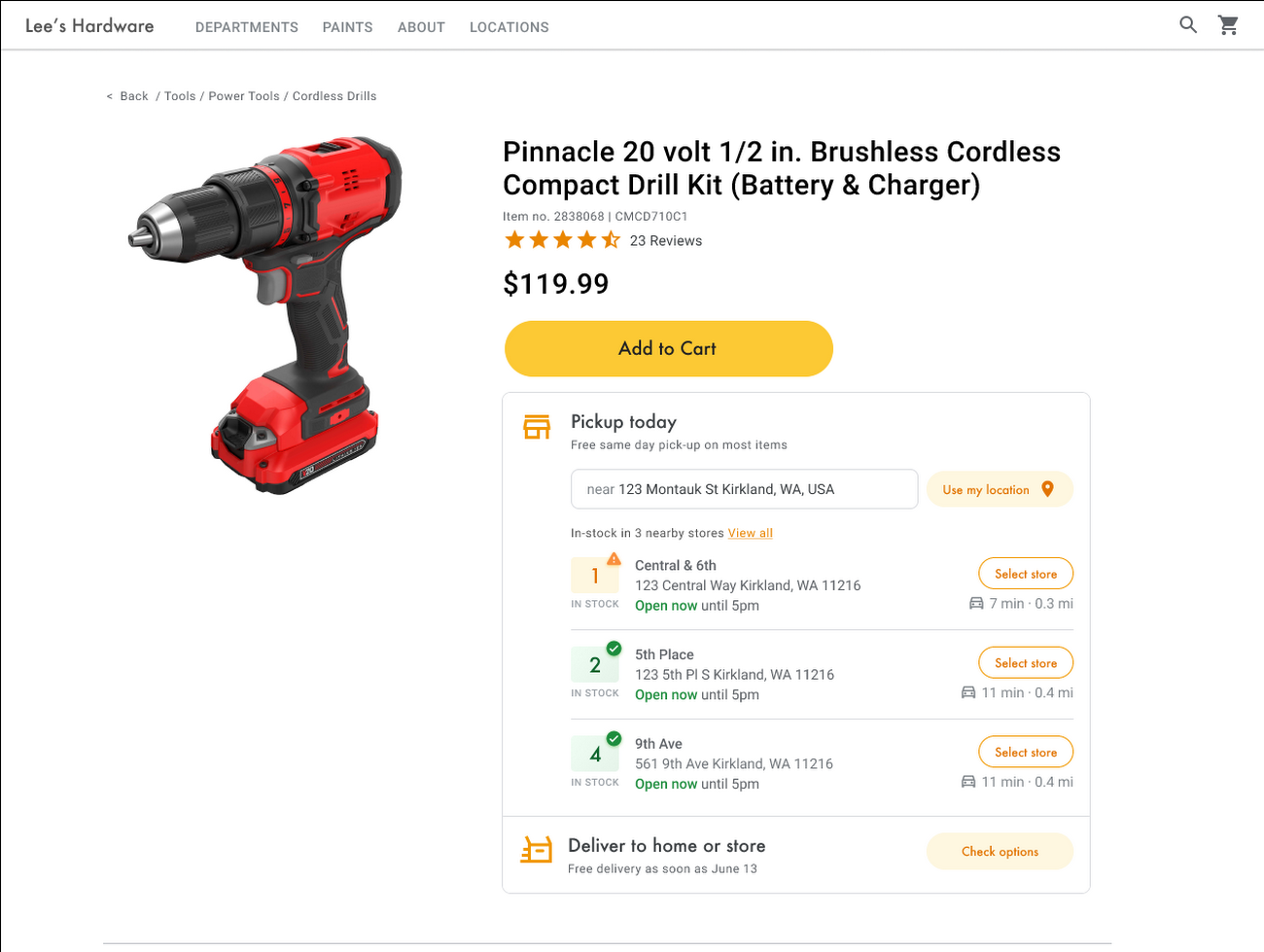
Update your store locator page to address more of shoppers’ needs
Store locators allow shoppers to more easily find your stores and can be made even more helpful with our Store Locator Plus solution. Our updated Store Locator Plus solution refreshes the store locator page to be more informative and engaging by integrating offers redeemable in-store, online scheduling for appointments and services, and text me directions services. Implement Store Locator Plus today using the guide.
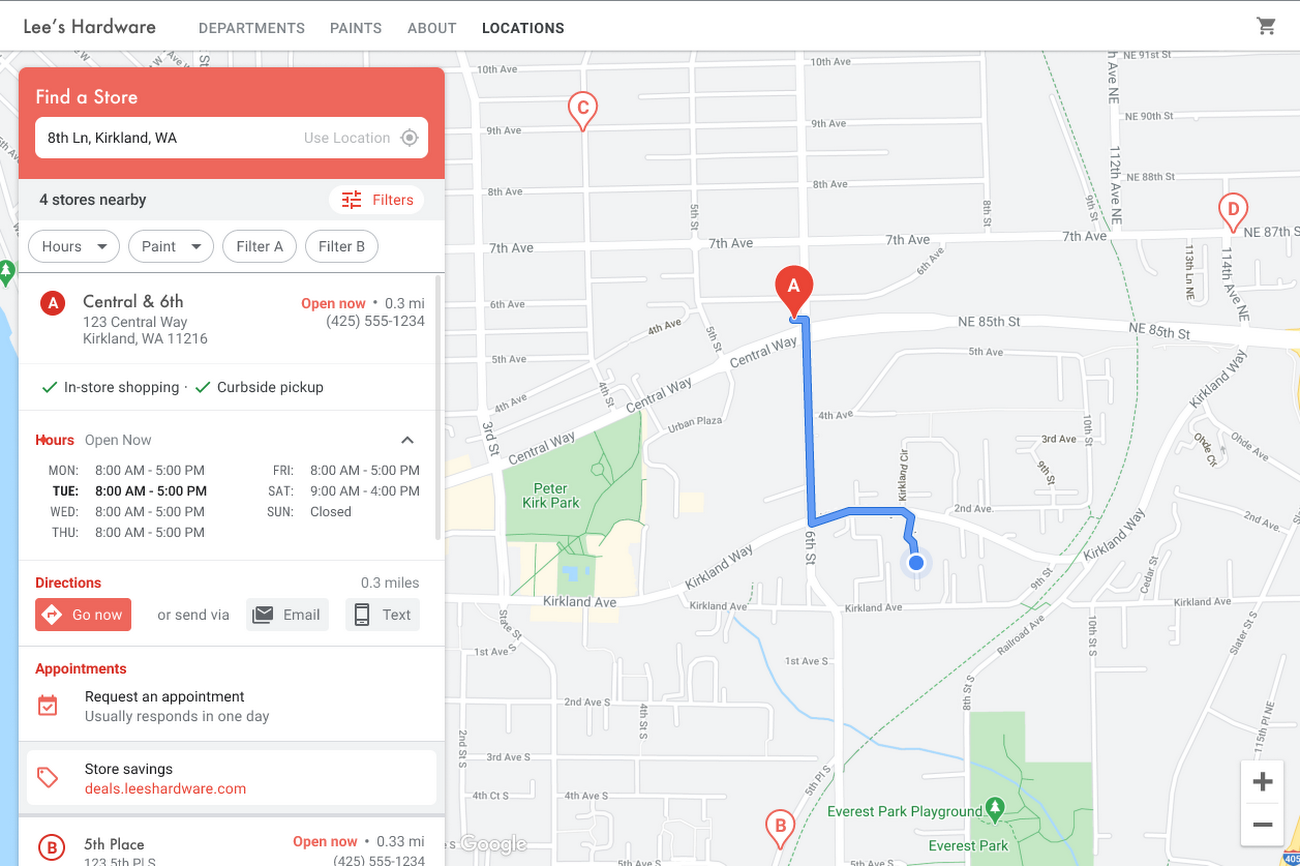
Build and customize Store Locator Plus for your business in minutes
At Google Maps Platform, we are always thinking of ways to make building a map easier and faster for our customers. In May at I/O we made Cloud-based Maps Styling generally available, enabling map updates to happen without touching a line of code. Today we’re excited to introduce Quick Builder, our free, low code builder which allows you to demo, customize and build a version of the Store Locator Plus solution for your website in minutes. Experience Quick Builder today.
To learn more about how you can start adopting these retail solutions, visit our retail solutions page.
For more information on Google Maps Platform, visit our website.
1 Global Insights Briefing: Getting back out there
2 https://www.shopify.com/pos/future-of-retail-2021
3 https://www.thinkwithgoogle.com/future-of-marketing/digital-transformation/covid-trends-1-year/
4 https://www.thinkwithgoogle.com/consumer-insights/consumer-trends/pandemic-shopping-behavior/
5 https://www.shopify.com/pos/future-of-retail-2021
Rethinking time management: Helping employees manage their time efficiently

3593
Of your peers have already read this article.
3:30 Minutes
The most insightful time you'll spend today!
As business leaders evaluate their hybrid work models, employee productivity is top of mind. They’re trying to understand how to balance organizational needs for productivity with employee needs for autonomy, flexibility, and work/life balance. In my role as Google’s Productivity Advisor, I help organizations and employees realize that being productive means working smartly and efficiently — not overworking. And one key to productivity is developing strong time management skills.
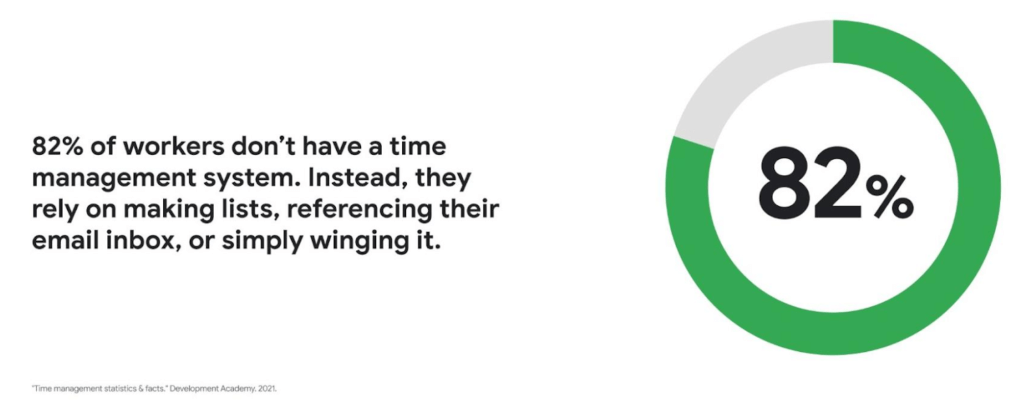
Recent research found that 82% of workers don’t have a proper time management system, however. Instead, they rely on making lists, referencing their inbox, or simply winging it. And the result is telling: 21% of people say “their work is never under control or only under control one day per week.”
Everyone works differently, and one of the best things about hybrid work is that it empowers people to work in their own way, at their own pace. However, if your employees are managing their time inefficiently over the long term, their risk of burnout increases — which can be bad news for employee wellbeing, morale and productivity.
In order for any hybrid work plan to be effective and your teams to be healthy, your employees need to build their time management muscle. You can help them do so with a three-step process:
- Understand how your employees are currently managing their time
- Encourage your employees to identify time management strengths and areas for improvement
- Empower your employees to maximize their time management practices
Step 1: Understanding your employees’ work habits
Before you can help your employees manage their time more effectively, you first need to understand how they spend it. To start, identify habits that might be preventing your employees from establishing productive workflows. For example, some employees might be working too much outside of business hours or spending the majority of their working hours in meetings.
While observation may help you glean some of this information, it’s best to go straight to the source. To find out if your employees feel they’re managing their time efficiently, simply ask them! You can distribute an anonymous questionnaire using a survey tool, like Google Forms, with questions like:
- Are you having trouble getting all your work done?
- Do you feel like you have enough independent working time?
- Do alerts and notifications interrupt or enhance your workflow?
- Which productivity and collaboration tools do you find the most and the least useful?
- How do you communicate best with your coworkers when working on- and off-site?
One major hurdle to effective time management can be too many meetings. To learn if meeting fatigue is plaguing your teams, include a survey question asking employees if they feel like they devote too much time to meetings. Help them get specific by encouraging them to use a tool like Time Insights. With this feature, employees can see exactly how much time they spend in meetings and how much focus time they schedule each week to accurately answer your survey.
Fielding an anonymous questionnaire is a great way to start your time management audit. The learnings that emerge can help you identify patterns in your workplace and among your teams — but they won’t reveal how individual employees work. For that, you’ll need to reach out to them directly.
Step 2: Identifying individual strengths to harness and areas for improvement
Once you have a general idea of how your team works, you can dig deeper into your individual employees’ time management methods and working styles. With this information, you can then help them identify the practices that work — and don’t work — for them.
Suggest to your employees that they spend a week observing their productivity patterns and time management methods. You might encourage people to look at:
- Their level of energy at different times during the day and/or on different days of the week
- The different types of work, such as strategic or administrative, they like doing and when
- How much time they spend doing work versus communicating about work
- How they feel during and after group meetings
- The amount of time they spend in deep-focus versus time spent switching among different tasks
If your organization uses digital timesheets, your employees can consult built-in, automatic time-tracking insights to see where they’re spending their time. Otherwise, you can easily create a custom time-tracking app using a no-code solution like AppSheet to help your employees measure the time they devote to their various responsibilities.
Once everyone has completed their weeklong study, set up dedicated meetings to review your employees’ observations with them individually. Armed with this new understanding, you and your employees can clarify when and how each person does their best work, identify areas for improvement, and start adjusting accordingly.
Step 3: Empowering your employees to flex their time management muscle
Now that you have clarity on how your employees spend their time, you can work with them to develop personal time management practices. To set them up for success, look for opportunities that take advantage of their strengths and offset their challenges — no matter how they like to work.
It’s important to remember there’s no one-size-fits-all solution to using time productively. Some workers love to tackle the most difficult tasks first thing in the morning; others feel more energized at the end of their day. Some people think best in conversation while others prefer to be alone with their thoughts. To help your employees develop time management practices that fit their working style, they need to feel empowered to decide how they can use their time and tools productively.
When it comes to time management, calendars are your best friend, so encourage your employees to take advantage of simple features. Google Calendar lets everyone see availability; by glancing at a shared calendar, coworkers will know when to reach out to someone (and when not to). You can also prompt your employees to block off quiet time during windows when they feel most productive, and use tools like Focus time to protect the time they need for heads-down work.
Email and chat are important, but they can also become a distraction if not used intentionally. Most people open email first thing in the morning, leave it open all day, and check it often. Instead, when you and your employees need to focus, try closing the email tab or using Gmail features to snooze and star emails to stay on task. The same approach applies to chat: check it strategically and turn off notifications when you need deep focus.
Finally, be intentional about building and maintaining trust with your teams as they develop new time management skills. If you decide to use Google Meet for regular check-ins, partner with your employees to develop meeting agendas directly inside Calendar invites to ensure your shared time will be used efficiently.
Valuing impact over output
Hybrid work offers an opportunity for business leaders to rethink their perspective on employee time management and what it means to be productive. Remember, the goal of building effective time management skills isn’t always to become more efficient so one can take on additional work. Often times, taking a step back helps us simplify how we work in order to deepen our impact. When you empower your employees to create a personal time management system, I think you’ll find they will be happier and healthier, with more to contribute to your organization.
3918
Of your peers have already watched this video.
15:11 Minutes
The most insightful time you'll spend today!
Communication in G Suite: The Future of Gmail, Chat, Meet, and More
Let’s take a step back and acknowledge the sudden shift that many of our businesses and employees have recently faced in the workplace.
A lot of people, who for a really long time relied on physical office space and infrastructure to both communicate and collaborate, have had to shift how they work and quickly. The crisis at hand has become a massive catalyst to remote, distributed and flexible work. And almost 3/4 of CFOs actually predict that these changes will permanently affect how companies choose to work moving forward.
While we’re well into this new reality, I want to quickly recap a few ways we’ve adapted to try to make this change to flexible work easier on people and organizations. First, we made premium Meet features available to all G Suite users, which meant that every customer, from schools to startups to small businesses to large enterprises, could leverage larger meeting sizes, live streams, recordings, and more.
In this video, find out more about how Google Workspace (formerly G Suite) is changing the future of work.
6565
Of your peers have already watched this video.
1:25 Minutes
The most insightful time you'll spend today!
How This 70-Year Old Japanese Shoe-maker Uses Collaboration to Beat Competition
For over six decades now, ASICS, a Japanese footwear, and sports equipment provider—for some of the biggest names in the sporting world—has been in the business of making sport a part of people’s lives. From manufacturing basketball shoes in 1949, ASICS soon began to design sports shoes for Olympians.
Headquartered in Kobe, Japan, ASICS is an acronym for the Latin phrase Anima Sana In Corpore Sano, meaning Sound Mind in a Sound Body.
“With over 65 years of history in the sporting goods business, we care for more than just quality products. We’re obsessed with customer experience,” says Paul Miles, Senior General Manager, Global Marketing Division, ASICS.
And without technology that’s not possible.
“Technology is helping us work better with athletes wherever they are. Whether it’s studying their performance, predicting the needs of customers through data, developing our products or simply inventing. Tech is enabling a new realm of possibility. When tech enables collaboration without limitation, the customer wins,” says Miles.
Watch the video to find out how ASICS has retained its place and how it continues to beat competition in a crowded sports market.
The Incredible Story of How Hero MotoCorp Moved 6,000 Users to the Cloud in 45 Days
7811
Of your peers have already read this article.
5:00 Minutes
The most insightful time you'll spend today!
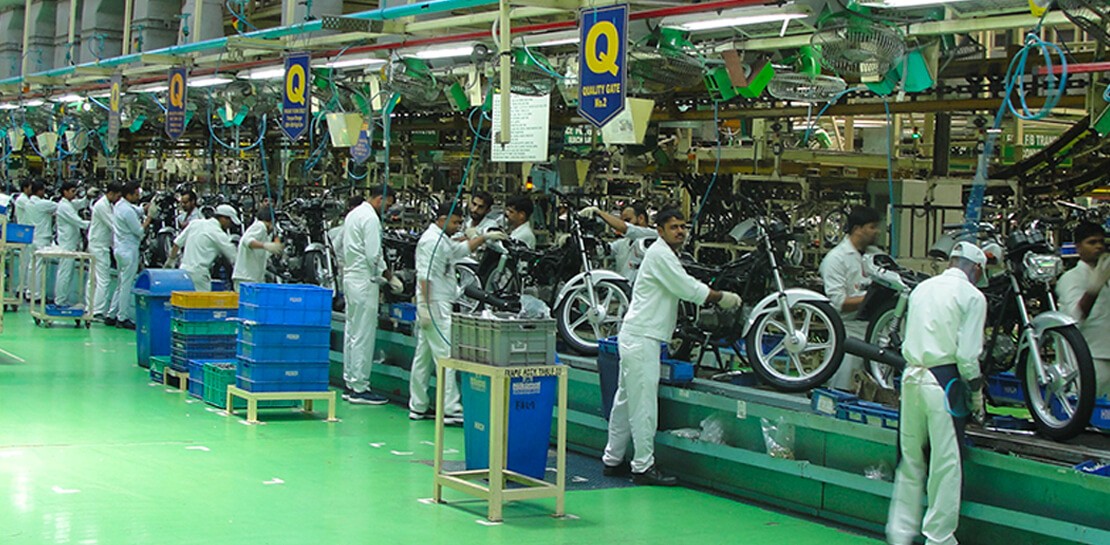
Assembling thousands of parts into one motorbike or scooter every 17 seconds is a complex task requiring accuracy and precision. For Hero MotoCorp — an India-headquartered manufacturer of two-wheeler vehicles — workforce collaboration, security, and mobility complement these processes and provide the cornerstone of the organization’s global operations.
Based in New Delhi, Hero MotoCorp is one of the world’s largest makers of two-wheeler vehicles, with a production capacity of 9 million units from five manufacturing plants in India and one each in Colombia and Bangladesh. The business has more than 90 million customers and operates in 37 countries across Asia, Africa, and South and Central America. In its home market, HeroMotoCorp sells one in every two two-wheelers.
Innovation and agility
Innovation and agility are deeply embedded in Hero MotoCorp’s culture and operations. Its Center of Innovation and Technology at Jaipur in Rajasthan, northern India, undertakes extensive product design and development, testing, and validation.
Hero MotoCorp has also established a technology center at Stephanskirchen, near Munich in Germany, to develop new vehicle concepts and technologies.
For several years, Hero MotoCorp relied on a traditional email solution to enable its employees to communicate and complete tasks. However, this solution could not provide the functionality, performance, ease of use, and security the business needed to maintain its market leadership.
“Our Chief Information Officer, Mr. Vijay Sethi, was the first to migrate to and embrace the features of G Suite and set an example to our workforce.”
Sujoy Brahmachari, Sr. GM and CISO, Hero MotoCorp
“Security, in particular, is extremely important — we don’t want our product design and development details falling into the wrong hands,” says Sujoy Brahmachari, Sr. GM and CISO, Hero MotoCorp. “We needed a solution that would allow us to control and monitor the distribution of sensitive information within and outside our organization.”
In early 2015, Hero MotoCorp’s technology team began evaluating email and workplace collaboration applications that could help the business realize its longer-term ambitions.
Collaboration key to success
“We were focused on a product that could drive greater collaboration among our workforce,” says Brahmachari. “In addition, we wanted to use the product on our desktops, laptops, mobile devices, and other devices. Finally, we needed to ensure email, other applications, and data were secure and available as and when we needed them.”
Hero MotoCorp’s evaluation found G Suite met all these requirements while being intuitive and easy to use. Furthermore, the cloud-based suite of intelligent applications provided a lower total cost of ownership than the business’s existing email solution and potential alternatives.
A 45-day migration
The business completed its review and completed the migration in just 45 days in 2015. “We worked closely with Google and our partners to complete the process in an innovative way that prioritized speed,” says Brahmachari. “For example, we migrated only three months’ worth of emails from our incumbent solution to G Suite, rather than the entire data repository.”
“Our teams are very happy and collaborative – employees can use Gmail through G Suite without being concerned about storage limits and can connect with colleagues, partners, customers, and other stakeholders through the chat, video, and audio call capabilities of Hangouts Meet.”
Sujoy Brahmachari, Sr. GM and CISO, Hero MotoCorp
Hero MotoCorp started the migration with a function-wise approach, creating batches and moving them overnight to G Suite. It created an internal video for employees to learn how to work using G Suite. It also created intranet posts to provide easy reference to all employees and established a service desk to respond to questions.
“Our Chief Information Officer, Mr. Vijay Sethi, was the first to migrate to and embrace the features of G Suite and set an example to our workforce,” says Brahmachari.
Deployed to 6,000 users
Hero MotoCorp has deployed G Suite to about 6,000 users in its core business and many users in affiliate companies. The company’s user-focused approach to the deployment, and the intuitive, easy-to-use nature of the product, has prompted the business’s workforce to embrace the full potential of G Suite.
“Our teams are very happy and collaborative — employees can use Gmail through G Suite without being concerned about storage limits and can connect with colleagues, partners, customers, and other stakeholders through the chat, video, and audio call capabilities of Hangouts Meet,” says Brahmachari.
Employees can also create, store, and access Docs, Sheets, Slides, and other file types on Drive — helping to ensure new product development, delivery schedules, budgeting, and other activities needed to keep a leading multinational manufacturer ahead of its competitors can be completed quickly and collaboratively.
Deployed to mobile devices
“With G Suite, information is available in the cloud to any employee at any time. The collaboration this enables plays a vital role in sustaining our leadership position.”
Sujoy Brahmachari, Sr. GM and CISO, Hero MotoCorp
Hero MotoCorp has also been able to give employees access to G Suite on a range of mobile devices — with administrators using mobile management to secure access applications and data on iOS and Android devices. The business is using the feature to require devices to have a screen lock or password; remote-wipe information from lost or stolen devices; and monitor from a central console the devices that access corporate data.
Further, Hero MotoCorp can use G Suite features to set and enforce policies and control system configuration and administration, while taking advantage of independently verified security, privacy, and compliance controls to meet business requirements.
With G Suite deployed and delivering value, Hero MotoCorp is now implementing or evaluating a range of Google technologies. For example, the business is using Google Maps Platform to power navigation for owners of new Hero MotoCorp two-wheelers and use Cloud Vision AI to enable immediate recognition of spare parts. “We are also evaluating Google Cloud data search and management technologies for potential application within the organization,” says Brahmachari.
The business is now well-positioned to accelerate into new markets and product development. “With G Suite, information is available in the cloud to any employee at any time,” says Brahmachari. “The collaboration this enables plays a vital role in sustaining our leadership position.”
The New Google Workspace Essentials: Bring Modern Collaboration to Work!

3731
Of your peers have already read this article.
1:30 Minutes
The most insightful time you'll spend today!
More than 3 billion users stay in touch, share ideas, and get more done together in Google Workspace, across apps like Meet, Chat, Drive, Docs, Sheets, Slides, and more. And starting today, we’re rolling out a new version designed to help people bring the apps they know and love to use in their personal lives to their work life. The new Google Workspace Essentials Starter Edition is a no-cost solution for business users looking to enhance teamwork and unlock innovation with secure-by-design collaboration. With Essentials Starter, we’re making it easy for employees to choose their own productivity tools and bring modern collaboration to work.
Work easily and securely within your current environment
As the world of work continues to evolve in unprecedented ways, secure collaboration—at speed, at scale, across platforms, on multiple devices—has never been more important. Essentials Starter helps employees and their teams break down silos and work together in new ways, even if their organization still relies on legacy productivity tools that weren’t built for the hybrid era of work. There’s no need for a new email address, file conversions, new plug-ins, or desktop software. All of the tools in Essentials Starter will work quickly and easily within your existing environment. And because we designed Google Workspace to operate on our industry-leading cloud foundation, Essentials Starter provides encrypted and secure access to files, helping keep users safe and their information private.
How Essentials Starter works
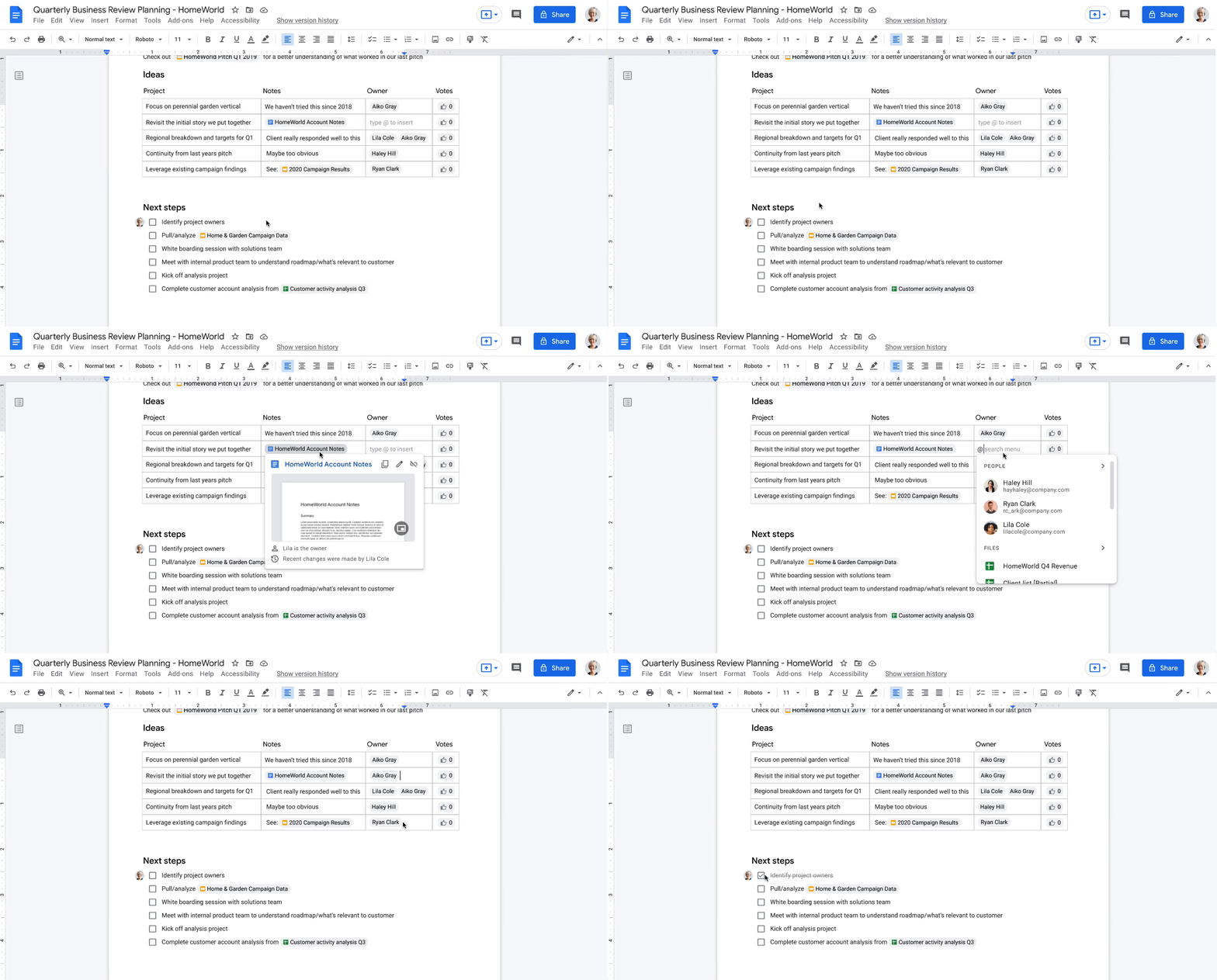
- Sign up with your work email for a no-cost Essentials Starter account. No credit card required and there’s no limited trial period.
- Invite teammates to collaborate using Google Docs, Slides, Sheets, Chat, Drive, and Meet.
- Unlock innovation with new ways of working with immersive, virtual meetings, and by storing, sharing, and collaborating on 100+ file types, including Microsoft Office, without the need for file conversions.
Collapse the boundaries between people, places, and timezones
In our recently commissioned hybrid work global survey with Economist Impact, when workers were asked what was most important to realize the benefits of hybrid work, their number one choice was “new technologies that allow for time and location flexibility.”*
Google Workspace was born in the cloud and designed for maximum flexibility; to be used from the location and device of your choice. Google Workspace brings chat, files, meetings, and your favorite apps into an intelligent hub so you—and your team—can connect, create, and collaborate from your PCs, tablets, and smartphones, across locations and time zones.

Modern collaboration capabilities
Using the cloud-first approach of Google Workspace, teams can:
- Experience modern collaboration without the burden of version control or email attachments. Brainstorm, build presentations, and glean insights from data using Google Sheets, Slides, and Docs.
- Host secure video meetings to bring everyone together in one place. Conduct one-to-one video meetings (unlimited) and immersive team meetings (3-100 people; up to 60 minutes in duration each).
- Real-time messaging with Google Chat. Share quick updates, files, and high-fives across the team with Google Chat, from one-to-one messages to larger group conversations.
- A dedicated place for team collaboration in Spaces. Spaces are tightly integrated with Google Workspace tools like Chat, Drive, Docs, Sheets, Slides, and Meet, providing a better way for people to engage in topic-based discussions, share knowledge and ideas, move projects forward, and build communities and team culture.
- Access work content securely from your devices. With 15 GB of storage in Google Drive, you can store, share, and access work content from your mobile device, tablet, or computer, and Drive for desktop can enable you to sync files and folders to your PC or Mac. Your Drive storage limits remain separate across your personal and Google Workspace Essentials Starter user accounts.
- Work with existing tools without file conversions. Store, share, or co-edit 100+ file types, including Microsoft Office documents and PDFs without the need for file conversions.
- Easily manage your team of collaborators. Add and remove team members effortlessly using a simple dashboard.

Over the past two years, organizations around the world have relied on Google Workspace to reimagine how work happens and enable modern collaboration across their teams to unlock innovation. During a time of enormous uncertainty, our customers have launched game-changing products, reached new audiences, accelerated lifesaving research, and digitally transformed their own customer experiences. Along the way, they’ve used Google Workspace to empower their employees—across homes, offices, and on the frontlines—to connect, create, and collaborate in powerful new ways. And starting today, with Essentials Starter, employees can make the switch from legacy productivity tools and experience the difference with Google Workspace.
* Economist Impact survey commissioned by Google in October 2021. The most popular answer when workers were asked about the most important condition needed to achieve the long-term success of hybrid work models was based on 42% of 1,244 respondents.
More Relevant Stories for Your Company

Gmail’s BIMI Increases Confidence about Security and Delivers Immersive Email Experiences
Creating a secure-by-default experience based on robust defenses has always been a core design principle for Gmail. That’s why we’ve established a strong baseline of security in Gmail, with built-in protections to help automatically filter out potentially malicious messages. While these defenses help keep Gmail users safe, email functions as

The Divercity Story: Using Google Cloud to Achieve a More Inclusive and Sustainable Workforce
Despite a growing number of diversity, equity, and inclusion (DEI) initiatives, Black and Latinx people remain highly underrepresented in tech. Although comprising 12.6% and 18% of the U.S. labor force respectively, Black professionals hold only 5% of tech positions, while Latinx professionals fill just 6% of tech roles. Long-standing biases

Workspace’s Collaboration Equity Integral for Delivering the ‘Promise of Hybrid Workplace’
Like many businesses around the world, Google is trying to combine on-site and off-site work into an efficient hybrid model. And like most businesses, we’re also figuring out how to get it right. As we grow our vision for the best possible hybrid workplace, one theme consistently emerges: the need for



How PwC Migrated 275,000+ Users to Google Workspace
PwC, a 150-year-old professional services firm, has deployed and measured the impact of G Suite on its network of firms in 158 countries to help change its culture and make digital mastery a competitive advantage. In 2015, PwC embarked on a journey of cultural change by deploying G Suite* to
