





Google Introduces ML-based Predictive Autoscaling to Forecast Capacity and Match Scaling Demands

4984
Of your peers have already read this article.
3:00 Minutes
The most insightful time you'll spend today!
At Google Cloud, we believe you get most benefits from the cloud when you scale infrastructure based on changing demand. Compute Engine allows you to configure autoscaling to save costs during periods of low demand, and add capacity to support peak loads.
When you use a managed instance group (MIG), you can have an autoscaler automatically create or delete virtual machine (VM) instances based on increases or decreases in load. However, if your application takes several minutes to initialize, creating VMs in response to growing load might not increase your application’s capacity quickly enough. For example, if there’s a large increase in load (like when users first wake up in the morning), some users might experience delays while your application is initializing on new instances.
A good way to solve this problem would be to create VMs ahead of demand so that your application has enough time to initialize beforehand. This requires knowing upcoming demand. If only we could predict the future… Well, now we can!
Introducing predictive autoscaling
Predictive autoscaling uses Google Cloud’s machine learning capabilities to forecast capacity needs. It creates VMs ahead of growing demand allowing enough time for your application to initialize.
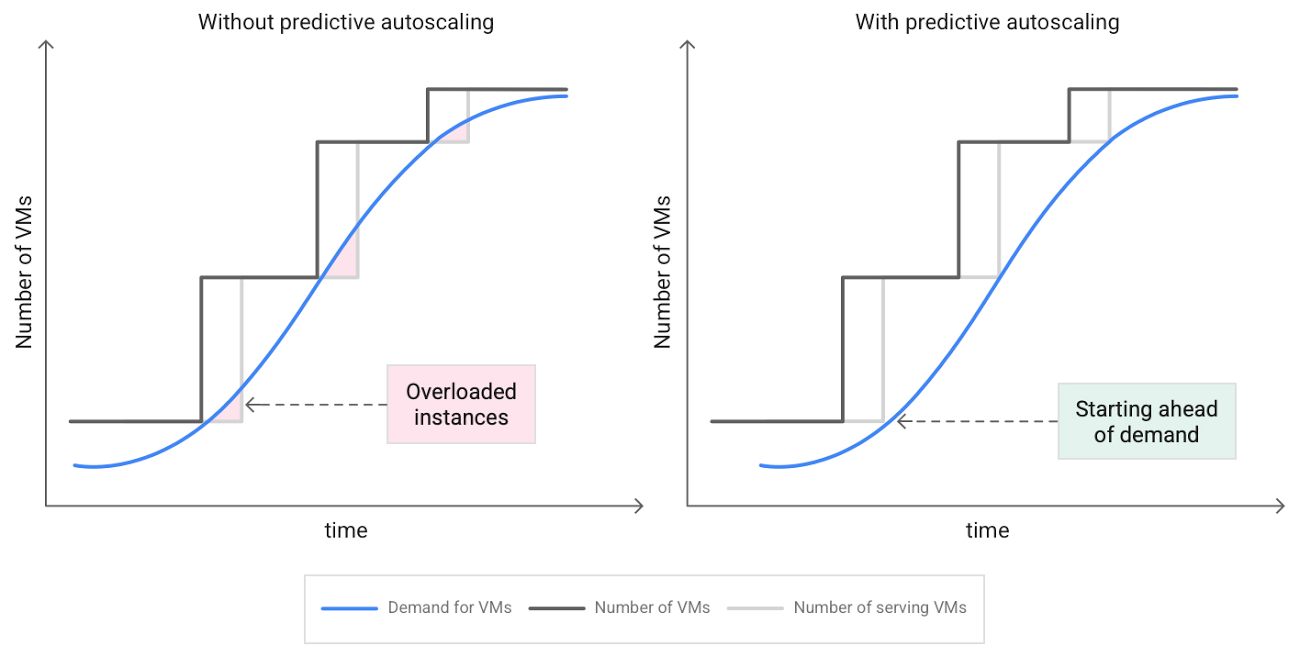
How does it work?
Predictive autoscaling uses your instance group’s CPU history to forecast future load and calculate how many VMs are needed to meet your target CPU utilization. Our machine learning adjusts the forecast based on recurring load patterns for each MIG.
You can specify how far in advance you want autoscaler to create new VMs by configuring the application initialization period. For example, if your app takes 5 minutes to initialize, autoscaler will create new instances 5 minutes ahead of the anticipated load increase. This allows you to keep your CPU utilization within the target and keep your application responsive even when there’s high growth in demand.
Many of our customers have different capacity needs during different times of the day or different days of the week. Our forecasting model understands weekly and daily patterns to cover for these differences. For example, if your app usually needs less capacity on the weekend our forecast will capture that. Or, if you have higher capacity needs during working hours, we also have you covered.
Why should you try it?
Predictive autoscaling continuously adapts forecasted capacity to best match upcoming demand. Autoscaler checks the forecast several times per minute and creates or deletes VMs to match its prediction. The forecast itself is updated every few minutes to match recent load trends so if your growth rate is higher or lower than usual we will adjust the forecast accordingly. This gives you capacity needed to cover peak load while saving on cost when demand goes down.
You can start using predictive autoscaling without worry as it’s fully compatible with the current autoscaler. Autoscaler will calculate enough VMs to cover both forecasted as well as real-time CPU load—whichever is higher. This works with other autoscaling features as well: you can scale based on schedule, your Load Balancer request target or Cloud Monitoring metrics. Autoscaler provides enough capacity to all of your configurations by taking the highest number of VMs needed to meet all your targets.
Getting started
You can enable predictive autoscaling in the Google Cloud Console. Select an autoscaled MIG from the instance groups page and click Edit group. Change predictive autoscaling configuration from Off to Optimize for availability.
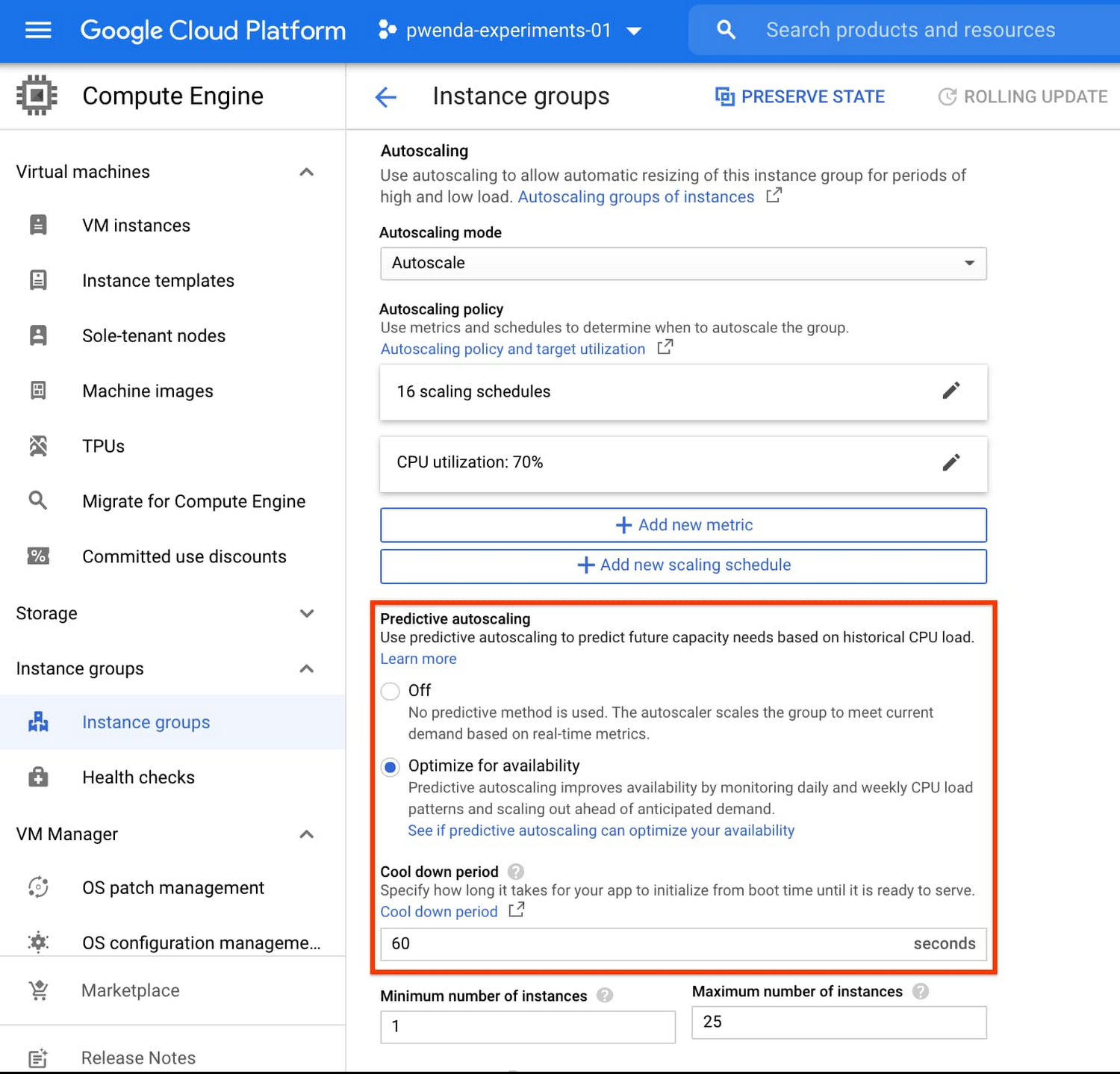
To better understand whether predictive autoscaling is good for your application, click the link See if predictive autoscaling can optimize your availability. This will show you a comparison of the last seven days with your current autoscaling configuration vs. with predictive autoscaling enabled.
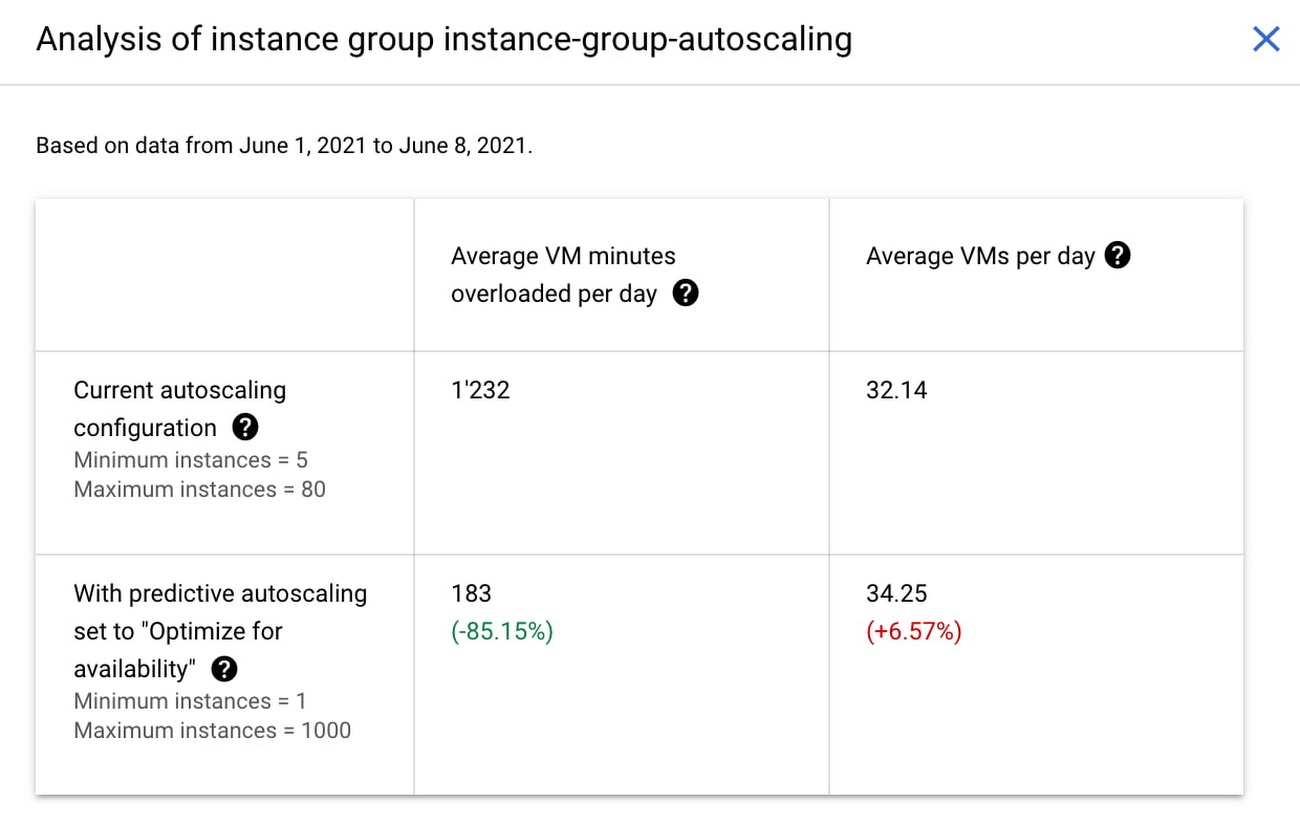
In the above chart,
- Average VM minutes overloaded per day shows how often your VMs exceed your CPU utilization target. This happens when demand is higher than available capacity. Predictive autoscaling can reduce this by starting VMs ahead of anticipated load.
- Average VMs per day is a proxy for cost. This shows how much additional VM capacity you need to keep your CPU utilization within the target you have set. You can optimize your cost by adjusting Minimum instances andCPU utilization as explained below.
Optimizing your configuration
Make sure your Cool down period reflects how long it takes for your application to initialize from VM boot time until it’s ready to serve the load. Predictive autoscaling will use this value to start VMs ahead of forecasted load. If you set it to 10 minutes (600 seconds) your VMs will start 10 minutes before the load is expected to increase.
Review your autoscaling CPU utilization target and Minimum number of instances. With predictive autoscaling you no longer need a buffer to compensate for the time it takes for a VM to start. If your application works best at 70% CPU utilization you don’t need to set target to a much lower value as predictive autoscaling will start VMs ahead of usual load. A higher CPU utilization and lower Minimum number of instances allows you to reduce the cost as you don’t need to pay for additional capacity to prepare for growing demand.
Try predictive autoscaling today
Predictive autoscaling is generally available across all Google Cloud regions. For more information on how to configure, simulate and monitor predictive autoscaling, consult the documentation.
12006
Of your peers have already watched this video.
3:26 Minutes
The most insightful time you'll spend today!
How L&T Financial Services Processes 95% of Motorcycle Loans in Less Than Two Minutes
L&T Financial Services is one of the largest lenders in India. India’s demonetization policy in recent years has led to a shift from cash transactions to digital payments. In 2016, the government withdrew 500 and 1000 rupee notes from circulation and encouraged a heavily cash-based population to deposit their canceled notes in banks. Financial institutions needed to pivot to a new way of doing business to stay competitive. L&T Financial Services modernized its IT infrastructure to keep up with changes and capture digital opportunities.
“Working capital is crucial to stimulate growth in rural communities. Our role as a lender is to provide access to funds. We don’t want to burden borrowers with the complexities of getting a loan. Towards this end, digitization is an important step,” says Dinanath Dubhashi, Managing Director and CEO at L&T Financial Services. “Google Cloud helps us streamline service delivery and identify the right customers. By offering the fastest processing time in the industry, we want to be the go-to lender for all customers.”
L&T Financial Services considered multiple cloud providers before choosing Google Cloud. According to Dinanath, Google Cloud understands both the need for businesses to move fast and the need for IT to modernize at different speeds. “We weren’t forced to abandon existing IT systems and migrate lock, stock, and barrel to Google Cloud on day one.”
L&T Financial Services engaged Google Cloud Professional Services to guide its digital transformation journey. The smooth migration from proof of concept to full-scale deployment on Google Cloud took a matter of months.
“Collaboration: a small idea with big opportunities. G Suite helps us connect remote branches with the head office, easily access shared files to submit and track approvals, and conduct face-to-face discussions to accelerate approval processes.”
—Dinanath Dubhashi, MD and CEO, L&T Financial Services
Digitizing the workforce with G Suite
The move to the cloud at L&T Financial Services started in 2017 when the company introduced G Suite to its 14,500 employees. The legacy email system was cumbersome to use, especially for frontline staff who need email access while they are on the road. Using Gmail, employees can connect with customers and co-workers from anywhere, on any device. Employees save time by scheduling meetings with Calendar, collaborating on Docs, and conducting video calls using Hangouts Meet.
Converting data into credit insights using BigQuery
Taking data intelligence one step further, L&T Financial Services adopts a responsible lending approach by applying algorithm-based data analytics to improve credit standards. Beyond traditional data such as credit score and credit payment history, the company also considers macro-economic indicators for risk audits. For example, a farmer’s ability to pay off the loan of his new tractor depends on a successful planting and harvest. So L&T Financial Services feeds long-term data into BigQuery and runs queries to predict loan defaults based on rainfall and crop yield.
5317
Of your peers have already watched this video.
1:30 Minutes
The most insightful time you'll spend today!
Why Enterprises Should Choose Google Cloud for their SAP Workloads
Change is a constant for SAP customers. Now more than ever, SAP customers need solutions that provide them business agility, rock solid availability and security and true economic value.
Learn how Google Cloud can guide your SAP journey to the cloud with simple and no cost migrations, powerful infrastructure and innovation technologies that you can take advantage of today.
Hear from SAP customers who have deployed on Google Cloud and the game changing results they are realizing.
3241
Of your peers have already watched this video.
20:00 Minutes
The most insightful time you'll spend today!
The Transformative Journeys of Financial Firms on Google Cloud: Watch Video
The reliance on cloud-based architectures, high performance computing, big data and more are accelerating in the banking, capital, insurance and financial services industries. Google Cloud had a strong role in transforming many businesses especially in the pandemic to smoothly transition into the digital space and understand their customers. Two years since then, financial firms have been able to design better products based on intelligent, real-time insights and leverage many capabilities of Google Cloud to deliver tailored experiences. So, how big of an impact Google Cloud has on the future of the financial services? The answer is huge and endless.
Watch this video to dive into the state of global financial services companies that leveraged modern cloud architecture for their sensitive data, platforms, devices and products while they increase revenues, stay compliant and curb costs.
Dataflow Guarantees 50+% Increase in Developer Productivity and Infrastructure Cost Savings: Read More

8377
Of your peers have already read this article.
3:00 Minutes
The most insightful time you'll spend today!
In our conversations with technology leaders about data-driven transformation using Google Data Cloud – industry’s leading unified data and AI solution – , one important topic is incorporating continuous intelligence to move from answering questions such as “What has happened? to questions like “What is happening?” and “What might happen?”. The core to this evolution is the need for an underlying data processing that not only provides powerful real-time capabilities for events happening close to origination, but also brings together existing data sources under one unified data platform to enable organizations to draw insights and take actions holistically. Dataflow, Google’s cloud-native data processing and streaming analytics platform, is a key component of any modern data and AI architecture and data transformation journey, along with BigQuery, Google’s internet-scale warehouse with built-in streaming, BI engine and ML; Pub/Sub, a global no-ops event delivery service; and Looker, a modern BI and embedded analytics platform. One of the key evaluation factors is potential economic value of Dataflow to their organization, particularly in the context of engaging other stakeholders is key for many of the leaders that we engage with. So we commissioned Forrester Consulting to conduct a comprehensive study on the impact that Dataflow had on their organization by interviewing actual customers .
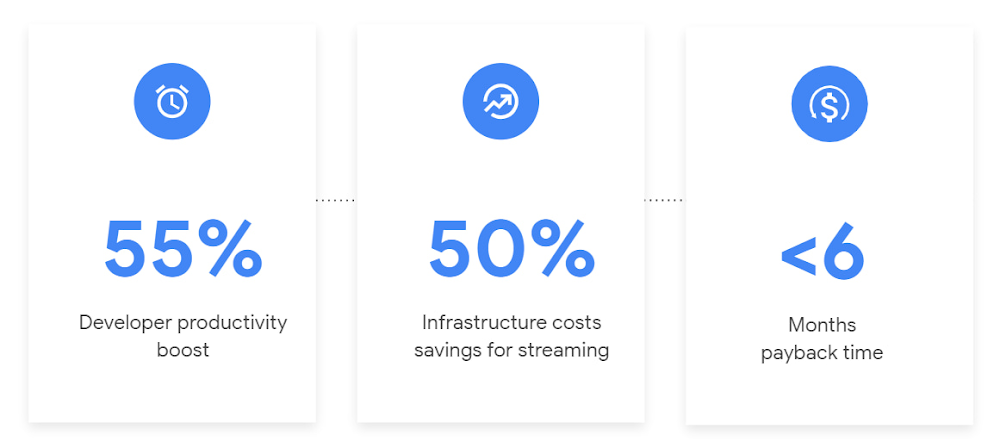
Today we’re excited to share our commissioned study conducted by Forrester Consulting, the Total Economic Impact™ of Google Cloud Dataflow, which allows data leaders to understand and quantify the benefits of Dataflow, and use cases it enables. Forrester conducted interviews with Dataflow customers to evaluate the benefits, costs, and risks of investing in Dataflow across an organization. Based on their interviews, Forrester identified major financial benefits across four different areas: business growth, infrastructure cost savings, data engineer productivity, and administration efficiency. In fact, Forrester found that customers adopting Dataflow can achieve a 55% boost in developer productivity and a 50% reduction in infrastructure costs. In fact, Forrester projects that customers adopting Dataflow can achieve a range of up to 171% Return on Investment (ROI) and a less than six months payback period. Customers can now use figures in the report to compute their own Return on Investment (ROI) and payback period.
“Dataflow is integral to accelerating time-to-market, decreasing time-to-production, reducing time to figure out how to use data for use cases, focusing time on value-add tasks, streamlining ingestion, and reducing total cost of ownership.” – Lead technical architect, CPG
Let’s take a deeper look at the ways that Forrester found that Dataflow can help you achieve your goals and unlock your business potential.
Benefit #1: Increase data engineer productivity by 55%
Developers can choose among a variety of programming languages to define and execute data workflows. Dataflow also seamlessly integrates with other Google Cloud Platform and open source technologies to maximize value and applicability to a wide variety of use cases. Dataflow streamlined workflows with code reusability,dynamic templates, and the simplicity of a managed service. Engineers trusted pipelines to run correctly and adhere to governance. Data engineers avoided laborious issue-monitoring and remediation tasks that were common in the legacy environments such as poor performance, lack of availability, and failed jobs. Teams valued the language flexibility and open source base.
“Dataflow provided us with ETL replacement that opened limitless potential use cases and enabled us to do smarter data enhancement while data remains in motion.” — Director of data projects, financial services
Benefit #2: Reduce infrastructure costs by up-to 50% for batch and streaming workloads
Dataflow’s serverless autoscaling and discrete control of job needs, scheduling, and regions eliminated overhead and optimized technology spending. Consolidating global data processing solutions to Dataflow further eliminated excess costs while ensuring performance, resilience, and governance across environments. Dataflow’s unified streaming and batch data platform gives organizations the flexibility to define either workload in the same programming model, run it on the same infrastructure, and manage it from a single operational management tool.
“Our costs with our cloud data platform using Dataflow are just a fraction of the costs we faced before. Now we only pay for cloud infrastructure consumption because the open source base helps us avoid licensing costs. We spend about $120,000 per year with Dataflow, but we’d be spending millions with our old technologies.” – Lead technical architect, CPG
Benefit #3: Increase top-line revenue by improving customer experience and retention with payback time of < 6 months
Streaming analytics is an essential capability in today’s digital world to gain real-time actionable insights. Likewise, organizations must also have flexible, high- performance batch environments to analyze historical data for building machine learning models, business intelligence, and advanced analytics. Dataflow enabled real-time streaming use cases, improved data enrichment, encouraged data exploration,improved performance and resiliency, reduced errors, increased trust, and eliminated barriers to scale. As a result, organizations provided customers with more accurate, relevant, and in-the-moment data-backed services and insights — boosting customer experience, creating new revenue streams, and improving acquisition, retention, and enrichment.
“It’s already been proven that we are getting more business [with Dataflow] because we can turn around results faster for customers.” – VP of technology, financial services technology
“When we provide data to our customers and partners with Dataflow, we are much more confident in those numbers and can provide accurate data within a minute. Our customers and partners have taken note and commented on this. It’s reduced complaints and prevented churn.” – Senior software engineer, media
Other benefits
Eliminated administrative overhead and toil
As a cloud-native managed service, all administration tasks such as provisioning, scaling, and updates are automatically handled by Google Cloud. Teams no longer need to manage servers and related software for legacy data processing solutions. Admins also streamlined processes for setting up data sources, adding pipelines, and enforcing governance.
Saved business operations costs for support teams and data end users
Dataflow improved the speed, quality, reliability, and ease of access to data for insights for general business users, saving time and empowering users to drive better data-backed outcomes. It also reduced support inquiry volume while automating manual job creation.
What’s next?
Download the Forrester Total Economic Impact study today to dive deep into the economic impact Dataflow can deliver your organization. We would love to partner with you to explore the potential Dataflow can unlock in your teams. Please reach out to our sales team to start a conversation about your data transformation with Google Cloud.
Google Extends Support for Windows Server Containers on Anthos for Faster App Modernization and Consistent Dev Experience

5589
Of your peers have already read this article.
3:00 Minutes
The most insightful time you'll spend today!
Today, many applications in organizations’ data centers run on Windows Server. Modernizing these traditional Windows apps onto Kubernetes promises a host of benefits: a consistent platform across environments, better portability, scalability, availability, simplified management and speed of deployment, just to name a few. But how? Rewriting traditional .NET applications to run on Linux with .NET Core can be challenging and time-consuming. There is, however, a lower-toil, more developer friendly option.
Last year, we announced support for Windows Server containers running on Google Kubernetes Engine (GKE), our cloud-based managed Kubernetes service, which lets you take the advantage of containers without porting your apps to .NET core or rewriting them for Linux. Today, we’re going a step further with support for Windows Server containers on Anthos clusters on VMware in your on-premises environment. Now available in preview, you can consolidate all your Windows operations across on-prem and Google Cloud.
Bringing Windows Server support to our family of Kubernetes-based services—GKE running on Google Cloud, and Anthos everywhere—with the same experience, lets you modernize apps faster and achieve a consistent development and deployment experience across hybrid and cloud environments. Further, by running Windows and Linux workloads side by side, you get operational consistency and efficiency—no need to have multiple teams specializing in different tooling or platforms to manage different workloads. The single-pane-of-glass view and the ability to manage policies from a central control plane simplifies the management experience, while bin packing multiple Windows applications drives better resource utilization, leading to infrastructure and license savings.
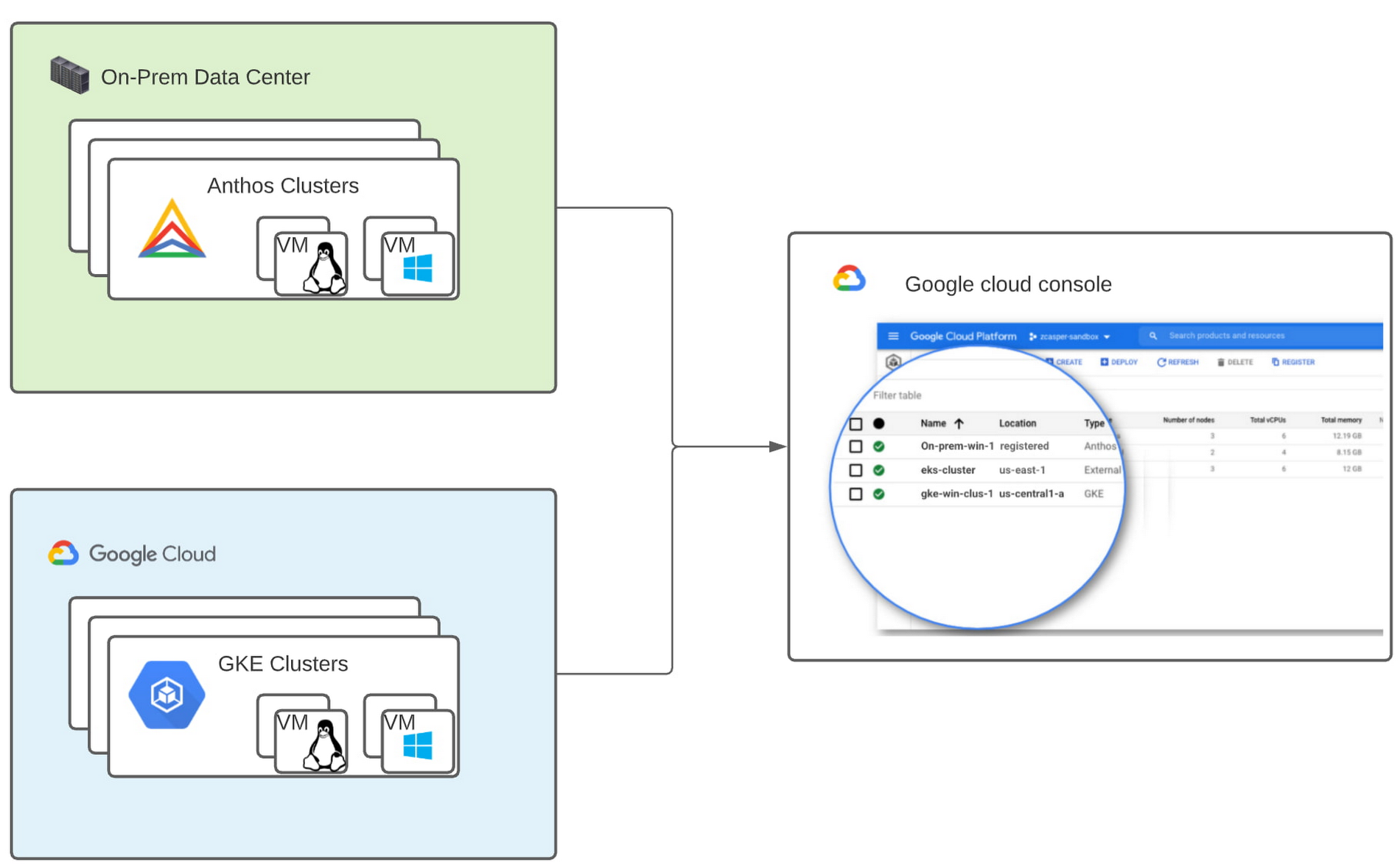
With all these benefits, it’s no surprise that customers such as Thales, a French multinational firm specializing in aerospace and security services, have been able to reap significant benefits by moving Windows applications to GKE.
“We moved our Windows applications from VMs to Windows containers on GKE and now have a unified mechanism for Linux and Windows-based application management, scaling, logging, and monitoring. Earlier, setting up these applications in VMs and configuring them for high availability used to take up to a week, and the applications were not easily scalable,” said Najam Siddiqui, Solutions Architect at Thales. “Now with GKE, the setup takes only a few minutes. GKE’s automatic scaling and built-in resiliency features make scaling and high-availability setup seamless. Also, manually maintaining the VMs and applying security patches used to be tedious, which is now handled by GKE.”
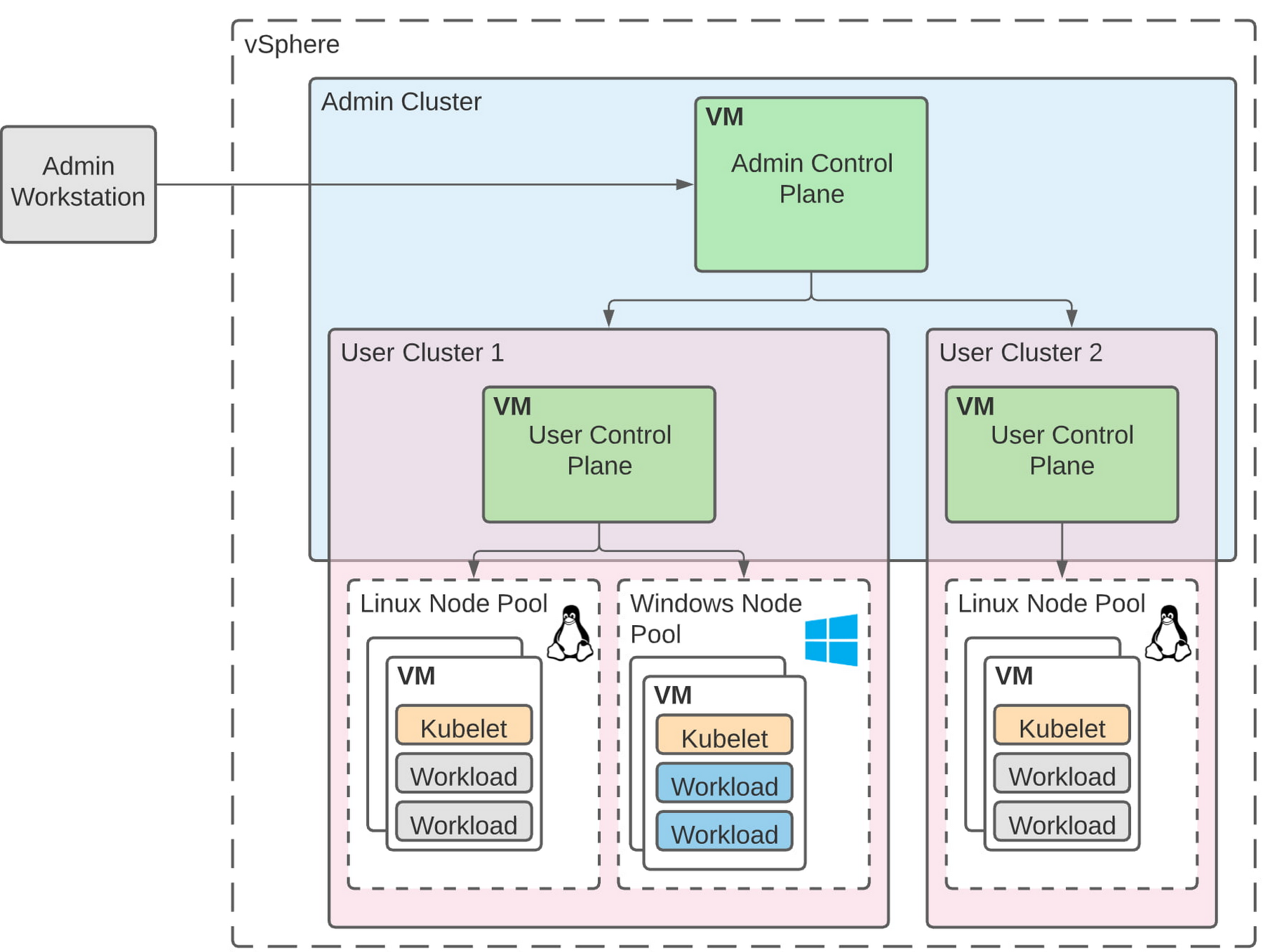
Let’s take a deeper look at the architecture that lets you run your Windows container-based workloads on-prem.
Windows Server running on-prem with Anthos
The diagram below illustrates the high-level architecture of running Windows container-based workloads in an on-prem GKE cluster with Anthos. Windows server node-pools can be added to an existing or new Anthos cluster. Kubelet and Kube-proxy run natively on Windows nodes, allowing you to run mixed Windows and Linux containers in the same cluster. The admin cluster and the user cluster control plane continue to be Linux-based, providing you a consistent orchestration experience and management ease across Windows and Linux workloads.
Get started today
When considering modernizing your on-prem Windows estate, we recommend running Windows Server containers on Anthos in your own data center. If you are new to Anthos, the Anthos getting started page and the Coursera course on Architecting Hybrid Cloud with Anthos are good places to start. You can also find detailed documentation on our website, and our partners are eager to help you with any questions related to the published solutions, as is the GCP sales team. And as always, please don’t hesitate to reach out to us at anthos-onprem-windows@google.com if you have any feedback or need help unblocking your use case.
More Relevant Stories for Your Company
What You Can Learn from ‘Up or Out’ Framework for Cloud Adoption
In times of significant disruption, organizations are faced with three choices: Retrench within legacy solutions, pause and do nothing while waiting for more data or different circumstances, or press ahead, potentially even accelerating to realize the desired outcome. In such an environment, it is critical to ensure you’re delivering the

Say Hola to New Google Cloud Region in Madrid
We’re continuing to expand our global footprint — and we’re doing it rapidly. In 2020, we announced our plans to launch a new cloud region to help accelerate the economic recovery and growth of Spain. Today, we’re excited to announce that our new Google Cloud region in Madrid is officially

More and More Businesses Trust the Cloud. Here’s Why.
What’s behind the rising confidence in cloud security? First hand experience, and careful, systematic assessments that tap multiple sources such as detailed audits and comparisons. The most frequent driver of increased confidence was the direct experience of the quality of security in the cloud versus on-premises. As a result, the
The Future of Cloud Computing
Increasingly, technology, data, and human interactions will follow a new model of real-time inputs, enabling change without interruption and positive iteration. Cloud computing powers an important shift for information technology, and it will usher in new and better ways to serve customers, make discoveries, and build great products and services.
