





Google Cloud’s Transfer Services Helps Move Nuro’s Petabytes of Data from Edge to the Cloud

5154
Of your peers have already read this article.
3:00 Minutes
The most insightful time you'll spend today!
Engineers that build last-mile delivery services belong to an elite order, a hallowed subcategory. Delivery customers are incredibly demanding when it comes to speed and convenience, and the services they use must take variables like increased traffic, road conditions, human error, and even driver availability into account every day.
Nuro is a company with a new approach to delivery services. Nuro has a fleet of autonomous vehicles designed to address many of the problems related to last-mile delivery. And every day, these vehicles — and their sensors — generate a lot of data before parking for the night. For Nuro engineers, that data can help them understand the impact of new on-road features, make improvements to their vehicles’ software, and ensure even better deliveries for their customers.
For Nuro, the key challenge is how to move petabytes of data as quickly, securely, and easily as possible from their edge environments, like vehicle depots, to Google’s Cloud Storage. For this delivery effort, Nuro selected Google’s Transfer Appliance with its new online transfer capability, now generally available.
Helping Nuro to speed up data delivery from the edge to the cloud
Like many Google Cloud customers, Nuro collects data from remote environments, like vehicle depots, that have different networking and storage capabilities when compared to a traditional data center. For a transfer solution to be effective moving unstructured data from these environments to the cloud, the solution needs to be easy to deploy and automate, while still providing similar performance as a more complicated alternative.
The Transfer Appliance was built for this use case. It arrives to customers as a physical appliance with a preconfigured version of Google’s Storage Transfer Service software already installed. Customers can move files to the appliance by using SFTP or SCP, or, alternately, can mount the appliance as an NFS share and copy target. Data can be stored locally on the appliance or transferred over the network, and secure encryption — at-rest and in-flight — is enabled by default.

With these new appliances, Nuro will be able to automate much of their storage transfer needs. When their autonomous vehicles return to the depot, they can move data like software logs, LIDAR data, and sensor data — all ideal fits for Google’s Cloud Storage — from parked vehicles to the Transfer Appliance. Online transfers can then be performed throughout the day, ensuring a steady stream of valuable data in the cloud for developers to analyze and use in their nightly builds. All of this will help Nuro’s engineering leaders like Jie Pan to run more productive development teams with less operational overhead.
“Our autonomous vehicles generate a tremendous amount of useful data, and our goal is to get that data to our engineers as soon as possible,” said Jie Pan, Engineering Manager at Nuro. “When vehicles return to the depot, we can move data hourly into Cloud Storage over the network. We also have the flexibility to return the Transfer Appliance back to Google Cloud. Most importantly, this rapid transfer architecture gives a meaningful boost to engineering productivity and development velocity.”
Going the extra mile
Engineering and infrastructure leaders understand the value of delivering the right data to the right teams, as fast as possible. By adding preconfigured, over-the-network transfer into a turnkey Transfer Appliance, Google Cloud customers can more easily automate these data deliveries by scheduling regular migrations of on-premises files, objects, and other unstructured data to our Cloud Storage.
As Nuro continues to grow their manufacturing and testing footprint, they plan to use Transfer Appliances to further scale and simplify their data migration from on-premises to Google Cloud. Cutting the time to migrate their data by more than half will make for happier, more productive developers, and that will help Nuro bring us all the future of delivery a little faster.
If you’d like to learn more about Transfer Appliance and its new online transfer capability, click here or reach out to your Google Cloud account team.
Master AI Prompt Engineering with 6 Proven Tips

1048
Of your peers have already read this article.
2:30 Minutes
The most insightful time you'll spend today!
As AI-powered tools become increasingly prevalent, prompt engineering is becoming a skill that developers need to master. Large language models (LLMs) and other generative foundation models require contextual, specific, and tailored natural language instructions to generate the desired output. This means that developers need to write prompts that are clear, concise, and informative.
In this blog, we will explore six best practices that will make you a more efficient prompt engineer. By following our advice, you can begin creating more personalized, accurate, and contextually aware applications. So let’s get started!
Tip #1: Know the model’s strengths and weaknesses
As AI models evolve and become more complex, it is essential for developers to comprehend their capabilities and limitations. Understanding these strengths and weaknesses can help you, as a developer, avoid making mistakes and create safer, more reliable applications.
For example, an AI model that is trained to recognize images of blueberries may not be able to recognize images of strawberries. Why? Because the model was only trained on a dataset of blueberry images. If a developer uses this model to build an application that is supposed to recognize both blueberries and strawberries, the application would likely make mistakes, leading to an ineffective outcome, and poor user experience.
It’s important to note that AI models have the ability to be biased. This is due to AI models being trained on data that is collected from the real world, and so it can reflect the inequitable power dynamics inherently rooted in our social hierarchy. If the data that is used to train an AI model is biased, then the model will also be biased. This can lead to problems if the model is used to make decisions that affect people by reinforcing societal biases. Addressing these biases is important to ensure that data is fair, promoting equality, and ensuring the responsibility of AI technology. Prompt engineers should be aware of training limitations or biases so they can craft prompts more effectively and understand what kind of prompting is even possible for a given model.

Tip #2: Be as specific as possible
AI models have the ability to comprehend a variety of prompts. For instance Google’s PaLM 2 can understand natural language prompts, multilingual text, and even programming codes like Python and JavaScript. Although AI models can be very knowledgeable, they are still imperfect, and have the ability to misinterpret prompts that are not specific enough. In order for AI models to navigate ambiguity, it is important to tailor your prompts specifically to your desired outcome.
Let’s say you would like your AI model to generate a recipe for 50 vegan blueberry muffins. If you prompt the model with “what is a recipe for blueberry muffins?”, the model does not know that you need to make 50 muffins. It is thus unlikely to list the larger volume of ingredients you’ll need or include tips to help you more efficiently bake such a large number of muffins. The model can only go off the context that is provided. A more effective prompt would be “I am hosting 50 guests. Generate a recipe for 50 blueberry muffins.” The model is more likely to generate a response that is relevant to your request and meets your specific requirements.
Tip #3: Utilize contextual prompts
Utilize contextual information in your prompts to help the model gain an in-depth understanding of your requests. Contextual prompts can include the specific task you want the model to perform, a replica of the output you’re looking for, or a persona to emulate, from a marketer or engineer to a high school teacher. Defining a tone and perspective for an AI model gives it a blueprint of the tone, style, and focused expertise you’re looking for to improve the quality, relevance, and effectiveness of your output.
In the case of the blueberry muffins, it is important to prompt the model using the context of the situation. The model might need more context than generating a recipe for 50 people. If it needs to be aware that the recipe must be vegan friendly, you might prompt the model by asking it to answer by emulating a skilled vegan chef.
By providing contextual prompts, you can help ensure that your AI interactions are as seamless and efficient as possible. The model will be able to more quickly understand your request and it will be able to generate more accurate and relevant responses.
Tip #4: Provide AI models with examples
When creating prompts for AI models, it is helpful to provide examples. This is because prompts act as instructions for the model, and examples can help the model to understand what you are asking for. Providing a prompt with an example looks something like this: “here are several recipes I like – create a new recipe based on the ones I provided.” The model can now understand the your ability and needs in order to make this pastry,
Tip #5: Experiment with prompts and personas
The way you construct your prompt impacts the model’s output. By creatively exploring different requests, you will soon have an understanding of how the model weighs its answers, and what happens when you interfuse your domain knowledge, expertise, and lived experience with the power of a multi-billion parameter large language model.
Try experimenting with different keywords, sentence structures, and prompt lengths to discover the perfect formula. Allow yourself to step into the shoes of various personas, from work personas such as “product engineer” or “customer service representatives,” to parental figures or celebrities such as your grandmother, a celebrity chef, and explore everything from cooking to coding!
By crafting unique, and innovative, requests replete with your expertise and experience, you can learn which prompts provide you with your ideal output. Further refining your prompts, known as ‘tuning,’ allows the model to have a greater understanding and framework for your next output.
Tip #6: Try chain-of-thought prompting
Chain of thought prompting is a technique for improving the reasoning capabilities of large language models (LLMs). It works by breaking down a complex problem into smaller steps, and then prompting the LLM to provide intermediate reasoning for each step. This helps the LLM to understand the problem more deeply, and to generate more accurate and informative answers. This will help you to understand the answer better and to make sure that the LLM is actually understanding the problem.
Conclusion
Prompt engineering is a skill that all workers, across industries and organizations, will need as AI-powered tools are becoming more prevalent. Remember to incorporate these five essential tips the next time you communicate with an AI model, so you can generate the accurate outputs that you desire. AI will forever continue to develop, constantly refining itself as we use it, so I encourage you to remember that learning, for mind and machine, is a never ending journey. Happy Prompting!
Groww’s Google Cloud-Powered Platform: The Key to Secure and Successful Investing

2937
Of your peers have already read this article.
4:00 Minutes
The most insightful time you'll spend today!
Groww makes investments simple and accessible, using Google Kubernetes Engine to ensure a reliable platform for customers, and makes data-backed decisions to grow its business with BigQuery.
About Groww
Headquartered in Bangalore, Groww is India’s fast-growing online investment platform that offers a simple and easy way to invest in stocks, direct mutual funds, IPOs, ETFs, and digital gold. Its mission is to make investing as intuitive and accessible as ecommerce.

Google Cloud results
- Reduces hardware costs with Preemptable Virtual Machines
- Enables a lean DevOps team with Google Cloud
- Analyzes data effectively and quickly for agile business growth
Investing is one way to ensure financial security. However, the thought of it can be a daunting one, especially for people without any prior experience. With a mission to make investment simple for digital natives in India, Groww was launched in 2016.
“We noticed that many people were on social media, booking cabs, and ordering food online, but the same people were not investing, despite having the means to do so,” says Singh. This observation led to a lightbulb moment for the team, and they realized that in order to appeal to the millennial, mobile-savvy generation, they had to create an investment platform that was as easy to use as an ecommerce platform.
Managing unpredictable spikes with Google Kubernetes Engine
As with any platform, there are bound to be peak and non-peak hours when it comes to traffic. For Groww, regular spikes take place in the early mornings, or in the evenings when people are more relaxed having come home from work. But the nature of the fintech industry is a volatile one. Investors are only human, and their investment decisions can be swayed quickly by the news. As such, spikes in traffic can happen at the most unpredictable times. To cope with this unpredictability, Groww uses Google Kubernetes Engine to scale up and down automatically to meet the required capacity around the clock. This also helps the company save costs, as it pays only for what is needed.
“No matter how much of an expert you are, you can never predict when traffic on the platform will be heavy,” says Singh. “Google Kubernetes Engine helps ensure that we never run out of capacity, without overspending on infrastructure cost.”
More recently, the investment company started using Preemptible Virtual Machines, which run at one third of its hardware cost. It also leverages Anthos to monitor and manage its backend infrastructure and to have better workload visibility. Singh shares, “We are very open to adopting new technologies, and our team is always eager to learn if we can do things better. We believe that technology is always evolving and it’s our responsibility to learn and make use of what’s available out there.”
Despite having so much running in the background, Singh explains that the company keeps a very lean DevOps team. “We’ve only got four or five people in DevOps, and that’s only possible because Google Cloud products are already able to run on their own.”
Making swift, data-backed business decisions
Infrastructure is only part of the equation for a successful business. Outside of operations, the ability to analyze data effectively is arguably the most important component for a startup to thrive. Groww leverages BigQuery to make decisions quickly and efficiently. “With BigQuery, we have a place where we can put all data, fire queries, and build dashboards almost instantly, allowing us to make business decisions quickly,” explains Singh.
The team also uses Looker Studio to clearly visualize the information generated through charts and graphs. The best part? Groww doesn’t need to spend additional time and resources setting up a large data team, since BigQuery does most of the work and in a shorter period of time. The resources saved also enables the team to focus on addressing functional requirements, rather than managing and sizing the data platform.
“From a startup perspective, BigQuery is really helpful because often setting up your own data lake can be very costly, and a distraction when the team is also busy focusing on setting up an infrastructure,” adds Singh.
Ensuring security and compliance with Google Cloud
As a fintech company, security and compliance continue to be top priorities for Groww. It chose Google Cloud as its preferred cloud provider because there are three data center replication zones in Mumbai, which means it adheres to financial regulations for keeping its user data within borders.
Moving forward, Groww plans to evolve its platform alongside its users. Singh says, “As we gain more users with different wants and needs, it will be a natural progression that the company evolves. I believe that with Google Cloud, we are well equipped to pave the way to the future.”
Google Cloud’s Suite of DevOps Speeds Up ForgeRock’s Development

5696
Of your peers have already read this article.
3:00 Minutes
The most insightful time you'll spend today!
Editor’s note: Today we hear from ForgeRock, a multinational identity and access management software company with more than 1,100 enterprise customers, including a major public broadcaster. In total, customers use the ForgeRock Identity Platform to authenticate and log in over 45 million users daily, helping them manage identity, governance, and access management across all platforms, including on-premises and multicloud environments.
Operating at that kind of scale isn’t easy. In this blog post, ForgeRock Engineering Director, Warren Strange discusses the three things that help make their developers efficient and productive, and the Google Cloud tools they use along the way.
At ForgeRock, we’ve been an early adopter of Kubernetes, viewing it as a strategic platform. Running on Kubernetes allows us to drive multicloud support across Google Kubernetes Engine (GKE), Amazon (EKS), and Azure (AKS). So no matter which cloud our customers are running on, we are able to seamlessly integrate our products into customers’ environments.
Making it easier for ForgeRock’s developers and operators to build, deploy and manage applications has been crucial in our ability to continually provide high quality solutions for our customers. We’re always looking for tools to improve productivity and keep our developers focused on coding instead of configuration. Google Cloud’s suite of DevOps tools have streamlined three specific practices to help keep our developers productive:
1. Make developers productive within IDEs
Developer productivity is core to the success of any organization, including ForgeRock. Since developers spend most of their time within their IDE of choice, our goal at ForgeRock has been to make it easier for our developers to write Kubernetes applications within the IDEs they know and love. Cloud Code helps us precisely with that: it makes the process of building, deploying, scaling, and managing Kubernetes infrastructure and applications a breeze.
In particular, working with the Kubernetes YAML syntax and schema takes time, and a lot of trial and error to master. Thanks to YAML authoring support within Cloud Code, we can easily avoid the complicated and time consuming task of writing YAML files at ForgeRock. With YAML authoring support, developers save time on every bug. Cloud Code’s inline snippets, completions, and schema validation, a.k.a. “linting,” further streamline working with YAML files.
The benefits of Cloud Code extend to local development as well. Iterating locally on Kubernetes applications often requires multiple manual steps, including building container images, updating Kubernetes manifests, and redeploying applications. Doing these steps over and over again can be a chore. Cloud Code supports Skaffold under the hood, which tracks changes as they come and automatically rebuilds and redeploys—reducing repetitive development tasks.
Finally, developing for Kubernetes usually involves jumping between the IDE, documentation, samples etc. Cloud Code reduces this context switching with Kubernetes code samples. With samples, we can get new developers up and running quickly. They spend less time learning about configuration and management of the application—and spend more time on writing and evolving the code.
2. Drive end-to-end automation
To further improve developer productivity, we’ve focused on end-to-end automation: from writing code within IDEs, to automatically triggering CI/CD pipelines and running the code in production. In particular, Tekton, Cloud Build, Container Registry, and GKE have been critical to Forgerock as we streamline the flow of code, feedback and remediation through the build and deployment processes. The process looks something like this:
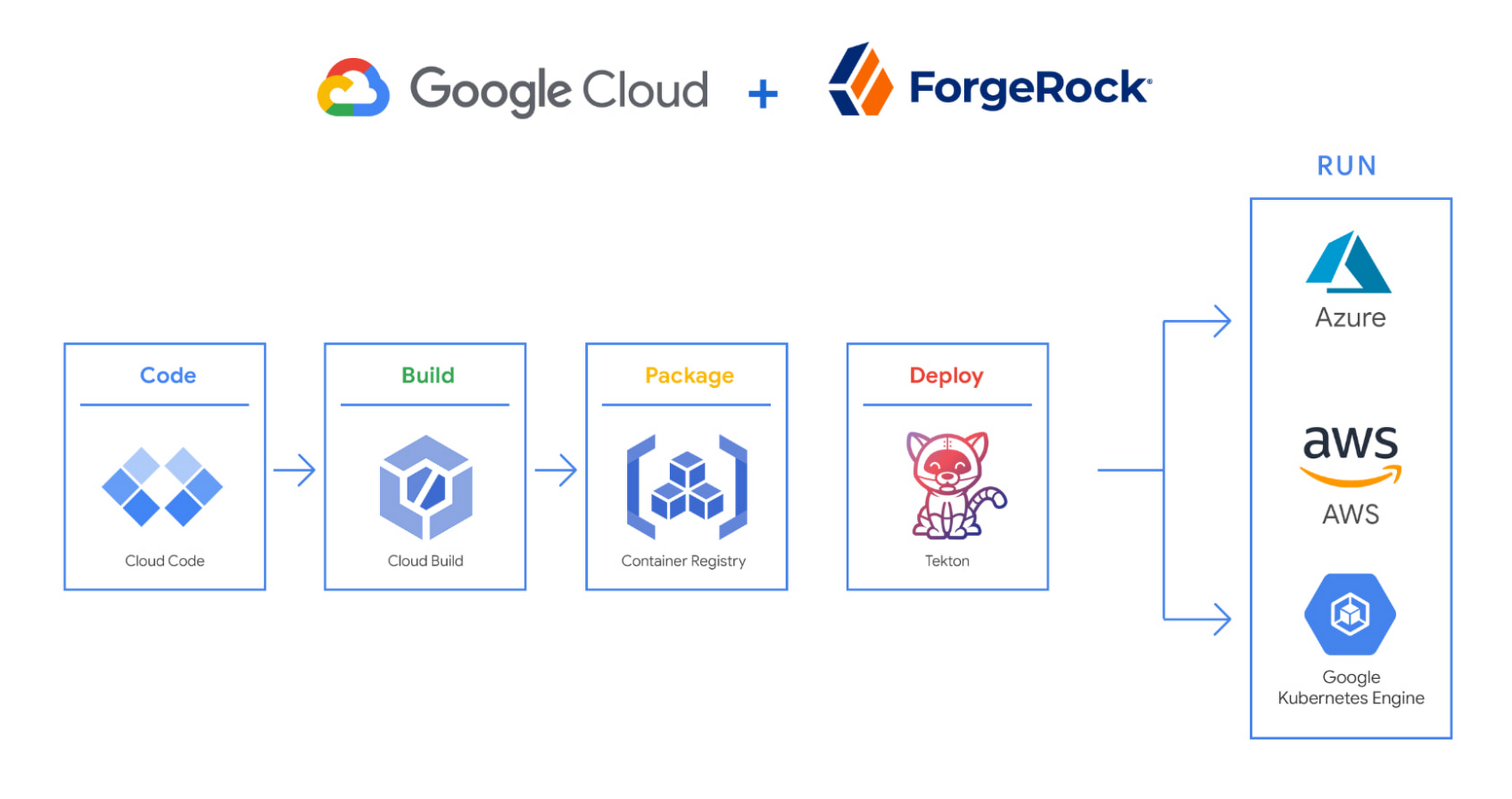
We begin by developing Kubernetes manifests and dockerfiles using Cloud Code. Then we use Skaffold to build containers locally, while Cloud Build helps with continuous integration (CI). The Cloud Build GitHub app allows us to automate builds and tests as part of our GitHub workflow. Cloud Build is differentiated from other continuous integration tools since it is fully serverless. It scales up and scales down in response to load, with no need for us to pre-provision servers or pay in advance for additional capacity. We pay for the exact resources we use.
Once the image is built by Cloud Build, it is stored, managed, and secured in Google’s Container Registry. Just like Cloud Build, Container Registry is serverless, so we only pay for what we use. Additionally, since Container Registry comes with automatic vulnerability scanning, every time we upload a new image to Container Registry, we can also scan it for vulnerabilities.
Next, a Tekton pipeline is triggered, which deploys the docker images stored in Container Registry and Kubernetes manifests to a running GKE cluster. Along with Cloud Build, Tekton is a critical part of our CI/CD process at ForgeRock. Most importantly, since Tekton comes with standardized Kubernetes-native primitives, we can create continuous delivery workflows very quickly.
After deployment, Tekton triggers a functional test suite to ensure that the applications we deploy perform as expected. The test results are posted to our team Slack channel so all developers have instant access and insights about each cluster. From there, we are able to provide our customers with their finished product request.
3. Leverage multicloud patterns and practices
The industry has seen a shift towards multicloud. Organizations have adopted multicloud strategies to minimize vendor lock-in, take advantage of best-in-class solutions, improve cost-efficiencies, and increase flexibility through choice.
At ForgeRock, we’re big proponents of multicloud. Part of that comes from the fact that our identity and access management product works across Google Cloud, AWS, and Azure. Developing products using open-source technologies such as Kubernetes has been particularly helpful in driving this interoperability.
Tekton has been another critical project that has allowed us to prevent vendor lock-in. Thanks to Tekton, our continuous delivery pipelines can deploy across any Kubernetes cluster. Most importantly, since Tekton pipelines run on Kubernetes, these pipelines can be decoupled from the runtime. Like Tekton and Kubernetes, both Cloud Build and Container Registry are based on open technologies. Community-contributed builders and official builder images allow us to connect to a variety of tools as a part of the build process. And finally, with support for open technologies like Google Cloud buildpacks within Cloud Build, we can build containers without even knowing Docker.
Making it easier for developers and operators to build, deploy and manage applications is critical for the success of any organization. Driving developer productivity within IDEs, leveraging end-to-end automation, and support for multi-cloud patterns and practices are just some of the ways we are trying to achieve this at ForgeRock. To learn more about ForgeRock, and to deploy the ForgeRock Identity Platform into your Kubernetes cluster, check out our open-source ForgeOps repository on GitHub.
2022’s First Cloud CISO Perspectives: Recap of the Megatrends, Releases and News

9361
Of your peers have already read this article.
3:00 Minutes
The most insightful time you'll spend today!
I’m excited to share our first Cloud CISO Perspectives post of 2022. It’s already shaping up to be an eventful year for our industry and we’re only in month one. There’s a lot to recap in this post, including the U.S. government’s recent efforts to address critical security issues, like open source software security and zero trust architectures. We’ve also released new resources from our Google Cybersecurity Action Team like the Cloud Security Megatrends and the Boards of Directors whitepaper on cloud risk governance.
Cloud Security Megatrends
We’re often asked if the cloud is more secure than on-prem (and why) so we shared our answer in a recent blog post. At Google Cloud, security by design is our priority. We’ve long adopted zero-trust principles for our baseline security architectures and built a global network that relies on defense in depth layers to protect against configuration errors and attacks. But security is always evolving and that is why we also take advantage of the following megatrends:
- Economy of scale: Decreasing the marginal cost of security raises the baseline level of security.
- Shared fate: A flywheel of increasing trust drives more transition to the cloud, which compels even higher security and even more skin-in-the-game from the cloud provider.
- Healthy competition: The race by deep-pocketed cloud providers to create and implement leading security technologies is the tip of the spear of innovation.
- Cloud as the digital immune system: Every security update the cloud gives the customer is informed by some threat, vulnerability, or new attack technique often identified by someone else’s experience. Enterprise IT leaders use this accelerating feedback loop to get better protection.
- Software-defined infrastructure: Cloud is software defined, so it can be dynamically configured without customers having to manage hardware placement or cope with administrative toil. From a security standpoint, that means specifying security policies as code, and continuously monitoring their effectiveness.
- Increasing deployment velocity: Because of cloud’s vast scale, providers have had to automate software deployments and updates, usually with automated continuous integration/continuous deployment (CI/CD) systems. That same automation delivers security enhancements, resulting in more frequent security updates.
- Simplicity: Cloud becomes an abstraction-generating machine for identifying, creating and deploying simpler default modes of operating securely and autonomically.
- Sovereignty meets sustainability: The cloud’s global scale and ability to operate in localized and distributed ways creates three pillars of sovereignty. This global scale can also be leveraged to improve energy efficiency.
If you’re an IT decision maker, pay attention to these megatrends that will continue to drive and reinforce cloud security and will outpace the security of on-prem infrastructure well into the future.
U.S. Federal government cybersecurity momentum
- Open source software security: Earlier this month, Google participated in the White House Summit on open source software security. The meeting came at a critical time for the industry following December’s Log4j vulnerabilities and was both a recognition of the challenge and an important first step towards addressing it. The open source software ecosystem is not homogenous, despite the fact that the industry often thinks of or treats it this way. Some of it, like Linux, is highly curated, while other critical software is supported through diffuse communities including technology companies and other stakeholders. There is also a long tail of many other critical projects driven by a dedicated community of maintainers around the world, including Googlers. In light of this reality, we welcomed the chance to share our recommendations to advance the future of open source software security. Some work we’ve done includes founding the Open Source Security Foundation, which has been instrumental already in making security improvements. We’ve also helped drive a number of key security initiatives within the open source community including security scorecards, the SLSA framework to improve the security and integrity of open source packages, and Secure Open Source Rewards to financially incentivize improvements to critical open source security projects.
- OMB’s Federal zero trust strategy: The publication of the Office of Management and Budget’s zero trust architecture strategy marks an important step for the U.S. federal government’s efforts to modernize under Executive Order 14028. Google Cloud supports this approach, which recognizes the immense security benefits offered by modern computing architectures. For the past decade, Google has successfully applied zero trust principles through our BeyondCorp and BeyondProd frameworks for providing end-user access and securing our cloud workloads. And we’ve brought these best practices from our own journey to global governments and businesses of any size through solutions like BeyondCorp Enterprise and capabilities like Binary Authorization and Anthos Service Mesh, which are embedded in Anthos, our managed application platform. For Federal agencies embarking on this zero trust journey, the Google Cybersecurity Action Team will offer our expertise by conducting Zero Trust Foundations strategy workshops, which can help organizations in the public and private sectors develop actionable and achievable strategies and plans for zero trust implementation.
Google Cybersecurity Action Team Highlights
Here are the latest updates, products, services and resources across our security teams this month:
Security
- Democratizing security operations: We recently announced that Siemplify, a leading security orchestration, automation and response (SOAR) provider, is joining Google Cloud to help companies better manage their threat response. Providing a proven SOAR capability with Chronicle’s approach to security analytics is an important step forward in our vision to advance invisible security and democratize security operations for every organization.
- Security by design: The Highmark Health security team is using “secure-by-design” techniques to address the security, privacy, and compliance aspects of its Living Health solution with Google Cloud’s Professional Services Organization (PSO). Google has long advocated for and followed security by design principles, which is why we’re continuously building enhanced security, controls, resiliency and more into our cloud products and services.
- Secure collaboration for hybrid work environments: The Google Workspace team shared its recommendations for businesses as they prepare for the future of work, where the hybrid/flexible work model is becoming standard practice and a new approach to security is essential.
- Anthos Policy Controller CIS Benchmark enforcement: A big part of our shared fate philosophy is to build secure products and not just security products. A recent example of this in action is embedding CIS benchmark policy conformance in the Anthos Policy Controller. We believe the more we embed approaches like this into our products, the more application and infrastructure teams can intrinsically embed security at the start and reduce toil for the security team.
- DevOps for technology-driven organizations and startups: A key success factor for many security programs is the partnership and integration with development teams, and there are some great resources and lessons in our DORA research.
- Security by design with Chrome OS: ABN AMRO’s Asia-Pacific region team recently shared how they are using Chrome OS and CloudReady to work securely in the cloud, reduce total cost of ownership, and add flexibility for employees. This is a great example of secure by design principles in the use of Chromium.
Risk & Compliance
- Boards of Directors summary guide to cloud risk governance: The latest whitepaper from the Google Cybersecurity Action Team outlines how boards of directors can prioritize safe, secure, and compliant adoption processes for cloud technologies within their organizations.
- TruSight Risk Assessment of Google Cloud: TruSight recently released a comprehensive
risk assessment report on Google Cloud. Our Enterprise Trust team collaborated on this robust assessment of Google Cloud services to validate the design and implementation of controls. TruSight’s risk assessment of our security controls will help customers accelerate and complete their risk management due diligence. - Data governance: Check out this new blog series on data governance where our teams explain the role of data governance, its importance, and the necessary processes to run an effective data governance program. Implementing data governance will help maximize value derived from business data, build user trust, and ensure compliance with required security measures.
Controls and Products
- Encrypting Data Fusion: To help meet the security, privacy and compliance requirements of customers in regulated industries like finance or public sector, we announced the general availability of Customer Managed Encryption Keys (CMEK) integration for Cloud Data Fusion, which enables encryption of both user data and metadata at rest with a key that customers can control through our Cloud Key Management Service (KMS).
Don’t forget to sign-up for our newsletter if you’d like to have our Cloud CISO Perspectives post delivered every month to your inbox. We’ll be back next month with more updates and security-related news.
Enhancing Developer Productivity with Skaffold v2 GA

2847
Of your peers have already read this article.
2:30 Minutes
The most insightful time you'll spend today!
For years, Google has been committed to maximizing developer productivity. In 2019, we announced the general availability of Skaffold, a command-line tool that facilitates continuous development and delivery for containerized applications. Today, we’re excited to announce that Skaffold V2 is now generally available.
Skaffold V2 expands Skaffold’s supported platforms and architectures with the introduction of Cloud Run as a supported deployer, and now supports building from and deploying to both ARM and x86 architectures. Skaffold V2 also offers enhanced support for CI/CD and GitOps workflows, with the introduction of the skaffold render phase, verify phase, and kpt integration. Best of all, all existing Skaffold configurations are fully compatible with Skaffold V2, and upgrading from V1 is as easy as running skaffold fix.
Expanded platform support
Since its inception, Skaffold has supported deploying applications to Kubernetes, using either kubectl or Helm deployers. Deploying to Kubernetes with Skaffold unlocks the benefits of improved velocity from source to prod, with reusable building blocks for iterative development and CI/CD.
We’re excited to expand these benefits to Cloud Run, Google’s serverless container runtime. Cloud Run provides a fully managed platform for any containerized application, and includes features such as automatic resource scaling and integrated storage, security, and monitoring solutions.
It’s easy to get started with Skaffold and Cloud Run; all you need is a Cloud Run service config and a few small updates to your skaffold.yaml. Skaffold also powers Cloud Deploy’s support of Cloud Run. Check out our documentation to learn more.
In addition to the new deployment target, the expanded set of compatible image-architecture configurations with Skaffold V2 helps developers ensure that the architecture of the machine on which an image is built is compatible with the architecture of the machine on which the image is intended to be run. Skaffold now intelligently checks the architecture of your local machine as well as the target Kubernetes cluster before building your images, allowing you to deploy to ARM, x86 or multi-arch clusters from a x86 or ARM machine without any manual configuration.
Check out our documentation to learn more about deploying to Cloud Run and managing ARM workloads.
CI/CD and DevOps, simplified
Skaffold helps developers implement CI/CD and DevOps workflows by providing a set of reusable building blocks for repeatable build, tag, and deploy steps. With Skaffold, the same config can be shared in development and production, leveraging Skaffold profiles to implement environment-specific configuration.
With Skaffold V2, the Skaffold render phase is now distinct from the deploy phase. The output of the Skaffold render phase is a manifest, hydrated with tagged image names and templated values, which can then be persisted in source control before deployment as part of a GitOps workflow.
In addition to the render phase, Skaffold V2’s new verify phase helps to configure post-deployment tests. This phase can be used to configure a series of test containers that are then monitored to ensure that the deployment was successful. This allows developers to integrate this verification step into reusable deployment pipelines rather than running these tests manually.
Finally, the introduction of kpt as a supported renderer in Skaffold V2 provides a sophisticated syntax for serially transforming and validating your manifests, unlocking additional customizability and verification in your GitOps workflows. Using Skaffold makes it easy to adopt kpt because you can take advantage of kpt’s transformation and validation functionality without needing to write any separate kpt configuration. It’s as easy as adding a few stanzas to your existing skaffold.yaml. Kpt can also be used alongside Skaffold’s pre-existing integrations with renderers Helm and Kustomize.
Check out our documentation to learn more about the Skaffold render phase, verify phase, and kpt integration.
Upgrading to Skaffold V2
Getting started with Skaffold V2 is easy. If you’re new to Skaffold, check out the V2 installation guide for platform-specific installation instructions.
If you’re an existing Skaffold user, upgrading to Skaffold V2 is simple and requires no manual configuration changes. All of your existing Skaffold configurations will continue to work as-is with Skaffold V2. Simply download the Skaffold V2 binary and run skaffold fix to update your config. Check out the V2 upgrade guide for more details.
Finally, check out our documentation for more detailed instructions on taking advantage of all of the new features introduced in Skaffold V2.
What’s next?
If you’re interested in harnessing the power of Skaffold for serverless workloads, check out our documentation for using Skaffold V2 with Cloud Run.
Also, be sure to check out Cloud Deploy, Google’s fully managed continuous delivery offering, which leverages Skaffold to construct reusable deployment pipelines.
We’re excited to hear from you. As always, you can reach out to us on GitHub and Slack.
More Relevant Stories for Your Company

Your Guide to Kubernetes Best Practices
Kubernetes made a splash when it brought containerized app management to the world a few years back. Now, many of us are using it in production to deploy and manage apps at scale. Along the way, we’ve gathered tips and best practices on using Kubernetes and Google Kubernetes Engine (GKE) to your

Google Announces Cloud Functions’ Native Integration with Secret Manager
Google Cloud Functions provides a simple and intuitive developer experience to execute code from Google Cloud, Firebase, Google Assistant, or any web, mobile, or backend application. Oftentimes that code needs secrets—like API keys, passwords, or certificates—to authenticate to or invoke upstream APIs and services. While Google Secret Manager is a fully-managed, secure, and

How APIs Help National Bank of Pakistan Modernize the Banking Experience
NBP, Pakistan’s largest government-owned bank, serves private and commercial customers and also acts as the government treasury bank. This means that it handles all government transactions—including disbursements and cash collection. In the past, every government transaction had to be handled physically through the NBP branch network. But in a populous

Driving Digital Success: Three ROI Criteria for Competitive Advantage
Choosing ROI criteria that drive smart decisions about digital investments is necessary to win in the app economy. But according to an Apigee Institute survey of IT and Marketing executives, there is a wide gap between what corporate leaders believe are the best ROI metrics and what are actually used in most
