





Google Cloud’s Suite of DevOps Speeds Up ForgeRock’s Development

5691
Of your peers have already read this article.
3:00 Minutes
The most insightful time you'll spend today!
Editor’s note: Today we hear from ForgeRock, a multinational identity and access management software company with more than 1,100 enterprise customers, including a major public broadcaster. In total, customers use the ForgeRock Identity Platform to authenticate and log in over 45 million users daily, helping them manage identity, governance, and access management across all platforms, including on-premises and multicloud environments.
Operating at that kind of scale isn’t easy. In this blog post, ForgeRock Engineering Director, Warren Strange discusses the three things that help make their developers efficient and productive, and the Google Cloud tools they use along the way.
At ForgeRock, we’ve been an early adopter of Kubernetes, viewing it as a strategic platform. Running on Kubernetes allows us to drive multicloud support across Google Kubernetes Engine (GKE), Amazon (EKS), and Azure (AKS). So no matter which cloud our customers are running on, we are able to seamlessly integrate our products into customers’ environments.
Making it easier for ForgeRock’s developers and operators to build, deploy and manage applications has been crucial in our ability to continually provide high quality solutions for our customers. We’re always looking for tools to improve productivity and keep our developers focused on coding instead of configuration. Google Cloud’s suite of DevOps tools have streamlined three specific practices to help keep our developers productive:
1. Make developers productive within IDEs
Developer productivity is core to the success of any organization, including ForgeRock. Since developers spend most of their time within their IDE of choice, our goal at ForgeRock has been to make it easier for our developers to write Kubernetes applications within the IDEs they know and love. Cloud Code helps us precisely with that: it makes the process of building, deploying, scaling, and managing Kubernetes infrastructure and applications a breeze.
In particular, working with the Kubernetes YAML syntax and schema takes time, and a lot of trial and error to master. Thanks to YAML authoring support within Cloud Code, we can easily avoid the complicated and time consuming task of writing YAML files at ForgeRock. With YAML authoring support, developers save time on every bug. Cloud Code’s inline snippets, completions, and schema validation, a.k.a. “linting,” further streamline working with YAML files.
The benefits of Cloud Code extend to local development as well. Iterating locally on Kubernetes applications often requires multiple manual steps, including building container images, updating Kubernetes manifests, and redeploying applications. Doing these steps over and over again can be a chore. Cloud Code supports Skaffold under the hood, which tracks changes as they come and automatically rebuilds and redeploys—reducing repetitive development tasks.
Finally, developing for Kubernetes usually involves jumping between the IDE, documentation, samples etc. Cloud Code reduces this context switching with Kubernetes code samples. With samples, we can get new developers up and running quickly. They spend less time learning about configuration and management of the application—and spend more time on writing and evolving the code.
2. Drive end-to-end automation
To further improve developer productivity, we’ve focused on end-to-end automation: from writing code within IDEs, to automatically triggering CI/CD pipelines and running the code in production. In particular, Tekton, Cloud Build, Container Registry, and GKE have been critical to Forgerock as we streamline the flow of code, feedback and remediation through the build and deployment processes. The process looks something like this:
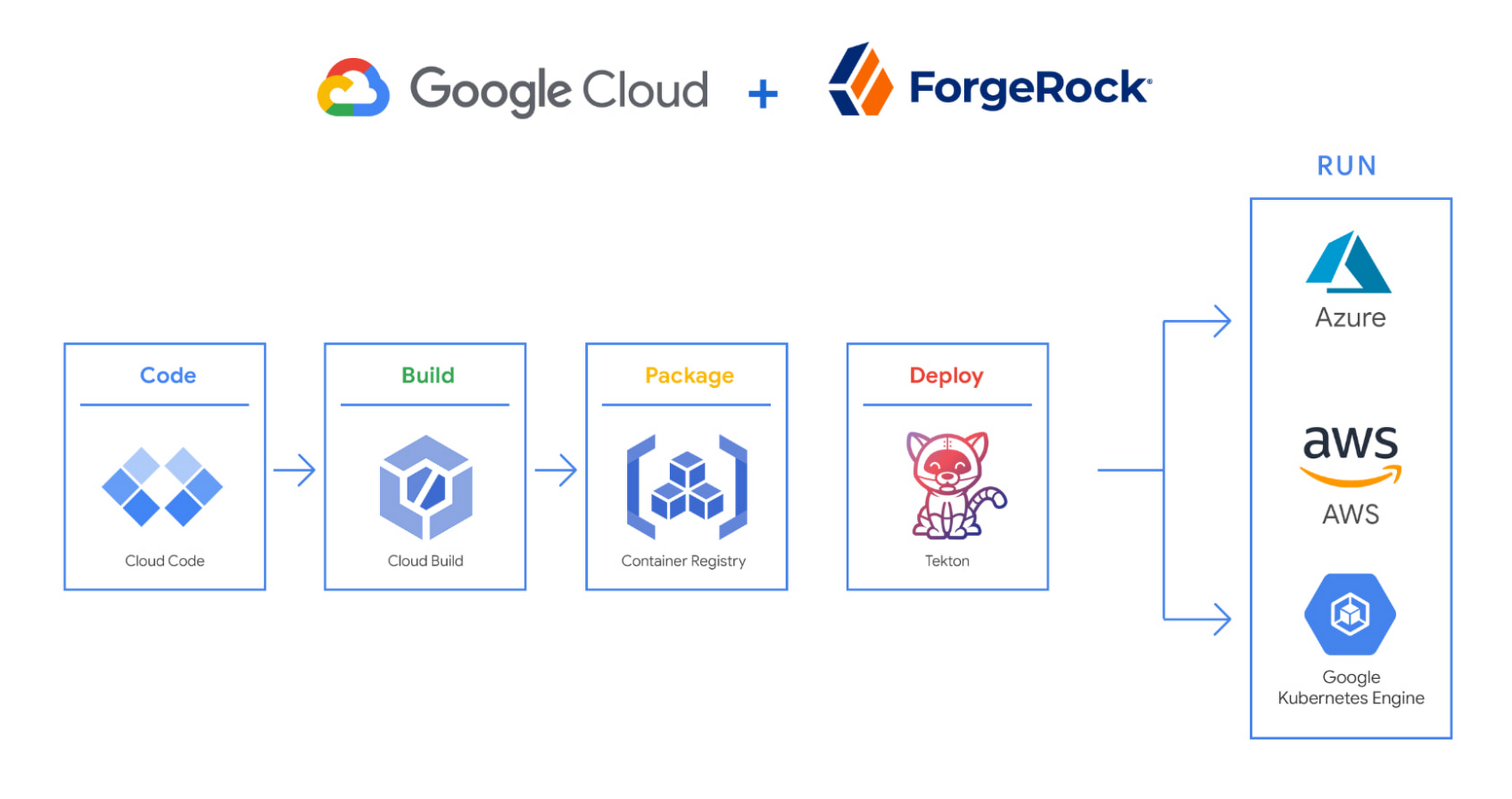
We begin by developing Kubernetes manifests and dockerfiles using Cloud Code. Then we use Skaffold to build containers locally, while Cloud Build helps with continuous integration (CI). The Cloud Build GitHub app allows us to automate builds and tests as part of our GitHub workflow. Cloud Build is differentiated from other continuous integration tools since it is fully serverless. It scales up and scales down in response to load, with no need for us to pre-provision servers or pay in advance for additional capacity. We pay for the exact resources we use.
Once the image is built by Cloud Build, it is stored, managed, and secured in Google’s Container Registry. Just like Cloud Build, Container Registry is serverless, so we only pay for what we use. Additionally, since Container Registry comes with automatic vulnerability scanning, every time we upload a new image to Container Registry, we can also scan it for vulnerabilities.
Next, a Tekton pipeline is triggered, which deploys the docker images stored in Container Registry and Kubernetes manifests to a running GKE cluster. Along with Cloud Build, Tekton is a critical part of our CI/CD process at ForgeRock. Most importantly, since Tekton comes with standardized Kubernetes-native primitives, we can create continuous delivery workflows very quickly.
After deployment, Tekton triggers a functional test suite to ensure that the applications we deploy perform as expected. The test results are posted to our team Slack channel so all developers have instant access and insights about each cluster. From there, we are able to provide our customers with their finished product request.
3. Leverage multicloud patterns and practices
The industry has seen a shift towards multicloud. Organizations have adopted multicloud strategies to minimize vendor lock-in, take advantage of best-in-class solutions, improve cost-efficiencies, and increase flexibility through choice.
At ForgeRock, we’re big proponents of multicloud. Part of that comes from the fact that our identity and access management product works across Google Cloud, AWS, and Azure. Developing products using open-source technologies such as Kubernetes has been particularly helpful in driving this interoperability.
Tekton has been another critical project that has allowed us to prevent vendor lock-in. Thanks to Tekton, our continuous delivery pipelines can deploy across any Kubernetes cluster. Most importantly, since Tekton pipelines run on Kubernetes, these pipelines can be decoupled from the runtime. Like Tekton and Kubernetes, both Cloud Build and Container Registry are based on open technologies. Community-contributed builders and official builder images allow us to connect to a variety of tools as a part of the build process. And finally, with support for open technologies like Google Cloud buildpacks within Cloud Build, we can build containers without even knowing Docker.
Making it easier for developers and operators to build, deploy and manage applications is critical for the success of any organization. Driving developer productivity within IDEs, leveraging end-to-end automation, and support for multi-cloud patterns and practices are just some of the ways we are trying to achieve this at ForgeRock. To learn more about ForgeRock, and to deploy the ForgeRock Identity Platform into your Kubernetes cluster, check out our open-source ForgeOps repository on GitHub.
5 Features IT Departments Love About Google Cloud

3659
Of your peers have already read this article.
5:30 Minutes
The most insightful time you'll spend today!
Throughout the past couple of years, I have helped a good number of companies, big and small, migrate their systems to the Google Cloud Platform (aka GCP). During the course of these migrations, there are always a few of those moments where people look at a specific Google Cloud feature and say, “now, that’s cool!”.
More often than not, it is because, coming from other platforms, they have gotten used to some features requiring multiple steps, or some operations being complicated, etc. And often they find out that in GCP you can do this specific operation in a couple of clicks, or by setting up a simple text-based configuration. Then you see that light bulb turning on in their head, and there you go… happy customer.
A few of these happen so often that I compiled them in a list to share with others who might also benefit from these “aha!” moments. You could say these are the five things I wish they told me when I started using Google Cloud.
Projects: Naturally Group Resources Together
A project is a namespace where resources live. Every resource you instantiate in GCP, from load balancers to Kubernetes clusters to virtual machines, belongs to a single project, and has no access (by default) to resources in other projects. User roles and authorisations can be defined per-project and trickle down to everything in it. This has two immediate benefits: you can group things that belong together in neat logical units, and things that don’t belong together are isolated from each other (and isolation is a Good Thing)
This is powerful and quite simple, but it often takes new users off-guard. I’ve had many clients call me and ask me “How can I make sure my developers cannot access the production machines? What’s the best way to create access policies? ”
The answer to this is actually super-simple:
- have a project for development where your developers have rights,
- have a project for production where they don’t.
- That’s it.
Every machine/other resource in the production project won’t be accessible to developers.
Of course there is a lot more to it, and you can refine roles and permissions to a much greater degree using Organizations, Folders, etc. Not to mention all the crazy things you can do with per-project billing. But at least you can say “hey, if it’s a machine in the staging environment then it can be found in the “staging” project”.
Global Virtual Networks Are *Truly* Global
Imagine you are using a Cloud provider and that you have servers in the US, and servers in Singapore, and that they need to communicate.
So you create a VPC (Virtual Private Cloud) network in the US data center, another one in the Singapore data center, and then you will connect them by setting up inter-region VPC peering or a VPN (Virtual Private Network) or a transit VPC or other routing magic.
Lots of work, right? And many moving parts, so lots of opportunities for things to break.
With GCP, however, what makes my clients go “aha!” is when they realize that in GCP a single VPC network covers the entire planet. Only subnets are attached to a geographic location, and virtual machines communicate between subnets on private IPs (good old RFC1918 addresses) — no extra routing needed.
So, to make your server communicate across continents on GCP, here are the steps:
- create a VPC network
- create a subnet in the US, put your US servers in it
- create a subnet in Singapore, put your Singapore servers in it
That’s all there is to it. Your VPC network spanning 2 continents is ready to use. Below is a screenshot of how it looks on my account, for a VPC network called ‘my-global-network’ with 2 subnets. The first column (“us-central1” and “asia-southeast1”) contains the name of the GCP regions (read: data centers). The second column is the subnet name that I picked when I created them.

A machine in the US (on the “us-central” subnet) with IP 10.0.0.5 can communicate directly with a machine in Singapore (on the “singapore”) subnet with IP 10.10.0.8.
Nothing else to set up.
And thanks to the way these networks work, the Google Cloud Load Balancer can present a single IP to the world, and forward traffic to the instances that are the closest to you geographically without having to setup a tedious DNS-based load balancing. But that’s worth an entire blog. I’ll save it for another day.
Firewalls with Tags and (Almost) No IP Addresses
There is no network security without a firewall so unsurprisingly GCP comes with one built-in.
Now, I don’t know about you, but nothing makes my brain hurt like a list of firewall rules displaying IP ranges and addresses and ‘Allow/Deny’ directives. It looks a bit like this:

If you imagine a normal network with a few dozen (hundred?) servers, you can quickly see how this can get out of control. You’d better have a solid printout of your network layout to refer to when you start adding and changing rules. And good luck debugging things!
Wouldn’t it be nice if, instead, you could just tell the firewall: “the HTTP traffic from outside can only reach the HTTP servers and the MySQL database is only reachable by the HTTP server(s) on the same network?”
Turns out it’s pretty simple on GCP by using a little thing called network tags. As the documentation says:
“Network tags are text attributes you can add to Compute Engine virtual machine (VM) instances. Tags allow you to make firewall rules and routes applicable to specific VM instances.”
So let’s see how it works. Firewall rules in GCP are defined in terms of source and target (the traffic flows from the source to the target). You can define filtering rules that apply to the source or the target, and in both cases you can use tags.
This is simpler shown with an example. The rule below states that on the default network, the traffic to the VMs with the tag mysql-server can come from the VMs with the tag http-appserver. Any other traffic is “Deny”-ed by default.

All you have to do is to tag your machines properly, and they will automatically be covered by the rule. You don’t need to enter their IP range.
That’s neat if you ask me. It makes it a lot simpler to grasp what’s happening.
Of course, there’s a TON more to firewalls in GCP. Tags also apply to routes and you can mix and match IP-based rules with tag-based rules. Not to mention that thing called service accounts, but I’ll leave those for another day.
The bottom line is that you can create most rules by just expressing a business need and not having to remember complicated network layouts. I have no hard stats, but I’m pretty sure this has saved me hours of work.
Console Access to VMs from the Browser
Easily access virtual machines (VMs) from the Google Cloud console was one of my first “aha!” moments when I started using GCP.
This is a screen capture of my Google Cloud console, with a virtual machine and its internal IP.

The last column has a header that says “Connect” and when you click on the word “SSH” a separate windows pops up. You wait for a few seconds, and… this is what you get. Your personal shell access — in a browser popup no less.

You are connected through ssh to the virtual machine of your choice. You did not have to download ssh keys and put them in the ~/.ssh directory, do the correct chmod command and run a long-winded ssh -i ~/.ssh/somekey me@<it-took-me-forever-to-copy-paste-the-address-here>
In addition, you have access to a few nifty features such as uploading and downloading files, changing the user etc. Just use the menu behind the cog icon at the top right.
In truth, you should not need to connect directly that often, but when you have to, this is a godsend.
Your Personal Jumphost from the Google Cloud Console
The Google Cloud console has a cool trick: you can actually connect to a virtual environment that is managed by the Google Cloud console itself. It serves a bit as a jump host. You can access most resources from the projects from it, and you can activate it directly from the top menu with, no particular setup on your side. It’s called the Cloud Shell.
This is how it looks at the top right of the console:

When you activate the Cloud Shell, the session opens at the bottom of the console. You get a command line prompt and it’s fully configured with the gcloud command line tool (the jack-of-all-trades of Google Cloud scripting).

You can do a great many things from there, and this even includes uploading and downloading files, editing code or deploying it, a web preview for your AppEngine application, and more.
So you can get access to a fully configured shell environment in your project from any laptop where you can connect with your credentials. On top of this, it persists between connections so you can fine-tune it to your needs and have these changes available the next time you re-connect.
This has saved me many times during my previous life as a traveling consultant!
Live migration
Did I say 5 “Aha!” moments ? Well, you’ve been patient reading all the way to here, so here’s one more for free.
Google Cloud has an amazing way to literally “teleport” a running virtual machine between physical hosts without stopping it. It’s called Live Migration. It allows Google to move your virtual machine away from a defective host, or a host that needs a patch or an upgrade, or for any other infrastructure related reason.
It’s all done in the background, and is totally transparent, so you never really see it happening. Unless you look VERY closely. I once did a demo to a client, where a machine was live migrated while he was simulating a solid network load — and we did not lose a single packet, with no noticeable degradation in latency.
And that’s a wrap!
So there you go. These are 5+1 things that made me go “Aha!” when I became more familiar with the Google Cloud Platform, and that still make my clients do the same.
There is a lot of depth to the platform, and my examples above only scratch the surface of our features. I encourage you to try it yourself. There is a generous free tier, and when you are ready to take the plunge and create that new company, please contact us at Google Cloud for Startups. We’ll get you up and running in no time.
Jerome is a Startup Architect at Google Cloud. Based in Singapore, he helps startups make the most of the Google Cloud Platform.
Telehealth Improves Patient and Clinical Experiences across Continuum of Care

4907
Of your peers have already read this article.
1:30 Minutes
The most insightful time you'll spend today!
According to a National Academy of Medicine discussion paper, social determinants of health (SDoH) account for upwards of 80% of a population’s health outcomes. Breaking this down further, 50% come just from socioeconomic and physical environment factors such as education, employment, income, family and social support, community safety, air and water quality, and access to housing and transit. SDoH determine access to and quality of healthcare, and are contributors to a system of disparate access to care.

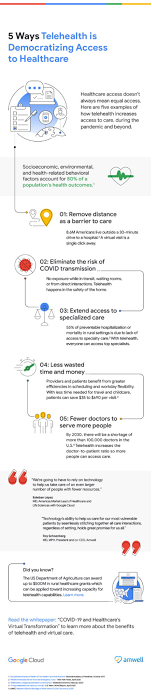
We believe that to more efficiently provide comprehensive healthcare access to more people, providers will leverage technology to blend in-person and virtual modes of care delivery.
In this article, Amwell and Google Cloud examine five ways telehealth – as part of a provider’s overall care model – can help democratize access to healthcare. (graphic url)
Remove distance as a barrier to care
8.6 million Americans live more than 30 minutes from their nearest hospital. Long drives can deter patients from seeking care or maintaining routine visits. On the flip side, 92% of Americans nationwide have access to wired broadband in the home or through mobile broadband. Therefore, having a virtual visit just a click away can help remove barriers to care, like distance.
Eliminate the risk of unnecessary exposure
Virtual care means that patients don’t have to worry about potential exposure in transit, while sitting in waiting rooms, or from direct interactions during in-person health visits. This is particularly relevant when it comes to those with chronic diseases or underlying conditions. Telehealth provides patients who may be more susceptible to diseases with access to continuous healthcare without putting them at higher risk for developing more severe symptoms. Virtual visits can occur in the comfort –and safety– of patients’ homes.
Extend access to specialized care
55% of preventable hospitalization or mortality in rural settings is due to lack of access to specialty care. With telehealth, physical proximity to specialized services–typically in urban areas–can be reduced as a limiting factor. Virtual solutions grant everyone access to top specialists, regardless of location.
Save time and money
By augmenting in-person visits with telehealth applications, providers can benefit from greater efficiencies in scheduling, helping to improve their bottom line, and add more flexibility to their workday. Meanwhile, patients can spend less on travel and childcare, limit time taken off work, and save on other costs associated with in-person visits — for a savings of $35 to $690 per visit. In a survey by the COVID-19 Healthcare Coalition, 76% of the 2,000+ patients surveyed across the US responded that transportation was removed as a barrier, 65% reported they no longer had to take time off from work for an appointment, and 67 percent reporting lower costs than an in-person visit.
Combat physician shortage and fatigue
Research shows there will be a shortage of more than 100,000 doctors by 2030. In the midst of a physician shortage, telehealth can help improve care delivery and make it more efficient, ensuring more people can still have their healthcare needs addressed. Additionally, by integrating intelligence such as case triaging along with telehealth into a virtual care model, providers can help reduce clinician burnout.
Amwell and Google Cloud are partnering to deliver transformative telehealth solutions that will make it easier for more patients to receive care and improve patient and clinician experiences across the continuum of care. One example includes embedding real-time captioning and translation services powered by Google Cloud’s AI and NLP technologies within the Amwell platform to increase health access and understanding for more people.
As physicians, we are excited that the future of healthcare will continue to blend cloud technologies like EHR-integrated telehealth platforms, AI, healthcare-trained virtual agents along with in-person care to create an integrated hybrid care model that will improve patient outcomes and unburden providers, all while expanding access to broader patient populations.
To learn more, download the whitepaper “Healthcare’s Virtual Transformation,” written in conjunction with Becker’s Hospital Review.
1: “Social Determinants of Health 101 for Health Care: Five Plus Five,” National Academy of Medicine, October 2017
Google Invests 1 Billion Euros on Germany to Support Growing Businesses

3546
Of your peers have already read this article.
2:00 Minutes
The most insightful time you'll spend today!
In September 2001, the first-ever German Google employee switched on their computer in Hamburg. Since then, we’ve grown to more than 2,500 employees in four offices across Germany. Berlin, Frankfurt, Hamburg and Munich have long been our home, and we continue to invest in the growth of the local economy.
Today, 20 years after the start of “Google Germany”, we are pleased to present one of our most important investment programs to date in this country. With the expansion of our Cloud Region in Frankfurt in a new Google-owned Hanau facility, a new Google Cloud region in Berlin-Brandenburg, and a broad investment plan in renewable energy, our commitment is clear: Google is investing in Germany’s potential and supporting the transition to a digital and sustainable economy. Between now (2021) and 2030, this investment in digital infrastructure and clean energy will total approximately 1 billion euros.
Expanding our Frankfurt cloud region to support growing demand from German businesses and organizations
In Hanau, only 20 kilometers from the DE-CIX Internet hub in Frankfurt, Google is proud to be nearing completion of an additional cloud facility that will be fully operational in 2022. This expansion of our existing Frankfurt Google Cloud region will serve the growing demand for Google Cloud services in Germany.
The 4-story building is 10,000 square meters and was sustainably constructed with energy efficient infrastructure and adherence to our circular economy model for waste. The symbolic handover of the keys from developer NDC-Garbe, together with local government officials, took place on site yesterday.
A new cloud region in Berlin-Brandenburg
In addition to the Hanau expansion of our Google Cloud region in Frankfurt, we are pleased to announce that a new Google Cloud region will be located in Berlin-Brandenburg, further extending our ability to meet growing demand for cloud services in the country. When open, this will be our second Google Cloud region in Germany, providing enterprise customers with faster access to secure infrastructure, smart analytics tools and an open platform. Designed and dedicated to providing enterprise services and products for Google Cloud customers of all sizes and industries in Germany, the Berlin-Brandenburg region will have three zones to protect against service disruptions and join the existing network of 27 Google Cloud regions connected via our high-performance network.
One of the cleanest clouds in the industry becomes even cleaner
Since 2017, Google has matched 100% of our global, annual electricity use with renewable energy. Last year, we set out to run our business on carbon-free energy everywhere and at all times by 2030, enabling us to offer cloud customers one of the cleanest clouds in the industry, while helping Europe achieve its ambitious climate goals.
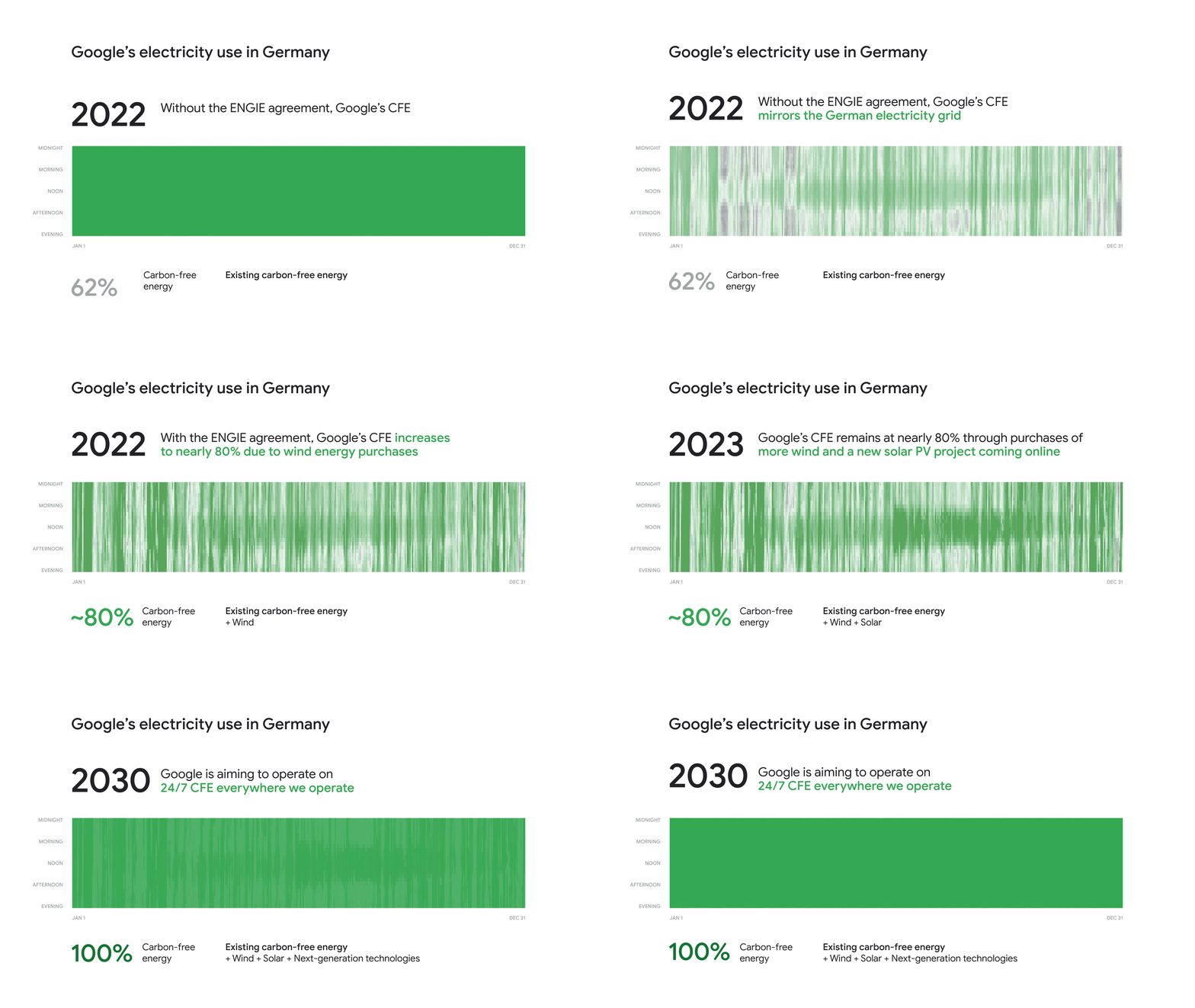
Today, we’re excited to announce that ENGIE Deutschland has been selected as Google’s carbon-free energy supplier in Germany. Under the terms of the agreement, ENGIE will assemble and develop, on Google’s behalf, a 140 megawatt (MW) carbon-free energy portfolio in Germany that has the ability to flex and grow with us as our needs change. This includes a new 39MW solar Photovoltaic system, and 22 wind parks in five federal states that will see their lives extended so they continue to produce electricity instead of being dismantled. This portfolio will ensure that the energy delivered to Google’s German facilities will be nearly 80% carbon-free by 2022 when measured on an hourly basis. This is a first but important step on Google’s journey to reach our goal of full electricity decarbonization by 2030.
This is the first energy supply of its kind in Europe, with a focus on sourcing carbon-free energy for every hour of Google’s operations. Not only will this new agreement draw the roadmap for the industry and more 24/7 carbon-free energy contracts in Europe, but it provides our cloud customers with two more regions where they can lower their carbon footprint. And importantly, by working with our energy suppliers to transform how clean energy is delivered to customers, Google is supporting the broader decarbonization of the German electricity grid.
What customers and partners are saying
As companies continue to grapple with changing customer demands, technology has played a critical role, and we’ve been fortunate to partner with and serve people, companies, and government institutions in Germany and around the world to help them adapt. The Google Cloud region in Berlin-Brandenburg and the expansion of our Google Cloud region in Hanau will help our customers — such as BMG, Delivery Hero, and Deutsche Bank — adapt to new requirements, new opportunities and new ways of working.
“We are very pleased about the symbolic handover of the keys to the building here in Hanau to Google Cloud,” said Hanau Mayor Claus Kaminsky. “With Google, we have a strong partner at our side who is supporting us in setting up Hanau’s economic future, both digitally and sustainably. The data center facility of Google Cloud embodies this transformation: We bring the cloud to us in Hanau and thus support the digital transformation of companies and public authorities. Not only in our city and Hesse, but throughout Germany and Europe. The new building meets high sustainability standards and the clean energy initiative presented today by Google is in line with our aspirations for sustainable digitalization.”
“Sustainability is a central pillar of Deutsche Bank’s strategy and we have made strong public commitments to be part of the solution,” said Bernd Leukert, Chief Technology, Data and Innovation Officer and Member of the Management Board at Deutsche Bank. “We welcome the new Google Cloud region in Germany, which will enable us to deliver additional resilience and performance for our German client base.”
Ralf Bernhard, Senior Originator Renewables, ENGIE, said: “ENGIE is excited to collaborate with Google based on a first-of-a-kind agreement which will support the company with its sustainability goals and ambitious carbon-free energy target. Thanks to our expertise in energy and risk management, we can seamlessly integrate renewable energy from existing plants and develop new assets to design a tailor made product that meets Google’s needs and plans to go even greener.”
20 years since Google first touched down in Germany, our commitment to helping Germany continue to lead in technical innovation is stronger than ever. We are excited to continue working with our partners in Hesse, Berlin and Brandenburg and across Germany to advance infrastructure and clean energy projects, help accelerate digital transformation, and secure a sustainable future for German and European companies and organizations.

The Cloud-First Imperative To Accelerate Digital Transformation In Retail
DOWNLOAD WHITEPAPER3456
Of your peers have already downloaded this article
1:30 Minutes
The most insightful time you'll spend today!
In a study by Forrester Consulting of 60 business and technology decision makers and influencers from Indian retail organizations, it is found that 2 in 3 organizations are planning to increase their cloud spending by 5% or more in the next 12 months.
According to the study, public cloud platforms help retailers to:
- Scale business faster and more easily
- Free up IT time to focus on core differentiators instead of commodity workloads
- Improve customer experience
- Establish greater connectivity for digital transformation
Download this infographic to understand why Indian retailers are adopting a cloud-first approach to accelerate digital transformation.
The Future of Cloud Computing: Choose Your Own Services and Payment Options

2103
Of your peers have already read this article.
1:30 Minutes
The most insightful time you'll spend today!
As the saying goes, “it’s hard to make predictions, especially about the future.” Some organizations find it challenging to predict what cloud resources they’ll need in months or years ahead. Every organization is on its own unique cloud journey. To help, we’re developing new ways for customers to consume and pay for Google Cloud services. We’re doing this by removing barriers to entry, aligning cost to consumption and providing contractual and product flexibility. Read on to learn how we’re rolling out several new go-to-market programs across these key areas to help our customers purchase and consume Google Cloud services more easily.
Removing barriers to entry with Google Cloud Flex Agreements
Many customers choose multi-year commitments because they provide better line-of-sight into IT spend and budgeting. However, these commitments can create difficulty for those who don’t have clear visibility into their future cloud consumption needs. That’s why today we’re launching Flex Agreements, which enable customers to migrate their workloads to the cloud with no up-front commitments. As part of this new licensing option, Google Cloud customers still get access to unique incentives, such as monthly spend discounts1, committed use discounts, cloud credits, and access to professional services, based on monthly spend and workloads migrated to Google Cloud.
Flex Agreements are just one example of how we are removing barriers to help customers start using Google Cloud. In 2022, we launched the Innovators Plus annual subscription, which gives developers a curated toolkit to accelerate their expertise, including access to live and on-demand training through Google Cloud Skills Boost, Google Cloud credits, and more.
We also recently expanded trials for Google Cloud products. For example, the new Spanner free trial instance is good for 90 days, allowing developers to create Google Standard SQL or PostgreSQL databases, explore Spanner capabilities, and prototype applications—with no commitment or contract needed.
Contractual and feature flexibility
Contractual flexibility has always been one of our core principles. Committed Use Discounts (CUDs), for example, provide discounted prices in exchange for a commitment to use a minimum level of resources for a specified term. Last year, we introduced Flexible CUD, spend-based commitments that offer predictable and simple flat-rate discounts that apply across multiple virtual machine families and regions.
In addition to contractual flexibility, our customers also need the flexibility to choose features and functionality based on their stages of cloud adoption and the complexity of their business requirements. Therefore, over the next few quarters, we will launch new product pricing editions—Standard, Enterprise, and Enterprise Plus—in parts of our cloud portfolio. This new commercial packaging model will help give customers more choice and flexibility to optimize their cloud spend.
For customers running workloads such as those in regulated industries like banking and public sector, the higher-end Enterprise Plus tier will offer compute, storage, networking and analytics services with high availability, multi-region support, regional failover and disaster recovery, advanced security, and a broad range of regulatory compliance support. The Enterprise pricing tier will include a broad range of features designed for customers with workloads that demand a high level of scalability, flexibility, and reliability. The Standard pricing tier will offer cost-efficient and easy-to-use managed services that include all essential capabilities such as autoscaling to meet the core workload requirements of customers.
Align costs to consumption with autoscaling
At Google Cloud, a core requirement for the products we build is providing customers industry-leading capabilities to automatically scale (autoscale) services up and down to match capacity with real-time demand. Autoscaling improves uptime, reduces infrastructure costs, and removes the operational burden of managing resources.
Many Google Cloud products include autoscaling capabilities to help customers manage unplanned variations in demand. For example, Dataflow vertical and horizontal autoscaling, in combination with granular adaptive resource configuration (aka “right-fitting”), has resulted in up to 50% saving in infrastructure costs for streaming by automatically choosing the right number of instances required to run the jobs and dynamically re-allocating more or fewer instances during the runtime of jobs. Bigtable also provides native autoscaling capabilities, and Spanner’s autoscale is an open source tool that works across regional and multi-regional Spanner deployments.
Similarly, we added multiple features such as Cluster Autoscaler, Horizontal Pod Autoscaling, Vertical Pod Autoscaling, and Node Auto-Provisioning to GKE for elasticity and cost efficiency.
For L.L.Bean, the ability to quickly scale capacity to meet changing usage patterns (e.g., during the holidays), as well as to rapidly perform load tests to test capacity, are “night and day” with Google Cloud compared to L.L.Bean’s legacy on-premises IT system.
“We won’t have to pay for peak capacity to have it available during peak shopping times. We just scale capacity up or down as needed.” — Randy Dyer, Enterprise Architect, L.L.Bean
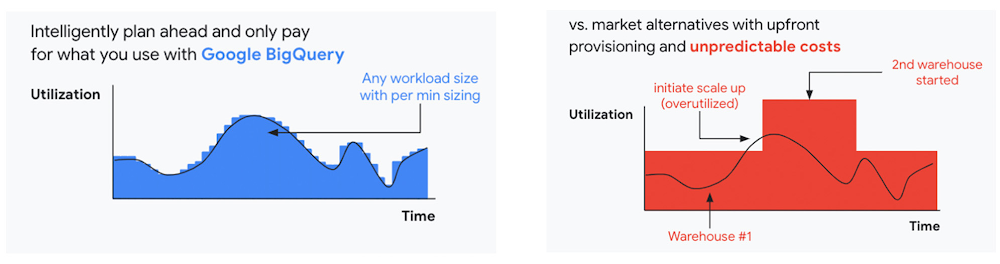
We are now taking these capabilities to the next level by enabling autoscaling in BigQuery at a more granular level so you never pay more than what you use. This allows you to provision additional capacity in smaller increments, so you never overprovision and overpay for underutilized capacity. BigQuery customers can now try the new BigQuery autoscaler (currently in public preview) in their Google Cloud console.
A commitment to flexibility and choice
At Google Cloud, we remain deeply committed to the success of our customers and partners, and we are uniquely positioned to help organizations transform their business. By providing you with more flexibility and choice in how to purchase our products, we are empowering you to be more efficient and resilient.
Join Google Data Cloud & AI Summit to hear the latest announcements around innovations in Google Data Cloud for databases, data analytics, business intelligence, and AI. Gain expert insights, new solutions, and strategies that can help you transform customer experiences with modern apps, boost revenue, and reduce costs.
1. Not available for customers buying through Partner Advantage.
More Relevant Stories for Your Company

Hybrid Cloud: The Trade-offs IT Leaders Hate–and a Way Around Them
What do CIOs and CTOs deliver for the company? If you said “technology,” that’s just the beginning. According to their research, McKinsey found that 85% of CIOs and CTOs interviewed in the spring of 2019 said they were essential for at least two of the three most common CEO priorities—revenue acceleration,

How a Mid-Sized Firm is Shrinking Inventory Carryovers 50% with AI
For more than 10 years, NMK Textile Mills has manufactured bed linens for major retailers in the United States and Canada. As e-commerce exploded, the company’s co-founder saw an opportunity to grow the business. So, in addition to manufacturing bed linens wholesale for retail customers, NMK Textile Mills reworked its complete supply


Confused about Cloud? Here is a Primer to get all Your Doubts Answered
When you have decided on moving workloads to the cloud, the task of choosing the right cloud platform can be a tough one with many questions looming in your mind. From which specific product to choose from the plethora of options available to how and where to store your data

Strategic Consulting, Training & Implementation Guidelines with Public Sector PSO Helps Governments Stay Compliant
Did you know that by 2025, enterprise IT spending on public cloud computing will overtake traditional IT spending? In fact, 51% of IT spend in application software, infrastructure software, business process services, and system infrastructure will transition to the public cloud, compared to 41% in 20221.. As enterprises continue to
