





Google Cloud’s High-performance Compute Speeds Up the Chip Design Process

3506
Of your peers have already read this article.
2:00 Minutes
The most insightful time you'll spend today!
Cloud offers a proven way to accelerate end-to-end chip design flows. In a previous blog, we demonstrated the inherent elasticity of the cloud, showcasing how front-end simulation workloads can scale with access to more compute resources. Another benefit of the cloud is access to a powerful, modern and global infrastructure. On-prem environments do a fantastic job of meeting sustained demand but Electronic Design Automation (EDA) tooling upgrades happen much more frequently (every six to nine months) than typical on-prem data center infrastructure upgrades (every three to five years).
What this means is that your EDA tool can provide much better performance if given access to the right infrastructure. This is especially useful in certain phases of the design process.
Take for example, a physical verification workload. Physical verification is typically the last step in the chip design process. In simplified terms, the process consists of verifying design rule checks (or DRCs) against the process design kit (PDK) provided by the foundry. It ensures that the layout produced from the physical synthesis process is ready for handoff to a foundry (in-house or otherwise) for manufacturing. Physical verification workloads tend to require machines with large memories (1TB+) for advanced nodes. Having access to such compute resources enables more physical verification to run in parallel, increasing your confidence in the design that is being taped out (i.e., sent to manufacturing).
At the other end of the spectrum are functional verification workloads. Unlike the physical verification process described above, functional verification is normally performed in the early stages of design and typically requires machines with much less memory. Furthermore, functional verification (dynamic verification in particular) accounts for the most time (translating directly to the availability of compute) in the design cycle. Verifying faster, an ambition for most design teams, is often tied to availability of right-sized compute resources.
The intermittent and varied infrastructure requirements for verification (both functional and physical) can be a problem for organizations with on-prem data centers. On-prem data centers are optimized for maximizing utilization—this does not directly address access to right-sized compute to deliver the best tool performance. Even if the IT and Computer Aided Design (CAD) departments choose to provision additional suitable hardware, the process of provisioning, acquiring and setting up new hardware on-prem typically takes months for even the most modern organizations. A “hybrid” flow that enables use of on-prem clusters most of the time, but provides seamless access to cloud resources as needed would be ideal.
Hybrid chip design in action
You can improve a typical verification workflow simply by utilizing a hybrid environment that provides instantaneous access to better compute. To illustrate, we chose a front-end simulation workflow, and designed an environment that replicates on-prem and cloud clusters. We also took a few more liberties to simplify the environment (described below). The simplified setup is provided in a GitHub repository for you to try out.
In any hybrid chip design flow, there are a few key considerations:
- Connectivity between on-prem infrastructure and the cloud: Establishing connectivity to the cloud is one of the most foundational aspects of the flow. Over the years, this has also become a very well-understood field, and secure, high availability connectivity is a reality in most setups.
In our tutorial, we represent both on-prem and cloud clusters as two different networks in the cloud where all traffic is allowed to pass between these networks. While this is not a real-world network configuration, it is sufficient to demonstrate the basic connectivity model. - Connection to license server: Most chip design flows utilize tools from EDA vendors. Such tools are typically licensed, and you need a license server with valid licenses to operate the tool. License servers may remain on-prem in the hybrid flow, so long as latency to the license server is acceptable. You can also install license servers in the cloud on a Compute Engine VM (particularly sole-tenant nodes) for lower latency. Check with your EDA vendors to understand if you can rehost your license services in the cloud.
In our tutorial, we use an open source tool (Icarus Verilog Simulator) and therefore, do not need a license server. - Identifying data sources and syncing data: There are three important aspects in running EDA jobs: the EDA tools themselves, the infrastructure where the tools run, and the data sources for the tool run. Tools don’t change much, and can be installed on cloud infrastructure. Data sources, on the other hand, are primarily created on-prem and updated regularly. These could be SystemVerilog files that describe the design, the testbenches or the layout files. It is important to sync data between on-prem and cloud to maintain parity. Furthermore, in production environments, it’s also important to maintain a high-performance syncing mechanism.
In our tutorial, we create a file system hierarchy in the cloud that is similar to one you’d find on-prem. We transfer the latest input files before invoking the tool. - Workload scheduler configuration and job submission transparency: Most environments that leverage batch jobs use job schedulers to access a compute farm. An ideal environment finds the balance between cost and performance, and builds parameters in the system to enable predictive (and prescriptive) wrappers to job schedulers (see picture below).
In our tutorial, we use the open-source SLURM job scheduler and an auto-scaling cluster. For simplicity, the tutorial does not include a job submission agent.

Other cloud-native batch processing environments such as Kubernetes can also provide further options for workload management.
Our on-prem network is called ‘onprem’ and the cloud cluster is called ‘burst’. Characteristics of the on-prem and burst clusters are specified below:


Once set up, we ran the OpenPiton regression for single and two-tile configurations. You can see the results below:

Regressions run on “burst” clusters were on average 30% faster than on “onprem”, delivering faster verification sign-off and physical verification turnaround times. You can find details about the commands we used in the repository.
Hybrid solutions for faster time to market
Of course, on-prem data centers will continue to play a pivotal role in chip design. However, things have changed. Cloud-based, high performance compute has proved itself to be a viable and proven technology for extending on-prem data centers during the chip design process. Companies that successfully leverage hybrid chip design flows will be able to better address the fluctuating needs of their engineering teams. To learn more about silicon design on Google Cloud, read our whitepaper “Using Google Cloud to accelerate your chip design process”.
Wipro selects Google Cloud to advance its digital transformation strategy

3719
Of your peers have already read this article.
2:30 Minutes
The most insightful time you'll spend today!
Wipro has partnered with Google for migration of its enterprise-wide SAP footprint to the Cloud platform. The engagement will bring SAP applications and workloads to the cloud to support the country’s fourth-largest software services firm’s 180,000-plus employees.
Bhanumurthy B.M, President and Chief Operating Officer, Wipro said that as a provider of digital transformation services to some of the world’s most impactful businesses, it is critical that the company’s own core systems and technologies are running on intelligent and modern platforms that encompass the needs of the future.
“The technology that we’re getting into right now, and the kind of design led approach that we are taking, I think customers will benefit significantly from this,” he told ET.
Read the Full Story on Economic Times
IBM Spectrum LSF and Google Collab: Leverage Google Cloud’s Scalability and Compute Engine Infrastructure

3581
Of your peers have already read this article.
3:00 Minutes
The most insightful time you'll spend today!
High Performance Computing (HPC) is prevalent today across many industries, including financial services, life sciences, higher education research, manufacturing, and energy. More and more businesses are deploying HPC workloads in the cloud to take advantage of its elasticity, scalability, and availability. Job schedulers are critical for HPC applications given the nature of these workloads that create, process, and tear down thousands, and sometimes millions, of vCPU and network resources with TB to PB of storage capacity. Job scheduling tools lead to improved operational efficiency and a degree of certainty that a particular HPC job, which can run for hours to weeks, will complete successfully.
IBM Spectrum LSF is used extensively in the manufacturing and semiconductor industry to manage Electronic Design Automation (EDA) workloads. Dynamically running workloads on-premises and in the cloud, also known as cloud bursting, is becoming a more common practice to address capacity and provisioning time constraints within data centers and enable enterprises to take advantage of virtually unlimited resources.
However, the challenge with cloud bursting is integrating and maintaining operational consistency across on-premises and cloud environments. IBM Spectrum LSF, in combination with Google Cloud, addresses this problem head on.
Google Cloud is excited to announce, in collaboration with IBM, enhanced capabilities to IBM Spectrum LSF that enables organizations to integrate their on-premises job scheduling scripts with resources deployed in Google Cloud. Customers are now able to fully leverage Google Cloud’s highly scalable and secure Compute Engine, networking and storage infrastructure.
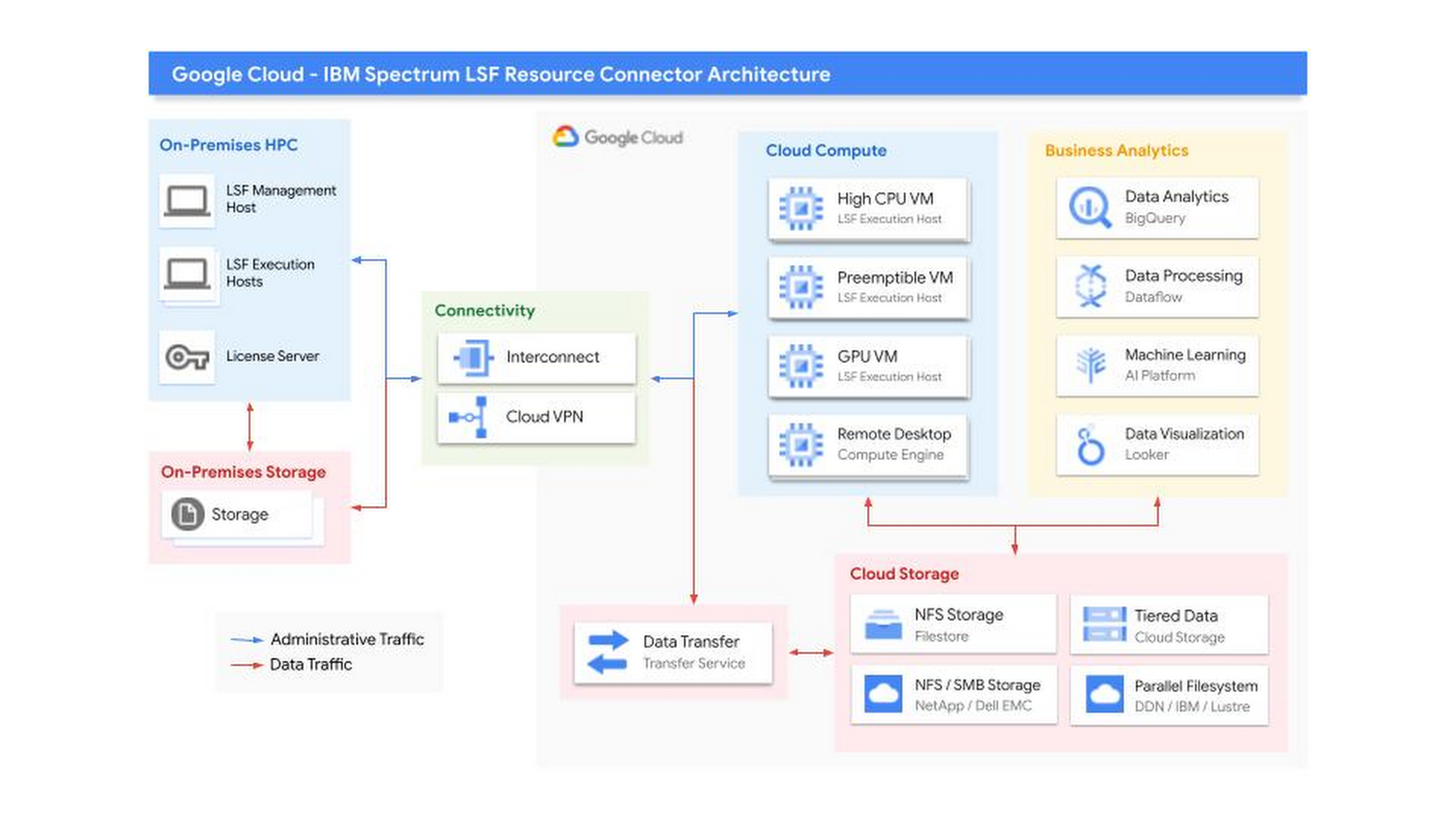
The LSF-Google Cloud resource connector patch supports key Google Cloud differentiators including Local SSDs, GCE instance templates, Preemptible VMs, and more:
- Bulk API support– Deploy large fleets of VM instances in a matter of seconds.
- Instance Templates – Simplify VM configuration by creating reusable templates.
- All Machine Types – Supports all GCE VM families and machine types, including Custom Machine Types.
- GPUs – Attach up to 16 GPUs per instance, including the largest A2 instances with up to 16 NVIDIA A100 GPUs
- Preemptible VMs – Preemptible VMs are provisioned from excess Compute Engine capacity and is a significant way to save money on GCE resources.
- Local SSD – Attach up to 9TB of NVMe SSD per instance
- Hyperthreading – Supports the “threads-per-core” option in GCE, which allows per-VM hypervisor level Hyperthread configuration (when supported by Instance Templates)
- Images – Supports custom disk images, including full support for Windows, for all attached Persistent Disks
- Placement Policies – Control where the instances are physically located relative to each other within a zone for improved low-latency performance
- Labels – Supports GCE Labels, which can be used for management of firewall rules, tracking billing, etc
- Minimum CPU Platform – Supports the ability to specify a minimum CPU Platform for your Virtual Machines.
Getting Started
This improvement to the IBM LSF Resource Connector was developed by IBM in coordination with Google. Find out more about the new supported features and their operation in the official IBM Spectrum LSF Resource Connector Documentation. You can also find additional documentation and download the software in the IBM Spectrum Computing Community. If you have further questions, you can contact IBM, or Google Cloud Sales.
Special thanks to Annie Ma-Weaver, Mark Mims, and Wyatt Gorman for their contributions.
Google Announced Leader in 2021 Gartner Magic Quadrant for Cloud Infrastructure and Platform Services

3553
Of your peers have already read this article.
3:00 Minutes
The most insightful time you'll spend today!
For the fourth consecutive year, Gartner has positioned Google as a Leader in the 2021 Gartner Magic Quadrant for Cloud Infrastructure and Platform Services (formerly titled as Magic Quadrant for Cloud Infrastructure as a Service upto 2014 Infrastructure as a Service, or (IaaS).
With our customers and communities adjusting to new ways of working and doing business, Google Cloud has remained focused on building services and platforms that help you be more resilient and derive even more value from your cloud infrastructure. We believe Gartner’s analysis and recognition gives our customers the confidence needed to choose Google as the platform for customer-centric innovation. Here are just a few recent examples.
Ready for the most demanding, mission-critical workloads
Our enterprise-ready cloud provides you the uptime, performance, and scale to run even your most demanding workloads. Examples of recent launches:
- The largest single-node GPU-enabled VM in the industry with up to 16 NVIDIA A100 instances so that our customers can run their ML workloads
- The only cloud to support scale-out out 96TB SAP HANA so that customers can confidently bring their most critical workloads to GCP
- Strategic partnerships with leading partners like SAP
- Several regions and an expanded global network footprint including new subsea cables, Firmina, Dunant, Blue and Raman
- High bandwidth 50/75/100Gbps networking for VMs
- Persistent Disk Extreme (block storage) with 120K IOPS
- Filestore High Scale scale-out NFS for HPC
Saves you money
Save money with a transparent and innovative approach to pricing and intelligent recommendations. In the past year, we’ve launched several innovations to help you save costs:
- Tau VMs, which offer the best price-performance among leading clouds for scale-out workloads
- Machine-learning-driven predictive auto-scaling for VMs and GKE Autopilot, enabling infrastructure to scale up and down as needed with minimal waste
- Standard network tier which routes traffic over the internet for cost optimization
Open
We have a long history of leadership in open technologies—from projects like Kubernetes, the industry standard in container orchestration and interoperability, to TensorFlow, a platform to help anyone develop and train machine learning models. Here are a few recent improvements we’ve made to ensure your cloud is an open cloud:
- Extended Anthos to bare metal and Microsoft Azure to support customers who want a multi-cloud and hybrid cloud posture.
- Announced a new network dataplane for Google Kubernetes Engine (GKE) and Anthos that supports eBPF, an open-source Linux kernel technology optimized for Kubernetes.
- Google Kubernetes Engine (based on the Kubernetes standard) received the top overall score based on 2021 Gartner Solution Scorecard for Google Kubernetes Engine.
Secure
Google Cloud’s trusted infrastructure uses layers of security to protect your data with advanced technologies and operations, keeping your organization secure and compliant. For example, we offer:
- Confidential VMs and Confidential GKE with in-memory encryption and encryption keys controlled by you, with a single checkbox
- Enhanced security for Cloud Run
- Strong support against DDoS attacks. In 2017, our infrastructure absorbed the largest-known DDoS attack at 2.5Tbps with no impact to customers.
Sustainable
Google Cloud helps customers transform their business sustainably. We operate the cleanest cloud in the industry to make sure your digital footprint doesn’t leave a carbon one. Here are a few proof points:
- Google has been carbon neutral since 2007, and for the past four years has matched 100% of the electricity we consume globally with wind and solar purchases. Everything you run on Google Cloud is net carbon neutral.
- We continue to innovate towards greater energy efficiency in our data centers, and compared with five years ago, now deliver around seven times as much computing power with the same amount of electrical power.
- Recently we announced new features to help customers reduce the carbon footprint of their applications and infrastructure, including a region picker to help with architecture decisions, and low carbon indicators in the Google Cloud Console.
Supporting our customers
Most importantly, our field organizations and partner organizations work with a singular focus to ensure customer success. This has made Google Cloud the fastest growing hyperscaler, with a rapidly expanding customer base across all geos and industries.
Since launching Customer Care last year, we consolidated and simplified the post-sales engagement with customers, increased the support channels, created an API to allow programmatic case creation, and combined product specific support into a single package for all of Google Cloud. Enterprises with Customer Care continue to report high levels of satisfaction with their focused technical account managers (TAMs), helping them get the most business value out of Google Cloud.
We are committed to sustaining and accelerating the pace of customer-centric innovation. You can download a complimentary copy of the 2021 Magic Quadrant for Cloud Infrastructure and Platform Services on our website.
Join us to learn much more about Google Cloud at the upcoming Google Cloud Next ‘21 digital conference.
Gartner, Magic Quadrant for Cloud Infrastructure and Platform Services, Raj Bala | Bob Gill | Dennis Smith | Kevin Ji | David Wright, 27 July 2021
Gartner, Solution Scorecard for Google Kubernetes Engine, Tony Iams | Traverse Clayton | Megan Bain, 12 April 2021
Gartner does not endorse any vendor, product or service depicted in its research publications, and does not advise technology users to select only those vendors with the highest ratings or other designation. Gartner research publications consist of the opinions of Gartner’s research organization and should not be construed as statements of fact. Gartner disclaims all warranties, expressed or implied, with respect to this research, including any warranties of merchantability or fitness for a particular purpose.

1130
Of your peers have already downloaded this article
5:30 Minutes
The most insightful time you'll spend today!
This comprehensive guide provides a detailed process for migrating archival workloads from Amazon Glacier to Google Cloud Storage Nearline in the Indian context. The process involves carefully planning data retrieval and staging strategies to ensure an efficient and cost-effective migration.
The whitepaper includes:
- Different storage methods on Amazon Glacier and their respective retrieval processes.
- Recommendations on managing retrieval costs to avoid high charges from Amazon Web Services.
- The recommended rate for data availability and download to prevent unnecessary repetition of the process.
- Utilization of Google Compute Engine for data staging, if stored directly in Amazon Glacier.
- Use of command-line utility, gsutil, or the Storage Transfer Service for transferring data from the staging location to Google Cloud Storage Nearline.
- Insights to achieve a streamlined and economical migration process from Amazon Glacier to Google Cloud Storage Nearline.
4 Steps to a Successful Cloud Migration

3954
Of your peers have already read this article.
2:00 Minutes
The most insightful time you'll spend today!
Digital transformation and migration to the cloud are top priorities for a lot of enterprises. At Google Cloud, we’re working hard to make this journey easier. For example, we recently launched Migrate for Compute Engine and Migrate for Anthos to simplify cloud migration and modernization. These services have helped customers like Cardinal Health perform successful, large-scale migrations to GCP.
But we understand that the migration journey can be daunting. To make things easier, we developed a whitepaper on application migration featuring investigative processes and advice to help you design an effective migration and modernization strategy. This guide outlines the four basic steps you need to follow to migrate successfully and efficiently:
- Build an inventory of your applications and infrastructure: Understanding how many items, such as applications and hardware appliances, exist in your current environment is an important first step.
- Categorize your applications: Analyze the characteristics of all of your applications and evaluate them across two dimensions: migration to cloud, and modernization.
- Decide whether or not to migrate an application to the cloud: Not all applications should move to the cloud quite yet. The whitepaper lists the questions to ask to determine whether or not to migrate a given application.
- Pick your migration strategy: For the applications you decided to migrate, decide on your ideal strategy—pure lift and shift, containers, cloud managed services, or a combination thereof.
There’s a lot to consider when you start thinking about digital transformation, and every cloud modernization project has its nuances and unique considerations. The secret to success is understanding the advantages and disadvantages of the options at your disposal, and weighing them against what you want to transform and why. To learn how to migrate and modernize your applications with Google Cloud, download this whitepaper.
More Relevant Stories for Your Company

Scope for Tech Adoption and Advancements in Healthcare are Still High: Google Cloud Research
Since the start of the COVID-19 pandemic, there’s been a rapid acceleration of digital transformation across the entire healthcare industry. Telehealth has become a more mainstream and safe way for patients and caregivers to connect. Machine learning modeling has helped speed up innovation and drug discovery. And new levels of

Google Cloud: Lowering Migration Risks for Indian Firms
A common perception is that migrating existing workloads to the public cloud—especially those with a lot of data—is complex, time consuming, and risky. But with the right planning, organizations can rapidly establish the right practices to accelerate migrations, lower risk, and succeed in the cloud.

The Inside Story of How PayPal Became an Innovator in a Competitive Market
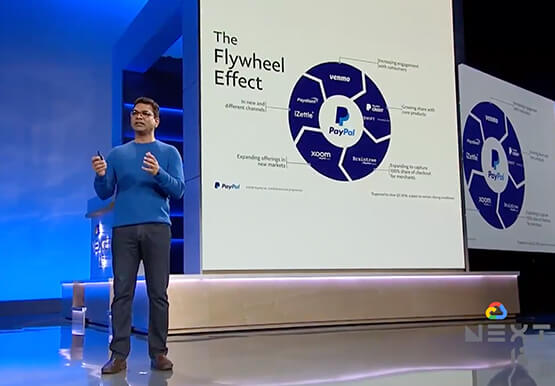
PayPal is an American company operating a worldwide online payment system that supports online money transfers and serves as an electronic alternative to traditional paper methods like checks and money orders. The company enables over 29 million payments or transactions on a peak day. in over 200 markets around the

AI-powered Business Messages for Timely, Engaging and Helpful Conversations with Customers
Over the last two years, we’ve seen a significant uptick in the number of people using messaging to connect with businesses. Whether it was checking hours of operation, verifying what was in stock, or scheduling a pick-up, the pandemic caused a significant shift in consumer behavior. 45% of users are
