





The Future of Workloads: Google Cloud’s Purpose-Built Infrastructure Evolution

3820
Of your peers have already read this article.
3:30 Minutes
The most insightful time you'll spend today!
For far too long, cloud infrastructure has focused on raw speeds and feeds of building blocks such as VMs, containers, networks, and storage. Today, Moore’s law is slowing, and the burden of picking the right combination of infrastructure components increasingly falls on IT.
At Google Cloud we are committed to removing that burden. We’ve engineered golden paths from silicon to the console, with a recipe of purpose-built infrastructure, prescriptive architectures, and an ecosystem to deliver workload-optimized infrastructure. And at this year’s Google Cloud Next, we made some exciting new announcements across key workloads.
In this post, we will put the new Google Cloud releases and capabilities in the context of popular workloads: From AI/ML to high performance computing and data analytics, to SAP, VMware, and mainframes.
Powering AI/ML workloads
No single technology has the potential to drive more transformation than AI and ML. At Next, we announced several new AI-based services: Translation Hub and DocAI services, and the OpenXLA Project, an open-source ecosystem of ML compiler technologies co-developed by a consortium of industry leaders.
To build these innovative services, you also need a powerful infrastructure platform. Today, we announced the following additions to our compute offerings:
- Cloud TPU v4 Pods – Now in General Availability (GA), Google’s advanced machine learning infrastructure is based on the world’s largest publicly available ML hub in Oklahoma and offers up to 9 exaflops of peak aggregate compute. Developers and researchers can use TPU v4 to train increasingly sophisticated models to power workloads such as large-scale natural language processing (NLP), recommendation systems, and computer vision algorithms in a cost effective and sustainable way. In June 2022, Cloud TPU v4 recorded the fastest training times on five MLPerf 2.0 benchmarks, with up to 80% better performance and up to 50% lower cost of training than the next best available alternative.
- A2 Ultra GPU VM instances – Now GA, you can use A2 Ultra GPU VM instances with Compute Engine, Google Kubernetes Engine and Deep Learning VMs. A2 Ultra GPUs have the largest and fastest GPU memory of the Google Cloud portfolio and are optimized for large AI/ML and HPC workloads with use cases such as AI assistants, recommendation systems, and autonomous driving. Powered by NVIDIA A100 Tensorcore GPU with 80 GBs of GPU memory, A2 Ultra delivers 25% higher throughput on inference and 2x higher performance on HPC simulations than original A2 machine shapes.
Learn more about A2 Ultra and hear how you can accelerate your ML development and learn from our customers Uber and Cohere in breakout session MOD300.
Boost HPC and data-intensive workloads
Customers rely on Google Cloud to help them run data-intensive workloads such as HPC and Hadoop. The new C3 machine series (currently in Preview) is the first in the public cloud to include the new 4th Gen Intel Xeon processor and Google’s custom Intel Infrastructure Processing Unit that enables 200Gbps, low-latency networking. Learn more about top HPC best practices in breakout session MOD106.
You can pair the C3 with Hyperdisk (currently in Private Preview), our new generation block storage, which offers 80% higher IOPS per vCPU for high-end database management system (DBMS) workloads when compared to other hyperscalers. Data workloads such as Hadoop and databases may no longer need oversized compute instances to benefit from high IOPS. Learn more about Hyperdisk in breakout session MOD206.
Enable new streaming experiences
Media and entertainment customers want streaming optimized workloads that build on our innovation in edge and our global network. Here are some new developments to support streaming use cases:
- Cloud CDN, our original content delivery networking offering, now offers Dynamic compression to reduce the size of responses transferred from the edge to a client, significantly helping to accelerate page load times and reduce egress traffic.
- Media CDN, introduced earlier this year, now supports the Live Stream API to ingest and package source content into HTTP-Live Streaming and DASH formats for optimized live streaming. We are also enabling two new developer-friendly integrations in Preview for Media CDN: Dynamic Ad Insertion with Google Ad Manager, which provides customized video ad placements, and third-party Ad Insertion using our Video Stitcher API for personalized ad placement. With these options, content producers can introduce additional monetization and personalization opportunities to their streaming services.
- For advanced customization, we are introducing the Preview of Network Actions for Media CDN, a fully managed serverless solution based on open-source web assembly that enables programmability for customers to deploy their own code directly in the request/response path at the edge.
With Media CDN, customers like Paramount+ are able to deliver a high-quality experience on the same Google infrastructure we’ve tested and tuned to serve YouTube’s 2 billion users globally.
“Streaming is one of the key growth areas for Paramount Global. When we migrated traffic onto Media CDN, we observed consistently superior performance and offload metrics. Partnering with Google Cloud enables us to provide our subscribers with the highest quality viewing experience.” — Chris Xiques, SVP of Video Technology Group, Paramount Global
Bringing Google Cloud to your workloads
For customers in regulated markets and in countries with strict sovereignty laws, Google Cloud has a spectrum of offerings to help them achieve varying degrees of sovereignty. Sovereign Controls by T-Systems is now GA, and Local Controls by S3NS, the Thales-Google partnership, is now available in Preview. You can expect more region and market announcements in the coming months. And for the most stringent sovereignty needs, we offer Google Distributed Cloud Hosted for a disconnected Google Cloud footprint deployed at the customer’s chosen site.
We are also expanding functionality for existing offerings to give you even more options to run your cloud where you want, how you want.
- Anthos, our cloud-centric container platform to run modern apps anywhere consistently at scale, now has a more robust user interface and an upgraded fleet management experience. Create, update, and reconfigure your Anthos clusters the same way from one dashboard or command-line interface, wherever your clusters run. New fleet management capabilities let you manage growing fleets of container clusters across clouds, on-premises, and at the edge and for different use cases (isolate dev from prod, apply fleet-specific security controls, enforce configurations fleet-wide). And we are pleased to announce the GA of virtual machine support on Anthos clusters for retail edge environments. Learn more about how Anthos can help you run modern applications anywhere in breakout session MOD208.
- Google Distributed Cloud Edge GPU-Optimized Config, is now GA in server-rack form factors powered by 12 Nvidia T4 GPUs. GDC Edge is designed to enable low-latency and high-performance hybrid workloads as a complement to your primary Google Cloud environment or as an independent edge deployment. We’re seeing early adoption by customers and partners for workloads such as augmented reality and retail self-checkout. In addition, software partners such as 66degrees are taking advantage of GDC Edge GPU optimization to provide real-time insights on in-store product availability, while Ipsotek is using machine intelligence at the edge to perform crowd and foot-traffic analysis in large locations such as malls, airports and railway stations. Learn more about GDC Edge and new partner validated solutions here, or watch breakout session MOD207 to hear how you can modernize your data center and accelerate your edge.
Infrastructure building blocks for cloud-first workloads
For most new projects, developers prefer them to be cloud-first optimized workloads, and nearly half of all developers use containers today. Google Kubernetes Engine (GKE) is the most automated and scalable container management service on the market today, and when you use GKE Autopilot, developers can get started faster than other leading cloud providers. At Next ‘22, we’re excited to unveil:
- A new workshop to help you discover how to unlock efficiency and innovation with a GKE Autopilot — sign up to get started.
- A new security posture management dashboard in GKE that provides opinionated guidance on Kubernetes security along with bundled tools to expertly help improve the security posture of your Kubernetes clusters and workloads.
When building scalable web applications or running background jobs that require lightweight batch processing, developers are increasingly turning to serverless technologies. We’re helping developers choose serverless with numerous updates to Cloud Run, our managed serverless compute service.
- With new Cloud Run integrations, Cloud Run and Google Cloud services work together smoothly. For example, configuring domains with a Load Balancer or connecting to a Redis Cache is now as easy as a single click, with more scenarios on the way.
- Cloud Run customized health checks for services is now available in Preview, providing user-defined HTTP and TCP Startup probes at the container level. This capability allows Cloud Run users to define criteria as to when their application has started and is ready to start serving traffic, and is particularly useful for applications that might require additional startup time on their first initialization.
- To make continuous deployment easier for our customers, we added an integration between Cloud Deploy, our fully managed continuous deployment service, and Cloud Run. With this integration in place, you can do continuous deployment through Cloud Deploy directly to Cloud Run, with one-click approvals and rollbacks, enterprise security and audit, and built-in delivery metrics. Learn more on Cloud Deploy web page.
Learn more about how to build next-level web applications with Cloud Run in breakout session BLD203.
You also need confidence in the building blocks that make up your workloads from the outset. To help get you started, we introduced Software Delivery Shield, which provides a comprehensive suite of tools offering a fully managed, end-to-end solution that helps protect your software supply chain. The Software Delivery Shield launch also included the following announcements:
- Cloud Workstations, currently in Preview, provides fully-managed development environments built to meet the needs of security-sensitive enterprises. With Cloud Workstations, developers can access secure, fast, and customizable development environments via a browser anytime and anywhere, with consistent configurations and customizable tooling. To learn more about Cloud Workstations, please visit the web page and check out breakout session BLD100.
- A new partnership with JetBrains provides fully managed Jetbrains IDEs as part of Cloud Workstations. This integration can give developers access to several popular IDEs with minimal management overhead for their admin teams.
Read more about Software Delivery Shield.
Open source and open standards are an important part of building applications. With that, we are excited to announce that Google has joined the Eclipse Adoptium Working Group, a consortium of leaders in the Java community working to establish a higher quality, developer-centric standard for Java distributions. Also, we are making Eclipse Temurin available across Google Cloud products and services. Eclipse Temurin provides Java developers a higher quality developer experience and more opportunities to create integrated, enterprise-focused solutions, with the openness they deserve.
Pioneering new technology with Web3 optimized infrastructure
It’s incredible to see the energy in Web3 right now and the focus on developing the broader benefits, use cases, and core capabilities of blockchain. We are helping customers with scalability, reliability, security, and data, so they can spend the bulk of their time on innovation in the Web3 space — unlocking deep user value and building the next app to attract a billion users to the ecosystem.
Companies like Near, Nansen, Solana, Blockdaemon, Dapper Labs & Sky Mavis use Google Cloud’s infrastructure. Yesterday, we announced a strategic partnership with Coinbase to better serve the growing Web3 ecosystem.
“We could not ask for a better partner to execute our vision of building a trusted bridge into the Web3 economy and accelerating broader growth and adoption of blockchain technology. I started Coinbase with a desire to create a more accessible financial system for everyone, and Google’s history of supporting open source and decentralized ecosystems made this a natural fit. Our partnership marks a major inflection point and, together, we are removing barriers to blockchain adoption and accelerating innovation.” — Brian Armstrong, CEO, Coinbase
Lift and transform traditional workloads
Not all workloads were born in the cloud — or have completed their journey to it. Google Cloud offers a variety of programs and capabilities to help optimize traditional workloads for a new cloud era, regardless of whether you’re looking to migrate it as-is, do light optimizations, or fully modernize and transform:
- Migration Center – Now in Preview. For organizations looking to migrate to the cloud and transform their businesses, Migration Center can reduce the complexity, time, and cost by providing an integrated migration and modernization experience. It brings together our assessment, planning, migration, and modernization tooling in one centralized location with a shared data platform so you can proceed faster, more intelligently, and more easily through your journey. Learn more at the Migration Center webpage.
- Google Cloud VMware Engine – Google Cloud is the first VMware partner to market with VMware Cloud Universal support, simplifying the migration of on-premises VMware VMs to VMware Engine in the cloud. With a cloud market-leading 99.99% availability SLA in a single site, VMware Engine is helping large organizations like Carrefour move to Google Cloud.
- Dual Run for Google Cloud – Now in Preview, this first-of-its-kind solution helps eliminate many of the common risks associated with mainframe modernizations by letting customers simultaneously run workloads on their existing mainframes and their modernized version on Google Cloud. This means customers can perform real-time testing and quickly gather data on performance and stability with no disruption to their business. Once satisfied that the performance of the two systems is functionally equivalent, the customer can make the Google Cloud environment the system of record, and operate the existing mainframe system as needed, typically as a backup. Learn more about Dual Run in this press release or on our Mainframe Modernization webpage.
- Google Cloud Workload Manager – Now in Preview for SAP workloads, and available in the Google Cloud console, Workload Manager provides automated analysis of your enterprise systems on Google Cloud to help continuously improve system quality, reliability, and performance. Google Cloud Workload Manager evaluates your SAP workloads by detecting deviations from documented standards and best practices to help proactively prevent issues, continuously analyze workloads, and simplify system troubleshooting.
Learn more about how organizations like Global Payments and Loblaw Technology have migrated with ease and speed in breakout session MOD104.
Protect all your workloads
The foundation of any workload is storage, and this year we expanded the number of supported regions with our Cloud Storage dual-region buckets (GA), so you can ensure that your workloads are protected. In the event of an outage, your application can easily access the data in the alternate region. You can add Turbo replication (GA) with your dual-region buckets. Turbo replication is backed by a 15-minute Recovery Point Objective (RPO) SLA.
Also, we recently announced Google Cloud’s Backup and DR Service (GA). This service is a fully integrated data-protection solution for critical applications and databases that lets you centrally manage data protection and disaster recovery policies directly within the Google Cloud console, and fully protect databases and applications with a few mouse clicks.
Learn more about Storage best practices in breakout session MOD206.
Migrate, observe, and secure network traffic
We also announced many new capabilities and enhancements to the Cloud Networking portfolio that help customers migrate, modernize, secure, and observe workloads traveling to and in Google Cloud:
- Private Service Connect helps simplify migrations by giving more control to users and integrations with 5 new partners.
- Network Intelligence Center can monitor the network for you with enhanced capabilities like the Performance Dashboard that will give you latency visibility between Google Cloud and the Internet.
- We expanded our Cloud Firewall product line and introduced two new tiers: Cloud Firewall Essentials and Cloud Firewall Standard.
For more information on what’s new with networking, read this blog and check out breakout session MOD205.
Optimize costs
Our customers’ workloads also require technical and commercial options that can deliver the best return on their investments. Here are some new enhancements that can help:
- Flex CUDs – GA coming soon, Flexible Committed Use Discounts help you save up to 46% off on-demand Compute Engine VM pricing, in exchange for a one- or three-year commitment. Like standard CUDs, you can apply Flex CUDs across projects within the same billing account, to VMs of different sizes, and across operating systems. Learn more.
- Batch – Now GA, Batch is a fully managed service that helps you run batch jobs easily, reliably, and at scale. Without having to install any additional software, Batch dynamically and efficiently manages resource provisioning, scheduling, queuing, and execution, freeing you up to focus on analyzing results. There’s no charge for using Batch, and you only pay for the resources used to complete the tasks.
Learn more about how you can optimize for cost savings with Google Cloud in MOD103.
Optimize for sustainability
Any new workloads you develop should have the smallest possible carbon footprint. Google Cloud Carbon Footprint helps you measure, report, and reduce your cloud carbon emissions, and is now GA. Since introducing Carbon Footprint last year, we added features that cover Scope 1, 2 and 3 emissions, and provided role-based access to other users such as sustainability teams. Active Assist’s carbon emissions estimates related to removing unattended projects are also now GA. Learn how to build a more sustainable cloud with lower carbon emissions in MOD103, and start using Carbon Footprint today.
“At Box, we’re focused on reducing our carbon footprint and we’re excited for the visibility and transparency the Carbon Footprint tool will provide as we continue our work to operate sustainably.” — Corrie Conrad, VP Communities and Impact and Executive Director of Box.org at Box
“At SAP we’re working to achieve net-zero by 2030, making it crucial to measure carbon emissions all along our value chain. Collaborating with Google Cloud on Carbon Footprint ensures that accurate emissions data is available in a timely manner, helping our many Solution Areas make more sustainable decisions.” — Thomas Lee, SVP and Head of Multicloud Products and Services at SAP
Designed around your workloads
These are only a few examples of the many golden paths we are enabling for your workloads. We strive to be the ‘open infrastructure cloud’ that is the most intuitive to consume because everything is designed around your workloads, providing tremendous TCO benefits.
To get even more information on all of this and more check out the Modernize breakout session track and these “What’s New” sessions available on demand at Next ’22:
- MOD105 to learn about new infrastructure solutions for enterprise architects and developers.
- BLD106 to learn what’s new to help developers build, deploy, and run applications.
- OPE100 to learn about the biggest announcements for DevOps teams, sysadmins, and operators.
Wunderkind Leverages Google Cloud to Address the Growing Needs of its Customer Base

5329
Of your peers have already read this article.
1:30 Minutes
The most insightful time you'll spend today!
Editor’s note: We’re hearing here how martech provider Wunderkind easily met the scaling demands of their growing customer base on multiple use cases with Cloud Bigtable and other Google Cloud data solutions.
Wunderkind is a performance marketing channel and we mostly have two kinds of customers: online retailers, and publishers like Gizmodo Media Group, Reader’s Digest, The New York Post and more. We help retailers boost their e-commerce revenue through real-time messaging solutions designed for email, SMS, onsite, and advertising. Brands want to provide a one-to-one experience to more of their customers, and we use our extensive history with best practices in email marketing and technology to help brands reach more customers through targeted messaging and personalized shopping experiences. With publishers, it’s a different value proposition, we use the same platform to provide a non disruptive and personalized ad experience for their website. For example, if you are on their site and then you left, we might show an ad tailored to you when you come back later – depending on the campaign.
After running into limitations with our legacy database system, we turned to Cloud Bigtable and Google Cloud, which helped us be more flexible and easily scale for high traffic demand – which can be a stable 40,000 requests per second, and meet the needs of our growing number of data use cases.
Three different databases power our core product
In our core offering, companies send us user events from their websites. We store these events and later decide (using our secret sauce) if and how to reach out to those users on behalf of our customers. Because many of our customers are retailers, Black Friday and Cyber Monday are big traffic days for us as. On such days, we can get 31 billion events, sometimes as many as 200K events per second. We show 1.6 billion impressions that have seen close to 1 billion pageviews. And at the end of all this, we securely send about 100 million emails. We noticed the same thing for election time; traffic reached the same high volume. We need scalable solutions to support this level of traffic as well as the elasticity to let us pay only for what we use, and that’s where Google Cloud comes in.
So how does this work? Our externally facing APIs, which are running on Google Kubernetes Engine, receive those user events—up to hundreds of thousand per second. All the components in our architecture need to be able to handle this demand. So from our APIs, those events go to Pub/Sub, Dataflow and from there they are written to Bigtable and BigQuery, Google Cloud’s serverless, and highly scalable data warehouse. This business user activity data underpins almost all our products. Events can be things like product views or additions to shopping carts. When we store this data in Bigtable, we use a combination of email address and the customer ID as the Bigtable key and we record the event details in that record.
What do we do with this information next? It’s important to mention that we also mark the last time we received an event about a user in Memorystore for Redis, Google Cloud’s fully managed Redis service. This is important because we have another service that is periodically checking Memorystore for users that have not been active for a campaign-specific period of time (it can be 30 minutes, for example), then deciding whether to reach out to them.
How we decide when we reach out is an intelligent part of our product offering, based on the channel, message, product, etc. When we do reach out, we use Memorystore for Redis as a rate limiter or token bucket. In order not to overwhelm the email or texting providers we send API requests to, we throttle those requests using Memorystore. (We prefer to preemptively throttle the outgoing API requests as opposed to handling errors later.)
When we do reach out, often we will need details for a specific product—let’s say if the website belongs to a retailer. We usually get that information from the retailer through various channels and we store product information in Cloud SQL for MySQL. We pull that information when we need to send an email with product information, and we use Memorystore for Redis to cache that information, since many of the products are repeatedly called. Our Cloud SQL instance has 16 vCPUs, 60GBs of memory and 0.5TB of disk space and when we perform those product information updates, we have about a thousand write transactions per second. We are also in the process of migrating some tables from a self managed MySQL instance, and we keep those tables synchronized with Cloud SQL using Datastream.
Our user history database was originally stored in AWS DynamoDB, but we were running into problems with how they structured the data, and we’d often get hot shards but with no way to determine how or why. That led to our decision to migrate to Bigtable. We set up the migration first by writing the data to two locations from Pub/Sub, performed some backfill of data until that was up and running, and then started working on the reading. We performed this over a few short months, then switched everything to Bigtable.
So, as mentioned, we are using Bigtable for multiple databases. The instance that stores our user events has about 30 TB with about 50 nodes.
Profile management
A second use case for Bigtable is for user profile management, where we track, for example, user attributes based on subscription activity, whether they’ve opted in or out of various lists, and where we apply list-specific rules that determine which targeted emails we send out to users.
Our very own URL shortener
Our third use case for Bigtable is our URL shortener. When our customers build out campaigns and choose a URL, we append tracking information to the query string of the URLs and they become long. Many times, we are sending them via SMS texts, so the URLs need to be short. We originally used an external solution, but made the determination that they couldn’t support our future demands. Our calls tend to be very bursty in nature, and we needed to plan for a future state of supporting higher throughput. We use a separate table in Bigtable for this shortened URL. We generate the short slug that is 62 bit-encoded and use it as the rowkey. We use the long slug as a Protobuf-encoded data structure in one of the row cells and we also have a cell for counting how many times it was used. We use Bigtable’s atomic increment to increase that counter to track how many times the short slug was used.
When the user receives a text message on their phone, they click the short URL, which goes through to us, and we expand it to the long slug (from Bigtable) and redirect them to the appropriate site location. Obviously, for the URL shortener use case, we need to make the conversion very quickly. Bigtable’s low latency helps us meet that demand and we can scale it up to meet higher throughput demands.
Meeting the future with Google Cloud
Our business has grown considerably, and as we keep signing up new clients, we need to scale up accordingly, and Bigtable has met our scaling demands easily. With Bigtable and other Google Cloud products powering our data architecture, we’ve met the demand of incredibly high traffic days in the last year, including Black Friday and Cyber Monday. Traffic for these events went much higher than expected, and Bigtable was there, helping us easily scale on demand.
We are working on leveraging a more cloud native approach and using Google Cloud managed services like GKE, Dataflow, pub/sub, Cloud SQL , Memorystore, BigQuery and more. Google has those 1st party products and we don’t see the value in rolling out or self managing such solutions ourselves..
Thanks to Google Cloud, we now have reliable and flexible data solutions that will help us meet the needs of our growing customer base, and delight their users with fast, responsive, personalized shopping messaging and experiences.
Learn more about Wunderkind and Cloud Bigtable. Or check out our recent blog exploring the differences between Bigtable and BigQuery.
The Latest in Spring Cloud GCP: Upgrading the Sample Bank of Anthos App
1390
Of your peers have already read this article.
3:30 Minutes
The most insightful time you'll spend today!
We’re excited to announce that Spring Cloud GCP version 4.0 is now generally available! In this post, we’ll be describing what the new major version has to offer, and demonstrating the process of using the migration guide on one of our reference architectures, Bank of Anthos.
What’s new?
With this release, Spring Cloud GCP officially supports Spring Boot 3.x. However, this migration involves a number of breaking changes as outlined in the migration guide. The full list of changes made is available on Github, but the one of the most significant differences is that Java 17 is now a minimum requirement.
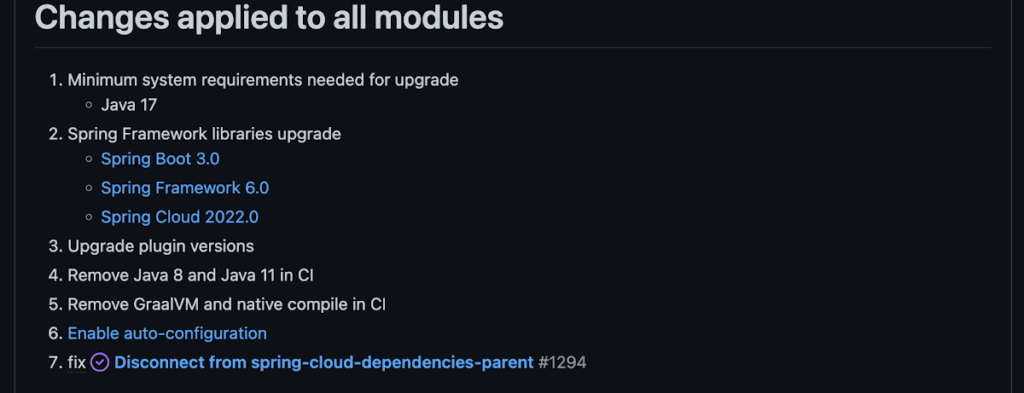
Another notable feature of this release is the addition of starter artifacts – Spring Boot starters for Google Cloud – that provide dependencies and auto-configurations for 80+ Google Client libraries. Just as the name suggests, these starters can serve as helpful starting points when working with a new client library. For now, they’re in preview.
These starters are not included in the BOM by default and need to be added as a dependency to your project before they can be used. For example, if you wanted to get started with Cloud Text-to-Speech, you would include the following:
<dependency>
    <groupId>com.google.cloud</groupId>
    <artifactId>google-cloud-texttospeech-spring-starter</artifactId>
    <version>4.0.0-preview</version>
  </dependency>
The upgrade process
We prepared a migration guide to help answer any questions involved with moving from 3.x to 4.x. Let’s follow those instructions to migrate Bank of Anthos.
We’ll start by cloning and building the application before the upgrade, according to the quickstart and development guide:
PROJECT_ID=<YOUR-PROJECT-ID>
gcloud services enable container --project ${PROJECT_ID}

git clone https://github.com/GoogleCloudPlatform/bank-of-anthos.git
cd bank-of-anthos/

gcloud services enable container.googleapis.com monitoring.googleapis.com \
  --project ${PROJECT_ID}

REGION=us-central1
gcloud container clusters create-auto bank-of-anthos \
  --project=${PROJECT_ID} --region=${REGION}

gcloud container clusters get-credentials bank-of-anthos \
  --project=${PROJECT_ID} --region=${REGION}

skaffold run --default-repo=gcr.io/${PROJECT_ID}/bank-of-anthos
At the end of this, you should see a “deployment stabilized” message:
Deployments stabilized in 9.657 secondsWith the environment set up for development, we’re ready to move on to the actual migration. The migration is already complete at time of writing, but here’s the full list of changes made:
- We began by checking the current Java, Spring Boot and Spring Cloud GCP versions.
- Our Java version is okay, but the other two are out of date, and will need to be updated.
We can also add the Spring Cloud GCP BOM to manage our versions going forward while we’re here.
- Our Java version is okay, but the other two are out of date, and will need to be updated.
- Then, in no particular order, we can make the following code changes:
- Remove the explicit type declarations from our ResponseEntity instantiations.
- Replace all javax.* imports with Jakarta.* counterparts, since Spring 3.0 makes use of Jakarta EE 9.0
With those changes in place, the app is upgraded and ready to re-deploy!
Live example
For a finished example of this migration, check out the Bank of Anthos repository on Github. It’s an excellent sample application that showcases a polyglot Java & Python app, served on Kubernetes and Google Cloud. All CI/CD and configurations are open source, so it may be instructive as you approach this migration.
Thanks for reading, and feel free to provide comments or feedback on Twitter, or in the issues section of the repository.
Budget-Friendly Log Management: Four Steps to Cost Optimization in Google Cloud

1208
Of your peers have already read this article.
4:30 Minutes
The most insightful time you'll spend today!
As part of our ongoing series on cost management for observability data in Google Cloud, we’re going to share four steps for getting the most out of your logs while on a budget. While we’ll focus on optimizing your costs within Google Cloud, we’ve found that this works with customers with infrastructure and logs on prem and in other clouds as well.
Step 1: Analyze your current spending on logging tools
To get started, create an itemized list of what volume of data is going where and what it costs. We’ll start with the billing report and the obvious line items including those under Operations Tools/Cloud Logging:
- Log Volume – the cost to write log data to disk once (see our previous blog post for an explanation)
- Log Storage Volume – the cost to retain logs for more than 30 days
If you’re using tools outside Cloud Logging, you’ll also need to include any costs related to these solutions. Here’s a list to get you started:
- Log vendor and hardware costs — what are you paying to observability vendors? If you’re running your own logging solution, you’ll want to include the cost of compute and disk.
- If you export logs within Google Cloud, include Cloud Storage and BigQuery costs
- Processing costs — consider the costs for Kafka, Pub/Sub or Dataflow to process logs. Network egress charges may apply if you’re moving logs outside Google Cloud.
- Engineering resources dedicated to managing your logging tools across your enterprise often are significant too!
Step 2: Eliminate waste — don’t pay for logs you don’t need
While not all costs scale directly with volume, optimizing your log volume is often the best way to reduce spend. Even if you are using a vendor with a contract that locks you into a fixed price for a period of time, you may still have costs in your pipeline that can be reduced by avoiding wasteful logs such as Kafka, Pub/Sub or Dataflow costs.
Finding chatty logs in Google Cloud
The easiest way to understand which sources are generating the highest volume of logs within Google Cloud is to start with our pre-built dashboards in Cloud Monitoring. To access the available dashboards:
- Go to Monitoring -> Dashboards
- Select “Sample Library” -> “Logging”
This blog post has some specific recommendations for optimizing logs for GKE and GCE using prebuilt dashboards.
As a second option, you can use Metrics Explorer and system metrics to analyze the volume of logs. For example, type “log bytes ingested” into the filter. This specific metric corresponds to the Cloud Logging “Log Volume” charge. There are many ways to filter this data. To get a big picture, we often start with grouping by both “resource_type” and “project_id”.
To narrow down the resource type in a particular project, add a “project_id” filter. Select “sum” under the Advanced Options -> Click on Aligner and select “sum”. Sort by volume to see the resources with the highest log volume.
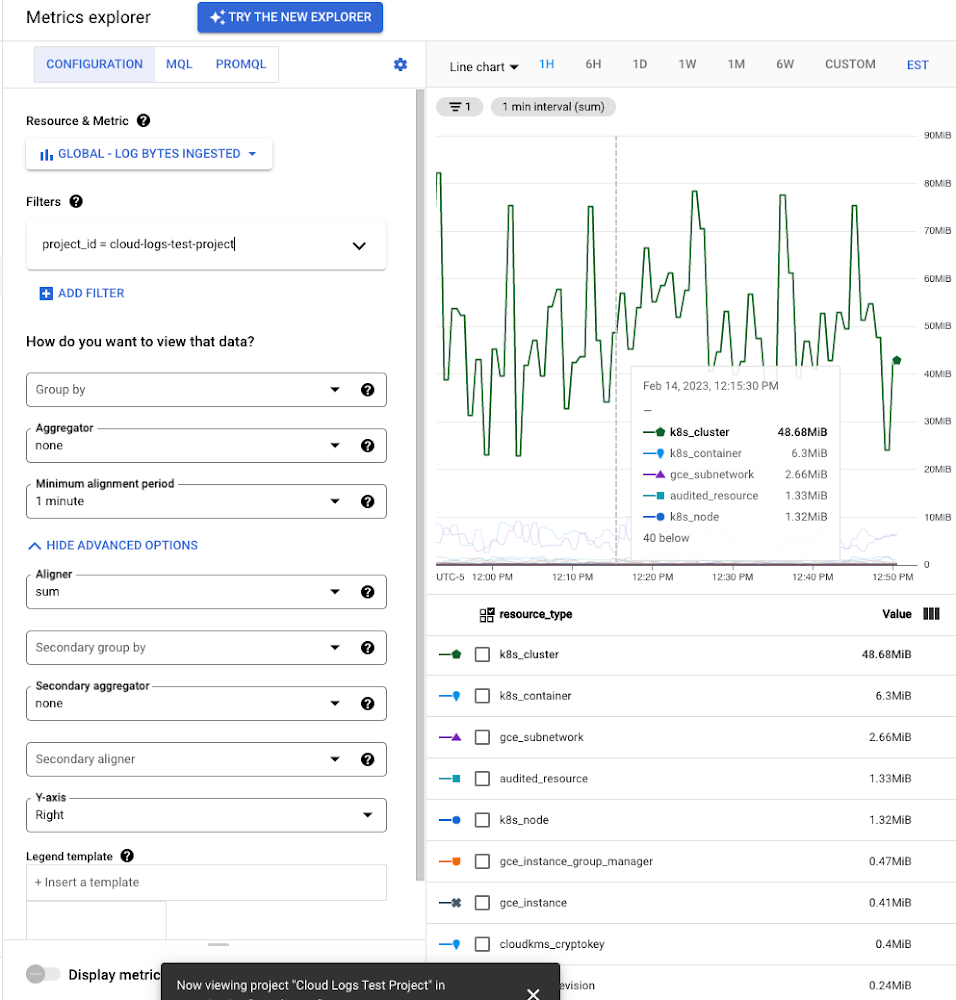
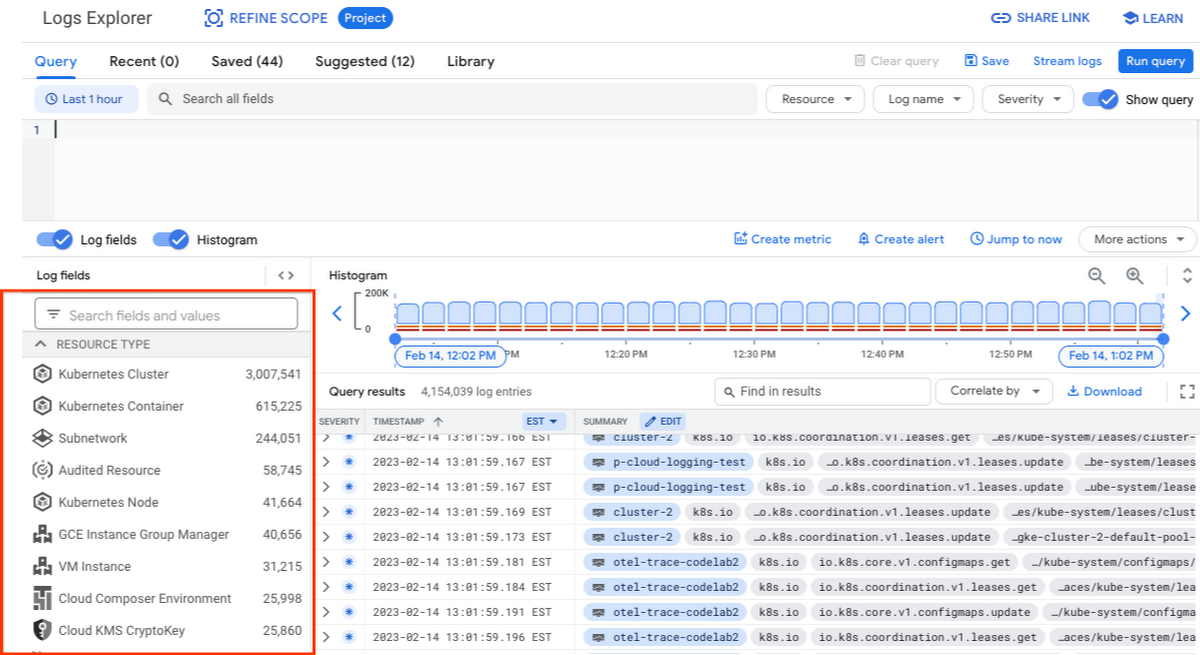
While these rich metrics are great for understanding volumes, you’ll probably want to eventually look at the logs to see whether they’re critical to your observability strategy. In Logs Explorer, the log fields on the left side help you understand volumes and filter logs from a resource type.
Reducing log volume with the Logs Router
Now that we understand what types of logs are expensive, we can use the Log Router and our sink definitions to reduce these volumes. Your strategy will depend on your observability goals, but here are some general tools we’ve found to work well.
The most obvious way to reduce your log volume is not to send the same logs to multiple storage destinations. One common example of this is when a central security team uses an aggregated log sink to centralize their audit logs but individual projects still ingest these logs. Instead, use exclusion filters on the _Default log sink and any other log sinks in each project to avoid these logs. Exclusion filters also work on log sinks to BigQuery, Pub/Sub, or Cloud Storage.
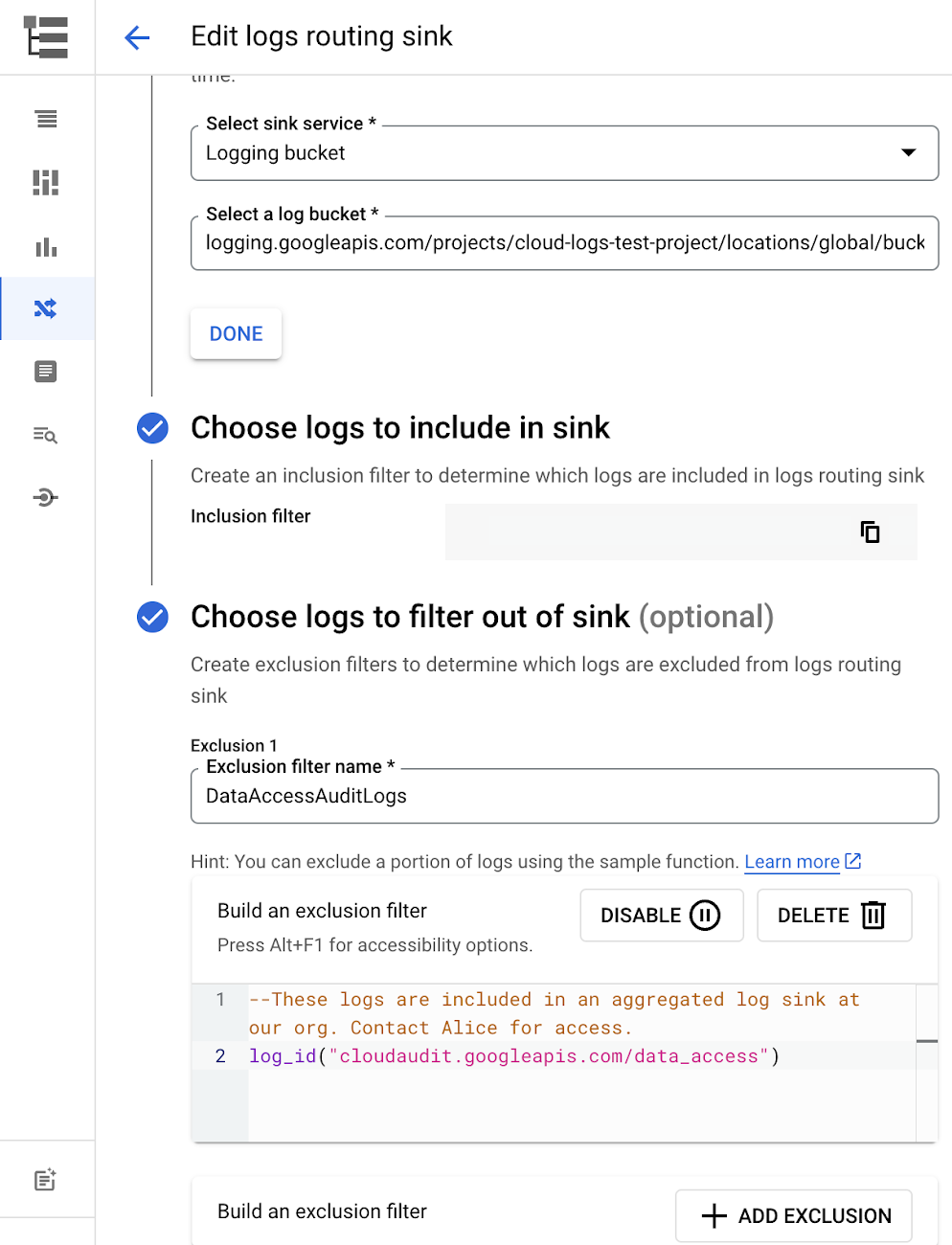
Similarly, if you’re paying to store logs in an external log management tool, you don’t have to save these same logs to Cloud Logging. We recommend keeping a small set of system logs from GCP services such as GKE in Cloud Logging in case you need assistance from GCP support but what you store is up to you, and you can still export them to the destination of your choice!
Another powerful tool to reduce log volume is to sample a percentage of chatty logs. This can be particularly useful with 2XX log balancer logs, for example. This can be a powerful tool, but we recommend you design a sampling strategy based on your usage, security and compliance requirements and document it clearly.
Step 3: Optimize costs over the lifecycle of your logs
Another option to reduce costs is to avoid storing logs for more time than you need them. Cloud Logging charges based on the monthly log volume retained per month. There’s no need to switch between hot and cold storage in Cloud Logging; doubling the default amount of retention only increases the cost by 2%. You can change your custom log retention at any time.
If you are storing your logs outside of Cloud Logging, it is a good idea to compare the cost to retain logs and make a decision.
Step 4: Setup alerts to avoid surprise bills
Once you are confident that the volume of logs being routed through log sinks fit in your budget, set up alerts so that you can detect any spikes before you get a large bill. To alert based on the volume of logs ingested into Cloud Logging:
- Go to the Logs-based metrics page. Scroll down to the bottom of the page and click the three dots on “billing/bytes_ingested” under System-defined metrics.
- Click “ Create alert from metric”
- Add filters (For example: use resource_id or project_id. This is optional).
- Select the logs based metric for the alert policy.
You can also set up similar alerts on the volume for log sinks to Pub/Sub, BigQuery or Cloud Storage.
Conclusion
One final way to stretch your observability budget is to use more Cloud Operations. We’re always working to bring our customers the most value possible for their budget such as our latest feature, Log Analytics, which adds querying capabilities but also makes the same data available for analytics, reducing the need for data silos. Many small customers can operate entirely on our free tier. Larger customers have expressed their appreciation for the scalable Log Router functionality available at no extra charge that would otherwise require an expensive event store to process data. So it’s no surprise that a 2022 IDC report showed that more than half of respondents surveyed stated that managing and monitoring tools from public cloud platforms provide more value compared to third-party tools. Get started with Cloud Logging and Monitoring today.
Without an API Product Owner, Your APIs Have a Limited Lifespan

3544
Of your peers have already read this article.
3:30 Minutes
The most insightful time you'll spend today!
Product teams often serve as the nexus between all organizational units within a company, ensuring that a specific line of business follows a clear roadmap and that cross-functional alignment drives success. At their most empowered, product owners are like miniature CEOs for each offering within a company.
Unfortunately, in today’s complicated IT landscape, not everything that should be thought of as a product receives the designation. In my time as a digital consultant, I’ve seen one particular technology too often dismissed as back-office minutiae — application programming interfaces, or APIs.
APIs can be the glue that binds a company’s resources together and the mechanisms through which an enterprise’s data, functionality, and other digital assets are accessed and distributed. They enable software systems to communicate and let developers leverage software for new applications and digital experiences, abstracting underlying complexity into a consistent interface that allows data and functionality to be combined and reused with unprecedented flexibility.
Unfortunately, many business leaders see APIs as middleware and thus as undeserving of the resources of a full-fledged digital product. Their organizations create APIs as one-off projects, with engineers moving on to other projects when they are done and no one looking after an API’s maintenance or whether it offers utility beyond the bespoke use case for which it was created.
This is a problem because APIs can unlock digital assets that otherwise would be captive within enterprise silos. An API that exposes a customer database can likely be used and reused for numerous purposes, for example, and treating developers as customers of this API can help increase adoption of and the amount of innovation around it. But such a powerful outcome is unlikely if an API has been created only as a system integration detail rather than as a product with an owner who oversees a full lifecycle, from ideation to adoption to iteration. Put bluntly, a project-oriented attitude toward APIs misses the boat.
Pitney Bowes, a company I’ve worked with at Google Cloud, offers a high-profile example in which a notable enterprise has treated APIs as products and given its API program the same treatment it would give to any go-to-market offering. After selling traditional mailing and shipping solutions for nearly 100 years, the company transformed itself into a provider of digital logistics and e-commerce solutions by building out 160 public APIs and 400 internal APIs. This enabled its developers and partners to easily consume the company’s location intelligence and shipping services in new, agile ways. It also accelerated the company’s internal project timelines, shortening the average project lifecycle from over a year to just a few months. What’s more, APIs not only introduced efficiencies and reduced costs, but also opened new revenue streams. Because developers can more easily leverage individual Pitney Bowes business capabilities for their applications, the company’s services are manifesting in new ways — such as when Pitney Bowes technology is harnessed to let customers print USPS shipping labels from within the context of an online marketplace.
Manage APIs as products
Traditionally, but wrongly, APIs have been considered pieces of other products. They’ve been built by the IT team at the request of product owners every time a project came up that required one. When the funding spigot is flowing, APIs generally receive support. But once the project runs its course, the APIs are neglected and quickly grow outdated.
Without consistent resources, APIs can’t be adapted to fluctuations in the enterprise and market dynamics. Worst of all, project-oriented APIs often end up siloed within the business unit that gave birth to them, which defies the benefit of modern APIs: to not only allow enterprise assets to be reused by other business units and partners but also accelerate the business’s innovation by increasing the number of developers interacting with its capabilities.
In contrast, if an API is treated as a product in its own right with its own owner lobbying for consistent funding, the API can be iterated according to shifts in internal and market trends. Ideally, the product owner should continually monitor an API’s engagement and collect and synthesize analytics to improve quality of service. Product-minded companies frequently launch APIs as minimum viable products in order to get ideas to market faster, then use API consumption analytics to understand developer engagement and refine APIs to be even more attractive, powerful, and intuitive.
With the help of management tools that facilitate dynamic changes, an API product owner can also help ensure that developers benefit from the latest and greatest build with minimal interruption.
Virtually all traditional product ownership responsibilities can be easily applied to an API. An API product owner is responsible for galvanizing the entire company around their API’s value. Their team can answer any questions users may have about the API’s value proposition or how to use it. It may sound trivial but having dedicated experts available to assist with any question that may arise can be a boon to an API’s velocity.
Additionally, if a dedicated product owner is assigned to pilot a company’s aggregate API program, they can use comprehensive monitoring and analysis of all API traffic to derive insight into which APIs drive value and which don’t. This can save considerable time and money from being wasted on the wrong bets. The product owner can also create API bundles segmented according to each developer community the program wants to serve. Here, the goal is not just to expose enterprise assets, but also to encourage repeat consumption. When it comes to third-party engagement, these bundles should seek to improve partner stickiness to cultivate and maintain new revenue channels. Just as any product is only useful if it has users adopting it and sticking with it, APIs are typically valuable when they attract communities of repeat users.
Tools and processes that turn APIs into strategic assets
To drive an API as a strategic asset, an API product manager should support the API with management tools and processes.
First off, it’s necessary to establish comprehensive security layers for an API so cross-functional internal groups and third-party partners are comfortable using it. Mechanisms that apply protection with introducing user friction — such as OAuth, API key verification, XML/JSON threat protection — are strongly encouraged. It’s also often prudent to integrate machine learning functionality that can detect bot attacks and other adversaries before they breach an API and affect either its developer users or the end users consuming those developers’ apps.
Enterprise software products are typically afforded visualization tools, dashboards, reports, and self-service functionality to drive adoption — and APIs should be no different. Comprehensive portals that highlight API features (including knowledge centers, interactive documentation, blogs, and forums) should be crafted to promote developer consumption. Anything that is likely to magnetize collaborators and expedite registration should be provided for an API. A primary goal of API-first development is to increase velocity, so offering developers a self-service experience while maintaining visibility and control over API usage is crucial.
Manage with an “outside-in” perspective
Perhaps the most important role an API product owner must fulfill is maintaining a staunch outside-in approach.
In an inside-out perspective, enterprise leaders look internally for gaps and fill them with existing IT capabilities. Internal intuition untested by the market can define planning, and the resources that IT already has — rather than those that customers demand — typically restrict options. In contrast, an outside-in approach requires the company to listen to what the market is asking for and to respond appropriately. Outside-in thinkers start by asking what the customer needs, then build strategies from there. Because customer preferences are moving targets, an outside-in perspective is constantly evolving and seeking new data. In the case of API programs, product managers should find ways to align API user data with business KPIs, which can be essential to organizing stakeholders and achieving buy-in for the program throughout the organization.
Because both consumers and developers will abandon products that do not meet their needs, an outside-in perspective is increasingly non-negotiable. The product owner needs to analyze rapidly-changing market trends, understand the competitive landscape, keep a pulse on customer and stakeholder needs, and facilitate a backlog of changes that can help the company satisfy the market. Essentially, API product owners are the end-user advocate — and that’s for both for developers using the APIs and the people touching the applications powered by those APIs.
None of this means product owners need to be entirely risk averse, however. They should have the freedom to experiment with hypotheses and to make adjustments — but to make experimentation viable over the long run, they also need to have the foresight to kill a project immediately if the early end-user response is poor. If the product owner is not learning and iterating, they probably are not pushing the API program forward.
Calling all product professionals
If an enterprise plans to pursue an API-first mandate, it’s crucial that the API program is a well-funded, autonomous business unit. Without a visionary owner, APIs will not be able to usher in the transformation experienced by companies such as Pitney Bowes. The API-first philosophy requires that APIs are built prior to applications and that the API provide a value proposition of its own — which means that if an enterprise wants to accelerate innovation and take advantage of APIs, its first step should be to hire API product managers.
Transforming Businesses with Google Distributed Cloud Edge Appliance: A Look at Real-World Use Cases

2530
Of your peers have already read this article.
4:30 Minutes
The most insightful time you'll spend today!
While many organizations are driving digital transformation by migrating to the cloud, there are some industries, geographies, and use cases that require a different approach to cloud modernization. Regulated industries such as healthcare, insurance, pharmaceutical, energy, telecommunication, and banking have stringent data residency and sovereignty requirements. Other industries need to meet local data processing requirements, while others require real-time data processing with sub-millisecond latencies, for example to detect defects on manufacturing lines. These use cases demand a combination of edge, on-premises and cloud services for their infrastructure.
With these requirements in mind, Google Cloud launched Google Distributed Cloud powered by Anthos to extend the power of Google Cloud infrastructure and services to the edge (or closer). The underlying infrastructure for this service comes in two variants: a 42U rack filled with compute, storage, and networking devices called Google Distributed Cloud Edge Rack and a 1U appliance called Google Distributed Cloud Edge Appliance.
In this blog post, we discuss the Google Distributed Cloud Edge Appliance and how manufacturing, retail, and automotive industry verticals can use it to address common use cases.
How the appliance works
But first, let’s talk about the Google Distributed Cloud Edge Appliance itself.
Google Distributed Cloud Edge Appliances comprises two components: (1) Distributed Cloud Edge infrastructure and (2) the Distributed Cloud Edge service.
The Google Distributed Cloud Edge service runs on Google Cloud and serves as a control plane for the nodes and clusters running on your appliance. In order to perform remote management of the appliance and to collect metrics, the Distributed Cloud Edge service must be connected to Google Cloud at all times, allowing you to manage your workloads on the edge hardware through the Google Cloud Console. For customers who can’t be connected at all times for data residency or sovereignty reasons, we highly recommend that the appliance be connected to the cloud at least once a month to allow for needed security patches and updates.
Google Distributed Cloud Edge Appliances come with built-in network ports that provide connectivity to the control plane via the internet, Cloud VPN, or Dedicated Interconnect, and to your on-prem network. Each Google Distributed Cloud Edge Appliance is homed to a specific Google Cloud region but it is designed to also use any public Google Cloud endpoint to communicate with the control plane in Google Cloud, allowing you to move these appliances between different geographic locations.
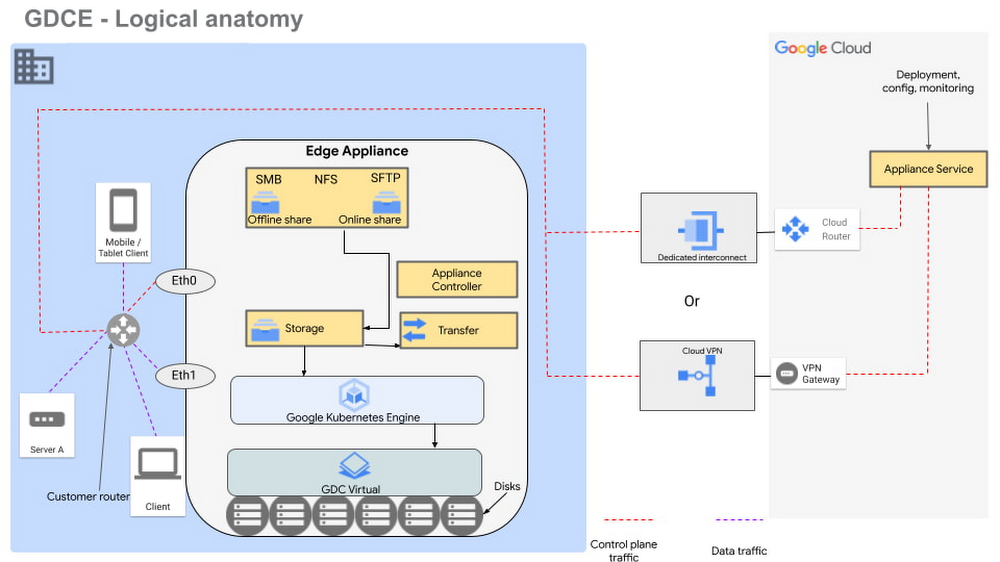
Figure 1 – Logical design of Google Distributed Cloud Edge Appliance
There are two NFS shares on each appliance; one is offline, meaning it does not transfer data to Google Cloud, and the other is online, meaning data saved to that share is synced to Cloud Storage on Google Cloud for further processing. The appliance supports Server Message Block (SMB) and Secure File Transfer Protocols (SFTP) for communication.
Each Google Distributed Cloud Edge Appliance runs Google Distributed Cloud Virtual, enabling you to build a single-node Kubernetes cluster with access to the underlying file system of the appliance. This allows you to build containerized applications on the underlying appliance hardware to address use cases in the following verticals.
Vertical use cases
Now that you understand how Google Cloud Edge Appliance is configured, let’s consider some of the industry use cases where it can provide unique value.
Manufacturing
In the manufacturing industry, quality control and safety is a crucial factor. Businesses need to ensure products are manufactured to the highest standards to remain competitive in their markets, to retain customers, and to keep factory workers safe. To do this, manufacturers need real-time data about the products being manufactured on the production lines, ensuring quality control and gaining a real-time view of where people are on the factory floor.
In manufacturing environments, Google Distributed Cloud Edge Appliance can be used to detect hazards or manufacturing defects in real-time. Figure 1 is a reference architecture for a hazard detection solution running off a Google Distributed Cloud Edge Appliance on a factory floor.
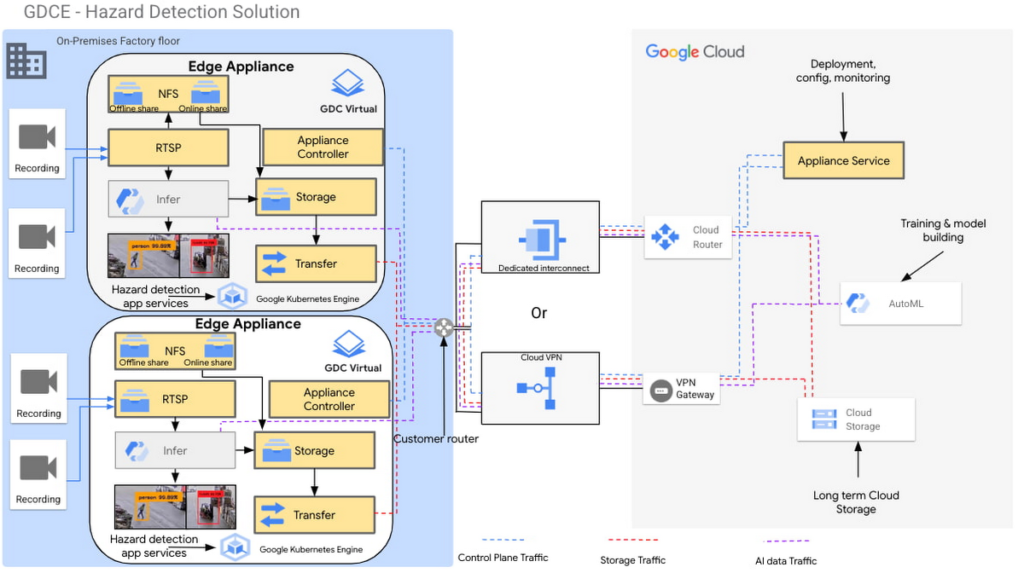
Figure 2 – Hazard detection architecture using Google Distributed Cloud Edge Appliance
In this architecture, cameras on the factory floor stream live video into the Google Distributed Cloud Edge Appliance. Depending on the number of cameras and appliances, cameras could be split or mapped to different appliances. This architecture makes it possible to initially transfer video data to Google Cloud using an online NFS share. Once in Google Cloud, you can use AutoML to train and build models that can be used as part of the hazard detection solution.
With these trained models, the cameras can stream video data into the appliance using the real-time streaming protocol (RTSP). You can then use AutoML inference to analyze the real-time video streaming data.
For example, in this reference architecture, if an individual comes too close to the fork lift, a function is triggered by the microservices running on the edge appliance that pushes a notification either to a messaging service, or to an enterprise resource planning tool. This alerts factory managers to factory floor hazards in real time so they can take corrective action.
You can also review messages and videos later on for preventive planning purposes, or push streamed videos to Cloud Storage for archive, to use the appliance’s storage space more efficiently.
Data transfers to Google Cloud can be done over Google Cloud Dedicated Interconnect, or VPN between the region and your site. This connectivity also allows you to send the appliance’s control-plane network traffic to the region.
You could also use the reference architecture in figure 2 for a product anomaly detection solution running off a Google Distributed Cloud Edge Appliance on a factory floor or manufacturing line. In this instance, machine learning models are trained to detect anomalies on finished products before final packaging.
Retail
In the retail industry, the Google Distributed Cloud Edge Appliance reference architecture in Figure 2 enables a number of transformative capabilities for retail operations, including:
- contactless checkout
- product scans
- mobile-scan-bag
- cashierless checkout
- unattended retail shops
- visual check-out monitoring
It does all this within a retailer’s facilities with the low latency and high throughput you need to process data locally, so you can obtain actionable insights from your data.
Or, you could use Google Distributed Cloud Edge Appliance at the edge to overhaul store management operations, for example, monitoring store occupancy, queue depth and wait times, detecting slips and falls and out-of-stock items, or monitoring inventory compliance.
Automotive
Advanced Driver Assistance Systems (ADAS) are becoming standard in modern automobiles. To successfully build and roll out continued improvements around ADAS, the automotive industry continues to run extensive tests on ADAS systems that are built into the vehicles they manufacture. Automotive companies can use Google Distributed Cloud Edge Appliance to modernize and transform how they collect data for the ADAS systems they’re developing. For example, test vehicles contain several different sensors that generate data, which can be quickly offloaded to an in-vehicle edge appliance.
Then, within the appliance, you can deploy containerized workloads to transform sensor data, infer videos and images and detect events. This alleviates the need for operators to label all events and allows development teams to quickly gather insights from the tests.
If you want to focus on a subset of information, you can transfer specific data or the entire data payload into Transfer Appliances when vehicles return to the development center. All these systems, i.e., transfer appliances and edge appliances, work in tandem to reduce local system administration and operational costs through a cloud-based control plane.
This approach allows you to deploy, track, monitor and configure services that are running in data centers or at edge locations from the cloud. From the factories, the data can be moved offline or online into Google Cloud where you can use different storage classes and processing capabilities to further process or store the data. You can also deploy newly trained models and business rules back to the edge appliances. In all this, data transfers between the cloud and the appliance are performed using end-to-end encryption, to give you control over your data.
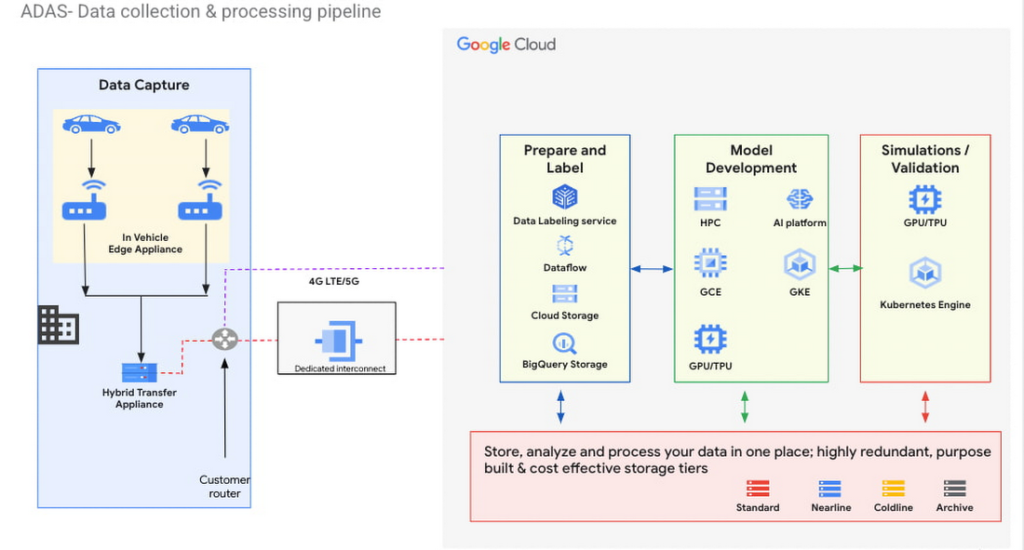
Figure 3 – ADAS implementation with a Google Distributed Cloud Edge Appliance
The reference architecture in Figure 3 shows an ADAS implementation where Google Distributed Cloud Edge Appliance is being used to gather, process and transform data at the edge in the automotive industry. It could also be applied to data capture and processing use cases in manned and unmanned vehicles. Notice how the Distributed Edge Appliance extends to the cloud by sending data there, or using other cloud-based services.
We’re just getting started
These are just a few of the use cases where organizations in the manufacturing, retail and automotive industries are using Google Distributed Cloud Edge Appliance with modern and containerized applications that are powered by Google Cloud. If you’re interested in bringing the power of Google Cloud to the edge using Google Distributed Cloud Edge Appliances to transform your business, reach out to us or any of our accredited partners.
More Relevant Stories for Your Company

State of DevOps 2018: Strategies for a New Economy
According to the new Accelerate: State of DevOps 2018: Strategies for a New Economy report, elite DevOps performers have more frequent code deployments, faster lead times, lower change failure rates, and far quicker incident recovery times. And that’s just the beginning. This year’s report reflects a fundamental industry change in

How Barilla Created a Social Media Style App to Improve Efficiency
Google Cloud Results Replaced conflicting, time-consuming paper logs with a near real-time, transparent appScaled rapidly and easily to accommodate new teams thanks to Google App EngineEnables photographic and video communication to replace confusing textNew factory solution rolled out in just 15 days In 1877, Pietro Barilla set up a small

How The New York Times Increased Speed of Delivery by Using Kubernetes
When New York Times decided a few years ago to move out of its data centers, its first deployments on the public cloud were smaller and less critical applications that were being managed on virtual machines. "We started building more and more tools, and at some point, we realized that

Rubin Observatory Leverages Google Cloud to Power Astronomical Research
This week, the Vera C. Rubin Observatory is launching the first preview of its new Rubin Science Platform (RSP) for an initial cohort of astronomers. The observatory, which is located in Chile but managed by the U.S. National Science Foundation’s NOIRLab in Tucson, AZ and SLAC in California, is jointly funded by the NSF and the U.S. Department
