





Google Cloud Named Leader of AI Infrastructure: Forrester Research

4403
Of your peers have already read this article.
3:00 Minutes
The most insightful time you'll spend today!
Forrester Research has named Google Cloud a Leader in The Forrester Wave™: AI Infrastructure, Q4 2021 report authored by Mike Gualtieri and Tracy Woo. In the report, Forrester evaluated dimensions of AI architecture, training, inference and management against a set of pre-defined criteria. Forrester’s analysis and recognition gives customers the confidence they need to make important platform choices that will have lasting business impact.
Google received the highest possible score in 16 Forrester Wave evaluation criteria: architecture design, architecture components, training software, training data, training throughput, training latency, inferencing throughput, inferencing latency, management operations, management external, deployment efficiency, execution roadmap, innovation roadmap, partner ecosystem, commercial model, and number of customers.
We believe that Google’s vision to be a unified data and AI solution provider for the end-to-end data science experience is recognized by Forrester, through high scores in the areas of architecture and innovation. We are focused on building the most robust yet cohesive experience to enable our customers to leverage the best of Google every step of the way. Here are four key areas where Google excels, among the many highlighted in this report.
AI Infrastructure: Leverage the building blocks of innovation
When an organization chooses to run its business on Google Cloud, it benefits from innovative infrastructure available globally. Google offers users a rich set of building blocks such as Deep Learning VMs and containers, the latest GPUs/TPUs and a marketplace of curated ISV offerings to help architect your own custom software stack on VMs and/or Google Kubernetes Engine (GKE).
Google provides a range of GPU & TPU accelerators for various use cases, including high performance training, low cost inferencing and large-scale accelerated data processing. Google is the only public cloud provider to offer up to 16 NVIDIA A100 GPUs in a single VM, making it possible to train very large AI models on a single node. Users can start with one NVIDIA A100 GPU and scale to 16 GPUs without configuring multiple VMs for single-node ML training. Google also provides TPU pods for large-scale AI research with PyTorch, TensorFlow, and JAX. The new fourth generation TPU pods deliver exaflop-scale peak performance with leading results in recent MLPerf benchmarks which included a 480 billion parameter language model.
Google Kubernetes Engine provides the most advanced Kubernetes services with unique capabilities like Autopilot, highly automated cluster version upgrades, and cluster backup/restore. GKE is a good choice for a scalable multi-node bespoke platform for training, inference and Kubeflow pipelines, given its support for 15,000 nodes per cluster, auto-provisioning, auto-scaling and various machine types (e.g. CPU, GPU, TPU and on-demand, spot). ML workloads also benefit from GKE’s support for dynamic scheduling, orchestrated maintenance, high availability, job API, customizability, fault tolerance and ML frameworks. When a company’s footprint grows to a fleet of GKE clusters, its data teams can leverage Anthos Config Management to enforce consistent configurations and security policy compliance.
Comprehensive MLOps: Build models faster and more easily without skimping on governance
Google’s fully managed Vertex AI platform provides services for ML lifecycle management, from data ingestion and preparation all the way up to model deployment, monitoring, and management. Vertex AI requires nearly 80% fewer lines of code to train a model versus competitive platforms1, enabling data scientists and ML engineers across all levels of expertise to implement Machine Learning Operations (MLOps) so they can efficiently build and manage ML projects throughout the entire development lifecycle.
Vertex AI Workbench provides data scientists with a single environment for the entire data-to-ML workflow, enabling data scientists to build and train models 5x faster than traditional notebooks. This is enabled by integrations across data services (like Dataproc, BigQuery, Dataplex, and Looker), which significantly reduce context switching. Users are also able to access NVIDIA GPUs, modify hardware on the fly, and set up idle shutdown to optimize infrastructure costs.
Organizations can then build and deploy models built on any framework (including TensorFlow, PyTorch, Scikit learn or XGBoost) with Vertex AI, with built-in tooling to track a model’s performance. Vertex Training also provides various approaches for developing large models including Reduction Server to optimize bandwidth and latency of multi-node distributed training on NVIDIA GPUs for synchronous data parallel algorithms. Vertex AI Prediction is serverless, and performs automatic provisioning and deprovisioning of nodes behind the scenes to provide low latency online predictions. It also provides the capability to split traffic between multiple models behind an endpoint. Models trained in Vertex AI can also be exported to be deployed in private or other public clouds.Google’s strengths in its current offering are in architecture, training, data throughput, and latency. Its sweet spot is in its product offering, Vertex AI, which has core AI compute capabilities and MLOps services for end-to-end AI lifecycle management.
The Forrester Wave:™ AI Infrastructure, Q4 2021
In addition to building models, it is important to deploy tools for governance, security, and auditability. These tools are crucial for compliance in regulated industries, and they help teams to protect data, understand why given models fail, and determine how models can be improved.
For orchestration and auditability, Vertex Pipelines and Vertex ML Metadata tracks the inputs and outputs of an ML pipeline and the lineage of artifacts. Once models are in production, Vertex AI Model Monitoring supports feature skew and drift detection, alerting data scientists. These capabilities speed up debugging and create the visibility required for regulatory compliance and good data hygiene in general.For explainability, Vertex Explainable AI helps teams understand their model’s outputs for classification and regression tasks. Vertex AI tells how much each feature in the data contributed to the predicted result. Data teams can then use this information to verify that the model is behaving as expected, recognize bias in the model, and get ideas for ways to improve the model and training data.
These services together aim to simplify MLOps for data scientists and ML engineers, so that businesses can accelerate time to value for ML initiatives.
Security: Protect data while keeping ML pipelines flowing
The Google stack builds security through progressive layers that deliver defense in depth. To accomplish data protection, authentication, authorization and non-repudiation, we have measures such as boot-level signature and chain-of-trust validation.
Ubiquitous data encryption delivers unified control over data at-rest, in-use, and in-transit, with keys that are held by customers themselves.
We offer options to run in fully encrypted confidential environments utilizing managed Hadoop or Spark with Confidential Dataproc or Confidential VMs.
Partner Ecosystem: Work with world-class AI specialists
Google works with certified partners globally to help our customers design, implement and manage complex AI systems. We have a growing list of partners with Machine Learning specializations on Google who have demonstrated customer success across industries, including deep partnerships with the largest Global System Integrators. The Google Cloud Marketplace also provides a list of technology partners who allow enterprises to deploy machine learning applications on Google’s AI infrastructure.
Our dedication to being your partner of choice for ML Needs
Leading organizations like OTOY, Allen Institute for AI and DeepMind (an Alphabet subsidiary) choose Google for ML, and enterprises like Twitter, Wayfair and The Home Depot shared more about their partnership with Google in their recent sessions at Google Next 2021.
Establishing well-tuned and appropriately managed ML systems has historically been challenging, even for highly skilled data scientists with sophisticated systems. With the key pillars of Google’s investments above, organizations can build, deploy, and scale ML models faster, with pre-trained and custom tooling, within a unified AI platform.
We look forward to continuing to innovate and to helping customers on their digital transformation journey. To download the full report, click here. Get started on Vertex AI, learn what’s upcoming with infrastructure for AI and ML at Google here, and talk with our sales team.
WayFair and Google Cloud Get Together to Raise the Bar on World-class Experience!

3016
Of your peers have already read this article.
2:00 Minutes
The most insightful time you'll spend today!
On Dec 9th and 10th, Wayfair and Google Cloud came together for the inaugural Wayfair-Google Cloud Machine Learning Hackathon. Wayfair firmly believes that hackathons are a great way to fuel a culture of collaboration and experimentation. To fuel Wayfair’s incredible pace of innovation at scale, it’s team of more than 3,000 technologists is constantly experimenting and taking smart risks. It’s test-and-learn culture empowers everyone to think critically and creatively, and take big swings to raise the bar on its world-class experience.
The Wayfair-Google Cloud Machine Learning Hackathon was all about getting Wayfairians excited about and enabled on new technology. More specifically, this event was a contained test environment for Wayfair innovators to validate AI and ML tools in order to understand how to get better insight from their data. The projects worked on during this hackathon will help Wayfair build new use cases that could impact the business and the end customer in new and productive ways. Google Cloud’s focus for this Hackathon was to enable Wayfairains to harness the power of Machine Learning and AI to enable their own goals around continual improvement and relentless customer focus.
Prior to the event, Wayfair Data Scientists and Machine Learning Engineers who signed up and submitted ideas for the Hackathon were invited to optional Google Cloud enablement and training sessions. Google Cloud set up classrooms in Qwiklabs on topics including, but not limited to, BigQuery, Vertex AI, and Natural Language AI, so that all Hackathon participants could try out new technologies and tools in a learning environment. Google Cloud subject matter experts were available to field any questions Wayfairians had about the use cases they were hacking on.
The Hackathon was a hybrid virtual & physical event that hosted 67+ innovators, 49 of which registered for Google Cloud supported ideas. 15 judges from both Google Cloud and Wayfair oversaw the event. The esteemed list of judges included Steven Conine, Wayfair’s Co-Founder and Co-Chairman who has helped pave the way for the development of practical applications of next-generation technologies like augmented reality. The judges measured and evaluated the success of a project based on the following criteria:
- “Wow Factor”: How innovative is the project?
- Impact: How impactful is the project to Wayfair?
- Polish: How complete is the project?
- Presentation Quality: How clear and consistent is the demo?
The theme of the Hackathon was Machine Learning and AI. Teams were able to collaborate with participants globally, either in-person or virtually, and work together on projects in five categories: Relentless Customer Focus, Always Improving, Google’s Choice, People’s Choice, and Hackers’ choice.
At the end of the two days there were winners in all 5 categories. The Google’s Choice award went to “Entity Extraction for Order Matching”. Team “Project Clippy” was named both Hackers’ Choice and the winners of the Relentless Customer Focus category. See below for the results of the 5 categories:
- Relentless Customer Focus and Hackers’ Choice
- Winning Team: Project Clippy
- Hackers: Misha Balyasin, Alex Saad, Leo Smerling, and Gabriele Lanaro
- This project provided a gamified experience to make the process of leaving a product review even more seamless.
- Always Improving
- Winning Team: Customer Causal MetaLeaners
- Hackers: Colin Gray, Irene Wang, Huy Vo Tran, Wenhao Xu, and Santiago Velez Ferro
- Team Customer Causal MetaLeaners worked to build lightweight procedure(s) for computationally distributed, multi-target, customized loss functions to make causal meta-learners more applicable to real-world Wayfair problems.
- Google’s Choice Award:
- Winning Team: Entity Extraction for Order Matching
- Hackers: Roger Bock, Bradley West, Sina Moeini, and Jonathan de Melker Worms
- This team built out a solution to use text models to extract and identify the products that customers purchased from user reviews.
- People’s Choice:
- Winning Team: KNN and ANN on Vertex AI
- Hackers: Santosh Jhingade, Ashrith Marpaka, Nikhil Bhaip, Adam Schulze, and Brandon Sanders
- This team used Vertex AI to expand the impact they can have on suppliers and customers by providing accurate and real-time information of products that match either description or image.
Wayfair leaders reflected on the two days and shared their input. Matt Ferrari, Head of Ad Tech, Customer Intelligence, and Machine Learning; Engineering and Product at Wayfair said, “Wayfair has a lot of vendors, but very few strategic partners, and Google is that. Our Partner.” “Thank you all for the participation! I’m grateful to Google, and the many others for helping lead a successful event.”
Wayfair partners with Google Cloud to optimize performance and resiliency, support scaling data-driven decisions, and Increase employee productivity. “Our category is ripe for innovation, and our partnership with Google Cloud helps us ensure that great ideas can come from anywhere by empowering our technologists with cutting-edge products and solutions,” said Ferrari. “We’re proud to partner on efforts like hackathons that align with our team’s eagerness to work on complex, rewarding problems that push the envelope and challenge us to always think big.”
At first Google Cloud won Wayfair over with the speed, reliability and performance of their technology. Hackathons like this one exemplify that what is equally as important is Google Cloud’s willingness to work side-by-side with Wayfair at every level to enable a culture of innovation. Learn more about the Wayfair-Google Cloud partnership here.
3221
Of your peers have already watched this video.
14:30 Minutes
The most insightful time you'll spend today!
How AI Has Helped Enterprises Adapt Quickly to Moments of Change
The pandemic has clearly caused a tremendous amount of rapid change for businesses across industries and regions.
In this session, Michael Baldwin, Head of Product – Financial Services, Google Cloud speaks about ways that artificial intelligence has helped enterprises adapt to those changes.
He will cover trends that Google Cloud experts are witnessing as they work with enterprises and the impact those trends have on key industries.
Some of these include:
- Significant shifts in demand
- Increased cost pressures
- Supply chain uncertainty
- Spikes in customer support cases
- Virtual work for continuity of services
- Accelerated digital transformation
He then demonstrates, with specific examples, how AI can helpful in these moments of change.
Scaling Machine Learning Operations with Vertex AI AutoML and Pipeline

2558
Of your peers have already read this article.
2:30 Minutes
The most insightful time you'll spend today!
When you build a Machine Learning (ML) product, consider at least two MLOps scenarios. First, the model is replaceable, as breakthrough algorithms are introduced in academia or industry. Second, the model itself has to evolve with the data in the changing world.
We can handle both scenarios with the services provided by Vertex AI. For example:
- AutoML capability automatically identifies the best model based on your budget, data, and settings.
- You can easily manage the dataset with Vertex Managed Datasets by creating a new dataset or adding data to an existing dataset.
- You can build an ML pipeline to automate a series of steps that start with importing a dataset and end with deploying a model using Vertex Pipelines.
This blog post shows you how to build this system. You can find the full notebook for reproduction here. Many folks focus on the ML pipeline when it comes to MLOps, but there are more parts to building MLOps as a “system”. In this post, you will see how Google Cloud Storage (GCS) and Google Cloud Functions manage data and handle events in the MLOps system.
Architecture
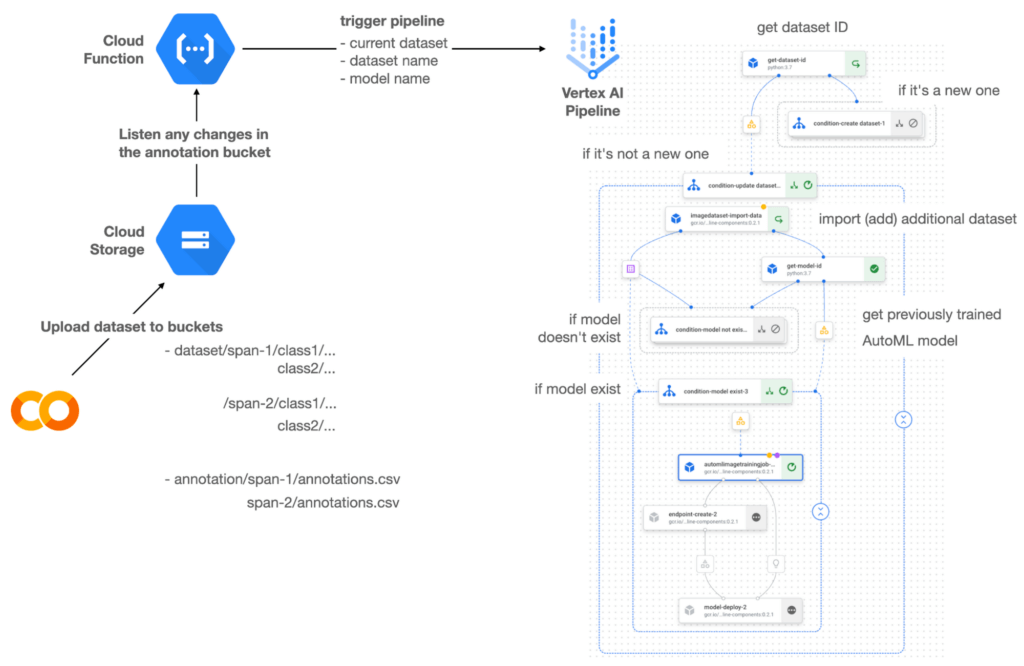

Figure 1 shows the overall architecture presented in this blog. We cover the components and their connection in the context of two common workflows of the MLOps system.
Components
Vertex AI is at the heart of this system, and it leverages Vertex Managed Datasets, AutoML, Predictions, and Pipelines. We can create and manage a dataset as it grows using Vertex Managed Datasets. Vertex AutoML selects the best model without your knowing much about modeling. Vertex Predictions creates an endpoint (RestAPI) to which the client communicates.
It is a simple, fully managed yet somewhat complete end-to-end MLOps workflow moves from a dataset to training a model that gets deployed. This workflow can be programmatically written in Vertex Pipelines. Vertex Pipelines outputs the specification for an ML pipeline allowing you to re-run the pipeline whenever or wherever you want. Specify when and how to trigger the pipeline using Cloud Functions and Cloud Storage.
Cloud Functions is a serverless way to deploy your code in Google Cloud. In this particular project, it triggers the pipeline by listening to changes on the specified Cloud Storage location. Specifically, if a new dataset is added, for example, a new span number is created; the pipeline is triggered to train the dataset, and a new model is deployed.
Workflow
This MLOps system prepares the dataset with either Vertex Dataset’s built-in user interface (UI) or any external tools based on your preference. You can upload the prepared dataset into the designated GCS bucket with a new folder named SPAN-NUMBER. Cloud Functions then detects the changes in the GCS bucket and triggers the Vertex Pipeline to run the jobs from AutoML training to endpoint deployment.
Inside the Vertex Pipeline, it checks if there is an existing dataset created previously. If the dataset is new, Vertex Pipeline creates a new Vertex Dataset by importing the dataset from the GCS location and emits the corresponding Artifact. Otherwise, it adds the additional dataset to the existing Vertex Dataset and emits an artifact.
When the Vertex Pipeline recognizes the dataset as a new one, it trains a new AutoML model and deploys it by creating a new endpoint. If the dataset isn’t new, it tries to retrieve the model ID from Vertex Model and determines whether a new AutoML model or an updated AutoML model is needed. The second branch determines whether the AutoML model has been created. If it hasn’t been created, the second branch creates a new model. Also, when the model is trained, the corresponding component emits the artifact as well.
Directory structure that reflects different distributions
In this project, I have created two subsets of the CIFAR-10 dataset, SPAN-1 and SPAN-2. A more general version of this project can be found here, which shows how to build training and batch evaluation pipelines pipelines. The pipelines can be set up to cooperate so they can evaluate the currently deployed model and trigger the retraining process.
ML Pipeline with Kubeflow Pipelines (KFP)
We chose to use Kubeflow Pipelines to orchestrate the pipeline. There are a few things that I would like to highlight. First, it’s good to know how to make branches with conditional statements in KFP. Second, you need to explore AutoML API specifications to fully leverage AutoML capabilities, such as training a model based on the previously trained one. Last, you also need to find a way to emit artifacts for Vertex Dataset and Vertex Model to consume that Vertex AI can recognize them. Let’s go through these one by one.
Branching strategy
In this project, there are two main conditions and two sub-branches inside the second main branch. The main branches split the pipeline based on a condition if there is an existing Vertex Dataset. The sub-branches are applied in the second main branch, which is selected when there is an exciting Vertex Dataset. It looks up the list of models and decides to train an AutoML model from scratch or a previously trained one.
ML pipelines written in KFP can have conditions with a special syntax of kfp.dsl.Condition. For instance, we can define the branches as follows:
from google_cloud_pipeline_components import aiplatform as gcc_aip


# try to get Vertex Dataset ID
dataset_op = get_dataset_id(...)

with kfp.dsl.Condition(name="create dataset",
                       dataset_op.outputs['Output'] == 'None'):
    # Create Vertex Dataset, train AutoML from scratch, deploy model

with kfp.dsl.Condition(name="update dataset",
                       dataset_op.outputs['Output'] != 'None'):
    # Update existing Vertex Dataset
    ...

    # try to get Vertex Model ID
    model_op = get_model_id(...)

    with kfp.dsl.Condition(name='model not exist',
                           model_op.outputs['Output'] == 'None'):
    # Create Vertex Dataset, train AutoML from scratch, deploy model

    with kfp.dsl.Condition(name='model exist',
                           model_op.outputs['Output'] != 'None'):
        # Create Vertex Dataset, train AutoML based on trained one, deploy model
get_dataset_id and get_model_id are custom KFP components used to determine if there is an existing Vertex Dataset and Vertex Model respectively. Both return “None” if a model is found and some other value if a model isn’t found. They also emit Vertex AI-aware artifacts. You will see what this means in the next section.
Emit Vertex AI-aware artifacts
Artifacts track the path of each experiment in the ML pipeline and display metadata in the Vertex Pipeline UI. When Vertex AI aware artifacts are released into in the pipeline, Vertex Pipeline UI displays links for its internal services such as Vertex Dataset, so that users can visit a web page for more information.
So how could you write a custom component to generate Vertex AI-aware artifacts? To do this, custom components should have Output[Artifact] in their parameters. Then you need to replace the resourceName of the metadata attribute with a special string format.
The following code example is the actual definition of get_dataset_id used in the previous code snippet:
@component(
    packages_to_install=["google-cloud-aiplatform",
                         "google-cloud-pipeline-components"]
)
def get_dataset_id(project_id: str,
                     location: str,
                 dataset_name: str,
                 dataset_path: str,
                      dataset: Output[Artifact]) -> str:
    from google.cloud import aiplatform
    from google.cloud.aiplatform.datasets.image_dataset import ImageDataset
    from google_cloud_pipeline_components.types.artifact_types import VertexDataset


    aiplatform.init(project=project_id, location=location)

    datasets = aiplatform.ImageDataset.list(project=project_id,
                                            location=location,
                                            filter=f'display_name={dataset_name}')

    if len(datasets) > 0:
        dataset.metadata['resourceName'] =
               f'projects/{project_id}/locations/{location}/datasets/{datasets[0].name}'
        return f'projects/{project_id}/locations/{location}/datasets/{datasets[0].name}'
    else:
        return 'None'
As you see, the dataset is defined in the parameters as Output[Artifact]. Even though it appears in the parameter, it is actually emitted automatically. You just need to provide the necessary data as if it is a function variable.
The dataset component retrieves the list of Vertex Dataset by calling the aiplotform.ImageDataset.list API. If the length of it is zero, it simply returns ‘None’. Otherwise, it returns the found resource name of the Vertex Dataset and provides the dataset.metadata[‘resourceName’] with the resource name at the same time. The Vertex AI-aware resource name follows a special string format, which is ‘projects/<project-id>/locations/<location>/<vertex-resource-type>/<resource-name>’.
The <vertex-resource-type>can be anything that points to an internal Vertex AI service. For instance, if you want to specify that the artifact is the Vertex Model, then you should replace <vertex-resource-type> with models. The <resource-name> is the unique ID of the resource, and it can be accessed in the name attribute of the resource found by the aiplatform API. The other custom component, get_model_id, is written in a very similar way as well.
AutoML based on the previous model
You sometimes want to train a new model on top of the previously best model. If that is possible, the new model will probably be much better than the one trained from scratch, because it leverages previously learned knowledge.
Luckily, Vertex AutoML comes with the ability to train a model using a previous model. AutoMLImageTrainingJobRunOp component lets you train a model by simply providing the base_model argument as follows:
training_job_run_op =
gcc_aip.AutoMLImageTrainingJobRunOp(
…,
base_model=model_op.outputs['model'],
…
)
When training a new AutoML model from scratch, you pass ‘None‘ in the base_model argument, and it is the default value. However, you can set it with a VertexModel artifact, and the component will trigger an AutoML training job based on the other model.
One thing to be careful of is that VertexModel artifacts can’t be constructed in a typical way of Python programming That means you can’t create an instance of VertexModel artifact by setting the id found in the Vertex Model dashboard. The only way you can create one is to set the metadata[‘resourceName’] parameters properly. The same rule applies to other Vertex AI-related artifacts such as VertexDataset. You can see how the VertexDataset artifact is constructed properly to get an existing Vertex Dataset to import additional data into it. See the full notebook of this project here.
Cost
You can reproduce the same result from this project with the free $300 credit when you create a new GCP account.
At the time of this blog post, Vertex Pipelines costs about $0.03/run, and the type of underlying VM for each pipeline component is e2-standard-4, which costs about $0.134/hour. Vertex AutoML training costs about $3.465/hour for image classification. GCS holds the actual data, which costs about $2.40/month for 100GiB capacity, and Vertex Dataset is free.
To simulate two different branches, the entire experiment took about one to two hours, and the total cost for this project is approximately $16.59. Please find more detailed pricing information about Vertex AI here.
Conclusion
Many people underestimate the capability of AutoML, but it is a great alternative for app and service developers who have little ML background. Vertex AI is a great platform that provides AutoML as well as Pipeline features to automate the ML workflow. In this article, I have demonstrated how to set up and run a basic MLOps workflow, from data injection to training a model based on the previously-achieved best one, to deploying the model to a Vertex AI platform. With this, we can let our ML model automatically adapt to the changes in a new dataset. What’s left for you to implement is to integrate a model monitoring system to detect data/model drift. One example is found here.
Digital Maturity in Higher Ed Tied to Improvements in Students’ Journey: Study

5139
Of your peers have already read this article.
3:00 Minutes
The most insightful time you'll spend today!
Why Higher Ed Needs to Go All-in on Digital
In the wake of the COVID-19 pandemic, the majority of students within the 18-24-year-old demographic now expect hybrid learning environments–even once we are beyond the pandemic. And a vast number of adult learners are seeking options that accommodate their work and family lives now that it’s clear that effective learning can indeed occur virtually. Implementing cloud technologies and achieving digital maturity within higher education will enable institutions to be innovative and responsive to evolving student preferences, while being prepared for future disruptions.
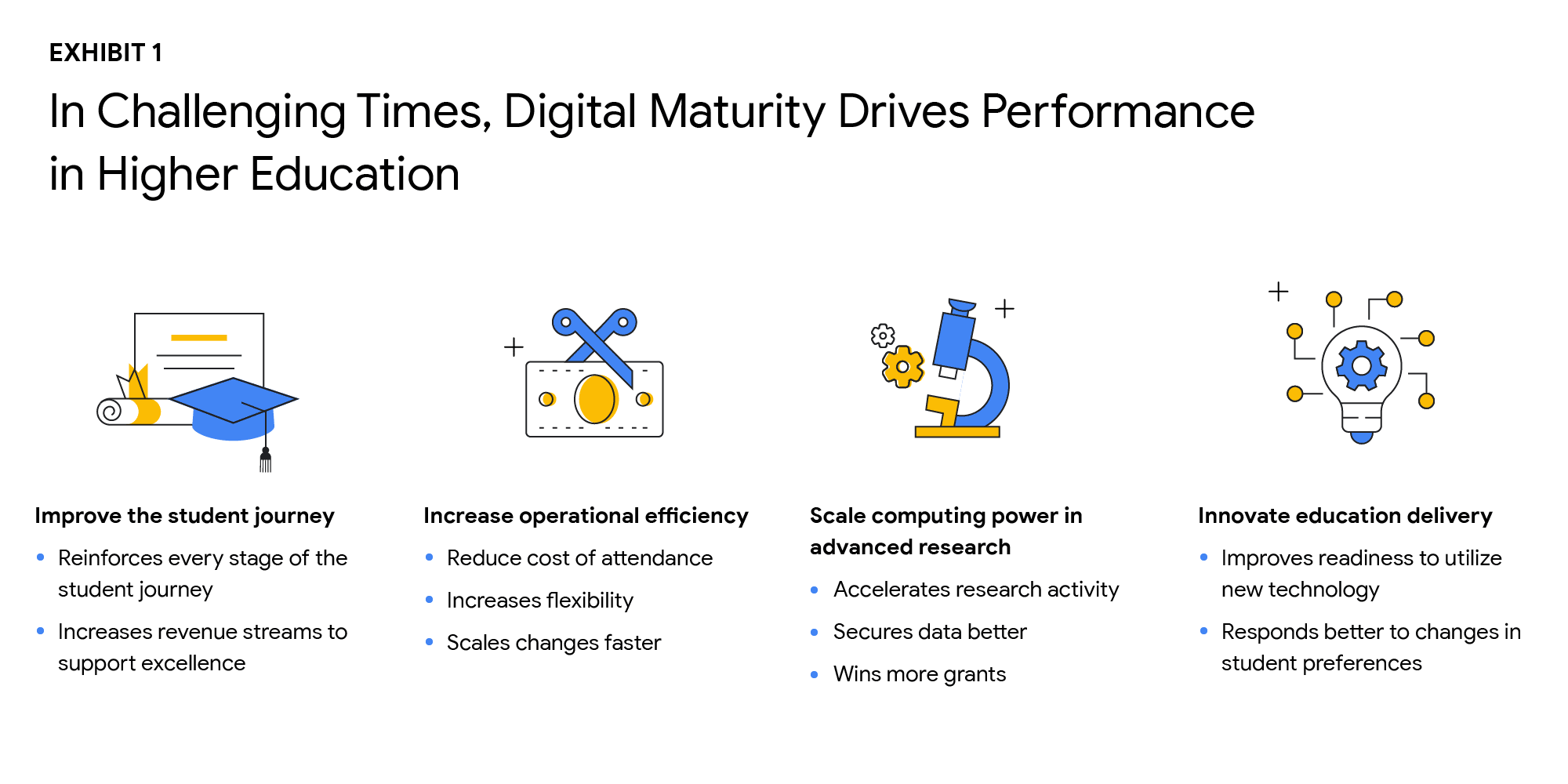
The state of digital maturity
In February and March 2021, Boston Consulting Group (BCG), in partnership with Google, surveyed U.S. higher education leaders on their views of the state of digital maturity in the higher education sector. This survey found that institutional and technology leaders strongly agreed that moving legacy IT systems to the cloud, centralizing and integrating data, and increasing the use of advanced analytics is necessary to make a successful digital transformation, and ultimately achieve digital maturity.
But what is digital maturity? Digital maturity—a measure of an organization’s ability to create value through digital delivery—focuses on three areas of technological advancement that drive large-scale innovation:
- Using cloud infrastructure
- Expanding access to data
- Using that data to improve processes through advanced analytics, such as Artificial Intelligence and Machine Learning (AI/ML)
Although university leaders agree on prioritizing digital maturity, more than 55% said they considered their schools to be “digital performers” or “digital leaders.” However, only 25% of tech leaders at these universities stated that their schools regularly use data analytics. As with corporations and governments, higher education institutions face barriers to technological innovation, such as:
- Competing priorities to meet step-change goals and decentralized decision making
- Budget constraints
- Cultural resistance to change
- Tech staff skillset gaps
Still, leaders understand that the way to overcome institutional inertia is with a strong, goal-oriented vision of what is best for the institution overall. Although only a handful of schools have reached digital maturity as we define it, others can learn a great deal from their examples. Here are the top takeaways from higher education leaders who successfully transformed their institutions:
Digital solutions can improve the student journey in many ways
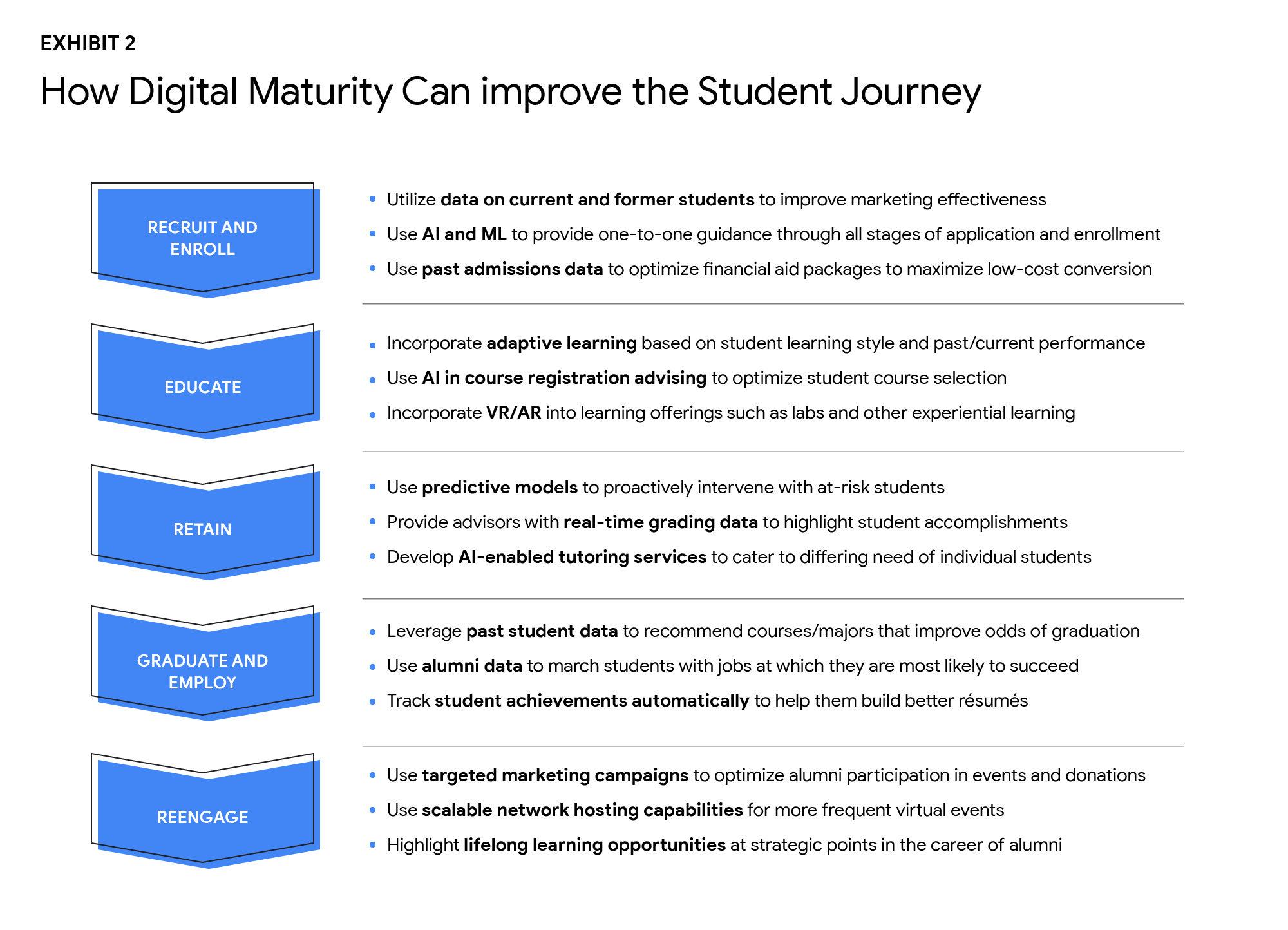
As digital capabilities hold the key to dealing effectively with declining enrollment and rising costs, higher ed leaders identified four goals that are critical to improving performance:
- Improve the student journey
- Increase operational efficiency
- Scale computing power in advanced research
- Innovate education delivery
The research found that technology investments can help enhance the student journey in the recruiting and retention of students, improving digital education delivery, government funding, and donations from alumni. Digital maturity can make institutions more agile and efficient in delivering education that aligns with the changing societal norms, evolving student preferences, and future disruptions. Survey participants shared that they plan to increase the use of the cloud by more than 50% over the next three years. By shifting legacy IT systems to the cloud, institutions can increase scalability, lower the cost of ownership, and improve operational agility, while offering a more secure, long-term data storage solution.
Cloud-native software-as-a-service (SaaS) solutions provide an excellent platform for centralizing data. However, institutions that attempt to “lift and shift” their legacy systems to the cloud may encounter challenges to achieving measurable improvements in data integration and cost reduction. Higher ed leaders must realize that centralizing data and transitioning to the cloud do not happen simultaneously.
Leaders who are able to articulate a strong vision and commitment will experience a more successful technology transformation. By linking their vision to specific needs, such as more effective recruiting, leaders will find their technology investments will have a more substantial return. University presidents should base their decisions about which systems to move, when, and how on desired performance outcomes.
Big visions become a reality with small steps. Small pilot projects are an excellent way to start the journey toward digital maturity. Small steps toward a significant transformation can reduce resistance to change, build positive momentum, and produce better student outcomes. Read the full report here. If you’d like to talk to a Google Cloud expert, get in touch.
Enhance Dev Workflows with Duet AI’s AI-Powered Support

1193
Of your peers have already read this article.
3:00 Minutes
The most insightful time you'll spend today!
Last week we announced the private preview of Duet AI for Google Cloud, an always-on AI collaborator that uses generative AI to provide help to developers and cloud users. This article gives you a detailed look at Duet AI for developers, showing how Duet AI can help provide developers with real-time code suggestions, chat assistance, and enterprise-focused customization. You can sign-up here to join our waitlist for Google Cloud’s AI trusted tester program.
We believe that addressing these use cases with large language models (LLMs) will usher in a major leap in productivity in enterprise development. Duet AI uses Codey, a family of code models built on PaLM 2.
Developers continuously seek ways to improve their productivity and, over the past few decades, these efforts have resulted in massive productivity leaps due to technological changes. From advanced debuggers and online developer communities, to modern IDEs/notebooks and cloud computing, each advance brought massive changes in productivity. Despite these improvements, developers still face numerous challenges, some of which are unique to cloud development:
- Disruptive context switching and friction when integrating a new tool or service
- Excessive time spent on repetitive tasks
- Time required to understand a new code base or project
- Large cognitive workload when working on large code bases or complex APIs
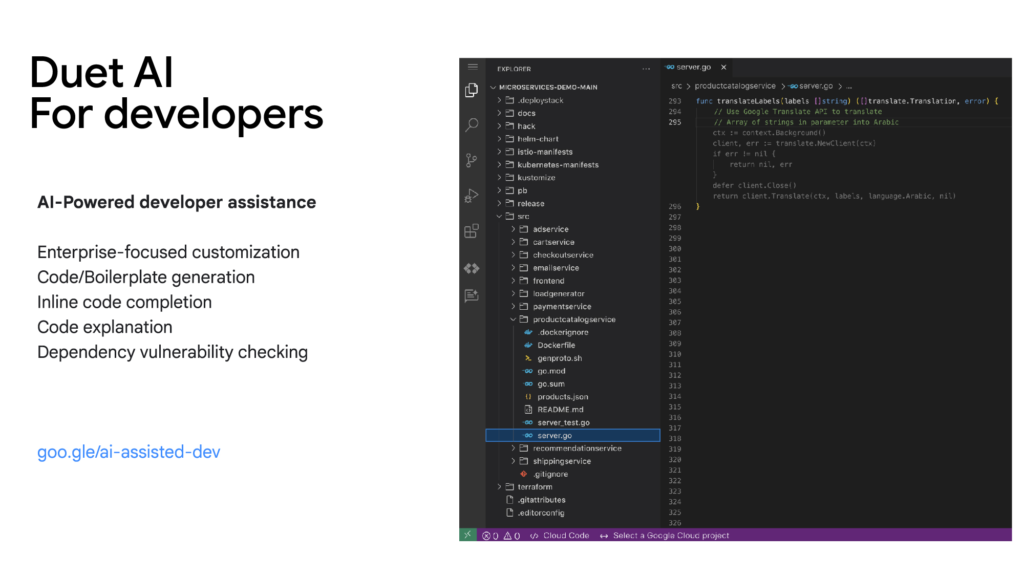
Duet AI for developers focuses on challenges and tasks across the development lifecycle:
Code/Boilerplate Generation — Developers can describe the tasks they have in mind as a comment or function name, such as creating a Cloud Pub/Sub topic. Duet AI will generate a reference implementation that can be reviewed and modified, so developers don’t need to spend time reading through multiple documentation pages.
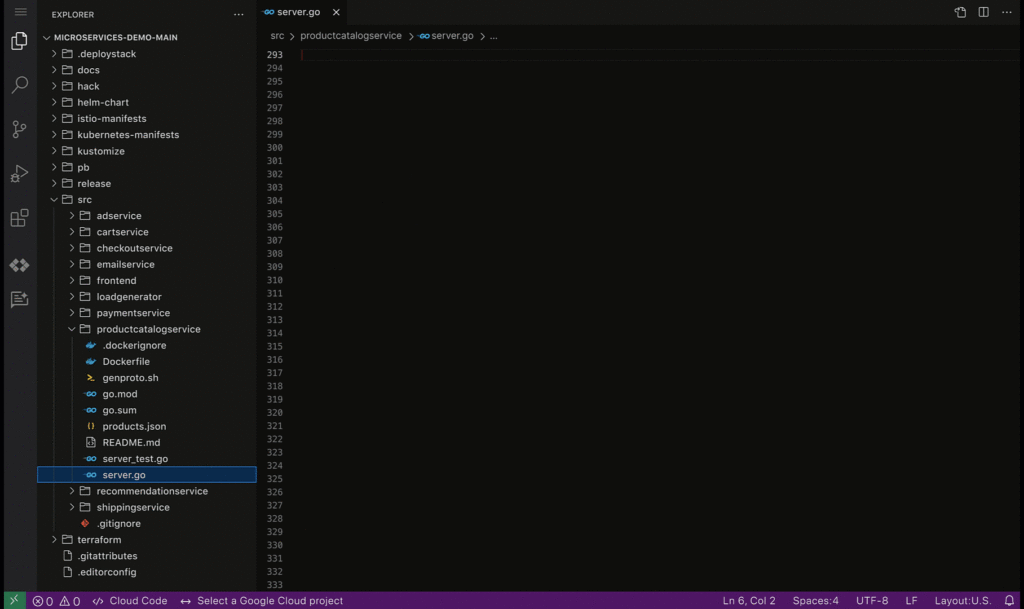
Inline Code Completion — To reduce the time spent on repetitive tasks and minimize the cognitive workload of tasks such as writing repetitive code or retrieving variable names, Duet AI provides intelligent, context-aware code completion, helping reduce the time spent on coding and enhancing the quality of the written code.
Enterprise Customization — Organizations frequently have massive code bases and specific recommended frameworks and best practices, which generic code assistance solutions may not be best positioned to support. With Vertex AI, developers will be able to tune and customize the underlying models and connect them to the Duet AI experience, allowing for assistance optimized to the needs of the organization.
Code Explanation — Developers spend significant time and effort reading and understanding code written by their peers or external contributors. To help assist in this process, Duet AI for code assistance provides an “Explain this code” option available whenever a developer selects their code, allowing them to more quickly understand, map, and navigate unfamiliar code bases.
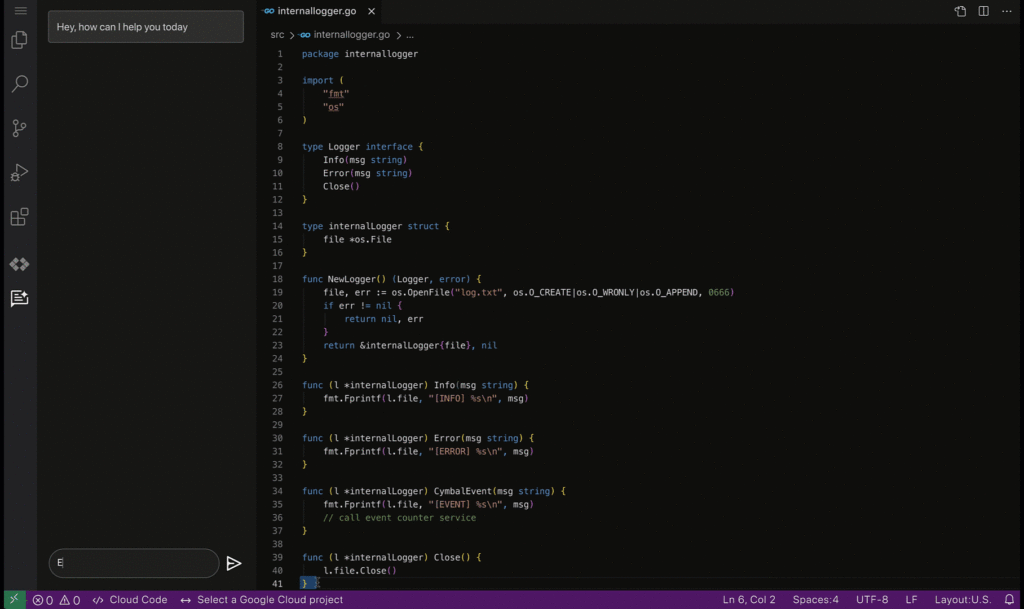
Code security guardrails — Code generated by Duet AI can also be scanned for vulnerable dependencies via Source Protect, helping surface known public vulnerabilities impacting code, along with suggested fixes when available, bringing additional security.
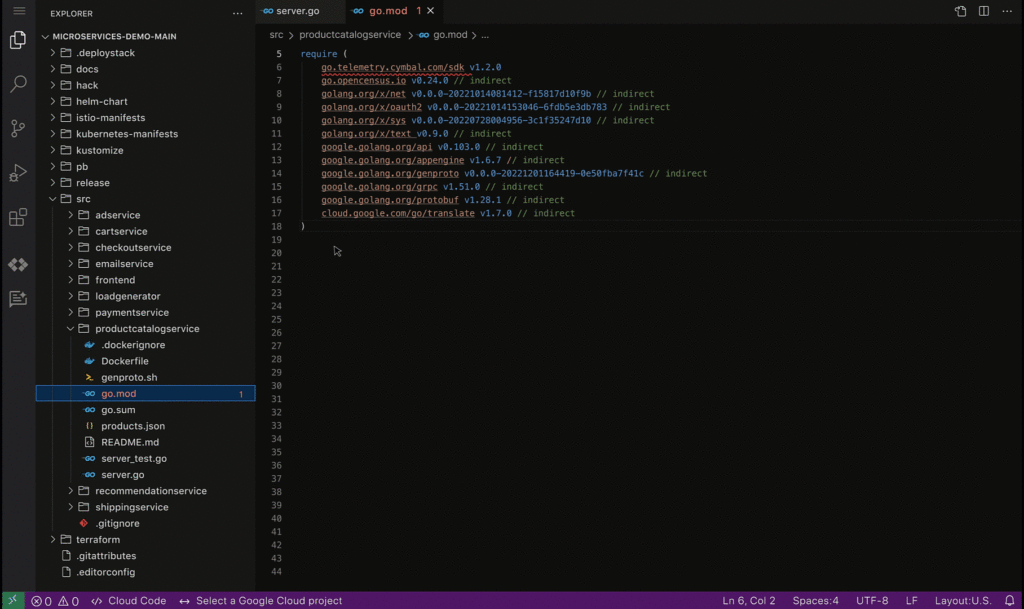
By harnessing the power of AI-driven developer assistance such as the one provided by Duet AI for developers, businesses can unlock unprecedented levels of productivity and efficiency in software development, paving the way for a new era of innovation and growth.
These early features of Duet AI for Google Cloud will be available for limited users and we will be expanding access very soon. Sign up here to join Google Cloud’s AI Trusted Tester Program.
More Relevant Stories for Your Company

New Visual Interface for Google Cloud’s Speech-to-Text API Makes API Easy to Use !
At Google Cloud, we’re committed to making artificial intelligence (AI) accessible to everyone and easier to harness for new use cases. That’s why we’re excited to announce the general availability of our intuitive, new visual user interface for Google Cloud’s Speech-to-Text (STT) API, right in Google Cloud Console, which makes the API

Latest Features and Updates to Globally Bolster Translation Services
Let’s face it: in the globalized world, which is now more than ever a digital demand world, you need to scale and reach your customers right where they’re at. Translation is a critical piece of that, whether you’re translating a website in multiple languages or releasing a document, a piece

An Expert’s Opinion on What Early-stage Startups Must Know
As lead for analytics and AI solutions at Google Cloud, my team works with startups building on Google Cloud. This puts us in the fortunate position to learn from founders and engineers about how early-stage startups’ investments can either constrain them or position them for success, even at the seed
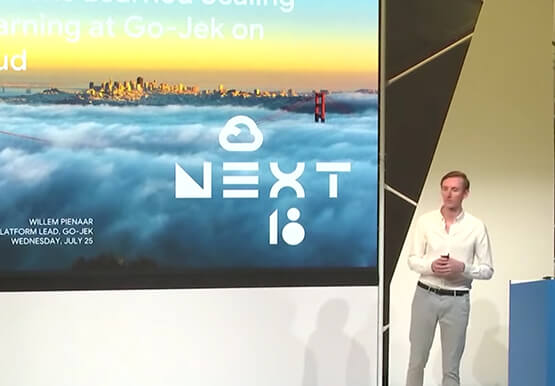
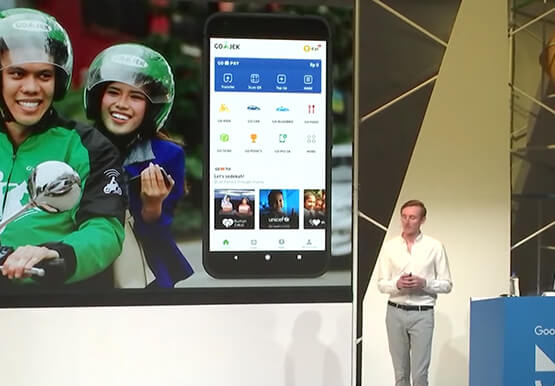

The Strange Phenomenon AI Revealed at Ride-Hailing Company Go-Jek
Go-Jek, Indonesia’s first billion-dollar startup, has seen an incredible amount of growth in both users and data over the past two years. Many of the ride-hailing company's services are backed by machine learning models hosted on Google Cloud Platform. Models range from driver allocation, to dynamic surge pricing, to food
