





Know the Leaders of Google Cloud Public Sector Community

5021
Of your peers have already read this article.
1:30 Minutes
The most insightful time you'll spend today!
At Google Cloud, being a strategic partner is part of our DNA. Whether it’s listening closely to our customers, helping to build team skills for innovation or simply being there (since we know the cloud is 24/7), we get excited about working hands-on with customers to deliver new solutions.
As we look to solve decades-old challenges with new technologies in workforce productivity, cybersecurity, and artificial intelligence/machine learning, we know that we are only as good as the people behind the technology. Today, we’re proud to spotlight a few of the inspiring folks behind Google Cloud Public Sector and celebrate their recognition in the industry.
Melissa Adamson, Head of Government Channels at Google Cloud, has been named to the highly respected Women of the Channel list for 2021. This annual list recognizes the unique strengths, leadership and achievements of female leaders in the IT channel. The women honored this year pushed forward with comprehensive business plans, marketing initiatives and innovative ideas to support their partners and customers.
Melissa was brought on to build the Public Sector channel from scratch. The initial focus was building the channel for the US government team and has since expanded to include education, Canada and Latin America.
Having a career background at both Microsoft and Accenture, Melissa leveraged her extensive professional network to build the organic partnerships needed to accelerate the Public Sector partner ecosystem. This helped her drive two key wins (US Postal Service and PTO) and personally recruit top cloud partners in the industry. Melissa loves card games and is learning a new language.
Todd Schoeder, Director of Global Public Sector Digital Strategy, was recently featured in the “Top 20 Cloud Executives to Watch in 2021” by Wash Exec. Recognized for his work in helping customers navigate through the impact of COVID-19 and developing innovative solutions to meet mission challenges, he says: “New partnerships are required to solve for the problems of the future. Challenges that were previously thought of as insurmountable, too risky or expensive, are actually quite the opposite — as long as you have the right partner that is working in your best interest with you.”
Josh Marcuse, Head of Strategy & Innovation, received his second Wash100 Award for leading a digital transformation team that works to drive the development of public sector solutions, including cyber defense, smart cities, and public health.
Josh has launched services to support collaborative team operations including Workspace for Government and an artificial intelligence-based customer service platform to support remote work needs. His work also includes leading Google Cloud’s partnerships with organizations to improve data sharing in the public health community, contact tracing activities, and supporting research efforts across national laboratories.
Like Melissa, Josh was brought on to build a new team dedicated to strategy and innovation. This team’s purpose is to bring an intense focus to public sector mission outcomes and the public servants who own them. Josh spent a decade pushing digital modernization and workforce transformation at the U.S. Department of Defense, and co-founded the Federal Innovation Council at the Partnership for Public Service, and now brings that domain expertise to supporting government workers who are driving digital transformation.
Join us in celebrating these folks for their leadership and contributions!
Five Ways Cloud Computing Helps Companies Optimize Operations and Lower IT Costs

4810
Of your peers have already read this article.
1:30 Minutes
The most insightful time you'll spend today!
There is no one way to recover. The past year has seen unprecedented challenges for business across the world, with social distancing and quarantine measures forcing many organizations to quickly adapt to remote working. A new report from BCG Platinion, titled “Finding a New Normal in the Cloud”, points out that while companies have done well to survive so far, the overall business environment is still a tough one with contracted economies and lowered revenues. CIOs have to find the right balance between technological innovation and lowering their cash burn rate.
The report identifies five key ways in which companies can use cloud computing to optimize their operations and reduce overall IT costs by as much as 10%.
1. Go beyond VPN
The BCG Platinion report states that companies need “rapid, efficient, highly scalable, and device agnostic solutions”. Traditionally, when employees had to work offsite, companies provided them with VPNs. But the sheer scale of the COVID-19 pandemic has shown these solutions to be expensive, slow, inconvenient, and hard to manage when entire workforces are working remotely.
Instead, BCG Platinion emphasizes the need for cloud-based solutions such as BeyondCorp Enterprise for more secure, more effective, lower cost remote access at scale. BeyondCorp Enterprise offers customers a zero trust platform for simple and secure access with continuous end-to-end protection that can be used on any device at any time. Deliveroo, a global food delivery company headquartered in the UK, uses BeyondCorp Enterprise to bring the zero trust model to its distributed workforce.
“Having secure access to applications and associated data is critical for our business,” says Vaughn Washington, VP of Engineering at Deliveroo. “With BeyondCorp Enterprise, we manage security at the app level, which removes the need for traditional VPNs and associated risks.”1
With a low cost cloud subscription model, BeyondCorp Enterprise eliminates the need for hardware, operating, and maintenance costs that come with VPN solutions and can also enable organizations to offer protection to the extended workforce at a fraction of the cost. BCG Platinion estimates that solutions like BeyondCorp Enterprise can save companies as much as 50% versus the cost of a traditional VPN.
2. Use SaaS to keep productivity up
With so much of the workforce fragmented due to social distancing measures, the need for seamless, efficient collaboration is greater than ever. According to BCG Platinion, a fully functional Software-as-a-Service productivity solution such as Google Workspace helps to “alleviate the traditional costs and burdens around availability, backup, and maintenance of on-premise collaboration infrastructure.” BCG Platinion analysts estimate that adopting a SaaS solution can lower computing costs for end users by up to 35%.
But working in the cloud does more than lower costs. The BCG Platinion report cites a 2020 study from Forrester that found adopting Google Workspace boosted revenue growth by 1.5%, reduced the need for on-demand tech support by 20%, and cut the risk of data breaches by more than 95%. Over the last year, companies of all sizes have looked on the conditions of the pandemic as an opportunity to change the way they work.
“Airbus has spent the past year thinking about what it actually means to return to work and we’re looking to support greater flexibility with Google Workspace in a leading role,” says Andrew Plunkett, Airbus Vice President Digital Workplace. “In 2020, we held 5.6M Google Meet sessions and we now have more than 70,000 shared Drives where people collaborate. Google Workspace has changed the way people work at Airbus and that will continue as the solution empowers the hybrid work reality.”2
3. Reduce IT overhead and management costs with cloud-first devices
Working in the cloud can be made even more effective with devices specifically designed for the cloud, says the BCG Platinion report. “Cloud-native devices such as Google’s Chromebooks and Chromeboxes are cost-effective, easy to deploy, simple to use, and highly secure,” says BCG Platinion. Additionally, with “thin client” devices, companies can save on hardware costs compared with traditional laptops and desktops.The report suggests that a thin client approach can produce savings of up to 25% in end-user technology and support.
Organizations and businesses of all sizes have found that Chrome OS and devices have greatly enhanced their capacity to work together in even the most challenging circumstances. Chrome OS provides employees with a modern experience and devices that stay fast, have built-in security, deploy quickly, and reduce the total cost of ownership. “Chromebooks are simple-to-use and cost-effective devices that do everything that our staff need them to do, which is mainly accessing Google Workspace online,” says Henry Lewis, Head of Platform for the London Borough of Hackney. “As soon as the Grab and Go Chromebooks were available, they were well used every day.”3
4. Lift and shift for easier transitions
While migrating to the cloud is a priority for many organizations to succeed, it does not have to happen all at once and in the same way. A total cloud migration can be a huge undertaking, involving redesigns of architecture and refactoring of applications. For many organizations, this process can take several months, even years.
But in times like these, CIOs need to make decisions quickly and reduce cash burn as much as possible. When resources are stretched and time is tight, BCG Platinion recommends a “lift-and-shift” approach for minimal disruption. With Google Compute Engine, for example, organizations can simply rehost their existing workloads on virtual machines without transformation. BCG Platinion reports that moving non-critical workloads to the cloud with lift-and-shift approaches can reduce IT spend by as much as 4% in just three months. Additionally, a quick, effective migration paves the way for more advanced IT infrastructure changes, creating effects that ripple long into the future.
5. Make data work for you with the cloud
Data is central to any industry and making the most out of it is more important now than ever before. With business as usual upended by the pandemic, organizations have turned to data for urgent tasks like demand forecasting or predicting supply-chain disruptions. A McKinsey report from last year points out that while many organisations had already started to engage with analytics and AI technologies, their progress was dramatically accelerated by the urgency of the pandemic: “Analytics capabilities that once might have taken these organizations months or years to build came to life in a matter of weeks.”
With the right setup a company can use data to drive efficiencies, respond quickly to its customers and open new markets. But big wins require huge amounts of information and powerful analytics, which means that effective data handling can be very difficult and expensive to do with on-premises architecture.
Moving to a cloud-based infrastructure minimizes infrastructure costs while opening up cutting edge techniques like machine learning for greater insight. The BCG Platinion report found that using a cloud-based data platform was not only cheaper and more efficient for businesses, but could result in a 70% increase in “effectiveness” which it defined as increased sales, lower costs of procured goods, and reduced inventory holding costs. “Moving to cloud provides competitive advantage as you scale innovation, accelerating the creation of new services to keep ahead of the competition,” explains Norbert Faure, Managing Director, Platinion Western Europe at Boston Consulting Group (BCG).
The key mission of any data platform is to make sure that the right people have access to the right information at the right time. Google Cloud helps to unify data across the entire business, increase agility, and innovate faster with a range of products. BigQuery runs complex analytics at infinite scale while helping organizations save up to 34% on the total cost of ownership compared with alternative cloud-based data warehouse solutions.4 Cloud Spanner provides a fully managed relational database that operates at 99.999% availability. Meanwhile, with Vertex AI, businesses can access the same groundbreaking machine learning tools that Google uses itself for unprecedented insight on a unified AI platform. “The whole Google Cloud suite of products accelerates the process of getting established and up and running, so we can perform the ‘bread-and-butter’ work of data science,” says David Herberich, VP, Head of Data at fintech startup Branch.5
Minimize costs today, innovate for tomorrow
As the world recovers from the pandemic, continued success depends on staying nimble and adaptive, argues the BCG Platinion report. Cloud computing can make companies more resilient by helping them to keep costs low, reducing overall IT spend by as much as 10% overall according to BCG Platinion. “For CIOs, cloud migrations can offer important near-term savings and benefits, while also reinvigorating progress toward the long-term goal of digital transformation.“
To learn more, read the full report from BCG Platinion.
1. BeyondCorp Enterprise: Introducing a safer era of computing
2. Building the future of work with Google Workspace
3. Hackney Council: Empowering 4,000 staff to keep serving their community from home
4. The Economic Advantages of Google BigQuery versus Alternative Cloud-based EDW Solutions
5. Fintech startup, Branch makes data analytics easy with BigQuery
Canada’s Climate Scientists Use Google Earth Engine to Observe Foliage Density in Near-real Time

3398
Of your peers have already read this article.
1:30 Minutes
The most insightful time you'll spend today!
Climate scientists face a deluge of environmental data to analyze and interpret from real-time sensors and satellites across the globe. The stakes are as high as our planet’s long-term future, but rapidly changing conditions are already impacting communities through extreme events like floods and wildfires as well as management of everyday resources. In this context, detailed environmental maps are key sources for urgent global issues like food security, water quality, and vegetation levels.
Scientists, researchers, and developers rely on state-of-the-art cloud computing tools like Google Earth Engine (EE) to detect changes, map trends, and quantify differences on the Earth’s surface. EE leverages the compute power of Google Cloud to combine a multi-petabyte catalog of satellite imagery and geospatial datasets with planetary-scale analysis capabilities.
To find out more about how climate scientists address these complex research challenges, I spoke to Dr. Richard Fernandes, Research Scientist at Natural Resources Canada (NRCan). Dr. Fernandes is also a 2022-23 member of the Google Research Innovators Program, which provides technical and professional support to a global cohort of leading researchers. I asked him to describe how cloud computing and machine learning (ML) tools can support climate resilience research and drive awareness about climate sustainability.
Dr. Fernandes, can you give me an overview of your research in climate sciences?
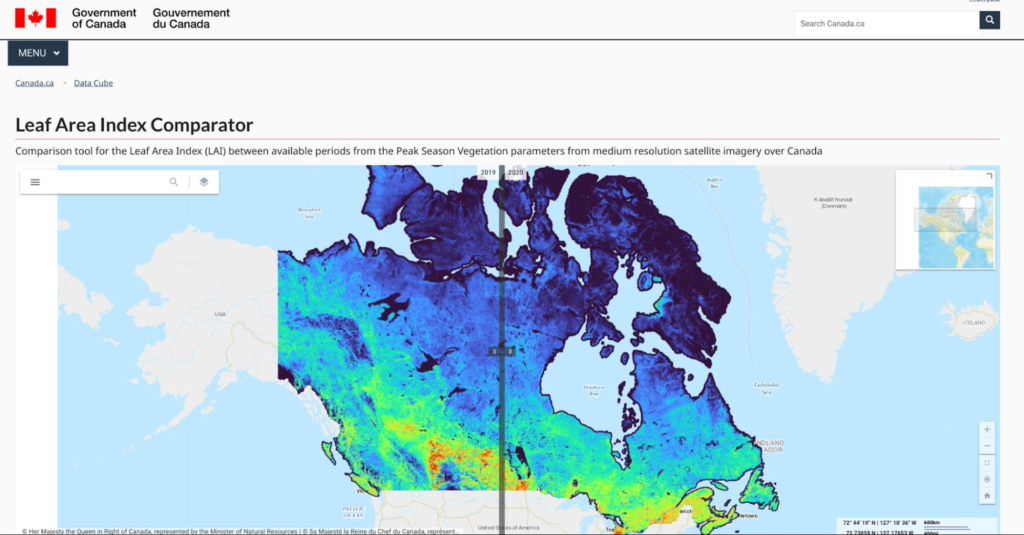
My research focuses on mapping the status and trends of vegetation over Canada. Every month we generate maps of vegetation parameters, such as canopy cover at 20m resolution, to support environmental monitoring and assessment. These maps contribute to global datasets that are used to reduce uncertainty in weather and climate forecasts.
Canada has approximately 10 million square kilometers of land and the annual data volume of these maps is equivalent to streaming HD movies for over 750 hours non-stop. And that’s only the tip of the iceberg: the volume of input data we need to generate those maps is typically 100 times more. Unlike movie streaming services, we have to independently process each input pixel to locate it accurately, screen for clouds (and even the shadows of clouds), and then transform it into a vegetation parameter value like canopy cover using ML algorithms.
The volume of high-resolution data and the amount of compute we need are challenging and ever-increasing. Rather than dedicating servers 24/7 for constant monitoring, we rely on cloud computing and ML. Cloud computing allows us to manage all this data in a useful and accessible way. We have also been able to successfully use the Google Artificial Intelligence (AI) Platform to calibrate new ML models for third-party datasets.
How did you start working with Google Cloud?
I started using EE together with open source APIs for integration with Google Drive about four years ago. With the pandemic my research group has transitioned to using EE, Google Cloud, and Google Drive for both our Canada-wide mapping as well as for R&D activities. In January we developed and released the LEAF toolbox, which builds on EE satellite data to create customizable maps of foliage density in near real-time. We do all of the pixel processing in EE and leverage the ability to integrate our own functions using their APIs. We combine EE with Google Cloud to handle and manage output datasets. Fortunately, EE has most of the input data already at hand so we don’t need to deal with that 100x larger volume.
What impact do you expect LEAF will have now–and down the road?
Both the Canadian federal government and provinces already use our data products as inputs to permafrost, crop status, and water resource models. Agriculture Canada had been using a conventional Geographic Information System (GIS) and approached us to ask how we manage our data. They want to use LEAF to assess how crops are progressing, which impacts local economies and the global food supply. We’re in a pilot with them to apply EE to their crop condition assessments.
Also exciting is that the Province of Alberta is integrating the LEAF toolbox within a system for monitoring the reclamation status of oil and gas wells and mines. They want to know how to rehabilitate sites that were developed for mineral and gas deposits. This is another great use case but many others are possible. The technology itself is cool, but that’s not even the point. ML algorithms are constantly evolving and improving. New ML algorithms use active learning that detects mistakes and makes updates on the fly. The technology will be different in five years — or five months! — so our priority is making these tools accessible and useful now.
Why is state-of-the-art technology for climate research so important?
Scientific research must be validated, transparent, and rigorous to drive the best solutions to our complex and changing ecosystem. Climate action needs greater public awareness, which requires more knowledge, which demands the best data. By democratizing information and decision-making, we can create an ecosystem of openness and public-private partnerships. We can lower the barrier to entry for advanced research and help scientists validate and reproduce their results. Also, scientists don’t want to have to become software engineers for these custom highly specific solutions. They want user-friendly tools that let them focus on their analyses and share their insights with the world. That’s one of the major appeals of the Google Research Innovators Program for me: I want to share LEAF with colleagues and collaborate with other researchers who are using new tools in new ways.
Do you have any parting words about your mission?
We’re so fortunate to have Canadian taxpayers and the Government of Canada funding our work. We have worked with many scientists over the past two decades to develop and validate the algorithms we use, especially Fred Baret and Marie Weiss at INRA France, who have championed the idea of free and open access to algorithms and knowledge, and data.
I really believe in democratic access to information. I like the fact that the terms of service of Google products allows us to offer not only maps but the actual processing system in a free and open manner to everyone. I also like that EE provides a simple-to-use user interface that works on mobile devices. We designed LEAF not just for experts, but for individuals. My mom was able to make maps of a nearby park in real time on her tablet. It is my hope that expanding access to critical environmental information will increase our collective awareness of how our actions impact both near and far places — and make us active in the cause of a sustainable future.
That’s an inspiring note to end on. Thank you for your time!
Thanks for having me!
Click here to learn more about Google’s commitment to renewable energy. Or try the LEAF toolbox for yourself!
Vizrt’s Story of ‘Lift and Shift’ and Delivering Phenomenal Performance with Google Cloud

3223
Of your peers have already read this article.
3:00 Minutes
The most insightful time you'll spend today!
When moving software applications from on-premise hardware to the cloud, it often “just works,” but it’s never guaranteed. This is especially the case for applications that are hardware intensive. This blog post examines what happened when a media company took software for real-time video broadcasts into the cloud. We’ll share how we, Google Cloud, collaborated with media software provider Vizrt to meet the demanding requirements of an eSports broadcaster. Together, we delivered a solution that not only met but exceeded the expected performance from a cloud-based deployment.
Video broadcasting in the cloud
Video broadcasts are a very hardware-intensive workflow. By needing to process and store data streams in near-real-time, broadcasts stress GPU, memory, disk, and CPU. In addition, the performance requirements quickly increase as producers add additional video streams into the mix, such as in this case, an eSports broadcast.
Vizrt’s customer wanted to increase their broadcast production by doubling the amount of camera feeds from 8 to 16, to have a more compelling and elaborate production.
At the heart of the eSports broadcasters’ production was Viz Vectar Plus, Vizrt’s software-based 4K switcher. While the client wanted to move more of its production into the cloud, Viz Vectar Plus was designed initially for on-premise hardware. So, when they tried a straightforward “lift and shift ” to the cloud, it surprised no one that the software didn’t run as well. They turned to Google Cloud and Vizrt to make it run the way they needed it to.
Troubleshooting lift and shift
Initially, we suspected that the issue could be in the design of the cloud deployment, i.e., the configuration of the VM hosting the software. So the focus of our troubleshooting was to find a cloud configuration that 1) made sure the software worked to spec and 2) did so optimally considering costs, robustness, and performance. Furthermore, we wanted to ensure that all components met performance specifications, particularly throughput, IOPS, and network bandwidth, as this was a video media application. Only after we validated the cloud deployment would we ask Vizrt to investigate the code itself. We would:
- Set up a test environment.
- Benchmark the environment.
- Test various configurations.
- Validate that the vendor software was optimally using the configuration.
This high-level methodology is straightforward. However, we approached the details in a particular order, considering we were optimizing for broadcast video. We honed in on the optimal cloud configuration by testing the following elements, prioritized in order of expected impact:
- VM type: The VM type largely dictates the available memory and CPU configurations. However, because this was a VM workflow, we had to pick N1’s. Today, they are the only VM type that can be attached to GPUs, which are practically a requirement for broadcast video.
- Disk type: Video broadcasts require high I/O speeds to handle high-quality video streams. We went from an HDD to a much-faster SSD.
- CPU size: We increased the VM CPU cores from 16 in increments up to 32. Increasing CPU size indeed increased performance, but did not return the level of performance we needed.
- SSD size: We increased the SSD size (and the accompanying higher IOPS and throughput that comes with increasing the size) enabling more simultaneous recordings. Again, this only partially worked.
- Disk count. We noticed read/write problems when the application was reading/writing with a single drive. There are two typical ways to approach this: 1) Separate read/writes tasks among two discs and 2) striping the data streams across discs. Implementing these had improved but marginal improvements in performances.
After our testing, we arrived at the following optimal configuration:
- VM: n1-standard-32 instance w/ 500Gb boot drive
- GPU: 1 T4 GPU
- SSD: 1 persistent disk with 1TB*
* We would later determine that two SSDs for separate read and write operations would be more optimal
This configuration was able to produce between 6 – 12 streams. Compared to the on-premise target of 8 streams, this was about as good but was not the customer’s target of 16. So we would need Vizrt to take the ball from here to optimize the software itself.
Optimizing media applications for cloud
We provided Vizrt our recommended configuration, performance notes, and the following best practices that are generally applicable to cloud-based video workloads:
- Separate read and write operations to two different disks to enable higher performance for both operations.
- A second 1 TB SSD persistent disk can be attached to the VM instance to increase performance.
With this information, Vizrt engineers worked their magic, providing daily patches to test; with each daily iteration the overall solution was found quickly. Not only were they able to meet the broadcaster’s request of 16 feeds, but they were also able to go even further to 44. Over a 5x improvement by optimizing for the cloud!
Teamwork in troubleshooting
Because of the specialized nature of media and entertainment, workflow situations across multiple companies are common as specialized applications hand their work from one to another.
“By working in partnership with Google Cloud we managed to build a system that can scale in ways that probably none of us thought would be possible. This allowed Viz Vectar Plus to run fully in the cloud using NDI and opened up amazing possibilities for making shows,” Dr. Andrew Cross, President R&D, Vizrt Group. “We ended up with great feedback from the customer, who were appreciative of how Google Cloud and Vizrt collaborated on a solution.”
The results speak for themselves: A satisfied customer with over a 5x improvement in results. That’s what we call a good game.
Ubuntu Pro Images Now Available on Google Cloud

4834
Of your peers have already read this article.
2:00 Minutes
The most insightful time you'll spend today!
Today, we’re pleased to announce the general availability of Ubuntu Pro images on Google Cloud, providing customers with an improved Ubuntu experience, expanded security coverage, and integration with critical Google Cloud features. In partnership with Canonical, we’re making it even easier for customers that have fully embraced open source to ensure security and compliance for their most mission-critical and enterprise workloads.
With Ubuntu Pro on Google Cloud, you now have access to features like:
- 10-year lifetime security updates – Canonical backs Ubuntu Pro for 10 years with security updates and a guaranteed upgrade path.
- FIPS & CC-EAL2 certification – Ubuntu Pro includes components that meet requirements from entities like FedRAMP, HIPAA, ISO, and PCI.
- Open-source security coverage – Protect your most important open-source workloads including MongoDB, Apache Kafka, Redis, NGINX, and PostgreSQL.
- Multi-version availability – Pro images are available for the three most popular Ubuntu Server distributions: 16.04 LTS, 18.04 LTS, and 20.04 LTS.
- Kernel Livepatch – Kernel patches are delivered immediately without having to reboot your VMs.
- Optional CIS and DISA STIG profiles – Choose from two leading profiles to harden your environment according to industry benchmarks.
- Cloud-based pricing – Ubuntu Pro does not require a contract, and pricing tracks with the underlying compute cost depending on the instance type.
Extended Security Maintenance (ESM) for Ubuntu 16.04 LTS with Ubuntu Pro
Availability of Ubuntu Pro images is especially important if you’re an Ubuntu 16.04 LTS customer and want extended security maintenance (ESM) for your virtual machines but don’t want to upgrade to Ubuntu 18.04 LTS or Ubuntu 20.04 LTS versions immediately. ESM is included with Ubuntu Pro 16.04. You can move your workloads from Ubuntu 16.04 LTS VM instances to Ubuntu Pro 16.04 instances to continue receiving ESM and all the above-mentioned benefits, without having to test your applications on a new version of the OS.
Gojek has evolved from offering just ride-hailing to a suite of more than 20 services today, serving everyday solutions for millions of users across Southeast Asia.
“We needed more time to comprehensively test and migrate our Ubuntu 16.04 LTS workloads to Ubuntu 20.04 LTS, which would mean stretching beyond the standard maintenance timelines for Ubuntu 16.04 LTS. With Ubuntu Pro on Google Cloud, we now have the ability to postpone this, and in moving our 16.04 workloads to Ubuntu Pro, we benefit from its live kernel patching and improved security coverage for our key open source components.”—Kartik Gupta, Engineering Manager for CI/CD & FinOps at Gojek
“With the launch of Ubuntu Pro on Google Cloud, we build on our joint investments with Google to optimize Ubuntu performance on Google Cloud, and add comprehensive security patching and Long Term Support for another 30,000 open source packages—the widest range of security-maintained open source on the planet,” said Mark Shuttleworth, CEO of Canonical. “As the world moves to open source for everything, Canonical offers the safety net of security maintenance that enterprises count on to unleash their developers.”
Getting started
Getting started with Ubuntu Pro on Google Cloud is simple. You can now purchase these premium images directly from Google Cloud by selecting Ubuntu Pro as the operating system straight from the Google Cloud Console.
To learn more about Ubuntu Pro on Google Cloud, please visit the documentation page and read the announcement from Canonical.
Rebel Foods Improves Accuracy of Forecast Time by 60% by Using Google Cloud

5316
Of your peers have already read this article.
1:30 Minutes
The most insightful time you'll spend today!
Google Cloud Results
- Enables accurate allocation of marketing spend to underserved areas
- Supports expansion into international markets
- Helps ensure accurate forecasting of inventory levels
- Improves accuracy of forecasted delivery times by at least 60%
Operating in India since 2011, Rebel Foods has grown from a brick-and-mortar business that provided wraps to customers to a cloud kitchen that delivers cuisine to about one million consumers per month. “We started with the Faasos food brand and now we have scaled up to 10 brands,” says Soumyadeep Barman, Chief Technology Officer at Rebel Foods. “We have doubled our revenue every year from 2014 until now, and we operate kitchens in 15 cities across India. Each kitchen offers at least seven of our brands to customers.”
Barman attributes Rebel Foods’ success to the fact that it is a full stack company. “We procure, we have our own inventory, we prepare the food, we deliver the food to customers, and we make sure customers are delighted every time they order,” he says.
The rapid emergence and adoption of mobile technologies and services in India gave the business its opportunity to expand quickly. “The boom in applications and the web really got going in India in about 2014,” Barman says. “The subsequent emergence of smart devices and mobile applications opened up new markets, including older people who had not really used a computer until then.”
The business released the first iteration of its mobile application in 2013 on servers in an on-premises data center. “However, we experienced breakages because our infrastructure was not scalable or dependable enough, and we decided to move to another solution,” Barman says.
Google Maps Platform delivers opportunity
In 2014, Rebel Foods decided to move to the cloud and selected Google Cloud because of its stability, reliability, and scalability.
The business also wanted to take advantage of the opportunities Google Maps Platform presented to improve the efficiency and effectiveness of its delivery service. With 175 kitchens delivering to about 900 locations across India, Rebel Foods needs to provide estimated delivery times and meet delivery guarantees, while accounting for all the factors that might affect how quickly a rider can reach a customer’s doorstep.
The business turned to Google Maps Platform Premier Partner Searce for support in leveraging Google Maps Platform APIs to deliver a compelling customer experience and improve its efficiency. “Searce helped us determine the Google Maps Platform APIs we should use across our mobile applications and websites, and how many licenses we needed to conduct activities like calculating estimated delivery time and reviewing order heat maps,” Barman says. “Thanks to the firm’s support, Google Maps Platform APIs were a game changer for us.”
Mapping customer locations
Customers accurately pinpoint their location in a map through functionality made available through the Places API and Geocoding API, in conjunction with the JavaScript API. Drivers use the Directions API to identify the quickest route to customers.
Customers can also track the progress of delivery and estimated time of arrival using an Android or iOS application, or the brand websites.
Deploying Google Maps Platform APIs enabled Rebel Foods to improve by up to 60 percent the accuracy of forecasted delivery times. “Rather than tell a customer we can reach them in, say, 45 minutes, based on previous experience and gut feeling, we can retrieve an accurate traffic scenario and calculate delivery times based on traffic congestion levels and likely average speeds,” Barman says
Allocating budget effectively
Google Maps Platform also allows the business to combine mapping of customers to individual kitchens and to how often customers place orders – and for what value. This enabled the business to understand where to allocate budget for local marketing to stimulate demand in underserved areas.
Google Maps Platform technologies complement Rebel Foods’ use of Google Cloud Platform services such as the BigQuery analytics data warehouse to process data used to forecast inventory levels and provide recommendations to customers based on previous usage and behaviors. The business also runs its key applications in Kubernetes Engine to achieve cost-effective scalability, so it can expand to international markets.
“We are targeting growth into a range of international markets in January 2019, including Australia, the Middle East, and Southeast Asia,” Barman says. “With the user data and experience provided by Google Maps Platform in particular, we are poised for success.”
More Relevant Stories for Your Company

This Chart, from Home Depot, Dramatically Demonstrates the Power of a Cloud Data Warehouse
The Home Depot (THD) is the world’s largest home-improvement chain, growing to more than 2,200 stores and 700,000 products in four decades. Much of that success was driven through the analysis of data. This included developing sales forecasts, replenishing inventory through the supply chain network, and providing timely performance scorecards. However,

Unlocking Business Acceleration in a Hybrid Cloud World
Across industries, CEOs share a top priority—harness technology to jump-start growth, accelerate time to market, and foster innovation. CIOs and other technology leaders recognize that the C-suite depends on them to achieve growth and meet rising expectations for agility. They increasingly view IT modernization—including migrating to the cloud, adopting new

Highnote Build the First Flexible, End-to-end Embedded Finance Platform on Google Cloud
The ability to quickly introduce and evolve payment options for products or services is essential for businesses, as nearly 50% of consumers who can’t use a preferred payment method abandon their purchase. At the same time, gift cards, branded credit cards and rewards programs are critical tools that companies rely

Insurer Uses Google Cloud AI to Battle Slow Growth: It Improves Sales by 5% in 8 Weeks
For a business to succeed in the long term, it needs to learn not just to adapt to inevitable change, but to harness it. South Africa-based PPS has been an insurance company since 1941 and today is the biggest mutual insurance provider in the country. As a mutual company, PPS is owned
