





Google Cloud Announces General Availability of BigQuery Row-level Security

6596
Of your peers have already read this article.
3:00 Minutes
The most insightful time you'll spend today!
Data security is an ongoing concern for anyone managing a data warehouse. Organizations need to control access to data, down to the granular level, for secure access to data both internally and externally. With the complexity of data platforms increasing day by day, it’s become even more critical to identify and monitor access to sensitive data. In many cases, sensitive data is co-mingled with non-sensitive data, and access restrictions to sensitive data need to be enabled based on factors like data location or presence of financial information. There may also be nuances where data is sensitive for some groups of users, while for others, it is not.
Today, we’re pleased to announce the general availability of BigQuery row-level security, which gives customers a way to control access to subsets of data in the same table for different groups of users. Row-level security (RLS) extends the principle of least privilege access and enables fine-grained access control policies in BigQuery tables. BigQuery currently supports access controls at the project-, dataset-, table- and column-level. Adding RLS to the portfolio of access controls now enables customers to filter and define access to specific rows in a table based on qualifying user conditions—providing much needed peace of mind for data professionals.
“Our digital transformation and migration of data to the cloud magnifies the business value we can extract from our information assets. However, granular data access control is essential to comply with international regulatory and contractual requirements. BigQuery row-level security helps us comply with data residency and export restrictions,” says Jarrett Garcia, Iron Mountain’s Enterprise Data Platform Senior Director. “It enables us to manage fine-grained access controls without replicating data. What used to take months for approval and access provisioning can now be done more efficiently and effectively. We are looking forward to implementing additional data security capabilities on the BigQuery roadmap to address other critical business use cases.”
How BigQuery row-level security works
Row-level security in BigQuery enables different user personas access to subsets of data in the same table. Customers who are currently using authorized views to enable these use cases can leverage RLS for ease of management. To express the concept of RLS, we have introduced a new entity in BigQuery called row access policy. Row access policies map a group of user principals to the rows that they can see, defined by a SQL filter predicate.
Secure logic rules created by data owners and administrators determines which user can see which rows through the creation of a row-level access policy. The row-level access policies created on a target table by administrators or data owners are applied when a query is run on the table. One table can have multiple policies applied to it.
Below is an example, where row-level access policies have been created to filter data based on users’ “region”.

In the illustrated scenario above, row-level access policies have been created to verify a querying user’s region and to give them access only to the subset of data relevant to that region. Access policies are granted to a grantee list which support all types of IAM principles such as individual users, groups, domains or service accounts. In this example, when a user queries the table, row-level access policies are evaluated to assess which, if any, policies are applicable to that user. The group ‘sales-apac’ is granted access to view a subset of rows where region = ‘APAC’ whereas the group ‘sales-us’ is granted access to view a subset of rows where the region = ’US’. Likewise, users in both groups will see rows in both regions, and users in neither group will not see any rows.
Row-level access policies can also be created using the SESSION_USER() function to restrict access only to rows that belong to the user running the query. If none of the row access policies are applicable to the querying user, the user will have no access to the data in the table.
When a user queries a table with a row-level access policy, BigQuery displays a banner notice indicating that their results may be filtered by a row-level access policy. This notice displays even if the user is a member of the `grantee_list`.

When to put BigQuery row-level security to work
Row-level access policies are useful when you have a need to limit access to data based on filter conditions. The row-access policies’ filter predicate supports arbitrary SQL, and is conceptually similar to the WHERE clause of a SQL query. Filter predicates support the SESSION_USER() function to restrict access only to rows that belong to the user running the query. If none of the row access policies are applicable to the querying user, the user will have no access to the data in the table. Currently, the column used for filtering must be in the table, but we anticipate adding support for subqueries in the filter expression, opening up access to use cases where data is filtered based on lookup tables and calculated values. Row-level access policies can be created, updated and dropped using DDL statements. You will be able to see the list of row-level access policies applied to a table using the BigQuery schema pane in the Cloud Console, which simplifies the management of policies per table, or by using the bq command-line tool.
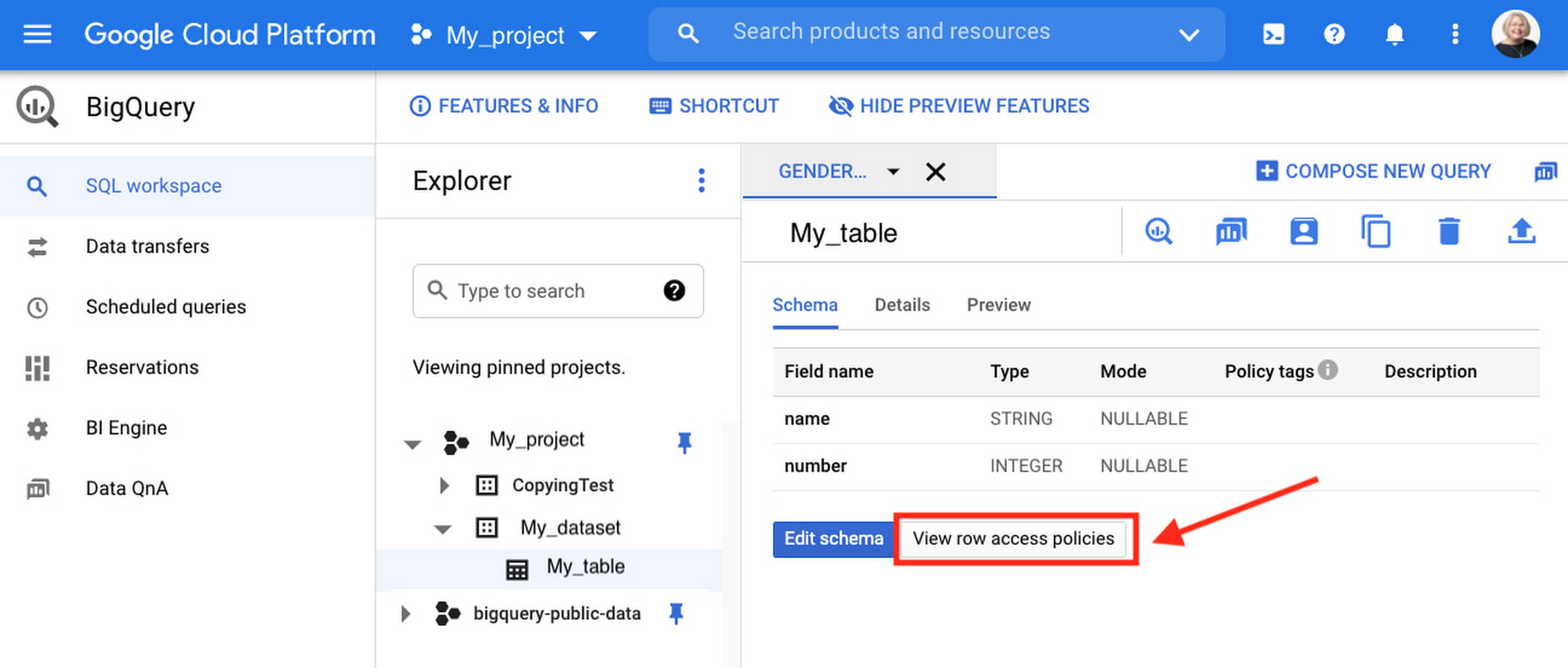
Row-level security is compatible with other BigQuery security features, and can be used along with column-level security for further granularity. Since row-level access policies are applied on the source tables, any actions performed on the table will inherit the table’s associated access policies, to ensure access to secure data is protected. Row-level access policies are applicable to every method used to access BigQuery data (API, Views, etc).
Try it out
We’re always working to enhance BigQuery’s (and Google Cloud’s) data governance capabilities, to provide more controls around managing your data. With row-level security, we are adding deeper protections for your data. You can learn more about BigQuery row-level security in our documentation and best practices.
Indian social media platform ShareChat saw a 50% reduction in costs after migrating to Google Cloud

4347
Of your peers have already read this article.
6:30 Minutes
The most insightful time you'll spend today!
One of the key trends that emerged from the lockdown brought about by the COVID-19 outbreak was the significant rise in people seeking entertainment online.
According to data released by Carat India, smartphone usage increased by 1.5 hours a week and social media consumption nearly doubled to 280 minutes a day. Of India’s 670 million internet users, a significant percentage live in rural areas, which saw a surge in demand for local language content.
As India’s premier social media platform, ShareChat saw significant engagement from its 60 million monthly active users (MAU) during the lockdown. The platform now has surpassed 120 million MAU post the government banning 59 Chinese apps in the last week of June.
ShareChat was founded by Ankush Sachdeva (co-founder and Chief Executive Officer), Farid Ahsan (co-founder and Chief Operating Officer), and Bhanu Pratap Singh (co-founder and Chief Technical Officer), in 2015.
In a recent conversation with YourStory, Bhanu spoke about content consumption during COVID-19, how they are reaching out to the country’s vernacular audience and their recent transition to Google Cloud.
Read the Full Story on YourStory
Airbus: Taking the flight to a brighter future with Google Cloud and Google Workplace

3564
Of your peers have already read this article.
1:30 Minutes
The most insightful time you'll spend today!
“Any device, anytime, anywhere.” A cohort of CIOs within Airbus believed that the cloud, combined with new ways of working, could provide the foundation for this vision. Google Workspace and Google Cloud have played a pivotal role in helping Airbus realize this new path, transforming security, data management, and collaboration along the way.

Adopting a secure-by-design approach
In adopting Google Workspace and Google Cloud Airbus needed to ensure a robust, zero-trust security model that works across the entire organization, even when employees are working outside the office. Google Workspace provides a single login that enables secure access to data, based on device and user information, as well as contextual inputs that inform the security risk of each login and user action. Airbus admins also use Google Workspace to define trust rules that govern what information and files can be shared within and outside the organization, making it easy for employees to comply with best practices from anywhere.
Encryption also plays a central role in keeping information secure and private. By default, Google Workspace uses the latest cryptographic standards to encrypt all data at rest and in transit. Google Workspace also offers client-side encryption, which Airbus uses for their most sensitive projects, giving them authoritative control over their data as the sole owner of their encryption keys.
And to ensure the organization is protected against hackers, Airbus has implemented sharding as a standard practice, thereby splitting data across multiple servers and data centers. Because the company works with incredibly sensitive information—including government and military information—the ability to locate data all within European data centers continues to be a necessity.
Powerful data management
Managing an enormous volume and variety of data, Airbus needs to ensure complete compliance with internal policies, as well as with external standards, like the General Data Protection Regulation (GDPR). Given this context, Airbus requires a solution that has strong built-in governance controls. Airbus also leverages the Drive labels feature, along with manual classification, to ensure that every file added to Google Drive is tagged and labeled correctly. In turn, these labels define the loss-prevention policies assigned to each file.
Staying connected during the pandemic
Before the pandemic, nearly every employee spent their workdays at an Airbus facility. When remote work became mandatory, the company made the pivot to Google Chat and Google Meet as an essential part of supporting real-time and asynchronous collaboration. Gmail also played a significant role in secure, anywhere-anytime communication, with its built-in anti-spam and anti-malware protections. Customizable filters let administrators protect against suspicious attachments, untrustworthy links, and countless other forms of malicious content. While Gmail blocks more than 99.9% of spam and phishing messages from ever reaching users’ inboxes, more advanced security measures like sandboxing can be put in place for specific use cases.
Protecting more than just data
Google Cloud’s sustainability efforts are as equally important to Airbus as data security. Google Cloud has been working to keep its climate footprint and those who use its services as low as possible, with all of Google currently carbon neutral and with a goal to run on carbon-free energy 24/7 at all of our data centers by 2030. And with our smarter, more efficient data centers, we’re already on that path with more than six times the computing power for the same amount of electrical power we used 5 years ago.
Building the future of work
By combining Google Workspace with Google Cloud, Airbus has been able to live up to its vision of “any device, anytime, anywhere.” The new model is a core foundation for its evolving future of work. Not only has Airbus adopted a zero-trust model across the organization, it’s also transformed how data is secured, managed, and accessed by employees working across a broad range of locations. The new flexible approach has also led to changes in how collaboration happens. Google is deeply gratified to have supported Airbus as they implement these changes and we continue to be proud that we’re running the cleanest cloud in the industry.
Want to learn more about how Google Workspace helps businesses like yours do more while keeping your data secure? Read this whitepaper to find out about our zero-trust model and other ways we protect organizations.
Marxent Leverages Google Cloud to Elevate Customer Journeys on Retail Apps with 3D Shopping Experiences

3328
Of your peers have already read this article.
3:00 Minutes
The most insightful time you'll spend today!
As ecommerce for home goods exploded in popularity during COVID, furniture and DIY retailers looked to find new ways to grow online transaction sizes to in-store levels. Shopping for furniture and home improvement projects has always been challenging online. Furniture, kitchen cabinets, fixtures, and appliances become a part of daily life, are challenging to return, and have a low purchase frequency. Once a shopper makes a decision, they tend to live with it for many years. These are visual, tactile, decisions that require measurements, style choices, budgeting, an understanding of available products, and an involved consideration processes. During the pandemic, retailers turned to 3D to enhance these virtual shopping experiences.
Inspiration and visualization cultivate confidence
Our 3D Room Commerce company, Marxent offers 3D visualization and configuration solutions that help retailers sell complex, configurable products online through consumer-facing 3D design and visualization apps. The Marxent 3D Room Planner with HD Renders helps shoppers to visualize how furniture or kitchen cabinet configurations will look in the specific floorplan of their home. Founded in 2011, Marxent envisions a world where buying a dining table or remodeling an entire kitchen is as easy as buying a car from Carvana or ordering dinner through Bite Squad. Our 3D apps create a streamlined inspiration to transaction to advocacy model that cultivates shopper confidence and allows retailers to sell the whole room, not just individual items.
Using Google Cloud as a foundation, we help some of the largest retail and home goods companies in the world provide exceptional customer journeys. We trust Google Cloud because our clients trust us to make it faster and easier for shoppers to buy semi-custom, configurable projects.
Embracing the power of 3D to super-charge ecommerce
It’s inarguable: e-commerce is on the rise. More people than ever before are shopping online for furniture, kitchen cabinets, decking, and other large-scale configurable products.
Customers who design with a retailer, usually buy from them. When shoppers visit stores and showrooms, they find inspiration in merchandised scenes that illustrate how products like sofas, chairs, rugs and lamps work together to accomplish a look. Skilled sales people make suggestions and offer advice on how to put pieces together. They may even work up a quick floor plan to show how multiple items work together in a room. In store, the inspiration phase is intimately tied to consideration and, ultimately, to driving transactions.
By contrast, online shoppers typically start home projects by seeking inspiration and ideas from Pinterest, Instagram and unbranded online image searches. Once they have formed their style preferences, shoppers keep searching to compare products across multiple retailers, plan their project, and put together a final budget.
To own the whole project sale, retailers need to own the entire inspiration to transaction to advocacy journey. With both online and in-store applications, Retailers leverage Marxent’s 3D Room Planner app to build shopper confidence, capture the whole room sale and win the customer over.
https://youtube.com/watch?v=_svOdVvX5LA%3Fenablejsapi%3D1%26
PRE-RENDERED MID-POLY 3D SCENE

POST-RENDERED MID-POLY 3D SCENE – This is a slightly different angle of the same room that has been rendered into a “Raw Render” (rendered in under 2 minutes).

Through Marxent’s 3D Room Commerce solution, users experience a cyclical inspiration to transaction to advocacy journey. It starts with shoppers viewing inspirational images and media online. Using Marxent’s applications, they can design directly from inspirational images to create a custom, configured space without any product catalog knowledge. Shoppers can visualize the products they love together and in the context of their own floor plan instead of navigating product pages and wondering if items will work together.
Then, they can add the whole room to a shopping cart with a single click. While this virtual experience does lead to a transaction, it also allows users to save, collaborate on, and share the spaces they’ve created. They become advocates by sharing their projects on social media, starting the inspirational content cycle again.
Putting an end to manual operations
To deliver renders at scale, Marxent needed to update their cloud render solution. Initially, our 3D Art team operated a manual on-premise render fleet. However, this required many hours of manual setup, configuration, and operation. We also had to manage expensive graphics servers—bare metal, CPUs, GPUs, RAM, HDD, and more. The only solution was to automate the 3D rendering process and empower end-users to rapidly create their own 3D room renders.
When we were evaluating new solutions, we saw distinct advantages in the Google Cloud Platform that would help them safely and securely scale their business, while strengthening their partnerships with end customers. For example, in moving to Google Cloud, we could automate and scale our rendering process without having to manage fleets of physical servers. We also viewed the platform as an asset due to Google’s secure-by-design infrastructure, agility, data analytics capabilities, and potential for joining the Marketplace.
Creating magical customer experiences that inspire purchase
To provide our customers and shoppers with contextual experiences, Marxent’s applications use mid-poly 3D models that balance speed and realism. These models provide a latency-free, real-time design experience that can be rendered into scenes that are realistic enough to be perceived as photos on social media.
The complex process of rendering these images requires a combination of efficiency, speed, analytics, and consistent performance that Google Cloud provides. When configured with powerful and speedy gaming GPUs, Marxent can provide fast rendering that meets customers and shopper demands. Here’s a look at our HD Renders application.

Before a user can request an HD Render, they must create a room in the Marxent 3D Room Planner. Once requested, Marxent pulls the saved project from the database and kicks off the process with Cloud Pub/Sub. The project loads into a gaming GPU, using the same platform code running when the user first creates the room in the application. It boots up the app in the cloud to load the room.
The code then scours the space and prepares it for rendering, adjusting texture formats, and adding in lighting. After going through the render engine, the project automatically uploads to Cloud Storage. Finally, the user receives a link to the final product. Throughout, Cloud Pub/Sub handles messages ensuring the right event processes are happening, such as rendering success or failure.
Using this process, it’s possible to create dozens of images out of a single scene, trading products in and out of a floor plan by leveraging a complete catalog of content geometries and covers, textures, and finishes.
Utilizing Google Cloud throughout the buying journey
Today, Marxent’s applications power world-class retailers with AR, VR, and 3D commerce experiences. We use cutting-edge graphics hardware to create renderings in less than 2 minutes per screenshot, often much faster. We’re also saving money as we no longer have to manage expensive servers or purchase expensive hardware upfront. Our clients are happier because we have passed on the cost savings to them while now having limitless scaling capabilities to meet demand.
By partnering with Google Cloud, Marxent can confidently offer our customers secure applications built on infrastructure with advanced security tools that support compliance and data confidentiality. Backed by a globally consistent platform, we can also help brands build reliable purchasing experiences across customer touchpoints—without fear of downtime during peak sales periods. This strategic partnership has allowed us to provide a best-in-breed, customer-first experience that our customers demand while providing the reliability that our partners expect.
With customers demanding seamless shopping experiences, Marxent’s 3D technologies open doors to new, easier, more convenient, and more satisfying shopping experiences that empower consumers to buy the right products the first time.
If you want to learn more about how Google Cloud can help your startup, visit our Startup Program application page here and sign up for our monthly startup newsletter to get a peek at our community activities, digital events, special offers, and more.
Modernize your Windows Server Workloads using Google Cloud Platform
DOWNLOAD RESEARCH REPORTS6243
Of your peers have already downloaded this article
1:30 Minutes
The most insightful time you'll spend today!
Application Modernization is an important enabler of Digital Transformations (DX), which fuel competitive advantage through increased productivity and business agility. Public cloud infrastructure proves to be a solid foundation for application modernization by providing Self-Service Provisioning capabilities, cloud-based & cloud-native technologies, and easier access to technology innovations such as AI/ML.
Windows Server-based enterprise applications rely on the underlying infrastructure for platform performance, security, and availability. A better performing cloud platform enables them to perform better and hence prove to be more resource-optimized and cost-effective.
Download this IDC report to understand why you should move your Windows Server workloads to Google Cloud and the benefits you can derive.
6 Tips for Stress-Free Google Cloud Billing

1317
Of your peers have already read this article.
1:30 Minutes
The most insightful time you'll spend today!
If you took one look at the title of this blog and thought, “just show me how, because I already know a million reasons why I’m stressed about billing things” then check out the interactive tutorial right here.
For everyone else, read on, because we’ll walk through some common sense tips, and a few step-by-step tutorials for all things billing related. If you’ve ever wished you could sit down with someone from Google Cloud, and walk through your bill, the console, and your options — you’re in the right place! Consider this Cloud Billing 101 – an intro level course that’ll get you started on the right foot.
6 simple tips to manage your Google Cloud billing accounts:
- Get to know your billing statement and console: Knowledge is power, after all. Take a tour of the billing console so you can better understand your options, along with what’s included in your monthly bill and the different components.
- Set up authorized users, alerts and budgets: Make sure anyone who needs to have access to payment settings is authorized. Allocate budgets for projects, and get notifications when your usage or spending exceeds a certain amount so you can take action as needed.
- Use cost-saving tools: We’ve got a range of tools and services to help you save money, like Committed Use Discounts, and even Recommenders for actionable, AI-powered intelligent recommendations around your cost trends and product usage.
- Optimize your resources: Use the Google Cloud Resource Manager to see how your resources are being used and identify areas for optimization, temporarily suspend, or even shut down unused projects.
- Review your billing history with reporting and data visualization: Regularly check your billing history with reports to help track your spending, identify any trends or patterns, and even anticipate future costs. You can even export your data to BigQuery for detailed analysis, or use a tool like Google Data Studio to visualize your data.
- Use the pricing calculator: Estimate your monthly costs and make informed decisions with the Google Cloud pricing calculator. It can help you get a ballpark figure for your usage, and determine if your use case fits within cost-free parameters.
I hope these common sense pointers and tutorials empower you to effectively manage your Google Cloud billing and stay on top of your spending. Get started right now by managing your billing methods and payment settings in this 5-minute tutorial, and then take a tour of the billing console to get familiar with your setup.
More Relevant Stories for Your Company
A Year of Going Carbon-free! Google’s Road to Sustainability Looks Promising
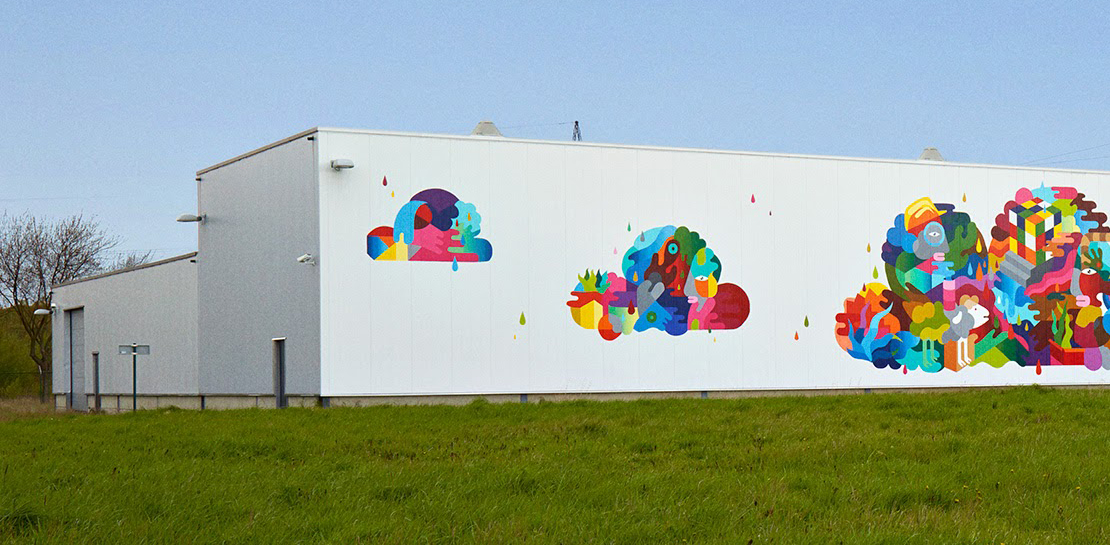
Last year, we announced our most ambitious sustainability goal yet: to operate everywhere on 24/7 carbon-free energy by 2030. We’ve set this goal to ensure that Google Cloud continues to be the cleanest cloud in the industry, and to show that full-scale decarbonization of electricity use is possible. Since setting our target,
Finding Your Favorite Google Cloud Product is Now Easy!
Welcome to a new way of exploring Google Cloud products. Finding your favorite products and discovering new ones requires a user interface that’s easy-to-use, clear, informative, and delightful. Google Cloud users have primarily used our side menu to navigate, but with almost one hundred products and growing, it’s safe to


Google Cloud Cortex Framework: Innovate on Cloud with Less Risk, Cost and Complexity!
Google Cloud Cortex Framework is a comprehensive approach to cloud innovation that enables users to accelerate value with less risk, complexity and cost! The Cortex Framework includes a comprehensive tools and know-how to build, design and deploy cloud solutions to address business challenges and achieve desired outcomes. Watch the video
Recapping Google Cloud VMware Engine’s Latest Milestones
We’ve made several updates to Google Cloud VMware Engine in recent weeks—today’s post provides a recap of our latest milestones. Google Cloud VMware Engine delivers an enterprise-grade VMware stack running natively in Google Cloud. This cloud service is one of the fastest paths to the cloud for VMware workloads without making changes
