





Goal for Google: AI for everyone

2944
Of your peers have already read this article.
3:30 Minutes
The most insightful time you'll spend today!
Alphabet CEO Sundar Pichai has compared the potential impact of artificial intelligence (AI) to the impact of electricity—so it may be no surprise that at Google Cloud, we expect to see increased AI and machine learning (ML) momentum across the spectrum of users and use cases.
Some of the momentum is more foundational, such as the hundreds of academic citations that Google AI researchers earn each year, or products like Google Cloud Vertex AI accelerating ML development and experimentation by 5x, with 80% fewer lines of code required. Some are more concrete, like mortgage servicer Mr. Cooper using Google Cloud Document AI to process documents 75% faster with 40% cost savings; Ford leveraging Google Cloud AI services for predictive maintenance and other manufacturing modernizations; and customers across a wide range of industries deploying ML platforms atop Google Cloud.
Together, these proof points reflect our belief that AI is for everyone, and that it should be easy to harness in workflows of all kinds and for people of all levels of technical expertise. We see our customers’ accomplishments as validation of this philosophy and a sign that we are taking away the right things from our conversations with business leaders. Likewise, we see validation in recognition from analysts, which recently includes Google being named a Leader by
Gartner® in the 2022 Magic Quadrant™ for Cloud AI Developer Services report
Forrester in the Forrester Wave™: AI Infrastructure, Q4 2021 report, the Forrester Wave™: Document-Oriented Text Analytics Platforms, Q2 2022 report, and The Forrester Wave™: People-Oriented Text Analytics Platforms, Q2 2022 report
In June, we talked about four pillars that guide our approach to creating products for MLOps and to accelerate development of ML models and their deployment into product. In this article, we’ll look more broadly at our AI and ML philosophy, and what it means to create “AI for everyone.”
AI should be for everyone
One of the pillars we discussed in June was “meeting users where they are,” and this idea extends far beyond products for data scientists. Technical expertise should not be a barrier to implementing AI—otherwise, use cases where AI can help will languish without modernization, and enterprises without well-developed AI practices will risk falling behind their competitors.
To this end, we focus on creating AI and ML services for all kinds of users, e.g.:
- DocumentAI, Contact Center AI, and other solutions that inject AI and ML into business workflows without imposing heavy technical requirements or retraining on users;
- Pre-trained APIs, ranging from Speech to Fleet Optimization, that let developers leverage pre-trained ML models and free them from having to develop core AI technologies from scratch;
- BigQuery ML to unite data analysis tasks with ML;
- AutoML for abstracted and low-code ML production without requiring ML expertise;
- Vertex AI to speed up ML experimentation and deployment, with every tool you need to build deploy and the lifecycle of ML projects
- AI Infrastructure options for training deep learning and machine learning models cost effectively. Including Deep Learning VMs optimized for data science and machine learning tasks and AI accelerators for every use case, from low-cost inference to high-performance training.
It’s important to provide not only leading tools for advanced AI practitioners, but also leading AI services for users of all kinds. Some of this involves abstracting or automating parts of the ML workflow to meet the needs of the job and technical aptitude of the user. Some of it involves integrating our AI and ML services with our broader range of enterprise products, whether that means smarter language models invisibly integrated into Google Docs or BigQuery making ML easily accessible to data analysts. Regardless of any particular angle, AI is turning into a multi-faceted, pervasive technology for businesses and users the world over, so we feel technology providers should reflect this by building platforms that help users harness the power of AI by meeting them wherever they are.
How we’re powering the next generation of AI
Creating products that help bring AI to everyone requires large research investments, including in areas where the path to productization may not be clear for years. We feel a foundation in research combines with our focus on business needs and users to inform sustainable AI products that are in keeping with our AI principles and encourages responsible use of AI.
Many of our recent updates to our AI and ML platforms began as Google research projects. Just consider how DeepMind’s breakthrough AlphaFold project has led to the ability to run protein prediction models in Vertex AI. Or how research into neural networks helped create Vertex AI NAS, which lets data science teams train models more accurately with lower latency and power requirements.
Research is crucial, but also only one way of validating an AI strategy. Products have to speak for themselves when they reach customers, and customers need to see their feedback reflected as products are iterated and updated. This reinforces the importance of seeing customer adoption and success across a range of industries, use cases, and user types. In this regard, we feel very fortunate to work with so many great customers, and very proud of the work we help them accomplish.
I’ve already mentioned Ford and Mr. Cooper, but those are just a small sampling. For example, Vodafone Commercial’s “AI Booster” platform uses the latest Google technology to enable cutting-edge AI use cases such as optimizing customer experiences, customer loyalty, and product recommendations. Our conversational AI technologies are used by companies ranging from Embodied, whose Moxie robot helps children overcome developmental challenges, to HubSpot connecting meeting notes to CRM data. Across our products and across industries around the world, customer stories grow by the day.
We also see validation in our partner network. As we noted in the pillars discussed in June, partners like Nvidia help us to ensure customers have freedom of choice when building their AI stacks, and partners like Neo4j help our customers to expand our services into areas like graph structures. Partners support our mission to bring AI to everyone, helping more customers use our services for new and expanded use cases.
Accelerating the momentum
Overall, to create products that reflect AI’s potential and likely future ubiquity, we have to take all of the preceding factors, from research to customer and analyst conversations to working with partners, and turn them into products and product updates. We’ve been very active over the last year, from the launch of Call Center AI Platform in March, to the new Speech model we released in May, to a range of announcements at the Google Cloud Applied ML Summit in June. We have much more planned in coming months, and we’re excited to work with customers not just to maintain the pace of AI momentum, but to accelerate it. To learn more about Google Cloud’s AI and ML services, visit this link or browse recent AI and ML articles on the Google Cloud Blog.
GARTNER and MAGIC QUADRANT are registered trademarks and service marks of Gartner, Inc. and/or its affiliates in the U.S. and internationally and are used herein with permission. All rights reserved. Gartner does not endorse any vendor, product or service depicted in its research publications and does not advise technology users to select only those vendors with the highest ratings or other designation. Gartner research publications consist of the opinions of Gartner’s Research & Advisory organization and should not be construed as statements of fact. Gartner disclaims all warranties, expressed or implied, with respect to this research, including any warranties of merchantability or fitness for a particular purpose.
Building Unique Customer Experiences with Speed & Scale: Sprinklr & Google Cloud

8224
Of your peers have already read this article.
2:00 Minutes
The most insightful time you'll spend today!
Enterprises are increasingly seeking out technologies that help them create unique experiences for customers with speed and at scale. At the same time, customers want flexibility when deciding where to manage their enterprise data, particularly when it comes to business-critical applications.
That’s why I’m thrilled that Sprinklr, the unified customer experience management (Unified-CXM) platform for modern enterprises, has partnered with Google Cloud to accelerate its go-to-market strategy and grow awareness among our joint customers. Sprinklr will work closely with our global salesforce, benefitting from our deep relationships with enterprises that have chosen to build on Google Cloud.
Akin to Google Cloud’s mission to accelerate every organization’s ability to digitally transform their business through data-powered innovation, Sprinklr’s primary objective is to empower the world’s largest and most loved brands to make their customers happier by listening, learning, and taking action through insights. With this strategic partnership now in place, Sprinklr and Google Cloud will go-to-market together with the end-customer as our sole focus.
Traditionally, brands have adopted point solutions to manage segments of the customer journey. In isolation, these may work — but they rarely work collaboratively, even when vendors build “Frankenstacks” of disconnected products. These solutions can’t deliver a 360° view of the customer, and often reinforce departmental silos. All of which creates point-solution chaos.
Sprinklr’s approach is fundamentally different and is the way out of the aforementioned point-solution chaos. As the first platform purpose-built for unified customer experience management (Unified-CXM) and trusted by the enterprise, Sprinklr’s industry-leading AI and powerful Care, Marketing, Research, and Engagement solutions enable the world’s top brands to learn about their customers, understand the marketplace, and reach, engage, and serve customers on all channels to drive business growth.
Sprinklr was built from the ground up as a platform-first solution, designed to evolve and grow with the rapid expansion of digital channels and applications. The results? Faster innovation. Stronger performance. And a future-proof strategy for customer engagement on an enterprise scale.
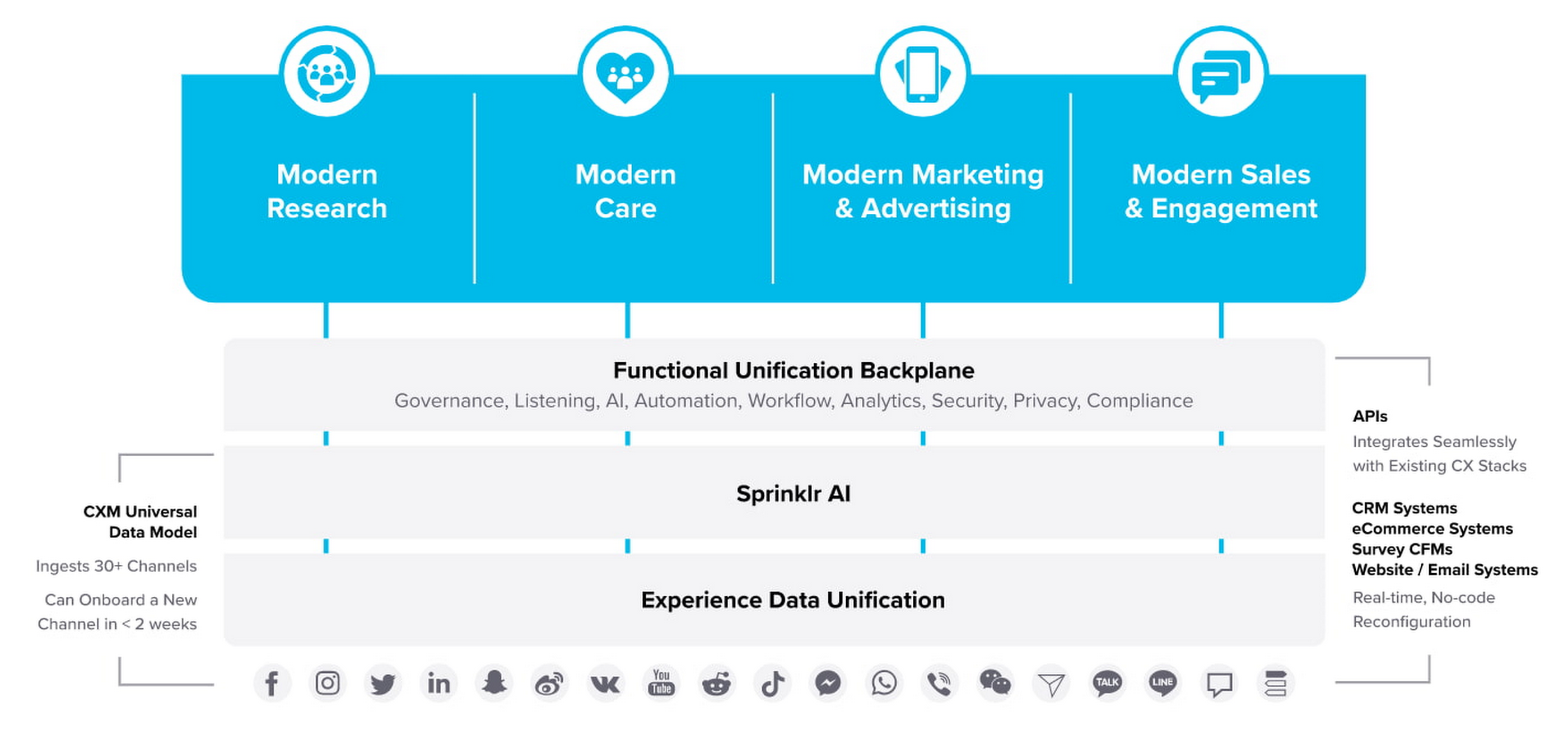
“Sprinklr works with large, global companies that want flexibility when deciding where to manage their enterprise data and consider our platform a business-critical application,” said Doug Balut, Senior Vice President of Global Alliances, Sprinklr. “Giving our customers the opportunity to manage Sprinklr on Google Cloud empowers them to create engaging customer experiences while maintaining the high security, scalability, and performance they need to run their business.”
To learn more about this exciting partnership and the challenges we jointly solve for customers, check out the recent conversation between Google Cloud’s VP of Marketing, Sarah Kennedy, and Sprinklr’s Chief Experience Officer, Grad Conn. Or read the press release on the partnership.
World’s Largest Online-only Grocery Retailer Uses AI to Figure Which Customers Need Most Attention

9468
Of your peers have already read this article.
4:20 Minutes
The most insightful time you'll spend today!
In the United Kingdom, the popularity of online grocery shopping is expected to surge from about 6% of the market today to 9% by 2021, according to market research firm Mintel. One of the pioneers of online-only grocery retailing is Ocado, based in Hatfield, Hertfordshire in the U.K. Since starting commercial deliveries in 2002, the company has grown to 600,000 active customers, 260,000 weekly orders, and £1.39 billion in annual revenue.
Ocado takes supermarket trips out of the equation by enabling shoppers to purchase items online through its convenient web and mobile applications. Items are then picked and packed in automated warehouses and shipped directly to customers in a one-hour time slot of their choosing. Ocado’s delivery punctuality is 95%, order accuracy is 99%, and its service footprint now reaches more than 70% of the U.K. population.
“Google Cloud Platform gives us the flexibility and performance to tackle the large and complex data challenges unique to our business.”
—Paul Clarke, Chief Technology Officer, Ocado
The company achieved its success by building in-house almost all the technology and automation that powers its end-to-end e-commerce, fulfillment, and logistics platform. Ocado also developed a new platform, the Ocado Smart Platform (OSP), which offers large brick-and-mortar grocery retailers around the world access to a best-in-class solution for online grocery.
Democratizing machine learning
The shopping journey for online grocery retailing differs significantly from other e-businesses. Customers often buy dozens of products at once, a single household may have multiple buyers using multiple devices, and product shelf life may only be a couple of days.
“We often say that having built an end-to-end platform that can do online grocery scalably and profitably, we can do other forms of online retail; but the reverse does not necessarily follow,” says Paul Clarke, Chief Technology Officer at Ocado. “Google Cloud Platform gives us the flexibility and performance to tackle the large and complex data challenges unique to our business.”
The Ocado business model takes advantage of consumers’ shifting preferences and the links between digital technology and shopping experiences.
“Google Cloud Machine Learning Engine gives us the agility we need. Our developers were able to try out TensorFlow and see firsthand the benefits of machine learning in the cloud.”
—Paul Clarke, Chief Technology Officer, Ocado
The company has been building machine learning into its systems for over five years. Until recently, Ocado machine learning applications required specialist data scientists, typically with PhDs in machine learning, who would build these solutions from the ground up. It also required the specialist who set up the system and costly on-premises infrastructure to train and run these systems.
However, working with Google as a private alpha testing site for Google Cloud Machine Learning Engine accelerated its adoption of artificial intelligence (AI).
“We’ve been talking about how the cloud could democratize AI for some time,” says Paul. “Google Cloud Machine Learning Engine gives us the agility we need. Our developers were able to try out TensorFlow and see firsthand the benefits of machine learning in the cloud.”
TensorFlow is an open source software library for machine learning developed by the Google Brain team. Ocado developers, engineers, and data scientists now use TensorFlow for many of their machine learning projects. They deploy the models they build on Google Cloud Machine Learning Engine, which lets them train models faster across servers, desktop computers, and mobile devices through a single application program interface (API). Additionally, Google Cloud Machine Learning Engine integrates easily with the other Google Cloud Platform products used widely at Ocado.
What do customers really want?
One of the first TensorFlow models Ocado created was a machine learning algorithm that tags and categorizes customer emails and then prioritizes them for response.
The contact center receives thousands of emails each day and Ocado wanted to automate determining which ones needed to be answered immediately and which ones could wait.
For example, a first-time customer expressing their delight in using Ocado doesn’t need to be responded to with the same urgency as a customer who is missing an item from their order or who won’t be home to receive the delivery.
“Enabling agents to respond without having to sort through less-urgent emails improves Ocado’s responsiveness and customer service.”
—James Donkin, General Manager, Ocado
“We get a lot of emails from customers saying, ‘Our service was great,’ or ‘The driver was very courteous,'” says James Donkin, General Manager, Ocado. “But when issues like weather or road conditions potentially affect delivery, we often get surges of urgent questions. Enabling agents to respond without having to sort through less-urgent emails improves Ocado’s responsiveness and customer service.”
Using Google Cloud Machine Learning Engine, TensorFlow, and a large data set culled from several years’ worth of manually categorized customer emails, Ocado experimented on which kind of neural network architecture would best prioritize emails. After testing its models, Ocado implemented the highest-performing one and has been able to respond to urgent messages four times faster. The company also discovered that 7% of its emails don’t require a response at all, which means call center representatives now have more time to devote to higher priority messages.
“Without Google Cloud Machine Learning Engine, it would have been a lot harder to succeed on a project like email classification,” says Roland Plaszowski, who has recently managed several big data projects and initiatives at Ocado.
“Even if we invested significantly in infrastructure, it would be difficult to manage because of the computational intensity. It’s challenging and expensive to run machine learning projects at the same time without infrastructure that you can scale easily.”
Ocado also uses machine learning to predict customer behavior and improve experiences. By analyzing order data, Ocado makes shopping as frictionless as possible. For example, the ordering system can pre-populate customers’ shopping carts with items they are most likely to purchase, remind customers about items they may have forgotten, and notify them of multi-buy offers they haven’t completed, for example, only buying one of a buy one, get one free offer. Based on machine learning from previous purchase data, the Ocado system can also offer new products that are likely to delight customers.
“You will regularly see items that are more personally relevant to you instead of items that are being promoted more generally,” says James. “I’m a vegetarian, so I’m offered specials for vegetarian products that I normally buy and new ones that I’ve never bought. I’m also less likely to see things that I’m not interested in.”
Machines and machine learning
Within the Internet of Things (IoT), Ocado is looking to enhance its warehouse robots with machine learning. An integral part of the OSP, thousands of robots continually stream data into Google Cloud Storage and Google BigQuery.
Ocado data scientists apply machine learning to create a type of swarm intelligence that enables warehouse robots to work cooperatively to achieve a common goal. Projects include modules to search robot telemetry data, such as whether a battery pack is operating within standard tolerances or whether firmware has been successfully loaded, and use it to optimize maintenance schedules or detect patterns in wear and tear.
“Another challenge we’re looking at is how to embed machine learning directly into robots so they become smarter in terms of self-testing, exception handling, and error recovery,” says Paul. “This is a challenging combination of IoT, data analytics, and machine learning that we believe Google BigQuery and Google Cloud Machine Learning are particularly well suited to helping Ocado achieve.”
The company also discovered that 7% of its emails don’t require a response at all, which means call center representatives now have more time to devote to higher priority messages.
Scaling for new business
Scalability is also a major reason behind some of Ocado’s cloud initiatives, including the migration of all its on-premises data to the cloud. Ocado wanted to improve customer experiences, empower business teams with greater insight, and reduce IT overhead, so it consolidated onto Google Cloud Platform.
“The old databases just weren’t fast enough,” says Paul. “We needed a solution that could scale with the amount of data we generate and how we use it. Google Cloud Storage and Google BigQuery now provide the backbone, from a data point of view, for the Ocado Smart Platform.”
Ocado estimates its business, product, and transaction data is approaching two petabytes. Combining customer and supply chain data helps both internal Ocado operations and the company’s ambitions to commercialize OSP.
“When compared with other options for expansion internationally, selling OSP as a managed service lets us turn companies that could have been competitors into customers,” says Paul. “We want to build OSP once and then turn it on for multiple business-to-business customers.”
Each time Ocado adds a new hosting customer to OSP, it will launch a customized instance to fit that customer’s requirements. The capacity and performance of each new OSP instance must be able to scale quickly as the backend platform for established retailers with large numbers of products, customers, and transactions.
Ocado’s first OSP customer, Morrisons, is already benefiting from this first-of-a kind solution. Morrisons is one of the UK’s four largest supermarkets and uses OSP to power its online retail business. Using Google Cloud Platform, Ocado has stored, processed, and analyzed terabytes of Morrisons’ data using a dedicated data lake and Google BigQuery.
In addition to using Google Cloud Platform for OSP, Ocado also adopted it for its own online grocery retail business operation. Ocado originally used the Apache Spark and Apache Hadoop open-source frameworks on Google Compute Engine for its data platform. Moving to Google BigQuery frees Ocado business analysts from the complex query setup and workflows associated with Spark and Hadoop. Plus, it lets Ocado share data analytics with suppliers and partners.
Google BigQuery is well integrated with TensorFlow on Google Cloud Machine Learning Engine and Google Cloud Dataproc, the Apache Spark and Apache Hadoop service that lets Ocado use open source data tools for batch processing, querying, streaming, and machine learning. Google Cloud Dataflow and Google Cloud Dataproc handle cluster management, and provide an easy-to-use framework so developers can spend less time and money on administration and more time on delivering valuable business features.
Switching from Hadoop to Google BigQuery revealed a series of cost and performance improvements. For example, Ocado no longer needed to decide how many instances to bring up in a cluster or wait for the instances to spin up. Google handled everything.
“We simply ran our queries and paid for the resources that we use,” adds Roland. “One big win with Google BigQuery is we don’t have to do maintenance. Best of all, we saw Google BigQuery outperform our Hadoop cluster by over 80 times on our largest dataset, and for only two-thirds the cost.”
Transform ‘Dark Data’ from Documents with Document AI, Cloud Functions and Workflows

8208
Of your peers have already read this article.
2:00 Minutes
The most insightful time you'll spend today!
At enterprises across industries, documents are at the center of core business processes. Documents store a treasure trove of valuable information whether it’s a company’s invoices, HR documents, tax forms and much more. However, the unstructured nature of documents make them difficult to work with as a data source. We call this “dark data” or unstructured data that businesses collect, process and store but do not utilize for purposes such as analytics, monetization, etc. These documents in pdf or image formats, often trigger complex processes that have historically relied on fragmented technology and manual steps. With compute solutions on Google Cloud and Document AI, you can create seamless integrations and easy to use applications for your users. Document AI is a platform and a family of solutions that help businesses to transform documents into structured data backed by machine learning. In this blog post we’ll walk you through how to use Serverless technology to process documents with Cloud Functions, and with workflows of business processes orchestrating microservices, API calls, and functions, thanks to Workflows.
At Cloud Next 2021, we presented how to build easy AI-powered applications with Google Cloud. We introduced a sample application for handling incoming expense reports, analyzing expense receipts with Procurement Document AI, a DocAI solution for automating procurement data capture from forms including invoices, utility statements and more. Then organizing the logic of a report approval process with Workflows, and used Cloud Functions as glue to invoke the workflow, and do analysis of the parsed document.

We also open sourced the code on this Github repository, if you’re interested in learning more about this application.

In the above diagram, there are two user journeys: the employee submitting an expense report where multiple receipts are processed at once, and the manager validating or rejecting the expense report.
First, the employee goes to the website, powered by Vue.js for the frontend progressive JavaScript framework and Shoelace for the library of web components. The website is hosted via Firebase Hosting. The frontend invokes an HTTP function that triggers the execution of our business workflow, defined using the Workflows YAML syntax.
Workflows is able to handle long-running operations without any additional code required, in our case we are asynchronously processing a set receipt files. Here, the Document AI connector directly calls the batch processing endpoint for service. This API returns a long-running operation: if you poll the API, the operation state will be “RUNNING” until it has reached a “SUCCEEDED” or “FAILED” state. You would have to wait for its completion. However, Workflows’ connectors handle such long-running operations, without you having to poll the API multiple times till the state changes. Here’s how we call the batch processing operation of the Document AI connector:
- invoke_document_ai:call: googleapis.documentai.v1.projects.locations.processors.batchProcessargs:name: ${"projects/" + project + "/locations/eu/processors/" + processorId}location: "eu"body:inputDocuments:gcsPrefix:gcsUriPrefix: ${bucket_input + report_id}documentOutputConfig:gcsOutputConfig:gcsUri: ${bucket_output + report_id}skipHumanReview: trueresult: document_ai_response
Machine learning uses state of the art Vision and Natural Language Processing models to intelligently extract schematized data from documents with Document AI. As a developer, you don’t have to figure out how to fine tune or reframe the receipt pictures, or how to find the relevant field and information in the receipt. It’s Document AI’s job to help you here: it will return a JSON document whose fields are: line_item, currency, supplier_name, total_amount, etc. Document AI is capable of understanding standardized papers and forms, including invoices, lending documents, pay slips, driver licenses, and more.
A cloud function retrieves all the relevant fields of the receipts, and makes its own tallies, before submitting the expense report for approval to the manager. Another useful feature of Workflows is put to good use: Callbacks, that we introduced last year. In the workflow definition we create a callback endpoint, and the workflow execution will wait for the callback to be called to continue its flow, thanks to those two instructions:
- create_callback:call: events.create_callback_endpointargs:http_callback_method: "POST"result: callback_details...- await_callback:try:call: events.await_callbackargs:callback: ${callback_details}timeout: 3600result: callback_requestexcept:as: esteps:- update_status_to_error:...
In this example application, we combined the intelligent capabilities of Document AI to transform complex image documents into usable structured data, with Cloud Functions for data transformation, process triggering, and callback handling logic, and Workflows enabled us to orchestrate the underlying business process and its service call logic.
Going further
If you’re looking to make sense of your documents, turning dark data into structured information, be sure to check out what Document AI offers. You can also get your hands on a codelab to get started quickly, in which you’ll get a chance at processing handwritten forms. If you want to explore Workflows, quickstarts are available to guide you through your first steps, and likewise, another codelab explores the basics of Workflows. As mentioned earlier, for a concrete example, the source code of our smart expense application is available on Github. Don’t hesitate to reach out to us at @glaforge and @asrivas_dev to discuss smart scalable apps with us.
Making Hybrid Work Human: Google Workspace and Economist Impact Survey

5476
Of your peers have already read this article.
2:30 Minutes
The most insightful time you'll spend today!
Google Workspace recently commissioned Economist Impact to complete a global survey (October 2021)* on the state of hybrid work, including its challenges and opportunities. We already knew that the pandemic had fundamentally changed the world of work, but the survey emphasizes the scale, reach, and longevity of those changes..
Over 75% of respondents believe that hybrid/flexible work will be a standard practice within their organizations in the coming three years. Given that 70% of respondents said they never worked remotely before the pandemic, it’s clear that hybrid has become the dominant model for work and that it’s here to stay.
But it’s also clear, as we’ll see below, that hybrid has some serious gaps that need to be addressed if it’s going to be sustainable and successful in the long term.
Defining hybrid work
As part of our work on the hybrid work survey and a broader project with The Economist Group, we interviewed a group of experts across research, consulting, business, and the advocacy world to arrive at a definition of hybrid work that captures all ways work is changing.
As Brian Kropp, one of the interviewees and vice president at Gartner, puts it: “Hybrid work is not just about different locations, but also different timings and different schedules.”
Harriet Molyneaux, managing director at HSM Advisory, a future-of-work research and advisory group, adds to this notion by describing the time-location work spectrum: “At one end of the spectrum is everyone in the office, nine till five, so both restricted time and location. And then at the other end of the spectrum is anywhere around the world at any time. So no restricted time or location. A hybrid is anything that sits in the middle of that.”
I agree with Brian and Harriet’s views. Flexibility in both location and hours is a core part of our working definition of hybrid work: a spectrum of flexible work arrangements in which an employee’s work location and/or hours are not strictly standardized.
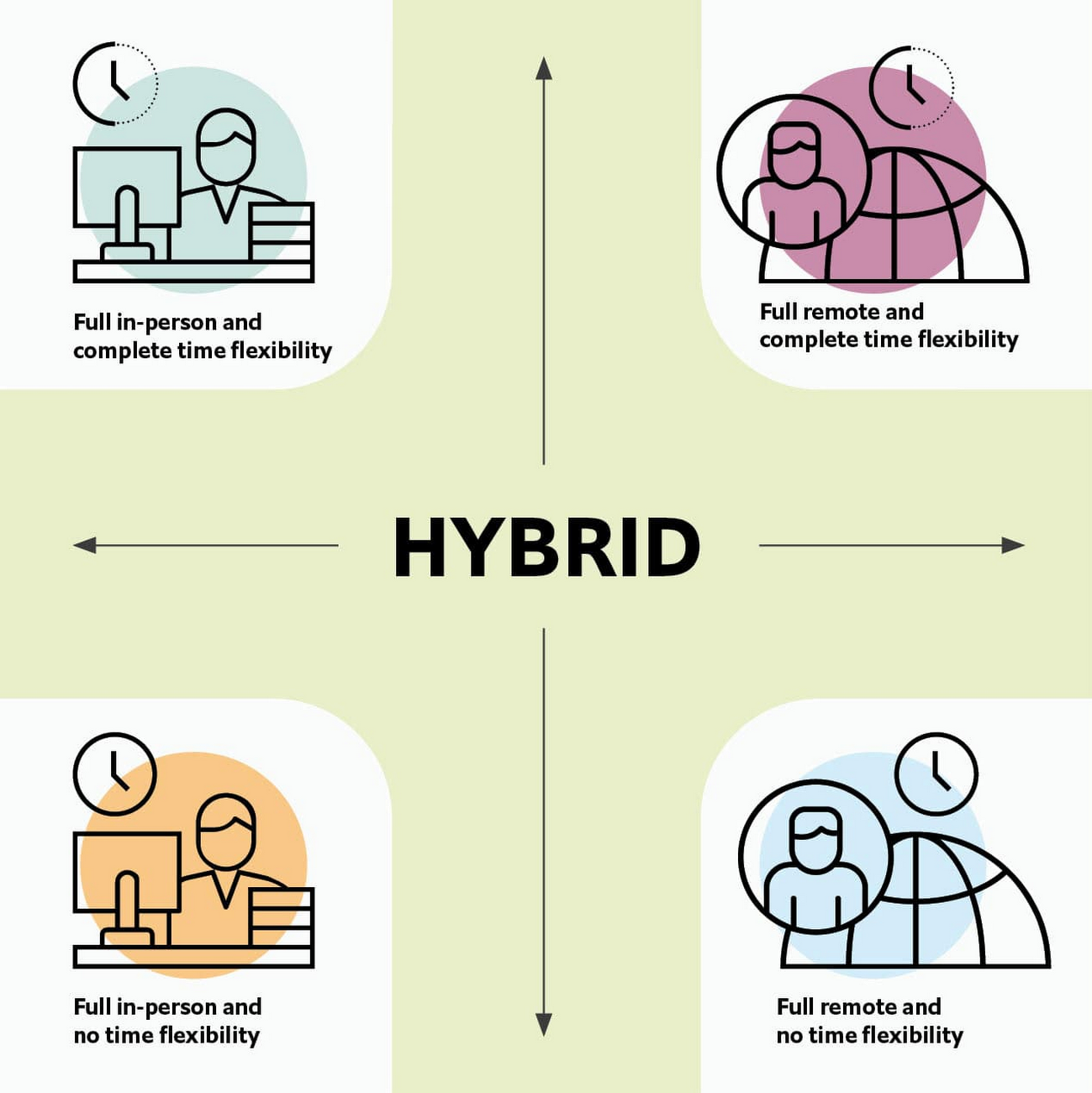
Given this definition and framework, how is hybrid work faring and what lies ahead?
Individual wellbeing is coming at the cost of organizational connection
Early on in the pandemic, productivity remained steady or even increased for many organizations. But it came at a cost, with levels of burnout spiking as employees juggled caregiving, homeschooling, and other demands in their personal lives with work responsibilities.
Based on the survey data, wellbeing has made an upward shift, no doubt aided by things like students returning to schools in many regions and fewer demands being made of working parents. The majority of respondents said that hybrid work, based on their own experiences, can have a positive impact on the physical, mental, financial, and social wellbeing of employees.
But it appears that individual wellbeing is coming at the cost of organizational connection. The majority of respondents said they feel disconnected from their organization and co-workers (57%), that limited networking opportunities negatively impact career growth (62%), and that limited social interactions with co-workers has had a negative impact on their mental health (54%).
To be sustainable, hybrid work models must address this sense of disconnection in real and tangible ways. And it won’t happen just by increasing the number of virtual meetings. Although 72% of people say that virtual meetings improve inclusion and participation, 68% also say there are too many virtual meetings to begin with. We need new ways for people to connect spontaneously.
Hybrid workers are often using tools built for a bygone desktop era
When asked about the most important conditions needed to achieve the long-term success of hybrid work models, the number one choice globally was “new technologies that allow for time and location flexibility.”
Naturally, it was gratifying to see this, since Google Workspace is built on a cloud-based platform that empowers collaboration from anywhere, on any device, but the survey answer also highlights how much organizations have had to scramble to meet the demands of the pandemic. Some had to take legacy, office-centric systems and make them work for a distributed workforce overnight, often leveraging less-than-ideal technologies like VPNs that introduce digital friction.
As a result, top technology concerns of respondents include:
- unreliable internet access (if only all our WiFi connections were hybrid-ready!)
- reliance on slow or outdated tools
- accessing and maintaining files in multiple places
- relying on too many applications in order to get work done
Hybrid work, it seems to me, doesn’t need more applications and collaboration surfaces. It needs deeper, more meaningful connections in the tools and surfaces we already have.
As organizations assess their tech stacks, they should consider whether they can shape the behaviors they want from hybrid employees (e.g., real-time collaboration, ease of information sharing) with the tools they have in place. Or are the limits of the technology determining hybrid employee behavior?
The management and culture gap
In the same way that tools have often been built for a shared physical workspace, organizational culture seems to lag behind the hybrid moment. The majority of respondents said that a lack of face-to-face supervision creates a sense of distrust among managers and employees, and that they feel stressed by increased monitoring associated with flexible work. And more than 62% said that limited networking opportunities with senior employees and co-workers has a negative impact on career growth.
Strikingly, more than 70% of respondents indicated that the culture of trust between managers and employees needed improvement. Training and management best practices (60% of people want more of both) might help fill some of the gaps, but a manager can’t build trust with their hybrid teams by going through a training program.
The role of manager must itself evolve to meet the demands of a hybrid model. How can we empower managers to be the bridge between the “office of one” and the “office of many”? And as I discussed previously on Forbes, driving towards impact rather than output is a more sustainable metric for team engagement and productivity. It also dispenses with monitoring as a core part of a manager’s role, freeing them up to be a coach-and-connector.
How Google Workspace can help bridge the hybrid work gaps
No one has all the answers for how to make hybrid work successful, and I suspect we will see iterations of the model into 2022 and beyond as organizations—including Google—experiment with the right mix of location, culture, processes, and tools.
On the technology front, Google Workspace is uniquely positioned to bridge many of the emerging hybrid work gaps. Over the last year, we’ve delivered a set of innovations that are designed to deepen collaboration experiences while strengthening social connections within and across teams.
For example, we launched smart canvas to bring new collaboration capabilities to the places where people are already working together, helping to keep them connected, rather than having them switch tabs or open new apps. And we delivered Spaces as a central place for collaboration, where teams can share ideas, work on documents together, and manage tasks from a single place. Because all their work is preserved for future reference, team members can easily jump in and contribute at a time that works best for them, seeing a full history of the conversations, context, and content along the way. Spaces helps people maintain individual wellbeing while preserving the health of a group project.
In Google Meet, we’ve introduced real-time captions in multiple languages (in preview now), the ability for people to customize their video tiles, including being able to turn off their own to help with meeting fatigue, and we’ve implemented automatic light adjustments and noise cancellation. These changes help ensure that everyone can be seen and heard.
Meanwhile, features like hand-raise, Q&A, and polls have helped make meetings more inclusive and companion mode (in preview) can bring these to life in hybrid settings, to help ensure that there’s one cohesive conversation between the people in the office and their colleagues working somewhere else. We view companion mode as a bridge between the office and “somewhere else.”
On the personal wellbeing front, we launched Focus Time, which lets people block out their calendars for uninterrupted focus work, and Time Insights in Google Calendar, where employees can look at how they’re spending their time and adjust as needed.
As hybrid work continues to evolve, Google Workspace is committed to supporting wellbeing and seamless collaboration with tools that can remove digital friction and help people maintain connections—to each other and the organizations they work for.
*Survey details: The survey, completed in October 2021, polled a total of 1,244 employees and managers in four regions (North America, Europe, APAC, and Latin America), from more than 15 industries, in every age group, and from both small and large organizations. The focus was on knowledge workers, though it’s important to note that some of those people have been working on the frontlines; 20% of respondents indicated they haven’t worked remotely at all during the pandemic. This includes people in hospitality, retail, transportation and logistics, and healthcare.
How Toyota’s Google Cloud-powered Voice Assistant Gives a Turboboost to Drivers’ Experience

4822
Of your peers have already read this article.
2:00 Minutes
The most insightful time you'll spend today!
Over the decades, technology has helped us organize large amounts of physical information in ways that are streamlined, efficient, and easily accessible. Rows upon rows of encyclopedias are no longer needed; simply punch in or speak a query into Google Search and find numerous results at your fingertips. There’s no need to haul around cases of CDs or cassettes either, when you can access hundreds of thousands of songs on music streaming services.
We wanted to bring that same level of accessibility to one specific type of publication: the printed car manual. Here’s how we shifted the paper manual to become an easy-to-access, voice-activated digital experience for owners of the all-new Sienna. It’s helped this resource become just as modern and useful as Toyotas themselves.
Putting cloud technology in the driver’s seat
Far too often, the printed car manual remains unused, collecting dust in the glove compartment—that is, until it’s needed during a roadside emergency or to solve the meaning of a mysterious light popping up on the dashboard. Even then, thumbing through hundreds of pages during high-stakes moments can be stressful. On top of that, these manuals can be expensive to print and update.
Digital versions, such as a PDF file, are a nice start. But, they’re often little more than reformatted flat documents. In poor visual conditions on the side of a road, the last thing a driver wants to do is squint at a phone or scroll through pages of tiny text. And similar to printed manuals, digital versions don’t facilitate ongoing, real-time conversations between drivers and automakers when it matters the most; they’re often only text and pictures, and at best, schematic drawings.
With that in mind, we set out to elevate and personalize the car manual by creating a voice-activated digital owner’s manual experience, all powered by Google Cloud. A voice-based assistant was the clear choice because, as it felt like the most intuitive, natural option, especially while driving. In fact, 51% of U.S. adults have used a voice assistant while driving, and 95% of all drivers expect to use a voice assistant in the next three years.
We’re now putting this technology on the road by powering the Toyota Driver’s Companion for the all-new 2021 Toyota Sienna model. Accessible through the existing Toyota app, this companion provides real-time assistance, any time of the day. Drivers can ask questions and the companion will efficiently provide helpful answers in convenient ways, from voice to 3D walkthroughs and explorable environments.
What a modern car manual should do
The Toyota Driver’s Companion has interactive features to help drivers discover the Sienna’s dashboard, set up the car’s interior and exterior appearance, better understand vehicle maintenance, and explore Dynamic Radar Cruise Control, Lane Departure Alert and other features.
Here are a few other additional key features to call out within the Toyota Driver’s Companion:
- An easily accessible virtual voice through the Toyota Driver’s Companion lets app users ask personal questions about their 2021 Sienna such as “what’s the height of my car?” and receive immediate answers either by voice, display or interactive input.
- The manual automatically connects with the purchased vehicle’s VIN number to create a completely personalized experience, curated specifically for the driver. For example, if an unfamiliar light on the dashboard pops up, the Toyota Driver’s Companion can help identify the light’s meaning.
- Interactive hotspots throughout the vehicle’s interior let drivers explore the cabin virtually. Drivers can discover button functionalities, find specific dials, and learn more about car functions, such as how to slide seats or open doors, to become acclimated with their new vehicle.
To bring this experience to life, we tapped into some of our key Google Cloud solutions:
- APIs powered by Google Cloud artificial intelligence technology make accessing specific vehicle information easy and effortless, by leveraging Google’s natural language processing:
- Google Cloud DialogFlow API serves as the decision tree that gives intelligence for both finding an answer for a question, i.e., how the Companion responds to the end user’s questions.
- One of our Text-to-Speech APIs—called Wavenet—creates the Companion’s realistic voice.
- And finally, our Speech-to-Text API “listens” to the user’s voice and finds the correct information to craft responses. That means a driver can ask a question multiple ways, and the Companion will still respond with the right answer.
Our Firebase mobile app dev platform gleans analytic insights that help improve the overall experience and services for OEMs and drivers alike.https://www.youtube.com/embed/66QxWS-PzIM?enablejsapi=1&
We’re encouraging better consumer experiences by providing faster access to fresh information, in a natural, accessible format—voice. But these new voice-activated experiences aren’t only an opportunity to help out drivers; it’s also about strengthening connections between drivers, their vehicles, and automakers, too.
Our hope is that through this information exchange, drivers can provide feedback on the most frequently misunderstood features, enabling OEMs to address questions early on. By understanding the most requested features, OEMs can also predict and inform driver questions about features. We’re incredibly excited to help make the driver’s experience more connected and helpful.
More Relevant Stories for Your Company

AI Features in Apigee X Helps Build and Manage APIs at Scale
APIs are the backbone of digital transformation. Via APIs, you can securely share data and functionality with developers both inside and outside of your organizational boundaries, letting you build applications faster, seamlessly connect and interact with partners, and drive new business revenue. Because APIs encompass business-critical information, any downtime or
Google Cloud Partnership Fuels ListenField’s Agriculture Revolution
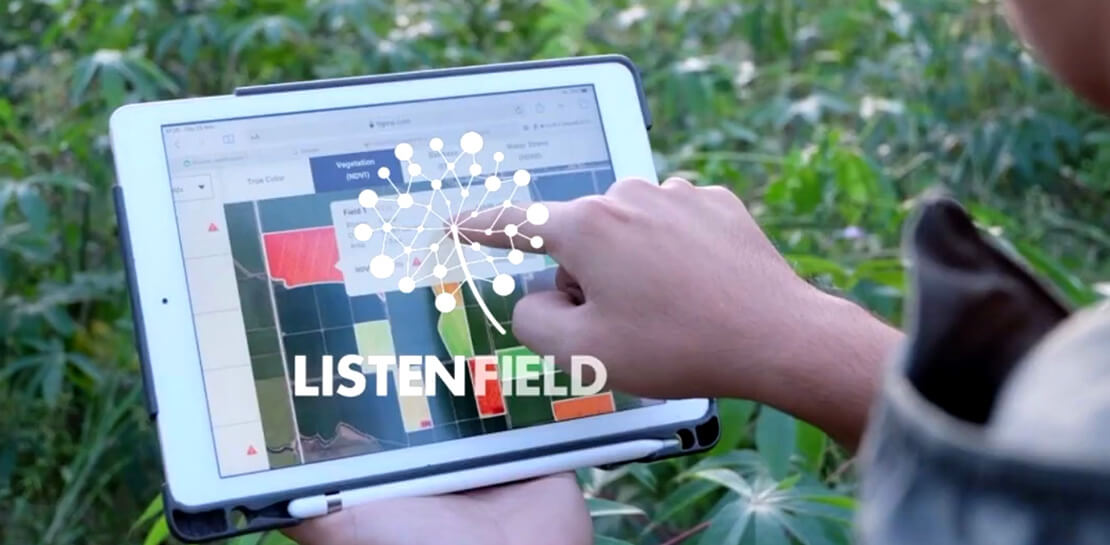
When I was growing up in Thailand, I witnessed the challenges facing farmers including rising food demand, shortage of labor, and uneven crop yields caused by climate change. As a result, many smallholder farmers found themselves trapped in a vicious circle, unable to reduce food insecurity due to low yields,

Google Cloud Helps Northwell Health to Boost Caregiver Productivity and Access to Right Care Using AI
Lung cancer is the leading cause of cancer death in the United States and like any cancer, early detection is crucial to survival. Screening at-risk populations is an important part of reducing mortality, and if concerning nodules are found on imaging, further testing may be required. Today, we’ll share how




Swarovski’s Journey towards Online and Offline Conversion with Predictive Analytics
Luxury brand and leader in crystals and glass production, Swarovski has charmed customers with its exquisite collections for over 125 years. To understand their customers better and map their online behaviors, Swarovski had to overcome prediction hurdles as majority of the purchases are not frequent or habitual. They are mostly
