





Fortress Vault Joins Forces with Google Cloud: Launches Private Data Storage for NFTs

2969
Of your peers have already read this article.
2:30 Minutes
The most insightful time you'll spend today!
Over the past two years, the general population has become more acquainted with cryptocurrencies and the first iterations of NFTs, which were among the earliest use cases for blockchain technology. This public awareness and participation has led to a growing interest in, and demand for, Web3 technology at the enterprise level.
But building trust in a new wave of technology, especially in large organizations, doesn’t happen overnight. That is why it’s critical for Web3 technologists to bring the broader benefits, use cases, and core capabilities of blockchain to the forefront of the conversation. If businesses don’t understand how this new technology can help them, how can they prioritize it among competing tech plans and resources? And without baseline protocols that account for privacy, confidential data, and IP, how can they future-proof a business?
Answering these questions and delivering trustworthy infrastructure is exactly why Scott Purcell and I founded Fortress Web3 Technologies — to bring about the next wave of Web3 utility. The company’s goal is to provide infrastructure that eliminates barriers to Web3 adoption with RESTful APIs and widgetized services that enable businesses to quickly launch and scale their Web3 initiatives.
Our tools include embeddable wallets for NFTs and fungible rewards tokens; NFT minting engines; and core financial services. These include payments, compliance, and crypto liquidity via our wholly-owned financial institution, Fortress Trust. Being overseen by a chartered, regulated entity ensures privacy, compliance and business continuity.
Fortress chose Google Cloud to help usher in this new-wave technology because no other cloud provider is better suited to helping regulated industries get up to scale on our Web3 infrastructure and blockchain technology. I’ll get into more specifics below, but at the highest level: IPFS (the current standard distributed storage) is going to face major resistance when it comes to industries that are heavily regulated or deal in ownership rights. By leveraging Google Cloud, which has critical certifications such as HIPPA, Department of Defense, ISO, and Motion Picture, we’re striking the appropriate balance between decentralization and centralization, using the best of both technologies.
The Fortress Vault on Google Cloud is a huge and necessary step forward as the first ever NFT-database solution to protect intellectual property, confidential documents, and other electronic records. It represents the first technology that marries privately stored content with the accessibility, privacy, portability, and provenance that blockchain provides.
Understanding Non-Fungible Tokens (NFTs)
An NFT is not an expensive jpeg. From a technical point of view, an NFT is a unique key stored in a distributed and trustless ledger we call a blockchain. This blockchain token is uniquely identifiable from any other token and acts as a digital key to authenticate ownership and unlock data held in a database.
While different blockchains have adopted different standards, Ethereum standards are a good proxy to represent overall concepts. Going back to the primitives, if you read the EIP 721 proposal, metadata is explicitly optional. While today’s NFT hype has indeed leveraged that technology to monetize and distribute digital art, the potential of blockchain is in the ability to digitally represent ownership of a wide variety of different asset classes on a decentralized ledger.
Unique, non-fungible tokens are not a new concept. We use them every day in technical systems for things like authentication, database keys, idempotency, and much more. Now, thanks to blockchain technology, you can take those out of their walled gardens and into an open platform that can lead to transformational utility and applications.
Take real estate, for example. Instead of a paper-based title documenting you as the owner of your home, imagine that the title is tokenized with an NFT on a blockchain. Any platform could cryptographically verify the authenticity of that form of title along with its provenance in real time and confirm that you’re the rightful owner of that property.
But, perhaps you don’t want the title of your property visible to others, nor the associated permits, tax documents, architectural drawings, contractor lists, and other documents. Maybe you just want banks, insurance companies, and others to be able to confirm that you are indeed the owner without revealing the details of those records. The NFT metadata records immutable public-facing provenance, while the underlying data remains private and protected using Fortress Vault on Google Cloud.
Apply that same utility to other sensitive information such as medical records, intellectual property, estate documents, corporate contracts, and other confidential information and it’s easy to see how enterprises are just now exploring how to hold traditional assets as NFTs.
Fortress Vault: Intellectual Property, Confidential Documents, and Other Electronic Records
What NFTs and Web3 have been lacking is the ability to make the tokenized data accessible exclusively by the owner — and only the owner. NFTs are a digital key to unlock everything ranging from music and event tickets, to real estate deeds and healthcare records, to estate documents, and to everything in the world that’s digital.
This is why we created the Fortress Vault. When building it, we had to make a fundamental decision: Either go with a distributed and permissionless storage protocol like IPFS, filecoin, or other blockchain-based database offerings, or work with an industry-leading cloud platform that understands data integrity and is establishing itself as the leader in the space.
Ultimately, we chose Google Cloud for its industry-leading object storage, professional management, fault tolerance, and myriad of certifications for architecture and data integrity.
Some of the challenges faced when vaulting a vast variety and quantity of digital content at scale include:
- Balancing data availability versus cost of storage
- Data redundancy
- Long term archival needs
- Business continuity
- Flexibility to meet current and future needs of the rapidly evolving Web3 industry.
Google Cloud is the clear leader across all of these pain points. The object lifecycle management of Google Cloud Storage enables efficient transition between storage classes when either the data matures to a certain point or it’s updated with newer files. Content in the Fortress Vault can range from on-demand data to long-term uses, such as estate planning documents that won’t be accessed for 30 years.
When storing NFT data, robust disaster recovery is table stakes. We quickly gravitated to the automatic redundancy options and multi-region storage buckets that let us customize where we store our data without massive devops and management overhead. By leveraging Google Cloud, we can offer industry leading retention, redundancy, and integrity for our customers’ NFT content.
Working with a leader in data storage was key to making this a reality. Additionally, Google Cloud shares our vision of bringing every industry forward into the world of Web3. We are both focused on building the critical infrastructure that allows everyone from Web3 native companies to Fortune 500 brands navigate the strategic shift to blockchain technology.
Why Web3 Matters
“Web3” is shorthand for the “third wave” of the internet and the technological innovation that brought us here.
Web 1 — the earliest internet — democratized reading and access to information, opening the doors to mass communication. Web 2 expanded on that with the ability to read and “write.” It democratized publishing by letting people directly engage in producing information through blogs, social media, gaming, and contributions to collective knowledge.
Web 3 expands our technological capabilities even more with the ability to read, write, and “own.” With blockchain, we can now establish clear provenance with visibility into the origination of ownership of any tokenized asset, and we can see the chain of ownership. We can rely on this next-generation technology to track, authenticate, protect, and keep a ledger of our assets.
With the Fortress Vault on Google Cloud, we have the capability to ensure the integrity of non-public data while making it accessible via NFTs. This is a game changer for Web3 adoption, particularly in industries like music, event ticketing, gaming, finance, transportation, real estate, and healthcare. Every industry can benefit from the ability to tokenize assets on blockchain technology without leaving the trusted safety of Google Cloud data storage.
The market for NFTs is everyone. And the Fortress Vault on Google Cloud is the technology evolution that makes it possible for Web3 innovators to confidently build, launch, and scale their initiatives across every industry imaginable.
1 Developer. 5 Months. A Revenue Generating App With 100K Users With Firebase

7879
Of your peers have already read this article.
5:30 Minutes
The most insightful time you'll spend today!
This is a guest post authored by Firebase customer, Anton Ivanov, Founder & CEO of DealCheck
Real estate investing is a fantastic way to build a stream of passive income and grow your wealth. Numerous studies have pointed out that real estate investing has created more millionaires throughout history than any other form of investing (like this one and this one). So why don’t more people do it?
I asked myself this very question a few years ago after talking to a group of friends about the success I’ve had with real estate, and listening to their reasons why they think it’s out of their reach.
A common theme among them was that they viewed it as something too difficult to learn and master. There were too many steps, the learning curve was steep and there was a lot of room for mistakes for somebody just starting out, especially when analyzing the financial performance of potential investment properties.
Traditionally, most investors used spreadsheets to do the math – which works only if you know what and how you’re calculating something. But if you don’t know that, it’s very easy to make mistakes and overlook things. And no one wants to make mathematical errors before a huge purchase like an investment property.
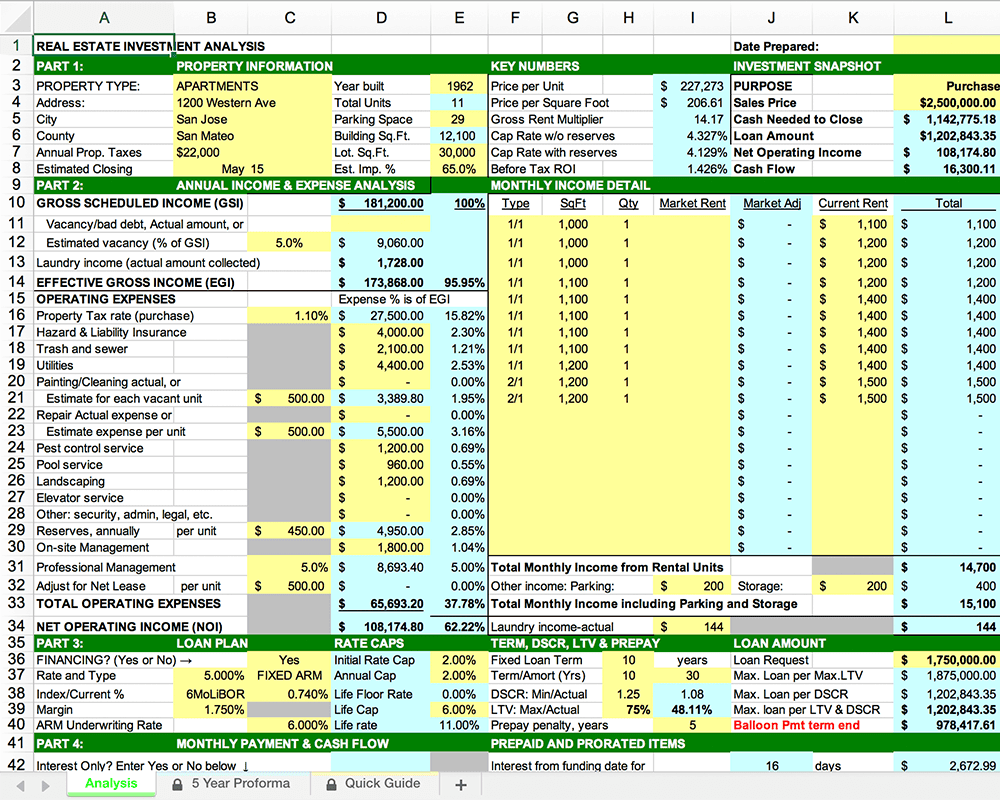
Where do I even begin?!
And that’s when I had the idea to build DealCheck – a cloud-based, easy-to-use property analysis tool for real estate investors and agents. I wanted to create a platform that would help new investors learn the ropes and avoid costly mistakes, but at the same time provide the flexibility to perform more advanced analysis with a click of a button.
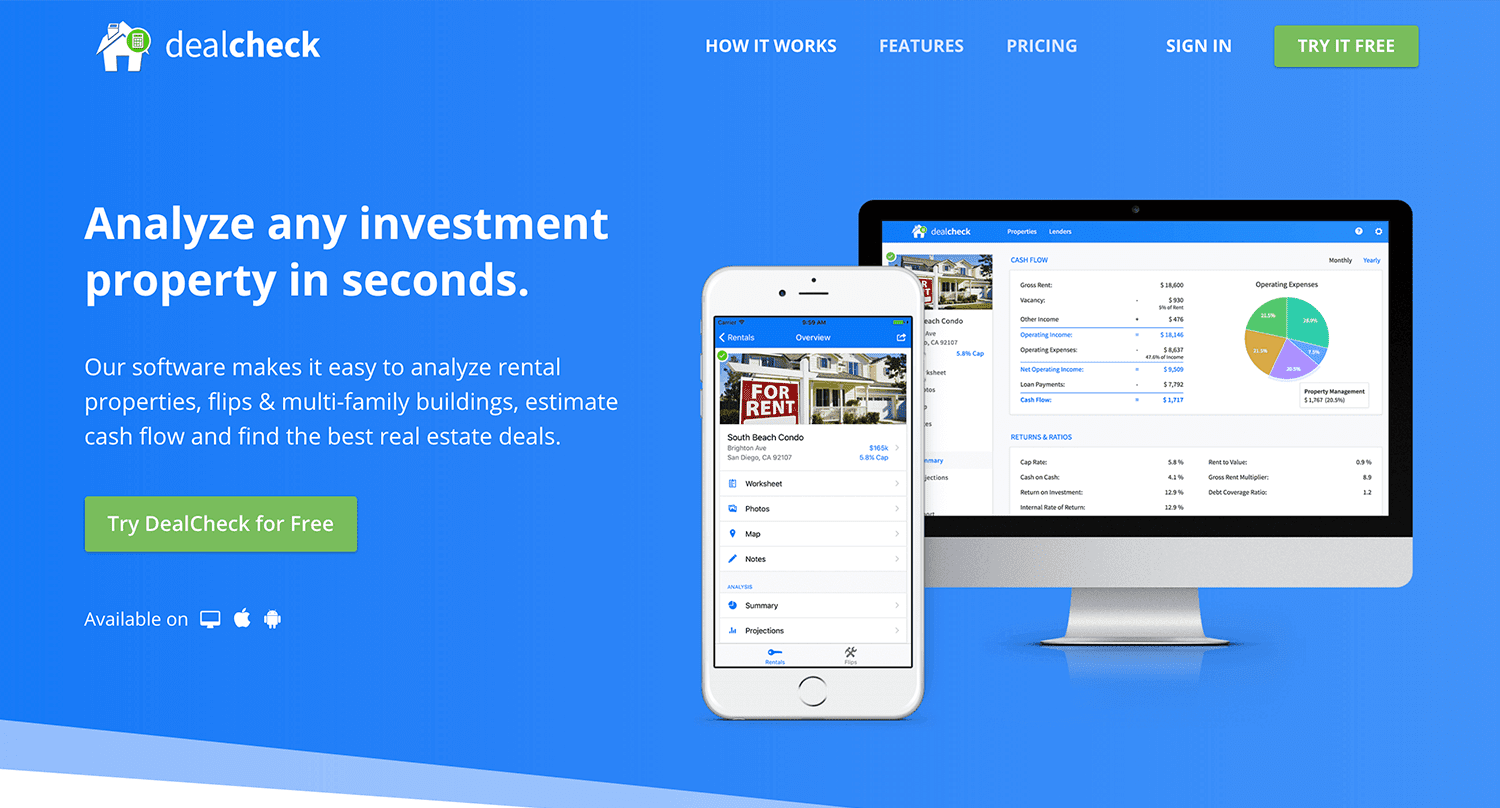
Making real estate investing easier and more accessible.
The Challenges of Solo Development
I was working as a front-end engineer at the time, so I knew I could build the UI myself, but what about the back-end, data storage, authentication, and a bunch of other things you need for a full-functioning cloud app?
I didn’t know anybody I could bring on as a co-founder, so I set out to research what technologies and platforms I could leverage to help me with the back-end and server infrastructure.
Firebase kept popping up again and again and I began to look at it in more detail. It was then recently acquired by Google and its collection of BaaS (backend-as-a-service) modules seemed to offer the exact solution I needed to build DealCheck.
I was especially impressed with the documentation for each feature and how well all of the different technologies could be tied together to create one unified platform.
It wasn’t long before I signed up and started building the first MVP of the app.
Using Firebase to Quickly Build a Scalable Backend
As the only developer on the project, I had limited time and resources to spend on building the back-end, so I set out to use every Firebase feature that was available at the time to my advantage.
My goal was actually to write as little server-side code as possible and instead focus on leveraging the different Firebase modules to solve three specific challenges:
Challenge #1 – Authentication and User Management
The first one was authentication and user management. DealCheck’s users needed the ability to create their accounts so they can view and analyze properties on any device (more on that later). I wanted to have the ability to sign in with email, Facebook or a Google account.
Firebase Authentication was designed specifically for this purpose and I used it to handle pretty much the entire authentication flow. Out-of-the-box, it has support for all the major social networks, cross-network credential linking and the basic account management operations like email changes, password resets and account deletions.
There was no server-side code required at all – I just needed to build the UI on the front-end.
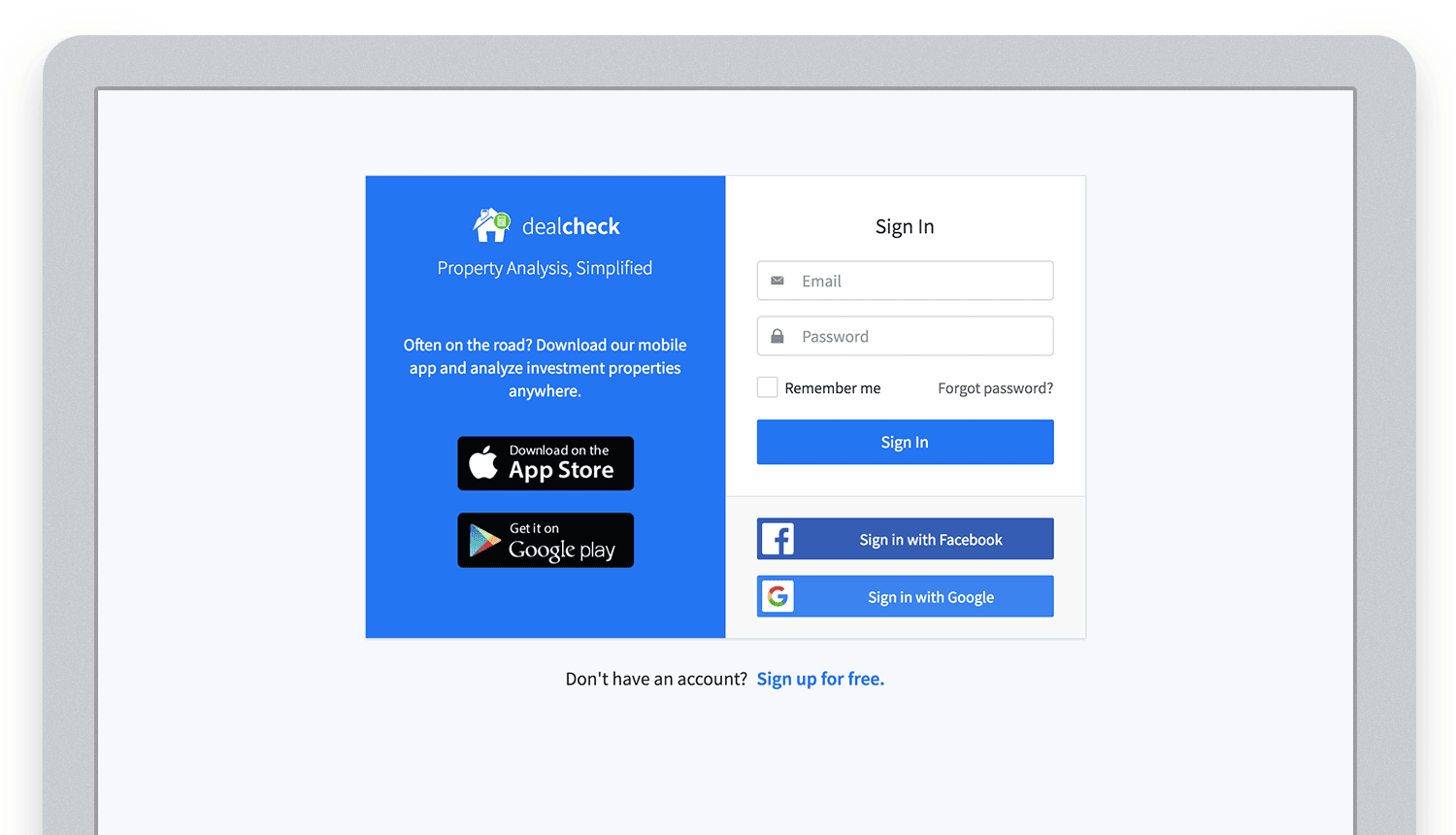
Email, Facebook and Google sign in powered by Firebase.
And as an added benefit, Firebase Authentication ties directly into the Realtime Database product to create a declarative permissions and access control framework that’s easy to implement and maintain. This helped me make sure user data was protected from unauthorized access, but also facilitate data sharing among users.
Challenge #2 – Cloud Storage with Cross-Device Sync
Next up was data storage. I knew that I wanted DealCheck’s users to be able to use the app and analyze properties online, on iOS and Android. So I needed a real-time, cloud-based database solution that could sync data across any device.
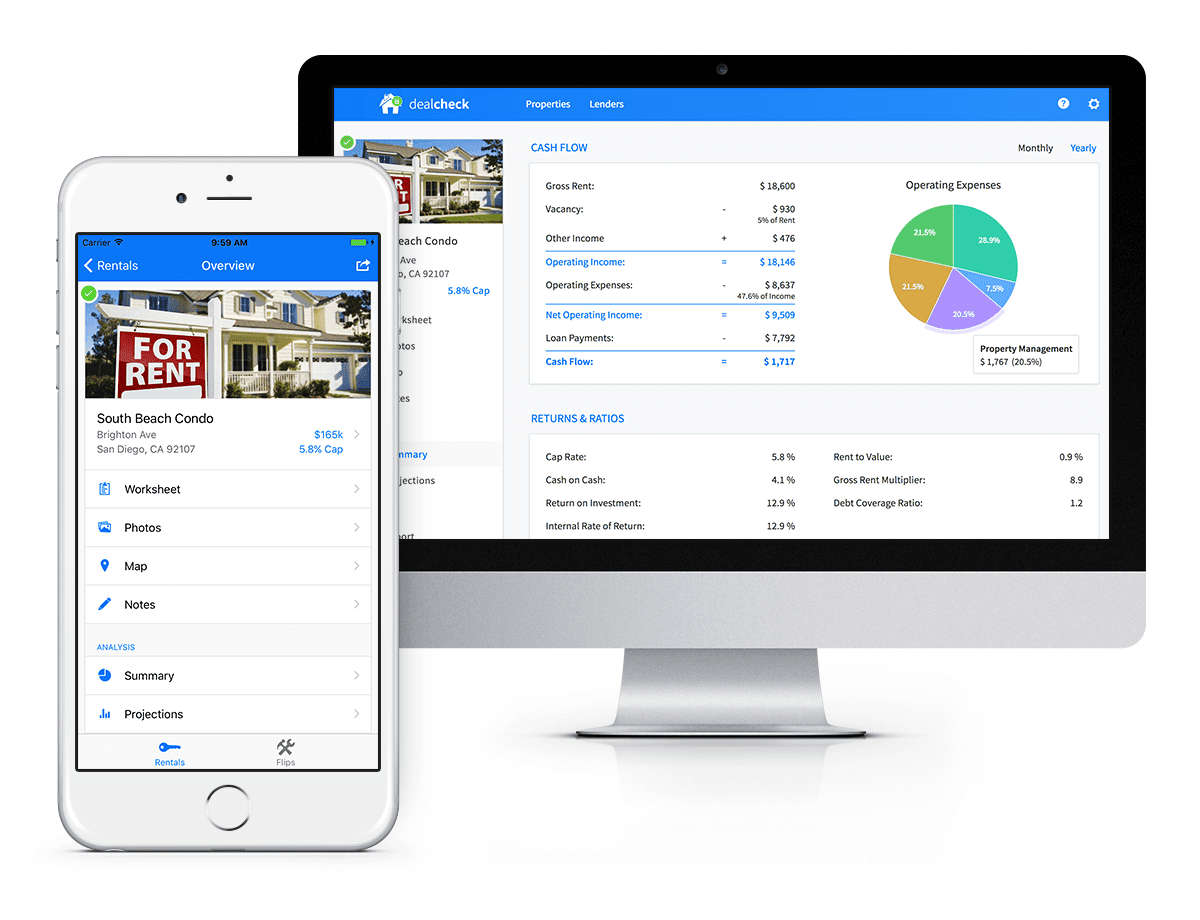
Syncing data across web and mobile is not easy!
Firebase Realtime Database is a NoSQL, JSON-based database solution that was designed exactly for this purpose, and I was actually surprised how great it worked. I used the official AngularJS bindings for Firebase on the front-end to read and write to it directly from the client.
I had to do some extra work on mobile to implement an offline mode with syncing after reconnections, but all-together the code required to make everything work was minimal.
As I mentioned, Firebase Authentication tied directly to the database to facilitate access control, so I really didn’t need to do anything extra there. And I was able to set up automatic daily backups of all the data with a click of a button.
Challenge #3 – Third-Party Integrations
Up to now, I had written exactly 0 lines of server-side code and everything was handled by the client directly. As DealCheck’s development progressed, however, I knew that I would need a server to handle some operations that could not be done in the client.
I wasn’t very experienced with server maintenance and DevOps, but fortunately the Firebase Cloud Functions product was able to solve all of my needs. Cloud Functions are essentially single-purpose functions that can be triggered (or executed) based on a specific HTTP request or events coming from the Authentication, Realtime Database or other Firebase products.
Each function can be run once based on a specific event trigger to perform its prescribed task. You don’t have to worry about provisioning a server instance or managing load – everything is done automatically for you by Firebase.
What’s even cooler, is that Cloud Functions can access the Realtime Database and Cloud Storage buckets of the same project, performing operations on them server-side, as needed.
This is how DealCheck processes subscription payments through Stripe, validates Apple and Google Play mobile subscription receipts, integrates with third-party APIs and updates database records without user interaction.
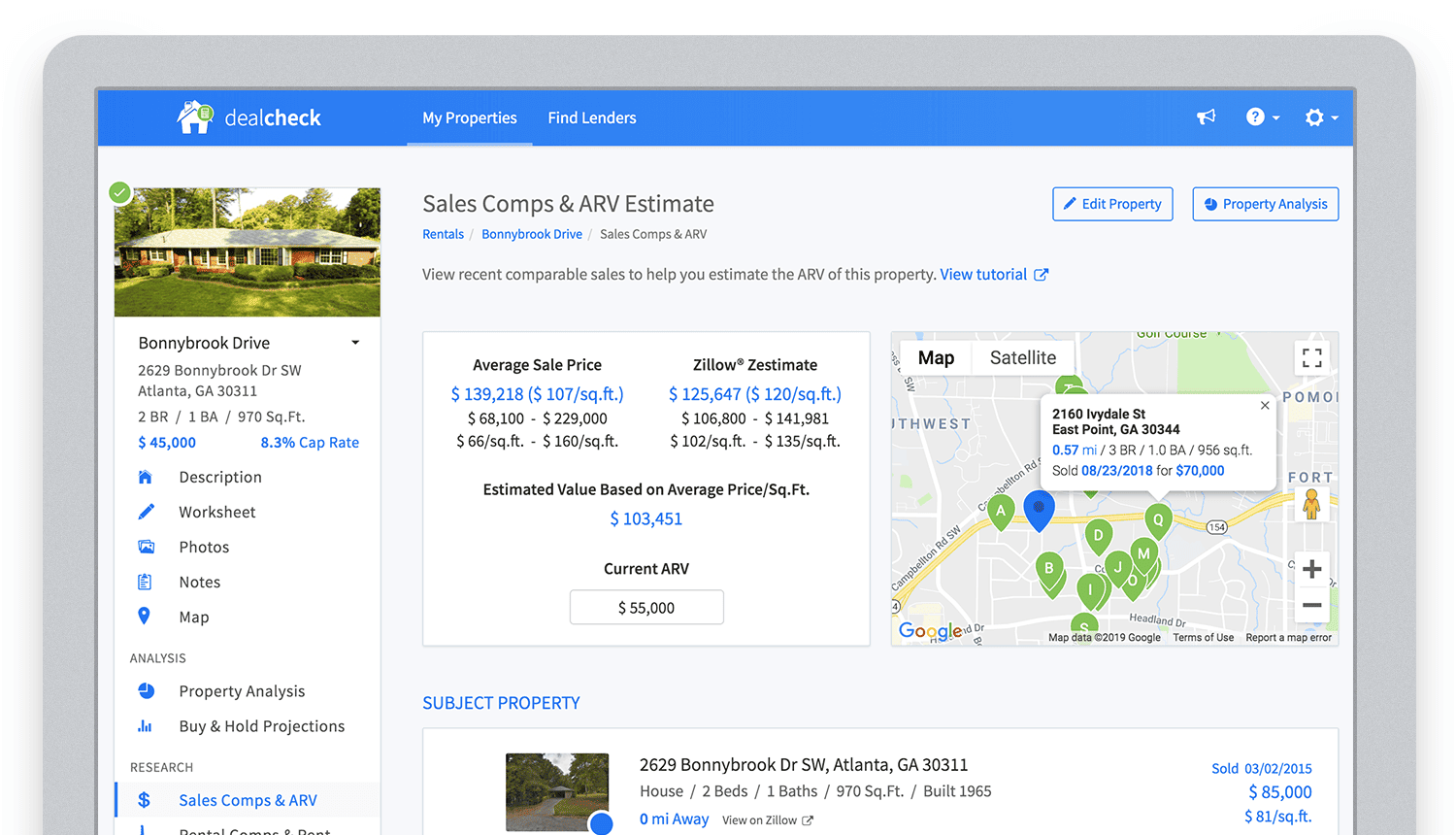
Bringing in sales comparable data from third-party providers into DealCheck.
Cloud Functions became the “glue” that tied the entire back-end infrastructure together.
Growing from an MVP to 100,000 Users with Firebase
The first version of the DealCheck app was built and launched in less than 5 months with just me on the development team. I definitely don’t think that would have been possible without Firebase powering the back-end infrastructure. Maybe the project wouldn’t have ever launched at all.
While Firebase is awesome for quick MVP development, it’s definitely designed to power production applications at scale as well. As DealCheck grew from a small side-project to one of the most popular real estate apps with over 100k users, all of the Firebase products that we use scaled to support the increasing load.
Moreover, the fantastic interoperability of all Firebase modules allows us to develop and release new features much faster because of the reduced coding requirements and ease of configuration.
So next time you’re looking to build an ambitious project with a small team – take a look at how Firebase can help you reduce development time and provide a suite of powerful tools that scale as your business grows.
This is exactly how DealCheck grew from a simple idea to make property analysis easier and faster, to an app that is helping tens of thousands of people grow their wealth and passive income through real estate investing. It’s a truly awesome and fulfilling experience to see your work positively impact so many people and it wouldn’t have been possible without Firebase.
Migrating MySQL to Spanner? Here’s What You Need to Know

5628
Of your peers have already read this article.
2:00 Minutes
The most insightful time you'll spend today!
Since its initial release in 1995, MySQL has not only been the de-facto database for many data storage needs, but has gathered much attention over the years as one of the most well-recognized databases around when it comes to Relational Database Management Systems and transactional data processing.
Any application in retail, e-commerce, or banking has likely had its fair share of business depending on a relational database for its transactional needs. Many of these applications are built on MySQL due to its flexibility, open source nature, and strong community support.
Whether in the context of a migration from a relational database (like MySQL or PostgreSQL) , migration from a NoSQL database (like Cassandra), or a green grass workload, many companies turn to Cloud Spanner seeking a high availability SLA (99.99% for regional instances and 99.999% for multi region instances), unlimited scale, and low operational overhead – no patching required, no maintenance or other planned downtimes, just to name a few benefits.
The tooling and open source ecosystem around Spanner has evolved and grown ever since the service was introduced. HarbourBridge is a part of this ecosystem, and it’s meant to help customers port their existing MySQL or PostgreSQL schema to a Cloud Spanner schema.
Application Migration Tips
Despite helpful tools like HarbourBridge, database migrations are never trivial. Here are a few things to pay attention to when migrating from MySQL to Spanner, and how to update your application logic to address them.
Note – The following snippets use the PHP client for Cloud Spanner. A couple of the snippets reference a partial Magento port that our friends over at Searce have been working on. Once you understand the operations, you should be able to implement the same in any of the other languages that Cloud Spanner supports.
Cloud spanner enforces strict data types
In a MySQL query, the value of an attribute can be referenced as either a string or an integer. Example:
- select * from catalog_eav_attribute where attribute_id = 46;
- select * from catalog_eav_attribute where attribute_id = “46”;
Both are valid and equivalent.
In Cloud Spanner, the query will return an error if you try to reference an integer type by using a string representation.
Here is an example of a working query from Cloud Spanner:
- select * from catalog_eav_attribute where attribute_id = 46; — this will work
- Select * from catalog_eav_attribute where attribute_id = “46” — will fail, since we are supplying a string with “46”
You may use a function like the following to assist you with such transformations.
/*** Formats the SQL for Cloud Spanner* Example* Input SQL : <select statement> WHERE* (`product_id` = '340') ORDER BY position ASC* Output SQL : <select statement> WHERE* (`product_id` = 340) ORDER BY position ASC* In the above example integer*`340` is sanitized by removing single quotes.* Sanitization is required since Cloud Spanner* has strict typing* @param string $sql* @return string $sql*/public function sanitizeSql(string $sql){if (preg_match_all("/('[^']*')/", $sql, $m)) {$matches = array_shift($m);for($i = 0; $i < count($matches); $i++) {$curr = $matches[$i];$curr = filter_var($curr,FILTER_SANITIZE_NUMBER_INT);if (is_numeric($curr)) {$sql = str_replace($matches[$i],$curr, $sql);}}}return $sql;}
Using sequences in primary keys is not a Spanner best practice
Cloud Spanner does not implement a sequence generator, and it is not a Spanner best practice to use sequential IDs because doing so can cause hotspotting.
An alternative mechanism of generating a unique primary key is to use a UUID or any other similar mechanisms that result in non-sequential values. For more information, please refer to this article.
In order to convert all existing primary keys to a UUID pattern, you can change the schema using the snippet here
You may use this code snippet to modify the application code to generate the UUID for the auto increment. There are other ways to do this as well, such as using PHP built-in uniqid function.
/*** Generate UUID.* @return string*/public function getAutoIncrement(){if (function_exists('com_create_guid') === true) {return trim(com_create_guid(), '{}');}return sprintf('%04X%04X-%04X-%04X-%04X-%04X%04X%04X',mt_rand(0, 65535), mt_rand(0, 65535),mt_rand(0, 65535), mt_rand(16384, 20479),mt_rand(32768, 49151), mt_rand(0, 65535),mt_rand(0, 65535), mt_rand(0, 65535));}
Implicit casting and the need for explicit casting of field data types
Both MySQL and Cloud Spanner follow the SQL standard, hence much of the query syntax is the same. One notable difference is that the Cloud Spanner field types are implicitly cast to an appropriate data type out of the ones mentioned here. When implicit casting of the field type fails, Spanner returns a read error, so it would be safer to perform the casting to the appropriate type when issuing the SELECT statement.
Modify application code to cast to respective data type before execution of query.
$con = $this->getSpannerConnection();/*** Cloud Spanner follows strict type so cast the columns appropriately*/$select = $con->addCast($select, "`t_d`.`value`", 'string');$select = $con->addCast($select, "`t_s`.`value`", 'string');$select = $con->addCast($select, "IF(t_s.value_id IS NULL,t_d.value, t_s.value)", 'string');$values = $con->fetchAll($select);
Modify the application code to cast the column to its respective type
/*** Cast the column with type* @param string $sql* @param string $col* @param string $type* @return string*/public function addCast(string $sql,string $col, string $type){$cast = "cast(".$col." as ".$type.")";return str_replace($col, $cast, $sql);}
Using interleaved tables to improve read performance
Cloud Spanner’s table interleaving is a great choice for many parent-child relationships where the child table’s primary key includes the parent table’s primary key columns. Interleaving ensures that child rows are collocated with their parent rows, which can significantly improve query performance.
Refer to the statements here for a few samples of creating interleaved tables. To learn more about table interleaving, visit the documentation.
Conclusion
Database migrations are complicated. Hopefully, using HarbourBridge and the list of tips in this article can make that task easier. For additional tips, please take a look at this migration guide and read more about HarbourBridge.
BigQuery’s User-friendly SQL is Like a Cool Drink for Hot Summer

5690
Of your peers have already read this article.
2:30 Minutes
The most insightful time you'll spend today!
With summer just around the corner, things are really heating up. But you’re in luck because this month BigQuery is supplying a cooler full of ice cold refreshments with this release of user-friendly SQL capabilities.
We are pleased to announce three categories of BigQuery user-friendly SQL launches: Powerful Analytics Features, Flexible Schema Handling, and New Geospatial Tools.
Powerful Analytics Features
These powerful SQL analytics features provide greater flexibility to analysts for organizing, filtering, and rendering data in BigQuery than ever before. You can enable spreadsheet-like functionality on summarized data using PIVOT and UNPIVOT and filter irrelevant data in analytic functions using QUALIFY.
Through this section, we will become familiar with these new features through examples using the BigQuery Public dataset, usa_names.
PIVOT/UNPIVOT (Preview)
One of the most time-consuming tasks for data analytics practitioners is wrangling data into the right shape. SQL is great for wrangling data, but sometimes you want to reformat a table as you would in a spreadsheet, pivoting rows and columns interchangeably. To support this use case, we are pleased to introduce PIVOT and UNPIVOT operators in BigQuery. PIVOT creates columns from unique values in rows by aggregating values, and UNPIVOT reverses this action.The example below uses PIVOT on bigquery-public-data.usa_names.usa_1910_current to show the number of males and females born each year, representing each gender as a column. Then UNPIVOT reverses this action.
Language: SQL
-- we start with SQL to create a simple table-- we only include gender, year, and number.CREATE TABLEmydataset.sampletable1 AS (SELECTGender,Year,SUM(Number) AS NumberFROM`bigquery-public-data.usa_names.usa_1910_current`WHEREYear >= 2017GROUP BYGender, Year);-- The resulting table:--+----------------------------------------+--| Gender | Year | Number |--+----------------------------------------+--| F | 2019 | 1353716 |--| F | 2017 | 1403989 |--| F | 2018 | 1380382 |--| M | 2018 | 1568678 |--| M | 2019 | 1538056 |--| M | 2017 | 1604609 |--+----------------------------------------+-- use PIVOT to create columns for “female” and “male”CREATE TABLEmydataset.Pivoted ASSELECTyear, male, femaleFROMmydataset.sampletable1PIVOT( SUM(Number) FOR gender IN ('M' AS male,'F' AS female))ORDER BYyear;-- The resulting pivoted table:--+----------------------------------------+--| Year | female | male |--+----------------------------------------+--| 2017 | 1403989 | 1604609 |--| 2018 | 1380382 | 1568678 |--| 2019 | 1353716 | 1538056 |--+----------------------------------------+-- UNPIVOT reverses the row/column rotation of PIVOT.SELECT*FROMmydataset.PivotedUNPIVOT(number FOR gender IN (male AS 'M',female AS 'F'));
QUALIFY (Preview)
More advanced users of SQL know the power of analytic functions (aka window functions). These functions compute values over a group of rows, returning a single result for each row. For example, customers use analytic functions to compute a grand total, subtotal, moving average, rank, and more. With the announcement of support for QUALIFY, BigQuery users can now filter on the results of analytic functions by using the QUALIFY clause.
QUALIFY belongs in the family of query clauses used for filtering along with WHERE and HAVING. The WHERE clause is used to filter individual rows in a query. The HAVING clause is used to filter aggregate rows in a result set after aggregate functions and GROUP BY clauses. The QUALIFY clause is used to filter results of analytic functions.
To show the utility of QUALIFY, the example below uses QUALIFY to return the top 3 female names from each year in the last decade using from bigquery-public-data.usa_names.usa_1910_current.
Language: SQL
-- QUALIFY filters the result of the RANK functionSELECTname,year,SUM(number) AS total,RANK() OVER (PARTITION BY yearORDER BY SUM(number) DESC) AS rankFROM`bigquery-public-data.usa_names.usa_1910_current`WHEREgender = 'F'AND YEAR >= 2010GROUP BY 1,2QUALIFY RANK <= 3ORDER BY 2,4;
Flexible Schema Handling
New SQL for administrators and data engineers enables table renaming for data pipeline processes, as well as flexible column management.
Table Rename (GA)
In data pipeline processes, tables are often created and then renamed so that they can make way for the next iteration of the pipeline run. To accomplish this, customers need a mechanism by which they can create a table and then subsequently rename it. Now if customers want to change this name using SQL, they can. Using the simple syntax that ALTER TABLE RENAME TO provides, customers will be able to rename a table after creation to clear the way for the next iteration of tables in the data pipeline.
Language: SQL
-- create a sample table “tablename” in “mydataset”.-- You will rename this table.CREATE OR REPLACE TABLE dataset.tablename(col1 STRING,col2 NUMERIC);-- if this table “tablename” becomes obsolete-- perform Table Rename to “obsoletetable”ALTER TABLEmydataset.name RENAME TO obsoletetable;
DROP NOT NULL constraints on a column (GA)
While BigQuery has historically provided many tools available in the UI, CLI and APIs, we know that many administrators prefer interfacing with the database using SQL. BigQuery recently released DDL statements which enable data administrators to provision and manage datasets and tables, greatly simplifying provisioning and management. Today, we continue the next addition in this line of releases by announcing ALTER COLUMN DROP NOT NULL constraint on a column:
- ALTER COLUMN DROP NOT NULL allows the administrator to remove the NOT NULL constraint from a column in BigQuery.
Language: SQL
-- create a table to store credit card numbers-- the business requires this field, so-- include a NOT NULL constraintCREATE TABLEmydataset.customers(credit_card_number STRING NOT NULL);-- if needs of the business no longer require this field,-- the customer can allow null entries in this column-- by dropping the constraintALTER TABLEmydataset.customersALTER COLUMN credit_card_number DROP NOT NULL;
CREATE VIEW with column list (GA)
Views are used ubiquitously by BigQuery customers to capture business logic. Oftentimes, BigQuery users have business requirements to assign aliases to columns in views. Now BigQuery supports doing so upon view creation in a column name list format with the release of CREATE VIEW with column list syntax.
Language: SQL
-- aliases list1 and list2 can be assigned in a list formatCREATE VIEWmyview (list1, list2) ASSELECTcolumn_1, column_2FROMmydataset.exampletable
New Geospatial Tools
ST_POINTN, ST_STARTPOINT, and ST_ENDPOINT
Geospatial data is incredibly valuable to data analytics customers dealing with data from the physical world. BigQuery has very strong geospatial function support to help customers process marketing data, track storms, or manage self-driving cars. Particularly for analyzing vehicle or location tracking data, we’re thrilled to provide three new functions to allow users to easily extract or filter on key points:
For example, when working with vehicle histories, ST_POINTN, ST_STARTPOINT, and ST_ENDPOINT allow users to extract elements such as the start and the end of a trip. For identifying origin-destination pairs these functions will make that task much easier.
Language: SQL
-- pull the first, second, penultimate and final points-- from a linestringWITH linestring as (SELECT ST_GeogFromText('linestring(1 1, 2 1, 3 2, 3 3)') g)SELECTST_StartPoint(g) AS first, ST_EndPoint(g) AS last,ST_PointN(g,2) AS second, ST_PointN(g, -2) as second_to_lastFROMlinestring+--------------+--------------+--------------+----------------+| first | last | second | second_to_last |+--------------+--------------+--------------+----------------+| POINT(1 1) | POINT(3 3) | POINT(2 1) | POINT(3 2) |+--------------+--------------+--------------+----------------+
As sure as a hot summer day pairs well with an ice-cold beverage, these new user-friendly SQL features in BigQuery pair well with your data analytics workflows. To learn more about BigQuery, visit our website, and get started immediately with the free BigQuery Sandbox.
Scaling Your Spanner Databases: The Benefits of Read-Only Replicas and Zero-Downtime Moves

1483
Of your peers have already read this article.
1:30 Minutes
The most insightful time you'll spend today!
As Google Cloud’s fully managed relational database that offers near unlimited scale, strong consistency, and availability up to 99.999%, Cloud Spanner powers applications at any scale in industries such as financial services, games, retail, and healthcare.
When you set up a Spanner instance, you can choose from two different kinds of configurations: regional and multi-regional. Both configuration types offer high availability, near unlimited scale, and strong consistency. Regional configurations offer 99.99% availability and can survive zone outages. Multi-regional configurations offer 99.999% availability and can survive two zone outages and entire regional outages.
Today, we’re announcing a number of significant enhancements to Spanner’s regional and multi-regional capabilities:
- Configurable read-only replicas let you add read-only replicas to any regional or multi-regional Spanner instance to deliver low latency reads to clients in any geography
- Spanner’s zero-downtime instance move service gives you the freedom to move your production Spanner instances from any configuration to another on the fly, with zero downtime, whether it’s regional, multi-regional, or a custom configuration with configurable read-only replicas
- We’re also dropping the list prices of our nine-replica global multi-regional configurations nam-eur-asia1 and nam-eur-asia3 to make them even more affordable for global workloads
Let’s take a look at each of these enhancements in a bit more detail.
Configurable read-only replicas
One of Spanner’s most powerful capabilities is its ability to deliver high performance across vast geographic territories. Spanner achieves this performance with read-only replicas. As its name suggests, a read-only replica contains an entire copy of the database and it can serve stale reads without requiring a round trip back to the leader region. In doing so, read-only replicas deliver low latency stale reads to nearby clients and help increase a node’s overall read scalability.
For example, a global online retailer would likely want to ensure that its customers worldwide can search and view products from its catalog efficiently. This product catalog would be ideally suited for Spanner’s nam-eur-asia1 multi-region configuration, which has read/write replicas in the United States and read-only replicas in Belgium and Taiwan. This would ensure that customers can view the product catalog with low latency around the globe.
Until today, read-only replicas were available in several multi-region configurations: nam6, nam9, nam12, nam-eur-asia1, and nam-eur-asia3. But now, with configurable read-only replicas, you can add read-only replicas to any regional or multi-regional Spanner instance so that you can deliver low-latency stale reads to clients everywhere.
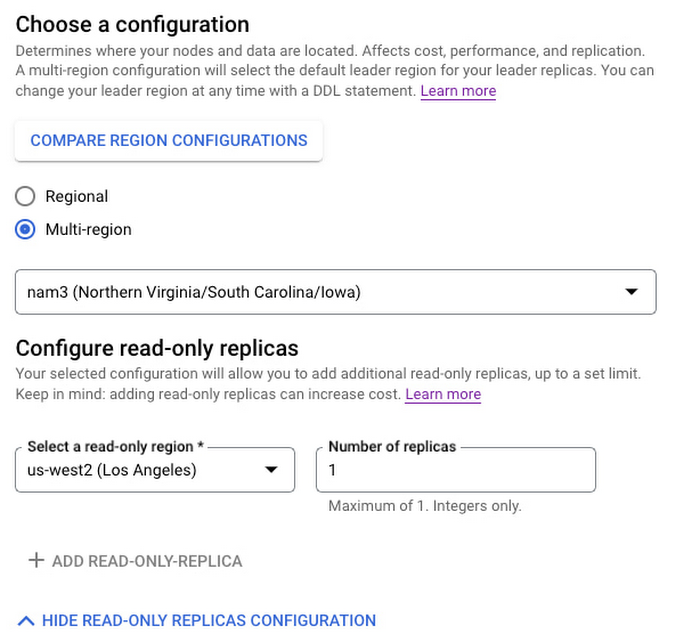
To add read-only replicas to a configuration, go to the Create Instance page in the Google Cloud console. You’ll now see a “Configure read-only replicas” section. In this section, select the region for the read-only replica, along with the number of replicas you want per node, and create the instance. It’s as simple as that!
The following snapshot shows how to add a read-only replica in us-west2 (Los Angeles) to the nam3 multi-regional configuration.
As we roll out configurable read-only replicas, we do not yet offer read-only replicas in every configuration/region pair. If you find that your desired read-only replica region is not yet listed, simply fill out this request form.
Configurable read-only replicas are available today for $1/replica/node-hour plus storage costs. Full details on pricing are available at Cloud Spanner pricing.
Also announcing: Spanner’s zero-downtime instance move service
Now that you can use configurable read-only replicas to create new instance configurations that are tailored to your specific needs, how can you migrate your current Spanner instances to these new configurations without any downtime? Spanner database instances are mission critical and can scale to many petabytes and millions of queries per second. So you can imagine that moving a Spanner instance from one configuration to another — say us-central1 in Iowa to nam3 with a read-only replica in us-west2 — is no small feat. Factor in Spanner’s stringent availability of up to 99.999% while serving traffic at extreme scale, and it might seem impossible to move a Spanner instance from us-central1 to nam3 with zero downtime.
However, that’s exactly what we’re announcing today! With the instance move service, now generally available, you can request a zero-downtime, live migration of your Spanner instances from any configuration to any other configuration — whether they are regional, multi-regional, or custom configurations with configurable read-only replicas.
To request an instance move, select “contact Google” in the Edit Instance of the Google Cloud Console and fill out the instance move request form. Once you make a move request, we’ll contact you to let you know the start date of your instance configuration move, and then move your configuration with zero downtime and no code changes while preserving the SLA guarantees of your configuration.
When moving an instance, both the source and destination instance configurations are subject to hourly compute and storage charges, as outlined in Cloud Spanner pricing. Depending on your environment, instance moves can take anywhere from a few hours to a few days to complete. Most importantly, during the instance move, your Spanner instance continues to run without any downtime, and can continue to rely on Spanner’s high availability, near unlimited scale, and strong consistency to serve your mission-critical production workloads.
Price drops for global 9-replica Spanner multi-regional configurations
Finally, we’re also pleased to announce that we’re making it even more compelling to use Spanner’s global configurations of nam-eur-asia1 and nam-eur-asia3 by dropping the compute list price of these configurations from $9/node/hour to $7/node/hour. With write quorums in North America and read-only replicas in both Europe and Asia, these configurations are perfectly suited for global applications with strict performance requirements and 99.999% availability. And now, they’re even more cost-effective to use!
Learn more
- If you are new to Spanner, try Spanner at no charge with a 90-day free trial instance.
- Learn more about multi-regional Spanner configurations by reading Demystifying Cloud Spanner multi-region configurations
Google Launches Open Saves To Power Gaming Platforms Scale to User Demands

5500
Of your peers have already read this article.
1:30 Minutes
The most insightful time you'll spend today!
Many of today’s games are rich, immersive worlds that engage the audience in ways that make a gamer a part of a continuing storyline. To create these persistent experiences, numerous storage technologies are required to ensure game data can scale to the standards of gamers’ demands. Not only do game developers need to store different types of data—such as saves, inventory, patches, replays, and more—but they also must keep the storage system high-performing, available, scalable, and cost-effective.
Enter Open Saves, a brand-new, purpose-built single interface for multiple storage back ends that’s powered by Google Cloud and developed in partnership with 2K. Now, development teams can store game data without having to make the technical decisions on which storage solution to use, whether that’s Cloud Storage, Memorystore, or Firestore.
“Open Saves demonstrates our commitment to partnering with top developers on gaming solutions that require a combination of deep industry expertise and Google scale,” said Joe Garfola, Vice President of IT and Security at 2K. “We look forward to continued collaboration with Google Cloud.”
Game development teams can save game data against Open Saves without having to worry about the optimal back-end storage solution, while operations teams can focus on needed scalability and storage options. Here’s how it looks in practice:
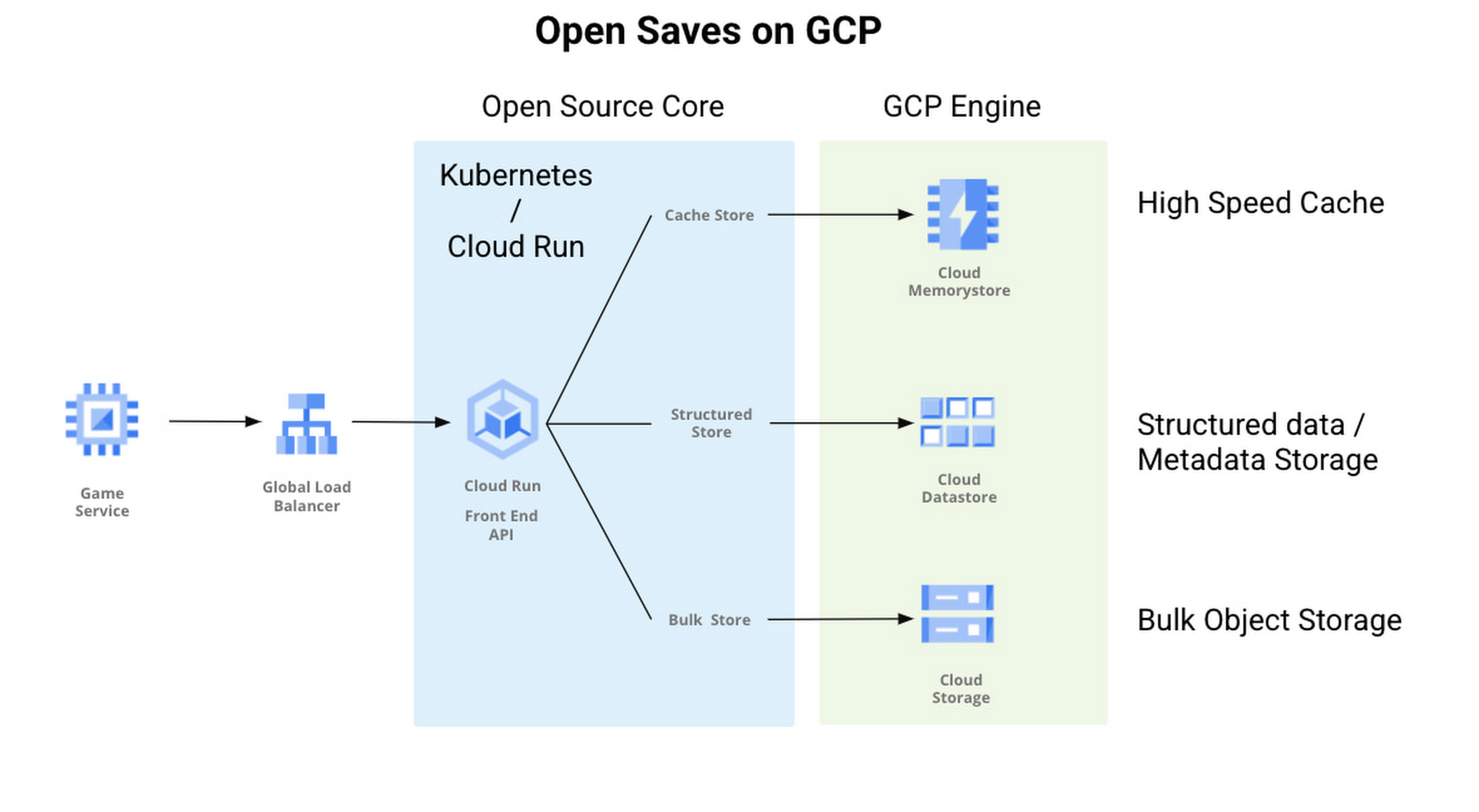
With Open Saves, game developers can run a cloud-native game storage system that is:
- Simple: Open Saves provides a unified, well-defined gRPC endpoint for all operations for metadata, structured, and unstructured objects.
- Fast: With a built-in caching system, Open Saves optimizes data placements based on access frequency and data size, all to achieve both low latency for smaller binary objects and high throughput for big objects.
- Scalable: The Open Saves API server can run on either Google Kubernetes Engine or Cloud Run. Both platforms can scale out to handle hundreds of thousands of requests per second. Open Saves also stores data in Firestore and Cloud Storage, and can handle hundreds of gigabytes of data and up to millions of requests per second.
Open Saves is designed with extensibility in mind, and can be integrated into any game—whether mobile or console, multiplayer or single player—running on any infrastructure, from on-prem to cloud or a hybrid. The server is written in Go, but you can use many programming languages and connect from client or server since the API is defined in gRPC.
Writing to and reading from Open Saves is as simple as the following code:
// To writerecord := &pb.Record{Key: uuid.New().String(),Tags: []string{"tag1", "tag2"},OwnerId: "owner",}createReq := &pb.CreateRecordRequest{StoreKey: storeKey,Record: record,}_, err := client.CreateRecord(ctx, createReq)if err != nil {t.Fatalf("CreateRecord failed: %v", err)}// To readgetReq := &pb.GetRecordRequest{StoreKey: storeKey, Key: recordKey}response, err := client.GetRecord(ctx, getReq)if err != nil {t.Errorf("GetRecord failed: %v", err)}
We are actively developing Open Saves in partnership with 2K Games, and would love for you to come join us on GitHub. There are a few ways to get involved:
- Install and deploy your Open Saves service
- Check out the API reference
- Read the development guide and start contributing
- Join the open-saves-discuss mailing list
More Relevant Stories for Your Company

Datashare for Financial Services: Securing the Publishers and Consumers’ Access to Market Data
Access to the cloud has advanced the distribution and consumption of financial information on a global scale. In parallel, the global financial data landscape has been transformed by an influx of alternative data sources, including social media, meteorological data, satellite imagery, and other data. Exchanges and market data providers now

Harnessing the Power of Data and AI to Transform Life Science Supply Chains
Global life science supply chains are lengthy and complex with many moving parts. One small disruption can create serious delays and affect your ability to deliver therapeutics for patients. Supply chain disruptors Over the last few years, healthcare organizations have encountered a range of obstacles, from both internal and external

BigQuery Explainable AI for Demystifying the Inner Workings of ML Models. Now GA!
Explainable AI (XAI) helps you understand and interpret how your machine learning models make decisions. We're excited to announce that BigQuery Explainable AI is now generally available (GA). BigQuery is the data warehouse that supports explainable AI in a most comprehensive way w.r.t both XAI methodology and model types. It does this at

Partnering with Google Cloud is the Key Behind Recent Healthcare Innovations
It’s simply amazing to witness how some of our systems integrators employ Google Cloud solutions to drive innovation in ways we at Google may never have considered—especially in healthcare. According to analyst firm MarketsandMarkets, the market for the Cloud in healthcare is projected to grow 43% between 2020 and 2025
