





Financial Firms Can Enjoy These 8 Benefits by Migrating and Running on Google Cloud VMware Engine

3350
Of your peers have already read this article.
2:00 Minutes
The most insightful time you'll spend today!
The COVID-19 pandemic brought dramatic changes to the financial services industry. Already under pressure from nimble young fintechs to modernize, established banks and insurers were undergoing incremental digital transformation. But in 2020, they hit the gas pedal. Branches closed and remote work became the norm. Almost overnight, employees needed secure remote access to corporate systems, and customers expected to be able to complete even complex transactions whenever they wanted, on whatever device. Even as things return to normal, many of these shifts are likely to be permanent. According to Forrester Research, nearly 90% of global financial services CIOs and SVPs believe that improving their application portfolio is key to improving customer experience and driving revenue.1 The problem? Replacing legacy systems with cloud-based SaaS enterprise software is a massive, time- and resource-intensive process.
IDG’s recently completed white paper, Financial Services Spotlight: Elevating agility and security in the cloud, highlights an alternative to the all-or-nothing approach to replatforming: “lifting and shifting” on-premises applications and workloads to the cloud without rewriting them. In this way, you keep your organization’s familiar architecture, but give it the scalability and cutting-edge technology of a modern cloud environment. That’s the promise of Google Cloud VMware Engine brings to the financial services industry.
Here’s a quick overview of the insights that the IDG study uncovers. Download the complete white paper.
Simpler migration, rich rewards
Google Cloud VMware Engine helps financial services companies seamlessly migrate and run
VMware workloads natively on Google Cloud. Once in the cloud, firms can take advantage of Google Cloud services, access a robust third-party cloud ecosystem, and use the same VMware tools, processes, and policies their teams already know. The IDG study found that migrating to Google Cloud with Google Cloud VMware Engine offers multiple benefits:
- Create new customer experiences. Migrating to Google Cloud puts modern, cloud-native architectures and technologies — such as containers and microservices — easily within reach. These make it possible for financial institutions to quickly and securely launch new applications and update them on a continuous basis using DevOps pipelines. They also allow firms to craft more personalized customer experiences across channels using Google Cloud’s native AI and data analytics.
- Deliver new services. After migrating, financial services organizations can connect to multiple third-party service providers via cloud-based APIs to bring new, diverse services to their customers — without having to build from scratch.
- Make the best use of IT resources. When your data and applications reside in Google Cloud, you’re no longer constrained by the physical storage and compute limits of on-premises infrastructure. This means your company can match capacity to demand — even during unexpected peaks. You also gain more visibility into your hybrid cloud environment with Google Cloud’s operations suite, which offers intelligent analysis and easier troubleshooting for your platform and applications.
- Gain fresh insights. The key to understanding what customers need and when they need it resides within your data, and data analytics in the cloud help you uncover those insights. Your company can connect to Google Cloud’s serverless data warehouse, BigQuery, which leverages data to deliver valuable insights for personalized customer experiences, rich compliance reporting, new product development, intelligent fraud detection, and more.
- Choose what to move. Data governance regulations and requirements specific to the financial services industry mean that some data must remain on premises. Google Cloud VMware Engine lets you easily manage a hybrid cloud/on-premises environment to keep sensitive data fully under your control.
- Become more resilient. Google Cloud VMware Engine gives financial services firms a distributed architecture and centralized control for their applications to support vital business continuity functions, such as backup and disaster recovery. This is on top of the performance and availability of Google Cloud’s global infrastructure.
- Improve security. Using cloud-native application frameworks, administrators can issue patches and software updates centrally and automatically across their organizations. This reduces the risk of errors and security vulnerabilities. Firms also tap into the security features and capabilities of Google Cloud, including always-on encryption and AI-powered threat detection.
- Redirect IT resources. Migrating virtualized workloads to the cloud can free up talent and budget to develop new products and services — time that was previously spent on maintaining complex on-premises infrastructure. That means less effort spent keeping the lights on, and more resources directed toward creating innovative and differentiating customer experiences.
IDG research concluded that migrating business applications to Google Cloud with Google Cloud VMware Engine can help financial services companies stay ahead of change without incurring further technical debt from their legacy IT systems. Working with cloud-based systems can give your financial services company much of the scale, speed, and agility of a startup while still enjoying the benefits of being an established organization.
Read the complete white paper to learn more about the ways in which Google and VMware work together to accelerate digital transformation for financial services firms.
1. Vmware-forrester-financial-services-modern-app-report.pdf, A commissioned study conducted by Forrester Consulting on behalf of VMware, 2020
Google Cloud Announces Improvements in Private Catalog to Drive Terraform Deployments

3375
Of your peers have already read this article.
3:00 Minutes
The most insightful time you'll spend today!
As an enterprise admin, when you choose to use Google Cloud Private Catalog to enable curated, self-serve Google Cloud infrastructure provisioning, you need the ability to manage your organization’s deployments. Today, we’re pleased to announce support for several improvements to Terraform driven deployments through Private Catalog.
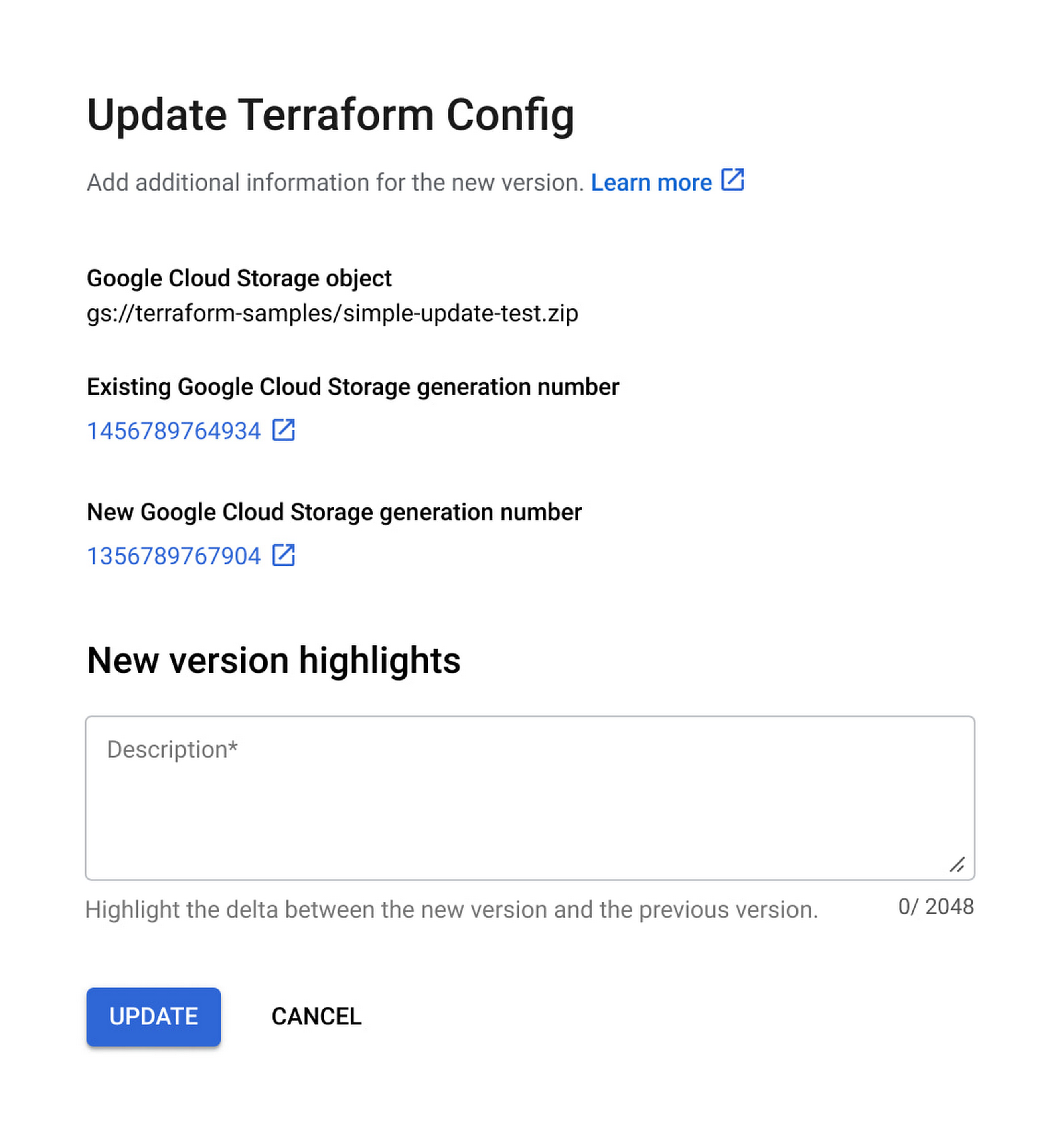
With this new release, you can update Terraform configurations and keep your end users informed about updates. At the same time, Private Catalog users have the ability to view new updates, note version highlights and then update the deployment. This gives you greater control over managing deployments for solutions provisioned through Private Catalog and ensuring compliance with organizational policies and standards.
Let’s take a closer look at the features you’ll find in this release.
Deployment change management
Terraform solutions use Cloud Storage’s Object Versioning to manage updates to configuration files. With this release, you may update configuration files using multiple approaches.
- Update the solution’s Cloud Storage object with a new configuration version
- Use a different Cloud Storage object that contains a new configuration file
Once you view and apply the changes to the solution in a Private Catalog, end users are immediately able to consume the new version of the deployment configuration.

Additionally, prior to applying any changes, you can evaluate the contents of an update by comparing versions to download and compare the current and latest versions of the configuration and use new version highlights to add a description about the updates.

Ease of consumption
Once Private Catalog detects a change to the deployment configuration, it automatically informs catalog users about the change. On the Solutions page, end users have the ability to:
- Get informed about solutions that have updates
- View version highlights published by the admin
- Apply the new version
Additionally, with this release, Catalog users can retry existing deployments by modifying deployment parameters.
Reporting improvements
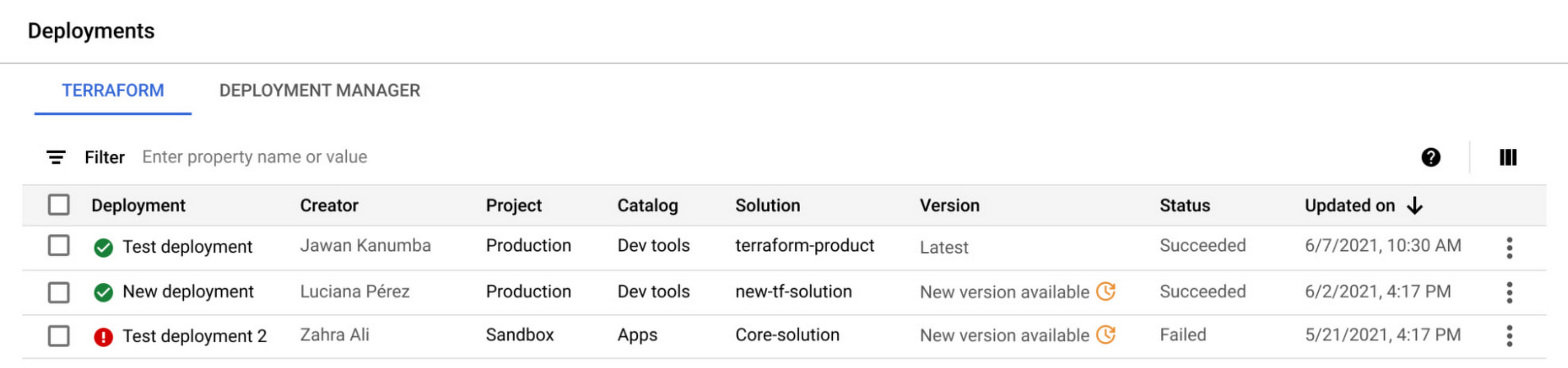
The deployment reporting dashboards for Private Catalog-based deployments now show additional information about the version of a solution deployed. This enables deeper insights into the overall deployment status across all Private Catalog solution assets.

Get started today
These new features are available to all Private Catalog customers. To learn how to use these features, refer to our documentation:
- Create a Terraform configuration in Private Catalog
- Manage and update your Terraform configurations in Private Catalog
VM End-to-end: Series Transcript on Conversation on VMs and their Role to Cloud-native Future

3298
Of your peers have already read this article.
1:30 Minutes
The most insightful time you'll spend today!
VMs and their relevance to a cloud-native future: A conversation
Last week, we published the first episode of VM End-to-End, a series of curated conversations between a “VM skeptic” and a “VM enthusiast”. Join Brian and Carter as they explore why VMs are some of Google’s most trusted and reliable offerings, and how VMs benefit companies operating at scale in the cloud. Here’s a transcript of the first episode:
Carter Morgan (VM skeptic): My team asked me to research VMs and see how they compare to other cloud-native approaches, like microservices, containers, and serverless. And to be honest with you, I am not excited about it at all. So I’ve brought in someone who is, Brian, resident VM expert. Welcome, Brian!
Brian Dorsey (VM enthusiast): Hello. I’m super happy to be here, because I am really excited about VMs.
Carter: How? See this is why I wanted to bring you here. I don’t understand how you can be so excited about VMs, already?
Brian: How can you not? It is like the best of both worlds. You’ve got a stable, reliable system you can run anything on, and you’re in the cloud, close to all of the new features, and you get new automation tooling.
Carter: See, that’s what I’m kind of skeptical about. When I think about the features of a modern system, I’m not sure that a VM can provide me with those.
Brian: Okay. Well, let’s be kind of specific there. What do you mean by a modern system?
Carter: When I think about a modern system, I think about things like modularity. I think about scalability and reliability. I want automation. I don’t want to have to do everything manually. I even think about portability and being able to move my workloads wherever they need to go. I also don’t want to implement everything by hand. I don’t want to have to do everything myself. Is that something I can get with a VM?
Brian: Yeah. Great, because I actually think we can get most of that, and I wonder, why not? Let’s go one level deeper and then we’ll come back out. In your mind, what is a VM?
Carter: Oh, you’re putting me on the spot, Brian?!
Brian: Yep.
Carter: Okay. A VM, it’s a computer, but it’s a virtualization. It’s a slice of a computer. And so, what it lets you do is it lets you run multiple operating systems on one machine, so it looks like you have multiple machines running on one physical machine.
Brian: Yep. Absolutely. And in the cloud kind of not.
Carter: Oh, what?
Brian: Yeah. So here’s why I say not. The obstructions are all there, so you’ve got memory CPU, disk, networking. And instead of from one computer, in the cloud, that’s coming from all of the computers in a data center. So the CPU is coming from a lot of machines. The networking is from the whole data center. And so, I like to think about it as instead of a slice of a computer, it’s a slice of the data center
Carter: Instead of a slice of a computer, it’s a slice of a data center. That sounds interesting. Impressive, even. But also abstract. Do you have some examples of features that you can get from a cloud VM that you can’t get from a traditional VM on one machine?
Brian: My turn to be specific. Yeah. I think one example is like bin packing. You talk about these VMs, and their different shapes. So you have one that needs a lot of CPU and another that needs a lot of memory. Maybe you’ve got a bunch of them that need a lot of CPU and they don’t fit so well in the same box without orphaning some of the memory or CPU. And if you’re running those in a whole data center, or you can basically just leave it to Google to solve that problem, you can just have whatever shape machine you want and we’ll figure out where to put it. Basically, that lets you customize your machines to exactly what you need.
Carter: Okay. That’s very interesting, because that’s a hard problem. And so, if you can just let Google handle where your workloads are going to go, that’s a good benefit. If that’s the only benefit of cloud VMs though, I’m not sure I’m sold on them over other approaches. Is there anything else we got?
Brian: Absolutely. There’s a ton of stuff we could talk about in terms of automation and other things. But I think another really concrete example is disks, and it’s kind of my favorite there, because you think about a physical disk and you read and write blocks from it, right? It’s a block device. In the data center level, those blocks could be on hundreds or thousands of different machines, and so all of them are working together to give you more reliability and make things smoother, more predictable in terms of performance. So what you get out of it is something that looks a lot like a SAN, you can take backups of disks that are running even, or if you’ve run out of space, like I think almost all of us have, you can just make the disk bigger. So, things like that.
Carter: That’s impressive, especially like you’re saying being able to run and just scale up, scale down or resize. Okay. Then another very targeted question. It’s going to sound like a dig. I don’t mean it to you. Google’s putting a lot of effort and resources into Google Kubernetes Engine (GKE). And so, is Google even still investing in VMs?
Brian: Absolutely. Where do you think these containers run? Every Kubernetes cluster is running on top of a whole bunch of VMs. And so, everything you learned about VMs applies to those clusters that you’re running. Also, another example is our managed databases, so Cloud SQL. So if you’re running Postgres or MySQL on a Cloud SQL, that’s running on VMs. And there’s a bunch of other examples, too.
Carter: I can’t get away from VMs, even if I tried, it sounds like.
Brian: Nope.
Carter: Okay. The way you’re saying that is making me think that maybe I need to rethink my idea that VMs are just old, dusty pieces of technology. So I want to be clear, definitively, are you saying that VMs have a place in a cloud-native future?
Brian: Absolutely. I want to take old and dusty and turn that into mature and reliable. Then the future part, all these things are built on top of it and we’re building new things over time. So we’ve got tools for scaling clusters of machines up and down. That’s using Kubernetes, but you can use it directly. And we keep investing and doing more and more things there. So, absolutely, part of the future as well.
Carter: Okay. Then what about if I wanted to switch to them? I’m pretty familiar with Kubernetes. It’s fairly easy to get started. What about with VM? Is it going to take me years to get started on these?
Brian: No. It’s just a computer. Basically, anything that’s already running on a computer somewhere, even if you don’t have the team who built it nearby, you can run that on a VM and in turn you can run it on a cloud VM and get a bunch of the cloud benefits as well.
Carter: All right. I must admit that you’ve swayed me a little bit. I’m still skeptical, but what you said made a lot of sense. I still have a lot of questions. I want to know about keeping costs down. I want to know how to update VMs. I have this idea in my head that they’re really slow to start and stop. Stateful data, I’m curious about that.
Brian: Awesome. How much time do you have?
Carter: All right. You know what, let’s have this convo another day, and maybe, just maybe we can agree that VMs do matter in a cloud-native future.

3369
Of your peers have already downloaded this article
10:00 Minutes
The most insightful time you'll spend today!
Operational resilience continues to be a key focus for financial services firms. Regulators from around the world are refocusing supervisory approaches on operational resilience to support the soundness of financial firms and the stability of the financial ecosystem. Our new white paper discusses the continuing importance of operational resilience to the financial services sector, and the role that a well-executed migration to Google Cloud can play in strengthening it.
3632
Of your peers have already downloaded this article
5:30 Minutes
The most insightful time you'll spend today!
Although most companies have migrated some infrastructure to public cloud, most enterprise workloads still run in on-premises data centers. Technology leaders want to migrate more workloads and infrastructure to public cloud, but they are frustrated by the process of assessing their existing workloads, identifying a migration strategy that aligns IT and business needs, and ensuring they have the right talent and skills in-house to execute a migration on time and on budget.
To encourage faster migration of a broader set of workloads to public cloud, enterprises seek not only cost optimization, but also strategy advice, powerful migration tools and professional services, and skill development.
Download this Forrester report to understand how to get your cloud migrations right the first time.
Ease Your Migration and Modernization Journey with Microsoft and Windows on Google Cloud Demo Center

8307
Of your peers have already read this article.
2:00 Minutes
The most insightful time you'll spend today!
If you’re looking to migrate and modernize your Microsoft and Windows workloads, Google Cloud is your premiere destination. No matter what migration strategy you’ve selected or what value you’re looking to achieve, with Google Cloud you’re able to:
- simplify your migration and modernization journey
- reduce your on-prem footprint and increase agility
- optimize license usage to reduce costs
- modernize to reduce single-vendor dependencies
- rely on enterprise-class support backed by Microsoft
Whether you’re looking to migrate applications running on Windows virtual machines, adopt Windows containers in Google Kubernetes Engine (GKE), convert SQL databases to Cloud SQL, or something else, Google Cloud offers you the first-class experience you need.
But we don’t want you to take our word for it. Try it out yourself with our new online Microsoft and Windows on Google Cloud Demo Center without any commitment or friction.

The demo center uses hands-on guided simulations to walk you through several scenarios for solving business critical challenges with Google Cloud’s Microsoft and Windows solutions. Because these are all simulated, you’ll see how it works without any deployment, configuration, or commitment. It’s a seamless way for you to see exactly how Google Cloud can help you.
Run dedicated hardware and optimize with sole tenant
Sometimes you might want to run your workloads on dedicated hardware (with oversubscription options) for compliance, licensing, and management. Google Cloud provides sole-tenant nodes that allow you to easily deploy your virtual machines onto dedicated machines to avoid “noisy neighbor” issues, address regulatory or licensing constraints, and optimize inter-VM communications.
Plus, the CPU Overcommit option allows oversubscribing sole-tenant node resources by up to 2x, therefore helping save on per-physical core licensing for many licensed workloads like SQL Server.
Learn how to set up a sole tenant group and node.
Optimize license costs with premium images & custom VMs
One of the easiest ways to optimize your cloud experience with virtual machines (VM) is to pick the right VM image. Google Cloud provides premium license-included VM images that are thoroughly tested and optimized, including SQL Server options with pay-as-you-go licensing. These are great for workloads that don’t need to run all the time or when you do not have spare licenses for bring your own license (BYOL).
Explore some Windows & SQL images and learn how CPU/Memory options can help optimize deployment and save on licensing.
Modernize your databases with Managed SQL Server
Sometimes you need to manage your SQL Server instance to achieve certain business or operational goals. But more often, managing SQL Server deployments can be undifferentiated: backups, high-availability, updates, and patching are just some of the many things you have to take care of when going the do-it-yourself route. One way to modernize your database tier is to migrate to a managed service like Cloud SQL, which is a fully managed Relational Database service for SQL.
Explore the process of creating an instance in just a few clicks!
Extract apps from VMs and move to containers in GKE with Migrate for Anthos
Many Windows workloads running on virtual machines such as Internet Information Services (IIS) are ideal candidates for migrating to containers without major changes like rewriting or rearchitecting. However, doing this migration manually can be tedious, which is why Migrate for Anthos can help easily re-platform a .NET app running on IIS into a container-based app.
Simulate intelligently extracting, migrating, and modernizing applications to run natively on containers in GKE and Anthos clusters.
Move .NET applications to GKE on Windows without code changes
When you’re looking to go fully cloud native, you can leverage Windows containers in GKE without rewriting your .NET applications. Simply create clusters with Windows nodes and deploy containerized Windows workloads in a few clicks, even alongside Linux containers. These deployments reduce operational overhead with features such as auto-upgrade, auto-repair, and release channels.
Learn how easy it is to build a GKE cluster with a Windows node and deploy an app.
Now that you’ve gotten a feel for what’s available, go check out the Demo Center. You can also visit us at Windows and Microsoft on Google Cloud to learn more.
More Relevant Stories for Your Company


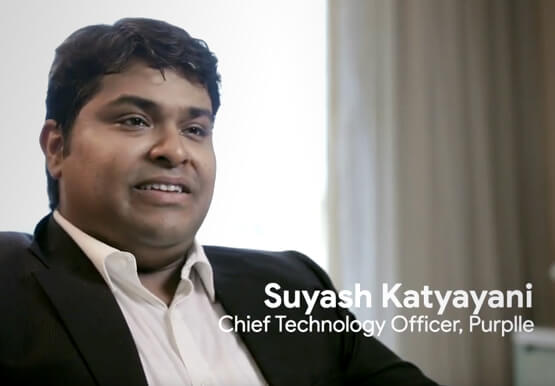

An Indian Example of How to Really Up Your Customer Experience Game and Increase Conversion Rates With AI
How about selfie analysis of users to recommend them the right lipstick color? That’s just one of the many ideas folks at Purplle.com came up with to improve the buying experience of Indian consumers. And without the power of Google Cloud, it would probably have remained just that…an idea. But

Cloud Bigtable Helps Fraud-detection Company Meet Scalability Demands and Secure Customer Data
Editor’s note: Today we are hearing from Jono MacDougall , Principal Software Engineer at Ravelin. Ravelin delivers market-leading online fraud detection and payment acceptance solutions for online retailers. To help us meet the scaling, throughput, and latency demands of our growing roster of large-scale clients, we migrated to Google Cloud and its



Skincare Firm Scales 4X in Minutes with SAP on Google Cloud
As the number one skincare brand in the United States, Rodan + Fields must support its team of over 300,000 of independent contractors as well as work to ensure a really personalized experience for customers. To keep pace with the company’s growth, Rodan + Fields realized it needed a more

Accelerating Success: Tips and Techniques for Optimizing and Scaling Your Startup
At Google Cloud, we want to provide you with the access to all the tools you need to grow your business. Through the Google Cloud Technical Guides for Startups, leverage industry leading solutions with how-to video guides and resources curated for startups. This multi-series contains 3 chapters: Start, Build and
