





Explore The New Era of Flexibility: Streamlined AWS-to-Google Cloud Migration

1341
Of your peers have already read this article.
3:30 Minutes
The most insightful time you'll spend today!
As an IT leader, you’re asked to do it all: innovate and optimize your tech stack for business outcomes — all while being secure and compliant. It takes heroic efforts to achieve innovation and progress while also tightening budgets and teams. This is why many of you are considering migrating applications to Google Cloud, for benefits like scalability and flexibility, security and compliance, disaster recovery and business continuity, and cutting-edge technologies at lower costs.
To help you do this, we suggest using Google Cloud’s Migrate to Virtual Machines – part of Migration Center. This managed cloud service lets you lift and shift workloads at scale to Google Cloud Compute Engine with minimal changes and risk.
And recently, we rolled out our latest release which introduces support for workload migration from AWS to Google Compute Engine. With this addition, you can now migrate both your on-prem and AWS workloads at scale. This means centralized management for your end to end workload migration journey from both sources via Cloud Console or APIs.
Simple and easy migrations from AWS and VMware sources to Google Cloud
Migration of AWS EC2 instances directly to Google Compute Engine using Migrate to Virtual Machines follows a well established and easy journey, which means a minimal learning curve for users who are already migrating workloads from VMware. Workload migration is agent-less, which means you do not need to access or alter workloads as a prerequisite for migration, allowing you to execute zero-touch migrations. Migrate instance data with no interruptions to the running workload at the source for a fast cutover to Google Cloud. In addition, our end-to-end cloud console interface surfaces your AWS EC2 inventory, migrations, and groups so you can execute migrations without ever leaving the cloud console interface.
Large-scale migrations
Completing a large-scale migration project in a timely manner calls for careful planning and streamlined migration sprints. The Migrate to Virtual Machines’ Groups construct enables you to group source VMs together in the planning phase. When it’s time to execute the planned migration, VM Groups let you execute migration operations on a group level, or on a subset of the group, streamlining the process at scale.
Minimal downtime and risk
Application uptime is key to keeping your business running. Every migration with this latest release of the service periodically replicates data from the source workload to the destination without manual steps or interruptions to the running workload, minimizing workload downtime and enabling fast cutover to Google Cloud. You can also launch non-disruptive migration tests — referred to as test-clones — to help you validate that these workloads will work properly in the cloud before cutting over. This helps avoid issues that might have otherwise been costly or disruptive to your business.
How the service works
Migrations simply work, at scale, in a managed service fashion. With Migrate to Virtual Machines, there’s no requirement to provision or manage migration-specific resources in the cloud. The service uses replication-based migration technology to lift and shift workloads from source environments to Google Cloud. The Migrate Connection replicates source VM disk snapshots in the background with no interruption to the source workload. Replicated data is encrypted in transit and at rest, and when you instantiate a migrating VM using a test-clone or cut-over, the service seamlessly adapts your source VM operating system to boot and run natively in the cloud — including configuring network settings and deploying Google Cloud guest packages.
The migration journey of an EC2 instance — or VMware VM — to Google Cloud is comprised of the following steps:
1. Onboarding a source VM for migration: Onboard one or more VMs for migration from the source environment fleet.
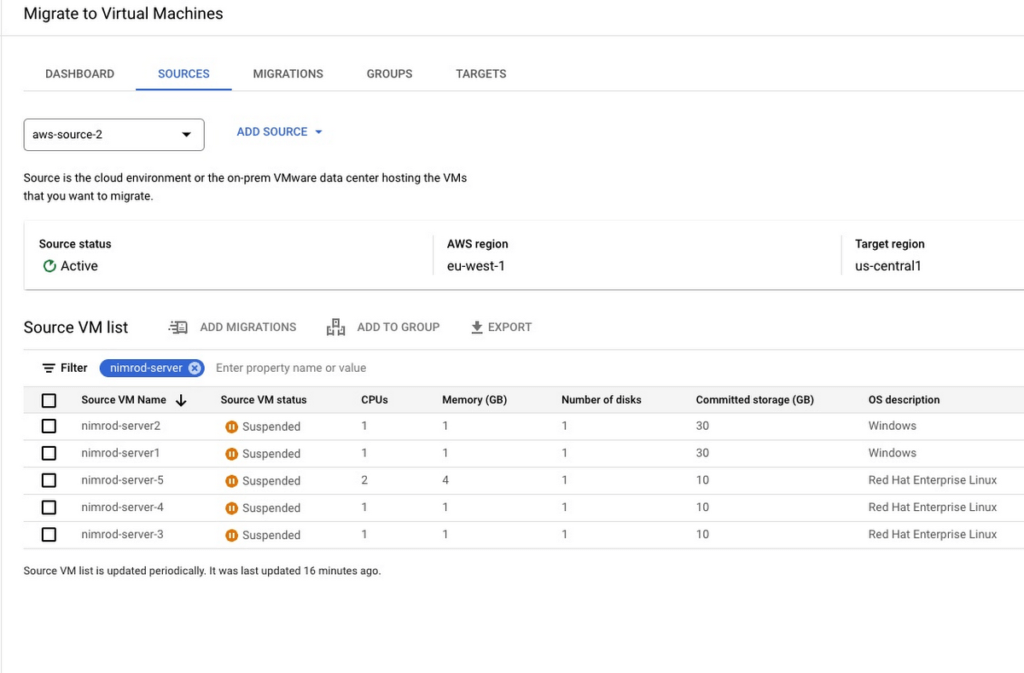
2. Configure landing zone target: You can migrate an instance to any Google Cloud project in your environment and update landing zone details at any time before executing a test-clone or cutover.
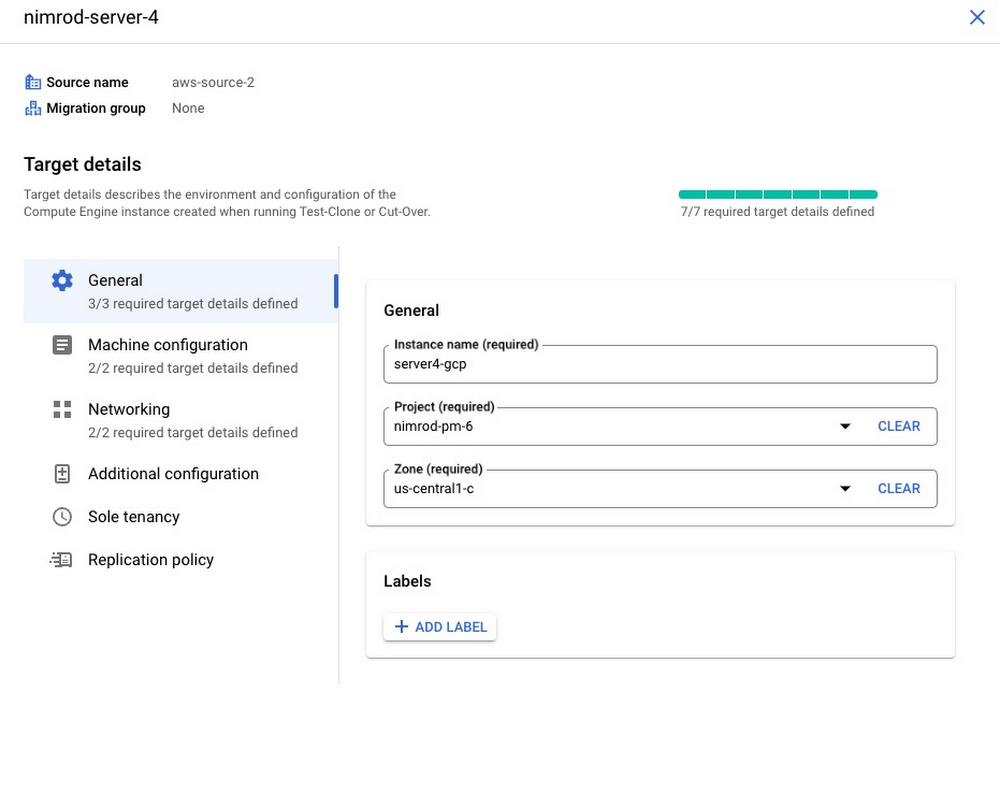
3. Initiate VM data replication of source workload: Migrate to Virtual Machines periodically replicates instance disks to the cloud with no interruption to the source instance. You can control replication frequently and pause or resume at any point in time.
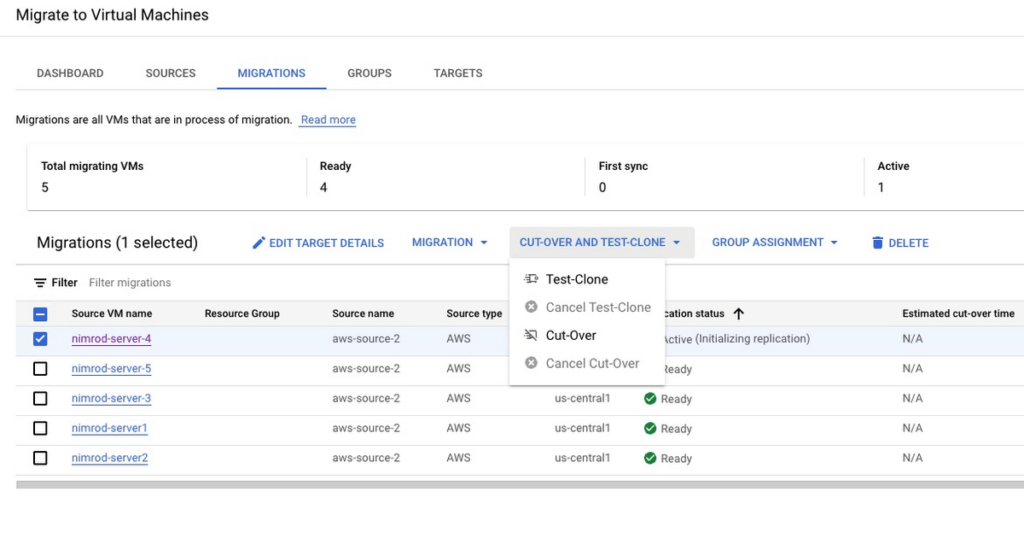
4. Test migrating instance: Test-clone creates a copy of your source instance in the defined landing zone to validate the migrating instance in the cloud before executing a cut-over. You can repeat the test-clone multiple times to multiple landing zones for thorough validation
5. Cutover migrating instance: Cutover operation shuts down your source instance and then performs the short final sync to Google Cloud. Migrated VM is instantiated in the target landing zone.
Getting started with Migrate to Virtual Machines
It’s quick and easy to start migrating your AWS EC2 instances and on-premises VMs today:
- Enable the vmmigration API in a Google Cloud project
- Create an AWS source in your environment
- Onboard and initiate replication of instance data from source
- Set migrating instance target details.
- Perform non-disruptive tests of your migrating instance using test-clone
- Cutover your instance to the cloud with minimal down time
You can also visit our website to learn more about Migrate to Virtual Machines. If you know you have to migrate in 2023 but aren’t sure how to get started, you can sign up for a free discovery and assessment of your current IT landscape so we can help craft the ideal migration plan for you and your business.
4882
Of your peers have already watched this video.
11:30 Minutes
The most insightful time you'll spend today!
Driving Business Transformation in Manufacturing, Industrial, and Transportation Using Google Cloud and AI/ML
Google Cloud partners closely with manufacturing, industrial, and transportation organizations to drive business transformation.
In this video, Mandeep Waraich, Head of Product – Industrial AI, Google Cloud, shares customer stories as well as Google Cloud’s differentiated AI products and solutions.
Waraich covers the current state of automation and industrial efficiency and how artificial intelligence is revealing an entirely new universe of possibilities.
He also speaks about Google Cloud’s approach to bringing these AI technologies to the market, and Google Cloud’s “deploy anywhere” methodology that helps achieve the impact of AI at a global enterprise scale.

3574
Of your peers have already downloaded this article
3:30 Minutes
The most insightful time you'll spend today!
Defending the world’s largest network against persistent and constantly evolving cyber threats has driven Google to architect, automate, and develop advanced tools to help keep it ahead. Understanding how Google has built and evolved it’s defenses can help you make smart architectural decisions of your own as you move forward.
- At Google every minute:
- 10 million spam messages are prevented from reaching Gmail customers.
- 694,000 indexed Web pages are scanned for harmful software.
- 7,000 deceitful URLs, executables, and browser extensions that may carry viruses, unwanted content, or phishing attempts are spotted and stopped.
- 6000 instances of unwanted software and nearly 1,000 instances of suspected malware are reported to Chrome users.
- 2 phishing sites and 1 malware site are found and labeled.
Download this e-book to know more about Google’s security at scale.
Ease Your Migration and Modernization Journey with Microsoft and Windows on Google Cloud Demo Center

8269
Of your peers have already read this article.
2:00 Minutes
The most insightful time you'll spend today!
If you’re looking to migrate and modernize your Microsoft and Windows workloads, Google Cloud is your premiere destination. No matter what migration strategy you’ve selected or what value you’re looking to achieve, with Google Cloud you’re able to:
- simplify your migration and modernization journey
- reduce your on-prem footprint and increase agility
- optimize license usage to reduce costs
- modernize to reduce single-vendor dependencies
- rely on enterprise-class support backed by Microsoft
Whether you’re looking to migrate applications running on Windows virtual machines, adopt Windows containers in Google Kubernetes Engine (GKE), convert SQL databases to Cloud SQL, or something else, Google Cloud offers you the first-class experience you need.
But we don’t want you to take our word for it. Try it out yourself with our new online Microsoft and Windows on Google Cloud Demo Center without any commitment or friction.

The demo center uses hands-on guided simulations to walk you through several scenarios for solving business critical challenges with Google Cloud’s Microsoft and Windows solutions. Because these are all simulated, you’ll see how it works without any deployment, configuration, or commitment. It’s a seamless way for you to see exactly how Google Cloud can help you.
Run dedicated hardware and optimize with sole tenant
Sometimes you might want to run your workloads on dedicated hardware (with oversubscription options) for compliance, licensing, and management. Google Cloud provides sole-tenant nodes that allow you to easily deploy your virtual machines onto dedicated machines to avoid “noisy neighbor” issues, address regulatory or licensing constraints, and optimize inter-VM communications.
Plus, the CPU Overcommit option allows oversubscribing sole-tenant node resources by up to 2x, therefore helping save on per-physical core licensing for many licensed workloads like SQL Server.
Learn how to set up a sole tenant group and node.
Optimize license costs with premium images & custom VMs
One of the easiest ways to optimize your cloud experience with virtual machines (VM) is to pick the right VM image. Google Cloud provides premium license-included VM images that are thoroughly tested and optimized, including SQL Server options with pay-as-you-go licensing. These are great for workloads that don’t need to run all the time or when you do not have spare licenses for bring your own license (BYOL).
Explore some Windows & SQL images and learn how CPU/Memory options can help optimize deployment and save on licensing.
Modernize your databases with Managed SQL Server
Sometimes you need to manage your SQL Server instance to achieve certain business or operational goals. But more often, managing SQL Server deployments can be undifferentiated: backups, high-availability, updates, and patching are just some of the many things you have to take care of when going the do-it-yourself route. One way to modernize your database tier is to migrate to a managed service like Cloud SQL, which is a fully managed Relational Database service for SQL.
Explore the process of creating an instance in just a few clicks!
Extract apps from VMs and move to containers in GKE with Migrate for Anthos
Many Windows workloads running on virtual machines such as Internet Information Services (IIS) are ideal candidates for migrating to containers without major changes like rewriting or rearchitecting. However, doing this migration manually can be tedious, which is why Migrate for Anthos can help easily re-platform a .NET app running on IIS into a container-based app.
Simulate intelligently extracting, migrating, and modernizing applications to run natively on containers in GKE and Anthos clusters.
Move .NET applications to GKE on Windows without code changes
When you’re looking to go fully cloud native, you can leverage Windows containers in GKE without rewriting your .NET applications. Simply create clusters with Windows nodes and deploy containerized Windows workloads in a few clicks, even alongside Linux containers. These deployments reduce operational overhead with features such as auto-upgrade, auto-repair, and release channels.
Learn how easy it is to build a GKE cluster with a Windows node and deploy an app.
Now that you’ve gotten a feel for what’s available, go check out the Demo Center. You can also visit us at Windows and Microsoft on Google Cloud to learn more.
The Future of Cloud Computing: Choose Your Own Services and Payment Options

2092
Of your peers have already read this article.
1:30 Minutes
The most insightful time you'll spend today!
As the saying goes, “it’s hard to make predictions, especially about the future.” Some organizations find it challenging to predict what cloud resources they’ll need in months or years ahead. Every organization is on its own unique cloud journey. To help, we’re developing new ways for customers to consume and pay for Google Cloud services. We’re doing this by removing barriers to entry, aligning cost to consumption and providing contractual and product flexibility. Read on to learn how we’re rolling out several new go-to-market programs across these key areas to help our customers purchase and consume Google Cloud services more easily.
Removing barriers to entry with Google Cloud Flex Agreements
Many customers choose multi-year commitments because they provide better line-of-sight into IT spend and budgeting. However, these commitments can create difficulty for those who don’t have clear visibility into their future cloud consumption needs. That’s why today we’re launching Flex Agreements, which enable customers to migrate their workloads to the cloud with no up-front commitments. As part of this new licensing option, Google Cloud customers still get access to unique incentives, such as monthly spend discounts1, committed use discounts, cloud credits, and access to professional services, based on monthly spend and workloads migrated to Google Cloud.
Flex Agreements are just one example of how we are removing barriers to help customers start using Google Cloud. In 2022, we launched the Innovators Plus annual subscription, which gives developers a curated toolkit to accelerate their expertise, including access to live and on-demand training through Google Cloud Skills Boost, Google Cloud credits, and more.
We also recently expanded trials for Google Cloud products. For example, the new Spanner free trial instance is good for 90 days, allowing developers to create Google Standard SQL or PostgreSQL databases, explore Spanner capabilities, and prototype applications—with no commitment or contract needed.
Contractual and feature flexibility
Contractual flexibility has always been one of our core principles. Committed Use Discounts (CUDs), for example, provide discounted prices in exchange for a commitment to use a minimum level of resources for a specified term. Last year, we introduced Flexible CUD, spend-based commitments that offer predictable and simple flat-rate discounts that apply across multiple virtual machine families and regions.
In addition to contractual flexibility, our customers also need the flexibility to choose features and functionality based on their stages of cloud adoption and the complexity of their business requirements. Therefore, over the next few quarters, we will launch new product pricing editions—Standard, Enterprise, and Enterprise Plus—in parts of our cloud portfolio. This new commercial packaging model will help give customers more choice and flexibility to optimize their cloud spend.
For customers running workloads such as those in regulated industries like banking and public sector, the higher-end Enterprise Plus tier will offer compute, storage, networking and analytics services with high availability, multi-region support, regional failover and disaster recovery, advanced security, and a broad range of regulatory compliance support. The Enterprise pricing tier will include a broad range of features designed for customers with workloads that demand a high level of scalability, flexibility, and reliability. The Standard pricing tier will offer cost-efficient and easy-to-use managed services that include all essential capabilities such as autoscaling to meet the core workload requirements of customers.
Align costs to consumption with autoscaling
At Google Cloud, a core requirement for the products we build is providing customers industry-leading capabilities to automatically scale (autoscale) services up and down to match capacity with real-time demand. Autoscaling improves uptime, reduces infrastructure costs, and removes the operational burden of managing resources.
Many Google Cloud products include autoscaling capabilities to help customers manage unplanned variations in demand. For example, Dataflow vertical and horizontal autoscaling, in combination with granular adaptive resource configuration (aka “right-fitting”), has resulted in up to 50% saving in infrastructure costs for streaming by automatically choosing the right number of instances required to run the jobs and dynamically re-allocating more or fewer instances during the runtime of jobs. Bigtable also provides native autoscaling capabilities, and Spanner’s autoscale is an open source tool that works across regional and multi-regional Spanner deployments.
Similarly, we added multiple features such as Cluster Autoscaler, Horizontal Pod Autoscaling, Vertical Pod Autoscaling, and Node Auto-Provisioning to GKE for elasticity and cost efficiency.
For L.L.Bean, the ability to quickly scale capacity to meet changing usage patterns (e.g., during the holidays), as well as to rapidly perform load tests to test capacity, are “night and day” with Google Cloud compared to L.L.Bean’s legacy on-premises IT system.
“We won’t have to pay for peak capacity to have it available during peak shopping times. We just scale capacity up or down as needed.” — Randy Dyer, Enterprise Architect, L.L.Bean
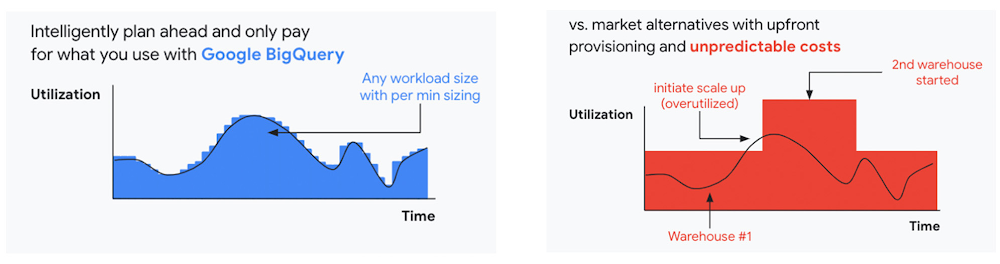
We are now taking these capabilities to the next level by enabling autoscaling in BigQuery at a more granular level so you never pay more than what you use. This allows you to provision additional capacity in smaller increments, so you never overprovision and overpay for underutilized capacity. BigQuery customers can now try the new BigQuery autoscaler (currently in public preview) in their Google Cloud console.
A commitment to flexibility and choice
At Google Cloud, we remain deeply committed to the success of our customers and partners, and we are uniquely positioned to help organizations transform their business. By providing you with more flexibility and choice in how to purchase our products, we are empowering you to be more efficient and resilient.
Join Google Data Cloud & AI Summit to hear the latest announcements around innovations in Google Data Cloud for databases, data analytics, business intelligence, and AI. Gain expert insights, new solutions, and strategies that can help you transform customer experiences with modern apps, boost revenue, and reduce costs.
1. Not available for customers buying through Partner Advantage.
Three Typical Connectivity Use Cases to Pick the Right Option for Your Enterprise

3298
Of your peers have already read this article.
3:00 Minutes
The most insightful time you'll spend today!
Enterprises today have a very broad mix of networks — from SD-WANs, dedicated WANs such as MPLS, cloud interconnects, to VPNs. At the same time, they’re moving those WANs to the cloud to take advantage of faster turn-up, lower cost, and increased feature velocity. As workloads migrate to the cloud and multi-cloud environments, we believe that it’s critical to simplify enterprises’ networking model.
Each major cloud provider uses distinct abstraction models to configure networks or connections between your resources. Some use gateways, some use connections or links. Network Connectivity Center, launched last year, provides a simple management solution for your network connection, and is now Generally Available.
In this post, we outline the typical connectivity use cases for customers to help you select and set up the best connectivity option for your environment.
Understanding cloud network connectivity
Cloud networking refers to the ability to connect two resources together inside a cloud, across clouds and with on-premises data centers. A cloud provider needs to provide three main types of connectivity:
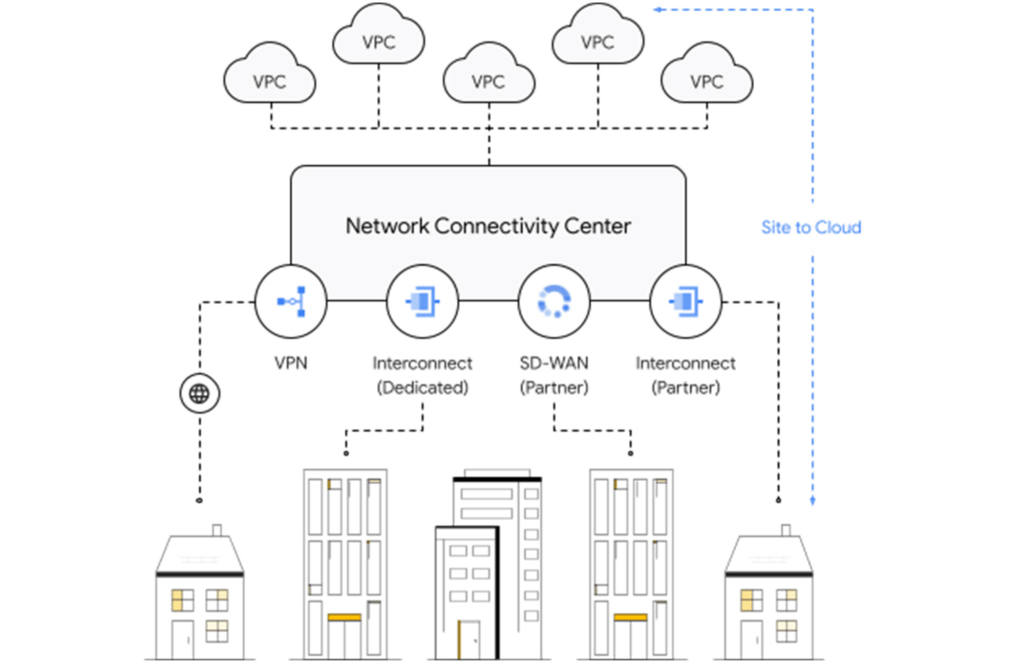
- Site-to-cloud – Between on-premises equipment and cloud resources
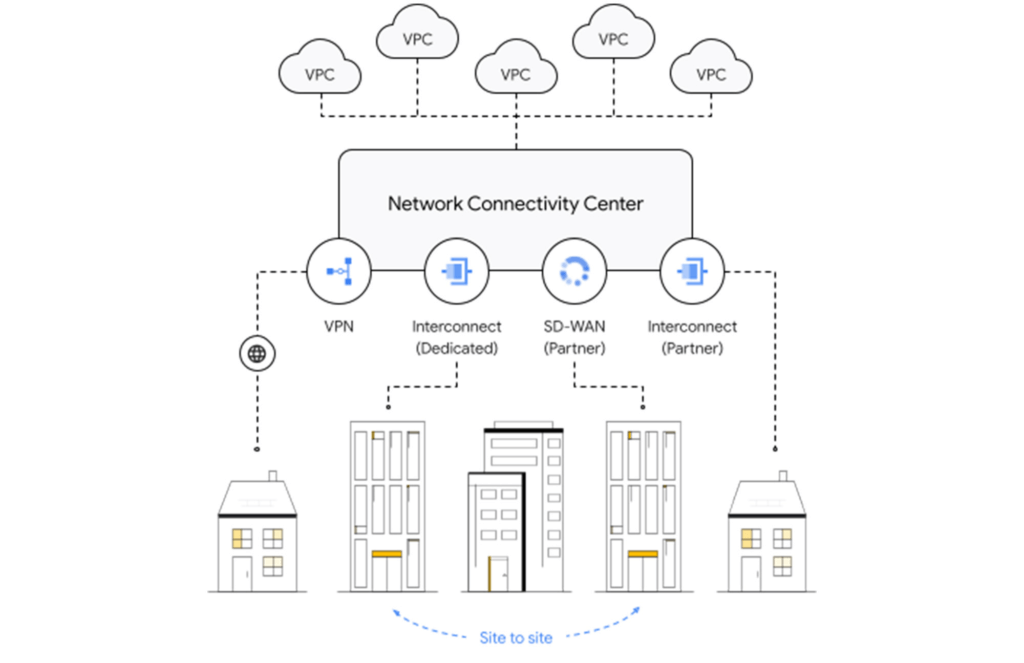
- Site-to-site – To connect on-premises resources together
- VPC-to-VPC – Connectivity between cloud resources
- Let’s take a look at each one.
Site-to-cloud connectivity
Site-to-cloud connectivity traditionally is done via a cloud interconnect or a cloud VPN. The automatic exchange of routes between on-premises and multiple VPCs can be done using a transit VPC.
A newer approach is to add cloud providers into an SD-WAN mesh using a router virtual appliance in Google Cloud. Network Connectivity Center brings the capacity to synchronize the appliance routes dynamically via BGP to Cloud Router and hence their VPCs. It enables connectivity between on-premises data centers and branch offices and their cloud workloads via SD-WAN-enabled connectivity. This capability is available globally across all 29+ Google Cloud regions. Several of our partners also support this capability in their router appliances.
Site-to-site connectivity
Site-to-site connectivity enables network connectivity directly between two or more hybrid connection points (VPN, Interconnect or SD-WAN). Network Connectivity Center simplifies this model by automating the routing announcements in this environment, such that all sites connected to a single global Network Connectivity Center hub are able to communicate freely in any-any fashion. You can see an example of this for a specific market vertical use case in a recent blog, Voice trading in the cloud — digital transformation of private wires.
VPC-to-VPC connectivity
You can create a full or partial mesh of VPC connections using multiple technologies, with VPC peering being the most common. VPC peering provides highly performant, low latency, private connectivity for customer networks connected via hybrid connectivity and Network Connectivity Center to multiple VPCs containing workloads, which can be segmented via granular firewall policies as needed. Alternatively, you can use a transit VPC model to connect multiple VPCs together in a hub and spoke topology.
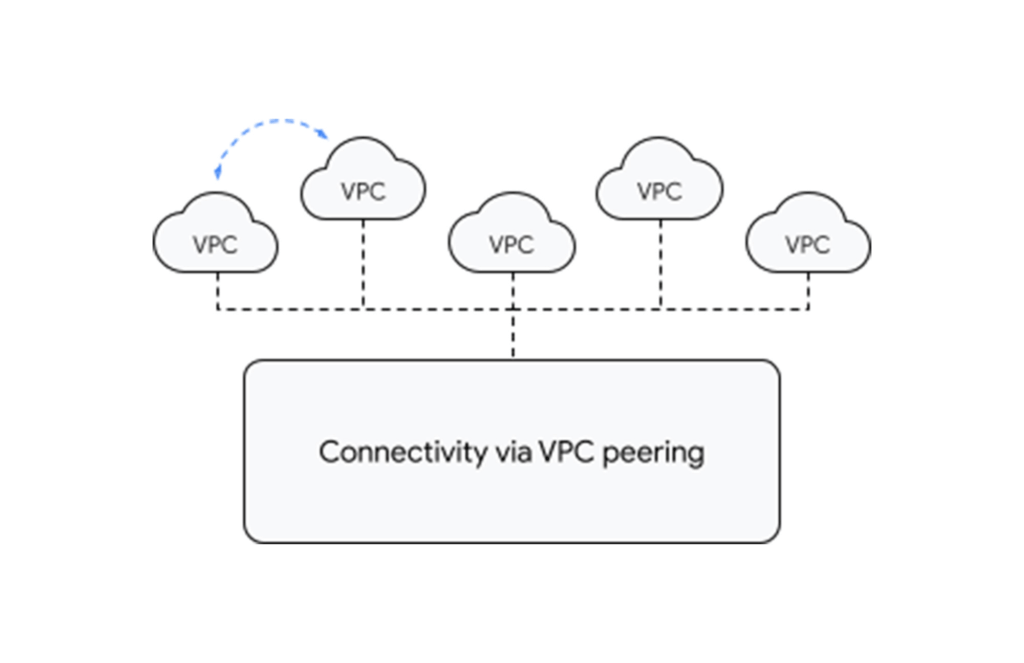
With tight integration with third-party router appliances as mentioned earlier, you can also leverage their third-party supported solutions such as next-generation firewalls to connect your VPCs together to meet specific compliance and segmentation requirements. Network Connectivity Center allows you to synchronize the routing tables of these appliances with your VPC’s routing table, simplifying the process of setting up redundant configurations.
What’s next for cloud networking connectivity in Google Cloud?
As enterprises continue to migrate different types of workloads to public cloud providers, networking topologies are becoming more complex. In summary, we have solutions for all connectivity needs. We aim to keep our models and solutions understandable and simple. Over time, look for Network Connectivity Center to become Google Cloud’s single point of configuration for all your connectivity needs, with capabilities to handle the most complex network.
More Relevant Stories for Your Company

How 20th Century Fox Uses Machine Learning to Gauge the Financial Performance of a Movie
Success in the movie industry relies on a studio’s ability to attract moviegoers—but that’s sometimes easier said than done. Moviegoers are a diverse group, with a wide variety of interests and preferences. Historically, movie studios have relied heavily on experience when deciding to invest in a particular script—but this can

Demystifying FinOps on Google Cloud: Whitepaper
FinOps is a concept similar to DevOps, but with a different set of goals. Cloud FinOps is an operational framework and cultural shift that brings together technology, finance and business to drive financial accountability and accelerate business value realization. In layman terms, FinOps aims to help companies achieve most out

Modernize your Windows Server Workloads using Google Cloud Platform
Application Modernization is an important enabler of Digital Transformations (DX), which fuel competitive advantage through increased productivity and business agility. Public cloud infrastructure proves to be a solid foundation for application modernization by providing Self-Service Provisioning capabilities, cloud-based & cloud-native technologies, and easier access to technology innovations such as AI/ML.

The Total Economic Impact of SAP on Google Cloud
Through customer interviews, a survey, and data aggregation, Forrester concluded that migrating and running SAP on Google Cloud has a number of benefits, including financial benefits. Download this Forrester infographic to understand the 3-year financial impact it can have on your organization.
