





Enterprises can Push the Limits of Edge Even Further!
6989
Of your peers have already read this article.
2:30 Minutes
The most insightful time you'll spend today!
Whether with the cloud or within their own data centers, enterprises have undergone a period of remarkable consolidation and centralization of their compute resources. But with the rise of ever more powerful mobile devices, and increasingly capable cellular networks, application architects are starting to think beyond the confines of the data center, and looking out to the edge.
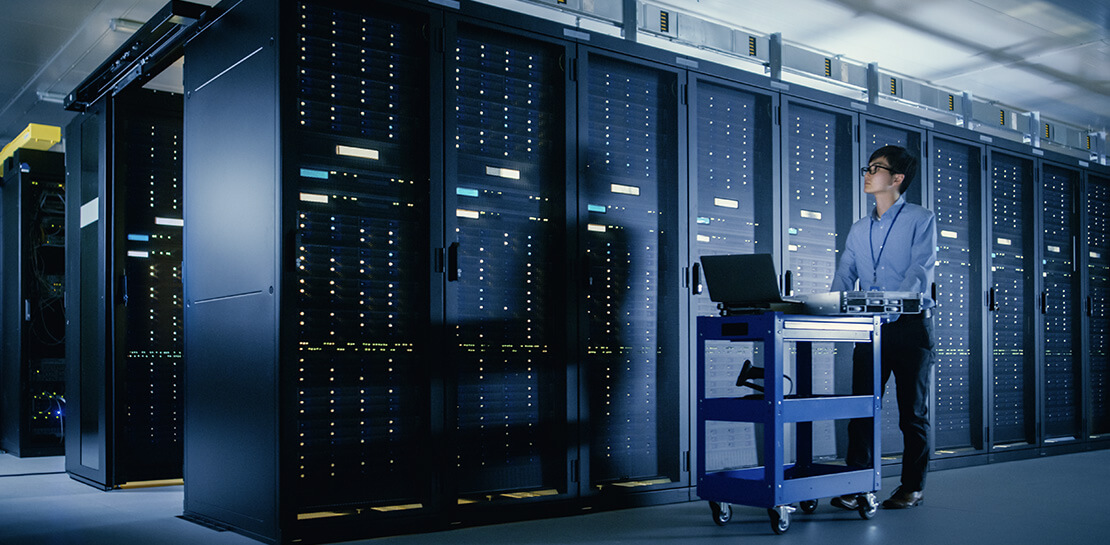
What exactly do we mean by edge? Think of the edge as distributed compute happening on a wide variety of non-traditional devices — mobile phones of course, but also equipment sensors in factories, industrial equipment, or even temperature and reaction monitoring in a remote lab. Edge devices are also connected devices, and can communicate back to the mothership over wireless or cellular networks.
Equipped with increasingly powerful processors, these edge devices are being called upon to perform tasks that have thus far been outside the scope of traditional IT. For enterprises, this could mean pre-processing incoming telemetry in a vehicle, collecting video in kiosks at a mall, gathering quality control data with cameras in a warehouse, or delivering interactive media to retail stores. Enterprises are also relying on edge to ingest data from outposts or devices that have even more intermittent connectivity, e.g., oil rigs or farm equipment, filtering that data to improve quality, reducing it to right-size information load, and processing it in the cloud. New data and models are then pushed back to the edge; in addition, we can also push configuration, software, and media updates and decentralize processing workload.
Edge isn’t all about enabling new use cases – it’s also about right-sizing environments and improving resource utilization. For example, adopting an edge model can also relieve load on existing data centers.
But while edge computing is full of promise for enterprises, there are many pieces that are still works in progress. Further, developing edge workloads is very different from developing traditional applications, which enjoy the benefits of persistent data connections and run on well-resourced hardware platforms. As such, cloud architects are still in the early days of figuring out how to use and implement edge for their organizations.
Fortunately, there are tools you can use to help ease the transition to edge computing — and that likely fit into your organization’s existing computing systems. Kubernetes, of course, but also higher level management tools like Anthos, which provides a consistent control plane across cloud, private data center and edge locations. Other parts of the Anthos family – Anthos Config Management and Anthos Service Mesh — go one step further and provide consistent, centralized management to your edge and cloud deployments. And there’s more to come.
For the remainder of this blog post, we’ll dive deeper into the past and current state of edge computing, and the benefits that architects and developers can expect to see from edge computing. In a next post, we’ll take a deeper look at some of the challenges that designing for edge introduces, and some of the advantages the average enterprise has in adopting the edge model. Finally, we’ll look at the Google Cloud tools that are available today to help you build out your edge environment, and look at some early customer examples that highlight what’s possible today — and that will spark your imagination for what to do tomorrow.
The evolution of edge computing
The edge is not a new concept. In fact, it’s been around for the last two decades, spanning many use cases that are prevalent today. One of the first applications for edge was to use content delivery networks (CDN) to cache and serve daily static website pages near clients, for example, web servers in California data centers serving financial data to European customers.
As connectivity has improved and software evolved, the edge has evolved too, and the focus has shifted towards using edge to distribute services. First, simple services expanded from static HTML to javascript libraries or image repositories. Common functions like image transformation, credit and address validation support services followed. Soon, organizations were deploying more complex cloudlet and clustered microservices installations, as well as distributed and replicated datasets. The term “endpoint” became ubiquitous, and APIs profilerated.
In parallel, there’s been an explosion of creativity in hardware, microcontrollers and dedicated edge devices. Fit-for-purpose products were deployed globally. Services like Google Cloud IoT Core extended our ability to manage and securely connect these dispersed devices, allowing platform managers to register tools and leverage managed services like Pub/Sub and Dataflow for data ingestion. And with Kubernetes, large remote clusters — mini private clouds in and of themselves — operate as self-healing, autoscaling services across the broader internet, opening the door to new models for applications and architectural patterns. In short, both distributed asynchronous systems and economies have blossomed.
What does this mean for enterprises? For the purposes of this series, edge means you can now go beyond the corporate network, beyond cloud VPCs, and beyond hybrid. The modern edge is not sitting at a major remote data center, nor is it a CDN, cloud provider, or in a corporate data center rack — it’s just as likely to look like 100 of these attached to a thousand sensors.
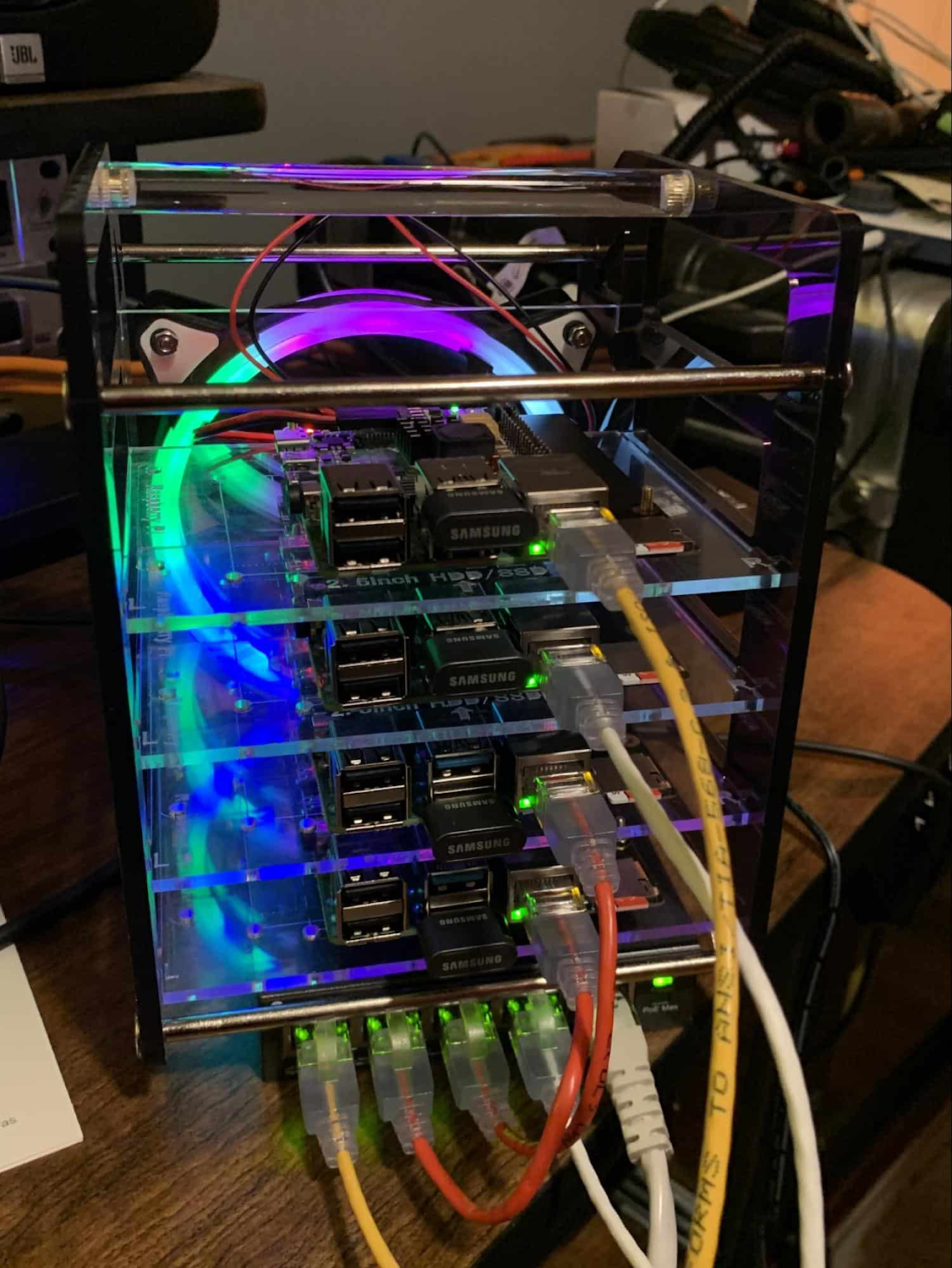
Edge, in short, is about having hardware and devices installed at remote locations that can process and communicate back the information they collect and generate. The edge management challenge, meanwhile, is being able to push configuration and software/model/media updates to these remote locations when they are connected.
Enable new use cases
Today, we have reached a new threshold for edge computing — one where micro-data-processing centers are deployed as the edge of a fractal arm, as it were. Together, they form a broad, geographically distributed, always-on framework for streaming, collecting, processing and serving asynchronous data. This big, loosely coupled application system lives, breathes and grows. Always changing, always learning from the data it collects — and always pushing out updated models when the tendrils are connected.
Right now, the rise of 5G is pushing the limits of edge even further. Devices enabled with 5G can transmit using a mobile network — no ISP required — enabling connectivity anywhere within reach of a cell tower. Granted, these networks have lower bandwidth, but they are often more than adequate for certain types of data, for example fire sensors in forests bordering remote towns that emit temperature or carbon monoxide data periodically. Recently, Google Cloud partnered with AT&T to enhance business use of 5G edge technology but there is so much more that can be done.
Reduce data center investments
In addition to enabling the digitization of a broad range of new use cases, adopting edge can also benefit your existing data center.
Let’s face it: data centers are expensive to maintain. Moving some data center load to edge locations can reduce your data center infrastructure investment, as well as compute time spent there. Edge services tend to have much lower service level objectives (SLOs) than data center services, driving lower levels of hardware investment. Edge installations also tend to tolerate disconnectedness, and thus function perfectly well with lower SLOs — and lower costs.
Let’s look at an example of where edge can really reduce costs: big data. Back in the day, we used to build monolithic serial processors — state machines — that had to keep track of where they were in processing in case of failure. But time and again, we’ve seen that smaller, more distributed processing can break down big, expensive problems into smaller, more cost-effective chunks.
Starting with the explosion of MapReduce almost 20 years ago, big-data workloads were parallelized across clusters on a network, and state management was simplified with intermediate output to share, wait for, or restart processing from checkpoints. Those monolithic systems were replaced by cheaper, smarter, networked clusters and data repositories where parallel work could be executed and rendered into workable datasets.
Flash forward to today, and we are seeing those same concepts applied and distributed to edge data-collection points. In this evolution of big data processing, we are scaling up and out to the point where observation data is so massive that it must first be prefiltered, and then preprocessed down to a manageable size and still be actionable. Only then should it be written back to the main data repositories for more resource-intensive processing and model building.
In short, data collection, cleanup, and potentially initial aggregation happens at the edge location, which reduces the amount of junk data sitting in costly data stores. This increases performance of the core data warehouse, and reduces the size and cost of network transfers and storage!
The edge is a huge opportunity for today’s enterprises. But designing environments that can make effective use of the edge isn’t without its challenges. Stick around for part two of this series, where we look at some of the architectural challenges typically encountered while designing for the edge and how we begin to address them.
Scaling Machine Learning Operations with Vertex AI AutoML and Pipeline

2550
Of your peers have already read this article.
2:30 Minutes
The most insightful time you'll spend today!
When you build a Machine Learning (ML) product, consider at least two MLOps scenarios. First, the model is replaceable, as breakthrough algorithms are introduced in academia or industry. Second, the model itself has to evolve with the data in the changing world.
We can handle both scenarios with the services provided by Vertex AI. For example:
- AutoML capability automatically identifies the best model based on your budget, data, and settings.
- You can easily manage the dataset with Vertex Managed Datasets by creating a new dataset or adding data to an existing dataset.
- You can build an ML pipeline to automate a series of steps that start with importing a dataset and end with deploying a model using Vertex Pipelines.
This blog post shows you how to build this system. You can find the full notebook for reproduction here. Many folks focus on the ML pipeline when it comes to MLOps, but there are more parts to building MLOps as a “system”. In this post, you will see how Google Cloud Storage (GCS) and Google Cloud Functions manage data and handle events in the MLOps system.
Architecture
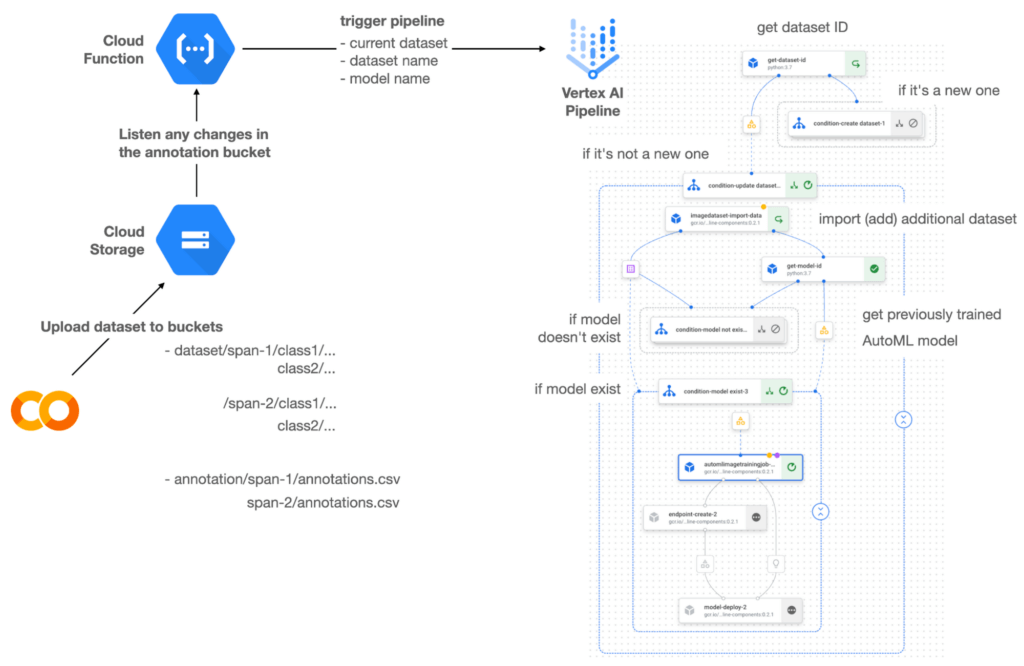

Figure 1 shows the overall architecture presented in this blog. We cover the components and their connection in the context of two common workflows of the MLOps system.
Components
Vertex AI is at the heart of this system, and it leverages Vertex Managed Datasets, AutoML, Predictions, and Pipelines. We can create and manage a dataset as it grows using Vertex Managed Datasets. Vertex AutoML selects the best model without your knowing much about modeling. Vertex Predictions creates an endpoint (RestAPI) to which the client communicates.
It is a simple, fully managed yet somewhat complete end-to-end MLOps workflow moves from a dataset to training a model that gets deployed. This workflow can be programmatically written in Vertex Pipelines. Vertex Pipelines outputs the specification for an ML pipeline allowing you to re-run the pipeline whenever or wherever you want. Specify when and how to trigger the pipeline using Cloud Functions and Cloud Storage.
Cloud Functions is a serverless way to deploy your code in Google Cloud. In this particular project, it triggers the pipeline by listening to changes on the specified Cloud Storage location. Specifically, if a new dataset is added, for example, a new span number is created; the pipeline is triggered to train the dataset, and a new model is deployed.
Workflow
This MLOps system prepares the dataset with either Vertex Dataset’s built-in user interface (UI) or any external tools based on your preference. You can upload the prepared dataset into the designated GCS bucket with a new folder named SPAN-NUMBER. Cloud Functions then detects the changes in the GCS bucket and triggers the Vertex Pipeline to run the jobs from AutoML training to endpoint deployment.
Inside the Vertex Pipeline, it checks if there is an existing dataset created previously. If the dataset is new, Vertex Pipeline creates a new Vertex Dataset by importing the dataset from the GCS location and emits the corresponding Artifact. Otherwise, it adds the additional dataset to the existing Vertex Dataset and emits an artifact.
When the Vertex Pipeline recognizes the dataset as a new one, it trains a new AutoML model and deploys it by creating a new endpoint. If the dataset isn’t new, it tries to retrieve the model ID from Vertex Model and determines whether a new AutoML model or an updated AutoML model is needed. The second branch determines whether the AutoML model has been created. If it hasn’t been created, the second branch creates a new model. Also, when the model is trained, the corresponding component emits the artifact as well.
Directory structure that reflects different distributions
In this project, I have created two subsets of the CIFAR-10 dataset, SPAN-1 and SPAN-2. A more general version of this project can be found here, which shows how to build training and batch evaluation pipelines pipelines. The pipelines can be set up to cooperate so they can evaluate the currently deployed model and trigger the retraining process.
ML Pipeline with Kubeflow Pipelines (KFP)
We chose to use Kubeflow Pipelines to orchestrate the pipeline. There are a few things that I would like to highlight. First, it’s good to know how to make branches with conditional statements in KFP. Second, you need to explore AutoML API specifications to fully leverage AutoML capabilities, such as training a model based on the previously trained one. Last, you also need to find a way to emit artifacts for Vertex Dataset and Vertex Model to consume that Vertex AI can recognize them. Let’s go through these one by one.
Branching strategy
In this project, there are two main conditions and two sub-branches inside the second main branch. The main branches split the pipeline based on a condition if there is an existing Vertex Dataset. The sub-branches are applied in the second main branch, which is selected when there is an exciting Vertex Dataset. It looks up the list of models and decides to train an AutoML model from scratch or a previously trained one.
ML pipelines written in KFP can have conditions with a special syntax of kfp.dsl.Condition. For instance, we can define the branches as follows:
from google_cloud_pipeline_components import aiplatform as gcc_aip


# try to get Vertex Dataset ID
dataset_op = get_dataset_id(...)

with kfp.dsl.Condition(name="create dataset",
                       dataset_op.outputs['Output'] == 'None'):
    # Create Vertex Dataset, train AutoML from scratch, deploy model

with kfp.dsl.Condition(name="update dataset",
                       dataset_op.outputs['Output'] != 'None'):
    # Update existing Vertex Dataset
    ...

    # try to get Vertex Model ID
    model_op = get_model_id(...)

    with kfp.dsl.Condition(name='model not exist',
                           model_op.outputs['Output'] == 'None'):
    # Create Vertex Dataset, train AutoML from scratch, deploy model

    with kfp.dsl.Condition(name='model exist',
                           model_op.outputs['Output'] != 'None'):
        # Create Vertex Dataset, train AutoML based on trained one, deploy model
get_dataset_id and get_model_id are custom KFP components used to determine if there is an existing Vertex Dataset and Vertex Model respectively. Both return “None” if a model is found and some other value if a model isn’t found. They also emit Vertex AI-aware artifacts. You will see what this means in the next section.
Emit Vertex AI-aware artifacts
Artifacts track the path of each experiment in the ML pipeline and display metadata in the Vertex Pipeline UI. When Vertex AI aware artifacts are released into in the pipeline, Vertex Pipeline UI displays links for its internal services such as Vertex Dataset, so that users can visit a web page for more information.
So how could you write a custom component to generate Vertex AI-aware artifacts? To do this, custom components should have Output[Artifact] in their parameters. Then you need to replace the resourceName of the metadata attribute with a special string format.
The following code example is the actual definition of get_dataset_id used in the previous code snippet:
@component(
    packages_to_install=["google-cloud-aiplatform",
                         "google-cloud-pipeline-components"]
)
def get_dataset_id(project_id: str,
                     location: str,
                 dataset_name: str,
                 dataset_path: str,
                      dataset: Output[Artifact]) -> str:
    from google.cloud import aiplatform
    from google.cloud.aiplatform.datasets.image_dataset import ImageDataset
    from google_cloud_pipeline_components.types.artifact_types import VertexDataset


    aiplatform.init(project=project_id, location=location)

    datasets = aiplatform.ImageDataset.list(project=project_id,
                                            location=location,
                                            filter=f'display_name={dataset_name}')

    if len(datasets) > 0:
        dataset.metadata['resourceName'] =
               f'projects/{project_id}/locations/{location}/datasets/{datasets[0].name}'
        return f'projects/{project_id}/locations/{location}/datasets/{datasets[0].name}'
    else:
        return 'None'
As you see, the dataset is defined in the parameters as Output[Artifact]. Even though it appears in the parameter, it is actually emitted automatically. You just need to provide the necessary data as if it is a function variable.
The dataset component retrieves the list of Vertex Dataset by calling the aiplotform.ImageDataset.list API. If the length of it is zero, it simply returns ‘None’. Otherwise, it returns the found resource name of the Vertex Dataset and provides the dataset.metadata[‘resourceName’] with the resource name at the same time. The Vertex AI-aware resource name follows a special string format, which is ‘projects/<project-id>/locations/<location>/<vertex-resource-type>/<resource-name>’.
The <vertex-resource-type>can be anything that points to an internal Vertex AI service. For instance, if you want to specify that the artifact is the Vertex Model, then you should replace <vertex-resource-type> with models. The <resource-name> is the unique ID of the resource, and it can be accessed in the name attribute of the resource found by the aiplatform API. The other custom component, get_model_id, is written in a very similar way as well.
AutoML based on the previous model
You sometimes want to train a new model on top of the previously best model. If that is possible, the new model will probably be much better than the one trained from scratch, because it leverages previously learned knowledge.
Luckily, Vertex AutoML comes with the ability to train a model using a previous model. AutoMLImageTrainingJobRunOp component lets you train a model by simply providing the base_model argument as follows:
training_job_run_op =
gcc_aip.AutoMLImageTrainingJobRunOp(
…,
base_model=model_op.outputs['model'],
…
)
When training a new AutoML model from scratch, you pass ‘None‘ in the base_model argument, and it is the default value. However, you can set it with a VertexModel artifact, and the component will trigger an AutoML training job based on the other model.
One thing to be careful of is that VertexModel artifacts can’t be constructed in a typical way of Python programming That means you can’t create an instance of VertexModel artifact by setting the id found in the Vertex Model dashboard. The only way you can create one is to set the metadata[‘resourceName’] parameters properly. The same rule applies to other Vertex AI-related artifacts such as VertexDataset. You can see how the VertexDataset artifact is constructed properly to get an existing Vertex Dataset to import additional data into it. See the full notebook of this project here.
Cost
You can reproduce the same result from this project with the free $300 credit when you create a new GCP account.
At the time of this blog post, Vertex Pipelines costs about $0.03/run, and the type of underlying VM for each pipeline component is e2-standard-4, which costs about $0.134/hour. Vertex AutoML training costs about $3.465/hour for image classification. GCS holds the actual data, which costs about $2.40/month for 100GiB capacity, and Vertex Dataset is free.
To simulate two different branches, the entire experiment took about one to two hours, and the total cost for this project is approximately $16.59. Please find more detailed pricing information about Vertex AI here.
Conclusion
Many people underestimate the capability of AutoML, but it is a great alternative for app and service developers who have little ML background. Vertex AI is a great platform that provides AutoML as well as Pipeline features to automate the ML workflow. In this article, I have demonstrated how to set up and run a basic MLOps workflow, from data injection to training a model based on the previously-achieved best one, to deploying the model to a Vertex AI platform. With this, we can let our ML model automatically adapt to the changes in a new dataset. What’s left for you to implement is to integrate a model monitoring system to detect data/model drift. One example is found here.
UKG Ready: Meeting the Needs of Complex Machine Learning Models and Distributed Data Sets

3967
Of your peers have already read this article.
2:30 Minutes
The most insightful time you'll spend today!
Business Problem
UKG Ready primarily operates in the Small and Medium Business (SMB) space, so inherently many customers are forced to operate and make key business decisions with less Workforce Management (WFM) / Human Capital Management (HCM) data. In addition to volume, SMB lacks the variety of data needed to create a dynamic and agile organization. This puts SMB at a major disadvantage compared to larger segments.
Project Goals
People Insights module is committed to surfacing insights to customers in the context of their day-to-day duties and aid in decision making. With the SMB customer data limitations mentioned above, the goal of this project was to create a global dataset that augments individual customer data to bring light to less obvious, yet important information.
Challenges
UKG Ready is a highly configurable application that gives customers the opportunity to build solutions on a platform that meets their specific business needs. High configurability gives high flexibility to customers in their usage of the software. However, it becomes nearly impossible to create a global dataset for machine learning and data insights. UKG Ready manages just under 4 million of the US workforce and some 30,000+ customers. Despite the large employee dataset size, machine learning models that are specific to customers are starved for data because the individual customers have a relatively small employee population. Does that mean we cannot support our SMB customers’ decision making with ML?
Result
Partnering with Google, we were able to develop an approach that allowed us to standardize various domain entities (pay categories, time off codes, job titles, etc.) so that we could build a global dataset to augment SMB customer data. Using machine learning we were able to build a common vocabulary across our customer base. This common vocabulary encapsulates the nuances of how our customers manage their business and yet is generalized and standardized such that the data can be aggregated over the variety of customer configurations. This allows us to serve up practical insights to customers through various use cases. Our partnership allowed us to leverage Google Cloud Services to meet the needs of our complex machine learning models, distributed data sets and CI/CD processes.
How
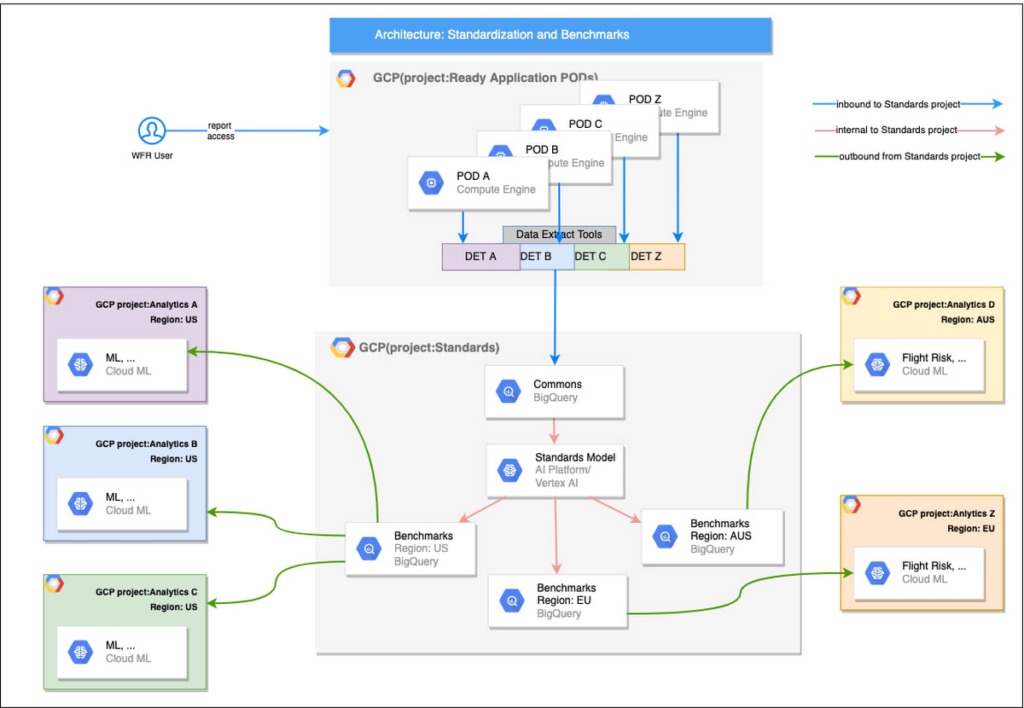
UKG Ready decided to partner with Google for an end-to-end solution for the analytics offering. This allowed us to focus on our core business logic without having to worry about the platform, environment configurations, performance and scalability of the entire solution. We make use of various Google Cloud services such as Cloud Triggers, Cloud Storage, Cloud Functions, Cloud Composer, Cloud Dataflow, Big Query, Vertex AI, Cloud Pub/Sub… to host our analytics solution. Jenkins manages the entire CI/CD pipelines and cloud environments are configured and deployed using Terraform.
The standardization of business entities problem was solved in three distinct steps:
Step 1: Collecting aggregated data
We needed an approach to collect aggregated data from our highly distributed, sharded, multi-tenant data sources. We developed a custom solution that allows us to extract data aggregated at source for PII and GDPR considerations and transfer to Google Cloud Storage in the fastest manner possible. Data is then transformed and stored in Big Query. Services used: GCS, Cloud Functions, DataFlow, Cloud Composer and Big Query. All processes are orchestrated using Cloud Composer and detailed logging is available in Cloud Logging (Stackdriver).
Step 2: Applying NLP (Natural Language Processing)
Once we had the variety of customer configurations or the business entities available, we then applied NLP algorithms to categorize and standardize these in buckets. This approach assumes that customers use natural language for configurations like job titles, pay codes etc.
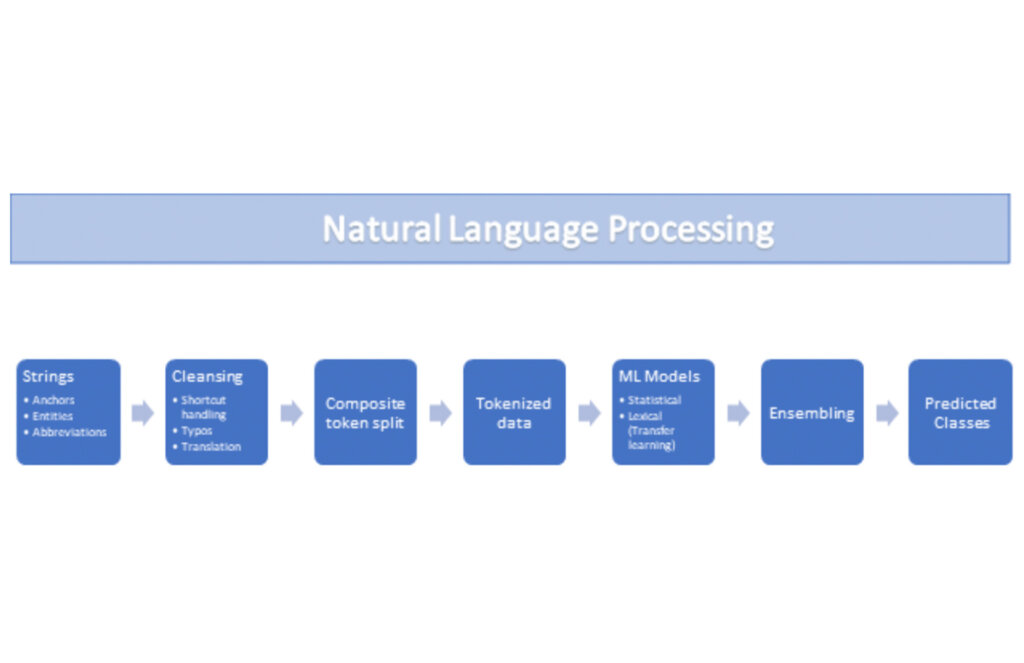
String Preparation
The input data for string preparation process is an entity string or several strings, that describe one entity object (like name-description pair or code-name pair). The output represents set of tokens that may be used to run a classification/clustering model. The process of string preparation tokenizes strings, replaces shortcuts, handles abbreviations, translates tokens, handles grammatical errors and mistypes
ML Models
Statistical
The idea of the model is to use defined target classes (clusters) and assign several tokens (anchors) to each of them an entity that has any of those tokens would be “attracted” to appropriate class. All other tokens are weighted according to frequencies of usage of theses tokens in the entities with anchor tokens:
Using anchor tokens, we are building kind-of Word2Vec - dimensionality of vector is equal to number of target classes. The higher the specific dimension (cluster) value, the higher the probability of entity to be included in appropriate cluster. Final prediction for entity tokens list for specific class is sum of weights of all the tokens included. Predicted cluster is a cluster that has maximal prediction score.
Lexical Model
We managed to generate reasonable amount of labeled data during statistical model implementation and testing. That opens a possibility to build “classical” NLP model that uses labeled data to train classification neural network using pretrained layers to produce token embeddings or even string embeddings. We started experimentation with pre-trained models like GloVe and got good results with single words and bi-grams but started getting issues in handling of n-grams. Our Google account team came to our rescue and recommended some white papers that helped formulate our strategy. We now use Tensorflow nnlm-en-dim128 model to produce string embeddings – it was trained on 200B records English Google News corpus and produces for each input string 128-dimensional vector. After that we use several Dense and Dropout layers to build a classification model.
Ensembling
To perform ensembling all the model results for each class are cast to probabilities using softmax transformation with scale normalization. Final predicted probability is maximal average score of both models among all the classes scores – appropriate class is predicted class.
The machine learning models are deployed on Vertex AI and are used in batch predictions. Model performance is captured at every prediction boundary and monitored for quality in production.
Step 3: Making available common vocabulary
Having the standardized vocabulary, we then needed a mechanism to have the results be available in UKG Ready reports and customer specific models like Flight Risk and Fatigue. For this we again used Google Services for orchestration, data transformation and data storage.
Once the modeling is complete, we made the customer specific models leveraging the above architecture be available in Reports. We utilized our proven existing technology choices in GCP for orchestration, data transformation and data storage
Results
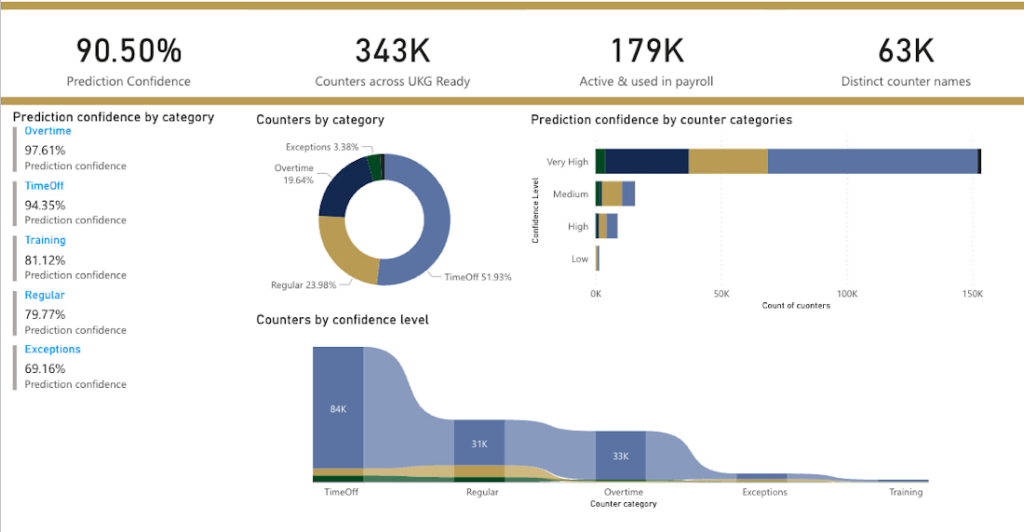
We are able to build a common vocabulary of our customers’ business entities with good confidence. And be an expert advisor to our SMB customers in their decision-making using machine learning. With the advice of our Google account team and using Google services we can add value to our product in a relatively short amount of time. And we are not done! We continue to use this platform for new use cases, complex business problems and innovative machine learning solutions.
Sample result:
Special thanks to Kanchana Patlolla , AI Specialist, Google for the collaboration in bringing this to light
Special Identity Parsers in Document AI eases Customer Verification and KYC Processes

2962
Of your peers have already read this article.
2:00 Minutes
The most insightful time you'll spend today!
If you’ve opened an account at a bank, applied for a government benefit, or provided a proof of age document on an ecommerce website, chances are you’ve had to share a physical or digital copy of a Driver’s License or a passport as proof of your identity. For businesses or public sector organizations that need this information to provide services, processing images of identity documents has long been a time- and resource-intensive process that requires extensive human intervention. Solutions exist to help digitally capture the data, but they require extensive human intervention that impacts the speed and cost of processing and ultimately the time to service customers.
The Google Cloud Document AI family of solutions has been designed to help solve some of the hardest problems for data capture at scale by extracting structured data from unstructured documents to help reduce processing costs and improve business speed and efficiency. Today, we’re announcing the general availability of identity parsers that bring the power of Document AI to customer verification, KYC, and other identity-based workflows.
With Document AI for Identity, businesses can leverage automation to extract information from identity documents with a high degree of accuracy, without having to bear the cost and turnaround time of manual tasks by a service provider. Document AI for Identity leverages artificial Intelligence to provide a set of pre-trained models that can parse identity and supports US driver’s licenses (generally available), US passports (generally available), French driver’s licenses (preview) and French National ID cards (preview), with more documents to be added from around the world over the coming months.
When our customers process high-volume workloads or complex workflows, they need a high degree of accuracy, since getting the first step wrong can derail the entire workflow. The introduction of special parsers for Identity processing can help solve one of the most commonly required document processing needs that our financial services and public sector customers face.
Along with the identity parsers, Google Cloud is also offering its “Human in the Loop” service, in which verification for a subset of identity documents can be automatically assigned to a pool of humans (internal or external) for manual review, based on confidence scores.
While there are multiple industries and applications that could benefit from Document AI for Identity, we’ve seen two main kinds of applications being adopted during the solution’s preview. One is around processing ID cards uploaded as unstructured images at scale, so that enterprises can have IDs on file. The second use case is to perform advanced checks on identity documents to validate their authenticity and / or to detect fraud. Google Cloud’s fraud detector API (which is currently in preview) can complement Document AI for Identity and apply an extra layer of normalization to help validate the identity as a government-issued ID by checking for suspicious words, image manipulation, and other common issues with forged identity documents. With new versions of driver’s licenses being frequently released, Document AI for identity uses specialized models and constantly-updated training data to help make sure the parsers can offer a high degree of accuracy. For all use cases, Document AI does not retain any customer data after completing the processing request (successfully or with an error).
Check out this demo and visit the Document AI for Identity landing page for more information on how Document AI can help solve your identity processing needs, and ask your Google Cloud account team to help you integrate Identity Document AI into your workflows.
For practitioners who’re interested in trying out Identity DocAI, check out our companion practitioner blog for step by step instructions on how to get started.
11214
Of your peers have already watched this video.
1:30 Minutes
The most insightful time you'll spend today!
Indian Retailer Figures Optimizes Hyperlocal Delivery to Increase Customer Experience
Anyone who follows the Indian e-commerce scene knows that one of the largest challenges these companies face is hyperlocal delivery.
That was a problem facing Wellness Forever, a retail chain of pharmacies with 150-plus stores across India.
“Exactly a year ago, we started our journey of hyperlocal deliveries. This optimization was a big time challenge for us to understand how to optimize this,” Palani Subbiah, CTO, Wellness Forever.
The problem in front of Wellness Forever was to identify which customer could can be sold from which store, so that a delivery could be made within 90 minutes.
“We handle a large amount of customer data and we wanted to use insights to help and improve the customer satisfaction index,” says Subbiah.
To do that Wellness Forever leveraged Google Big Query to run massive amount of data to come up with the operational insights. They also used Firebase and Google Maps.
“By 2021, we are going to have about 450 stores. Those stores are going to be not only a physical store, which is a digital store.
World’s Largest Online-only Grocery Retailer Uses AI to Figure Which Customers Need Most Attention

9454
Of your peers have already read this article.
4:20 Minutes
The most insightful time you'll spend today!
In the United Kingdom, the popularity of online grocery shopping is expected to surge from about 6% of the market today to 9% by 2021, according to market research firm Mintel. One of the pioneers of online-only grocery retailing is Ocado, based in Hatfield, Hertfordshire in the U.K. Since starting commercial deliveries in 2002, the company has grown to 600,000 active customers, 260,000 weekly orders, and £1.39 billion in annual revenue.
Ocado takes supermarket trips out of the equation by enabling shoppers to purchase items online through its convenient web and mobile applications. Items are then picked and packed in automated warehouses and shipped directly to customers in a one-hour time slot of their choosing. Ocado’s delivery punctuality is 95%, order accuracy is 99%, and its service footprint now reaches more than 70% of the U.K. population.
“Google Cloud Platform gives us the flexibility and performance to tackle the large and complex data challenges unique to our business.”
—Paul Clarke, Chief Technology Officer, Ocado
The company achieved its success by building in-house almost all the technology and automation that powers its end-to-end e-commerce, fulfillment, and logistics platform. Ocado also developed a new platform, the Ocado Smart Platform (OSP), which offers large brick-and-mortar grocery retailers around the world access to a best-in-class solution for online grocery.
Democratizing machine learning
The shopping journey for online grocery retailing differs significantly from other e-businesses. Customers often buy dozens of products at once, a single household may have multiple buyers using multiple devices, and product shelf life may only be a couple of days.
“We often say that having built an end-to-end platform that can do online grocery scalably and profitably, we can do other forms of online retail; but the reverse does not necessarily follow,” says Paul Clarke, Chief Technology Officer at Ocado. “Google Cloud Platform gives us the flexibility and performance to tackle the large and complex data challenges unique to our business.”
The Ocado business model takes advantage of consumers’ shifting preferences and the links between digital technology and shopping experiences.
“Google Cloud Machine Learning Engine gives us the agility we need. Our developers were able to try out TensorFlow and see firsthand the benefits of machine learning in the cloud.”
—Paul Clarke, Chief Technology Officer, Ocado
The company has been building machine learning into its systems for over five years. Until recently, Ocado machine learning applications required specialist data scientists, typically with PhDs in machine learning, who would build these solutions from the ground up. It also required the specialist who set up the system and costly on-premises infrastructure to train and run these systems.
However, working with Google as a private alpha testing site for Google Cloud Machine Learning Engine accelerated its adoption of artificial intelligence (AI).
“We’ve been talking about how the cloud could democratize AI for some time,” says Paul. “Google Cloud Machine Learning Engine gives us the agility we need. Our developers were able to try out TensorFlow and see firsthand the benefits of machine learning in the cloud.”
TensorFlow is an open source software library for machine learning developed by the Google Brain team. Ocado developers, engineers, and data scientists now use TensorFlow for many of their machine learning projects. They deploy the models they build on Google Cloud Machine Learning Engine, which lets them train models faster across servers, desktop computers, and mobile devices through a single application program interface (API). Additionally, Google Cloud Machine Learning Engine integrates easily with the other Google Cloud Platform products used widely at Ocado.
What do customers really want?
One of the first TensorFlow models Ocado created was a machine learning algorithm that tags and categorizes customer emails and then prioritizes them for response.
The contact center receives thousands of emails each day and Ocado wanted to automate determining which ones needed to be answered immediately and which ones could wait.
For example, a first-time customer expressing their delight in using Ocado doesn’t need to be responded to with the same urgency as a customer who is missing an item from their order or who won’t be home to receive the delivery.
“Enabling agents to respond without having to sort through less-urgent emails improves Ocado’s responsiveness and customer service.”
—James Donkin, General Manager, Ocado
“We get a lot of emails from customers saying, ‘Our service was great,’ or ‘The driver was very courteous,'” says James Donkin, General Manager, Ocado. “But when issues like weather or road conditions potentially affect delivery, we often get surges of urgent questions. Enabling agents to respond without having to sort through less-urgent emails improves Ocado’s responsiveness and customer service.”
Using Google Cloud Machine Learning Engine, TensorFlow, and a large data set culled from several years’ worth of manually categorized customer emails, Ocado experimented on which kind of neural network architecture would best prioritize emails. After testing its models, Ocado implemented the highest-performing one and has been able to respond to urgent messages four times faster. The company also discovered that 7% of its emails don’t require a response at all, which means call center representatives now have more time to devote to higher priority messages.
“Without Google Cloud Machine Learning Engine, it would have been a lot harder to succeed on a project like email classification,” says Roland Plaszowski, who has recently managed several big data projects and initiatives at Ocado.
“Even if we invested significantly in infrastructure, it would be difficult to manage because of the computational intensity. It’s challenging and expensive to run machine learning projects at the same time without infrastructure that you can scale easily.”
Ocado also uses machine learning to predict customer behavior and improve experiences. By analyzing order data, Ocado makes shopping as frictionless as possible. For example, the ordering system can pre-populate customers’ shopping carts with items they are most likely to purchase, remind customers about items they may have forgotten, and notify them of multi-buy offers they haven’t completed, for example, only buying one of a buy one, get one free offer. Based on machine learning from previous purchase data, the Ocado system can also offer new products that are likely to delight customers.
“You will regularly see items that are more personally relevant to you instead of items that are being promoted more generally,” says James. “I’m a vegetarian, so I’m offered specials for vegetarian products that I normally buy and new ones that I’ve never bought. I’m also less likely to see things that I’m not interested in.”
Machines and machine learning
Within the Internet of Things (IoT), Ocado is looking to enhance its warehouse robots with machine learning. An integral part of the OSP, thousands of robots continually stream data into Google Cloud Storage and Google BigQuery.
Ocado data scientists apply machine learning to create a type of swarm intelligence that enables warehouse robots to work cooperatively to achieve a common goal. Projects include modules to search robot telemetry data, such as whether a battery pack is operating within standard tolerances or whether firmware has been successfully loaded, and use it to optimize maintenance schedules or detect patterns in wear and tear.
“Another challenge we’re looking at is how to embed machine learning directly into robots so they become smarter in terms of self-testing, exception handling, and error recovery,” says Paul. “This is a challenging combination of IoT, data analytics, and machine learning that we believe Google BigQuery and Google Cloud Machine Learning are particularly well suited to helping Ocado achieve.”
The company also discovered that 7% of its emails don’t require a response at all, which means call center representatives now have more time to devote to higher priority messages.
Scaling for new business
Scalability is also a major reason behind some of Ocado’s cloud initiatives, including the migration of all its on-premises data to the cloud. Ocado wanted to improve customer experiences, empower business teams with greater insight, and reduce IT overhead, so it consolidated onto Google Cloud Platform.
“The old databases just weren’t fast enough,” says Paul. “We needed a solution that could scale with the amount of data we generate and how we use it. Google Cloud Storage and Google BigQuery now provide the backbone, from a data point of view, for the Ocado Smart Platform.”
Ocado estimates its business, product, and transaction data is approaching two petabytes. Combining customer and supply chain data helps both internal Ocado operations and the company’s ambitions to commercialize OSP.
“When compared with other options for expansion internationally, selling OSP as a managed service lets us turn companies that could have been competitors into customers,” says Paul. “We want to build OSP once and then turn it on for multiple business-to-business customers.”
Each time Ocado adds a new hosting customer to OSP, it will launch a customized instance to fit that customer’s requirements. The capacity and performance of each new OSP instance must be able to scale quickly as the backend platform for established retailers with large numbers of products, customers, and transactions.
Ocado’s first OSP customer, Morrisons, is already benefiting from this first-of-a kind solution. Morrisons is one of the UK’s four largest supermarkets and uses OSP to power its online retail business. Using Google Cloud Platform, Ocado has stored, processed, and analyzed terabytes of Morrisons’ data using a dedicated data lake and Google BigQuery.
In addition to using Google Cloud Platform for OSP, Ocado also adopted it for its own online grocery retail business operation. Ocado originally used the Apache Spark and Apache Hadoop open-source frameworks on Google Compute Engine for its data platform. Moving to Google BigQuery frees Ocado business analysts from the complex query setup and workflows associated with Spark and Hadoop. Plus, it lets Ocado share data analytics with suppliers and partners.
Google BigQuery is well integrated with TensorFlow on Google Cloud Machine Learning Engine and Google Cloud Dataproc, the Apache Spark and Apache Hadoop service that lets Ocado use open source data tools for batch processing, querying, streaming, and machine learning. Google Cloud Dataflow and Google Cloud Dataproc handle cluster management, and provide an easy-to-use framework so developers can spend less time and money on administration and more time on delivering valuable business features.
Switching from Hadoop to Google BigQuery revealed a series of cost and performance improvements. For example, Ocado no longer needed to decide how many instances to bring up in a cluster or wait for the instances to spin up. Google handled everything.
“We simply ran our queries and paid for the resources that we use,” adds Roland. “One big win with Google BigQuery is we don’t have to do maintenance. Best of all, we saw Google BigQuery outperform our Hadoop cluster by over 80 times on our largest dataset, and for only two-thirds the cost.”
More Relevant Stories for Your Company


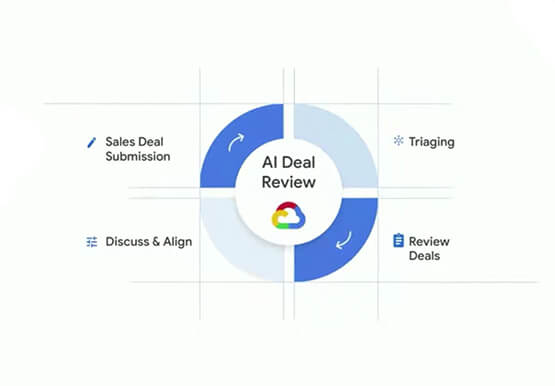

Responsible AI: From Theory to Practice
In less than 10 years, AI will be the number one driver of global GDP growth. And organizations that achieve AI absorption will be the leaders of the global economy. But as fast as AI is progressing, it also requires more care and attention from a responsibility standpoint. A more


AI-as-a-Service is Here. It’s Really Almost Plug-and-Play
What is the one thing that enterprises want providers to do vis-à-vis AI? To decomplexify it. Today, the path to AI adoption is confusing, and requires skills that are out of reach for most enterprises. That’s what Google Cloud is addressing. “It used to be—still is true—that AI's a pretty

Journey to Transformation and Modernization with Google’s Distributed Cloud
Google Cloud has been leading the way of helping businesses make most from their cloud investments to drive digital transformation through modern application platforms that cater to today's customer needs. Watch the video from the Next '21 to explore three areas where companies are supported by Google Cloud throughout their



Nippon India Mutual Fund Re-Invents How Indians Buy with AI
Nippon India Mutual Fund, formerly Reliance Mutual Funds is changing the way Indians purchase funds making it easier and faster, with the help of Google Cloud. In India, only 3-4 percent of the population has invested in mutual funds. There's a sizeable market to tap into for mutual fund houses--if
