





End Security Risks with the Unattended Projects Recommender Feature

6146
Of your peers have already read this article.
3:00 Minutes
The most insightful time you'll spend today!
In fast-moving organizations, it’s not uncommon for cloud resources, including entire projects, to occasionally be forgotten about. Not only such unattended resources can be difficult to identify, but they also tend to create a lot of headaches for product teams down the road, including unnecessary waste and security risks.
To help you prune your idle cloud resources, we’re excited to introduce Unattended Project Recommender. It’s a new feature of Active Assist that provides you with a one-stop shop for discovering, reclaiming, and shutting down unattended projects. With actionable and automatic recommendations, you no longer have to worry about wasting money or mitigating security risks presented by your idle resources. Unattended Project Recommender uses machine learning to identify, with a high degree of confidence, projects that are likely abandoned based on API and networking activity, billing, usage of cloud services, and other signals. This feature is available via the Recommender API today, making it easy for you to integrate with your company’s existing workflow management and communication tools, or export results to a BigQuery table for custom analysis.
Thousands of projects can be unattended in large organizations, presenting major security risks
Your cloud projects can go abandoned or unattended for a number of reasons — ranging from a test environment that’s no longer needed, to project cancellation, to project owner switching jobs, and more. Not only can such projects contribute to your cloud bill (waste) but they may contain security issues such as open firewalls or privileged service account keys that attackers can exploit to get a hold of your cloud resources for cryptocurrency mining or, worse, compromise your company’s sensitive data. These security risks tend to grow over time because the latest best practices and patches are usually not applied to unattended projects.
We experience this issue here at Google, too… In fact, it has been on Google’s internal security team’s radar for some time now, so we joined forces and looked into this problem together, starting with our very own “google.com” organization cloud projects. We quickly found some projects that were unattended, but remediating this issue was easier said than done due to challenges in several areas:
- Detection: With lots of signals available to you via sources like Cloud Monitoring, what are the right ones you should look at (e.g. API, networking, user activity)? How can you tell the difference between an unattended project and a project that has a low level of activity by design (e.g. a “shell” project that holds an auth token)?
- Remediation: Once you have identified a project that seems abandoned, how do you go about ensuring that it’s indeed an unattended project? How do you reduce the risk of deleting something that might be essential to a production workload, causing irreversible data loss? How do you solve this at the scale of your entire organization, beyond a one-time cleanup?
Over the course of 2021 we built and tested a Google-internal prototype first, cleaning up many of our internal unattended projects, and then worked with a number of Google Cloud customers to build and tune this feature based on real-life data (thank you to all of our early adopters for working with us and your generous feedback that helped us shape this feature!) It was not uncommon for us to come across organizations with thousands of unattended projects, and we’re very excited to bring Unattended Project Recommender to all customers, in public preview.
Discovering and acting on unattended project recommendations
Unattended Project Recommender analyzes usage activity across all projects under your organization, including the following data:
- API activity (e.g. service accounts with authentication activity, API calls consumed)
- Networking activity (ingress and egress)
- Billing activity (e.g. services with billable usage)
- User activity (e.g. active project owners)
- Cloud services usage (e.g. number of active VMs, BigQuery jobs, storage requests)
Based on these signals, it can generate recommendations to clean up projects that have low usage activity (where “low usage” is defined using a machine learning model that ranks projects in your organization by level of usage), or recommendations to reclaim projects that have high usage activity but no active project owners. Here’s what an example post-processed summary list of recommendations can look like for the “foobar” organization that has 3 projects:
Project ID: demo-project-307815Recommendation: CLEANUP_PROJECTProject ID: new-projectRecommendation: N/AProject ID: bobs-playground-projectRecommendation: RECLAIM_PROJECT
In addition to the recommendations, you can also examine the underlying project activity insights that the recommendations are based upon. The insights provide additional information that can be useful for integration with your organization’s existing workflows and automation (e.g. send an auto-generated email or chat message to project owners based on the list provided by the owners field). Here’s an example insight payload:
content:activeAppengineInstanceDailyCount: 0activeCloudsqlInstanceDailyCount: 0activeGceInstanceDailyCount: 3activeServiceAccountDailyCount: 1apiClientDailyCount: 18922 // Daily average API calls producedbigqueryInflightJobDailyCount: 0bigqueryInflightQueryDailyCount: 0bigqueryStorageDailyBytes: 0bigqueryTableDailyCount: 0consumedApiDailyCount: 0 // Daily average API calls consumeddatastoreApiDailyCount: 0gcsObjectDailyCount: 11gcsRequestDailyCount: 0gcsStorageDailyBytes: 2663548hasActiveOauthTokens: false // OAuth tokens used in the last 180 dayshasBillingAccount: truenumActiveUserOwners: 1owners: // List of project owners- activeOnProject: falsemember: user:user1@example.com- activeOnProject: truemember: user:user2@example.comserviceWithBillableUsage:– Cloud Storage- Compute EnginevpcEgressDailyBytes: 264456938 // Daily average VPC egress bytesvpcIngressDailyBytes: 392435047 // Daily average VPC ingress bytesusagePercentile: 20 // Level of usage relative to other projects
GCP projects are used in many different ways and for many different purposes. In case you get a recommendation to delete a project that’s being used in a way that’s out of the scope for this feature, you can dismiss the recommendation and it will stop showing up for the given project.
Restoring deleted projects
When you choose to shut down a project using the projects.delete() method, it gets marked for deletion. After a project is marked for deletion, it becomes unusable, all resources within that project are shut down, and a 30-day wait period for the project and all of its data to get fully deleted begins.
In case a useful project is accidentally shut down, you have the option to restore the project within that 30-day wait period. Since restoring allows you to recover most but not necessarily all of your project data and resources, we recommend carefully examining the utilization insights associated with a project and considering any additional utilization signals that may not be captured by the Unattended Project Recommender before taking the cleanup action.
Early customer success stories
A number of enterprise customers are already using Unattended Project Recommender to keep their organizations clean of unattended projects and resources.
Decathlon, a French sporting goods retailer, is excited for the insight Unattended Project Recommender will bring to their environment, and are already deploying it as a part of their latest cloud security initiatives.
“After a thorough test of this feature and the validation of our CISO, we ended up deleting our first 775 projects, and no one complained! A great help to improve our security. The next step for us will be to operationalize it at scale, and implement a company wide policy for unattended resource management.” —Adeline Villette, Cloud Security Officer
For Veolia, one of the world’s largest water, waste and energy management companies, not only does this feature reduce security risks and waste, but also helps drive cultural shift and alignment with its ecological transformation strategy.
“This feature allows us to reduce our costs and security debt on assets that are no longer in use, and is also fully in line with Veolia’s philosophy of limiting its carbon footprint. After having tested Unattended Project Recommender on more than 3,000 projects throughout our organization, we are looking to bring it as proactive alerts to our project owners at scale.”—Thomas Meriadec, Product Manager
Box, a secure cloud content management provider, views it as a foundation for building a repeatable process to remediate unused resources.
“Unattended Project Recommender is a great fit for us. It gives us a unified view of project usage across our entire organization and enables us to address security risks of legacy projects in a systematic and organized manner, ensuring an even safer environment.” —Matt Bowes, Staff Security Engineer
Getting started with the Unattended Project Recommender
To help you get started, we’ve prepared a Cloud Shell tutorial (source code) that you can use to find unattended project recommendations within your own Projects/Folders/Organization. Click this button to clone the tutorial from GitHub and run in your Cloud Shell environment:

As you can see, listing recommendations for your projects only takes a few clicks with the tutorial (special thanks to Lanre Ogunmola, Security & Compliance Specialist, for making this look so easy)! For additional detail on using the gcloud CLI or API to discover unattended project recommendations, please refer to the documentation page.
You can also automatically export all recommendations from your Organization to BigQuery and then investigate the recommendations with DataStudio or Looker, or use Connected Sheets that let you use Google Workspace Sheets to interact with the data stored in BigQuery without having to write SQL queries.
As with any other Recommender, you can choose to opt out of data processing at any time by disabling the appropriate data groups in the Transparency & control tab under Privacy & Security settings.
We hope that you can leverage Unattended Project Recommender to improve your cloud security posture and reduce cost, and can’t wait to hear your feedback and thoughts about this feature! Please feel free to reach us at active-assist-feedback@google.com and we also invite you to sign up for our Active Assist Trusted Tester Group if you would like to get early access to the newest features as they are developed.
Google Cloud & Health-ISAC’s EMEA Collaborate to Boost Healthcare Security

1175
Of your peers have already read this article.
3:30 Minutes
The most insightful time you'll spend today!
Last July, Google Cloud launched our ambassador partnership with the Health Information Sharing and Analysis Center (Health-ISAC) and committed to working with industry leaders to better protect our healthcare ecosystem. Securing healthcare technology and data is a global challenge, and to meet it security professionals need to have better channels for sharing information and effective security practices.
To that end, we’re pleased to announce that our relationship with Health-ISAC is now expanding to include CISOs and security leaders in Europe, the Middle East, and Africa (EMEA).
On May 23, 2023, we’ll join the Health-ISAC on a 17-city tour across the region, starting in Zurich, Switzerland, as part of its European Healthcare Threat Landscape Tour. In each session, we will bring together experts from across the region with cybersecurity practitioners from the Health-ISAC, Google Cloud, law enforcement, and regulatory bodies.
Our goals is to focus the discussions on several topics:
- How the threat landscape is unique to each country we visit;
- How we can better share threat intelligence;
- What are the emerging European laws and regulations that can affect healthcare and cybersecurity;
- How ransomware continues to evolve and the threat that poses to healthcare; organizations;
- What we can do to improve cyber incident response;
- What impact digital sovereignty can have on European healthcare;
- And which initiatives Health-ISAC and Google Cloud are launching to better protect Europe’s healthcare system.
The timing for the tour could not come at a more critical time. Ransomware and digital extortion threatens healthcare and its subsectors, with national health systems in Ireland, UK, Germany, and Spain all recently experiencing extended outages because of ransomware. Threat actors continue to target proprietary data at biotechnology and pharmaceutical firms. Meanwhile, existing regulations such as the Digital Markets Act and GDPR, and new regulations such as the NIS2 Directive (Directive (EU) 2022/2555), which seek to protect EU citizens and businesses from risks posed by the digital world, are raising the bar that CISOs and security leaders must surpass to ensure their businesses can stay compliant and able compete in the global digital economy.
“The European Healthcare Threat Landscape Tour is one of many efforts we have undertaken to build a closer community of trust around threats and cybersecurity practices that keep health organization’s safe,” said Denise Anderson, executive director, Health-ISAC.
“We all rely on these organizations to take care of us and produce therapies that keep us healthy. Delivering these engagements alongside Google Cloud helps us achieve global scale and shows off both organizations’ commitments to building a sustainable, resilient healthcare ecosystem for entire societies.”
Each stop in the tour will provide opportunities to dive deep into these topics, grow an understanding of these challenges, create a space for collaboration, and build closer, trusted partnerships. The meetings are open to member and non-member organizations working in healthcare. Interested participants can contact the Health-ISAC through their contact form or register on their website for the nearest event.
“The Google Cybersecurity Action Team’s mission is to secure customers, secure the cloud, and secure the planet (and beyond). Working with industry groups like Health-ISAC helps us achieve this mission while respecting each other and the unique challenges European health systems face. Myself and our EMEA-based Google Cloud and Mandiant security teams are looking forward to another great collaboration,” said Phil Venables, chief information security officer, Google Cloud.
At Google Cloud, we’re committed to helping build a secure and resilient healthcare ecosystem for everyone. As we hit the road with the Health-ISAC this summer, we’ll be sure to send updates on what we learn through this collaboration and how we can all work together to secure smarter in 2023 and beyond.
3286
Of your peers have already watched this video.
4:43 Minutes
The most insightful time you'll spend today!
Beaconing Malware: How CISOs Can Catch it With Threat Analytics in Just a Few Clicks
Are you checking your network for beacon activity? If you aren’t you are risking your business’ reputation and customer data.
Beaconing is the practice of sending short and regular communications from an infected host to an attacker-controlled Command and Control server, compromising internal information.
These threats often go undetected but with Google’s Backstory you can store and continuously analyze petabytes of security telemetry. It ingests a large amount of telemetry data in just a few clicks, normalizes it, indexes it, correlates it with known threats, and makes it available for analysis.
This unmatched speed combined with UI responsiveness translates incident investigations and threat exploration into tasks that analysts can complete in seconds instead of hours.
Watch this four-minute video to find out how to focus on investigations to fight Malware Beaconing.
What’s in Line for Google Cloud’s Europe Customers in Regards to the E.U.-U.S. Data Transfer Framework

2959
Of your peers have already read this article.
4:00 Minutes
The most insightful time you'll spend today!
Last week, the European Commission and U.S. Government agreed on a new E.U.-U.S. data transfer framework. Earlier today, Google shared that it welcomes these efforts by the U.S. government to enhance privacy protections for E.U. data and facilitate trusted transatlantic data flows. For our Google Cloud customers, we intend to make the protections offered by this new framework available once it is implemented.
Last year, we reaffirmed our commitment to E.U. businesses after the European Data Protection Board (EDPB) issued its Recommendations on Supplementary Measures, following Europe’s top court ruling invalidating the E.U.-U.S. Privacy Shield Framework and upholding the E.U. Standard Contractual Clauses (SCCs).
Since then, we’ve continued to help our customers meet stringent data protection requirements by offering industry-leading technical controls, contractual commitments, and risk assessment resources. We’ve also continued our advocacy to create more legal certainty around transatlantic data flows.
Today, we would like to provide an update to our customers on this work.
A customer-controlled cloud
Google Cloud1 continues to be a leading provider of technical and security controls to help meet customers’ data protection requirements, as well as their increasing data sovereignty expectations.
We are committed to building our Cloud on Europe’s terms, including by offering customer-managed encryption and data localization for a growing list of key products and collaborating with local partners to provide the highest levels of sovereignty, all while enabling the next wave of growth and transformation for Europe’s businesses and organizations.
Google Cloud Platform
We recently announced the general availability of Assured Workloads for the E.U. This product helps Google Cloud Platform (GCP) customers protect their data by allowing them to:
- Store their data in their choice of E.U. Google Cloud region(s)
- Ensure that only E.U. persons – located in the E.U. – have access to the data and provide customer support
- Deploy cryptographic control for data access, including customer-managed encryption keys
Cloud External Key Manager (EKM) enables customers to encrypt data in a variety of services with keys that are stored and managed in a third-party key management system deployed outside of Google’s infrastructure. Google Cloud continues to be the only cloud provider to enable customers to store and manage encryption keys for cloud-resident data outside the provider’s infrastructure with customer’s control over decryption based on specific justifications, including government access requests.
Key Access Justifications greatly advances the control that GCP customers have over their data by giving customers a justification every time their externally hosted keys have to be used to decrypt data. Signed Access Approval (SAA) adds a layer of extra assurance that requires explicit customer consent for any administrative access to customer data or configurations.
Google Cloud’s Confidential Computing portfolio is a breakthrough technology that allows customers to encrypt their most sensitive data in the cloud while in-use. Ubiquitous Data Encryption further extends data protection by providing cryptographic protection for this data at-rest, in-transit, and in-use. The keys used to encrypt customer data outside of GCP using Cloud EKM are securely shared with applications operating within Confidential environments.
Google Workspace
Our Google Workspace (including Workspace for Education) customers can choose to store their covered data in Europe. Additionally, with Client-Side Encryption, we offer customers direct control of encryption keys and the identity service they choose to access those keys. With Client-Side Encryption, customer data is indecipherable to Google, while users can continue to take advantage of Google’s native web-based collaboration, access content on mobile devices, and share encrypted files externally. Client-Side Encryption is currently available in Public Beta for Google Drive, Docs, Sheets, and Slides, and we plan to extend it to Gmail, Calendar and Meet. Additionally, customers can also benefit by choosing third party solutions that offer similar encryption capabilities with select Google Workspace services.
Legal Basis for International Data Transfers
We updated our data processing terms for GCP and Google Workspace and Cloud Identity to reflect various modules of the new E.U. Standard Contractual Clauses (SCCs) approved by the European Commission on June 4, 2021, as well as separate U.K. SCCs.
Google Cloud plans to adopt the new E.U.-U.S. data transfer framework and offer it as a transfer solution to our cloud customers, as further detailed in our data processing terms.
Advocacy and Additional Helpful Resources
We have adopted the Trusted Cloud Principles with industry peers to demonstrate our commitments to protect the rights of our Google Cloud customers. We will continue to support the ongoing work of the Organisation for Economic Co-operation and Development on government access to data and the negotiation of CLOUD Act Agreements — including between the U.S. and E.U. — as vehicles for surveillance reform.
We will continue to publish additional materials on our Cloud Privacy Resource Center, such as our whitepaper on safeguards for international data transfers with Google Cloud.
Millions of organizations with users in Europe rely on our cloud services to run their businesses every day, and we remain steadfastly committed to helping them meet their regulatory requirements by maintaining a diverse set of compliance tools.
Google Cloud: Google Workspace (including Google Workspace for Education) and Google Cloud Platform (GCP)
2930
Of your peers have already watched this video.
15:00 Minutes
The most insightful time you'll spend today!
What Makes Google Cloud the Go-to Platform to Build Next-gen Security Services
Join the discussion by the panel of security experts and IT leaders from renowned organizations to examine the role of Google Cloud for security companies in building next-generation security services. Watch the video from the security session of Google Cloud Next ’21 to deep dive into Google Cloud’s security and partnership models to explore the security-related aspects of building robust, security based SaaS products.
How Firewall Insights can Simplify Corporate Firewall Rules

3127
Of your peers have already read this article.
3:30 Minutes
The most insightful time you'll spend today!
Corporate firewalls typically include a massive number of rules, which accumulate over time as new workloads are added. When rules stack up piecemeal like this, misconfigurations occur that, at best, create headaches for security administrators, and at worst, create vulnerabilities that lead to security breaches.
To address this, we have introduced the Firewall Insights module in our Network Intelligence Center, which provides a single console for managing Google Cloud network visibility, monitoring and troubleshooting.
What are Firewall insights?
Historically, there hasn’t been an easy way to deal with the accumulation of complicated firewall rules. That was until we created Firewall Insights, which provides metrics reports and insight reports. These two reports contain information about firewall usage and the impact of various firewall rules on your VPC network. Even better, these insights and metrics are integrated into your Google Cloud Console for the VPC firewall and are also available via APIs.
You can use metrics reports to verify that firewall rules are being used appropriately and as intended. This report can uncover leftover rules from the past that are not actively used, review that the firewall rules allow or deny what is intended, perform live debugging of connections dropped, and leverage Cloud Monitoring to discover malicious attempts to access your network.
You can use insight reports to identify firewall misconfigurations, detect security attacks, and optimize and tighten your security rules.
Let’s take a look at how these reports work.
Metrics Report, a deeper dive
Metrics insights analyzes your VPC firewalls usage by tracking metrics such as firewall hit counts and last used. Let’s check this out with an example:
When you navigate to your VPC network and click on Firewall, ensure that you have selected Logs, Hit count and also Last hit in the column display options:
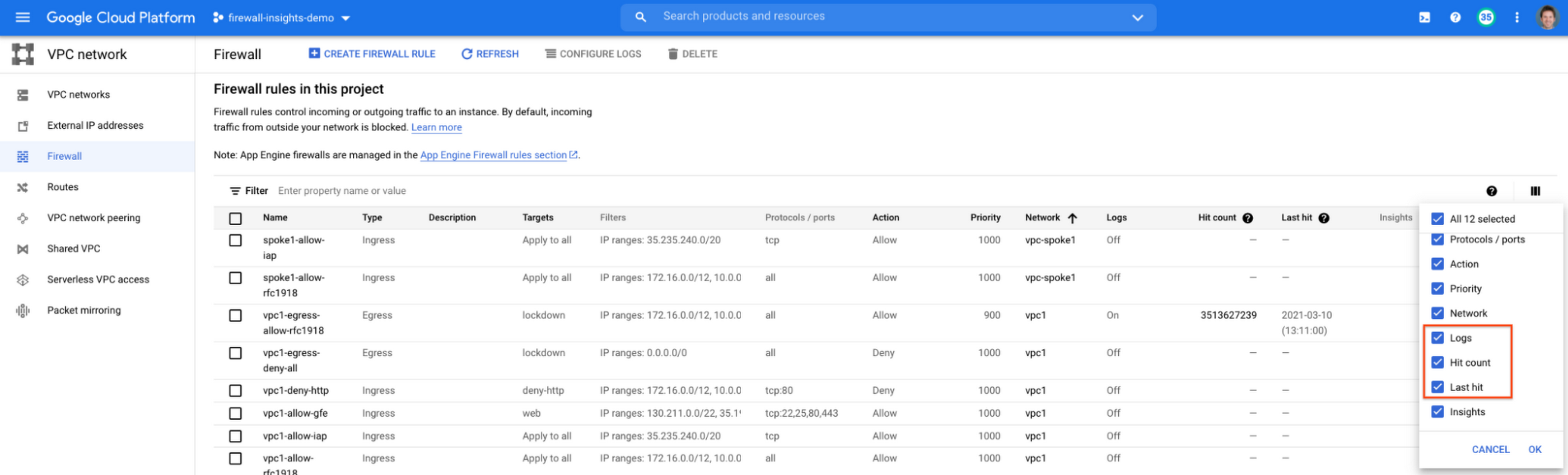
After this is enabled, now you should be able to see your VPC firewall rules with the hit count and last hit metrics. In the image below you can see that if logs are not enabled for rules, hit count and last hit metrics will not be collected. If logs are enabled, these details are collected, and shown in the VPC firewalls console.
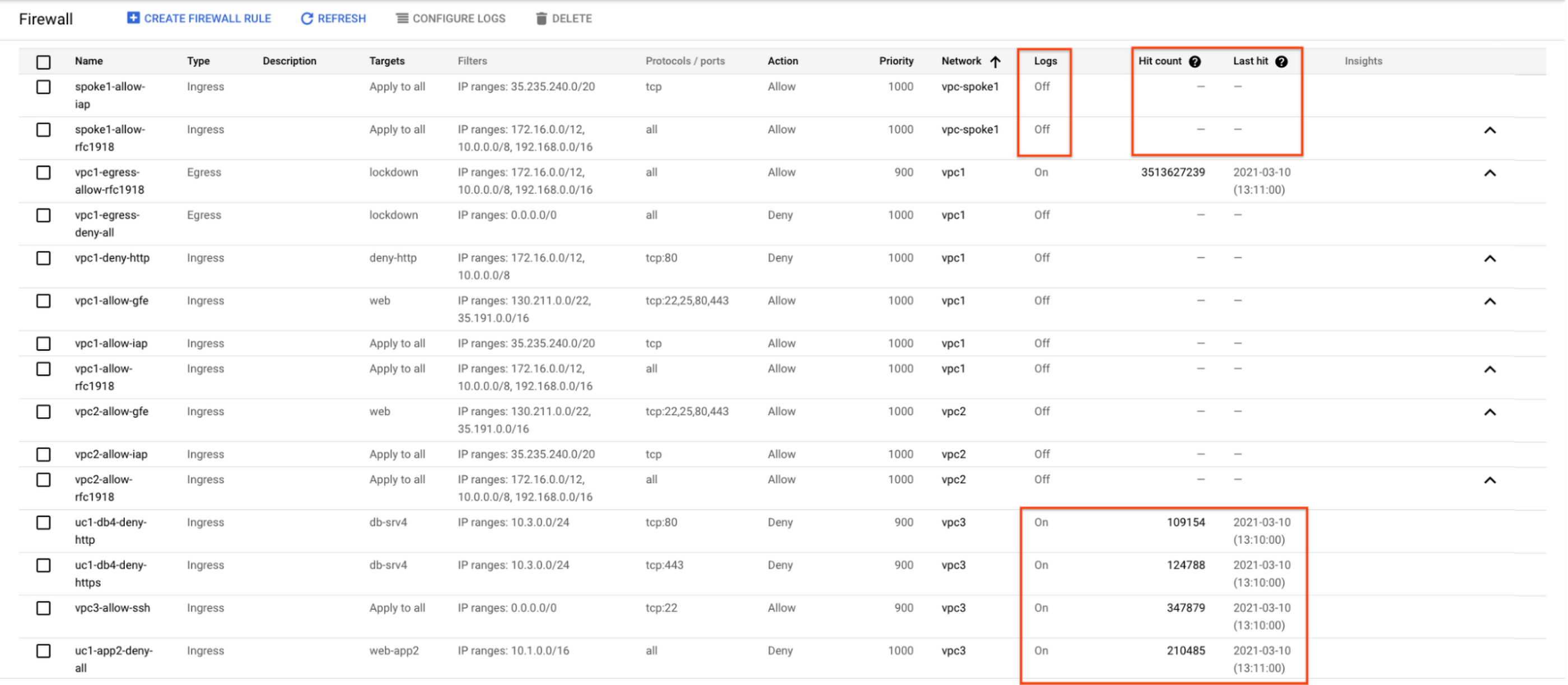
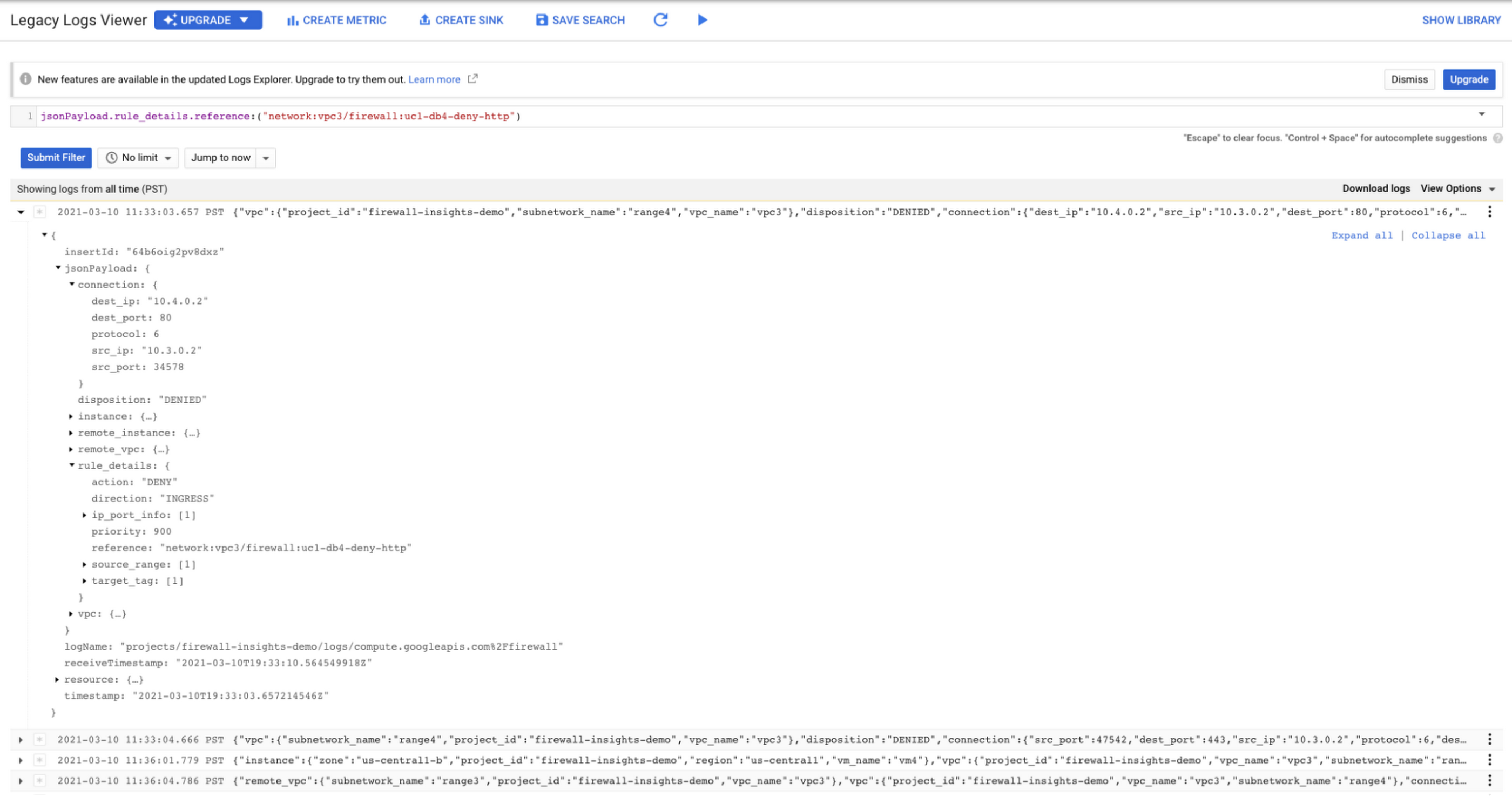
As you can see in Figure 1.2, each firewall rule which has logging enabled will show hit counts, so based on the example above, the rule “uc1-db4-deny-http” has been hit 109,154 times, the last time being 2021-03-10 (13:10:00). If you want to dive even deeper, you can click on the hit count and this will bring you to the logs viewer page where you can expand these logs and analyze all the details:
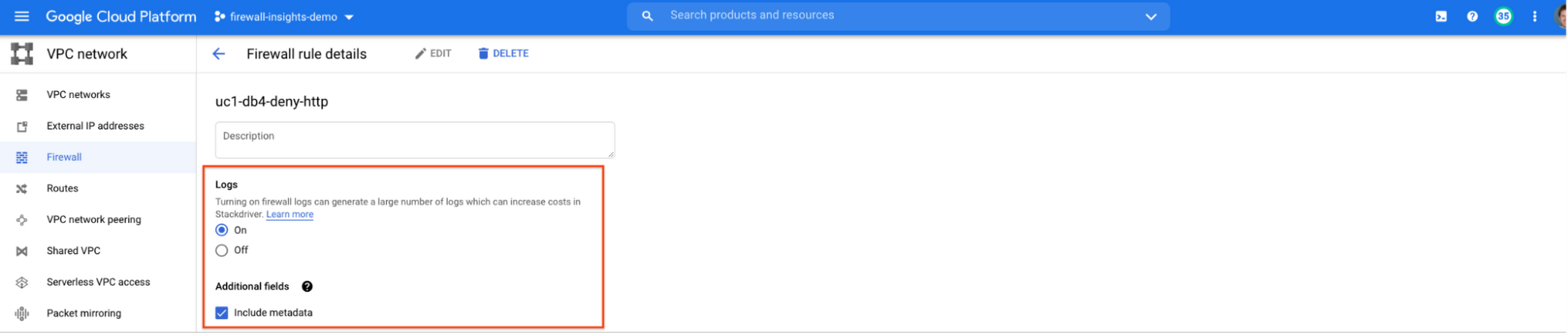
In order to enable logs for a particular firewall rule, you can edit it and turn logs on. By default, metadata is added in firewall logs. If you want to reduce the log size, you can do so by excluding these additional fields. Excluding these metadata fields will not impact the functionality of Firewall Insights.
From the “Firewall” page, you can also multi-select a group of firewall rules and turn on all logs at once.
Firewall rule usage metrics are accurate only for the period of time during which Firewall Rules Logging is enabled.
Insights Report, a deeper dive
Insights Report provides an intelligent analysis of the configuration of your firewalls. A report can contain one or more insights.
We will see examples now about the different insight reports which include:
- Shadowed firewall rules
- Allow rules with no hit in the last six weeks
- Deny rules with hits in the last 24 hours
By definition, a shadowed rule is a VPC firewall rule that is completely overshadowed by one or more firewall rules with higher or equal priority. We call that shadowing rules. Let’s see an example on how to find shadowed rules:Let’s say that you try to use ping between two VMs but it fails. Let’s take a look at the firewall rules applied to the VM:
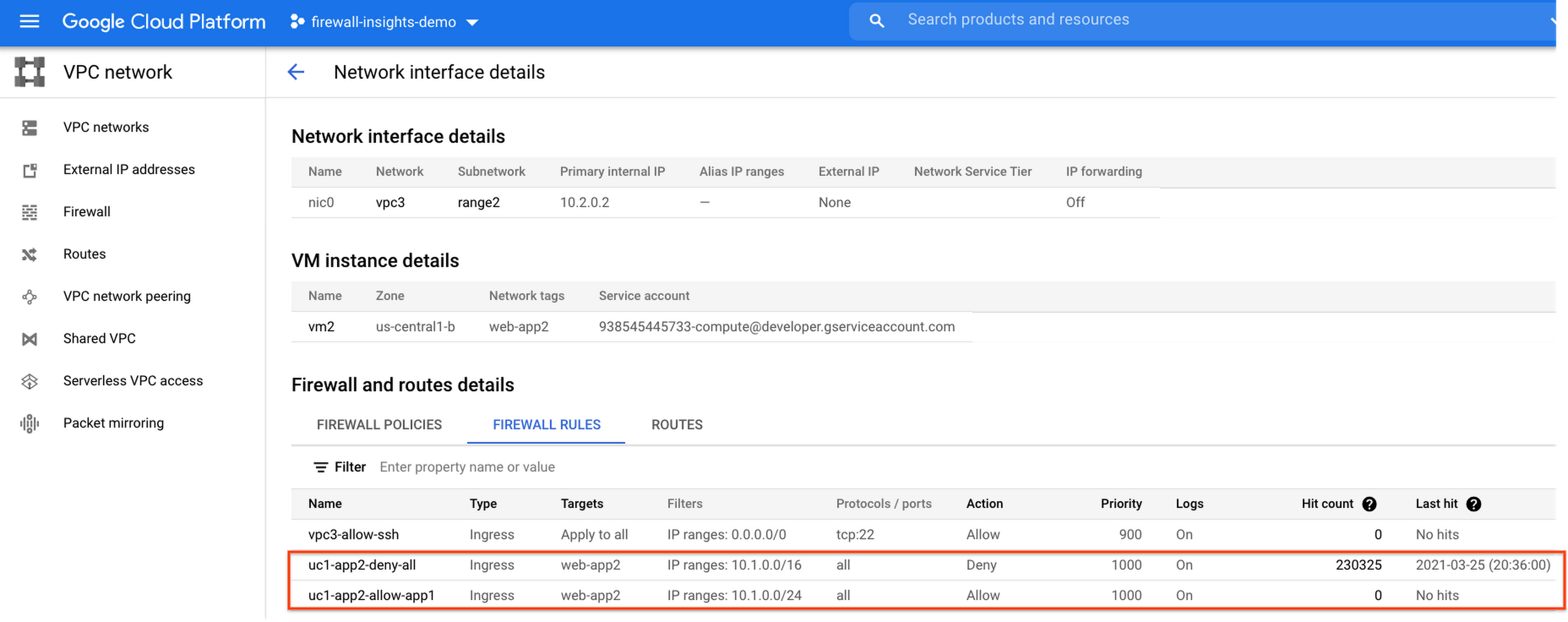
If we look closely, we can see that there are two rules with the same target tag, and those are almost identical except their source IP range. The IP range of the deny rule “uc1-app2-deny-all” includes the IP range of the rule allow “uc1-app2-allow-app1”. Therefore, we can see that “uc1-app2-allow-app1” is shadowed by “uc1-app2-deny-all”, and the ping between these VMs failed due to that.
To avoid such incidents in the future, Firewall Insights provides you with a convenient list of rules overshadowed by other firewall rules.
To see shadowed rules, you can click on the column selector, and add “Insights” to the firewall and route details:

Once this is applied, you will be able to see shadowed rules here:

Alternatively, you can navigate to Network Intelligence > Firewall Insights, where we will see the shadowed rule report:
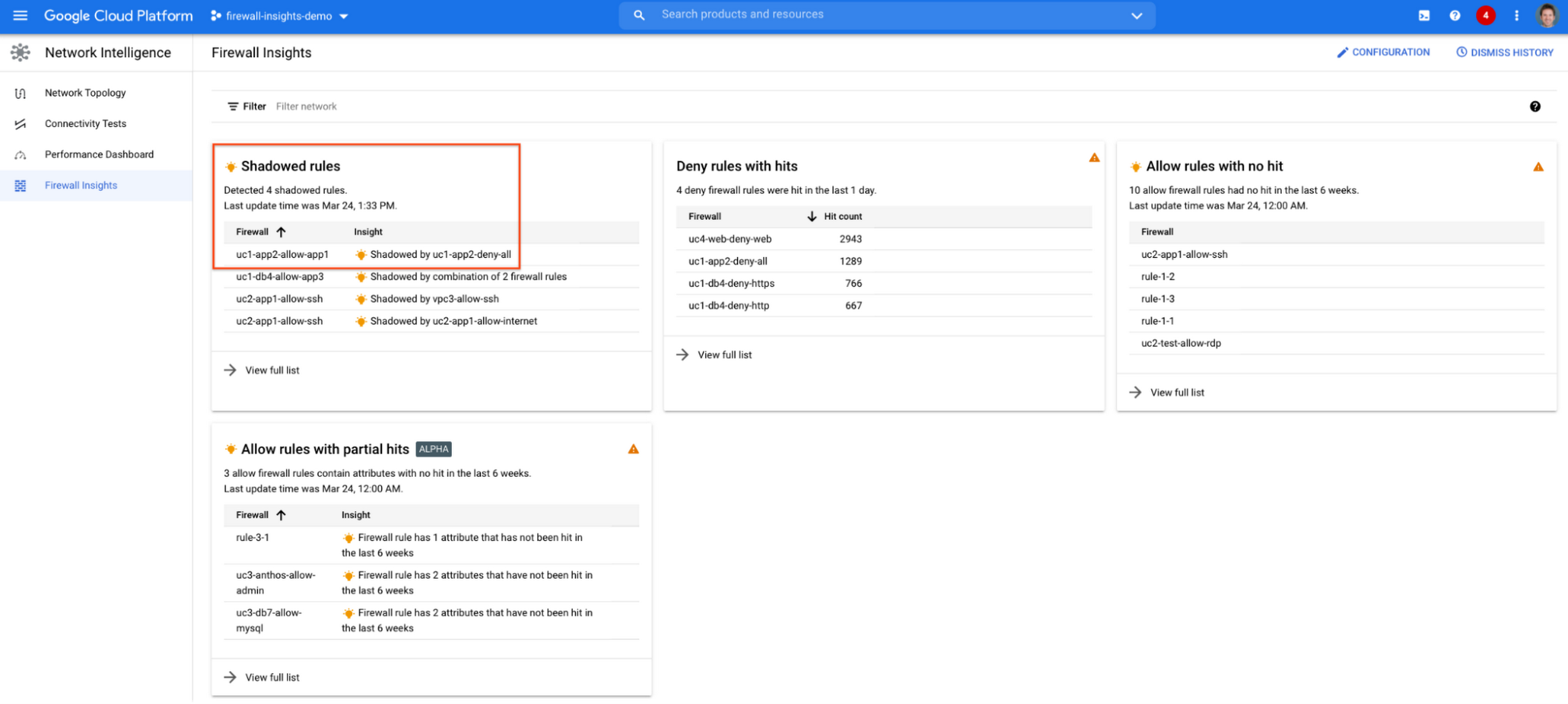
If we click on the insight we will get more details:

Going back to the firewall insights card (Figure 1.8), we can also identify that “uc1-db4-allow-app3” is shadowed by a combination of two rules and if we clicked on the insight this would provide all the details.
From the Firewall Insights dashboard, let’s move on to “allow rules with no hit”, where we can see firewall rules that have not logged any hits in the past six weeks. Such rules could be as a result of a misconfiguration, or leftover rules from past deployments. Tighten your security boundaries by identifying and removing such rules. If we go back to Network Intelligence > Firewall Insights, we can see allow rules with no hit:

We can drill down to view the full list of rules with no hit. We can see, for instance, one of the rules, the bottom one “uc2-app1-allow-internet”, might be a leftover rule to allow internet access from a past deployment, which means it has little likelihood of being hit in the future. So you may want to consider removing it from the rule set:

Click on the firewall rule to review all the details, and take a look at the prediction, which is made based on the hit pattern that we saw for similar rules in the same organization:

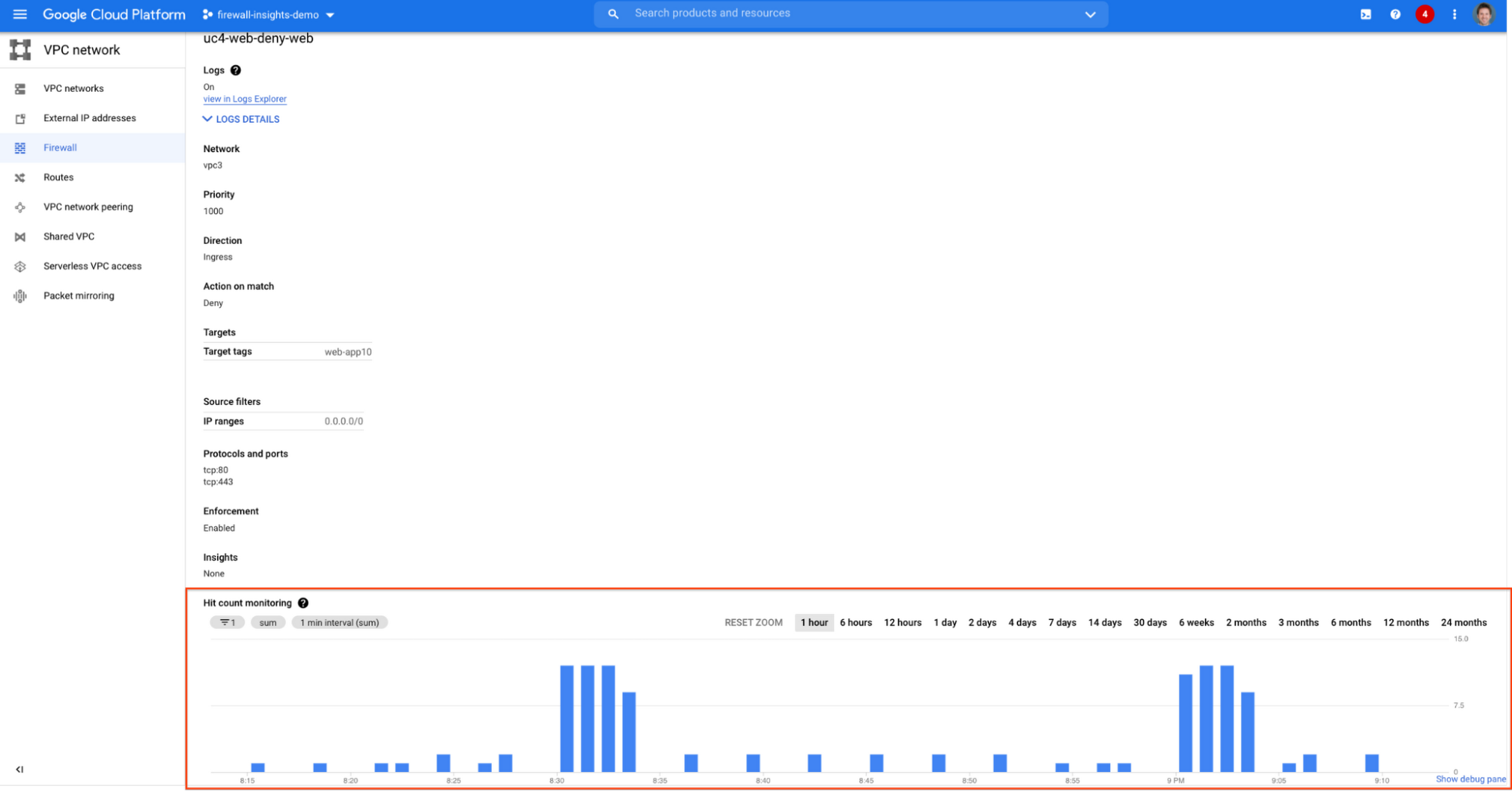
Let’s go back to the Firewall Insights dashboard and move on to the last category, “deny rules with hits in the last 24 hours”, which help you capture the traffic blocked by deny rules. These traffic types could indicate external attacks into your VPC network, or compromised VM instances attempting to send traffic out of your network. Let’s examine future hit prediction on a firewall rule. Navigate to Network Intelligence > Firewall Insights and take a look at the deny rules with hits card:

If your click on the “uc4-web-deny-web” rule, you can see the hit count monitoring, and if you click on the hit number we can dive deeper in the logs:

These tips should help you effectively leverage Firewall Insights to gain better control over a massive firewall rule set. Automate shadowed rule detection, quickly troubleshoot misconfigured rules, effortlessly pinpoint the overgranting rules hidden in the rule set, and identify the failed attempts to break into your network that were rejected by your firewall rules.
To learn more about Firewall Insights, please refer to our documentation. Additionally, to see how we’re advancing intelligent automation in network security, check our recent blog post.
More Relevant Stories for Your Company

Secrets Management Risk Analysis: Mitigating Threats with Secret Manager
Can you keep a secret? Many people struggle to keep secrets. So do organizations. An organization’s digital credentials — its passwords, API keys, tokens, and encryption keys baked into its software code — are its vital secrets, used to authenticate access to protected resources and services. The security of these

Revamping Cloud Security: Google Introduces Attack Path Simulation to Security Command Center
To help secure increasingly complex and dynamic cloud environments, many security teams are turning to attack path analysis tools. These tools can enable them to better prioritize security findings and discover pathways that adversaries can exploit to access and compromise cloud assets such as virtual machines, databases, and storage buckets.

Redefining Network Security with Google Cloud’s Secure Web Proxy
Google Cloud provides multiple layers of security to help customers stay ahead of evolving threats and keep their cloud workloads safe. Today at our annual Security Summit, we are excited to announce the general availability of Secure Web Proxy, a new cloud-first network security offering that provides web egress traffic inspection, protection,

New ML-Powered API Abuse Detection
API security incidents are increasingly common and disruptive. With the growth of API traffic, enterprises across the world are also experiencing an uptick in malicious API attacks, making API security a heightened priority. According to our latest API Security Research Report, 50% of organizations surveyed have experienced an API security incident
