





End Security Risks with the Unattended Projects Recommender Feature

6123
Of your peers have already read this article.
3:00 Minutes
The most insightful time you'll spend today!
In fast-moving organizations, it’s not uncommon for cloud resources, including entire projects, to occasionally be forgotten about. Not only such unattended resources can be difficult to identify, but they also tend to create a lot of headaches for product teams down the road, including unnecessary waste and security risks.
To help you prune your idle cloud resources, we’re excited to introduce Unattended Project Recommender. It’s a new feature of Active Assist that provides you with a one-stop shop for discovering, reclaiming, and shutting down unattended projects. With actionable and automatic recommendations, you no longer have to worry about wasting money or mitigating security risks presented by your idle resources. Unattended Project Recommender uses machine learning to identify, with a high degree of confidence, projects that are likely abandoned based on API and networking activity, billing, usage of cloud services, and other signals. This feature is available via the Recommender API today, making it easy for you to integrate with your company’s existing workflow management and communication tools, or export results to a BigQuery table for custom analysis.
Thousands of projects can be unattended in large organizations, presenting major security risks
Your cloud projects can go abandoned or unattended for a number of reasons — ranging from a test environment that’s no longer needed, to project cancellation, to project owner switching jobs, and more. Not only can such projects contribute to your cloud bill (waste) but they may contain security issues such as open firewalls or privileged service account keys that attackers can exploit to get a hold of your cloud resources for cryptocurrency mining or, worse, compromise your company’s sensitive data. These security risks tend to grow over time because the latest best practices and patches are usually not applied to unattended projects.
We experience this issue here at Google, too… In fact, it has been on Google’s internal security team’s radar for some time now, so we joined forces and looked into this problem together, starting with our very own “google.com” organization cloud projects. We quickly found some projects that were unattended, but remediating this issue was easier said than done due to challenges in several areas:
- Detection: With lots of signals available to you via sources like Cloud Monitoring, what are the right ones you should look at (e.g. API, networking, user activity)? How can you tell the difference between an unattended project and a project that has a low level of activity by design (e.g. a “shell” project that holds an auth token)?
- Remediation: Once you have identified a project that seems abandoned, how do you go about ensuring that it’s indeed an unattended project? How do you reduce the risk of deleting something that might be essential to a production workload, causing irreversible data loss? How do you solve this at the scale of your entire organization, beyond a one-time cleanup?
Over the course of 2021 we built and tested a Google-internal prototype first, cleaning up many of our internal unattended projects, and then worked with a number of Google Cloud customers to build and tune this feature based on real-life data (thank you to all of our early adopters for working with us and your generous feedback that helped us shape this feature!) It was not uncommon for us to come across organizations with thousands of unattended projects, and we’re very excited to bring Unattended Project Recommender to all customers, in public preview.
Discovering and acting on unattended project recommendations
Unattended Project Recommender analyzes usage activity across all projects under your organization, including the following data:
- API activity (e.g. service accounts with authentication activity, API calls consumed)
- Networking activity (ingress and egress)
- Billing activity (e.g. services with billable usage)
- User activity (e.g. active project owners)
- Cloud services usage (e.g. number of active VMs, BigQuery jobs, storage requests)
Based on these signals, it can generate recommendations to clean up projects that have low usage activity (where “low usage” is defined using a machine learning model that ranks projects in your organization by level of usage), or recommendations to reclaim projects that have high usage activity but no active project owners. Here’s what an example post-processed summary list of recommendations can look like for the “foobar” organization that has 3 projects:
Project ID: demo-project-307815Recommendation: CLEANUP_PROJECTProject ID: new-projectRecommendation: N/AProject ID: bobs-playground-projectRecommendation: RECLAIM_PROJECT
In addition to the recommendations, you can also examine the underlying project activity insights that the recommendations are based upon. The insights provide additional information that can be useful for integration with your organization’s existing workflows and automation (e.g. send an auto-generated email or chat message to project owners based on the list provided by the owners field). Here’s an example insight payload:
content:activeAppengineInstanceDailyCount: 0activeCloudsqlInstanceDailyCount: 0activeGceInstanceDailyCount: 3activeServiceAccountDailyCount: 1apiClientDailyCount: 18922 // Daily average API calls producedbigqueryInflightJobDailyCount: 0bigqueryInflightQueryDailyCount: 0bigqueryStorageDailyBytes: 0bigqueryTableDailyCount: 0consumedApiDailyCount: 0 // Daily average API calls consumeddatastoreApiDailyCount: 0gcsObjectDailyCount: 11gcsRequestDailyCount: 0gcsStorageDailyBytes: 2663548hasActiveOauthTokens: false // OAuth tokens used in the last 180 dayshasBillingAccount: truenumActiveUserOwners: 1owners: // List of project owners- activeOnProject: falsemember: user:user1@example.com- activeOnProject: truemember: user:user2@example.comserviceWithBillableUsage:– Cloud Storage- Compute EnginevpcEgressDailyBytes: 264456938 // Daily average VPC egress bytesvpcIngressDailyBytes: 392435047 // Daily average VPC ingress bytesusagePercentile: 20 // Level of usage relative to other projects
GCP projects are used in many different ways and for many different purposes. In case you get a recommendation to delete a project that’s being used in a way that’s out of the scope for this feature, you can dismiss the recommendation and it will stop showing up for the given project.
Restoring deleted projects
When you choose to shut down a project using the projects.delete() method, it gets marked for deletion. After a project is marked for deletion, it becomes unusable, all resources within that project are shut down, and a 30-day wait period for the project and all of its data to get fully deleted begins.
In case a useful project is accidentally shut down, you have the option to restore the project within that 30-day wait period. Since restoring allows you to recover most but not necessarily all of your project data and resources, we recommend carefully examining the utilization insights associated with a project and considering any additional utilization signals that may not be captured by the Unattended Project Recommender before taking the cleanup action.
Early customer success stories
A number of enterprise customers are already using Unattended Project Recommender to keep their organizations clean of unattended projects and resources.
Decathlon, a French sporting goods retailer, is excited for the insight Unattended Project Recommender will bring to their environment, and are already deploying it as a part of their latest cloud security initiatives.
“After a thorough test of this feature and the validation of our CISO, we ended up deleting our first 775 projects, and no one complained! A great help to improve our security. The next step for us will be to operationalize it at scale, and implement a company wide policy for unattended resource management.” —Adeline Villette, Cloud Security Officer
For Veolia, one of the world’s largest water, waste and energy management companies, not only does this feature reduce security risks and waste, but also helps drive cultural shift and alignment with its ecological transformation strategy.
“This feature allows us to reduce our costs and security debt on assets that are no longer in use, and is also fully in line with Veolia’s philosophy of limiting its carbon footprint. After having tested Unattended Project Recommender on more than 3,000 projects throughout our organization, we are looking to bring it as proactive alerts to our project owners at scale.”—Thomas Meriadec, Product Manager
Box, a secure cloud content management provider, views it as a foundation for building a repeatable process to remediate unused resources.
“Unattended Project Recommender is a great fit for us. It gives us a unified view of project usage across our entire organization and enables us to address security risks of legacy projects in a systematic and organized manner, ensuring an even safer environment.” —Matt Bowes, Staff Security Engineer
Getting started with the Unattended Project Recommender
To help you get started, we’ve prepared a Cloud Shell tutorial (source code) that you can use to find unattended project recommendations within your own Projects/Folders/Organization. Click this button to clone the tutorial from GitHub and run in your Cloud Shell environment:

As you can see, listing recommendations for your projects only takes a few clicks with the tutorial (special thanks to Lanre Ogunmola, Security & Compliance Specialist, for making this look so easy)! For additional detail on using the gcloud CLI or API to discover unattended project recommendations, please refer to the documentation page.
You can also automatically export all recommendations from your Organization to BigQuery and then investigate the recommendations with DataStudio or Looker, or use Connected Sheets that let you use Google Workspace Sheets to interact with the data stored in BigQuery without having to write SQL queries.
As with any other Recommender, you can choose to opt out of data processing at any time by disabling the appropriate data groups in the Transparency & control tab under Privacy & Security settings.
We hope that you can leverage Unattended Project Recommender to improve your cloud security posture and reduce cost, and can’t wait to hear your feedback and thoughts about this feature! Please feel free to reach us at active-assist-feedback@google.com and we also invite you to sign up for our Active Assist Trusted Tester Group if you would like to get early access to the newest features as they are developed.
Protect Users in Apps with Multi-Factor Authentication

3364
Of your peers have already read this article.
1:30 Minutes
The most insightful time you'll spend today!
These days, using a password alone to secure user accounts containing sensitive, identifiable, or private information just isn’t sufficient. Passwords are often subject to reuse and can easily be phished and stolen.
With this in mind, we recently teamed up with researchers from New York University and the University of California, San Diego to find out just how effective basic account hygiene is at preventing account takeovers. The research showed that simply adding a SMS as a second factor to a Google account can block up to 100% of automated bots, 96% of bulk phishing attacks, and 76% of targeted attacks that occurred during our investigation.
To help you enhance the security of your apps and protect your users, Identity Platform now supports multi-factor authentication (MFA) with SMS in beta.
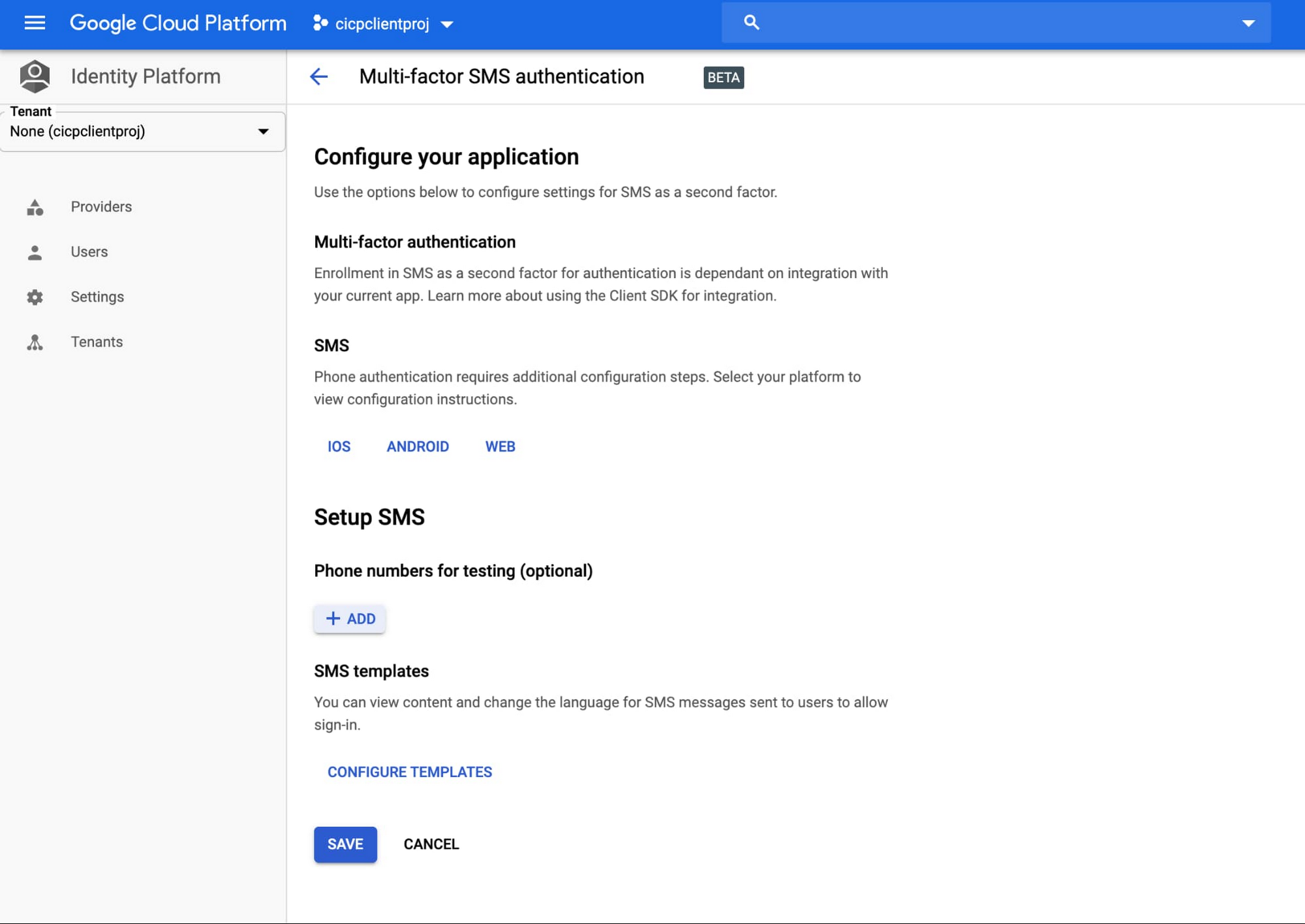
You can now configure Identity Platform to require users who attempt to login to your application to self-enroll in MFA—also known as two-factor authentication (2FA)—and register a device that is capable of receiving SMS messages. When users attempt to sign-in to your app with their first-factor credential (email/password, social login, SAML, OIDC), Identity Platform will require them to enter the six-digit authentication code that it sends via SMS to their registered devices before they can sign-in to your apps and services.
Getting started
You can learn more about this new feature by checking out the documentation page. To get started with Identity Platform, enable it in GCP Marketplace, watch our Cloud Next ‘19 presentation, and read the quickstart.
Create and Protect Admin Accounts

4863
Of your peers have already read this article.
1:30 Minutes
The most insightful time you'll spend today!
Setting up your new cloud infrastructure is scary. Extra scary when you realize that someone (is it gonna be you?) gets to have phenomenal cosmic power over the whole thing.
Yes, I’m talking about the admin account, and today we’ll dig into why they are important, dangerous and different.
When the team at pistach.io got their nuts-as-a-service business growing fruitfully, they knew they needed to think carefully about admin accounts. These people would have tremendous control over their use of Google Cloud, and they could potentially cause very big problems if any were compromised. Definitely resources that require a protective shell.

Early in pistach.io’s development, an employee named Walter Nutt wanted to play a prank by changing his co-worker’s profile photo from an almond to a peanut (pretty devious, since a peanut is actually a legume). He didn’t have access to his friend’s computer, but he did have access to the company’s Cloud Storage bucket. While searching for the profile photo in question, Wally inadvertently deleted the entire contents of the bucket!
As he searched for ways to restore its contents, Wally modified access to two other pistach.io buckets. The company was ground to a halt for a week while teams worked to crack through the permissions issues.
Time to rethink permissions a bit, so this couldn’t spoil their buttery smooth operations in the future.
Following the resource manager guide, the team made a super admin email address that wasn’t tied to a particular individual or Workspace account, and secured it with strong multi-factor authentication. This would be their backup in case an admin account were to be compromised, so they could recover and repair.
The team already uses Google Workspace, so they have an organization set up already. That creation process established initial super administrators, allowing them to create and modify all other resources inside the organization. As they looked toward using Google Cloud, the super administrators could:
- Give the admin role to people, for Cloud
- Act as a point of contact for account recovery
- Modify or delete the organization if needed
Making admin users for the organization allows other people to then flesh out the resources and policies for pistach.io, before they go nuts and give everyone all the permissions. While that would speed things up, it would make it easy for an attacker to crack through the security shell because any account compromise could give ousize access. Yikes!

Instead, the IT leads specified certain people to act as organization admins, and then gave them permissions to:
- Define Identity and Access Management policies
- Structure the Resource Hierarchy
- Delegate control of specific Cloud elements to others on the team
Once those organization admins were set up, they could give management and oversight of Compute, Storage, Networking and other resource types to the relevant leads, making sure each person had just the right amount of permission for the role they needed to perform. The organization admins don’t have permissions themselves to make these resources. They just delegate.
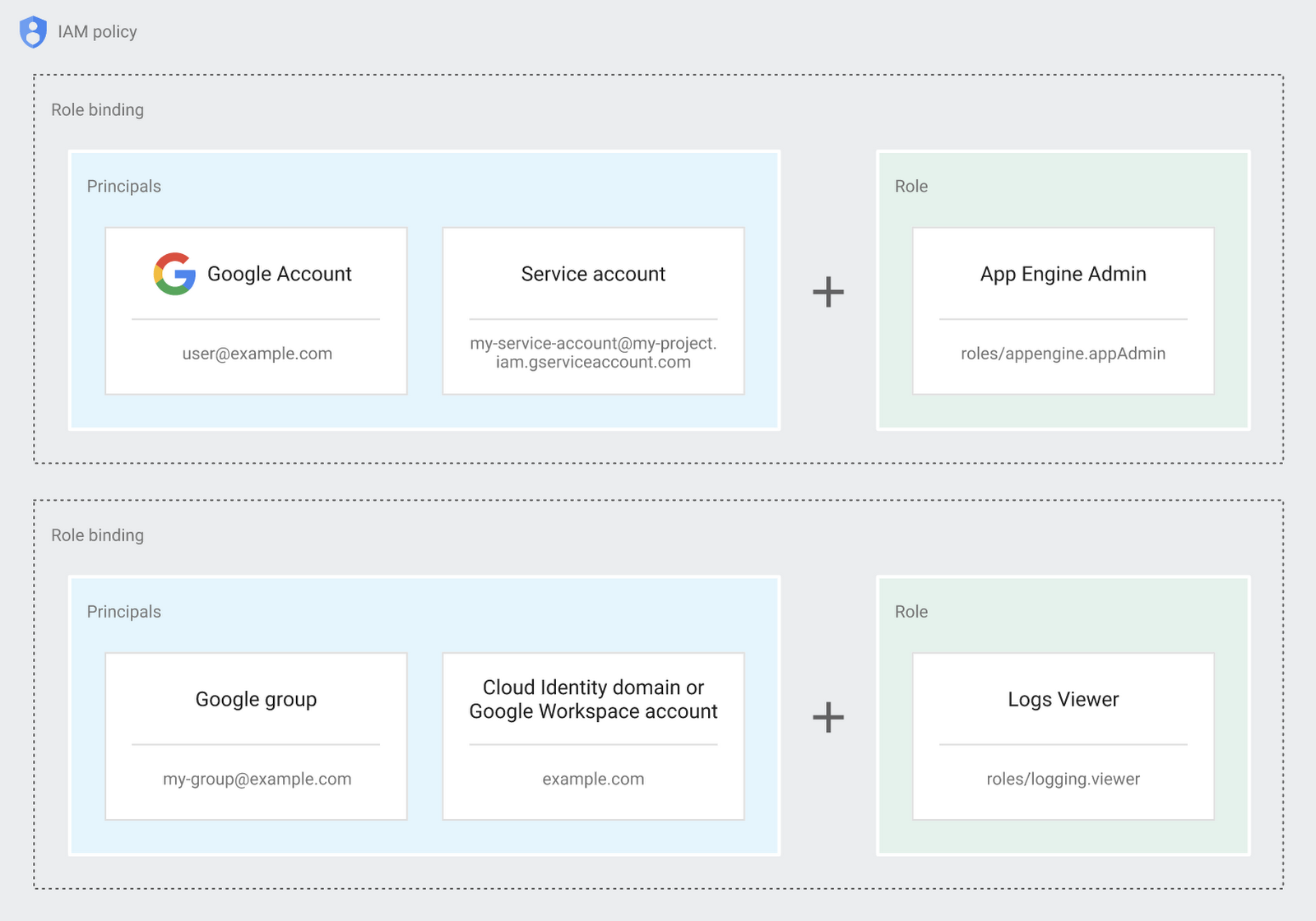
Now each person can accomplish the job they’re responsible for, but doesn’t have overly permissive access. Delegating like this keeps the entire organization safer, and limits the blast radius if someone does manage to break in.
You can go through these steps yourself with this tutorial.
By default the creation of an organization resource for the domain gives everyone the ability to create projects and billing accounts. Once they set up their Organization Admin at pistach.io they decided to remove some of these wide permissions and, in a nutshell, bring everything down to a much finer control. So people could get permissions for a folder or a project, but not the entire organization!
Remember to take care of your admin roles, as they have the power, and responsibility, to cause serious harm if not used safely. Be safe with your Identity and Access Management. And keep your data yours!
Next time we join you we’ll take a crack at creating and provisioning an app to run inside the policies and resource management frameworks created today.
Register to Watch July’s Security Summit

2906
Of your peers have already read this article.
1:30 Minutes
The most insightful time you'll spend today!
Together we can solve for the future of cloud security. Join us to learn how you can stay ahead of the next generation of threats with Google Cloud – whether you need to keep your organization secure in the cloud, on-premises, or in a hybrid environment. Get fresh insights from industry leaders and engage in interactive sessions that can help you solve your most critical security challenges.
Our digital event has ended, but you can still explore our sessions on demand.
The Security Summit is part of our digital Google Cloud Summit series. Check out the other events in the series to explore Google Cloud technology applications in various industries and dive into our latest digital innovations.Original air date:20 July 2021 21:30 Register to watch on demand.
Cloud Security : The First Priority for Enterprises

3337
Of your peers have already read this article.
2:00 Minutes
The most insightful time you'll spend today!
Cloud-based solutions were a technology life raft for organizations during the COVID-19 pandemic as employees took to the virtual office and companies scrambled to adjust to a distributed, remote reality. However, these rapid and substantial changes in the role of cloud technologies on the business came with an increased focus on security.
The accelerated move to the cloud also meant companies needed to rapidly evolve existing security practices to protect everything that matters at the core of business—from their people and their operational and transactional data to customers and their most sensitive personal information. Suddenly, enterprises were keenly aware of where business practices, employee training, and security policies were falling short.
A recent Google-commissioned study by IDG explored the details behind the heightened focus on security solutions since the start of the pandemic while highlighting the role cloud-based security solutions are playing in helping keep customers safe. The survey of 2,000 global IT leaders serves to illustrate that in this new and unfamiliar world, enterprises are more ready than ever to embrace cloud security.LEARN MOREIT Leaders Research ReportWhat are the biggest IT priorities in 2021? Explore insights from a survey of 2,000 Senior IT leaders conducted by IDG, in collaboration with Google Cloud.
Security is an even higher priority post-pandemic
In the wake of the pandemic, many organizations are facing a broader attack surface than ever before as employees moved to temporarily working from remote home offices (and in some cases, encouraged to stay there for the foreseeable future). With fewer inherent security protections on personal internet connections and more work meetings happening via video conferencing, attackers have launched a cyber pandemic of their own designed to take advantage of and exploit new weaknesses.
However, even as businesses amp up security initiatives and preventative measures, the growing wave of threats continue to keep security top of mind for IT leaders. Security risks and concerns remain one of the top pain points impeding innovation according to the IDG study respondents—only surpassed by insufficient IT and developer skills.
Enterprises looking to cloud providers for help with security
As a result, addressing security risks is a leading area where IT leaders turn to cloud providers for support. For these organizations, the ability to control access to data while using cloud services was the most required infrastructure security and compliance features from a cloud provider.
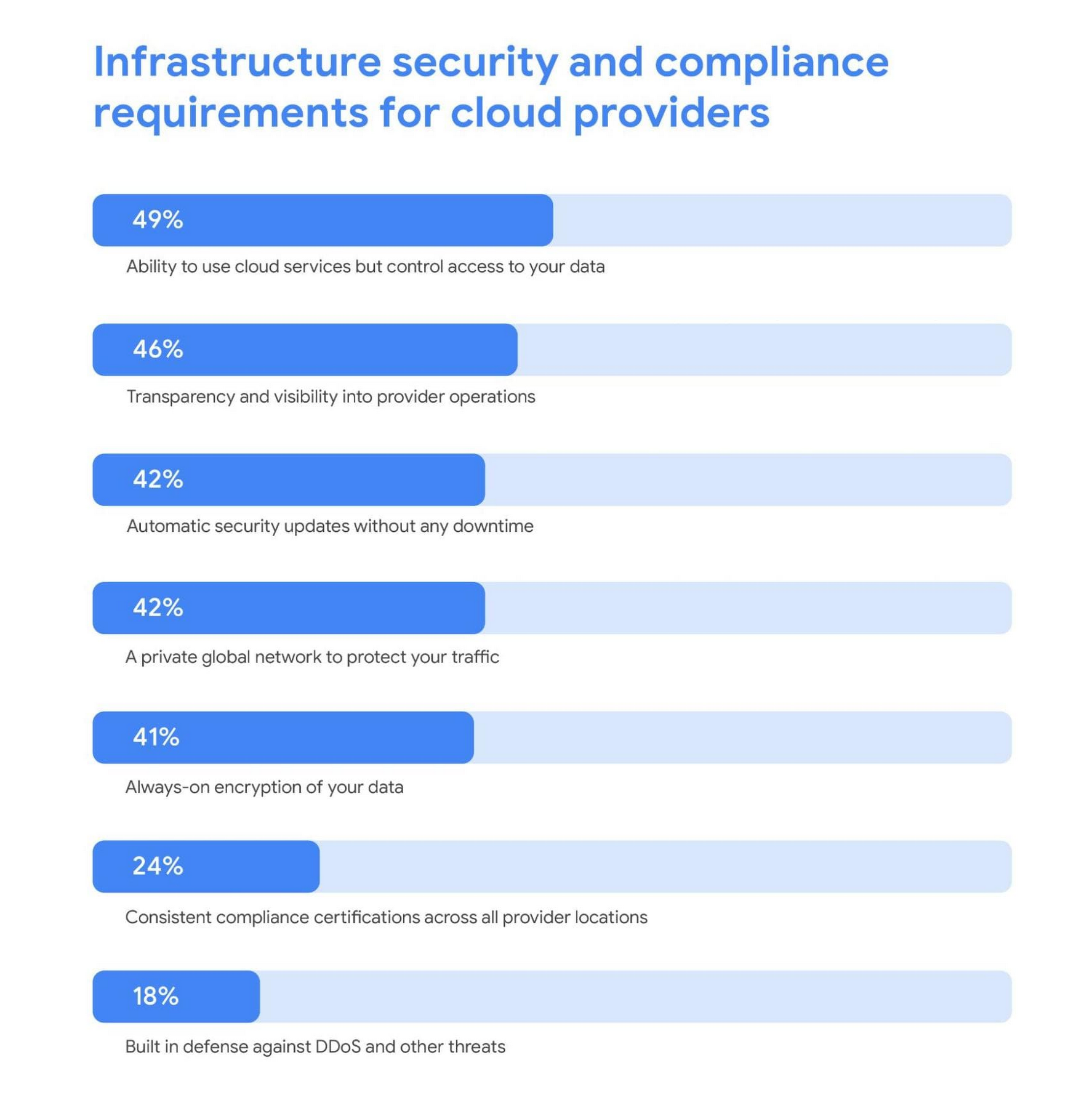
Cloud security is more trusted than ever
A deeper look into the results also revealed a shift in perspective about whether cloud security is really up to the task of protecting enterprises against modern attacks. Despite skepticism in the past, the majority of IT leaders are now comfortable with using cloud-based security solutions.
Confidence in the security of cloud infrastructure is extremely high with 85% of respondents stating they feel secure (or more secure) than on-premises infrastructure—compared to just 15% who believe on-premises is still safer.
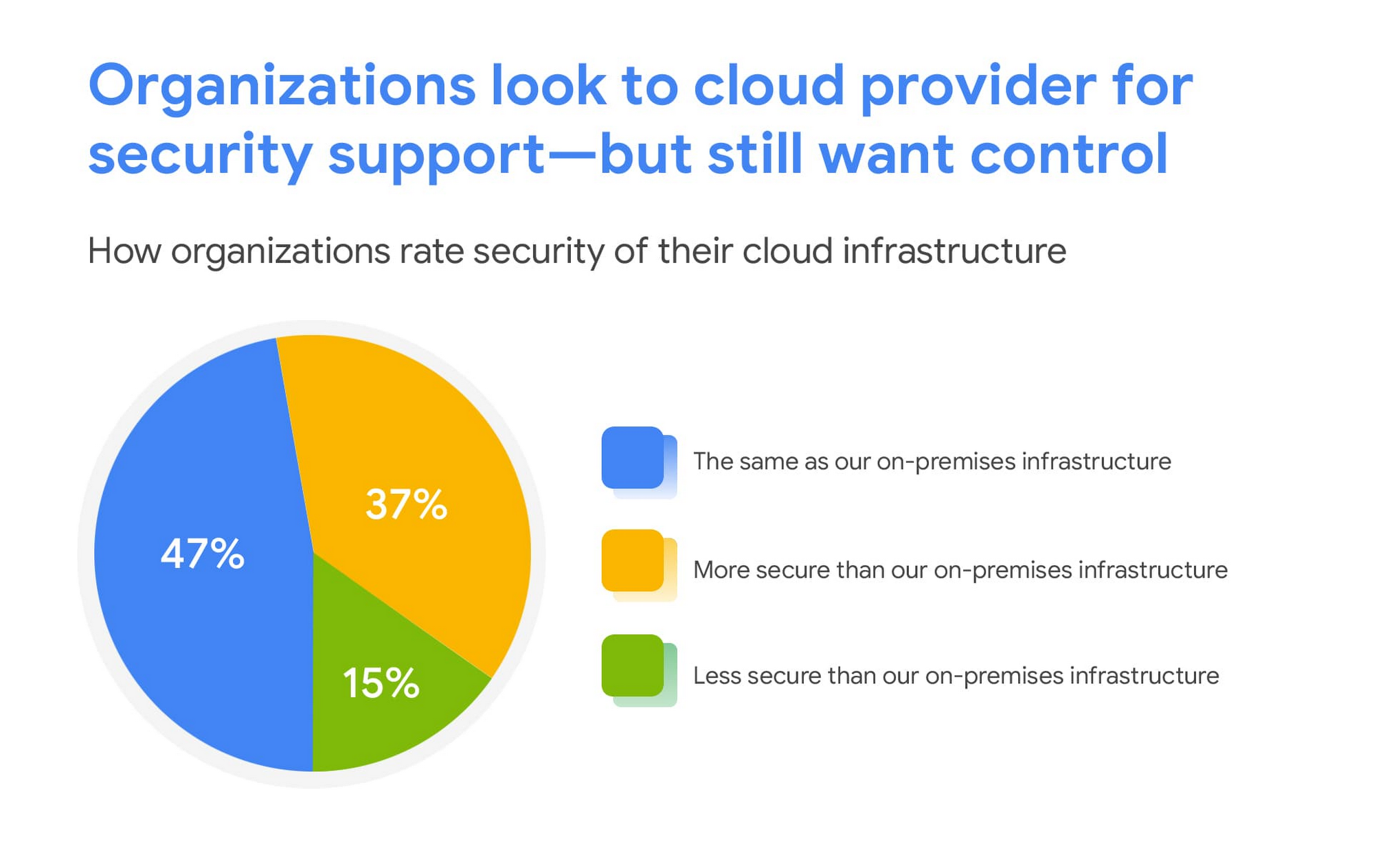
This is a clear indication that there are fewer reservations around the efficacy of cloud-based security solutions, signaling an increase in trust as organizations invest in cloud-based infrastructure and solutions.
We are committed to safe, secure solutions
Google Cloud protects your data, applications, and infrastructure, as well as your customers, from fraudulent activity, spam, and other types of online abuse. We protect you against a growing list of cybersecurity threats using the same infrastructure foundation and security services that we use for our own operations, so you never have to compromise between ease of use and advanced security.
To learn more about the IDG findings and how IT leaders are addressing security concerns post-COVID, download the full report.
Interested in how Google Cloud’s commitment to providing safe, secure solutions helps you address your security needs?
Our networking, data storage, and compute services encrypt data at rest and in transit to ensure the integrity, authenticity, and privacy of your data and your customers’ data. We also offer the ability to encrypt data in use, while it’s being processed in VM and container workloads, and our advanced security tools support compliance and data confidentiality with minimal operational overhead.
How AI-powered ML Models Helps Run Unemployment Claims Verification at Scale

8379
Of your peers have already read this article.
2:00 Minutes
The most insightful time you'll spend today!
With unemployment application submissions reaching record numbers over the past year, state and local agencies in the United States have faced the challenge of processing unprecedented numbers of claims per week. The digital infrastructure most agencies have in place is unable to handle this volume, resulting in constituents waiting longer, and bad actors taking advantage of vulnerable systems. The Department of Labor Inspector General estimates that $63 billion in claims distributed is either an improper payment or fraud.
Validating claims also requires secure data sharing with other agencies for document and identity verification. Government leaders need a way to allow case adjudicators to quickly and confidently release backlogged claims, integrate with existing systems, and segment legitimate claims from potentially fraudulent ones — all within limited government budgets — securely and at scale.
Implementing a fraud detection solution on Google Cloud
States were under pressure to release payments, while also filtering out potentially fraudulent claims. SpringML and Google Cloud developed a framework to give adjudicators a reliable verification process that quickly filters potentially fraudulent claims, while processing the remaining claims so benefits reach citizens in a timely manner. SpringML and Google Cloud, applied AI-powered machine learning models to detect anomalous patterns in large datasets. Using Google Cloud tools, SpringML implemented a solution to streamline workflows, improve efficiencies, automate processes and identify potentially fraudulent claims.
SpringML used a variety of Google Cloud products to deliver a fraud detection solution, including:
- Google Cloud Storage to store and manage data
- BigQuery to store tabular data and BigQuery Machine Learning (BQML) to conduct machine learning on that data
- AutoML solutions to build predictive models and risk scoring
- Visualization tools such as Looker and Data Studio to present data and help government leaders make informed decisions.
Implementing machine learning to detect improper payments allows agencies to classify claims as “fraud” or “not fraud” based on the number of flags, as well as prioritize the most urgent claims. Deploying intelligent virtual agents to handle frequently asked questions meant that live agents could focus their time on more challenging cases.
Even once the pandemic is behind us, there will be bad actors trying to take advantage of overwhelmed or legacy systems. We’ve identified a few best practices for agencies managing enormous case loads and looking to improve improper payment analytics:
- Move your systems to the cloud. Many on-premises legacy systems can’t update their applications and scale to meet the volume of claims. Moving to a cloud environment enables rapid solution deployment and ingestion of large amounts of data without fear of overloading the system. The cloud scales with you–cost-effectively and securely.
- Understand patterns in the data. The answer is always in the data — we used deep analysis to help uncover suspicious patterns in large data sets. We implemented unsupervised machine learning to learn behaviors and create configurable rules that adjust to new information that comes into the system. We can uncover patterns that are likely associated with fraud – ones that a human might have missed.
- Use AI/ML tools to automate your existing systems and teams. These tools enable humans to work smarter and more efficiently. We automate anomaly detection and create dashboards for adjudicators to rapidly process claims. We are enabling the Wisconsin Department of Workforce Development by implementing automatic calculations and processing of recharge amounts, resulting in faster processing times and fewer human errors. Proactive fraud detection and timely calculation of recharge payment allowed DWD to ensure the benefits reached the right individuals.
- Build flexibility into your systems. We discovered that fraud patterns change over time. For instance,flags for fraud during March-May 2020 were vastly different from those we found in June-July 2020. Google Cloud tools make it easy to continually update algorithms to detect patterns and integrate external data sources.
Using Google Cloud tools, we can update digital infrastructure and incorporate machine learning best practices to help organizations efficiently process large volumes of claims and identify high probability fraudulent ones. SpringML provides consulting and implementation services and industry-specific analytics solutions that deliver high-impact business value to accelerate data-driven digital transformation. Learn more about fraud detection and how to improve improper payments analytics by watching our webinar.
More Relevant Stories for Your Company


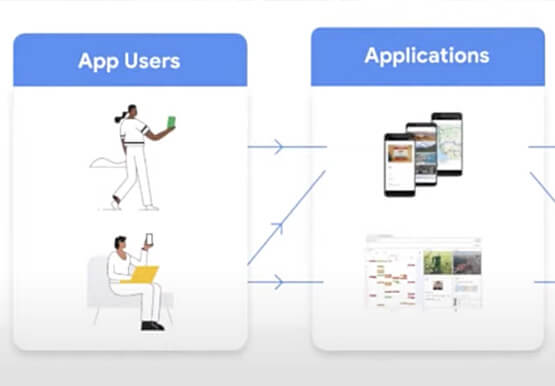

AppSheet: Reduce Shadow IT and Accelerate Development of Enterprise-grade Apps
Google Cloud findings suggest that nearly 40 percent of organizations' investments are consumed by shadow IT and can be a detractor to the adoption of cutting-edge tools and solutions. Also, about 51 percent of the surveyed executives are of the opinion that the inability to adapt to digital transformation trends

Confidential Computing: Google Cloud Security, Project Zero and AMD Come Together to Secure Sensitive Workloads
At Google Cloud, we believe that the protection of our customers’ sensitive data is paramount, and encryption is a powerful mechanism to help achieve this goal. For years, we have supported encryption in transit when our customers ingest their data to bring it to the cloud. We’ve also long supported

How Firewall Insights can Simplify Corporate Firewall Rules
Corporate firewalls typically include a massive number of rules, which accumulate over time as new workloads are added. When rules stack up piecemeal like this, misconfigurations occur that, at best, create headaches for security administrators, and at worst, create vulnerabilities that lead to security breaches. To address this, we have

Google Cloud’s Invisible Security Vision: Key Highlights
Yesterday we held our final Google Cloud Security Talks event of 2021. Our event focused on zero trust and covered everything from Google’s history with BeyondCorp to our strategic thinking when it comes to applying zero trust principles to production environments. We shared product updates across the portfolio and talked about how
