





Enable high quality curated detections in Chronicle SecOps Suite

2841
Of your peers have already read this article.
2:30 Minutes
The most insightful time you'll spend today!
A critical component of any security operations team’s job is to deliver high-fidelity detections of potential threats across the breadth of adversary tactics. But increasingly sophisticated threat actors, an expanding attack surface, and an ever-present cybersecurity talent shortage make this task more challenging than ever.
Google keeps more people safe online than anyone else. Individuals, businesses and governments globally depend on our products that are secure-by-design and secure-by-default. Part of the “magic” behind Google’s security is the sheer scale of threat intelligence we are able to derive from our billions of users, browsers, and devices.
Today, we are putting the power of Google’s intelligence in the hands of security operations teams. We are thrilled to announce the general availability of curated detections as part of our Chronicle SecOps Suite. These detections are built by our Google Cloud Threat Intelligence (GCTI) team, and are actively maintained to reduce manual toil in your team.
Our detections provide security teams with high quality, actionable, out-of-the-box threat detection content curated, built and maintained by Google Cloud Threat Intelligence (GCTI) researchers. Our scale, and depth of intelligence, gained by securing billions of users everyday, gives us a unique vantage point to craft effective and targeted detections. These native detection sets cover a wide variety of threats for cloud and beyond, including Windows-based attacks like ransomware, remote-access tools (RAT), infostealers, data exfiltration, suspicious activity, and weakened configurations.
With this launch, security teams can smoothly leverage Google’s expertise and unique visibility into the threat landscape. This release helps understaffed and overstressed security teams keep up with an ever evolving threat landscape, quickly identify threats, and drive effective investigation and response. With this new release, security teams can:
- Enable high quality curated detections with a single click from within the Chronicle console.
- Operationalize data with high-fidelity threat detections, stitched with context available from authoritative sources (such as IAM and CMDB).
- Accelerate investigation and response by finding anomalistic assets and domains with prevalence visualization for the detections triggered.
- Map detection coverage to the MITRE ATT&CK framework to better understand adversary tactics and techniques and uncover potential gaps in defenses.
Detections are constantly updated and refined by GCTI researchers based on the evolving threat landscape. The first release of curated detections includes two categories that cover a broad range of threats, including:
- Windows-based threats: Coverage for several classes of threats including infostealers, ransomware, RATs, misused software, and crypto activity.
- Cloud attacks and cloud misconfigurations: Secure cloud workloads with additional coverage around exfiltration of data, suspicious behavior, and additional vectors.
Let’s look at an example of how you can put curated detections to work within the Chronicle dashboard, monitor coverage, and map to MITRE ATT&CK®.
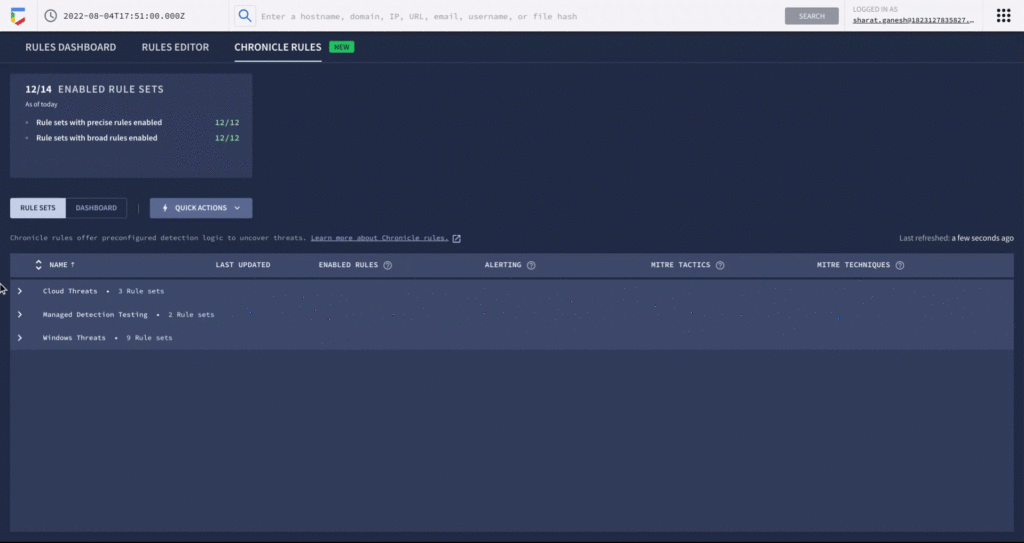
An analyst can learn more details around specific detections and understand how they map to the MITRE ATT&CK framework. There are customized settings to configure deployment and alerting, and specify exceptions via reference lists.
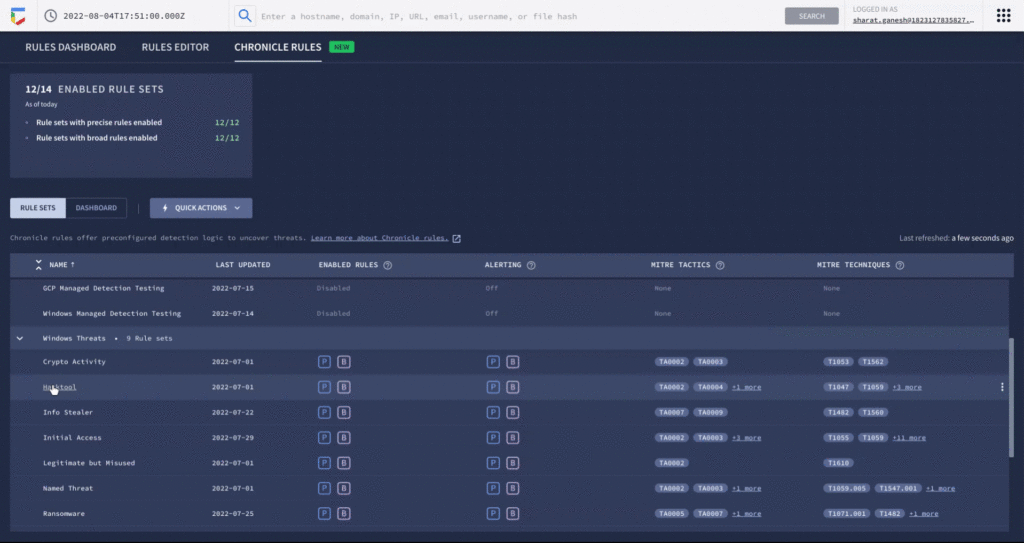
You can see each rule which has generated a detection against your log data in the Chronicle rules dashboard. You can observe detections associated with the rule and pivot to investigative views. For example, here is the detection view from the timeline of an Empire Powershell Stager launch triggered by the Windows RAT rule set. You can also easily pivot to associated information and investigate the asset on which it was triggered.
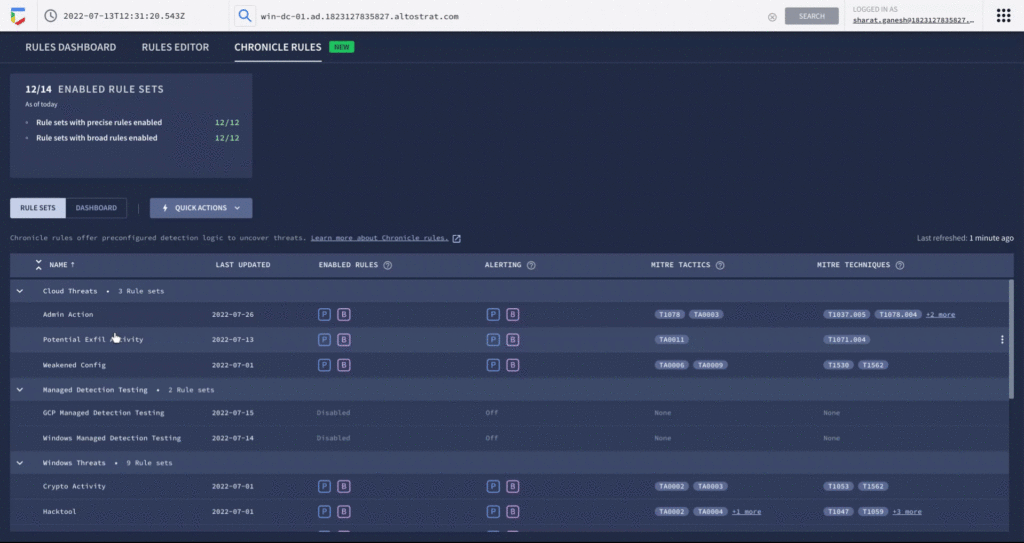
By surfacing impactful, high-efficacy detections, Chronicle can enable analysts to spend time responding to actual threats and reduce alert fatigue. Our customers who used curated detections during our public preview were able to detect malicious activity and take actions to prevent threats earlier in their lifecycle. And there’s more to come. We will be delivering a steady release of new detection categories covering a wide variety of threats, community-driven content, and other out-of-the-box analytics.
Ready to put Google’s intelligence to work in your Security Operations Center? Contact Google Cloud sales or your customer success CSM team. You can also learn more about all these new capabilities in Google Chronicle in our product documentation.
End Security Risks with the Unattended Projects Recommender Feature

6141
Of your peers have already read this article.
3:00 Minutes
The most insightful time you'll spend today!
In fast-moving organizations, it’s not uncommon for cloud resources, including entire projects, to occasionally be forgotten about. Not only such unattended resources can be difficult to identify, but they also tend to create a lot of headaches for product teams down the road, including unnecessary waste and security risks.
To help you prune your idle cloud resources, we’re excited to introduce Unattended Project Recommender. It’s a new feature of Active Assist that provides you with a one-stop shop for discovering, reclaiming, and shutting down unattended projects. With actionable and automatic recommendations, you no longer have to worry about wasting money or mitigating security risks presented by your idle resources. Unattended Project Recommender uses machine learning to identify, with a high degree of confidence, projects that are likely abandoned based on API and networking activity, billing, usage of cloud services, and other signals. This feature is available via the Recommender API today, making it easy for you to integrate with your company’s existing workflow management and communication tools, or export results to a BigQuery table for custom analysis.
Thousands of projects can be unattended in large organizations, presenting major security risks
Your cloud projects can go abandoned or unattended for a number of reasons — ranging from a test environment that’s no longer needed, to project cancellation, to project owner switching jobs, and more. Not only can such projects contribute to your cloud bill (waste) but they may contain security issues such as open firewalls or privileged service account keys that attackers can exploit to get a hold of your cloud resources for cryptocurrency mining or, worse, compromise your company’s sensitive data. These security risks tend to grow over time because the latest best practices and patches are usually not applied to unattended projects.
We experience this issue here at Google, too… In fact, it has been on Google’s internal security team’s radar for some time now, so we joined forces and looked into this problem together, starting with our very own “google.com” organization cloud projects. We quickly found some projects that were unattended, but remediating this issue was easier said than done due to challenges in several areas:
- Detection: With lots of signals available to you via sources like Cloud Monitoring, what are the right ones you should look at (e.g. API, networking, user activity)? How can you tell the difference between an unattended project and a project that has a low level of activity by design (e.g. a “shell” project that holds an auth token)?
- Remediation: Once you have identified a project that seems abandoned, how do you go about ensuring that it’s indeed an unattended project? How do you reduce the risk of deleting something that might be essential to a production workload, causing irreversible data loss? How do you solve this at the scale of your entire organization, beyond a one-time cleanup?
Over the course of 2021 we built and tested a Google-internal prototype first, cleaning up many of our internal unattended projects, and then worked with a number of Google Cloud customers to build and tune this feature based on real-life data (thank you to all of our early adopters for working with us and your generous feedback that helped us shape this feature!) It was not uncommon for us to come across organizations with thousands of unattended projects, and we’re very excited to bring Unattended Project Recommender to all customers, in public preview.
Discovering and acting on unattended project recommendations
Unattended Project Recommender analyzes usage activity across all projects under your organization, including the following data:
- API activity (e.g. service accounts with authentication activity, API calls consumed)
- Networking activity (ingress and egress)
- Billing activity (e.g. services with billable usage)
- User activity (e.g. active project owners)
- Cloud services usage (e.g. number of active VMs, BigQuery jobs, storage requests)
Based on these signals, it can generate recommendations to clean up projects that have low usage activity (where “low usage” is defined using a machine learning model that ranks projects in your organization by level of usage), or recommendations to reclaim projects that have high usage activity but no active project owners. Here’s what an example post-processed summary list of recommendations can look like for the “foobar” organization that has 3 projects:
Project ID: demo-project-307815Recommendation: CLEANUP_PROJECTProject ID: new-projectRecommendation: N/AProject ID: bobs-playground-projectRecommendation: RECLAIM_PROJECT
In addition to the recommendations, you can also examine the underlying project activity insights that the recommendations are based upon. The insights provide additional information that can be useful for integration with your organization’s existing workflows and automation (e.g. send an auto-generated email or chat message to project owners based on the list provided by the owners field). Here’s an example insight payload:
content:activeAppengineInstanceDailyCount: 0activeCloudsqlInstanceDailyCount: 0activeGceInstanceDailyCount: 3activeServiceAccountDailyCount: 1apiClientDailyCount: 18922 // Daily average API calls producedbigqueryInflightJobDailyCount: 0bigqueryInflightQueryDailyCount: 0bigqueryStorageDailyBytes: 0bigqueryTableDailyCount: 0consumedApiDailyCount: 0 // Daily average API calls consumeddatastoreApiDailyCount: 0gcsObjectDailyCount: 11gcsRequestDailyCount: 0gcsStorageDailyBytes: 2663548hasActiveOauthTokens: false // OAuth tokens used in the last 180 dayshasBillingAccount: truenumActiveUserOwners: 1owners: // List of project owners- activeOnProject: falsemember: user:user1@example.com- activeOnProject: truemember: user:user2@example.comserviceWithBillableUsage:– Cloud Storage- Compute EnginevpcEgressDailyBytes: 264456938 // Daily average VPC egress bytesvpcIngressDailyBytes: 392435047 // Daily average VPC ingress bytesusagePercentile: 20 // Level of usage relative to other projects
GCP projects are used in many different ways and for many different purposes. In case you get a recommendation to delete a project that’s being used in a way that’s out of the scope for this feature, you can dismiss the recommendation and it will stop showing up for the given project.
Restoring deleted projects
When you choose to shut down a project using the projects.delete() method, it gets marked for deletion. After a project is marked for deletion, it becomes unusable, all resources within that project are shut down, and a 30-day wait period for the project and all of its data to get fully deleted begins.
In case a useful project is accidentally shut down, you have the option to restore the project within that 30-day wait period. Since restoring allows you to recover most but not necessarily all of your project data and resources, we recommend carefully examining the utilization insights associated with a project and considering any additional utilization signals that may not be captured by the Unattended Project Recommender before taking the cleanup action.
Early customer success stories
A number of enterprise customers are already using Unattended Project Recommender to keep their organizations clean of unattended projects and resources.
Decathlon, a French sporting goods retailer, is excited for the insight Unattended Project Recommender will bring to their environment, and are already deploying it as a part of their latest cloud security initiatives.
“After a thorough test of this feature and the validation of our CISO, we ended up deleting our first 775 projects, and no one complained! A great help to improve our security. The next step for us will be to operationalize it at scale, and implement a company wide policy for unattended resource management.” —Adeline Villette, Cloud Security Officer
For Veolia, one of the world’s largest water, waste and energy management companies, not only does this feature reduce security risks and waste, but also helps drive cultural shift and alignment with its ecological transformation strategy.
“This feature allows us to reduce our costs and security debt on assets that are no longer in use, and is also fully in line with Veolia’s philosophy of limiting its carbon footprint. After having tested Unattended Project Recommender on more than 3,000 projects throughout our organization, we are looking to bring it as proactive alerts to our project owners at scale.”—Thomas Meriadec, Product Manager
Box, a secure cloud content management provider, views it as a foundation for building a repeatable process to remediate unused resources.
“Unattended Project Recommender is a great fit for us. It gives us a unified view of project usage across our entire organization and enables us to address security risks of legacy projects in a systematic and organized manner, ensuring an even safer environment.” —Matt Bowes, Staff Security Engineer
Getting started with the Unattended Project Recommender
To help you get started, we’ve prepared a Cloud Shell tutorial (source code) that you can use to find unattended project recommendations within your own Projects/Folders/Organization. Click this button to clone the tutorial from GitHub and run in your Cloud Shell environment:

As you can see, listing recommendations for your projects only takes a few clicks with the tutorial (special thanks to Lanre Ogunmola, Security & Compliance Specialist, for making this look so easy)! For additional detail on using the gcloud CLI or API to discover unattended project recommendations, please refer to the documentation page.
You can also automatically export all recommendations from your Organization to BigQuery and then investigate the recommendations with DataStudio or Looker, or use Connected Sheets that let you use Google Workspace Sheets to interact with the data stored in BigQuery without having to write SQL queries.
As with any other Recommender, you can choose to opt out of data processing at any time by disabling the appropriate data groups in the Transparency & control tab under Privacy & Security settings.
We hope that you can leverage Unattended Project Recommender to improve your cloud security posture and reduce cost, and can’t wait to hear your feedback and thoughts about this feature! Please feel free to reach us at active-assist-feedback@google.com and we also invite you to sign up for our Active Assist Trusted Tester Group if you would like to get early access to the newest features as they are developed.
Latest News: Secure Digital Infrastructure Services with Apigee Advanced API Security for Google Cloud

4481
Of your peers have already read this article.
3:30 Minutes
The most insightful time you'll spend today!
Organizations in every region and industry are developing APIs to enable easier and more standardized delivery of services and data for digital experiences. This increasing shift to digital experiences has grown API usage and traffic volumes. However, as malicious API attacks also have grown, API security has become an important battleground over business risk.
To help customers more easily address their growing API security needs, Google Cloud is announcing today the Preview of Advanced API Security, a comprehensive set of API security capabilities built on Apigee, our API management platform. Advanced API Security enables organizations to more easily detect security threats. Here’s a closer look at the two key functionality included in this launch: identifying API misconfigurations and detecting bots.
Identify API misconfigurations
Misconfigured APIs are one of the leading reasons for API security incidents. In 2017, Gartner® predicted that by 2022 API abuses will be the most frequent attack vector resulting in data breaches for enterprise web applications. Today, our customers tell us application API security is one of their top concerns, which is supported by an independent study from 2021 by Fugue and Sonatype. The report found that misconfigurations are the number one cause of data breaches, and that “too many cloud APIs and interfaces to adequately govern” are frequently the main point of attack in cyberattacks.
While identifying and resolving API misconfigurations is a top priority for many organizations, the configuration management process can be time consuming and require considerable resources.
Advanced API Security can make it easier for API teams to identify API proxies that do not conform to security standards. To help identify APIs that are misconfigured or experiencing abuse, Advanced API Security regularly assesses managed APIs and provides API teams with a recommended action when configuration issues are detected.
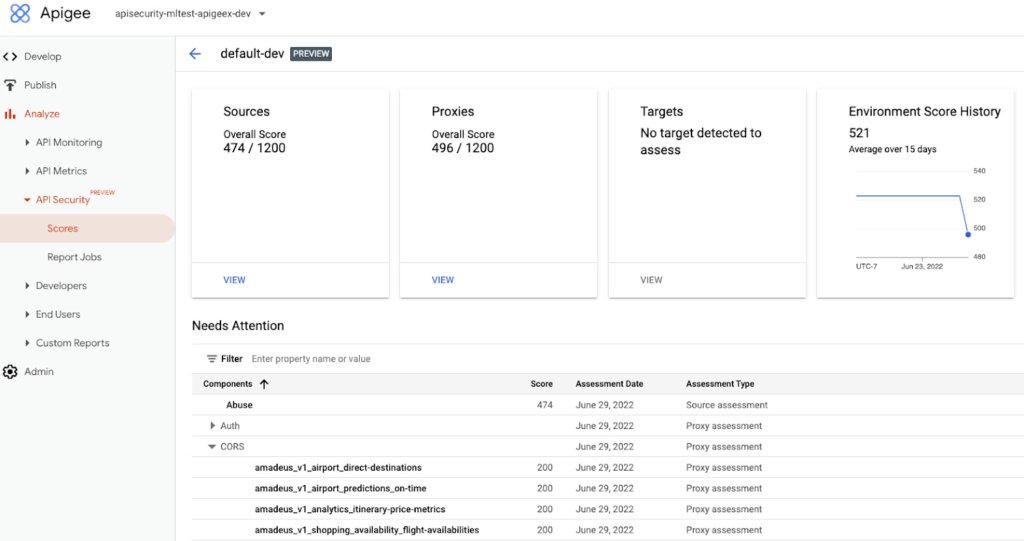
Advanced API Security identifies misconfigured API proxies, including the missing CORS policy.
APIs form an integral part of the digital connective tissue that make modern medicine run smoothly for patients and healthcare staff. One common healthcare API use case occurs when a healthcare organization inputs a patient’s medical coverage information into a system that works with insurance companies. Almost instantly, that system determines the patient’s coverage for a specific medication or procedure, a process which is enabled by APIs. Because of the often-sensitive personal healthcare data being transmitted, it is important that the required authentication and authorization policies are implemented so that only authorized users, such as an insurance company, can access the API.
Advanced API Security can detect if those required policies have not been applied, an alert which can help reduce the surface area of API security risks. By leveraging Advanced API Security, API teams at healthcare organizations can more easily detect misconfiguration issues and can reduce security risks to sensitive information.
Detect Bots
Because of the increasing volume of API traffic, there is also an increase in cybercrime in the form of API bot attacks—the automated software programs deployed over the Internet for malicious purposes like identity theft.
Advanced API Security uses pre-configured rules to help provide API teams an easier way to identify malicious bots within API traffic. Each rule represents a different type of unusual traffic from a single IP address. If an API traffic pattern meets any of the rules, Advanced API Security reports it as a bot.
Additionally, Advanced API Security can speed up the process of identifying data breaches by identifying bots that successfully resulted in the HTTP 200 OK success status response code.
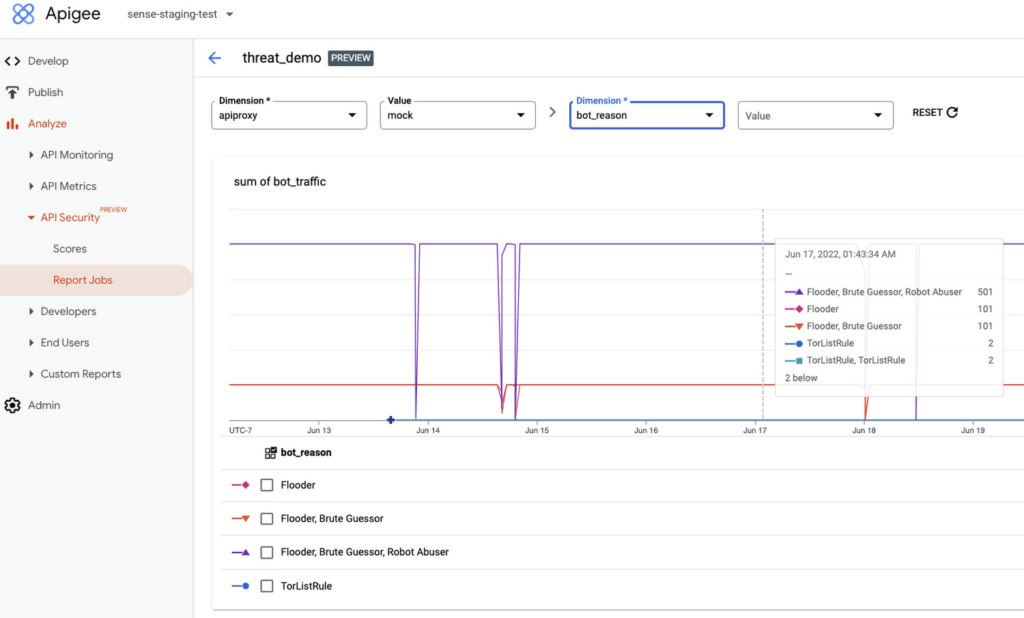
Financial services APIs are frequently the target of malicious bot attacks due to the high-value data that is processed. A bank that has adopted open banking standards by making APIs accessible to customers and partners can use Advanced API Security to make it easier to analyze traffic patterns and identify the sources of malicious traffic. You may experience this when your bank allows you to access your data with a third-party application. While a malicious hacker could try to use a bot to access this information, Advanced API Security can help the bank’s API team to identify and stop malicious bot activity in API traffic.
API Security at Equinix
Equinix powers the world’s digital leaders, bringing together and interconnecting infrastructure to fast-track digital advantage. Operating a global network of more than 240 data centers with a 99.999% or greater uptime, Equinix simplifies global interconnections for organizations, saving customers time and effort with the Apigee API management platform.
“A key enabler of our success is Google’s Apigee, delivering digital infrastructure services securely and quickly to our customers and partners,” said Yun Freund, senior vice president of Platform at Equinix. “Security is a key pillar to our API-first strategy and Apigee has been instrumental in enabling our customers to securely bridge the connections they need for their businesses to easily identify potential security risks and mitigate threats in a timely fashion. As our API traffic has grown, so has the amount of time and effort required to secure our APIs. Having a bundled solution in one managed platform gives us a differentiated high-performing solution.”
Getting started
To learn more, check out the documentation or contact us to request access to get started with Advanced API Security.
To learn more about API security best practices, please register to attend our Cloud OnAir webcast on Thursday, July 28th, 2:00 pm PT.
Announcing New, Faster Search and Investigative Experience in Chronicle Security Operations

2945
Of your peers have already read this article.
1:30 Minutes
The most insightful time you'll spend today!
In cybersecurity, speed matters. Whether a security analyst is trying to understand the details of an alert that was triggered by an indicator of compromise (IoC), or find additional context for a suspicious asset, speed is often the critical factor that will help thwart a cyberattack before threat actors are able to inflict damage.
With speed in mind, we are pleased to announce the general availability of our new investigative experience in Chronicle Security Operations. We are continuing to deliver on our mission to bring the power of Google to security operations and are raising the bar for search and the investigative experience in the SOC.
With this release, SecOps teams will be able to harness Chronicle’s lightning-fast search across any form of structured data. Additionally, the new investigation experience can provide greater flexibility to pivot and drill-down when conducting complex, open-ended threat investigations and surface insights quickly and easily.
Our Unified Data Model (UDM) schema, with its built-in flexibility that can effectively handle a wide variety of security related events, is at the heart of Chronicle’s powerful search. We have scaled this capability by optimizing query responses across structured data. Additionally, analysts can investigate large datasets and build complex queries with a new and intuitive user experience. With user personalization enhancements, analysts can quickly access saved searches and top queries in their environment to improve routine SOC workflows.
With the new investigative experience, security teams can:
- Drive faster threat understanding with an interactive event results timeline that helps eliminate unnecessary long wait times by streaming results as they are processed to quickly begin threat analysis
- Use enhanced context and operationalize relevant data for threat analysis with one-click filter-to-query conversion
- Personalize the analyst experience with saved search and search history functions for quicker analyst knowledge recall
- Power threat investigation and hunting with a new, improved, highly performant UDM search
Let’s look at an example of how to use the reimagined investigative experience and our new broader, faster search.
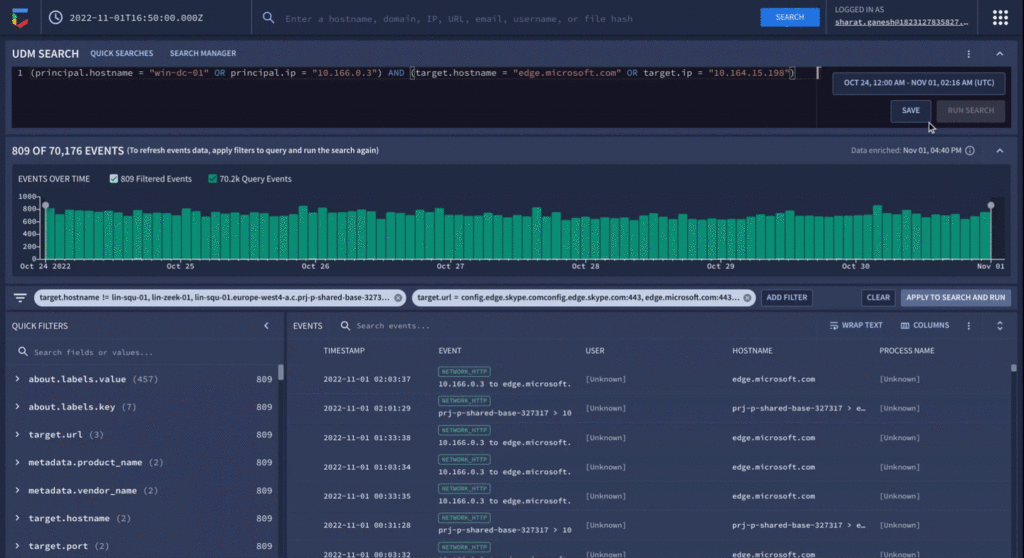
In our use-case, a security analyst is investigating a curated detection alert for potentially suspicious behavior on a Windows environment. Additionally, there is a low prevalence domain from host “win-dc-01” with ip “10.166.0.3”. To investigate further, let’s open the UDM Search page and construct a query containing the host and IP information along with destination information of the domain the host was contacting (edge.microsoft.com). Over 70,000 events stream into the investigation interface providing the analyst an immediate picture of data surrounding their alert.
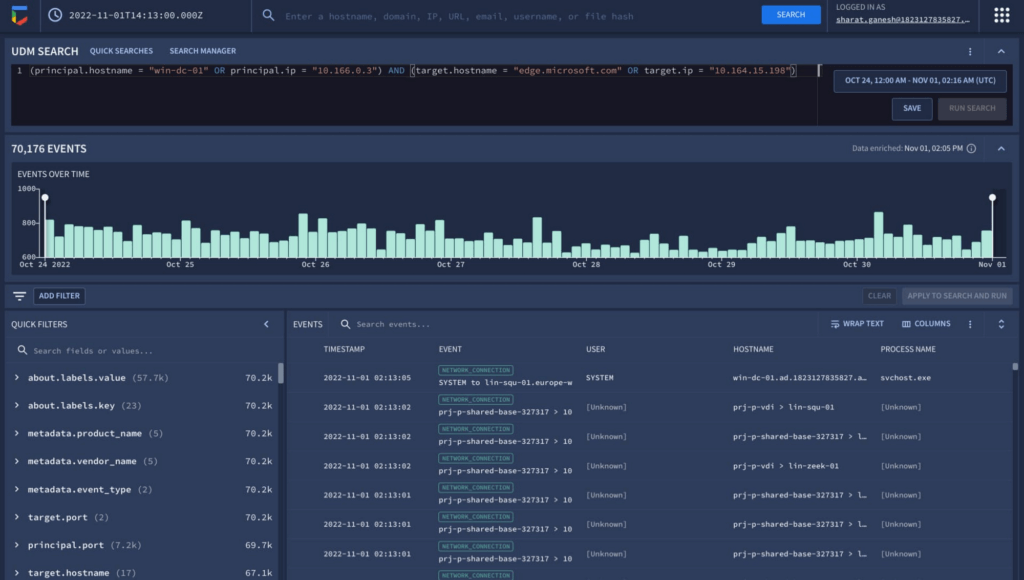
The new interactive events timeline can provide a clear picture of event trends over time with key statistical data which can be easily filtered. Additionally, with the new quick filters, the analyst is able to easily filter out hosts that are known-good to get pertinent information about the domain.
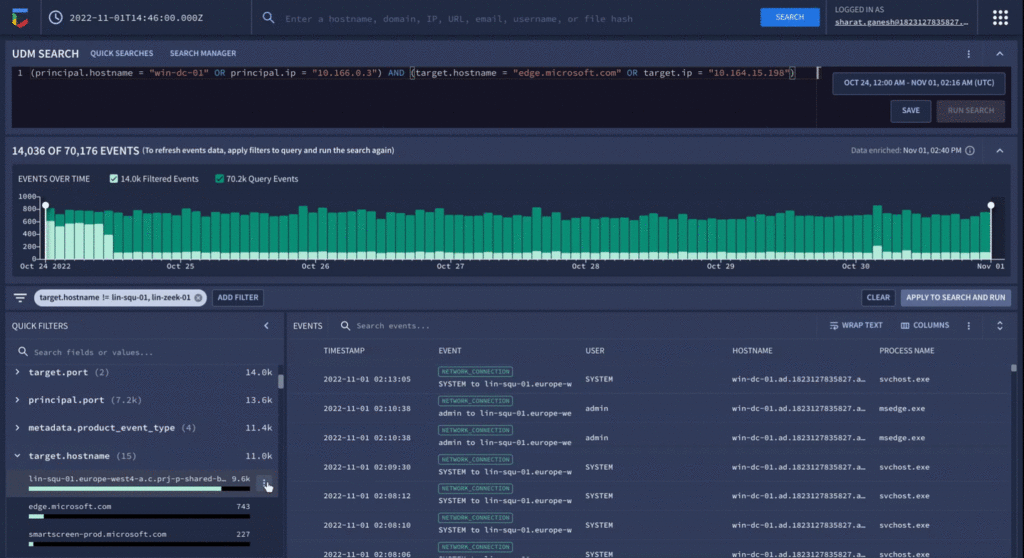
Analyzing value aggregations present in the filter panel, automatically generated by Chronicle, enables analysts to domain values of highest interest, and quickly determine that approximately 800 events were present in the last week that related to edge.microsoft.com URL. Since Microsoft Edge is disallowed in the organization, there should not be any outbound traffic to this type of destination.
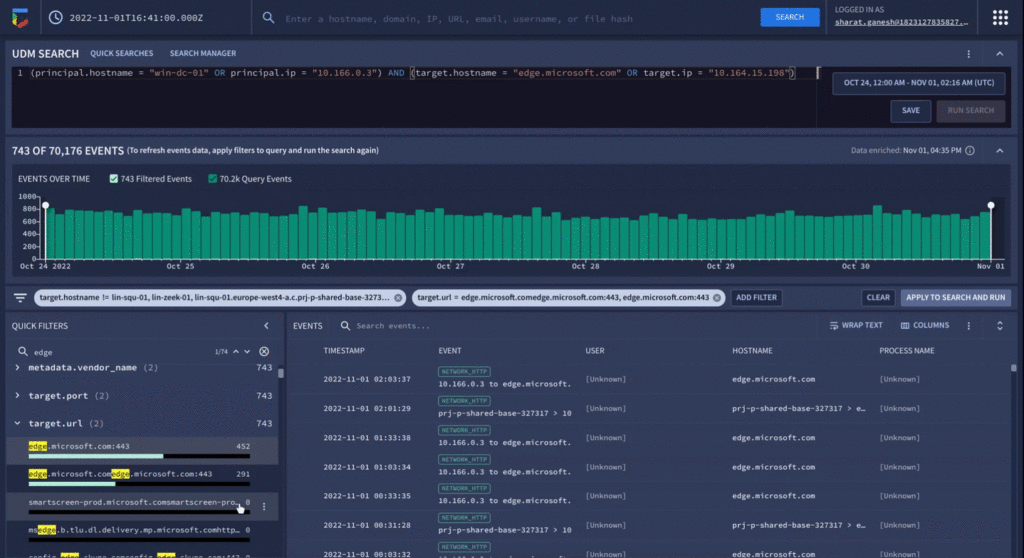
As a final step before orchestrating a response in Chronicle SOAR’s case management, the analyst can save their search to quickly recall the steps they took in the future for related investigations.
We have already seen our customers use these new capabilities in preview to build new use cases, accelerate existing threat hunting workflows, and drive faster threat response. We will continue our mission to bring Google speed, scale, and intelligence to the investigative experience, expediting “time to aha” for security analysts, and driving better, faster responses.
Ready to put Chronicle to work in your Security Operations Center? Contact Google Cloud sales or your customer success CSM team. You can also learn more about all these new capabilities in Google Chronicle in our product documentation.

5273
Of your peers have already downloaded this article
10:30 Minutes
The most insightful time you'll spend today!
The age of unthinking fears about cloud security is over. Not only is cloud adoption rising steadily across geographies, industries and job functions, but confidence in cloud security is rising as well — to the point where increased security is a major reason enterprises opt for cloud solutions.
Gone are the days when organizations accessed applications and infrastructure over the internet only because it was the least expensive way to scale compute, storage and networking resources as business needs changed. The cloud today is a strategic necessity, with increased agility, integration and speed (as well as security) being the prime drivers of its increased adoption.
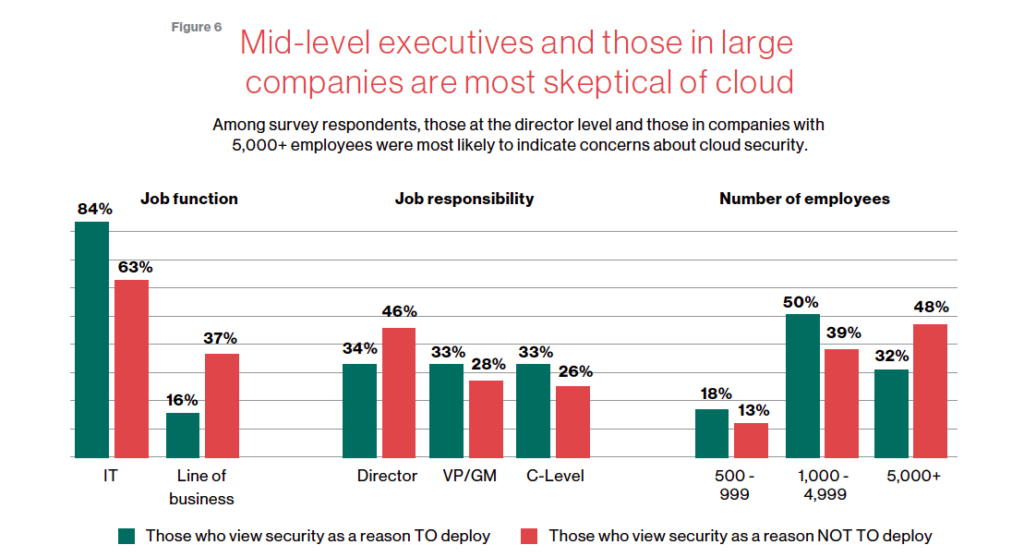
This MIT SMR survey of security professionals studies trends in security, which workloads are seeing the highest cloud utilization, the steady growth of comfort with cloud security–and interestingly paints a picture of the executives who are holding out with regards to cloud security.
Download the report now!
Chrome OS’s Hybrid Work Model Powers Google’s Return to Work Strategy

7505
Of your peers have already read this article.
1:30 Minutes
The most insightful time you'll spend today!
The pandemic continues to deeply affect our lives around the globe. In some places, new cases are surging and returning to work is the last thing on people’s minds. In other areas, conditions are improving and companies are starting to think about transitioning their workforce back to the office.
Exactly when and how to do this remains complex and varies by country, industry, and company. What’s certain is that hybrid work will become an essential part of the business world moving forward. And finding solutions that bridge the gap between “in-person” and “somewhere else” are crucial.
At Google, we’ve been focused on what the hybrid transformation means for us. To prepare for hybrid work, using modern solutions is a key enabler.
Chrome OS: Supporting Google’s return to office strategy
At Google, we’ll move to a hybrid work week where most Googlers spend approximately three days in the office and two days wherever they work best. It’s no surprise that as the modern, secure, cloud-first platform, Chrome OS is playing a key role in our transition to a hybrid work model. Because Chrome OS devices can easily be shared, more flexible working models and spaces are now possible. And with user profiles stored in the cloud and collaboration solutions like Google Workspace, employees can log in to any Chrome OS device, access what they need and pick up where they left off.
Here are just a few ways we are using Chrome OS and its tools to support the return to the office:
- In select office locations, Googlers can reserve desks through an internal booking tool set up with a high-performance Chromebox, keyboard, mouse, and monitor. Employees can log in to the Chromebox which syncs their cloud profile, and start working with the same environment they have on all their Chrome OS devices.
- We’re announcing new docking stations that are designed for Chrome OS devices and allow employees to bring in their Chromebook from home, connect to the dock with one USB-C cable, and use a monitor, keyboard, and mouse for a full desktop experience.
- Every Chrome OS device enables a zero-trust security working model with BeyondCorp Enterprise providing our workforce with simple and secure access to applications while providing additional security controls for IT.
- We’ve deployed the new Chrome OS Readiness Tool to our extended workforce to identify employees that are able to switch to Chrome OS. This allows us to expand the latest security, deployment, and manageability benefits to more of the workforce.
Additional ways Chrome OS is helping organizations with return to office
We aren’t the only ones supporting our return to office and hybrid work strategy with Chrome OS. We’ve heard more ways our customers are using Chrome OS to make the transition as smooth as possible. These include:
- Streamlining deployment and management of Chrome OS devices using zero-touch enrollment which allows devices to automatically enroll into a corporate domain without IT configuration.
Grab & Go Chromebooks being used for frontline and hybrid information workers, allowing employees to grab a Chromebook from a cart and get to work right away. - Parallels Desktop for Chrome OS being deployed to allow employees to access Windows or legacy apps locally on their Chrome OS devices.
- Existing Windows and Mac devices being modernized and repurposed to run a Chrome OS experience using CloudReady. (Google is currently offering a CloudReady promotion. Learn more here.)
While the Chrome OS team has been working towards making remote working as seamless as possible for IT, we’ve also made advancements in supporting traditional technology that’s required in the office.
- In October, we announced Chrome Enterprise Recommended: a collection of identity, printing, productivity, communications, and virtualization solutions that are verified to run great on Chrome OS.
- With the increased usage of video conferencing on Chrome OS devices, we’ve made improvements to Google Meet and Zoom performance including camera and video improvements to reduce any unnecessary processing and features that intelligently adapt to your device, your network, and what you are working on.
- For improved access to Windows and legacy apps, VMware Horizon introduced multi-monitor support and USB redirection and Citrix Workspace released a tech preview with webcam enhancements and Microsoft Teams optimizations.
- We integrated with the Okta Workflows platform, so IT administrators can include Chrome OS in it’s access logic and deploy quickly without code. Recently, we’ve added the ability to require users to reauthenticate on their Chrome OS device once Okta has detected that the user has changed their password. Try out this new capability by signing up for our Trusted Tester program.
- We’ve increased our support for direct IP printing with additional printer models since the beginning of 2020. In addition, we have made improvements to management features, including support for multiple print servers and launched policy APIs to provide a better IT admin experience.
Join us for a digital event with Modern Computing Alliance and its newest member HP
Last year we announced the launch of the Modern Computing Alliance—a collaboration of industry leaders including Box, Chrome Enterprise, Citrix, Dell, Google Workspace, Imprivata, Intel, Okta, RingCentral, Slack, VMware, and Zoom aim to create the pioneering solutions that businesses need. We are thrilled to introduce HP, who brings their innovative hardware and enterprise hardware expertise to the Modern Computing Alliance and has been working closely with the alliance to ensure true silicon-to-cloud innovation.
As an alliance, we’ve been deeply engaged in the hybrid work shift. We invite you to join us for a digital event where we discuss questions about returning to work. Like how product design can encourage participation and collaboration regardless of where employees are, important security issues to keep in mind, and what factors businesses should consider to support a safe, working environment.
Home. Heading back. Hybrid.
Hear from the experts on hybrid work and return to office.
Date: May 20th, 2021
Register here.
If you are ready to try Chrome OS today, it’s easy to get started. You can contact us to get connected to a partner, sign up for a free 30-day trial of Chrome Enterprise Upgrade to start managing Chrome OS devices, or deploy the Chrome OS Readiness Tool to identify employees that are ready to switch to Chrome OS.POSTED IN:
More Relevant Stories for Your Company

The Tech Tightrope: How the U.S. State & Local Agencies Strive to Balance between Innovation and Budget
State and local government (SLG) agencies are reeling from a combination of unbudgeted COVID-related expenses and reduced tax revenue caused by unemployment and business closures. Any way you look at it, the situation is challenging. To understand how SLG agencies are coping, Google Cloud collaborated with MeriTalk to survey 200




How does Google Pick its Data Center ?
Google is well known for its sustainable tech and hardware initiatives. Did you know alongside its environmental friendly designs of its data centers, it takes into account various factors such as redundant power supplies, data replication, network connectivity, etc. Watch the video to learn more.

Protect Users in Apps with Multi-Factor Authentication
These days, using a password alone to secure user accounts containing sensitive, identifiable, or private information just isn’t sufficient. Passwords are often subject to reuse and can easily be phished and stolen. With this in mind, we recently teamed up with researchers from New York University and the University of



What Makes Google Cloud the Go-to Platform to Build Next-gen Security Services
Join the discussion by the panel of security experts and IT leaders from renowned organizations to examine the role of Google Cloud for security companies in building next-generation security services. Watch the video from the security session of Google Cloud Next '21 to deep dive into Google Cloud's security and
